Transparent software: Making complexity understandable

Software is broken. Not because it is not simple. Because it is not transparent. Let me elaborate.

“I don’t think that’s feasible”

That are not the first words we wanted to hear from our client after our presentation.

“I have seen several engineers working over a year just for the concept”

This is complex.

The world tells you that all should be simple. Make it simple. Keep it simple. It is just that simple.

Only when it is not.

Look around you. Nature is beautiful. And complex. The human is beautiful. And complex. Many systems and contexts are complex.

Look inside you. Your thoughts and emotions. Your relationships.

Look at your computer, your phone, your work. Many problems we have and solve everyday are not simple.

Sometimes we think “Oh, why can’t this be simple”. “The software should be simpler”. But KISS won’t save you. Software is broken. But not because it is not simple. We do not want simplicity. We want clarity. We want to understand. Let me elaborate.

I create software for engineers. Engineers are the people who take problems who are fine in theory and work perfectly in a controlled environment like a lab and translate them to the real world. But the real world isn’t simple or controlled. It is messy. The smallest things can blow up your house of cards of theory. These people need software to understand what happens. Through their education and their experience they know what should happen. They are the experts. But the systems and problems they work with are so complex and mostly invisible to the human eye and incomprehensible to the human brain. But today’s engineering software looks like this:

cases-colorful-colourful-2019
Options all over the place

Make no mistake. This isn’t constrained to engineering problems. Take a look around you. Nowadays there are a million sensors collecting masses of data. Your phone. Your thermostat. Your shoes. Even your tooth brush. Sensors are everywhere. We are collecting more data than ever before. This data gives us a glimpse of the complex underlying system. So we think. But why do we collect them in the first place?
Because we can. We are seeking the holy grail of wisdom. More data creates more information. More information creates more knowledge. And finally we hope that more knowledge gets us a spark of wisdom. But we are just starting out.

The course of technology

The normal way of technology goes something like this: First we are constrained. We try to push the borders. When the field is wide and open we do everything that’s possible. After a while we become more mature and use it to serve a purpose. Software is like that. Collecting data is like that. It is like an addiction. Think about it: Do you influence the data or does the data influence you? Who is in control?

But there’s hope. In order to reason about and come to our decisions we need transparent software. The dictionary defines transparent as:

transparent (adjective)

  • (of a material or article) allowing light to pass through so that objects behind can be distinctly seen
  • easy to perceive or detect
  • having thoughts, feelings, or motives that are easily perceived
  • (of an organization or its activities) open to public scrutiny
  • Physics: transmitting heat or other electromagnetic rays without distortion.
  • Computing: (of a process or interface) functioning without the user being aware of its presence.

Transparent is a tricky word. It seems to be a paradox: on the one hand it means invisible and on the other hand it means easily perceived. Both uses of the word apply to what software needs to be.

No more magic

Software has to help us understand systems and concepts. What happens and what happened. It has to make it clear, comprehensible and detectable. We need to see how the software comes to its conclusions. We need the option to overrule it. The last decision is ours. Software can help us forming a decision but it should never decide on our behalf.
Also: It gets out of our way. We don’t need any more rituals to please the software to do our bidding. Software is a tool. To be a great tool it needs to fit the problem and the person. No one wants to cut with a knife that is all blade. It should adapt to our capabilities. It should fit like a glove. It amplifies not cripples our capabilities. It is made for us. It is transparent.

That’s the goal. But how do we get there?

Maximalistic design or design with ‘Betthupferl’

Minimalistic design is a misnomer. Reducing a complex issue needs more design not less. Designing is about thinking, taking care. If we want to make complex systems understandable we need to think hard. What is the essence of the problem? What information does the expert need to evaluate a situation? All of this expertise is hidden in the heads and the daily routine of the people we design for. So we need to ask, watch and listen to them. Not direct and with a free mind. Throw your preconceptions overboard. Remove your ego. First just observe. Collect. Challenge your assumptions. When you have a good amount of information (with experience you will know when you can start but do not believe you will ever have enough), distill. Distill the essence. And then add. That little extra. The details. The cues which foster understanding.
When you stay the night in a hotel and in your white and clean bed you find a little sweet on your pillow. You are delighted. In German we call this ‘Betthupferl’.
This little extra you add is just this. The user feels cared for. He sees that someone has gone the extra mile, has thought deeply about him. The essence is not enough. You need some details. To weave the parts to together to form a whole. This can be extra information when the user needs it. This can be a shortcut when the context is right. Or an animation which guides the eye. Or or or…
Important is that it does not confuse or blur the essence. It should support. Silently, almost invisible.

Streaming images from your application to the web with GStreamer and Icecast – Part 1

Streaming existing media files such as videos to the web is a common task solved by streaming servers. But maybe you would like to encode and stream a sequence of images originating from inside your application on the fly as video to the web. This two part article series will show how to use the GStreamer media framework and the Icecast streaming server to achieve this goal.

GStreamer

GStreamer is an open source framework for setting up multimedia pipelines. The idea of such a pipeline is that it is constructed from elements, each performing a processing step on the multimedia data that flows through them. Each element can be connected to other elements (source and a sink elements), forming a directed, acyclic graph structure. GStreamer pipelines are comparable to Unix pipelines for text processing. In the simplest case a pipeline is a linear sequence of elements, each element receiving data as input from its predecessor element and sending the processed output data to its successor element. Here’s a GStreamer pipeline that encodes data from a video test source with the VP8 video codec, wraps (“multiplexes”) it into the WebM container format and writes it to a file:

videotestsrc ! vp8enc ! webmmux ! filesink location=test.webm

In contrast to Unix pipelines the notation for GStreamer pipelines uses an exclamation mark instead of a pipe symbol. An element can be configured with attributes denoted as key=value pairs. In this case the filesink element has an attribute specifying the name of the file into which the data should be written. This pipeline can be directly executed with a command called gst-launch-1.0 that is usually part of a GStreamer installation:

gst-launch-1.0 videotestsrc ! vp8enc ! webmmux ! filesink location=test.webm
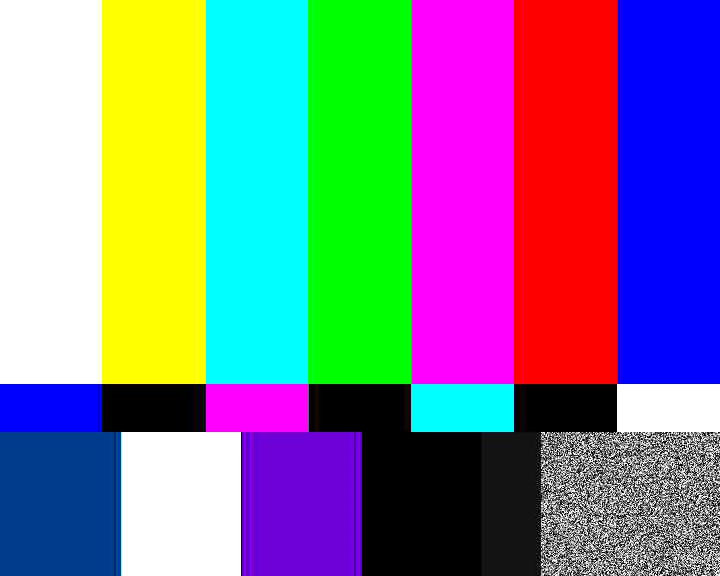
videotestsrc
videotestsrc

If we wanted to use a different codec and container format, for example Theora/Ogg, we would simply have to replace the two elements in the middle:

gst-launch-1.0 videotestsrc ! theoraenc ! oggmux ! filesink location=test.ogv

Icecast

If we want to stream this video to the Web instead of writing it into a file we can send it to an Icecast server. This can be done with the shout2send element:

gst-launch-1.0 videotestsrc ! vp8enc ! webmmux ! shout2send ip=127.0.0.1 port=8000 password=hackme mount=/test.webm

This example assumes that an Icecast server is running on the local machine (127.0.0.1) on port 8000. On a Linux distribution this is usually just a matter of installing the icecast package and starting the service, for example via systemd:

systemctl start icecast

Note that WebM streaming requires at least Icecast version 2.4, while Ogg Theora streaming is supported since version 2.2. The icecast server can be configured in a config file, usually located under /etc/icecast.xml or /etc/icecast2/icecast.xml. Here we can set the port number or the password. We can check if our Icecast installation is up and running by browsing to its web interface: http://127.0.0.1:8000/ Let’s go back to our pipeline:

gst-launch-1.0 videotestsrc ! vp8enc ! webmmux ! shout2send ip=127.0.0.1 port=8000 password=hackme mount=/test.webm

The mount attribute in the pipeline above specifies the path in the URL under which the stream will be available. In our case the stream will be available under http://127.0.0.1:8000/test.webm You can open this URL in a media player such as VLC or MPlayer, or you can open it in a WebM cabable browser such as Chrome or Firefox, either directly from the URL bar or from an HTML page with a video tag:

<video src="http://127.0.0.1:8000/test.webm"></video>

If we go to the admin area of the Icecast web interface we can see a list of streaming clients connected to our mount point. We can even kick unwanted clients from the stream.

Conclusion

This part showed how to use GStreamer and Icecast to stream video from a test source to the web. In the next part we will replace the videotestsrc element with GStreamer’s programmable appsrc element, in order to feed the pipeline with raw image data from our application.

Configuration of TANGO devices

In the previous part of our TANGO tutorial trail we put our TANGO device into production by registering it with a TANGO database. The TANGO tools allowed for basic interaction with our device. Now we want to improve the device with the TANGO way of configuration: properties.

TANGO device configuration

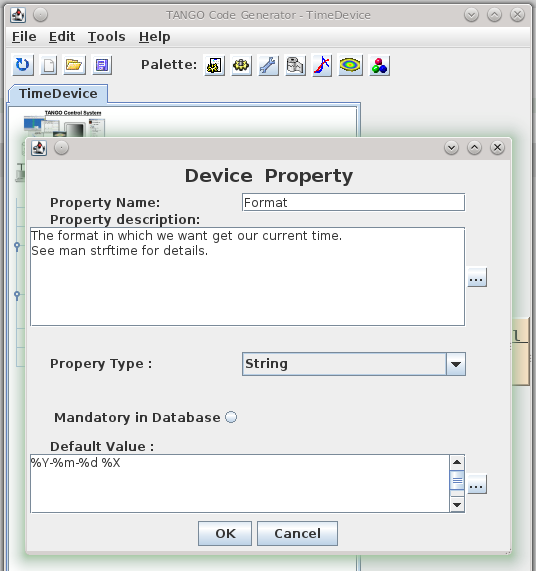
TANGO devices are configured with properties, which are not to confuse with OO-properties or TANGO attributes. TANGO properties are read on initialisation of a device and saved to the TANGO database. That way they live across server restarts. TANGO properties replace simple configuration files or registry-like configuration frameworks. As they are saved in the TANGO database it makes our devices location-agnostic – they can run on any host system on the network. Let us add a format properties to our TimeDevice to change the output to our liking. Again, we use pogo to define the property:

Pogo-Device Property

The property will be generated as a member variable of our TANGO device manage by the framework. We do not need to read it from the database ourselves – the corresponding code is generated by pogo – we just use it (format in line 5):

/*----- PROTECTED REGION ID(TimeDevice::read_CurrentTime) ENABLED START -----*/

  attr_CurrentTime_read = new Tango::DevString;
  TimeProvider timeProvider;
  *attr_CurrentTime_read = Tango::string_dup(timeProvider.now(format).c_str());
  //	Set the attribute value
  attr.set_value(attr_CurrentTime_read, 1, 0, true);

/*----- PROTECTED REGION END -----*/	//	TimeDevice::read_CurrentTime

Managing device state

The state of a TANGO device is extremely important for TANGO clients because they often decide how to interact with a device based on its state. We will cover state and the TANGO state machine in a later post but for now we make our TimeDevice sane by setting the its state to ON after correct initialisation, so that it reflects the operating state of the TimeDevice:

/*----- PROTECTED REGION ID(TimeDevice::init_device) ENABLED START -----*/

  set_state(Tango::ON);
  set_status("Ready to accept time queries.");

/*----- PROTECTED REGION END -----*/    //    TimeDevice::init_device

Here is the result in Jive and AtkPanel:

Configure Device in Jive-AtkPanel

Conclusion
We extended our to device with some real world features like configuration by the means of device properties and rudimentary state management. Real state management is an important topic on its own and deserves a separate blog post. Feel free to play with the full source code.

What developers can learn from designers

Looking beyond the tellerrand into what and how and why other disciplines do something can teach us more about our craft.

Slow down

Technology demands speed. Our industry focuses on speed and efficiency. Even our processes measure speed. (Scrum calls it velocity) But thinking needs time. Planning takes time. Caring needs time. Details need time. Testing needs time. Hearing, researching, observing, listening. All these need time. Designers know this.
We need to slow down. In order to see and design the details without losing the big picture we need to slow down. Great designs come from thinking hard. How do you do that? You concentrate on the essence. What matters most. How do you identify the essence? By thinking hard. And that needs time.

Design is about intention

Take a look at your code: is every line there for a reason? Every line? The order of the methods. The name of the variables. The separation in classes, interfaces, packages. How much of it is accidentally? Good designers choose everything with a reason. The place of this button? No coincidence. This color? This control? This flow of actions? Everything has an intention behind it. The information presented. Even the information not presented. The wording? Is part of the overall character. The menu structure? Grounded in good decisions.
On the other side when I look at my code (especially after some months) it doesn’t look so organized and determined. The order of the methods? Grown. The reason for this interface when there is only one implementation? Maybe I thought there would be more. Using this pattern here? What part of your code tells you its intent? And how much cries: incidental complexity? Think about it: did you choose what to include and what to left out?

Test for change, build to learn

What was the subtitle of the first XP book? Embrace change. This sounds like we are victims. Change is coming and we need to cope with it. But what when change is really coming? Are we prepared? 58 unit tests for the garbage?! The whole architecture and patterns I developed, tested and refactored countless times? Delete them?! In reality we still fear change.
But it does not have to be this way. What do designers do? They test for change. They build wireframes, mockups, prototypes. If some of them didn’t work out they can abandon them. The cost to create them is low. And even when it was not the right design they learned something. They build the prototypes to test their hypotheses. They build them to proof or falsify their assumptions. They build to learn.
The learning effect is more important than the artifact itself.
And when the application is in production? They also test for change. They do A/B tests (again for learning). Designers don’t wait until change comes to them and then they have to embrace it, they test for change.

Listen

Listen. Truly listen. Shut down your preconceptions. How often do we ask too fast, too much? Suggestive questions? Questions with constrained possibilities to answer? I often ask goal directed questions. To further find out. To define what the requirements are.
Then one day I made a mistake. I asked an open ended question. And got an answer. Not what I expected. I thought I would know the shape of the problem. I thought: okay, we need a chart, the possibility to switch between different scales and a second view for the deviation. But no. Suddenly the customer tells me: just show one series in one scale. The deviation can be displayed in a table. We do not need other scales. In previous meetings he nodded in agreement when I presented the other solution. What happened? Did the customer change his mind? No. He told me his thoughts. Not the other way around. I did not tell him what I think and he agrees. He had to think for himself. He had to shape his thoughts in order to explain them to me. He had to think it through.

Net effect matters most

Developers like to think in features. When you ask a developer what did you do for customer X, he might tell you: we created a system to manage the complex process of submitting proposals for a great variety of technologies in an efficient manner. Features: submission of proposals, complexity management, flexibility and efficiency. The what.
A designer might answer: through our work scientists all over the world have access to advanced technology to explore the future of science. The effect on the world, users and customers.
Think what is made possible through our creations, how it improves lives. Start with why.

Documentation is essential

There is this notion in our craft that the code is all the documentation you need. Why is this the way it is? Take a look at the code. The code is the documentation. Look at the commit message. This is all you need.
No. In our experience code as documentation sucks. It is too low level. What is the goal you want to reach with this piece? What is the information you collected. What are the decisions you made. What is omitted. What is rethought. What alternatives were abandoned.
Designers use all kind of artifacts to learn and record their findings and decisions. They create and keep only the essential ones and keep it pragmatic. Easy to create. Easy to update. Easy to note down what you learned and what was wrong in your assumptions. The code is just one level of abstraction and usually the end result of the thought and decision process. Record and keep the way of the decisions, not just the end result.

Focus on the whole

Developers like to divide and conquer. To separate everything into small manageable pieces. Agile demands that. First services. Then microservices. What’s next? Nanoservices?
Designers on the other hand keep the complete experience in mind. For them the whole product matters. The whole is more than the sum of its parts. The dream of the developer is that all pieces fit like Lego stones together in the end. But they forget to imagine and plan the whole creation they wanted to build. A house is not the same as another house. The composition of rooms matter. The lighting. The connections between rooms and floors. The placement of windows and doors. The whole experience. The same is valid for applications that people use.

Solution alternatives

As developers we are natural problem solvers. We are given a problem and create a solution. Designers are problem solvers, too. They identify a problem and create many solutions, test them, rate them and present them. They explore. They test and learn. They collect data and evidence. They know that every solution has its trade offs. The most promising ones are evaluated. With a plan. With hypotheses. They crave for feedback.

Reduced and emphasized – It’s about the connection

YAGNI. KISS. We know them. But what do we do with the time saved? We solve other problems. Designers carve out the details. They think of interactions, clear wording, better defaults. The little things that delight the user. Going the extra mile. The user of the applications feels cared for. He feels that there was a human that thought about his situation. There’s a connection between designers and users through the application.
When we saw Bret Victor presenting his jaw dropping talk about “Inventing on principle” he made one important point: creators must feel a connection to their creation. I think everyone should feel a connection to the software he uses. He should feel cared for and delighted. Applications are not just tools, they are experiences, they create emotions, they connect us.

Domain model design with food coupons

A recent customer requirement for the implementation of an application specified that every data-modifying user action has to be confirmed by the user through a confirmation prompt.
The application in question is a single page web application with client/server communication over an HTTP JSON API. The domain model is located on the server side, the client side is the user interface.

One option to accomplish the requirement could have been to implement the confirmation process exclusively on the client-side. The client code would show a confirmation dialog right before every HTTP POST, PUT, PATCH or DELETE request and perform the request only after confirmation. This would be fairly easy to implement. The downside of this approach is that the requirement is not reflected in the application’s domain model. The requirement however is so crucial that it should be part of the domain model, not just an implementation detail of the client user interface. So we opted for a different approach, which makes the confirmation process part of the domain model and exposes it through the HTTP API.

Coupon system

The basic idea is a coupon system, analogous to the ones that can be found at some food and beverage sales booths at festivals: you choose a food or drink item, pay for it at the pay booth and get a coupon. This coupon can be redeemd at a different booth where you receive the actual item.

coupon
Source: http://de.wikipedia.org/wiki/Verzehrbon | License: Public domain


Transferred to our web application the implementation looks like this: The client sends a request for an action to the server. But instead of performing the action immediately, the server stalls the action and responds with a unique confirmation token that identifies the waiting action. The client receives the token and can finally trigger the action by sending the confirmation token to a separate confirmation API endpoint. The server recognizes the pending user action based on the confirmation token and executes it. Of course, some care has to be taken that those pending actions, which are never confirmed time out after a while and that a malicious user can’t flood the server with waiting actions. The confirmation dialog can be triggered from the client-side code via an HTTP response interceptor that checks for a confirmation token in the response and opens the confirmation dialog if a token is present and hands the token to the confirmation endpoint if the user clicks “Ok”.

Conclusion

With this design the requirement is encoded in the server-side domain model and becomes apparent through the API. Any user of the API is called to attention by the guidance of its design. Of course, an implementor of a new client could choose to ignore the hint and return the token directly to the server without prompting the user for confirmation, but that would be a deliberate and conscious choice and not a mere oversight.

Using your TANGO devices

Now that we have built a nice TANGO device server in the previous part of this tutorial we finally want to use it.

After installing TANGO from the sources or binaries provided on www.tango-controls.org and running the TANGO database device server you need to register your device with the database to use it fully. There is however a nodb-mode if you absolutely cannot communicate with the the database device due to networking restrictions. We assume normal operation with a database accessible for the following stuff.

Registering a device server at a TANGO database

The database to use is specified by the environment variable TANGO_HOST. So first you run the tool jive and run the Server Wizard from the Tools menu:

Server Wizard1

The server name equals the executable name for C++ device servers but can be set by the programmer for Python and Java device servers. We use time_device_server for our tutorial. The instance name may be chosen quite freely – lets call our server instance localtime. In the next step we have to start the server with the same TANGO_HOST and the instance name as parameter. That way you can register and run the same server multiple times on the same or even different machines and distinguish the them. Then you have to declare the device classes and name the device instances of this server:

Server Wizard2 Server Wizard3

The device name is a three part identifier which is used to communicate with the device. In our example we use the first part to differentiate between real/hardware devices and virtual/logical devices implemented completely in software. It also could be used for the different departments in your institution for example. It is up to you to fill the identifier with meaningful information.

At the end of the wizard the device server is reinitialised and ready to use. Now we can use Jive to find our device:

Device in Jive-AtkPanel

Our device implementation is very basic so it provides only the meaningless state information of UNKNOWN but also our read-only attribute providing us with the current machine time in ISO format. AtkPanel polls all attributes of our devices and gives us a generic overview of the actual device state. Writable attributes can be changed through AtkPanel or with Test device from the Jive context menu (bottom window of the screenshot above). Feel free to experiment a bit with both tools.

In the next post we will improve our device server and add configuration via device properties.

The developer experience (DX): Our development process

Personally I like reading stories about how others tackle problems, their way to the solution, their process. This post is intended to give you a glimpse of how we work.

Personally I like reading stories about how others tackle problems, their way to the solution, their process.
Recently our team sat down together to brainstorm what is not so good or even bad about our way of solving things. To address those problems and to improve our developer experience I researched and documented our typical development process. This post is intended to give you a glimpse of how we work.
First you have to know that we are a service business so usually a project starts with a (potential or recurring) customer coming to us with his concerns, his business needs. On the course of a typical project the following phases (some in iterations) run:

1. Identifying the problem (aka analysis)

Often the first expressed need is not the problem to be solved. We need to dig deeper and identify the core. At this point in the process we ask the customer goal oriented questions. We guide the conversation to find any constraints of the solution. One of these constraints is often the technological platform (web, mobile, desktop).
If it is a bigger problem we need to work through different levels of abstraction, one iteration at a time.
We document all the results in functional specs. These are small blocks of text in the language of the customer describing the functional side of the problem and its constraints. These specs form the basis of every project and are entered as issues in our JIRA.
Alongside we record the concepts of the domain in form of a glossary in our wiki.
Besides the text we draw complex or core parts of the domain as diagrams on paper. A rough domain model. A module concept. A high level architecture of the system.

2. Planning

In a planning poker session we estimate each issue from the analysis. The customer sets a priority. Together we develop a milestone plan for our iterations. Smaller (1 week) iterations for explorative or fast paced projects and longer (2 – 3 weeks) iterations for slow paced or well defined projects.

3. Finding a solution

Before implementing a solution to a problem in code, we create different concepts which fit the constraints we recorded earlier.
These concepts can be paper prototypes or sketches. Sometimes these are HTML mockups or simulations.
From these we choose the best suited concept by talking with the customer or from our experience.

4. Development

At the start of the project we set up the necessary internal infrastructure. This usually consists of a git repository and jenkins jobs for continuous integration. We install the libraries, frameworks and applications. We create a project in the IDE and start implementing. While developing we write automated tests where appropriate. We use manual testing to tell us what the users will see and how it behaves like we expected. When we think we are done we look for feedback.

5. Feedback and acceptance

For feedback we deploy the project on a staging or test system, email the customer so that he fulfills a manual user acceptance test.
If the customer accepts the solution we continue with the next phase. If bigger problems arise we reopen our JIRA issues or create new ones and start with the analysis again.

6. Delivery

First we need to set up a machine to our project specific needs: automatic or manual (snowflaking). This is called provisioning.
We create scripts and jobs in Jenkins for the following steps: one for release and one for deployment and commissioning.
The release step packages the project and creates documents from our JIRA issues which were resolved in this version. The deploy step takes the release artifact and transfers this to the target machine. Usually this step also runs the deployed project. Every installation (release and deploy/commisioning) is documented manually on paper to be traceable. An email to the customer tells him what the new release includes. Tags in the repository identify the deployed code.

7. Monitoring

Every error or exception occurring is sent via email to a project specific account. Additionally we create a job in Jenkins which supervises the system periodically. The job tries to reach the application and executes some health checks.

TANGO device server step-by-step tutorial

Now that we learned about TANGO in general and the architecture of device servers it is time to get our hands dirty. Here is a step-by-step tutorial for making your software remotely accessible as TANGO devices.

We will develop a small C++ class that can provide us the current time and date as a string and then build a device server that makes our functionality available over TANGO to remote clients. Our plain C++ project structure looks like this:

$PROJECT_ROOT/
  CMakeLists.txt
  TimeProvider/
    CMakeLists.txt
    TimeProvider.h
    TimeProvider.cpp
    main.cpp

Here are our CMake build files:
toplevel

project(Time)
cmake_minimum_required(VERSION 2.8)

find_package(PkgConfig)

add_subdirectory(TimeProvider)

and for the TimeProvider

project(TimeProvider)

add_library(time TimeProvider.cpp)

add_executable(timeprovider main.cpp)
target_link_libraries(timeprovider time)

And the C++ sources for our standalone application:
TimeProvider.h

#include <string>

class TimeProvider
{
public:
    TimeProvider() {}

    const std::string now();
};

TimeProvider.cpp

#include "TimeProvider.h"

#include <ctime>

const std::string TimeProvider::now()
{
    time_t now = time(0);
    struct tm time;
    char timeString[100];
    time = *localtime(&now);
    strftime(timeString, sizeof(timeString), "%Y-%m-%d %X", &time);
    return timeString;
}

main.cpp

#include <iostream>
#include "TimeProvider.h"

int main()
{
    TimeProvider tp;
    std::cout << tp.now() << std::endl;
    return 0;
}

Next we create a new subdirectory “TimeDevice” and add it to our toplevel CMakeLists.txt along with the TANGO package lookup:

...
find_package(PkgConfig)
pkg_check_modules(TANGO tango>=7.2.6 REQUIRED)

add_subdirectory(TimeProvider)
add_subdirectory(TimeDevice)

In this newly created directory we now run the Pogo application with pogo TimeDevice from our TANGO installation to generate our device server skeleton:

Pogo-Create Deviceand add the Attribute:Pogo-AddAttributeso the result looks like:

Pogo-TimeDevice

Now we need to add the generated sources to our CMake build like this:

project(TimeDevice)

set(SOURCES
    ${PROJECT_NAME}.cpp
    ${PROJECT_NAME}Class.cpp
    ${PROJECT_NAME}StateMachine.cpp
    ClassFactory.cpp
    main.cpp
)

# this is needed because of wrong generation of include statements
# you may correct them in generated code because they are in protected regions
include_directories(.)

include_directories(
    ${TimeProvider_SOURCE_DIR}
    ${TANGO_INCLUDE_DIRS}
)

add_definitions("-std=c++11")

add_executable(time_device_server ${SOURCES})
target_link_libraries(time_device_server
    time
    ${TANGO_LIBRARIES}
)

As the last step, we implement the code for the CurrentTime attribute like this:

void TimeDevice::read_CurrentTime(Tango::Attribute &attr)
{
	DEBUG_STREAM << "TimeDevice::read_CurrentTime(Tango::Attribute &attr) entering... " << endl;
	/*----- PROTECTED REGION ID(TimeDevice::read_CurrentTime) ENABLED START -----*/

    attr_CurrentTime_read = new Tango::DevString;
    TimeProvider timeProvider;
    *attr_CurrentTime_read = Tango::string_dup(timeProvider.now().c_str());
    //	Set the attribute value
    attr.set_value(attr_CurrentTime_read, 1, 0, true);

	/*----- PROTECTED REGION END -----*/	//	TimeDevice::read_CurrentTime
}

For other correct implementations of string attributes see the documentation on the TANGO website.
Now we should end up with a ready to run TANGO device server executable.

Conclusion
If  you structure your project with hindsight you can integrate your drivers or services in your TANGO control system with very low effort. In the next post we we will show how to add a device server to a TANGO database and use its facilities like device properties for configuration or jive for inspection of a device.

Feel free to download the full source code of this tutorial.

How I find the source of bugs

You know the situation: a user calls or emails you to tell you your program has a problem. Here I illustrate how I find the source of the problem

You know the situation: a user calls or emails you to tell you your program has a problem. When you are lucky he lists some steps he believe he did to reproduce the behaviour. When you are really lucky those steps are the right ones.
In some cases you even got a stacktrace on the logs. High fives all around. You follow the steps the problem shows and you get the exact position in the code where things get wrong. Now is a great time to write a test which executes the steps and shows the bug. If the bug isn’t data dependent you normally can nail it with your test. If it is dependent on the data in the production system you have to find the minimal set of data constraints which causes the problem. The test fails, fixing it should make it green and fix the problem. Done.
But there are cases where the problem is caused not in the last action but sometime before. If the data does not reflect that the problem is buried in layers between like caches, in memory structures or the particular state the system is in.
Here knowledge of the frameworks used or the system in question helps you to trace back the flow of the state and data coming to the position of the stack trace.
Sometimes the steps do not reproduce the behaviour. But most of the time the steps are an indicator for how to reproduce the problem. The stack trace should give you enough information. If it doesn’t, take a look in your log. If this also does not show enough info to find the steps you should improve your log around the position of the strack trace. Wait for the next instance or try your own luck and then you should have enough information to find the real problem.
But what if you have no stack trace? No position to start your hunt? No steps to reproduce? Just a message like: after some days I got an empty transmission happening every minute. After some days. No stack trace. No user actions. Just a log message that says: starting transmission. No error. No further info.
You got nothing. Almost. You got a message with three bits of info: transmission, every minute and empty.
I start with transmission. Where does the system transmit data. Good for the architecture but bad for tracing the transmission is decoupled from the rest of the system by using a message bus. Next.
Every minute. How does the system normally start recurring processes? By quartz, a scheduler for Java. Looking at the configuration of the live system no process is nearly triggered every minute. There must be another place. Searching the code and the log another message indicates a running process: a watchdog. This watchdog puts a message on the bus if it detects a problem. Which is then send by the transmission process. Bingo. But why is it empty?
Now the knowledge about the facilities the system uses comes into play: UMTS. Sometimes the transmission rate is so low that the connection does not transfer any packages. The receiving side records a transmission but gets no data.
Most of the time the problem can be found in your own code but all code has bugs. If you assume after looking at your code that the frameworks you use have a bug. Search the bug database of the framework hopefully it is found there and already fixed.

The four rules of data safety

I tried to translate the four rules of gun safety to the task of data validation in order to formulate a behavioural framework of improved input safety.

firefly-gunOne of the most dangerous objects to handle is guns. No wonder there are strict and understandable rules how to handle them safely. The Canadians have The Four Firearm ACTS, but for this blog entry, I will cite the Four Rules stated by Captain Ira L. Reeves right before the first world war and restated by Colonel Jeff Cooper:

  1. All guns are always loaded
  2. Never let the muzzle (the business end of a gun) cover anything you are not willing to destroy
  3. Keep you finger off the trigger until your sights are on the target
  4. Be sure of your target and what is beyond it

Even if you accidentally break one rule (for example, rule 3 is often blatantly disobeyed on television), there are still enough precautions in place to keep you (and everybody around you) relatively safe. The rules are meant to instill a certain amount of respect for the gun into the owner so that offloading of responsibility isn’t possible any more, as in the line “I know this gun is unloaded, so it’s probably mighty fun to point it at somebody”.

The guns of software development

In software development, the most dangerous objects we can handle is user-created data or inputs. To mitigate the risks we take when we accept inputs from our users (and most software would be pretty useless otherwise), we have the concept of validation: Before anything other may happen with the data, it needs to be validated, meaning “proved to be free of danger”. Improper input validation is so prevalent in software development that it has its own CWE number (CWE-20) and ranked number 1 on the Top 25 list of “most dangerous programming errors”.

There are some concepts ready to help us tackle this task. The most promising is the Taint checking that treats all input as dangerous and therefore unworthy of further usage unless proven otherwise. Taint checking reminds you of validation, but not how to validate and isn’t available in most programming languages, unfortunately. What we need is a language agnostic set of rules that shape our behaviour in a way that we can’t make the most common mistakes of validation. It seems that gun owners have tried the same and succeeded. So Let’s formulate our Four Rules of data safety, inspired by the gun rules.

Our four rules

  1. All data always contains malicious aspects
  2. Never accept input for modules you cannot afford to have hacked
  3. Leave input data alone until you actually want to use it
  4. Be sure what aspects to validate and how to do it properly

This is just a starting ground for discussion, let’s call it the first version of the Four Rules. Here is my motivation for each rule:

All data always contains malicious aspects

Most users of most systems are in no way harmful. But if they attempt to harm a system, it better stands prepared. Problem is, even with a thorough validation in your current context, there is always the possibility that your attacker plays a rail shot, entering the system here, but causing damage somewhere else. A good example of this practice were images with Javascript code in their metadata. An adequate validation of uploaded images would check for a valid image format, but don’t mind the “dead content” in the meta tags. A browser would later discover the Javascript and execute it – a classic cross-site scripting attack. Never treat any data as fully validated. If you know that your particular code is vulnerable to a specific threat, let’s say a zero value in a variable used as a divisor, validate once more against this threat. This practice is also contained in the idea of Defensive programming.

Never accept input for modules you cannot afford to have hacked

Behind this rule lies a simple truth: Everything that can be hacked will be hacked, given enough time. The only protection against any hack is no access at all (like in “some air between network cable and network card”). If for example you run a certificate authority and absolutely cannot risk losing your secret private key, the machine using this key must not be connected to any network. If your database contains data much too valuable to be “stolen”, the database shouldn’t be accessible directly – and all access need to be validated beforehand. You need to think about a pragmatic compromise for your scenario when following this rule, but you’ve always been warned.

Leave input data alone until you actually want to use it

This was the most difficult rule for me to decide on. The rationale is that even the slightest bit of validation is actually usage of the input. Given enough knowledge about the validation, an attacker could possibly attack the system by abusing weaknesses in the validation itself (see rule 1 for inspiration). Any contact with input data is dangerous, even when it happens with the best intentions. The downside is that you won’t have a stronghold security architecture, where a mighty wall separates the danger zone from friendly territory (or tainted from cleaned data). Remember that even persisting the input data is using it in some form.

Be sure what aspects to validate and how to do it properly

If the time has come to use the input and to validate it right before, you need to think deep about the threats you want to eliminate. Just like with guns, where real bullets (as opposed by “television bullets”) won’t stop at the shooter’s convenience, your validation has consequences beyond an immediate gain of security. A common error is the rushed countermeasure, when you think of a specific threat and immediately try to abolish it. Take your time and think deep! For example, if your users can enter way too high values, it’s of no use to constrain the input field length, because direct web requests and notations like “1E9” are still possible. But converting an input string to a number to check its value might not be the smartest idea, too. Not long ago, you could crash nearly every application by entering a certain “number of death”. Following this rule requires experience and lots of reading, learning and thinking. And even then, there’s always somebody smarter than you, so ultimately, you should plan your system under the impression of rule 2.

As stated, this is just a starting point to try to formulate rules for data validation that provide a behaviour framework that avoids the most common mistakes and pitfalls. I’m highly interested to hear your thoughts about this topic. Please leave a comment below – but be gentle with the comment validation algorithm.