Building RPM packages of SCons-based projects

Easy delivery and installation of a project helps massively with user acceptance. Take a look at all the app stores and user friendly package managers. For quite some of our Linux specific projects we build RPM-Packages using a build farm and the Jenkins continuous integration (CI) server. Sometimes we have to package dependencies which are not available for the used distributions. Some days ago we packaged some projects that were using the SCons build system. Using SCons is quite simple but there is one caveat to make it work nicely with rpmbuild: You have to fiddle with the installation prefixes. Let’s have a look at the build and install stanza of the SPEC-file:

# build stanza
%build
scons PREFIX=/usr LIBDIR=%_libdir all

# install stanza
%install
rm -rf $RPM_BUILD_ROOT
scons PREFIX=/usr LIBDIR=%_libdir install --install-sandbox="$RPM_BUILD_ROOT"

The two crucial parts here are:

  1. Setting the correct prefixes in build and install because the build could use configured paths which have to match the situation of the installed result
  2. The --install-sandbox command line switch which tells SCons to install everything under the specified location instead of directly to the system. This allows rpmbuild to put the artifacts into the package using the correct layout.

Using the above advice it should be quite easy to build nicely working RPM packages out of projects using SCons.

The difference between Test First and Test Driven Development

If you tend to fall into the “one-two-everything”-trap while doing TDD, this blog post might give you some perspective on what really happens and how to avoid the trap by decomposing the problem.

The concept of Test First (“TF”, write a failing test first and make it green by writing exactly enough production code to do so) was always very appealing to me. But I’ve never experienced the guiding effect that is described for Test Driven Development (“TDD”, apply a Test First approach to a problem using baby steps, letting the tests drive the production code). This lead to quite some frustration and scepticism on my side. After a lot of attempts and training sessions with experienced TDD practioners, I concluded that while I grasped Test First and could apply it to everyday tasks, I wouldn’t be able to incorporate TDD into my process toolbox. My biggest grievance was that I couldn’t even tell why TDD failed for me.

The bad news is that TDD still lies outside my normal toolbox. The good news is that I can pinpoint a specific area where I need training in order to learn TDD properly. This blog post is the story about my revelation. I hope that you can gather some ideas for your own progress, implied that you’re no TDD master, too.

A simple training session

In order to learn TDD, I always look for fitting problems to apply it to. While developing a repository difference tracker, the Diffibrillator, there was a neat little task to order the entries of several lists of commits into a single, chronologically ordered list. I delayed the implementation of the needed algorithm for a TDD session in a relaxed environment. My mind began to spawn background processes about possible solutions. When I finally had a chance to start my session, one solution had already crystallized in my imagination:

An elegant solution

Given several input lists of commits, now used as queues, and one result list that is initially empty, repeat the following step until no more commits are pending in any input queue: Compare the head commits of all input queues by their commit date and remove the oldest one, adding it to the result list.
I nick-named this approach the “PEZ algorithm” because each commit list acts like the old PEZ candy dispensers of my childhood, always giving out the topmost sherbet shred when asked for.

A Test First approach

Trying to break the problem down into baby-stepped unit tests, I fell into the “one-two-everything”-trap once again. See for yourself what tests I wrote:

@Test
public void emptyIteratorWhenNoBranchesGiven() throws Exception {
  Iterable<ProjectBranch> noBranches = new EmptyIterable<>();
  Iterable<Commit> commits = CombineCommits.from(noBranches).byCommitDate();
  assertThat(commits, is(emptyIterable()));
}

The first test only prepares the classes’ interface, naming the methods and trying to establish a fluent coding style.

@Test
public void commitsOfBranchIfOnlyOneGiven() throws Exception {
  final Commit firstCommit = commitAt(10L);
  final Commit secondCommit = commitAt(20L);
  final ProjectBranch branch = branchWith(secondCommit, firstCommit);
  Iterable<Commit> commits = CombineCommits.from(branch).byCommitDate();
  assertThat(commits, contains(secondCommit, firstCommit));
}

The second test was the inevitable “simple and dumb” starting point for a journey led by the tests (hopefully). It didn’t lead to any meaningful production code. Obviously, a bigger test scenario was needed:

@Test
public void commitsOfSeveralBranchesInChronologicalOrder() throws Exception {
  final Commit commitA_1 = commitAt(10L);
  final Commit commitB_2 = commitAt(20L);
  final Commit commitA_3 = commitAt(30L);
  final Commit commitA_4 = commitAt(40L);
  final Commit commitB_5 = commitAt(50L);
  final Commit commitA_6 = commitAt(60L);
  final ProjectBranch branchA = branchWith(commitA_6, commitA_4, commitA_3, commitA_1);
  final ProjectBranch branchB = branchWith(commitB_5, commitB_2);
  Iterable<Commit> commits = CombineCommits.from(branchA, branchB).byCommitDate();
  assertThat(commits, contains(commitA_6, commitB_5, commitA_4, commitA_3, commitB_2, commitA_1));
}

Now we are talking! If you give the CombineCommits class two branches with intertwined commit dates, the result will be a chronologically ordered collection. The only problem with this test? It needed the complete 100 lines of algorithm code to be green again. There it is: the “one-two-everything”-trap. The first two tests are merely finger exercises that don’t assert very much. Usually the third test is the last one to be written for a long time, because it requires a lot of work on the production side of code. After this test, the implementation is mostly completed, with 130 lines of production code and a line coverage of nearly 98%. There wasn’t much guidance from the tests, it was more of a “holding back until a test allows for the whole thing to be written”. Emotionally, the tests only hindered me from jotting down the algorithm I already envisioned and when I finally got permission to “show off”, I dived into the production code and only returned when the whole thing was finished. A lot of ego filled in the lines, but I didn’t realize it right away.

But wait, there is a detail left out from the test above that needs to be explicitely specified: If two commmits happen at the same time, there should be a defined behaviour for the combiner. I declare that the order of the input queues is used as a secondary ordering criterium:

@Test
public void decidesForFirstBranchIfCommitsAtSameDate() throws Exception {
  final Commit commitA_1 = commitAt(10L);
  final Commit commitB_2 = commitAt(10L);
  final Commit commitA_3 = commitAt(20L);
  final ProjectBranch branchA = branchWith(commitA_3, commitA_1);
  final ProjectBranch branchB = branchWith(commitB_2);
  Iterable<Commit> commits = CombineCommits.from(branchA, branchB).byCommitDate();
  assertThat(commits, contains(commitA_3, commitA_1, commitB_2));
}

This test didn’t improve the line coverage and was green right from the start, because the implementation already acted as required. There was no guidance in this test, only assurance.

And that was my session: The four unit tests cover the anticipated algorithm completely, but didn’t provide any guidance that I could grasp. I was very disappointed, because the “one-two-everything”-trap is a well-known anti-pattern for my TDD experiences and I still fell right into it.

A second approach using TDD

I decided to remove my code again and pair with my co-worker Jens, who formulated a theory about finding the next test by only changing one facet of the problem for each new test. Sounds interesting? It is! Let’s see where it got us:

@Test
public void noBranchesResultsInEmptyTrail() throws Exception {
  CommitCombiner combiner = new CommitCombiner();
  Iterable<Commit> trail = combiner.getTrail();
  assertThat(trail, is(emptyIterable()));
}

The first test starts as no big surprise, it only sets “the mood”. Notice how we decided to keep the CommitCombiner class simple and plain in its interface as long as the tests don’t get cumbersome.

@Test
public void emptyBranchesResultInEmptyTrail() throws Exception {
  ProjectBranch branchA = branchFor();
  CommitCombiner combiner = new CommitCombiner(branchA);
  assertThat(combiner.getTrail(), is(emptyIterable()));
}

The second test asserts only one thing more than the initial test: If the combiner is given empty commit queues (“branches”) instead of none like in the first test, it still returns an empty result collection (the commit “trail”).

With the single-facet approach, we can only change our tested scenario in one “domain dimension” and only the smallest possible amount of it. So we formulate a test that still uses one branch only, but with one commit in it:

@Test
public void branchWithCommitResultsInEqualTrail() throws Exception {
  Commit commitA1 = commitAt(10L);
  ProjectBranch branchA = branchFor(commitA1);
  CommitCombiner combiner = new CommitCombiner(branchA);
  assertThat(combiner.getTrail(), Matchers.contains(commitA1));
}

With this test, there was the first meaningful appearance of production code. We kept it very simple and trusted our future tests to guide the way to a more complex version.

The next test introduces the central piece of domain knowledge to the production code, just by changing the amount of commits on the only given branch from “one” to “many” (three):

@Test
public void branchWithCommitsAreReturnedInOrder() throws Exception {
  Commit commitA1 = commitAt(10L);
  Commit commitA2 = commitAt(20L);
  Commit commitA3 = commitAt(30L);
  ProjectBranch branchA = branchFor(commitA3, commitA2, commitA1);
  CommitCombiner combiner = new CommitCombiner(branchA);
  assertThat(combiner.getTrail(), Matchers.contains(commitA3, commitA2, commitA1));
}

Notice how this requires the production code to come up with the notion of comparable commit dates that needs to be ordered. We haven’t even introduced a second branch into the scenario yet but are already asserting that the topmost mission critical functionality works: commit ordering.

Now we need to advance to another requirement: The ability to combine branches. But whatever we develop in the future, it can never break the most important aspect of our implementation.

@Test
public void twoBranchesWithOnlyOneCommit() throws Exception {
  Commit commitA1 = commitAt(10L);
  ProjectBranch branchA = branchFor(commitA1);
  ProjectBranch branchB = branchFor();
  CommitCombiner combiner = new CommitCombiner(branchA, branchB);
  assertThat(combiner.getTrail(), Matchers.contains(commitA1));
}

You might say that we knew about this behaviour of the production code before, when we added the test named “branchWithCommitResultsInEqualTrail”, but it really is the assurance that things don’t change just because the amount of branches changes.

Our production code had no need to advance as far as we could already anticipate, so there is the need for another test dealing with multiple branches:

@Test
public void allBranchesAreUsed() throws Exception {
  Commit commitA1 = commitAt(10L);
  ProjectBranch branchA = branchFor(commitA1);
  ProjectBranch branchB = branchFor();
  CommitCombiner combiner = new CommitCombiner(branchB, branchA);
  assertThat(combiner.getTrail(), Matchers.contains(commitA1));
}

Note that the only thing that’s different is the order in which the branches are given to the CommitCombiner. With this simple test, there needs to be some important improvements in the production code. Try it for yourself to see the effect!

Finally, it is time to formulate a test that brings the two facets of our algorithm together. We tested the facets separately for so long now that this test feels like the first “real” test, asserting a “real” use case:

@Test
public void twoBranchesWithOneCommitEach() throws Exception {
  Commit commitA1 = commitAt(10L);
  Commit commitB1 = commitAt(20L);
  ProjectBranch branchA = branchFor(commitA1);
  ProjectBranch branchB = branchFor(commitB1);
  CommitCombiner combiner = new CommitCombiner(branchA, branchB);
  assertThat(combiner.getTrail(), Matchers.contains(commitB1, commitA1));
}

If you compare this “full” test case to the third test case in my first approach, you’ll see that it lacks all the mingled complexity of the first try. The test can be clear and concise in its scenario because it can rely on the assurances of the previous tests. The third test in the first approach couldn’t rely on any meaningful single-faceted “support” test. That’s the main difference! This is my error in the first approach: Trying to cramp more than one new facet in the next test, even putting all required facets in there at once. No wonder that the production code needed “everything” when the test requires it. No wonder there’s no guidance from the tests when I wanted to reach all my goals at once. Decomposing the problem at hand into independent “features” or facets is the most essential step to learn in order to advance from Test First to Test Driven Development. Finding a suitable “dramatic composition” for the tests is another important ability, but it can only be applied after the decomposition is done.

But wait, there is a fourth test in my first approach that needs to be tested here, too:

@Test
public void twoBranchesWithCommitsAtSameTime() throws Exception {
  Commit commitA1 = commitAt(10L);
  Commit commitB1 = commitAt(10L);
  ProjectBranch branchA = branchFor(commitA1);
  ProjectBranch branchB = branchFor(commitB1);
  CommitCombiner combiner = new CommitCombiner(branchA, branchB);
  assertThat(combiner.getTrail(), Matchers.contains(commitA1, commitB1));
}

Thankfully, the implementation already provided this feature. We are done! And in this moment, my ego showed up again: “That implementation is an insult to my developer honour!” I shouted. Keep in mind that I just threw away a beautiful 130-lines piece of algorithm for this alternate implementation:

public class CommitCombiner {
  private final ProjectBranch[] branches;

  public CommitCombiner(ProjectBranch... branches) {
    this.branches = branches;
  }

  public Iterable<Commit> getTrail() {
    final List<Commit> result = new ArrayList<>();
    for (ProjectBranch each : this.branches) {
      CollectionUtil.addAll(result, each.commits());
    }
    return sortedWithBranchOrderPreserved(result);
  }

  private Iterable<Commit> sortedWithBranchOrderPreserved(List<Commit> result) {
    Collections.sort(result, antichronologically());
    return result;
  }

  private <D extends Dated> Comparator<D> antichronologically() {
    return new Comparator<D>() {
      @Override
      public int compare(D o1, D o2) {
        return o2.getDate().compareTo(o1.getDate());
      }
    };
  }
}

The final and complete second implementation, guided to by the tests, is merely six lines of active code with some boiler-plate! Well, what did I expect? TDD doesn’t lead to particularly elegant solutions, it leads to the simplest thing that could possibly work and assures you that it will work in the realm of your specification. There’s no place for the programmer’s ego between these lines and that’s a good thing.

Conclusion

Thank you for reading until here! I’ve learnt an important lesson that day (thank you, Jens!). And being able to pinpoint the main hindrance on my way to fully embracing TDD enabled me to further improve my skills even on my own. It felt like opening an ever-closed door for the first time. I hope you’ve extracted some insights from this write-up, too. Feel free to share them!

Does Refactoring turn unit test of TDD to integration tests?

We really value automated tests and do experiments regarding test driven development (TDD) and tests in general from time to time. In the retrospective of our lastest experiment this question struck me: Does refactoring turn the unit tests of TDD to integration tests over time?

Let me elaborate this a bit further. When you start out with your tests you have some unit of functionality – usually a class – in mind. As you add test after test your implementation slowly fleshes out. You are repeating the TDD cycle “Write a failing test – Make test pass – Refactor” as you are adding features. The refactoring step is crucial in the whole process because it keeps the code clean and evolvable. But this step is also the cause leading to my observation: As you add new features you may extract new classes when refactoring to obey the single responsibility principle (SRP) and keep your design sane. It is very easy to forget or just ignore refactoring the tests. They still pass. You still have the same code coverage. But your tests now test the combination of several units. And what’s worse: You have units without direct tests.

This happened even in relatively small experiments on “Communication through tests” where the recontructing team could sometimes only guess that some class existed and either went on without it or created the class out of neccessity. The problem with this is that there are no obvious and clear indicators that your unit tests are not real unit tests anymore.

Conclusion

I neither have any solution nor am I completely sure how big the problem is in practice. It may help to state the TDD cycle more explicitly like “Write a failing test – Make test pass – Refactor implementation and tests” although that is no 100% remedy. One could implement a simple, checkstyle-like tool which lists all units without associated test class. I will keep an eye on the phenomenom and try to analyse it further. I would love to hear you view and experience on the matter.

Ugly problems, ugly solutions?

Do have workarounds to be worse than the problems?

One type of our projects is to integrate some devices into our customers infrastructure. The tasks then mostly consist of writing bridging code for third party libs of the hardware vendor. The most fun part is when the libs do not have some needed capability or feature.

The situation

In my case I was building a device driver with following requirements:

  • asynchronous execution of long running tasks.
  • ability to cancel long running tasks.
  • at any time it is asked for its current status, it has to provide it.

The device is accompanied by a DLL with a following interface(simplified):

  • doWork(), a blocking function that returns after a configurable amount of time that can range from milliseconds to hours.
  • abortWork(), is supposed to cancel the process triggered by doWork() and to make doWork() return earlier.

First impressions

I was able to fullfill two requirements pretty fast. The state ist more or less a simple getter and the doWork function was called in a separate thread. Just cancelling the execution didn’t work. More precisely it didn’t work as expected. In the time between a call to doWork() and the moment it returned, the process always used 100% of one CPU core. After that it always dropped to nearly zero. Now, what happened, when I called abortWork()? There were two things: doWork() returned, but the CPU utilization stayed the same for an indefinite amount of time. Or the call was ignored completely. Especially funny was the first case, where the API seemed to work until the process run out of cores and the system practically grinded to a halt.

The “Solution”

Banging my head against the desk didn’t help, so my first thought was to forget abortWork() and kill the thread myself. Microsoft provides a nice function called TerminateThread for that purpose. Everyone who looks at the documentation, will see that the list of side effects is quite impressive, memory leaks being the least bad ones. I couldn’t guarantee that the application would work afterwards, so I decided against it. What would be the alternative? Process shutdown. When you stop the process all blocked threads should be away. Being too soft and trying to unload the DLL is a bad idea – you have a deadlock when the DllMain waits for the worker thread to finish. My last attempt was to suicide the process!

Now I was able to abort a running task, but my app were no longer available all the time. Every attempt to get the current status between the start of a shutdown and a completed startup failed. So a semi-persistent storage containing the last status of a living application was needed. To achieve this, I created an application with the same interface as the real device driver and proxy that delegated all the requests to it, caching the status responses. That way the polling application still assumed that the last action were still running until the restarting app was fully available again.

In the end the solution consisted of two device drivers, one for caching the state and the other for doing the work. When cancelling the task was required, the latter device driver died and restarted itself again.

Final thoughts

I hope that there is a way to do this in a more elegant way and I just overlooked some facts. It is unbelievable that you can lose all control over your app by a simple call to a third party library and that the only escape is death.

TDD: avoid getting stuck or what’s the next test?

One central point of practicing TDD is to determine what is the next test. Choosing the wrong path can lead you into the infamous impasse

One central point of practicing TDD is to determine what is the next test. Choosing the wrong path can lead you into the infamous impasse: to make the next test pass you need to make not baby but giant steps. Some time ago Uncle Bob introduced a principle called the transformation priority premise. To make a test pass you need to change the implementation. These changes are transformations. There are at least the following transformations (taken from his blog post):

  • ({}–>nil) no code at all->code that employs nil
  • (nil->constant)
  • (constant->constant+) a simple constant to a more complex constant
  • (constant->scalar) replacing a constant with a variable or an argument
  • (statement->statements) adding more unconditional statements.
  • (unconditional->if) splitting the execution path
  • (scalar->array)
  • (array->container)
  • (statement->recursion)
  • (if->while)
  • (expression->function) replacing an expression with a function or algorithm
  • (variable->assignment) replacing the value of a variable.

To determine what the next test should be you look at the possible next tests and the changes in the implementation necessary to make that test pass. The required transformations should be as high in the list as possible. If you always choose the test which causes the highest transformations you avoid getting stuck, the impasse.
This seems to work but I think this is pretty complicated and expensive. Shouldn’t there be an easier way?
Let’s take a look at his case study: the word wrap kata. Word wrap is a function which takes two parameters: a string, and a column number. It returns the string, but with line breaks inserted at just the right places to make sure that no line is longer than the column number. You try to break lines at word boundaries.
The first three tests (nil, empty string and one word which is shorter than the wrap position) are obvious and easy but the next test can lead to an impasse:

@Test
public void twoWordsLongerThanLimitShouldWrap() throws Exception {
  assertThat(wrap("word word", 6), is("word\nword"));
}

With the transformation priority premise you can “calculate” that this is the wrong test and another one is simpler meaning needs transformations higher in the list. But let me introduce another concept: the facets or dimensions of tests.
Each test in a TDD session tests another facet of your problem. And only one more. What a facet is is determined by the problem domain. So you need some domain knowledge but usually to solve that problem you need this nevertheless. Back to the word wrap example: what is a facet? The first test tests the nil input, it changes one facet. The empty input test changes another facet. Then comes one word shorter than the wrap position (one facet changed again) and the fourth test uses two words longer than the wrap position. See it? The fourth tests introduces changes in two facets: one word to two word and shorter to longer than. So what can you do instead? Just change one facet. According to this the next test would be to use one word longer than the wrap position (facet: longer) which is proposed as a solution. Or you can use two words shorter than the wrap position (facet: word count) but this test will just pass without modifications to the implementation code. So facets of the word wrap kata could be: word count, shorter/longer, number of breaks, break position.
I know this is a very informal way of finding the next tests. It leans on your experience and domain knowledge. But I think it is less expensive than the transformations. And even better it can be combined with the transformation priority premise to check and verify your decisions.
What are you experiences with getting stuck in TDD? Do you think the proposed facets of TDD could be of help? Is it too informal? Too vague?

Meet the diffibrillator, a diff tracker

If you need to keep several projects of a product family in sync, you can use modularization or keep track of the differences and port them. A diff tracker like the diffibrillator helps you with the second approach.

diffibrillator_128Lately, we had multiple occassions where a certain software tool was missing in our arsenal. Let me describe the situations and then extrapolate the requirements for the tool.

We work on a fairly large project that resembles a web application for our customer. Because the customer is part of a larger organization, the project was also needed for a second, rather independent customer within the organization. Now we had two customers with distinct requirements. We forked the code base and developed both branches independently. But often, there is a bug fix or a new feature that is needed in both branches. And while both customers have different requirements, it’s still the same application in the core. Technically speaking, both branches are part of a product family. We use atomic commits and cherry-picks to keep the code bases of the branches in sync if needed.

Another customer has a custom hardware with an individual control software written by us. The hardware was built several times, with the same software running on all instances. After a while, one hardware instance got an additional module that only was needed there. We coped by introducing an optional software module that can control the real hardware on this special instance or act as an empty placeholder for the other instances. Soon, we had to introduce another module. The software is now heavily modularized. Then the hardware defects began. The customer replaced every failing hardware component with a new type of hardware, using their new capabilities to improve the software features, too. But every hardware instance was replaced differently and there is no plan to consolidate the hardware platforms again. Essentially, this left us with a apecific version of the software for each hardware instance. Currently, we see no possibility to unify the different hardware platforms with one general interface. What we did was to fork the code base and develop on each branch independently. But often, there is a bug fix or a new feature that is needed in several branches. Technically speaking, all branches are part of a product family. We use atomic commits and cherry-picks to keep the code bases of the branches in sync if needed.

In both cases, we needed a list that helped us to keep track which commits were already cherry-picked, never need to be picked or are not reviewed in that regard yet. Our version control system of choice, git, supports this requirement by providing globally unique commit IDs. Maintaining this list manually is a cumbersome task, so we developed a little tool that helps us with it.

Meet the diffibrillator

First thing we always do for our projects is to come up with a witty name for it. In this case, because it is a “diff tracker” really, we came up with the name “diffibrillator”. The diffibrillator is a diff tracker on the granularity level of commits. For each new commit in either repository of a product family, somebody has to review the commit and decide about its category:

  • Undecided: This is the initial category for each commit. It means that there is no decision made yet whether to cherry-pick the commit to one or several other branches or to define it as “unique” to this branch.
  • Unported: If a reviewer chooses this category for a commit, there is no need to port the content of the commit to other branches. The commit is regarded as part of the unique differences of this branches to all other ones in the product family.
  • Ported: If there are other branches in the product family that require the same changes as are made in the commit, the reviewer has to do two things: cherry-pick the commit to the required branches (port the functionality) and mark the commit and the new cherry-pick commits as “ported”. This takes the commits out of the pending list and indicates that the changes in the commit are included in several branches.

In short, the diffibrillator helps us to keep track about every commit made on every branch in the product family and shows us where we forgot to port a functionality (like a bugfix) to the other members of the family.

Here is a typical screenshot of the desktop GUI. Some information is blurred to keep things ambiguous and to protect the innocent.

diffibrillatorYou see a (very long) table with several columns. The first column denotes the commit date of the commit in each row. The commits are sorted anti-chronologically over all projects, but inserted into its project’s column. In this screenshot, you can see that the third project wasn’t changed for quite a time. Some commits are categorized, but the latest commits need some work in this regard.

Foundation for the diffibrillator

The diffibrillator in its current state relies heavily on the atomic nature of our commits. As soon as two functionalities are included in one commit, both the cherry-pick and the categorization would lose precision. Luckily, we have only developers that adhere to the commit-early-commit-often principle. We had plans for a diff tracker with the granularity of individual changes, but an analysis of our real requirements revealed that we wouldn’t benefit from the higher change resolution but lose the trackability on the commit level. And that is the level we want to think and act upon.

Technicalities of the diffibrillator

Technically, the diffibrillator is very boring. It’s a java-based server application that uses directory structures and flat files as a data storage. The interaction is done by a custom REST interface that can be used with a swing-based desktop GUI or a javascript-based web GUI (or any other client that is coompatible with the REST interface). As there is only one server instance for all of us, the content of its data storage is “the truth” about our product family’s commits.

The biggest problem was to design the REST API orthogonal enough to make any sense but also with a big amount of pragmatism to keep it fast enough. This lead to a query that should return only the commits’ IDs but returns all information about them to avoid several thousand subsequent HTTP requests for the commits’ data. As a result, this query’s answer grew very big, leading to timeout errors on smallband connections. To counter this problem, we had to introduce result paging, where the client can specify the start index and result length of its query.

Why should you care?

We are certain that the task to keep several members of a product family in sync isn’t all that seldom. And while there are many different possible solutions to this problem, the two most prominent approaches seem to be “modularization” or “diff tracking”. We chose diff tracking as the approach with lower costs for us, but lacked tool support. The diffibrillator is a tool to keep track of all your product familys’ commits and to categorize them. It relies on atomic commits, but is relatively low-tech and easy to understand otherwise.

If you happen to have the same problem of a product family consisting of several independent projects, drop us a line. We’d love to hear from you about your experience and solutions. And if you think that the diffibrillator can help you with that task, let us know! We are not holding anything back.

Building Visual C++ Projects with CMake

In previous post my colleague showed how to create RPM packages with CMake. As a really versatile tool it is also able to create and build Visual Studio projects on Windows. This property makes it very valuable when you want to integrate your project into a CI cycle(in our case Jenkins).

Prerequisites:

To be able to compile anything following packages needed to be installed beforehand:

  •  CMake. It is helpful to put it in the PATH environment variable so that absolute paths aren’t needed.
  • Microsoft Windows SDK for Windows 7 and .NET Framework 4 (the web installer or  the ISOs).  The part “.NET Framework 4” is very important, since when the SDK for the .NET Framework 3.5 is installed you will get following parse error for your *.vcxproject files:

    error MSB4066: The attribute “Label” in element is unrecognized

    at the following position:

    <ItemGroup Label=”ProjectConfigurations”>

    Probably equally important is the bitness of the installed SDK. The x64 ISO differs only in one letter from the x86 one. Look for the X if want 64 bit.

  • .NET Framework 4, necessary to make msbuild run

It is possible that you encounter following message during your SDK setup:

A problem occurred while installing selected Windows SDK components. Installation of the “Microsoft Windows SDK for Windows 7” product has reported the following error: Please refer to Samples\Setup\HTML\ConfigDetails.htm document for further information. Please attempt to resolve the problem and then start Windows SDK setup again. If you continue to have problems with this issue, please visit the SDK team support page at http://go.microsoft.com/fwlink/?LinkId=130245. Click the View Log button to review the installation log. To exit, click Finish.

The reason behind this wordy and less informative error message were the Visual C++ Redistributables installed on the system. As suggested by Microsoft KB article removing them all helped.

Makefiles:

For CMake to build anything you need to have a CMakeLists.txt file in your project. For a tutorial on how to use CMake, look at this page. Here is a simple CMakeLists.txt to get you started:

project(MyProject)
 cmake_minimum_required(VERSION 2.6)
 set(source_files
 main.cpp
 )
 include_directories(
 ${CMAKE_CURRENT_SOURCE_DIR}
 )
 add_executable(MyProject ${source_files})

Building:

To build a project there are few steps necessary. You can enter them in your CI directy or put them in a batch file.

call "%ProgramFiles%\Microsoft SDKs\Windows\v7.1\Bin\SetEnv.cmd" /Release /x86

With this call all necessary environment variables are set. Be careful on 64 bit platforms as jenkins slave executes this call in a 32 bit context and so “%ProgramFiles%” is resolved to “ProgramFiles (x86)” where the SDK does not lie.

del CMakeCache.txt

This command is not strictly necessary, but it prevents you from working with outdated generated files when you change your configuration.

cmake -G "Visual Studio 10" .

Generates a Visual Studio 2010 Solution. Every change to the solution and the project files will be gone when you call it, so make sure you track all necessary files in the CMakeLists.txt.

cmake --build . --target ALL_BUILD --config Release

The final step. It will net you the MyProject.exe binary. The target parameter is equal to the name of the project in the solution and the config parameter is one of the solution configurations.

Final words:

The hardest and most time consuming part was the setup of prerequisites. Generic, not informative error messages are the worst you can do to a clueless customer. But… when you are done with it, you are only two small steps apart from an automatically built executable.

1-Click Deployment of RPMs with Jenkins

In one of my previous posts we learned how to build and package our projects as RPM packages. How do we get our shiny packages to our users? If we host our own RPM repository, we can use our extisting CI infrastructure (jenkins in our case) for that. Here are the steps in detail:

Convention for the RPM location in our jobs

To reduce the work needed for our deployment job we define a location where each job puts the RPM artifacts after a successful build. Typically we use something like $workspace/build_dir for that. Because we are using matrix build for different target plattforms, we need to use the same naming conventions for our job axes, too!

Job for RPM deployment

Because of the above convention we can use one parameterized job to deploy the packages of different build jobs. We use the JOBNAME of the build job as our only parameter:

Deploy-RPM-Jobname-Parameter

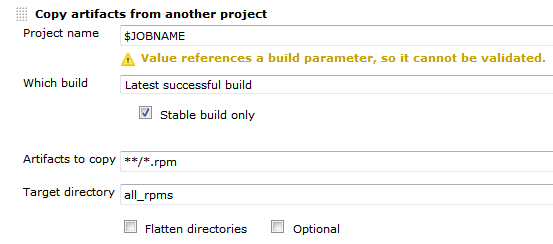
First the deploy job needs to get all the rpms from the build job. We can do this using the Copy Artifact plugin like so:Deploy-RPM-Copy-Artifacts

Since we are usually building for several distributions and processor architectures, we have a complete directory tree in our target directory. We are using a small shell script to copy all the packages to our repository using rsync. Finally we can update the remote repository over ssh. See the complete shell script below:

for i in suse-12.2 suse-12.1 suse-11.4 suse-11.3
do
  rm -rf $i
  dir32=$i/RPMS/i686
  dir64=$i/RPMS/x86_64
  mkdir -p $dir32
  mkdir -p $dir64
  versionlabel=`echo $i | sed 's/[-\.]//g'`
  if [ -e all_rpms/Architecture\=32bit\,Distribution\=$versionlabel/build_dir/ ]
  then
    cp all_rpms/Architecture\=32bit\,Distribution\=$versionlabel/build_dir/* $dir32
  fi
  if [ -e all_rpms/Architecture\=64bit\,Distribution\=$versionlabel/build_dir/ ]
  then
    cp all_rpms/Architecture\=64bit\,Distribution\=$versionlabel/build_dir/* $dir64
  fi
  rsync -e "ssh" -avz $i/* root@repository-server:/srv/www/htdocs/repo/$i/
  ssh root@repository-server "createrepo /srv/www/htdocs/repo/$i/RPMS"
done

Conclusion

With a few small tricks and scripts we can deploy the artifacts of our build jobs to the RPM repository and thus deliver a new software release at the push of a button. You could let the deployment job run automatically after a successful build, but we like to have more control over the actual software we release to our users.

TDD myths: the problems

I take a look at some (in my experience) problems/misconceptions with TDD:
100% code coverage is enough, Debugging is not needed, Design for testability, You are faster than without tests

100% code coverage is enough

Code coverage seems to be a bad indicator for the quality of the tests. Take the following code as an example:

public void testEmptySum() {
  assertEquals(0, sum());
}

public void testSumOfMultipleNumbers() {
  assertEquals(5, sum(2, 3));
}

Now take a look at the implementation:

public int sum(int...numbers) {
  if (numbers.length == 0) {
    return 0;
  }
  return 5;
}

Baby steps in TDD could lead you to this implementation. It has 100% code coverage and all tests are green. But the implementation isn’t finished at all. Our experiment where we investigated how much tests communicate the intend of the code showed flaws in metrics like code coverage.

Debugging is not needed

One promise of TDD or tests in general is that you can neglect debugging. Even abandon it. In my experience when a test goes red (especially an integration test) you sometimes need to fire up the debugger. The debugger helps you to step through code and see the actual state of the system at that time. Tests treat code as a black box, an input results in an output. But what happens in between? How much do you want to couple your tests to your actual implementation steps? Do we need the tests to cover this aspect of software development? Maybe something along the lines as shown in Inventing on principle where the computer shows you the immediate steps your code takes could replace debugging but tests alone cannot do it.

Design for testability

A noble goal. But are tests your primary client? No. Other code is. Design for maintainability would be better. You will need to change your code, fix it, introduce new features, etc. Don’t get me wrong: You need tests and you need testability. But how much code do you write specifically for your tests? How much flexibility do you introduce because of your tests? What patterns do you use just because your tests need them? It’s like YAGNI for code exposure for tests. Code specifically written only for tests couples your code to your tests. Only things that need to be coupled should be. Is the choice of the underlying data structure important? Couple it, test it. If it isn’t, don’t expose it, don’t write a getter. Don’t break the information hiding principle if you don’t need to. If you couple your tests too much to your code every little change breaks your tests. This hinders maintenance. The important and difficult design question is: what is important. Test this.

You are faster than without tests

Some TDD practitioners claim that they are faster with TDD than without tests because the bugs and problems in your code will overwhelm you after a certain time. So with a certain level of complexity you are going faster with TDD. But where is this level? In my experience writing code without tests is 3x-4x faster than with TDD. For small applications. There are entire communities where many applications are written without or with only a few tests. But I wouldn’t write a large application without tests but at least my feeling is that in many cases I go much slower. Cases where I feel faster are specification heavy. Like parsing or writing formats, designing an algorithm or implementing a scientific formula. So the call is open on this one. What are your experiences? Do you feel slowed down by TDD?

Communication through Tests – a larger experiment

We evaluated our ability to communicate through tests in a two-day experiment and gathered some interesting results.

triangulatorFor us, automated tests are the hallmark of professional software development. That doesn’t mean that we buy into every testing fad that comes along or consider ourselves testing experts just because we write some tests alongside our code. We put our money where our mouth is and evaluate our abilities in writing effective tests.

One way to measure the effectiveness of tests is to try to “communicate through tests”. One developer/team writes code and tests for a given specification. Another team picks up the tests only and tries to recreate the production code and infer the specification. The only communication between the two teams happens through the tests.

We performed a small experiment with two teams and one day for both phases and blogged about it. The results of this evaluation was that unit tests are a good medium to transport specification details. But we got a hint that problems might be bigger when the code was less arithmetic and more complex. As most of our development tasks are rather complex and driven by business rules instead of clean mathematical algorithms, we wanted to inspect further.

Our larger experiment

So we organized a bigger experiment with a broader scope. Instead of two teams, we had three teams. We ran the phases for eight instead of two hours, essentially increasing the resulting code size by a factor of 3. The assignments weren’t static, but versioned – and the team only knew the rules of the current version. When a team would reach a certain milestone, more rules would be revealed, partly contradicting the previous ruleset. This should emulate changing customer requirements. And to provide the ability to retrospect on the reconstruction phase, we recorded this phase with a screencast software (we used the commercial product Debut Video Capture), capturing both inputs and conversation by using headsets for every developer.

The first part of this experiment happened in late January of 2013, where all teams had one day to produce production and test code. This was a day of loud buzz in our development department. The second part for the reconstruction phase was scheduled for the middle of February 2013. We had to be a bit more quiet this time to increase the audio recording quality, but the developers were humming nonetheless.

Here are some numbers of what was produced in the first session:

  • Team 1: 400 lines of production code, 530 lines of test code. 8 production classes, 54 tests. Test coverage of 90.6%.
  • Team 2: 576 lines of production code, 655 lines of test code. 17 production classes, 59 tests. Test coverage of 98.2%.
  • Team 3: 442 lines of production code, 429 lines of test code. 18 production classes, 37 tests. Test coverage of 97.0%.

The reconstruction phase was finished in less than five hours, partly because we stuck very close to the actual tests with little guesswork. When the tests didn’t enforce a functionality, it wasn’t implemented to reveal the holes in the test coverage. This reduced the amount of production code that had to be written. On the flipside, every team got lost once on the way, loosing the better part of an hour without noticeable progress.

The results

After all the talk about the event itself, let’s have a look at our results of the experiment:

  • The recording of the reconstruction phase was a huge gain in understanding the detailed problems. We even discussed recording the construction phase too to capture the original design decisions.
  • Every decision on unclear terms from the original team lead to “blurry” tests that didn’t guide the reconstruction team as good as the “razor-sharp” tests did.
  • You could definitely tell the TDD tests from the “test first” tests or even the tests written “immediately after”. More on this aspect later, but this was our biggest overall take-away: The quality of the tests in terms of being a specification differed greatly. This wasn’t bound to teams – as soon as a team lost the TDD “drive”, the tests lost guidance power.
  • Test coverage (in terms of line coverage or conditional coverage) means nothing. You can have 100% test coverage and still suffer from severe plot holes in your tests. Blurry tests tend to increase the coverage, but not the accountability of tests.
  • In general, we were surprised how little guidance and coverage most tests offered. The assignments included some obvious “testing problems” like dealing with randomness and every team dealt with them deliberately. Still, these were the major pain points during the reconstruction phase. This result puts our first small experiment a bit into perspective. What works well with small code bases might be disproportionally harder to achieve when the code size scales up. So while TDD/tests might work sufficiently easy on a small task, it needs more attention for a larger task.

The biggest problem

When talking about “plot holes” from the tests, let me give you a detailed example of what I mean. The more useless tests suffered from a lack of triangulation. In geometry, triangulation is the process of determining the location of a point by measuring several angles to it from known points. When writing tests, triangulation is the effort to “pinpoint” or specify the implementation with a set of different inputs and required outputs. You specify enough different tests of the same functionality to require it being “real” instead of a dummy implementation. Let’s look at this test:

@Test
public void parsesUserInput() {
  assertThat(new InputParser().parse("1 3 5"), hasItems(1, 3, 5));
}

Well, the test tells us that we need to convert a given string into a bunch of integers. It specifies the necessary class and method for this task, but gives us great freedom in the actual implementation. This makes the test green:

public Iterable<Integer> parse(String input) {
  return Arrays.asList(1, 3, 5);
}

As far as the tests are concerned, this is a concise and correct implementation of the required functionality. And while it is obvious in our example that this will never be sufficient, it oftentimes isn’t so obvious when the problem domain isn’t as familiar as parsing strings to numbers. But to complete my explanation of test triangulation, let’s consider a more elaborate implementation of this test that needs a lot more work on the implementation side (especially when developed in accordance with the Transformation Priority Premise by Uncle Bob and without obvious duplication):

@Test
public void parsesUserInput() {
  assertThat(new InputParser().parse("1 3 5"), hasItems(1, 3, 5));
  assertThat(new InputParser().parse("1 2"), hasItems(1, 2));
  assertThat(new InputParser().parse("1 2 3 4 5"), hasItems(1, 2, 3, 4, 5));
  assertThat(new InputParser().parse("1 4 5 3 2"), hasItems(1, 2, 3, 4, 5));
  assertThat(new InputParser().parse("5 4"), hasItems(4, 5));
  assertThat(new InputParser().parse("5 3"), hasItems(3, 5));
}

Maybe not all assertions are required and maybe they should live in different tests giving more hints in their names, but you get the idea: Making this test green is way “harder” than the initial test. Writing properly triangulated tests is one of the immediate benefits of Test Driven Development (TDD), as for example outlined nicely by Ray Sinnema on his blog entry about test-driving a code kata.
Our tests that were written “after the fact” often lacked the proper amount of triangulation, making it easier to “fake it” in the reconstruction phase. In a real project setting, these tests would allow for too much implementation deviation to act as a specification. They act more as usage examples and happy path “smoke” tests.

Our benefits

While this experiment doesn’t fulfill rigid academic requirements on gathering data, it already paid off greatly for us. We’ve examined our ability to express our implementations through tests and gathered insight on our real capabilities to use test-driven methodologies. Being able to judge relatively objectively on the quality of your own tests (by watching the reconstruction phase’s screencast) was very helpful. We now know better what skills to improve and what to focus on during training.

Where to go from here?

We plan to repeat this experiment with interested participants as a spare-time event later this year. For now and ourselves, we have gathered enough impressions to act on them. If you are interested in more details, drop us a note. We could publish only the tests (for reconstruction), the complete code or even the screencasts (albeit they are somewhat long-running). Our participants could elaborate their impressions in the comment section, if you ask them.
We are very interested in your results when performing similar events, like Tomasz Borek did this month in Krakow, Poland. We found his blog entry about the event to be very interesting. We definitely lacked the surprise element for the teams during the event.