FindBugs-driven bughunting in legacy projects

I have been working on a >100k lines legacy project for a while now. We have to juggle customer requests, bug fixes and refactoring so it is hard to improve the quality and employ new techniques or tools while keeping the software running and the clients happy. Initially there were no unit tests and most of the code had a gigantic cyclomatic complexity. Over the course of time we managed to put the system under continuous integration, employed quite some unit tests and analyzed code “hotspots” and our progress with crap4j.

Normally we get bug reports from our userbase or have to test manually to find bugs. A few weeks ago I tried a new approach to bughunting in legacy projects using FindBugs. Many of you surely know this useful tool, so I just want to describe my experiences in that project using FindBugs. Many of the bugs may be in parts of the application which are seldom used or only appear in hard to reproduce circumstances. First a short list of what I encountered and how I dealt with it.

Interesting found bugs in the project

  • There was a calculation using an integer division but returning a double. So the actual computation result was wrong but yet the error would have been hard to catch because people rarely recalculate results of a computer. When writing the test associated to the bugfix I found a StackOverFlowError too!
  • There were quite some null dereferences found, often in contructs like
     if (s == null && s.length() == 0)
     

    instead of

    if (s == null || s.length() == 0)
    

    which could be simplified or rewritten anyway. Sometimes there were possibilities for null dereferences on some paths despite of several null checks in the code.

  • Many performance bugs which may or may not have an effect on overall performance of the system like: new String(), new Integer(12), string concatenation across loops, inefficient usage of java.util.Map.keySet() instead of java.util.Map.entrySet() etc.
  • Some dead stores of local variables and statements without effect which could be thrown away or be corrected to do the intended things.

Things you may want to ignore

There are of course some bugs that you may ignore for now because you know that it is a common pattern in the team and abuse and thus errors are extremely unlikely. I, for example, opted to ignore some dozens of “may expose internal representation” found bugs regarding arrays in interfaces or accessibly via getters because it is a common pattern on the team not to tamper existing arrays as they are seen as immutable by the team members. It would have taken too much time to fix all those without that much of a benefit.

You may opt to ignore the performance bugs too but they are usually easy to fix.

Tips

  • If you have many foundbugs, fix the easy ones to be able to see the important ones more easily.
  • Ignore certain bug categories for now, fix them later, when you stumble upon them.
  • Concentrate on the ones that lead to wrong behaviour and crashes of your application.
  • Try to reproduce the problem with unit test and then fix the code whenever feasible! Tests are great to expose the bug and fix it without unwanted regressions!
  • Many bugs appear in places which need refactoring anyway so here is your chance to catch several flies at once.

Conclusion

With FindBugs you can find common programming errors sprinkled across the whole application in places where you probably would not have looked for years. It can help you to understand some common patterns of your team members and help you all to improve your code quality. Sometimes it even finds some hard to spot errors like the integer computation or null dereferences on certain paths. This is even more true in entangled legacy projects without proper test coverage.

A more elegant way to equals in Java

Implementing equals and hashCode in Java is a basic part of your toolbox. Here I describe a cleaner and less error-prone way to use in your code.

— Disclaimer: I know this is pretty basic stuff but many, many programmers are doing it still wrong —
As a Java programmer you know how to implement equals and that hashCode has to be implemented as well. You use your favorite IDE to generate the necessary code, use common wisdom to help you code it by hand or use annotations. But there is a fourth way: introducing EqualsBuilder (not the apache commons one which has some drawbacks over this one) which implements the general rules for equals and hashCode:

public class EqualsBuilder {

  public static interface IComparable {
      public Object[] getValuesToCompare();
  }

  private EqualsBuilder() {
    super();
  }

  public static int getHashCode(IComparable one) {
    if (null == one) {
      return 0;
    }
    final int prime = 31;
    int result = 1;
    for (Object o : one.getValuesToCompare()) {
      result = prime * result
                + EqualsBuilder.calculateHashCode(o);
    }
    return result;
  }

  private static int calculateHashCode(Object o) {
    if (null == o) {
      return 0;
    }
    return o.hashCode();
  }

  public static boolean isEqual(IComparable one,
                                              Object two) {
    if (null == one || null == two) {
      return false;
    }
    if (one.getClass() != two.getClass()) {
      return false;
    }
    return compareTwoArrays(one.getValuesToCompare(),
              ((IComparable) two).getValuesToCompare());
  }

  private static boolean compareTwoArrays(Object arrayOne, Object arrayTwo) {
      if (Array.getLength(arrayOne) != Array.getLength(arrayTwo)) {
        return false;
      }
      for (int i = 0; i < Array.getLength(arrayOne); i++) {
        if (!EqualsBuilder.areEqual(Array.get(arrayOne, i), Array.get(arrayTwo, i))) {
          return false;
        }
      }
      return true;
  }

  private static boolean areEqual(Object objectOne, Object objectTwo) {
    if (null == objectOne) {
      return null == objectTwo;
    }
    if (null == objectTwo) {
      return false;
    }
    if (objectOne.getClass().isArray() && objectTwo.getClass().isArray()) {
        return compareTwoArrays(objectOne, objectTwo);
    }
    return objectOne.equals(objectTwo);
  }

}

The interface IComparable ensures that equals and hashCode are based on the same instance variables.
To use it your class needs to implement the interface and call the appropiate methods from EqualsBuilder:

public class MyClass implements IComparable {
  private int count;
  private String name;

  public Object[] getValuesToCompare() {
    return new Object[] {Integer.valueOf(count), name};
  }

  @Override
  public int hashCode() {
    return EqualsBuilder.getHashCode(this);
  }

  @Override
  public boolean equals(Object obj) {
    return EqualsBuilder.isEqual(this, obj);
  }
} 

Update: If you want to use isEqual directly one test should be added to the start:

  if (one == two) {
    return true;
  }

Thanks to Nyarla for this hint.

Update 2: Thanks to a hint by Alex I fixed a bug in areEqual: when an array (especially a primitive one) is passed than the equals would return a wrong result.

Update 3: The newly added compareTwoArrays method had a bug: it resulted in true if arrayTwo is bigger than arrayOne but starts the same. Thanks to Thierry for pointing that out.

A more elegant way to HTTP Requests in Java

The support for sending and processing HTTP requests was always very basic in the JDK. There are many, many frameworks out there for sending requests and handling or parsing the response. But IMHO two stand out: HTTPClient for sending and HTMLUnit for handling. And since HTMLUnit uses HTTPClient under the hood the two are a perfect match.

This is an example HTTP Post:

HttpClient client = new HttpClient();
PostMethod post = new PostMethod(url);
for (Entry param : params.entrySet()) {
    post.setParameter(param.key, param.value);
}
try {
    return client.executeMethod(post);
} finally {
    post.releaseConnection();
}

and HTTP Get:

WebClient webClient = new WebClient();
return (HtmlPage) webClient.getPage(url);

Accessing the returned HTML via XPath is also very straightforward:

List roomDivs=(List)page.getByXPath("//div[contains(@class, 'room')]");
for (HtmlElement div:roomDivs) {
  rooms.add(
    new Room(this,
      ((HtmlElement) div.getByXPath(".//h2/a").get(0)).getTextContent(),
      div.getId())
  );
}

One last issue remains: HTTPClient caches its cookies but HTMLUnit creates a HTTPClient on its own. But if you override HttpWebConnection and give it your HTTPClient everything works smoothly:

public class HttpClientBackedWebConnection extends HttpWebConnection {
  private HttpClient client;

  public HttpClientBackedWebConnection(WebClient webClient,
      HttpClient client) {
    super(webClient);
    this.client = client;
  }

  @Override
  protected HttpClient getHttpClient() {
    return client;
  }
}

Just set your custom webconnection on your webclient:

webClient.setWebConnection(
  new HttpClientBackedWebConnection(webClient, client)
);

About breaking class contracts – fear clone()

Recently I had some discussions about copying of Objects in Java with some fellow developers. They were overriding clone() which I never felt neccessary. Shortly after I stumbled over a Checkstyle-Warning in our own code regarding clone() where overriding it is absolutely discouraged. Triggered by these two events I decided to dig a bit deeper into the issue.Climbing a Pile of Files

The bottom line is that Object.clone() has a defined contract which is very easy to break. This has to do with it’s interaction with the Cloneable interface which does not define a clone() method and the nature of Object’s clone implementation which is native.  Joshua Bloch names some problems and pitfalls with overriding clone in his excellent book Effective Java (Item 11):

  • “If you override the clone method in a nonfinal class, you shoud return an object obtained by invoking super.clone()”. A problem here is that this is never enforced.
  • “In practice, a class that implements Cloneable is expected to provide a properly functioning public clone method”. Again this is enforced nowhere.
  • “In effect, the clone method functions as another constructor; you must ensure that it does no harm to the original object and that it properly establishes invariants on the clone.”. This means paying extreme attention to the issue of shallow and deep copies. Also be sure not to forget possible side effects your constructors may have like registering the object as a listener.
  • “The clone architecture is incompatible with normal use of final fields referring to mutable objects”. You are sacrificing freedom in your class design because of flaw in the clone() concept.

He also provides better alternatives like copy constructors or copy factories if you really need object copying. I urge you to use one of the alternatives because breaking class contracts is evil and your classes may not work as expected. This one is easy to break. If you absolutely must implement a clone() method because you are subclassing an unchangeable cloneable class be sure to follow the rules. As a sidenote also be aware of the contract that hashCode() and equals() define.

Always be aware of the charset encoding hell

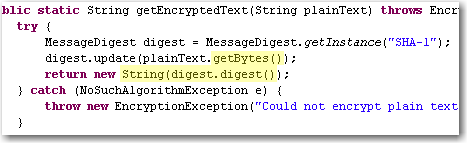
Most developers already struggled with textual data from some third party system and getting garbage special characters and the like because of wrong character encodings.  Some days ago we encountered an obscure problem when it was possible to login into one of our apps from the computer with the password database running but not from other machines using the same db.  After diving into the problem we found out that they SHA-1 hashes generated from our app were slightly different. Looking at the code revealed that platform encoding was used and that lead to different results:platform-encoding

The apps were running on Windows XP and Windows 2k3 Server respectively and you would expect that it would not make much of a difference but in fact it did!

Lesson:

Always specify the encoding explicitly, when exchanging character data with any other system. Here are some examples:

  • String.getBytes(“utf-8”), new Printwriter(file, “ascii”) in Java
  • HTML-Forms with attribute accept-charset="ISO-8859-1"
  • In XML headers <?xml version="1.0" encoding="ISO-8859-15"?>
  • In your Database and/or JDBC driver
  • In your file format documentation
  • In LaTeX documents
  • everywhere where you can provide that info easily (e.g. as a comment in a config file)

Problems with character encodings seem to appear every once in a while either as end user, when your umlauts get garbled or as a programmer that has to deal with third party input like web forms or text files.

The text file rant

After stumbling over an encoding problem *again* I thought a bit about the whole issue and some of my thought manifested in this rant about text files. I do not want to blame our computer science predecessors for inventing and using restricted charsets like ASCII or iso8859. Nobody has forseen the rapid development of computers and their worldwide adoption and use in everyday life and thus need for an extensible charset (think of the addition of new symbols like the €), let aside performance and memory considerations. The problem I see with text files is that there is no standard way to describe the used encoding. Most text files just leave it to the user to guess what the encoding might be whereas almost all binary file formats feature some kind of defined header with metadata about the content, e.g. bit depth and compression method in image files. For text files you usually have to use heuristical tools which work  more or less depending on the input.

A standardized header for text files right from the start would have helped to indicate the encoding and possibly language or encoding version information of the text and many problems we have today would not exist. The encoding attribute in the XML header or the byte order mark in UTF-8 are workarounds for the fundamental problem of a missing text file header.

Grails Web Application Security: XSS prevention

XSS (Cross Site Scripting) became a favored attack method in the last years. Several things are possible using an XSS vulnerability ranging from small annoyances to a complete desaster.
The XSS prevention cheat sheet states 6 rules to prevent XSS attacks. For a complete solution output encoding is needed in addition to input validation.
Here I take a further look on how to use the built in encoding methods in grails applications to prevent XSS.

Take 1: The global option

There exists a global option that specifies how all output is encoded when using ${}. See grails-app/conf/Config.groovy:

// The default codec used to encode data with ${}
grails.views.default.codec="html" // none, html, base64

So every input inside ${} is encoded but beware of the standard scaffolds where fieldValue is used inside ${}. Since fieldValue uses encoding you get a double escaped output – not a security problem, but the output is garbage.
This leaves the tags from the tag libraries to be reviewed for XSS vulnerability. The standard grails tags use all HTML encoding. If you use older versions than grails 1.1: beware of a bug in the renderErrors tag. Default encoding ${} does not help you when you use your custom tags. In this case you should nevertheless encode the output!
But problems arise with other tags like radioGroup like others found out.
So the global option does not result in much protection (only ${}), double escaping and problems with grails tags.

Take 2: Tainted strings

Other languages/frameworks (like Perl, Ruby, PHP,…) use a taint mode. There are some research works for Java.
Generally speaking in gsps three different outputs have to be escaped: ${}, <%%> and the ones from tags/taglibs. If a tainted String appears you can issue a warning and disallow or escape it. The problem in Java/Groovy is that Strings are value objects and since get copied in every operation so the tainted flag needs to be transferred, too. The same tainted flag must also be introduced for GStrings.
Since there isn’t any implementation or plugin for groovy/grails yet, right now you have to take the classic route:

Take 3: Test suites and reviews

Having a decent test suite in e.g. Selenium and reviewing your code for XSS vulnerabilities is still the best option in your grails apps. Maybe the tainted flags can help you in the future to spot places which you didn’t catch in a review.

P.S. A short overview for Java frameworks and their handling of XSS can be found here

Don’t trust micro versions

Normally you would think, that upgrading a third party dependency where its micro version (after the second dot, like x in 2.3.x) changes should make your software work (even) better and not break it. Sadly enough it can easily happen. Some time ago we stumbled over a subtle change in the JNDI implementation of the Jetty webserver and servlet container: In version 6.1.11 you specified (or at least could specify) JNDI resources in jetty-env.xml with URLs like jdbc/myDatabase. After the update to 6.1.12 the specified resource could not be found anymore. Digging through code changelogs and the like provided a solution that finally worked with 6.1.12: java:comp/env/jdbc/myDatabase. The bad thing is that the latter does not work with 6.1.11 so that our configuration became micro-version-dependent on Jetty.

It seems that a new feature around JETTY-725 in the update from 6.1.11 to 6.1.12 broke our software.

Conclusion

Always make sure that your dependencies are fixed for your software releases and test your software everytime when upgrading a dependency. Do not trust some automatic dependency update system or the version numbers of a project. In the end they are just numbers and should indicate the impact of the changes but you never can be sure the changes do not break something for you.

A guide through the swamp – The CrapMap

Locate your crappy methods quickly with this treemap visualization tool for Crap4J report data.

One of the most useful metrics to us in the Softwareschneiderei is “CRAP”. For java, it is calculated by the Crap4J tool and provided as an HTML report. The report gives you a rough idea whats going on in your project, but to really know what’s up, you need to look closer.

A closer look on crap

The Crap4J tool spits out lots of numbers, especially for larger projects. But from these numbers, you can’t easily tell some important questions like:

  • Are there regions (packages, classes) with lots more crap than others?
  • What are those regions?

So we thought about the problem and found it to be solvable by data visualization.

Enter CrapMap

If you need to use advanced data visualization techniques, there is a very helpful project called prefuse (which has a successor named flare for web applications). It provides an exhaustive API to visualize nearly everything the way you want to. We wanted our crap statistics drawn in a treemap. A treemap is a bunch of boxes, crammed together by a clever layouting strategy, each one representing data, for example by its size or color.

The CrapMap is a treemap where every box represents a method. The size gives you a hint of the method’s complexity, the color indicates its crappyness. Method boxes reside inside their classes’ boxes which reside in package boxes. That way, the treemap represents your code structure.

A picture worth a thousand numbers

crapmap1

This is a screenshot of the CrapMap in action. You see a medium sized project with few crap methods (less than one percent). Each red rectangle is a crappy method, each green one is an acceptable method regarding its complexity.

Adding interaction

You can quickly identify your biggest problem (in terms of complexity) by selecting it with your mouse. All necessary data about this method is shown in the bottom section of the window. The overall data of the project is shown in the top section.

If you want to answer some more obscure questions about your methods, try the search box in the lower right corner. The CrapMap comes with a search engine using your methods’ names.

Using CrapMap on your project

CrapMap is a java swing application, meant for desktop usage. To visualize your own project, you need the report.xml data file of it from Crap4J. Start the CrapMap application and load the report.xml using the “open file” dialog that shows up. That’s all.

In the near future, CrapMap will be hosted on dev.java.net (crapmap.dev.java.net). Right now, it’s only available as a binary executable from our download server (1MB download size). When you unzip the archive, double-click the crapmap.jar to start the application. CrapMap requires Java6 to be installed.

Show your project

We would be pleased to see your CrapMap. Make a screenshot, upload it and leave a comment containing the link to the image.

The perils of \u0027

Adventures (read: pitfalls) of internationalization with Struts2, concerning the principle “stacked smartness doesn’t add up”.

u0027Struts2 is a framework for web application development in Java. It’s considered mature and feature-rich and inherits the internationalization (i18n) capabilities of the Java platform. This is what you would expect. In fact, the i18n features of Struts2 are more powerful than the platform ones, but the power comes with a price.

Examples of the sunshine path

If you read a book like “Struts 2 in Action” written by Donald Brown and others, you’ll come across a chapter named “Understanding internationalization” (it’s chapter 11). You’ll get a great overview with a real-world example of what is possible (placeholder expansion, for example) and if you read a bit further, there is a word of warning:

“You might also want to further investigate the MessageFormat class of the Java platform. We saw its fundamentals in this chapter when we learned of the native Java support for parameterization of message texts and the autoformatting of date and numbers. As we indicated earlier, the MessageFormat class is much richer than we’ve had the time to demonstrate. We recommend consulting the Java documentation if you have further formatting needs as well. “

If you postpone this warning, you’re doomed. It’s not the fault of the book that their examples are the sunshine case (the best circumstances that might happen). The book tries to teach you the basics of Struts2, not its pitfalls.

A pitfall of Struts2 I18N

You will write a web application in Struts2, using the powerful built-in i18n, just to discover that some entries aren’t printed right. Let’s have an example i18n entry:

impossible.action.message=You can't do this

If you include this entry in a webpage using Struts2 i18n tags, you’ll find the apostrophe (unicode character \u0027) missing:

You cant do this

What happened? You didn’t read all about MessageFormat. The apostrophe is a special character for the MessageFormat parser, indicating regions of non-interpreted text (Quoted Strings). As there is only one apostrophe in our example, it just gets omitted and ignored. If there were two of them, both would be omitted and all expansion effort between them would be ceased.

How to overcome the pitfall

You’ll need to escape the apostrophe to have it show up. Here’s the paragraph of the MessageFormat APIDoc:

Within a String, "''" represents a single quote. A QuotedString can contain arbitrary characters except single quotes; the surrounding single quotes are removed. An UnquotedString can contain arbitrary characters except single quotes and left curly brackets. Thus, a string that should result in the formatted message “‘{0}'” can be written as "'''{'0}''" or "'''{0}'''".

That’s bad news. You have to tell your translators to double-type their apostrophes, else they won’t show up. But only the ones represented by \u0027, not the specialized ones of the higher unicode regions like “grave accent”  or “acute accent”. If you already have a large amount of translations, you need to check every apostrophe if it was meant to be printed or to control the MessageFormat parser.

The underlying principle

This unexpected behaviour of an otherwise powerful functionality is a common sign of a principle I call “stacked smartness doesn’t add up”. I will blog about the principle in the near future, so here’s just a short description: A powerful (smart) behaviour makes sense in the original use case, but when (re-)used in another layer of functionality, it becomes a burden, because strange side-effects need to be taken care of.

Easy code inspection using QDox

Spend five minutes and inspect your code for the aspect you always wanted to know using the QDox project.

Copyright by http://www.clipartof.com/So, you’ve inspected your Java code in any possible way, using Findbugs, Checkstyle, PMD, Crap4J and many other tools. You know every number by heart and keep a sharp eye on its trend. But what about some simple questions you might ask yourself about your project, like:

  • How many instance variables aren’t final?
  • Are there any setXYZ()-methods without any parameter?
  • Which classes have more than one constructor?

Each of this question isn’t of much relevance to the project, but its answer might be crucial in one specific situation.

Using QDox for throw-away tooling

QDox is a fine little project making steady progress in being a very intuitive Java code structure inspection API. It’s got a footprint of just one JAR (less than 200k) you need to add to your project and one class you need to remember as a starting point. Everything else can be learnt on the fly, using the code completion feature of your favorite IDE.

Let’s answer the first question of our list by printing out all the names of all instance variables that aren’t final. I’m assuming you call this class in your project’s root directory.

public class NonFinalFinder {
    public static void main(String[] args) {
         File sourceFolder = new File(".");
         JavaDocBuilder parser = new JavaDocBuilder();
         builder.addSourceTree(sourceFolder);
         JavaClass[] javaClasses = parser.getClasses();
         for (JavaClass javaClass : javaClasses) {
             JavaField[] fields = javaClass.getFields();
             for (JavaField javaField : fields) {
                 if (!javaField.isFinal()) {
                     System.out.println("Field "
                       + javaField.getName()
                       + " of class "
                       + javaClass.getFullyQualifiedName()
                       + " is not final.");
                }
            }
        }
    }
}

The QDox parser is called JavaDocBuilder for historical reasons. It takes a directory through addSourceTree() and parses all the java files it finds in there recursively. That’s all you need to program to gain access to your code structure.

In our example, we descend into the code hierarchy using the parser.getClasses() method. From the JavaClass objects, we retrieve their JavaFields and ask each one if it’s final, printing out its name otherwise.

Praising QDox

The code needed to answer our example question is seven lines in essence. Once you navigate through your code structure, the QDox API is self-explanatory. You only need to remember the first two lines of code to get started.

The QDox project had a long quiet period in the past while making the jump to the Java 5 language spec. Today, it’s a very active project published under the Apache 2.0 license. The developers add features nearly every day, making it a perfect choice for your next five-minute throw-away tool.

What’s your tool idea?

Tell me about your code specific aspect you always wanted to know. What would an implementation using QDox look like?