Debug Output

Crafting debug output from std::istream data can be dangerous!

Writing a blog post sometimes can be useful to get some face-palm kind of programming error out of one’s system.

Putting such an error into written words then serves a couple of purposes:

  • it helps oneself remembering
  • it helps others who read it not to do the same thing
  • it serves as error log for future reference

So here it comes:

In one project we use JSON to serialize objects in order to send them over HTTP (we use the very nice JSON Spirit library, btw).

For each object we have serialize/deserialize methods which do the heavy lifting. After having developed a new deserialize method I wanted to test it together with the HTTP request handling. Using curl for this I issued a command like this:

curl -X PUT http://localhost:30222/some/url -d @datafile

This command issues a PUT request to the given URL and uses data in ./datafile, which contains the JSON, as request data.

The request came through but the deserializer wouldn’t do its work. WTF? Let’s see what goes on – let’s put some debug output in:

MyObject MyObjectSerializer::deserialize(std::istream& jsonIn)
{
   // debug output starts here
   std::string stringToDeserialize;
   Poco::StreamCopier::copyToString(jsonIn, stringToDeserialize);
   std::cout << "The String: " << stringToDeserialize << std::endl;
   // debug output ends here

   json_spirit::Value value;
   json_spirit::read(jsonIn, value);
   ...
}

I’ll give you some time to spot the bug…. 3..2..1..got it? Please check Poco::StreamCopier documentation if you are not familiar with POCO libraries.
What’s particularly misleading is the “Copier” part of the name StreamCopier, because it does not exactly copy the bytes from the stream into the string – it moves them. This means that after the debug output code, the istream is empty.

Unfortunately, I did not immediately recognize the change in the error outputs of the JSON parser. This might have given me a hint to the real problem. Instead, during the next half hour I searched for errors in the JSON I was sending.

When I finally realized it …

A shot at definitions beyond “unit test”

When doing research on which kinds of programmatic tests different developers and companies utilize and how they handle them, I realized that there is no common definition of terms and concepts. While most sources agree on what is and what is not a unit test, there are various contradictory definitions of what a test is, if it is not a unit test. In this blog post I’d like to present a brief overview of the definitions we are currently using. Since we steadily try to enhance and refine our development process and tools, the terms and concepts presented here are almost certain to change in the future.

Please note that this post is not intended to fully describe all the details of the different test approaches, but rather to give an idea and first impression on how we distinguish them.

Unit Tests

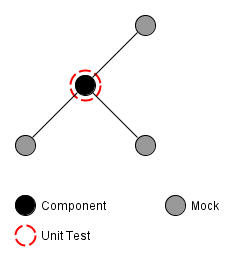
The most basic kind of programmatic tests, unit-tests, are likely to be the most commonly used kind of test. They help to determine that a small piece of code, e.g. a single method or class, behaves as intended by its developer. If properly applied, unit-tests provide a solid foundation to build an application upon. Figure 1 schematically depicts the scope of a unit-test in an exemplary software system.

Depending on the complexity of the tested system, techniques like mocking of dependencies may be required. Especially system resources need to be replaced by mocks, since unit tests need to be completely independent from them (Michael Feathers describes this and some other requirements of unit tests in his blog post “A Set of Unit Testing Rules”). Furthermore, unit tests are not meant to be long running, but instead have to execute within a split second.

Schematic view of a unit test of a component in an exemplary system
Figure 1: Schematic view of a unit test of an component in an exemplary system

Integration Tests

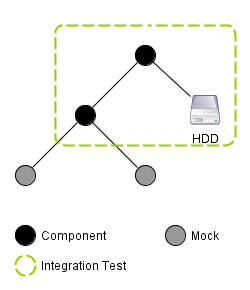
A more sophisticated approach to testing are integration tests which challenge a part or sub-system of an application made up of several units in order to determine whether these units properly cooperate. In contrast to unit tests, integration tests may include system resources and may also determine the test’s outcome by checking the state of these resources. This larger scope and the fact that the tested functionality is typically made up of several actions, leads to integration tests taking a multitude of the time taken by unit tests. Figure 2 schematically illustrates an integration test’s view on an exemplary system.

Schematic of an integration test in an exemplary system
Figure 2: Schematic of an integration test in an exemplary system

Acceptance Tests

The by far most involved technique to test the behavior of an application is the utilization of acceptance tests. While the other approaches challenge only parts of an application, acceptance tests are meant to challenge the application as a whole from a user’s point of view. This includes using system resources, as well as to control the application and verify its proper function as a user would: Through its (G)UI and without knowing anything about the internals of the software.

Schematic of an acceptance test in an exemplary system
Figure 3: Schematic of an acceptance test in an exemplary system

Conclusion

While some developers only distinguish between unit tests and other tests, defining the latter ones more clearly proved very useful when creating, using and explaining them to other developers and customers. Yet, these definitions are not carved in stone and certainly need to be refined over time. Thus, I would like to get to know your opinion on these definitions. Do you agree or do you have a completely different way of distinguishing between test approaches? How many kinds of tests do you distinguish? And why do you do so?

Prepare for the unexpected

In most larger projects there are many details which cannot be foreseen by the development team. Specifications turn out to be wrong, incomplete or not precise enough for your implementation to work without further adjustments. New features have to work with production data that may not be available in your development or testing environment.

The result I often observed is that everything works fine in your environment including great automated tests but fails nevertheless when deployed to production systems. Sometimes it is minor differences in the operating system version or configuration, the locale for example, may cause your software to fail. Another common problem is  real production data containing unexpected characters, inconsistencies in the data (sometimes due to bugs) or its sheer size.

What can we do to better prepare for unexpected issues after deployment?

The thing is to expect such issues and to implement certain countermeasures to better cope with them. This may conflict with the KISS principle but usually is worth a bit of added complexity. I want to provide some advice which proved useful for us in the past and may help you in the future too:

  1. Provide good, detailed and persistent debug output for certain features: Once we added a complex rule system which operated on existing domain objects. To check every possible combination of domain object states would have been a ton of work, so we wrote tests for the common cases and difficult cases we could think of. Since the correctness of the functionality was not critical we decided to rather display slightly incorrect information instead of failing and thus breaking the feature for the user. We did however provide extensive and detailed logs whenever our rule system detected a problem.
  2. Make certain parts of your communication interface to third party systems configurable: Often your system communicates to different kinds of users and other systems. Common examples are import/export functionality, web service APIs or text protocols. Even if most of the time details like date and number formats, data separators, line endings, character encoding and so forth are specified it often proves valuable to make them configurable. Many times the specification changes or is incorrect, some communication partner implements the protocol slightly different or a format deviates from your assumption breaking your application. It is great if you can change that with a smile in front of your client and make the whole thing work in minutes instead of walking home frustrated to fix the issues.

The above does not mean building applications with ultimate flexibility and configurability and ignoring automated tests or realistic test environments. It just means that there are typical aspects of an application where you can prepare for otherwise unexpected deviations of theory and praxis.

Summary of the Schneide Dev Brunch at 2011-07-17

A summary of our Dev Brunch at Sunday 2011-07-17. You’ll read about conferences, the GRASP principles and some cool projects to know about, mostly.

Last Sunday, the 17th July of 2011, we held another Dev Brunch at our company.

A Dev Brunch is an event that brings three main ingredients together: developers, food and software industry related topics. Given enough time (there is never enough time!), we chat, eat, learn and laugh the whole evening through. Most of the stories and chitchat that is told cannot be summarized and has little value outside its context. But most participants bring a little topic alongside their food bag, something of interest they can talk like 10 minutes about. This blog post summarizes at least the official topics and gives links to additional resources.

Conference review of the Java Forum Stuttgart 2011

The Java Forum Stuttgart is an annual conference held by the Java User Group Stuttgart. It’s the biggest regional Java event and always worth a visit (as long as you understand the german language). This year, the talks stagnated a bit around topics that are mostly well-known.

The best talk was given by Michael Wiedeking from MATHEMA Software GmbH in Erlangen. The talk titled “The next big (Java) thing”, but mostly addressed the history and current state of Java in an entertaining and thought-provoking way. The premise was that you have to know the past and present to anticipate the future. The slides don’t represent the talk well enough, but here’s a link anyway.

Another session introduced the PatternTesting toolkit, a collection of helper classes and useful features that enrich the development of unit testing. Alongside the other spice you can add to unit tests, this project might be worth a look. My favorite was the @Broken annotation that ignores a test case until a given date. It’s like an @Ignore with a best-before date.

There were the usual introductory talks, for example about CouchDB and git/Egit. They were well-executed, but lacked a certain thrill if you heard about the projects before.

As a personal summary, the Java world lacks the “next big thing” a bit.Two buzz products for the next year might be Eclipse Jubula (for UI testing) and Griffon (for desktop application development).

Conference review of the Karlsruhe Entwicklertag (developer day) 2011

The Karlsruhe Entwicklertag is another annual conference, spanning several days and presenting top-notch talks and sessions. It’s the first address for software developers in Karlsruhe that want to stay up to date with current topics and products.

Some topics were presented nearly identically to the Java Forum Stuttgart (but half a year earlier if that matters), while other tracks (like the Pecha Kucha talks) can only be found here.

The buzz product for the next year might be Gerrit (for code review) and Eclipse Jubula again (for UI testing).

As a personal summary, even this conference lacked a certain drive towards real new “big picture” topics. But maybe, that’s just allright given all the hype of the last years.

The GRASP principles

This topic contained hands-on software development knowledge about the nine principles named “GRASP” or General Responsibility Assignment Software Patterns/Principles. There is nothing really new about the GRASP principles, they will only give you common names for otherwise mostly unnamed best practices or fundamental design paradigms and patterns.

We even went through some educational slides that summarize the principles. The most discussion arose about the name “Pure Fabrication” for classes without a relation to the problem domain.

If you are an average experienced software developer, spend a few minutes and scan the GRASP principles so you can combine the name with the specific content.

First-hand experiences of combining work and children

We are well within the best age to raise children. So this topic gets a lot attention, specifically the actual tipps to survive the first two years with kids and how to interact with the different administrative bodies. Germany is a welfare state, but nobody claimed that welfare should be easy or logical. We’ve learned a lot about different reference dates and unusual time partitioning.

Another insight was that working less than 40 percent isn’t really worth the hassle. You are mostly inefficient and aware of it.

That’s all, folks

As always, we shared a lot more information and anecdotes. If you want to participate at one of our Dev Brunches, let us know. We are open for guests and really interested in your topics.

Spice up your unit testing

Writing unit tests shouldn’t be a chore. This article presents six tools (with alternatives) that help to improve your developer experience.

Writing unit tests is an activity every reasonable developer does frequently. While it certainly is a useful thing to do, it shouldn’t be a chore. To help you with the process of creating, running and evaluating unit tests, there are numerous tools and add-ons for every programming language around. This article focusses on improving the developer experience (the counterpart of “user experience”) for Java, JUnit and the Eclipse IDE. I will introduce you to the toolset we are using, which might not be the complete range of tools available.

Creating unit tests

  • MoreUnit – This plugin for Eclipse helps you to organize your unit test classes by maintaining a connection between the test and the production class. This way you’ll always see which classes and methods still lack a corresponding test. You can take shortcuts in the navigation by jumping directly into the test class and back. And if you move one file, MoreUnit will move the other one alongside. It’s a swiss army knife for unit test writers and highly recommended.
  • EqualsVerifier – If you ever wrote a custom implementation of the equals()/hashcode() method pair, you’ll know that it’s not a triviality. What’s even more intimidating is that you probably got it wrong or at least not fully correct. The effects of a flawed equals() method aren’t easily determinable, so this is a uncomfortable situation. Luckily, there is a specialized tool to help you with this task exactly. The EqualsVerifier library tests your custom implementation against all aspects of the art of writing an equals() method with just one line of code.
  • Mockito (and EasyMock) – When dealing with dependencies of classes under test, mock objects can come in handy. But writing them by hand is tedious, boring and error-prone. This is where mock frameworks can help by reducing the setup and verification of a mock object to just a few lines of code. EasyMock is the older of the two projects, but it manages to stay up-to-date by introducing new features and syntax with every release. Mockito has a very elegant and readable syntax and provides a rich feature set. There are other mock frameworks available, too.

Running unit tests

  • InfiniTest (and JUnit Max) – Normally, you have to run the unit tests in your IDE by manually clicking the “run” button or hitting some obscure keyboard shortcut. These two continuous testing tools will run your tests while you still type. This will shorten your test feedback loop to nearly milliseconds after each change. Your safety net was never closer. InfiniTest and JUnit Max are both Eclipse plugins, but the latter costs a small annual fee. It’s written by Kent Beck himself, though.

Evaluating unit tests

  • EclEmma (and Cobertura) – If you want to know about the scope or “coverage” of your tests, you should consult a code coverage tool. Cobertura produces really nice HTML reports for all your statistical needs. EclEmma is an Eclipse plugin that integrates the code coverage tool Emma with Eclipse in the finest way possible. Simply run “coverage as” instead of “run as” and you are done. All the hassle with instrumenting your classes and setting up the classpath in the right order (major hurdles when using cobertura) is dealt with behind the scenes.
  • Jester (and Jumble) – The question “who tests my tests?” is totally legit. And it has an answer: Every mutation testing tool around. For Java and JUnit, there are at least two that do their job properly: Jester works on the source code while Jumble uses the bytecode. Mutation testing injects little changes into your production code to test if your tests catch them. This is a different approach on test coverage that can detect code that is executed but not pinned down by an assertion. While Jester has a great success story to tell, Jumble tends to produce similar results as cobertura’s condition coverage report, at least in my experience.

Summary

As you can see, there is a wide range of tools available to improve your efforts to write well-tested software. This list is in no way comprehensive. If you know about a tool that should be mentioned, we would love to read your comment.

Test Framework Classpath Forgery

A lesson learnt when using HttpUnit with all its dependencies. Xerces changed the system behaviour, but with the test classpath only.

Recently, I had an interesting problem using a testing framework with third-party dependencies. When writing integration tests with JUnit against a very small embedded web application (think of the web based management console for your printer as an example), I chose to use HttpUnit as an auxiliary framework to reduce and clarify the test code.

HttpUnit for testing web applications

If you need to test a classic request/response web application, HttpUnit serves its purpose very well. You can write test code concise and to the point. Downloading and integrating HttpUnit is straight-forward, you can immediately get it to work. Here is an example of a test that asserts that there is at least one link on the web application’s main page:

WebConversation web = new WebConversation();
WebResponse response = web.getResponse(fromServer(port));
WebLink[] allLinks = response.getLinks();
assertTrue("No links found on main webpage", ArrayUtil.hasContent(allLinks));

Test failures appear

After this test was written and included into the build, the continuous integration suddenly reported test failures – in the unit tests. I didn’t change any test there and had no need to change the production code, either. So what was causing the test to fail?

The failing unit test class was very old, ensuring the persistence of some data structure to XML and back. The test that actually failed took care of the XML parser behaviour when an empty XML file was read:

public void testReadingEmptyXML() throws IOException {
    try {
        new XMLQueryPersister(new StringReader(XMLQueryPersisterTest.EMPTY_XML), null).loadQueries();
        Assert.fail();
    } catch (ParseException e) {
        Assert.assertEquals("Error on line 1: Premature end of file.", e.getMessage());
    }
}

The assertion that checks the exception message failed, stating that the actual message was now “Error on line -1: Premature end of file.”

Hunting the bug

How can the inclusion of a new integration test have such an impact on the rest of the system? Thanks to continuous integration, the cause for the behaviour change could only lie in the most recent commit. A quick investigation revealed the culprit:

HttpUnit has a third-party dependency on the Xerces xml parser (or another equivalent org.xml.sax parser), see their FAQ for details. When I included the libraries, I accidentally changed the default xml parser for the whole system to Xerces in the version that HttpUnit delivers. This altered the handling of the “premature end of file” case to the new behaviour, causing the test to fail. As these libraries are only included in the classpath when tests are run, the change only happens in the test environment, not in production.

Test classpath versus production classpath

The real issue here isn’t the change in behaviour, this can be taken into account if you have a good test coverage. The issue is different classpaths for test and production environments. If you don’t want to deploy all your test scope libraries (thus making the production classpath similar to the test classpath), you should pay extra attention to what you include in your test classpath. It might alter your system, so that you don’t test the real behaviour anymore.

Resolving the issue

In my case, it was sufficient to remove the Xerces jar from the classpath again. A compliant org.xml.sax parser is already included in the Java core API. It’s the parser that already got used in production and should be used for the tests, too.

Update/Correction: After removing Xerces, HttpUnit stopped working correctly. The quick fix now is to include Xerces in the production classpath and deal with the behaviour changes. I will investigate this issue further and append the outcome as a comment to this blog entry. Update 2: Issue resolved, see comment section for the solution.

This taught me a lesson to always be aware of the dependencies, even if it’s “only” the test scope dependencies.

Summary

Including the Xerces xml parser as a dependency for a testing framework (HttpUnit) changed the behaviour of my system under test, albeit for the tests only. The issue was easily resolved by removing it again, but now I know that testing frameworks have side effects, too.

An Oracle story: Null, empty or what?

One big argument for relational databases is SQL which as a standard minimizes the effort needed to switch your app between different DBMSes. This comes particularily handy when using in-memory databases (like HSQL or H2) for development and a “big” one (like PostgreSQL, MySQL, DB2, MS SqlServer or Oracle) in production. The pity is that there are subtle differences with regard to the interpretation of the SQL-standard when it comes to databases from different vendors.

Oracle is particularily picky and offers quite some interesting behaviours: Most databases (all that I know well) treat null and empty as different values when it comes to strings. So it is perfectly valid to store an empty string in a not-null column and retrieving the string from the column yields an empty string. Not so with Oracle 10g! Inserting null and retrieving the value yields unsurprisingly null, even using Oracle. Inserting an empty string and retrieving the value leaves you with null, too! Oracle does not differentiate between empty strings and null values like a Java developer would expect. In our environment this has led to surprised developers and locally unreproducible bug which clearly exist in production a couple of times.

[rant]Oracle has great features for big installations and enterprises that can afford the support, maintenance and hardware of a serious Oracle DBMS installation. But IMHO it is a shame that such a big player in the market does not really care about the shortcomings of their flagship product and standards in general (Oracle 10g only supports SQL92 entry level!). Oracle, please fix such issues and help us developers to get rid of special casing for your database product![/rant]

The lesson to be learnt here is that you need a clone of the production database for your integration tests or acceptance tests to be really effective. Quite some bugs have slipped into production because of subtle differences in behaviour of our inhouse databases and the ones in production at the customer site.

FindBugs-driven bughunting in legacy projects

I have been working on a >100k lines legacy project for a while now. We have to juggle customer requests, bug fixes and refactoring so it is hard to improve the quality and employ new techniques or tools while keeping the software running and the clients happy. Initially there were no unit tests and most of the code had a gigantic cyclomatic complexity. Over the course of time we managed to put the system under continuous integration, employed quite some unit tests and analyzed code “hotspots” and our progress with crap4j.

Normally we get bug reports from our userbase or have to test manually to find bugs. A few weeks ago I tried a new approach to bughunting in legacy projects using FindBugs. Many of you surely know this useful tool, so I just want to describe my experiences in that project using FindBugs. Many of the bugs may be in parts of the application which are seldom used or only appear in hard to reproduce circumstances. First a short list of what I encountered and how I dealt with it.

Interesting found bugs in the project

  • There was a calculation using an integer division but returning a double. So the actual computation result was wrong but yet the error would have been hard to catch because people rarely recalculate results of a computer. When writing the test associated to the bugfix I found a StackOverFlowError too!
  • There were quite some null dereferences found, often in contructs like
     if (s == null && s.length() == 0)
     

    instead of

    if (s == null || s.length() == 0)
    

    which could be simplified or rewritten anyway. Sometimes there were possibilities for null dereferences on some paths despite of several null checks in the code.

  • Many performance bugs which may or may not have an effect on overall performance of the system like: new String(), new Integer(12), string concatenation across loops, inefficient usage of java.util.Map.keySet() instead of java.util.Map.entrySet() etc.
  • Some dead stores of local variables and statements without effect which could be thrown away or be corrected to do the intended things.

Things you may want to ignore

There are of course some bugs that you may ignore for now because you know that it is a common pattern in the team and abuse and thus errors are extremely unlikely. I, for example, opted to ignore some dozens of “may expose internal representation” found bugs regarding arrays in interfaces or accessibly via getters because it is a common pattern on the team not to tamper existing arrays as they are seen as immutable by the team members. It would have taken too much time to fix all those without that much of a benefit.

You may opt to ignore the performance bugs too but they are usually easy to fix.

Tips

  • If you have many foundbugs, fix the easy ones to be able to see the important ones more easily.
  • Ignore certain bug categories for now, fix them later, when you stumble upon them.
  • Concentrate on the ones that lead to wrong behaviour and crashes of your application.
  • Try to reproduce the problem with unit test and then fix the code whenever feasible! Tests are great to expose the bug and fix it without unwanted regressions!
  • Many bugs appear in places which need refactoring anyway so here is your chance to catch several flies at once.

Conclusion

With FindBugs you can find common programming errors sprinkled across the whole application in places where you probably would not have looked for years. It can help you to understand some common patterns of your team members and help you all to improve your code quality. Sometimes it even finds some hard to spot errors like the integer computation or null dereferences on certain paths. This is even more true in entangled legacy projects without proper test coverage.

A blind spot of Continuous Integration

Imagine you haven’t changed a continuously integrated project for months when suddenly a unit test breaks. Here’s why CI has a blind spot with flawed tests.

In the early days of April 2008, we updated our hudson continuous integration (CI) server to a new version. This was no unusual action, as there was a new version every day back then, bringing new features in a rapid rate. What was unusual after the upgrade was that one of the surveilled projects failed to build all of a sudden.

Sudden (test) failure without a change

The build was started manually, without a code change. The project itself was inactive back then, meaning that no changes were made for months. And suddenly, a unit test broke. The test was in the project for two whole years without ever going off. What happened?

Good unit tests

There are rules for good unit tests. A basic set are the A-TRIP rules formulated in the excellent beginner’s book “Pragmatic Unit Testing” by Andy Hunt and Dave Thomas. The failed test clearly disobeyed the “repeatable” rule (the R in A-TRIP): It didn’t result in the same result as before while the code under test didn’t change.

Write repeatable tests or your CI will be blind (partially)

The cause of the failed test was putting the clocks back because the daylight-saving time part of the year began. The unit test secured some date calculations by taking the current date and comparing it to future and past dates that got calculated. The calculation went wrong when the daylight-saving mode changes in the calculated period, which was a bug. Repeatability of the unit test was lost when “the current date” entered the code – whether on the unit test or productive code side.

Two years of blindness

How could this bug survive two years without being noticed? The project was under CI surveillance since the beginning, the unit test to detect the bug was present along with the bugged code. The answer is: We never programmed for this project around the weeks of the year when the clock is adjusted and the bug occurs. This was a coincidence influenced by the customer’s schedule. So every time CI (or we) ran the unit test, it passed. Until that day right after putting the clocks back.

How to avoid this blind spot

There are two things you can do to avoid this scenario:

  • Always inject a fixed “the current date” into your code when dealing with date calculations. Only use absolute dates in your unit tests. Time isn’t a healer for your tests, it’s a beast to be tamed.
  • Set up a nightly build for your project that runs once a day even when no changes have been made. It would have caught this bug one and a half year earlier.

To sum it up:

CI only spots bugs when they move (aka the code is changed). Nightly builds provide a (fuzzy) security layer against non-repeatable unit tests. And unit tests with flaws provide only delusory security.

Additional background information

After fully understanding the circumstances, we were curious why the customer didn’t notice the bug and asked him about it. The answer was delightful: “Our computers don’t adjust their clocks. Daylight-saving time only causes trouble.” What a wise decision!

For a good comparison of CI vs. Nightly Builds see this blog entry.

Enable Capture/Replay for Selenium Flex

One of the missing features of the SeleniumFlexAPI was capture/replay. So I looked into different ways to enable it:

  • Approach 1: Dispatch a DOM event and listen for it in ide-extensions.js

    Problem: Where do I include the name/id of the Flex control?
  • Approach 2: Custom events

    Problem: How do I listen to them in ide-extensions.js?

Solution: Additions to the Selenium IDE code: window.record

The solution is to add a new method to the Selenium IDE code: window.record which delegates to recorder.record. So that the Flex code can call this method directly through the ExternalInterface. The clear advantage of this technique is that there is no code pollution in your production code. But you have to change the SeleniumIDE code. There is an issue in the SeleniumIDE Jira which describes the additions, so go and vote for it!
Addtional code is also needed in the SeleniumFlexAPI.as in the applicationCompleteHandler:

private function applicationCompleteHandler(event:FlexEvent):void {
  ...
  registerListeners(appTreeParser.thisApp.parent);
  ...
}
private function registerListeners(subject:*):void {
  subject.addEventListener(MouseEvent.CLICK, recordClick);
  subject.addEventListener(MouseEvent.DOUBLE_CLICK, recordDoubleClick);
  subject.addEventListener(Event.ADDED, childAdded);
  addListenerRecursive(subject);
}

Bubbling events like MouseEvent.CLICK can be added here but for the non-bubbling ones you have to recursively walk the displayobject hierarchy:

public function addListenerRecursive(root:*):void {
  for(var i:int = 0; i < root.numChildren; i++) {
    try {
      var child:Object = root.getChildAt(i);
      if (isMenuBar(child)) {
        child.removeEventListener(MenuEvent.ITEM_CLICK, recordMenuItemClick);
        child.addEventListener(MenuEvent.ITEM_CLICK, recordMenuItemClick);
      }
      if (isTextControl(child)) {
        child.removeEventListener(Event.CHANGE, recordTextChange);
        child.addEventListener(Event.CHANGE, recordTextChange);
      }
      if (isDataGrid(child)) {
        child.removeEventListener(DataGridEvent.ITEM_FOCUS_IN, recordItemClick);
        child.addEventListener(DataGridEvent.ITEM_FOCUS_IN, recordItemClick);
      }
      addListenerRecursive(child);
    } catch(e:Error) {}
  }
}

In the event handling functions you just call the record function with the appropiate SeleniumFlex command:

private function recordClick(event:MouseEvent):void {
  ExternalInterface.call("record", "flexClick", "name=" + event.target.name, "");
}

Since Flex Sprites have no ids I use the name here for identifying the clicked target.
Another pitfall is when components are added dynamically (like when a Date opens, it adds a calendar view):

private function childAdded(event:Event):void {
  if (isDate(event.target.parent.parent)) {
    event.target.parent.parent.removeEventListener(CalendarLayoutChangeEvent.CHANGE, recordDate);
    event.target.parent.parent.addEventListener(CalendarLayoutChangeEvent.CHANGE, recordDate);
  }
}

Conclusion

So finally capture/replay in SeleniumFlex becomes a reality! Nonetheless there is some work to do to support the different kinds of flex controls and Selenium commands.