Poor man’s TimeMachine

Some weeks ago I wrote about a easy and cheap backup solution for windows users. But what about Mac and Linux users? The Mac guys have a similar solution right at hand: TimeMachine. It is quite easy to backup the most important stuff regularily onto an external drive while working. The configuration and hardware investment is minimal.

Now what if I happen to use Linux as an operating system? I looked for solutions similar to the Seagate Replica or TimeMachine expecting less comfort. My first try was rsnapshot because a friend of mine recommended it. While it works nicely and has quite some features it requires manual editing of text configuration files. Nothing, that a casual user would like and even I was not quite satisfied. A little more research on the web brought me to Back in time.

Back in time was exactly what I wanted: simple install from the Ubuntu package repository, a GNOME gui (KDE version is available too) to configure and maintain everything and unobstrusive background operation. You can configure it even to run with root priviledges to backup files the logged in user cannot access. So you can keep system configuration files etc. backed up, too.

One hint for ubuntu users: You may need to install the “menu”-package to be able to use the root version.

Conclusion

With these backup solutions available for all major operating systems one can achive basic data security at virtually no cost. There is no compelling reason to risk many hours of work to a drive failure or a user delete without undelete possibilies (think rm -rf *). Of course one can improve that backup strategy further, but for me this is a baseline nobody should miss.

FindBugs-driven bughunting in legacy projects

I have been working on a >100k lines legacy project for a while now. We have to juggle customer requests, bug fixes and refactoring so it is hard to improve the quality and employ new techniques or tools while keeping the software running and the clients happy. Initially there were no unit tests and most of the code had a gigantic cyclomatic complexity. Over the course of time we managed to put the system under continuous integration, employed quite some unit tests and analyzed code “hotspots” and our progress with crap4j.

Normally we get bug reports from our userbase or have to test manually to find bugs. A few weeks ago I tried a new approach to bughunting in legacy projects using FindBugs. Many of you surely know this useful tool, so I just want to describe my experiences in that project using FindBugs. Many of the bugs may be in parts of the application which are seldom used or only appear in hard to reproduce circumstances. First a short list of what I encountered and how I dealt with it.

Interesting found bugs in the project

  • There was a calculation using an integer division but returning a double. So the actual computation result was wrong but yet the error would have been hard to catch because people rarely recalculate results of a computer. When writing the test associated to the bugfix I found a StackOverFlowError too!
  • There were quite some null dereferences found, often in contructs like
     if (s == null && s.length() == 0)
     

    instead of

    if (s == null || s.length() == 0)
    

    which could be simplified or rewritten anyway. Sometimes there were possibilities for null dereferences on some paths despite of several null checks in the code.

  • Many performance bugs which may or may not have an effect on overall performance of the system like: new String(), new Integer(12), string concatenation across loops, inefficient usage of java.util.Map.keySet() instead of java.util.Map.entrySet() etc.
  • Some dead stores of local variables and statements without effect which could be thrown away or be corrected to do the intended things.

Things you may want to ignore

There are of course some bugs that you may ignore for now because you know that it is a common pattern in the team and abuse and thus errors are extremely unlikely. I, for example, opted to ignore some dozens of “may expose internal representation” found bugs regarding arrays in interfaces or accessibly via getters because it is a common pattern on the team not to tamper existing arrays as they are seen as immutable by the team members. It would have taken too much time to fix all those without that much of a benefit.

You may opt to ignore the performance bugs too but they are usually easy to fix.

Tips

  • If you have many foundbugs, fix the easy ones to be able to see the important ones more easily.
  • Ignore certain bug categories for now, fix them later, when you stumble upon them.
  • Concentrate on the ones that lead to wrong behaviour and crashes of your application.
  • Try to reproduce the problem with unit test and then fix the code whenever feasible! Tests are great to expose the bug and fix it without unwanted regressions!
  • Many bugs appear in places which need refactoring anyway so here is your chance to catch several flies at once.

Conclusion

With FindBugs you can find common programming errors sprinkled across the whole application in places where you probably would not have looked for years. It can help you to understand some common patterns of your team members and help you all to improve your code quality. Sometimes it even finds some hard to spot errors like the integer computation or null dereferences on certain paths. This is even more true in entangled legacy projects without proper test coverage.

Blog harvest, December 2009

Some noteworthy blog articles, harvested for early December 2009

Today’s blog harvest spans a lot of topics that i’ve found noteworthy in the last weeks. As an added bonus, there’s a watchworthy video link at the end. I hope you enjoy reading the articles as much as I did. If you have thoughts one the articles, feel free to comment them here.

This was the article side of this harvesting. Let’s have some fun by watching a video and relieving our conscience:

  • Living with 1000 Open Source Projects – It might get crowded on your disk! Nic Williams shares his secrets of mastering open source heavy lifting. The video runs a short half hour and has its funniest minute between 11:20 and 12:20. Brilliant!
  • The Bad Code Offset – Guilty of writing bad code? Well, remember the last entry of the list above? You’ve probably created a new job. If not, you can find absolution by buying some “Bad Code Offsets”. Think of it as the Carbon offset of the software industry.

SSD and (One)-touch Backup solution

As explained a while ago we (developers) get an annual creativity budget. This time I decided to improve my notebook working experience and reliability by introducing two new items:

  1. A fast SSD replacing the conventional relatively slow 2,5″ hard disk
  2. An one-touch backup solution which in fact is a no touch solution

The SSD is a X25-m from Intel with 160Gb and the backup solution is a Seagate Replica with 500Gb disk space. Although there are recurring problems with the firmware and toolbox software the Intel SSD seemed to be the best choice price/performance/reliability wise. To be on a safer side data wise we paired it with the backup solution. Let me first explain the migration which went really smooth and was the first stress test for the backup system. The steps were the following:

  1. Backup the existing system with the replica which does not require any user interaction after the client backup software is automatically installed
  2. replace the original harddisk with the SSD
  3. reboot the system with the recovery CD of the replica solution and restore the backed up system
  4. reboot the recovered system from the SSD

The whole process went really smooth and only took some hours of data copying. There were no hickups whatsoever. After booting from the SSD my system was exactly like before, so the replica already proved that it really works even in the worst case of a complete drive loss.

The performance of the whole system is noticable better especially at system and application startup as you would expect.

Conclusion

The backup solution is so damn easy to use that I would recommend it to all people running Windows and caring about the data on their system. To keep your backup up to date just plug the external hard drive in a free USB port and continue working. You don’t have to do any configuration and other hassles which often end any effort of deploying a working backup solution. This is even more true for private people who do not have the knowledge to fiddle with system details. So go for a “one touch backup” if you do not have some working solution in use already!

A modern SSD can really improve your working experience especially on notebooks where hard disk performance is far worse than in an workstation environment. So older hardware can get new life and make your life easier and more productive.

Blog harvest, October II

Some interesting blog articles, harvested for late October 2009

harvest64A great way to stay up to date with current musings and hypes of our industry is to follow other people’s blogs. We do this regularly – everybody scans his RSS feeds and roams the internet. But to have a pool of shared knowledge, we pick our favorite recent blog articles and usually write an email titled “blog harvest” to the rest of the company.

Then, the idea came up to replace the internal email by a public blog post. So here it is, the first entry of a new category called “blog harvests”. You’ll read more harvests in the future. They will be categorized and tagged appropriate and have the harvest icon nearby.

Second Blog harvest for October 2009

There are four main blog entries I want to share:

  • 8 Signs your code sucks – Let’s assume we all read Martin Fowler’s classic “Refactoring” book, then these eight signs are a mere starter. But as the follow-up post indicates, it got quite a few people started and upset for the “comments are code smells” line. Well, we heartfully agree with the premise that comments are clutter and code should be the comment. /* TODO: Add a joke using comments here */
  • ORMs are a thing of the past – Another opinion that might get in the way of hibernate fanboys. We’ve had our share of hibernate “experiences”. It’s a useful tool if you know how to use it – and when not to. Replies followed instantly, here are two noteworthy ones by Scot Mcphee and by Jens Schauder.
  • The Case for Clojure – Clojure is functional programming on the Java VM (think LISP). Stay tuned for our own book review on this topic. You can argue that Clojure isn’t pure, though.
  • Bad Programmers Create Jobs – As is already is a controversy harvesting, lets add some more, written by Mohammad Azam. Side note: Half of our work was initially created by “bad” programmers, so I think Mohammad hit the nail on the head. And remember that you’ve produced legacy code today.

Then there is a bit of (future) knowledge you shouldn’t miss:

That’s it for now. My harvest format has changed for the blog, i’ll evolve it further in the next months, Thanks for your attention, stay tuned.

Always be aware of the charset encoding hell

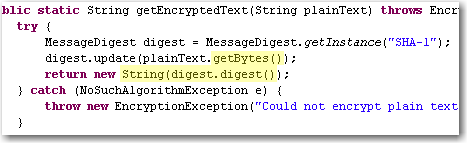
Most developers already struggled with textual data from some third party system and getting garbage special characters and the like because of wrong character encodings.  Some days ago we encountered an obscure problem when it was possible to login into one of our apps from the computer with the password database running but not from other machines using the same db.  After diving into the problem we found out that they SHA-1 hashes generated from our app were slightly different. Looking at the code revealed that platform encoding was used and that lead to different results:platform-encoding

The apps were running on Windows XP and Windows 2k3 Server respectively and you would expect that it would not make much of a difference but in fact it did!

Lesson:

Always specify the encoding explicitly, when exchanging character data with any other system. Here are some examples:

  • String.getBytes(“utf-8”), new Printwriter(file, “ascii”) in Java
  • HTML-Forms with attribute accept-charset="ISO-8859-1"
  • In XML headers <?xml version="1.0" encoding="ISO-8859-15"?>
  • In your Database and/or JDBC driver
  • In your file format documentation
  • In LaTeX documents
  • everywhere where you can provide that info easily (e.g. as a comment in a config file)

Problems with character encodings seem to appear every once in a while either as end user, when your umlauts get garbled or as a programmer that has to deal with third party input like web forms or text files.

The text file rant

After stumbling over an encoding problem *again* I thought a bit about the whole issue and some of my thought manifested in this rant about text files. I do not want to blame our computer science predecessors for inventing and using restricted charsets like ASCII or iso8859. Nobody has forseen the rapid development of computers and their worldwide adoption and use in everyday life and thus need for an extensible charset (think of the addition of new symbols like the €), let aside performance and memory considerations. The problem I see with text files is that there is no standard way to describe the used encoding. Most text files just leave it to the user to guess what the encoding might be whereas almost all binary file formats feature some kind of defined header with metadata about the content, e.g. bit depth and compression method in image files. For text files you usually have to use heuristical tools which work  more or less depending on the input.

A standardized header for text files right from the start would have helped to indicate the encoding and possibly language or encoding version information of the text and many problems we have today would not exist. The encoding attribute in the XML header or the byte order mark in UTF-8 are workarounds for the fundamental problem of a missing text file header.

Evil operator overloading of the day

The other day we encountered a strange stack overflow when cout-ing an instance of a custom class. The stream output operator << was overloaded for the class to get a nice output, but since the class had only two std::string attributes the implementation was very simple:

using namespace std;

class MyClass
{
   public:
   ...
   private:
      string stringA_;
      string stringB_;

   friend ostream& operator << (ostream& out, const MyClass& myClass);
};

ostream& operator << (ostream& out, const MyClass& myClass)
{
   return out << "MyClass (A: " << myClass.stringA_ 
              <<", B: " << myClass.stringB_ << ")"  << std::endl;
}

Because the debugger pointed us to a completely separate code part, our first thought was that maybe some old libraries had been accidently linked or some memory got corrupted somehow. Unfortunately, all efforts in that direction lead to nothing.

That was the time when we noticed that using old-style printf instead of std::cout did work just fine. Hm..

So back to that completely separate code part. Is it really so separate? And what does it do anyway?

We looked closer and after a few minutes we discovered the following code parts. Just look a little while before you read on, it’s not that difficult:

// some .h file somewhere in the code base that somehow got included where our stack overflow occurred:

...
typedef std::string MySpecialName;
...
ostream& operator << (ostream& out, const MySpecialName& name);

// and in some .cpp file nearby

...
ostream& operator << (ostream& out, const MySpecialName& name)
{
   out << "MySpecialName: " << name  << std::endl;
}
...

Got it? Yes, right! That overloaded out-stream operator << for MySpecialName together with that innocent looking typedef above put your program right into death by segmentation fault.  Overloading the out-stream operator for a given type can be a good idea – as long as that type is not a typedef of std::string. The code above not only leads to the operator << recursively calling itself but also sucks every other part of the code into its black hole which happens to include the .h file and wants to << a std::string variable.

You just have to love C++…

How much boost does a C++ newbie need?

The other day, I talked to a C++ developer, who is relatively new in the language, about the C++ training they just had at his company. The training topics were already somewhat advanced and contained e.g. STL containers and their peculiarities, STL algorithms and some boost stuff like binders and smart pointers. That got me thinking about how much of STL and boost does a C++ developer just has to know in order to survive their C++ projects.

There is also another angle to this. There are certain corners of the C++ language, e.g. template metaprogramming, which are just hard to get, even for more experienced developers. And because of that, in my opinion, they have no place in a standard industry C++ project. But where do you draw the line? With template meta-programming it is obvious that it probably will never be in every day usage by Joe Developer. But what about e.g. boost’s multi-index container or their functional programming stuff? One could say that it depends on the skills of team whether more advanced stuff can be used or not. But suppose your team consist largely of C++ beginners and does not have much experience in the language, would you want to pass on using Boost.Spirit when you had to do some serious parsing? Or would you want to use error codes instead of decent exceptions, because they add a lot more potentially “invisible” code paths? Probably not, but those are certainly no easy decisions.

One of the problems with STL and boost for a C++ beginner can be illustrated with the following easy problem: How do you convert an int into a std::string and back? Having already internalized the stream classes the beginner might come up with something like this:

 int i = 5;
 std::ostringstream out;
 out << i;
 std::string i_string = out.str();  

 int j=0;
 std::istringstream in(i_string);
 in >> j;
 assert(i == j);

But if he just had learned a little boost he would know that, in fact, it is as easy as this:

 int i=5;
 std::string i_string = boost::lexical_cast<std::string>(i);

 int j = boost::lexical_cast<int>(i_string);

So you just have to know some basic boost stuff in order to write fairly decent C++ code. Besides boost::lexical_cast, which is part of the Boost Conversion Library, here is my personal list of mandatory boost knowledge:

Boost.Assign: Why still bother with std::map::push_back and the likes, if there is a much easier and concise syntax to initialize containers?

Boost.Bind (If you use functional programming): No one should be forced to wade through the mud of STL binders any longer. Boost::bind is just so much easier.

Boost.Foreach: Every for-loop becomes a code-smell after your first use of BOOST_FOREACH.

Boost.Member Function: see Boost.Bind

Boost.Smart Pointers: No comment is needed on that one.

As you can see, these are only the most basic libraries. Other extremely useful things for day-to-day programming are e.g. Boost.FileSystem, Boost.DateTime, Boost.Exceptions, Boost.Format, Boost.Unordered and Boost.Utilities.

Of course, you don’t have to memorize every part of the boost libraries, but boost.org should in any case be the first address to look for a solution to your daily  C++ challenges.

Don’t trust micro versions

Normally you would think, that upgrading a third party dependency where its micro version (after the second dot, like x in 2.3.x) changes should make your software work (even) better and not break it. Sadly enough it can easily happen. Some time ago we stumbled over a subtle change in the JNDI implementation of the Jetty webserver and servlet container: In version 6.1.11 you specified (or at least could specify) JNDI resources in jetty-env.xml with URLs like jdbc/myDatabase. After the update to 6.1.12 the specified resource could not be found anymore. Digging through code changelogs and the like provided a solution that finally worked with 6.1.12: java:comp/env/jdbc/myDatabase. The bad thing is that the latter does not work with 6.1.11 so that our configuration became micro-version-dependent on Jetty.

It seems that a new feature around JETTY-725 in the update from 6.1.11 to 6.1.12 broke our software.

Conclusion

Always make sure that your dependencies are fixed for your software releases and test your software everytime when upgrading a dependency. Do not trust some automatic dependency update system or the version numbers of a project. In the end they are just numbers and should indicate the impact of the changes but you never can be sure the changes do not break something for you.

Dancing the TANGO

One of our customers is an administration department at a research center, which is responsible to operate and maintain a synchrotron light source. They are in charge of a whole bunch of “normal” IT infrastructure as well as a wide variety of electronic devices which are used in all kinds of experiment settings. These can be cameras, electronic motors, detectors of all sorts, etc. One of their main day-to-day challenges is to integrate all those devices such that they can be controlled in a uniform way with standard measurement and control tools.

In order to provide a common solution to this task the TANGO platform has been developed in a collaborative effort of some the the main European synchrotron institutes. TANGO is an object-oriented distributed control system in which every device is represented in an abstract way by a so-called Device Server. A device server provides access to a given piece of hardware by exposing its attributes, properties, states, events and supported commands in a uniform way. CORBA is used as middleware which shows that it is still popular in real-time and embedded environments. Device server instances are registered at a central database and can be accessed and controlled using a variety of TANGO tools.

The typical TANGO development process is as follows: Each device comes with some vendor provided driver library and corresponding interface documentation (C interfaces in many cases). Starting with that information, all attributes, states and supported commands are defined using a tool called POGO. The resulting model of the device is then used to generate skeleton code for the device server. Right now, POGO supports C++, Java and Python. Then, the device server skeleton code is completed by accessing the actual device using the driver library.

For example, one of our latest projects was an X-ray detector which is roughly like a CCD camera for X-rays. As such it has read-only TANGO attributes Width and Height which corresponds to the width and height of the CCD chip. Furthermore it has a read-write attribute called ROI (region of interest) which is an array of four integer values (X0, Y0, X1, X2), Exposure Time, an integer value in milliseconds and a variety of other attributes. One obvious TANGO command is Start which tells the camera to start exposure and store resulting images.

So, if you happen to have a synchrotron light source in your garage (or of course any other bunch of hardware that you want to integrate), consider dancing the TANGO.