C++17: The two line visitor explained

If you have ever used an “idiomatic” C++ variant datatype like Boost.Variant or the new C++17 std::variant, you probably wished you could assemble a visitor to dispatch on the type by assembling a couple of lambda expressions like this:

auto my_visitor = visitor{
  [&](int value) { /* ... */ },
  [&](std::string const& value) { /* ... */ },
};

The code in question

While reading through the code for lager I stumbled upon a curious way to to make this happen. And it is just two lines of code! Wow, that is cool.

template<class... Ts> struct visitor: Ts... { using Ts::operator()...; };
template<class... Ts> visitor(Ts...) -> visitor<Ts...>;

A comment in the code indicated that the code was copied from cppreference.com where I quickly found the source on the page for std::visit, albeit with the different name “overloaded”. There were, however, no comments as to how this code worked.

Multiple inheritance to the rescue

Lambda expressions in C++ are just syntactic sugar for callables, pretty much like a struct with an operator(). As such, you can derive from them. which is what the first line does.
It uses variadic templates and multiple inheritance to assemble the types of the lambdas into one type. Without the content in the struct body, an instantiation with our example would be roughly equivalent to this:

struct int_visitor {
  void operator()(int value)
  {/* ... */}
};

struct string_visitor {
  void operator()(std::string const& value)
  {/* ... */}
};

struct visitor : int_visitor, string_visitor {
};

Using all of it

Now this cannot yet be called, as overload resolution (by design) does not work across different types. Hence the using in the structs body. It pulls the operator() implementations into the visitor type where overload resolution can work across all of them.
With it, our hypothetical instantiation becomes:

struct visitor : int_visitor, string_visitor {
  using int_visitor::operator();
  using string_visitor::operator();
};

Now an instance of that type can actually be called with both our types, which is what the interface for, e.g. std::visit demands.

Don’t go without a guide

The second line intruiged me. It looks a bit like a function declaration but that is not what it is. The fact that I had to ask in the (very helpful!) C++ slack made me realize that I did not keep up with the new features in C++17 as much as I would have liked.
This is, in fact, a class template argument deducation (CTAD) guide. It is a new feature in C++17 that allows you do deduce template arguments for a type based on constructor parameters. In a way, it supercedes the Object Generator idiom of old.
The syntax is really quite straight-forward. Given a list of constructor parameter types, resolve to a specific template instance based on those.

Constructing

The last piece of the puzzle is how the visitor gets initialized. The real advantage of using lambdas instead of writing the struct yourself is that you can capture variables from your context. Therefore, you cannot just default-initialize most lambdas – you need to transport its values, its bound context.
In our example, this uses another new C++17 feature: extended aggregate initialization. Aggregate initialization is how you initialized structs way back in C with curly-brackets. Previously, it was forbidden to do this with structs that have a base class. The C++17 extension now lifts this restriction, thus making it possible to initialize this visitor with curly brackets.

Edit 2018/04/16: The people on r/cpp rightfully pointed out that using the “other name” in the code snippet was confusing – so the visitor is now called “visitor”.

Book review: Clean Architecture by Robert C. Martin

A personal review of the book “Clean Architecture” by Robert C. Martin. Spoiler: you might want to read it.

In 2008, a book changed the way software developers around the globe talked (and hopefully) acted about their code. Robert C. Martin’s “Clean Code” was and still is a cornerstone of modern software development. The book itself is remarkably weak in its code examples, but has strong and effective messages on the level of practices and principles. Even today, ten years later, this is the one book that most of my students read and are passionate about. It’s a book that speaks reason to them, albeit with some contortion because of high volume. Robert C. Martin has the tendency to preach 200 percent in order to still get the half-convinced to an acceptable level.

So when a new book from him, called “Clean Architecture”, appeared on the horizon, I was thrilled. Would it be groundbreaking like “Clean Code” or a dud like “The Clean Coder” (sorry, my opinion – this is a personal review, not an academic evaluation)? I’ve read some very good books about software development (like “The Pragmatic Programmer”), fantastic books about programming (“Refactoring” and “Working Effectively With Legacy Code” come to mind) and even some mind-blowing pieces about design and emerging architecture (my first read of “Growing Object-Oriented Software, Guided by Tests” felt like a personal audience with Steve Freeman and Nat Pryce). But all these books dealt with tactics, with the immediacies of software development. Don’t get me wrong! This is the most important part and it helped me tremendously. But there are parts “above” the footwork that needs to be addressed in bigger systems, too.

And there, the literature got thin or stale. Books about software architecture talked about large-scale architectures (so-called “enterprise scale” systems that span from horizon to horizon, like in “Patterns of Enterprise Application Architecture”) or had the taste of dry plywood because it was clear that the findings were from another era and would translate badly into modern software development.

“Clean Architecture” begins with a quick and focused overview over the current programming paradigms and a conclusion that there are no different “eras”. We didn’t get better in designing systems, we just changed the aroma and color of our failures. Future generations will look at our code and architectures as scornful as we looked at the ruins of the systems of our ancestors. And make no mistake – the ruins are still in production today! We cannot place our hope on another new and liberating programming paradigm because there probably won’t be one. We have to make do with what we have.

This is the first six chapters of “Clean Archicture”. The chapters are short and on point and I loved every line of it. It probably isn’t the most comprehensive and balanced description of structured, object-oriented and functional programming, but it provides a narrative that is intuitive and convincing – your mileage may vary, I was hooked.

In the next five chapters, Robert C. Martin reiterates the known SOLID design principles. I rolled my eyes when I glanced the content because I’ve read it like a hundred times in maybe as many books. But I decided to read it once more and I’m glad I did. The principles are known, but the underlying revelation is woven into the text like a good thriller. I hesitate to give away too much, because I really think this book can be spoiled – just like a good thriller. I was sold. Robert C. Martin can explain the same old SOLID to me and I still learn something and have fun.

Then, the part about components. It feels like an intermezzo to an even better thriller, because suddenly there is math and formulas. Its interesting and noteworthy, but if you followed the metrics discussion in the last fifteen years, the excitement of this part will be dampened.

But wait, there is more! Starting with page 133 of 321 (yeah, the Appendix is interesting, but more in the “The Clean Coder” way of things), there is the central question: “What is Architecture?”. There it was again, the thrill that in every line, there could be insights that are worth weeks of thoughts. I read this part in the train from south to north germany and I stared out of the window often, following my own train of thoughts.

Again, no spoilers, but the way the answers are given is so refreshing and the answer itself is so simple that I’m surprised that it took me this long to not come to the same conclusion. Software architecture lost some of its mysticism, but gained a lot of applicability for me. I was spent (in a good way).

And then, on page 200, finally, “The Clean Archicture”. Well, I watched all the trailers on this topic, so my surprise wasn’t really there, but with all the knowledge and insights from the first 200 pages, I could have “invented” the Clean Architecture by myself then and there. It’s more or less the logical next step from the prerequisites. I applaud this masterwork of storytelling, because it doesn’t overwhelm the reader with the genius of the narrator, it drives him to connect the dots himself.

The rest of the book, like the title of part VI, are just “Details”. The central message  – The Dependency Rule, this little spoiler should be allowed – is simple, convincing and deduced from the beginning. I’ve seen the heart of software architecture and it is beautiful.

I even forgive the many typos and grammatical errors (far more than usual) and the bulky appendix for this ride. This book is definitely up there with “Clean Code”. It is accessible, has a clear message and profound effects. And it refrains from preaching most of the time. No need to turn it up to 200 percent when your message is so convincing in itself.

Conclusion: If you are interested in software development with a structure, go grab this book as soon as possible. We’ve waited long enough!

Advanced deb-packaging with CMake

CMake has become our C/C++ build tool of choice because it provides good cross-platform support and very reasonable IDE (Visual Studio, CLion, QtCreator) integration. Another very nice feature is the included packaging support using the CPack module. It allows to create native deployable artifacts for a plethora of systems including NSIS-Installer for Windows, RPM and Deb for Linux, DMG for Mac OS X and a couple more.

While all these binary generators share some CPACK-variables there are specific variables for each generator to use exclusive packaging system features or requirements.

Deb-packaging features

The debian package management system used not only by Debian but also by Ubuntu, Raspbian and many other Linux distributions. In addition to dependency handling and versioning packagers can use several other features, namely:

  • Specifying a section for the packaged software, e.g. Development, Games, Science etc.
  • Specifying package priorities like optional, required, important, standard
  • Specifying the relation to other packages like breaks, enhances, conflicts, replaces and so on
  • Using maintainer scripts to customize the installation and removal process like pre- and post-install, pre- and post-removal
  • Dealing with configuration files to protect end user customizations
  • Installing and linking files and much more without writing shell scripts using ${project-name}.{install | links | ...} files

All these make the software easier to package or easier to manage by your end users.

Using deb-features with CMake

Many of the mentioned features are directly available as appropriately named CMake-variables all starting with CPACK_DEBIAN_.  I would like to specifically mention the CPACK_DEBIAN_PACKAGE_CONTROL_EXTRA variable where you can set the maintainer scripts and one of my favorite features: conffiles.

Deb protects files under /etc from accidental overwriting by default. If you want to protect files located somewhere else you specify them in a file called conffiles each on a separate line:

/opt/myproject/myproject.conf
/opt/myproject/myproject.properties

If the user made changes to these files she will be asked what to do when updating the package:

  • keep the own version
  • use the maintainer version
  • review the situation and merge manually.

For extra security files like myproject.conf.dpkg-dist and myproject.conf.dpkg-old are created so no changes are lost.

Unfortunately, I did not get the linking feature working without using maintainer scripts. Nevertheless I advise you to use CMake for your packaging work instead of packaging using the native debhelper way.

It is much more natural for a CMake-based project and you can reuse much of your metadata for other target platforms. It also shields you from a lot of the gory details of debian packaging without removing too much of the power of deb-packages.

Lessons learned developing hybrid web apps (using Apache Cordova)

In the past year we started exploring a new (at leat for us) terrain: hybrid web apps. We already developed mobile web apps and native apps but this year we took a first step into the combination of both worlds. Here are some lessons learned so far.

In the past year we started exploring a new (at leat for us) terrain: hybrid web apps. We already developed mobile web apps and native apps but this year we took a first step into the combination of both worlds. Here are some lessons learned so far.

Just develop a web app

after all the hybrid app is a (mobile) web app at its core, encapsulating the native interactions helped us testing in a browser and iterating much faster. Also clean architecture supports to defer decisions of the environment to the last possible moment.

Chrome remote debugging is a boon

The tools provided by Chrome for remote debugging on Android web views and browser are really great. You can even see and control the remote UI. The app has some redraw problems when the debugger is connected but overall it works great.

Versioning is really important

Developing web apps the user always has the latest version. But since our app can run offline and is installed as a normal Android app you have to have versions. These versions must be visible by the user, so he can tell you what version he runs.

Android app update fails silently

Sometimes updating our app only worked in parts. It seemed that the web view cached some files and didn’t update others. The problem: the updater told the user everything went smoothly. Need to investigate that further…

Cordova plugins helped to speed up

Talking to bluetooth devices? checked. Saving lots of data in a local sqlite? Plugins got you covered. Writing and reading local files? No problemo. There are some great plugins out there covering your needs without going native for yourself.

JavaScript isn’t as bad as you think

Working with JavaScript needs some discipline. But using a clean architecture approach and using our beloved event bus to flatten and exposing all handlers and callbacks makes it a breeze to work with UIs and logic.

SVG is great

Our apps uses a complex visualization which can be edited, changed, moved and zoomed by the user. SVG really helps here and works great with CSS and JavaScript.

Use log files

When your app runs on a mobile device without a connection (to the internet) you need to get information from the device to you. Just a console won’t cut it. You need log files to record the actions and errors the user provokes.

Accessibility is harder than you think

Modern design trends sometimes make it hard to get a good accessibility. Common problems are low contrast, using only icons on buttons, indiscernible touch targets, color as information bearer and touch targets that are too small.

These are just the first lessons we learned tackling hybrid development but we are sure there are more to come.

Implementation visibility – Part III

In the thirf part of our series about implementation visibility, we look at the high ground of our visibility scale and peek even higher. The series ends with a recap of the concept and its implications.

In the first article of this series, I presented the concept of “implementation visibility”. Every requirement can be expressed in source code on a scale of how prominent the implementation will be. There are at least five stages (or levels) on the scale:

  • level 0: Inline
    • level 0+: Inline with comment
    • level 0++: Inline with apologetic comment
  • level 1: separate method
  • level 2: separate class
    • level 2+: new type in domain model
  • level 3: separate aggregate
  • level 4: separate package or module
  • level 5: separate application or service

We examined a simple code example in both preceding articles. The level 0, 0+ and 0++ were covered in the first article, while the second article talked about level 1, 2 and 2+. You might want to read them first if you want to follow the progression through the ranks. In this article, we look at the example at level 3, have a short outlook on further levels and then recap the concept.

A quick reminder

Our example is a webshop that lacks brutto prices. The original code of our shopping cart renderer might looked like this:


public class ShowShoppingCart {
  public ShoppingCartRenderModel render(Iterable&amp;amp;lt;Product&amp;amp;gt; inCart) {
    final ShoppingCartRenderModel result = new ShoppingCartRenderModel();
    for (Product each : inCart) {
      result.addProductLine(
            each.description(),
            each.nettoPrice());
    }
    return result;
  }
}

Visibility level 3: Domain drive all the things!

We’ve introduced a new class for our requirement in visibility level 2 and made it a domain type. This is mostly another name for the concept of Entities or Value Objects from Domain Driven Design (DDD). If you aren’t familiar with Domain Driven Design, I recommend you grab the original book or its worthy successor and read about it. It is a way to look at requirements and code that will transform the way you develop software. To give a short spoiler, DDD Entities and DDD Value Objects are named core domain concepts that form the foundation of every DDD application. They are found by learning about the problem domain your software is used in. DDD Entities have an own identity, while DDD Value Objects just exist to indicate a certain value. Every DDD Entity and most DDD Value Objects are part of an DDD Aggregate. To load and store DDD Aggregates, a DDD Repository is put into place. The DDD Repository encapsulates all the technical stuff that has to happen when the application wants to access an DDD Aggregate through its DDD Root Entity. Sorry for all the “DDD” prefixes, but the terms are overloaded with many different meanings in our profession and I want to be clear what I mean when I use the terms “Repository” or “Aggregate”. Be very careful not to mistake the DDD meanings of the terms for any other meaning out there. Please read the books if you are unsure.

So, in Domain Driven Design, our BruttoPrice type is really a DDD Value Object. It represents a certain value in our currency of choice (Euro in our example), but has no life cycle on its own. Two BruttoPrices can be considered “the same” if their values are equal. This raises the question what the DDD Root Entity of the corresponding DDD Aggregate might be. Just imagine what happens in the domain (in real life, on paper) if you calculate a brutto price from a given netto price: You determine the value added tax category of your taxable product, look up its current percentage and multiply your netto price with the percentage. The DDD Root Entity is the value added tax category, as it can be introduced and revoked by your government and therefor has a life cycle on its own. The tax percentage, the netto price and the brutto price are just DDD Value Objects in its vicinity.

To bring DDD into our code and raise the implementation visibility level, we need to introduce a lot of new types with lots of lines of code:

  • NettoPrice is a DDD Value Object representing the concept of a monetary value without taxes.
  • BruttoPrice is a DDD Value Object representing the concept of a monetary value including taxes.
  • ValueAddedTaxCategory is a DDD Root Entity standing for the concept of different VAT percentages for different product groups.
  • ValueAddedTaxPercentage might be a DDD Value Object representing the concept of a percentage being applied to a NettoPrice to get a BruttoPrice. We will omit this explicit concept and let the ValueAddedTaxCategory deal with the calculation internally.
  • ValueAddedTaxRepository is a DDD Repository providing the ability to retrieve a ValueAddedTaxCategory for a known Taxable.
  • Taxable might be a DDD Entity. For us, it will remain an abstraction to decouple our taxes from other concrete types like Product.

The most surprising new class is probably the ValueAddedTaxRepository. It lingered in our code in nearly all previous levels, but wasn’t prominent, not visible enough to be explicit. Remember lines like this?

final BigDecimal taxFactor = <gets the right tax factor from somewhere> 

Now we know where to retrieve our ValueAddedTaxCategory from! And we don’t even know that the VAT is calculated using a percentage or factor anymore. That’s a detail of the ValueAddedTaxCategory given to us from the ValueAddedTaxRepository. If one day, for example at April 1th, 2020, the VAT for bottled water is decreed to be a fixed amount per bottle, we might need to change the internals of our VAT DDD Aggregate, but the netto and brutto prices and the rest of the application won’t even notice.

We’ve given our different reasons of change different places in our code. We have separated our concerns. This separation requires a lot of work to be spelled out. Let’s look at the code of our example at implementation visibility level 3:

public class ShowShoppingCart {
  public ShoppingCartRenderModel render(Iterable<Product> inCart) {
    final ShoppingCartRenderModel result = new ShoppingCartRenderModel();
    final ValueAddedTaxRepository vatProvider = givenVatRepository();
    for (Product each : inCart) {
      final ValueAddedTaxCategory vat = vatProvider.forType(each);
      final BruttoPrice bruttoPrice = vat.applyTo(each.nettoPrice());
      result.addProductLine(
            each.description(),
            each.nettoPrice(),
            bruttoPrice);
    }
    return result;
  }
}

There are now three lines of code responsible for calculating the brutto prices. It gets ridiculous! First we obtain the DDD Repository from somewhere. Somebody probably gave us the reference in the constructor or something. Just to remind you: The class is named ShowShoppingCart and now needs to know about a class that calls itself ValueAddedTaxRepository. Then, we obtain the corresponding ValueAddedTaxCategory for each Product or Taxable in our shopping cart. We apply this VAT to the NettoPrice of the Product/Taxable and pass the resulting BruttoPrice side by side with the NettoPrice in the addProductLine() method. Notice how we changed the signature of the method to differentiate between NettoPrice and BruttoPrice instead of using just to Euro parameters. Those domain types are now our level of abstraction. We don’t really care about Euro anymore. The prices might be expressed in mussle shells or bottle caps and we still could use our code without modification.

The ValueAddedTaxCategory we obtain from the DDD Repository isn’t a class with a concrete implementation. Instead, it is an interface:


/**
* AN-17: Calculates the brutto price (netto price with value added tax (VAT))
* for the given netto price.
*/
public interface ValueAddedTaxCategory {
  public BruttoPrice applyTo(NettoPrice nettoPrice);
}

Now we could nearly get rid of the comment above. It just repeats what the signature of the single method in this type says, too. We keep it for the reference to the requirement (AN-17).

Right now, the interface has only one implementation in the class PercentageValueAddedTaxCategory:


public class PercentageValueAddedTaxCategory implements ValueAddedTaxCategory {
  private final BigDecimal percentage;

  public PercentageValueAddedTaxCategory(final BigDecimal percentage) {
    this.percentage = percentage;
  }

  @Override
  public BruttoPrice applyTo(NettoPrice nettoPrice) {
    final Euro value = nettoPrice.multiplyWith(this.percentage).inEuro();
    return new BruttoPrice(value);
  }
}

You might notice that the concrete code of applyTo still has knowledge about the Euro. As long as we don’t ingrain the relationship between NettoPrice and BruttoPrice in these types, somebody has to do the conversion externally – and needs to know about implementation details of these types. That’s an observation that you should at least note down in your domain crunching documents. It isn’t necessarily bad code, but a spot that will require modification once the currency changes to cola bottle caps.

This is a good moment to reconsider what we’ve done to our ShowShoppingCart class. Let’s refactor the code a bit and move the responsibility for value added taxes where it belongs: in the Product type.


public class ShowShoppingCart {
  public ShoppingCartRenderModel render(Iterable<Product> inCart) {
    final ShoppingCartRenderModel result = new ShoppingCartRenderModel();
    for (Product each : inCart) {
      result.addProductLine(
            each.description(),
            each.nettoPrice(),
            each.bruttoPrice());
    }
    return result;
  }

}

Now we have made a full circle: Our code looks like it began without the brutto prices, but with one additional line that delivers the brutto prices to the product line in the ShoppingCartRenderModel. The whole infrastructure that we’ve built is hidden behind the Product/Taxable type interface. We still use all of the domain types from above, we’ve just changed the location where we use them. The whole concept complex of different price types, value added taxes and tax categories is a top level construct in our application now. It shows up in the domain model and in the vocabulatory of our project. It isn’t a quick fix, it’s the introduction of a whole set of new ideas and our code now reflects that.

The code at implementation visibility level 3 might seem bloated and over-engineered to some. There is probably truth in this judgement. We’ve introduced far more code seams in the form of abstractions and indirections than we can utilize in the moment. We’ve prepared for an uncertain future. That might turn out to be unnecessary and would then be waste.

So let’s look at our journey as an example of what could be done. There is no need to walk all the way all the time. But you should be able to walk it in case it proves necessary.

Visibility level 4 and above: To infinity and beyond!

Remember that there are implementation visibility levels above 3! If you choose such a level, there will be even more code, more classes and types, more indirection and more abstraction. Suddenly, your new code will show up on system architecture diagrams and be deployed independently. Maybe you’ll need a dedicated server for it or scale it all the way up to its own server farm. Our example doesn’t match those criterias, so I stop here and just say that visibility level 3 isn’t the end of the journey. But you probably got the idea and can continue on your own now.

Recap: Rising through the visibility levels

We’ve come a long way since level 0 in terms of implementation visibility. The code still does the same thing, it just accumulates structure (some may call it cruft) and fletches out the relationships between concepts. In doing so, different axis of change emerge in different locations instead of entangled in one place. Our development effort rises, but we hope for a return on investment in the future.

I’ve found it easier to elevate the implementation visibility level of some code later than to decrease it. You might experience it the other way around. In the end, it doesn’t matter which way we choose – we have to match the importance of the requirement in the code. And as the requirements and their importance change, our code has to adjust to it in order to stay relevant. It isn’t the visibility level you choose now that will decide if your code is visible enough, it is the necessary visibility level you cannot reach for one reason or the other that will doom your code. Because it “feels bloated” and gets replaced, because it wasn’t found in time and is duplicated somewhere else, because it fused together with unrelated code and cannot be separated. Because of a plethora of reasons. By choosing and changing the implementation visibility level of your code deliberately, you at least take the responsibility to minimize the effects of those reasons. And that will empower you even if not all your decisions turn out profitable.

Conclusion

With the end of this third part, our series about the concept of implementation visibility comes to an end. I hope you’ve enjoyed the journey and gained some insights. If you happen to identify an example where this concept could help you, I’d love to hear from you! And if you know about a book or some other source where this concept is explained, too – please comment with a link below.

Integrating catch2 with CMake and Jenkins

A few years back, we posted an article on how to get CMake, googletest and jenkins to play nicely with each other. Since then, Phil Nash’s catch testing library has emerged as arguably the most popular thing to write your C++ tests in. I’m going to show how to setup a small sample project that integrates catch2, CMake and Jenkins nicely.

Project structure

Here is the project structure we will be using in our example. It is a simple library that implements left-pad: A utility function to expand a string to a minimum length by adding a filler character to the left.

├── CMakeLists.txt
├── source
│   ├── CMakeLists.txt
│   ├── string_utils.cpp
│   └── string_utils.h
├── externals
│   └── catch2
│       └── catch.hpp
└── tests
    ├── CMakeLists.txt
    ├── main.cpp
    └── string_utils.test.cpp

As you can see, the code is organized in three subfolders: source, externals and tests. source contains your production code. In a real world scenario, you’d probably have a couple of libraries and executables in additional subfolders in this folder.

The source folder

set(TARGET_NAME string_utils)

add_library(${TARGET_NAME}
  string_utils.cpp
  string_utils.h)

target_include_directories(${TARGET_NAME}
  INTERFACE ./)

install(TARGETS ${TARGET_NAME}
  ARCHIVE DESTINATION lib/)

The library is added to the install target because that’s what we typically do with our artifacts.

I use externals as a place for libraries that go into the projects VCS. In this case, that is just the catch2 single-header distribution.

The tests folder

I typically mirror the filename and path of the unit under test and add some extra tag, in this case the .test. You should really not need headers here. The corresponding CMakeLists.txt looks like this:

set(UNIT_TEST_LIST
  string_utils)

foreach(NAME IN LISTS UNIT_TEST_LIST)
  list(APPEND UNIT_TEST_SOURCE_LIST
    ${NAME}.test.cpp)
endforeach()

set(TARGET_NAME tests)

add_executable(${TARGET_NAME}
  main.cpp
  ${UNIT_TEST_SOURCE_LIST})

target_link_libraries(${TARGET_NAME}
  PUBLIC string_utils)

target_include_directories(${TARGET_NAME}
  PUBLIC ../externals/catch2/)

add_test(
  NAME ${TARGET_NAME}
  COMMAND ${TARGET_NAME} -o report.xml -r junit)

The list and the loop help me to list the tests without duplicating the .test tag everywhere. Note that there’s also a main.cpp included which only defines the catch’s main function:

#define CATCH_CONFIG_MAIN
#include <catch.hpp>

The add_test call at the bottom tells CTest (CMake’s bundled test-runner) how to run catch. The “-o” switch commands catch to direct its output to a file, report.xml. The “-r” switch sets the report mode to JUnit format. We will need both to integrate with Jenkins.

The top-level folder

The CMakeLists.txt in the top-level folder needs to call enable_testing() for our setup. Other than that, it just directs to the subfolders via add_subdirectory().

Jenkins

Now all that is needed is to setup Jenkins accordingly. Setup jenkins to get your code, add a “CMake Build” build-step. Hit “Add build tool invocation” and check “Use cmake” to let cmake handle the invocation of your build tool (e.g. make). You also specify the target here, which is typically “install” or “package” via the “–target” switch.

Now you add another step that runs the tests via CTest. Add another Build Step, this time “CMake/CPack/CTest Execution” and pick CTest. The one quirk with this is that it will let the build fail when CTest returns a non-zero exit code – which it does when any tests fail. Usually, you want the build to become unstable and not failed if that happens. Hence set “1-65535” in the “Ignore exit codes” input.

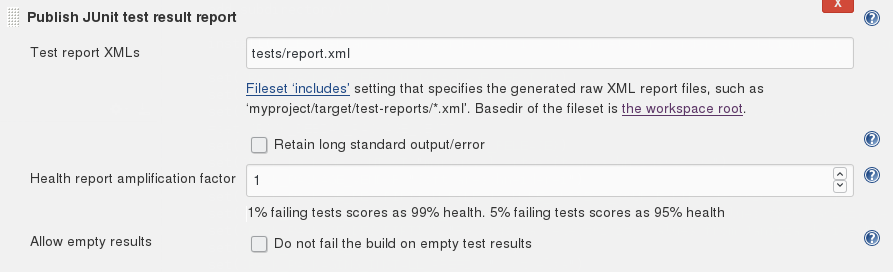
The final step is to let jenkins use the report.xml that we had CTest generate so it can generate the test result charts and tables. To do that, add the post-build action: “Publish JUnit test result report” and point it to tests/report.xml.

Done!

That’s it. Now you got your CI running nice catch tests. The code for this example is available on our github.

Debian packaging against the rules

In a former post I talked about packaging your own software in the most convenient and natural way for the target audience. Think of a MSI or .exe installer for Microsoft Windows, distribution specific packages for Linux (maybe even by providing own repositories) or smartphone apps via the standard app stores. In the case of Debian packages there are quite strict rules about filesystem layout, licensing and signatures. This is all fine if you want to get your software upstream into official repositories.

If you are developing commercial software for specific clients things may be different! I suggest doing what serves the clients user experience (UX) best even in regard to packaging for debian or linux.

Packaging for your users

Packaging for Linux means you need to make sure that your dependencies and versioning are well defined. If you miss out here problems will arise in updating your software. Other things you may consider even if they are against the rules

  • Putting your whole application with executables, libraries, configuration and resources under the same prefix, e.g. /opt/${my_project} or /usr/local/${my_project}. That way the user finds everything in one place instead of scattered around in the file system.
    • On debian this has some implication like the need to use the conffiles-feature for your configuration
  • Package together what belongs together. Often times it has no real benefit to split headers, libraries, executables etc. into different packages. Fewer packages makes it easier for the clients to handle.
  • Provide integration with operating system facilities like systemd or the desktop. Such a seamless integration eases use and administration of your software as no “new tricks” have to be learned.
    • A simple way for systemd is a unit file that calls an executable with an environment file for configuration
  • Adjust the users path or put links to your executables in well known directories like /usr/bin. Running your software from the command line should be easy and with sensible defaults. Show sample usages to the user so they can apply “monkey see – monkey do”.

Example of a unit file:

[Unit]
Description=My Server

[Service]
EnvironmentFile=/opt/my_project/my-server.env
ExecStart=/usr/bin/my-server

[Install]
WantedBy=multi-user.target

In the environment file you can point to other configuration files like XML configs or the like if need be. Environment variables in general are a quite powerful way to customize behaviour of a program on a per-process base, so make sure your start scripts or executables support them for manual experimentation, too.

Possible additional preparations

If you plan to deliver your packages without providing an own repository and want to enable your clients to install them easily themselves you can further aid them.

If the target machines are few and can easily be prepared by you, install tools like gdebi that allow installation using double click and a graphical interface.

If the target machines are numerous implement automation with tools like ansible and ensure unattended installation/update procedures.

Point your clients to easy tools they are feeling comfortable with. That could of course be a command line utility like aptitude, too.

What to keep in mind

There is seldom a one-size-fits-all in custom software. Do what fits the project and your target audience best. Do not fear to break some rules if it improves the overall UX of your service.

Implementation visibility – Part II

In the second part of our series about implementation visibility, we examine the middle ground of our visibility scale and discover that most requirements end up in this range. The maintainability is good, but we still have to check for architectural sins.

In the first article of this series, I presented the concept of “implementation visibility”. Every requirement can be expressed in source code on a scale of how prominent the implementation will be. There are at least five stages (or levels) on the scale:

  • level 0: Inline
    • level 0+: Inline with comment
    • level 0++: Inline with apologetic comment
  • level 1: separate method
  • level 2: separate class
    • level 2+: new type in domain model
  • level 3: separate aggregate
  • level 4: separate package or module
  • level 5: separate application or service

The article then introduced a simple example and examined how the level 0, 0+ and 0++ would appear within the example code. You may want to read the first article before we carry on with level 1 and 2 in this article.

A quick reminder

Our example is a webshop that lacks brutto prices. The original code of our shopping cart renderer might looked like this:


public class ShowShoppingCart {
  public ShoppingCartRenderModel render(Iterable&lt;Product&gt; inCart) {
    final ShoppingCartRenderModel result = new ShoppingCartRenderModel();
    for (Product each : inCart) {
      result.addProductLine(
            each.description(),
            each.nettoPrice());
    }
    return result;
  }
}

Visibility level 1: Extracted code lives longer

After all the (rather depressing) level 0 implementations of our brutto price calculation, the separated method is the first visibility level to result in code that can be discussed and tested separately:


public class ShowShoppingCart {
  public ShoppingCartRenderModel render(Iterable<Product> inCart) {
    final ShoppingCartRenderModel result = new ShoppingCartRenderModel();
    for (Product each : inCart) {
      result.addProductLine(
            each.description(),
            each.nettoPrice(),
            bruttoPriceFor(each));
    }
    return result;
  }

  /**
  * AN-17: Calculates the brutto price for the given product.
  */
  private Euro bruttoPriceFor(Product product) {
    final BigDecimal taxFactor = <gets the right tax factor from somewhere>
    return product.nettoPrice().multiplyWith(taxFactor);
  }
}

The new code is in lines 8 and 13 onwards. The new method was introduced to separate the calculation code from the rendering code. It still lives in the wrong class, but can be tested on its own if you make it public or package accessible. The comment now has a natural scope. And, most important: This implementation is the first where the notion of “brutto price” appears in the JavaDoc and the IDE.

Methods are the smallest parts of our object-oriented code. If you would have one method per requirement, you would just need one extra method of glue code to tie everything together. If one requirement needs to change or becomes obsolete, you know where to cut.

Methods are the primary focus of unit tests. You prepare the parameters for the method you want to test, call it and check the result. This is the AAA or triple-A normal form of unit testing: Arrange, Act, Assert. If several methods or even several objects need to be tested in conjunction, the testing effort rises.

We can conclude that with its own method, the VAT calculation now has its own home. Future readers can grasp the scope of our implementation easily and hopefully make changes under direct test coverage. This is the first visibility level that starts to feel like we meant it.

Visibility level 2: Make it a top-level affair

There is one part in object-oriented code that is even more basic than a method: the class. In Java, each class strives to have its own text file. Before you can write a method in Java, you need to define a class to contain it. Classes are the primary granularity level we navigate our code. Every IDE will show classes as the default elements in our “project explorers”. So what if we introduce a new class for our VAT calculation and move all our code there?

public class ShowShoppingCart {
  public ShoppingCartRenderModel render(Iterable<Product> inCart) {
    final ShoppingCartRenderModel result = new ShoppingCartRenderModel();
    for (Product each : inCart) {
      result.addProductLine(
            each.description(),
            each.nettoPrice(),
            CalculateBruttoPrice.forProduct(each));
    }
    return result;
  }
}
/**
 * AN-17: Calculates the brutto price with value added tax (VAT) for the given product.
 */
public class CalculateBruttoPrice {
  public static Euro forProduct(Product product) {
    final BigDecimal taxFactor = <gets the right tax factor from somewhere>
    return product.nettoPrice().multiplyWith(taxFactor); 
  }
}

The new code is in line 8 and the full new class file. This implementation might not look a lot different from level 1 (separate method), but it really is on another level. The brutto price calculation now isn’t tied to rendering shopping carts anymore. It is not tied to anything other than a given product. It is a top-level concept of our application now. Anybody with a product can call the method and receive the brutto price, from anywhere in our application (hopefully respecting our architecture boundaries).

Our unit test class now reads as if we had written it only for the new requirement: CalculateBruttoPriceTest. We still need to invent test products in our test, but the whole notion of render models and shopping carts is gone. In essence, we freed the concept of price calculation from its “evolutionary” ties.

Implementing the new requirement in a separate class, if feasible, adheres to the Single Responsibility Principle (SRP), that requires each class of a system to only have one reason to change. In our case, the CalculateBruttoPrice class only changes if the brutto prices needs adjustment. For all previous visibility levels, that wasn’t true. The ShowShoppingCart class would need modifications if the brutto prices or the shopping cart rendering were to be changed. This improvement is reason enough to elevate our implementation visibility past level 1.

In short, a good heuristics for new requirements (as opposed to change requests for existing requirements) is to start with a new class. If you are unsure, start lower, but keep in mind that classes are the main navigation layer of object-oriented code.

Visibility level 2+: Inviting the requirement to be part of the project’s language

Introducing a new class for our requirement felt good, but something still feels off. When we review the interface of the CalculateBruttoPrice, two things stick out immediately: The class is named as a service (CalculateXYZ as in “do XYZ for me”) and can only calculate brutto prices for products. Our customer was serious with his requirement, so it’s safe to assume that brutto prices will stay in the application and play a key role. We should reflect this seriousness by lifting the implementation visibility level once more and make the BruttoPrice a top level concept of our project’s domain:

public class ShowShoppingCart {
  public ShoppingCartRenderModel render(Iterable<Product> inCart) {
  final ShoppingCartRenderModel result = new ShoppingCartRenderModel();
    for (Product each : inCart) {
      result.addProductLine(
            each.description(),
            each.nettoPrice(),
            BruttoPrice.of(each).inEuro());
    }
    return result;
  }
}

The ShowShoppingCart code doesn’t look very different from the level 2 code beforehands. The new code is in line 8, too. The new class isn’t named like a service anymore, but like a concept or domain type. The named constructor of() returns a BruttoPrice instance and not just a Euro object:

/**
 * AN-17: Represents the brutto price with value added tax (VAT) for the given Taxable.
 */
public final class BruttoPrice {
  public static BruttoPrice of(Taxable item) {
    final BigDecimal taxFactor = <gets the right tax factor from somewhere>
    return new BruttoPrice(item.nettoPrice().multiplyWith(taxFactor));
  }
  
  private final Euro asValue;

  private BruttoPrice(Euro value) {
    this.asValue = value;
  }

  public Euro inEuro() {
    return this.asValue;
  }
}

Now, we can accumulate additional behaviour in the new BruttoPrice type if the need arises. With the service class of level 2, we probably wouldn’t have risen above the Euro abstraction and mixed up netto and brutto prices somewhere in the future.  If we model our NettoPrice and BruttoPrice as domain types, the compiler will help us keeping them separate – even if both contain Euros as their value.

With this visibility elevation, we discovered another abstraction: We can create brutto prices for virtually anything that can be taxed. It doesn’t have to be a product, it just needs a netto price and a tax factor. The new (abstract) domain type is named Taxable. Of course, Product is an implementation of Taxable.

This makes us even more independent from any webshop, shopping cart or product. We can now write unit tests for our BruttoPrice without being coupled to the Product class at all. We have successfully decoupled the cart/product part of our application from the prices part. Recognizing and implementing the independence of concepts is an important step towards even higher visibility levels. It is also the groundwork of a low coupled, high cohesive code base where most things fall into their place naturally.

The step from level 2 (separate class) to level 2+ (new domain type) wasn’t just syntactic sugar, it was driven by the insight that separation of concerns is the fundamental principle to achieve maintainability, as long as the abstractions aren’t overwhelming. A good indicator that you’ve taken it too far is when your domain expert (in our example our client) raises her eyebrows in surprise when you talk about your abstract domain types because the names sound outlandish and far-fetched.

But you can take your implementation visibility even further and should really consider doing so given the circumstances. We will learn about visibility level 3 (separate aggregate) in the next blog post of this series. Stay tuned!

Implementation visibility – Part I

The concept of implementation visibility is very powerful. If you choose the wrong visibility for your requirements, your code will end up unmaintainable.

Somewhere in my take on programming, there lingers the concept of “implementation visibility”, that I’m not quite sure to be able to express clearly, but I’ll try.

Let’s say you are writing an academic text like a bachelor thesis and your professor makes it clear that she regards the list of literature a very important part of your work. What are you going to do? Concentrate on your cool topic and treat the literature as a secondary task? Or will you shift your focus and emphasize your extensive literature research, highlighting promising cross-references in your text? You’ll probably adjust your resources to make your list of literature more prominent, more visible. You respond to the priorities of your stakeholders.

Now imagine that your customer wants you to program a web application, but has one big requirement: All actions of the users need to be reassured with a confirmation question (as in “do you really want to delete this?”). He makes it clear that this is a mandatory feature that needs to be implemented with utmost care and precision. What would you do? We responded by adjusting our system’s architecture to incorporate the requirement into the API. You can read about our approach in this blog post from 2015. The gist of it is that every possible client of the system will be immediately aware of the requirement and has a much easier time conforming to it. It is harder to ignore or forget the requirement than to adhere to it because the architecture pushes you into the right direction.

The implementation of the customer’s requirement in the example above is very visible. You’ll take one look at the API and know about it. It isn’t hidden into well-meaning but out-dated developer documentation or implicitly stated because every existing action has a confirmation step and you should be sentient enough to know that this means your new one needs one, too. The implementation visibility of the customer’s requirement is maximized with our approach.

Stages of visibility

I have identified some typical stages (or levels) of implementation visibility that I want to present in this blog post series. That doesn’t mean that there won’t or can’t be others. I’m not even sure if the level system is as one-dimensional as I’m claiming here. I invite you to think about the concept, make your own observations and evolve from there. This is a starting point, not an absolute truth.

The following stages typically appear in my projects:

  • level 0: Inline
    • level 0+: Inline with comment
    • level 0++: Inline with apologetic comment
  • level 1: separate method
  • level 2: separate class
    • level 2+: new type in domain model
  • level 3: separate aggregate
  • level 4: separate package or module
  • level 5: separate application or service

In my day-to-day work, the levels 1 to 3 are the most relevant, but that’s probably not universally applicable. Our example above with the requirement-centered API isn’t even located on this list. I suggest it’s at level 6 and called separate concept or something similar.

An example to explain the visibility levels

Let’s assume a customer wants us to program a generic webshop. We are not very versed in commerce or e-commerce things and just start implementing requirements one after one.

After the first few iterations with demonstrated and usable artifacts, our customer calls us and explains that all prices in the webshop are netto prices and that there need to be some kind of brutto price calculation. You, being accustomed to prices that don’t change once you put products into your shopping cart, ask a few questions and can finally grasp the concept of value added taxes. Now you want to implement it into the webshop.

The first approach to the whole complex is to show the brutto prices right besides the netto prices when the user views his shopping cart. You can then validate the results with your customer and discuss problems or misconceptions that are now visible and therefore tangible.

The original code of your shopping cart renderer might look like this:


public class ShowShoppingCart {
  public ShoppingCartRenderModel render(Iterable<Product> inCart) {
    final ShoppingCartRenderModel result = new ShoppingCartRenderModel();
    for (Product each : inCart) {
      result.addProductLine(
               each.description(),
               each.nettoPrice());
      }
      return result;
  }
}

A quick explanation of the code: The class ShowShoppingCart takes some products and converts them into a ShoppingCartRenderModel that contains the shopping cart data in a presentable form so the GUI just needs to take the render model and paste it into some kind of template. For each product, there is one line with a description and the (already renamed) netto price on the page.

Visibility level 0: It’s just code anyway

Let’s start with the lowest and most straight-forward implementation visibility level: The inline implementation.

public class ShowShoppingCart {
  public ShoppingCartRenderModel render(Iterable<Product> inCart) {
    final ShoppingCartRenderModel result = new ShoppingCartRenderModel();
    for (Product each : inCart) {
      final Euro bruttoPrice = each.nettoPrice().multiplyWith(1.19D);
      result.addProductLine(
            each.description(),
            each.nettoPrice(),
            bruttoPrice);
    }
    return result;
  }
}

The new code is in lines 5 and 9. As you can see, the programmer chose to implement exactly what he understood from the discussion about netto and brutto prices with the customer. A brutto price is a netto price with value added tax. The VAT rate is 19 percent at the time of writing, so a multiplication with 1.19 is a valid implementation.

Our problem with this approach isn’t the usage of floating point numbers in the calculations or that calculations even exist in a method that should do nothing more than render some products, but that the visibility of the requirement is minimal. If you, I or somebody else doesn’t know exactly where this code hides, we will have a hard time finding it once the VAT is changed or anything else should be done with brutto prices or VATs.

Technically, the customer’s requirement is implemented and the brutto prices will show up. But because the concept of taxes (or VAT) is important for the customer, we likely made the code too invisible to be maintainable.

Visibility level 0+: Hey, I even wrote a comment

To make some part of the code stick out of the mess, we have the tool of inline code comments. Let’s apply them to our example and raise our visibility level from 0 to 0+:

public class ShowShoppingCart {
  public ShoppingCartRenderModel render(Iterable<Product> inCart) {
    final ShoppingCartRenderModel result = new ShoppingCartRenderModel();
    for (Product each : inCart) {
      // AN-17: calculating the brutto price from the netto price
      final Euro bruttoPrice = each.nettoPrice().multiplyWith(1.19D);
      result.addProductLine(
            each.description(),
            each.nettoPrice(),
            bruttoPrice);
    }
    return result;
  }
}

The new code is in lines 5, 6 and 10. You can see that the programmer chose the same approach as before, but realized that the code would be buried if not marked. Given that the requirement identifier is “AN-17”, the code can be found by a text search of this number. And if you happen to stumble upon this part of the application, you can deduct meaning about what you see from the comment.

Except that you cannot really be sure what the AN-17 code really is. Is the result.addProductLine() part of AN-17 or not? Would you expect the calculation of taxes and prices in a method called render() in a class named ShowShoppingCart? Is this implementation really correct? Aren’t there different tax rates for different products? Did the original author think about that? Is the customer content with this functionality?

Note that you cannot really test the brutto price calculation. You have to invent some products, render them and then scrape the brutto prices from the render model. That’s tedious at best and a clear sign that the implementation visibility is still too low. On to the next level

Visibility level 0++: This sucks, but I’ve got to go now

This level tries to make you a partner in crime by explicitly stating what’s obviously wrong with the code at hand. Now it’s your responsibility to fix it. You wouldn’t leave a broken window be, would you?

public class ShowShoppingCart {
  public ShoppingCartRenderModel render(Iterable<Product> inCart) {
  final ShoppingCartRenderModel result = new ShoppingCartRenderModel();
  for (Product each : inCart) {
    // AN-17: calculating the brutto price from the netto price
    // TODO: take different tax factors into account
    final Euro bruttoPrice = each.nettoPrice().multiplyWith(1.19D);
    result.addProductLine(
          each.description(),
          each.nettoPrice(),
          bruttoPrice);
  }
  return result;
  }
}

The new code is in lines 5, 6, 7 and 11. The new comment line 6 is typical for this visibility level: The original programmer knew that his implementation isn’t adequate but couldn’t be bothered with improving it. Perhaps he had external circumstances force him to do it. Whatever it was, this code is the equivalent to a soiled public toilet. The difference is, this time we can determine who made the mess.

The apologetic “I know I made a mess” comment often begins with TODO or FIXME. This isn’t directed towards the original author, it’s pointed at you, the person that happens to read the comment. Now, what are you going to do? Pretend you didn’t read the comment? Leave the toilet soiled? Clean up the mess of your predecessor? You probably have work to do, too. And doesn’t it work the way it is? Never change a running system!

We will see how you can improve the implementation visibility of the requirement in the next blog post of this series. Stay tuned!

4 Tips for better CMake

We are doing one of those list posts again! This time, I will share some tips and insights on better CMake. Number four will surprise you! Let’s hop right in:

Tip #1

model dependencies with target_link_libraries

I have written about this before, and this is still my number one tip on CMake. In short: Do not use the old functions that force properties down the file hierarchy such as include_directories. Instead set properties on the targets via target_link_libraries and its siblings target_compile_definitions, target_include_directories and target_compile_options and “inherit” those properties via target_link_libraries from different modules.

Tip #2

always use find_package with REQUIRED

Sure, having optional dependencies is nice, but skipping on REQUIRED is not the way you want to do it. In the worst case, some of your features will just not work if those packages are not found, with no explanation whatsoever. Instead, use explicit feature-toggles (e.g. using option()) that either skip the find_package call or use it with REQUIRED, so the user will know that another lib is needed for this feature.

Tip #3

follow the physical project structure

You want your build setup to be as straight forward as possible. One way to simplify it is to follow the file system and and the artifact structure of your code. That way, you only have one structure to maintain. Use one “top level” file that does your global configuration, e.g. find_package calls and CPack configuration, and then only defers to subdirectories via add_subdirectory. Only for direct subdirectories though: if you need extra levels, those levels should have their own CMake files. Then build exactly one artifact (e.g. add_executable or add_library) per leaf folder.

Tip #4

make install() an option()

It is often desirable to include other libraries directly into your build process. For example, we usually do this with googletest for our unit test. However, if you do that and use your install target, it will also install the googletest headers. That is usually not what you want! Some libraries handle this automagically by only doing the install() calls when they are the top level project. Similar to the find_package tip above, I like to do this with an option() for explicit user control!

Generating done

That is it for today! I hope this is helps and we will all see better CMake code in the future.