The Story of a Multithreading Sin

The story of a bug that was caused by a common multithreading pitfall, the dreaded liquid lock.

In my last blog entry, I wrote about multithreading pitfalls (in Java), and ironically, this was the week when we got a strange bug report from one of our customers. This blog entry tells the story of the bug and adds another multithreading pitfall to the five I’ve already listed in my blog entry “When it comes to multithreading, better be safe than sorry”.

The premise

We developed a software that runs on several geographically distant independent “stations” that collect a multitude of environmental measurement data. This data is preprocessed and stuffed into data packages, which are periodically transferred to a control center. The software of this control center, also developed by us, receives the data packages, stores them on disk and in a huge database and extracts the overall state of the measurement network from raw data. If you describe the main task of the network on this level, it sounds nearly trivial. But the real functionality requirements are manifold and the project grew large.

We kept the whole system as modular as necessary to maintain an overall grasp of what is going on where in the system and installed a sufficient automatic test coverage for the most important parts. The system is still under active development, but the main parts of the network are in production usage without real changes for years now.

The symptoms

This might explain that we were very surprised when our customer told us that the control center had lost some data packages. Very soon, it turned out that the control center would randomly enter a state of “denial”. In this state, it would still accept data packages from the stations and even acknowledge their arrival (so the stations wouldn’t retry the transmission), but only write parts of the package or nothing at all to the disk and database. When the control center entered this state, it would never recover from it. But when we restarted the software manually, everything would run perfectly fine for several days and then revert back into denial without apparent trigger.

We monitored the control center with every means on our disposal, but its memory consumption, CPU footprint and threading behaviour was without noticeable problem even when the instance was in its degraded state. There was no exception or uncommon entry logged in the logfiles. As the symptom happened randomly, without external cause and with no chance of reversal once it happened, we soon suspected some kind of threading issue.

The bug

The problem with a threading issue is that you can’t just reproduce the bug with an unit or system test. We performed several code reviews until we finally had a trace. When a data package arrives, a global data processing lock is acquired (so that no two data packages can be processed in parallel) and the content of the package is inspected. This might trigger several network status changes. These change events are propagated through the system with classic observer/listener structures, using synchronous calls (normal delegation). The overall status of the network is translated in a human readable status message and again forwarded to a group of status message listeners. This is a synchronous call again. One of the status message listeners was the software driver for a LED ticker display. This module was a recent addition to the control center’s hardware outfit and used to display the status message prominently to the operators. Inside this LED software driver, some bytes are written to a socket stream and then the driver awaits an answer of the hardware device. To avoid the situation that two messages are sent to the device at the same time, a lock is acquired just before the message is sent. This code attracted our attention. Lets have a look at it:

private Message lastMessage = new Message();

public void show(Message message) {
    synchronized (this.lastMessage) {
        writeCommandAndWaitForResponse(Command.SHOW_TEXT, message.asBytes());
        this.lastMessage = message;
    }
}

The main problem here is the object the lock is acquired upon: the reference of lastMessage is mutable! We call this a liquid lock, because the lock isn’t as solid as it should be. It’s one of the more hideous multithreading pitfalls as it looks like everything’s fine at first glance. But this lock doesn’t have a complete “locking” effect because each caller may acquire the lock of a different instance. And a lock with a flawed locking behaviour is guaranteed to fail (in production). The liquid lock is like the bigger brother of the local lock. It isn’t local, but its mutability cause the same problems.

The bug finally turned out to be caused by the liquid lock in the LED display driver that got notified of system message changes when a data package arrived. But only if multiple messages were sent at once to the device, discarding some of the necessary answers in this circumstance or if the connection to the LED hardware would fail in the midst of a transmission, the system would not return from the write attempt. If one thread wouldn’t return to the data package processor, the global data processing lock would not be freed (read the start of this chapter again, this is the most important lock in the system!). And while the data processing lock was still held, all other data packages would be received, but piling up to obtain the lock. But the lock would never be returned from the thread waiting on an answer from a hardware device that had no intention to send another answer. This was when the control center appeared to be healthy but didn’t process any data packages anymore.

The conclusion

If you want to avoid the category of liquid lock multithreading bugs, make sure that all your lock instance references are immutable. Being final is an important property of lock instance references. Avoid to retrieve your locks from notoriously muteable data structures like collections or arrays. The best thing you can do to avoid liquid locks is to “freeze” all your lock instances.

Another insight from this story is that software modules have to be separated threadwise, too. It was a major design flaw to let the data processing thread, while holding the main processing lock, descend down into the deep ends of the LED driver, eventually getting stuck there for infinity. Some simple mechanisms like asynchronous listener notification or producer/consumer queues for pending transmission requests would have helped to confine the effects of the liquid lock bug inside the LED module. Without proper thread separation, it took down the whole software instance.

When it comes to multithreading, better be safe than sorry

Writing multithreaded applications in Java is hard. Here are five problems and how to avoid them without much effort (mostly).

Recently, I attended a code review of the core parts of a web application, written in Java. The application is used by a large customer base and occassionally, there are error reports and exceptions in the log files. Some of these exceptions are the dreaded ConcurrentModificationExceptions, indicating conflicting read/write access on an unsynchronized collection data structure. In the code review, we found several threading flaws, but not after an exhaustive reading of the whole module. Here, I want to present the flaws and give some advice on how to avoid them:

The public lock

In some parts of the code, methods were defined as synchronized through the method declaration keyword:

public synchronized String getLastReservation() { [...]

While there is nothing wrong with this approach in itself, it can be highly dangerous in combination with synchronized blocks. The code above effectively wraps a synchronized block using the object instance (this) as a lock. No information of an object is more publicly visible as the object reference (this), so you have to check all direct or indirect clients of this object if they synchronize on this instance, too. If they do, you have chained two code blocks together, probably without proper mentioning of this fact. The least harmful defect will be performance losses because your code isn’t locked as fine grained as it could be.

The easiest way to avoid these situations it to always hide the locks. Try not to share one object’s locks with other objects. If you choose publicly accessible locks, you can never be sure about that.

The subtle lock change

In one class, there were both instance and class (static) methods, using the synchronized keyword:

public synchronized String getOrderNumberOf(String customerID) { [...]
public  synchronized static int getTotalPendingOrders() { [...]

And while they were both accessing the same collection data structure (a static hashmap), they were using different locks. The lock of the instance method is the instance itself, while the lock of the static method is the class object of the type. This is very dangerous, as it can be easily missed when writing or altering the code.

The best way to prevent this problem it to avoid the synchronized modifier for methods completely. State your locks explicitely, all the time.

Partial locking

In a few classes, collection datatypes like lists were indeed synchronized by internal synchronized-blocks in the methods, using the private collection instance as lock. The synchronized blocks were applied to the altering methods like putX(), removeX() and getX(). But the toString() method, building a comma-separated list of the textual list entries, wasn’t synchronized to the list. The method contained the following code:

public String toString() {
    StringBuilder result = new StringBuilder();
    for (String entry : this.list) {
        result.append(entry);
        result.append(",");
    }
    [...]
    return result.toString();
}

I’ve left out some details and special cases, as they aren’t revelant here. The problem with the foreach loop is that an anonymous Iterator over the list is used and it will relentlessly monitor the list for any changes and throw a ConcurrentModificationException as soon as one of the properly synchronized sections changes it. The toString() method was used to store the list to a session dependent data storage. Every once in a while, the foreach loop threw an exception and failed to properly persist the list data, resulting in data loss.

The most straight-forward solution to this problem might be to add the missing synchronization block in the toString() method. If you don’t want to block the user session while writing to disk, you might traverse the list without an Iterator (and be careful with your assumptions about valid indices) or work on a copy of the list, given that an in-memory copy of the list would be cheap. In an ACID system scenario, you should probably choose to complete your synchronized block guards.

Locking loophole

Another problem was a collection that was synchronized internally, but could be accessed through a getter method. No client could safely modify or traverse the collection, because they had the collection, but not the lock object (that happened to be the collection, too, but who can really be sure about that in the future?). It would be ridiculous to also provide a getter for the lock object (always hide your locks, remember?), the better solution is to refactor the client code to a “tell, don’t ask” style.

To prevent a scenario when a client can access a data structure but not its lock, you shouldn’t be able to gain access to the data structure, but pass “command objects” to the data structure. This is a perfect use case for closures. Effectively, you’ll end up with something like Function or Operation instances that are applied to every element of the collection within a synchronized block and perform your functionality on them. Have a look at op4j for inspirational syntax.

Local locking

This was the worst of all problems and the final reason for this blog entry: In some methods, the lock objects were local variables. In summary, these methods looked like this:

public String getData() {
    Object lock = new Object();
    synchronized (lock) {
        [...]
    }
}

Of course, it wasn’t that obvious. The lock objects were propagated to other methods, stored in datastructures, removed from them, etc. But in the end, each caller of the method got his own lock and could henceforth wreck havoc in code that appeared very well synchronized on first look. The error in its clarity is too stupid to be widespread. The problem was the obfuscation around it. It took us some time to really understand what is going on and where all that lock objects really come from.

My final advice is: If you have to deal with multithreading, don’t outsmart yourself and the next fellow programmer by building complex code structures or implicit relationships. Be as concise and explicit as you can be. Less clutter is more when dealing with threads. The core problem is the all-or-none law of thread synchronization: Either you’ve got it all right or you’ve got it all wrong – you just don’t know yet.

Hide your locks, name your locks explicitely, reduce the scope of necessary locking so that you can survey it easily, never hand out your locked data, and, most important, remove all clutter around your locking structures. This might make the difference between “just works” and endless ominous bug reports.

A VisualBasic.NET cheat sheet for Java developers

If you want to learn VisualBasic.NET coming from a Java perspective, we’ve prepared a little cheat sheet to ease the transition.

Sometimes, we cannot choose what language to implement a project in. Be it because of environmental restrictions (everything else is programmed in language X) or just because there’s an existing code base that needs to be extended and improved. This is when our polyglot programming mindset will be challenged. In a recent project, we picked up the current incarnation of VisualBasic, a language most of us willfully forgot after brief exposure in the late nineties, more than 10 years ago.

Spaceward Ho!

So we ventured into the land of VisualEverything, installing VisualStudio (without ReSharper at first) and finding out about the changes in VisualBasic.NET compared to VisualBasic 6, the language version we used back in the days. Being heavily trained in Java and “javaesque” languages, we were pleasantly surprised to find a modern, object-oriented language with a state-of-the-art platform SDK (the .NET framework) and only little reminiscences of the old age. Microsoft did a great job in modernizing the language, cutting out maybe a bit too much language specific stuff. VisualBasic.NET feels like C# with an uninspired syntax.

Making the transition

To ease our exploration of the language features of VisualBasic.NET, one of our student workers made a comparison table between Java and VisualBasic.NET. This cheat sheet helped us tremendously to wrap our heads around the syntax and the language. The platform SDK is very similar to the Java API, as you can see in the corresponding sections of the table. And because it helped us, it might also help you to gain a quick overview over VisualBasic.NET when you are heading from Java.

I have to thank Frederik Zipp a lot for his work. My only contribution to this cheat sheet is the translation from german to english. I can only try to imagine his effort of putting everything together. And while you might read the whole comparison in about 21 minutes (as stated in the title), it’s worth several hours of searching.

The downloads

And without much further ado, here are the download links for the HTML and PDF versions of the “Java vs. VisualBasic.NET cheat sheet”:

You may use and modify the documents as you see fit. If you redistribute it, please adhere to the Creative Commons Attribution-ShareAlike license. Thank you.

Summary of the Schneide Dev Brunch at 2011-07-17

A summary of our Dev Brunch at Sunday 2011-07-17. You’ll read about conferences, the GRASP principles and some cool projects to know about, mostly.

Last Sunday, the 17th July of 2011, we held another Dev Brunch at our company.

A Dev Brunch is an event that brings three main ingredients together: developers, food and software industry related topics. Given enough time (there is never enough time!), we chat, eat, learn and laugh the whole evening through. Most of the stories and chitchat that is told cannot be summarized and has little value outside its context. But most participants bring a little topic alongside their food bag, something of interest they can talk like 10 minutes about. This blog post summarizes at least the official topics and gives links to additional resources.

Conference review of the Java Forum Stuttgart 2011

The Java Forum Stuttgart is an annual conference held by the Java User Group Stuttgart. It’s the biggest regional Java event and always worth a visit (as long as you understand the german language). This year, the talks stagnated a bit around topics that are mostly well-known.

The best talk was given by Michael Wiedeking from MATHEMA Software GmbH in Erlangen. The talk titled “The next big (Java) thing”, but mostly addressed the history and current state of Java in an entertaining and thought-provoking way. The premise was that you have to know the past and present to anticipate the future. The slides don’t represent the talk well enough, but here’s a link anyway.

Another session introduced the PatternTesting toolkit, a collection of helper classes and useful features that enrich the development of unit testing. Alongside the other spice you can add to unit tests, this project might be worth a look. My favorite was the @Broken annotation that ignores a test case until a given date. It’s like an @Ignore with a best-before date.

There were the usual introductory talks, for example about CouchDB and git/Egit. They were well-executed, but lacked a certain thrill if you heard about the projects before.

As a personal summary, the Java world lacks the “next big thing” a bit.Two buzz products for the next year might be Eclipse Jubula (for UI testing) and Griffon (for desktop application development).

Conference review of the Karlsruhe Entwicklertag (developer day) 2011

The Karlsruhe Entwicklertag is another annual conference, spanning several days and presenting top-notch talks and sessions. It’s the first address for software developers in Karlsruhe that want to stay up to date with current topics and products.

Some topics were presented nearly identically to the Java Forum Stuttgart (but half a year earlier if that matters), while other tracks (like the Pecha Kucha talks) can only be found here.

The buzz product for the next year might be Gerrit (for code review) and Eclipse Jubula again (for UI testing).

As a personal summary, even this conference lacked a certain drive towards real new “big picture” topics. But maybe, that’s just allright given all the hype of the last years.

The GRASP principles

This topic contained hands-on software development knowledge about the nine principles named “GRASP” or General Responsibility Assignment Software Patterns/Principles. There is nothing really new about the GRASP principles, they will only give you common names for otherwise mostly unnamed best practices or fundamental design paradigms and patterns.

We even went through some educational slides that summarize the principles. The most discussion arose about the name “Pure Fabrication” for classes without a relation to the problem domain.

If you are an average experienced software developer, spend a few minutes and scan the GRASP principles so you can combine the name with the specific content.

First-hand experiences of combining work and children

We are well within the best age to raise children. So this topic gets a lot attention, specifically the actual tipps to survive the first two years with kids and how to interact with the different administrative bodies. Germany is a welfare state, but nobody claimed that welfare should be easy or logical. We’ve learned a lot about different reference dates and unusual time partitioning.

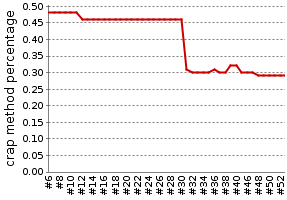
Another insight was that working less than 40 percent isn’t really worth the hassle. You are mostly inefficient and aware of it.

That’s all, folks

As always, we shared a lot more information and anecdotes. If you want to participate at one of our Dev Brunches, let us know. We are open for guests and really interested in your topics.

Bear up against static code analysis

If you ever had the urge to switch off a rule in your static code analysis tool, this article tries to convince you not to do it. By accepting challenges presented by your tools, you become a better developer and clean up your code on the run.

One of the first things we do when we join a team on a new (or existing) project is to set up a whole barrage of static code analysis tools, like Findbugs, Checkstyle or PMD for java (or any other for virtually every language around). Most of these tools spit out tremendous amounts of numbers and violated rules, totally overwhelming the team. But the amount of violations, (nearly) regardless how high it might be, is not the problem. It’s the trend of the violation curve that shows the problem and its solution. If 2000 findbugs violations didn’t kill your project yet, they most likely won’t do it in the future, too. But if for every week of development there are another 50 violations added to the codebase, it will become a major problem, sooner or later.

Visibility is key

So the first step is always to gain visibility, no matter how painful the numbers are. After the initial shock, most teams accept the challenge and begin to resolve issues in their codebase as soon as they appear and slowly decrease the violation count by spending extra minutes with fixing old code. This is the most valuable phase of static code analysis tools: It enables developers to learn from their mistakes (or goofs) without being embarrassed by a colleague. The analysis tool acts like a very strict and nit-picking code review partner, revealing every flaw in the code. A developer that embraces the changes implied by static analysis tools will greatly accelerate his learning.

But then, after the euphoric initial challenges that improve the code without much hassle, there are some violations that seem hard, if not impossible to solve. The developer already sought out his journey to master the tool, he cannot turn around and just leave these violations in the code. Surely, the tool has flaws itself! The analysis brought up a false positive here! This isn’t faulty code at all, it’s just an overly pedantic algorithm without taste for style that doesn’t see the whole picture! Come to think about it, we have to turn off this rule!

Leave your comfort zone

When this stage is reached, the developers have a deep look into the tool’s configuration and adjust every nut and bolt to their immediate skill level. There’s nothing wrong with this approach if you want to stay on your skill level. But you’ll miss a chance to greatly improve your coding skills by allowing the ruleset to be harder than you can cope with now. Over time, you will come up with solutions you now thought are impossible. It’s like fitness training for your coding skills, you should raise the bar every now and then. Unlike fitness training, nobody gets hurt if the numbers of your code analysis show more violations than you can fix up right now. The violations are in the code, if you let them count or not.

Once, a fellow developer complained really loud about a specific rule in a code analysis tool. He was convinced that the rule was pointless and should be switched off. I asked about a specific example where this rule was violated in his code. When reviewing the code, I thought that applying the rule would improve the code’s internal structure (it was a rule dealing with collapsible conditional statements). In the discussion on how to implement the code block without violating the rule, the real problem showed up – my colleague couldn’t think about a solution to the challenge. So we proceeded to implement the code block in a dozen variations, each without breaking the rule. After the initial few attempts that I had to lead program for him, he suddenly came up with even more solutions. It was as if a switch snapped in his head, from “I’m unable to resolve this stupid rule” to “Hey, if we do it this way, we even can get rid of this local variable”.

Embrace challenges

Don’t trick yourself into thinking that just because your analysis tool doesn’t bring up these esoteric violations anymore after you switched off the rules, they are gone. They are still in your code, just hidden and without your awareness. Bear up against your analysis tool and fix every violation it brings you, one after the other. The tools aren’t there to annoy you, they want to help you stay clear of trouble by pointing out the flaws in a clear and precise manner. Once you meet the challenges the tool presents you with, your skill level will increase automatically. And as a side effect, your code becomes cleaner.

Beyond clean code

Even if every analysis tool approves your code as being clean, it can still be improved. You might have a look at Object Calisthenics or similar code training rulesets. They work the same way as the analysis tools, but without the automatic enforcement (yet). The goal is always cleaner code and higher skilled developers.

Spice up your unit testing

Writing unit tests shouldn’t be a chore. This article presents six tools (with alternatives) that help to improve your developer experience.

Writing unit tests is an activity every reasonable developer does frequently. While it certainly is a useful thing to do, it shouldn’t be a chore. To help you with the process of creating, running and evaluating unit tests, there are numerous tools and add-ons for every programming language around. This article focusses on improving the developer experience (the counterpart of “user experience”) for Java, JUnit and the Eclipse IDE. I will introduce you to the toolset we are using, which might not be the complete range of tools available.

Creating unit tests

  • MoreUnit – This plugin for Eclipse helps you to organize your unit test classes by maintaining a connection between the test and the production class. This way you’ll always see which classes and methods still lack a corresponding test. You can take shortcuts in the navigation by jumping directly into the test class and back. And if you move one file, MoreUnit will move the other one alongside. It’s a swiss army knife for unit test writers and highly recommended.
  • EqualsVerifier – If you ever wrote a custom implementation of the equals()/hashcode() method pair, you’ll know that it’s not a triviality. What’s even more intimidating is that you probably got it wrong or at least not fully correct. The effects of a flawed equals() method aren’t easily determinable, so this is a uncomfortable situation. Luckily, there is a specialized tool to help you with this task exactly. The EqualsVerifier library tests your custom implementation against all aspects of the art of writing an equals() method with just one line of code.
  • Mockito (and EasyMock) – When dealing with dependencies of classes under test, mock objects can come in handy. But writing them by hand is tedious, boring and error-prone. This is where mock frameworks can help by reducing the setup and verification of a mock object to just a few lines of code. EasyMock is the older of the two projects, but it manages to stay up-to-date by introducing new features and syntax with every release. Mockito has a very elegant and readable syntax and provides a rich feature set. There are other mock frameworks available, too.

Running unit tests

  • InfiniTest (and JUnit Max) – Normally, you have to run the unit tests in your IDE by manually clicking the “run” button or hitting some obscure keyboard shortcut. These two continuous testing tools will run your tests while you still type. This will shorten your test feedback loop to nearly milliseconds after each change. Your safety net was never closer. InfiniTest and JUnit Max are both Eclipse plugins, but the latter costs a small annual fee. It’s written by Kent Beck himself, though.

Evaluating unit tests

  • EclEmma (and Cobertura) – If you want to know about the scope or “coverage” of your tests, you should consult a code coverage tool. Cobertura produces really nice HTML reports for all your statistical needs. EclEmma is an Eclipse plugin that integrates the code coverage tool Emma with Eclipse in the finest way possible. Simply run “coverage as” instead of “run as” and you are done. All the hassle with instrumenting your classes and setting up the classpath in the right order (major hurdles when using cobertura) is dealt with behind the scenes.
  • Jester (and Jumble) – The question “who tests my tests?” is totally legit. And it has an answer: Every mutation testing tool around. For Java and JUnit, there are at least two that do their job properly: Jester works on the source code while Jumble uses the bytecode. Mutation testing injects little changes into your production code to test if your tests catch them. This is a different approach on test coverage that can detect code that is executed but not pinned down by an assertion. While Jester has a great success story to tell, Jumble tends to produce similar results as cobertura’s condition coverage report, at least in my experience.

Summary

As you can see, there is a wide range of tools available to improve your efforts to write well-tested software. This list is in no way comprehensive. If you know about a tool that should be mentioned, we would love to read your comment.

Groovy isn’t a superset of Java

Groovy is Java with sugar, right?

Coming from Java to Groovy and seeing that Groovy looks like Java with sugar, you are tempted to write code like this:

  private String take(List list) {
    return 'a list'
  }

  private String take(String s) {
    return 'a string'
  }

But when you call this method take with null you get strange results:

  public void testDispatch() {
    String s = null
    assertEquals('a string', take(s)) // fails!
  }

It fails because Groovy does not use the declared types. Since it is a dynamic typed language it uses the runtime type which is NullObject and calls the first found method!
So when using your old Java style to write code in Groovy beware that you are writing in a dynamic environment!
Lesson learned: learn the language, don’t assume it behaves in the same way like a language you know even when the syntax looks (almost) the same.

== isn’t equals, or is it?

Beware of the subtle differences of == and equals in Java and Groovy.

== and equals behave different in Java (and Groovy). You all know the subtle difference when it comes to comparing strings. equals is recommended in Java, == works in Groovy, too. So you could think that using equals is always the better option… think again!
Take a look at the following Groovy code:

  String test = "Test"
  assertTrue("Test" == test) // true!
  assertTrue("Test" == "${test}") // true!
  assertTrue("Test".equals("${test}")) // false?!

The same happens with numbers:

  assertTrue(1L == 1) // true!
  assertTrue(1L.equals(1)) // false?!

A look at the API description of equals shows the underlying cause (taken from the Integer class):

Compares this object to the specified object. The result is true if and only if the argument is not null and is an Integer object that contains the same int value as this object.

equals follows the contract or best practice (see Effective Java) that the compared objects must be of the same class. So comparing different types via equals always results in false. You can convert both arguments to the same type beforehand to ensure that you get the expected behavior: the comparison of values. So next time when you compare two values think of the types or convert both values to the same type.

Java Swing Layouting done right

A praise of the most developer-friendly Java Swing layout manager to date: DesignGridLayout.

Layout Managers were an huge benefit for Java Swing. They enabled software developers to program layout rather than to “drag and drop” it with some proprietary GUI builder. That’s nothing against a good GUI builder, but against the “source code” that gets generated as a result of using it. But after some time of playing and working with the layout managers given by Swing itself, we concluded that they weren’t up to the task. Since then, we were constantly on the lookout for new and better ways to tackle the layouting task.

A history of layout managers

Let’s reiterate our major path with different layout managers:

  • GridBagLayout – the most versatile layout manager included in the Java Swing core classes. It’s capable to handle virtually every layouting task, but the price is huge constraint setup code. Since the code bloats with even facile complexity in the dialog, it’s not maintainable once written. The advantages over GUI builders aren’t really present.
  • StringGridBagLayout – has the same power as GridBagLayout, but with much more concise constraint definitions. It uses a string based domain specific language that you have to learn. After a while, you begin to feel a clumsiness when inserting variables into the constraints.
  • TableLayout – was a new approach to layouting by applying a global grid to your panel. You define the grid by specifying row and column constraints. If you need special cell constraints afterwards, you can alter them, but it’s getting bloated again.
  • StringTableLayout – provided a string based domain specific language over the TableLayout. It had some nice additional features, but lacked versatility with dynamic GUIs.
  • FormLayout – was a great relief and a good companion for many full sized layouting tasks. By concentrating on a problem domain (form based layouts), it played out some advantages over general purpose layout managers. This layout is still in use here.
  • MigLayout – the bigger brother of all these layouts. MigLayout comes with several pages of cheat sheets and you’re soon lost without it. It combines the approaches of all layout managers listed (and many more) and blends them into a massively powerful and versatile product. If you learn this layout manager thoroughly, you’ll never have to look elsewhere. But the learning curve is steep and the complexity of your code scales with the complexity of the GUI (which isn’t a drawback).

All these layout managers added value to our GUIs and are in use until today, albeit seldom.

Keep it simple

Most of the time, your dialogs aren’t these super-fancy, highly dynamic full-page layouts every UI designer dreams about. If they are, pick one of the layout managers from the list and wade through the constraint setup. But let’s say you want to layout a rather plain dialog with some widgets, but you want to do it quick without sacrificing the looks. Here is a developer-friendly solution for this task: Use the DesignGridLayout manager.

Slick and easy layouts

The one thing that differentiates the DesignGridLayout from almost every other layout manager is that you use the layout manager instance itself (in a fluent interface style) to arrange the constraints of your grid. You do not add your widgets to the panel and hope for the layout manager to catch up with the layout, you add them to the layout manager (and hope for it to fill it into your panel, which it does nicely). Here is a little example of the API usage:

JPanel content = new JPanel();
DesignGridLayout layout = new DesignGridLayout(content);
JTextArea history = new JTextArea();
history.setRows(5);
JTextField message = new JTextField();
JButton sendNow = new JButton("Send");
layout.row().grid(new JLabel("History:")).add(new JScrollPane(history));
layout.row().grid(new JLabel("Message:")).add(message, 2).add(sendNow);
content.setLayout(layout);

If you are interested in the possibilities of the layout manager, you should read the usage introduction page of DesignGridLayout.

Developer-friendly approach

One big advantage of the fluent API when compared with the string based constraint definitions is the compiler and type system support. You can’t spell anything wrong and the code completion feature of your IDE guides you to the right method and parameter order. The other advantage is that you don’t need to mess with pixel sizes for spacing and such. It’s handled by the layout manager in the most comfortable manner.

And because an article about a layout manager isn’t of any worth without a picture, here’s one:

This is a frame with the panel we constructed in the example code above.

Add flair to your code: Code Squiggles

Introduction to Code Squiggles, a coding style that improves the readability of your java code.

Wrought Iron by quadriremeFor several months now, I’m experimenting with a programming style that you might want to call “syntax aware programming”. Every coding step starts with the question “what do I want to achieve and how do I want to write it down?”. Then I proceed to write it down in this perfect manner, mostly some english sentence, and try to incrementally convert the syntax into something the java compiler stops complaining about. There’s a lot to be learnt about API design, naming and creative syntax usage this way. One thing I’ve discovered along the way are Code Squiggles.

Introduction to Code Squiggles

Code squiggles are little methods that contain no functionality, other than directly returning the single given parameter. Their purpose is to make the code more fluently readable by casual readers. Calling these methods is absolutely optional, as they offer no behaviour at runtime. But by bloating your code with these method calls, you lower the amount of syntax rules and conventions the reader has to know before being able to understand the code. The process of adding the method calls feels like adding “happy little squiggles” (I certainly miss Bob Ross!) to your code.

Adding Code Squiggles by example

Let me give you a full example how Code Squiggles can turn your boring old java code into something even non-programming readers can grasp without problems. Note that the process of transforming the code isn’t the process I initially described, but the way to deal with existing code.

The initial code fragment looks like this:

assertTrue(filesDirectory.getChild("0.png").isFile());

As you can see, it’s an assertion line of an unit test. We improve the readability by extracting the intent of the assertion into the called method name (it’s a normal “extract method” refactoring):

assertFileExists("0.png", filesDirectory);

Now is the time to add the first Code Squiggle:

assertFileExists("0.png", in(filesDirectory));

You’ve noticed the difference? It’s just the word “in”, but it improves the semantics of the second parameter. As I promised, Code Squiggles are methods without any functionality worth talking about:

protected VirtualFile in(VirtualFile filesDirectory) {
    return filesDirectory;
}

The method takes a parameter and returns it. The real “functionality” of this method lies within its name. Everything else is only necessary to overcome (or overcode) java’s shortcoming of advanced syntax definition measures.

That’s all about Code Squiggles. But it doesn’t stop here. Let’s improve the example to its final shape, when we add two squiggles:

assertFile(withName("0.png"), existsIn(filesDirectory));

Read this line out loud! And notice the subtle change in the assertion method’s name. It begins to deminish clarity without the Code Squiggles. That’s when your API begins to depend on them. But it’s still perfectly valid java code if you just omit them.

The conceptual origin of Code Squiggles clearly comes from the behaviour driven development (BDD) style of writing tests and the ScalaTest Matchers. So I can’t claim much originality or cleverness myself here. But Code Squiggles, despite this initial example, aren’t limited to test code.

Adding inline documentation with Code Squiggles

Remember the last time you needed to integrate an horrible third-party API? Probably, there was a method with seven or eight parameters and all of them were primitive ints. No matter how often you called this method, you couldn’t remember the order of these ints. That’s when Code Squiggles might help you a bit.

This is the signature of a fairly complex method:

protected int performCalculation(int value, int lowerLimit, int upperLimit, int offset) { ...

Therefore, your call isn’t very self-explanatory:

int result = performCalculation(10, 2, 23, 13);

But it might be a lot more understandable when you add some squiggles:

int result = performCalculation(value(10), lowerLimit(2), upperLimit(23), offset(13));

I won’t spell out the squiggle implementations, as they should be straight-forward. Note that the java compiler doesn’t catch up here. You can easily swap the squiggles around to obfuscate your code. All you got is read-time safety. If you want compile-time safety, you need to replace the primitives with types and probably pay for some rounds of beer for the third-party API developers to include your changes or write an adapter (“corruption layer” is my preferred term here).

Regular use of Code Squiggles

If you want to use squiggles a lot, you might think about collecting them in a dedicated class. Design them to be static and generic, and you can use them easily with static imports:

public static <T> T existsIn(T instance) {
    return instance;
}

But remember that there are reserved keywords in java that might hamper you a bit.

Conclusion

Code Squiggles are useless bloat to your code unless you value read-time safety or casual readability. They can tidy up your code to a point where method or even class names are affected to form a block of code where you only have to replace the funnier chars with blanks to obtain a paragraph of plain written english anybody can read and understand.

What are your ideas towards Code Squiggles? Have you used them on your code? Mind to share the result?

Code squiggles are little methods that contain no functionality, other than directly returning the single given parameter. Their purpose is to make the code more fluently readable by casual readers.