Learning UX design: UX is like a text adventure

Designing with a beginner’s mind. Question everything. Get to the whys, the reasons. But how do I translate this information to a software interface?
In the first part I emphasized how important it is to think for the user. Normally I tried to think like the user. The problem is: the users of my software have a totally different view point and experience. They are experts in their respective domain and have years of working knowledge in it. So I try a more naive approach: thinking with a beginner’s mind. Question everything. Get to the whys, the reasons. But how do I translate this information to a software interface?

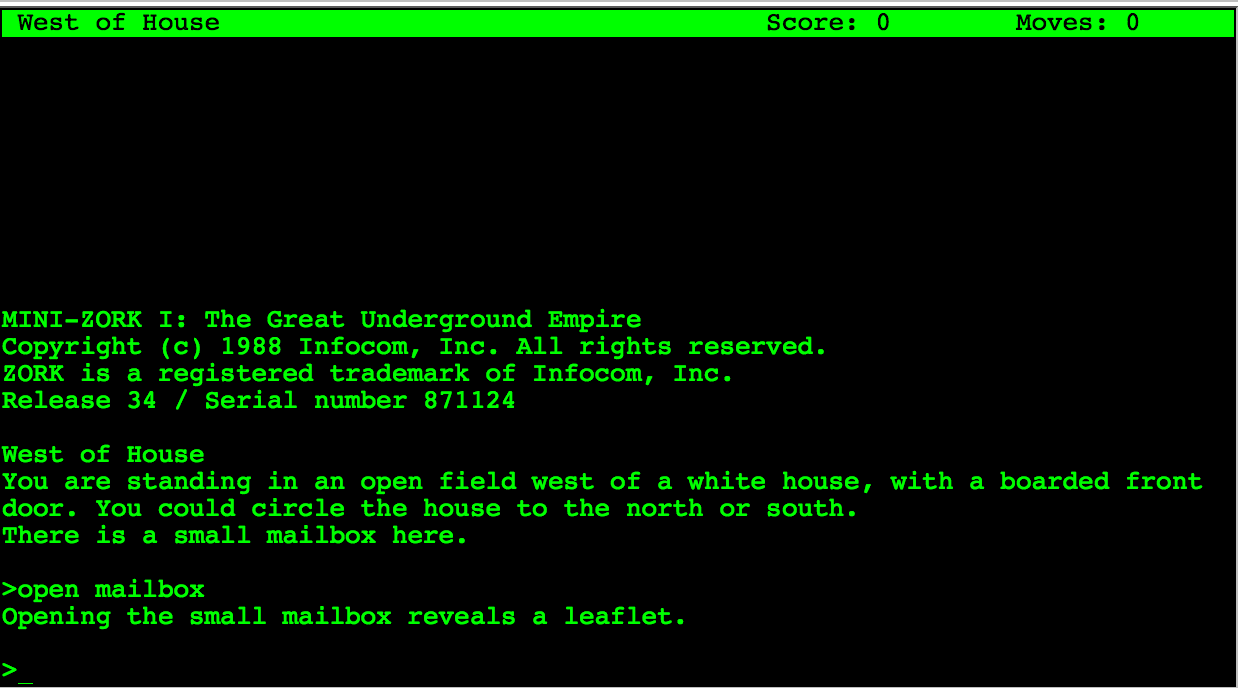
zork

A text adventure

I remember playing (and programming) my first text adventures, later on with simple static images. Many of them had a rich and fascinating atmosphere in spite of having any graphic gizmos or sophisticated real time action.
One of the most important parts of your user interface is text and the words need to be carefully chosen from the user’s domain. But here I want to highlight another similarity between a text adventure and thinking for the user. A text adventure presents the user with a short but sufficient description. These small snippets of text is all the information the user needs at this step of his journey.
A user interface should be the same. Think about the crucial information the user needs at this step. But the description does not stop here: it highlights important parts which further the story. Think about the necessary information and the most important information. Think about a simple hierarchy of information.
For atmosphere and fun the text adventures add small sentences or even unusual phrasing. Besides highlighting things by contrast these parts help the user to get a sense where in the part of the journey he is. Where he came from and where he can go. It connects different rooms.
A business process from the user’s domain is like a journey through the software. He needs to know what the next steps are, what is expected and what is already accomplished. Furthermore the actions which can be done are of utmost importance. In text adventures objects which can be interacted with are emphasized by giving them an extra wording or sentence at the end of a paragraph. Actions are revealed by the domain (common wisdom or specific domain knowledge like fantasy).
For this we need to determine which actions can be done in this part of the process, on this screen.

Information and actions

After listening and reflecting on the information we collected from the user’s view point of their domain, we need to divide it up into steps of a process and form a consistent journey which resembles the imagination of the process the users have in mind. Ryan Singer uses a simple but effective notation for jotting down the needed information and the possible actions.
The information forms the base. Without it the user does not know where in the process he is, what process he works on and what are the next steps. In order to extract this information form the vast knowledge we already collected we need to abstract.
Imagine you have only the information present in this step and want to reach this goal. Is this possible? Is the information sufficient? What information is lacking? Is the missing information part of the common domain knowledge? Did you verify it is common domain knowledge? And if you have enough information: do you know what the expected actions are? What should be done to get further to the goal?

The big picture

Thinking about every step on the way to the goal helps designing each step. But it is also important to not lose sight of the big picture, the goal. Maybe some steps are not necessary or can be circumvented in special cases. Here you need the knowledge of the domain experts. But remember you need to question the assumptions behind their reasoning. Some steps may be mandated by law, some steps may be needed as a mental help. Do not try to cram everything into one step. The steps and their order need to resemble the mental image of the users. But you can help to remove cruft and maybe even delight them on their journey. But this is part of another post.

Learning UX design: where do I start?

Where do I start? A typical question when trying to step into a new field. So many resources, so many definitions, concepts, opinions.

Where do I start? A typical question when trying to step into a new field. So many resources, so many definitions, concepts, opinions. A needle in a haystack. Most of the beginner articles for UX are tailored for design students. Many of the resources for teaching design to developers aim at getting better at visual design or interaction design. But what if your goal is to make life better for users of the software you develop ?
A simple question. ‘It depends’ I hear a lot. I think there are two things everybody can do or learn to do that have a profound effect on the UX of your products.

Think

Increasingly – since beginning to focus on UX – I get the following feedback by our customers and users: “You surely put much thought into it.” Much thought. What does that even mean? Why do they say that?
Common wisdom says you should think like a user in order to create a better experience for him. In my view you should think for the user. Think about what he wants and what he needs. The goals he want to reach and the information and guidance he needs.
Don’t stop at the what. As developers we often only consider what needs to be done. The user stories. The functional specifications. What functionality needs to be implemented. Fixed scope. We do not need to create exactly what the spec says.
Remember our goal? Make life better for our users. We need to understand what this means. Besides understanding the processes, methods and concepts of our user’s domain, we need to find out what the goals are and why the user wants to reach it.
Nobody wants to use a writing application. Nobody wants to write a letter. We need to dig deeper. Maybe he wants to cancel a magazine subscription or a contract. Or he wants to express his feelings to a loved one. That’s better. But what is his goal? In case of the cancellation letter: To save money? To reduce waste?
The why is important to the user and therefore it should be important to us. Not only our focus is changed from the things we need to implement to the goals the user wants to reach, we also have more freedom and a guiding post at the same time. We can find solutions which are outside of the initial user story or even outside the computer. And on the other hand we can evaluate decisions we need to make against helping our users reach their goals.
Think of our work as a bridge. The user wants to reach the other side of the river. Our bridge should be the most efficient and pleasurable way to get there.

Pleasurable

This is where the feelings from the journey of our user comes in. As a developer we try to find a balance between the goals of the business and the technological constraints. When we consider making the lives of our users better, the goals and needs of the users add a new force to be weighted. This is the primary task of the UX designer. We need to find the underlying goals and intentions on the one side and the needs on the other. All of them need to be balanced with the goals of the business.
So how do I find these intentions and needs?

Listen

Really, really listen to your users. The notion that users do not know what they want is poisonous. They don’t need to tell you directly what they want. You need to listen. You need to observe. Start with a beginner’s mind. Let the user explain. Do not assume. I tend to think ahead, to formulate ideas and solutions while listening. Now I am rather naive. I ask why. Why is it this way. Why after why. Do not settle but also do not stress your users. Get to the goals. Discover the needs from the current office environment of the user or the difficulty of the task. Learn what is important for the user and what not. Learn to listen for specific naming and phrasing. Human needs stem from our basic nature, look at Maslow’s hierarchy of needs.
After you collected all sorts of information you need to resolve conflicts, balance the trade offs, reach consensus. You need to construct a whole from the parts of your listening. Therefore you need to think. Prioritize. Sort out. Reflect. Again: you should not assume. Use your whys.

Start with thinking and listening

UX design is a broad field with a simple goal: making life better for our users. In order to reach this we need to think. We need to listen. We need to care. No tool or method will change that. As developers we like to learn tools, languages and have recipes and methods. We would love to have a top ten resources list. The books to read. The course to learn. But all that does not save us from thinking. UX design is even more so: thinking for the user is the core of UX design.

Thinking in immutability

The way I learned programming is dictated by objects and states. Besides advantages and on going efforts in the industry I couldn’t help but thinking: immutability is nice. I can use it in some cases and keep it quietly stored in the corner. But it didn’t remain silent.

The way I learned programming is dictated by objects and states. According to my thinking data is packed into objects which are later modified to reflect the changes over time. State and modification are a central modelling technique. For me programming and OOP in particular resolved around this common theme. Mutating objects pervade my thinking even beyond the code into the database and even the architecture of the whole system.
Besides advantages and on going efforts in the industry I couldn’t help but thinking: immutability is nice. I can use it in some cases and keep it quietly stored in the corner.
But it didn’t remain silent.
So I asked myself: How do you construct programs that build upon immutability? How do you (mostly) avoid mutable objects? How do you think in immutability?
The first step was to unlearn. No updates. No modifications. Read, create, copy. That’s about it. No more CRUD only CR. No more SQL updates, only inserts.

Events and logs

To illustrate I use a simple example. Creating, moving, translating and deleting a point. In the traditional OO way it looks like this:

Point p = new Point(40, 30);
p.translateXBy(5);
p.moveTo(10, 20);
p.delete();

Or using SQL might be something like this (omitting primary keys and where clauses here):

insert into points (x, y) values (40, 30)
update points p set p.x = p.x + 5
update points p set p.x = 10, p.y = 20
delete from points

In our memory (or database if we use one) every line updates our point:

Point p = new Point(40, 30); // p = {x: 40, y: 30}
p.translateXBy(5); // p = {x: 45, y: 30}
p.moveTo(10, 20); // p = {x: 10, y: 20}
p.delete(); // p = ?

But what if we do not store the results of the operations but the operations themselves? The events.
Imagine your state changes as a series of events. Just imagine.

new PointCreated(40, 30); // pointEvents = [{created[x: 40, y:30]}]
new PointTranslatedXBy(5); // pointEvents = [{created[x: 40, y:30]}, {translated[x: 5]}]
new PointMovedTo(10, 20); // pointEvents = [{created[x: 40, y:30]}, {translated[x: 5]}, {moved:[x: 10, y:20]}]
new PointDeleted(); // pointEvents = [{created[x: 40, y:30]}, {translated[x: 5]}, {moved:[x: 10, y:20]}, {deleted}]

Even in the database we would just use inserts, no more updates and no more deletes. The events are stored in a log (ironically the database does this the same way). A log is a fully ordered, append only queue. Once we use and store events we have some extras besides immutability: an audit trail, an undo stack, recovering, …
We could externalize the event stream in a message queue and could monitor it, replay it to reproduce bugs, distribute it. The possibilities are endless.

But. That’s all nice and fine. I have one more question: what’s the current state? A user should see the current state and other parts of the system also (not mentioning that I – coming from a mutable state kind of thinking – would also feel better seeing it).

So what’s the current state?

All events applied in order.

OK. But isn’t this expensive doing this all the time?

Yes!

Here another concept from databases helps us: materialized views. We can easily translate in our mind between the new immutable event driven way and the old in place update way. It is just the same data in different representations (if we only are interested in the current state). If we store the current state as a materialized view (or cache) besides the event log we can have both.
Every part of the program which needs the current state gets an immutable copy of it. If this part needs to know when something changes, it can observe the events and act accordingly. This way mutability is pushed to the borders, to the parts where the current state is shown (like the UI layer).

What’s your time, database?

Time is a difficult subject. Especially time zones and daylight saving time. Adding layers makes things worse. Ask your database.

Time is a difficult subject. Especially time zones and daylight saving time. Sounds easy? Well, take a look.
Adding layers in software development complicates the issue and every layer has its own view of time. Let’s start with an example: we write a simple application which stores time based data in a SQL database, e.g. Oracle. The table has a column named ‘at’. Since we don’t want to mess around with timezones, we use a column type without timezone information, in Oracle this would be ‘Date’ if we do not need milliseconds and ‘Timestamp’ if we need them. In Java with plain JDBC we can extract it with a call to ‘getTimestamp’:

Date timestamp = resultSet.getTimestamp("at");

The problem is now we have a timestamp in our local timezone. Where is it converted? Oracle itself has two timezone settings: for the database and for the session. We can query them with:

select DBTIMEZONE from dual;

and

select SESSIONTIMEZONE from dual;

First Oracle uses the time zone set in the session, then the database one. The results from those queries are interesting though: some return a named timezone like ‘Europe/Berlin’, the other return an offset ‘+01:00’. Here a first subtle detail is important: the named timezone uses the offset and the daylight saving time from the respective timezone, the offset setting only uses the offset and no daylight saving. So ‘+01:00’ would just add 1 hour to UTC regardless of the date.
In our example changing these two settings does not change our time conversion. The timezone settings are for another column type: timestamp with (local) timezone.
Going up one layer the JDBC API reveals an interesting tidbit:

Timestamp getTimestamp(int columnIndex)
throws SQLException

Retrieves the value of the designated column in the current row of this ResultSet object as a java.sql.Timestamp object in the Java programming language.

Sounds about right, but wait there’s another method:

Timestamp getTimestamp(int columnIndex,
Calendar cal)
throws SQLException


Retrieves the value of the designated column in the current row of this ResultSet object as a java.sql.Timestamp object in the Java programming language. This method uses the given calendar to construct an appropriate millisecond value for the timestamp if the underlying database does not store timezone information.

Just as in Oracle we can use a named timezone or an offset:

Date timestamp = resultSet.getTimestamp("at", Calendar.getInstance(TimeZone.getTimeZone("GMT+1:00")));

This way we have control over what and how the time is extracted from the database. The next time you work with time based information take a close look. And if you work with Java use Joda Time.

Universal skills every software developer can benefit from

I develop software. Professionally for almost 15 years. These are some skills that helped and help me and I think they could help any software developer.

Disclaimer: I develop software. Professionally for almost 15 years. These are some skills that helped and help me and I think they could help any software developer.

Debug

I cannot tell you how many times debugging saved me. I debug with print statements, with IDEs, with command line debuggers and with my brain. Understanding how a system works is crucial. Which parts are connected and which are not. Asking what if. And asking what happened.

Profile

If things go slow, I need to know why. Users and stakeholders expect a certain speed. And rightly so. But beware: if you optimize for one scenario, others might suffer. Profiling and optimizations are a thing of priority: which tasks should be fast and which can be slow.

Sketch

If I work with or for others, understanding each other and the models and concepts they use is essential. Sketching helps me to illustrate my view, my understanding of their view and the misunderstandings between us. Even when not communicating with others I can communicate with myself. Sketching a model of what is in my head or what I plan helps me reason about it. You don’t need to be a master artist, simple shapes like lines, rectangles, circles and arrows get you a long way.

Concepts (domain and technical)

Everybody thinks in concepts and models. May they be from a technical or a user domain. In my daily work I need to understand, to develop, to extract and to communicate concepts. Concepts come from very different places: code has concepts, domains have concepts, our profession has concepts and all kinds of people have concepts. Concepts form the base for my communication.

Budgeting

Time is limited. Concentration is limited. Constraints in a project help me to focus. To be pragmatic. But they also push me to plan and to estimate. I need to develop a notion of how long a feature takes, how important it is, how risky.

Evaluate

In my work I constantly evaluate. From small scale: which implementation is better, to large scale: which technology, which architecture should I use. To evaluate, I need to know the goals and the criteria. My experience helps me and hinders me. I know that no evaluation can be objective. Every one has his personal favorites (and dislikes). Some things can only be seen afterwards. So I have to remind me that I don’t take too long with evaluation and start using it.

Talk

With other developers I can talk in IT lingo. With designers I need to use words from design. With users and stakeholders I speak so that they understand. My job is not only writing code. My job is to explain my job to others. If they do not understand me, it is my fault, not theirs. I do not need to bother them with every detail but sometimes they are the only ones who can decide. I need to tell them what their options are and what the consequences for each of them is – in their words.

Plan and prepare

They are two kinds of people: the ones who like to prepare and the ones who like to improvise. I am in the middle. Some things can be prepared and planned. It is useful when you can move work ahead of time or when you have (more) options when you need to improvise. Don’t overplan. Remember: a plan is there to be changed.

Improvise

During my career I face new situations every now and then. I cannot plan for them or I didn’t. When I am in a client meeting, in a demo presentation, at the production system and something goes not as planned, I need to do something. Sometimes now. It helps me to have a emergency mode. In these situations I focus on what I have: my brain and my voice and on what I can (maybe) get: help from others, a pencil and a paper, time. And sometimes I need to say: I am sorry.

Lead / own

If I work on an issue, I need to own it. If I lead a project, I need to own it. My career: I need to own it. I am the one who is responsible. That does not mean I have to perform the work myself. I also need to know when I am not the right person for the job. But I need to decide. The work, the project, the career is not a boat which drifts in a giant ocean, I need to take the paddle and use it.

Collaborate

I work not alone. I have teammates. I have clients. My goal is to work with them to a common goal. For this I need to collaborate. To delegate. To talk and to ask. To lead and to follow.

Define goals

Goals are measurable. I can ask: did I reach that goal? And answer with yes or no. Often we define something like: I want to get better at X as a goal. But that isn’t a goal. Think of a goal as a destination, not a direction. It is important to strike the balance between focusing too little or too much on our goals. But without even knowing what the goals are we just wander around.

Reflect and how to get feedback

I confess: I cannot live without feedback for too long. Am I on my way to the goal? Is this code any good? Was this the right decision? Do I make progress? Does it work? Reflection and feedback are stepping stones for me. A base from which I can move to higher mountains.

Ask

Asking is hard. Asking for help is hard. Asking for things you don’t (and maybe should) know is hard. But it helps immensely in learning. Be curious. Asking so that the other understands your question and you get the answers you need, needs practice. So: feel free to ask 🙂

Software development is code organization

The biggest problem in developing and maintaining software is understanding code. Software developers should get good training in crafting code which can be understood. To make sense of the mess that is code we need to organize it.

The biggest problem in developing and maintaining software is understanding code. Software developers should get good training in crafting code which can be understood. To make sense of the mess we need to organize it.

In 2000 Edsger Dijkstra wrote about our problems organizing and designing software:

I would therefore like to posit that computing’s central challenge, “How not to make a mess of it”, has not been met. On the contrary, most of our systems are much more complicated than can be considered healthy, and are too messy and chaotic to be used in comfort and confidence.

Our code bases get so big and complicated today that we cannot comprehend them all at once. Back in the days of UNIX technical constraints led to smaller code. But the computer is not the limiting factor anymore. We are. Our mind cannot comprehend what we create. Brian Kernighan wrote:

Everyone knows that debugging is twice as hard as writing a program in the first place. So if you’re as clever as you can be when you write it, how will you ever debug it?

Writing code that we (or other developers) can understand is crucial. But why do we fail?

Divide and lose

Usually the first argument when tackling code is to decouple it. Make it clean. Use clean code principles like DRY, SOLID, KISS, YAGNI and what other acronyms you know. These really help to decouple. But they are missing the point. They are the how not the why.
Take a look at your codebase and tell me where are the classes which constitute a subdomain or a specific feature? In which project or part do they live?
Normally you cannot. We only know how to divide code by technical aspects. But features and changes often come from the domain, not from the technology.
How can we understand our creations when we cannot understand its structure? Its architecture? How can we understand something we do not see.

But it does work

The next argument is not much better. Our code might work now. But what if a bug is found or a new feature is about to be implemented? Do you understand the code and its structure? Even weeks, months or years later? Working code is good but you can only change code reliably that you understand.

KISS

Write simple code. Write simple and small methods. Write cohesive classes. The dream of components. But the whole is more than the sum of its parts. You can write simple classes but the communication and threading issues between them can be very complex. Even if the interfaces are sound and simple. Understanding a simple class can be easy in isolation. But understanding a system of simple classes can be difficult and complex. Things are complex. Domains are complex. We cannot ignore that.

Code as an interface

When writing code we have to take the reader and the domain into account. Treat code as an interface. An interface to the system and the domain. It is an opinionated view of the world. The computer does not care about the code we use. Just like the printer who prints our favorite book. But the reader does.
This isn’t just nice thinking, understanding code is key to successfully crafting and changing software.

Assumptions – how to find, track and eliminate them

Assumptions can kill a project. Like a house built on sand we don’t know when and where it will collapse.
The problem with assumptions is that they disguise as truths. We believe them.

Assumptions can kill a project. Like a house built on sand we don’t know when and where it will collapse.
The problem with assumptions is that they disguise as truths. We believe them. They are the project’s reality. Just like the matrix.
Assumptions are shortcuts. Guesses at reality. We cannot fully grasp reality, so we assume. But we can find evidence for our decisions. For this we need to uncover the assumptions, assess their risk and gather evidence. But how do we know what we assume?

Find assumptions

Watch your language

‘I think’, ‘In my opinion’, ‘should be’, ‘roughly’, ‘circa’ are all clues for assumptions. Decisions need to be based on evidence. When we use vague language or personal opinions to describe our project we need to pause. Under this lurks insecurity and assumptions.
Another red flag are metaphors. Metaphors might be great to present, paint a picture in our head or describe a vision. But in decision making they are too abstract and meaningless. We may use them to describe our strategy but when we need to design and implement we need borders that constrain our decisions. Metaphors usually cover only some aspects of the project and vice versa. There’s a mismatch. We need concrete language without ambiguity.

Be dumb

We know so much that we think others have the same experience, education, view point, familiarity, proficiency and imprinting. We know so little that we think the other way is also true. We transfer. We assume. Dare to ask dumb questions. Adopt a beginner’s mind. Challenge traditions and common beliefs.
We take age old decisions for granted. They were made by people smarter than us, so they must be right. Don’t do this. Question them. Even the obvious ones.
In the book ‘Hidden in plain sight’ Jan Chipchase enters a typical cafe where people sit and talk, drink coffee and typing on their laptops. The question he poses: should the coffeshop owner sell diapers? So that everybody can continue what they do without the need to go to the bathroom. This question challenges our cultural and imprinted beliefs. And this is good.

Be curious

Ask: why? We need to get to the root of the problem. Dig deeper. Often under layers of reasoning and thoughtful decisions lies an assumption. The chain is only so strong as its weakest link. If we started with an assumption, the reasoning building on it is also assumed. Children often ask why and don’t stop even when we think it is all said and logical. So when we find the root, we need to continue to ask: is this really the root? Why is it the way it is.
Another question we need to ask repeatedly is: what if? What if: our target audience changes? we try to follow the opposite of the goals of our project? what if the technology changes?

Change perspectives

We see what we want to see. Seeing is an active process. We can stretch our thinking only so far. To stretch it even further we need to change roles. For just some hours do the work our users do. Feel their pains. Their highs and lows.
Or adopt the role of the browser. Good interfaces are conversations. Play a dialog with your user. Be the browser.
Only by embracing constraints of other perspectives we can force ourselves to stretch. In this way we find things which are assumed by us because of our view of the world.

Track them

After we have collected the assumptions we need to track them to later prove or disprove them. For this a simple spreadsheet or table is sufficient. This learning plan consists of 5 columns (taken from Leah Buley’s The UX Team of one):

  • the assumption: what we believe is true
  • the certainty: a 3 or 5 point scale showing how sure we are that we are right
  • notes: additional notes of why we think the assumption is right or wrong
  • the evidence: results which we collected to support this assumption
  • the research: things we can do to collect further evidence

Eliminate them

Now that we know what we assume and with which certainty we think we are right, we can start to collect further information to support or disprove our claims. In short: We research. Research can take many different forms. But all forms are there to gain further insights. Some basic forms we use to bring light into the darkness of uncertainty are:

  • Stakeholder interviews
  • (Contextual) user interviews
  • Heuristic evaluation
  • Prototyping
  • Market research

Other methods we don’t use (yet) include:

  • A/B tests (paired with analytics)
  • User tests

The point behind all these methods is to build a chain of reasoning. Everything in our software needs a reason to exist. The users and the stakeholders are the primary sources of insight. But also our experience, the human psychology and common patterns or conventions help us to decide which way to go.
Not only the method of collecting is important but also how the results are documented. We should present the essential information in a way that it is easy to get a glimpse of it just by looking at the respective documents. On the other side we should all keep this pragmatic and not go overboard. Our goal is to get insight and not build a proof of the system.

The web is for documents

The web is intended to help a person find and understand relevant information. The primary container of information is the document. Therefore web applications should be centered around a document metaphor, not an app one.

The web is intended to help a person find and understand relevant information. The primary container of information is the document. Therefore web applications should be centered around a document metaphor, not an app one.

In 1990 Tim Berners-Lee and Robert Cailliau wrote a proposal for what we call the web today:

HyperText is a way to link and access information of various kinds as a web of nodes in which the user can browse at will.

The web is a linked information system. Bret Victor states:

Information software serves the human urge to learn. A person uses information software to construct and manipulate a model that is internal to the mind — a mental representation of information.

The web is built around information. More information than we can handle. What we need to make sense of it all is understanding. The power of technology can be used to transfer and gain understanding. Understanding needs to be a first class citizen. The applications we build must be centered around it.

One way to foster understanding is to interact, to play with information. Technology can simulate a system of information so that we can form hypotheses and ask questions. Bret Victor coined the term “explorable explanations” to describe such systems.

I believe the web is perfectly suited for building explorable explanations.

The web’s container for information is the document. A document combines different forms of media (text, images, video, …) to a whole. Fortunately for us the web does not stop here. With scripting we have the possibility to interact and manipulate the information in order to gain further insight.

Most of the tools we need to create for understanding are already at our hands. What we need is a fundamental change in focus. Right now (a large part of) the web industry tries to play catch up with native. Whole frameworks try to mimic native applications like this is a virtue. Current developments want to abstract the document as far away as possible. This is not what the web was intended for. Why build an application which tries so hard to recreate a native feeling in something other than the native platform itself? Web applications should be built on the strength of the web. We should not chase a foreign metaphor.
Right now the web seems to be torn. Torn between the print era of passive documents and the shiny new world of native applications. But the web has the capability to do so much more. To concentrate on its purpose, to fill the niche. A massive niche. Understanding is a core endeavor of mankind. To quote Stephen Anderson and Karl Fast in introducing their upcoming book From Information to Understanding:

In all areas of life, we are surrounded by understanding problems.

Doug Engelbart shares a similar vision for the purpose of the personal computer per se:

By “augmenting human intellect” we mean increasing the capability of a man to approach a complex problem situation, to gain comprehension to suit his particular needs, and to derive solutions to problems.

The web is ready. The tools are ready. But are we?

Where to start: foundations

The typography of source code

All of our source code has typical (macro) typographical properties. This structure can tell us something about the language used, about the type of artifact and even about the composition of the individual parts of a class or file itself.

Take a look at the following source code, can you guess which language this is written in?

It’s CSS. CSS has a typical layout with a minimal indentation depth where a group of selectors embraces lines of attribute / value pairs. Take a look:

As with the example above all of our source code has typical (macro) typographical properties. This features can tell us something about the language used, about the type of artifact and even about the composition of the individual parts of a class or file itself.
Here’s another typical file in a common language:

In this case it is a Java class. It reveals itself by its block of imports at the top (1). The class declaration (2) is rather long probably due to generics. The typical block of field declarations (3) starts the class body. Quickly a short constructor follows (4). It is too short but has parameters so it is a convenience constructor. The real constructor is next (5). Here we see the constructor is too long. It does so much we almost take it for a normal method. At (6) we see parameters for a method call one on each line. The slight change in indentation at (7) indicates an inner class. The block at (8) confirms the inner class: here parameters from the outer class are referenced by prefixing it with OuterClassName.this.
Even subtle things like annotations (9) can be seen at macro level.

Let’s compare two object oriented languages one is Java, the other one Ruby.

Several things can be noticed (besides the Java version is much longer than the Ruby one). First the Java block of imports is missing in Ruby. The field block seems to be small in Ruby but another big block follows in the middle. The Ruby class shown here is a Rails domain class. The block in the middle contains the associations (has_many and friends). Looking closer one can glimpse that the closing part of the methods seems a bit thicker in Ruby (Ruby closes the method with end whereas Java closes with }). But besides the difference a similarity is also there: both classes have a couple of short methods near the bottom.
Even within one language and one framework classes with different purpose have different shapes. Seeing a Rails model and a controller side by side shows some interesting patterns.

While controllers have a block at the end of the class (which is for permitting request parameters), model classes have blocks of scope declarations and associations typical at the center. Whereas model methods are short in both dimensions, the controller methods have a level of indentation (which is a typical if which checks for the success or failure of the operation).

But why does this all matter? The first thing when we look a block of text is its (macro) structure. Typical patterns can help us to identify the type of class or language. Inconsistencies could be bugs or parts which were difficult to write. Kevlin Henney advocates in his talk Seven Ineffective Coding Habits Of Many Programmers for formatting techniques that are stable and produce a minimal set of alignments. Because:

You convey information by the way you arrange a design’s elements in relation to each other. This information is understood immediately, if not consciously, by the people viewing your designs.

Daniel Higginbotham, http://www.visualmess.com/

I think many more things can be seen by looking at the macro level but for now I leave you with another picture of a sourcecode of a well known language. Can you guess what it is?

Transparent software: Making complexity understandable

Software is broken. Not because it is not simple. Because it is not transparent. Let me elaborate.

“I don’t think that’s feasible”

That are not the first words we wanted to hear from our client after our presentation.

“I have seen several engineers working over a year just for the concept”

This is complex.

The world tells you that all should be simple. Make it simple. Keep it simple. It is just that simple.

Only when it is not.

Look around you. Nature is beautiful. And complex. The human is beautiful. And complex. Many systems and contexts are complex.

Look inside you. Your thoughts and emotions. Your relationships.

Look at your computer, your phone, your work. Many problems we have and solve everyday are not simple.

Sometimes we think “Oh, why can’t this be simple”. “The software should be simpler”. But KISS won’t save you. Software is broken. But not because it is not simple. We do not want simplicity. We want clarity. We want to understand. Let me elaborate.

I create software for engineers. Engineers are the people who take problems who are fine in theory and work perfectly in a controlled environment like a lab and translate them to the real world. But the real world isn’t simple or controlled. It is messy. The smallest things can blow up your house of cards of theory. These people need software to understand what happens. Through their education and their experience they know what should happen. They are the experts. But the systems and problems they work with are so complex and mostly invisible to the human eye and incomprehensible to the human brain. But today’s engineering software looks like this:

cases-colorful-colourful-2019
Options all over the place

Make no mistake. This isn’t constrained to engineering problems. Take a look around you. Nowadays there are a million sensors collecting masses of data. Your phone. Your thermostat. Your shoes. Even your tooth brush. Sensors are everywhere. We are collecting more data than ever before. This data gives us a glimpse of the complex underlying system. So we think. But why do we collect them in the first place?
Because we can. We are seeking the holy grail of wisdom. More data creates more information. More information creates more knowledge. And finally we hope that more knowledge gets us a spark of wisdom. But we are just starting out.

The course of technology

The normal way of technology goes something like this: First we are constrained. We try to push the borders. When the field is wide and open we do everything that’s possible. After a while we become more mature and use it to serve a purpose. Software is like that. Collecting data is like that. It is like an addiction. Think about it: Do you influence the data or does the data influence you? Who is in control?

But there’s hope. In order to reason about and come to our decisions we need transparent software. The dictionary defines transparent as:

transparent (adjective)

  • (of a material or article) allowing light to pass through so that objects behind can be distinctly seen
  • easy to perceive or detect
  • having thoughts, feelings, or motives that are easily perceived
  • (of an organization or its activities) open to public scrutiny
  • Physics: transmitting heat or other electromagnetic rays without distortion.
  • Computing: (of a process or interface) functioning without the user being aware of its presence.

Transparent is a tricky word. It seems to be a paradox: on the one hand it means invisible and on the other hand it means easily perceived. Both uses of the word apply to what software needs to be.

No more magic

Software has to help us understand systems and concepts. What happens and what happened. It has to make it clear, comprehensible and detectable. We need to see how the software comes to its conclusions. We need the option to overrule it. The last decision is ours. Software can help us forming a decision but it should never decide on our behalf.
Also: It gets out of our way. We don’t need any more rituals to please the software to do our bidding. Software is a tool. To be a great tool it needs to fit the problem and the person. No one wants to cut with a knife that is all blade. It should adapt to our capabilities. It should fit like a glove. It amplifies not cripples our capabilities. It is made for us. It is transparent.

That’s the goal. But how do we get there?

Maximalistic design or design with ‘Betthupferl’

Minimalistic design is a misnomer. Reducing a complex issue needs more design not less. Designing is about thinking, taking care. If we want to make complex systems understandable we need to think hard. What is the essence of the problem? What information does the expert need to evaluate a situation? All of this expertise is hidden in the heads and the daily routine of the people we design for. So we need to ask, watch and listen to them. Not direct and with a free mind. Throw your preconceptions overboard. Remove your ego. First just observe. Collect. Challenge your assumptions. When you have a good amount of information (with experience you will know when you can start but do not believe you will ever have enough), distill. Distill the essence. And then add. That little extra. The details. The cues which foster understanding.
When you stay the night in a hotel and in your white and clean bed you find a little sweet on your pillow. You are delighted. In German we call this ‘Betthupferl’.
This little extra you add is just this. The user feels cared for. He sees that someone has gone the extra mile, has thought deeply about him. The essence is not enough. You need some details. To weave the parts to together to form a whole. This can be extra information when the user needs it. This can be a shortcut when the context is right. Or an animation which guides the eye. Or or or…
Important is that it does not confuse or blur the essence. It should support. Silently, almost invisible.