IS NULL or IS NOT NULL, that is the question

Today I’ll demonstrate a curiosity of SQL regarding the NOT IN operator in combination with a subquery and NULL values.

Let’s assume we have two database tables, users and profiles:

 users              profiles
+--------------+  +-------------+
| id  username |  | id  user_id |
| 0   'joe'    |  | 0   2       |
| 1   'kate'   |  | 1   0       |
| 2   'john'   |  | 2   NULL    |
| 3   'maria'  |  +-------------+
+--------------+

We want to find all users, which have no associated profile. The intuitive solution would be a negated membership test (“NOT IN”) on the result set of a subquery:

SELECT * FROM users WHERE id NOT IN (SELECT user_id FROM profiles);

The anticipated result is:

+---------------+
| id  username	|
| 1   'kate'    |
| 3   'maria'   |
+---------------+

However, the actual result is an empty set:

+--------------+
| id  username |
+--------------+

This is irritating, especially since the non-negated form produces a sensible result:

SELECT * FROM users WHERE id IN (SELECT user_id FROM profiles);

+--------------+
| id  username	|
| 0   'joe'    |
| 2   'john'   |
+--------------+

So why does the NOT IN operator produce this strange result?

To understand what happens we replace the result of the subquery with a set literal:

SELECT * FROM users WHERE id NOT IN (2, 0, NULL);

This statement is internally translated to:

SELECT * FROM users WHERE id<>2 AND id<>0 AND id<>NULL;

And here comes the twist: a field<>NULL clause evaluates to UNKNOWN in SQL, which is treated like FALSE in a boolean expression. The desired clause would be id IS NOT NULL, but this is not what is used by SQL. As a consequence the result set is empty.

The result for the non-negated membership test (“IN”) can be explained as well. The IN clause is internally translated to:

SELECT * FROM users WHERE id=2 OR id=0 OR id=NULL;

A field=NULL clause evaluates to UNKNOWN as well. But in this case it is of no consequence, since the clause is joined via OR.

Now that we know what’s going on, how can we fix it? There are two possibilities:

One is to use an outer join:

SELECT u.id FROM users u LEFT OUTER JOIN profiles p ON u.id=p.user_id WHERE p.id IS NULL;

The other option is to filter out all NULL values in the subquery:

SELECT id FROM users WHERE id NOT IN (SELECT user_id FROM profiles WHERE user_id IS NOT NULL);

Conclusion

Both field=NULL and field<>NULL evaluate to UNKNOWN in SQL. Unfortunately, SQL uses these clauses for IN and NOT IN set operations. The solution is to work around it.

Thinking in immutability

The way I learned programming is dictated by objects and states. Besides advantages and on going efforts in the industry I couldn’t help but thinking: immutability is nice. I can use it in some cases and keep it quietly stored in the corner. But it didn’t remain silent.

The way I learned programming is dictated by objects and states. According to my thinking data is packed into objects which are later modified to reflect the changes over time. State and modification are a central modelling technique. For me programming and OOP in particular resolved around this common theme. Mutating objects pervade my thinking even beyond the code into the database and even the architecture of the whole system.
Besides advantages and on going efforts in the industry I couldn’t help but thinking: immutability is nice. I can use it in some cases and keep it quietly stored in the corner.
But it didn’t remain silent.
So I asked myself: How do you construct programs that build upon immutability? How do you (mostly) avoid mutable objects? How do you think in immutability?
The first step was to unlearn. No updates. No modifications. Read, create, copy. That’s about it. No more CRUD only CR. No more SQL updates, only inserts.

Events and logs

To illustrate I use a simple example. Creating, moving, translating and deleting a point. In the traditional OO way it looks like this:

Point p = new Point(40, 30);
p.translateXBy(5);
p.moveTo(10, 20);
p.delete();

Or using SQL might be something like this (omitting primary keys and where clauses here):

insert into points (x, y) values (40, 30)
update points p set p.x = p.x + 5
update points p set p.x = 10, p.y = 20
delete from points

In our memory (or database if we use one) every line updates our point:

Point p = new Point(40, 30); // p = {x: 40, y: 30}
p.translateXBy(5); // p = {x: 45, y: 30}
p.moveTo(10, 20); // p = {x: 10, y: 20}
p.delete(); // p = ?

But what if we do not store the results of the operations but the operations themselves? The events.
Imagine your state changes as a series of events. Just imagine.

new PointCreated(40, 30); // pointEvents = [{created[x: 40, y:30]}]
new PointTranslatedXBy(5); // pointEvents = [{created[x: 40, y:30]}, {translated[x: 5]}]
new PointMovedTo(10, 20); // pointEvents = [{created[x: 40, y:30]}, {translated[x: 5]}, {moved:[x: 10, y:20]}]
new PointDeleted(); // pointEvents = [{created[x: 40, y:30]}, {translated[x: 5]}, {moved:[x: 10, y:20]}, {deleted}]

Even in the database we would just use inserts, no more updates and no more deletes. The events are stored in a log (ironically the database does this the same way). A log is a fully ordered, append only queue. Once we use and store events we have some extras besides immutability: an audit trail, an undo stack, recovering, …
We could externalize the event stream in a message queue and could monitor it, replay it to reproduce bugs, distribute it. The possibilities are endless.

But. That’s all nice and fine. I have one more question: what’s the current state? A user should see the current state and other parts of the system also (not mentioning that I – coming from a mutable state kind of thinking – would also feel better seeing it).

So what’s the current state?

All events applied in order.

OK. But isn’t this expensive doing this all the time?

Yes!

Here another concept from databases helps us: materialized views. We can easily translate in our mind between the new immutable event driven way and the old in place update way. It is just the same data in different representations (if we only are interested in the current state). If we store the current state as a materialized view (or cache) besides the event log we can have both.
Every part of the program which needs the current state gets an immutable copy of it. If this part needs to know when something changes, it can observe the events and act accordingly. This way mutability is pushed to the borders, to the parts where the current state is shown (like the UI layer).

What’s your time, database?

Time is a difficult subject. Especially time zones and daylight saving time. Adding layers makes things worse. Ask your database.

Time is a difficult subject. Especially time zones and daylight saving time. Sounds easy? Well, take a look.
Adding layers in software development complicates the issue and every layer has its own view of time. Let’s start with an example: we write a simple application which stores time based data in a SQL database, e.g. Oracle. The table has a column named ‘at’. Since we don’t want to mess around with timezones, we use a column type without timezone information, in Oracle this would be ‘Date’ if we do not need milliseconds and ‘Timestamp’ if we need them. In Java with plain JDBC we can extract it with a call to ‘getTimestamp’:

Date timestamp = resultSet.getTimestamp("at");

The problem is now we have a timestamp in our local timezone. Where is it converted? Oracle itself has two timezone settings: for the database and for the session. We can query them with:

select DBTIMEZONE from dual;

and

select SESSIONTIMEZONE from dual;

First Oracle uses the time zone set in the session, then the database one. The results from those queries are interesting though: some return a named timezone like ‘Europe/Berlin’, the other return an offset ‘+01:00’. Here a first subtle detail is important: the named timezone uses the offset and the daylight saving time from the respective timezone, the offset setting only uses the offset and no daylight saving. So ‘+01:00’ would just add 1 hour to UTC regardless of the date.
In our example changing these two settings does not change our time conversion. The timezone settings are for another column type: timestamp with (local) timezone.
Going up one layer the JDBC API reveals an interesting tidbit:

Timestamp getTimestamp(int columnIndex)
throws SQLException

Retrieves the value of the designated column in the current row of this ResultSet object as a java.sql.Timestamp object in the Java programming language.

Sounds about right, but wait there’s another method:

Timestamp getTimestamp(int columnIndex,
Calendar cal)
throws SQLException


Retrieves the value of the designated column in the current row of this ResultSet object as a java.sql.Timestamp object in the Java programming language. This method uses the given calendar to construct an appropriate millisecond value for the timestamp if the underlying database does not store timezone information.

Just as in Oracle we can use a named timezone or an offset:

Date timestamp = resultSet.getTimestamp("at", Calendar.getInstance(TimeZone.getTimeZone("GMT+1:00")));

This way we have control over what and how the time is extracted from the database. The next time you work with time based information take a close look. And if you work with Java use Joda Time.

Database Migration Categories

Most long-running projects need to manage changes to the database schema of the system and data migrations in some way. As the system evolves new datatypes/tables and properties/columns are added, some are removed and others are changed. Relationships between objects also change in unpredictable ways so that you have to deal with these changes in some way. Not all changes are equal in nature, so we handle them differently!

One tool we use to manage our database is liquibase. The units of change are called migrations and are logged in the database itself (table “databasemigrations”) so that you can actually see in which state the schema is. Our experience using such tools for several years is very positive because there is no manual work on the database of some production system needed and new installations automatically create the database schema matching the running software. There are however a few situations when you want to do things manually. So we identified three types of changes and defined how to handle them:

1. structural changes

Structural changes modify the database schema but no data. In some cases you have to care about the default values for not null columns. These changes are handled by database management/versioning tools. They are relevant for all instances and specific for each deployed version of the system. The changes are stored with the source code under version control. Most of the time they are needed when extending the functionality of the system and implementing new features. In SQL the typical commands are CREATE, DROP and ALTER.

2. data rule changes

Changes to the way how the data is stored we call data rule changes. Examples for this are changing the representation of an enum from integer to string or a relation from one-to-many to many-to-many. In such a case the schema and importantly existing data has to be changed. For these migrations you do not need explicit ids of an object in the database but you change all entries in the same way according to the new rules. The changes can be applied to each instance of the system that is update to the new database (and software) version. Like structural changes they are executed using the database migration tool and stored under version control. The typical SQL command after the involveld structural changes needed is UPDATE with an where clause and sometimes CASE WHEN statements.

3. data modifications

Sometimes you have to change individual data sets of one instance of a system. That may be because of a bug in the software or corrupted/wrong entries that cannot by fixed using the system itself, e.g. as super user. Here you fix the entries of one instance of the system manually or with a SQL script. You will usually name specific object ids of the database and perform these exact changes only on this instance. It may be necessary to perfom similar tasks on other instances using different object ids. Because of this one-time and instance-specific nature of the changes we do not use a migration tool but some kind of SQL shell. Such manual changes have to be performed with extra caution and need to be thoroughly documented, e.g. in your issue tracker and wiki. If possible use a non-destructive approach and make backups of the data before executing the changes. Typical SQL statements are UPDATE or DELETE containing ids or business keys.

Conclusion

With categories and guidelines above developers can easily figure out how to deal with changes to the database. They can keep the software, database schema and customer data up-to-date, nice and clean over many years while improving and evolving the system and managing several instances running possibly different versions of the system.

How to speed up your ORM queries of n x m associations

What solution (no cache) causes a 45x speedup? Learn the different approaches and how they compare

What causes a speedup like this? (all numbers are in ms)

Disclaimer: the absolute benchmark numbers are for illustration purposes, the relationship and the speedup between the different approaches are important (just for the curious: I measured 500 entries per table in a PostgreSQL database with both Rails 4.1.0 and Grails 2.3.8 running on Java 7 on a recent MBP running OSX 10.8)

Say you have the model classes Book and (Book)Writer which are connected via a n x m table named Authorship:
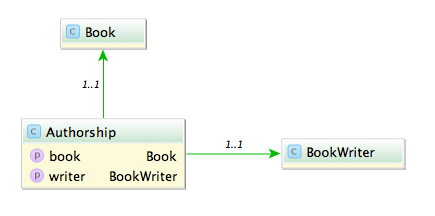
A typical query would be to list all books with its authors like:

Fowler, Martin: Refactoring

A straight forward way is to query all authorships:

In Rails:

# 1500 ms
Authorship.all.map {|authorship| "#{authorship.writer.lastname}, #{authorship.writer.firstname}: #{authorship.book.title}"}

In Grails:

// 585 ms
Authorship.list().collect {"${it.writer.lastname}, ${it.writer.firstname}: ${it.book.title}"}

This is unsurprisingly not very fast. The problem with this approach is that it causes the famous n+1 select problem. The first option we have is to use eager fetching. In Rails we can use ‘includes’ or ‘joins’. ‘Includes’ loads the associated objects via additional queries, one for authorship, one for writer and one for book.

# 2300 ms
Authorship.includes(:book, :writer).all

‘Joins’ uses SQL inner joins to load the associated objects.

# 1000 ms
Authorship.joins(:book, :writer).all
# returns only the first element
Authorship.joins(:book, :writer).includes(:book, :writer).all

Additional queries with ‘includes’ in our case slows down the whole request but with joins we can more than halve our time. The combination of both directives causes Rails to return just one record and is therefore ruled out.

In Grails using ‘belongsTo’ on the associations speeds up the request considerably.

class Authorship {
    static belongsTo = [book:Book, writer:BookWriter]

    Book book
    BookWriter writer
}

// 430 ms
Authorship.list()

Also we can implement eager loading with specifying ‘lazy: false’ in our mapping which boosts a mild performance increase.

class Authorship {
    static mapping = {
        book lazy: false
        writer lazy: false
    }
}

// 416 ms
Authorship.list()

Can we do better? The normal approach is to use ‘has_many’ associations and query from one side of the n x m association. Since we use more properties from the writer we start from here.

class Writer < ActiveRecord::Base
  has_many :authors
  has_many :books, through: :authors
end

Testing the different combinations of ‘includes’ and ‘joins’ yields interesting results.

# 1525 ms
Writer.all.joins(:books)

# 2300 ms
Writer.all.includes(:books)

# 196 ms
Writer.all.joins(:books).includes(:books)

With both options our request is now faster than ever (196 ms), a speedup of 7.
What about Grails? Adding ‘hasMany’ and the authorship table as a join table is easy.

class BookWriter {
    static mapping = {
        books joinTable:[name: 'authorships', key: 'writer_id']
    }

    static hasMany = [books:Book]
}
// 313 ms, adding lazy: false results in 295 ms
BookWriter.list().collect {"${it.lastname}, ${it.firstname}: ${it.books*.title}"}

The result is rather disappointing. Only a mild speedup (2x) and even slower than Rails.

Is this the most we can get out of our queries?
Looking at the benchmark results and the detailed numbers Rails shows us hints that the query per se is not the problem anymore but the deserialization. What if we try to limit our created object graph and use a model class backed by a database view? We can create a view containing all the attributes we need even with associations to the books and writers.

create view author_views as (SELECT "authorships"."writer_id" AS writer_id, "authorships"."book_id" AS book_id, "books"."title" AS book_title, "writers"."firstname" AS writer_firstname, "writers"."lastname" AS writer_lastname FROM "authorships" INNER JOIN "books" ON "books"."id" = "authorships"."book_id" INNER JOIN "writers" ON "writers"."id" = "authorships"."writer_id")

Let’s take a look at our request time:

# 15 ms
 AuthorView.select(:writer_lastname, :writer_firstname, :book_title).all.map { |author| "#{author.writer_lastname}, #{author.writer_firstname}: #{author.book_title}" }
// 13 ms
AuthorView.list().collect {"${it.writerLastname}, ${it.writerFirstname}: ${it.bookTitle}"}

13 ms and 15 ms. This surprised me a lot. Seeing this in comparison shows how much this impacts performance of our request.

The lesson here is that sometimes the performance can be improved outside of our code and that mapping database results to objects is a costly operation.

When UTF8 != UTF8

Not all encoding problems are problems with different encodings

Problem

Recently I encountered a problem with umlauts in file names. I had to read names from a directory and find and update the appropriate entry in the database. So if I had a file named hund.pdf (Hund is German for dog) I had to find the corresponding record in the database and attach the file. Almost all files went smooth but the ones with umlauts failed all.

Certainly an encoding problem I thought. So I converted the string to UTF-8 before querying. Again the query returned an empty result set. So I read up on the various configuration options for JDBC, Oracle and Active Record (it is a JRuby on Rails based web app). I tried them all starting with nls_language and ending with temporary setting the locale. No luck.

Querying the database with a hard coded string containing umlauts worked. Both strings even printed on the console looked identically.

So last but not least I compared the string from the file name with a hard coded one: they weren’t equal. Looking at the bytes a strange character combination was revealed \204\136. What’s that? UTF8 calls this a combining diaeresis. What’s that? In UTF8 you can encode umlauts with their corresponding characters or use a combination of the character without an umlaut and the combining diaeresis. So ‘ä’ becomes ‘a\204\136’.

Solution

The solution is to normalize the string. In (J)Ruby you can achieve this in the following way:

string = string.mb_chars.normalize.to_s

And in Java this would be:

string = Normalizer.normalize(string, Normalizer.Form.NFKC)

Ruby uses NFKC (or kc for short) as a default and suggests this for databases and validations.

Lesson learned: So the next time you encounter encoding problems look twice it might be in the right encoding but with the wrong bytes.

Using Rails with a legacy database schema – Part 2

Part one of this blog post mini-series showed how to override default table names and primary key names in ActiveRecord model classes, and how to define alias attributes for legacy column names.

This part will discuss some options for primary key definitions in the schema file, which are relevant for legacy schemas, as well as primary key value generation on Oracle databases.

Primary key schema definition

The database schema definition of a Rails application is usually provided in a file called schema.rb via a simple domain specific language.

The create_table method implicitly adds a primary key column with name id (of numeric type) by default.

create_table 'users' do |t|
  t.string 'name', limit: 20
  # ...
end

If the primary key has a different name you can easily specify it via the primary_key option:

create_table 'users', primary_key: 'user_key' do |t|
  t.string 'name', limit: 20
  # ...
end

But what if a table has a primary key of non-numeric type? The Rails schema DSL does not directly support this. But there’s a workaround: you can set the id option of create_table to false, declare the primary key column like an ordinary non-nullable column, and add the primary key constraint afterwards via execute.

create_table 'users', id: false do |t|
  t.string 'user_key', null: false
  t.string 'name', limit: 20
  # ...
end
execute 'ALTER TABLE user ADD PRIMARY KEY (user_key)'

Primary key value generation

On Oracle databases new primary key values are usually created via sequences. The Oracle adapter for ActiveRecord assumes sequence names in the form of table name + “_seq”.  You can override this default sequence name in a model class via the sequence_name property:

class User < ActiveRecord::Base
  self.sequence_name = 'user_sequence'
  # ...
end

Sometimes primary key values are auto-generated via triggers. In this case you need the Oracle Enhanced adapter, which is a superset of the original ActiveRecord Oracle adapter, but with additional support for working with legacy databases. Now you can set the sequence_name property to the value :autogenerated:

class User < ActiveRecord::Base
  self.sequence_name = :autogenerated
  # ...
end

This circumvents the default convention and tells the adapter to not include primary key values in generated INSERT statements.

Using Rails with a legacy database schema

Rails is known for its convention over configuration design paradigm. For example, database table and column names are automatically derived and generated from the model classes. This is very convenient, but when you want to build a new application upon an existing (“legacy”) database schema you have to explore the configuration side of this paradigm.

The most basic operation for dealing with a legacy schema in Rails is to explicitly set the table_names and the primary_keys of model classes:

class User < ActiveRecord::Base
  self.table_name = 'benutzer'
  self.primary_key = 'benutzer_nr'
  # ...
end

Additionally you might want to define aliases for your column names, which are mapped by ActiveRecord to attributes:

class Article < ActiveRecord::Base
  # ...
  alias_attribute :author_id, :autor_nr
  alias_attribute :title, :titel
  alias_attribute :date, :datum
end

This automatically generates getter, setter and query methods for the new alias names. For associations like belongs_to, has_one, has_many you can explicitly specify the foreign_key:

class Article < ActiveRecord::Base
  # ...
  belongs_to :author, class_name: 'User', foreign_key: :autor_nr
end

Here you have to repeat the original name. You can’t use the previously defined alias attribute name. Another place where you have to live with the legacy names are SQL queries:

q = "%#{query.downcase}%"
Article.where('lower(titel) LIKE ?', q).order('datum')

While the usual attribute based finders such as find_by_* are aware of ActiveRecord aliases, Arel queries aren’t:

articles = Article.arel_table
Article.where(articles[:titel].matches("%#{query}%"))

And lastly, the YML files with test fixture data must be named after the database table name, not after the model name. So for the example above the fixture file name would be benutzer.yml, not user.yml.

Conclusion

If you step outside the well-trodden path of convention be prepared for some inconveniences.

Next part: Primary key schema definition and value generation

Test your migrations

Do you trust your database migrations?

An evolving project that changes its persistent data structure can require a transformation of already existing content into the new form. To achieve this goal in our grails projects we use a grails database migration plugin. This plugin allows us to apply changesets to the database and keep track of its current state.

The syntax of the DSL for groovy database migrations is easy to read. This can trick you into the assumption that everything that looks good, compiles and runs without errors is OK. Of course it is not. Here is an example:

changeSet(author: 'vasili', id: 'copies messages to archive') {
  grailsChange {
    change {
      sql.eachRow("SELECT MESSAGES.ID, MESSAGES.CONTENT, "
                + "MESSAGES.DATE_SENT FROM MESSAGES WHERE "
                + "MESSAGES.DATE_SENT > to_date('2011-01-01 00:00', "
                + "'YYYY-MM-DD HH24:MI:SS')") { row ->
        sql.execute("INSERT INTO MESSAGES_ARCHIVE(ID, CONTENT, DATE_SENT) "
                  + "VALUES(${row.id}, ${row.content}, ${row.date_sent})")
      }
    }
    change {
      sql.eachRow("SELECT MESSAGES.ID, MESSAGES.CONTENT, "
                + "MESSAGES.DATE_SENT FROM MESSAGES WHERE "
                + "MESSAGES.DATE_SENT > to_date('2012-01-01 00:00', "
                + "'YYYY-MM-DD HH24:MI:SS')") { row ->
        sql.execute("INSERT INTO MESSAGES_ARCHIVE(ID, CONTENT, DATE_SENT) "
                + "VALUES(${row.id}, ${row.content}, ${row.date_sent})")
      }
    }
  }
}

Here you see two change closures that differ only by the year in the SQL where clause. What do you think will happen with your database when this migration is applied? The answer is: only changes from the year 2012 will be found in the destination table. The assumption that when there is one change closure in the grailsChange block there can also be two changes in it is, while compilable and runnable, wrong. Loking at the documentation you will see that it shows only one change block in the example code. When you divide the migration into multiple parts, each of them working on their own change, everything will work as expected.

Currently there is no safety net like unit tests for database migrations. Every assumption you make must be tested manually with some dummy test data.

Grails and the query cache

The principle of least astonishment can be violated in the unusual places like using the query cache on a Grails domain class.

Look at the following code:

class Node {
  Node parent
  String name
  Tree tree
}

Tree tree = new Tree()
Node root = new Node(name: 'Root', tree: tree)
root.save()
new Node(name: 'Child', parent: root, tree: tree).save()

What happens when I query all nodes by tree?

List allNodesOfTree = Node.findAllByTree(tree, [cache: true])

Of course you get 2 nodes, but what is the result of:

allNodesOfTree.contains(Node.get(rootId))

It should be true but it isn’t all the time. If you didn’t implement equals and hashCode you get an instance equals that is the same as ==.
Hibernate guarantees that you get the same instance out of a session for the same domain object. (Node.get(rootId) == Node.get(rootId))

But the query cache plays a crucial role here, it saves the ids of the result and calls Node.load(id). There is an important difference between Node.get and Node.load. Node.get always returns an instance of Node which is a real node not a proxy. For this it queries the session context and hits the database when necessary. Node.load on the other hand never hits the database. It returns a proxy and only when the session contains the domain object it returns a real domain object.

So allNodesOfTree returns

  • two proxies when no element is in the session
  • a proxy and a real object when you call Node.get(childId) beforehand
  • two real objects when you call get on both elements first

Deactivating the query cache globally or for this query only, returns two real objects.