Modern developer Issue #2: RPM like deployment on Windows

Deployment is a crucial step in every development project. Without shipping no one would ever see our work (and we get no feedback if our work is good).

drawer

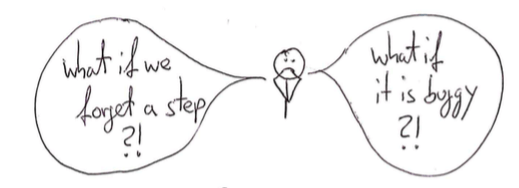
Often we fear deploying to production because of the effort involved and the errors we make. Questions like ‘what if we forget a step?’ or ‘what if the new version we install is buggy?’ buzz in our mind.
fears

Deployment needs to be a non-event, a habit. For this we need to automate every step besides the first one: clicking a button to start deployment.
deploy

On Linux we have wonderful tools for this but what if you are stuck with deploying to Windows?

brave

Fear not, brave developer! Even on Windows we can use a package manager to install and rollback buggy versions. Let me introduce you to chocolatey.

choco

Chocolatey (or choco in short) uses the common NuGet package format. Formerly developed for the .net platform we can use it for other platforms, too. In our following example we use a simple Java application which we install as a service and as a task.
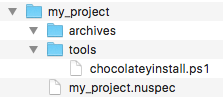
Setting up we need a directory structure for the package like this:

folders

We need to create two files: one which specifies our package (my_project.nuspec) and one script which holds the deployment steps (chocolateyinstall.ps1). The specification file holds things like the package name, the package version (which can be overwritten when building the package), some pointers to project, source and license URLs. We can configure files and directories which will be copied to the package: in our example we use a directory containing our archives (aptly named archives) and a directory containing the installation steps (named tools). Here is a simple example:

<?xml version="1.0" encoding="utf-8"?>
<!-- Do not remove this test for UTF-8: if “Ω” doesn’t appear as greek uppercase omega letter enclosed in quotation marks, you should use an editor that supports UTF-8, not this one. -->
<package xmlns="http://schemas.microsoft.com/packaging/2015/06/nuspec.xsd">
  <metadata>
    <id>my_project</id>
    <title>My Project (Install)</title>
    <version>0.1</version>
    <authors>Me</authors>
    <owners>Me</owners>
    <summary></summary>
    <description>Just an example</description>
    <projectUrl>http://localhost/my_project</projectUrl>
    <packageSourceUrl>http://localhost/git</packageSourceUrl>
    <tags>example</tags>
    <copyright>My company</copyright>
    <licenseUrl>http://localhost/license</licenseUrl>
    <requireLicenseAcceptance>false</requireLicenseAcceptance>
    <releaseNotes></releaseNotes>
  </metadata>
  <files>
    <file src="tools\**" target="tools" />
    <file src="archives\**" target="archives" />
  </files>
</package>

This file tells choco how to build the packages and what to include. For the deployment process we need a script file written in Powershell.

powershell

A Powershell primer

Powershell is not as bad as you might think. Let’s take a look at some basic Powershell syntax.

Variables

Variables are started with a $ sign. As in many other languages ‘=’ is used for assignments.

$ErrorActionPreference = 'Stop'

Strings

Strings can be used with single (‘) and double quotes (“).

$serviceName = 'My Project'
$installDir = "c:\examples"

In double quoted strings we can interpolate by using a $ directly or with curly braces.

$packageDir = "$installDir\my_project"
$packageDir = "${installDir}\my_project"

For escaping double quotes inside a double quoting string we need back ticks (`)

"schtasks /end /f /tn `"${serviceName}`" "

Multiline strings are enclosed by @”

$cmdcontent = @"
cd /d ${packageDir}
java -jar ${packageName}.jar >> output.log 2>&1
"@

Method calls

Calling methods looks a mixture of command line calls with uppercase names.

Write-Host "Stopping and deleting current version of ${packageName}"
Get-Date -format yyyyddMMhhmm
Copy-Item $installFile $packageDir

Some helpful methods are:

  • Write-Host or echo: for writing to the console
  • Get-Date: getting the current time
  • Split-Path: returning the specified part of a path
  • Join-Path: concatenating a path with a specified part
  • Start-Sleep: pause n seconds
  • Start-ChocolateyProcessAsAdmin: starting an elevated command
  • Get-Service: retrieving a Windows service
  • Remove-Item: deleting a file or directory
  • Test-Path: testing for existence of a path
  • New-Item: creating a file or directory
  • Copy-Item: copying a file or directory
  • Set-Content: creating a file with the specified contents
  • Out-Null: swallowing output
  • Resolve-Path: display the path after resolving wildcards

The pipe (|) can be used to redirect output.

Conditions

Conditions can be evaluated with if:

if ($(Get-Service "$serviceName" -ErrorAction SilentlyContinue).Status -eq "Running") {
}

-eq is used for testing equality. -ne for difference.

Deploying with Powershell

For installing our package we need to create the target directories and copy our archives:

$packageName = 'myproject'
$installDir = "c:\examples"
$packageDir = "$installDir\my_project"

Write-Host "Making sure $installDir is in place"
if (!(Test-Path -path $installDir)) {New-Item $installDir -Type Directory  | Out-Null}

Write-Host "Making sure $packageDir is in place"
if (!(Test-Path -path $packageDir)) {New-Item $packageDir -Type Directory  | Out-Null}

Write-Host "Installing ${packageName} to ${packageDir}"
Copy-Item $installFile $packageDir

When reinstalling we first need to delete existing versions:

$installDir = "c:\examples"
$packageDir = "$installDir\my_project"

if (Test-Path -path $packageDir) {
  Remove-Item -recurse $(Join-Path $packageDir "\*") -exclude *.conf, *-bak*, *-old*
}

Now we get to the meat creating a Windows service.

$installDir = "c:\examples"
$packageName = 'myproject'
$serviceName = 'My Project'
$packageDir = "$installDir\my_project"
$cmdFile = "$packageDir\$packageName.cmd"

if (!(Test-Path ($cmdFile)))
{
    $cmdcontent = @"
cd /d ${packageDir}
java -jar ${packageName}.jar >> output.log 2>&1
"@
    echo "Dropping a ${packageName}.cmd file"
    Set-Content $cmdFile $cmdcontent -Encoding ASCII -Force
}

if (!(Get-Service "${serviceName}" -ErrorAction SilentlyContinue))
{
  echo "No ${serviceName} Service detected"
  echo "Installing ${serviceName} Service"
  Start-ChocolateyProcessAsAdmin "install `"${serviceName}`" ${cmdFile}" nssm
}

Start-ChocolateyProcessAsAdmin "set `"${serviceName}`" Start SERVICE_DEMAND_START" nssm

First we need to create a command (.cmd) file which starts our java application. Installing a service calling this command file is done via a helper called nssm. We set it to starting manual because we want to start and stop it periodically with the help of a task.

For enabling a reinstall we first stop an existing service.

$installDir = "c:\examples"
$serviceName = 'My Project'
$packageDir = "$installDir\my_project"

if (Test-Path -path $packageDir) {
  Write-Host $(Get-Service "$serviceName" -ErrorAction SilentlyContinue).Status

  if ($(Get-Service "$serviceName" -ErrorAction SilentlyContinue).Status -eq "Running") {
    Start-ChocolateyProcessAsAdmin "Stop-Service `"${serviceName}`""
    Start-Sleep 2
  }
}

Next we install a task with help of the build in schtasks command.

$serviceName = 'My Project'
$installDir = "c:\examples"
$packageDir = "$installDir\my_project"
$cmdFile = "$packageDir\$packageName.cmd"

echo "Installing ${serviceName} Task"
Start-ChocolateyProcessAsAdmin "schtasks /create /f /ru system /sc hourly /st 00:30 /tn `"${serviceName}`" /tr  `"$cmdFile`""

Stopping and deleting the task enables us to reinstall.

$packageName = 'myproject'
$serviceName = 'My Project'
$installDir = "c:\examples"
$packageDir = "$installDir\my_project"

if (Test-Path -path $packageDir) {
  Write-Host "Stopping and deleting current version of ${packageName}"
  Start-ChocolateyProcessAsAdmin "schtasks /delete /f /tn `"${serviceName}`" "
  Start-Sleep 2
  Start-ChocolateyProcessAsAdmin "schtasks /end /f /tn `"${serviceName}`" "
  Remove-Item -recurse $(Join-Path $packageDir "\*") -exclude *.conf, *-bak*, *-old*
}

tl;dr

Putting it all together looks like this:

$ErrorActionPreference = 'Stop'; # stop on all errors

$packageName = 'myproject'
$serviceName = 'My Project'
$installDir = "c:\examples"
$packageDir = "$installDir\my_project"
$cmdFile = "$packageDir\$packageName.cmd"
$currentDatetime = Get-Date -format yyyyddMMhhmm
$scriptDir = "$(Split-Path -parent $MyInvocation.MyCommand.Definition)"
$installFile = (Join-Path $scriptDir -ChildPath "..\archives\$packageName.jar") | Resolve-Path


if (Test-Path -path $packageDir) {
  Write-Host "Stopping and deleting current version of ${packageName}"
  Start-ChocolateyProcessAsAdmin "schtasks /delete /f /tn `"${serviceName}`" "
  Start-Sleep 2
  Start-ChocolateyProcessAsAdmin "schtasks /end /f /tn `"${serviceName}`" "
  Remove-Item -recurse $(Join-Path $packageDir "\*") -exclude *.conf, *-bak*, *-old*

  Write-Host $(Get-Service "$serviceName" -ErrorAction SilentlyContinue).Status

  if ($(Get-Service "$serviceName" -ErrorAction SilentlyContinue).Status -eq "Running") {
    Write-Host "Stopping and deleting current version of ${packageName}"
    Start-ChocolateyProcessAsAdmin "Stop-Service `"${serviceName}`""
    Start-Sleep 2
  }

  if ($(Get-Service "$serviceName"  -ErrorAction SilentlyContinue).Status -ne "Running") {
    Write-Host "Cleaning ${packageDir} directory"
    Remove-Item -recurse $(Join-Path $packageDir "\*") -exclude *.conf, *-bak*, *-old*
  }
}
 
Write-Host "Making sure $installDir is in place"
if (!(Test-Path -path $installDir)) {New-Item $installDir -Type Directory  | Out-Null}

Write-Host "Making sure $packageDir is in place"
if (!(Test-Path -path $packageDir)) {New-Item $packageDir -Type Directory  | Out-Null}

Write-Host "Installing ${packageName} to ${packageDir}"
Copy-Item $installFile $packageDir

if (!(Test-Path ($cmdFile)))
{
    $cmdcontent = @"
cd /d ${packageDir}
java -jar ${packageName}.jar >> output.log 2>&1
"@
    echo "Dropping a ${packageName}.cmd file"
    Set-Content $cmdFile $cmdcontent -Encoding ASCII -Force
}

if (!(Get-Service "${serviceName}" -ErrorAction SilentlyContinue))
{
  echo "No ${serviceName} Service detected"
  echo "Installing ${serviceName} Service"
  Start-ChocolateyProcessAsAdmin "install `"${serviceName}`" ${cmdFile}" nssm
}

Start-ChocolateyProcessAsAdmin "set `"${serviceName}`" Start SERVICE_DEMAND_START" nssm

echo "Installing ${serviceName} Task"
Start-ChocolateyProcessAsAdmin "schtasks /create /f /ru system /sc hourly /st 00:30 /tn `"${serviceName}`" /tr  `"$cmdFile`""

Finally

Now we just need to create the package in our build script. The package will be named my_project.version.nupkg.
On our build machine we need to install choco. On the target machine we need the following tools installed:
chocolatey and nssm (for service management). Now we can create the package with:

  choco pack --version=${version}

Copy it to the target machine and install the current version with:

choco install -f -y c:\\installations\\${archive.name} --version=${version}

Put these steps inside a build script and use your favourite contininuous integration platform and voila.
Done.

deploy

Using passwords with Jenkins CI server

For many of our projects the Jenkins continuous integration (CI) server is one important cornerstone. The well known “works on my machine” means nothing in our company. Only code in repositories and built, tested and packaged by our CI servers counts. In addition to building, testing, analyzing and packaging our projects we use CI jobs for deployment and supervision, too. In such jobs you often need some sort of credentials like username/password or public/private keys.

If you are using username/password they do not only appear in the job configuration but also in the console build logs. In most cases this is undesirable but luckily there is an easy way around it: using the Environment Injector Plugin.

In the plugin you can “inject passwords to the build as environment variables” for use in your commands and scripts.inject-passwords-configuration

The nice thing about this is that the passwords are not only masked in the job configuration (like above) but also in the console logs of the builds!inject-passwords-console-log

Another alternative doing mostly the same is the Credentials Binding Plugin.

There is a lot more to explore when it comes to authentication and credential management in Jenkins as you can define credentials at the global level, use public/private key pairs and ssh agents, connect to a LDAP database and much more. Just do not sit back and provide security related stuff plaintext in job configurations or your deployments scripts!

Our five types of configuration

Over the years, we came up with a strategy to handle configurable aspects of our software applications. Using five different types of configuration, we are able to provide high customizability with modest effort.

settings © vege / fotoliaConfigurable aspects of software are the magical parts with which you can achieve higher customer satisfaction with relatively modest investment if done right. Your application would be perfect if only this particular factor were of the value three instead of two as it is now. No problem – a little tweak in the configuration files and everything is right. No additional development cost, no compile/build cycle. You can add or increase business value with a simple text editor when things are configurable.

The first problem of this approach is the developer’s decision what to make configurable. Every configurable and therefor variable value of a software system requires some sort of indirection and additional infrastructure. It suddenly counts as user input and needs to be validated and sanitized. If your application environment requires an identifier like a key, the developer needs to come up with a good one, consistent to the existing keys and meaningful enough to make sense to an unsuspecting user. In short, making something configurable is additional and hard work that every developer tries to avoid in the face of tight deadlines and long feature lists.

Over-configurability

Our first approach to configurable content of our applications lead to a situation where everything could be configured, even the name and location of the configuration files themselves. You had to jump through so many hoops to get from the code to the actual value that it was a nightmare to maintain. And it provided virtually no business value at all. No customer ever changed the location of only one configuration file. All they did was to change values inside the configuration files once in a while. Usually, the values were adjusted once at first installation and once some time later, when the improvement of the change could be anticipated. The possibility of the second adjustment usually brings the customer satisfaction.

Under-configurability

So we tried to narrow down the path of configurable aspects by asking our customers for constant values. We are fortunate to have direct customer access and to develop a lot of software based on physics and chemistry, science fields with a high rate of constants. But the attempt to embed natural constants directly in the code failed, too. Soon after we installed the first software of this kind, an important constant related to neutron backscattering was changed – just a bit, but enough to make a difference. Putting important domain values in the code just doesn’t cut it, even if they are labeled constants and haven’t changed for decades.

The five types

A good configurable software application finds the sweet spot between being completely configurable and totally rigid. To help you with this balancing, here are the five types of configuration we identified along our way:

Resources

The section containing the resources of the application isn’t meant to be introspected or edited by the user. It contains mostly binary data like images or media formats and static content like translations. Most resources are even bundled into archive files, so they don’t present themselves as files. All resources are overwritten with every new version of the application, so changing for example an icon is possible, but only has a short-term effect unless it is fed back into the code base. If the resources were deleted, the application would probably boot up, but lack all kind of icons, images and media. Most language content would be replaced by internationalization keys. In short, the application would be usable, but ugly.

(Manufacturer) Settings

We call every configurable option that is definitely predefined by the developer a setting. We group these options into a section called settings. Like resources, settings are overwritten with every new version of the application, so changes should be rare and need to be reported back into development. Settings are configurable if the urgent need arises, but are ultimately owned by the developers and not by the users. The most delicate decision for a developer is to distinguish between a setting and an option. Settings are owned by the developer, options are owned by the user. If the settings were deleted, the application would most likely not boot up or use hard-coded defaults that might not be suited for the given use case. We use settings mostly for feature toggles or dynamically loaded content like menu definitions or team credits.

Options

This is the most interesting type of configurable in terms of user centered business value. Every little bit of information in the option section is only deployed once. As soon as it can be edited by the user, it belongs to the user. We deliver nearly every property, config or ini file as an option. We fill them with nondestructive defaults and adjust the values during the initial deployment, but after that, the user is free to change the files as he likes. This has three important implications for the developer:

  • You can’t rely on the presence of any option entry. Each option entry needs to have a hardcoded fallback value that takes over if the entry is missing in the files.
  • Every new option entry needs to be optional (no pun intended). Since we can’t redeploy the option files, any new entry won’t exist in an existing installation and we can’t force the user to add it. If you can’t find a sensible way to make your option optional, you’re going to have a hard time.
  • If you need to make changes to existing option files, you need to automate it because the number of installations might be huge. We’ve developed our own small domain specific language for update scripts that perform these changes while maintaining readability. Update scripts are the most fragile part of an update deployment and should be avoided whenever possible.

The options are what makes each installation unique, so we take every measure to avoid data loss. All options are in one specific directory tree and can be backuped by a simple copy and paste. Our deliverables don’t contain option files, so they can’t be overwritten by manual copy or extract actions. If the options were deleted, the application would boot up and recreate the initial options with our default values, therefor losing its uniqueness.

(Mutable) Data

The data section is filled with mutable information that gets created by the application itself. It’s more of a database implemented in files than real configuration. The user isn’t encouraged to even look into this section, let alone required to edit anything by hand. If this section would be deleted, the application would lose parts of its current state like lists of pending tasks, but not the carefully adjusted configurables. The application would boot up into a pristine state, but with a suitable configuration.

Archive

The last type isn’t really a configuration, but a place for the application to store the documents it produces as part of its user-related functionality. Only the application writes to the archive, and only in a one-time fashion. Existing content is never altered and rarely deleted. The archive is the place to look for results like measurement data or analysis reports. It’s very important to keep the archive free of any kind of mutable data. If the archive would be deleted, all previously produced result documents would be lost, but the application would work just fine.

Summary

As you’ve seen, we differentiate between five types of configurables, but only two types are “real” configuration: The settings belong to the developer while the options belong to the user. We’ve built over a dozen successful applications using this strategy and are praised for their configurability while our required effort for maintainance is rather low.

Let us know if you have a similar or totally different concept for configurables by dropping a comment.

Packaging kernel modules/drivers using DKMS

Hardware drivers on linux need to fit to the running kernel. When drivers you need are not part of the distribution in use you need to build and install them yourself. While this may be ok to do once or twice it soon becomes tedious doing it after every kernel update.

The Dynamic Kernel Module Support (DKMS) may help in such a situation: The module source code is installed on the target machine and can be rebuilt and installed automatically when a new kernel is installed. While veterans may be willing to manually maintain their hardware drivers with DKMS end user do not care about the underlying system that keeps their hardware working. They want to manage their software updates using the tools of their distribution and everything should be working automagically.

I want to show you how to package a kernel driver as an RPM package hiding all of the complexities of DKMS from the user. This requires several steps:

  1. Preparing/patching the driver (aka kernel module) to include dkms.conf and follow the required conventions of DKMS
  2. Creating a RPM spec-file to install the source, tool chain and integrate the module source with DKMS

While there is native support for RPM packaging in DKMS I found the following procedure more intuitive and flexible.

Preparing the module source

You need at least a small file called dkms.conf to describe the module source to the DKMS system. It usually looks like that:

PACKAGE_NAME="menable"
PACKAGE_VERSION=3.9.18.4.0.7
BUILT_MODULE_NAME[0]="menable"
DEST_MODULE_LOCATION[0]="/extra"
AUTOINSTALL="yes"

Also make sure that the source tarball extracts into the directory /usr/src/$PACKAGE_NAME-$PACKAGE_VERSION ! If you do not like /usr/src as a location for your kernel modules you can configure it in /etc/dkms/framework.conf.

Preparing the spec file

Since we are not building a binary and package it but install source code, register, build and install it on the target machine the spec file looks a bit different than usual: We have no build step, instead we just install the source tree and potentially additional files like udev rules or documentation and perform all DKMS work in the postinstall and preuninstall scripts. All that means, that we build a noarch-RPM an depend on dkms, kernel sources and a compiler.

Preparation section

Here we unpack and patch the module source, e.g.:

Source: %{module}-%{version}.tar.bz2
Patch0: menable-dkms.patch
Patch1: menable-fix-for-kernel-3-8.patch

%prep
%setup -n %{module}-%{version} -q
%patch0 -p0
%patch1 -p1

Install section

Basically we just copy the source tree to /usr/src in our build root. In this example we have to install some additional files, too.

%install
rm -rf %{buildroot}
mkdir -p %{buildroot}/usr/src/%{module}-%{version}/
cp -r * %{buildroot}/usr/src/%{module}-%{version}
mkdir -p %{buildroot}/etc/udev/rules.d/
install udev/10-siso.rules %{buildroot}/etc/udev/rules.d/
mkdir -p %{buildroot}/sbin/
install udev/men_path_id udev/men_uiq %{buildroot}/sbin/

Post-install section

In the post-install script of the RPM we add our module to the DKMS system build and install it:

occurrences=/usr/sbin/dkms status | grep "%{module}" | grep "%{version}" | wc -l
if [ ! occurrences > 0 ];
then
    /usr/sbin/dkms add -m %{module} -v %{version}
fi
/usr/sbin/dkms build -m %{module} -v %{version}
/usr/sbin/dkms install -m %{module} -v %{version}
exit 0

Pre-uninstall section

We need to remove our module from DKMS if the user uninstalls our package to leave the system in a clean state. So we need a pre-uninstall script like this:

/usr/sbin/dkms remove -m %{module} -v %{version} --all
exit 0

Conclusion

Packaging kernel modules using DKMS and RPM is not really hard and provides huge benefits to your users. There are some little quirks like the post-install and pre-uninstall scripts but after you got that working you (and your users) are rewarded with a great, fully integrated experience. You can use the full spec file of the driver in the above example as a template for your driver packages.

Snowflakes are a bad sign

Snowflake servers are brittle and expensive. Treating hardware like cattle instead of pets is one strategy to overcome the snowflake syndrome. Here are some strategies to foster this mindset.

snowflakeFirst, allow me a bad joke: If you enter your server room and find real snowflakes, it might be a sign that your air conditioning is over-ambitious. But even if you just enter your server room, you probably see some snowflakes, but in the metaphorical sense.

Snowflake servers

Snowflakes are servers with an unique layout. I cannot say it better than Martin Fowler two years ago in his Bliki posting SnowflakeServer, but I’m trying to add some insights and more current tools. The term probably originates in the motto that everybody is a “precious unique snowflake”. This holds true for humans and animals, but not for machines. Let’s examine how a snowflake is born. Imagine that in the beginning, all servers are the same: standard hardware, a default operating system and nothing more. You pick one server to host a special application and adjust the hardware accordingly. Now you already have an hardware snowflake – not the worst thing, but you better document your rationale behind the adjustment in an accessible way – a wiki page specifically for that server perhaps. Because sooner or later, that machine will fail (or become hopelessly obsolete) and needs to be replaced – with adequate hardware. Without your documentation, you’ll have to remember why the old machine had that specific layout – and if it was sufficient. I’ve seen the “ancient server” anti-pattern much too often: A dusted machine, buzzing like an asthmatic pensioner in the last corner of the server room, and nobody was allowed near. Because there are no spare parts (VESA local bus isn’t supported anymore), if one part fails, the whole system is doomed – operating system and software included. Entire organizations rely on the readiness for duty of one hardware assembly – and almost always a crude one.

Server as cattle

The ancient server happens more likely when you treat your servers like pets. This is the crucial mental switch you’ll have to make: servers are cattle, not pets. They have numbers, not names. They can be monitored, upgraded and fostered, but at the end of the day, they serve a clearly defined business case and deserve no emotional investment of the owner. If a pet gets hurt, you take it to the veterinary and cure it. If cattle gets sick, you call the veterinary to make sure it’s not contagious and then replace the affected individuals – to cure them would be more expensive. Pets live as long as they can, cattle has a dacattlete of expiry. And our cattle (servers) really isn’t sentient, so stop treating it like pets.

Strategies to run a ranch

Our current answer to make the transition from pet zoo to cattle ranch without significantly increasing the amount of metal in our server room can be boiled down to three strategies:

  • Virtualize the logical machines. Instead of working on “real metal machines”, more and more of our services run inside virtual machines. This allows for a clearer separation of concerns (one duty per machine) and keeps the emotional commitment towards the machine low. Currently, we use VirtualBox and Docker for this task. Both are easy to set up and fulfill their task well.
  • Remove the names from real metal machines. We really number our real machines now. Giving clever names to virtual machines is still possible, but not necessary: they are probably only accessed using DNS aliases that specify their use, like “projectX-database” or “projectY-webserver”. We even choose the computer cases for our machines accordingly to separate the pets (unique cases) from cattle (uniform cases).
  • Specify the machine. The virtualized hardware must be described and explained (e.g. why this particular machine needs twice the normal RAM ration). Currently, we use Vagrant to specify the hardware and operating system of our virtual machines. The specifications are stored in a version controlled repository, so there is a place where most of our server infrastructure is described in a deployable fashion. Even more, all necessary third-party software products are specified, too. Imagine a todo list of what to install and prepare, like the one you’ve handed over to your admin in the past, but automatically executable. We currently use Ansible for our configuration management because it has very low requirements for the target platform itself and has a low learning curve.

Applying these three strategies, every (logical) machine in our server room should be reproduceable. They are still individuals, specifically tailored for their jobs, but completely specified and virtualized. The real metal machines only run the bare minimum of software necessary to host the logical machines. None of the machines promote emotional attachment – they are tools for their job.

Data is snow

One important insight is that persistent data will turn your machine into a snowflake over time (we use the term as a verb: “data will snowflake your machine”). You will become emotionally and financially attached to this data – otherwise, there is no need to persist it in the first place. We don’t have a panacea here yet. You probably want to use a database and a sophisticated backup strategy here. Just make sure that the presence of precious data on it doesn’t obscure your stance towards the machine. You want to keep the data and still be able to throw the machine away.

Don’t stop at machines

We are software developers, so we cannot deny that the concept of snowflaking is very helpful for our own projects, too. Every dependency that we can bring with us during deployment (called “self-containment” or “batteries included” in our slang) is one less thing of “snowflaking” the target machine. Every piece of infrastructure (real, virtualized or purely conceptual) we implicitly rely on (like valid certificates, SSH keys or passwords and database locations) will snowflake the target machine and should be treated accordingly: documented, specified and automated. If you hot-fix a production server, it’s definitely a huge snowflaking action that needs to be at least carefully documented. You can’t avoid snowflaking completely, but strive to mimize the manual amount of it and then sanitize the automated part.

Snowflaking is a concept

We’ve found the term of “snowflaking” very useful to transport the necessity and value in documenting, specifying and automating everything that doesn’t happen on a developer machine (and even there, the build process is fully automated). Snowflaked enviroments tend to be expensive in maintainance and brittle in operations. The effort to mitigate the effects of snowflaking pays off very soon and is highly reuseable. But even more powerful is the change in the mindset as soon as the concept of “snowflaking” is understood. It’s a short term for a broad range of strategies and values/beliefs. It’s a powerful and scalable concept.

We’d love to hear your experiences

You’ve probably experimented with various tools and concepts to manage your servers, too. What were your experiences and insights? Add a comment below, we are looking forward to your input.

Database Migration Categories

Most long-running projects need to manage changes to the database schema of the system and data migrations in some way. As the system evolves new datatypes/tables and properties/columns are added, some are removed and others are changed. Relationships between objects also change in unpredictable ways so that you have to deal with these changes in some way. Not all changes are equal in nature, so we handle them differently!

One tool we use to manage our database is liquibase. The units of change are called migrations and are logged in the database itself (table “databasemigrations”) so that you can actually see in which state the schema is. Our experience using such tools for several years is very positive because there is no manual work on the database of some production system needed and new installations automatically create the database schema matching the running software. There are however a few situations when you want to do things manually. So we identified three types of changes and defined how to handle them:

1. structural changes

Structural changes modify the database schema but no data. In some cases you have to care about the default values for not null columns. These changes are handled by database management/versioning tools. They are relevant for all instances and specific for each deployed version of the system. The changes are stored with the source code under version control. Most of the time they are needed when extending the functionality of the system and implementing new features. In SQL the typical commands are CREATE, DROP and ALTER.

2. data rule changes

Changes to the way how the data is stored we call data rule changes. Examples for this are changing the representation of an enum from integer to string or a relation from one-to-many to many-to-many. In such a case the schema and importantly existing data has to be changed. For these migrations you do not need explicit ids of an object in the database but you change all entries in the same way according to the new rules. The changes can be applied to each instance of the system that is update to the new database (and software) version. Like structural changes they are executed using the database migration tool and stored under version control. The typical SQL command after the involveld structural changes needed is UPDATE with an where clause and sometimes CASE WHEN statements.

3. data modifications

Sometimes you have to change individual data sets of one instance of a system. That may be because of a bug in the software or corrupted/wrong entries that cannot by fixed using the system itself, e.g. as super user. Here you fix the entries of one instance of the system manually or with a SQL script. You will usually name specific object ids of the database and perform these exact changes only on this instance. It may be necessary to perfom similar tasks on other instances using different object ids. Because of this one-time and instance-specific nature of the changes we do not use a migration tool but some kind of SQL shell. Such manual changes have to be performed with extra caution and need to be thoroughly documented, e.g. in your issue tracker and wiki. If possible use a non-destructive approach and make backups of the data before executing the changes. Typical SQL statements are UPDATE or DELETE containing ids or business keys.

Conclusion

With categories and guidelines above developers can easily figure out how to deal with changes to the database. They can keep the software, database schema and customer data up-to-date, nice and clean over many years while improving and evolving the system and managing several instances running possibly different versions of the system.

Ansible: Play it again, Sam

Recently we started using Ansible for the provisioning of some of our servers. Ansible is one of many configuration management / provisioning tools that are popular right now. Puppet and Chef are probably more widely known representatives of their kind, but what attracted us to Ansible was the fact that it’s agentless: the target machines don’t need an agent installed, all you need is remote access via SSH. Well, almost. It turns out that Python is also required on the remote machines, otherwise you’ll be limited to a very basic set of functionality (the raw module). Fortunately, most Linux distributions have Python installed by default.

With Ansible you describe the desired target configuration as a sequence of tasks in a YAML file called Playbook: package installation, copying files, enabling and starting services, etc. The playbook is semi-declarative. Each step usually describes a goal, e.g. package XY should be present. Action is only taken if necessary. On the other hand it’s also very imperative: steps are executed sequentially and you can have conditionals and loops (e.g. “with_items”). You can also define handlers, which are executed once after they have been notified, for example if you want to restart the Apache web server after its configuration has changed.

Before a playbook is applied to a remote machine Ansible will query “facts” about this machine. These facts are available as variables in the playbook. You can also define your own variables.

A playbook is usually applied to a set of machines. Available machines are listed in a separate file, the inventory, where they can be grouped by roles. With one command you can configure or update all the machines of a specific role at once. You can also execute a “dry run”, which simulates a playbook run and tells you what changes would be applied.

So far our experience with Ansible has been good. The concepts are easy to grasp. YAML syntax requires getting used to, but at least it’s not XML. On the website the actual documentation is a bit hidden among promotion for their commercial products, but you can also directly visit docs.ansible.com.

Configuring your Java webapp

There are several ways to configure your Java Servlet-based webapp with values for deployment-specific things like the database connection or directories for data and logs. Let us take a look at the alternatives and their benefits and drawbacks.

web.xml

The deployment descriptor (web.xml) resides inside your WAR file. You can specify init parameters available using the ServletContext.
web.xml

<context-param>
    <param-name>LogDirectory</param-name>
    <param-value>/myapp/logs</param-value>
</context-param>

Accessing the parameter in your Servlet:

String logDirectory = getServletContext().getInitParameter("LogDirectory");
// do something with it

The nice thing about this solution is the self-containment of your packaged application. The price is building a customized web.xml/WAR for each deployment instance.

Environment variables

Another possibility is to pass environment variables to your servlet container at startup, e.g. using JAVA_OPTS in the case of Apache Tomcat.
tomcat.conf

...
JAVA_OPTS="-DLogDirectory=/myapp/logs"
...

They can be easily accessed using

    System.getProperty("LogDirectory");

This is very easy to employ but has several drawbacks:

  • you have to mess with the configuration of your servlet container/host to set the variables
  • they are valid for the whole servlet container, possibly interferring with other webapps or the container itself
  • the settings are harder to find than in one file that you deliver with your webapp
  • need of server restart to change the values

context.xml

Using context.xml and JNDI is our preferred way of configuring our webapps. You can ship a default context.xml in the META-INF directory of your WAR and easily configure resources and beans:

<Context>
    <Environment name="LogDirectory" value="/myapp/logs" type="java.lang.String" />
    <!-- Development DB -->
    <Resource name="jdbc/devdb" auth="Container" type="javax.sql.DataSource"
               maxActive="100" maxIdle="30" maxWait="-1"
               username="sa" password="" driverClassName="org.h2.Driver"
               url="jdbc:h2:mem:devDB;mode=Oracle"/>
</Context>

A context.xml outside of your WAR has to be copied in the context configuration directory of your servlet container, e.g.:

cp context.xml /etc/tomcat7/Catalina/localhost/myapp.xml

You can then access the configuration items using JNDI:

Context ctx = (Context) new InitialContext().lookup("java:comp/env");
String logDirectory = (String) ctx.lookup("LogDirectory");
// do something

You can of course use context-params and the ServletContext to retrieve simple String parameters stored in the context.xml instead of web.xml, too.

The name of the context file must match the name of the deployed application. That way we can deploy the same WAR on several target machines and configure the applications separately. The context.xml not only contains the JNDI datasources (which is very common) but also configuration parameters that may change for each target system.

The vigilant’s hat

We put on a cowboy hat every time we connect to a live server. This article describes why.

In the german language, there is a proverb that means “being alert” or “being on guard”. It’s called “auf der Hut sein” and would mean, if translated without context, “being on hat”. That doesn’t make sense, even to germans. But it’s actually directly explainable if you know that the german word “Hut” has two meanings. It most of the time means the hat you put on your head. But another form of it means “shelter”, “protection” or “guard”. It turns up in quite a few derived german words like “Obhut” (custody) or “Vorhut” (vanguard). So it isn’t so strange for germans to think of a hat when they need to stay alert and vigilant.

Vigilant developers

Being mindful and careful is a constant state of mind for every developer. The computer doesn’t accept even the slightest fuzziness of thought. But there is a moment when a developer really has to take care and be very very precautious: When you operate on a live server. These machines are the “real” thing, containing the deployed artifacts of the project and connecting to the real database. If you make an error on this machine, it will be visible. If you accidentally wipe some data, it’s time to put the backup recovery process to the ultimate test. And you really should have that backup! In fact, you should never operate on a live server directly, no matter what.

Learning from Continuous Delivery

One of the many insights in the book “Continuous Delivery” by Jez Humble and David Farley is that you should automate every step that needs to take place on a live server. There is an ever-growing list of tools that will help you with this task, but in its most basic form, you’ll have to script every remote action, test it thoroughly and only then upload it to the live server and execute it. This is the perfect state your deployment should be in. If it isn’t yet, you will probably be forced to work directly on the live server (or the real database) from time to time. And that’s when you need to be “auf der Hut“. And you can now measure your potential for improvement in the deployment process area in “hat time”.

cowboy hats in action

We ain’t no cowboys!

In our company, there is a rule for manual work on live servers: You have to wear a hat. We bought several designated cowboy hats for that task, so there’s no excuse. If you connect to a server that isn’t a throw-away test instance, you need to wear your hat to remind you that you’re responsible now. You are responsible for the herd (the data) and the ranch (the server). You are responsible for every click you make, every command you issue and every change you make. There might be a safety net to prevent lethal damage, but this isn’t a test. You should get it right this time. As long as you wear the “live server hat”, you should focus your attention on the tasks at hand and document every step you make.

Don’t ask, they’ll shoot!

But the hat has another effect that protects the wearer. If you want to ask your collegue something and he’s wearing a cowboy hat, think twice! Is it really important enough to disturb him during the most risky, most stressful times? Do you really need to shout out right now, when somebody concentrates on making no mistake? In broadcasting studios, there is a sign saying “on air”. In our company, there is a hat saying “on server”. And if you witness more and more collegues flocking around a terminal, all wearing cowboy hats and seeming concerned, prepare for a stampede – a problem on a live server, the most urgent type of problem that can arise for developers.

The habit of taking off the hat after a successful deployment is very comforting, too. You physically alter your state back to normal. You switch roles, not just wardrobe.

Why cowboy hats?

We are pretty sure that the same effects can be achieved with every type of hat you can think of. But for us, the cowboy hat combines ironic statement with visual coolness. And there is no better feeling after a long, hard day full of deployments than to gather around the campfire and put the spurs aside.

Building RPM packages of SCons-based projects

Easy delivery and installation of a project helps massively with user acceptance. Take a look at all the app stores and user friendly package managers. For quite some of our Linux specific projects we build RPM-Packages using a build farm and the Jenkins continuous integration (CI) server. Sometimes we have to package dependencies which are not available for the used distributions. Some days ago we packaged some projects that were using the SCons build system. Using SCons is quite simple but there is one caveat to make it work nicely with rpmbuild: You have to fiddle with the installation prefixes. Let’s have a look at the build and install stanza of the SPEC-file:

# build stanza
%build
scons PREFIX=/usr LIBDIR=%_libdir all

# install stanza
%install
rm -rf $RPM_BUILD_ROOT
scons PREFIX=/usr LIBDIR=%_libdir install --install-sandbox="$RPM_BUILD_ROOT"

The two crucial parts here are:

  1. Setting the correct prefixes in build and install because the build could use configured paths which have to match the situation of the installed result
  2. The --install-sandbox command line switch which tells SCons to install everything under the specified location instead of directly to the system. This allows rpmbuild to put the artifacts into the package using the correct layout.

Using the above advice it should be quite easy to build nicely working RPM packages out of projects using SCons.