Avoid switch! Use enum!

Recently I was about to refactor some code Crap4j pointed me to. When I realized most of that code was some kind of switch-case or if-else-cascade, I remembered Daniel“s post and decided to obey those four rules.
This post is supposed to give some inspiration on how to get rid of code like:

switch (value) {
  case SOME_CONSTANT:
    //do something
    break;
  case SOME_OTHER_CONSTANT:
    //do something else
    break;
  ...
  default:
    //do something totally different
    break;
}

or an equivalent if-else-cascade.

In a first step, let’s assume the constants used above are some kind of enum you created. For example:

public enum Status {
  ACTIVE,
  INACTIVE,
  UNKNOWN;
}

the switch-case would then most probably look like:

switch (getState()) {
  case INACTIVE:
    //do something
    break;
  case ACTIVE:
    //do something else
    break;
  case UNKNOWN:
    //do something totally different
    break;
}

In this case you don’t need the switch-case at all. Instead, you can tell the enum to do all the work:

public enum Status {
  INACTIVE {
    public void doSomething() {
      //do something
    }
  },
  ACTIVE {
    public void doSomething() {
      //do something else
    }
  },
  UNKNOWN {
    public void doSomething() {
      //do something totally different
    }
  };

  public abstract void doSomething();
}

The switch-case then shrinks to:

getState().doSomething();

But what if the constants are defined by some third-party code? Let’s adapt the example above to match this scenario:

public static final int INACTIVE = 0;
public static final int ACTIVE = 1;
public static final int UNKNOWN = 2;

Which would result in a switch-case very similar to the one above and again, you don’t need it. All you need to do is:

Status.values()[getState()].doSomething();

Regarding this case there is a small stumbling block, which you have to pay attention to. Enum.values() returns an Array containing the elements in the order they are defined, so make sure that order accords to the one of the constants. Furthermore ensure that you do not run into an ArrayOutOfBoundsException. Hint: Time to add a test.

There is yet another case that may occur. Let’s pretend you encounter some constants that aren’t as nicely ordered as the ones above:

public static final int INACTIVE = 4;
public static final int ACTIVE = 7;
public static final int UNKNOWN = 12;

To cover this case, you need to alter the enum to look something like:

public enum Status {
  INACTIVE(4),
  ACTIVE(7),
  UNKNOWN(12);

  private int state;

  public static Status getStatusFor(int desired) {
    for (Status status : values()) {
      if (desired == status.state) {
        return status;
      }
    }
    //perform error handling here
    //e.g. throw an exception or return UNKNOWN
  }
}

Even though this introduces an if (uh oh, didn’t obey rule #4), it still looks much more appealing to me than a switch-case or if-else-cascade would. Hint: Time to add another test.

How do you feel about this technique? Got good or bad experiences using it?

Diving into Hibernate’s Query Cache behaviour

Hibernate is a very sophisticated OR-Mapper and as such has some overhead for certain usage patterns or raw queries. Through proper usage of caches (hibernates featured a L1, L2 cache and a query cache) you can get both performance and convenience if everything fits together. When trying to get more of our persistence layer we performed some tests with the query cache to be able to decide if it is worth using for us. We were puzzled by the behaviour in our test case: Despite everything configured properly we never had any cache hits into our query cache using the following query-sequence:

  1. Transaction start
  2. Execute query
  3. Update a table touched by query
  4. Execute query
  5. Execute query
  6. Transaction end

We would expect that step 5 would be a cache hit but in our case it was not. So we dived into the source of the used hibernate release (the 3.3.1 bundled with grails 1.3.5) and browsed the hibernate issue tracker. We found the issue and correlated it to the issues HHH-3339 and HHH-5210. Since the fix was simpler than upgrading grails to a new hibernate release we fixed the issue and replaced the jar in our environment. So far, so good, but in our test step 5 still refused to produce a cache hit. Using the debugger strangely enough provided us a cache hit when analyzing the state of the cache and everything. After some more brooding and some println()'s and sleep()‘s we found the reason for the observed behaviour in the UpdateTimestampsCache (yes, yet another cache!):

	public synchronized void preinvalidate(Serializable[] spaces) throws CacheException {
		//TODO: to handle concurrent writes correctly, this should return a Lock to the client
		Long ts = new Long( region.nextTimestamp() + region.getTimeout() );
		for ( int i=0; i
			if ( log.isDebugEnabled() ) {
				log.debug( "Pre-invalidating space [" + spaces[i] + "]" );
			}
			//put() has nowait semantics, is this really appropriate?
			//note that it needs to be async replication, never local or sync
			region.put( spaces[i], ts );
		}
		//TODO: return new Lock(ts);
	}

The innocently looking statement region.nextTimestamp() + region.getTimeout() essentially means that the query cache for a certain “region” (e.g. a table in simple cases) is “invalid” (read: disabled) for some “timeout” period or until the end of the transaction. This period defaults to 60 seconds (yes, one minute!) and renders the query cache useless within a transaction. For many use cases this may not be a problem but our write heavy application really suffers because it works on very few different tables and thus query caching has no effect. We are still discussing ways to leverage hibernates caches to improve the performance of our app.

Statement against public fields in Java

Every once in a while I talk to people about coding style and sooner or later there is discussion about public fields and getters/setters in Java. I would like to elaborate my opinion on this issue in addition to other quite well balanced articles to a broader audience.

First I want to differentiate properties of a class from other fields/member variables. Properties are fields, whose values are useful and important to clients of the class. We consciously decide to break encapsulation here and provide this data to our clients. The size of a collection may serve as a nice example. Fields on the other hand store state or dependencies our class needs to be fully operational. Datastructures like arrays, data access objects (DAOs) or some kind of notification service may serve as examples here.

The internal implementation of both, properties and fields, should never be exposed because this truely breaks encapsulation and takes away the freedom of the class implementor to change their implementation. At a later time you may decide to compute a value or read it from a database instead of storing it directly . On the other hand properties themselves may well be public and belong to the API of our class.

Now on to Java. There is no native property support in the Java language as it does not support the uniform access principle using language constructs. In other languages like Python, Ruby, Groovy or Scala you can change from direct field access to accessor methods without changing the clients, so it is no problem to expose fields (or more precisely properties) and thus make them public or protected. To gain the same degree of freedom in Java you have to emulate properties by using the getter/setter convention of Java Beans. You have to trade conciseness of public fields against this freedom and you really should do it. An IDE can generate the accessors and fold the methods away from your sight. The cost of getters/setters is really negligible.

Now we can derive the conclusions for Java programers. With each member variable you introduce you have to decide if it is a property or just some internal field. For properties you may provide getters and/or setters with appropriate visibility when needed. That means you should not provide accessor methods for all of your fields. In general you should never expose fields directly and all instance variables should be private. Not doing so will remove the freedom to change class internals without affecting the clients. Once a class with exposed internals is published as part of an API it is almost impossible to change internal design decisions.

Combine cobertura with the awesomeness of crap4j

Want the awesomeness of crap4j without running your tests twice in your build? Just combine it with your cobertura data using crapertura.

You may have heard of crap4j when it was still actively developed. Crap4j is a software metric that points you to “crappy” methods in your projects by combining cyclomatic complexity numbers with test coverage data. The rationale is that overly complex code can only be tamed by rigorous testing or it will quickly reduce to an unmaintainable mess – the feared “rotten code” or “crappy code”, as Alberto Savoia and Bob Evans, the creators of crap4j would put it. The crap4j metric soon became our most important number for every project. It’s highly significant, yet easy to grasp and mandates a healthy coding style.

Some enhancements to crap4j

Crap4j got even better when we developed our own custom enhancements to it, like the CrapMap or the crap4j hudson plugin. We have a tool that formats the crap4j data like cobertura’s report, too.

A minor imperfection

The only thing that always bugged me when using crap4j inside our continuous integration build cycle was that at least half the data was already gathered. Cobertura calculates the code coverage of our tests right before crap4j does the same again. Wouldn’t it be great if the result of the first analysis could be re-used for the crap metric to save effort and time?

Different types of coverage

Soon, I learnt that crap4j uses the “path coverage” to combine it with the complexity of a method. This is perfectly reasonable given that the complexity determines the number of different pathes through the method. Cobertura only determines the “line coverage” and “branch coverage”. As it stands, you can’t use the cobertura data for crap4j because they represent different approaches to measure coverage. That’s still true and probably will be for a long time. But the allurement of the shortcut approach was too high for me to resist. I just tried it out one day to see the real difference.

A different metric

So, here it is, our new metric, heavily inspired by crap4j. I just took the line and branch coverage for every method and multiplied them. If you happen to have a perfect coverage (1.0 on both numbers), it stays perfect. If you only have 75% coverage on both numbers, it will result in a “crapertura coverage” of 56,25%. Then I fed this new coverage data into crap4j and compared the result with the original data. Well, it works on my project.

Presenting crapertura

Encouraged by this result, I wrote a complete ant task that acts similar to the original crap4j ant task. You can nearly use it as a drop-in replacement, given that the cobertura XML report file is already present. Here is an example ant call:


<crapertura
coberturaReportFile="/path/to/cobertura/coverage.xml"
targetDirectory="/where/to/place/the/crap4j/report"
classesDirectory="/your/unarchived/project/class/files"
/>

It will output the usual crap4j report files to the given target directory. Please note that even if it looks like crap4j data, it’s a different metric and should be treated as such. Therefore, online comparison of numbers is disabled.

The whole project is published on github. Feel free to browse the code and compile it for yourself. If you want a binary release, you might grab the latest jar from our download server.

The complete usage guide can be found on the github page or inside the project. If you have questions or issues, please use the comment section here.

Conclusion

If crapertura is able to give you nearly the numbers that crap4j gave you is up to your project, really. Our test project contained over 20k methods, but very little crap. The difference between crap4j and crapertura was negligible. Both metrics basically identified the same methods as being crappy. Your mileage may vary, though. If that’s the case, let us know. If your experience is like ours, you’ve just saved some time in your build cycle without sacrificing quality.

== isn’t equals, or is it?

Beware of the subtle differences of == and equals in Java and Groovy.

== and equals behave different in Java (and Groovy). You all know the subtle difference when it comes to comparing strings. equals is recommended in Java, == works in Groovy, too. So you could think that using equals is always the better option… think again!
Take a look at the following Groovy code:

  String test = "Test"
  assertTrue("Test" == test) // true!
  assertTrue("Test" == "${test}") // true!
  assertTrue("Test".equals("${test}")) // false?!

The same happens with numbers:

  assertTrue(1L == 1) // true!
  assertTrue(1L.equals(1)) // false?!

A look at the API description of equals shows the underlying cause (taken from the Integer class):

Compares this object to the specified object. The result is true if and only if the argument is not null and is an Integer object that contains the same int value as this object.

equals follows the contract or best practice (see Effective Java) that the compared objects must be of the same class. So comparing different types via equals always results in false. You can convert both arguments to the same type beforehand to ensure that you get the expected behavior: the comparison of values. So next time when you compare two values think of the types or convert both values to the same type.

Java Swing Layouting done right

A praise of the most developer-friendly Java Swing layout manager to date: DesignGridLayout.

Layout Managers were an huge benefit for Java Swing. They enabled software developers to program layout rather than to “drag and drop” it with some proprietary GUI builder. That’s nothing against a good GUI builder, but against the “source code” that gets generated as a result of using it. But after some time of playing and working with the layout managers given by Swing itself, we concluded that they weren’t up to the task. Since then, we were constantly on the lookout for new and better ways to tackle the layouting task.

A history of layout managers

Let’s reiterate our major path with different layout managers:

  • GridBagLayout – the most versatile layout manager included in the Java Swing core classes. It’s capable to handle virtually every layouting task, but the price is huge constraint setup code. Since the code bloats with even facile complexity in the dialog, it’s not maintainable once written. The advantages over GUI builders aren’t really present.
  • StringGridBagLayout – has the same power as GridBagLayout, but with much more concise constraint definitions. It uses a string based domain specific language that you have to learn. After a while, you begin to feel a clumsiness when inserting variables into the constraints.
  • TableLayout – was a new approach to layouting by applying a global grid to your panel. You define the grid by specifying row and column constraints. If you need special cell constraints afterwards, you can alter them, but it’s getting bloated again.
  • StringTableLayout – provided a string based domain specific language over the TableLayout. It had some nice additional features, but lacked versatility with dynamic GUIs.
  • FormLayout – was a great relief and a good companion for many full sized layouting tasks. By concentrating on a problem domain (form based layouts), it played out some advantages over general purpose layout managers. This layout is still in use here.
  • MigLayout – the bigger brother of all these layouts. MigLayout comes with several pages of cheat sheets and you’re soon lost without it. It combines the approaches of all layout managers listed (and many more) and blends them into a massively powerful and versatile product. If you learn this layout manager thoroughly, you’ll never have to look elsewhere. But the learning curve is steep and the complexity of your code scales with the complexity of the GUI (which isn’t a drawback).

All these layout managers added value to our GUIs and are in use until today, albeit seldom.

Keep it simple

Most of the time, your dialogs aren’t these super-fancy, highly dynamic full-page layouts every UI designer dreams about. If they are, pick one of the layout managers from the list and wade through the constraint setup. But let’s say you want to layout a rather plain dialog with some widgets, but you want to do it quick without sacrificing the looks. Here is a developer-friendly solution for this task: Use the DesignGridLayout manager.

Slick and easy layouts

The one thing that differentiates the DesignGridLayout from almost every other layout manager is that you use the layout manager instance itself (in a fluent interface style) to arrange the constraints of your grid. You do not add your widgets to the panel and hope for the layout manager to catch up with the layout, you add them to the layout manager (and hope for it to fill it into your panel, which it does nicely). Here is a little example of the API usage:

JPanel content = new JPanel();
DesignGridLayout layout = new DesignGridLayout(content);
JTextArea history = new JTextArea();
history.setRows(5);
JTextField message = new JTextField();
JButton sendNow = new JButton("Send");
layout.row().grid(new JLabel("History:")).add(new JScrollPane(history));
layout.row().grid(new JLabel("Message:")).add(message, 2).add(sendNow);
content.setLayout(layout);

If you are interested in the possibilities of the layout manager, you should read the usage introduction page of DesignGridLayout.

Developer-friendly approach

One big advantage of the fluent API when compared with the string based constraint definitions is the compiler and type system support. You can’t spell anything wrong and the code completion feature of your IDE guides you to the right method and parameter order. The other advantage is that you don’t need to mess with pixel sizes for spacing and such. It’s handled by the layout manager in the most comfortable manner.

And because an article about a layout manager isn’t of any worth without a picture, here’s one:

This is a frame with the panel we constructed in the example code above.

Add flair to your code: Code Squiggles

Introduction to Code Squiggles, a coding style that improves the readability of your java code.

Wrought Iron by quadriremeFor several months now, I’m experimenting with a programming style that you might want to call “syntax aware programming”. Every coding step starts with the question “what do I want to achieve and how do I want to write it down?”. Then I proceed to write it down in this perfect manner, mostly some english sentence, and try to incrementally convert the syntax into something the java compiler stops complaining about. There’s a lot to be learnt about API design, naming and creative syntax usage this way. One thing I’ve discovered along the way are Code Squiggles.

Introduction to Code Squiggles

Code squiggles are little methods that contain no functionality, other than directly returning the single given parameter. Their purpose is to make the code more fluently readable by casual readers. Calling these methods is absolutely optional, as they offer no behaviour at runtime. But by bloating your code with these method calls, you lower the amount of syntax rules and conventions the reader has to know before being able to understand the code. The process of adding the method calls feels like adding “happy little squiggles” (I certainly miss Bob Ross!) to your code.

Adding Code Squiggles by example

Let me give you a full example how Code Squiggles can turn your boring old java code into something even non-programming readers can grasp without problems. Note that the process of transforming the code isn’t the process I initially described, but the way to deal with existing code.

The initial code fragment looks like this:

assertTrue(filesDirectory.getChild("0.png").isFile());

As you can see, it’s an assertion line of an unit test. We improve the readability by extracting the intent of the assertion into the called method name (it’s a normal “extract method” refactoring):

assertFileExists("0.png", filesDirectory);

Now is the time to add the first Code Squiggle:

assertFileExists("0.png", in(filesDirectory));

You’ve noticed the difference? It’s just the word “in”, but it improves the semantics of the second parameter. As I promised, Code Squiggles are methods without any functionality worth talking about:

protected VirtualFile in(VirtualFile filesDirectory) {
    return filesDirectory;
}

The method takes a parameter and returns it. The real “functionality” of this method lies within its name. Everything else is only necessary to overcome (or overcode) java’s shortcoming of advanced syntax definition measures.

That’s all about Code Squiggles. But it doesn’t stop here. Let’s improve the example to its final shape, when we add two squiggles:

assertFile(withName("0.png"), existsIn(filesDirectory));

Read this line out loud! And notice the subtle change in the assertion method’s name. It begins to deminish clarity without the Code Squiggles. That’s when your API begins to depend on them. But it’s still perfectly valid java code if you just omit them.

The conceptual origin of Code Squiggles clearly comes from the behaviour driven development (BDD) style of writing tests and the ScalaTest Matchers. So I can’t claim much originality or cleverness myself here. But Code Squiggles, despite this initial example, aren’t limited to test code.

Adding inline documentation with Code Squiggles

Remember the last time you needed to integrate an horrible third-party API? Probably, there was a method with seven or eight parameters and all of them were primitive ints. No matter how often you called this method, you couldn’t remember the order of these ints. That’s when Code Squiggles might help you a bit.

This is the signature of a fairly complex method:

protected int performCalculation(int value, int lowerLimit, int upperLimit, int offset) { ...

Therefore, your call isn’t very self-explanatory:

int result = performCalculation(10, 2, 23, 13);

But it might be a lot more understandable when you add some squiggles:

int result = performCalculation(value(10), lowerLimit(2), upperLimit(23), offset(13));

I won’t spell out the squiggle implementations, as they should be straight-forward. Note that the java compiler doesn’t catch up here. You can easily swap the squiggles around to obfuscate your code. All you got is read-time safety. If you want compile-time safety, you need to replace the primitives with types and probably pay for some rounds of beer for the third-party API developers to include your changes or write an adapter (“corruption layer” is my preferred term here).

Regular use of Code Squiggles

If you want to use squiggles a lot, you might think about collecting them in a dedicated class. Design them to be static and generic, and you can use them easily with static imports:

public static <T> T existsIn(T instance) {
    return instance;
}

But remember that there are reserved keywords in java that might hamper you a bit.

Conclusion

Code Squiggles are useless bloat to your code unless you value read-time safety or casual readability. They can tidy up your code to a point where method or even class names are affected to form a block of code where you only have to replace the funnier chars with blanks to obtain a paragraph of plain written english anybody can read and understand.

What are your ideas towards Code Squiggles? Have you used them on your code? Mind to share the result?

Code squiggles are little methods that contain no functionality, other than directly returning the single given parameter. Their purpose is to make the code more fluently readable by casual readers.

About PrintStream and Exceptions

Several of our projects deal with sensor hardware of different types often connected via the good oldā„¢ serial port. That is fine most of the time because most protocols are simple and RXTX provides a nice cross-platform library for most of your serial port needs. But many new computers do not feature the old RS232 serial ports anymore or other contraints prevent the use of a plain RS232 serial port. Here come serial converters like the Advantech ADAM 4570 (serial-to ethernet) or usb-to-serial converters into play. Usually this works fine.

Now one of our customers had a test system using an unreliable converter with sensor hardware. The hardware problems uncovered a robustness issue in our software which crashed the JVM when the virtual serial port of the converter disappeared and our app tried to write to it. Despite the faulty hardware our software had to be robust because it manages many more devices other than just that one sensor over serial. Looking at the problem we discovered that the crash occurred somewhere in the native part of RXTX. So we decided to scratch our own itch (and the one of the customer) and set out to fix the issue in RXTX at a Open Source Love Day (OSLD) . So we fixed the problem and submitted the patch to the bugtracker of the RXTX project. Our sample program now worked flawlessly and threw an IOException when the serial port failed in some way.

Happy to have fixed the problem we incorporated the patch RXTX in our production software but it still crashed and no IOException appeared anywhere in the logs. After another bughunting session we spotted the subtle difference of sample and production program: the use of OutputStream insted of PrintStream. PrintStream silently swallows all exceptions which proved fatal in our use case with the unreliable stream carrier. So the final fix was essentially replacing our PrintStream code

RXTXPort port = new RXTXPort("COM6");
PrintStream p = new PrintStream(port.getOutputStream(), true, "iso8859");
p.print("command");

with using OutputStream directly:

RXTXPort port = new RXTXPort("COM6");
OutputStream o = port.getOutputStream();
o.write("command".getBytes("iso8859"));

Conclusion

Be careful when using PrintStream with unreliable stream carriers it swallows exceptions! That may shadow problems which you may want to know of. Often PrintStreams behaviour will not be a problem but in certain cases like the one depicted above it causes a lot of headaches.

Prettier failures using Swing TaskDialog

An introduction to the Swing TaskDialog project, a fine little gem to spice up your (java swing) dialogs. Includes a real usage example.

The standard way to present graphical user interfaces (GUI) on a desktop machine in java is to use Swing. It’s a very flexible API with a steep learning curve and some oddities (e.g. EDT handling is cumbersome at least), beginning to show some age. There were several attempts to take the Swing experience to a new level, including the marvellous book “Filthy Rich Clients” by Chet Haase (we miss you in the Java camp!) and Romain Guy. So Swing isn’t dead or dying, it’s just getting old.

A pain point of Swing

One thing always bothered me with Swing: It is relatively easy to present a basic message or input dialog. But to add slightly more complexity to a dialog suddenly means substantially more effort. Dialogs don’t scale in Swing. If you ever “designed” an error dialog for your end user, presenting the essence of an exception that just occurred, you already know what I’m talking about. I have to make a confession: Our exception/error dialogs were nearly as nasty as the exception itself. But nobody wants to fail nasty.

Swing TaskDialog to the rescue

At late february this year, Eugene Ryzhikov published his Swing TaskDialog project on his blog. His release pace has been a new version once a week since then. So I’m writing on a moving target.

The TaskDialog project provides basic message, progress and input dialogs based on the operating system’s “User Experience Guidelines”. The visual content is very appealing as a result. But the project doesn’t stop here. The programming API is very understandable and to the point. You don’t have to hassle with big concepts to use it, just look at the examples and start from there.

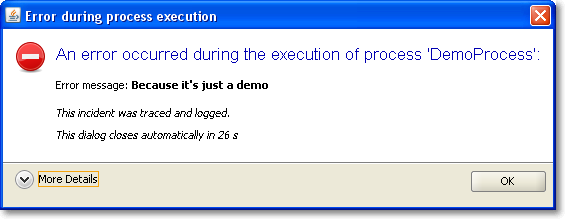
It was a matter of minutes to replace our old, nasty error dialog with a much prettier one using TaskDialog. Here are two screenshots of it in action, with the detail section retracted (initial state) and flipped open.

Of course, this is only the Windows version of the dialog. You should head over to the TaskDialog examples page to get an idea how this might look on a Mac. This is a dialog that’s pretty enough to not scare the user away by sheer uglyness. The code for this dialog is something like:


TaskDialog dialog = new TaskDialog("Error during process execution");
 dialog.setIcon(TaskDialog.StandardIcon.ERROR);
 dialog.setInstruction("An error occurred during the execution of process 'DemoProcess':");

 Exception exception = new Exception("Because it's just a demo");
 StringBuilder detailMessage = new StringBuilder();
 for (StackTraceElement stackTraceElement : exception.getStackTrace()) {
 detailMessage.append(stackTraceElement.toString());
 detailMessage.append("\n");
 }
 dialog.setText("Error message: <b>" + exception.getMessage() + "</b>\n\n<i>This incident was traced and logged.</i>");
 dialog.getDetails().setExpandableComponent(
 new JLabel(Strings.toHtml(detailMessage.toString())));
 dialog.getDetails().setExpanded(false);

 JLabel waitLabel = new JLabel(Strings.toHtml("<i>This dialog closes automatically in 26s</i>"));
 dialog.setFixedComponent(waitLabel);

 dialog.show();

Notice the usage of Strings.toHtml() to convert plain Strings to HTML-rendered rich text elements.

Timed dialogs

If you look at the presented information, you’ll notice it’s just a demo presenting a fake exception. But you’ll notice another thing, too: This dialog is about to close itself automatically soon. This is a speciality of our project: The GUI runs unattended by users for long periods of time. If you encounter an error every ten minutes and an user returns to the screen after a week, the system isn’t accessable without closing a million dialogs first. You might argue why a system error lasts for a week, but that’s a reality in this project we cannot change. So we came up with timed dialogs that go away on their own after a while. The information of the dialog is persisted in the log files that get evaluated periodically.

The TaskDialog API provides easy integration for a GUI widget to be included in the dialog. In our timed dialog use case, it’s a JLabel, as highlighted in the code example at lines 16 and 17. A background thread periodically updates the text and closes the dialog when time runs out. But you’ll find examples with progress bars and other components on Eugene’s blog.

Conclusion

The Swing TaskDialog project is a fine little gem to spice up your application. It’s API is simple, yet powerful and has proven customizable to our special use case. Finally, effort for basic dialogs in Swing scales again.

Verbosity is not Java’s fault

One of Java’s most heard flaws (verbosity) isn’t really tied to the language it is rooted in a more deeply source: it comes from the way we use it.

Quiz: Whats one of the most heard flaws of Java compared to other languages?

Bad Performance? That’s a long overhauled myth. Slow startup? OK, this can be improved… It’s verbosity, right? Right but wrong. Yes, it is one of the most mentioned flaws but is it really inherit to the language Java? Do you really think Closures, annotations or any other new introduced language feature will significantly reduce the clutter? Don’t get me wrong here: closures are a mighty construct and I like them a lot. But the source of the problem lies elsewhere: the APIs. What?! You will tell me Java has some great libraries. These are the ones that let Java stand out! I don’t talk about the functionality of the libraries here I mean the design of the API. Let me elaborate on this.

Example 1: HTML parsing/manipulation

Say you want to parse a HTML page and remove all infoboxes and add your link to a blog box:

        DOMFragmentParser parser = new DOMFragmentParser();
        parser.setFeature("http://xml.org/sax/features/namespaces", false); 
        parser.setFeature("http://cyberneko.org/html/features/balance-tags", false);
        parser.setFeature("http://cyberneko.org/html/features/balance-tags/document-fragment", true);
        parser.setFeature("http://cyberneko.org/html/features/scanner/ignore-specified-charset", true);
        parser.setFeature("http://cyberneko.org/html/features/balance-tags/ignore-outside-content", true);
        HTMLDocument document = new HTMLDocumentImpl();
        DocumentFragment fragment = document.createDocumentFragment();
        parser.parse(new InputSource(new StringReader(html)), fragment);
        XPathFactory factory = XPathFactory.newInstance();
        XPath xpath = factory.newXPath();
        Node infobox = xpath.evaluate("//*/div[@class='infobox']", fragment, XPathConstants.NODE);
        infobox.getParentNode().removeChild(infobox);
        Node blog = xpath.evaluate("//*[@id='blog']", fragment, XPathConstants.NODE);
        NodeList children = blog.getChildNodes();
        for (int i = 0; i < children.getLength(); i++) {
            node.remove(children.item(i));
        }
        blog.appendChild(/*create Elementtree*/);

What you really want to say is:

HTMLDocument document = new HTMLDocument(url);
document.at("//*/div[@class='infobox']").remove();
document.at("//*[@id='blog']").setInnerHtml("<a href='blog_url'>Blog</a>");

Much more concise, easy to read and it communicates its purpose clearly. The functionality is the same but what you need to do is vastly different.

  The library behind the API should do the heavy lifting not the API's user.

Example 2: HTTP requests

Take this example of sending a post request to an URL:

HttpClient client = new HttpClient();
PostMethod post = new PostMethod(url);
for (Entry param : params.entrySet()) {
    post.setParameter(param.key, param.value);
}
try {
    return client.executeMethod(post);
} finally {
    post.releaseConnection();
}

and compare it with:

HttpClient client = new HttpClient();
client.post(url, params);

Yes, there are cases where you want to specify additional attributes or options but mostly you just want to send some params to an URL. This is the default functionality you want to use, so why not:

  Make the easy and most used cases easy,
    the difficult ones not impossible to achieve.

Example 3: Swing’s JTable

So what happens when you designed for one purpose but people usually use it for another one?
The following code displays a JTable filled with attachments showing their name and additional actions:
(Disclaimer: this one makes heavy use of our internal frameworks)

        JTable attachmentTable = new JTable();
        TableColumnBinder<FileAttachment> tableBinding = new TableColumnBinder<FileAttachment>();
        tableBinding.addColumnBinding(new StringColumnBinding<FileAttachment>("Attachments") {
            @Override
            public String getValueFor(FileAttachment element, int row) {
                return element.getName();
            }
        });
        tableBinding.addColumnBinding(new ActionColumnBinding<FileAttachment>("Actions") {
            @Override
            public IAction<?, ?>[] getValueFor(FileAttachment element, int row) {
                return getActionsFor(element);
            }
        });
        tableBinding.bindTo(attachmentTable, this.attachments);

Now think about you had to implement this using bare Swing. You need to create a TableModel which is unfortunately based on row and column indexes instead of elements, you need to write your own renderers and editors, not talking about the different listeners which need to map the passed indexes to the corresponding element.
JTable was designed as a spreadsheet like grid but most of the time people use it as a list of items. This change in use case needs a change in the API. Now indexes are not a good reference method for a cell, you want a list of elements and a column property. When the usage pattern changes you can write a new library or component or you can:

  Evolve your API.

Designed to be used

So why is one API design better than another? The better ones are designed to be used. They have a clearly defined purpose: to get the task done in a simple way. Just that. They don’t want to satisfy a standard or a specification. They don’t need to open up a huge new world of configuration options or preference tweaks.

Call to action

So I argue that to make Java (or your language of choice) a better language and environment we have to design better APIs. Better designed APIs help an environment more than just another new language feature. Don’t jump on the next super duper language band wagon because it has X or Y or any other cool language feature. Improve your (API) design skills! It will help you in every language/environment you use and will use. Learning new languages is good to give you new viewpoints but don’t just flee to them.