
When developing a feature containing unknown technology or hardware, I prefer a spike followed by integration tests. Sometimes it helps a lot.
How it all began
One of our customers employs NAS for data storage, accessing it per FTP. Some of the features like copying and moving files around were already implemented by us using Apaches FTPClient. The next feature on the list was “cleanup after x days” – deletion of files, or more important: directories. FTP, being a pretty basic protocol, does not allow for recursive deletion of directories. The only way to do it is to delete the deepest elements first, going up one level and repeat – or in other words – implementing the recursion yourself. This was too much for our simple feature, so the decision was made to hide the complexity behind a VirtualFile, an interface already existing in our framework.
Being a novice in speaking FTP I was happy to hear that we already have acquired exactly the same type of NAS the customer has. To see how the system behaves (or not) and document it at the same time, I decided to implement the interface integration test first.
Fun
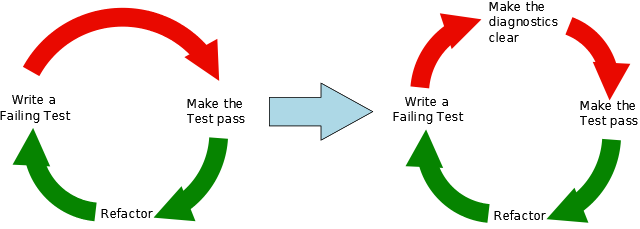
As the amount of tests and file operations started to grow, so did grow the round trip time of my test/make test pass/refactor cycle and my patience dwindled. I switched from NAS FTP-Server to a local FileZilla FTP-Server. It worked like a charm and all necessary features were implemented really fast.
The next step was to run the app using the new feature with real amount of data, real directory structure and our NAS. It failed miserably. And randomly. The app suffered from closed connections while trying to open a data connection. After some search the reason was found: FTPClient we use had active mode enabled by default. That means that to transfer data the server tried to connect to the client and the clients Firewall did not like it. After setting connection mode to passive the problem was solved.
The tests run fine, but they run slow. And they introduced a dependency on an external system. If that system broke or were disabled for any other reason, our CI would report failure without any changes in the code. Both points could be addressed by using an embedded FTP Server. We choose Apaches FTP Server. Changing the tests was easy, since the only thing to do was to setup the server before the test and to shut it down afterwards. Surprisingly some tests failed. Apaches server handled some cases differently:
- it allowed opening output streams to directories without any exception
- it forbid to delete current working directory
- the name listing in the directory (NLST) returned by NAS were absolute paths to the file, Apaches server returned simple names.
After another code change the code worked correctly with all three servers.
Lessons learned
While implementing the interface I learned much about how to create and test bridging functionality:
- Specification cannot replace tests. Searching for the FTP commands to use I looked at several websites that described the commands. None of them wrote about whether NLST returns absolute paths or only filenames. There are always holes in the spec that will be interpreted differently by vendors or the vendors do not always obey it.
- Unit tests are great, but they are limited to your code only. When it comes to communication between system components, especially communication with foreign systems, an integration test is a must.
- Working with a test setup that mimics production environment as close as possible is great. Without the NAS, the app would have simply failed in the best case. In the worst case it would have deleted wrong files. Neither of them make a customer happy.

 Schneide Blog