Enable Capture/Replay for Selenium Flex

One of the missing features of the SeleniumFlexAPI was capture/replay. So I looked into different ways to enable it:

  • Approach 1: Dispatch a DOM event and listen for it in ide-extensions.js

    Problem: Where do I include the name/id of the Flex control?
  • Approach 2: Custom events

    Problem: How do I listen to them in ide-extensions.js?

Solution: Additions to the Selenium IDE code: window.record

The solution is to add a new method to the Selenium IDE code: window.record which delegates to recorder.record. So that the Flex code can call this method directly through the ExternalInterface. The clear advantage of this technique is that there is no code pollution in your production code. But you have to change the SeleniumIDE code. There is an issue in the SeleniumIDE Jira which describes the additions, so go and vote for it!
Addtional code is also needed in the SeleniumFlexAPI.as in the applicationCompleteHandler:

private function applicationCompleteHandler(event:FlexEvent):void {
  ...
  registerListeners(appTreeParser.thisApp.parent);
  ...
}
private function registerListeners(subject:*):void {
  subject.addEventListener(MouseEvent.CLICK, recordClick);
  subject.addEventListener(MouseEvent.DOUBLE_CLICK, recordDoubleClick);
  subject.addEventListener(Event.ADDED, childAdded);
  addListenerRecursive(subject);
}

Bubbling events like MouseEvent.CLICK can be added here but for the non-bubbling ones you have to recursively walk the displayobject hierarchy:

public function addListenerRecursive(root:*):void {
  for(var i:int = 0; i < root.numChildren; i++) {
    try {
      var child:Object = root.getChildAt(i);
      if (isMenuBar(child)) {
        child.removeEventListener(MenuEvent.ITEM_CLICK, recordMenuItemClick);
        child.addEventListener(MenuEvent.ITEM_CLICK, recordMenuItemClick);
      }
      if (isTextControl(child)) {
        child.removeEventListener(Event.CHANGE, recordTextChange);
        child.addEventListener(Event.CHANGE, recordTextChange);
      }
      if (isDataGrid(child)) {
        child.removeEventListener(DataGridEvent.ITEM_FOCUS_IN, recordItemClick);
        child.addEventListener(DataGridEvent.ITEM_FOCUS_IN, recordItemClick);
      }
      addListenerRecursive(child);
    } catch(e:Error) {}
  }
}

In the event handling functions you just call the record function with the appropiate SeleniumFlex command:

private function recordClick(event:MouseEvent):void {
  ExternalInterface.call("record", "flexClick", "name=" + event.target.name, "");
}

Since Flex Sprites have no ids I use the name here for identifying the clicked target.
Another pitfall is when components are added dynamically (like when a Date opens, it adds a calendar view):

private function childAdded(event:Event):void {
  if (isDate(event.target.parent.parent)) {
    event.target.parent.parent.removeEventListener(CalendarLayoutChangeEvent.CHANGE, recordDate);
    event.target.parent.parent.addEventListener(CalendarLayoutChangeEvent.CHANGE, recordDate);
  }
}

Conclusion

So finally capture/replay in SeleniumFlex becomes a reality! Nonetheless there is some work to do to support the different kinds of flex controls and Selenium commands.

Hudson for C++/CMake/CppUnit Revised

A few months ago, in order to use Hudson as CI for your C++/CMake/CppUnit projects you had to do quite a lot of shell scripting. By now the situation has very much improved as some very useful plugins came into existence. To cover the situation described in my previous post you can now use a combination of the CMake plugin and the CppUnit plugin.

With these extensions Hudson gets more and more useful for C/C++ developers. Yet another new plugin that supports this trend is the CCCC Plugin which uses the CCCC tool to generate trend reports for various software metrics including cyclomatic complexity.

How to find the HTML Entity you look for

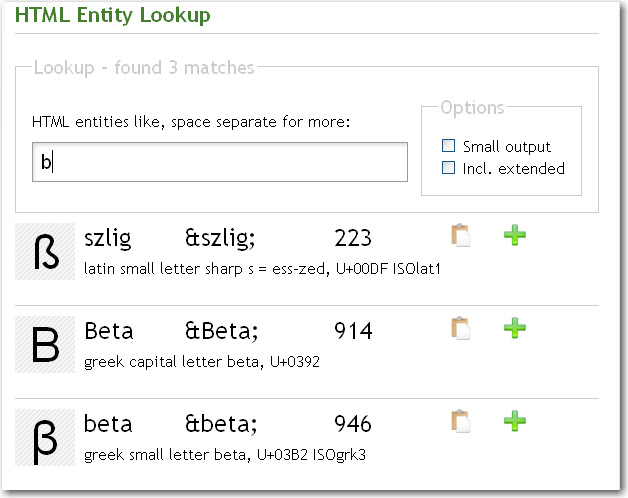
As a webdeveloper have you ever wondered how a special character has to be encoded as a html entity? There is a nice little tool available online that will answer your call for help.EntityLook for 'b' What makes the tool really rock is the simplicity and great incremental search. Typing in the letter ‘c’ will present you entities for “cent”, “copyright”, the greek “sigma” and mathematical entities like “superset” because the basic shape of the resulting special character is also considered. Upon entering a ‘b’ you will get the german ß as one of the results.This kind of search is almost a “do what I mean” feature and very helpful if you do not know exact substrings or meaning of your special character.

There is a Firefox-Extension and as a special goodie for our beloved Mac-users there is even a dashboard widget available that works without internet connection and is a bit more convenient to use than the web application.

Followup: Selenium Flex API with Firefox 3 and Selenium IDE 1.0 Beta 2 now working

Because of a bug in the Selenium Flex API, it didn’t work with Firefox 3 and the Selenium IDE 1.0 beta 2.
To fix this bug add the following line:

    if (flashObj.wrappedJSObject) {
        flashObj = flashObj.wrappedJSObject;
    }

to ide-extensions.js in Selenium.prototype.callFlexMethod after

var flashObj = selenium.browserbot.findElement(this.flashObjectLocator);

The state of functional testing in Flex

Functional testing of UIs is an important and often neglected way of ensuring quality and prevent regression. The Flex world of functional tests seems at the very beginning. We evaluated some of the tools available and used the following criterias:

  • OS independence
    the tool and the created test scripts should run on at least every platform the Flex SDK and the Flash platform are available
  • Tool changes
    how much we need to change or adapt the tool to suit our needs
  • Code pollution
    how much the actual code needs to be polluted to support this testing tool
  • Capture/Replay
    the tool needs at least an option to capture and replay test scripts
  • Additional License Costs
    if we need to pay additional (besides the tool) license costs for things like the FlexBuilder Pro
OS ind. Tool changes Code pollution Capture / Replay Add. costs
Automation based tools + 0 +
SeleniumFlex + 0 + 0 +
FunFx 0 + 0
Fluorida + + +

Automation based tools (like FlexMonkey, QTP and RIATest) use the Flex automation API and have additional costs for FlexBuilderPro (700$ per license). For custom components you have to add automation code to them (pollution) and introduce them and their events in FlexMonkeys event map (tool changes).
SeleniumFlex uses the JavascriptBridge (ExternalInterface) of the FlashPlayer and needs you to add the custom components and events to this external interface which resides in the tool/test code (therefore a 0 at tool changes). You can use the Selenium plugin for spy (the ids)/replay but the capture option isn’t working yet (0 for capture/replay).
FunFx also uses the ExternalInterface and is written in Ruby but runs only on Windows (- for OS independence) because it connects to the Flex application via Win32OLE. I found no capture/replay (-) and the website says you need FlexBuilder (I don’t know why therefore a 0 for license costs, we use IntelliJ IDEA for Flex development)
Fluorida seems to be at the beginning and there is very little documentation so it looks like to need an investment (- for tool changes). It has no capture/replay (-).

Conclusion

So our tool of choice is SeleniumFlex and we hope to get capture/replay working in the near future.
What experience have you made with functional testing in Flex? Which one do you use?

Structuring CppUnit Tests

How to structure cppunit tests in non-trivial software systems so that they can be easily executed selectively during code-compile-test cycle and at the same time are easy to execute as a whole by your continuous integration system.

While unit testing in Java is dominated by JUnit, C++ developers can choose between a variety of frameworks. See here for a comprehensive list. Here you can find a nice comparison of the biggest players in the game.

Being probably one of the oldest frameworks CppUnit sure has some usability issues but is still widely used. It is criticised mostly because you have to do a lot of boilerplate typing to add new tests. In the following I will not repeat how tests can be written in CppUnit as this is described already exhaustively (e.g. here or here). Instead I will concentrate on the task of how to structure CppUnit tests in bigger projects. “Bigger” in this case means at least a few architectually independent parts which are compiled independently, i.e. into different libraries.

Having independently compiled parts in your project means that you want to compile their unit tests independently, too. The goal is then to structure the tests so that they can easily be executed selectively during development time by the programmer and at the same time are easy to execute as a whole during CI time (CI meaning Continuous Integration, of course).

As C++ has no reflection or other meta programming elements like the Java Annotations, things like automatic test discovery and how to add new tests become a whole topic of its own. See the CppUnit cookbook for how to do that with CppUnit . In my projects I only use the TestFactoryRegistry approach because it provides the most automatics in this regard.

Let’s begin with a simplest setup, the Link-Time Trap (see example source code): Test runner and result reporter are setup in the “main” function that is compiled into an executable. The actual unit tests are compiled in separate libraries and are all linked to the executable that contains the main function. While this solution works well for small projects it does not scale. This is simply because every time you change something during the code-compile-test cycle the unit test executable has to be relinked, which can take a considerable amount of time the bigger the project gets. You fall into the Link Time Trap!

The solution I use in many projects is as follows: Like in the simple approach, there is one test main function which is compiled into a test executable. All unit tests are compiled into libraries according to their place in the system architecture. To avoid the Link-Time-Trap, they are not linked to the test executable but instead are automatically discovered and loaded during test execution.

1. Automatic Discovery

Applying a little convention-over-configuration all testing libraries end with the suffix “_tests.so”. The testing main function can then simply walk over the directory tree of the project and find all shared libraries that contain unit test classes.

2. Loading

If a “.._test.so” library has been found, it simply gets loaded using dlopen (under Unix/Linux). When the library is loaded the unit tests are automatically registered with the TestFactoryRegistry.

3. Execution

After all unit test libraries has been found and loaded text execution is the same as in the simple approach above.

Here my enhanced testmain.cpp (see example source code).

#include ... 

using namespace boost::filesystem; 
using namespace std; 

void loadPlugins(const std::string& rootPath) 
{
  directory_iterator end_itr; 
  for (directory_iterator itr(rootPath); itr != end_itr; ++itr) { 
    if (is_directory(*itr)) {
      string leaf = (*itr).leaf(); 
      if (leaf[0] != '.') { 
        loadPlugins((*itr).string()); 
      } 
      continue; 
    } 
    const string fileName = (*itr).string();
    if (fileName.find("_tests.so") == string::npos) { 
      continue;
    }
    void * handle = 
      dlopen (fileName.c_str(), RTLD_NOW | RTLD_GLOBAL); 
    cout << "Opening : " << fileName.c_str() << endl; 
    if (!handle) { 
      cout << "Error: " << dlerror() << endl; 
      exit (1); 
    } 
  } 
} 

int main ( int argc, char ** argv ) { 
  string rootPath = "./"; 
  if (argc > 1) { 
    rootPath = static_cast<const char*>(argv[1]); 
  } 
  cout << "Loading all test libs under " << rootPath << endl; 
  string runArg = std::string ( "All Tests" ); 
  // get registry 
  CppUnit::TestFactoryRegistry& registry = 
    CppUnit::TestFactoryRegistry::getRegistry();
  
  loadPlugins(rootPath); 
  // Create the event manager and test controller 
  CppUnit::TestResult controller; 

  // Add a listener that collects test result 
  CppUnit::TestResultCollector result; 
  controller.addListener ( &result ); 
  CppUnit::TextUi::TestRunner *runner = 
    new CppUnit::TextUi::TestRunner; 

  std::ofstream xmlout ( "testresultout.xml" ); 
  CppUnit::XmlOutputter xmlOutputter ( &result, xmlout ); 
  CppUnit::TextOutputter consoleOutputter ( &result, std::cout ); 

  runner->addTest ( registry.makeTest() ); 
  runner->run ( controller, runArg.c_str() ); 

  xmlOutputter.write(); 
  consoleOutputter.write(); 

  return result.wasSuccessful() ? 0 : 1; 
}

As you can see the loadPlugins function uses the Boost.Filesystem library to walk over the directory tree.

It also takes a rootPath argument which you can give as parameter when you call the test main executable. This solves our goal stated above. When you want to execute unit tests selectively during development you can give the path of the corresponding testing library as parameter. Like so:

./testmain path/to/specific/testing/library

In your CI environment on the other hand you can execute all tests at once by giving the root path of the project, or the path where all testing libraries have been installed to.

./testmain project/root

Visualizations with Flare/Prefuse

Recently we were in need of visualizing lots of data in networks. We started with a Javascript based version using RaphaelJS. RaphaelJS uses SVG/VML as the underlying graphics API. Drawing lots of nodes and edges in different shapes and colors worked like a breeze. But we quickly got performance problems when animating the transitions between different states of the network. So we had to look to an alternative technology which is performant enough and pragmatic to use. Reading a lot about Flex and its promising animation capabilities we gave it a try.
Shortly after we stumbled upon Flare/Prefuse and the stunning demos convinced us. It is very easy to use and gives remarkable results in a short time. We integrated it into our web app but suddenly the visualizations weren’t drawn upon startup. Everything went fine when the visualization was ready before the Flex app was fully completed but when the data was visualized after that the edges and nodes weren’t shown. Debugging our app and reading the Flex Sprite API wasn’t much helpful. But one comment in a superclass of all the Flare sprites solved out problem:

Internally, the DirtySprite class maintains a static list of all "dirty" sprites, and redraws each sprite in the list when a Event.RENDER event is issued. Typically, this process is performed automatically. In a few cases, erratic behavior has been observed due to a Flash Player bug that results in RENDER events not being properly issued. As a fallback, the static renderDirty() method can be invoked to manually force each dirty sprite to be redrawn.

These few cases were the default behaviour of our app, so invoking renderDirty solved all our drawing issues. I found no blog entry or hint in the docs and the demos run perfectly since all data is there before the app is shown. So the lesson here is:

  • retest your assumptions (we thought the Flare sprites were all DataSprites and the next superclass is the Flex API Sprite and forgot about the DirtySprite)
  • besides the demos and tutorials/docs read the API docs carefully, often there are implementation/technology specific hints

Make friends with your compiler

Suppose you are a C++ programmer on a project and you have the best intentions to write really good code. The one fellow that you better make friends with is your compiler. He will support you in your efforts whenever he can. Unless you don’t let him. One sure way to reject his help is to switch off all compiler warnings. I know it should be well-known by now that compiling at high warning levels is something to do always and anytime but it seems that many people just don’t do it.
Taking g++ as example, high warning levels do not mean just having “-Wall” switched on. Even if its name suggests otherwise, “-Wall” is just the minimum there. If you just spend like 5 minutes or so to look at the man page of g++ you find many many more helpful and reasonable -W… switches. For example (g++-4.3.2):


-Wctor-dtor-privacy: Warn when a class seems unusable because all the constructors or destructors in that class are private, and it has neither friends nor public static member functions.

Cool stuff! Let’s what else is there:


-Woverloaded-virtual: Warn when a function declaration hides virtual functions from a base class. Example:

class Base
{
public:
virtual void myFunction();
};

class Subclass : public Base
{
public:
void myFunction() const;
};

I would certainly like to be warned about that, but may be that’s just me.


-Weffc++: Warn about violations of the following style guidelines from Scott Meyers’ Effective C++ book

This is certainly one of the most “effective” weapons in your fight for bug-free software. It causes the compiler to spit out warnings about code issues that can lead to subtle and hard-to-find bugs but also about things that are considered good programming practice.

So suppose you read the g++ man page, you enabled all warning switches additional to “-Wall” that seem reasonable to you and you plan to compile your project cleanly without warnings. Unfortunately, chances are quite high that your effort will be instantly thwarted by third-party libraries that your code includes. Because even if your code is clean and shiny, header files of third-pary library may be not. Especially with “-Weffc++” this could result in a massive amount of warning messages in code that you have no control of. Even with the otherwise powerful, easy-to-use and supposedly mature Qt library you run into that problem. Compiling code that includes Qt headers like <QComboBox>with “-Weffc++” switched on is just unbearable.

Leaving aside the fact that my confidence in Qt has declined considerably since I noticed this, the question remains what to do ignore the shortcomings of other peoples code. With GCC you can for example add pragmas around offending includes as desribed here. Or you can create wrapper headers for third-party includes that contain


#pragma GCC system_header

AFAIK Microsoft’s compilers have similar pragmas:


#pragma warning(push, 1)
#include
#include
#pragma warning(pop)

Warning switches are a powerful tool to increase your code quality. You just have to use them!

Drawing your background with Javascript

Having complex backgrounds (like radial gradients) or even dynamic backgrounds in a web page is not an easy task using only images. Javascript helps here and the SVG/VML support in modern browsers makes drawing a reality. Looking around in the Javascript library world there are some which have APIs for crossbrowser drawing or charting. But if you are looking for a small and easy to learn on you have to search. We found raphaeljs, a project which started as a 20%er at Atlassian. It has an API which is close to SVG but also supports non SVG browsers like IE. How to make animations and complex drawings is easy to learn. The examples give a hint of what is possible.
We needed a radial gradient to have a smooth background, looking at the docs and the SVG spec, it was a four liner:

var Paper = Raphael("canvas", width, height);
var b = Paper.circle(width / 2, height / 2, Math.max(width, height));
var gradient = {type: "radial", dots: [{color: "#FFFFFF"}, {color: "#D5D5D5"}], vector: [0, 0, 0, "100%"]};
b.attr({"gradient": gradient});

On teaching software engineering

Be sure to include current topics in your lectures when teaching software engineering. Here are some hints.

overheadIn my rare spare time, I hold lectures on software engineering at the University of Cooperative Education in Karlsruhe. The topics range from evergreens like UML to modern subjects like aspect oriented programming (AOP) or Test Driven Development (TDD).

One thing I observe is that students don’t have difficulty separating the old topics from the current ones, even if they hear both of them for the first time. It seems that subject matter ages by itself, just like source code does. So, I’m constantly searching for new topics to include in the lectures, replacing the oldest ones.

Three things to include in your lectures

Some months ago, I read a very good blog post written by Alan Skorkin, titled “3 Things They Should Have Taught In My Computer Science Degree”. Alan covers three points:

  1. Open Source Development
  2. An Agile Process (e.g. XP, Scrum)
  3. Corporate Politics/Building Relationships

The idea of missed opportunities to tell some fundamentals to my students struck me. I compared my presentations to the list, finding the leading two topics covered to a great extent. The last one, corporate politics, is a bit off-topic for a technical lecture. But nevertheless, it’s too important to omit completely, so I already had included some Tom DeMarco lessons in my presentations. Perhaps I can build this part up a bit in the future.

What they should have taught me

Soon afterwards, I though about things my lecturers missed during my study. Here’s the list with only two points in addition to Alan’s list:

  • Age and “maturity” of topic: When I was a student, I quickly identified old topics, like my students do nowadays. What I couldn’t tell was if a topic was mature (a classic) or just deprecated. It would have helped to announce that a topic was necessary, but of little actual relevance in modern software development craftmanship. Or that a topic is academical news, but yet unheard of in the industry and lacking wide-spread acceptance. Both extremes were blended together in the presentations, creating an unique mixture of antiquated and futuristic approaches. This is a common problem of Advanced Beginners in the Dreyfus model.
  • Ergonomics and Effectiveness: I still can’t believe I didn’t hear a word about proper workplace setup from my teachers. I had courses teaching me how to learn, but not a single presentation that taught me how to work. This topic ranges from the right chair over lighting to screen size and quantity and could be skimmed over in less than an hour. But it doesn’t stop with the hardware. Entire books like Neal Ford’s “The Productive Programmer” cover the software side of effective workplace setup. And even further, the minimal set of tools a software developer should use (e.g. IDE, SCM, CI, issue tracker, Wiki) wasn’t even mentioned.

I hope to provide all these topics and information to my students in a recognizable (and rememberable) manner. They deserve to learn about the latest achievements in software engineering. Otherwise you aren’t prepared to work in an industry changing fundamentally every five to ten years. Of course, hearing about the classic stuff is necessary, too.

Give me feedback. What are your missed topics during apprenticeship, study or even work?

Update: In case you can’t visit my lectures but want to know a bit about ergonomics, I’ve written two blog articles on this topic: