Summary of the Schneide Dev Brunch at 2012-07-15

If you couldn’t attend the Schneide Dev Brunch in July 2012, here are the main topics we discussed neatly summarized.

Two weeks ago, we held another Schneide Dev Brunch. The Dev Brunch is a regular brunch on a sunday, only that all attendees want to talk about software development and various other topics. If you bring a software-related topic along with your food, everyone has something to share. The brunch was so well attended that we had trouble to all find a chair and fit at the table. There were quite some new participants, so the introductory round was necessary again. Let’s have a look at the main topics we discussed:

Choosing Google Web Toolkit

If you start the development of a new web application today, there are many frameworks to call to aid. Most of them will not lend a hand, but mostly stand in the way. In a short presentation, we learnt about the arguments in favor and against the use of the Google Web Toolkit for the development of a highly customizable web application. The two most important aspects were that GWT enables desktop-like “real” (as opposed to “web”) development but still provides enough hooks to embrace the web-only developers.

Spock Framework

The Spock testing framework tries to bring natural and expressive syntax back to testing. It mixes the best of most current testing and specification frameworks together in a groovy-based domain specific language. The first contact with Spock of one of our attendees was very pleasant. The framework provides opiniated default tools for most modern testing aspects (e.g. mocking), but is extremely integrative with all current testing libraries. The take-away of this topic was: Try Spock for your next adventures in testing.

Schneide job offer

We from the Softwareschneiderei host the Dev Brunch for nearly six years now. In all these years, we grew slowly without the need to announce open job offers. Now is the time where even we have to insert a little bit of advertising into the brunch: we are hiring. Enough said.

SWT UI-based tests

The Standard Widget Toolkit is the graphical foundation of the Eclipse platform. It’s a bit dated (like most Java-based UI toolkits) and doesn’t really embrace automatic UI-based tests. There is SWTBot, but it doesn’t provide the power of a tool like FEST-Swing. We discussed the situation, but couldn’t offer much help.

Decorator pattern

Another question for discussion was the usage of the classic decorator design pattern in a rather twisted use case. Without going into much detail, the best option would have been the use of Mixins, but the environment (Java) doesn’t provide them. It was an interesting discussion with lots of different solution attempts. We didn’t find the definitive answer, but there was some good inspiration in the train of thoughts.

The programming language Go

One guest offered us a quick overview over the new programming language Go, developed by Google. To sum up a few aspects that were mentioned, Go is compiled to native code, doesn’t offer type inheritance but compile-time interface binding (if it matches, it binds) and so-called goroutines. The latter are slightly improved coroutines. The communication between objects is mostly done with channels, a very flexible event notification system. The feature with the most raised eyebrows was the visibility modifier: capitalization. If your name begins with a capital letter, it is exported. You can quickly learn the basics of the language with the web-based “Tour of Go”.

Summary of Java Forum Stuttgart

One attendee summed up his impressions and experiences with this year’s Java Forum Stuttgart, a local Java-based conference. The day was worthwile and informative, but some basic pieces went missing. For example, you weren’t provided with a notepad and a pen and had to go on a hunt at the exhibitor booths. The single extraordinary talk that you’ll remember for years didn’t happen, either. Most visited talks were solid, but not outstanding. Most noteworthy tools this year were Gerrit and Sonar.

Data loses its location

A final aspect for open discussion was the fact that stored data loses its location. With all modern web- or cloud-based services, the notion of a “storage medium” begins to lose meaning. And with the fast mobile internet access, you won’t have to reside at a specific location to access all your data. For the next generations of computer users (read: kids), data will behave like the notorious aether: always there, never affixable.

Epilogue

As usual, the Dev Brunch contained a lot more chatter and talk than listed here. The high number of attendees makes for an unique experience every time. We are looking forward to the next Dev Brunch at the Softwareschneiderei. And as always, we are open for guests and future regulars. Just drop us a notice and we’ll invite you over next time.
Building Windows C++ Projects with CMake and Jenkins

An short and easy way to build Windows C++ Software with CMake in Jenkins (with the restriction to support Visual Studio 8).

The C++ programming environment where I feel most comfortable is GCC/Linux (lately with some clang here and there). In terms of build systems I use cmake whenever possible. This environment also makes it easy to use Jenkins as CI server and RPM for deployment and distribution tasks.

So when presented with the task to set up a C++ windows project in Jenkins I tried to do it the same way as much as possible.

The Goal:

A Jenkins job should be set up that builds a windows c++ project on a Windows 7 build slave. For reasons that I will not get into here, compatibility with Visual Studio 8 is required.

The first step was to download and install the correct Windows SDK. This provides all that is needed to build C++ stuff under windows.

Then, after installation of cmake, the first naive try looked like this (in an “execute Windows Batch file” build step)

cmake . -DCMAKE_BUILD_TYPE=Release

This cannot work of course, because cmake will not find compilers and stuff.

Problem: Build Environment

When I do cmake builds manually, i.e. not in Jenkins, I open the Visual Studio 2005 Command Prompt which is a normal windows command shell with all environment variables set. So I tried to do that in Jenkins, too:

call “c:\Program Files\Microsoft SDKs\Windows\v6.0\Bin\SetEnv.Cmd” /Release /x86

cmake . -DCMAKE_BUILD_TYPE=Release

This also did not work and even worse, produced strange (to me, at least) error messages like:

‘Cmd’ is not recognized as an internal or external command, operable program or batch file.

The system cannot find the batch label specified – Set_x86

After some digging, I found the solution: a feature of windows batch programming called delayed expansion, which has to be enabled for SetEnv.Cmd to work correctly.

Solution: SetEnv.cmd and delayed expansion

setlocal enabledelayedexpansion

call “c:\Program Files\Microsoft SDKs\Windows\v6.0\Bin\SetEnv.Cmd” /Release /x86

cmake . -DCMAKE_BUILD_TYPE=Release

nmake

Yes! With this little trick it worked perfectly. And feels almost as with GCC/CMake under Linux:  nice, short and easy.

Better diagnostics in TDD

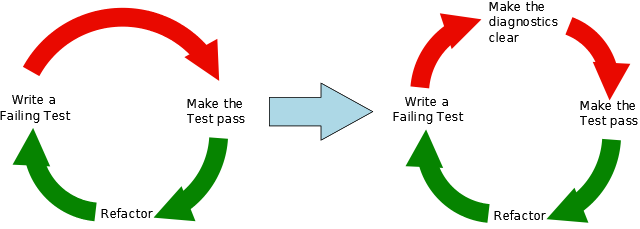
Automated tests gain more and more popularity in our field and our company. Avoiding being slowed down by tests becomes crucial. Steve Freeman has a nice talk on infoq.com with many advices for maintaining the benefits of automated testing without producing too much drag. One seldomly discussed topic is test diagnostics and immediately caught our attention. In short your aim is to produce as meaningful messages as possible for failing tests. This leads to the extended TDD cycle depicted below.

There are several techniques to improve the diagnostics of failing tests. Here is a short list of the most important ones:

  • Using assertion messages to make clear what exactly failed
  • Using “named objects” where you essentially just override the toString()-method of some type in your tests to provide meaning for the checked value
    Date startDate = new Date(1000L) {
        @Override
        public String toString() {
            return "startDate";
        }
    };
    
    
  • Using “tracer objects” by giving names to mocks/collaborators in the test, e.g. in Mockito-syntax:
    EventManager em1 = mock(EventManager.class, "Gavin");
    EventManager em2 = mock(EventManager.class, "Frank");
    // do something with them
    

Conclusion

By applying the extended TDD-cycle you can drastically reduce guessing of what went wrong and find regressions much faster without using debug messages or the debugger itself.

Why do (different) programming languages matter?

One common saying in software development is: use the best tool for the job. But what is the best tool? I think the best tool is determined by two things: how it fits the problem domain and how it fits your mental model.

One common saying in software development is: use the best tool for the job. But what is the best tool? I think the best tool is determined by two things: how it fits the problem domain and how it fits your mental model. Why your mental model? Just use the best language available! you might think. But as humans we think in languages and even inside these languages everybody has a typical way of expressing himself. Even own words and if they become common we even have a name for it: a dialect. But it is all that you should consider when choosing a programming language? Certainly there are the tools of the trade: the IDE, debugger, profiler, etc. Here is comes down to personal preferences and most of the shortcomings in this field are short term: better tool support is on the way.
There’s another more important aspect though: the community and therefore the mindset which is brought along. The communities form how the languages are used, where the most libraries and frameworks are developed, which problem domains are tackled and what the values are. Values can be testing, elegance, simplicity, robustness, …
Since communities are consisted of individuals, individuals form what the values are. But I think the language designer lays a foundation here: take Ruby for example, Ruby was designed with the intention to make programming fun. This is one of the things that appeals to many developers and the whole community which uses Ruby. Ruby is fun.
These environments spawn amazing things like Rails or more recently RubyMotion Because of the mindset of the community and the foundation inside the language there are these fruits. Last but not least another reason to choose a language is your familiarity with it. You might choose an inferior tool or language because you know it inside out.

A short story about priorities

When you mix your own priorities with the ones of your customers, embarrassing things might happen.

Before I can tell you the story, I have to add this disclaimer: The story is true, but it wasn’t us. To protect the identities, I’ve changed nearly all the details, hopefully without watering down the essence of the story.

The assignment

A few years ago, when developing software for mobile devices wasn’t as ordinary as it is today, a freelance developer got a call from a loyal customer. He should develop a little web application that could also be used on a smartphone. The functionality of the application was minimal: Show a neat image containing two buttons to download a song teaser in two different file formats, probably MP3 and WMA. That’s all. The whole thing was a marketing app that should be used a few weeks or months and then be mothballed. Being a marketing app, the payment was very decent.

The development

The freelancer was excited to say the least. This was his chance to enter the emerging field of mobile device software development. And because it should be a web application, he would try out all these new fancy mobile web frameworks and settle for the best. The image of the website should rotate and adjust to the device screen if the user tilted his phone. And because phone screens weren’t that well equipped with pixels as today and mobile internet was expensive, the image should be optimized for the best possible tradeoff between details and file size.

Some mobile web frameworks provided access to the device type, so there were all kinds of javascript magic tricks to be potentially applied. Well, they weren’t applied, but very well could have been. The freelancer prototyped most of them, out of curiosity.

The web application itself was completed in one session once the song files and the master image were provided by the customer. The freelancer installed everything on a staging web server and communicated back success. The customer was pleased by the quick reaction time and appointed a meeting to inspect the results.

The presentation

The customer gave the freelancer a notebook attached to a beamer to present the application. The notebook had a screen resolution many times the envisioned target platform, so the intro image was very pixellated and far from appealing. The freelancer used his smartphone to present the image on a smaller screen, but the customer only shook his head: “You should develop a web application for both phones and PCs. Most of our customers will use their PC to visit the site.” The freelancer apologized and promised to add another browser switch to present a full resolution image to PC users.

Now, the freelancer continued to present the web application on his phone. He invited the customer to tilt the device and was satisfied when the web site adjusted perfectly. The customer was pleased, too. Then, he tapped on one of the buttons. Nothing happened. The whole application consisted only of two buttons and one wasn’t working. The freelancer frantically tried to figure out what had gone wrong, when the customer tapped on the other button. No reaction from that one, too. “But I’ve uploaded both song files to the right location with the right access rights.”, the freelancer just said to himself when it dawned him: He forgot to insert the link tags in the HTML file. The buttons were just images. He never actually clicked on one of the buttons during development.

The moral of the story

Recapitulating, the freelancer was asked to develop a web application with an image and two download buttons, but he managed to cripple the image for the larger part of the anticipated users and never provide any download functionality at all. The customer’s requirements somehow got lost along the way.

This isn’t so much a story about a confused freelancer or improper requirement analysis. It’s a story about priorities. The customer expressed his priorities through the requirements. The freelancer superimposed his own priorities very early in the process (without telling anybody) and never returned to the original set until the presentation. And while it is granted to have a secondary agenda as a service provider, it should never interfere with the primary agenda – the one set by the customer.

Don’t fool yourself into thinking that this could never happen to you. It’s not always as obvious as in this story. Some, if not most of your customer’s priorities are unintentionally (or even intentionally) kept secret. They can only be traced during live exercises, which is why early prototyping and using the prototype in real scenarios is a good way to reveal them.

The 2012 Experience

Do you know that feeling when you use or look at some kind of device, software, technology or service and think that there is an easier, faster, nicer or simply better way to do it? To put it simply, when something is just inconvenient to use. Earlier this year, in a discussion we had about some inconvenient every day technology the phrase “That does not feel like 2012!” was used to describe this feeling. Since then, the “2012 experience” has become kind of an inofficial commendation we award in our discussions.

For me, this sentence says it all. In the year 2012 (that some claim to be our last) there are still more than enough products that make every day life and work unnecessarily complicated. Despite various existing techniques, good practices and, most important, lots of examples that can show producers how to create a good 2012 experience.

Even though the phrase was originally coined describing a scientific API, the last few weeks taught me that this phenomenon is by no means unique to our profession. The worst non-2012 experiences I had thus far were with service hotlines. While there are many examples of good 2012 experiences leaving me with the feeling that my issue is taken care of, there are also those that leave me with the urge to immediately dial again and hope for another service employee.

Regardless of the work I do, be it developing an API, designing a GUI or providing customer support, I always try to imagine how I would expect it to be done by someone else to leave me contended.

Basic Image Processing Tasks with OpenCV

2D detectors and scientific CCD cameras produce many megabytes of image data. Open source library OpenCV is highly recommended as your work horse for all kinds of image processing tasks.

For one of our customers in the scientific domain we do a lot of integration of pieces of hardware into the existing measurement- and control network. A good part of these are 2D detectors and scientific CCD cameras, which have all sorts of interfaces like ethernet, firewire and frame grabber cards. Our task is then to write some glue software that makes the camera available and controllable for the scientists.

One standard requirement for us is to do some basic image processing and analytics. Typically, this entails flipping the image horizontally and/or vertically, rotating the image around some multiple of 90 degrees, and calculcating some statistics like standard deviation.

The starting point there is always some image data in memory that has been acquired from the camera. Most of the time the image data is either gray values (8, or 16 bit), or RGB(A).

As we are generally not falling victim to the NIH syndrom we use open source image processing librarys. The first one we tried was CImg, which is a header-only (!) C++ library for image processing. The header-only part is very cool and handy, since you just have to #include <CImg.h> and you are done. No further dependencies. The immediate downside, of course, is long compile times. We are talking about > 40000 lines of C++ template code!

The bigger issue we had with CImg was that for multi-channel images the memory layout is like this: R1R2R3R4…..G1G2G3G4….B1B2B3B4. And since the images from the camera usually come interlaced like R1G1B1R2G2B2… we always had to do tricks to use CImg on these images correctly. These tricks killed us eventually in terms of performance, since some of these 2D detectors produce lots of megabytes of image data that have to be processed in real time.

So OpenCV. Their headline was already very promising:

OpenCV (Open Source Computer Vision) is a library of programming functions for real time computer vision.

Especially the words “real time” look good in there. But let’s see.

Image data in OpenCV is represented by instances of class cv::Mat, which is, of course, short for Matrix. From the documentation:

The class Mat represents an n-dimensional dense numerical single-channel or multi-channel array. It can be used to store real or complex-valued vectors and matrices, grayscale or color images, voxel volumes, vector fields, point clouds, tensors, histograms.

Our standard requirements stated above can then be implemented like this (gray scale, 8 bit image):

void processGrayScale8bitImage(uint16_t width, uint16_t height,
                               const double& rotationAngle,
                               uint8_t* pixelData)
{
  // create cv::Mat instance
  // pixel data is not copied!
  cv::Mat img(height, width, CV_8UC1, pixelData);

  // flip vertically
  // third parameter of cv::flip is the so-called flip-code
  // flip-code == 0 means vertical flipping
  cv::Mat verticallyFlippedImg(height, width, CV_8UC1);
  cv::flip(img, verticallyFlippedImg, 0);

  // flip horizontally
  // flip-code > 0 means horizontal flipping
  cv::Mat horizontallyFlippedImg(height, width, CV_8UC1);
  cv::flip(img, horizontallyFlippedImg, 1);

  // rotation (a bit trickier)
  // 1. calculate center point
  cv::Point2f center(img.cols/2.0F, img.rows/2.0F);
  // 2. create rotation matrix
  cv::Mat rotationMatrix =
    cv::getRotationMatrix2D(center, rotationAngle, 1.0);
  // 3. create cv::Mat that will hold the rotated image.
  // For some rotationAngles width and height are switched
  cv::Mat rotatedImg;
  if ( (rotationAngle / 90.0) % 2 != 0) {
    // switch width and height for rotations like 90, 270 degrees
    rotatedImg =
      cv::Mat(cv::Size(img.size().height, img.size().width),
              img.type());
  } else {
    rotatedImg =
      cv::Mat(cv::Size(img.size().width, img.size().height),
              img.type());
  }
  // 4. actual rotation
  cv::warpAffine(img, rotatedImg,
                 rotationMatrix, rotatedImg.size());

  // save into TIFF file
  cv::imwrite("myimage.tiff", gray);
}

The cool thing is that almost the same code can be used for our other image types, too. The only difference is the image type for the cv::Mat constructor:


8-bit gray scale: CV_U8C1
16bit gray scale: CV_U16C1
RGB : CV_U8C3
RGBA: CV_U8C4

Additionally, the whole thing is blazingly fast! All performance problems gone. Yay!

Getting basic statistical values is also a breeze:

void calculateStatistics(const cv::Mat& img)
{
  // minimum, maximum, sum
  double min = 0.0;
  double max = 0.0;
  cv::minMaxLoc(img, &min, &max);
  double sum = cv::sum(img)[0];

  // mean and standard deviation
  cv::Scalar cvMean;
  cv::Scalar cvStddev;
  cv::meanStdDev(img, cvMean, cvStddev);
}

All in all, the OpenCV experience was very positive, so far. They even support CMake. Highly recommended!

Your own CI-based RPM build farm, part 3

In my previous post we learned how to build RPM packages of your software for multiple versions of your target distribution(s). Now I want to present a way of automating the build process and building packages on/for all target platforms. You should have a look at the openSUSE build service to see if it already fits your needs. Then you can stop reading here :-).

We needed better control over the platforms and the process, so we setup a build farm based on the Jenkins continuous integration (CI) server ourselves. The big picture consists of the following components:

  • build slaves allowing a jenkins user to do unattended builds of the packages
  • Jenkins continuous integration server using matrix builds with build slaves for each target platform
  • build script orchestrating the build of all our self-maintained packages
  • jenkins job to deploy the packages to our RPM repository

Preparing the build slaves

Standard installations of openSUSE need some minor tweaks so they can be used as Jenkins build slaves doing unattended RPM package builds. Here are the changes we needed to make it work properly:

  1. Add a user account for the builds, e.g. useradd -m -d /home/jenkins jenkins and setup a password with passwd jenkins.
  2. Change sshd configuration to allow password authentication and restart sshd.
  3. We will link the SOURCES and SPECS directories of /usr/src/packages to the working copy of our repository, so we need to delete the existing directories: rm -r /usr/src/packages/SPECS /usr/src/packages/SOURCES /usr/src/packages/RPMS /usr/src/packages/SRPMS.
  4. Allow non-priviledged users to work with /usr/src/packages with chmod -R o+rwx /usr/src/packages.
  5. Copy the ssh public key for our git repository to the build account in ~/.ssh/id_rsa
  6. Test ssh access on the slave as our build user with ssh -v git@repository. With this step we confirm the host authenticity one time so that future public key ssh interactions work unattended!
  7. Configure git identity on the slave with git config --global user.name "jenkins@build###-$$"; git config --global user.email "jenkins@buildfarm.myorg.net".
  8. Add privileges for the build user needed for our build process in /etc/sudoers: jenkins ALL = (root) NOPASSWD:/usr/bin/zypper,/bin/rpm

Configuring the build slaves

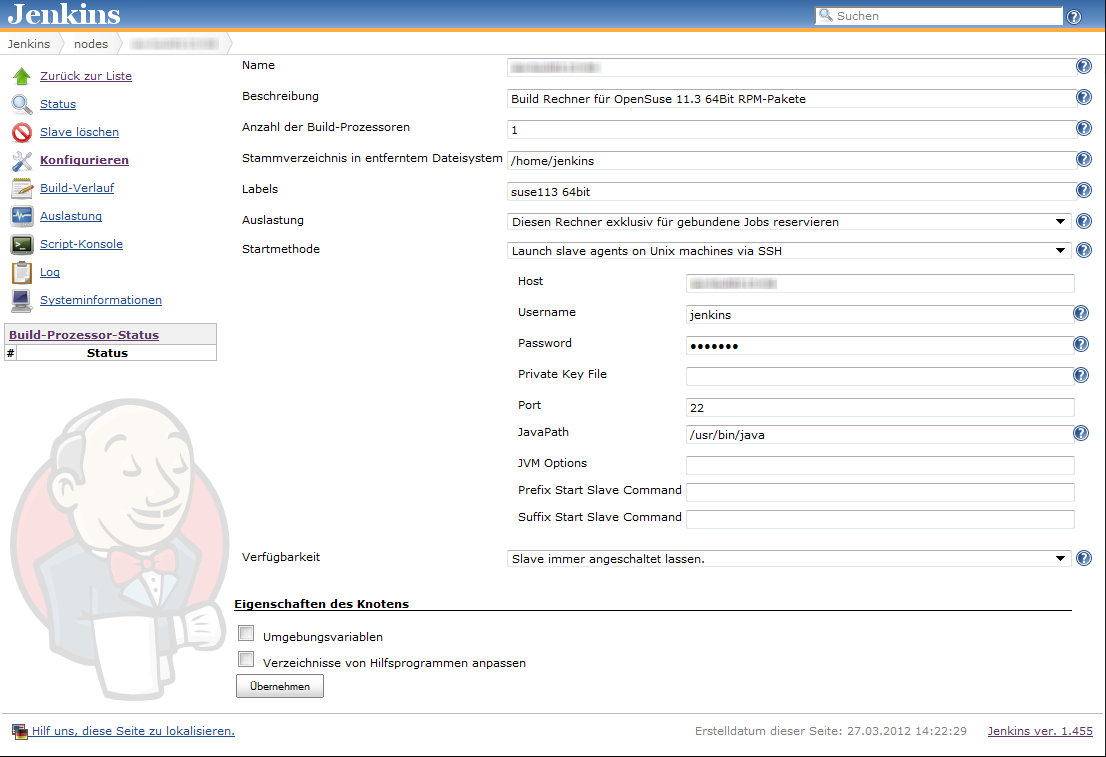
Linux build slaves over ssh are quite easily configured using Jenkins’ web interface. We add labels denoting the distribution release and architecture to be easily able to setup our matrix builds. Then we setup our matrix build as a new job with the usual parameters for source code management (in our case git) etc.

Our configuration matrix has the two axes Architecture and OpenSuseRelease and uses the labels of the build slaves. Our only build step here is calling the script orchestrating the build of our rpm packages.

Putting together the build script

Our build script essentially sets up a clean environment, builds package after package installing build prerequisites if needed. We use small utility functions (functions.sh) for building a package, installing packages from repository, installing freshly built packages and removing installed RPM. The script contains roughly the following phases:

  1. Figure out some quirks about the environment, e.g. openSUSE release number or architecture to build.
  2. Clean the environment by removing previously installed self-built packages.
  3. Setting up the build environment, e.g. linking folder from /usr/src/packages to our working copy or installing compilers, headers and the like.
  4. Building the packages and installing them locally if they are a dependency of packages yet to be built.

Here is a shortened example of our build script:

#!/bin/bash

RPM_BUILD_ROOT=/usr/src/packages
if [ "i686" = `uname -m` ]
then
  ARCH=i586
else
  ARCH=`uname -m`
fi
SUSE_RELEASE=`cat /etc/SuSE-release | sed '/^[openSUSE|CODENAME]/d' | sed 's/VERSION =//g' | tr -d '[:blank:]' | sed 's/\.//g'`

source functions.sh

# setup build environment
ensureDirectoryLinks
# force a repository refresh without checking the signature
sudo zypper -n --no-gpg-checks refresh -f OUR_REPO
# remove previously built and installed packages
removeRPM libomniORB4.1
removeRPM omniNotify2
# install needed tools
installFromRepo c++-compiler
if [ $SUSE_RELEASE -lt 121 ]
then
  installFromRepo java-1_6_0-sun-devel
else
  installFromRepo jdk
fi
installFromRepo log4j
buildRPM omniORB
installRPM $ARCH/libomniORB4.1
installRPM $ARCH/omniORB-devel
installRPM $ARCH/omniORB-servers
buildAndInstallRPM omniNotify2 $ARCH

Deploying our packages via Jenkins

We setup a second Jenkins job to deploy successfully built RPM packages to our internal repository. We use the Copy Artifacts plugin to fetch the rpms from our build job and put them into a directory like all_rpms. Then we add a build step to execute a script like this:

for i in suse-12.1 suse-11.4 suse-11.3
do
  rm -rf $i
  mkdir -p $i
  versionlabel=`echo $i | sed 's/[-\.]//g'`
  cp -r "all_rpms/Architecture=32bit,OpenSuseRelease=$versionlabel/RPMS" $i
  cp -r "all_rpms/Architecture=64bit,OpenSuseRelease=$versionlabel/RPMS" $i
  cp -r "all_rpms/Architecture=64bit,OpenSuseRelease=$versionlabel/SRPMS" $i
  rsync -e "ssh" -avz $i/* root@rpmrepository.intranet:/srv/www/htdocs/OUR_REPO/$i/
  ssh root@rpmrepository.intranet "createrepo /srv/www/htdocs/OUR_REPO/$i/RPMS"

Summary

With a setup like this we can perform an automatic build of all our RPM packages on several targetplatform everytime we update one of the packages. After a successful build we can deploy our new packages to our RPM repository making them available for our whole organisation. There is an initial amount of work to be done but the rewards are easy, unattended package updates with deployment just one button click away.

Game of Life: TDD style in Java

I always got problems finding the right track with test driven development (TDD), going down the wrong track can get you stuck.
So here I document my experience with tdd-ing Conway’s Game of Life in Java.

I always got problems finding the right track with test driven development (TDD), going down the wrong track can get you stuck.
So here I document my experience with tdd-ing Conway’s Game of Life in Java.

The most important part of a game of life implementation since the rules are simple is the datastructure to store the living cells.
So using TDD we should start with it.
One feature of our cells should be that they are equal according to their coordinates:

@Test
public void positionsShouldBeEqualByValue() {
  assertEquals(at(0, 1), at(0, 1));
}

The JDK features a class holding two coordinates: java.awt.Point, so we can use it here:

public class Board {
  public static Point at(int x, int y) {
    return new Point(x, y);
  }
}

You could create your own Position or Cell class and implementing equals/hashCode accordingly but I want to keep things simple so we stick with Point.
A board should holding the living cells and we need to compare two boards according to their living cells:

@Test
public void boardShouldBeEqualByCells() {
  assertEquals(new Board(at(0, 1)), new Board(at(0, 1)));
}

Since we are only interested in living cells (all other cells are considered dead) we store only the living cells inside the board:

public class Board {
  private final Set<Point> alives;

  public Board(Point... points) {
    alives = new HashSet<Point>(Arrays.asList(points));
  }

  @Override
  public boolean equals(Object o) {
    if (this == o) return true;
    if (o == null || getClass() != o.getClass()) return false;

    Board board = (Board) o;

    if (alives != null ? !alives.equals(board.alives) : board.alives != null) return false;

    return true;
  }

  @Override
  public int hashCode() {
    return alives != null ? alives.hashCode() : 0;
  }
}

If you take a look at the rules you see that you need to have a way to count the neighbours of a cell:

@Test
public void neighbourCountShouldBeZeroWithoutNeighbours() {
  assertEquals(0, new Board(at(0, 1)).neighbours(at(0, 1)));
}

Easy:

public int neighbours(Point p) {
  return 0;
}

Neighbours are either vertically adjacent:

@Test
public void neighbourCountShouldCountVerticalOnes() {
  assertEquals(1, new Board(at(0, 0), at(0, 1)).neighbours(at(0, 1)));
}
public int neighbours(Point p) {
  int count = 0;
  for (int yDelta = -1; yDelta <= 1; yDelta++) {
    if (alives.contains(at(p.x, p.y + yDelta))) {
      count++;
    }
  }
  return count;
}

Hmm now both neighbour tests break, oh we forgot to not count the cell itself:
First the test…

@Test
public void neighbourCountShouldNotCountItself() {
  assertEquals(0, new Board(at(0, 0)).neighbours(at(0, 0)));
}

Then the fix:

public int neighbours(Point p) {
  int count = 0;
  for (int yDelta = -1; yDelta <= 1; yDelta++) {
    if (!(yDelta == 0) && alives.contains(at(p.x, p.y + yDelta))) {
      count++;
    }
  }
  return count;
}

And the horizontal adjacent ones:

@Test
public void neighbourCountShouldCountHorizontalOnes() {
  assertEquals(1, new Board(at(0, 1), at(1, 1)).neighbours(at(0, 1)));
}
public int neighbours(Point p) {
  int count = 0;
  for (int yDelta = -1; yDelta <= 1; yDelta++) {
    for (int xDelta = -1; xDelta <= 1; xDelta++) {
      if (!(xDelta == 0 && yDelta == 0) && alives.contains(at(p.x + xDelta, p.y + yDelta))) {
        count++;
      }
    }
  }
  return count;
}

And the diagonal ones are also included in our implementation:

@Test
public void neighbourCountShouldCountDiagonalOnes() {
  assertEquals(2, new Board(at(-1, 1), at(1, 0), at(0, 1)).neighbours(at(0, 1)));
}

So we set the stage for the rules. Rule 1: Cells with one neighbour should die:

@Test
public void cellWithOnlyOneNeighbourShouldDie() {
  assertEquals(new Board(), new Board(at(0, 0), at(0, 1)).next());
}

A simple implementation looks like this:

public Board next() {
  return new Board();
}

OK, on to Rule 2: A living cell with 2 neighbours should stay alive:

@Test
public void livingCellWithTwoNeighboursShouldStayAlive() {
  assertEquals(new Board(at(0, 0)), new Board(at(-1, -1), at(0, 0), at(1, 1)).next());
}

Now we need to iterate over each living cell and count its neighbours:

public class Board {
  public Board(Point... points) {
    this(new HashSet<Point>(Arrays.asList(points)));
  }

  private Board(Set<Point> points) {
    alives = points;
  }

  public Board next() {
    Set<Point> aliveInNext = new HashSet<Point>();
    for (Point cell : alives) {
      if (neighbours(cell) == 2 {
        aliveInNext.add(cell);
      }
    }
    return new Board(aliveInNext);
  }
}

In this step we added a convenience constructor to pass a set instead of some cells.
The last Rule: a cell with 3 neighbours should be born or stay alive (the pattern is called blinker, so we name the test after it):

@Test
public void blinker() {
  assertEquals(new Board(at(-1, 1), at(0, 1), at(1, 1)), new Board(at(0, 0), at(0, 1), at(0, 2)).next());
}

For this we need to look at all the neighbours of the living cells:

public Board next() {
  Set<Point> aliveInNext = new HashSet<Point>();
  for (Point cell : alives) {
    for (int yDelta = -1; yDelta <= 1; yDelta++) {
      for (int xDelta = -1; xDelta <= 1; xDelta++) {
        Point testingCell = at(cell.x + xDelta, cell.y + yDelta);
        if (neighbours(testingCell) == 2 || neighbours(testingCell) == 3) {
          aliveInNext.add(testingCell);
        }
      }
    }
  }
  return new Board(aliveInNext);
}

Now our previous test breaks, why? Well the second rule says: a *living* cell with 2 neighbours should stay alive:

public Board next() {
  Set<Point> aliveInNext = new HashSet<Point>();
  for (Point cell : alives) {
    for (int yDelta = -1; yDelta <= 1; yDelta++) {
      for (int xDelta = -1; xDelta <= 1; xDelta++) {
        Point testingCell = at(cell.x + xDelta, cell.y + yDelta);
        if ((alives.contains(testingCell) && neighbours(testingCell) == 2) || neighbours(testingCell) == 3) {
          aliveInNext.add(testingCell);
        }
      }
    }
  }
  return new Board(aliveInNext);
}

Done!
Now we can refactor and make the code cleaner like removing the logic duplication for iterating over the neighbours, adding methods like toString for output or better failing test messages, etc.

Summary of the Schneide Dev Brunch at 2012-05-27

If you couldn’t attend the Schneide Dev Brunch in May 2012, here are the main topics we discussed neatly summarized.

Yesterday, we held another Schneide Dev Brunch on our roofgarden. The Dev Brunch is a regular brunch on a sunday, only that all attendees want to talk about software development and various other topics. If you bring a software-related topic along with your food, everyone has something to share.

We had to do another introductory round because there were new participants with new and very interesting topics. This brunch was very well attended and rich in information. Let’s have a look at the main topics we discussed:

Agile wording (especially SCRUM)

This was just a quick overview over the common agile vocabulary and what ordinary people associate with them. A few examples are “scrum“, “sprint” and “master”. We agreed that some terms are flawed without deeper knowledge about the context in agile.

Book: “Please Understand Me”

if you are interested in the Myers-Briggs classification of personality types (keywords: are you INTJ, ESTP or INFP?), this is the book to go. It uses a variation of the personality test to classify and explain yourself, your motives and personal traits. And if you happen to know about the personality type of somebody else, it might open your eyes to the miscommunication that will likely occur sooner or later. Just don’t go overboard with it, it’s just a model about the most apparent personality characteristics. The german translation of the book is called “Versteh mich bitte” and has some flaws with typing and layouting errors. If you can overlook them, it might be the missing piece of insight (or empathy) you need to get through to somebody you know.

TV series: “Dollhouse”

As most of us are science fiction buffs and hold a special place in our heart for the series “Firefly”, the TV series “Dollhouse” by Joss Whedon should be a no-brainer to be interested in. This time, it lasted two seasons and brings up numerous important questions about programmability every software developer should have a personal answer for. Just a recommendation if you want to adopt another series with limited episode count.

Wolfpack Programming

A new concept of collaborative programming is “wolfpack programming” (refer to pages 21-26). It depends on a shared (web-based) editor that several developers use at once to develop code for the same tasks. The idea is that the team organizes itself like a pack of wolves hunting deer. Some alpha wolves lead groups of developers to a specific task and the hunt begins. Some wolves/developers are running/programming while the others supervise the situation and get involved when convenient. The whole code is “huntable”, so it sounds like a very chaotic experience. There are some tools and reports of experiments with wolfpack programming in Smalltalk. An interesting idea and maybe the next step beyond pair programming. Some more information about the editor can be found on their homepage and in this paper.

Book: “Durchstarten mit Scala”

Sorry for the german title, but the book in this review is a german introductory book about Scala. It’s not very big (around 200 pages) but covers a lot of topics in short, with a list of links and reading recommendations for deeper coverage. If you are a german developer and used to a modern object-oriented language, this book will keep its promise to kickstart you with Scala. Everything can be read and understood easily, with only a few topics that are more challenging than there are pages for them in the book. The topics range from build to test and other additional frameworks and tools, not just core Scala. This book got a recommendation for being concise, profound and understandable (as long as you can understand german).

Free Worktime Rule

This was a short report about employers that pay their developers a fixed salary, but don’t define the workload that should happen in return. Neither the work time nor the work content is specified or bounded. While this sounds great in the first place (two hours of work a week with full pay, anybody?), we came to the conclusion that peer pressure and intrinsic motivation will likely create a dangerous environment for eager developers. Most of us developers really want to work and need boundaries to not burn out in a short time. But an interesting thought nevertheless.

Experimental Eclipse Plugin: “Code_Readability”

This was the highlight of the Dev Brunch. One attendee presented his (early stage) plugin for Eclipse to reformat source code in a naturally readable manner. The effect is intriguing and very promising. We voted vehemently for early publication of the source code on github (or whatever hosting platform seems suitable). If the plugin is available, we will provide you with a link. The plugin has a tradition in the “Three refactorings to grace” article of the last Dev Brunch.

Light Table IDE

A short description of the new IDE concept named “Light Table”. While the idea itself isn’t new at all, the implementation is very inspirational. In short, Lighttable lets you program code and evaluates it on the fly, creating a full feedback loop in milliseconds. The effects on your programming habits are… well, see and try it for yourself, it’s definitely worth a look.

Inventing on Principles

Light Table and other cool projects are closely linked to Bret Victor, the speaker in the mind-blowing talk “Inventing on Principles”. While the talk is nearly an hour of playtime, you won’t regret listening. The first half of the talk is devoted to several demo projects Bret made to illustrate his way of solving problems and building things. They are worth a talk alone. But in the second half of the talk, Bret explains the philosophy behind his motivation and approach. He provides several examples of people who had a mission and kept implementing it. This is very valuable and inspiring stuff, it kept most of us on the edge of our seats in awe. Don’t miss this talk!

Albatros book page reminder (and Leselotte)

If you didn’t upgrade your reading experience to e-book readers yet, you might want to look at these little feature upgrades for conventional books. The Albatros bookmark is a page remembering indexer that updates itself without your intervention. We could test it on a book and it works. You might want to consider it especially for your travelling literature. This brought us to another feature that classic dead wood books are lacking: the self-sustained positioning. And there’s a solution, too: The “Leselotte” is a german implementation of the bean bag concept for a flexible book stand. It got a recommendation by an attendee, too.

Bullshit-Meter

If you ever wondered what you just read: It might have been bullshit. To test a text on its content of empty phrases, filler and hot air, you can use the blabla-meter for german or english text. Just don’t make the mistake to examine the last apidoc comments you hopefully have written. It might crush your already little motivation to write another one.

Review on Soplets

In one of the last talks on the Java User Group Karlsruhe, there was a presentation of “Soplets”, a new concept to program in Java. One of our attendees summarized the talk and the concept for us. You might want to check out Soplets on your own, but we weren’t convinced of the approach. There are many practical problems with the solution that aren’t addressed yet.

Review on TDD code camp

One of our attendees lead a code camp with students, targeting Test Driven Development as the basic ruleset for programming. The camp rules closely resembled the rules of Code Retreats by Corey Haines and had Conway’s Game of Life as the programming task, too. With only rudimentary knowledge about TDD and Test First, the students only needed four iterations to come up with really surprising and successful approaches. It was a great experience, but showed clearly how traditional approaches like “structured object-oriented analysis” stands in the way of TDD. Example: Before any test was written to help guide the way, most students decided on the complete type structure of the software and didn’t aberrate from this decision even when the tests told them to.

Report of Grails meetup

Earlier last week, the first informal Grails User Group Karlsruhe meeting was held. It started on a hot late evening some distance out of town in a nice restaurant. The founding members got to know each other and exchanged basic information about their settings. The next meeting is planned with presentations. We are looking forward to what this promising user group will become.

Epilogue

This Dev Brunch was a lot of fun and new information and inspiration. As always, it had a lot more content than listed here, this summary is just a best-of. We are looking forward to the next Dev Brunch at the Softwareschneiderei. And as always, we are open for guests and future regulars. Just drop us a notice and we’ll invite you over next time.