Meet the diffibrillator, a diff tracker

If you need to keep several projects of a product family in sync, you can use modularization or keep track of the differences and port them. A diff tracker like the diffibrillator helps you with the second approach.

diffibrillator_128Lately, we had multiple occassions where a certain software tool was missing in our arsenal. Let me describe the situations and then extrapolate the requirements for the tool.

We work on a fairly large project that resembles a web application for our customer. Because the customer is part of a larger organization, the project was also needed for a second, rather independent customer within the organization. Now we had two customers with distinct requirements. We forked the code base and developed both branches independently. But often, there is a bug fix or a new feature that is needed in both branches. And while both customers have different requirements, it’s still the same application in the core. Technically speaking, both branches are part of a product family. We use atomic commits and cherry-picks to keep the code bases of the branches in sync if needed.

Another customer has a custom hardware with an individual control software written by us. The hardware was built several times, with the same software running on all instances. After a while, one hardware instance got an additional module that only was needed there. We coped by introducing an optional software module that can control the real hardware on this special instance or act as an empty placeholder for the other instances. Soon, we had to introduce another module. The software is now heavily modularized. Then the hardware defects began. The customer replaced every failing hardware component with a new type of hardware, using their new capabilities to improve the software features, too. But every hardware instance was replaced differently and there is no plan to consolidate the hardware platforms again. Essentially, this left us with a apecific version of the software for each hardware instance. Currently, we see no possibility to unify the different hardware platforms with one general interface. What we did was to fork the code base and develop on each branch independently. But often, there is a bug fix or a new feature that is needed in several branches. Technically speaking, all branches are part of a product family. We use atomic commits and cherry-picks to keep the code bases of the branches in sync if needed.

In both cases, we needed a list that helped us to keep track which commits were already cherry-picked, never need to be picked or are not reviewed in that regard yet. Our version control system of choice, git, supports this requirement by providing globally unique commit IDs. Maintaining this list manually is a cumbersome task, so we developed a little tool that helps us with it.

Meet the diffibrillator

First thing we always do for our projects is to come up with a witty name for it. In this case, because it is a “diff tracker” really, we came up with the name “diffibrillator”. The diffibrillator is a diff tracker on the granularity level of commits. For each new commit in either repository of a product family, somebody has to review the commit and decide about its category:

  • Undecided: This is the initial category for each commit. It means that there is no decision made yet whether to cherry-pick the commit to one or several other branches or to define it as “unique” to this branch.
  • Unported: If a reviewer chooses this category for a commit, there is no need to port the content of the commit to other branches. The commit is regarded as part of the unique differences of this branches to all other ones in the product family.
  • Ported: If there are other branches in the product family that require the same changes as are made in the commit, the reviewer has to do two things: cherry-pick the commit to the required branches (port the functionality) and mark the commit and the new cherry-pick commits as “ported”. This takes the commits out of the pending list and indicates that the changes in the commit are included in several branches.

In short, the diffibrillator helps us to keep track about every commit made on every branch in the product family and shows us where we forgot to port a functionality (like a bugfix) to the other members of the family.

Here is a typical screenshot of the desktop GUI. Some information is blurred to keep things ambiguous and to protect the innocent.

diffibrillatorYou see a (very long) table with several columns. The first column denotes the commit date of the commit in each row. The commits are sorted anti-chronologically over all projects, but inserted into its project’s column. In this screenshot, you can see that the third project wasn’t changed for quite a time. Some commits are categorized, but the latest commits need some work in this regard.

Foundation for the diffibrillator

The diffibrillator in its current state relies heavily on the atomic nature of our commits. As soon as two functionalities are included in one commit, both the cherry-pick and the categorization would lose precision. Luckily, we have only developers that adhere to the commit-early-commit-often principle. We had plans for a diff tracker with the granularity of individual changes, but an analysis of our real requirements revealed that we wouldn’t benefit from the higher change resolution but lose the trackability on the commit level. And that is the level we want to think and act upon.

Technicalities of the diffibrillator

Technically, the diffibrillator is very boring. It’s a java-based server application that uses directory structures and flat files as a data storage. The interaction is done by a custom REST interface that can be used with a swing-based desktop GUI or a javascript-based web GUI (or any other client that is coompatible with the REST interface). As there is only one server instance for all of us, the content of its data storage is “the truth” about our product family’s commits.

The biggest problem was to design the REST API orthogonal enough to make any sense but also with a big amount of pragmatism to keep it fast enough. This lead to a query that should return only the commits’ IDs but returns all information about them to avoid several thousand subsequent HTTP requests for the commits’ data. As a result, this query’s answer grew very big, leading to timeout errors on smallband connections. To counter this problem, we had to introduce result paging, where the client can specify the start index and result length of its query.

Why should you care?

We are certain that the task to keep several members of a product family in sync isn’t all that seldom. And while there are many different possible solutions to this problem, the two most prominent approaches seem to be “modularization” or “diff tracking”. We chose diff tracking as the approach with lower costs for us, but lacked tool support. The diffibrillator is a tool to keep track of all your product familys’ commits and to categorize them. It relies on atomic commits, but is relatively low-tech and easy to understand otherwise.

If you happen to have the same problem of a product family consisting of several independent projects, drop us a line. We’d love to hear from you about your experience and solutions. And if you think that the diffibrillator can help you with that task, let us know! We are not holding anything back.

Building Visual C++ Projects with CMake

In previous post my colleague showed how to create RPM packages with CMake. As a really versatile tool it is also able to create and build Visual Studio projects on Windows. This property makes it very valuable when you want to integrate your project into a CI cycle(in our case Jenkins).

Prerequisites:

To be able to compile anything following packages needed to be installed beforehand:

  •  CMake. It is helpful to put it in the PATH environment variable so that absolute paths aren’t needed.
  • Microsoft Windows SDK for Windows 7 and .NET Framework 4 (the web installer or  the ISOs).  The part “.NET Framework 4” is very important, since when the SDK for the .NET Framework 3.5 is installed you will get following parse error for your *.vcxproject files:

    error MSB4066: The attribute “Label” in element is unrecognized

    at the following position:

    <ItemGroup Label=”ProjectConfigurations”>

    Probably equally important is the bitness of the installed SDK. The x64 ISO differs only in one letter from the x86 one. Look for the X if want 64 bit.

  • .NET Framework 4, necessary to make msbuild run

It is possible that you encounter following message during your SDK setup:

A problem occurred while installing selected Windows SDK components. Installation of the “Microsoft Windows SDK for Windows 7” product has reported the following error: Please refer to Samples\Setup\HTML\ConfigDetails.htm document for further information. Please attempt to resolve the problem and then start Windows SDK setup again. If you continue to have problems with this issue, please visit the SDK team support page at http://go.microsoft.com/fwlink/?LinkId=130245. Click the View Log button to review the installation log. To exit, click Finish.

The reason behind this wordy and less informative error message were the Visual C++ Redistributables installed on the system. As suggested by Microsoft KB article removing them all helped.

Makefiles:

For CMake to build anything you need to have a CMakeLists.txt file in your project. For a tutorial on how to use CMake, look at this page. Here is a simple CMakeLists.txt to get you started:

project(MyProject)
 cmake_minimum_required(VERSION 2.6)
 set(source_files
 main.cpp
 )
 include_directories(
 ${CMAKE_CURRENT_SOURCE_DIR}
 )
 add_executable(MyProject ${source_files})

Building:

To build a project there are few steps necessary. You can enter them in your CI directy or put them in a batch file.

call "%ProgramFiles%\Microsoft SDKs\Windows\v7.1\Bin\SetEnv.cmd" /Release /x86

With this call all necessary environment variables are set. Be careful on 64 bit platforms as jenkins slave executes this call in a 32 bit context and so “%ProgramFiles%” is resolved to “ProgramFiles (x86)” where the SDK does not lie.

del CMakeCache.txt

This command is not strictly necessary, but it prevents you from working with outdated generated files when you change your configuration.

cmake -G "Visual Studio 10" .

Generates a Visual Studio 2010 Solution. Every change to the solution and the project files will be gone when you call it, so make sure you track all necessary files in the CMakeLists.txt.

cmake --build . --target ALL_BUILD --config Release

The final step. It will net you the MyProject.exe binary. The target parameter is equal to the name of the project in the solution and the config parameter is one of the solution configurations.

Final words:

The hardest and most time consuming part was the setup of prerequisites. Generic, not informative error messages are the worst you can do to a clueless customer. But… when you are done with it, you are only two small steps apart from an automatically built executable.

1-Click Deployment of RPMs with Jenkins

In one of my previous posts we learned how to build and package our projects as RPM packages. How do we get our shiny packages to our users? If we host our own RPM repository, we can use our extisting CI infrastructure (jenkins in our case) for that. Here are the steps in detail:

Convention for the RPM location in our jobs

To reduce the work needed for our deployment job we define a location where each job puts the RPM artifacts after a successful build. Typically we use something like $workspace/build_dir for that. Because we are using matrix build for different target plattforms, we need to use the same naming conventions for our job axes, too!

Job for RPM deployment

Because of the above convention we can use one parameterized job to deploy the packages of different build jobs. We use the JOBNAME of the build job as our only parameter:

Deploy-RPM-Jobname-Parameter

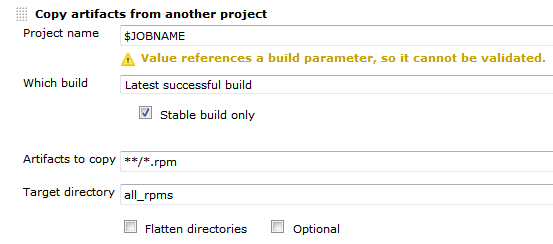
First the deploy job needs to get all the rpms from the build job. We can do this using the Copy Artifact plugin like so:Deploy-RPM-Copy-Artifacts

Since we are usually building for several distributions and processor architectures, we have a complete directory tree in our target directory. We are using a small shell script to copy all the packages to our repository using rsync. Finally we can update the remote repository over ssh. See the complete shell script below:

for i in suse-12.2 suse-12.1 suse-11.4 suse-11.3
do
  rm -rf $i
  dir32=$i/RPMS/i686
  dir64=$i/RPMS/x86_64
  mkdir -p $dir32
  mkdir -p $dir64
  versionlabel=`echo $i | sed 's/[-\.]//g'`
  if [ -e all_rpms/Architecture\=32bit\,Distribution\=$versionlabel/build_dir/ ]
  then
    cp all_rpms/Architecture\=32bit\,Distribution\=$versionlabel/build_dir/* $dir32
  fi
  if [ -e all_rpms/Architecture\=64bit\,Distribution\=$versionlabel/build_dir/ ]
  then
    cp all_rpms/Architecture\=64bit\,Distribution\=$versionlabel/build_dir/* $dir64
  fi
  rsync -e "ssh" -avz $i/* root@repository-server:/srv/www/htdocs/repo/$i/
  ssh root@repository-server "createrepo /srv/www/htdocs/repo/$i/RPMS"
done

Conclusion

With a few small tricks and scripts we can deploy the artifacts of our build jobs to the RPM repository and thus deliver a new software release at the push of a button. You could let the deployment job run automatically after a successful build, but we like to have more control over the actual software we release to our users.

TDD myths: the problems

I take a look at some (in my experience) problems/misconceptions with TDD:
100% code coverage is enough, Debugging is not needed, Design for testability, You are faster than without tests

100% code coverage is enough

Code coverage seems to be a bad indicator for the quality of the tests. Take the following code as an example:

public void testEmptySum() {
  assertEquals(0, sum());
}

public void testSumOfMultipleNumbers() {
  assertEquals(5, sum(2, 3));
}

Now take a look at the implementation:

public int sum(int...numbers) {
  if (numbers.length == 0) {
    return 0;
  }
  return 5;
}

Baby steps in TDD could lead you to this implementation. It has 100% code coverage and all tests are green. But the implementation isn’t finished at all. Our experiment where we investigated how much tests communicate the intend of the code showed flaws in metrics like code coverage.

Debugging is not needed

One promise of TDD or tests in general is that you can neglect debugging. Even abandon it. In my experience when a test goes red (especially an integration test) you sometimes need to fire up the debugger. The debugger helps you to step through code and see the actual state of the system at that time. Tests treat code as a black box, an input results in an output. But what happens in between? How much do you want to couple your tests to your actual implementation steps? Do we need the tests to cover this aspect of software development? Maybe something along the lines as shown in Inventing on principle where the computer shows you the immediate steps your code takes could replace debugging but tests alone cannot do it.

Design for testability

A noble goal. But are tests your primary client? No. Other code is. Design for maintainability would be better. You will need to change your code, fix it, introduce new features, etc. Don’t get me wrong: You need tests and you need testability. But how much code do you write specifically for your tests? How much flexibility do you introduce because of your tests? What patterns do you use just because your tests need them? It’s like YAGNI for code exposure for tests. Code specifically written only for tests couples your code to your tests. Only things that need to be coupled should be. Is the choice of the underlying data structure important? Couple it, test it. If it isn’t, don’t expose it, don’t write a getter. Don’t break the information hiding principle if you don’t need to. If you couple your tests too much to your code every little change breaks your tests. This hinders maintenance. The important and difficult design question is: what is important. Test this.

You are faster than without tests

Some TDD practitioners claim that they are faster with TDD than without tests because the bugs and problems in your code will overwhelm you after a certain time. So with a certain level of complexity you are going faster with TDD. But where is this level? In my experience writing code without tests is 3x-4x faster than with TDD. For small applications. There are entire communities where many applications are written without or with only a few tests. But I wouldn’t write a large application without tests but at least my feeling is that in many cases I go much slower. Cases where I feel faster are specification heavy. Like parsing or writing formats, designing an algorithm or implementing a scientific formula. So the call is open on this one. What are your experiences? Do you feel slowed down by TDD?

Communication through Tests – a larger experiment

We evaluated our ability to communicate through tests in a two-day experiment and gathered some interesting results.

triangulatorFor us, automated tests are the hallmark of professional software development. That doesn’t mean that we buy into every testing fad that comes along or consider ourselves testing experts just because we write some tests alongside our code. We put our money where our mouth is and evaluate our abilities in writing effective tests.

One way to measure the effectiveness of tests is to try to “communicate through tests”. One developer/team writes code and tests for a given specification. Another team picks up the tests only and tries to recreate the production code and infer the specification. The only communication between the two teams happens through the tests.

We performed a small experiment with two teams and one day for both phases and blogged about it. The results of this evaluation was that unit tests are a good medium to transport specification details. But we got a hint that problems might be bigger when the code was less arithmetic and more complex. As most of our development tasks are rather complex and driven by business rules instead of clean mathematical algorithms, we wanted to inspect further.

Our larger experiment

So we organized a bigger experiment with a broader scope. Instead of two teams, we had three teams. We ran the phases for eight instead of two hours, essentially increasing the resulting code size by a factor of 3. The assignments weren’t static, but versioned – and the team only knew the rules of the current version. When a team would reach a certain milestone, more rules would be revealed, partly contradicting the previous ruleset. This should emulate changing customer requirements. And to provide the ability to retrospect on the reconstruction phase, we recorded this phase with a screencast software (we used the commercial product Debut Video Capture), capturing both inputs and conversation by using headsets for every developer.

The first part of this experiment happened in late January of 2013, where all teams had one day to produce production and test code. This was a day of loud buzz in our development department. The second part for the reconstruction phase was scheduled for the middle of February 2013. We had to be a bit more quiet this time to increase the audio recording quality, but the developers were humming nonetheless.

Here are some numbers of what was produced in the first session:

  • Team 1: 400 lines of production code, 530 lines of test code. 8 production classes, 54 tests. Test coverage of 90.6%.
  • Team 2: 576 lines of production code, 655 lines of test code. 17 production classes, 59 tests. Test coverage of 98.2%.
  • Team 3: 442 lines of production code, 429 lines of test code. 18 production classes, 37 tests. Test coverage of 97.0%.

The reconstruction phase was finished in less than five hours, partly because we stuck very close to the actual tests with little guesswork. When the tests didn’t enforce a functionality, it wasn’t implemented to reveal the holes in the test coverage. This reduced the amount of production code that had to be written. On the flipside, every team got lost once on the way, loosing the better part of an hour without noticeable progress.

The results

After all the talk about the event itself, let’s have a look at our results of the experiment:

  • The recording of the reconstruction phase was a huge gain in understanding the detailed problems. We even discussed recording the construction phase too to capture the original design decisions.
  • Every decision on unclear terms from the original team lead to “blurry” tests that didn’t guide the reconstruction team as good as the “razor-sharp” tests did.
  • You could definitely tell the TDD tests from the “test first” tests or even the tests written “immediately after”. More on this aspect later, but this was our biggest overall take-away: The quality of the tests in terms of being a specification differed greatly. This wasn’t bound to teams – as soon as a team lost the TDD “drive”, the tests lost guidance power.
  • Test coverage (in terms of line coverage or conditional coverage) means nothing. You can have 100% test coverage and still suffer from severe plot holes in your tests. Blurry tests tend to increase the coverage, but not the accountability of tests.
  • In general, we were surprised how little guidance and coverage most tests offered. The assignments included some obvious “testing problems” like dealing with randomness and every team dealt with them deliberately. Still, these were the major pain points during the reconstruction phase. This result puts our first small experiment a bit into perspective. What works well with small code bases might be disproportionally harder to achieve when the code size scales up. So while TDD/tests might work sufficiently easy on a small task, it needs more attention for a larger task.

The biggest problem

When talking about “plot holes” from the tests, let me give you a detailed example of what I mean. The more useless tests suffered from a lack of triangulation. In geometry, triangulation is the process of determining the location of a point by measuring several angles to it from known points. When writing tests, triangulation is the effort to “pinpoint” or specify the implementation with a set of different inputs and required outputs. You specify enough different tests of the same functionality to require it being “real” instead of a dummy implementation. Let’s look at this test:

@Test
public void parsesUserInput() {
  assertThat(new InputParser().parse("1 3 5"), hasItems(1, 3, 5));
}

Well, the test tells us that we need to convert a given string into a bunch of integers. It specifies the necessary class and method for this task, but gives us great freedom in the actual implementation. This makes the test green:

public Iterable<Integer> parse(String input) {
  return Arrays.asList(1, 3, 5);
}

As far as the tests are concerned, this is a concise and correct implementation of the required functionality. And while it is obvious in our example that this will never be sufficient, it oftentimes isn’t so obvious when the problem domain isn’t as familiar as parsing strings to numbers. But to complete my explanation of test triangulation, let’s consider a more elaborate implementation of this test that needs a lot more work on the implementation side (especially when developed in accordance with the Transformation Priority Premise by Uncle Bob and without obvious duplication):

@Test
public void parsesUserInput() {
  assertThat(new InputParser().parse("1 3 5"), hasItems(1, 3, 5));
  assertThat(new InputParser().parse("1 2"), hasItems(1, 2));
  assertThat(new InputParser().parse("1 2 3 4 5"), hasItems(1, 2, 3, 4, 5));
  assertThat(new InputParser().parse("1 4 5 3 2"), hasItems(1, 2, 3, 4, 5));
  assertThat(new InputParser().parse("5 4"), hasItems(4, 5));
  assertThat(new InputParser().parse("5 3"), hasItems(3, 5));
}

Maybe not all assertions are required and maybe they should live in different tests giving more hints in their names, but you get the idea: Making this test green is way “harder” than the initial test. Writing properly triangulated tests is one of the immediate benefits of Test Driven Development (TDD), as for example outlined nicely by Ray Sinnema on his blog entry about test-driving a code kata.
Our tests that were written “after the fact” often lacked the proper amount of triangulation, making it easier to “fake it” in the reconstruction phase. In a real project setting, these tests would allow for too much implementation deviation to act as a specification. They act more as usage examples and happy path “smoke” tests.

Our benefits

While this experiment doesn’t fulfill rigid academic requirements on gathering data, it already paid off greatly for us. We’ve examined our ability to express our implementations through tests and gathered insight on our real capabilities to use test-driven methodologies. Being able to judge relatively objectively on the quality of your own tests (by watching the reconstruction phase’s screencast) was very helpful. We now know better what skills to improve and what to focus on during training.

Where to go from here?

We plan to repeat this experiment with interested participants as a spare-time event later this year. For now and ourselves, we have gathered enough impressions to act on them. If you are interested in more details, drop us a note. We could publish only the tests (for reconstruction), the complete code or even the screencasts (albeit they are somewhat long-running). Our participants could elaborate their impressions in the comment section, if you ask them.
We are very interested in your results when performing similar events, like Tomasz Borek did this month in Krakow, Poland. We found his blog entry about the event to be very interesting. We definitely lacked the surprise element for the teams during the event.

Procrastination

Not doing things at the time they ought be done seems to be a known problem for as long as people are able to plan. They know the consequences and knowingly decide to delay the inevitable. When do you encounter such situations in your professional life? How can they be improved?

Deadline

is the trump card that can be played every time someone wants to put off a task that hinders but not completely stops the process. I’ve seen it often when talking about refactorings or automated tests – “We can do it when we have time”. When the situation does not permit changes to the schedule it is a valid and appropriate decision to delay them until later. Delaying again and again is not. To improve the situation it is necessary that everyone in the chain in the development process from the developer to the customer[1] knows the consequences of accumulating technical debt. In most cases they are just ignorant of the fact or of its long term impact and will change the course of action when “enlightened”. The next step should be the reduction of workload to catch up and improve the product in time.

Fear

of failure or fear of consequences is also often the reason someone delays important tasks. The fear can be fostered through misinterpreted quality standards. A little checklist to keep in mind:

  • Breaking the build is not bad. It is bad to let it stay broken.
  • Checkstyle is not everything. There are situations when people are “more right”. Dogmatism is unhealthy anyway.
  • Man is not a machine. Nobody can be expected to work full time without making mistakes. Even hardware fails.

To improve this situation it is necessary to revise the values and make sure that the consequences are reduced to the level where they are noticeable but not hurting or even crippling. This way any person can make decisions – even wrong ones – without anticipation of immediate punishment. Not all working environments are that toxic. Sometimes the person is just inexperienced or has low self esteem. Here teaching, leading by example and encouragement to take responsibility helps a lot.

Boredom

is like torture for conscious mind. A boring task can be endured once, but doing it every day is very unconfortable. Fortunately when something can be predicted, it can be automated. Cron jobs, continuous integration systems or small round vacuum cleaners serve as example. Even our brain automates processes by pushing them into the subconscious mind – this way we are able to speak and walk at the same time without any problems. Some bureaucratic routines however, like time tracking, cannot be automated fully and require our intervention at regular intervals. The natural behaviour to increase the intervals between the tasks or forgetting them ultimately leads to the situation comparable to technical debt where a huge amount of undone tasks grinds a system to a halt. Since most companies require some amount of bureaucracy to function, it is not possible to completely optimize it away. But it is possible to reduce the chance to forget a task. As example we are always wearing a real cowboy hut when we work in a production environment. Only when we are done, we can put it off. To make boring tasks more attractive the idea of continuous integration game can be used. In time tracking context the user would get points for booking time at the same working day and less for booking at the next day.

Conclusion
Simplified the equation is: pressure * negative feelings towards the task = danger of procrastination. To improve the situation, lower the factors!

[1] Especially in product development: Customer is not the one who buys or uses the product, but the one who pays the developer to make the product and later wants to make money with it.

TDD myths

Some TDD myths and what is true about them.

TDD, Test first or test immediately after are all the same

No. All methods result in having tests in the end. But especially in the TDD case your mind set is completely different. First the tests drive the design of your code. You construct your system piece by piece. Unit test for unit test. All code you write must have a test first and you use the tests to describe and reason about the external interface of your units. In TDD the tests represent the future clients using your code. In practice this leads to small(er) units.

In TDD the tests’ (main) objective is to prevent regression

No. Tests help immensely when you break the same code twice. But even more so tests help to structure your code and make it maintainable. When using TDD you tend to reduce your code and its flexibility because you need to write a test for every piece of functionality first. So over designing or implementing things you don’t need (breaking YAGNI or KISS) bites you doubly: in the code and in the tests. Also wrong design decisions like choosing an inappropriate data structure or representation hits you twice as hard. TDD emphasizes bad design decisions.

Test code is the same as production code

No. Test code should adhere too a similar quality level like production code. But you won’t write tests for your tests. Also conditionals and loops are a very bad idea in tests and should be avoided. Take the following example:

public void testSomething() {
  for (MyEnum value : values()) {
    assertEquals(expected, do(value))
  }
}

If you forgot an enum value the tests just passes. Even if you have no values in your enum it passes still. Conditions have the same problem: you introduce another path through your test which can be avoided or never taken. You could secure the other path through an assert but in some cases this is a hint that you broke another principle: single responsibility of tests.

DRY is harmful in tests

No. DRY (don’t repeat yourself) aims to reduce or eliminate duplication in logic. But often DRY is understood as removing code duplication. This is not the same! Code duplication can be essential in tests. You need all of the essential information in the test. This code should not be extracted or abstracted elsewhere. These code lines which may seem similar are not coupled logically. When you change one test, the other test is not affected.

TDD is hard

No and yes. For me learning TDD is like learning a new language. It certainly needs time. But if you do it often and repeatedly you learn more every time you use it. It’s a way of reasoning about a system, a way of thinking, a paradigm. When I started with TDD I thought it was impossible or unreasonable to use in cases other than where strong specs exist like parsing a format. But over time I value the driving part of TDD more and more. You can get into a TDD flow. TDD gives you a very good feeling of security when you refactor. It forces you beforehand to think about your intended use for your code. Which is good. It changes my way of seeing my code, one step at time. Some things are still hard: acceptance tests are unreasonably expensive. Just testing one thing needs discipline. Not jumping ahead of the tests and implementing too much code also. Finding the next unit of testing can be difficult, getting stuck can be frustrating. Just like learning a new language I think it is worth it.

Build a RPM package using CMake

Some while ago I presented a way to package projects using different build systems as RPM packages. If you are using CMake for your projects you can use CPack to build RPM packages (in addition to tarballs, NSIS installers, deb packages and so on). This is a really nice option for deployment of your own projects because installation and update can be easily done by the users using familiar package management tools like zypper, yum and yast2.

Your first CPack RPM

It is really easy to add RPM using CPack to your existing project. Just set the mandatory CPack variables and include CPack below the variable definitions, usually as one of the last steps:

project (my_project)
cmake_minimum_required (VERSION 2.8)

set(VERSION "1.0.1")
<----snip your usual build instructions snip--->
set(CPACK_PACKAGE_VERSION ${VERSION})
set(CPACK_GENERATOR "RPM")
set(CPACK_PACKAGE_NAME "my_project")
set(CPACK_PACKAGE_RELEASE 1)
set(CPACK_PACKAGE_CONTACT "John Explainer")
set(CPACK_PACKAGE_VENDOR "My Company")
set(CPACK_PACKAGING_INSTALL_PREFIX ${CMAKE_INSTALL_PREFIX})
set(CPACK_PACKAGE_FILE_NAME "${CPACK_PACKAGE_NAME}-${CPACK_PACKAGE_VERSION}-${CPACK_PACKAGE_RELEASE}.${CMAKE_SYSTEM_PROCESSOR}")
include(CPack)

These few lines should be enough to get you going. After that you can execute a make package command should obtain the RPM package.

Spicing up the package

RPM packages can contain much more metadata and especially package dependencies and a version changelog. Most of the stuff can be specified using CPACK variables. We sometimes prefer to use a SPEC file template to be filled and used by CPack because it then contains most of the RPM specific stuff in a familiar manner instead of polluting the CMakeLists.txt itself:

project (my_project)
<----snip your usual CMake stuff snip--->
<----snip your additional CPack variables snip--->
configure_file("${CMAKE_CURRENT_SOURCE_DIR}/my_project.spec.in" "${CMAKE_CURRENT_BINARY_DIR}/my_project.spec" @ONLY IMMEDIATE)
set(CPACK_RPM_USER_BINARY_SPECFILE "${CMAKE_CURRENT_BINARY_DIR}/my_project.spec")
include(CPack)

The variables in the RPM SPEC file will be replaced by the values provided in the CMakeLists.txt and then be used for the RPM package. It looks very similar to a standard SPEC file but you can omit the usual build instructions boiling down to something like this:

Buildroot: @CMAKE_CURRENT_BINARY_DIR@/_CPack_Packages/Linux/RPM/@CPACK_PACKAGE_FILE_NAME@
Summary:        My very cool Project
Name:           @CPACK_PACKAGE_NAME@
Version:        @CPACK_PACKAGE_VERSION@
Release:        @CPACK_PACKAGE_RELEASE@
License:        GPL
Group:          Development/Tools/Other
Vendor:         @CPACK_PACKAGE_VENDOR@
Prefix:         @CPACK_PACKAGING_INSTALL_PREFIX@
Requires:       opencv >= 2.4

%define _rpmdir @CMAKE_CURRENT_BINARY_DIR@/_CPack_Packages/Linux/RPM
%define _rpmfilename @CPACK_PACKAGE_FILE_NAME@.rpm
%define _unpackaged_files_terminate_build 0
%define _topdir @CMAKE_CURRENT_BINARY_DIR@/_CPack_Packages/Linux/RPM

%description
Cool project solving the problems of many colleagues.

# This is a shortcutted spec file generated by CMake RPM generator
# we skip _install step because CPack does that for us.
# We do only save CPack installed tree in _prepr
# and then restore it in build.
%prep
mv $RPM_BUILD_ROOT @CMAKE_CURRENT_BINARY_DIR@/_CPack_Packages/Linux/RPM/tmpBBroot

%install
if [ -e $RPM_BUILD_ROOT ];
then
  rm -Rf $RPM_BUILD_ROOT
fi
mv "@CMAKE_CURRENT_BINARY_DIR@/_CPack_Packages/Linux/RPM/tmpBBroot" $RPM_BUILD_ROOT

%files
%defattr(-,root,root,-)
@CPACK_PACKAGING_INSTALL_PREFIX@/@LIB_INSTALL_DIR@/*
@CPACK_PACKAGING_INSTALL_PREFIX@/bin/my_project

%changelog
* Tue Jan 29 2013 John Explainer <john@mycompany.com> 1.0.1-3
- use correct maintainer address
* Tue Jan 29 2013 John Explainer <john@mycompany.com> 1.0.1-2
- fix something about the package
* Thu Jan 24 2013 John Explainer <john@mycompany.com> 1.0.1-1
- important bugfixes
* Fri Nov 16 2012 John Explainer <john@mycompany.com> 1.0.0-1
- first release

Conclusion

Integrating RPM (or other package formats) to your CMake-based build is not as hard as it seems and quite flexible. You do not need to rely on the tools provided by your OS vendor and still deliver your software in a way your users are accustomed to. This makes CPack very continuous integration (CI) friendly too!

Java Generics: the Klingonian Cast

Struck by Java generic’s odd type erasure behaviour again? You can circumvent the missing upcast feature by using the Klingonian Cast.

Klingon_by_Balsavor

Ever since Generics were included in Java, they’ve been a great help and source of despair at once. One thing that most newcomers will stumble upon sooner or later is “Type Erasure” and its effects. You may read about it in the Java Tutorial and never quite understand it, until you encounter it in the wild (in your code) and it just laughs at your carefully crafted type system construct. This is the time when you venture into the deep end of the Java language specification and aren’t seen for days or weeks. And when you finally reappear, you are a broken man – or a strong warrior, even stronger than before, charged with the wisdom of the ancients.

The problem

If my introduction was too mystic for your taste – bear with me. The rest of this blog post is rather technical and bleak. It won’t go into the nitty-gritty details of Java generics or type erasure, but describe a real-world problem and one possible solution. The problem can be described by a few lines of code:


List<Integer> integers = new ArrayList<Integer>();
Iterable<Integer> iterable = integers;
Iterable<Number> numbers = integers; // Damn!

The last line won’t compile. Let’s examine it step by step:

  • We create a list of Integers
  • The list can be (up-)casted into an Iterable of Integers. Lists are/behave like Iterables.
  • But the list cannot be casted into an Iterable of Number, even though Integers are/behave like Numbers.

The compiler error message isn’t particularly helpful here:

Type mismatch: cannot convert from List<Integer> to Iterable<Number>

This is when we remember one thing about Java Generics: They aren’t exactly variant. While they have “use-site variance”, we are in need of “declaration-site variance” here, which Java Generics lack entirely. Don’t despair, this was all the theoretical discussion about the topic for today. If you want to know more, just ask in the comment section. Perhaps we can provide another blog post discussing just the theory.

The workaround

In short, our problem is that Java is unable to see the relationship between the types Integer and Number when given as generic parameter. But we can make it see:


List<Integer> integers = new ArrayList<Integer>();
List<Number> numberList = new ArrayList<Number>();
numberList.addAll(integers);
Iterable<Number> numbers = numberList;

This will compile and work. I’ve split the creation and filling of the second List into two steps to make more clear what’s happening: By explicitely creating a new collection and (up-)casting every element of the List alone, we can show the compiler that everything’s ok.

The Klingonian Cast

Well, if the compiler wants to see every element of our initial collection to be sure about upcasting, we should show him. But why create a new List and swap the elements by hand every time, when we can just use the “Klingonian Cast“? Ok, I’ve made the name up. But how else would you call a structure that’s essentially an upcast, but using two generic parameters and a dozen lines of code if not something very manly and bold. But enough mystery again, let’s look at the code:


List<Integer> integers = new ArrayList<Integer>();
Iterable<Number> numbers = MakeIterable.<Number>outOf(integers);

The good thing about the Klingonian cast is that it has a very thin footprint at runtime. Your hotspot compiler might even eliminate it completely. But you probably don’t want to hear about it characteristics, but see the implementation:


public class MakeIterable {
  public static <T> Iterable<T> outOf(final Iterable<? extends T> iterable) {
    return new Iterable<T>() {
      @Override
      public Iterator<T> iterator() {
        return iteratorOutOf(iterable.iterator());
      }
    };
  }

  protected static <T> Iterator<T> iteratorOutOf(final Iterator<? extends T> iterator) {
    return new Iterator<T>() {
      @Override
      public boolean hasNext() {
        return iterator.hasNext();
      }
      @Override
      public T next() {
        return iterator.next();
      }
      @Override
      public void remove() {
        iterator.remove();
      }
    };
  }
}

That’s it. A “simple” upcast for Java Generics, ready to use it for your own convenience. Enjoy!

FTP integrated

When developing a feature containing unknown technology or hardware, I prefer a spike followed by integration tests. Sometimes it helps a lot.

How it all began
One of our customers employs NAS for data storage, accessing it per FTP. Some of the features like copying and moving files around were already implemented by us using Apaches FTPClient. The next feature on the list was “cleanup after x days” – deletion of files, or more important: directories. FTP, being a pretty basic protocol, does not allow for recursive deletion of directories. The only way to do it is to delete the deepest elements first,  going up one level and repeat – or in other words – implementing the recursion yourself. This was too much for our simple feature, so the decision was made to hide the complexity behind a VirtualFile, an interface already existing in our framework.

Being a novice in speaking FTP I was happy to hear that we already have acquired exactly the same type of NAS the customer has. To see how the system behaves (or not) and document it at the same time, I decided to implement the interface integration test first.

Fun
As the amount of tests and file operations started to grow, so did grow the round trip time of my test/make test pass/refactor cycle and my patience dwindled. I switched from NAS FTP-Server to a local FileZilla FTP-Server. It worked like a charm and all necessary features were implemented really fast.

The next step was to run the app using the new feature with real amount of data, real directory structure and our NAS. It failed miserably. And randomly. The app suffered from closed connections while trying to open a data connection. After some search the reason was found: FTPClient we use had active mode enabled by default. That means that to transfer data the server tried to connect to the client and the clients Firewall did not like it. After setting connection mode to passive the problem was solved.

The tests run fine, but they run slow. And they introduced a dependency on an external system. If that system broke or were disabled for any other reason, our CI would report failure without any changes in the code. Both points could be addressed by using an embedded FTP Server. We choose Apaches FTP Server. Changing the tests was easy, since the only thing to do was to setup the server before the test and to shut it down afterwards. Surprisingly some tests failed. Apaches server handled some cases differently:

  • it allowed opening output streams to directories without any exception
  • it forbid to delete current working directory
  • the name listing in the directory (NLST) returned by NAS were absolute paths to the file, Apaches server returned simple names.

After another code change the code worked correctly with all three servers.

Lessons learned
While implementing the interface I learned much about how to create and test bridging functionality:

  • Specification cannot replace tests. Searching for the FTP commands to use I looked at several websites that described the commands. None of them wrote about whether NLST returns absolute paths or only filenames. There are always holes in the spec that will be interpreted differently by vendors or the vendors do not always obey it.
  • Unit tests are great, but they are limited to your code only. When it comes to communication between system components, especially communication with foreign systems, an integration test is a must.
  • Working with a test setup that mimics production environment as close as possible is great. Without the NAS, the app would have simply failed in the best case. In the worst case it would have deleted wrong files. Neither of them make a customer happy.