Industry Standard C++

The other day I was browsing through the C++ API code of a third-party library. I was not much surprised to see stuff like

#define MAX(a, b) ( (a) >= (b) ? (a) : (b))
#define MIN(a, b) ( (a) <= (b) ? (a) : (b))

because despite the fact that std::min, std::max together with the rest of the C++ standard library is around for quite a while now, you still come across old fashioned code like above frequently. But things got worse:

#define FALSE 0
#define TRUE 1

and later:

...
bool someVariable = TRUE;

As if they learned only half the story about the bool type in C++. But there was more to come:

class ListItem
{
   ListItem* next;
   ListItem* previous;
   ...
};

class List : private ListItem
{
...
};

Yes, that’s right, the API guys created their own linked-list implementation. And a pretty weird one, too, mixing templates with void* pointers to hold the contents. Now, why on earth would you do that when you could just use std::list or std::vector? Makes you wonder about the quality of the rest of the code. Especially with C++ where there are so many little pitfalls and details which can burn you. Hey, if you have no clue about the very basics of a language, leave it alone!

Unfortunately, the above example is not exceptional in industry software. It seems that the C++ world these days is actually split into two worlds. In one, people like Andrei Alexandrescu write great books about Modern C++ design, Scott Meyers gives talks about Effective C++ and the boost guys introduce the next library using even more creative operator overloading that in the spirit library (which is pretty cool stuff, btw).

In the other world, you could easily call it industry reality, people barely know the STL, don’t use templates at all, or fall for misleading and dangerous c++ features like the throw() clause in method signatures. Or they ban certain c++ features because they are supposedly not easy to understand for the new guy on the project or are less readable in general. Take for example the Google C++ Style Guide. They don’t even allow exceptions, or the use of std::auto_ptr. Their take on the boost library is that “some of the libraries encourage … an excessively “functional” style of programming”. What exactly is bad about piece of functional programming used as the right tool in the right place? And what communicates ownership issues better than e.g. returning a heap allocated object using a std::auto_ptr?

The no-exceptions rule is also only partly understandable. Sure enough, exceptions increase code complexity in C++ more than in other languages (read Items 18 and 19 of Herb Sutter’s Exceptional C++ as an eye-opener. Or look here). But IMHO their advantages still outweigh their downsides.

With the upcoming new C++0X standard my guess is that the situation will not get any better, to put it mildly. Most likely, things like type inference with the new auto keyword will sell big because they save typing effort. Same thing with the long overdue feature of constructor delegation. But why would people who find functional programming less readable start to use lambda functions? As little known as the explicit keyword is now, how many people will know about or actually use the new “= delete” keyword, let alone “= default“? Maybe I’m a little too pessimistic here but I will certainly put a mark in my calender on the day I encounter the first concept definition in some piece of industry C++ software.

Update: Concepts have been removed from C++0X so that mark in my calender will not come any time soon…

Creative Wordle usage

Wordle used to summarize conference programs and analyze java projects.

Many of you may have stumbled over Wordle like I did some time ago. It is a nice little tool (implemented as a Java applet) that creates nice word clouds out of some arbitrary text pasted directly into the browser or provided by an URL. Since then I have found some nice, interesting and creative uses for it.

  • schneideblogwordleSchneide Blog Wordle First a Wordle-cloud of our blog frontpage. The left image shows that we are currently talking a lot about projects and our approach to blogging. Compare that with the cloud from a few weeks ago where listener structures and memory management were hot topics.
  • The guys over at EclipseSource ran Wordle over the EclipseCon program to give a quick overview what this conference is all about.
  • Daan analyzed the class naming of popular OpenSource projects and put the very interesting results on his blog.

I quickly hacked something similar together and ran it over two of our projects. The interesting thing is that you can actually get an impression what the projects are about. Let’s take a look at it:

NPA (Nano Particle Analyzer)

NPA Wordle
This seems to be a project where everything is about measuring something. We can see that there is need for calibration and that energy and data play a major role here. We can even spot a laser (try to find it!) out there which is an important part of the whole system.

Ramses

Ramses Wordle
This project seems to be very abstract and generic but there are some concrete pointers to what’s going on here too. It works together with some spectrometry hardware via Genie2k, with a Delphin box and some camera. There seems to be an appointment management integrated, i18n support ready and some more obscure things like fesas.

If you have other cool ideas how to use Wordle I would be glad to hear about them.

A DSL for deploying grails apps

Everytime I deploy my grails app I do the same steps over and over again:

  • get the latest build from our Hudson CI
  • extract the war file from the CI archive
  • scp the war to a gateway server
  • scp the war to the target server
  • run stop.sh to shutdown the jetty
  • run update.sh to update the web app in the jetty webapps dir
  • run start.sh to start the jetty

Reading the Productive Programmer I thought: “This should be automated”. Looking at the Rails world I found a tool named Capistrano which looked like a script library for deploying Rails apps. Using builders in groovy and JSch for SSH/scp I wrote a small script to do the tedious work using a self defined DSL for deploying grails apps:

Grapes grapes = new Grapes()
def script = grapes.script {
    set gateway: "gateway-server"
    set username: "schneide"
    set password: "************"
    set project: "my_ci_project"
    set ciType: "hudson"
    set target: "deploy_target.com"
    set ci_server: "hudson-schneide"
    set files: ["webapp.war"]

    task("deploy") {
        grab from: "ci"
        scp to: "target"
        ssh "stop.sh"
        ssh "update.sh"
        ssh "start.sh"
    }
}

script.tasks.deploy.execute()

This is far from being finished but a starting point and I think about open sourcing it. What do you think: may it help you? What are your experiences with deploying grails apps?

Make it visible: The Project Cockpit

How to use a whiteboard as information radiator for project management, showing progress, importance, urgency and volume of projects.

We are a project shop with numerous customers booking software development projects as they see fit, so we always work on several projects concurrently in various sub-teams.

We always strive for a working experience that provides more productivity and delight. One major concept of achieving it is “make it visible”. This idea is perfectly described in the awesome book “Behind Closed Doors” by Johanna Rothman and Esther Derby from the Pragmatic Bookshelf. Lets see how we applied the concept to the task of managing our project load.

What is the Project Cockpit?

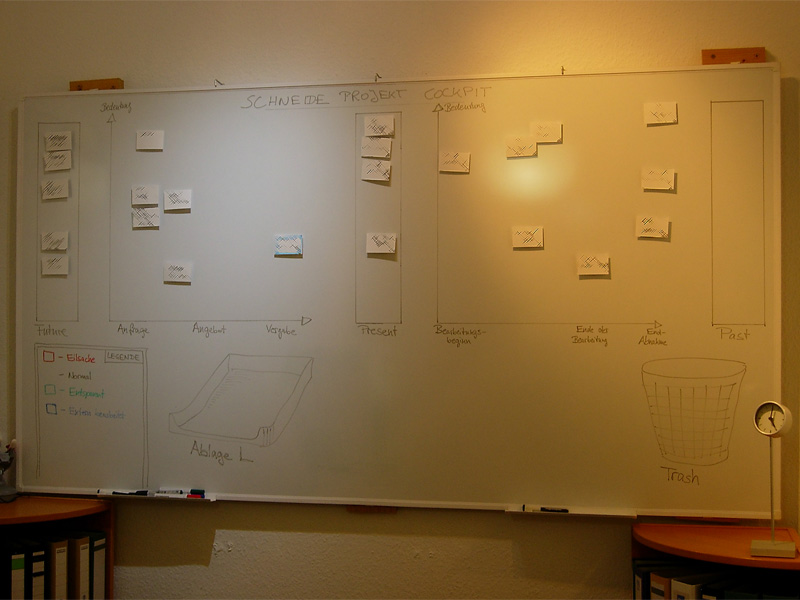
The Project Cockpit is a whiteboard with titled index cards and separated regions. If you glance at it, you might be reminded of a scrum board. In effect, it serves the same purpose: Tracking progress (of whole projects) and making it visible.

Here is a photo of our Project Cockpit (with actual project names obscured for obvious reasons):

cockpit1

How does it work?

In summary, each project gets a card and transitions through its lifecycle, from left to right on the cockpit.

The Project Cockpit consists of two main areas, “upcoming projects” and “current projects”. Both areas are separated into three stages eachs, denoting the usual steps of project placing and project realization.

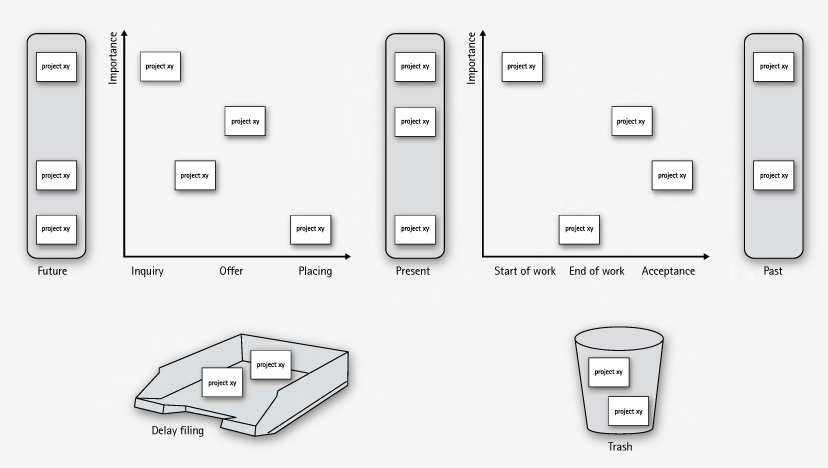
Every project we are contacted for gets represented by an index card with some adhesive tape and a whiteboard magnet on its back. The project card enters the cockpit on the left (in the “future” or “inquiry” region) and moves to the right during its lifecycle. The y-axis of the chart denotes the “importance” of the project, with higher being more important.

cockpit2

In the “upcoming” area, projects are in acquisition phase and might drop out to the bottom, either into the “delay filing” or the “trash”. The former is used if a project was blocked, but is likely to make progress in the future. The latter is the special place we put projects that went awry. It’s a seldom action, but finally putting a project card there was always a relief.

The more natural (and successful) progress of a project card is the advance from the “upcoming” area to the “present” bar. The project is now appointed and might get a redefinition on importance. Soon, it will enter the right area of “current” projects and be worked on.

The right area of “current” projects is a direct indicator of our current workload. From here on, project cards move to the rightmost bar labeled “past” projects. Past projects are achievements to be proud of (until the card magnet is needed for a new project card).

If you want to, you can color code the project cards for their urgency or apply fancy numbers stating their volume.

What’s the benefit?

The Project Cockpit enables every member of our company to stay informed about the project situation. It’s a great place to agree upon the importance of new projects and keep long running acquisitions (the delay filing cases) in mind. The whiteboard acts as an information radiator, everybody participates in project and workload planning because it’s always present. Unlike simpler approaches to the task, our Project Cockpit includes project importance, urgency and volume without overly complicating the matter.

The whiteboard occupies a wall in our meeting room, so every customer visiting us gets a glance on it. As we use internal code names, most customers even don’t spot their own project, let alone associate the other ones. But its always clear to them in which occupancy condition we are, without a word said about it.

Ultimately, we get visibility of very crucial information from our Project Cockpit: When the left side is crowded, it’s a pleasure, when the right side is crowded, it’s a pressure 😉

“Tag, you’re it!” – how we manage our blog heartbeat

We successfully revived a nearly abandonded blog by using a token and a few metaphors.

The new year 2009 just started. A great opportunity to review some things. Here is a review of our blogging.

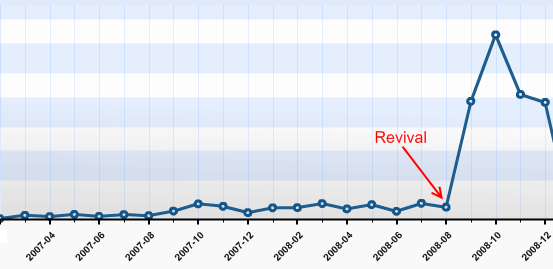
heartbeatWe started this blog in February 2007. Soon afterwards, it was nearly dead, as no new articles were written. Why? We would have answered to “be under pressure” and “have more relevant things to do” or simply “have no idea about what to write”. The truth is that we didn’t regard this blog as being important to us. We didn’t allocate any ressources, be it time, topics or attention to it. Seeming unimportant is a sure death cause for any business resource in any mindful managed company.
The Revival

This changed in late August 2008, after we heard from several sources that our articles published so far were very promising. Some new contacts even asked about our Code Flow-O-Meter before they asked any other question. So we sat together and thought about a way to revive this blog with minimal possible effort. We came to the conclusion that, being a four-man-show company, it would be sufficient for everyone to write one blog article a month in order to show a weekly blog heartbeat. It’s simple math. The same discussion led to the conclusion that blogging in english would reach a broader audience.

It’s a management problem

This laid the foundation for a few new blog entries, as everyone was eager to tell some news. But how could we manage the blog heartbeat in a sustainable fashion, with minimal effort and attention of the individual?

blogtoken

We decided to give the “Blog Token” a try. This token is nothing more than a little index card informing you that you are responsible for the blog entry in the next week. You can keep the index card on your desk or take it with you to remind you of the task. If you published your entry, you hand it over to the following team member in line. The token order is defined on a very viewable whiteboard. It took us 5 minutes to set up the token and define the order. Everything else is managed by the one who wants to get rid of the token and the one who receives it.

It doesn’t work without metaphors

When we reviewed the process, we realized that without a few maxims and their impact, things would have gone astray even with the token in place. Here are some of our maxims, spelled by the metaphors we found for them:

  • “blog heartbeat”: When you want to “keep it flowing” in a sustainable pace, you need to have a pace first. We defined that our blog is alive when it has a periodic heartbeat. Weekly articles seemed to be a good start and were approved in every review yet.
  • “to grow vegetables”: Good ideas (and good blog topics) need to evolve and grow. You need to care about them for an amount of time and publish them when they are mature. But first of all, you need to put the seeds for ideas (and blog topics) in your garden. Whenever somebody mentions something that might be worth a blog entry, somebody calls “this is a vegetable!”. A first sketch of a new blog entry (a new vegetable in your garden) is born in this moment. To be honest, some vegetables starve over time.
  • “it’s not a competition”: We try to publish high quality blog entries. But it’s more important to us to tell you about our favorite vegetable (see second metaphor) than to win a pulitzer price for every article. We even try to remind ourselves that we do not compete for the recoginition from our readers (you, in this case!). To be honest here, too: Though it’s not a contest, we issued an internal price for our most read article: Using Hudson for C++/CMake/CppUnit

Reviewing the Revival

We revived our blog with three ingredients:

  • Our commitment (“it’s important to us”)
  • The Blog Token (“tag, you’re it!”)
  • Metaphors (“everyone can grow vegetables”)

Telling from the statistics, it simply skyrocketed us:

blog-stats

Thank YOU, our blog visitors, for making this possible. It’s been a great experience for us and we are looking forward to continue our blog heartbeat in 2009 with fully stacked vegetable gardens. Stay tuned and if you like, share your thoughts (or just say hello) by adding a comment. We really appreciate your opinion.

Analyzing Java Heap problems Part 2: Using Eclipse MAT

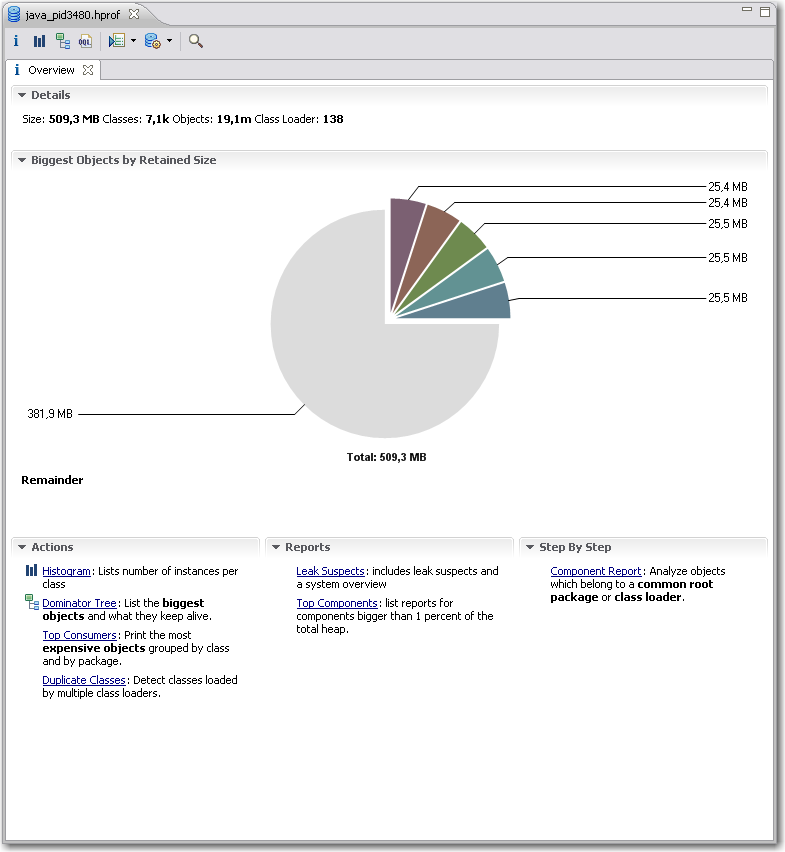
In part one we saw how to obtain the data to analyze, the heap dumps. Now we are looking into a nice plugin for the Eclipse IDE for analyzing the dumps.  Compared to the basic tools described in the previous article Memory Analyzer Tool (MAT) offers better usability, performance and some high level analysis and report tools.Eclipse MAT Overview After you open a hprof heap dump with MAT it will generate index files for faster access to all the data you are interested in and show an overview with nice charts.  From here you have access to other views and features:

  • The histogram is somewhat similar to what jHat offers.mat-pathtogcroot It allows you to browse, sort and filter the object instances in memory and shows you instance count and the shallow heap (memory used only by this object instance) and retained heap (memory used by this object instance including referenced objects). From the context menu you can choose “Merge Shortest Paths to GC roots” to see the reference chain of an object all the way up to the classloader. Here we can see that the JDateChooser registers itself at the MenuSelectionManager as a listener which can cause serious memory leaks as described in another post about Java memory handling.
  • The dominator tree allows you to quickly identify the biggest objects and what they reference. Again, using the context menu on an item in the list offers many options to dive deeper into the analysis.
  • The object inspector gives you detailed information about the selected objects like shallow and retained size, its fields and the class loader by whom it was loaded.
  • The leak suspects report tries to give you some high level hints about possible causes of memory problems of your application.
  • MAT Component ReportThe component report provides some very interesting statistics about Strings and collection usage which might be worth looking at if you are not hunting down leaks but trying to reduce overall memory usage. You can even get performance hints when many overfull HashMaps are detected or there are many empty collections which could be better lazily created.

I personally am using the histogram and the dominator tree the most because I am a technical guy and like to hunt down the problems in the code. Nevertheless the reports may show use other valuable aspects which you did not think of before. The MAT team are expanding the tools nicely on that side so that the benefit of these reports is ever increasing.

It is very likely that when you analyze large heap dumps you may need to increase the Java heap size for Eclipse by using the -vmargs -Xmx<memory size> parameter. That way you are able to analyze big heaps > 500M relatively fast and comfortable. For some live demo take a look at a webinar by some of SAPs Eclipse MAT committers.

Merry christmas – and check your candles before you light them

LED tea lights are dangerously akin to their waxen antetypes.

xmas-treeThe Softwareschneiderei (Schneide) team wishes you all a merry christmas and a happy new year.

We might pause this blog for a few weeks as everybody is on holiday.

This year, we sent out christmas cards that needed to be assembled. The card with a tea light made up a little latern. To have all batteries included, we bought some tea lights but couldn’t resist to buy some LED tea lights, too. The we put the parts together in giant envelopes and sent them out.

We got really nice feedback, but several reports suggested we might additionally package a warning note next time we send out LED tea lights that look too similar to traditional ones. The LED tea lights refuse to catch fire when burned, that’s for certain now.

So a word of warning in advance: Double-check your christmas tree candles before you kindle them. They might operate with batteries instead of fire.

Batteries not included

Your feature isn’t ready-to-use until you provide the necessary requirements alongside, too.

When I bought a label printing device lately, it came bundled with a label tape roll. That suggested instant usage – no need to think of additional parts upfront. Only tousb-battery-little find out that, you’ve guessed it already, batteries weren’t included. A bunch of standardized parts missing (Murphy’s law applied) and the whole ready-to-use package was rendered useless. The time and effort it took me to get the batteries was the same as to get the label tape I really wanted to use instead of the bundled one.

This is a common pattern not only with device manufacturers, but with software developers, too.

Instant feature – just add effort

Frequently, a software comes “nearly” ready-to-use. All you have to do to make it run is

  • upgrade to the latest graphics drivers
  • install some database system (we won’t tell you how as it’s not our business)
  • create some file or directory manually
  • login with administrator rights once (or worse: always) to gather write access to the registry or configuration file
  • review and change the complete configuration prior to first usage

The last point is a personal pet peeve of mine.

It all boils down to the question if a software or a feature is really ready-to-use. Most of the work you have to do manually is tedious or highly error-prone. Why not add support for this apparently crucial steps to the software in the first place?

It works instantly – with my setup

A common mistake made by developers is to forget about the history of a feature emerging in the development labs. The history includes all the little requirements (a writeable folder here, an existing database table there) that will naturally be present on the developer’s machine when she finishes work, because fulfilling them was part of the development process.

If the same developer was forced to recreate the feature on a fresh machine, she would notice all these steps with ease and probably automate or support (e.g. documentate) them, least to save herself the work of wading through it a third time.

But given that most developers regard a feature “finished”, “done” or “resolved” when the code was accepted by the repository (and hopefully the continuous integration system), the aching of the users wont reach them.

This is a case of lacking feedback.

Feel the pain – publicly

To close this open feedback loop, we established a habit of “adopting” features and bringing them to the user in person to overcome the problem of “nearly done”. If you can’t make your own feature run on the client’s machine within a few seconds, is it really that usable and “ready”? The unavoidable presence of the whole process – from the first feature request to the installed and proven-to-work software acts as a deterrent to fall for the “works on my machine” style of programming. It creates a strong relationship between the user, a feature and the developer as a side-effect.

We’ve seen quite a few junior developers experiencing a light bulb moment (and heavy sweating) in front of the customer. This is the hot-wired feedback loop working. In most cases, the situation (a feature requiring non-trivial effort to be run) will not repeat ever.

Batteries are part of the product

If your product (e.g. software) isn’t usable because some standard part (e.g. a folder) is missing, make sure you add these parts to the delivery package. It is a very pleasant experience for the user to just unwrap a software and use it right away. It shows that you’ve been cared for.

Observer/Listener structures in C++ with boost’s smart pointers

Whenever you are developing sufficiently large complex programs in languages like C++ or Java you have to deal with memory issues. This holds true especially when your program is supposed to run 24/7 or close to that. Because these kinds of issues can be hard to get right Java has this nice little helper, the garbage collector. But as Java solves all memory problems, or maybe not? points out, you can still easily shoot yourself in foot or even blow your whole leg away.  One of the problems stated there is that memory leaks can easily occur due to incorrect listener relations. Whenever a listener is not removed properly, which is either a large object itself or has references to such objects,  it’s only a matter of time until your program dies with “OutOfMemoryError” as its last words.  One of the proposed solutions is to use Java weak pointers for listener management.  Let’s see how this translates to C++.

Observer/listener management in C++ is often done using pointers to listener objects. Pointers are pretty weak by default. They can be :

  • null
  • pointing to a valid object
  • pointing to an invalid memory address

In listener relationships especially the latter can be a problem. For example, simple listener management could look like this:

   class SimpleListenerManagement
   {
   public:
      void addListener(MyListener* listener);
      void removeListener(MyListener* listener);
      void notifyListeners();
   private:
      std::list<MyListener*> listeners_;
   };

   void SimpleListenerManagement::notifyListeners()
   {
      // call notify on all listeners
      for (std::list<MyListener*>::iterator iter = listeners_.begin();
          iter != listeners_.end();
          ++iter)
      {
         (*iter)->notify(); // may be a bad idea!
      }
   }

In notifyListeners(), the pointer is used trusting that it still points to a valid object. But if it doesn’t, for instance because the object was deleted but the client forgot to removed it from the listener management, well, too bad.

Obviously, the situation would be much better if we didn’t use raw pointers but some kind of wrapper objects instead.  A first improvement would be to use boost::shared_ptr in the listener management:

   typedef boost::shared_ptr<MyListener> MyListenerPtr;

   class SimpleListenerManagement
   {
   public:
      void addListener(MyListenerPtr listener);
      void removeListener(MyListenerPtr listener);
      void notifyListeners();
   private:
      std::list<MyListenerPtr> listeners_;
   };

Provided that the given MyListenerPtr instance was created correctly by the client we can be sure now that all listeners exist when we call notify() on them.  Seems much better now. But wait! Using boost::shared_ptr, we now hold  strong references in our listeners list and are therefore kind of in the same situation as described in the post mentioned above. If the client forgets to remove its MyListenerPtr instance it never gets deleted and may be in a invalid state next time notify() is called.

A solution that works well in most cases is to use boost::weak_ptr to hold the listeners. If you see boost::shared_ptr on a level with normal Java references, boost::weak_ptrs are roughly the same as Java’ s weak references. Our listener management class would then look like this:

   typedef boost::shared_ptr<MyListener> MyListenerPtr;
   typedef boost::weak_ptr<MyListener> MyListenerWeakPtr;

   class SimpleListenerManagement
   {
   public:
      void addListener(MyListenerPtr listener);
      void removeListener(MyListenerPtr listener);
      void notifyListeners();
   private:
      std::list<MyListenerWeakPtr> listeners_; // using weak_ptr
   };

Note that addListener and removeListener still use MyListenerPtr as parameter. This ensures that the client provides valid listener objects.  The interesting stuff happens in notifyListeners():

   void SimpleListenerManagement::notifyListeners()
   {
      std::list<MyListenerWeakPtr>::iterator iter = listeners_.begin();
      while(iter != listeners_.end())
      {
         if ((*iter).expired())
         {
            iter = listeners_.erase(iter);
         }
         else
         {
            MyListenerPtr listener = (*iter).lock(); // create a shared_ptr from the weak_ptr
            listener->notify();
            ++iter;
         }
      }
   }

Each weak_ptr can now be checked if its object still exists before using it. If the weak_ptr is expired, it can simply be removed from the listeners list. With this implementation the removeListener method becomes optional and can as well be omitted. The client only has to make sure that the shared_ptr holding the listener gets deleted somehow.

We’ve won a prize!

When we switched our continuous integration platform from CruiseControl to Hudson, it was still a younhudsonbutler-149_50pxg project with many white areas on the project roadmap. But it already was powerful enough to handle our settings and delivered real value, so we eagerly wanted to contribute back.

The development process with “release early, release often” policy and community focussed drive fit right into our mindset, so we (in fact, mostly me) spent a few nights figuring out what and how to contribute. The effort materialized in a few private tweaks and a new plugin: the Crap4J hudson plugin.

With the knowledge of Hudson’s internals, we were able to help out various customers to set up their own sophisticated installations (which nearly led to the development of a Perforce plugin when Mike Wille finished his one right on time). This led to various bug reports and feature requests that we filed to Hudson’s issue database.

Soon afterwards, Sun Microsystems announced the GlassFish Awards Program (GAP) as part of the Community Innovation Awards Program. Hudson was part of the participating projects, so I gave it a try and submitted some feature requests and the plugin.

lauriersAnd we won a prize! It’s not the big sort of prize (look at position 50 in the list), but a reward for our filed issues and a honorable mention of the plugin (which truly stands no chance compared to the awesome work of Dr. Hafner, who contributed a complete “get-them-all” collection of useful metrics reporting plugins). At least, we are the only winner from Karlsruhe.

Lately, we blogged about awarding your customers. Well, that’s just what Sun did here. Thanks for that!