My conan 2 Consumer Workflow

A great many things changed in the transition from conan 1.x to conan 2.x. For me, as an application-developer first, the main thing was how I consume packages. The two IDEs I use the most in C++ are Visual Studio and CLion, so I needed a good workflow with those. For Visual Studio, I am using its CMake integration, otherwise known as “folder mode”, which lets you directly open a project with a CMakeLists.txt file in it, instead of generating a solution and opening that. The deciding factor for me is that that uses Ninja as a build tool instead of MSBuild, which often is a lot faster. I have had projects with 3.5x build-time speed ups. As an added bonus, CLion supports very much the same workflow, which reduces friction when switching between platforms.

Visual Studio

First, we’re going to need some local profiles. I typically treat them as ‘build configurations’, with one profile for debug and release on each platform. I put them under version control with the project. A good starting point to create them is conan profile detect, which guesses your environment. To create a profile to a file, go to your project folder and use something like:

conan profile detect --name ./windows_release

Note the ./ in the name, which will instruct conan to create a profile in the current working directory instead of in your user settings. For me, this generates the following profile:

[settings]
arch=x86_64
build_type=Release
compiler=msvc
compiler.cppstd=14
compiler.runtime=dynamic
compiler.version=194
os=Windows

Conan will warn you, that this is only a guess and you should make sure that the values work for you. I usually bump up the compiler.cppstd to at least 20, but the really important change is to change the CMake generator to Ninja, after which the profile should look something like this:

[settings]
arch=x86_64
build_type=Release
compiler=msvc
compiler.cppstd=20
compiler.runtime=dynamic
compiler.version=194
os=Windows

[conf]
tools.cmake.cmaketoolchain:generator=Ninja

Copy and edit the build_type to create a corresponding profile for debug builds.

While conanfile.txt still works for specifying your dependencies, I now recommend directly using conanfile.py from the get go, as some options like overriding dependencies are now exclusive to it. Here’s an example installing the popular logging library spdlog:

from conan import ConanFile
from conan.tools.cmake import cmake_layout


class ProjectRecipe(ConanFile):
    settings = "os", "compiler", "build_type", "arch"
    generators = "CMakeToolchain", "CMakeDeps"

    def requirements(self):
        self.requires("spdlog/1.14.1")

    def layout(self):
        cmake_layout(self)

Note that I am using cmake_layout to setup the folder structure, which will make conan put the files it generates in build/Release for the windows_release profile we created.

Now it is time to install the dependencies using conan install. Make sure you have a clean project before this, e.g. there are no other build/config folders like build/, out/ and .vs/. Specifically, do not open the project in Visual Studio before doing that, as it will create another build setup. You already need the CMakeLists.txt at this point, but it can be empty. For completeness, here’s one that works with the conanfile.py from above:

cmake_minimum_required(VERSION 3.28)
project(ConanExample)

find_package(spdlog CONFIG REQUIRED)

add_executable(conan_example
  main.cpp
)

target_link_libraries(conan_example
  spdlog::spdlog
)

Run this in your project folder:

conan install . -pr:a ./windows_release

This will install the dependencies and even tell you what to put in your CMakeLists.txt to use them. More importantly for the Visual Studio integration, it will create a CMakeUserPresets.json file that will allow Visual Studio to find the prepared build folder once you open the project. If there is no CMakeLists.txt when you call conan install, this file will not be created! Note that you generally do not want this file under version control.

Now that this is setup, you can finally open the project in Visual Studio. You should see a configuration named “conan-release” already available and CMake should run without errors. After this point, you can let conan add new configurations and Visual Studio should automatically pick them up through the CMake user presets.

CLion

The process is essentially the same for CLion, except that the profile will probably look different, depending on the platform. Switching the generator to Ninja is not as essential, but I still like to do it for the speed advantages.

Again, make sure you let conan setup the initial build folders and CMakeUserPresets.json and not the IDE. CLion will then pick them up and work with them like Visual Studio does.

Additional thoughts

I like to create additional script files that I use to setup/update the dependencies. For example, in windows, I create a conan_install.bat file like this:

@echo Installing debug dependencies
conan install . -pr:a conan/windows_debug --build=missing %*
@if %errorlevel% neq 0 exit /b %errorlevel%

@echo Installing release dependencies
conan install . -pr:a conan/windows_release --build=missing %*
@if %errorlevel% neq 0 exit /b %errorlevel%

Have you used other workflows successfully in these or different environments? Let me know about them!
Time Intervals in SQL

SQL not only supports date and timestamp data types but also time intervals.

An interval in SQL represents a period of time, such as days, hours, minutes, or seconds. SQL supports intervals in two main types: INTERVAL YEAR TO MONTH and INTERVAL DAY TO SECOND.

The two types

YEAR TO MONTH is used to represent a span of years and months. Examples include calculating ages, durations of contracts, or project timelines.

DAY TO SECOND is used to represent a span of days, hours, minutes, and seconds. Examples include scheduling events, logging activities, and tracking precise durations.

-- Represents 1 year and 6 months
INTERVAL '1-6' YEAR TO MONTH

-- Represents 5 days, 12 hours, 30 minutes, and 45 seconds
INTERVAL '5 12:30:45' DAY TO SECOND

This distinction may seem arbitrary at first, but it aligns with real-world use cases. An interval of “2 months” is clearly different from “60 days,” even though they might seem similar. The former is handled as a “YEAR TO MONTH” interval, and the latter as a “DAY TO SECOND” interval, making it clear how operations should be performed. Storing only the relevant units also reduces the amount of space required. For instance, storing a “YEAR TO MONTH” interval doesn’t need to allocate space for hours or seconds, thus saving storage.

Despite its name a “DAY TO SECOND” interval can also include fractional seconds:

INTERVAL '1 12:30:45.123' DAY TO SECOND

There are also shorter forms of interval literals if you only want to use one or several units of the interval:

For “YEAR TO MONTH”:

INTERVAL '3' YEAR   -- 3 years
INTERVAL '5' MONTH  -- 5 months

For “DAY TO SECOND”:

INTERVAL '2' DAY                -- 2 days
INTERVAL '5:30' HOUR TO MINUTE  -- 5 hours and 30 minutes
INTERVAL '15' MINUTE            -- 15 minutes
INTERVAL '30' SECOND            -- 30 seconds
INTERVAL '45.678' SECOND        -- 45.678 seconds

Note that the syntax always uses the singular forms of the unit words.

The two types can be used as data types for table columns:

CREATE TABLE interval_examples (
  id NUMBER,
  a INTERVAL YEAR TO MONTH,
  b INTERVAL DAY TO SECOND
);

Calculations with intervals

Intervals can be added to or subtracted from dates to calculate future or past dates.

-- Adding 10 days to the current date
CURRENT_DATE + INTERVAL '10' DAY

-- Subtracting 3 months from a specific date
DATE '2024-06-14' - INTERVAL '3' MONTH

It’s important to understand that intervals of type YEAR TO MONTH do not have a fixed duration. The number of days added to CURRENT_TIMESTAMP when you add an INTERVAL ‘1’ MONTH depends on the current month and year, as different months have different numbers of days.

Intervals can also be compared to each other with the usual operators such as =, <, <=, >, >=, <>.

Combining both types

Suppose you need to add an interval of 1 year, 2 months, 3 days, 4 hours, 5 minutes, and 6 seconds to the current timestamp. In this case you need to combine intervals of the two types:

SELECT (CURRENT_TIMESTAMP + INTERVAL '1-2' YEAR TO MONTH) + INTERVAL '3 04:05:06' DAY TO SECOND AS result;

Notes on PostgreSQL

PostgreSQL supports the above standard interval syntax, but it also supports a unified syntax for intervals with the following syntax:

INTERVAL '1 year 2 months'
INTERVAL '10 days 12 hours 30 minutes 45.123 seconds'
INTERVAL '1 year 2 months 3 days 4 hours 5 minutes 6 seconds'

In fact, in PostgreSQL, YEAR TO MONTH and DAY TO SECOND are not a distinct data type on their own; they are specializations of the broader INTERVAL data type.

It also supports multiplication and division of intervals:

-- Results in an interval of 6 days
SELECT INTERVAL '2 days' * 3 AS multiplied_interval;

-- Results in an interval of 2 hours
SELECT INTERVAL '3 hours' / 1.5 AS divided_interval;

Updating Grails: From 5 to 6

We have a long history of maintaining quite a large grails application since Grails 1.0. Over the first few major versions upgrading was a real pain.

The situation changed dramatically after Grails 3 as you can see in our former blog posts and and the upgrade from 3 to 4. Going from 4 to 5 was so smooth that I did not even dedicate a blog post to it.

A few weeks ago we decided to upgrade from version 5 to 6 and here is a short summary of our experiences. Things fortunately went quite smooth again:

The changes

The new major version 6 contains mostly dependency upgrades and official support for Java 17 which is probably the biggest selling point.

Some other minor things to note are without any particular order:

  • The logback configuration file name has changed from logback.groovy to logback-config.groovy
  • The pathing-jar is already setup for you, so you can remove the directive from your build files if you had it in
  • The build uses the standard gradle-application plugin allowing some more simplifications in your build files and infrastructure

Other noteworthy news

Object Computing stepped down as the steward of the grails framework and informed the community in an open letter. While there is still the grails foundation and the open source community we can expect the development and changes to slow down.

Whether this results in negative developer experience remains to be seen.

Conclusion

Using and maintaining a Grails application developed to a rather smooth ride and only poorly maintained plugins hurt your experience. The framework and its foundation have been pretty solid for some time now.

Regarding new projects you certainly have to evaluate if using grails is the best option. For an full stack framework the answer maybe yes, but if you only need a powerful API backend lighter and more modern frameworks like micronaut or javalin may be a better choice.

End each business process with a report

There is the internet saying of “pictures or it didn’t happen”. In the business world, you can translate it to “report or it didn’t happen”. Let me explain.

The concept of a business process is important for this blog post. My impression is that the concept is underrepresented in the business world. I can recall a time where I wasn’t familiar with it. Work occurred and had to be done. No need to make it more complicated than that. Well, it won’t really get more complicated with a business process, just more defined.

A business process is a series of tasks that are directed to a “business objective” or some desirable goal. Everything you do in the context of professional work is probably a task in a business process. The difference to “just work” is that the process is defined in a repeatable manner. There is a description of the necessary steps to do it again. Let’s take a bugfix in a software as an example. The actual content of the bug is different for every iteration of the process. But the basic steps are always the same:

  • A bug report is written by a customer
  • The bug is verified by a developer
  • A test case is written that reveals the bug’s minimal cause
  • The code is changed to fix the bug
  • The test case is changed to protect against the bug
  • The changeset is merged into the upstream code
  • The bug report is marked as fixed
  • The bugfix is released

This might be the rudimentary description of this business process. Note that while all the details of verification effort and code changes are omitted, the process can be repeated on this level of detail many times without variation.

In our company, we describe our business processes as “text with media content” in our wiki. The basic structure of each process consists of four parts that each hold a number of steps:

  • E (Event) – Something happened that requires an iteration of the process
  • A (Actions) – A series of things we need to do to reach the objective, described in varied detail
  • R (Result) – The stop condition for the process. What have we achieved when we perform the actions successfully?
  • B (Report) – Who do we need to inform about the process iteration?

The name for the last part might look strange to you: B for report is only explainable if you translate it into german: “Bericht” means report and starts with a B.

Let’s project these four parts to the example above:

The bug report by the customer is the event. Then follow five steps that are actions (verification, test case, code change, test change, upstream merge). The next step can be interpreted as the report. If you close the bug report ticket, that is the notification that things just got better. The problem here is that the result (the bugfix is released) occurs after the report. This often leads to irritation on the side of the customer that still has the problem even if the ticket is marked as “resolved”.

But this blog post is not about the unfortunate process design that puts the report before the result. It is about the report itself. In my experience, this crucial part of the process is often missing from the description or willfully omitted by the process operator. And that is a problem that can and should be fixed.

A report doesn’t need to be a piece of paper or an e-mail, though it often is. Let me give you two examples of other forms of reports:

  • In hotels, the toilet paper is often folded in a certain way. It indicates that somebody has cleaned this room and it wasn’t used since.
  • The dishwasher in our company is equipped with a new cleaning tab as soon as it was emptied. This indicates that it can be loaded with dirty dishes again. The machine will never close the tab compartment by itself, so if it is closed, it was loaded by a human (who put the clean dishes away beforehands, hopefully).

Without such a report, a business process like the room cleaning or the dishwasher emptying might have occurred, but everybody has to check again on their own.

In the digital world, we often try to automate the reporting by sending out e-mails to ticket reporters and the like. That’s fine. The report step doesn’t need to create extra effort, but it needs to happen.

If you can “think in processes”, you can ask yourself the question “who do I need to inform at the end of this process?”. Who has an interest in the result? Let them know that it is available now! You can’t reach everybody with an interest directly? Think of a way to leave a clue like the folded toilet paper.

In our company, most of our processes are accompanied by a digital ticket, so the resolution of the ticket often triggers the necessary report e-mails. But even in this situation, there are many processes left that require explicit thought and effort to inform the right people.

What is your most clever way to report the end of a business process? Tell us in the comments!

How to use LDAP in a Javalin Server

I recently implemented authentication and authorization via LDAP in my Javalin web server. I encountered a few pitfalls in the process. That is why I am sharing my experiences in this blog article.

Javalin

I used pac4j for the implementation. This is a modular library that allows you to replicate your own use case with different authenticators, clients and web server connection libraries. In this case I use “org.pac4j:pac4j-ldap” as authenticator, “org.pac4j:pac4j-http” as client and “org.pac4j:javalin-pac4j” as web server.

In combination with Javalin, pac4j independently manages the session and forwards it for authentication if you try to access a protected path.

var config = new LdapConfigFactory().build();
var callback = new CallbackHandler(config, null, true);

Javalin.create()
   .before("administration", new SecurityHandler(config, "FormClient", "admin"))
   .get("administration", ctx -> webappHandler.serveWebapp(ctx))
   .get("login", ctx -> webappHandler.serveWebapp(ctx))
   .get("forbidden", ctx -> webappHandler.serveWebapp(ctx))
   .get("callback", callback)
   .post("callback", callback)
   .start(7070);

In this example code the path to the administration is protected by the SecurityHandler. The “FormClient” indicates that in the event of missing authentication, the user is forwarded to a form for authentication. The specification “admin” defines that the user must also be authorized to the role “admin”.

LDAP Config Factory

I configured LDAP using my own ConfigFactory. Here, for example, I define the callback and login route. In addition, my self-written authorizer and http action adapter are assigned. I will go into these two areas in more detail below. The login form requires the authenticator here. For us, this is an LdapProfileService.

public class LdapConfigFactory implements ConfigFactory {
    @Override
    public Config build(Object... parameters) {
        var formClient = new FormClient("http://localhost:7070/login", createLdapProfileService());
        var clients = new Clients("http://localhost:7070/callback", formClient);
        var config = new Config(clients);

        config.setWebContextFactory(JEEContextFactory.INSTANCE);
        config.setSessionStoreFactory(JEESessionStoreFactory.INSTANCE);
        config.setProfileManagerFactory(ProfileManagerFactory.DEFAULT);
        config.addAuthorizer("admin", new LdapAuthorizer());
        config.setHttpActionAdapter(new HttpActionAdapter());

        return config;
    }
}

LDAP Profile Service

I implement a separate method for configure the service. The LDAP connection requires the url and a user for the connection and the query of the active directory. The LDAP connection is defined in the ConnectionConfig. It is also possible to activate TLS here, but in our case we use LDAPS.

The Distinguished Name must also be defined. Queries only search for users under this path.

private static LdapProfileService createLdapProfileService() {
    var url = "ldaps://test-ad.com";
    var baseDN = "OU=TEST,DC=schneide,DC=com";
    var user = "username";
    var password = "password";

    ConnectionConfig connConfig = ConnectionConfig.builder()
            .url(url)
            .connectionInitializers(new BindConnectionInitializer(user, new Credential(password)))
            .build();

    var connectionFactory = new DefaultConnectionFactory(connConfig);

    SearchDnResolver dnResolver = SearchDnResolver.builder()
            .factory(connectionFactory)
            .dn(baseDN)
            .filter("(displayName={user})")
            .subtreeSearch(true)
            .build();

    SimpleBindAuthenticationHandler authHandler = new SimpleBindAuthenticationHandler(connectionFactory);

    Authenticator authenticator = new Authenticator(dnResolver, authHandler);

    return new LdapProfileService(connectionFactory, authenticator, "memberOf,displayName,sAMAccountName", baseDN);
}

The SearchDNResolver is used to search for the user to be authenticated. A filter can be defined for the match with the user name. And, very importantly, the subtreeSearch must be activated. By default, it is set to false, which means that only users who appear exactly in the BaseDN are found.

The SimpleBindAuthenticationHandler can be used together with the Authenticator for authentication with user and password.

Finally, in the LdapProfileService, a comma-separated string can be used to define which attributes of a user should be queried after authentication and transferred to the user profile.

With all of these settings, you will be redirected to the login page when you try to accessing administration. The credentials is then matched against the active directory via LDAP and the user is authenticated. In addition, I want to check that the user is in the administrator group and therefore authorized. Unfortunately, pac4j cannot do this on its own because it cannot interpret the attributes as roles. That’s why I build my own authorizer.

Authorizer

public class LdapAuthorizer extends ProfileAuthorizer {
    @Override
    protected boolean isProfileAuthorized(WebContext context, SessionStore sessionStore, UserProfile profile) {
        var group = "CN=ADMIN_GROUP,OU=Groups,OU=TEST,DC=schneide,DC=com";
        var attribute = (List) profile.getAttribute("memberOf");
        return attribute.contains(group);
    }

    @Override
    public boolean isAuthorized(WebContext context, SessionStore sessionStore, List<UserProfile> profiles) {
        return isAnyAuthorized(context, sessionStore, profiles);
    }
}

The attributes defined in LdapProfileService can be found in the user profile. For authorization, I query the group memberships to check if the user is in the group. If the user has been successfully authorized, he is redirected to the administration page. Otherwise the http status code forbidden is returned.

Javalin Http Action Adapter

Since I want to display a separate page that shows the user the Forbidden, I build my own JavalinHttpActionAdapter.

public class HttpActionAdapter extends JavalinHttpActionAdapter {
    @Override
    public Void adapt(HttpAction action, WebContext webContext) {
        JavalinWebContext context = (JavalinWebContext) webContext;
        if(action.getCode() == HttpConstants.FORBIDDEN){
            context.getJavalinCtx().redirect("/forbidden");
            throw new RedirectResponse();
        }
        return super.adapt(action, context);
    }
}

This redirects the request to the Forbidden page instead of returning the status code.

Conclusion

Overall, the use of pac4j for authentication and authorization on javalin facilitates the work and works well. Unfortunately, the documentation is rather poor, especially for the LDAP module. So the setup was a bit of a journey of discovery and I had to spend a lot of time looking for the root cause of some problems like subtreeSearch.

Why we can’t dispose of every Manager, even in Tech fields

The world is in a place in which we gradually learn to question old patterns of societal behaviour and to look deeply into the meaning of what it is that we actually do. Especially in the technical / digital field, we see that our hands are not tied – most of the things we do, we can decide to do for an actual reason, or to find a way of disposing of exactly that – in what speed or level of disruption we consider appropriate.

While this holds for any level of detail, it is especially fruitful in these patterns where we do something for historical reason; the patterns that emerged as seeming to hold true for generation after generation – why should the present days be any different?

Now, I do not hate any traditions just for the reason of them being traditions. That stance is not useful, as a significant number of traditions have some underlying reasons why they work. Sometimes these are not obvious at all, and worse, sometimes everyone around us thinks they can tell use these reasons, while what they tell is are mostly empty phrases, placeholders, tranquilizers, red herrings, tautologies. But I digress.

One of the largest volume of “what we do” revolves around our work. Not only in a “this is a German clichee” sense, but the universal “what we deliver to sustain our livelihood”. And one of the most profitable discussions are these at the intersections of that work and of our inner state of being, our emotions, attitudes, values, interpersonal relations. The stuff that plays no role in traditional work.

To clarfiy, the world has not yet gone to a magical sphere of enlightenment where we’re just so incredibly smarter than our ancestors, but at least the reasoning takes place, and is within reach to be emplaced.

But there is little insight in only asking “what have they thought wrong?”. You have to also ask “what have they gotten right?” to get to the next level.

The Question: “What is Management?”

It’s not as simple to tell, because if you just look at what most Managers do, you can only answer “What is Mismanagement?”. Think of any fictional CEO, and chances are you will imagine one of these movie stereotypes, the people who put more work in buttering their insecure ego with layers of self-importance and complacency until the whole package somewhat sticks.

As such, there appears to be a current trend in Management Consultants that actually do God’s work in trying to correct that view. Do any internet search, there is plenty of quotable verdict on that field – “As a manager, you should trust your people and get out of their way. They work with you for a reason” – Even if they might not convince many Executives in changing their ways, more lower-employed people lose their tolerance for such mannerisms.

This means, that in a job interview, a Newcomer can very well ask – “Tell me, what do we need you for? Under the assumption that I’m the right person for this job, what is there I could possibly need an Executive for without invalidating the former assumption?” (… is not something your average applicant would say, but it’s the core of that idea that matters.)

So, there’s the obvious bulk of organisational overhead, outside representation, legal matters, ensuring-everyone-gets-paid-on-time, duties about Datenschutz & friends, i.e. tasks that are most efficiently handled by as few hands as possible. (Depending on how American you feel, there you might also need to constantly insult your competitors publicly.) But other than that, do you just hang around and ask your employees about their favorite variety of coffee once in a while?

  • Yes, in some instances that is the most preferable conduct for your Manager,
  • Generally, it’s not.

Where you can really reap the crops

Basically, you are deployed to optimize every flow of any relevant currency. These might change over time, but it is not only the regular appearance of some money in some accounts and it’s also not only the getting out of your way to let the recipients of said money do their magic. It’s also not about everyone feeling absolutely smart and awesome on every occasion. Neither the opposite.

You can be of actual use. Here’s three points that come to my mind.

  • 1.) Define the Culture, especially its Boundaries
  • 2.) Evaluate the Direction of Motion
  • 3.) Advertise that Words can have an Actual Meaning

Now I guess I have written a lot already, so I will have to delve into details in some upcoming posts. But let me summarize.

@1.) Defining the culture of your work place is something you either do conciously or fail miserably, but it gets exponentially more important over time.

  • Some obvious things you might not need to define (e.g.” no physical assault”)
  • Then there’s potential for micromanagent or personal overreach. These you should never interfere with or only decide case-by-case.
  • But some decisions in between have many options, still someone needs to break the symmetry. E.g. “use this particular tool for XYZ”. This can change, and you should always be able to give actual reasons, but if you don’t limit this choice, your people will waste their focus on the wrong questions, and one can only handle a certain number of question marks in their day. It’s about focus.

@2.) Evaluating the direction of motion of your business also sounds obvious. It more or less is. But there is not only motion in the sense of business output, e.g. “we focus on software that…” but inner direction, e.g. “we aim to recruit people who…”. These will change by factors outside your control and if you choose not to change course, you should do it on purpose, not by not thinking about it.

@3.) Knowing what you do (see 2) and how you do it (see 1) is quite nice already. Some focus is even nicer, but even more important than that is guaranteeing a level of consistency that guarantees that the foresaid boundaries are not subject to momentary reassessment. Do not think that one can ever act on a purely ration basis – this does not work ever – but treat your word very deliberate. This does not mean every actual vocabulary, but their fundamental underpinning. Not every attitude can hold forever either. Neither can you be perfect and never forget a thing. But if you appear careless in your word, people will notice that you consider them merely pawns in a game, and they might see that you don’t actually know how to play.

Now this became longer than intended. Anyway, I wish you a happy <legal reason why there’s no work next Monday>!

PS: this blog post is not sponsored or otherwise favorably promoted by the Softwareschneiderei management level 😉

Simple marching squares in C++

Marching squares is an algorithm to find the contour of a scalar field. For example, that can be a height-map and the resulting contour would be lines of a specific height known as ‘isolines’.

At the core of the algorithm is a lookup table that says which line segments to generate for a specific ’tile’ configuration. To make sense of that, you start with a convention on how your tile configuration and the resulting lines are encoded. I typically add a small piece of ASCII-art to explain that:

// c3-e3-c2
// |      |
// e0    e2
// |      |
// c0-e1-c1
//
// c are corner bits, e the edge indices

The input of our lookup table is a bitmask of which of the corners c are ‘in’ or above our isolevel. The output is which tile edges e to connect with line segments. That is either 0, 1 or 2 line segments, so we need to encode that many pairs. You could easily pack that into a 32-bit, but I am using a std::vector<std::uint8_t> for simplicity. Here’s the whole thing:

using config = std::vector<std::uint8_t>;
using config_lookup = std::array<config, 16>;
const config_lookup LOOKUP{
  config{},
  { 0, 1 },
  { 1, 2 },
  { 0, 2 },
  { 2, 3 },
  { 0, 1, 2, 3 },
  { 1, 3 },
  { 0, 3 },
  { 3, 0 },
  { 3, 1 },
  { 1, 2, 3, 0 },
  { 3, 2 },
  { 2, 0 },
  { 2, 1 },
  { 1, 0 },
  config{},
};

I usually want to generate index meshes, so I can easily connect edges later without comparing the floating-point coordinates. So one design goal here was to generate each point only once. Here is the top-level algorithm:

using point_id = std::tuple<int, int, bool>;

std::vector<v2<float>> points;
// Maps construction parameters to existing entries in points
std::unordered_map<point_id, std::uint16_t, key_hash> point_cache;
// Index pairs for the constructed edges
std::vector<std::uint16_t> edges;

auto [ex, ey] = map.size();
auto hx = ex-1;
auto hy = ey-1;

// Construct inner edges
for (int cy = 0; cy < hy; ++cy)
for (int cx = 0; cx < hx; ++cx)
{
  std::uint32_t key = 0;
  if (map(cx, cy) > threshold)
    key |= 1;
  if (map(cx + 1, cy) > threshold)
    key |= 2;
  if (map(cx + 1, cy + 1) > threshold)
    key |= 4;
  if (map(cx, cy + 1) > threshold)
    key |= 8;

  auto const& geometry = LOOKUP[key];

  for (auto each : geometry)
  {
    auto normalized_id = normalize_point(cx, cy, each);
    auto found = point_cache.find(normalized_id);
    if (found != point_cache.end())
    {
      edges.push_back(found->second);
    }
    else
    {
      auto index = static_cast<std::uint16_t>(points.size());
      points.push_back(build_point(map, threshold, normalized_id));
      edges.push_back(index);
      point_cache.insert({ normalized_id, index });
    }
  }
}

For each tile, we first figure out the lookup input-key by testing the 4 corners. We then get-or-create the global point for each edge point from the lookup.
Since each edge in a tile can be accessed from two sides, we first normalize it to have a unique key for our cache:

point_id normalize_point(int cx, int cy, std::uint8_t edge)
{
  switch (edge)
  {
  case 3:
    return { cx, cy + 1, false };
  case 2:
    return { cx + 1, cy, true };
  default:
    return { cx, cy, edge == 0 };
  };
}

When we need to create a point an edge, we interpolate to estimate where exactly the isoline intersects our tile-edge:

v2<float> build_point(raster_adaptor const& map, float threshold, point_id const& p)
{
  auto [x0, y0, vertical] = p;
  int x1 = x0, y1 = y0;
  if (vertical)
    y1++;
  else
    x1++;

  const auto s = map.scale();
  float h0 = map(x0, y0);
  float h1 = map(x1, y1);
  float lambda = (threshold - h0) / (h1 - h0);

  auto result = v2{ x0 * s, y0 * s };
  auto shift = lambda * s;
  if (vertical)
    result[1] += shift;
  else
    result[0] += shift;
  return result;
}

For a height-map, that’s about as good as you can get.

You can, however, sample other scalar field functions with this as well, for example sums of distances. This is not the most sophisticated implementation of marching squares, but it is reasonably simple and can easily be adapted to your needs.

Unveiling the secrets of invisible database columns

After my last blog post, where I wrote about Generated and Virtual Columns, I would like to dedicate this post to another type of database column: Invisible Columns. This feature exists in MySQL since version 8.0 and in Oracle Database since version 12c. PostgreSQL and MS SQL Server do not support this feature.

Invisible columns, as the name suggests, are columns within a table that are hidden from standard query results by default. Unlike traditional columns that are visible and accessible in query results, invisible columns are not included unless explicitly specified in the query.

This feature provides a level of control over data visibility, allowing developers to hide certain columns from applications or other database users while still retaining their functionality within the database.

Defining invisible columns

When creating a table in MySQL or Oracle, you can designate certain columns as invisible by using the INVISIBLE keyword in the column definition. For example:

CREATE TABLE your_table (
  visible_column   INT,
  invisible_column INT INVISIBLE
);

In this example, the invisible_column is marked as invisible, while the visible_column remains visible by default. To alter an existing table and make a column invisible:

ALTER TABLE your_table
  MODIFY COLUMN existing_column_name INVISIBLE;

Replace your_table with the name of your table and existing_column_name with the name of the column you want to make invisible.

When querying the your_table, the invisible column will not be included in the result set unless explicitly specified:

SELECT * FROM your_table;

visible_column
--------------
   4
   8
  15

By default, invisible columns are hidden from query results, providing a cleaner and more concise view of the data. However, developers can still access invisible columns when needed by explicitly including them in the query:

SELECT visible_column, invisible_column FROM your_table;

visible_column | invisible_column
---------------------------------
   4           |   16
   8           |   23
  15           |   42
Unveiling invisible columns

To list the invisible columns of a table in MySQL, you can query the information_schema.columns system table and filter the results based on the COLUMN_DEFAULT column. Invisible columns have NULL as their default value. Here’s a simple SQL query to accomplish this:

SELECT COLUMN_NAME
  FROM information_schema.columns
  WHERE TABLE_SCHEMA = 'your_database'
    AND TABLE_NAME = 'your_table'
    AND COLUMN_DEFAULT IS NULL;

In Oracle, you can query the USER_TAB_COLUMNS or ALL_TAB_COLUMNS data dictionary views to list the invisible columns of a table. Here’s how you can do it:

SELECT COLUMN_NAME
  FROM USER_TAB_COLUMNS
  WHERE TABLE_NAME = 'your_table'
    AND INVISIBLE = 'YES';

If you want to list invisible columns from all tables in the current schema, you can use the ALL_TAB_COLUMNS view instead:

SELECT TABLE_NAME, COLUMN_NAME
  FROM ALL_TAB_COLUMNS
  WHERE INVISIBLE = 'YES';
Are invisible columns actually useful?

Invisible columns can make schema evolution easier by providing a flexible mechanism for evolving database schemas over time without disrupting existing applications or queries. You can test new features or data structures without committing to them fully. Invisible columns provide a way to add experimental columns to your tables without exposing them to production environments until they are fully tested and ready for use.

They can create cleaner and more concise views of your data by hiding less relevant columns. This can make it easier for developers, analysts, and users to work with the data without unnecessary clutter. However, I would argue that this is also achievable with normal database views.

The downside of introducing invisible columns is that they add complexity to the database schema, which can make it harder to understand and maintain, especially for developers who are not familiar with the invisible columns feature. They also add potential for confusion: Developers may forget about the presence of invisible columns, leading to unexpected behavior in queries or applications.

You probably shouldn’t use them to hide sensitive data, since invisible columns don’t have any additional access control, and security through obscurity is not a good idea. If you grant SELECT permission on the table to a user, they will be able to query visible and invisible columns alike.

Now that you know about them, you can make your own choice.

When open source is only marketing

Nowadays, Open Source Software (OSS) is everywhere and probably everyone is using it somewhere. It may be your browser, the operating system on your phone, some libraries of your beloved games and apps or some web server software or infrastructure software delivering websites and other data like music or videos to you. Basically, OSS is everywhere – even if it is sometimes not openly visible.

When developing software we often use libraries and frameworks that are open source. For us it is great for a couple of reasons:

  • Often free of cost
  • We can have a look under the hood to learn how something is done
  • We can check and review the code for security issues to increase trust
  • We can improve the software, adapt it to our use case or fix issues plaguing us

In using OSS and probably contributing to it by either feedback or code we strenghen the software development community and are pushing our domain a little forward step-by-step.

Some companies noticed the positive notion about OSS and started to build their businesses on OSS. They pay developers to develop or contribute to OSS and provide services around it offering assistance, support or solutions based on their OSS. Companies like Red Hat or Nextcloud have quite some success with this model.

I personally think it is a great way of business leading to a win-win situation in the IT world: A company can make money and millions of other developers can increase their productivity or develop their own solutions standing on the shoulder of giants (aka OSS).

Open Source done wrong

Sometimes, I feel open source is only used as a label and marketing tool. Let me illustrate by an example I stumbled upon a few weeks ago:

There is an OSS javascript library with a github repository, issue tracker and so on. Sounds like a proper open source project, doesn’t it?

Well, there is an issue or maybe more a lacking feature that some people noticed and somebody even opened a pull request with a proposed fix.

The fix does not breaking anything, consists of the addition of 5 lines in one file and some CSS styles in another and only adds a feature to one component of the library.

Still, the pull request (PR) was simply put down and closed with a comment along the lines

“We do not think this is necessary, so we do not accept it.”

A follow-up issue 3 (!) years later was closed with a copy&paste comment, too.

While of course it is always the right and obligation (look at the recent supply chain attacks!) of the maintainers to decide what gets in and what does not it sometimes just has the notion of “No, not invented here”. Blocking unobstrusive, small and sensible changes without real reasons is very counter-productive. It defeats some of the main advantages of an open source solution:

Developers are not able to give back and get their improvements upstream. This leads to workarounds, forks oder separately maintained patches. That in turn means overhead and more overall effort needed to build and maintain a solution thus mitigating part of the benefits using the OSS in the first place.

Do not take me wrong: Closed/proprietary software does not even give you many of the options and advantages of OSS. It offers more of a “take it as it is” approach and leaves it up to you to decide if it is worth it or not.

Doing it right

On the other hand there are tons of well governed open source projects that really consider contributions for upstream and listen to the community. We have had several successful contributions to the Tango and Grails projects for example.

So if you or your company run an open source project I advise you to be open and to listen to your users. Working as a loosely connected distributed team with a good steering team at the helm leads to many potential win-win situations and makes the (software development) world a better place.

Separation of Intent and Implementation

Last week, my colleague wrote about building blocks and how to achieve a higher-level language in your code by using them. Instead of talking about strings and files, you change your terms to things like coordinates and resources.

I want to elaborate on one aspect of this improvement, that aims at the separation of your intent from the current implementation. Your intent is what you want to achieve with the code you write. The current implementation is how you achieve it right now. I point out the transience of the implementation so clearly because it is most likely the first (and maybe even only) thing to change.

I have an example of this concept that is hopefully understandable enough. Let’s say that you build a system that gathers a lot of environmental data and stores it for later analysis and introspection. Don’t worry, the data consists mostly of things like air pressure, temperature and radioactive load. Totally harmless stuff – unless you find the wrong isotopes. In that case, you want to have a closer look and understand the situation. Most temporarily increased radioactivity in the air is caused by a normal thunderstorm. Most temporarily decreased radioactivity in the air is caused by a normal rain.

Storing all the data requires something like an archive. We want to store the data separated by the point of measurement (a “station”), the type of data (let’s call it “data entry type” because we aren’t very creative with names here) and by the exact point in time the measurement took place. To make matters a little bit more complicated, we might have more than one device in a station that captures a specific data entry type. Think about two thermometers on both sides of the station to make local heatup effects visible.

In order to reference a definite entry in our archive, we need a value for four aspects or dimensions :

  • The station
  • The data entry type
  • The device
  • The date and time

Thinking from the computer

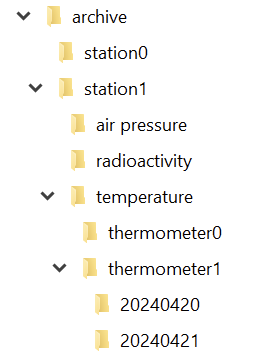
If you implement your archive in the file system, you can probably see the directory structure right before you:

And in each directory for the day, we have a file for each hour:

So we can just write a class that takes our four parameters and returns the corresponding file. That is a straighforward and correct implementation.

It is also one of the implementations that couples your intent (an archive with four dimensions of navigability) nearly inseparably with your decisions on how to use your computer’s basic resources.

Thinking from the algorithms point of view

In order to separate your intent from your current implementation, you need to specify your intent as unencumbered from details as possible. Let’s specify our 4-axis archive nagivation system as a coordinate:

public record ArchiveCoordinate(
    StationId station,
    DataEntryType type,
    DeviceId device,
    LocalDateTime measurementTime
) {
}

There is nothing in here that point towards file system things like directories or files. We might have a hunch of the actual hierarchy by looking at the order of the parameters, but it is easy to implement a hierarchy-free nagivation between coordinates:

public record ArchiveCoordinate([...]) {
    public ArchiveCoordinate withStationChangedTo(
        StationId newStation
    ) {
        [...]
    }
    
    public ArchiveCoordinate withTypeChangedTo(
        DataEntryType newType
    ) {
        [...]
    }
    
    public ArchiveCoordinate withDeviceChangedTo(
        DeviceId newDevice
    ) {
        [...]
    }
    
    public ArchiveCoordinate withMeasurementTimeChangedTo(
        LocalDateTime newMeasurementTime
    ) {
        [...]
    }
}

The concept is that if you know one coordinate, you can navigate relative to it through the archive, without knowingly changing the directory or whatever implementation structure lies beneath your model layer. Let’s say we have the coordinate of a particular measurement of one thermometer. How do we get the same measurement of the other thermometer?

ArchiveCoordinate measurementForThermometer0 = new ArchiveCoordinate([...]);
ArchiveCoordinate measurementForThermometer1 = measurementForThermometer0.withDeviceChangedTo(thermometer1);

We can provide methods that allow us to step forward and backward in time. We can provide our application code with everything it requires to implement clear and concise algorithms based on our model of the archive.

But there will be the moment where you want to “get real” and access the data. You might decide to let your current implementation shine through to your intent layer and provide an actual file:

public interface Archive {
    Optional<File> entryFor(ArchiveCoordinate coordinate);
}

That’s all you need from the archive to get your file. But you might also decide to prolong your intent layer and wrap the file in your own data type that provides everything your algorithms need without revealing that it is really a file that lies underneath:

public interface Archive {
    Optional<ArchiveResource> entryFor(ArchiveCoordinate coordinate);
}

The new ArchiveResource is a thin, but effective veneer (some might call it a wrapper or a facade) that gives us the required information:

public interface ArchiveResource {
    String name();
    long size();
    InputStream read();
}

Of course, we need to provide an implementation for all of this. But by staying vague in the intent layer, we open the door for an implementation that has nothing to do with files. Instead of a file system, there could be a relational database underneath and we wouldn’t notice. Our algorithms would still work the same way and read their data from ArchiveResources that aren’t FileArchiveResources anymore, but DatabaseArchiveResources.

You can probably imagine how you can provide the intent for data writing using the example above. If not, let me show you the necessary additions:

public interface Archive {
    Optional<ArchiveResource> entryFor(ArchiveCoordinate coordinate);
    ArchiveResource createEntryFor(ArchiveCoordinate coordinate) throws IOException;
}
public interface ArchiveResource {
    String name();
    long size();
    InputStream read();
    OutputStream write();
}

Now you can store additional data to the archive without ever knowing if you write to a file or a database or something completely different.

Summary

By separating your intent from your current actual implementation, you gain at least three things for the cost of more work and some harder thinking:

  1. Your algorithms only use your intent layer. You design it exclusively for your algorithms. It will fit like a glove.
  2. The terms you use in your intent layer shape the algorithm metaphors way better than the terms of your current implementation. You can freely decide what terms you’ll use.
  3. The algorithms and your intent layer are designed to last. Your current implementation can be swapped out without them noticing.

If this sounds familiar to you, it is a slightly different take on the “ports and adapters” architecture. The important thing is that by starting with the intent and naming it from the standpoint of your algorithms (application code), you are less prone to let your implementation shine through.