Blog harvest, May 2010

Some noteworthy blog articles, harvested for May 2010. You’ll hear a lot about Java, a bit about Clojure, a fair share about Pair Programming and some thoughts about the advantage of employee exchange programs.

You can tell from the frequency of recent blog harvests that we are slightly overloaded with work at the moment. This is a rather preferred state to be in as a small contract development company, but everything not ultimately necessary is reduced during those phases. We consider blog reading as indispensable, but reporting the best of articles (our blog harvest) isn’t. So right now, we have a very long list of articles in our harvest barn. Here are some articles of the last two months:

  • Does Groovy Know You Are Seeing Clojure? – A real world story of learning Clojure, the Functional Programming language on top of the JVM. I can wholeheartly agree with the sentence “In the intervening 30 years since starting out on a TRS-80 Model 1 nothing has been more difficult in terms of solving even the most trivial of problems than learning Clojure.”, but in my case, it has been a little more than 15 years of real experience. After a year trying to “get” Clojure, I deferred it for more productive work.
  • Don’t return null; use a tail call – A blog entry about the billion-dollar-mistake (null pointers) and API design. It got inspired by Steve Freeman’s book “Growing Object-Oriented Software” (see next section for more content by Steve Freeman). The idea of “tail calls” or callbacks isn’t new or revolutionary, but widely underused. Personally, I found the idea of returning empty Iterables (as an abstract commonplace of Collections) useful in some scenarios.
  • Practical Styles of Pair Programming – First hand experiences of a pair programming enthusiast (Iwein Fuld). His scenarios seem familiar and the advices given reasonable. Reading the article sharpened my awareness about pair programming. There is only one complaint about the article from my side: Using headphones while programming doesn’t turn you into a zombie, it just eliminates the outer world for some time. That’s Alone Time, and it’s there for a reason, too.
  • Java1.6u18 and double array creation – A little story about flawed unit tests, recent java improvements and the value of nightly builds. Thanks for sharing this with the world, David Shay.
  • Do You Like Pain? – Jared Richardson shares his story and advice about getting used to the “pain” in any environment. I like the idea of the “prisoner swap” to identify pain points a lot. But from my own experience I can tell that the messenger might be muted by labelling him “not fully aware”.
  • Exploring Google GuavaGoogle Guava is the new Apache Commons. There are some neat features, though. Definitely worth the 20-minutes-read this article by Dan Lewis provides.
  • Java Post Mortem with Gilad Bracha – A post mortem should only be done on “dead” people/projects. So the title alone is a harsh statement. But the summary of the talk contains some valid points and a lot of opinions to think about. I particularly like the term “cottage industry” for DI framework vendors.

Next comes the video section of this blog harvest. I’ve found the time invested in these talks worthwhile:

  • Threading is not a model (35min) – Joe Gregorio presents the lack of advanced multiprocessing tools in most programming languages. His talk covers a lot more than just that and gives some appetizers on Python. The solicited lack of MP support was my reason to learn Clojure (see first entry in the list above).
  • Sustainable Test-Driven Development (55min) – Steve Freeman gives a whole bunch of advanced tips to write unit tests. The talk is given from the TDD/BDD point of view, but mostly applies to unit tests in general. You should be familiar with JUnit to fully understand this talk.

And at last, there is a tool I want to present you (this kind of resembles the fun section, too):

  • Dollar – An experimental java API that shows how much you can bend the java syntax to suit your personal taste. Through inspiration by this project I’ve come to some unique ways to make my code more expressive – without using funny signs. Thanks to Davide Angelocola for his unique approach.
Prettier failures using Swing TaskDialog

An introduction to the Swing TaskDialog project, a fine little gem to spice up your (java swing) dialogs. Includes a real usage example.

The standard way to present graphical user interfaces (GUI) on a desktop machine in java is to use Swing. It’s a very flexible API with a steep learning curve and some oddities (e.g. EDT handling is cumbersome at least), beginning to show some age. There were several attempts to take the Swing experience to a new level, including the marvellous book “Filthy Rich Clients” by Chet Haase (we miss you in the Java camp!) and Romain Guy. So Swing isn’t dead or dying, it’s just getting old.

A pain point of Swing

One thing always bothered me with Swing: It is relatively easy to present a basic message or input dialog. But to add slightly more complexity to a dialog suddenly means substantially more effort. Dialogs don’t scale in Swing. If you ever “designed” an error dialog for your end user, presenting the essence of an exception that just occurred, you already know what I’m talking about. I have to make a confession: Our exception/error dialogs were nearly as nasty as the exception itself. But nobody wants to fail nasty.

Swing TaskDialog to the rescue

At late february this year, Eugene Ryzhikov published his Swing TaskDialog project on his blog. His release pace has been a new version once a week since then. So I’m writing on a moving target.

The TaskDialog project provides basic message, progress and input dialogs based on the operating system’s “User Experience Guidelines”. The visual content is very appealing as a result. But the project doesn’t stop here. The programming API is very understandable and to the point. You don’t have to hassle with big concepts to use it, just look at the examples and start from there.

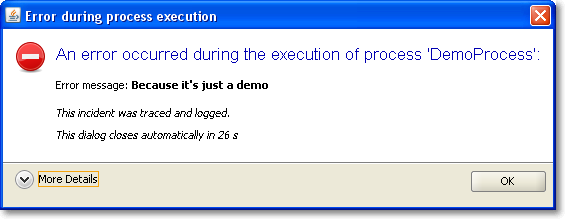
It was a matter of minutes to replace our old, nasty error dialog with a much prettier one using TaskDialog. Here are two screenshots of it in action, with the detail section retracted (initial state) and flipped open.

Of course, this is only the Windows version of the dialog. You should head over to the TaskDialog examples page to get an idea how this might look on a Mac. This is a dialog that’s pretty enough to not scare the user away by sheer uglyness. The code for this dialog is something like:


TaskDialog dialog = new TaskDialog("Error during process execution");
 dialog.setIcon(TaskDialog.StandardIcon.ERROR);
 dialog.setInstruction("An error occurred during the execution of process 'DemoProcess':");

 Exception exception = new Exception("Because it's just a demo");
 StringBuilder detailMessage = new StringBuilder();
 for (StackTraceElement stackTraceElement : exception.getStackTrace()) {
 detailMessage.append(stackTraceElement.toString());
 detailMessage.append("\n");
 }
 dialog.setText("Error message: <b>" + exception.getMessage() + "</b>\n\n<i>This incident was traced and logged.</i>");
 dialog.getDetails().setExpandableComponent(
 new JLabel(Strings.toHtml(detailMessage.toString())));
 dialog.getDetails().setExpanded(false);

 JLabel waitLabel = new JLabel(Strings.toHtml("<i>This dialog closes automatically in 26s</i>"));
 dialog.setFixedComponent(waitLabel);

 dialog.show();

Notice the usage of Strings.toHtml() to convert plain Strings to HTML-rendered rich text elements.

Timed dialogs

If you look at the presented information, you’ll notice it’s just a demo presenting a fake exception. But you’ll notice another thing, too: This dialog is about to close itself automatically soon. This is a speciality of our project: The GUI runs unattended by users for long periods of time. If you encounter an error every ten minutes and an user returns to the screen after a week, the system isn’t accessable without closing a million dialogs first. You might argue why a system error lasts for a week, but that’s a reality in this project we cannot change. So we came up with timed dialogs that go away on their own after a while. The information of the dialog is persisted in the log files that get evaluated periodically.

The TaskDialog API provides easy integration for a GUI widget to be included in the dialog. In our timed dialog use case, it’s a JLabel, as highlighted in the code example at lines 16 and 17. A background thread periodically updates the text and closes the dialog when time runs out. But you’ll find examples with progress bars and other components on Eugene’s blog.

Conclusion

The Swing TaskDialog project is a fine little gem to spice up your application. It’s API is simple, yet powerful and has proven customizable to our special use case. Finally, effort for basic dialogs in Swing scales again.

Blog harvest, March/Easter 2010

Some noteworthy blog articles, harvested for March/Easter 2010. You’ll hear a lot about common software bugs, Java, inappropriate hiring procedures and Scala. If you ever wanted to know about the Fussy Bird in Scala, this blog post is for you, too.

Easter times means springtime, an hour stolen by the daylight saving time, rapidly changing weather and the first days without gloves (I catch chillblains very quick. There isn’t an adequate word for them in the german language, so I couldn’t name it for years). We are looking forward for a very hot summer, not only with the weather. But now, let’s talk about software.

  • Top 10 Web Software Application Security Risks – The OWASP community has released their current list of web programmer gotchas. There is nothing to add but “don’t try this at work, kids!”. For a broader audience, there’s the updated “Top 25 Most Dangerous Programming Errors” from the Common Weakness Enumeration project.
  • The 10 most common mistakes made in software development – Another top list with developer mistakes, written by Peter Horsten from GOYELLO IT Services. This one isn’t too code centric and doesn’t provide many solutions, but there is much wisdom in top 9 and 10.
  • I Have No Talent – There is a saying that open source development will make you humble, but John Nunemaker takes it to an extreme. He speaks true words. My favourite phrase is the last one, saying that he doesn’t compare himself to others, but to his own progress. If only everybody would do.
  • Why I love everything you hate about Java – An interesting blog entry by Nick Kallen. He takes a stand for the “bloated” middle-layer in (java) code. The post tends to be a long read, but I found it worthwile. The one thing I hate about Java is the slow progress in recent years.
  • Why I dropped Scala in favor of Java? – While you might argue about the universal importance of Subhash Chandran’s reasoning, it’s still valid. Combined with the previous blog harvest entry, there’s a pattern to be discovered: the grass isn’t always greener on the other side. But you have to change sides to see it.
  • NIO.2 : The new Path API in Java 7 – Java makes slow progress in recent years, but there is progress to be seen. The Path API is something we could have used years earlier. The DirectoryStream and WatchService are two functionalities you couldn’t easily build on your own yet.
  • Ant 1.8 Scanning Leaves 1.7.1 in the Dust – If you are using Ant, you can regain performance with just an upgrade. And you will find the other new features (like lexically scoped properties) really useful.

This was the more serious part of this harvesting. Let’s read some articles that share their message in a lighter way:

Finally, I want to introduce a “interesting tool” section. Each new harvest should present a framework/product/project I found interesting enough to tell you about it:

  • op4j – It calls itself a developer happiness tool. You may call it a stress test for static imports, collection kung-fu or fluency madness. But nevertheless, it’s fun to apply it to your boring old data structures.

P.S.: No easter egg is to be found in this posting.

Verbosity is not Java’s fault

One of Java’s most heard flaws (verbosity) isn’t really tied to the language it is rooted in a more deeply source: it comes from the way we use it.

Quiz: Whats one of the most heard flaws of Java compared to other languages?

Bad Performance? That’s a long overhauled myth. Slow startup? OK, this can be improved… It’s verbosity, right? Right but wrong. Yes, it is one of the most mentioned flaws but is it really inherit to the language Java? Do you really think Closures, annotations or any other new introduced language feature will significantly reduce the clutter? Don’t get me wrong here: closures are a mighty construct and I like them a lot. But the source of the problem lies elsewhere: the APIs. What?! You will tell me Java has some great libraries. These are the ones that let Java stand out! I don’t talk about the functionality of the libraries here I mean the design of the API. Let me elaborate on this.

Example 1: HTML parsing/manipulation

Say you want to parse a HTML page and remove all infoboxes and add your link to a blog box:

        DOMFragmentParser parser = new DOMFragmentParser();
        parser.setFeature("http://xml.org/sax/features/namespaces", false); 
        parser.setFeature("http://cyberneko.org/html/features/balance-tags", false);
        parser.setFeature("http://cyberneko.org/html/features/balance-tags/document-fragment", true);
        parser.setFeature("http://cyberneko.org/html/features/scanner/ignore-specified-charset", true);
        parser.setFeature("http://cyberneko.org/html/features/balance-tags/ignore-outside-content", true);
        HTMLDocument document = new HTMLDocumentImpl();
        DocumentFragment fragment = document.createDocumentFragment();
        parser.parse(new InputSource(new StringReader(html)), fragment);
        XPathFactory factory = XPathFactory.newInstance();
        XPath xpath = factory.newXPath();
        Node infobox = xpath.evaluate("//*/div[@class='infobox']", fragment, XPathConstants.NODE);
        infobox.getParentNode().removeChild(infobox);
        Node blog = xpath.evaluate("//*[@id='blog']", fragment, XPathConstants.NODE);
        NodeList children = blog.getChildNodes();
        for (int i = 0; i < children.getLength(); i++) {
            node.remove(children.item(i));
        }
        blog.appendChild(/*create Elementtree*/);

What you really want to say is:

HTMLDocument document = new HTMLDocument(url);
document.at("//*/div[@class='infobox']").remove();
document.at("//*[@id='blog']").setInnerHtml("<a href='blog_url'>Blog</a>");

Much more concise, easy to read and it communicates its purpose clearly. The functionality is the same but what you need to do is vastly different.

  The library behind the API should do the heavy lifting not the API's user.

Example 2: HTTP requests

Take this example of sending a post request to an URL:

HttpClient client = new HttpClient();
PostMethod post = new PostMethod(url);
for (Entry param : params.entrySet()) {
    post.setParameter(param.key, param.value);
}
try {
    return client.executeMethod(post);
} finally {
    post.releaseConnection();
}

and compare it with:

HttpClient client = new HttpClient();
client.post(url, params);

Yes, there are cases where you want to specify additional attributes or options but mostly you just want to send some params to an URL. This is the default functionality you want to use, so why not:

  Make the easy and most used cases easy,
    the difficult ones not impossible to achieve.

Example 3: Swing’s JTable

So what happens when you designed for one purpose but people usually use it for another one?
The following code displays a JTable filled with attachments showing their name and additional actions:
(Disclaimer: this one makes heavy use of our internal frameworks)

        JTable attachmentTable = new JTable();
        TableColumnBinder<FileAttachment> tableBinding = new TableColumnBinder<FileAttachment>();
        tableBinding.addColumnBinding(new StringColumnBinding<FileAttachment>("Attachments") {
            @Override
            public String getValueFor(FileAttachment element, int row) {
                return element.getName();
            }
        });
        tableBinding.addColumnBinding(new ActionColumnBinding<FileAttachment>("Actions") {
            @Override
            public IAction<?, ?>[] getValueFor(FileAttachment element, int row) {
                return getActionsFor(element);
            }
        });
        tableBinding.bindTo(attachmentTable, this.attachments);

Now think about you had to implement this using bare Swing. You need to create a TableModel which is unfortunately based on row and column indexes instead of elements, you need to write your own renderers and editors, not talking about the different listeners which need to map the passed indexes to the corresponding element.
JTable was designed as a spreadsheet like grid but most of the time people use it as a list of items. This change in use case needs a change in the API. Now indexes are not a good reference method for a cell, you want a list of elements and a column property. When the usage pattern changes you can write a new library or component or you can:

  Evolve your API.

Designed to be used

So why is one API design better than another? The better ones are designed to be used. They have a clearly defined purpose: to get the task done in a simple way. Just that. They don’t want to satisfy a standard or a specification. They don’t need to open up a huge new world of configuration options or preference tweaks.

Call to action

So I argue that to make Java (or your language of choice) a better language and environment we have to design better APIs. Better designed APIs help an environment more than just another new language feature. Don’t jump on the next super duper language band wagon because it has X or Y or any other cool language feature. Improve your (API) design skills! It will help you in every language/environment you use and will use. Learning new languages is good to give you new viewpoints but don’t just flee to them.

FindBugs-driven bughunting in legacy projects

I have been working on a >100k lines legacy project for a while now. We have to juggle customer requests, bug fixes and refactoring so it is hard to improve the quality and employ new techniques or tools while keeping the software running and the clients happy. Initially there were no unit tests and most of the code had a gigantic cyclomatic complexity. Over the course of time we managed to put the system under continuous integration, employed quite some unit tests and analyzed code “hotspots” and our progress with crap4j.

Normally we get bug reports from our userbase or have to test manually to find bugs. A few weeks ago I tried a new approach to bughunting in legacy projects using FindBugs. Many of you surely know this useful tool, so I just want to describe my experiences in that project using FindBugs. Many of the bugs may be in parts of the application which are seldom used or only appear in hard to reproduce circumstances. First a short list of what I encountered and how I dealt with it.

Interesting found bugs in the project

  • There was a calculation using an integer division but returning a double. So the actual computation result was wrong but yet the error would have been hard to catch because people rarely recalculate results of a computer. When writing the test associated to the bugfix I found a StackOverFlowError too!
  • There were quite some null dereferences found, often in contructs like
     if (s == null && s.length() == 0)
     

    instead of

    if (s == null || s.length() == 0)
    

    which could be simplified or rewritten anyway. Sometimes there were possibilities for null dereferences on some paths despite of several null checks in the code.

  • Many performance bugs which may or may not have an effect on overall performance of the system like: new String(), new Integer(12), string concatenation across loops, inefficient usage of java.util.Map.keySet() instead of java.util.Map.entrySet() etc.
  • Some dead stores of local variables and statements without effect which could be thrown away or be corrected to do the intended things.

Things you may want to ignore

There are of course some bugs that you may ignore for now because you know that it is a common pattern in the team and abuse and thus errors are extremely unlikely. I, for example, opted to ignore some dozens of “may expose internal representation” found bugs regarding arrays in interfaces or accessibly via getters because it is a common pattern on the team not to tamper existing arrays as they are seen as immutable by the team members. It would have taken too much time to fix all those without that much of a benefit.

You may opt to ignore the performance bugs too but they are usually easy to fix.

Tips

  • If you have many foundbugs, fix the easy ones to be able to see the important ones more easily.
  • Ignore certain bug categories for now, fix them later, when you stumble upon them.
  • Concentrate on the ones that lead to wrong behaviour and crashes of your application.
  • Try to reproduce the problem with unit test and then fix the code whenever feasible! Tests are great to expose the bug and fix it without unwanted regressions!
  • Many bugs appear in places which need refactoring anyway so here is your chance to catch several flies at once.

Conclusion

With FindBugs you can find common programming errors sprinkled across the whole application in places where you probably would not have looked for years. It can help you to understand some common patterns of your team members and help you all to improve your code quality. Sometimes it even finds some hard to spot errors like the integer computation or null dereferences on certain paths. This is even more true in entangled legacy projects without proper test coverage.

A more elegant way to equals in Java

Implementing equals and hashCode in Java is a basic part of your toolbox. Here I describe a cleaner and less error-prone way to use in your code.

— Disclaimer: I know this is pretty basic stuff but many, many programmers are doing it still wrong —
As a Java programmer you know how to implement equals and that hashCode has to be implemented as well. You use your favorite IDE to generate the necessary code, use common wisdom to help you code it by hand or use annotations. But there is a fourth way: introducing EqualsBuilder (not the apache commons one which has some drawbacks over this one) which implements the general rules for equals and hashCode:

public class EqualsBuilder {

  public static interface IComparable {
      public Object[] getValuesToCompare();
  }

  private EqualsBuilder() {
    super();
  }

  public static int getHashCode(IComparable one) {
    if (null == one) {
      return 0;
    }
    final int prime = 31;
    int result = 1;
    for (Object o : one.getValuesToCompare()) {
      result = prime * result
                + EqualsBuilder.calculateHashCode(o);
    }
    return result;
  }

  private static int calculateHashCode(Object o) {
    if (null == o) {
      return 0;
    }
    return o.hashCode();
  }

  public static boolean isEqual(IComparable one,
                                              Object two) {
    if (null == one || null == two) {
      return false;
    }
    if (one.getClass() != two.getClass()) {
      return false;
    }
    return compareTwoArrays(one.getValuesToCompare(),
              ((IComparable) two).getValuesToCompare());
  }

  private static boolean compareTwoArrays(Object arrayOne, Object arrayTwo) {
      if (Array.getLength(arrayOne) != Array.getLength(arrayTwo)) {
        return false;
      }
      for (int i = 0; i < Array.getLength(arrayOne); i++) {
        if (!EqualsBuilder.areEqual(Array.get(arrayOne, i), Array.get(arrayTwo, i))) {
          return false;
        }
      }
      return true;
  }

  private static boolean areEqual(Object objectOne, Object objectTwo) {
    if (null == objectOne) {
      return null == objectTwo;
    }
    if (null == objectTwo) {
      return false;
    }
    if (objectOne.getClass().isArray() && objectTwo.getClass().isArray()) {
        return compareTwoArrays(objectOne, objectTwo);
    }
    return objectOne.equals(objectTwo);
  }

}

The interface IComparable ensures that equals and hashCode are based on the same instance variables.
To use it your class needs to implement the interface and call the appropiate methods from EqualsBuilder:

public class MyClass implements IComparable {
  private int count;
  private String name;

  public Object[] getValuesToCompare() {
    return new Object[] {Integer.valueOf(count), name};
  }

  @Override
  public int hashCode() {
    return EqualsBuilder.getHashCode(this);
  }

  @Override
  public boolean equals(Object obj) {
    return EqualsBuilder.isEqual(this, obj);
  }
} 

Update: If you want to use isEqual directly one test should be added to the start:

  if (one == two) {
    return true;
  }

Thanks to Nyarla for this hint.

Update 2: Thanks to a hint by Alex I fixed a bug in areEqual: when an array (especially a primitive one) is passed than the equals would return a wrong result.

Update 3: The newly added compareTwoArrays method had a bug: it resulted in true if arrayTwo is bigger than arrayOne but starts the same. Thanks to Thierry for pointing that out.

A more elegant way to HTTP Requests in Java

The support for sending and processing HTTP requests was always very basic in the JDK. There are many, many frameworks out there for sending requests and handling or parsing the response. But IMHO two stand out: HTTPClient for sending and HTMLUnit for handling. And since HTMLUnit uses HTTPClient under the hood the two are a perfect match.

This is an example HTTP Post:

HttpClient client = new HttpClient();
PostMethod post = new PostMethod(url);
for (Entry param : params.entrySet()) {
    post.setParameter(param.key, param.value);
}
try {
    return client.executeMethod(post);
} finally {
    post.releaseConnection();
}

and HTTP Get:

WebClient webClient = new WebClient();
return (HtmlPage) webClient.getPage(url);

Accessing the returned HTML via XPath is also very straightforward:

List roomDivs=(List)page.getByXPath("//div[contains(@class, 'room')]");
for (HtmlElement div:roomDivs) {
  rooms.add(
    new Room(this,
      ((HtmlElement) div.getByXPath(".//h2/a").get(0)).getTextContent(),
      div.getId())
  );
}

One last issue remains: HTTPClient caches its cookies but HTMLUnit creates a HTTPClient on its own. But if you override HttpWebConnection and give it your HTTPClient everything works smoothly:

public class HttpClientBackedWebConnection extends HttpWebConnection {
  private HttpClient client;

  public HttpClientBackedWebConnection(WebClient webClient,
      HttpClient client) {
    super(webClient);
    this.client = client;
  }

  @Override
  protected HttpClient getHttpClient() {
    return client;
  }
}

Just set your custom webconnection on your webclient:

webClient.setWebConnection(
  new HttpClientBackedWebConnection(webClient, client)
);

Grails Web Application Security: XSS prevention

XSS (Cross Site Scripting) became a favored attack method in the last years. Several things are possible using an XSS vulnerability ranging from small annoyances to a complete desaster.
The XSS prevention cheat sheet states 6 rules to prevent XSS attacks. For a complete solution output encoding is needed in addition to input validation.
Here I take a further look on how to use the built in encoding methods in grails applications to prevent XSS.

Take 1: The global option

There exists a global option that specifies how all output is encoded when using ${}. See grails-app/conf/Config.groovy:

// The default codec used to encode data with ${}
grails.views.default.codec="html" // none, html, base64

So every input inside ${} is encoded but beware of the standard scaffolds where fieldValue is used inside ${}. Since fieldValue uses encoding you get a double escaped output – not a security problem, but the output is garbage.
This leaves the tags from the tag libraries to be reviewed for XSS vulnerability. The standard grails tags use all HTML encoding. If you use older versions than grails 1.1: beware of a bug in the renderErrors tag. Default encoding ${} does not help you when you use your custom tags. In this case you should nevertheless encode the output!
But problems arise with other tags like radioGroup like others found out.
So the global option does not result in much protection (only ${}), double escaping and problems with grails tags.

Take 2: Tainted strings

Other languages/frameworks (like Perl, Ruby, PHP,…) use a taint mode. There are some research works for Java.
Generally speaking in gsps three different outputs have to be escaped: ${}, <%%> and the ones from tags/taglibs. If a tainted String appears you can issue a warning and disallow or escape it. The problem in Java/Groovy is that Strings are value objects and since get copied in every operation so the tainted flag needs to be transferred, too. The same tainted flag must also be introduced for GStrings.
Since there isn’t any implementation or plugin for groovy/grails yet, right now you have to take the classic route:

Take 3: Test suites and reviews

Having a decent test suite in e.g. Selenium and reviewing your code for XSS vulnerabilities is still the best option in your grails apps. Maybe the tainted flags can help you in the future to spot places which you didn’t catch in a review.

P.S. A short overview for Java frameworks and their handling of XSS can be found here

Easy code inspection using QDox

Spend five minutes and inspect your code for the aspect you always wanted to know using the QDox project.

Copyright by http://www.clipartof.com/So, you’ve inspected your Java code in any possible way, using Findbugs, Checkstyle, PMD, Crap4J and many other tools. You know every number by heart and keep a sharp eye on its trend. But what about some simple questions you might ask yourself about your project, like:

  • How many instance variables aren’t final?
  • Are there any setXYZ()-methods without any parameter?
  • Which classes have more than one constructor?

Each of this question isn’t of much relevance to the project, but its answer might be crucial in one specific situation.

Using QDox for throw-away tooling

QDox is a fine little project making steady progress in being a very intuitive Java code structure inspection API. It’s got a footprint of just one JAR (less than 200k) you need to add to your project and one class you need to remember as a starting point. Everything else can be learnt on the fly, using the code completion feature of your favorite IDE.

Let’s answer the first question of our list by printing out all the names of all instance variables that aren’t final. I’m assuming you call this class in your project’s root directory.

public class NonFinalFinder {
    public static void main(String[] args) {
         File sourceFolder = new File(".");
         JavaDocBuilder parser = new JavaDocBuilder();
         builder.addSourceTree(sourceFolder);
         JavaClass[] javaClasses = parser.getClasses();
         for (JavaClass javaClass : javaClasses) {
             JavaField[] fields = javaClass.getFields();
             for (JavaField javaField : fields) {
                 if (!javaField.isFinal()) {
                     System.out.println("Field "
                       + javaField.getName()
                       + " of class "
                       + javaClass.getFullyQualifiedName()
                       + " is not final.");
                }
            }
        }
    }
}

The QDox parser is called JavaDocBuilder for historical reasons. It takes a directory through addSourceTree() and parses all the java files it finds in there recursively. That’s all you need to program to gain access to your code structure.

In our example, we descend into the code hierarchy using the parser.getClasses() method. From the JavaClass objects, we retrieve their JavaFields and ask each one if it’s final, printing out its name otherwise.

Praising QDox

The code needed to answer our example question is seven lines in essence. Once you navigate through your code structure, the QDox API is self-explanatory. You only need to remember the first two lines of code to get started.

The QDox project had a long quiet period in the past while making the jump to the Java 5 language spec. Today, it’s a very active project published under the Apache 2.0 license. The developers add features nearly every day, making it a perfect choice for your next five-minute throw-away tool.

What’s your tool idea?

Tell me about your code specific aspect you always wanted to know. What would an implementation using QDox look like?

JTable index madness

A coworker of mine recently stumbled upon a strange looking JTable:
A broken down JTable

This reminded me of an effect I have seen several times. Digging through the source code of the JTable we found an unusual handling of TableEvents:

    public void tableChanged(TableModelEvent e) {
        if (e == null || e.getFirstRow() == TableModelEvent.HEADER_ROW) {
            // The whole thing changed
            clearSelectionAndLeadAnchor();

            rowModel = null;

            if (getAutoCreateColumnsFromModel()) {
		// This will effect invalidation of the JTable and JTableHeader.
                createDefaultColumnsFromModel();
		return;
	    }

	    resizeAndRepaint();
            return;
        }
...

The hidden problem here is that the value of TableModelEvent.HEADER_ROW is -1. So sending a TableEvent to the table with a obviously wrong index causes the table to reset discarding all renderers, column sizes, etc. And this is regardless of the type of the event (INSERT, UPDATE and DELETE). Yes, it is a bug in our implementation of the table model but instead of throwing an exception like IndexOutOfBounds it causes another event which resets the table. Not an easy bug to hunt down…
