Recap of the Schneide Dev Brunch 2015-12-13

If you couldn’t attend the Schneide Dev Brunch at 13th of December 2015, here is a summary of the main topics.

brunch64-borderedTwo weeks ago, we held another Schneide Dev Brunch, a regular brunch on the second sunday of every other (even) month, only that all attendees want to talk about software development and various other topics. So if you bring a software-related topic along with your food, everyone has something to share. The brunch was small this time, but with enough stuff to talk about. As usual, a lot of topics and chatter were exchanged. This recapitulation tries to highlight the main topics of the brunch, but cannot reiterate everything that was spoken. If you were there, you probably find this list inconclusive:


Company strategies

Our first topic was about the changes that happen in company culture once a certain threshold is overstepped. The founders lose touch with their own groundwork and then with their own employees. Compliance frameworks are installed and then enforced, even if the rules make no sense in specific cases. A new hierarchy layer, the middle management, springs into existence and is populated by people that never worked on the topic but make all the decisions. The brightest engineers are promoted to a management position and find themselves helpless and overburdened. Adopting a new technology or tool takes forever now. The whole company stalls technologically.

Sounds familiar? We discussed several cases of this dramaturgy and some ways around it. One possible remedy is to never grow big enough. Stay small, stay fast and stay agile. That’s the Schneide way.

Code analysis with jDeodorant

We devoted a lot of time on getting to know jDeodorant, an eclipse-based code smell detection tool for Java. We grabbed a real project and analyzed it with the tool. Well, this step alone took its time, because the plugin cannot be operated in an intuitive manner. It presents itself as a collection of student thesis work without overarching narrative and a clear disregard of expectation conformity. If several experienced eclipse users cannot figure out how a tool works despite having used similar tools for years, something is afoul. We got past the bad user experience by viewing several screencasts, the most noteworthy being a plain feature demonstration.

Once you figure out the handling, the tool helps you to find code smells or refactoring opportunities. In our case, most of the findings were false alarms or overly picky. But in two cases, the tool provided a clear hint on how to make the code better (both being feature envies). If the project would really benefit from the proposed refactorings is subject for discussion. The tool acts like a very assiduous colleague in a code review when every improvement gets rewarded.

We really don’t know how to rate this tool. It’s hard to learn and provides little value on first sight, but might be useful on larger legacy code bases. We’ll keep it at the back of our minds.

Naming and syntax rules

During the discussion about jDeodorant, we talked about naming schemes and other syntax rules. We remembered horrific conventions like prefixed I and E or suffixed Exception. The last one got some curious looks, because it’s still a convention in the Java SDK and some names won’t make it without, like the beloved IOException. But what about the NullPointerException? Wouldn’t NullPointer describe the problem just as good? Kevlin Henney already talked about this and other ineffective coding habits (if you have audio degradation halfway through, try another video of the talk). It’s a good eye-opener to (some of) the habits we’ve adopted without questioning them. But challenging the status quo is a good thing if done in reasonable doses and with a constructive attitude.

Unit testing

When we played around with jDeodorant and surfed the code of the project that served as our testing ground, the Infinitest widget raised some questions. So we talked about Continuous Testing, unit tests and some pitfalls if your tests aren’t blazing fast. The eclipse plugin for MoreUnit was mentioned soon. Those two plugins really make a difference in working with tests. Especially the unannounced shortcut Ctrl+J is very helpful. I’ve even blogged about the topic back in 2011.

Epilogue

As usual, the Dev Brunch contained a lot more chatter and talk than listed here. The number of attendees makes for an unique experience every time. We are looking forward to the next Dev Brunch at the Softwareschneiderei. And as always, we are open for guests and future regulars. Just drop us a notice and we’ll invite you over next time.

Our voyage to service separation – Part II

We transformed our evolutionary grown IT landscape to a planned setup. Here is what we learned on the way (part 2/2).

Recap of the situation

In the first part of this blog series, we introduced you to our evolutionary grown IT landscape. We had a room full of snow- flaked servers and no overall concept how to use them. We wanted our services to be self-contained and separated. So we chose the approach of virtualization to host one VM per service on a uniform platform. We chose VirtualBox, Vagrant and Ansible to help us along the way.
This blog entry tells you about the way and our experiences and insights.

The migration

In order to migrate every service you use to its own virtual machine (VM), you’ll need a list or map of your services first. We gathered our list, compared it to reality, adjusted it, reiterated everything, added the forgotten services, drew the map, compared again, drew again and even then missed some services that are painfully obvious in hindsight, like DNS or SMTP. We identified more than 15 distinct services and estimated their resource profile. Then we planned the VM layouts and estimated the required computation power to host all of them. Then we bought the servers.

We started with three powerful hosting servers but soon saw that there is a group of “alpha VMs” with elevated requirements on availability and bought a fourth hosting server with emphasis on redundancy. If some seldom used backoffice service goes down, that’s one thing. The most important services of our company should not go down because of a harddisk failure or such.

Four nearly identical hosting servers to run 15+ VMs on required a repeatable process to set things up. This is where the first tip comes into play:

  • Document everything. Document all the details. Have your Wiki ready and write a step-by-step tutorial for every task you perform. It’s really tedious and probably a bit cumbersome at first, but it will pay of sooner and better than you’d imagine.

We started the migration process with the least important services to get a feeling for the required steps. It turned out later that these services were also the most time-consuming ones. The most essential and seemingly complex services took the least time. We essentially experienced the pareto effect but in reverse: We started with the lowest benefit for the highest cost. But we can give two tips from this experience:

  • Go the extra mile. Just forget about the pareto effect and migrate all services. It’s so much more fun to have a clean IT landscape map than one where most things are tidy but there’s an area marked “here be dragons”.
  • Migration effort and service importance aren’t linked. Our most important service was migrated in about half an hour. Our least important service needed nearly three days. It’s all about the system architecture of the service and if it values self-containment.

The migration took place over the course of a few months with frequent address changes of our tools and an awful lot of communication for cutoff dates. If you need to migrate a service, be very open about the process and make sure that the old service address won’t work after the switch. I cannot count the amount of e-mails I wrote with the subject prefix “IMPORTANT!”. But the transition went smooth and without problems, so we probably added some extra caution that might not have been necessary.

After the migration

When we had migrated our last service in its own VM, there were a lot of old servers without any purpose anymore. We switched them off and got rid of them. Now we had nearly two dozen new servers to care for. One insight we had right after the start of our journey is that virtualized servers require the same amount of administration as physical ones. Just using our old approaches for the new IT landscape wouldn’t cut it. So we invested heavily in automation and scripted everything. Want to set up a new CI build slave? Just add its address into Ansible’s inventory and run the script (“playbook”). All servers need security updates? Just one command and a little wait.

Gears by Pete BirkinshawLearning to automate the administrative tasks in the right way had a steep curve, but it’s the only feasible way. We benefit heavily from the simple fact that we forced ourselves to do it by making it impossible to handle the tasks manually. It’s a “burned bridges” approach, but upon reaching the goal, it really pays off. So another tip:

  • Automate everything. Even if you think you’ll perform this task just a few times – that’s exactly the scenario to automate it to never have to bother with the details again. Automation is key if you want to scale your IT landscape to reasonable sizes.

Reaping the profit

We’ve done the migration and have a fully virtualized setup now. This would not be very beneficial in itself, but opens the door for another level of capabilities we simply couldn’t leverage before. Let me just describe two of them:

  • Rethink your backup strategy. With virtual machines, you can now backup your services on an appliance level. If you wanted to perform this with a real server, you would need to buy the exact same hardware, make exact copies of the harddisks and store this “clone machine” somewhere safe. Creating an appliance level backup means to stop the VM, export it and restart it. You’ll have some downtime, but everything else is just a (big) file.
  • Rethink your service maintainance strategy. We often performed test upgrades to newer versions of our important services on test machines. If the upgrade went well, we would perform it again on the live server and hope for the best. With virtual machines and appliance backups, you can try the upgrade on an exact copy of the live server over and over again. And if you are happy with the result, you just swap your copy with the live server and everything’s fine. No need for duplicated procedures, you always work with the real deal – well, an indistinguishable copy of it.

Conclusion

We’ve migrated our IT landscape from evoluationary to a planned virtualized state in just about a year. We’ve invested weeks of work in it, just to have the same services available as before. From a naive viewpoint, nothing much has changed. So – was it worth it?

The answer is short and clear: Absolutely yes. Even in the short time after the migration, the whole setup performs smoother and more in a planned way than just by chance. The layout can be communicated clearer and on different levels. And every virtual machine has its own use case, to the point and dedicated. We now have an IT landscape that obeys our rules and responds to our needs, whereas before we often needed to make hard compromises.

The positive effects of documentation and automation alone are worth the journey, even if they are mere side effects of the main goal. +1, would migrate again.

Our voyage to service separation – Part I

We transformed our evolutionary grown IT landscape to a planned setup. Here is what we learned on the way.

What you need to know

We are a small software development company with a home-grown IT infrastructure. The euphemism for such a state is “evolutionary grown”, denoting a process that was shaped by the most elementary forces, often implicitely. One such implicit force is laziness: If there is a quick way to do things, it will be done this way. Why invest effort if everything works just fine?
During an internal safety review, we identified our IT landscape as a risk factor. It was designed to meet yesterday’s and perhaps today’s demands, but in no way aligned to our strategic vision. We decided to invest in our IT to bring it to a planned state that we are confident will sustain our demands of tomorrow – or be easily adaptable.

Where we started

Our starting point was a room full of servers that were bought at some point to serve a specific need like “be the build box”. Every server started with a good reason to exist and evolved from there. Some gathered more and more services, some were repurposed and some idled along. We identified only two servers that were essential for the company: one was the continuous integration server master and one hosted nearly all mission-critical services at once. The latter server was also our oldest machine in production usage. It was secured against data loss, but not against outages. So everytime this server went down, our company essentially came to a stop because all services were offline. Luckily, it went down very infrequently, but it still identified as a clear single point of failure.

Where we wanted to go

containersIn April 2014, the heartbleed vulnerability was published. We luckily weren’t affected on a large scale, but took it as a wake-up call to review our IT setup and to develop a strategy to mitigate the effects of disasters similar in scope to heartbleed while we still have time. We wanted to have our IT in a condition where we actually choose which risks we take instead of just hoping for the best. So we sat before a whiteboard and outlined the goals: We wanted to separate and self-contain every essential service, so that the compromising or outage of one service doesn’t affect the others. That means one machine (or container) per service. To gain flexibility, we also planned to separate our IT landscape into two layers: The “metal layer” provides the computation power, while the “appliance layer” realizes the services. We wanted to be able to implement the appliance layer nearly independtly to the metal layer, which means to use some sort of virtualization. In modern words, we wanted to have a “cloud platform” to deploy our service applications on. We just don’t wanted it out on the internet but in our computer center. To sum up, we wanted to separate hardware and software and move every service in its own compartment.

What technologies we chose

We thought about fitting technology for a long time but settled for a small-scale, bottom-up approach: Start with just a few metal machines (hosts) and use a familiar virtualization product. In our case, this meant two standard servers, Linux and Oracle’s VirtualBox to run the virtual computers. There sure are more professional and powerful virtualization products out there, but we had years of experience (and sometimes frustration) with VirtualBox and didn’t want to rely on an unknown technology. It’s not exciting, but works well enough for our use case – and we knew that beforehands.
We decided against any fancy cloud or grid software to combine the hosts to a pool and just planned the hosting of the virtual machines (VMs) statically by hand. This might mean that one host gets bored while another host cannot handle the pressure anymore. It will be our responsibility to take that problem into account. This approach primarily achieves one thing: it keeps everything rather simple. Each host has a list of VMs and that’s it. If we want to migrate a VM to another host, we have to do it manually.
To create the VMs, we used Vagrant, which turned out fine for three-quarters of our machines, but proved toxic for the remaining ones. Vagrant is a very handy tool for developers to quickly launch a VM, but it makes a lot of assumptions that might not match your specific requirements. We essentially abandoned Vagrant after the initial phase.
During the migration phase of our services, we adopted another tool to solve the problem of scaling effects in maintainance. It’s another story to maintain 20+ servers instead of the handful we had beforehands. Luckily, Ansible proved useful to automate most of our normal administration tasks. This transition from manual to automated administration wasn’t part of the original plan, but is one of the biggest payoffs. But that’s stuff for the next blog entry.

What’s next?

In this first part of our story to regain control of our IT landscape, we described the starting point, the plan and the tools. In the next part, you’ll hear about the migration and where we ended up. We will also point out our experiences along the way and hopefully give some useful tips if you think of reshaping your services, too: Click here to read part two of the series.

My motto: Make it visible

To have a clear principle that guides your actions and inventions is a very powerful thing. In this short blog entry, I describe my principle of making information visible.

Nearly ten years ago, I read the wonderful book “Behind Closed Doors. Secrets of Great Management” by Johanna Rothman and Esther Derby. They shared a lot of valuable insights and tipps for my management career, but more important, gave a name to a trend I was pursuing much longer. In their book, they introduce the central aspect of the “Big Visible Chart”, a whiteboard that contains all the important work. This term combined several lines of thought that lingered in my head at the time without myself being able to fully express them. Let me reiterate some of them:

  • Extreme Feedback Devices (XFD) were a new concept back in the days. The aspect of physical interaction with a purely virtual software project thrilled me. Given a sensible choice of the feedback device, it represents project state in a intuitive manner.
  • Scrum and Kanban Boards got popular around the same time. I always rationally regarded them as poor man’s issue tracker, but the ability to really move things around instead of just clicking had something in itself.
  • My father always mentioned his Project Cockpit that he used in his company to maintain an overview of all upcoming and present projects. This cockpit is essentially a Scrum Board on project granularity. We use our variation with great success.
  • A lot of small everyday aspects required my attention much too often. Things like if the dishwasher in a shared appartment contains dirty or clean dishes always needed careful examination.

It was about time to weave all these motivations into one overarching motto that could guide my progress. The “Big Visible Chart” was the first step to this motto, but not the last. A big chart is really just a big information radiator and totally unsuited for the dishwasher use case. The motto needed to contain even more than “put all information on a central whiteboard”. I wasn’t able to word my motto until Bret Victor came along and held his talk “Inventing On Principle” (if you don’t know it, go and watch it now, I’ll be waiting). He talks about the personal mission statement that you should find to arrange your actions around it. That was the magical moment when everything fell into place for me. I knew my motto all along, but couldn’t spell it. And then, it was clear: “Make it visible”. My personal mission is to make things visible.

Let me try to give you a few examples where I applied my principle of making information visible:

  • I built a lot of Extreme Feedback Devices that range from single lamps over multi-colored displays to speech synthesis and even a little waterfall that gets switched on if things are “in a state of flux”, like being built on the CI server. All the devices are clearly perceivable and express information that would otherwise need to be actively pulled from different sources. I even wrote a book chapter about this topic and talk about it on conferences.
  • A lot of recurring tasks in my team are handled by paper tokens that get passed on when the job is done. Examples are the blog token (yes, it’s currently on my desk) for blog entries or the backup token as a reminder to bring in the remotely stored backup device and sync it. These tokens not only remind the next owner of his duty, but also act as a sign that you’ve accomplished your job, just like with task cards on the Scrum board.
  • If we need to work directly on a client server, we put on our “live server hat so that we are reminded to be extra careful (in german, there’s the idiom of “auf der hut sein”). But the hat is also a plain visible sign to everybody else to be a tad more silent and refrain from disturbing. Don’t talk to the hat! A lesser grade of “do not disturb” sign is the fully applied headphone.
  • Of course I built my own variation of my father’s Project Cockpit. It’s a great tracking device to never forget about any project, how sparse the actual activity might be.
  • And I solved the dishwasher case: The last action when clearing the dishes should be to already apply the next dishwasher tab. That way, whenever you open the dishwasher door, there are two possible states: if the tab case is empty, the dishes are clean (or somebody forgot to re-arm). If the tab is closed, you can be sure to have dirty dishes in the machine. The case gets re-opened during the next washing cycle.
  • An extra example might be the date of opening we write on the milk and juice cartons so you’ll know how long it has been open already.

All of these examples make information visible in place that would otherwise require you to collect it by sampling, measuring or asking around. Information radiators are typically big objects that typically do that job for you and present you the result. I’ve come to find that information radiators can be as little as a dishwasher tab in the right spot. The important aspect is to think about a way to make the information visible without much effort.

So if you repeatedly invest effort to gather all necessary data for an information, ask yourself: how could you automate or just formalize things so that you don’t have to gather the data, but have the information right before your eyes whenever you need it? It’s as simple as a little indicator on your mailbox that gets raised by the mailman or as complicated as a multi-colored LED in your faucet indicating the water temperature. The overarching principle is always to make information visible. It’s a very powerful motto to live by.

Keep your ovens clean

If you have build dependencies that require the build system to be altered, like registered DLLs, there is a workaround that might save you from snowflaking all your machines.

Let’s assume for a moment that you are a baker, producing different types of pastries in your small bakery. The production process is always the same: prepare the dough, put it in the oven, wait some time and retrieve the most delicious buns or bread. If we can abstract the real baking process to these steps, it’s the same as with software: prepare the sourcecode, put it in the compiler, wait some time and retrieve the most delicious binary or executable. There is only one difference: The oven of the baker is a self-contained, closed system, while our compilers require a distinct system setup around them in order to produce anything edible. The oven is independent from the kitchen around it, the compiler is depedent on the environment. To finish the analogy, what would a baker say if he can’t bake bread in his oven unless he nurtures a certain type of yeast in his kitchen?

A most unpleasant case

While developing a platform dependent application recently, we met a most unpleasant case of build dependency on a third-party library. It was an old dynamic link library (DLL) that requires registering in the windows registry. There was no other way than to register the DLL using the regsrv32 utility. If you didn’t do this, the build process would abort with an error stating unmet dependencies. If you ran the resulting program on a machine without registered DLL, it would crash with a runtime error complaining about the missing registry entry. And by the way, there are two totally independent regsrv32 utilities on a 64-bit windows system, one for 32-bit and one for 64-bit registrations. No, the name of the latter one isn’t regsvr64, that would be way too easy.

We accepted the fact that you need to prepare your system if you want to run the program, but we quarreled a lot with the nuisance that you need to alter your system just to build the software. This process of alteration is called snowflaking in the DevOp mentality and it’s not a desired activity. We would need to alter every build machine in our continuous integration cluster that comes into contact with the project. And we would need to de-snowflake them again afterwards, because this kind of tinkering adds up to inscrutable side-effects very fast.

A practicable workaround

We found a way around the abovementioned snowflaking for our build servers. It’s not a solution, it’s only a workaround, as it solves the immediate problem but produces some lesser problems on the way. Let’s look at what we did.

At first, our situation could be described with this module diagram:

dependency1We couldn’t modify the problematic DLL itself, it was a given binary. But we could wrap it in our own DLL. Wrapping less pleasant things into something you can control is a proven technique even in baking, by the way. We now had a system layout that looks like this:

dependency2Nothing gained so far, just that we now have a layer outside our system that can provide the functionality of the DLL and is actually under our control. The wrapper really does nothing on its own but to forward each call to the DLL. To profit from this indirection, we need to introduce another module, like this:

dependency3The second module provides the same interface as the first, but does nothing, not even forwarding anywhere. It’s a complete stub, just there to be uncomplicated during the build process. The goal is to build the system using this “empty” DLL and then replace it with the “problematic” DLL afterwards. The only question is: how do we build the problematic DLL? Here’s the workaround part of the solution: We actually had to compile the problematic DLL on a snowflaked system and add it to the project repository. Good thing our target system’s specification is known, so we only need to do this for one platform. Because we are reasonably sure that the DLL interface will not change over time (it had every opportunity in the last ten years and didn’t use it), we can assume that the interface of our two wrapper DLLs also won’t change. So it’s not too problematic to check in a precompiled binary that needs to satisfy an interface that’s reproduced with every build cycle. Still, we need to keep an eye on the method signatures of our two wrapper DLLs. If one of them changes, the modification needs to be replicated on the other wrapper, too. It’s a classic duplication.

When we balanced the duplication in the interfaces of the two wrapper DLLs against the snowflaking of every CI and developer machine, we found our aversion against snow outweighing the other negative aspects. Your mileage may vary.

Conclusion

We kept our build ovens clean by introducing a wrapping layer around the problematic depedency and then using the benefits of indirection by switching to a non-problematic stub during the build cycle. The technique is very old, but still use- and powerful.

Recap of the Schneide Dev Brunch 2015-08-09

If you couldn’t attend the Schneide Dev Brunch at 9th of August 2015, here is a summary of the main topics.

brunch64-borderedTwo weeks ago, we held another Schneide Dev Brunch, a regular brunch on the second sunday of every other (even) month, only that all attendees want to talk about software development and various other topics. So if you bring a software-related topic along with your food, everyone has something to share. The brunch was well attented this time with enough stuff to talk about. As usual, a lot of topics and chatter were exchanged. This recapitulation tries to highlight the main topics of the brunch, but cannot reiterate everything that was spoken. If you were there, you probably find this list inconclusive:

News on Docker

Docker is the hottest topic among developers and operators in 2015. No wonder we started chatting about it the minute we sat down. There are currently two interesting platform projects that provide runtime services for docker: Tutum (commercial) and Rancher (open source). We all noted the names and will check them out. The next interesting fact was that Docker is programmed in the Go language. The team probably one day decided to give it a go.

Air Conditioning

We all experienced the hot spell this summer and observed that work in the traditional sense is impossible beyond 30° Celsius. Why there are still so few air conditioned offices in our region is beyond our grasp. Especially since it’s possible to power the air condition system with green electricity and let sun-power deal with the problem that, well, the sun brought us. In 2015 alone, there are at minimum two work weeks lost to the heat. The productivity gain from cooling should outweigh the costs.

License Management

We talked about how different organisations deal with the challenge of software license management. Nearly every big company has a tool that does essentially the same license management but has its own cool name. Other than that, bad license management is such a great productivity killer that even air conditioning wouldn’t offset it.

Windows 10

Even if we are largely operation system agnostic, the release of Windows 10 is hot news. A few of our participants already tried it and concluded that “it’s another Windows”. A rather confusing aspect is the split system settings. And you have to abdicate the Cortana assistant if you want to avoid the data gathering.

Patch Management

A rather depressing topic was the discussion about security patches. I just repeat two highlights: A substantial number of servers on the internet are still vulnerable to the heartbleed attack. And if a car manufacturer starts a big recall campaign with cost-free replacements, less than 10 percent of the entitled cars are actually fixed on average. These explicitely includes safety-critical issues. That shouldn’t excuse us as an industry for our own shortcomings and it’s not reassuring to see that other industries face the same problems.

Self-Driving Cars

We disgressed on the future hype topic of self-driving cars. I can’t reiterate the complete discussion, but we agreed that those cars will hit the streets within the next ten years. The first use case will be freight transports, because the cargo doesn’t mind if the driver is absent and efficiency matters a lot in logistics. Plus, machines don’t need breaks. Ok, those were enough puns on the topic. Sorry.

Tests on Interfaces

An interesting question was how to build tests that can ensure a class or interface contract. Much like regression tests for recently broken functionality, compatibility tests should deal with backward compatibility issues in the interface. Turns out, the Eclipse foundation gave the topic some thoughts and came up with an exhaustive list of aspects to check. There are even some tools that might come in handy if you want to compare two versions of an API.

API Design

When the topic of API Design came up, some veterans of the Schneide Events immediately mentioned the API Design Fest we held in November 2013 to get our noses bloody on API design. Well, bleed we did. The most important take-away from the Fest was that if you plan to publish an API that can endure some years in production while being enhanced and improved, you just shouldn’t do it. Really, don’t do it, it’s probably a bad idea and you lack the required skill without even knowing it. If you want to know, participate or even host an API Design Fest.

And if you happen to design a web-based API, you might abandon backward compatibility by offering several distinct “versions” of APIs of a service. The version is included in the API URL, and acts more like a name than a version. This will ease your burden a bit. A nice reference resource might also be the PayPal API style guide.

Let’s just agree that API design is really hard and should not be done until it’s clear you don’t suffer from Dunning-Kruger effect symptoms too much.

Performance Tests

We talked about the most effective setup of performance tests. There were a lot of ideas and we cornerstoned the topic around this:

  • There was a nearly heroic effort from the Eclipse development team to measure their IDE performance, especially to compare different versions of the IDE. The Eclipse Test & Performance Tools Platform (TPTP) was (as in: discontinued) a toolkit of interesting approaches to the topic. The IDE itself was measured by performance fingerprints like this example from 2011. As far as we know, all those things ceased to exist.
  • At the last Java Forum Stuttgart, there was a talk about performance testing from an experienced tester that loved to give specific advice. The slides can be viewed online in german language (well, not really, but the talk was).
  • The book Release It! has a lot of insights to this topic. It’s one of the bigger books on the pragmatic bookshelf.
  • The engineers at NetFlix actually did a lot of thinking about the topic. They came up with Hystrix, a resilience library, aimed to make it easier to prevent complete system blackouts. They also came up with Chaos Monkey, a service that makes it easier to have a complete system blackout. If we can say anything about NetFlix, it is that they definitely approach their problems from the right angle.

Company Culture

Leaking over from the previous topic about effective performance-related measures, we talked about different company cultures, especially in regard to a centralized human resources departments and works council (german: Betriebsrat). We agreed that it is very difficult to maintain a certain culture and continued growth. We also agreed that culture trickles down from top management.

OpenGL

The last topic on this Dev Brunch was about the rendering of text or single characters in OpenGL. By using signed distance fields, you can render text more crisp and still only use cheap computation instructions. There is a paper from Valve on the topic that highlights the benefits and gives a list of additional reading. It’s always cool to learn about something simple that actually improves things.

Epilogue

As usual, the Dev Brunch contained a lot more chatter and talk than listed here. The number of attendees makes for an unique experience every time. We are looking forward to the next Dev Brunch at the Softwareschneiderei. And as always, we are open for guests and future regulars. Just drop us a notice and we’ll invite you over next time.

A small example of domain analysis

One thing I’ve learned a lot about in recent years is domain analysis and domain modeling. Every once in a while, an isolated piece of code or a separable concept shows me just how much I’ve missed out all the years before. A few weeks ago, I came across such an example and want to share the experience and insight. It’s a story about domain exploration with heightened degree of difficulty – another programmer had analyzed it before and written code that I should replace. But first, let’s talk about the domain.

The domain

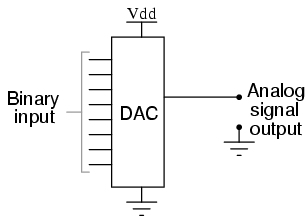
04250The project consisted of a machine control software that receives commands and alters the state of a complex electronic circuitry accordingly. The circuitry consists of several digital-to-analog converters (DAC), among other parts. We will concentrate on the DACs in this story. In case you don’t know what a DAC is, let me explain. Imagine a little integrated circuit (IC), the black bug-like electronic parts on a circuit board. On one side, you provide it a digital number in binary representation and on the other side, you’ll get an analog voltage that represents your number. Let’s say you drive a 8-bit DAC and give it a digital zero, the output will be zero volt. If you give the same DAC the number 255, it will output the maximum possible voltage. This voltage is given by the “reference voltage” pin and is usually tied to 5 V in traditional TTL logic circuits. If you drive a 12-bit DAC, the zero will still yield 0 V, while the 255 will now only yield about 0,3 V because the maximum digital number is now 4095. So the resolution of a DAC, given in bits, is a big deal for the driver.

DAC0800How exactly you have to provide that digital number, what additional signals need to be set or cleared to really get the analog voltage is up to the specific type of DAC. So this is the part of behaviour that should be encapsulated inside a DAC class. The rest of the software should only be able to change the digital number using a method on a particular DAC object. That’s our modeling task.

The original implementation

My job was not to develop the machine control software from scratch, but re-engineer it from existing sources. The code is written in plain C by an electronics technician, and it really shows. For our DAC driver, there was a function that took one argument – an integer value that will be written to the DAC. If the client code was lazy enough to not check the bounds of the DAC, you would see all kinds of overflow effects. It worked, but only if the client code knew about the resolution of the DAC and checked the bounds. One task the machine control software needed to do was to translate the command parameters that were given in millivolts to the correct integer number to feed it into the DAC and receive the desired millivolts at the analog output pin. This calculation, albeit not very complicated, was duplicated all over the place.


writeDAC(int value);

My original translation

One primary aspect when doing re-engineering work is not to assume too much and don’t change too many places at once. So my first translation was a method on the DAC objects requiring the exact integer value that should be written. The method would internally check for the valid value range because the object knows about the DAC resolution, while the client code should subsequently lose this knowledge. The original code translated nicely to this new structure and worked correctly, but I wasn’t happy with it. To provide the correct integer value, the client code needs to know about the DAC resolution and perform the calculation from millivolts to DAC value. Even if you centralize the calculation, there are still calls from everywhere to it.


dac.write(int value);

My first relevation

When I finally had translated all existing code, I knew that every single call to the DAC got their parameter in millivolts, but needed to set the DAC integer. Now I knew that the client code never cared about DAC integers at all, it cared about millivolts. If you find such a revelation, act on it – even just to see where it might lead you to. I acted and replaced the integer parameter of the write method on the DAC object with a voltage parameter. I created the Voltage domain type and had it expose factory methods to be easily created from millivolts that were represented by integers in the commands that the machine control software received. Now the client code only needed to create a Voltage object and pass it to the DAC to have that voltage show up at the analog output pin. The whole calculation and checking part happened inside the DAC object, where it belongs.


dac.write(Voltage required);

This version of the code was easy to read, easy to reason about and worked like a charm. It went into production and could be the end of the story.

The second insight

But the customer had other plans. He replaced parts of the original circuitry and upgraded most of the DACs on the way. Now there was only one type of DAC, but with additional amplifier functionality for some output pins (a typical DAC has several output pins that can be controlled by a pin address that is provided alongside the digital number). The code needed to drive the DACs, that were bound to 5 V reference voltage, but some channels would be amplified to double the voltage, providing a voltage range from 0 V to 10 V. If you want to set one of those channels to 5 V output voltage, you need to write half the maximum number to it. If the DAC has 12-bit resolution, you need to write 2047 (or 2048, depending on your rounding strategy) to it. Writing 4095 would yield 10 V on those channels.

Because the amplification isn’t part of the DAC itself, the DAC code shouldn’t know about it. This knowledge should be placed in a wrapper layer around the DAC objects, taking the voltage parameters from the client code and changing it according to the amplification of the channel. The client code would want to write 10 V, pass it to the wrapper layer that knows about the amplification and reduces it to 5 V, passing this to the DAC object that transforms it to the maximum reference voltage (5 V) that subsequently gets amplified to 10 V. This sounded so weird that I decided to review my domain analysis.

It dawned on me that the DAC domain never really cared about millivolts or voltages. Sure, the output will be a specific voltage, but it will be relative to your input in relation to the maximum value. The output voltage has the same percentage of the maximum value as the input value. It’s all about ratios. The DAC should always demand a percentage from the client code, not a voltage. This way, you can actually give it the ratio of anything and it will express this ratio as a voltage compared to the reference voltage. The DAC is defined by its core characteristics and the wrapper layer performs the translation from required voltage to percentage. In case of amplification, it is accounted for in this translation – the DAC never needs to know.


dac.write(Percentage required);

Expressiveness of the new concept

Now we can really describe in code what actually happens: A command arrives, requiring us to set a DAC channel to 8 volt. We create the voltage object for 8 volt and pass it on to the DAC wrapper layer. The layer knows about the 2x amplification and the reference voltage. It calculates that 8 volt will be 80% of the maximum DAC value (80% of 5 V being 4 V before and 8 V after amplification) and passes this information to the DAC object. The DAC object, being the only one to know its resolution, sets 0.8 * maximum_DAC_value to the required register and everything works.

The new concept of percentages decouples the voltage information from the DAC resolution information and keeps both informations where they belong. In fact, the DAC chip never really knows about the reference voltage, either – it’s the circuit around it that knows.

Conclusion

While it is easy to see why the first version with voltages as parameters has its charms, it isn’t modeling the reality accurately and therefor falls short when flexibility is required. The first version ties DAC resolution and reference voltage together when in fact the DAC chip only knows the resolution. You can operate the chip with any reference voltage within a valid range. By decoupling those informations and moving the knowledge about reference voltages outside the DAC object, I modeled the reality more accurate and every requirement finds its natural place. This “natural place finding” is what makes a good model useful for reasoning. In our case, the natural place for the reference voltage was outside the DAC in the wrapper layer. Finding a real name for the wrapper layer was easy, I called it “circuit board”.

Domain analysis is all about having the right abstractions for your model. Your model is suitable for your task when everything fits and falls into place nearly automatically. When names needn’t be found but kind of obtrude themselves from the real domain. The right model (for the given task) feels good and transports a lot of domain knowledge. And domain knowledge is the most treasurable knowledge for any developer.

Recap of the Schneide Dev Brunch 2015-06-14

If you couldn’t attend the Schneide Dev Brunch at 14th of June 2015, here is a summary of the main topics.

brunch64-borderedA week ago, we held another Schneide Dev Brunch, a regular brunch on the second sunday of every other (even) month, only that all attendees want to talk about software development and various other topics. So if you bring a software-related topic along with your food, everyone has something to share. The brunch was well attented this time with enough stuff to talk about. We probably digressed a little bit more than usual. As usual, a lot of topics and chatter were exchanged. This recapitulation tries to highlight the main topics of the brunch, but cannot reiterate everything that was spoken. If you were there, you probably find this list inconclusive:

Distributed Secret Sharing

Ever thought about an online safe deposit box? A place where you can store a secret (like a password or a certificate) and have authorized others access it too, while nobody else can retrieve it even if the storage system containing the secret itself is compromised? Two participants of the Dev Brunch have developed DUSE, a secure secret sharing application that provides exactly what the name suggests: You can store your secrets without any cleartext transmission and have others read them, too. The application uses the Shamir’s Secret Sharing algorithm to implement the secret distribution.

The application itself is in a pre-production stage, but already really interesting and quite powerful. We discussed different security aspects and security levels intensily and concluded that DUSE is probably worth a thorough security audit.

Television series

A main topic of this brunch, even when it doesn’t relate as strong with software engineering, were good television series. Some mentioned series were “The Wire”, a rather non-dramatic police investigation series with unparalleled realism, the way too short science-fiction and western crossover “Firefly” that first featured the CGI-zoom shot and “True Detective”, a mystery-crime mini-series with similar realism attempts as The Wire. “Hannibal” was mentioned as a good psychological crime series with a drift into the darker regions of humankind (even darker than True Detective). And finally, while not as good, “Silicon Valley”, a series about the start-up mentality that predominates the, well, silicon valley. Every participant that has been to the silicon valley confirms that all series characters are stereotypes that can be met in reality, too. The key phrase is “to make the world a better place”.

Review of the cooperative study at DHBW

A nice coincidence of this Dev Brunch was that most participants studied at the Baden-Württemberg Cooperative State University (DHBW) in Karlsruhe, so we could exchange a lot of insights and opinions about this particular form of education. The DHBW is an unique mix of on-the-job training and academic lectures. Some participants gathered their bachelor’s degree at the DHBW and continued to study for their master’s degree at the Karlsruhe Institute of Technology (KIT). They reported unisono that the whole structure of studies changes a lot at the university. And, as could be expected from a master’s study, the level of intellectual requirement raises from advanced infotainment to thorough examination of knowledge. The school of thought that transpires all lectures also changes from “works in practice” to “needs to work according to theory, too”. We concluded that both forms of study are worth attending, even if for different audiences.

Job Interview

A short report of a successful job interview at an upcoming german start-up revealed that they use the Data Munging kata to test their applicants. It’s good to see that interviews for developer positions are more and more based on actual work exhibits and less on talk and self-marketing skills. The usage of well-known katas is both beneficial and disadvantageous. The applicant and the company benefit from realistical tasks, while the number of katas is limited, so you could still optimize your appearance for the interview.

Following personalities

We talked a bit about the notion of “following” distinguished personalities in different fields like politics or economics. To “follow” doesn’t mean buying every product or idolizing the person, but to inspect and analyze his or her behaviour, strategies and long-term goals. By doing this, you can learn from their success or failure and decide for yourself if you want to mimick the strategy or aim for similar goals. You just need to be sure to get the whole story. Oftentimes, a big personality maintains a public persona that might not exhibit all the necessary traits to fully understand why things played out as they did. The german business magazine Brand Eins or the english Offscreen magazine are good starting points to hear about inspiring personalities.

How much money is enough?

Another non-technical question that got quite a discussion going was the simple question “when did/do you know how much money is enough?”. I cannot repeat all the answers here, but there were a lot of thoughtful aspects. My personal definition is that you have enough money as soon as it gets replaced as the scarcest resource. The resource “time” (as in livetime) is a common candidate to be the replacement. As soon as you don’t think in money, but in time, you have enough money for your personal needs.

Basic mechanics of company steering

In the end, we talked about start-ups and business management. When asked, I explained the basic mechanics of my attempt to steer the Softwareschneiderei. I won’t go into much detail here, but things like the “estimated time of death” (ETOD) are very important instruments that give everyone in the company a quick feeling about our standings. As a company in the project business, we also have to consider the difference between “gliding flight projects” (with continuous reward) and “saw tooth projects” with delayed reward. This requires fundamentally different steering procedures as any product manufacturer would do. The key characteristic of my steering instruments is that they are directly understandable and highly visible.

Epilogue

As usual, the Dev Brunch contained a lot more chatter and talk than listed here. The number of attendees makes for an unique experience every time. We are looking forward to the next Dev Brunch at the Softwareschneiderei. And as always, we are open for guests and future regulars. Just drop us a notice and we’ll invite you over next time.

Easy maintenance, not easy production

Imagine that you have to do critical changes in the source code, stressed, over-worked and under time pressure, without any recollection about your thoughts during development, lacking your familiar tools while your customer waits impatiently by your side. That’s when you are glad you prepared for this moment.

It is said that source code gets read a hundred times more often than it gets written. My experience confirms this circumstance, which leads to a principle of economic source code modifications: The first modification is almost for free, it’s the later ones that run up a bill. In order to achieve a low TCO (total cost of ownership), it’s sound advice to plan (and develop) for easy maintenance instead of easy production. This principle even has a fancy name: Keep It Simple, Stupid (KISS).

Origin of KISS

According to the english Wikipedia on the topic, the principle’s name was coined by an aircraft engineer named Kelly Johnson, who also designed the fastest jet plane of all time, the SR-71 “Blackbird”. The aircraft reached speeds of over Mach 3 and had an unmatched defensive armament: enough thrust to evade any confrontation. It would simply fly higher and/or faster than anything launched against it, like interceptor fighters or anti-air missiles. The Blackbird used construction material that was specifically invented for this plane and very expensive, so it definitely was no easy production. Sadly for this blog post, it wasn’t particularly easy to maintain, either. It usually leaked so much fuel that it had to be refueled directly after takeoff. The leaks were pragmatically designed that way and would seal themselves in flight. It’s quite an interesting plane.

Easy maintenance

Johnson once alledegly gave his engineers a bunch of tools and required that the aircraft under design must be repairable with only these tools, by an average mechanic in the field under combat conditions (e.g. stressed, exhausted and narrow timeframe). This is a wonderful concept that I regularly apply to my projects: Imagine that you are on-site with your customer, the most important functionality of your project just broke, resulting in a disastrous standstill of the whole facility and all you have is your sourcecode and the vi editor (or vim, if you’re non-hardcore like me). No internet, no IDE, no extensive documentation. Could you make meaningful changes to your project under these conditions? What needs to be changed to make your life easier in such an extreme situation? What restrictions would these changes impose on your daily work? How much effort/damage/resources would these changes cost? Is it easier to anticipate maintenance or to trust to luck that it won’t be necessary?

Easy production

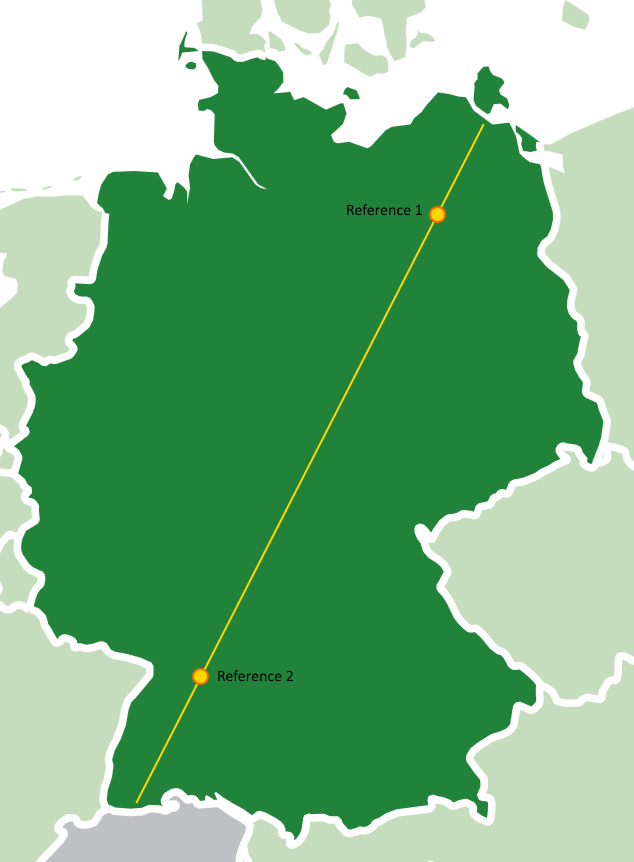
A while ago, I reviewed the code of a map tool. The user viewed a map and could click on it to mark a certain location. The geo coordinates of this location would be used as an input for further computations. The map was restricted to a fixed area, so the developer wrote the code in the easiest way possible: He chose well-known geographic landmarks on the map and determined their geo coordinates and pixel locations. map-with-referenceThose were the reference points in the code that every click would be related to. Using easy mathematic (rule of three), each point on the map could be calculated. Clever trick and totally working! The code practically wrote itself and the reference points only needed to be determined once.

Until the map was changed. The code contained some obscure constants that described the original landmarks, but the whole concept of arbitrary reference points was alien to the next developer. He was used to the classic concept of two reference points: top left and bottom right, with their respective geo coordinates and pixel locations. What seemed like a quick task turned into a stressful reclaiming of the clever trick during production.

In this example, the production (initial development) was easy, straight-forward and natural, but not easily reproducible during the maintenance phase (subsequent modification). The algorithm used a clever approach, but this cleverness isn’t necessarily available “under combat conditions”.

Go the extra mile

Most machines are designed so that wearing parts can be easily replaced. Think of batteries in electronic gagdets (well, at least before the gadget’s estimated lifetime was lower than the average battery life) or light bulbs in cars (well, at least before LED headlights were considered cool). Thing is, engineers usually know the wear effects their designs have to endure. There is no “usual wear effect” on software, due to lack of natural forces like gravitation. Everything could change, so it’s better to be prepared for all sorts of change. That’s the theory, but it’s not economically sound to develop software that is prepared for any circumstance. Pragmatic reasoning calls for compromise, like supporting changes that

  • are likely to happen (this needs to be grounded in domain knowledge and should be documented in the code)
  • are not expensive to arrange beforehands (the popular “low-hanging fruits”)
  • are expensive to implement afterwards

The last aspect might be a bit of a surprise, but it’s the exact aspect that came to play in the example above: To recreate the knowledge about the clever trick of landmark choices needed more time than implementing the classic interpolation taking the edge points.

So if you see a possible (and not totally unlikely) change that will be expensive to implement once the intimate knowledge of the code you have during the initial development, go the extra mile and prepare for it right now. Leave a comment, implement some kind of extension mechanism or just mind the code seams. In our example, slightly complicating the initial development led to a dramatically less clever and more accessible code.

Conclusion

You should consider writing your code for easy maintenance, even if that means additional effort during the initial implementation. Imagine that you yourself have to do the future change, stressed, over-worked and under time pressure, without any recollection about your thoughts today, lacking your familiar tools while your customer waits impatiently by your side. With proper preparation, even this scenario is feasible.


Recap of the Schneide Dev Brunch 2015-04-12

If you couldn’t attend the Schneide Dev Brunch at 12th of April 2015, here is a summary of the main topics.

brunch64-borderedA week ago, we held another Schneide Dev Brunch, a regular brunch on the second sunday of every other (even) month, only that all attendees want to talk about software development and various other topics. So if you bring a software-related topic along with your food, everyone has something to share. The brunch was a little sparsely attented this time but there was enough stuff to talk about. As usual, a lot of topics and chatter were exchanged. This recapitulation tries to highlight the main topics of the brunch, but cannot reiterate everything that was spoken. If you were there, you probably find this list inconclusive:

Review of San Francisco

As it turned out, San Francisco might be half a planet away, but several of our attendees happened to live there for a while. They described the city and its culture to us and shared stories about specific persons and places. For a moment, San Francisco was just around the corner.

Review Ninja

One reason that San Francisco came up was the mentioning of Review Ninja, a second-generation code review tool with one of the coolest project URLs ever. If you ever were smitten by code review tools like gerrit, then Review Ninja might be worth a look. It has a lightweight and simplistic approach to a activity that could as well end up being a bureaucratic nightmare.

Be convincing

Another topic was the art of being convincing – to convince people of something useful but unfamiliar. We concluded that you cannot change people, no matter the effort. Only people can change people. You can try to facilitate their change, though. But don’t expect appreciation or even acknowledgement for your effort. Everybody will be convinced that they came up with the solution themselves. That’s the art of being convincing – or so we convinced ourselves.

Google recruitment process

We spent a lot of time discussing the Google recruitment process that one attendee had just successfully passed. But it’s a long and extensive process, so our timeframe fit. There is a book, “Cracking the Coding Interview” by Gayle Laakmann McDowell, that seems to be quite useful for preparation on the daylong in-depth interview marathon that needs to be mastered if you want to join Google. A number of similar books try to teach you the knowledge necessary to pass the recruitment process – not the job that usually follows, mind you, just the recruitment. Our participant counted more than thirty distinguishable contacts with Google during the process. The process itself is highly formalized, while interviews are performed by normal engineers on Google’s side. The comparability between applicants is achieved through the great number of interviews to even out random outliers.

Nearly all big IT companies utilize a similar recruitment process, so this insight can be applied nearly everywhere: If you want to be recognized as talented, you have to be prepared for the tests to come. Don’t assume that your interviewer presupposes anything about your abilities. Just because you have a degree in computer sciences doesn’t mean you know how to program, for example. They will test for that, and with rather challenging tasks, so better learn your stuff again.

Work environment

Anticipating the next topic, we talked about different workplace setups, like open-plan offices, separate rooms for everyone and the like. A great insight was that very different preferences exist. The ideal work environment of one developer is a nightmare for the next. And now imagine how difficult it gets to agree on a trade-off in a bigger team. We couldn’t even agree on music vs. silence for in-zone programming sessions, let alone the style of music that should be playing.

Room setup

As a practical exercise, we tried to rearrange the desks in the Softwareschneiderei to increase the number of desks on our second floor. We started without any restrictions on placement and iterated through several layouts, discussing several side-effects and drawbacks in our solutions. In the end, two applicable layout alternatives survived our weeding process. It was a lesson in group dynamics and emergent rulesets and even gave us a viable result.

 What defines object orientation?

We talked about the different approaches to define object orientation in terms of developer thinking. The classic approach of giving entities an identity was explored as well as the rather personal definition of flowing functionality instead of flowing data. We agreed that knowing all kinds of programming paradigms (with imperative, object oriented and functional being the major ones) enables developers to make the right choices for the task at hand. Being unable to choose leads to being ineffective fast.

The Java Memory Model

A short recap of the very informative and insightful talk about the Java Memory Model given by one of our attendees closed our brunch. The Java Memory Model (or any other memory model in fact) is a great help in determining if something weird can possibly happen with your code, like one thread observing a field X being set first and Y second, while another thread swears that Y was set first and X later. A memory model helps you to understand the quantum mechanics of your programming language and therefore survive multithreaded programming. And a simple rule will let you understand the vast majority of the Java Memory Model, as shown in the talk. I highly recommend you read up about the memory model of your favorite programming language.

Epilogue

As usual, the Dev Brunch contained a lot more chatter and talk than listed here. The number of attendees makes for an unique experience every time. We are looking forward to the next Dev Brunch at the Softwareschneiderei. And as always, we are open for guests and future regulars. Just drop us a notice and we’ll invite you over next time.