What developers can learn from designers

Looking beyond the tellerrand into what and how and why other disciplines do something can teach us more about our craft.

Slow down

Technology demands speed. Our industry focuses on speed and efficiency. Even our processes measure speed. (Scrum calls it velocity) But thinking needs time. Planning takes time. Caring needs time. Details need time. Testing needs time. Hearing, researching, observing, listening. All these need time. Designers know this.
We need to slow down. In order to see and design the details without losing the big picture we need to slow down. Great designs come from thinking hard. How do you do that? You concentrate on the essence. What matters most. How do you identify the essence? By thinking hard. And that needs time.

Design is about intention

Take a look at your code: is every line there for a reason? Every line? The order of the methods. The name of the variables. The separation in classes, interfaces, packages. How much of it is accidentally? Good designers choose everything with a reason. The place of this button? No coincidence. This color? This control? This flow of actions? Everything has an intention behind it. The information presented. Even the information not presented. The wording? Is part of the overall character. The menu structure? Grounded in good decisions.
On the other side when I look at my code (especially after some months) it doesn’t look so organized and determined. The order of the methods? Grown. The reason for this interface when there is only one implementation? Maybe I thought there would be more. Using this pattern here? What part of your code tells you its intent? And how much cries: incidental complexity? Think about it: did you choose what to include and what to left out?

Test for change, build to learn

What was the subtitle of the first XP book? Embrace change. This sounds like we are victims. Change is coming and we need to cope with it. But what when change is really coming? Are we prepared? 58 unit tests for the garbage?! The whole architecture and patterns I developed, tested and refactored countless times? Delete them?! In reality we still fear change.
But it does not have to be this way. What do designers do? They test for change. They build wireframes, mockups, prototypes. If some of them didn’t work out they can abandon them. The cost to create them is low. And even when it was not the right design they learned something. They build the prototypes to test their hypotheses. They build them to proof or falsify their assumptions. They build to learn.
The learning effect is more important than the artifact itself.
And when the application is in production? They also test for change. They do A/B tests (again for learning). Designers don’t wait until change comes to them and then they have to embrace it, they test for change.

Listen

Listen. Truly listen. Shut down your preconceptions. How often do we ask too fast, too much? Suggestive questions? Questions with constrained possibilities to answer? I often ask goal directed questions. To further find out. To define what the requirements are.
Then one day I made a mistake. I asked an open ended question. And got an answer. Not what I expected. I thought I would know the shape of the problem. I thought: okay, we need a chart, the possibility to switch between different scales and a second view for the deviation. But no. Suddenly the customer tells me: just show one series in one scale. The deviation can be displayed in a table. We do not need other scales. In previous meetings he nodded in agreement when I presented the other solution. What happened? Did the customer change his mind? No. He told me his thoughts. Not the other way around. I did not tell him what I think and he agrees. He had to think for himself. He had to shape his thoughts in order to explain them to me. He had to think it through.

Net effect matters most

Developers like to think in features. When you ask a developer what did you do for customer X, he might tell you: we created a system to manage the complex process of submitting proposals for a great variety of technologies in an efficient manner. Features: submission of proposals, complexity management, flexibility and efficiency. The what.
A designer might answer: through our work scientists all over the world have access to advanced technology to explore the future of science. The effect on the world, users and customers.
Think what is made possible through our creations, how it improves lives. Start with why.

Documentation is essential

There is this notion in our craft that the code is all the documentation you need. Why is this the way it is? Take a look at the code. The code is the documentation. Look at the commit message. This is all you need.
No. In our experience code as documentation sucks. It is too low level. What is the goal you want to reach with this piece? What is the information you collected. What are the decisions you made. What is omitted. What is rethought. What alternatives were abandoned.
Designers use all kind of artifacts to learn and record their findings and decisions. They create and keep only the essential ones and keep it pragmatic. Easy to create. Easy to update. Easy to note down what you learned and what was wrong in your assumptions. The code is just one level of abstraction and usually the end result of the thought and decision process. Record and keep the way of the decisions, not just the end result.

Focus on the whole

Developers like to divide and conquer. To separate everything into small manageable pieces. Agile demands that. First services. Then microservices. What’s next? Nanoservices?
Designers on the other hand keep the complete experience in mind. For them the whole product matters. The whole is more than the sum of its parts. The dream of the developer is that all pieces fit like Lego stones together in the end. But they forget to imagine and plan the whole creation they wanted to build. A house is not the same as another house. The composition of rooms matter. The lighting. The connections between rooms and floors. The placement of windows and doors. The whole experience. The same is valid for applications that people use.

Solution alternatives

As developers we are natural problem solvers. We are given a problem and create a solution. Designers are problem solvers, too. They identify a problem and create many solutions, test them, rate them and present them. They explore. They test and learn. They collect data and evidence. They know that every solution has its trade offs. The most promising ones are evaluated. With a plan. With hypotheses. They crave for feedback.

Reduced and emphasized – It’s about the connection

YAGNI. KISS. We know them. But what do we do with the time saved? We solve other problems. Designers carve out the details. They think of interactions, clear wording, better defaults. The little things that delight the user. Going the extra mile. The user of the applications feels cared for. He feels that there was a human that thought about his situation. There’s a connection between designers and users through the application.
When we saw Bret Victor presenting his jaw dropping talk about “Inventing on principle” he made one important point: creators must feel a connection to their creation. I think everyone should feel a connection to the software he uses. He should feel cared for and delighted. Applications are not just tools, they are experiences, they create emotions, they connect us.
The developer experience (DX): Our development process

Personally I like reading stories about how others tackle problems, their way to the solution, their process. This post is intended to give you a glimpse of how we work.

Personally I like reading stories about how others tackle problems, their way to the solution, their process.
Recently our team sat down together to brainstorm what is not so good or even bad about our way of solving things. To address those problems and to improve our developer experience I researched and documented our typical development process. This post is intended to give you a glimpse of how we work.
First you have to know that we are a service business so usually a project starts with a (potential or recurring) customer coming to us with his concerns, his business needs. On the course of a typical project the following phases (some in iterations) run:

1. Identifying the problem (aka analysis)

Often the first expressed need is not the problem to be solved. We need to dig deeper and identify the core. At this point in the process we ask the customer goal oriented questions. We guide the conversation to find any constraints of the solution. One of these constraints is often the technological platform (web, mobile, desktop).
If it is a bigger problem we need to work through different levels of abstraction, one iteration at a time.
We document all the results in functional specs. These are small blocks of text in the language of the customer describing the functional side of the problem and its constraints. These specs form the basis of every project and are entered as issues in our JIRA.
Alongside we record the concepts of the domain in form of a glossary in our wiki.
Besides the text we draw complex or core parts of the domain as diagrams on paper. A rough domain model. A module concept. A high level architecture of the system.

2. Planning

In a planning poker session we estimate each issue from the analysis. The customer sets a priority. Together we develop a milestone plan for our iterations. Smaller (1 week) iterations for explorative or fast paced projects and longer (2 – 3 weeks) iterations for slow paced or well defined projects.

3. Finding a solution

Before implementing a solution to a problem in code, we create different concepts which fit the constraints we recorded earlier.
These concepts can be paper prototypes or sketches. Sometimes these are HTML mockups or simulations.
From these we choose the best suited concept by talking with the customer or from our experience.

4. Development

At the start of the project we set up the necessary internal infrastructure. This usually consists of a git repository and jenkins jobs for continuous integration. We install the libraries, frameworks and applications. We create a project in the IDE and start implementing. While developing we write automated tests where appropriate. We use manual testing to tell us what the users will see and how it behaves like we expected. When we think we are done we look for feedback.

5. Feedback and acceptance

For feedback we deploy the project on a staging or test system, email the customer so that he fulfills a manual user acceptance test.
If the customer accepts the solution we continue with the next phase. If bigger problems arise we reopen our JIRA issues or create new ones and start with the analysis again.

6. Delivery

First we need to set up a machine to our project specific needs: automatic or manual (snowflaking). This is called provisioning.
We create scripts and jobs in Jenkins for the following steps: one for release and one for deployment and commissioning.
The release step packages the project and creates documents from our JIRA issues which were resolved in this version. The deploy step takes the release artifact and transfers this to the target machine. Usually this step also runs the deployed project. Every installation (release and deploy/commisioning) is documented manually on paper to be traceable. An email to the customer tells him what the new release includes. Tags in the repository identify the deployed code.

7. Monitoring

Every error or exception occurring is sent via email to a project specific account. Additionally we create a job in Jenkins which supervises the system periodically. The job tries to reach the application and executes some health checks.

How I find the source of bugs

You know the situation: a user calls or emails you to tell you your program has a problem. Here I illustrate how I find the source of the problem

You know the situation: a user calls or emails you to tell you your program has a problem. When you are lucky he lists some steps he believe he did to reproduce the behaviour. When you are really lucky those steps are the right ones.
In some cases you even got a stacktrace on the logs. High fives all around. You follow the steps the problem shows and you get the exact position in the code where things get wrong. Now is a great time to write a test which executes the steps and shows the bug. If the bug isn’t data dependent you normally can nail it with your test. If it is dependent on the data in the production system you have to find the minimal set of data constraints which causes the problem. The test fails, fixing it should make it green and fix the problem. Done.
But there are cases where the problem is caused not in the last action but sometime before. If the data does not reflect that the problem is buried in layers between like caches, in memory structures or the particular state the system is in.
Here knowledge of the frameworks used or the system in question helps you to trace back the flow of the state and data coming to the position of the stack trace.
Sometimes the steps do not reproduce the behaviour. But most of the time the steps are an indicator for how to reproduce the problem. The stack trace should give you enough information. If it doesn’t, take a look in your log. If this also does not show enough info to find the steps you should improve your log around the position of the strack trace. Wait for the next instance or try your own luck and then you should have enough information to find the real problem.
But what if you have no stack trace? No position to start your hunt? No steps to reproduce? Just a message like: after some days I got an empty transmission happening every minute. After some days. No stack trace. No user actions. Just a log message that says: starting transmission. No error. No further info.
You got nothing. Almost. You got a message with three bits of info: transmission, every minute and empty.
I start with transmission. Where does the system transmit data. Good for the architecture but bad for tracing the transmission is decoupled from the rest of the system by using a message bus. Next.
Every minute. How does the system normally start recurring processes? By quartz, a scheduler for Java. Looking at the configuration of the live system no process is nearly triggered every minute. There must be another place. Searching the code and the log another message indicates a running process: a watchdog. This watchdog puts a message on the bus if it detects a problem. Which is then send by the transmission process. Bingo. But why is it empty?
Now the knowledge about the facilities the system uses comes into play: UMTS. Sometimes the transmission rate is so low that the connection does not transfer any packages. The receiving side records a transmission but gets no data.
Most of the time the problem can be found in your own code but all code has bugs. If you assume after looking at your code that the frameworks you use have a bug. Search the bug database of the framework hopefully it is found there and already fixed.

Successful patterns for software developers

Some lessons I learned

Be good at everything but better at something

Diversify. Knowing and working in different domains, using different programming languages and tools and handling diverse tasks enriches your creativity as a developer. It keeps your mind flexible and inspires you. Many can agree on that. But on the other hand you should find your niche, your personal joy, your home ground. Different developers have different personalities, different talents and different preferences. People shine when they work with something they like. They are more happy, more productive and more creative. But not all developers in a team or company have the same favorites. Your company should encourage you getting better at your specialty. Work on your strengths.
I like dynamic languages, others prefer static languages. Some developers like to craft desktop software, some web applications. Others concentrate on the UI or controlling robots or sensors. Some ponder over algorithms while others are happy with designing visualizations.
When your team has a common ground but everybody has strengths in different fields everybody can learn from and supplement each other. Synergy is created.

Be support, project manager, admin, …

Developers in our company wear many hats. Sometimes even literally (but that’s another story). If a developer is responsible or takes part in other roles of the project his view is widened. When he talks with customers he not only understands their needs better but also can suggest different ways or solutions. His domain knowledge grows and he can identify pain points. Working with the platforms where the application is deployed and the systems involved also strengthens his grasp of the environment the application lives in. As a project manager he learns to juggle time and scope. He learns to work with constraints and different forces pulling not only the code but the whole project.

Optimize for forgiveness

A user deleted a post accidentally. What do we normally do? We introduce a security question to establish a barrier for deletion. What’s this? We make the UX worse because we think it is the user’s fault and we need to protect him from himself. A better way would be to don’t delete the post but make it invisible. This way he can undo if he wrongly deleted the post. But what about updates? Updating a post overwrites the old content. What if this happened not on purpose? A better way would be to record the last state of the post and undo the update if necessary. Todays computers have so much memory and are so powerful that an application can be allowed to be merciful. It can forgive its users when they did something wrong and want to revert it.

It is not about you

This is one of the hardest lessons to learn. Your work is not about you. Yes, it reflects you in a way. But it does not define you, you define the work. If your code has bugs or you make a mistake and accidentally delete important data, take a deep breath and think. Get help. Plan your steps, discuss with others what to do. Tell them you made a mistake. Everybody does. Do not try to fix it yourself. Do not hide it. Focus on the problem at hand. Not your shame or feeling of guilt. (This goes hand in hand with optimizing for forgiveness)

Talk and listen

Feedback. One of the most important things in software development. Talk to your users. Listen. Again and again. Often talking 10 minutes about a task or problem can result in hours of work saved. The bug you couldn’t reproduce? It was in a different area. The feature you thought was nearly impossible? With a slight change it is much easier. This also goes for everything else. Deployments and commits. Design decisions. You are the expert in your domain, the customer in his. Act accordingly. Tell him the options he has and what will be the consequences. Don’t let him guess. He shouldn’t do your work.

Web, your users deserve better

The web has come a long way since its inception. But nevertheless many applications fail to serve the user appropriately. We talk a lot about new presentation styles, approaches and enhancements. These are all good endeavors but we should not neglect the basics.

The web has come a long way since its inception. But nevertheless many applications fail to serve the user appropriately. We talk a lot about new presentation styles, approaches and enhancements. These are all good endeavors but we should not neglect the basics. Say you have crafted a beautiful application. It is fast, reliable and has all features the client, user or product manager has envisioned. But is it usable? Is its design up to the task? How should you know? You are no designer. But you can evaluate if your application has the fundamental building blocks, the basics. How?
Fortunately there is an ISO standard about the proper behaviour of information systems: ISO 9241-110. It defines seven principles for dialogues (in a wider sense):

  • Suitability for the task: the dialogue is suitable for a task when it supports the user in the effective and efficient completion of the task.
  • Self-descriptiveness: the dialogue is self-descriptive when each dialogue step is immediately comprehensible through feedback from the system or is explained to the user on request.
  • Controllability: the dialogue is controllable when the user is able to initiate and control the direction and pace of the interaction until the point at which the goal has been met.
  • Conformity with user expectations: the dialogue conforms with user expectations when it is consistent and corresponds to the user characteristics, such as task knowledge, education, experience, and to commonly accepted conventions.
  • Error tolerance: the dialogue is error tolerant if despite evident errors in input, the intended result may be achieved with either no or minimal action by the user.
  • Suitability for individualization: the dialogue is capable of individualization when the interface software can be modified to suit the task needs, individual preferences, and skills of the user.
  • Suitability for learning: the dialogue is suitable for learning when it supports and guides the user in learning to use the system.

This sounds pretty abstract so let’s take a look at each principle in detail.

Suitability for the task

bloated app

Simple and easy. You all know the bloated applications from the desktop with myriads of functions, operations, options, settings, preferences, … These are easy to spot. But often the details are left behind. Many applications try to collect too much information. Or in the wrong order. Scattered over too many dialogues. This is such a big problem in today’s information systems that there’s even a German word for preventing this: Datensparsamkeit. Your application should only collect and ask for the information it needs to fulfill its tasks.
But not only collecting information is a problem. Help in little things like placing the focus on the first input field or prefilling fields with meaningful values which can be automatically derived improve the efficience of task completion. Todays application has many context information available and can help the user in filling out these data from the context she is in like the current date, location, selected contexts in the application or previous values.
Above all you have to talk to your users and understand them to adequately support their goals. Communication is key. This is hard work. They might not know what is important to them. Then watch them using your application, look at how they reached their goals before your application was there. What were their problems? What went well? What (common) mistakes did they make? How can your application avoid those?

Self descriptiveness

In every part of your application the user needs to know what is the function of every item on the screen. A recent trend in design generates widgets on the screen that are too ambiguous. Is this a link, a button or just text? What is clickable? Or editable? UX calls this an affordance:

“a situation where an object’s sensory characteristics intuitively imply its functionality and use”

So just from looking at it the user has to have an idea what the control is for. So when you look at the following input field, what is the format of the date you need to enter?

date format

So if your application accepts a set of formats you should tell the user beforehand. Same with required fields or constraints like maximum or minimum length or value ranges. But nowadays applications can go a step further: you can tell the user while she enters her data that her input contradicts another input or value in your database. You can tell her that the username she wants is already taken, the date of the appointment is already blocked.

username taken

Controllability

Everybody has seen this dreaded message:

Item was deleted

Despite any complex confirmations needed to delete an item items get deleted accidentally. What now? Adding levels of confirmation or complex rituals to delete an item does not value the users and their time. Some applications only mark an item as deleted and remove this flag if necessary. That is not enough. What if the user does not delete but overwrites a value of an item by mistake? Your application needs an undo mechanism. A global one. Users as all humans make mistakes. The technology is ready to and should not make them feel bad about it. It can be forgiving. So every action an user does must be revocable. Long running processes must be cancelable. Updates must be undoable.
I know there are exceptions to this. Actions which cause processes in the real world to start can sometimes be irrevocable. Sometimes. Nobody thought that sending an email can be undone. Google did it. How? They delay sending and offer an option to cancel this process. Think about it. Maybe you can undone the actions taken.
Your application should not only allow to reverse a process but also to start a process and complete it. This sounds obvious. But many applications set so many obstacles to find how to start an action. Show the actions which can be started. Provide shortcuts to the user to start and to advance. If your process has multiple steps make it easy for the user to return to where she left.

Conformity with user expectations

Especially in web design where there is so much freedom how your application looks: avoid fancy- or cleverness.

fancyness - blog post without borders and title

There are certain standards how widgets look, stick to them. If the users clicks a button on a form she expects that the content she entered is submitted. If she wants to upload a file the button should be labelled accordingly. Use clear words. Not only conventions determine how something is worded but also the task at hand. If the user expects to see a chart of her data, “calculate” or “generate” might not be the right button label even if the application does that. So again: talk to your users, understand them and their experience. Choose clarity over cleverness. Make it obvious. Your application might look “boring” but if the user knows where and what to do this is some much more worth.

Error tolerance

Oh! Your application accepts scientific notation. Entering 9e999999999… and

boom!

Users don’t enter malicious data by purpose (at least not always). But mistakes happen. Your application should plan for that. Constrain your input values. Don’t blow up when the users attachs a 100 GB file. Tell them what values you accept and when and why their entered information does not comply. Help them by showing fuzzy matches if their search term doesn’t yield an exact match. Even if the user submitted data is correct, data from other sources might not be. Your application needs to be robust. Take into account the problem and error cases not just the sunshine state.

Suitability for individualisation

Users are different. They have differ in skills, education, knowledge, experience and other characteristics. Some might need visual assistance like a color blind mode. Your application needs to provide this. Due to the different levels of experience and the different approachs a user takes your application should provide options to define how much and how the presented information is shown. Take a look at the following table of values. Do you see what is shown?

sinus curve values

Now take a look at a graph with the same values.

sinus curve values as graph

Sometimes one representation is better as another. Again talk to your users they might prefer different presentations.

Suitability for learning

You know your application. You know where to start an action and where to click. You know how the search is used and what filters are. You know where to find the report generation. You built it. But for first time users it is as entering a foreign city. Some things might be familiar and some strange. You need to think about the entry of your application. Users need help. Think about the blank slate, when your user or your application does not have any data. How do you guide the user to create her first project or enter information for the first item. She needs help with where to find the appropiate buttons and links to start the processes. She might not recognize the function behind an icon at first glance. Sometimes a tooltip helps. Sometimes you need a legend. And sometimes you should use a text instead of an icon.

icon glory

Build your own performance and log monitoring solution

Tips for a better performance only help when you know where you can improve performance. So to find the places where speed is needed you can monitor the performance of your app in production. Here we build a simple performance and log monitoring solution.

Tips for a better performance like using views or reducing the complexity of your algorithms only help when you know where you can improve performance. So to find the places where speed is needed you can build extensive load and performance tests or even better you can monitor the performance of your app in production. Many solutions exists which give you varying levels of detail (the costs of them also varies). But often a simple solution is enough. We start with a typical (CRUD) web app and build a monitor and a tool to analyse response times. The goal is to see what are the ten worst performing queries of the last week. We want an answer to this question continuously and maybe ask additional questions like what were the details of the responses like user/role, URL, max/min, views or persistence. A web app built on Rails gives us a lot of measurements we need out of the box but how do we extract this information from the logs?
Typical log entries from an app running on JRuby on Rails 4 using Tomcat looks like this:

Sep 11, 2014 7:05:29 AM org.apache.catalina.core.ApplicationContext log
Information: I, [2014-09-11T07:05:29.455000 #1234]  INFO -- : [19e15e24-a023-4a33-9a60-8474b61c95fb] Started GET "/my-app/" for 127.0.0.1 at 2014-09-11 07:05:29 +0200

...

Sep 11, 2014 7:05:29 AM org.apache.catalina.core.ApplicationContext log
Information: I, [2014-09-11T07:05:29.501000 #1234]  INFO -- : [19e15e24-a023-4a33-9a60-8474b61c95fb] Completed 200 OK in 46ms (Views: 15.0ms | ActiveRecord: 0.0ms)

Important to identify log entries for the same request is the request identifier, in our case 19e15e24-a023-4a33-9a60-8474b61c95fb. To see this in the log you need to add the following line to your config/environments/production.rb:

config.log_tags = [ :uuid ]

Now we could parse the logs manually and store them in a database. That’s what we do but we use some tools from the open source community to help us. Logstash is a tool to collect, parse and store logs and events. It reads the logs via so called inputs, parses, aggregates and filters with the help of filters and stores by outputs. Since logstash is by Elasticsearch – the company – we use elasticsearch – the product – as our database. Elasticsearch is a powerful search and analytcs platform. Think: a REST frontend to Lucene – only much better.

So first we need a way to read in our log files. Logstash stores its config in logstash.conf and reads file with the file input:

input {
  file {
    path => "/path/to/logs/localhost.2014-09-*.log"
    # uncomment these lines if you want to reread the logs
    # start_position => "beginning"
    # sincedb_path => "/dev/null"
    codec => multiline {
      pattern => "^%{MONTH}"
      what => "previous"
      negate => true
    }
  }
}

There are some interesting things to note here. We use wildcards to match the desired input files. If we want to reread one or more of the log files we need to tell logstash to start from the beginning of the file and forget that the file was already read. Logstash remembers the position and the last time the file was read in a sincedb_path to ignore that we just specify /dev/null as a path. Inputs (and outputs) can have codecs. Here we join the lines in the log which do not start with a month. This helps us to record stack traces or multiline log entries as one event.
Add an output to stdout to the config file:

output {
  stdout {
    codec => rubydebug{}
  }
}

Start logstash with

logstash -f logstash.conf --verbose

and you should see your log entries as json output with the line in the field message.
To analyse the events we need to categorise them or tag them for this we use the grep filter:

filter {
  grep {
    add_tag => ["request_started"]
    match => ["message", "Information: .* Started .*"]
    drop => false
  }
}

Grep normally drops all non matching events, so we need to pass drop => false. This filter adds a tag to all events with the message field matching our regexp. We can add filters for matching the completed and error events accordingly:

  grep {
    add_tag => ["request_completed"]
    match => ["message", "Information: .* Completed .*"]
    drop => false
  }
  grep {
    add_tag => ["error"]
    match => ["message", "\:\:Error"]
    drop => false
  }

Now we know which event starts and which ends a request but how do we extract the duration and the request id? For this logstash has a filter named grok. One of the more powerful filters it can extract information and store them into fields via regexps. Furthermore it comes with predefined expressions for common things like timestamps, ip addresses, numbers, log levels and much more. Take a look at the source to see a full list. Since these patterns can be complex there’s a handy little tool with which you can test your patterns called grok debug.
If we want to extract the URL from the started event we could use:

grok {
    match => ["message", ".* \[%{TIMESTAMP_ISO8601:timestamp} \#%{NUMBER:}\].*%{LOGLEVEL:level} .* \[%{UUID:request_id}\] Started %{WORD:method} \"%{URIPATHPARAM:uri}\" for %{IP:} at %{GREEDYDATA:}"]
 }

For the duration of the completed event it looks like:

grok {
    match => ["message", ".* \[%{TIMESTAMP_ISO8601:timestamp} \#%{NUMBER:}\].*%{LOGLEVEL:level} .* \[%{UUID:request_id}\] Completed %{NUMBER:http_code} %{GREEDYDATA:http_code_verbose} in %{NUMBER:duration:float}ms (\((Views: %{NUMBER:duration_views:float}ms \| )?ActiveRecord: %{NUMBER:duration_active_record:float}ms\))?"]
 }

Grok patterns are inside of %{} like %{NUMBER:duration:float} where NUMBER is the name of the pattern, duration is the optional field and float the data type. As of this writing grok only supports floats or integers as data types, everything else is stored as string.
Storing the events in elasticsearch is straightforward replace or add to your stdout output an elasticsearch output:

output {
  elasticsearch {
    protocol => "http"
    host => localhost
    index => myindex
  }
}

Looking at the events you see that start events contain the URL and the completed events the duration. For analysing it would be easier to have them in one place. But the default filters and codecs do not support this. Fortunately it is easy to develop your own custom filter. Since logstash is written in JRuby, all you need to do is write a Ruby class that implements register and filter:

require "logstash/filters/base"
require "logstash/namespace"

class LogStash::Filters::Transport < LogStash::Filters::Base

  # Setting the config_name here is required. This is how you
  # configure this filter from your logstash config.
  #
  # filter {
  #   transport { ... }
  # }
  config_name "transport"
  milestone 1

  def initialize(config = {})
    super
    @threadsafe = false
    @running = Hash.new
  end 

  def register
    # nothing to do
  end

  def filter(event)
    if event["tags"].include? 'request_started'
      @running[event["request_id"]] = event["uri"]
    end
    if event["tags"].include? 'request_completed'
      event["uri"] = @running.delete event["request_id"]
    end
  end
end

We name the class and config name ‘transport’ and declare it as milestone 1 (since it is a new plugin). In the filter method we remember the URL for each request and store it in the completed event. Insert this into a file named transport.rb in logstash/filters and call logstash with the path to the parent of the logstash dir.

logstash --pluginpath . -f logstash.conf --verbose

All our events are now in elasticsearch point your browser to http://localhost:9200/_search?pretty or where your elasticsearch is running and it should return the first few events. You can test some queries like _search?q=tags:request_completed (to see the completed events) or _search?q=duration:[1000 TO *] to get the events with a duration of 1000 ms and more. Now to the questions we want to be answered: what are the worst top ten response times by URL? For this we need to group the events by URL (field uri) and calculate the average duration:

curl -XPOST 'http://localhost:9200/_search?pretty' -d '
{
  "size":0,
  "query": {
    "query_string": {
      "query": "tags:request_completed AND timestamp:[7d/d TO *]"
     }
  },
  "aggs": {
    "group_by_uri": {
      "terms": {
        "field": "uri.raw",
        "min_doc_count": 1,
        "size":10,
        "order": {
          "avg_per_uri": "desc"
        }
      },
      "aggs": {
        "avg_per_uri": {
          "avg": {"field": "duration"}
        }
      }
    }
  }
}'

See that we use uri.raw to get the whole URL. Elasticsearch separates the URL by the /, so grouping by uri would mean grouping by every part of the path. now-7d/d means 7 days ago. All groups of events are included but if we want to limit our aggregation to groups with a minimum size we need to alter min_doc_count. Now we have an answer but it is pretty unreadable. Why not have a website with a list?
Since we don’t need a whole web app we could just use Angular and the elasticsearch JavaScript API to write a small page. This page displays the top ten list and when you click on one it lists all events for the corresponding URL.

<!DOCTYPE html>
<html>
  <head>
    <script type="text/javascript" src="https://ajax.googleapis.com/ajax/libs/angularjs/1.2.11/angular.min.js"></script>
    <script type="text/javascript" src="elasticsearch-js/elasticsearch.angular.js"></script>
    <script type="text/javascript" src="monitoring.js"></script>

    <link rel="stylesheet" href="http://netdna.bootstrapcdn.com/bootstrap/3.1.0/css/bootstrap.min.css">
    <link rel="stylesheet" href="http://netdna.bootstrapcdn.com/bootstrap/3.1.0/css/bootstrap-theme.min.css">
  </head>
  <body>
    <div ng-app="Monitoring" class="container" ng-controller="Monitoring">
      <div class="col-md-6">
        <h2>Last week's top ten slowest requests</h2>
        <table class="table">
          <thead>
            <tr>
              <th>URL</th>
              <th>Average Response Time (ms)</th>
            </tr>
          </thead>
          <tbody>
            <tr ng-repeat="request in top_slow track by $index">
              <td><a href ng-click="details_of(request.key)">{{request.key}}</a></td>
              <td>{{request.avg_per_uri.value}}</td>
            </tr>
          </tbody>
        </table>
      </div>
      <div class="col-md-6">
        <h3>Details</h3>
        <table class="table">
          <thead>
            <tr>
              <th>Logs</th>
            </tr>
          </thead>
          <tbody>
            <tr ng-repeat="line in details track by $index">
              <td>{{line._source.message}}</td>
            </tr>
          </tbody>
        </table>
      </div>
    </div>
  </body>
</html>

And the corresponding Angular app:

var module = angular.module("Monitoring", ['elasticsearch']);

module.service('client', function (esFactory) {
  return esFactory({
    host: 'localhost:9200'
  });
});

module.controller('Monitoring', ['$scope', 'client', function ($scope, client) {
var indexName = 'myindex';
client.search({
index: indexName,
body: {
  "size":0,
  "query": {
    "query_string": {
      "query": "tags:request_completed AND timestamp:[now-1d/d TO *]"
     }
  },
  "aggs": {
    "group_by_uri": {
      "terms": {
        "field": "uri.raw",
        "min_doc_count": 1,
        "size":10,
        "order": {
          "avg_per_uri": "desc"
        }
      },
      "aggs": {
        "avg_per_uri": {
          "avg": {"field": "duration"}
        }
      }
    }
  }
}
}, function(error, response) {
  $scope.top_slow = response.aggregations.group_by_uri.buckets;
});

$scope.details_of = function(url) {
client.search({
index: indexName,
body: {
  "size": 100,
  "sort": [
    { "timestamp": "asc" }
  ],
  "query": {
    "query_string": {
      "query": 'timestamp:[now-1d/d TO *] AND uri:"' + url + '"'
     }
  },
}
}, function(error, response) {
  $scope.details = response.hits.hits;
});
};
}]);

This is just a start. Now we could filter out the errors, combine logs from different sources or write visualisations with d3. At least we see where performance problems lie and take further steps at the right places.

How to speed up your ORM queries of n x m associations

What solution (no cache) causes a 45x speedup? Learn the different approaches and how they compare

What causes a speedup like this? (all numbers are in ms)

Disclaimer: the absolute benchmark numbers are for illustration purposes, the relationship and the speedup between the different approaches are important (just for the curious: I measured 500 entries per table in a PostgreSQL database with both Rails 4.1.0 and Grails 2.3.8 running on Java 7 on a recent MBP running OSX 10.8)

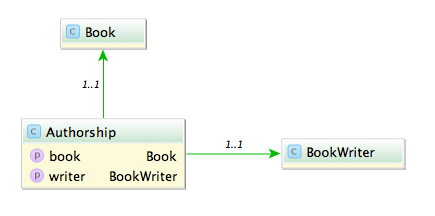
Say you have the model classes Book and (Book)Writer which are connected via a n x m table named Authorship:

A typical query would be to list all books with its authors like:

Fowler, Martin: Refactoring

A straight forward way is to query all authorships:

In Rails:

# 1500 ms
Authorship.all.map {|authorship| "#{authorship.writer.lastname}, #{authorship.writer.firstname}: #{authorship.book.title}"}

In Grails:

// 585 ms
Authorship.list().collect {"${it.writer.lastname}, ${it.writer.firstname}: ${it.book.title}"}

This is unsurprisingly not very fast. The problem with this approach is that it causes the famous n+1 select problem. The first option we have is to use eager fetching. In Rails we can use ‘includes’ or ‘joins’. ‘Includes’ loads the associated objects via additional queries, one for authorship, one for writer and one for book.

# 2300 ms
Authorship.includes(:book, :writer).all

‘Joins’ uses SQL inner joins to load the associated objects.

# 1000 ms
Authorship.joins(:book, :writer).all
# returns only the first element
Authorship.joins(:book, :writer).includes(:book, :writer).all

Additional queries with ‘includes’ in our case slows down the whole request but with joins we can more than halve our time. The combination of both directives causes Rails to return just one record and is therefore ruled out.

In Grails using ‘belongsTo’ on the associations speeds up the request considerably.

class Authorship {
    static belongsTo = [book:Book, writer:BookWriter]

    Book book
    BookWriter writer
}

// 430 ms
Authorship.list()

Also we can implement eager loading with specifying ‘lazy: false’ in our mapping which boosts a mild performance increase.

class Authorship {
    static mapping = {
        book lazy: false
        writer lazy: false
    }
}

// 416 ms
Authorship.list()

Can we do better? The normal approach is to use ‘has_many’ associations and query from one side of the n x m association. Since we use more properties from the writer we start from here.

class Writer < ActiveRecord::Base
  has_many :authors
  has_many :books, through: :authors
end

Testing the different combinations of ‘includes’ and ‘joins’ yields interesting results.

# 1525 ms
Writer.all.joins(:books)

# 2300 ms
Writer.all.includes(:books)

# 196 ms
Writer.all.joins(:books).includes(:books)

With both options our request is now faster than ever (196 ms), a speedup of 7.
What about Grails? Adding ‘hasMany’ and the authorship table as a join table is easy.

class BookWriter {
    static mapping = {
        books joinTable:[name: 'authorships', key: 'writer_id']
    }

    static hasMany = [books:Book]
}
// 313 ms, adding lazy: false results in 295 ms
BookWriter.list().collect {"${it.lastname}, ${it.firstname}: ${it.books*.title}"}

The result is rather disappointing. Only a mild speedup (2x) and even slower than Rails.

Is this the most we can get out of our queries?
Looking at the benchmark results and the detailed numbers Rails shows us hints that the query per se is not the problem anymore but the deserialization. What if we try to limit our created object graph and use a model class backed by a database view? We can create a view containing all the attributes we need even with associations to the books and writers.

create view author_views as (SELECT "authorships"."writer_id" AS writer_id, "authorships"."book_id" AS book_id, "books"."title" AS book_title, "writers"."firstname" AS writer_firstname, "writers"."lastname" AS writer_lastname FROM "authorships" INNER JOIN "books" ON "books"."id" = "authorships"."book_id" INNER JOIN "writers" ON "writers"."id" = "authorships"."writer_id")

Let’s take a look at our request time:

# 15 ms
 AuthorView.select(:writer_lastname, :writer_firstname, :book_title).all.map { |author| "#{author.writer_lastname}, #{author.writer_firstname}: #{author.book_title}" }
// 13 ms
AuthorView.list().collect {"${it.writerLastname}, ${it.writerFirstname}: ${it.bookTitle}"}

13 ms and 15 ms. This surprised me a lot. Seeing this in comparison shows how much this impacts performance of our request.

The lesson here is that sometimes the performance can be improved outside of our code and that mapping database results to objects is a costly operation.

When UTF8 != UTF8

Not all encoding problems are problems with different encodings

Problem

Recently I encountered a problem with umlauts in file names. I had to read names from a directory and find and update the appropriate entry in the database. So if I had a file named hund.pdf (Hund is German for dog) I had to find the corresponding record in the database and attach the file. Almost all files went smooth but the ones with umlauts failed all.

Certainly an encoding problem I thought. So I converted the string to UTF-8 before querying. Again the query returned an empty result set. So I read up on the various configuration options for JDBC, Oracle and Active Record (it is a JRuby on Rails based web app). I tried them all starting with nls_language and ending with temporary setting the locale. No luck.

Querying the database with a hard coded string containing umlauts worked. Both strings even printed on the console looked identically.

So last but not least I compared the string from the file name with a hard coded one: they weren’t equal. Looking at the bytes a strange character combination was revealed \204\136. What’s that? UTF8 calls this a combining diaeresis. What’s that? In UTF8 you can encode umlauts with their corresponding characters or use a combination of the character without an umlaut and the combining diaeresis. So ‘ä’ becomes ‘a\204\136’.

Solution

The solution is to normalize the string. In (J)Ruby you can achieve this in the following way:

string = string.mb_chars.normalize.to_s

And in Java this would be:

string = Normalizer.normalize(string, Normalizer.Form.NFKC)

Ruby uses NFKC (or kc for short) as a default and suggests this for databases and validations.

Lesson learned: So the next time you encounter encoding problems look twice it might be in the right encoding but with the wrong bytes.

Grails Update from 2.2 to 2.3

An update in the minor version does not seem like a big step but this is one brought a lot of changes, so here a step by step guide which highlights some pitfalls.

An update in the minor version does not seem like a big step but this is one brought a lot of changes, so here a step by step guide which highlights some pitfalls.

First update the version of Grails in your application properties:

app.grails.version=2.3.8

The tomcat and hibernate plugins now have versions of their respective frameworks and not the version number of Grails:

plugins.tomcat=7.0.52.1
plugins.hibernate=3.6.10.13

Grails 2.3 has a new databinding mechanism. To use the old one, especially if you use custom property editors you have to add this option to your Config.groovy:

grails.databinding.useSpringBinder = true

But even with the old databinding something changed. The field id is not bound in command objects you need to bind id explicitly:

def action = { MyCommand command ->
  command.id = params['id']?.toLong()
}

Besides the databinding mechanism also the dependency resolving changed. But you can use the old ivy mechanism by including this in BuildConfig.groovy:

grails.project.dependency.resolver="ivy"

Nonetheless all dependencies must be declared in application.properties or BuildConfig.groovy. If you have a lib directory with local jars in your application you need to add this to your repositories as a local directory:

grails.project.dependency.resolution = {
    repositories {
        flatDir name:'myRepo', dirs:'lib'
    }
}

When you have all dependencies declared your application should start.

Tests

Grails 2.3 features a new test mode: forking. This causes some problems and is better to be deactivated in BuildConfig.groovy:

grails.project.fork = [
        test: false,
]

With the new version only JUnit4 style tests are supported. This means that you don’t extend GroovyTestCase or GrailsUnitTestCase. All rules must be public and non static. All tests methods need to be annotated with @Test. Set up methods are annotated with @Before and must be public. The tearDown methods must also be annotated with @After and be public. A bug in Grails prevents you from naming the set up and tear down methods freely: the names must be setUp and tearDown. All test methods must be public void, the old def declaration is not supported anymore. Now without extending GroovyTestCase you lose the assertion methods and need to add a static import:

import static groovy.util.GroovyTestCase.*

Unit Tests

All tests should be annotated with @TestMixin([GrailsUnitTestMixin]). If you need to mock domain classes you change mockDomain to @Mock:

class MyTest {
	public void testThis() {
      mockDomain(MyDomainClass, [mdc])
  }
}
@Mock([Proposal])
class MyTest {
	public void testThis() {
      mdc.save()
  }
}

Configuration is now already mocked and your properties can be added easily:

config.my.property.value.is='123'

Integration tests

As mentioned before setUp method naming has a bug: you have to name them setUp otherwise the changes to your database aren’t rollbacked.

Acceptance Tests with Selenium

You need to patch the Remote Control Plugin because of a ClassNotFoundException. Add an additional constructor to RemoteControl.groovy to support setting the classloader:

RemoteControl(ClassLoader loader) {
  super(new HttpTransport(getFunctionalTestReceiverAddress(), loader), loader)
} 

In your tests you call this new constructor with the classloader of your class:

new RemoteControl(getClass().classLoader)

Using a Groovy Mixin in your application does not work in your tests and need to be replaced with grails.util.Mixin. But this only works in one way: the target class can access the mixin but the mixin not the target class. For this to work you need to let your mixin implement MixinTargetAware and declare a field named target:

class MyMixin implements MixinTargetAware {
	def target
}

Subtle changes and pitfalls

If you have a classname with a Controller suffix and a corresponding test but which isn’t a Grails controller Grails nevertheless tries to mock the class in your unit tests. If you rename the test to something without controller everything works fine.

In our pre 2.3 project we had some select tags in our views and used fieldValue for the selection:

<g:select value="${fieldValue(bean: object, field: 'value')}">

But now the select tag uses equals which fails if the values aren’t Strings. Just use the unescaped value:

<g:select value="${object?.value}">

I hope this guide and hints help others to avoid the headaches when upgrading your Grails application.

A coder’s manifesto

A personal manifesto about what I value in developing software and what I think needs to change how we develop software.

Remember the Agile manifesto? What was the most important principle behind it?

User value first

Our highest priority is to satisfy the customer
through early and continuous delivery
of valuable software.
– The agile manifesto

If it doesn’t benefit the user it should not be done. This can be a new feature, a better user interface, a clearer wording, better performance, robustness, … Not all improvements have immediate value but they must have a value at some time. If you look at the craftsman project priorities timely delivery has the most user value for me. (Personal footnote: I think this is where the software craftsmanship movement sets the wrong focus: quality is not the most important thing, user value is). But how do you know what the user might need?

Communication is key

Communication in all parts of software development is a must. You need to talk to your users, your fellow developers and other project partners. What often is neglected is the communication part of the code and the documentation. The primary measure of good code is how well it communicates its intent. How clear it is. Many measure code quality with things like testability, low coupling, coverage, metrics. But clarity and communication are by far the most important. If you can understand what the code does and how and why, you are able to change it. I personally believe that not only the statements but also the formatting of the code and the individual expression, the style, is important. Just as in novels and poetry, the typography emphasizes the meaning, the formatting can do this for the code.
Sometimes the why of decisions cannot be expressed in code this is where documentation comes in. If you have a need to document the what or the how, refactor your code. The importance of communication cannot be understated. Often talking with the user first can save you days and weeks of coding. How?

KISS and YAGNI

Simple and easy. As computer scientist we are trained to solve a problem correctly in all its glory. Every corner case is handled and secured by a test. I think to be more successful as a developer we have to unlearn this. (don’t get me wrong: there are places and software where we need this but the majority of software doesn’t need this) How often did I implement a complete version of a solution to later see that only 80% of it was used. The remaining 20% occur once in a lifetime but needed the most of the development time. If we constraint the problem we can save magnitudes of development time and can invest in more user value. And in…

Developer happiness

Some developers trade development productivity for runtime performance. But we don’t want to code in assembler or C. I happily trade runtime performance for productivity. Productivity means happiness. I am happy when I get things done. If I need to improve the performance I can focus on the parts which need it (remember YAGNI?). Programming languages, frameworks and platforms are not just tools, they are and form our ways of thinking. Tools we use have to help us reaching our goals, so…

Testing is important but just a tool

Testing gives me confidence to change code without breaking things. It helps me to avoid regression. Tests are a great tool. But only a means to an end. The program code is more important than tests, so tests should not force me to make compromises in clarity or communication level of the code. Ideally testing environments should be easy to set up and execute. One thing the recent TDD debate showed me is that we need to focus on the goals we have and the problems we want to solve with our tools. The tools we use should take a front row seat. If they need more focus or effort than the benefit they bring something is wrong. We need to constantly assess if the tools help us to reach our goals. So we have to…

Reflect

The last principle of the agile manifesto is to reflect regularly. What can be done better? How to improve? What did we learn? Often this sounds like a chore. Many times the reflection is omitted. Clean code tries to prevent this with daily reflection. But the set of practices and principles is questionable and carved into stone. So what can be done to make reflection more attractive? One of my suggestions is to keep a

Developer handbook

Reading Small Talk Best Practice Patterns (by Kent Beck) I could not help but have a feeling that this is like a personal developer handbook. In it Kent touches many important aspects of programming like composition of methods, naming and formatting. On top of that he describes his personal experiences and opinions in many of the patterns. I found this really valuable. I think starting with some of these patterns and my own experiences it would be helpful to record them in a personal developer handbook. I can use this book to remember past solutions and reflect on them. I can add my experiences in different projects and contexts to these. The goal is to get better at writing clear code and improve the communication of my code. These records could also help me to make my common habits, patterns, mistakes and approaches to problems explicit and learn from them. This is a personal book but it could also be a team effort or help others. The last part, the conclusion, of the TDD debate has a special insight for me: I should not lean on the masters of software development to advance our field and my development skills in particular. I need to find my own way and many things I take for granted I have to…

Re-think

Kent told an anecdote how he discovered TDD and then it struck me: he had a goal (or a need) in mind and had to find his way. In hindsight it sounds easy but it takes courage and persistence to push through. I think many more problems currently exist in developing software and often we took them for a given, we adjusted us, we accepted them. We cannot imagine a solution for these problems because like the elephant with the rope we never experienced a time without them. But this needs to change. We have to rethink the unsolved or inadequately solved problems and ignore some conventions and habits we formed as developers and as an industry. We have to rethink some of our approaches and assumptions. I believe we can find new ways which improve how we develop software and for this we need to rethink.