Recently I ran into a problem that only showed up outside the development environment.
I had a small script that needed to iterate over all records in the database and load blobs.
Document.all.eachdo |doc|
process(doc.blob)
end
With a small dataset everything worked as expected. With production-sized data, however, the job was terminated by the runtime with an out-of-memory error.
This behaviour is not surprising once you look at what all.each actually does.
How all.each works
When calling all.each ActiveRecord is loading the complete result set into memory before the iteration starts. For large tables this means that thousands or even millions of Ruby objects are instantiated at once.
If each record also references additional data — for example blobs, attachments, or associations — the memory usage grows quickly.
Loading Records with find_each
ActiveRecord provides find_each for exactly this scenario:
Document.find_eachdo |doc|
process(doc.blob)
end
In contrast to each, this method does not load all records at once. Instead, records are fetched in batches and yielded one by one.
Conceptually the process looks like this:
Load a limited number of records
Yield them to the block
Discard them
Load the next batch
By default, find_each loads records in batches of 1000. The batch size can be configured:
Document.find_each(batch_size:100) do |doc|
process(doc.blob)
end
find_each always iterates in primary key order. This means the model must have a primary key that is orderable like integer or string. Any explicit ordering will be ignored.
If more control is required, find_in_batches can be used instead. It requires manual iteration over the batches.
Conclusion
Iterating over large tables with all.each is easy to write but can lead to excessive memory usage once the dataset grows.
For batch processing tasks, find_each is usually the safer default because it limits the number of instantiated records and keeps memory usage predictable.
Anyone who has ever gone through a public tender knows the feeling: forms on forms, references to other forms, appendices that depend on annexes, and fields that must be filled exactly as specified somewhere on page 37 of a different document. This is not a task; it is a paper war.
Trying to fight this war alone is a mistake.
We learned that the most effective way to survive such bureaucratic battles is to treat them like a team sport. Not a big team—three people are enough—but with clearly defined roles.
The Problem with the Lone Warrior
The naive approach is simple: one person sits down, opens all documents, and starts filling things out.
This person must:
understand the overall structure of the process,
search for the right documents and sections,
enter data correctly and consistently,
double-check everything afterward.
That is a lot of cognitive load. The result is usually slow progress, rising frustration, and errors that only show up when it’s already too late.
The paper war doesn’t reward heroics. It rewards coordination.
A Three-Person Setup
We had much better results by splitting the work into three distinct roles, all active at the same time.
1. The EXECUTOR
The executor is the only person who actually enters data into the forms.
This role is deliberately narrow:
type exactly what is agreed upon,
do not search,
do not interpret,
do not “improve” anything on the fly.
The executor’s job is flow. By removing all other responsibilities, they can focus on speed and accuracy.
2. The Navigator
The navigator owns the overview.
They know:
which document is relevant right now,
where a specific field is defined,
which appendix explains which requirement.
While the executor is typing, the navigator is already preparing the next reference: “Next field is in document B, section 4.2, and it depends on the value we used earlier in A.3.”
This prevents context switching for the executor and keeps the process moving forward.
3. The Checker
The checker validates everything live.
They verify:
numbers,
names,
dates,
consistency with previous entries,
alignment with external sources (contracts, invoices, registers).
This is crucial: checking after the fact is expensive. Checking while data is entered is cheap. Errors are caught immediately, while the context is still fresh.
Like a Car Driving Lesson
This setup is not unfamiliar if you think about a car driving lesson.
The executor is the driver. They focus entirely on operating the vehicle: steering, braking, accelerating. They don’t decide where to go next; they just execute cleanly and safely.
The navigator is the driving instructor sitting in the passenger seat. They know the route, anticipate upcoming turns, and give timely instructions so the driver can react without stress.
The checker plays the role of the driving examiner in the back seat. Quiet but attentive, they observe everything, immediately spotting mistakes, inconsistencies, or rule violations before they become real problems.
Just like in a driving lesson, separating these roles creates confidence, flow, and control—exactly what you need when navigating bureaucratic traffic.
Why This Works
This setup mirrors patterns we already know from software development:
separation of concerns,
reducing cognitive load,
fast feedback loops.
Each person has a clear responsibility, and overlaps are intentional but limited. Nobody is idle, and nobody is overwhelmed.
Most importantly, the process becomes predictable. Instead of a chaotic scramble through documents, you get a steady, almost mechanical flow from field to field.
Paper Wars Won’t Disappear
Bureaucratic processes are unlikely to become simpler anytime soon. Digital forms often just move the paper war onto a screen without changing its nature.
But how we approach them can change.
Treating a public tender as a collaborative, real-time effort instead of a solitary endurance test turns frustration into something manageable—and sometimes even efficient.
You may not win the war forever. But at least you’ll win this battle.
Monorepos or “collection repositories” tend to grow over time. At some point, a part of them deserves its own life: independent deployments, a dedicated team, or separate release cycles.
The tricky part is obvious: How do you split out a subproject without losing its Git history?
The answer is a powerful tool called git-filter-repo.
Step 1: Clone the Repository into a New Directory
Do not work in your existing checkout. Instead, clone the repository into a fresh directory by running the following commands in Git Bash:
git clone ssh://git@github.com/project/Collection.git
cd Collection
We avoid working directly on origin and create a temporary branch:
git checkout -b split
This provides a safety net while rewriting history.
Step 2: Filter the Repository
Now comes the crucial step. Using git-filter-repo, we keep only the desired path and move it to the repository root.
Finally, push the rewritten history to the new repository:
git push -u origin main
That’s it — the new repository is ready, complete with a clean and meaningful history.
Conclusion
git-filter-repo makes it possible to split repositories precisely. Instead of copying files and losing context, you preserve history — which is invaluable for git blame, audits, and understanding how the code evolved.
When refactoring at repository level, history is not baggage. It’s documentation.
When dividing decimal numbers in Java, some values—like 1 divided by 3—result in an infinite decimal expansion. In this blog post, I’ll show how such a calculation behaves using BigDecimal and BigFraction.
BigDecimal
Since this cannot be represented exactly in memory, performing such a division with BigDecimal without specifying a rounding mode leads to an “java.lang.ArithmeticException: Non-terminating decimal expansion; no exact representable decimal result”. Even when using MathContext.UNLIMITED or an effectively unlimited scale, the same exception is thrown, because Java still cannot produce a finite result.
BigDecimal a = new BigDecimal("1");
BigDecimal b = new BigDecimal("3");
BigDecimal c = a.divide(b);
By providing a scale – not MathContext.UNLIMITED – and a rounding mode, Java can approximate the result instead of failing. However, this also means the value is no longer mathematically exact. As shown in the second example, multiplying the rounded result back can introduce small inaccuracies due to the approximation.
BigDecimal a = new BigDecimal("1");
BigDecimal b = new BigDecimal("3");
BigDecimal c = a.divide(b, 100, RoundingMode.HALF_UP); // 0.3333333...
BigDecimal a2 = c.multiply(b);  // 0.9999999...
When working with BigDecimal, it’s important to think carefully about the scale you actually need. Every additional decimal place increases both computation time and memory usage, because BigDecimal stores each digit and carries out arithmetic with arbitrary precision.
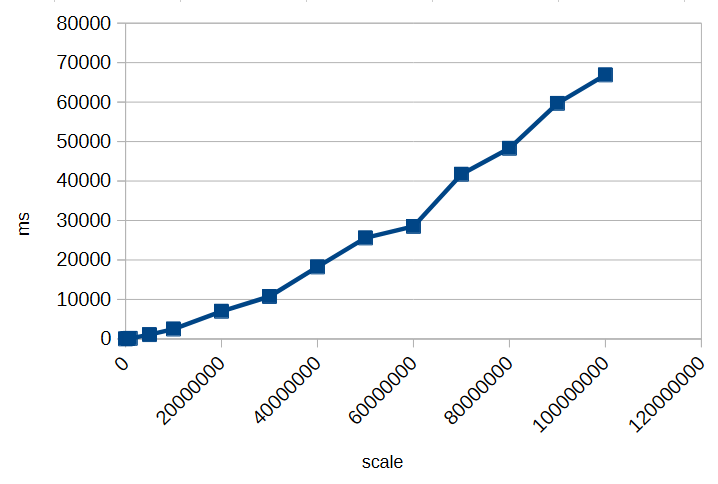
To illustrate this, here’s a small timing test for calculating 1/3 with different scales:
As you can see, increasing the scale significantly impacts performance. Choosing an unnecessarily high scale can slow down calculations and consume more memory without providing meaningful benefits. Always select a scale that balances precision requirements with efficiency.
However, as we’ve seen, decimal types like BigDecimal can only approximate many numbers when their fractional part is infinite or very long. Even with rounding modes, repeated calculations can introduce small inaccuracies.
But how can you perform calculations exactly if decimal representations can’t be stored with infinite precision?
BigFraction
To achieve truly exact calculations without losing precision, you can use fractional representations instead of decimal numbers. The BigFraction class from Apache Commons Numbers stores values as a numerator and denominator, allowing it to represent numbers like 1/3 precisely, without rounding.
import org.apache.commons.numbers.fraction.BigFraction;

BigFraction a = BigFraction.ONE;
BigFraction b = BigFraction.of(3);
BigFraction c = a.divide(b);    // 1 / 3
BigFraction a2 = c.multiply(b); // 1
In this example, dividing 1 by 3 produces the exact fraction 1/3, and multiplying it by 3 returns exactly 1. Since no decimal expansion is involved, all operations remain mathematically accurate, making BigFraction a suitable choice when exact arithmetic is required.
BigFraction and Decimals
But what happens if you want to create a BigFraction from an existing decimal number?
At first glance, everything looks fine: you pass in a precise decimal value, BigFraction accepts it, and you get a fraction back. So far, so good. But if you look closely at the result, something unexpected happens—the number you get out is not the same as the one you put in. The difference is subtle, hiding far to the right of the decimal point—but it’s there. And there’s a simple reason for it: the constructor takes a double.
A double cannot represent most decimal numbers exactly. The moment your decimal value is passed into BigFraction.from(double), it is already approximated by the binary floating-point format of double. BigFraction then captures that approximation perfectly, but the damage has already been done.
Even worse: BigFraction offers no alternative constructor that accepts a BigDecimal directly. So whenever you start from a decimal number instead of integer-based fractions, you inevitably lose precision before BigFraction even gets involved. What makes this especially frustrating is that BigFraction exists precisely to allow exact arithmetic.
Creating a BigFraction from a BigDecimal correctly
To preserve exactness when converting a BigDecimal to a BigFraction, you cannot rely on BigFraction.from(double). Instead, you can use the unscaled value and scale of the BigDecimal directly:
In this case, BigFraction automatically reduces the fraction to its simplest form, storing it as short as possible. Even though the original numerator and denominator may be huge, BigFraction divides out common factors to minimize their size while preserving exactness.
BigFraction and Performance
Performing fractional or rational calculations in this exact manner can quickly consume enormous amounts of time and memory, especially when many operations generate very large numerators and denominators. Exact arithmetic should only be used when truly necessary, and computations should be minimized to avoid performance issues. For a deeper discussion, see The Great Rational Explosion.
Conclusion
When working with numbers in Java, both BigDecimal and BigFraction have their strengths and limitations. BigDecimal allows precise decimal arithmetic up to a chosen scale, but it cannot represent numbers with infinite decimal expansions exactly, and high scales increase memory and computation time. BigFraction, on the other hand, can represent rational numbers exactly as fractions, preserving mathematical precision—but only if constructed carefully, for example from integer numerators and denominators or from a BigDecimal using its unscaled value and scale.
In all cases, it is crucial to be aware of these limitations and potential pitfalls. Understanding how each type stores and calculates numbers helps you make informed decisions and avoid subtle errors in your calculations.
Java Streams are like clean, connected pipes: data flows from one end to the other, getting filtered and transformed along the way. Everything works beautifully — as long as the pipe stays intact.
But what happens if you cut the pipe? Or if you throw rocks into it?
Both stop the flow, though in different ways. Let’s look at what that means for Java Streams.
Exceptions — Cutting the Pipe in Half
A stream is designed for pure functions. The same input gives the same output without side effects. Each element passes through a sequence of operations like map, filter, sorted. But when one of these operations throws an exception, that flow is destroyed. Exceptions are side effects.
Throwing an exception in a stream is like cutting the pipe right in the middle: some water (data) might have already passed through, but nothing else reaches the end. The pipeline is broken.
Example:
var result = items.stream()
    .map(i -> {
        if(i==0) {
            throw new InvalidParameterException();
        }
        return 10 / i;
    })
    .toList();
If you throws the exception, the entire stream stops. The remaining elements never get processed.
Uncertain Operations — Throwing Rocks into the Pipe
Now imagine you don’t cut the pipe — you just throw rocks into it.
Some rocks are small enough to pass. Some are too big and block the flow. Some hit the walls and break the pipe completely.
That’s what happens when you perform uncertain operations inside a stream that might fail in expected ways — for example, file reads, JSON parsing, or database lookups.
Most of the time it works, but when one file can’t be read, you suddenly have a broken flow. Your clean pipeline turns into a source of unpredictable errors.
The compiler does not allow checked exceptions like IOException in streams. Unchecked exceptions, such as RuntimeException, are not detected by the compiler. That’s why this example shows a common “solution” of catching the checked exception and converting it into an unchecked exception. However, this approach doesn’t actually solve the underlying problem; it just makes the compiler blind to it.
Uncertain operations are like rocks in the pipe — they don’t belong inside. You never know whether they’ll pass, get stuck, or destroy the stream.
How to Keep the Stream Flowing
There are some strategies to keep your stream unbroken and predictable.
Prevent problems before they happen
If the failure is functional or domain-specific, handle it before the risky operation enters the stream.
Example: division by zero — a purely data-related, predictable issue.
var result = items.stream()
    .filter(i -> i != 0)
    .map(i -> 10 / i)
    .toList();
Keep the flow pure by preparing valid data up front.
Represent expected failures as data
This also applies to functional or domain-specific failures. If a result should be provided for each element even when the operation cannot proceed, use Optional instead of throwing exceptions.
var result = items.stream()
    .collect(Collectors.toMap(
        i -> i,
        i -> {
            if(i == 0) {
                return Optional.empty();
            }
            return Optional.of(10 / i);
        }
    ));
Now failures are part of the data. The stream continues.
Keep Uncertain Operations Outside the Stream
This solution is for technical failures that cannot be prevent — perform it before starting the stream.
Fetch or prepare data in a separate step that can handle retries or logging. Once you have stable data, feed it into a clean, functional pipeline.
var responses = fetchAllSafely(ids); // handle exceptions here

responses.stream()
    .map(this::transform)
    .toList();
That way, your stream remains pure and deterministic — the way it was intended.
Conclusion
A busted pipe smells awful in the basement, and exceptions in Java Streams smell just as bad. So keep your pipes clean and your streams pure.
Materialized views are powerful. They give us precomputed, queryable snapshots of expensive joins and aggregations. But the moment you start layering other views on top of them, you enter tricky territory.
The Scenario
You define a materialized view to speed up a reporting query. Soon after, others discover it and start building new views on top of it. The structure spreads.
Now imagine: you need to extend the base materialized view. Maybe add a column, or adjust its definition. That’s when the trouble starts.
The Problem
Unlike regular views, materialized views don’t offer a convenient CREATE OR REPLACE. You can’t just adjust the definition in place. Oracle also doesn’t allow a simple ALTER to add a column or tweak the structure—recreating the materialized views is often the only option.
Things get even more complicated when other views depend on your materialized view. In that case, Oracle won’t even let you drop it. Instead, you’re greeted with an error about dependent objects, leaving you stuck in a dependency lock-in.
The more dependencies there are, the more brittle the setup becomes. What started as a performance optimization can lock you into a rigid structure that resists change.
As a short example, let’s look at how other databases handle this scenario. In Postgres, you can drop a materialized view even if other views depend on it. The dependent views temporarily lose their base and will fail if queried, but you won’t get an error on the drop. Once you recreate the materialized view with the same name and structure, the dependent views automatically start working again.
What to Do?
That is the hard question. Sometimes you can try to hide materialized views behind stable views. Or you take the SQL of all dependent views, drop them, change the materialized view, and then recreate all dependent views— a process that can be a huge pain.
How do you manage changes to materialized views that already have dependent views stacked on top? Do you design around it, fight with rebuild scripts every time, or have another solution?
Following up on “The Dimensions of Navigation in Object-Oriented Code” this post explores how Eclipse, one of the most mature IDEs for Java development, supports navigating across different dimensions of code: hierarchy, behavior, validation and utilities.
Let’s walk through these dimensions and see how Eclipse helps us travel through code with precision.
1. Hierarchy Navigation
Hierarchy navigation reveals the structure of code through inheritance, interfaces and abstract classes.
Open Type Hierarchy (F4): Select a class or interface, then press F4. This opens a dedicated view that shows both the supertype and subtype hierarchies.
Quick Type Hierarchy (Ctrl + T): When your cursor is on a type (like a class, interface name), this shortcut brings up a popover showing where it fits in the hierarchy—without disrupting your current layout.
Open Implementation (Ctrl + T on method): Especially useful when dealing with interfaces or abstract methods, this shortcut lists all concrete implementations of the selected method.
2. Behavioral Navigation
Behavioral navigation tells you what methods call what, and how data flows through the application.
Open Declaration (F3 or Ctrl + Click): When your cursor is on a method call, pressing F3 or pressing Ctrl and click on the method jumps directly to its definition.
Call Hierarchy (Ctrl + Alt + H): This is a powerful tool that opens a tree view showing all callers and callees of a given method. You can expand both directions to get a full picture of where your method fits in the system’s behavior.
Search Usages in Project (Ctrl + Shift + G): Find where a method, field, or class is used across your entire project. This complements call hierarchy by offering a flat list of usages.
3. Validation Navigation
Validation navigation is the movement between your business logic and its corresponding tests. Eclipse doesn’t support this navigation out of the box. However, the MoreUnit plugin adds clickable icons next to classes and tests, allowing you to switch between them easily.
4. Utility Navigation
This is a collection of additional navigation features and productivity shortcuts.
Quick Outline (Ctrl + O): Pops up a quick structure view of the current class. Start typing a method name to jump straight to it.
Search in All Files (Ctrl + H): The search dialog allows you to search across projects, file types, or working sets.
Content Assist (Ctrl + Space): This is Eclipse’s autocomplete—offering method suggestions, parameter hints, and even auto-imports.
Generate Code (Alt + Shift + S): Use this to bring up the “Source” menu, which allows you to generate constructors, getters/setters, toString(), or even delegate methods.
Format Code (Ctrl + Shift + F): Helps you clean up messy files or align unfamiliar code to your formatting preferences.
Organize Imports (Ctrl + Shift + O): Automatically removes unused imports and adds any missing ones based on what’s used in the file.
Markers View (Window → Show View → Markers): Shows compiler warnings, TODOs, and FIXME comments—helps prioritize navigation through unfinished or problematic code.
One powerful aspects of modern software development is how we move through our code. In object-oriented programming (OOP), understanding relationships between classes, interfaces, methods, and tests is important. But it is not just about reading code; it is about navigating it effectively.
This article explores the key movement dimensions that help developers work efficiently within OOP codebases. These dimensions are not specific to any tool but reflect the conceptual paths developers regularly take to understand and evolve code.
1. Hierarchy Navigation: From Parent to Subtype and Back
In object-oriented systems, inheritance and interfaces create hierarchies. One essential navigation dimension allows us to move upward to a superclass or interface, and downward to a subclass or implementing class.
This dimension is valuable because:
Moving up let us understand general contracts or abstract logic that governs behavior across many classes.
Moving down help us see specific implementations and how abstract behavior is concretely realized.
This help us maintain a clear overview of where we are within the hierarchy.
2. Behavioral Navigation: From Calls to Definitions and Back
Another important movement is between where methods are defined and where they are used. This is less about structure and more about behavior—how the system flows during execution.
Understanding this movement helps developers:
Trace logic through the system from the point of use to its implementation.
Identify which parts of the system rely on a particular method or class.
Assess how a change to a method might ripple through the codebase.
This navigation is useful when debugging, refactoring, or working in unfamiliar code.
3. Validation Navigation: Between Code and its Tests
Writing automated tests is a fundamental part of software development. Tests are more than just safety nets—they also serve as valuable guides for understanding and verifying how code is intended to behave. Navigating between a class and its corresponding test forms another important dimension.
This movement enables developers to:
Quickly validate behavior after making changes.
Understand how a class is intended to be used by seeing how it is tested.
Improve or add new tests based on recent changes.
Tight integration between code and test supports confident and iterative development, especially in test-driven workflows.
4. Utility Navigation: Supporting Movements that Boost Productivity
Beyond the main three dimensions, there are several supporting movements that contribute to developer efficiency:
Searching across the codebase to find any occurrence of a class, method, or term.
Generating boilerplate code, like constructors or property accessors, to reduce repetitive work.
Code formatting and cleanup, which helps maintain consistency and readability.
Autocompletion, which reduces cognitive load and accelerates writing.
These actions do not directly reflect code relationships but enhance how smoothly we can move within and around the code, keeping us focused on solving problems rather than managing structure.
Conclusion: Movement is Understanding
In object-oriented systems, navigating through your codebase along different dimensions provides essential insight for understanding, debugging, and improving your software.
Mastering these dimensions transforms your workflow from reactive to intuitive, allowing you to see code not just as static text, but as a living system you can navigate, shape, and grow.
In an upcoming post, I will take the movement dimensions discussed here and show how they are practically supported in IDEs like Eclipse and IntelliJ IDEA.
You might know this from fantasy book series: the author creates a unique world, a whole universe of their own and sets a story or series of books within it. Then, a few years later, a new series is released. It is set in the same universe, but at a different time, with different characters, and tells a completely new story. Still, it builds on the foundation of that original world. The author does not reinvent everything from scratch. They use the same map, the same creatures, the same customs and rules established in the earlier books.
But what does this have to do with software development? In one of my projects, I faced a very similar use case. I had to implement several services, each covering a different use case, but all sharing the same set of peripherals, adapters, and domain types.
So I needed an architecture that did not just allow for interchangeable periphery, as is usually the focus, but also supported interchangeable use cases. In other words, I needed a setup that allowed for multiple “books” to be written within the same “universe.”
Architecture
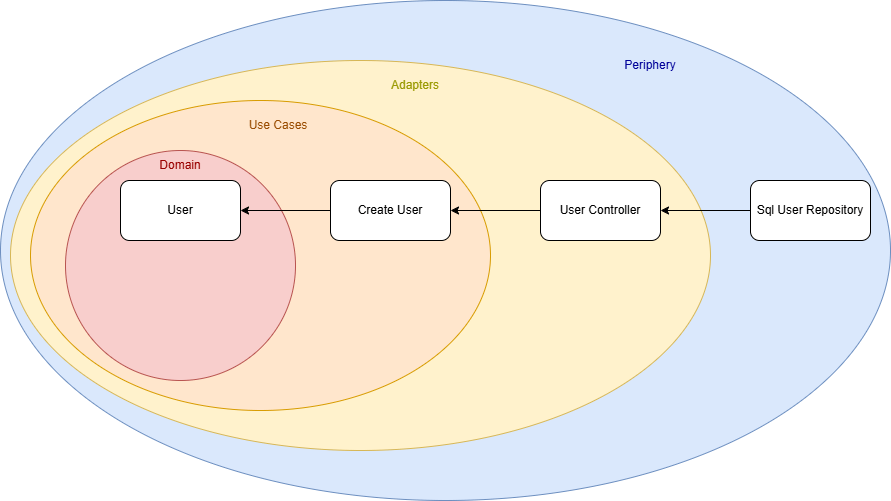
Let’s start with a simple example: user management. I originally implemented it following Clean Architecture principles, where the structure resembles an onion, dependencies flow inward, from the outer layers to the core domain logic. This makes the outer layers (the “peel”) easily replaceable or extendable.
Our initial use case is a service that creates a user. The use case defines an interface that the user controller implements, meaning the dependency flows from the outer layer (the controller) toward the core. So far, so good.
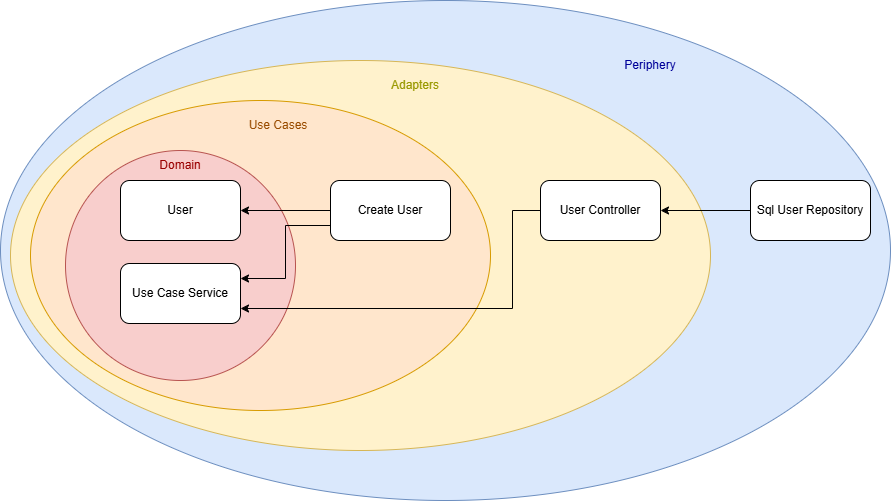
However, I wanted to evolve the architecture to support multiple use cases. For that, the direct dependency from the UserController to the CreateUser use case had to be removed.
My solution was to introduce a new domain module, a shared foundation that contains all interfaces, data types, and common logic used by both use cases and adapters. I called this module the UseCaseService.
The result is a new architecture diagram:
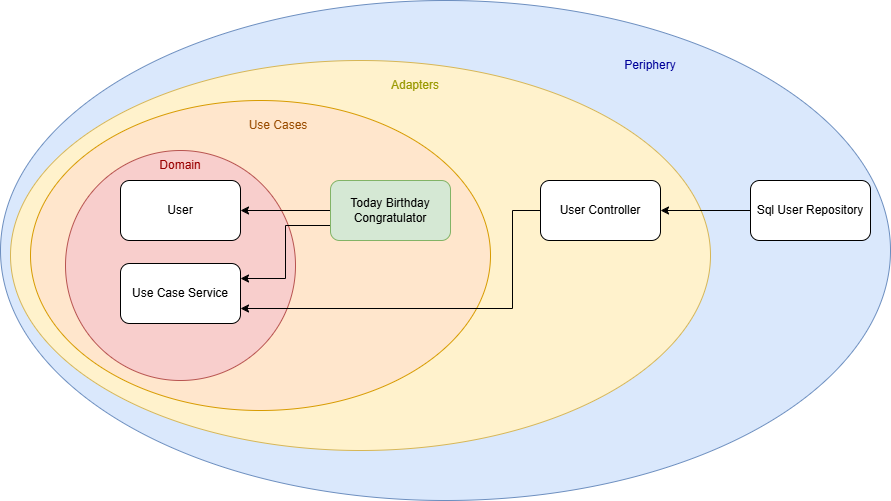
There is no longer a direct connection between a specific use case and an adapter. Instead, both depend on the shared UseCaseService module. With this setup, I can easily create new use cases that reuse the existing ecosystem without duplicating code or logic.
For example, I could implement another service that retrieves all users whose birthday is today and sends them birthday greetings. (Whether this is GDPR-compliant is another discussion!) But thanks to this architecture, I now have the freedom to implement that use case cleanly and efficiently.
Conclusion
Architecture is a highly individual matter. There is no one-size-fits-all solution that solves every problem or suits every project. Models like Clean Architecture can be helpful guides, but ultimately, you need to define your own architectural requirements and find a solution that meets them. This was a short story of how one such solution came to life based on my own needs.
It is also a small reminder to keep the freedom to think outside the box. Do not be afraid to design an architecture that truly fits you and your project, even if it deviates from the standard models.
Today, I encountered a surprising issue with my Docker-based web application. The application has an upload limit set, but before reaching it, an unexpected error appeared:
413 Request Entity Too Large
Despite the application’s upload limit being correctly configured, the error occurred much earlier—when the file was barely over 1MB. Where does this limitation come from, and how can it be changed?
Troubleshooting
The issue occurred before the request even reached the application layer, during a critical step in request processing. The root cause was Nginx, the web server and reverse proxy used in the Docker stack.
Nginx, commonly used in modern application stacks for load balancing, caching, and HTTPS handling, acts as the gateway to the application, managing all incoming requests. However, Nginx was rejecting uploads larger than 1MB. This was due to the client_max_body_size directive, which—when unset—defaults to a relatively low limit in some configurations. As a result, Nginx blocked larger file uploads before they could reach the application.
Solution
To resolve this issue, the client_max_body_size directive in the Nginx configuration needed to be updated to allow larger file uploads.
Modify the nginx.conf file or the relevant server block configuration:
server {
    listen 80;
    server_name example.com;
    client_max_body_size 100M;  # Allow uploads up to 100MB
}
After making this change, restart Nginx to apply the new configuration:
nginx -s reload
If Nginx is running in a Docker container, you can restart the container instead:
docker restart <container_name>
With this update, the upload limit increased to 100MB, allowing the application to handle larger files without premature rejection. Once the configuration was applied, the error disappeared, and file uploads worked as expected, provided they remained within the newly defined limits.



 Schneide Blog