Using your TANGO devices

Now that we have built a nice TANGO device server in the previous part of this tutorial we finally want to use it.

After installing TANGO from the sources or binaries provided on www.tango-controls.org and running the TANGO database device server you need to register your device with the database to use it fully. There is however a nodb-mode if you absolutely cannot communicate with the the database device due to networking restrictions. We assume normal operation with a database accessible for the following stuff.

Registering a device server at a TANGO database

The database to use is specified by the environment variable TANGO_HOST. So first you run the tool jive and run the Server Wizard from the Tools menu:

Server Wizard1

The server name equals the executable name for C++ device servers but can be set by the programmer for Python and Java device servers. We use time_device_server for our tutorial. The instance name may be chosen quite freely – lets call our server instance localtime. In the next step we have to start the server with the same TANGO_HOST and the instance name as parameter. That way you can register and run the same server multiple times on the same or even different machines and distinguish the them. Then you have to declare the device classes and name the device instances of this server:

Server Wizard2 Server Wizard3

The device name is a three part identifier which is used to communicate with the device. In our example we use the first part to differentiate between real/hardware devices and virtual/logical devices implemented completely in software. It also could be used for the different departments in your institution for example. It is up to you to fill the identifier with meaningful information.

At the end of the wizard the device server is reinitialised and ready to use. Now we can use Jive to find our device:

Device in Jive-AtkPanel

Our device implementation is very basic so it provides only the meaningless state information of UNKNOWN but also our read-only attribute providing us with the current machine time in ISO format. AtkPanel polls all attributes of our devices and gives us a generic overview of the actual device state. Writable attributes can be changed through AtkPanel or with Test device from the Jive context menu (bottom window of the screenshot above). Feel free to experiment a bit with both tools.

In the next post we will improve our device server and add configuration via device properties.
TANGO device server step-by-step tutorial

Now that we learned about TANGO in general and the architecture of device servers it is time to get our hands dirty. Here is a step-by-step tutorial for making your software remotely accessible as TANGO devices.

We will develop a small C++ class that can provide us the current time and date as a string and then build a device server that makes our functionality available over TANGO to remote clients. Our plain C++ project structure looks like this:

$PROJECT_ROOT/
  CMakeLists.txt
  TimeProvider/
    CMakeLists.txt
    TimeProvider.h
    TimeProvider.cpp
    main.cpp

Here are our CMake build files:
toplevel

project(Time)
cmake_minimum_required(VERSION 2.8)

find_package(PkgConfig)

add_subdirectory(TimeProvider)

and for the TimeProvider

project(TimeProvider)

add_library(time TimeProvider.cpp)

add_executable(timeprovider main.cpp)
target_link_libraries(timeprovider time)

And the C++ sources for our standalone application:
TimeProvider.h

#include <string>

class TimeProvider
{
public:
    TimeProvider() {}

    const std::string now();
};

TimeProvider.cpp

#include "TimeProvider.h"

#include <ctime>

const std::string TimeProvider::now()
{
    time_t now = time(0);
    struct tm time;
    char timeString[100];
    time = *localtime(&now);
    strftime(timeString, sizeof(timeString), "%Y-%m-%d %X", &time);
    return timeString;
}

main.cpp

#include <iostream>
#include "TimeProvider.h"

int main()
{
    TimeProvider tp;
    std::cout << tp.now() << std::endl;
    return 0;
}

Next we create a new subdirectory “TimeDevice” and add it to our toplevel CMakeLists.txt along with the TANGO package lookup:

...
find_package(PkgConfig)
pkg_check_modules(TANGO tango>=7.2.6 REQUIRED)

add_subdirectory(TimeProvider)
add_subdirectory(TimeDevice)

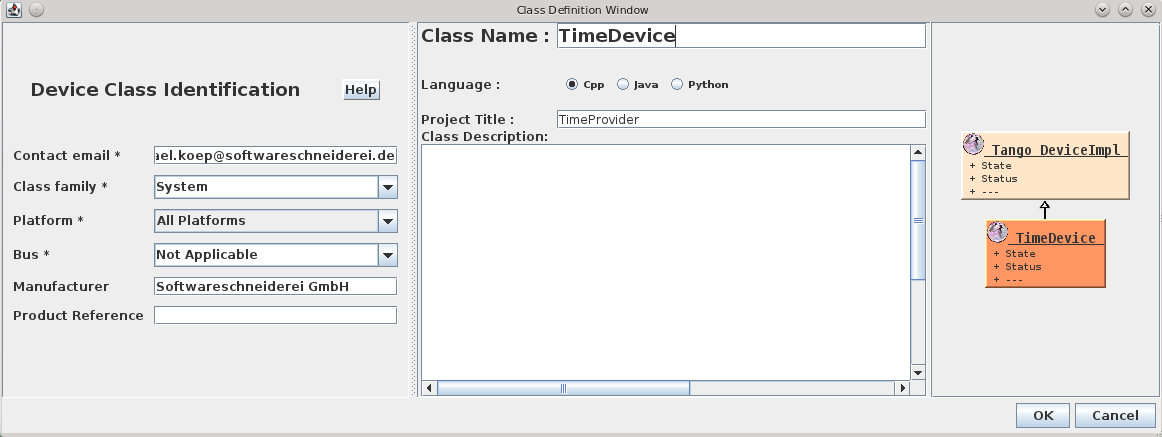
In this newly created directory we now run the Pogo application with pogo TimeDevice from our TANGO installation to generate our device server skeleton:

Pogo-Create Deviceand add the Attribute:Pogo-AddAttributeso the result looks like:

Pogo-TimeDevice

Now we need to add the generated sources to our CMake build like this:

project(TimeDevice)

set(SOURCES
    ${PROJECT_NAME}.cpp
    ${PROJECT_NAME}Class.cpp
    ${PROJECT_NAME}StateMachine.cpp
    ClassFactory.cpp
    main.cpp
)

# this is needed because of wrong generation of include statements
# you may correct them in generated code because they are in protected regions
include_directories(.)

include_directories(
    ${TimeProvider_SOURCE_DIR}
    ${TANGO_INCLUDE_DIRS}
)

add_definitions("-std=c++11")

add_executable(time_device_server ${SOURCES})
target_link_libraries(time_device_server
    time
    ${TANGO_LIBRARIES}
)

As the last step, we implement the code for the CurrentTime attribute like this:

void TimeDevice::read_CurrentTime(Tango::Attribute &attr)
{
	DEBUG_STREAM << "TimeDevice::read_CurrentTime(Tango::Attribute &attr) entering... " << endl;
	/*----- PROTECTED REGION ID(TimeDevice::read_CurrentTime) ENABLED START -----*/

    attr_CurrentTime_read = new Tango::DevString;
    TimeProvider timeProvider;
    *attr_CurrentTime_read = Tango::string_dup(timeProvider.now().c_str());
    //	Set the attribute value
    attr.set_value(attr_CurrentTime_read, 1, 0, true);

	/*----- PROTECTED REGION END -----*/	//	TimeDevice::read_CurrentTime
}

For other correct implementations of string attributes see the documentation on the TANGO website.
Now we should end up with a ready to run TANGO device server executable.

Conclusion
If  you structure your project with hindsight you can integrate your drivers or services in your TANGO control system with very low effort. In the next post we we will show how to add a device server to a TANGO database and use its facilities like device properties for configuration or jive for inspection of a device.

Feel free to download the full source code of this tutorial.

TANGO – Making equipment remotely controllable

Usually hardwareTango_logo vendors ship some end user application for Microsoft Windows and drivers for their hardware. Sometimes there are generic application like coriander for firewire cameras. While this is often enough most of these solutions are not remotely controllable. Some of our clients use multiple devices and equipment to conduct their experiments which must be orchestrated to achieve the desired results. This is where TANGO – an open source software (OSS) control system framework – comes into play.

Most of the time hardware also can be controlled using a standardized or proprietary protocol and/or a vendor library. TANGO makes it easy to expose the desired functionality of the hardware through a well-defined and explorable interface consisting of attributes and commands. Such an interface to hardware –  or a logical piece of equipment completely realised in software – is called a device in TANGO terms.

Devices are available over the (intra)net and can be controlled manually or using various scripting systems. Integrating your hardware as TANGO devices into the control system opens up a lot of possibilites in using and monitoring your equipment efficiently and comfortably using TANGO clients. There are a lot of bindings for TANGO devices if you do not want to program your own TANGO client in C++, Java or Python, for example LabVIEW, Matlab, IGOR pro, Panorama and WinCC OA.

So if you have the need to control several pieces of hardware at once have a look at the TANGO framework. It features

  • network transparency
  • platform-indepence (Windows, Linux, Mac OS X etc.) and -interoperability
  • cross-language support(C++, Java and Python)
  • a rich set of tools and frameworks

There is a vivid community around TANGO and many drivers for different types of equipment already exist as open source projects for different types of cameras, a plethora of motion controllers and so on. I will provide a deeper look at the concepts with code examples and guidelines building for TANGO devices in future posts.

Testing C++ code with OpenCV dependencies

This is a documentation of a problem I ran into when I wrote C++ tests for a simple function, inclusive workaround.

The story:

Pushing for more quality and stability we integrate google test into our existing projects or extend test coverage. One of such cases was the creation of tests to document and verify a bugfix. They called a single function and checked the fields of the returned cv::Scalar.

TEST(ScalarTest, SingleValue) {
  ...
  cv::Scalar actual = target.compute();
  ASSERT_DOUBLE_EQ(90, actual[0]);
  ASSERT_DOUBLE_EQ(0, actual[1]);
  ASSERT_DOUBLE_EQ(0, actual[2]);
  ASSERT_DOUBLE_EQ(0, actual[3]);
}

Because this was the first test using OpenCV, the CMakeLists.txt also had to be modified:

target_link_libraries(
  ...
  ${OpenCV_LIBS}
  ...
)

Unfortunately, the test didn’t run through: it ended either with a core dump or a segmentation fault. The analysis of the called function showed that it used no pointers and all variables were referenced while still in scope. What did gdb say to the segmentation fault?

(gdb) bt
#0  0x00007ffff426bd25 in raise () from /lib64/libc.so.6
#1  0x00007ffff426d1a8 in abort () from /lib64/libc.so.6
#2  0x00007ffff42a9fbb in __libc_message () from /lib64/libc.so.6
#3  0x00007ffff42afb56 in malloc_printerr () from /lib64/libc.so.6
#4  0x00007ffff54d5135 in void std::_Destroy_aux&amp;lt;false&amp;gt;::__destroy&amp;lt;testing::internal::String*&amp;gt;(testing::internal::String*, testing::internal::String*) () from /usr/lib64/libopencv_ts.so.2.4
#5  0x00007ffff54d5168 in std::vector&amp;lt;testing::internal::String, std::allocator&amp;lt;testing::internal::String&amp;gt; &amp;gt;::~vector() ()
from /usr/lib64/libopencv_ts.so.2.4
#6  0x00007ffff426ec4f in __cxa_finalize () from /lib64/libc.so.6
#7  0x00007ffff54a6a33 in ?? () from /usr/lib64/libopencv_ts.so.2.4
#8  0x00007fffffffe110 in ?? ()
#9  0x00007ffff7de9ddf in _dl_fini () from /lib64/ld-linux-x86-64.so.2
Backtrace stopped: frame did not save the PC

Apparently my test had problems at the end of the test, at the time of object destruction. So I started to eliminate every statement until the problem vanished or no statements were left. The result:

#include &quot;gtest/gtest.h&quot;
TEST(DemoTest, FailsBadly) {
  ASSERT_EQ(1, 0);
}

And it still crashed! So the code under test wasn’t the culprit. Another change introduced previously was the addition of OpenCV libs to the linker call. An incompatibility between OpenCV and google test? A quick search spitted out posts from users experiencing the same problems, eventually leading to the entry in OpenCVs bug tracker: http://code.opencv.org/issues/1608 or http://code.opencv.org/issues/3225. The opencv_ts library which appeared in the stack trace, exports symbols that conflict with google test version we link against. Since we didn’t need opencv_ts library, the solution was to clean up our linker dependencies:

Before:

find_package(OpenCV)


/usr/bin/c++ CMakeFiles/demo_tests.dir/DemoTests.cpp.o -o demo_tests -rdynamic ../gtest-1.7.0/libgtest_main.a -lopencv_calib3d -lopencv_contrib -lopencv_core -lopencv_features2d -lopencv_flann -lopencv_gpu -lopencv_highgui -lopencv_imgproc -lopencv_legacy -lopencv_ml -lopencv_nonfree -lopencv_objdetect -lopencv_photo -lopencv_stitching -lopencv_ts -lopencv_video -lopencv_videostab ../gtest-1.7.0/libgtest.a -lpthread -lopencv_calib3d -lopencv_contrib -lopencv_core -lopencv_features2d -lopencv_flann -lopencv_gpu -lopencv_highgui -lopencv_imgproc -lopencv_legacy -lopencv_ml -lopencv_nonfree -lopencv_objdetect -lopencv_photo -lopencv_stitching -lopencv_ts -lopencv_video -lopencv_videostab

After:


find_package(OpenCV REQUIRED core highgui)


/usr/bin/c++ CMakeFiles/demo_tests.dir/DemoTests.cpp.o -o demo_tests -rdynamic ../gtest-1.7.0/libgtest_main.a -lopencv_highgui -lopencv_core ../gtest-1.7.0/libgtest.a -lpthread

Lessons learned:

Know what you really want to depend on and explicitly name it. Ignorance or trust in build tools’ black magic is a recipe for blog posts.

Integrating googletest in CMake-based projects and Jenkins

In my – admittedly limited – perception unit testing in C++ projects does not seem as widespread as in Java or the dynamic languages like Ruby or Python. Therefore I would like to show how easy it can be to integrate unit testing in a CMake-based project and a continuous integration (CI) server. I will briefly cover why we picked googletest, adding unit testing to the build process and publishing the results.

Why we chose googletest

There are a plethora of unit testing frameworks for C++ making it difficult to choose the right one for your needs. Here are our reasons for googletest:

  • Easy publishing of result because of JUnit-compatible XML output. Many other frameworks need either a Jenkins-plugin or a XSLT-script to make that work.
  • Moderate compiler requirements and cross-platform support. This rules out xUnit++ and to a certain degree boost.test because they need quite modern compilers.
  • Easy to use and integrate. Since our projects use CMake as a build system googletest really shines here. CppUnit fails because of its verbose syntax and manual test registration.
  • No external dependencies. It is recommended to put googletest into your source tree and build it together with your project. This kind of self-containment is really what we love. With many of the other frameworks it is not as easy, CxxTest even requiring a Perl interpreter.

Integrating googletest into CMake project

  1. Putting googletest into your source tree
  2. Adding googletest to your toplevel CMakeLists.txt to build it as part of your project:
    add_subdirectory(gtest-1.7.0)
  3. Adding the directory with your (future) tests to your toplevel CMakeLists.txt:
    add_subdirectory(test)
  4. Creating a CMakeLists.txt for the test executables:
    include_directories(${gtest_SOURCE_DIR}/include)
    set(test_sources
    # files containing the actual tests
    )
    add_executable(sample_tests ${test_sources})
    target_link_libraries(sample_tests gtest_main)
    
  5. Implementing the actual tests like so (@see examples):
    #include "gtest/gtest.h"
    
    TEST(SampleTest, AssertionTrue) {
        ASSERT_EQ(1, 1);
    }
    

Integrating test execution and result publishing in Jenkins

  1. Additional build step with shell execution containing something like:
    cd build_dir && test/sample_tests --gtest_output="xml:testresults.xml"
  2. Activate “Publish JUnit test results” post-build action.

Conclusion

The setup of a unit testing environment for a C++ project is easier than many developers think. Using CMake, googletest and Jenkins makes it very similar to unit testing in Java projects.

C/C++ pitfalls for Java developers

Java and C/C++ have concepts that are similar enough to get an inexperienced Java developer confused. Here I want to show you some mistakes I found or done myself.

Java and C/C++ have concepts that are similar enough to get an inexperienced Java developer confused. Here I want to show you some mistakes I found or done myself.

Type conversion rules

A well known and often used pattern is simultaneous assignment of an expression to a variable and its comparison with another value.

if((a = b) != c) {
  // do something
}

In both Java and C would this code would have the same behaviour. The problem arises when a parenthesis is misplaced, resulting in an assignment of a boolean expression to a:

if((a = b != c)) {
  // do something
}

Since a boolean expression can be converted to an integer and the assignment expression is contained in a parenthesis, the compiler may even not ensue a warning. For Java this code isn’t legal anymore while perfectly fine in C. The error strikes most hard when the result of the comparison, namely 0 or 1, is a valid value. A good example is a call to socket(), that may return 0 as a file descriptor for stdin. The probably simplest solution to this problem is separating the assignment from comparison – even at the cost of a temporary variable.

Memory management

The behaviour of standard containers is sometimes combined with incomplete/misunderstood behaviour of pointers. An example:

class A {}
class B
{
  public:
  void foo()
  {
    std::vector<A*> theContainer;
    for(int i = 0; i < 100; i++) {
      theContainer.push_back(new A());
    }
  }
}

Every call to foo() would result in a memory leak due to not deleted A’s. When the vector is destructed, a destructor of each contained item is called. For pointers and other scalar types this is a no-op, resulting in missing call to the destructor of pointed to class. A solution to this problem could be the use of smart pointers wrapping the actual pointers or an explicit destruction of pointed to objects before the vector goes out of scope.

Deterministic destruction

Coming from language with automatic memory management there is some uncertainty when it comes to the order of destruction when multiple objects leave the scope. Consider this example:

void foo()
{
  std::lock_guard<std::mutex> lock(mutex);
  std::ifstream input ....

  //some operations

  //??
}

In this case the stream is destructed before the lock, guaranteeing that the stream is destructed before the execution reaches the destructor of the lock. This pattern is exploited by the RAII.

Exception handling

This is my personal favourite. Here is a little quiz: what is printed to the screen?

try {
  throw new SomeException();
} catch (SomeException& e) {
  std::cout << "first" << std::endl;
} catch (...) {
  std::cout << "second" << std::endl;
}

As some may already have guessed from the question: the answer is “second”. To make the code work, the reference in the catch block has to be replaced by the pointer. Another, and probably better alternative is to create the exception on the stack. The reason behind this mistake is that in java any thrown object is constructed with new. Explicit hints or experience are required to avoid such flawed exception handling.

Communication Through Code

In a previous post my colleague described our experiment on our ability to transfer the intention of the code by tests. The tests describe how the code behaves when called from the outside. Additional approach is to communicate through code.

To understand the code, at least the following two questions have to be answered:

  • How does the code work?
  • What is the reason behind the way the code is implemented?

Challenge

As long as the code is readable, it is possible to deduce its meaning. Improving readability is a common technique to help the reader. This includes using descriptive names, reducing complexity or hiding implementation details until they are absolutely necessary to understand the problem.

On the other hand deducing the reason why exactly this implementation was chosen by somebody is an impossible task without the knowledge (or lack thereof) of all implementors combined. One of the missing parts are the assumptions. Our code is full of them. Consider the following example:

void print(char* text)
{
  printf("program says %s", text);
}

In this function the writer assumes that:

  • the text is a valid pointer
  • the text is zero terminated
  • this program can write to stdout, i.e. is a console app
  • the reader speaks english

Or something nastier:

void* allocateBuffer(size_t size)
{
  void* buffer = malloc(size);
  if (!buffer) {
    printf("expect a segmentation fault!");
  }
  return buffer;
}

Here the writer assumes that malloc always returns either NULL or a pointer to dereferenceable memory. It is not always the case:

If size is zero, the return value depends on the particular library implementation (it may or may not be a null pointer), but the returned pointer shall not be dereferenced.

Assumptions not explicitly defined in the code lead sooner or later to hard to discover bugs.

Solution approaches

Comments are the quick and dirty way of writing down assumptions. They are easiest to read, but are never enforced and tend to diverge from the code with every edit made to it. However it is better to read “should never come here” and hear the alarm bells ringing than seeing nothing but whitespace.

Some of the assumptions can be documented and verified through tests, with varying level of detail. Unit tests will be most efficient on assumptions with little or no context, like verifying that only non-NULL-pointers are passed to a function. For more global assumptions integration or acceptance tests can be used. Together they ensure that no changes to the codebase break the assumptions made earlier. The drawback of unit tests is that they are locally decoupled from the code tested, forcing the reader to gather the information by searching for direct or indirect references to it.

When new code is written, assertions help to document how the API is meant to be used. Since they are executed not only during the test phase, they can capture wrong assumptions the authors made about the runtime environment. Writing down every possible assumption can quickly clutter the code with repeated statements like “assume pointer x is not NULL”, reducing readability and usefulness of this technique.

Conclusion

All of the shown approaches are not new. Each one has an aspect it excels at, so to get the most information out of the code they all have to be used. Their domains overlap partially, so it is possible to choose the approach depending on the situation, i.e. replacing assertions with unit tests for time critical code. One niche currently not filled by any of them is the description of global assumptions like the cultural background of the users.

Ugly problems, ugly solutions?

Do have workarounds to be worse than the problems?

One type of our projects is to integrate some devices into our customers infrastructure. The tasks then mostly consist of writing bridging code for third party libs of the hardware vendor. The most fun part is when the libs do not have some needed capability or feature.

The situation

In my case I was building a device driver with following requirements:

  • asynchronous execution of long running tasks.
  • ability to cancel long running tasks.
  • at any time it is asked for its current status, it has to provide it.

The device is accompanied by a DLL with a following interface(simplified):

  • doWork(), a blocking function that returns after a configurable amount of time that can range from milliseconds to hours.
  • abortWork(), is supposed to cancel the process triggered by doWork() and to make doWork() return earlier.

First impressions

I was able to fullfill two requirements pretty fast. The state ist more or less a simple getter and the doWork function was called in a separate thread. Just cancelling the execution didn’t work. More precisely it didn’t work as expected. In the time between a call to doWork() and the moment it returned, the process always used 100% of one CPU core. After that it always dropped to nearly zero. Now, what happened, when I called abortWork()? There were two things: doWork() returned, but the CPU utilization stayed the same for an indefinite amount of time. Or the call was ignored completely. Especially funny was the first case, where the API seemed to work until the process run out of cores and the system practically grinded to a halt.

The “Solution”

Banging my head against the desk didn’t help, so my first thought was to forget abortWork() and kill the thread myself. Microsoft provides a nice function called TerminateThread for that purpose. Everyone who looks at the documentation, will see that the list of side effects is quite impressive, memory leaks being the least bad ones. I couldn’t guarantee that the application would work afterwards, so I decided against it. What would be the alternative? Process shutdown. When you stop the process all blocked threads should be away. Being too soft and trying to unload the DLL is a bad idea – you have a deadlock when the DllMain waits for the worker thread to finish. My last attempt was to suicide the process!

Now I was able to abort a running task, but my app were no longer available all the time. Every attempt to get the current status between the start of a shutdown and a completed startup failed. So a semi-persistent storage containing the last status of a living application was needed. To achieve this, I created an application with the same interface as the real device driver and proxy that delegated all the requests to it, caching the status responses. That way the polling application still assumed that the last action were still running until the restarting app was fully available again.

In the end the solution consisted of two device drivers, one for caching the state and the other for doing the work. When cancelling the task was required, the latter device driver died and restarted itself again.

Final thoughts

I hope that there is a way to do this in a more elegant way and I just overlooked some facts. It is unbelievable that you can lose all control over your app by a simple call to a third party library and that the only escape is death.

Building Visual C++ Projects with CMake

In previous post my colleague showed how to create RPM packages with CMake. As a really versatile tool it is also able to create and build Visual Studio projects on Windows. This property makes it very valuable when you want to integrate your project into a CI cycle(in our case Jenkins).

Prerequisites:

To be able to compile anything following packages needed to be installed beforehand:

  •  CMake. It is helpful to put it in the PATH environment variable so that absolute paths aren’t needed.
  • Microsoft Windows SDK for Windows 7 and .NET Framework 4 (the web installer or  the ISOs).  The part “.NET Framework 4” is very important, since when the SDK for the .NET Framework 3.5 is installed you will get following parse error for your *.vcxproject files:

    error MSB4066: The attribute “Label” in element is unrecognized

    at the following position:

    <ItemGroup Label=”ProjectConfigurations”>

    Probably equally important is the bitness of the installed SDK. The x64 ISO differs only in one letter from the x86 one. Look for the X if want 64 bit.

  • .NET Framework 4, necessary to make msbuild run

It is possible that you encounter following message during your SDK setup:

A problem occurred while installing selected Windows SDK components. Installation of the “Microsoft Windows SDK for Windows 7” product has reported the following error: Please refer to Samples\Setup\HTML\ConfigDetails.htm document for further information. Please attempt to resolve the problem and then start Windows SDK setup again. If you continue to have problems with this issue, please visit the SDK team support page at http://go.microsoft.com/fwlink/?LinkId=130245. Click the View Log button to review the installation log. To exit, click Finish.

The reason behind this wordy and less informative error message were the Visual C++ Redistributables installed on the system. As suggested by Microsoft KB article removing them all helped.

Makefiles:

For CMake to build anything you need to have a CMakeLists.txt file in your project. For a tutorial on how to use CMake, look at this page. Here is a simple CMakeLists.txt to get you started:

project(MyProject)
 cmake_minimum_required(VERSION 2.6)
 set(source_files
 main.cpp
 )
 include_directories(
 ${CMAKE_CURRENT_SOURCE_DIR}
 )
 add_executable(MyProject ${source_files})

Building:

To build a project there are few steps necessary. You can enter them in your CI directy or put them in a batch file.

call "%ProgramFiles%\Microsoft SDKs\Windows\v7.1\Bin\SetEnv.cmd" /Release /x86

With this call all necessary environment variables are set. Be careful on 64 bit platforms as jenkins slave executes this call in a 32 bit context and so “%ProgramFiles%” is resolved to “ProgramFiles (x86)” where the SDK does not lie.

del CMakeCache.txt

This command is not strictly necessary, but it prevents you from working with outdated generated files when you change your configuration.

cmake -G "Visual Studio 10" .

Generates a Visual Studio 2010 Solution. Every change to the solution and the project files will be gone when you call it, so make sure you track all necessary files in the CMakeLists.txt.

cmake --build . --target ALL_BUILD --config Release

The final step. It will net you the MyProject.exe binary. The target parameter is equal to the name of the project in the solution and the config parameter is one of the solution configurations.

Final words:

The hardest and most time consuming part was the setup of prerequisites. Generic, not informative error messages are the worst you can do to a clueless customer. But… when you are done with it, you are only two small steps apart from an automatically built executable.

Build a RPM package using CMake

Some while ago I presented a way to package projects using different build systems as RPM packages. If you are using CMake for your projects you can use CPack to build RPM packages (in addition to tarballs, NSIS installers, deb packages and so on). This is a really nice option for deployment of your own projects because installation and update can be easily done by the users using familiar package management tools like zypper, yum and yast2.

Your first CPack RPM

It is really easy to add RPM using CPack to your existing project. Just set the mandatory CPack variables and include CPack below the variable definitions, usually as one of the last steps:

project (my_project)
cmake_minimum_required (VERSION 2.8)

set(VERSION "1.0.1")
<----snip your usual build instructions snip--->
set(CPACK_PACKAGE_VERSION ${VERSION})
set(CPACK_GENERATOR "RPM")
set(CPACK_PACKAGE_NAME "my_project")
set(CPACK_PACKAGE_RELEASE 1)
set(CPACK_PACKAGE_CONTACT "John Explainer")
set(CPACK_PACKAGE_VENDOR "My Company")
set(CPACK_PACKAGING_INSTALL_PREFIX ${CMAKE_INSTALL_PREFIX})
set(CPACK_PACKAGE_FILE_NAME "${CPACK_PACKAGE_NAME}-${CPACK_PACKAGE_VERSION}-${CPACK_PACKAGE_RELEASE}.${CMAKE_SYSTEM_PROCESSOR}")
include(CPack)

These few lines should be enough to get you going. After that you can execute a make package command should obtain the RPM package.

Spicing up the package

RPM packages can contain much more metadata and especially package dependencies and a version changelog. Most of the stuff can be specified using CPACK variables. We sometimes prefer to use a SPEC file template to be filled and used by CPack because it then contains most of the RPM specific stuff in a familiar manner instead of polluting the CMakeLists.txt itself:

project (my_project)
<----snip your usual CMake stuff snip--->
<----snip your additional CPack variables snip--->
configure_file("${CMAKE_CURRENT_SOURCE_DIR}/my_project.spec.in" "${CMAKE_CURRENT_BINARY_DIR}/my_project.spec" @ONLY IMMEDIATE)
set(CPACK_RPM_USER_BINARY_SPECFILE "${CMAKE_CURRENT_BINARY_DIR}/my_project.spec")
include(CPack)

The variables in the RPM SPEC file will be replaced by the values provided in the CMakeLists.txt and then be used for the RPM package. It looks very similar to a standard SPEC file but you can omit the usual build instructions boiling down to something like this:

Buildroot: @CMAKE_CURRENT_BINARY_DIR@/_CPack_Packages/Linux/RPM/@CPACK_PACKAGE_FILE_NAME@
Summary:        My very cool Project
Name:           @CPACK_PACKAGE_NAME@
Version:        @CPACK_PACKAGE_VERSION@
Release:        @CPACK_PACKAGE_RELEASE@
License:        GPL
Group:          Development/Tools/Other
Vendor:         @CPACK_PACKAGE_VENDOR@
Prefix:         @CPACK_PACKAGING_INSTALL_PREFIX@
Requires:       opencv >= 2.4

%define _rpmdir @CMAKE_CURRENT_BINARY_DIR@/_CPack_Packages/Linux/RPM
%define _rpmfilename @CPACK_PACKAGE_FILE_NAME@.rpm
%define _unpackaged_files_terminate_build 0
%define _topdir @CMAKE_CURRENT_BINARY_DIR@/_CPack_Packages/Linux/RPM

%description
Cool project solving the problems of many colleagues.

# This is a shortcutted spec file generated by CMake RPM generator
# we skip _install step because CPack does that for us.
# We do only save CPack installed tree in _prepr
# and then restore it in build.
%prep
mv $RPM_BUILD_ROOT @CMAKE_CURRENT_BINARY_DIR@/_CPack_Packages/Linux/RPM/tmpBBroot

%install
if [ -e $RPM_BUILD_ROOT ];
then
  rm -Rf $RPM_BUILD_ROOT
fi
mv "@CMAKE_CURRENT_BINARY_DIR@/_CPack_Packages/Linux/RPM/tmpBBroot" $RPM_BUILD_ROOT

%files
%defattr(-,root,root,-)
@CPACK_PACKAGING_INSTALL_PREFIX@/@LIB_INSTALL_DIR@/*
@CPACK_PACKAGING_INSTALL_PREFIX@/bin/my_project

%changelog
* Tue Jan 29 2013 John Explainer <john@mycompany.com> 1.0.1-3
- use correct maintainer address
* Tue Jan 29 2013 John Explainer <john@mycompany.com> 1.0.1-2
- fix something about the package
* Thu Jan 24 2013 John Explainer <john@mycompany.com> 1.0.1-1
- important bugfixes
* Fri Nov 16 2012 John Explainer <john@mycompany.com> 1.0.0-1
- first release

Conclusion

Integrating RPM (or other package formats) to your CMake-based build is not as hard as it seems and quite flexible. You do not need to rely on the tools provided by your OS vendor and still deliver your software in a way your users are accustomed to. This makes CPack very continuous integration (CI) friendly too!