Calculation with infinite decimal expansion in Java

When dividing decimal numbers in Java, some values—like 1 divided by 3—result in an infinite decimal expansion. In this blog post, I’ll show how such a calculation behaves using BigDecimal and BigFraction.

BigDecimal

Since this cannot be represented exactly in memory, performing such a division with BigDecimal without specifying a rounding mode leads to an “java.lang.ArithmeticException: Non-terminating decimal expansion; no exact representable decimal result”. Even when using MathContext.UNLIMITED or an effectively unlimited scale, the same exception is thrown, because Java still cannot produce a finite result.

BigDecimal a = new BigDecimal("1");
BigDecimal b = new BigDecimal("3");
BigDecimal c = a.divide(b);

By providing a scale – not MathContext.UNLIMITED – and a rounding mode, Java can approximate the result instead of failing. However, this also means the value is no longer mathematically exact. As shown in the second example, multiplying the rounded result back can introduce small inaccuracies due to the approximation.

BigDecimal a = new BigDecimal("1");
BigDecimal b = new BigDecimal("3");
BigDecimal c = a.divide(b, 100, RoundingMode.HALF_UP); // 0.3333333...
BigDecimal a2 = c.multiply(b);  // 0.9999999...

When working with BigDecimal, it’s important to think carefully about the scale you actually need. Every additional decimal place increases both computation time and memory usage, because BigDecimal stores each digit and carries out arithmetic with arbitrary precision.

To illustrate this, here’s a small timing test for calculating 1/3 with different scales:
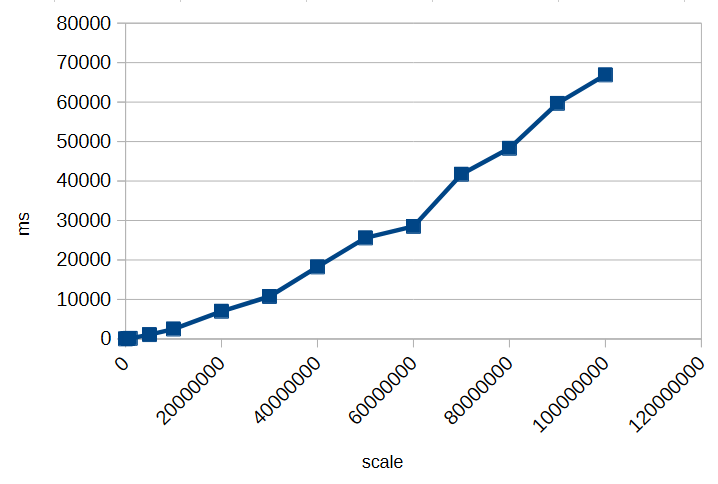
As you can see, increasing the scale significantly impacts performance. Choosing an unnecessarily high scale can slow down calculations and consume more memory without providing meaningful benefits. Always select a scale that balances precision requirements with efficiency.

However, as we’ve seen, decimal types like BigDecimal can only approximate many numbers when their fractional part is infinite or very long. Even with rounding modes, repeated calculations can introduce small inaccuracies.

But how can you perform calculations exactly if decimal representations can’t be stored with infinite precision?

BigFraction

To achieve truly exact calculations without losing precision, you can use fractional representations instead of decimal numbers. The BigFraction class from Apache Commons Numbers stores values as a numerator and denominator, allowing it to represent numbers like 1/3 precisely, without rounding.

import org.apache.commons.numbers.fraction.BigFraction;

BigFraction a = BigFraction.ONE;
BigFraction b = BigFraction.of(3);
BigFraction c = a.divide(b);    // 1 / 3
BigFraction a2 = c.multiply(b); // 1

In this example, dividing 1 by 3 produces the exact fraction 1/3, and multiplying it by 3 returns exactly 1. Since no decimal expansion is involved, all operations remain mathematically accurate, making BigFraction a suitable choice when exact arithmetic is required.

BigFraction and Decimals

But what happens if you want to create a BigFraction from an existing decimal number?

BigFraction fromDecimal = BigFraction.from(2172.455928961748633879781420765027);
fromLongDecimal.bigDecimalValue(); // 2172.45592896174866837100125849246978759765625 

At first glance, everything looks fine: you pass in a precise decimal value, BigFraction accepts it, and you get a fraction back. So far, so good. But if you look closely at the result, something unexpected happens—the number you get out is not the same as the one you put in. The difference is subtle, hiding far to the right of the decimal point—but it’s there.
And there’s a simple reason for it: the constructor takes a double.

A double cannot represent most decimal numbers exactly. The moment your decimal value is passed into BigFraction.from(double), it is already approximated by the binary floating-point format of double. BigFraction then captures that approximation perfectly, but the damage has already been done.

Even worse: BigFraction offers no alternative constructor that accepts a BigDecimal directly. So whenever you start from a decimal number instead of integer-based fractions, you inevitably lose precision before BigFraction even gets involved. What makes this especially frustrating is that BigFraction exists precisely to allow exact arithmetic.

Creating a BigFraction from a BigDecimal correctly

To preserve exactness when converting a BigDecimal to a BigFraction, you cannot rely on BigFraction.from(double). Instead, you can use the unscaled value and scale of the BigDecimal directly:

BigDecimal longNumber = new BigDecimal("2172.455928961748633879781420765027");
BigFraction fromLongNumber = BigFraction.of(
   longNumber.unscaledValue(),
   BigInteger.TEN.pow(longNumber.scale())
); // 2172455928961748633879781420765027 / 1000000000000000000000000000000

fromLongNumber.bigDecimalValue() // 2172.455928961748633879781420765027

This approach ensures the fraction exactly represents the BigDecimal, without any rounding or loss of precision.

BigDecimal longNumber = new BigDecimal("2196.329071038251366120218579234972");
BigFraction fromLongNumber = BigFraction.of(
   longNumber.unscaledValue(),
   BigInteger.TEN.pow(longNumber.scale())
); // 549082267759562841530054644808743 / 250000000000000000000000000000

fromLongNumber.bigDecimalValue() // 2196.329071038251366120218579234972

In this case, BigFraction automatically reduces the fraction to its simplest form, storing it as short as possible. Even though the original numerator and denominator may be huge, BigFraction divides out common factors to minimize their size while preserving exactness.

BigFraction and Performance

Performing fractional or rational calculations in this exact manner can quickly consume enormous amounts of time and memory, especially when many operations generate very large numerators and denominators. Exact arithmetic should only be used when truly necessary, and computations should be minimized to avoid performance issues. For a deeper discussion, see The Great Rational Explosion.

Conclusion

When working with numbers in Java, both BigDecimal and BigFraction have their strengths and limitations. BigDecimal allows precise decimal arithmetic up to a chosen scale, but it cannot represent numbers with infinite decimal expansions exactly, and high scales increase memory and computation time. BigFraction, on the other hand, can represent rational numbers exactly as fractions, preserving mathematical precision—but only if constructed carefully, for example from integer numerators and denominators or from a BigDecimal using its unscaled value and scale.

In all cases, it is crucial to be aware of these limitations and potential pitfalls. Understanding how each type stores and calculates numbers helps you make informed decisions and avoid subtle errors in your calculations.


Common SQL Performance Gotchas in Application Development

When building apps that use a SQL database, it’s easy to run into performance problems without noticing. Many of these issues come from the way queries are written and used in the code. Below are seven common SQL mistakes developers make, why they happen, and how you can avoid them.

Not Using Prepared Statements

One of the most common mistakes is building SQL queries by concatenating strings. This approach not only introduces the risk of SQL injection but also prevents the database from reusing execution plans. Prepared statements or parameterized queries let the database understand the structure of the query ahead of time, which improves performance and security. They also help avoid subtle bugs caused by incorrect string formatting or escaping.

// Vulnerable and inefficient
String userId = "42";
Statement stmt = connection.createStatement();
ResultSet rs = stmt.executeQuery("SELECT * FROM users WHERE id = " + userId);
// Safe and performant
String sql = "SELECT * FROM users WHERE id = ?";
PreparedStatement ps = connection.prepareStatement(sql);
ps.setInt(1, 42);
ResultSet rs = ps.executeQuery();

The N+1 Query Problem

The N+1 problem happens when an application fetches a list of items and then runs a separate query for each item to retrieve related data. For example, fetching a list of users and then querying each user’s posts in a loop. This results in one query to fetch the users and N additional queries for their posts. The fix is to restructure the query using joins or batch-fetching strategies, so all the data can be retrieved in fewer queries.

We have written about it on our blog before: Understanding, identifying and fixing the N+1 query problem

Missing Indexes

When queries filter or join on columns that do not have indexes, the database may need to scan entire tables to find matching rows. This can be very slow, especially as data grows. Adding the right indexes can drastically improve performance. It’s important to monitor slow queries and check whether indexes exist on the columns used in WHERE clauses, JOINs, and ORDER BY clauses.

Here’s how to create an index on an “orders” table for its “customer_id” column:

CREATE INDEX idx_orders_customer_id ON orders(customer_id);

Once the index is added, the query can efficiently find matching rows without scanning the full table.

Retrieving Too Much Data

Using SELECT * to fetch all columns from a table is a common habit, but it often retrieves more data than the application needs. This can increase network load and memory usage. Similarly, not using pagination when retrieving large result sets can lead to long query times and a poor user experience. Always select only the necessary columns and use LIMIT or OFFSET clauses to manage result size.

For example:

String sql = "SELECT id, name, price FROM products LIMIT ? OFFSET ?";
PreparedStatement ps = connection.prepareStatement(sql);
ps.setInt(1, 50);
ps.setInt(2, 0);
ResultSet rs = ps.executeQuery();

Chatty Database Interactions

Some applications make many small queries in a single request cycle, creating high overhead from repeated database access. Each round-trip to the database introduces latency. Here’s an inefficient example:

for (int id : productIds) {
    PreparedStatement ps = connection.prepareStatement(
        "UPDATE products SET price = price * 1.1 WHERE id = ?"
    );
    ps.setInt(1, id);
    ps.executeUpdate();
}

Instead of issuing separate queries, it’s often better to combine them or use batch operations where possible. This reduces the number of database interactions and improves overall throughput:

PreparedStatement ps = connection.prepareStatement(
    "UPDATE products SET price = price * 1.1 WHERE id = ?"
);

for (int id : productIds) {
    ps.setInt(1, id);
    ps.addBatch();
}
ps.executeBatch();

Improper Connection Pooling

Establishing a new connection to the database for every query or request is slow and resource-intensive. Connection pooling allows applications to reuse database connections, avoiding the cost of repeatedly opening and closing them. Applications that do not use pooling efficiently may suffer from connection exhaustion or high latency under load. To avoid this use a connection pooler and configure it with appropriate limits for the workload.

Unbounded Wildcard Searches

Using wildcard searches with patterns like '%term%' in a WHERE clause causes the database to scan the entire table, because indexes cannot be used effectively. These searches are expensive and scale poorly. To handle partial matches more efficiently, consider using full-text search features provided by the database, which are designed for fast text searching. Here’s an example in PosgreSQL:

SELECT * FROM articles
WHERE to_tsvector('english', title) @@ to_tsquery('database');

One of our previous blog posts dives deeper into this topic: Full-text Search with PostgreSQL.

By being mindful of these common pitfalls, you can write SQL that scales well and performs reliably under load. Good database performance isn’t just about writing correct queries – it’s about writing efficient ones.

Have you faced any of these problems before? Every project is different, and we all learn a lot from the challenges we run into. Feel free to share your experiences or tips in the comments. Your story could help someone else improve their app’s performance too.

Don’t go bursting the pipe

Java Streams are like clean, connected pipes: data flows from one end to the other, getting filtered and transformed along the way. Everything works beautifully — as long as the pipe stays intact.

But what happens if you cut the pipe? Or if you throw rocks into it?

Both stop the flow, though in different ways. Let’s look at what that means for Java Streams.

Exceptions — Cutting the Pipe in Half

A stream is designed for pure functions. The same input gives the same output without side effects. Each element passes through a sequence of operations like map, filter, sorted. But when one of these operations throws an exception, that flow is destroyed. Exceptions are side effects.

Throwing an exception in a stream is like cutting the pipe right in the middle:
some water (data) might have already passed through, but nothing else reaches the end. The pipeline is broken.

Example:

var result = items.stream()
    .map(i -> {
        if(i==0) {
            throw new InvalidParameterException();
        }
        return 10 / i;
    })
    .toList();

If you throws the exception, the entire stream stops. The remaining elements never get processed.

Uncertain Operations — Throwing Rocks into the Pipe

Now imagine you don’t cut the pipe — you just throw rocks into it.

Some rocks are small enough to pass.
Some are too big and block the flow.
Some hit the walls and break the pipe completely.

That’s what happens when you perform uncertain operations inside a stream that might fail in expected ways — for example, file reads, JSON parsing, or database lookups.

Most of the time it works, but when one file can’t be read, you suddenly have a broken flow. Your clean pipeline turns into a source of unpredictable errors.

var lines = files.stream()
   .map(i -> {
        try {
            return readFirstLine(i); // throws IOException
        }
        catch (IOException e) {
            throw new RuntimeException(e);
        }
    })
    .toList();

The compiler does not allow checked exceptions like IOException in streams. Unchecked exceptions, such as RuntimeException, are not detected by the compiler. That’s why this example shows a common “solution” of catching the checked exception and converting it into an unchecked exception. However, this approach doesn’t actually solve the underlying problem; it just makes the compiler blind to it.

Uncertain operations are like rocks in the pipe — they don’t belong inside.
You never know whether they’ll pass, get stuck, or destroy the stream.

How to Keep the Stream Flowing

There are some strategies to keep your stream unbroken and predictable.

Prevent problems before they happen

If the failure is functional or domain-specific, handle it before the risky operation enters the stream.

Example: division by zero — a purely data-related, predictable issue.

var result = items.stream()
    .filter(i -> i != 0)
    .map(i -> 10 / i) 
    .toList();

Keep the flow pure by preparing valid data up front.

Represent expected failures as data

This also applies to functional or domain-specific failures. If a result should be provided for each element even when the operation cannot proceed, use Optional instead of throwing exceptions.

var result = items.stream()
    .collect(Collectors.toMap(
        i -> i,
        i -> {
            if(i == 0) {
                return Optional.empty();
            }
            return Optional.of(10 / i);
        }
    ));

Now failures are part of the data. The stream continues.

Keep Uncertain Operations Outside the Stream

This solution is for technical failures that cannot be prevent — perform it before starting the stream.

Fetch or prepare data in a separate step that can handle retries or logging.
Once you have stable data, feed it into a clean, functional pipeline.

var responses = fetchAllSafely(ids); // handle exceptions here

responses.stream()
    .map(this::transform)
    .toList();

That way, your stream remains pure and deterministic — the way it was intended.

Conclusion

A busted pipe smells awful in the basement, and exceptions in Java Streams smell just as bad. So keep your pipes clean and your streams pure.

Highlight Your Assumptions With a Test

There are many good reasons to write unit tests for your code. Most of them are abstract enough that it might be hard to see the connection to your current work:

  • Increase the test coverage
  • Find bugs
  • Guide future changes
  • Explain the code
  • etc.

I’m not saying that these goals aren’t worth it. But they can feel remote and not imperative enough. If your test coverage is high enough for the (mostly arbitrary) threshold, can’t we let the tests slip a bit this time? If I don’t know about future changes, how can I write guidelining tests for them? Better wait until I actually know what I need to know.

Just like that, the tests don’t get written or not written in time. Writing them after the fact feels cumbersome and yields subpar tests.

Finding motivation by stating your motivation

One thing I do to improve my testing habit is to state my motivation why I’m writing the test in the first place. It seemed to boil down to two main motivations:

  • #Requirement: The test ensures that an explicit goal is reached, like a business rule that is spelled out in the requirement text. If my customer wants the value added tax of a price to be 19 % for baby food and 7 % for animal food, that’s a direct requirement that I can write unit tests for.
  • #Bugfix: The test ensures the perpetual absence of a bug that was found in production (or in development and would be devastating in production). These tests are “tests that should have been there sooner”. But at least, they are there now and protect you from making the same mistake twice.

A code example for a #Requirement test looks like this:

/**
 * #Requirement: https://ticket.system/TICKET-132
 */
@Test
void reduced_VAT_for_animal_food() {
    var actual = VAT.addTo(
        new NetPrice(10.00),
        TaxCategory.animalFood
    );
    assertEquals(
        new GrossPrice(10.70),
        actual
    );
}

If you want an example for a #Bugfix test, it might look like this:

/**
 * #Bugfix: https://ticket.system/TICKET-218
 */
@Test
void no_exception_for_zero_price() {
    try {
        var actual = VAT.addTo(
            NetPrice.zero,
            TaxCategory.general
        );
        assertEquals(
            GrossPrice.zero,
            actual
        );
    } catch (ArithmeticException e) {
        fail(
            "You messed up the tax calculation for zero prices (again).",
            e
        );
    }
}

In my mind, these motivations correlate with the second rule of the “ATRIP rules for good unit tests” from the book “Pragmatic Unit Testing” (first edition), which is named “Thorough”. It can be summarized like this:

  • all mission critical functionality needs to be tested
  • for every occuring bug, there needs to be an additional test that ensures that the bug cannot happen again

The first bullet point leads to #Requirement-tests, the second one to #Bugfix-tests.

An overshadowed motivation

But recently, we discovered a third motivation that can easily be overshadowed by #Requirement:

  • #Assumption: The test ensures a fact that is not stated explicitly by the requirement. The code author used domain knowledge and common sense to infer the most probable behaviour of the functionality, but it is a guess to fill a gap in the requirement text.

This is not directly related to the ATRIP rules. Maybe, if one needs to fit it into the ruleset, it might be part of the fifth rule: “Professional”. The rule states that test code should be crafted with care and tidyness, that it is relevant even if it doesn’t get shipped to the customer. But this correlation is my personal opinion and I don’t want my interpretation to stop you from finding your own justification why testing assumptions is worth it.

How is an assumption different from a requirement? The requirement is written down somewhere else, too and not just in the code. The assumption is necessary for the code to run and exhibit the requirements, but it’s only in the code. In the mind of the developer, the assumption is a logical extrapolation from the given requirements. “It can’t be anything else!” is a typical thought about it. But it is only “written down” in the mind of the developer, nowhere else.

And this is a perfect motivation for a targeted unit test that “states the obvious”. If you tag it with #Assumption, it makes it clear for the next developer that the actual content of the corresponding coded fact is more likely to change than other facts, because it wasn’t required directly.

So if you come across an unit test that looks like this:

/**
 * #Assumption: https://ticket.system/TICKET-132
 */
@Test
void normal_VAT_for_clothing() {
    var actual = VAT.addTo(
        new NetPrice(10.00),
        TaxCategory.clothing
    );
    assertEquals(
        new GrossPrice(11.90),
        actual
    );
}

you know that the original author made an educated guess about the expected functionality, but wasn’t explicitly told and is not totally sure about it.

This is a nice way to make it clear that some of your code is not as rigid or expected as other code that was directly required by a ticket. And by writing an unit test for it, you also make sure that if anybody changes that assumed fact, they know what they are doing and are not just guessing, too.

Your null parameter is hostile

I hope we all agree that emitting null values is a hostile move. If you are not convinced, please ask the inventor of the null pointer, Sir Tony Hoare. Or just listen to him giving you an elaborate answer to your question:

https://www.infoq.com/presentations/Null-References-The-Billion-Dollar-Mistake-Tony-Hoare/

So, every time you pass a null value across your code’s boundary, you essentially outsource a problem to somebody else. And even worse, you multiply the problem, because every client of yours needs to deal with it.

But what about the entries to your functionality? The parameters of your methods? If somebody passes null into your code, it’s clearly their fault, right?

Let’s look at an example of pdfbox, a java library that deals with the PDF file format. If you want to merge two or more PDF documents together, you might write code like this:

File left = new File("C:/temp/document1.pdf");
File right = new File("C:/temp/document2.pdf");

PDFMergerUtility merger = new PDFMergerUtility();
merger.setDestinationFileName("C:/temp/combined.pdf");

merger.addSource(left);
merger.addSource(right);

merger.mergeDocuments(null);

If you copy this code verbatim, please be aware that proper exception and resource handling is missing here. But that’s not the point of this blog entry. Instead, I want you to look at the last line, especially the parameter. It is a null pointer and it was my decision to pass it here. Or was it really?

If you look at the Javadoc of the method, you’ll notice that it expects a StreamCacheCreateFunction type, or “a function to create an instance of a stream cache”. If you don’t want to be specific, they tell you that “in case of null unrestricted main memory is used”.

Well, in our example code above, we don’t have the necessity to be specific about a stream cache. We could implement our own UnrestrictedMainMemoryStreamCacheCreator, but it would just add cognitive load on the next reader and don’t provide any benefit. So, we decide to use the convenience value of null and don’t overthink the situation.

But that’s the same as emitting null from your code over a boundary, just in the other direction. We use null as a way to communicate a standard behaviour here. And that’s deeply flawed, because null is not standard and it is not convenient.

Offering an interface that encourages clients to use null for convience or abbreviation purposes should be considered just as hostile as returning null in case of errors or “non-results”.

How could this situation be defused by the API author? Two simple solutions come to mind:

  1. There could be a parameter-less method that internally delegates to the parameterized one, using the convenient null value. This way, my client code stays clear from null values and states its intent without magic numbers, whereas the implementation is free to work with null internally. Working with null is not that big of a problem, as long as it doesn’t pass a boundary. The internal workings of a code entity is of nobody’s concern as long as it isn’t visible from the outside.
  2. Or we could define the parameter as optional. I mean in the sense of Optional<StreamCacheCreateFunction>. It replaces null with Optional.empty(), which is still a bit weird (why would I pass an empty box to a code entity?), but communicates the situation better than before.

Of course, the library could also offer a variety of useful standard implementations for that interface, but that would essentially be the same solution as the self-written implementation, minus the coding effort.

In summary, every occurrence of a null pointer should be treated as toxic. If you handle toxic material inside your code entity without spilling it, that’s on you. If somebody spills toxic material as a result of a method call, that’s an hostile act.

But inviting your clients to use toxic material for convenience should be considered as an hostile attitude, too. It normalizes harmful behaviour and leads to a careless usage of the most dangerous pointer value in existence.

The Dimensions of Navigation in Eclipse

Following up on “The Dimensions of Navigation in Object-Oriented Code” this post explores how Eclipse, one of the most mature IDEs for Java development, supports navigating across different dimensions of code: hierarchy, behavior, validation and utilities.

Let’s walk through these dimensions and see how Eclipse helps us travel through code with precision.

1. Hierarchy Navigation

Hierarchy navigation reveals the structure of code through inheritance, interfaces and abstract classes.

  • Open Type Hierarchy (F4):
    Select a class or interface, then press F4. This opens a dedicated view that shows both the supertype and subtype hierarchies.
  • Quick Type Hierarchy (Ctrl + T):
    When your cursor is on a type (like a class, interface name), this shortcut brings up a popover showing where it fits in the hierarchy—without disrupting your current layout.
  • Open Implementation (Ctrl + T on method):
    Especially useful when dealing with interfaces or abstract methods, this shortcut lists all concrete implementations of the selected method.

2. Behavioral Navigation

Behavioral navigation tells you what methods call what, and how data flows through the application.

  • Open Declaration (F3 or Ctrl + Click):
    When your cursor is on a method call, pressing F3 or pressing Ctrl and click on the method jumps directly to its definition.
  • Call Hierarchy (Ctrl + Alt + H):
    This is a powerful tool that opens a tree view showing all callers and callees of a given method. You can expand both directions to get a full picture of where your method fits in the system’s behavior.
  • Search Usages in Project (Ctrl + Shift + G):
    Find where a method, field, or class is used across your entire project. This complements call hierarchy by offering a flat list of usages.

3. Validation Navigation

Validation navigation is the movement between your business logic and its corresponding tests. Eclipse doesn’t support this navigation out of the box. However, the MoreUnit plugin adds clickable icons next to classes and tests, allowing you to switch between them easily.

4. Utility Navigation

This is a collection of additional navigation features and productivity shortcuts.

  • Quick Outline (Ctrl + O):
    Pops up a quick structure view of the current class. Start typing a method name to jump straight to it.
  • Search in All Files (Ctrl + H):
    The search dialog allows you to search across projects, file types, or working sets.
  • Content Assist (Ctrl + Space):
    This is Eclipse’s autocomplete—offering method suggestions, parameter hints, and even auto-imports.
  • Generate Code (Alt + Shift + S):
    Use this to bring up the “Source” menu, which allows you to generate constructors, getters/setters, toString(), or even delegate methods.
  • Format Code (Ctrl + Shift + F):
    Helps you clean up messy files or align unfamiliar code to your formatting preferences.
  • Organize Imports (Ctrl + Shift + O):
    Automatically removes unused imports and adds any missing ones based on what’s used in the file.
  • Markers View (Window Show View Markers):
    Shows compiler warnings, TODOs, and FIXME comments—helps prioritize navigation through unfinished or problematic code.

Eclipse Navigation Cheat Sheet

ActionShortcut / Location
Open Type HierarchyF4
Quick Type HierarchyCtrl + T
Open ImplementationCtrl + T (on method)
Open DeclarationF3 or Ctrl + Click
Call HierarchyCtrl + Alt + H
Search UsagesCtrl + Shift + G
MoreUnit SwitchMoreUnit Plugin
Quick OutlineCtrl + O
Search in All FilesCtrl + H
Content AssistCtrl + Space
Generate CodeAlt + Shift + S
Format CodeCtrl + Shift + F
Organize ImportsCtrl + Shift + O
Markers ViewWindow → Show View → Markers

How to improve this() by using super()

I have a particular programming style regarding constructors in Java that often sparks curiosity and discussion. In this blog post, I want to note my part in these discussions down.

Let’s start with the simplest example possible: A class without anything. Let’s call it a thing:

public class Thing {
}

There is not much you can do with this Thing. You can instantiate it and then call methods that are present for every Object in Java:

Thing mine = new Thing();
System.out.println(
    mine.hashCode()
);

This code tells us at least two things about the Thing class that aren’t immediately apparent:

  • It inherits methods from the Object class; therefore, it extends Object.
  • It has a constructor without any parameters, the “default constructor”.

If we were forced to write those two things in code, our class would look like this:

public class Thing extends Object {
    
    public Thing() {
        super();
    }
}

That’s a lot of noise for essentially no signal/information. But I adopted one rule from it:

Rule 1: Every production class has at least one constructor explicitly written in code.

For me, this is the textual anchor to navigate my code. Because it is the only constructor (so far), every instantiation of the class needs to call it. If I use “Callers” in my IDE on it, I see all clients that use the class by name.

Every IDE has a workaround to see the callers of the constructor(s) without pointing at some piece of code. If you are familiar with such a feature, you might use it in favor of writing explicit constructors. But every IDE works out of the box with the explicit constructor, and that’s what I chose.

There are some exceptions to Rule 1:

  • Test classes aren’t instantiated directly, so they don’t benefit from a constructor. See also https://schneide.blog/2024/09/30/every-unit-test-is-a-stage-play-part-iii/ for a reasoning why my test classes don’t have explicit constructors.
  • Record classes are syntactic sugar that don’t benefit from an explicit constructor that replaces the generated one. In fact, record classes use much of their appeal once you write constructors for them.
  • Anonymous inner types are oftentimes used in one place exclusively. If I need to see all their clients by using the IDE, my code is in a very problematic state, and an explicit constructor won’t help.

One thing that Rule 1 doesn’t cover is the first line of each constructor:

Rule 2: The first line of each constructor contains either a super() or a this() call.

The no-parameters call to the constructor of the superclass is done regardless of my code, but I prefer to see it in code. This is a visual cue to check Rule 3 without much effort:

Rule 3: Each class has only one constructor calling super().

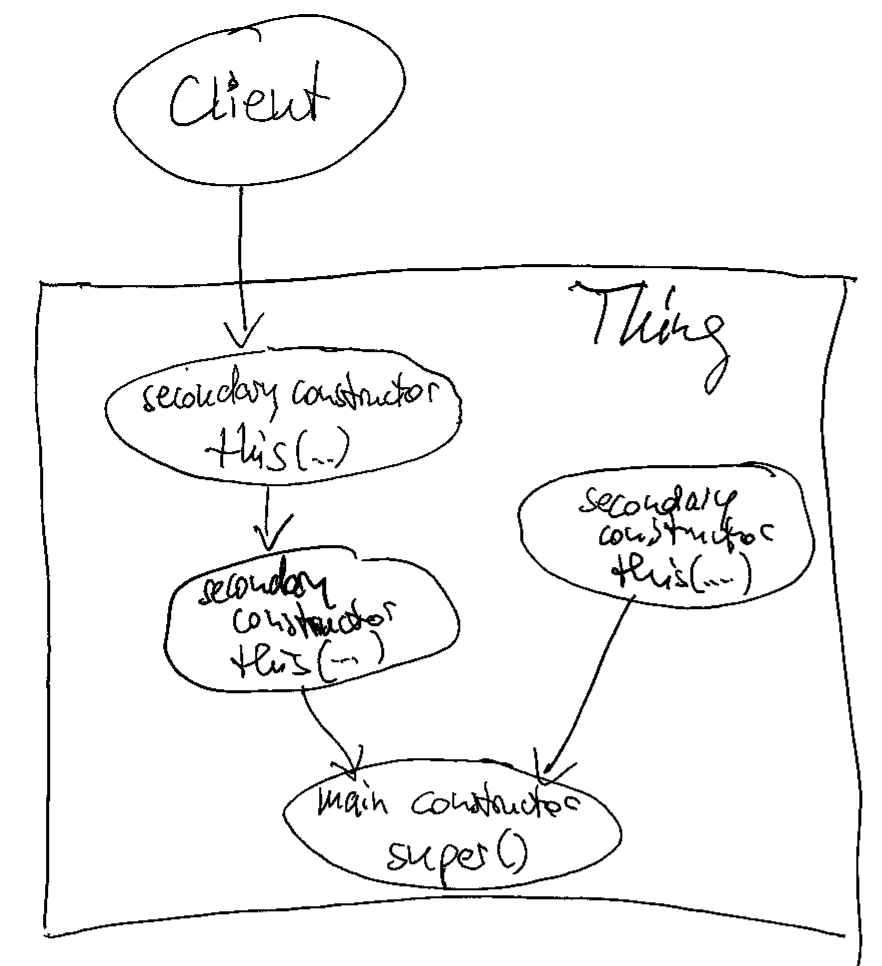
If you incorporate Rule 3 into your code, the instantiation process of your objects gets much cleaner and free from duplication. It means that if you only exhibit one constructor, it calls super() – with or without parameters. If you provide more than one constructor, they form a hierarchy: One constructor is the “main” or “core” constructor. It is the one that calls super(). All the other constructors are “secondary” or “intermediate” constructors. They use this() to call the main constructor or another secondary constructor that is an intermediate step towards the main constructor.

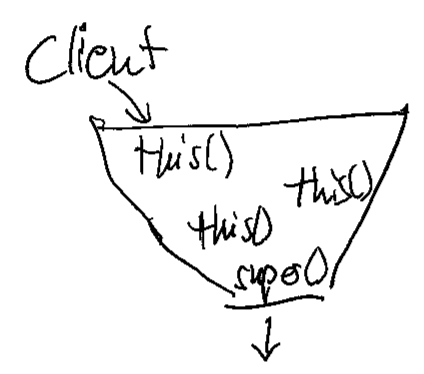
If you visualize this construct, it forms a funnel that directs all constructor calls into the main constructor. By listing its callers, you can see all clients of your class, even those that use secondary constructors. As soon as you have two super() calls in your class, you have two separate ways to construct objects from it. I came to find this possibility way more harmful than useful. There are usually better ways to solve the client’s problem with object instantiation than to introduce a major source of current or future duplication (and the divergent change code smell). If you are interested in some of them, leave a comment, and I will write a blog entry explaining some of them.

Back to the funnel:

if you don’t see the funnel yet, let me abstract the situation a bit more:

This is how it looks in source code:

public class Thing {
    
    private final String name;
    
    public Thing(int serialNumber) {
        this(
            "S/N " + serialNumber
        );
    }
    
    public Thing(String name) {
        super();
        this.name = name;
    }
}

I find this structure very helpful to navigate complex object construction code. But I also have a heuristic that the number of secondary constructors (by visually counting the this() calls) is proportional to the amount of head scratching and resistance to change that the class will induce.

As always, there are exceptions to the rule:

  • Some classes are just “more specific names” for the same concept. Custom exception types come to mind (see the code example below). It is ok to have several super() calls in these classes, as long as they are clearly free from additional complexity.
  • Enum types cannot have the super() call in the main constructor. I don’t write a comment as a placeholder; I trust that enum types are low-complexity classes with only a few private constructors and no shenanigans.

This is an example of a multi-super-call class:

public class BadRequest extends IOException {

    public BadRequest(String message, Throwable cause) {
        super(message, cause);
    }

    public BadRequest(String message) {
        super(message);
    }
}

It clearly does nothing more than represent a more specific IOException. There won’t be many reasons to change or even just look at this code.

I might implement a variation to my Rule 2 in the future, starting with Java 22: https://openjdk.org/jeps/447. I’m looking forward to incorporating the new possibilities into my habits!

As you’ve seen, my constructor code style tries to facilitate two things:

  • Navigation in the project code, with anchor points for IDE functionality.
  • Orientation in the class code with a standard structure for easier mental mapping.

It introduces boilerplate or cruft code, but only a low amount at specific places. This is the trade-off I’m willing to make.

What are your ideas about this? Leave us a comment!

Java enum inheritance preferences are weird

Java enums were weird from their introduction in Java 5 in the year 2004. They are implemented by forcing the compiler to generate several methods based on the declaration of fields/constants in the enum class. For example, the static Enum::valueOf(String) method is only present after compilation.

But with the introduction of default methods in Java 8 (published 2014), things got a little bit weirder if you combine interfaces, default methods and enums.

Let’s look at an example:

public interface Person {

  String name();
}

Nothing exciting to see here, just a Person type that can be asked about its name. Let’s add a default implementation that makes clearly no sense at all:

public interface Person {

  default String name() {
    return UUID.randomUUID().toString();
  }
}

If you implement this interface in a class and don’t overwrite the name() method, you are the weird one:

public class ExternalEmployee implements Person {

  public ExternalEmployee() {
    super();
  }
}

We can make your weirdness visible by creating an ExternalEmployee and calling its name() method:

public class Main {

  public static void main(String[] args) {
    ExternalEmployee external = new ExternalEmployee();
    System.out.println(external.name());
  }
}

This main method prints the “name” of your external employee on the console:

1460edf7-04c7-4f59-84dc-7f9b29371419

Are you sure that you hired a human and not some robot?

But what if we are a small startup company with just a few regular employees that can be expressed by a java enum?

public enum Staff implements Person {

  michael,
  bob,
  chris,
  ;
}

You can probably predict what this little main method prints on the console:

public class Main {

  public static void main(String[] args) {
    System.out.println(
      Staff.michael.name()
    );		
  }
}

But, to our surprise, the name() method got overwritten, without us doing or declaring to do so:

michael

We ended up with the “default” generated name() method from the Java enum type. In this case, the code generated by the compiler takes precedence over the default implementation in the interface, which isn’t what we would expect at first glance.

To our grief, we can’t change this behaviour back to a state that we want by overwriting the name() method once more in our Staff class (maybe we want our employees to be named by long numbers!), because the generated name() method is declared final. From the source code of the enum class:

/**
 * @return the name of this enum constant
 */
public final String name() {
  return name;
}

The only way out of this situation is to avoid the names of methods that are generated in an enum type. For the more obscure ordinal(), this might be feasible, but name() is prone for name conflicts (heh!).

While I can change my example to getName() or something, other situations are more delicate, like this Kotlin issue documents: https://youtrack.jetbrains.com/issue/KT-14115/Enum-cant-implement-an-interface-with-method-name

And I’m really a fan of Java’s enum functionality, it has the power to be really useful in a lot of circumstances. But with great weirdness comes great confusion sometimes.

Integrating API Key Authorization in Micronaut’s OpenAPI Documentation

In a Java Micronaut application, endpoints are often secured using @Secured(SecurityRule.IS_AUTHENTICATED), along with an authentication provider. In this case, authentication takes place using API keys, and the authentication provider validates them. If you also provide Swagger documentation for users to test API functionalities quickly, you need a way for users to specify an API key in Swagger that is automatically included in the request headers.

For a general guide on setting up a Micronaut application with OpenAPI Swagger and Swagger UI, refer to this article.

The following article focuses on how to integrate API key authentication into Swagger so that users can authenticate and test secured endpoints directly within the Swagger UI.

Accessing Swagger Without Authentication

To ensure that Swagger is always accessible without authentication, update the application.yml file with the following settings:

micronaut:  
  security:
    intercept-url-map:
      - pattern: /swagger/**
        access:
          - isAnonymous()
      - pattern: /swagger-ui/**
        access:
          - isAnonymous()
    enabled: true

These settings ensure that Swagger remains accessible without requiring authentication while keeping API security enabled.

Defining the Security Schema

Micronaut supports various Swagger annotations to configure OpenAPI security. To enable API key authentication, use the @SecurityScheme annotation:

import io.swagger.v3.oas.annotations.security.SecurityScheme;
import io.swagger.v3.oas.annotations.enums.SecuritySchemeIn;
import io.swagger.v3.oas.annotations.enums.SecuritySchemeType;

@SecurityScheme(
    name = "MyApiKey",
    type = SecuritySchemeType.APIKEY,
    in = SecuritySchemeIn.HEADER,
    paramName = "Authorization",
    description = "API Key authentication"
)

This defines an API key security scheme with the following properties:

  • Name: MyApiKey
  • Type: APIKEY
  • Location: Header (Authorization field)
  • Description: Explains how the API key authentication works

Applying the Security Scheme to OpenAPI

Next, we configure Swagger to use this authentication scheme by adding it to @OpenAPIDefinition:

import io.swagger.v3.oas.annotations.info.*;
import io.swagger.v3.oas.annotations.security.SecurityRequirement;

@OpenAPIDefinition(
    info = @Info(
        title = "API",
        version = "1.0.0",
        description = "This is a well-documented API"
    ),
    security = @SecurityRequirement(name = "MyApiKey")
)

This ensures that the Swagger UI recognizes and applies the defined authentication method.

Conclusion

With these settings, your Swagger UI will display an Authorization field in the top-left corner.

Users can enter an API key, which will be automatically included in all API requests as a header.

This is just one way to implement authentication. The @SecurityScheme annotation also supports more advanced authentication flows like OAuth2, allowing seamless token-based authentication through a token provider.

By setting up API key authentication correctly, you enhance both the security and usability of your API documentation.

String Representation and Comparisons

Strings are a fundamental data type in programming, and their internal representation has a significant impact on performance, memory usage, and the behavior of comparisons. This article delves into the representation of strings in different programming languages and explains the mechanics of string comparison.

String Representation

In programming languages, such as Java and Python, strings are immutable. To optimize performance in string handling, techniques like string pools are used. Let’s explore this concept further.

String Pool

A string pool is a memory management technique that reduces redundancy and saves memory by reusing immutable string instances. Java is a well-known language that employs a string pool for string literals.

In Java, string literals are automatically “interned” and stored in a string pool managed by the JVM. When a string literal is created, the JVM checks the pool for an existing equivalent string:

  • If found, the existing reference is reused.
  • If not, a new string is added to the pool.

This ensures that identical string literals share the same memory location, reducing memory usage and enhancing performance.

Python also supports the concept of string interning, but unlike Java, it does not intern every string literal. Python supports string interning for certain strings, such as identifiers, small immutable strings, or strings composed of ASCII letters and numbers.

String Comparisons

Let’s take a closer look at how string comparisons work in Java and other languages.

Comparisons in Java

In this example, we compare three strings with the content “hello”. While the first comparison return true, the second does not. What’s happening here?

String s1 = "hello";
String s2 = "hello";
String s3 = new String("hello");

System.out.println(s1 == s2); // true
System.out.println(s1 == s3); // false

In Java, the == operator compares references, not content.

First Comparison (s1 == s2): Both s1 and s2 reference the same object in the string pool, so the comparison returns true.

Second Comparison (s1 == s3): s3 is created using new String(), which allocates a new object in heap memory. By default, this object is not added to the string pool, so the object reference is unequal and the comparison returns false.

You can explicitly add a string to the pool using the intern() method:

String s1 = "hello";
String s2 = new String("hello").intern();

System.out.println(s1 == s2); // true

To compare the content of strings in Java, use the equals() method:

String s1 = "hello";
String s2 = "hello";
String s3 = new String("hello");

System.out.println(s1.equals(s2)); // true
System.out.println(s1.equals(s3)); // true
Comparisons in Other Languages

Some languages, such as Python and JavaScript, use == to compare content, but this behavior may differ in other languages. Developers should always verify how string comparison operates in their specific programming language.

s1 = "hello"
s2 = "hello"
s3 = "".join(["h", "e", "l", "l", "o"])

print(s1 == s2)  # True
print(s1 == s3)  # True

print(s1 is s2)  # True
print(s1 is s3)  # False

In Python, the is operator is used to compare object references. In the example, s1 is s3 returns False because the join() method creates a new string object.

Conclusion

Different approaches to string representation reflect trade-offs between simplicity, performance, and memory efficiency. Each programming language implements string comparison differently, requiring developers to understand the specific behavior before relying on it. For example, some languages differentiate between reference and content comparison, while others abstract these details for simplicity. Languages like Rust, which lack a default string pool, emphasize explicit memory management through ownership and borrowing mechanisms. Languages with string pools (e.g., Java) prioritize runtime optimizations. Being aware of these nuances is essential for writing efficient, bug-free code and making informed design choices.