Streaming images from your application to the web with GStreamer and Icecast – Part 1

Streaming existing media files such as videos to the web is a common task solved by streaming servers. But maybe you would like to encode and stream a sequence of images originating from inside your application on the fly as video to the web. This two part article series will show how to use the GStreamer media framework and the Icecast streaming server to achieve this goal.

GStreamer

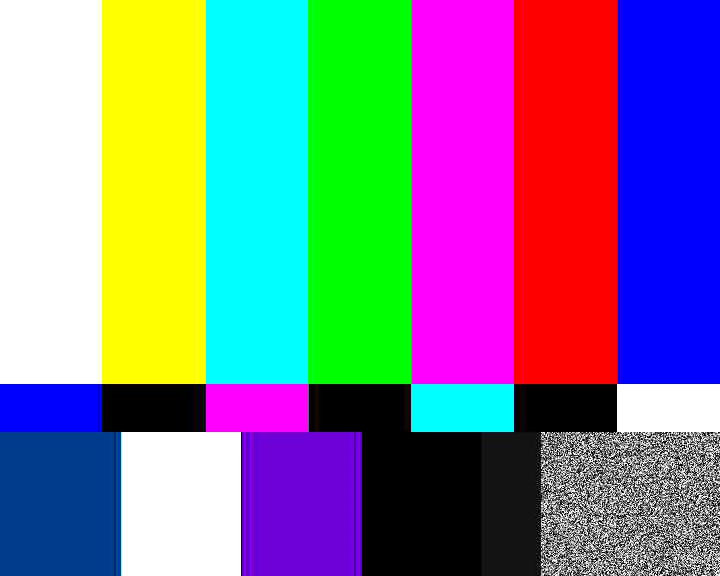
GStreamer is an open source framework for setting up multimedia pipelines. The idea of such a pipeline is that it is constructed from elements, each performing a processing step on the multimedia data that flows through them. Each element can be connected to other elements (source and a sink elements), forming a directed, acyclic graph structure. GStreamer pipelines are comparable to Unix pipelines for text processing. In the simplest case a pipeline is a linear sequence of elements, each element receiving data as input from its predecessor element and sending the processed output data to its successor element. Here’s a GStreamer pipeline that encodes data from a video test source with the VP8 video codec, wraps (“multiplexes”) it into the WebM container format and writes it to a file:

videotestsrc ! vp8enc ! webmmux ! filesink location=test.webm

In contrast to Unix pipelines the notation for GStreamer pipelines uses an exclamation mark instead of a pipe symbol. An element can be configured with attributes denoted as key=value pairs. In this case the filesink element has an attribute specifying the name of the file into which the data should be written. This pipeline can be directly executed with a command called gst-launch-1.0 that is usually part of a GStreamer installation:

gst-launch-1.0 videotestsrc ! vp8enc ! webmmux ! filesink location=test.webm
videotestsrc
videotestsrc

If we wanted to use a different codec and container format, for example Theora/Ogg, we would simply have to replace the two elements in the middle:

gst-launch-1.0 videotestsrc ! theoraenc ! oggmux ! filesink location=test.ogv

Icecast

If we want to stream this video to the Web instead of writing it into a file we can send it to an Icecast server. This can be done with the shout2send element:

gst-launch-1.0 videotestsrc ! vp8enc ! webmmux ! shout2send ip=127.0.0.1 port=8000 password=hackme mount=/test.webm

This example assumes that an Icecast server is running on the local machine (127.0.0.1) on port 8000. On a Linux distribution this is usually just a matter of installing the icecast package and starting the service, for example via systemd:

systemctl start icecast

Note that WebM streaming requires at least Icecast version 2.4, while Ogg Theora streaming is supported since version 2.2. The icecast server can be configured in a config file, usually located under /etc/icecast.xml or /etc/icecast2/icecast.xml. Here we can set the port number or the password. We can check if our Icecast installation is up and running by browsing to its web interface: http://127.0.0.1:8000/ Let’s go back to our pipeline:

gst-launch-1.0 videotestsrc ! vp8enc ! webmmux ! shout2send ip=127.0.0.1 port=8000 password=hackme mount=/test.webm

The mount attribute in the pipeline above specifies the path in the URL under which the stream will be available. In our case the stream will be available under http://127.0.0.1:8000/test.webm You can open this URL in a media player such as VLC or MPlayer, or you can open it in a WebM cabable browser such as Chrome or Firefox, either directly from the URL bar or from an HTML page with a video tag:

<video src="http://127.0.0.1:8000/test.webm"></video>

If we go to the admin area of the Icecast web interface we can see a list of streaming clients connected to our mount point. We can even kick unwanted clients from the stream.

Conclusion

This part showed how to use GStreamer and Icecast to stream video from a test source to the web. In the next part we will replace the videotestsrc element with GStreamer’s programmable appsrc element, in order to feed the pipeline with raw image data from our application.

TANGO – Making equipment remotely controllable

Usually hardwareTango_logo vendors ship some end user application for Microsoft Windows and drivers for their hardware. Sometimes there are generic application like coriander for firewire cameras. While this is often enough most of these solutions are not remotely controllable. Some of our clients use multiple devices and equipment to conduct their experiments which must be orchestrated to achieve the desired results. This is where TANGO – an open source software (OSS) control system framework – comes into play.

Most of the time hardware also can be controlled using a standardized or proprietary protocol and/or a vendor library. TANGO makes it easy to expose the desired functionality of the hardware through a well-defined and explorable interface consisting of attributes and commands. Such an interface to hardware –  or a logical piece of equipment completely realised in software – is called a device in TANGO terms.

Devices are available over the (intra)net and can be controlled manually or using various scripting systems. Integrating your hardware as TANGO devices into the control system opens up a lot of possibilites in using and monitoring your equipment efficiently and comfortably using TANGO clients. There are a lot of bindings for TANGO devices if you do not want to program your own TANGO client in C++, Java or Python, for example LabVIEW, Matlab, IGOR pro, Panorama and WinCC OA.

So if you have the need to control several pieces of hardware at once have a look at the TANGO framework. It features

  • network transparency
  • platform-indepence (Windows, Linux, Mac OS X etc.) and -interoperability
  • cross-language support(C++, Java and Python)
  • a rich set of tools and frameworks

There is a vivid community around TANGO and many drivers for different types of equipment already exist as open source projects for different types of cameras, a plethora of motion controllers and so on. I will provide a deeper look at the concepts with code examples and guidelines building for TANGO devices in future posts.

Database Migration Categories

Most long-running projects need to manage changes to the database schema of the system and data migrations in some way. As the system evolves new datatypes/tables and properties/columns are added, some are removed and others are changed. Relationships between objects also change in unpredictable ways so that you have to deal with these changes in some way. Not all changes are equal in nature, so we handle them differently!

One tool we use to manage our database is liquibase. The units of change are called migrations and are logged in the database itself (table “databasemigrations”) so that you can actually see in which state the schema is. Our experience using such tools for several years is very positive because there is no manual work on the database of some production system needed and new installations automatically create the database schema matching the running software. There are however a few situations when you want to do things manually. So we identified three types of changes and defined how to handle them:

1. structural changes

Structural changes modify the database schema but no data. In some cases you have to care about the default values for not null columns. These changes are handled by database management/versioning tools. They are relevant for all instances and specific for each deployed version of the system. The changes are stored with the source code under version control. Most of the time they are needed when extending the functionality of the system and implementing new features. In SQL the typical commands are CREATE, DROP and ALTER.

2. data rule changes

Changes to the way how the data is stored we call data rule changes. Examples for this are changing the representation of an enum from integer to string or a relation from one-to-many to many-to-many. In such a case the schema and importantly existing data has to be changed. For these migrations you do not need explicit ids of an object in the database but you change all entries in the same way according to the new rules. The changes can be applied to each instance of the system that is update to the new database (and software) version. Like structural changes they are executed using the database migration tool and stored under version control. The typical SQL command after the involveld structural changes needed is UPDATE with an where clause and sometimes CASE WHEN statements.

3. data modifications

Sometimes you have to change individual data sets of one instance of a system. That may be because of a bug in the software or corrupted/wrong entries that cannot by fixed using the system itself, e.g. as super user. Here you fix the entries of one instance of the system manually or with a SQL script. You will usually name specific object ids of the database and perform these exact changes only on this instance. It may be necessary to perfom similar tasks on other instances using different object ids. Because of this one-time and instance-specific nature of the changes we do not use a migration tool but some kind of SQL shell. Such manual changes have to be performed with extra caution and need to be thoroughly documented, e.g. in your issue tracker and wiki. If possible use a non-destructive approach and make backups of the data before executing the changes. Typical SQL statements are UPDATE or DELETE containing ids or business keys.

Conclusion

With categories and guidelines above developers can easily figure out how to deal with changes to the database. They can keep the software, database schema and customer data up-to-date, nice and clean over many years while improving and evolving the system and managing several instances running possibly different versions of the system.

Ansible: Play it again, Sam

Recently we started using Ansible for the provisioning of some of our servers. Ansible is one of many configuration management / provisioning tools that are popular right now. Puppet and Chef are probably more widely known representatives of their kind, but what attracted us to Ansible was the fact that it’s agentless: the target machines don’t need an agent installed, all you need is remote access via SSH. Well, almost. It turns out that Python is also required on the remote machines, otherwise you’ll be limited to a very basic set of functionality (the raw module). Fortunately, most Linux distributions have Python installed by default.

With Ansible you describe the desired target configuration as a sequence of tasks in a YAML file called Playbook: package installation, copying files, enabling and starting services, etc. The playbook is semi-declarative. Each step usually describes a goal, e.g. package XY should be present. Action is only taken if necessary. On the other hand it’s also very imperative: steps are executed sequentially and you can have conditionals and loops (e.g. “with_items”). You can also define handlers, which are executed once after they have been notified, for example if you want to restart the Apache web server after its configuration has changed.

Before a playbook is applied to a remote machine Ansible will query “facts” about this machine. These facts are available as variables in the playbook. You can also define your own variables.

A playbook is usually applied to a set of machines. Available machines are listed in a separate file, the inventory, where they can be grouped by roles. With one command you can configure or update all the machines of a specific role at once. You can also execute a “dry run”, which simulates a playbook run and tells you what changes would be applied.

So far our experience with Ansible has been good. The concepts are easy to grasp. YAML syntax requires getting used to, but at least it’s not XML. On the website the actual documentation is a bit hidden among promotion for their commercial products, but you can also directly visit docs.ansible.com.

Documentation for your project: what and how

Writing documentation is seldom fun for developers and much useless documentation is written. I want to provide some guidelines helping to focus your project documentation efforts on useful stuff instead of following a set of dogmatic rules to plainly fulfill requirements.

Code Documentation

Probably written many times before but nevertheless often neglected:

  • Avoid untouched documentation templates, e.g. // This is a getter for A. They only clutter the code hurting developers instead of providing value.
  • Do not document every class, method, file etc. blindly. Focus on all API classes et al. to be used by other (external) developers.
  • Do not document what the code does, it should speak for itself. Rather explain why a certain algorithm or data structure is used. Try to communicate design decisions.
  • Check comments everytime you touch documented code and update them if necessary. Outdated documentation hurts more than its worth so if docs exists keep them up-to-date.

Project Documentation

This kind of documentation usually provides more value than many javadoc/doxygen generated pages. Nowadays, many people use a wiki software for project documentation. I encourage you to use a powerful wiki like Confluence because it provides rich formatting options and templating allowing for visually pleasing and expressive documentation. As such it may be even printed (to PDF) and handed out to your customers.

  • Putting parts like Installation into the code repository and integrating them into the wiki often serves administrators, managers (visibility!) and developers. See my older post “centralized project documentation” for some other ideas.
  • Wikis allow for easy editing and document sharing and are version controlled. All this facilitates reviews and updates of the documents.
  • Document prerequisites and external dependencies explicitly. They may be hard to find in configuration files but are of good use to people running your project.
  • Improve  searches in the wiki by providing tags and other metadata to help your future me and others finding the information they are looking for.
  • Provide consistent examples or even templates for common documentation tasks to encourage others and help them getting their project documentation started.

Conclusion

Good documentation is a real asset and can provide much value if you keep your efforts focused on the important stuff. Complex workflows and draconic rules will hinder documentation efforts wheres open collaboration and valuable documentation will motivate bringing more of it into existence.

Centralized project documentation

Project documentation is one thing developers do not like to think about but it is necessary for others to use the software. There are several approaches to project documentation where it is either stored in the source code repository and/or some kind of project web page, e.g. in a wiki. It is often hard for different groups of people to find the documentation they need and to maintain it. I want to show an approach to store and maintain the documentation in one place and integrate it in several other locations.

The project documentation (not API documentation, generated by tools like javadoc or Doxygen) should be version controlled and close to the source code. So a directory in the project source tree seems to be a good place. That way the developers or ducumenters can keep it up-to-date with the current source code version. For others it may be hard to access the docs hidden somewhere in the source tree. So we need to integrate them into other tools to become easily accessible by all the people who need them.

Documentation format

We start with markdown as the documentation format because it is easily read and written using a normal text editor. It can be converted to HTML, PDF and other common document formats. The markdown files reside in a directory next to the source tree, named documentation for example. With pegdown there is a nice java library allowing integration of markdown support in your projects.

Integration in your wiki

Often you want to have your project documentation available on a web page, usually a wiki. With confluence you can directly embed markdown files from an URL in your project page using a plugin. This allows you to enrich the general project documentation in the source tree with your organisation specific documentation. The documentation becomes more widely accessible and searchable. The link can be served by a source code browser like gitweb: http://myrepo/git/?p=MyProject.git;a=blob_plain;f=README.md;hb=HEAD and is alsways up-to-date.

Integration in jenkins

Jenkins has a plugin to use markdown as description format. Combined with the project description setter plugin you can use a file from your workspace to display the job description. Short usage instructions or other notes and links can be maintained in the source tree and show up on the jenkins job page.

Integration in Github or Gitlab

Project hosting platforms like Github or your own repository manager, e.g. gitlab also can display markdown-formatted content from your source tree as the project description yielding a basic project page more or less for free.

Conclusion

Using markdown as a basis for your project documentation is a very flexible approach. It stays usable without any tool support and can be integrated and used in various ways using a plethora of tools and converters. Especially if you plan to open source a project it should contain useful documentation in such a widely understood format distributed with your source code.

Integrating googletest in CMake-based projects and Jenkins

In my – admittedly limited – perception unit testing in C++ projects does not seem as widespread as in Java or the dynamic languages like Ruby or Python. Therefore I would like to show how easy it can be to integrate unit testing in a CMake-based project and a continuous integration (CI) server. I will briefly cover why we picked googletest, adding unit testing to the build process and publishing the results.

Why we chose googletest

There are a plethora of unit testing frameworks for C++ making it difficult to choose the right one for your needs. Here are our reasons for googletest:

  • Easy publishing of result because of JUnit-compatible XML output. Many other frameworks need either a Jenkins-plugin or a XSLT-script to make that work.
  • Moderate compiler requirements and cross-platform support. This rules out xUnit++ and to a certain degree boost.test because they need quite modern compilers.
  • Easy to use and integrate. Since our projects use CMake as a build system googletest really shines here. CppUnit fails because of its verbose syntax and manual test registration.
  • No external dependencies. It is recommended to put googletest into your source tree and build it together with your project. This kind of self-containment is really what we love. With many of the other frameworks it is not as easy, CxxTest even requiring a Perl interpreter.

Integrating googletest into CMake project

  1. Putting googletest into your source tree
  2. Adding googletest to your toplevel CMakeLists.txt to build it as part of your project:
    add_subdirectory(gtest-1.7.0)
  3. Adding the directory with your (future) tests to your toplevel CMakeLists.txt:
    add_subdirectory(test)
  4. Creating a CMakeLists.txt for the test executables:
    include_directories(${gtest_SOURCE_DIR}/include)
    set(test_sources
    # files containing the actual tests
    )
    add_executable(sample_tests ${test_sources})
    target_link_libraries(sample_tests gtest_main)
    
  5. Implementing the actual tests like so (@see examples):
    #include "gtest/gtest.h"
    
    TEST(SampleTest, AssertionTrue) {
        ASSERT_EQ(1, 1);
    }
    

Integrating test execution and result publishing in Jenkins

  1. Additional build step with shell execution containing something like:
    cd build_dir && test/sample_tests --gtest_output="xml:testresults.xml"
  2. Activate “Publish JUnit test results” post-build action.

Conclusion

The setup of a unit testing environment for a C++ project is easier than many developers think. Using CMake, googletest and Jenkins makes it very similar to unit testing in Java projects.

How to use partial mocks in real life

Partial mocks are an advanced feature of modern mocking libraries like mockito. Partial mocks retain the original code of a class only stubbing the methods you specify. If you build your system largely from scratch you most likely will not need to use them. Sometimes there is no easy way around them when working with dependencies not designed for testability. Let us look at an example:

/**
 * Evil dependency we cannot change
 */
public final class CarvedInStone {

    public CarvedInStone() {
        // may do unwanted things
    }

    public int thisHasSideEffects(int i) {
        return 31337;
    }

    // many more methods
}

public class ClassUnderTest {

    public Result computeSomethingInteresting() {
        // some interesting stuff
        int intermediateResult = new CarvedInStone().thisHasSideEffects(42);
        // more interesting code
        return new Result(intermediateResult * 1337);
    }
}

We want to test the computeSomethingInteresting() method of our ClassUnderTest. Unfortunately we cannot replace CarvedInStone, because it is final and does not implement an interface containing the methods of interest. With a small refactoring and partial mocks we can still test almost the complete class:

public class ClassUnderTest {
    public int computeSomethingInteresting() {
        // some interesting stuff
        int intermediateResult = intermediateResultsFromCarvedInStone(42);
        // more interesting code
        return intermediateResult * 1337;
    }

    protected int intermediateResultsFromCarvedInStone(int input) {
        return new CarvedInStone().thisHasSideEffects(input);
    }
}

We refactored our dependency into a protected method we can use to stub out with our partial mocking to be tested like this:

public class ClassUnderTestTest {
    @Test
    public void interestingComputation() throws Exception {
        ClassUnderTest cut = spy(new ClassUnderTest());
        doReturn(1234).when(cut).intermediateResultsFromCarvedInStone(42);
        assertEquals(1649858, cut.computeSomethingInteresting());
    }
}

Caveat: Do not use the usual when-thenReturn-style:

when(cut.intermediateResultsFromCarvedInStone(42)).thenReturn(1234);

with partial mocks because the real method will get called once!

So the only untested code is a simple delegation. Measures like that refactoring and partial mocking generally serve as a first step and not the destination.

Where to go from here

To go the whole way we would encapsulate all unmockable dependencies into wrapper objects providing the functionality we need here and inject them into our ClassUnderTest. Then we can replace our wrapper(s) easily using regular mocking.

Doing all this can be a lot of work and/or risk depending on the situation so the depicted process serves as an low risk intermediate step for getting as much important code under test as possible.

Note that the wrappers themselves stay largely untestable like our protected delegating method.

Meet the diffibrillator, a diff tracker

If you need to keep several projects of a product family in sync, you can use modularization or keep track of the differences and port them. A diff tracker like the diffibrillator helps you with the second approach.

diffibrillator_128Lately, we had multiple occassions where a certain software tool was missing in our arsenal. Let me describe the situations and then extrapolate the requirements for the tool.

We work on a fairly large project that resembles a web application for our customer. Because the customer is part of a larger organization, the project was also needed for a second, rather independent customer within the organization. Now we had two customers with distinct requirements. We forked the code base and developed both branches independently. But often, there is a bug fix or a new feature that is needed in both branches. And while both customers have different requirements, it’s still the same application in the core. Technically speaking, both branches are part of a product family. We use atomic commits and cherry-picks to keep the code bases of the branches in sync if needed.

Another customer has a custom hardware with an individual control software written by us. The hardware was built several times, with the same software running on all instances. After a while, one hardware instance got an additional module that only was needed there. We coped by introducing an optional software module that can control the real hardware on this special instance or act as an empty placeholder for the other instances. Soon, we had to introduce another module. The software is now heavily modularized. Then the hardware defects began. The customer replaced every failing hardware component with a new type of hardware, using their new capabilities to improve the software features, too. But every hardware instance was replaced differently and there is no plan to consolidate the hardware platforms again. Essentially, this left us with a apecific version of the software for each hardware instance. Currently, we see no possibility to unify the different hardware platforms with one general interface. What we did was to fork the code base and develop on each branch independently. But often, there is a bug fix or a new feature that is needed in several branches. Technically speaking, all branches are part of a product family. We use atomic commits and cherry-picks to keep the code bases of the branches in sync if needed.

In both cases, we needed a list that helped us to keep track which commits were already cherry-picked, never need to be picked or are not reviewed in that regard yet. Our version control system of choice, git, supports this requirement by providing globally unique commit IDs. Maintaining this list manually is a cumbersome task, so we developed a little tool that helps us with it.

Meet the diffibrillator

First thing we always do for our projects is to come up with a witty name for it. In this case, because it is a “diff tracker” really, we came up with the name “diffibrillator”. The diffibrillator is a diff tracker on the granularity level of commits. For each new commit in either repository of a product family, somebody has to review the commit and decide about its category:

  • Undecided: This is the initial category for each commit. It means that there is no decision made yet whether to cherry-pick the commit to one or several other branches or to define it as “unique” to this branch.
  • Unported: If a reviewer chooses this category for a commit, there is no need to port the content of the commit to other branches. The commit is regarded as part of the unique differences of this branches to all other ones in the product family.
  • Ported: If there are other branches in the product family that require the same changes as are made in the commit, the reviewer has to do two things: cherry-pick the commit to the required branches (port the functionality) and mark the commit and the new cherry-pick commits as “ported”. This takes the commits out of the pending list and indicates that the changes in the commit are included in several branches.

In short, the diffibrillator helps us to keep track about every commit made on every branch in the product family and shows us where we forgot to port a functionality (like a bugfix) to the other members of the family.

Here is a typical screenshot of the desktop GUI. Some information is blurred to keep things ambiguous and to protect the innocent.

diffibrillatorYou see a (very long) table with several columns. The first column denotes the commit date of the commit in each row. The commits are sorted anti-chronologically over all projects, but inserted into its project’s column. In this screenshot, you can see that the third project wasn’t changed for quite a time. Some commits are categorized, but the latest commits need some work in this regard.

Foundation for the diffibrillator

The diffibrillator in its current state relies heavily on the atomic nature of our commits. As soon as two functionalities are included in one commit, both the cherry-pick and the categorization would lose precision. Luckily, we have only developers that adhere to the commit-early-commit-often principle. We had plans for a diff tracker with the granularity of individual changes, but an analysis of our real requirements revealed that we wouldn’t benefit from the higher change resolution but lose the trackability on the commit level. And that is the level we want to think and act upon.

Technicalities of the diffibrillator

Technically, the diffibrillator is very boring. It’s a java-based server application that uses directory structures and flat files as a data storage. The interaction is done by a custom REST interface that can be used with a swing-based desktop GUI or a javascript-based web GUI (or any other client that is coompatible with the REST interface). As there is only one server instance for all of us, the content of its data storage is “the truth” about our product family’s commits.

The biggest problem was to design the REST API orthogonal enough to make any sense but also with a big amount of pragmatism to keep it fast enough. This lead to a query that should return only the commits’ IDs but returns all information about them to avoid several thousand subsequent HTTP requests for the commits’ data. As a result, this query’s answer grew very big, leading to timeout errors on smallband connections. To counter this problem, we had to introduce result paging, where the client can specify the start index and result length of its query.

Why should you care?

We are certain that the task to keep several members of a product family in sync isn’t all that seldom. And while there are many different possible solutions to this problem, the two most prominent approaches seem to be “modularization” or “diff tracking”. We chose diff tracking as the approach with lower costs for us, but lacked tool support. The diffibrillator is a tool to keep track of all your product familys’ commits and to categorize them. It relies on atomic commits, but is relatively low-tech and easy to understand otherwise.

If you happen to have the same problem of a product family consisting of several independent projects, drop us a line. We’d love to hear from you about your experience and solutions. And if you think that the diffibrillator can help you with that task, let us know! We are not holding anything back.