Special upgrade notes for Grails 1.3.x to 2.2.x

Usually there are quite extensive upgrade notes that should take you from one Grails release to another. Every now and then there are subtle changes in behaviour that may break your application without being mentioned in the notes. We are maintaining some Grails applications started years ago in the Grails 1.0.x era and a bucket full of experience upgrading between major releases.

Here are our special upgrade notes for 1.3.x to 2.2.x:

  • domain constructors with default parameters lead to DuplicateMethodErrors. The easy fix is to change code like
    public MyDomain(def number = 0) {
        ...
    }
    

    to

    public MyDomain() {
        this(0)
    }
    
    public MyDomain(def number) {
        ...
    }
    
  • private static classes are disallowed in controllers. So in general avoid visibility modifiers for multiple classes in one file.
  • If you use Apache Shiro with the Grails Shiro Plugin for authentication, you will have to do some work for existing accounts to stay working because the default CredentialMatcher changed from SHA1 to SHA256. To get the old behaviour add the following to conf/spring/resources.groovy:
    import org.apache.shiro.authc.credential.Sha1CredentialsMatcher
    
    beans = {
        ...
        credentialMatcher(Sha1CredentialsMatcher) {
            storedCredentialsHexEncoded = true
        }
        ...
    }
    
    
  • A domain class property or even a domain class with the name “environment” clashes(d) with a spring bean (GRAILS-7851) and leads to unexpected effects. Renaming the property or class is a viable workaround.
  • Namespacing in tag libs is broken so that you cannot name a local variable “properties”:
        def myTag = { attrs, body ->
            String properties = 'some string'
    

    leads to a bogus error
    [groovyc] TagLib.groovy: -1: The return type of java.lang.String getProperties() in TagLib$_closure24_closure87 is incompatible with java.util.Map getProperties() in groovy.lang.Closure.Simply renaming the variable to something like props fixes the problem.

  • Migrations need package statements if you organize them in subdirectories.

In addition to the changes mentioned in the official release notes solving the issues above made our application work again with the latest and greatest Grails release.

Performance considerations with network requests, database queries and other IO

Todays processors, memory and other sub systems are wicked fast. Nevertheless, many applications feel sluggish. In my experience this is true for client and server applications and not limited to specific scenarios. So the question is, why?

Many developer rush straight into optimizing their code to save CPU cycles. Most of the time thats not the real problem. The most important rule of performance optimisation stays true: Measure first!

Often times you will find your application waiting the greater part of its running time waiting for input/output (IO). Common sources for IO are database queries, network/http request and file system operations. Many developers are aware of these facts but we see this problem very often whether in inhouse or on-site customer projects.

Profile the unresponsive/slow parts of your application and check especially for hidden excess IO, here some Java examples:

  • The innocently looking method File.isFile() typically does a seek on the harddrive on each call. Using it an a loop over several dozens of files will slow you down massively.
  • The java.net.URL class does network requests for hashCode() and equals()! Never use it in collections, especially HashMaps. It is better to use the java.net.URI for managing the resource location and only convert to URL when needed.
  • Using an object-relational-mapping (ORM) tool like hibernate most people default to lazy loading. If your usage pattern requires to load the referenced objects all or most of the time you will get many additional database requests, at least one for each accessed association. In such cases it is most likely better to use eager fetching because the network and query overhead is reduced drastically and the data has to be loaded anyway.

So if you have performance and/or responsiveness problems, keep an eye on your IO pattern and optimize the algorithms to reduce IO. Usually it will help you much more than micro optimisation of your application code.

C/C++ pitfalls for Java developers

Java and C/C++ have concepts that are similar enough to get an inexperienced Java developer confused. Here I want to show you some mistakes I found or done myself.

Java and C/C++ have concepts that are similar enough to get an inexperienced Java developer confused. Here I want to show you some mistakes I found or done myself.

Type conversion rules

A well known and often used pattern is simultaneous assignment of an expression to a variable and its comparison with another value.

if((a = b) != c) {
  // do something
}

In both Java and C would this code would have the same behaviour. The problem arises when a parenthesis is misplaced, resulting in an assignment of a boolean expression to a:

if((a = b != c)) {
  // do something
}

Since a boolean expression can be converted to an integer and the assignment expression is contained in a parenthesis, the compiler may even not ensue a warning. For Java this code isn’t legal anymore while perfectly fine in C. The error strikes most hard when the result of the comparison, namely 0 or 1, is a valid value. A good example is a call to socket(), that may return 0 as a file descriptor for stdin. The probably simplest solution to this problem is separating the assignment from comparison – even at the cost of a temporary variable.

Memory management

The behaviour of standard containers is sometimes combined with incomplete/misunderstood behaviour of pointers. An example:

class A {}
class B
{
  public:
  void foo()
  {
    std::vector<A*> theContainer;
    for(int i = 0; i < 100; i++) {
      theContainer.push_back(new A());
    }
  }
}

Every call to foo() would result in a memory leak due to not deleted A’s. When the vector is destructed, a destructor of each contained item is called. For pointers and other scalar types this is a no-op, resulting in missing call to the destructor of pointed to class. A solution to this problem could be the use of smart pointers wrapping the actual pointers or an explicit destruction of pointed to objects before the vector goes out of scope.

Deterministic destruction

Coming from language with automatic memory management there is some uncertainty when it comes to the order of destruction when multiple objects leave the scope. Consider this example:

void foo()
{
  std::lock_guard<std::mutex> lock(mutex);
  std::ifstream input ....

  //some operations

  //??
}

In this case the stream is destructed before the lock, guaranteeing that the stream is destructed before the execution reaches the destructor of the lock. This pattern is exploited by the RAII.

Exception handling

This is my personal favourite. Here is a little quiz: what is printed to the screen?

try {
  throw new SomeException();
} catch (SomeException& e) {
  std::cout << "first" << std::endl;
} catch (...) {
  std::cout << "second" << std::endl;
}

As some may already have guessed from the question: the answer is “second”. To make the code work, the reference in the catch block has to be replaced by the pointer. Another, and probably better alternative is to create the exception on the stack. The reason behind this mistake is that in java any thrown object is constructed with new. Explicit hints or experience are required to avoid such flawed exception handling.

Thoughts on Design

There is a book I am currently reading (and recommend): “The design of everyday things” by Donald A. Norman. The author describes common design errors in an easy readable way and shows or outlines the solutions for them. Despite not beeing a book about software engineering, it covers pretty well one of its greatest problems: interaction with a human. What are the points a software developer should consider when creating new or changing old features?

Natural mapping

Natural mappings are the clues that we can map to known patterns and instinctively use to interpret new unknown things. These mostly date back to prehistoric times and address the animal in us to catch our attention. To animals big things, moving things, things that are different because of color, shape or some other distinctive property are important, because they must decide based on them whether to flee or to attack. Natural mappings require near zero conscious processing power and make the user to pay attention to crucial information instantly. If you have two buttons “cancel order” and “submit order” and you want the user to click on submit, you better make the submit button big and flashy and the cancel button normal size and color it in standard grey (Have a look at the publish button and the preview button of wordpress).

Visibility

Not all users read the manual (if any exists) before they use their programs. Not all users that read the manual, can understand it or find there the steps necessary to accomplish their task. To be still able to succeed, at every step the user asks himself the following questions:

  • What is already done?
  • What is my current position in the process?
  • What is to do now?
  • How far I am away from my goal?

Consider a user who only has 15 minutes and has to fill out an order form consisting of 15 pages. A user who does not even get the total number of pages stops frustrated after very few pages, because the process seems endless. Provide him with the page count and the current page and he will be able to plan ahead and esimate the needed time. If the mandatory fields are marked, the user will concentrate on them and progress faster, incresing the probability to complete the order in time.

Feedback

Every time a user has done something, he will want to ensure that everything happened as he wanted. A mute system will inspire confusion and fear (Want to try it out? Use ed). A status message is a great signal for the user that he accomplished some of the steps on the way to his goal. Without the message “Order submitted successfully” the user won’t know whether the system accepted his input or just jumped to an another page. Additional confirmations like emails allow the user to receive status information with the additional benefit of being persistent unlike a web page in a browser.

Errors

Like any human the users input bogus data or trigger unwanted actions. In this cases the user should get appropriate feedback. When the previous steps are considered, the user will know what field is affected, why the input is not accepted and what the steps are to correct the situation. Sometimes the errors are logical and not syntactical, making them hard to impossile to detect by the system. There is no way to tell whether the user wanted to buy one or ten books. The layout of elements can be adapted to minimize the risk of accidental use: the “Close Application” button is better not to be placed near the “Save” button. When the mistake has been done, the user should be offered an edit, or at least a withdrawal option. Not all systems allow reversal of actions, and present the user a confirmation dialog with an important choice, producing unnecessary stress. There are ways to conter that problem.

Conclusion

This are simple points that can be taken into consideration when carefully designing a system. Even if they are simple, we tend to forget them because we have deadlines or understand the system on such level that we cannot even imagine what steps an inexperienced user can take and what hints he need.

Testing Java with Grails 2.2

We have some projects that consist of both java and groovy classes. If you don’t pay attention, you can have a nice WTF moment.

Let us look at the following fictive example. You want to test a static method of a java class “BlogAction”. This method should tell you whether a user can trigger a delete action depending on a configuration property.

The classes under test:

public class BlogAction {
    public static boolean isDeletePossible() {
        return ConfigurationOption.allowsDeletion();
    }
}
class ConfigurationOption {
    static boolean allowsDeletion() {
        // code of the Option class omitted, here it always returns false
        return Option.isEnabled('userCanDelete');
    }
}

In our test we mock the method of ConfigurationOption to return some special value and test for it:

@TestMixin([GrailsUnitTestMixin])
class BlogActionTest {
    @Test
    void postCanBeDeletedWhenOptionIsSet() {
        def option = mockFor(ConfigurationOption)
        option.demand.static.allowsDeletion(0..(Integer.MAX_VALUE-1)) { -> true }

        assertTrue(BlogAction.isDeletePossible())
    }
}

As result, the test runner greets us with a nice message:

junit.framework.AssertionFailedError
    at junit.framework.Assert.fail(Assert.java:48)
    at junit.framework.Assert.assertTrue(Assert.java:20)
    at junit.framework.Assert.assertTrue(Assert.java:27)
    at junit.framework.Assert$assertTrue.callStatic(Unknown Source)
    ...
    at BlogActionTest.postCanBeDeletedWhenOptionIsSet(BlogActionTest.groovy:21)
    ...

Why? There is not much code to mock, what is missing? An additional assert statement adds clarity:

assertTrue(ConfigurationOption.allowsDeletion())

The static method still returns false! The metaclass “magic” provided by mockFor() is not used by my java class. BlogAction simply ignores it and calls the allowsDeletion method directly. But there is a solution: we can mock the call to the “Option” class.

@Test
void postCanBeDeletedWhenOptionIsSet() {
    def option = mockFor(Option)
    option.demand.static.isEnabled(0..(Integer.MAX_VALUE-1)) { String propertyName -> true }

    assertTrue(BlogAction.isDeletePossible())
}

Lessons learned: The more happens behind the scenes, the more important becomes the context of execution.

Impressions from Java Forum Stuttgart 2013

Java Forum Stuttgart(JFS) is a yearly java focused conference primarily visited by developers. The conference lasts for a day, offering 45 minute long talks plus some time in between for discussions. This was my second visit and I am happy to tell you about my impressions.

vert.x: Polyglot – modular – Asynchron

Speaker: Eberhard Wolff from adesso AG

This was my first stop. The topic seemed interesting, because at Softwareschneiderei we are using a mix of different languages and frameworks for our projects. To learn about a new Framework was a nice thing. vert.x runs on a Java VM and can be written in a mixable variety of languages like Java, JavaScript or Groovy. The main points of the presentation were the examples in Java and JavaScript showing the asynchronous features and communication between different components. Judging by the function set and the questions asked, this seems to be a framework that provides java developers a smooth transition from the synchronous world to the event based asynchronous world. Compared to NodeJS, vert.x is currently a small project containing only a handful of modules.

Java 8 innovations

Speaker: Michael Wiedeking from MATHEMA Software GmbH

This one is somewhat special. After thousands of blog entries, presentations and whatever there is only a marginal chance to get fresh news about java features. The speaker did know this and spiced the presentation up with some jokes, while showing ever increasing complex code samples. Exactly what I hoped for: reading code and having fun.

Statical code analysis as a quality measurement?

Speaker: Dr. Karl-Heinz Wichert from iteratec GmbH

We are using grails in some of our projects. As any other highly dynamic language, grails suffers from its strength: weak type system. Without acceptance test support it is hard to verify whether a given code piece is correct or not. My hope was to hear something about new trends in statical analysis that allow me to detect simple errors faster, without firing up the system. Biggest mismatch between imagination and reality that day. The speaker presented the reasons why to use statical code analysys and its current shortcomings like the inability to verify that comments match the code commented or the inability to detect complex implementations of a simple algorithm. An interesting statement was that statical analysis fails if not every aspect is checked, the reason beeing the developer trying to optimize the code against the measured criteria while neglecting other aspects. From my point of view this is not a shortcoming of a statical analysis, but of the way the people use it. It is measurable that a maintainable product has proportionally more readable variable names than an unmaintainable one, but is not necessarily true that your product gets maintainable when you rename all your variables. All in one: the speaker managed to motivate me to look for holes in his argumentation and thus to actively think about the topic.

Enterprise portals with grails. Does it work?

Speakers: Tobias Kraft and Manuel Breitfeld from exentio GmbH

Like the previous presentation, this one attracted me because of the grails context. Additionally, because of the title, I was hoping for a nice description on pitfalls they encountered while building their portals. One part of the presentation was the description of the portal they built and the requirements it has to fullfill. Another part was a description of the grails platform. They use grails to deliver snippets for their portal that is organized as a collection of such snippets. Very valuable was the part about the problems one can encounter when using grails, where they honestly admitted that the migration from Grails 1.3.7 to 2.x did cost them some time. To detect regressions during platform upgrades they recommended to put extra effort in tests.

Car2Car systems – Java and Peer2Peer move into the car

Speaker: Adam Kovacs from msg-systems

After the impressive lunch break my brain waves almost reached zero. The program brochure missed any interesting titles for the next round so I went for the least common topic. The presentation turned out a lucky find. The speaker managed to keep the right level of detail, without diving too deep or scratching the surface. He described how Chord, an implementation of a distributed hash table, can be used to share locally relevant traffic data like traffic jams or accidents. To increase the stability and the security of the network he introduced the use of existing transmitting stations and certificate authorities.

Kotlin

Speaker: Dr Ralph Guderlei from eXXcellent Solutions

There were two reasons I wanted to visit this presentation. The first was: My colleague already showed me some features of this language. The second: the language is developed by the company that also develops the IntelliJ IDEA. Good IDE support is practically built in, isn’t it? The presentation covered syntax, lambdas, type inference extension methods and how kotlin handles null references. It looks like kotlin is going to become something like an improved java. I hope for the best.

Enterprise Integration Patterns

Speaker: Alexander Heusingfeld from First Point IT Solutions

Another Presentation that gets selected because of the least boring sounding title and another success. In the first minutes I expected an endless enumeration of common well known patterns. This was only true for the first minutes. The topic quickly shifted to asynchronous messaging and increasingly complex patterns to handle it. As two frameworks with similar range of functions he presented Apache Camel and Spring  Integration

Bottom line

The event was as always fun. Unfortunately it was not possible to visit more presentations due to their “parallel execution”. Have you been an JFS too and want to share your impressions about same or other presentations too? Post a comment!

Learning UX from your clients

One of our web apps is based around many lists of different domain specific things like special pdf documents with metadata, affiliations and users. In most places you need pagination and different filter options to effiecently work with the data. Since the whole development process is highly incremental these features are only added when needed. That way we learned something about user experience from our clients:

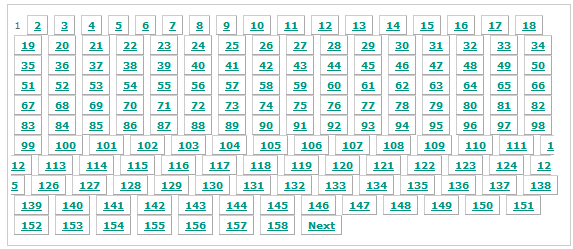
One day we did a large import of users and with around 2K user accounts our user management looked ugly because we had around 160 pages with default settings. Our client rightfully told us he will not use the pagination featureall-users-pagination. Our brains immediately thought about technical solutions to the problem when the client came up with a super-simple dramatic improvement: Instead of preselecting the "all" filter just preselect the "a" filter to only show the users starting with the letter 'a'.  This solution fixed 95% of the clients problems and was implemented in like 10 minutes.

In another place we were dealing with similar amounts of affiliations which consist of several lines of address information and the like. Again we immediately thought about pagination, better layouting to save space and various performance improvements to help the usability. The dead-simple solution here was using the context information available and pre-filling a filter text box to reduce the number of entries in the list to a handful of relevant items. No other changes were needed because an important thing was implemented already: The controls for the list were either at the top of the list or integrated with each item making selection and scrolling down unnecessary.

Conclusions

It often helps to listen to your client/users to learn about the workflows and the information/options really needed to accomplish the most relevant tasks. They might come up with really simple solutions to problems where it is easy to put days of thought into. Using available context information and sensible preselections may help immensly because you display the informations the users most likely needs first and above while still allowing him to navigate to less important or more seldom needed things.

Another take-away is that pagination does not scale well. In most applications with large amounts of user visible items you will need more modern features like filters, type-ahead search and tags to narrow down the results and let the users focus at the currently needed items.

Communication Through Code

In a previous post my colleague described our experiment on our ability to transfer the intention of the code by tests. The tests describe how the code behaves when called from the outside. Additional approach is to communicate through code.

To understand the code, at least the following two questions have to be answered:

  • How does the code work?
  • What is the reason behind the way the code is implemented?

Challenge

As long as the code is readable, it is possible to deduce its meaning. Improving readability is a common technique to help the reader. This includes using descriptive names, reducing complexity or hiding implementation details until they are absolutely necessary to understand the problem.

On the other hand deducing the reason why exactly this implementation was chosen by somebody is an impossible task without the knowledge (or lack thereof) of all implementors combined. One of the missing parts are the assumptions. Our code is full of them. Consider the following example:

void print(char* text)
{
  printf("program says %s", text);
}

In this function the writer assumes that:

  • the text is a valid pointer
  • the text is zero terminated
  • this program can write to stdout, i.e. is a console app
  • the reader speaks english

Or something nastier:

void* allocateBuffer(size_t size)
{
  void* buffer = malloc(size);
  if (!buffer) {
    printf("expect a segmentation fault!");
  }
  return buffer;
}

Here the writer assumes that malloc always returns either NULL or a pointer to dereferenceable memory. It is not always the case:

If size is zero, the return value depends on the particular library implementation (it may or may not be a null pointer), but the returned pointer shall not be dereferenced.

Assumptions not explicitly defined in the code lead sooner or later to hard to discover bugs.

Solution approaches

Comments are the quick and dirty way of writing down assumptions. They are easiest to read, but are never enforced and tend to diverge from the code with every edit made to it. However it is better to read “should never come here” and hear the alarm bells ringing than seeing nothing but whitespace.

Some of the assumptions can be documented and verified through tests, with varying level of detail. Unit tests will be most efficient on assumptions with little or no context, like verifying that only non-NULL-pointers are passed to a function. For more global assumptions integration or acceptance tests can be used. Together they ensure that no changes to the codebase break the assumptions made earlier. The drawback of unit tests is that they are locally decoupled from the code tested, forcing the reader to gather the information by searching for direct or indirect references to it.

When new code is written, assertions help to document how the API is meant to be used. Since they are executed not only during the test phase, they can capture wrong assumptions the authors made about the runtime environment. Writing down every possible assumption can quickly clutter the code with repeated statements like “assume pointer x is not NULL”, reducing readability and usefulness of this technique.

Conclusion

All of the shown approaches are not new. Each one has an aspect it excels at, so to get the most information out of the code they all have to be used. Their domains overlap partially, so it is possible to choose the approach depending on the situation, i.e. replacing assertions with unit tests for time critical code. One niche currently not filled by any of them is the description of global assumptions like the cultural background of the users.

Does Refactoring turn unit test of TDD to integration tests?

We really value automated tests and do experiments regarding test driven development (TDD) and tests in general from time to time. In the retrospective of our lastest experiment this question struck me: Does refactoring turn the unit tests of TDD to integration tests over time?

Let me elaborate this a bit further. When you start out with your tests you have some unit of functionality – usually a class – in mind. As you add test after test your implementation slowly fleshes out. You are repeating the TDD cycle “Write a failing test – Make test pass – Refactor” as you are adding features. The refactoring step is crucial in the whole process because it keeps the code clean and evolvable. But this step is also the cause leading to my observation: As you add new features you may extract new classes when refactoring to obey the single responsibility principle (SRP) and keep your design sane. It is very easy to forget or just ignore refactoring the tests. They still pass. You still have the same code coverage. But your tests now test the combination of several units. And what’s worse: You have units without direct tests.

This happened even in relatively small experiments on “Communication through tests” where the recontructing team could sometimes only guess that some class existed and either went on without it or created the class out of neccessity. The problem with this is that there are no obvious and clear indicators that your unit tests are not real unit tests anymore.

Conclusion

I neither have any solution nor am I completely sure how big the problem is in practice. It may help to state the TDD cycle more explicitly like “Write a failing test – Make test pass – Refactor implementation and tests” although that is no 100% remedy. One could implement a simple, checkstyle-like tool which lists all units without associated test class. I will keep an eye on the phenomenom and try to analyse it further. I would love to hear you view and experience on the matter.

Building Visual C++ Projects with CMake

In previous post my colleague showed how to create RPM packages with CMake. As a really versatile tool it is also able to create and build Visual Studio projects on Windows. This property makes it very valuable when you want to integrate your project into a CI cycle(in our case Jenkins).

Prerequisites:

To be able to compile anything following packages needed to be installed beforehand:

  •  CMake. It is helpful to put it in the PATH environment variable so that absolute paths aren’t needed.
  • Microsoft Windows SDK for Windows 7 and .NET Framework 4 (the web installer or  the ISOs).  The part “.NET Framework 4” is very important, since when the SDK for the .NET Framework 3.5 is installed you will get following parse error for your *.vcxproject files:

    error MSB4066: The attribute “Label” in element is unrecognized

    at the following position:

    <ItemGroup Label=”ProjectConfigurations”>

    Probably equally important is the bitness of the installed SDK. The x64 ISO differs only in one letter from the x86 one. Look for the X if want 64 bit.

  • .NET Framework 4, necessary to make msbuild run

It is possible that you encounter following message during your SDK setup:

A problem occurred while installing selected Windows SDK components. Installation of the “Microsoft Windows SDK for Windows 7” product has reported the following error: Please refer to Samples\Setup\HTML\ConfigDetails.htm document for further information. Please attempt to resolve the problem and then start Windows SDK setup again. If you continue to have problems with this issue, please visit the SDK team support page at http://go.microsoft.com/fwlink/?LinkId=130245. Click the View Log button to review the installation log. To exit, click Finish.

The reason behind this wordy and less informative error message were the Visual C++ Redistributables installed on the system. As suggested by Microsoft KB article removing them all helped.

Makefiles:

For CMake to build anything you need to have a CMakeLists.txt file in your project. For a tutorial on how to use CMake, look at this page. Here is a simple CMakeLists.txt to get you started:

project(MyProject)
 cmake_minimum_required(VERSION 2.6)
 set(source_files
 main.cpp
 )
 include_directories(
 ${CMAKE_CURRENT_SOURCE_DIR}
 )
 add_executable(MyProject ${source_files})

Building:

To build a project there are few steps necessary. You can enter them in your CI directy or put them in a batch file.

call "%ProgramFiles%\Microsoft SDKs\Windows\v7.1\Bin\SetEnv.cmd" /Release /x86

With this call all necessary environment variables are set. Be careful on 64 bit platforms as jenkins slave executes this call in a 32 bit context and so “%ProgramFiles%” is resolved to “ProgramFiles (x86)” where the SDK does not lie.

del CMakeCache.txt

This command is not strictly necessary, but it prevents you from working with outdated generated files when you change your configuration.

cmake -G "Visual Studio 10" .

Generates a Visual Studio 2010 Solution. Every change to the solution and the project files will be gone when you call it, so make sure you track all necessary files in the CMakeLists.txt.

cmake --build . --target ALL_BUILD --config Release

The final step. It will net you the MyProject.exe binary. The target parameter is equal to the name of the project in the solution and the config parameter is one of the solution configurations.

Final words:

The hardest and most time consuming part was the setup of prerequisites. Generic, not informative error messages are the worst you can do to a clueless customer. But… when you are done with it, you are only two small steps apart from an automatically built executable.