Assumptions – how to find, track and eliminate them

Assumptions can kill a project. Like a house built on sand we don’t know when and where it will collapse.
The problem with assumptions is that they disguise as truths. We believe them.

Assumptions can kill a project. Like a house built on sand we don’t know when and where it will collapse.
The problem with assumptions is that they disguise as truths. We believe them. They are the project’s reality. Just like the matrix.
Assumptions are shortcuts. Guesses at reality. We cannot fully grasp reality, so we assume. But we can find evidence for our decisions. For this we need to uncover the assumptions, assess their risk and gather evidence. But how do we know what we assume?

Find assumptions

Watch your language

‘I think’, ‘In my opinion’, ‘should be’, ‘roughly’, ‘circa’ are all clues for assumptions. Decisions need to be based on evidence. When we use vague language or personal opinions to describe our project we need to pause. Under this lurks insecurity and assumptions.
Another red flag are metaphors. Metaphors might be great to present, paint a picture in our head or describe a vision. But in decision making they are too abstract and meaningless. We may use them to describe our strategy but when we need to design and implement we need borders that constrain our decisions. Metaphors usually cover only some aspects of the project and vice versa. There’s a mismatch. We need concrete language without ambiguity.

Be dumb

We know so much that we think others have the same experience, education, view point, familiarity, proficiency and imprinting. We know so little that we think the other way is also true. We transfer. We assume. Dare to ask dumb questions. Adopt a beginner’s mind. Challenge traditions and common beliefs.
We take age old decisions for granted. They were made by people smarter than us, so they must be right. Don’t do this. Question them. Even the obvious ones.
In the book ‘Hidden in plain sight’ Jan Chipchase enters a typical cafe where people sit and talk, drink coffee and typing on their laptops. The question he poses: should the coffeshop owner sell diapers? So that everybody can continue what they do without the need to go to the bathroom. This question challenges our cultural and imprinted beliefs. And this is good.

Be curious

Ask: why? We need to get to the root of the problem. Dig deeper. Often under layers of reasoning and thoughtful decisions lies an assumption. The chain is only so strong as its weakest link. If we started with an assumption, the reasoning building on it is also assumed. Children often ask why and don’t stop even when we think it is all said and logical. So when we find the root, we need to continue to ask: is this really the root? Why is it the way it is.
Another question we need to ask repeatedly is: what if? What if: our target audience changes? we try to follow the opposite of the goals of our project? what if the technology changes?

Change perspectives

We see what we want to see. Seeing is an active process. We can stretch our thinking only so far. To stretch it even further we need to change roles. For just some hours do the work our users do. Feel their pains. Their highs and lows.
Or adopt the role of the browser. Good interfaces are conversations. Play a dialog with your user. Be the browser.
Only by embracing constraints of other perspectives we can force ourselves to stretch. In this way we find things which are assumed by us because of our view of the world.

Track them

After we have collected the assumptions we need to track them to later prove or disprove them. For this a simple spreadsheet or table is sufficient. This learning plan consists of 5 columns (taken from Leah Buley’s The UX Team of one):

  • the assumption: what we believe is true
  • the certainty: a 3 or 5 point scale showing how sure we are that we are right
  • notes: additional notes of why we think the assumption is right or wrong
  • the evidence: results which we collected to support this assumption
  • the research: things we can do to collect further evidence

Eliminate them

Now that we know what we assume and with which certainty we think we are right, we can start to collect further information to support or disprove our claims. In short: We research. Research can take many different forms. But all forms are there to gain further insights. Some basic forms we use to bring light into the darkness of uncertainty are:

  • Stakeholder interviews
  • (Contextual) user interviews
  • Heuristic evaluation
  • Prototyping
  • Market research

Other methods we don’t use (yet) include:

  • A/B tests (paired with analytics)
  • User tests

The point behind all these methods is to build a chain of reasoning. Everything in our software needs a reason to exist. The users and the stakeholders are the primary sources of insight. But also our experience, the human psychology and common patterns or conventions help us to decide which way to go.
Not only the method of collecting is important but also how the results are documented. We should present the essential information in a way that it is easy to get a glimpse of it just by looking at the respective documents. On the other side we should all keep this pragmatic and not go overboard. Our goal is to get insight and not build a proof of the system.

Recap of the Schneide Dev Brunch 2015-06-14

If you couldn’t attend the Schneide Dev Brunch at 14th of June 2015, here is a summary of the main topics.

brunch64-borderedA week ago, we held another Schneide Dev Brunch, a regular brunch on the second sunday of every other (even) month, only that all attendees want to talk about software development and various other topics. So if you bring a software-related topic along with your food, everyone has something to share. The brunch was well attented this time with enough stuff to talk about. We probably digressed a little bit more than usual. As usual, a lot of topics and chatter were exchanged. This recapitulation tries to highlight the main topics of the brunch, but cannot reiterate everything that was spoken. If you were there, you probably find this list inconclusive:

Distributed Secret Sharing

Ever thought about an online safe deposit box? A place where you can store a secret (like a password or a certificate) and have authorized others access it too, while nobody else can retrieve it even if the storage system containing the secret itself is compromised? Two participants of the Dev Brunch have developed DUSE, a secure secret sharing application that provides exactly what the name suggests: You can store your secrets without any cleartext transmission and have others read them, too. The application uses the Shamir’s Secret Sharing algorithm to implement the secret distribution.

The application itself is in a pre-production stage, but already really interesting and quite powerful. We discussed different security aspects and security levels intensily and concluded that DUSE is probably worth a thorough security audit.

Television series

A main topic of this brunch, even when it doesn’t relate as strong with software engineering, were good television series. Some mentioned series were “The Wire”, a rather non-dramatic police investigation series with unparalleled realism, the way too short science-fiction and western crossover “Firefly” that first featured the CGI-zoom shot and “True Detective”, a mystery-crime mini-series with similar realism attempts as The Wire. “Hannibal” was mentioned as a good psychological crime series with a drift into the darker regions of humankind (even darker than True Detective). And finally, while not as good, “Silicon Valley”, a series about the start-up mentality that predominates the, well, silicon valley. Every participant that has been to the silicon valley confirms that all series characters are stereotypes that can be met in reality, too. The key phrase is “to make the world a better place”.

Review of the cooperative study at DHBW

A nice coincidence of this Dev Brunch was that most participants studied at the Baden-Württemberg Cooperative State University (DHBW) in Karlsruhe, so we could exchange a lot of insights and opinions about this particular form of education. The DHBW is an unique mix of on-the-job training and academic lectures. Some participants gathered their bachelor’s degree at the DHBW and continued to study for their master’s degree at the Karlsruhe Institute of Technology (KIT). They reported unisono that the whole structure of studies changes a lot at the university. And, as could be expected from a master’s study, the level of intellectual requirement raises from advanced infotainment to thorough examination of knowledge. The school of thought that transpires all lectures also changes from “works in practice” to “needs to work according to theory, too”. We concluded that both forms of study are worth attending, even if for different audiences.

Job Interview

A short report of a successful job interview at an upcoming german start-up revealed that they use the Data Munging kata to test their applicants. It’s good to see that interviews for developer positions are more and more based on actual work exhibits and less on talk and self-marketing skills. The usage of well-known katas is both beneficial and disadvantageous. The applicant and the company benefit from realistical tasks, while the number of katas is limited, so you could still optimize your appearance for the interview.

Following personalities

We talked a bit about the notion of “following” distinguished personalities in different fields like politics or economics. To “follow” doesn’t mean buying every product or idolizing the person, but to inspect and analyze his or her behaviour, strategies and long-term goals. By doing this, you can learn from their success or failure and decide for yourself if you want to mimick the strategy or aim for similar goals. You just need to be sure to get the whole story. Oftentimes, a big personality maintains a public persona that might not exhibit all the necessary traits to fully understand why things played out as they did. The german business magazine Brand Eins or the english Offscreen magazine are good starting points to hear about inspiring personalities.

How much money is enough?

Another non-technical question that got quite a discussion going was the simple question “when did/do you know how much money is enough?”. I cannot repeat all the answers here, but there were a lot of thoughtful aspects. My personal definition is that you have enough money as soon as it gets replaced as the scarcest resource. The resource “time” (as in livetime) is a common candidate to be the replacement. As soon as you don’t think in money, but in time, you have enough money for your personal needs.

Basic mechanics of company steering

In the end, we talked about start-ups and business management. When asked, I explained the basic mechanics of my attempt to steer the Softwareschneiderei. I won’t go into much detail here, but things like the “estimated time of death” (ETOD) are very important instruments that give everyone in the company a quick feeling about our standings. As a company in the project business, we also have to consider the difference between “gliding flight projects” (with continuous reward) and “saw tooth projects” with delayed reward. This requires fundamentally different steering procedures as any product manufacturer would do. The key characteristic of my steering instruments is that they are directly understandable and highly visible.

Epilogue

As usual, the Dev Brunch contained a lot more chatter and talk than listed here. The number of attendees makes for an unique experience every time. We are looking forward to the next Dev Brunch at the Softwareschneiderei. And as always, we are open for guests and future regulars. Just drop us a notice and we’ll invite you over next time.

Declare war on your software

If we believe Robert Greene, life is dominated by fierce war – and he does not only refer to obvious events such as World War II or the Gulf Wars, but also to politics, jobs and even the daily interactions with your significant other.

The book

Left aside whether or not his notion corresponds to reality, it is indeed possible to apply many of the strategies traditionally employed in warfare to other fields including software development. In his book The 33 Strategies of War, Robert Greene explains his extended conception on the term war, which is not restricted to military conflicts, and describes various methods that may be utilized not only to win a battle, but also to gain advantage in everyday life. His advice is backed by detailed historic examples originating from famous military leaders like Sun Tsu, influential politicans like Franklin D. Roosevelt and even successful movie directors like Alfred Hitchcock.

Examples

While it is clear that Greene’s methods are applicable to diplomacy and politics, their application in the field of software development may seem slightly odd. Hence, I will give two specific examples from the book to explain my view.

The Grand Strategy

Alexander the Great became king of Macedon at the young age of twenty, and one of his first actions was to propose a crusade against Persia, the Greek’s nemesis. He was warned that the Persian navy was strong in the Mediterranean Sea and that he should strengthen the Greek navy so as to attack the Persians both by land and by sea. Nevertheless, he boldly set off with an army of 35,000 Greeks and marched straight into Asia Minor – and in the first encounter, he inflicted a devastating defeat on the Persians.

Now, his advisors were delighted and urged him to head into the heart of Persia. However, instead of delivering the finishing blow, he turned south, conquering some cities here and there, leading his army through Phoenicia into Egypt – and by taking Persia’s major ports, he disabled them from using their fleet. Furthermore, the Egyptians hated the Persians and welcomed Alexander, so that he was free to use their wealth of grain in order to feed his army.

Still, he did not move against the Persian king, Darius, but started to engage in politics. By building on the Persion government system, changing merely its unpopular characteristics, he was able to stabilize the captured regions and to consolidate his power. It was not before 331 B. C., two years after the start of his campaign, that he finally marched on the main Persian force.

While Alexander might have been able to defeat Darius right from the start, this success would probably not have lasted for a long time. Without taking the time to bring the conquered regions under control, his empire could easily have collapsed. Besides, the time worked in his favor: Cut off from the Egyptian wealth and the subdued cities, the Persian realm faltered.

One of Greene’s strongest points is the notion of the Grand Strategy: If you engage in a battle which does not serve a major purpose, its outcome is meaningless. Like Alexander, whose actions were all targeted on establishing a Macedonian empire, it is crucial to focus on the big picture.

It is easy to see that these guidelines are not only useful in warfare, but rather in any kind of project work – including software projects. While one has to tackle the main tasks at some point, it is important to approach it reasoned, not rashly. If anaction is not directed towards the aim of the project, one will be distracted and endager its execution by wasting resources.

The Samurai Musashi

Miyamoto Musashi, a renowned warrior and duellist, lived in Japan during the late 16th and the early 17th century. Once, he was challenged by Matashichiro, another samurai whose father and brother had already been killed by Musashi. In spite of the warning of friends that it might be a trap, he decided to oppose his enemy, however, he did prepare himself.

For his previous duels, he had arrived exorbitantly late, making his opponents lose their temper and, hence, the control over the fight. Instead, this time he appeared at the scene hours before the agreed time, hid behind some bushes and waited. And indeed, Matashichiro arrived with a small troop to ambush Musashi – but using the element of surprise, he could defeat them all.

Some time later, another warrior caught Musashi’s interest. Shishido Baiken used a kusarigama, a chain-sickle, to fight and had been undefeated so far. The chain-sickle seemed to be superior to swords: The chain offered greater range and could bind an enemy’s weapon, whereupon the sickle would deal the finishing blow. But even Baiken was thrown off his guard; Musashi showed up armed with a shortsword along with the traditional katana – and this allowed him to counter the kusarigama.

A further remarkable opponent of Musashi was the samurai Sasaki Ganryu, who wore a nodachi, a sword longer than the usual katanas. Again, Musashi changed his tactics: He faced Ganryu with an oar he had turned into a weapon. Exploiting the unmatched range of the oar, he could easily win the fight.

The characteristic that distinguished Musashi from his adversaries most was not his skill, but that he excelled at adapting his actions to his surroundings. Even though he was an outstanding swordsman, he did not hesitate to follow different paths, if necessary. Education and training facilitate becoming successful, but one has to keep an open mind to change.

Relating to software development, it does not mean that we have to start afresh all the time we begin a new project. Nevertheless, it is dangerous if one clings to outdated technologies and procedures, sometimes may be helpful to regard a situation like a child, without any assumptions. In this manner, it is probably possible to learn along the way.

Summary

Greene’s book is a very interesting read and even though in my view one should take its content with a pinch of salt, it is a nice opportunity to broaden one’s horizon. The book contains far more than I addressed in this article and I think most of its findings are indeed in one way or another applicable to everyday life.

VB.NET for Java Developers – Updated Cheat Sheet

The BASIC programming language (originally invented at Dartmouth College in 1964) and Microsoft share a long history together. Microsoft basically started their business with the licensing of their BASIC interpreter (Altair BASIC), initially developed by Paul Allan and Bill Gates. Various dialects of Microsoft’s BASIC implementation were installed in the ROMs of many home computers like the Apple II (Applesoft BASIC) or the Commodore 64 (Commodore BASIC) during the 1970s and 1980s. A whole generation of programmers discovered their interest for computer programming through BASIC before moving on to greater knowledge.

BASIC was also shipped with Microsoft’s successful disk operating system (MS-DOS) for the IBM PC and compatibles. Early versions were BASICA and GW-BASIC. Original BASIC code was based on line numbers and typically lots of GOTO statements, resulting in what was often referred to as “spaghetti code”. Starting with MS-DOS 5.0 GW-BASIC was replaced by QBasic (a stripped down version of Microsoft QuickBasic). It was backwards compatible to GW-BASIC and introduced structured programming. Line numbers and GOTOs were no longer necessary.

When Windows became popular Microsoft introduced Visual Basic, which included a form designer for easy creation of GUI applications. They even released one version of Visual Basic for DOS, which allowed the creation of GUI-like textual user interfaces.

Visual Basic.NET

The current generation of Microsoft’s Basic is Visual Basic.NET. It’s the .NET based successor to Visual Basic 6.0, which is nowadays known as “Visual Basic Classic”.

Feature-wise VB.NET is mostly equivalent to C#, including full support for object-oriented programming, interfaces, generics, lambdas, operator overloading, custom value types, extension methods, LINQ and access to the full functionality of the .NET framework. The differences are mostly at the syntax level. It has almost nothing in common with the original BASIC anymore.

Updated Cheat Sheet for Java developers

A couple of years ago we published a VB.NET cheat sheet for Java developers on this blog. The cheat sheet uses Java as the reference language, because today Java is a lingua franca that is understood by most contemporary programmers. Now we present an updated version of this cheat sheet, which takes into account recent developments like Java 8:

The web is for documents

The web is intended to help a person find and understand relevant information. The primary container of information is the document. Therefore web applications should be centered around a document metaphor, not an app one.

The web is intended to help a person find and understand relevant information. The primary container of information is the document. Therefore web applications should be centered around a document metaphor, not an app one.

In 1990 Tim Berners-Lee and Robert Cailliau wrote a proposal for what we call the web today:

HyperText is a way to link and access information of various kinds as a web of nodes in which the user can browse at will.

The web is a linked information system. Bret Victor states:

Information software serves the human urge to learn. A person uses information software to construct and manipulate a model that is internal to the mind — a mental representation of information.

The web is built around information. More information than we can handle. What we need to make sense of it all is understanding. The power of technology can be used to transfer and gain understanding. Understanding needs to be a first class citizen. The applications we build must be centered around it.

One way to foster understanding is to interact, to play with information. Technology can simulate a system of information so that we can form hypotheses and ask questions. Bret Victor coined the term “explorable explanations” to describe such systems.

I believe the web is perfectly suited for building explorable explanations.

The web’s container for information is the document. A document combines different forms of media (text, images, video, …) to a whole. Fortunately for us the web does not stop here. With scripting we have the possibility to interact and manipulate the information in order to gain further insight.

Most of the tools we need to create for understanding are already at our hands. What we need is a fundamental change in focus. Right now (a large part of) the web industry tries to play catch up with native. Whole frameworks try to mimic native applications like this is a virtue. Current developments want to abstract the document as far away as possible. This is not what the web was intended for. Why build an application which tries so hard to recreate a native feeling in something other than the native platform itself? Web applications should be built on the strength of the web. We should not chase a foreign metaphor.
Right now the web seems to be torn. Torn between the print era of passive documents and the shiny new world of native applications. But the web has the capability to do so much more. To concentrate on its purpose, to fill the niche. A massive niche. Understanding is a core endeavor of mankind. To quote Stephen Anderson and Karl Fast in introducing their upcoming book From Information to Understanding:

In all areas of life, we are surrounded by understanding problems.

Doug Engelbart shares a similar vision for the purpose of the personal computer per se:

By “augmenting human intellect” we mean increasing the capability of a man to approach a complex problem situation, to gain comprehension to suit his particular needs, and to derive solutions to problems.

The web is ready. The tools are ready. But are we?

Where to start: foundations

Easy maintenance, not easy production

Imagine that you have to do critical changes in the source code, stressed, over-worked and under time pressure, without any recollection about your thoughts during development, lacking your familiar tools while your customer waits impatiently by your side. That’s when you are glad you prepared for this moment.

It is said that source code gets read a hundred times more often than it gets written. My experience confirms this circumstance, which leads to a principle of economic source code modifications: The first modification is almost for free, it’s the later ones that run up a bill. In order to achieve a low TCO (total cost of ownership), it’s sound advice to plan (and develop) for easy maintenance instead of easy production. This principle even has a fancy name: Keep It Simple, Stupid (KISS).

Origin of KISS

According to the english Wikipedia on the topic, the principle’s name was coined by an aircraft engineer named Kelly Johnson, who also designed the fastest jet plane of all time, the SR-71 “Blackbird”. The aircraft reached speeds of over Mach 3 and had an unmatched defensive armament: enough thrust to evade any confrontation. It would simply fly higher and/or faster than anything launched against it, like interceptor fighters or anti-air missiles. The Blackbird used construction material that was specifically invented for this plane and very expensive, so it definitely was no easy production. Sadly for this blog post, it wasn’t particularly easy to maintain, either. It usually leaked so much fuel that it had to be refueled directly after takeoff. The leaks were pragmatically designed that way and would seal themselves in flight. It’s quite an interesting plane.

Easy maintenance

Johnson once alledegly gave his engineers a bunch of tools and required that the aircraft under design must be repairable with only these tools, by an average mechanic in the field under combat conditions (e.g. stressed, exhausted and narrow timeframe). This is a wonderful concept that I regularly apply to my projects: Imagine that you are on-site with your customer, the most important functionality of your project just broke, resulting in a disastrous standstill of the whole facility and all you have is your sourcecode and the vi editor (or vim, if you’re non-hardcore like me). No internet, no IDE, no extensive documentation. Could you make meaningful changes to your project under these conditions? What needs to be changed to make your life easier in such an extreme situation? What restrictions would these changes impose on your daily work? How much effort/damage/resources would these changes cost? Is it easier to anticipate maintenance or to trust to luck that it won’t be necessary?

Easy production

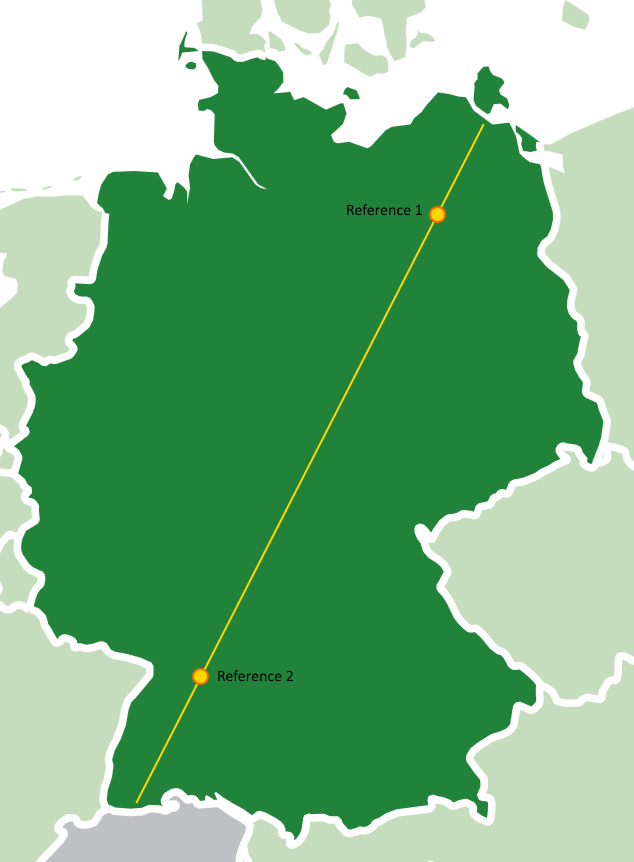
A while ago, I reviewed the code of a map tool. The user viewed a map and could click on it to mark a certain location. The geo coordinates of this location would be used as an input for further computations. The map was restricted to a fixed area, so the developer wrote the code in the easiest way possible: He chose well-known geographic landmarks on the map and determined their geo coordinates and pixel locations. map-with-referenceThose were the reference points in the code that every click would be related to. Using easy mathematic (rule of three), each point on the map could be calculated. Clever trick and totally working! The code practically wrote itself and the reference points only needed to be determined once.

Until the map was changed. The code contained some obscure constants that described the original landmarks, but the whole concept of arbitrary reference points was alien to the next developer. He was used to the classic concept of two reference points: top left and bottom right, with their respective geo coordinates and pixel locations. What seemed like a quick task turned into a stressful reclaiming of the clever trick during production.

In this example, the production (initial development) was easy, straight-forward and natural, but not easily reproducible during the maintenance phase (subsequent modification). The algorithm used a clever approach, but this cleverness isn’t necessarily available “under combat conditions”.

Go the extra mile

Most machines are designed so that wearing parts can be easily replaced. Think of batteries in electronic gagdets (well, at least before the gadget’s estimated lifetime was lower than the average battery life) or light bulbs in cars (well, at least before LED headlights were considered cool). Thing is, engineers usually know the wear effects their designs have to endure. There is no “usual wear effect” on software, due to lack of natural forces like gravitation. Everything could change, so it’s better to be prepared for all sorts of change. That’s the theory, but it’s not economically sound to develop software that is prepared for any circumstance. Pragmatic reasoning calls for compromise, like supporting changes that

  • are likely to happen (this needs to be grounded in domain knowledge and should be documented in the code)
  • are not expensive to arrange beforehands (the popular “low-hanging fruits”)
  • are expensive to implement afterwards

The last aspect might be a bit of a surprise, but it’s the exact aspect that came to play in the example above: To recreate the knowledge about the clever trick of landmark choices needed more time than implementing the classic interpolation taking the edge points.

So if you see a possible (and not totally unlikely) change that will be expensive to implement once the intimate knowledge of the code you have during the initial development, go the extra mile and prepare for it right now. Leave a comment, implement some kind of extension mechanism or just mind the code seams. In our example, slightly complicating the initial development led to a dramatically less clever and more accessible code.

Conclusion

You should consider writing your code for easy maintenance, even if that means additional effort during the initial implementation. Imagine that you yourself have to do the future change, stressed, over-worked and under time pressure, without any recollection about your thoughts today, lacking your familiar tools while your customer waits impatiently by your side. With proper preparation, even this scenario is feasible.


Creating a GPS network service using a Raspberry Pi – Part 2

In the last article we learnt how to install and access a GPS module in a Raspberry Pi. Next, we want to write a network service that extracts the current location data – latitude, longitude and altitude – from the serial port.

Basics

We use Perl to write a CGI-script running within an Apache 2; both should be installed on the Raspberry Pi. To access the serial port from Perl, we need to include the module Device::SerialPort. Besides, we use the module JSON to generate the HTTP response.

use strict;
use warnings;
use Device::SerialPort;
use JSON;
use CGI::Carp qw(fatalsToBrowser);

Interacting with the serial port

To interact with the serial port in Perl, we instantiate Device::SerialPort and configure it according to our hardware. Then, we can read the data sent by our hardware via device->read(…), for example as follows:

my $device = Device::SerialPort->new('...') or die "Can't open serial port!";
//configuration
...
($count, $result) = $device->read(255);

For the Sparqee GPSv1.0 module, the device can be configured as shown below:

our $device = '/dev/ttyAMA0';
our $baudrate = 9600;

sub GetGPSDevice {
 my $gps = Device::SerialPort->new($device) or return (1, "Can't open serial port '$device'!");
    $gps->baudrate($baudrate);
    $gps->parity('none');
    $gps->databits(8);
    $gps->stopbits(1);
    $gps->write_settings or return (1, 'Could not write settings for serial port device!');
    return (0, $gps);
}

Finding the location line

As described in the previous blog post, the GPS module sends a continuous stream of GPS data; here is an explanation for the single components.

$GPGSA,A,3,17,09,28,08,26,07,15,,,,,,2.4,1.4,1.9*.6,1.7,2.0*3C
$GPRMC,031349.000,A,3355.3471,N,11751.7128,W,0.00,143.39,210314,,,A*76
$GPGGA,031350.000,3355.3471,N,11751.7128,W,1,06,1.7,112.2,M,-33.7,M,,0000*6F
$GPGSA,A,3,17,09,28,08,07,15,,,,,,,2.6,1.7,2.0*3C
$GPGSV,3,1,12,17,67,201,30,09,62,112,28,28,57,022,21,08,55,104,20*7E
$GPGSV,3,2,12,07,25,124,22,15,24,302,30,11,17,052,26,26,49,262,05*73
$GPGSV,3,3,12,30,51,112,31,57,31,122,,01,24,073,,04,05,176,*7E
$GPRMC,031350.000,A,3355.3471,N,11741.7128,W,0.00,143.39,210314,,,A*7E
$GPGGA,031351.000,3355.3471,N,11741.7128,W,1,07,1.4,112.2,M,-33.7,M,,0000*6C

We are only interested in the information about latitude, longitude and altitude, which is part of the line starting with $GPGGA. Assuming that the first parameter contains a correctly configured device, the following subroutine reads the data stream sent by the GPS module, extracts the relevant line and returns it. In detail, it searches for the string $GPGGA in the data stream, buffers all data sent afterwards until the next line starts, and returns the buffer content.

# timeout in seconds
our $timeout = 10;

sub ExtractLocationLine {
    my $gps = $_[0];
    my $count;
    my $result;
    my $buffering = 0;
    my $buffer = '';
    my $limit = time + $timeout;
    while (1) {
        if (time >= $limit) {
           return '';
        }
        ($count, $result) = $gps->read(255);
        if ($count <= 0) {
            next;
        }
        if ($result =~ /^\$GPGGA/) {
            $buffering = 1;
        }
        if ($buffering) {
            my $part = (split /\n/, $result)[0];
            $buffer .= $part;
        }
        if ($buffering and ($result =~ m/\n/g)) {
            return $buffer;
        }
    }
}

Parsing the location line

The $GPGGA-line contains more information than we need. With regular expressions, we can extract the relevant data: $1 is the latitude, $2 is the longitude and $3 is the altitude.

sub ExtractGPSData {
    $_[0] =~ m/\$GPGGA,\d+\.\d+,(\d+\.\d+,[NS]),(\d+\.\d+,[WE]),\d,\d+,\d+\.\d+,(\d+\.\d+,M),.*/;
    return ($1, $2, $3);
}

Putting everything together

Finally, we convert the found data to JSON and print it to the standard output stream in order to write the HTTP response of the CGI script.

sub GetGPSData {
    my ($error, $gps) = GetGPSDevice;
    if ($error) {
        return ToError($gps);
    }
    my $location = ExtractLocationLine($gps);
    if (not $location) {
        return ToError("Timeout: Could not obtain GPS data within $timeout seconds.");
    }
    my ($latitude, $longitude, $altitude) = ExtractGPSData($location);
    if (not ($latitude and $longitude and $altitude)) {
        return ToError("Error extracting GPS data, maybe no lock attained?\n$location");
    }
    return to_json({
        'latitude' => $latitude,
        'longitude' => $longitude,
        'altitude' => $altitude
    });
}

sub ToError {
    return to_json({'error' => $_[0]});
}

binmode(STDOUT, ":utf8");
print "Content-type: application/json; charset=utf-8\n\n".GetGPSData."\n";

Configuration

To execute the Perl script with a HTTP request, we have to place it in the cgi-bin directory; in our case we saved the file at /usr/lib/cgi-bin/gps.pl. Before accessing it, you can ensure that the Apache is configured correctly by checking the file /etc/apache2/sites-available/default; it should contain the following section:

ScriptAlias /cgi-bin/ /usr/lib/cgi-bin/
<Directory "/usr/lib/cgi-bin">
    AllowOverride None
    Options +ExecCGI -MultiViews +SymLinksIfOwnerMatch
    Order allow,deny
    Allow from all
</Directory>

Furthermore, the permissions of the script file have to be adjusted, otherwise the Apache user will not be able to execute it:

sudo chown www-data:www-data /usr/lib/cgi-bin/gps.pl
sudo chmod 0755 /usr/lib/cgi-bin/gps.pl

We also have to add the Apache user to the user group dialout, otherwise it cannot read from the serial port. For this change to come into effect the Raspberry Pi has to be rebooted.

sudo adduser www-data dialout
sudo reboot

Finally, we can check if the script is working by accessing the page <IP address>/cgi-bin/gps.pl. If the Raspberry Pi has no GPS reception, you should see the following output:

{"error":"Error extracting GPS data, maybe no lock attained?\n$GPGGA,121330.326,,,,,0,00,,,M,0.0,M,,0000*53\r"}

When the Raspberry Pi receives GPS data, they should be given in the browser:

{"longitude":"11741.7128,W","latitude":"3355.3471,N","altitude":"112.2,M"}

Last, if you see the following message, you should check whether the Apache user was correctly added to the group dialout.

{"error":"Can't open serial port '/dev/ttyAMA0'!"}

Conclusion

In the last article, we focused on the hardware and its installation. In this part, we learnt how to access the serial port via Perl, wrote a CGI script that extracts and delivers the location information and used the Apache web server to make the data available via network.

Declaration-site and use-site variance explained

A common question posed by programming novices who have their first encounters with parametrized types (“generics” in Java and C#) is “Why can’t I use a List<Apple> as a List<Fruit>?” (given that Apple is a subclass of Fruit) Their reasoning usually goes like this: “An apple is a fruit, so a basket of apples is a fruit basket, right?”

Here’s another, similar, example:

Milk is a dairy product, but is a bottle of milk a dairy product bottle? Try putting a Cheddar cheese wheel into the milk bottle (without melting or shredding the cheese!). It’s obviously not that simple.

Let’s assume for a moment that it was possible to use a List<Apple> as a List<Fruit>. Then the following code would be legal, given that Orange is a subclass of Fruit as well:

List<Apple> apples = new ArrayList<>();
List<Fruit> fruits = apples;
fruits.add(new Orange());

// what's an orange doing here?!
Apple apple = apples.get(0);

This short code example demonstrates why it doesn’t make sense to treat a List<Apple> as a List<Fruit>. That’s why generic types in Java and C# don’t allow this kind of assignment by default. This behaviour is called invariance.

Variance of generic types

There are, however, other cases of generic types where assignments like this actually could make sense. For example, using an Iterable<Apple> as an Iterable<Fruit> is a reasonable wish. The opposite direction within the inheritance hierarchy of the type parameter is thinkable as well, e.g. using a Comparable<Fruit> as a Comparable<Apple>.

So what’s the difference between these generic types: List<T>, Iterable<T>, Comparable<T>? The difference is the “flow” direction of objects of type T in their interface:

  1. If a generic interface has only methods that return objects of type T, but don’t consume objects of type T, then assignment from a variable of Type<B> to a variable of Type<A> can make sense. This is called covariance. Examples are: Iterable<T>, Iterator<T>, Supplier<T>inheritance
  2. If a generic interface has only methods that consume objects of type T, but don’t return objects of type T, then assignment from a variable of Type<A> to a variable of Type<B> can make sense. This is called contravariance. Examples are: Comparable<T>, Consumer<T>
  3. If a generic interface has both methods that return and methods that consume objects of type T then it should be invariant. Examples are: List<T>, Set<T>

As mentioned before, neither Java nor C# allow covariance or contravariance for generic types by default. They’re invariant by default. But there are ways and means in both languages to achieve co- and contravariance.

Declaration-site variance

In C# you can use the in and out keywords on a type parameter to indicate variance:

interface IProducer<out T> // Covariant
{
    T produce();
}

interface IConsumer<in T> // Contravariant
{
    void consume(T t);
}

IProducer<B> producerOfB = /*...*/;
IProducer<A> producerOfA = producerOfB;  // now legal
// producerOfB = producerOfA;  // still illegal

IConsumer<A> consumerOfA = /*...*/;
IConsumer<B> consumerOfB = consumerOfA;  // now legal
// consumerOfA = consumerOfB;  // still illegal

This annotation style is called declaration-site variance, because the type parameter is annotated where the generic type is declared.

Use-site variance

In Java you can express co- and contravariance with wildcards like <? extends A> and <? super B>.

Producer<B> producerOfB = /*...*/;
Producer<? extends A> producerOfA = producerOfB; // legal
A a = producerOfA.produce();
// producerOfB = producerOfA; // still illegal

Consumer<A> consumerOfA = /*...*/;
Consumer<? super B> consumerOfB = consumerOfA; // legal
consumerOfB.consume(new B());
// consumerOfA = consumerOfB; // still illegal

This is called use-site variance, because the annotation is not placed where the type is declared, but where the type is used.

Arrays

The variance behaviour of Java and C# arrays is different from the variance behaviour of their generics. Arrays are covariant, not invariant, even though a T[] has the same problem as a List<T> would have if it was covariant:

Apple[] apples = new Apple[10];
Fruit[] fruits = apples;
fruits[0] = new Orange();
Apple apple = apples[0];

Unfortunately, this code compiles in both languages. However, it throws an exception at runtime (ArrayStoreException or ArrayTypeMismatchException, respectively) in line 3.

C++ inheritance for Java developers

Both Java and C++ are modern programming languages with native support for object oriented programming (OOP). While similar in syntax and features there are a bunch of differences in implementation and (default) behaviour which can be surprising for Java developers learning C++ or vice versa. In my post I will depict the basics of inheritance and polymorphism in C++ and stress the points Java developers may find surprising.

Basic inheritance or user defined types

Every Java programmer knows that all classes have java.lang.Object at the root of their inheritance hierarchy. This is not true for C++ classes: They do not share some common base class and do not inherit more or less useful methods like toString() oder clone(). C++ classes do not have any member functions besides the constructor and destructor by default. In Java all instance methods are virtual by default, meaning that if a subclass overrides a method from a superclass only the overridden version will be visible and callable on all instances of the subclass. We will see the different behaviour in the following example:

#include <iostream>
#include <memory>

using namespace std;

class Parent
{
public:
  void myName() { cout << "Parent\n"; }
  virtual void morph() { cout << "Base class\n"; }
};

class Child : public Parent
{
public:
  void myName() { cout << "Child\n"; }
  virtual void morph() { cout << "Child class\n"; }
};

int main()
{
  // initialisations more or less equivalent to
  // Parent parent = new Parent(); etc. in Java
  unique_ptr parent(new Parent);
  unique_ptr parentPointerToChild(new Child);
  unique_ptr child(new Child);
  parent->myName(); // prints Parent as expected
  parent->morph(); // prints Base class as expected
  parentPointerToChild->myName(); // surprise: prints Parent!
  parentPointerToChild->morph(); // prints Child class as expected
  child->myName(); // prints Child as expected
  child->morph(); // prints Child class as expected
  return 0;
}

The difference to Java becomes visible in line 29 where we call to an instance of Child using the type Parent. Since myName() is not virtual the implementation in the parent class is not overridden but only shadowed by the subclass. Depending on the type of our variable on which we call the method either the parent method or the child method (line 31) is invoked.

Access modifiers in Java and C++ are almost identical as both are offering public, protected and private. As there are no packages in C++ protected restricts access to child classes only.

Different syntax and fewer keywords

There are no keywords for interface or abstract class in C++ but the concepts are supported by pure virtual functions and multiple inheritance. So a class that defines a virtual function without a body like:


class Interface
{
public:
  virtual void m() = 0;
};

becomes abstract and cannot be instanciated. Subclasses must provide implementations for all pure virtual functions or become abstract themselves. A class having exclusively pure virtual functions serves as the equivalent of an Java interface in C++. Since C++ supports inheritance from multiple classes you can easily use these features for interface segregation (see ISP). Most people advise against multiple implementation inheritance although C++ makes that possible, too.

Class interface control

One problem with inheritance in Java is that you always inherit all non-private methods of the base classes. This can lead to large and sometimes unfocused interfaces when using inheritance blindly. Delegation gives you more control about your classes interface and means less coupling but requires a bit more writing effort. While you can (and should most of the time) do the same in C++ it offers more control to your classes interface using private/protected inheritance where you can decide on an per-method-basis which functions to expose and what virtual functions you would like to override:

class ReuseMe
{
public:
    void somethingGreat();
    void somethingSpecial();
};

// does expose somethingGreat() but hides sometingSpecial()
class PrivateParent : private ReuseMe
{
public:
    using ReuseMe::somethingGreat;
};

Children also gain access to their parents protected members.

Using super class functions and delegating constructors

Calling the functions of the parent class or other constructors looks a bit different in C++, as there is no super keyword and this is only a pointer to the current instance (please excuse the contrived example…):

class CoordinateSet
{
public:
    string toString() {
        stringstream s;
        std::copy(coordinates.begin(), coordinates.end(), std::ostream_iterator<double>(s, ","));
        return s.str();
    }
protected:
    vector<double> coordinates;
};

class Point : public CoordinateSet
{
public:
    // delegating constructor
    Point() : Point(0, 0) {}
    Point(double x, double y)
    {
        coordinates.push_back(x);
        coordinates.push_back(y);
    }
    // call a function of the parent class
    void print() { cout << CoordinateSet::toString() << "\n"; }
};

I hope my little guide helps some Java people getting hold of C++ inheritance features and syntax.

The typography of source code

All of our source code has typical (macro) typographical properties. This structure can tell us something about the language used, about the type of artifact and even about the composition of the individual parts of a class or file itself.

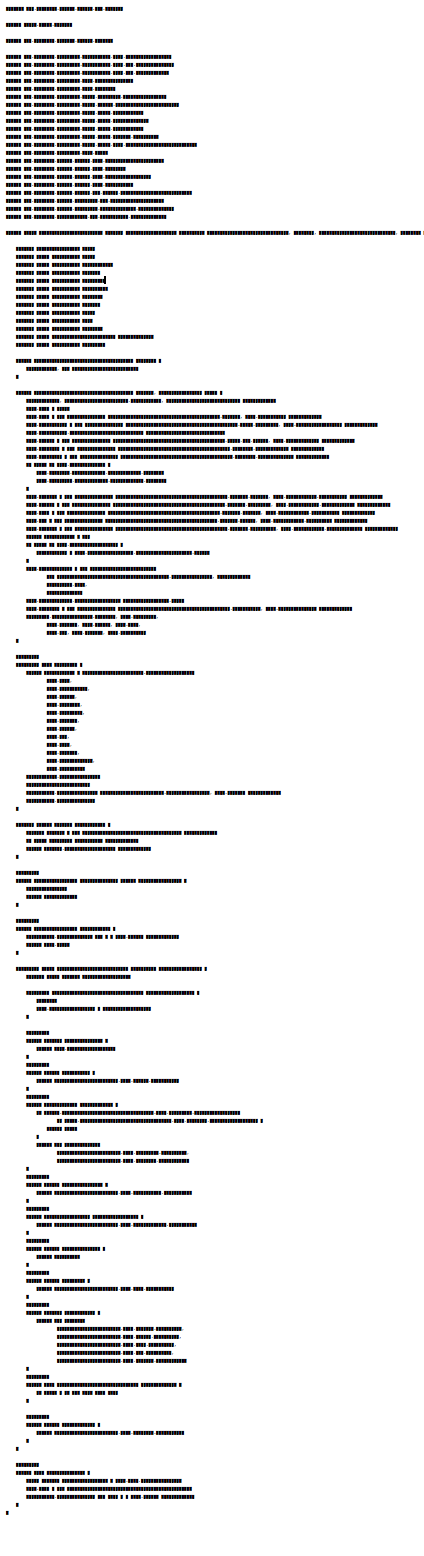
Take a look at the following source code, can you guess which language this is written in?

It’s CSS. CSS has a typical layout with a minimal indentation depth where a group of selectors embraces lines of attribute / value pairs. Take a look:

As with the example above all of our source code has typical (macro) typographical properties. This features can tell us something about the language used, about the type of artifact and even about the composition of the individual parts of a class or file itself.
Here’s another typical file in a common language:

In this case it is a Java class. It reveals itself by its block of imports at the top (1). The class declaration (2) is rather long probably due to generics. The typical block of field declarations (3) starts the class body. Quickly a short constructor follows (4). It is too short but has parameters so it is a convenience constructor. The real constructor is next (5). Here we see the constructor is too long. It does so much we almost take it for a normal method. At (6) we see parameters for a method call one on each line. The slight change in indentation at (7) indicates an inner class. The block at (8) confirms the inner class: here parameters from the outer class are referenced by prefixing it with OuterClassName.this.
Even subtle things like annotations (9) can be seen at macro level.

Let’s compare two object oriented languages one is Java, the other one Ruby.

Several things can be noticed (besides the Java version is much longer than the Ruby one). First the Java block of imports is missing in Ruby. The field block seems to be small in Ruby but another big block follows in the middle. The Ruby class shown here is a Rails domain class. The block in the middle contains the associations (has_many and friends). Looking closer one can glimpse that the closing part of the methods seems a bit thicker in Ruby (Ruby closes the method with end whereas Java closes with }). But besides the difference a similarity is also there: both classes have a couple of short methods near the bottom.
Even within one language and one framework classes with different purpose have different shapes. Seeing a Rails model and a controller side by side shows some interesting patterns.

While controllers have a block at the end of the class (which is for permitting request parameters), model classes have blocks of scope declarations and associations typical at the center. Whereas model methods are short in both dimensions, the controller methods have a level of indentation (which is a typical if which checks for the success or failure of the operation).

But why does this all matter? The first thing when we look a block of text is its (macro) structure. Typical patterns can help us to identify the type of class or language. Inconsistencies could be bugs or parts which were difficult to write. Kevlin Henney advocates in his talk Seven Ineffective Coding Habits Of Many Programmers for formatting techniques that are stable and produce a minimal set of alignments. Because:

You convey information by the way you arrange a design’s elements in relation to each other. This information is understood immediately, if not consciously, by the people viewing your designs.

Daniel Higginbotham, http://www.visualmess.com/

I think many more things can be seen by looking at the macro level but for now I leave you with another picture of a sourcecode of a well known language. Can you guess what it is?