Recap of the Schneide Dev Brunch 2015-04-12

If you couldn’t attend the Schneide Dev Brunch at 12th of April 2015, here is a summary of the main topics.

brunch64-borderedA week ago, we held another Schneide Dev Brunch, a regular brunch on the second sunday of every other (even) month, only that all attendees want to talk about software development and various other topics. So if you bring a software-related topic along with your food, everyone has something to share. The brunch was a little sparsely attented this time but there was enough stuff to talk about. As usual, a lot of topics and chatter were exchanged. This recapitulation tries to highlight the main topics of the brunch, but cannot reiterate everything that was spoken. If you were there, you probably find this list inconclusive:

Review of San Francisco

As it turned out, San Francisco might be half a planet away, but several of our attendees happened to live there for a while. They described the city and its culture to us and shared stories about specific persons and places. For a moment, San Francisco was just around the corner.

Review Ninja

One reason that San Francisco came up was the mentioning of Review Ninja, a second-generation code review tool with one of the coolest project URLs ever. If you ever were smitten by code review tools like gerrit, then Review Ninja might be worth a look. It has a lightweight and simplistic approach to a activity that could as well end up being a bureaucratic nightmare.

Be convincing

Another topic was the art of being convincing – to convince people of something useful but unfamiliar. We concluded that you cannot change people, no matter the effort. Only people can change people. You can try to facilitate their change, though. But don’t expect appreciation or even acknowledgement for your effort. Everybody will be convinced that they came up with the solution themselves. That’s the art of being convincing – or so we convinced ourselves.

Google recruitment process

We spent a lot of time discussing the Google recruitment process that one attendee had just successfully passed. But it’s a long and extensive process, so our timeframe fit. There is a book, “Cracking the Coding Interview” by Gayle Laakmann McDowell, that seems to be quite useful for preparation on the daylong in-depth interview marathon that needs to be mastered if you want to join Google. A number of similar books try to teach you the knowledge necessary to pass the recruitment process – not the job that usually follows, mind you, just the recruitment. Our participant counted more than thirty distinguishable contacts with Google during the process. The process itself is highly formalized, while interviews are performed by normal engineers on Google’s side. The comparability between applicants is achieved through the great number of interviews to even out random outliers.

Nearly all big IT companies utilize a similar recruitment process, so this insight can be applied nearly everywhere: If you want to be recognized as talented, you have to be prepared for the tests to come. Don’t assume that your interviewer presupposes anything about your abilities. Just because you have a degree in computer sciences doesn’t mean you know how to program, for example. They will test for that, and with rather challenging tasks, so better learn your stuff again.

Work environment

Anticipating the next topic, we talked about different workplace setups, like open-plan offices, separate rooms for everyone and the like. A great insight was that very different preferences exist. The ideal work environment of one developer is a nightmare for the next. And now imagine how difficult it gets to agree on a trade-off in a bigger team. We couldn’t even agree on music vs. silence for in-zone programming sessions, let alone the style of music that should be playing.

Room setup

As a practical exercise, we tried to rearrange the desks in the Softwareschneiderei to increase the number of desks on our second floor. We started without any restrictions on placement and iterated through several layouts, discussing several side-effects and drawbacks in our solutions. In the end, two applicable layout alternatives survived our weeding process. It was a lesson in group dynamics and emergent rulesets and even gave us a viable result.

 What defines object orientation?

We talked about the different approaches to define object orientation in terms of developer thinking. The classic approach of giving entities an identity was explored as well as the rather personal definition of flowing functionality instead of flowing data. We agreed that knowing all kinds of programming paradigms (with imperative, object oriented and functional being the major ones) enables developers to make the right choices for the task at hand. Being unable to choose leads to being ineffective fast.

The Java Memory Model

A short recap of the very informative and insightful talk about the Java Memory Model given by one of our attendees closed our brunch. The Java Memory Model (or any other memory model in fact) is a great help in determining if something weird can possibly happen with your code, like one thread observing a field X being set first and Y second, while another thread swears that Y was set first and X later. A memory model helps you to understand the quantum mechanics of your programming language and therefore survive multithreaded programming. And a simple rule will let you understand the vast majority of the Java Memory Model, as shown in the talk. I highly recommend you read up about the memory model of your favorite programming language.

Epilogue

As usual, the Dev Brunch contained a lot more chatter and talk than listed here. The number of attendees makes for an unique experience every time. We are looking forward to the next Dev Brunch at the Softwareschneiderei. And as always, we are open for guests and future regulars. Just drop us a notice and we’ll invite you over next time.
Creating a GPS network service using a Raspberry Pi – Part 1

Using sensors is a task we often face in our company. This article series consisting of two parts will show how to install a GPS module in a Raspberry Pi and to provide access to the GPS data over ethernet. This guide is based on a Raspberry Pi Model B Revision 2 and the GPS shield “Sparqee GPSv1.0”. In the first part, we will demonstrate the setup of the hardware and the retrieval of GPS data within the Raspberry Pi.

Hardware configuration

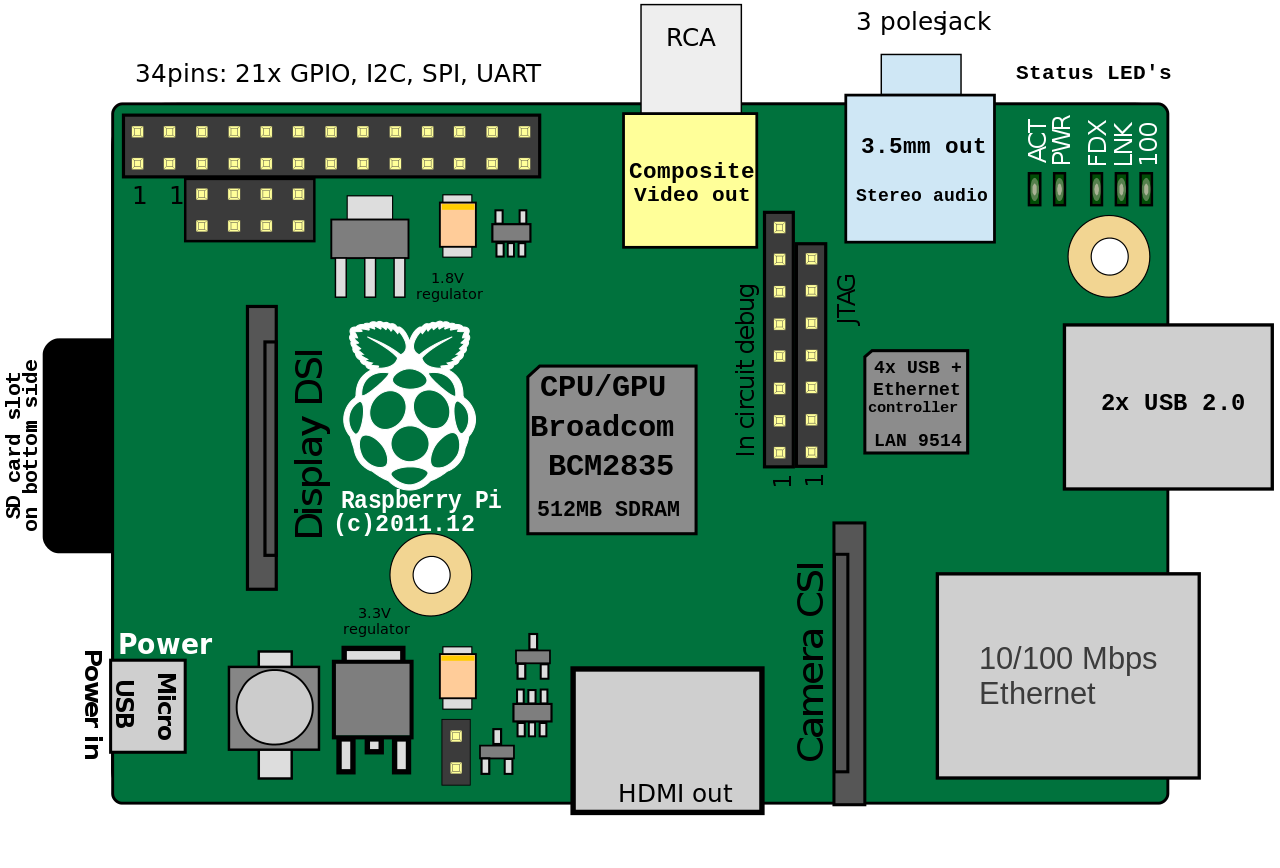
The GPS shield can be connected to the Raspberry Pi by using the pins in the top left corner of the board.

Raspberry Pi B Rev. 2 (Source: Wikipedia)

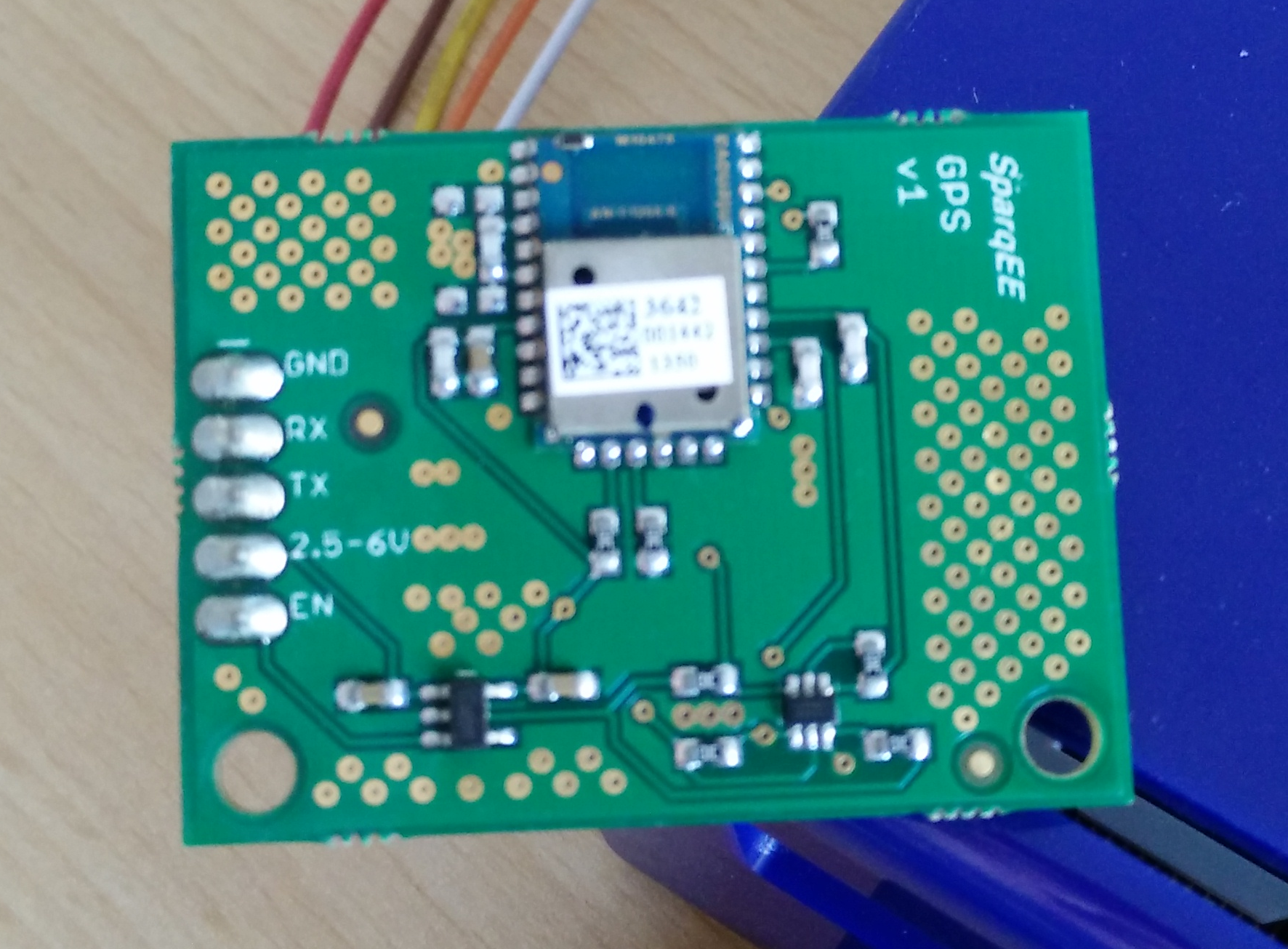
The Sparqee GPS shield possesses five pins whose purpose can be found on the product page:

Pin Function Voltage I/O
GND Ground connection 0 I
RX Receive 2.5-6V I
TX Transmit 2.5-6V O
2.5-6V Power input 2.5-6V I
EN Enable power module 2.5-6V I
Sparqee GPSv1.0
Sparqee GPSv1.0

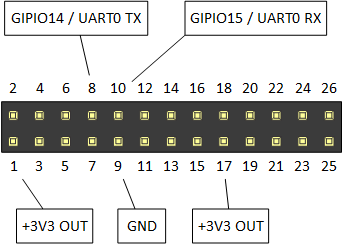
We used the following pin configuration for connecting the GPS shield:

GPS Shield Raspberry Pi Pin-Nummer
GND GND 9
RX GPIO14 / UART0 TX 8
TX GPIO15 / UART0 RX 10
2.5-6V +3V3 OUT 1
EN +3V3 OUT 17

You can see the corresponding pin numbers on the Raspberry board in the graphic below. A more detailed guide for the functionality of the different pins can be found here.

Relevant pins of the Raspberry Pi

After attaching the GPS module, our Raspberry Pi looks like this:

Attaching the GPS shield to the Raspberry


GPS data retrieval

The Raspberry GPS communicates with the Sparqee GPS shield over the serial port UART0. However, in Raspbian this port is usually used as serial console, which is why we cannot directly access the GPS shield. To turn this feature off and activate the module, you have to follow these steps:

  1. Edit the file /boot/cmdline.txt and delete all parameters containing the key ttyAMA0:
    console=ttyAMA0,115200 kgdboc=ttyAMA0,115200

    Afterwards, our file contains this text:

    dwc_otg.lpm_enable=0 console=tty1 root=/dev/mmcblk0p2 rootfstype=ext4 elevator=deadline rootwait
    
  2. Edit the file /etc/inittab and comment the following line out:
    T0:23:respawn:/sbin/getty -L ttyAMA0 115200 vt100

    Comments are identified by the hash sign; the result should look as follows:

    #T0:23:respawn:/sbin/getty -L ttyAMA0 115200 vt100
    
  3. Next, we have to reboot the Raspberry Pi:
    sudo reboot
    
  4. Finally, we can test the GPS module with Minicom. The baud rate is 9600 and the device name is /dev/ttyAMA0:
    sudo minicom -b 9600 -D /dev/ttyAMA0 -o
    

    If necessary, you can install Minicom using APT:

    sudo apt-get install minicom


    You can quit Minicom with the key combination strg+a followed by z.

If you succeed, Minicom will continually output a stream of GPS data. Depending on wether the GPS module attains a lock, that is, wether it receives GPS data by a satellite, the output changes. While no data is received, the output remains mostly empty.

$GPGGA,080327.199,,,,,0,00,,,M,0.0,M,,0000*59
$GPGSA,A,1,,,,,,,,,,,,,,,*1E
$GPRMC,080327.199,V,,,,,,,240314,,,N*42
$GPGGA,080328.199,,,,,0,00,,,M,0.0,M,,0000*56
$GPGSA,A,1,,,,,,,,,,,,,,,*1E
$GPRMC,080328.199,V,,,,,,,240314,,,N*4D
$GPGGA,080329.199,,,,,0,00,,,M,0.0,M,,0000*57
$GPGSA,A,1,,,,,,,,,,,,,,,*1E
$GPGSV,3,1,12,02,14,214,29,04,64,182,24,05,00,000,21,10,00,000,23*7E
$GPGSV,3,2,12,12,03,334,26,08,57,094,,23,52,187,,27,52,110,*76
$GPGSV,3,3,12,03,36,332,,09,32,128,,24,27,212,,17,26,350,*7B

Once the GPS module starts receiving a signal, Minicom will display more data as in the example below. If you encounter problems in attaining a GPS lock, it might help to place the Raspberry Pi outside.

$GPGSA,A,3,17,09,28,08,26,07,15,,,,,,2.4,1.4,1.9*.6,1.7,2.0*3C
$GPRMC,031349.000,A,3355.3471,N,11751.7128,W,0.00,143.39,210314,,,A*76
$GPGGA,031350.000,3355.3471,N,11751.7128,W,1,06,1.7,112.2,M,-33.7,M,,0000*6F
$GPGSA,A,3,17,09,28,08,07,15,,,,,,,2.6,1.7,2.0*3C
$GPGSV,3,1,12,17,67,201,30,09,62,112,28,28,57,022,21,08,55,104,20*7E
$GPGSV,3,2,12,07,25,124,22,15,24,302,30,11,17,052,26,26,49,262,05*73
$GPGSV,3,3,12,30,51,112,31,57,31,122,,01,24,073,,04,05,176,*7E
$GPRMC,031350.000,A,3355.3471,N,11741.7128,W,0.00,143.39,210314,,,A*7E
$GPGGA,031351.000,3355.3471,N,11741.7128,W,1,07,1.4,112.2,M,-33.7,M,,0000*6C

A detailed description of the GPS format emitted by the Sparqee GPSv1.0 can be found here. Probably the most important information, the GPS coordinates, is contained by the line starting with $GPGGA: In this case, the module was located at 33° 55.3471′ Latitude North and 117° 41.7128′ Longitude West at an altitude of 112.2 meters above mean sea level.

Conclusion

We demonstrated how to connect a Sparqee GPS shield to a Raspberry Pi and how to display the GPS data via Minicom. In the next part, we will write a network service that extracts and delivers the GPS data from the serial port.

Streaming images from your application to the web with GStreamer and Icecast – Part 2

In the last article we learned how to create a GStreamer pipeline that streams a test video via an Icecast server to the web. In this article we will use GStreamer’s programmable appsrc element, in order to feed the pipeline with raw image data from our application.

First we will recreate the pipeline from the last article in C source code. We use plain C, since the original GStreamer API is a GLib based C API.

#include <gst/gst.h>

int main(int argc, char *argv)
{
    GError *error = NULL;

    gst_init(&argc, &argv);

    GstPipeline *pipeline = gst_parse_launch("videotestsrc ! vp8enc ! webmmux ! shout2send ip=127.0.0.1 port=8000 password=hackme mount=/test.webm", &error);
    if (error != NULL) {
        g_printerr("Could not create pipeline: %s\n", error->message);
        return 1;
    }
    gst_element_set_state(pipeline, GST_STATE_PLAYING);

    GMainLoop *loop = g_main_loop_new(NULL, FALSE);
    g_main_loop_run(loop);

    g_free(loop);
    g_free(pipeline);

    return 0;
}

In order to compile this code the GStreamer development files must be installed on your system. On an openSUSE Linux system, for example, you have to install the package gstreamer-plugins-base-devel. Compile and run this code from the command line:

$ cc demo1.c -o demo1 $(pkg-config --cflags --libs gstreamer-1.0)
$ ./demo1

The key in this simple program is the gst_parse_launch call. It takes the same pipeline string that we built on the command line in the previous article as an argument and creates a pipeline object. The pipeline is then started by setting its state to playing.

appsrc

So far we have only recreated the same pipeline that we called via gst-launch-1.0 before in C code. Now we will replace the videotestsrc element with an appsrc element:

#include <gst/gst.h>

extern guchar *get_next_image(gsize *size);

const gchar *format = "GRAY8";
const guint fps = 15;
const guint width = 640;
const guint height = 480;

typedef struct {
    GstClockTime timestamp;
    guint sourceid;
    GstElement *appsrc;
} StreamContext;

static StreamContext *stream_context_new(GstElement *appsrc)
{
    StreamContext *ctx = g_new0(StreamContext, 1);
    ctx->timestamp = 0;
    ctx->sourceid = 0;
    ctx->appsrc = appsrc;
    return ctx;
}

static gboolean read_data(StreamContext *ctx)
{
    gsize size;

    guchar *pixels = get_next_image(&size);
    GstBuffer *buffer = gst_buffer_new_wrapped(pixels, size);

    GST_BUFFER_PTS(buffer) = ctx->timestamp;
    GST_BUFFER_DURATION(buffer) = gst_util_uint64_scale_int(1, GST_SECOND, fps);
    ctx->timestamp += GST_BUFFER_DURATION(buffer);

    gst_app_src_push_buffer(ctx->appsrc, buffer);

    return TRUE;
}

static void enough_data(GstElement *appsrc, guint unused, StreamContext *ctx)
{
    if (ctx->sourceid != 0) {
        g_source_remove(ctx->sourceid);
        ctx->sourceid = 0;
    }
}

static void need_data(GstElement *appsrc, guint unused, StreamContext *ctx)
{
    if (ctx->sourceid == 0) {
        ctx->sourceid = g_idle_add((GSourceFunc)read_data, ctx);
    }
}

int main(int argc, char *argv[])
{
    gst_init(&argc, &argv);

    GstElement *pipeline = gst_parse_launch("appsrc name=imagesrc ! videoconvert ! vp8enc ! webmmux ! shout2send ip=127.0.0.1 port=8000 password=hackme mount=/test.webm", NULL);
    GstElement *appsrc = gst_bin_get_by_name(GST_BIN(pipeline), "imagesrc");

    gst_util_set_object_arg(G_OBJECT(appsrc), "format", "time");
    gst_app_src_set_caps(appsrc, gst_caps_new_simple("video/x-raw",
        "format", G_TYPE_STRING, format,
        "width", G_TYPE_INT, width,
        "height", G_TYPE_INT, height,
        "framerate", GST_TYPE_FRACTION, fps, 1, NULL));

    GMainLoop *loop = g_main_loop_new(NULL, FALSE);
    StreamContext *ctx = stream_context_new(appsrc);

    g_signal_connect(appsrc, "need-data", G_CALLBACK(need_data), ctx);
    g_signal_connect(appsrc, "enough-data", G_CALLBACK(enough_data), ctx);

    gst_element_set_state(pipeline, GST_STATE_PLAYING);

    g_main_loop_run(loop);

    gst_element_set_state(pipeline, GST_STATE_NULL);

    g_free(ctx);
    g_free(loop);

    return 0;
}

We assign a name (“imagesrc”) to the appsrc element by setting its name attribute in the pipeline string in line 58. The element can then be retrieved via this name by calling the function gst_bin_get_by_name. In lines 61-66 we set properties and capabilities of the appsrc element such as the image format (in this example 8 bit greyscale), width, height and frames per second.

In lines 71 and 72 we connect callback functions to the “need-data” and “enough-data” signals. The appsrc element emits the need-data signal, when it wants us to feed more image frame buffers to the pipeline and the enough-data signal when it wants us to stop.

We use an idle source to schedule calls to the read_data function in the main loop. The interesting work happens in read_data: we acquire the raw pixel data of the image for the next frame as byte array, in this example represented by a call to a function named get_next_image. The pixel data is wrapped into a GStreamer buffer and the duration and timestamp of the buffer is set. We track the time in a self-defined context object. The buffer is then sent to the appsrc via gst_app_src_push_buffer. GStreamer will take care of freeing the buffer once it’s no longer needed.

Conclusion

With little effort we created a simple C program that streams image frames from within the program itself as video to the Web by leveraging the power of GStreamer and Icecast.

Managing C++’s complexity or learning to enjoy C++

Disclaimer

I have never been a big fan of C++ coming from C and Java. C is a nice little language and yet offers many means of code structuring. Java offers many object-oriented features and makes the use of them quite easy. Together with garbage collection, a huge ecosystem and powerful IDEs it lets you work on the problem at hand at quite some speed. C++ on the other hand is a huge language with myriads of concepts and supports almost all features of C. So at first it seemed to me as worst of all worlds. Similar to Scala which is also a quite large multi-paradigm language (that I happen to like).

Why and how use C++ then?

On my job I have to work with C++ regularily. Diving deeper into the language, learning STL and modern code styles I am starting to actually like C++. In addition to the runtime-efficiency (that you can get with C too, and to some extent even with Java) C++ provides many means for robust programs and nice abstractions. Using idioms like RAII, the Algorithms library, smart pointers and operating mostly on values takes away most of the resource management and memory buffer handling hassle. But since C++ is so large and supports so many programming styles I think the following measures really help to build robust and maintainable programs and enjoy using C++:

  • Establish rules for your code, e.g. no naked pointer, no friend, no multiple inheritance, use of exceptions etc. That way you create an idyllic world where you develop most of the time and the number of pitfalls is greatly reduced. Your rules may change like you see them fit but adhere to them and do not change them lightly.
  • Protect your code from legacy/3rd party code and libraries using anti-corruption layers, wrappers and adapters. They are means to preserve your idyllic world and make life there easier. Don’t let the null pointers slip in.
  • Use modern idioms and APIs, as modern as your compiler/environment supports them (see gcc c++11 support, Visual Studio etc.). Like in other programming environments take special care regarding your dependencies! Manage them carefully.
  • Understand and learn to use STL containers, smart pointers, RAII, algorithm, streams etc. There are plethora of concise, clear and robust solutions for your everyday problems without the need of iterating over vectors with and index variable…
  • Build classes/components that manage their resources and provide easy to use interfaces. Use type-rich interfaces and work mostly with values. The compiler will help you a lot more than with a pointer-heavy and mostly primitives style. Treat delete (outside of a destructor) and naked new as smells and restrict them to areas where you cannot find a way around them.

Where is the fun for me?

I find it rewarding and satisfying carefully crafting these easy-to-use components and improving them over time. Adding some const statements, deciding between pass-by-value or pass-by-reference, making the components thread-safe, finding the right balance between using classes or free floating functions, private inheritance etc. You can really do a lot have the compiler as a friend instead of a dreaded enemy and let it guarantee many things programmers tend to do wrong. Build your components so that they are hard to use in a wrong way. Then there are really cool features like call_once library support, closures (aka lambda functions) and type inference with the auto keyword, user-defined literals and many more.


Transparent software: Making complexity understandable

Software is broken. Not because it is not simple. Because it is not transparent. Let me elaborate.

“I don’t think that’s feasible”

That are not the first words we wanted to hear from our client after our presentation.

“I have seen several engineers working over a year just for the concept”

This is complex.

The world tells you that all should be simple. Make it simple. Keep it simple. It is just that simple.

Only when it is not.

Look around you. Nature is beautiful. And complex. The human is beautiful. And complex. Many systems and contexts are complex.

Look inside you. Your thoughts and emotions. Your relationships.

Look at your computer, your phone, your work. Many problems we have and solve everyday are not simple.

Sometimes we think “Oh, why can’t this be simple”. “The software should be simpler”. But KISS won’t save you. Software is broken. But not because it is not simple. We do not want simplicity. We want clarity. We want to understand. Let me elaborate.

I create software for engineers. Engineers are the people who take problems who are fine in theory and work perfectly in a controlled environment like a lab and translate them to the real world. But the real world isn’t simple or controlled. It is messy. The smallest things can blow up your house of cards of theory. These people need software to understand what happens. Through their education and their experience they know what should happen. They are the experts. But the systems and problems they work with are so complex and mostly invisible to the human eye and incomprehensible to the human brain. But today’s engineering software looks like this:

cases-colorful-colourful-2019
Options all over the place

Make no mistake. This isn’t constrained to engineering problems. Take a look around you. Nowadays there are a million sensors collecting masses of data. Your phone. Your thermostat. Your shoes. Even your tooth brush. Sensors are everywhere. We are collecting more data than ever before. This data gives us a glimpse of the complex underlying system. So we think. But why do we collect them in the first place?
Because we can. We are seeking the holy grail of wisdom. More data creates more information. More information creates more knowledge. And finally we hope that more knowledge gets us a spark of wisdom. But we are just starting out.

The course of technology

The normal way of technology goes something like this: First we are constrained. We try to push the borders. When the field is wide and open we do everything that’s possible. After a while we become more mature and use it to serve a purpose. Software is like that. Collecting data is like that. It is like an addiction. Think about it: Do you influence the data or does the data influence you? Who is in control?

But there’s hope. In order to reason about and come to our decisions we need transparent software. The dictionary defines transparent as:

transparent (adjective)

  • (of a material or article) allowing light to pass through so that objects behind can be distinctly seen
  • easy to perceive or detect
  • having thoughts, feelings, or motives that are easily perceived
  • (of an organization or its activities) open to public scrutiny
  • Physics: transmitting heat or other electromagnetic rays without distortion.
  • Computing: (of a process or interface) functioning without the user being aware of its presence.

Transparent is a tricky word. It seems to be a paradox: on the one hand it means invisible and on the other hand it means easily perceived. Both uses of the word apply to what software needs to be.

No more magic

Software has to help us understand systems and concepts. What happens and what happened. It has to make it clear, comprehensible and detectable. We need to see how the software comes to its conclusions. We need the option to overrule it. The last decision is ours. Software can help us forming a decision but it should never decide on our behalf.
Also: It gets out of our way. We don’t need any more rituals to please the software to do our bidding. Software is a tool. To be a great tool it needs to fit the problem and the person. No one wants to cut with a knife that is all blade. It should adapt to our capabilities. It should fit like a glove. It amplifies not cripples our capabilities. It is made for us. It is transparent.

That’s the goal. But how do we get there?

Maximalistic design or design with ‘Betthupferl’

Minimalistic design is a misnomer. Reducing a complex issue needs more design not less. Designing is about thinking, taking care. If we want to make complex systems understandable we need to think hard. What is the essence of the problem? What information does the expert need to evaluate a situation? All of this expertise is hidden in the heads and the daily routine of the people we design for. So we need to ask, watch and listen to them. Not direct and with a free mind. Throw your preconceptions overboard. Remove your ego. First just observe. Collect. Challenge your assumptions. When you have a good amount of information (with experience you will know when you can start but do not believe you will ever have enough), distill. Distill the essence. And then add. That little extra. The details. The cues which foster understanding.
When you stay the night in a hotel and in your white and clean bed you find a little sweet on your pillow. You are delighted. In German we call this ‘Betthupferl’.
This little extra you add is just this. The user feels cared for. He sees that someone has gone the extra mile, has thought deeply about him. The essence is not enough. You need some details. To weave the parts to together to form a whole. This can be extra information when the user needs it. This can be a shortcut when the context is right. Or an animation which guides the eye. Or or or…
Important is that it does not confuse or blur the essence. It should support. Silently, almost invisible.

Having a plan

As a software developer, I quickly learnt that having a plan is essential for the successful realization of a project. Of course, there are projects which seem to run by themselves – either because no problems occur or because their solution is trivial. However, the larger the project, the tighter the deadlines, the more you need a plan to retain control over it. And it is particularly easy to lose control over a project if you not only manage it, but also participate in its implementation.

A project leader is responsible for the outcome of a project. They have to keep track of its goals, must know its current state and how far it progressed. You can, for example, constantly prescind from present actions and problems and check them in order to find out if they bring you closer to your objective or if you are getting side-tracked. Useful techniques are time boxes as in the Pomodoro techniques: For a fixed time, you concentrate on a problem, and afterwards, you recapitulate your results and, if necessary, adjust your approach. Yet, this is probably not enough to reveal how far your project advanced – and for this purpose you can employ a plan.

Such a plan can show you the exact condition of a project: It will tell you which milestones are already reached, where you are at the moment and which tasks have to be tackled next – and most importantly, it will tell you if you are in time. Basically, a plan is a monitoring tool for a project. By molding the project according to the plan, it is possible to see wether everything is alright, to expose potential pitfalls and, in the worst case, to recognize early if the project fails.

Moreover, a plan can also improve the communication related to the project. On the one hand, you will be able to brief your clients on the course of the project. Even better, if you can publish your progress regularly in a form allowing your clients to verify what you did so far, you will create a feedback loop that helps you to meet the clients’ demands. On the other hand, a plan will give you a handle to communicate with the people involved in the project realization. The knowledge about the state of the project is spreaded, which will permit you to spend less time talking about the required actions and more talking about the actual solution.

How to plan

Now, I want to enumerate a few hints for constructing a plan. First, even though a plan is crucial for a project, it is not necessary to develop the perfect plan right from the start, and it is presumably disadvantageous to stick with it at all costs. Instead, it is completely fine to launch the project following a rough draft; you can adapt it to your needs anytime.

Next, you should think about the unit of time you use to organize a project. If its life span amounts to a few weeks, it might be appropriate to plan single days, but in case it covers several months or even years, you should not bother to deduce the duties for the last month before starting the project. However, you should keep in mind that you may adjust the granularity arbitrarily: You can, for example, plan the first few days of a project in detail, while you sketch later actions in terms of weeks and months. In this step, it is also important to identify possible deadlines which have to be met.

Furthermore, you have to divide the project into sub-goals that are easier to operationalize. Just like with time units, you do not need to split your project into equally sized tasks, but upcoming issues should be specified in higher detail. At this point, you must also estimate the resources required to solve the issues; this could be as simple as time or money, but also something more specific as hardware or software. If you have tight deadlines, it is vital to check if there are tasks blocking other tasks: They cannot be parallelized and hence, the required resource is not just time, but rather calendar time.

Finally, even if you are managing a project, you are probably not alone – and you should exploit that circumstance extensively. When you know that there is someone who is able to perform a task more efficiently, you should delegate it. This is not restricted to the actual work in the project, but also includes management tasks such as the estimation of efforts. By this means, you will distribute the knowledge about the project to your team and facilitate the take-over of responsibility if it becomes necessary. In fact, perhaps the best way to successfully lead a project is to render oneself superfluous.

Zoom out early, zoom out often

Often struck by yak shaving or target fixation? There’s a simple remedy: zoom out early, zoom out often.

Dennis Jarvis [CC BY-SA 3.0 (http://creativecommons.org/licenses/by-sa/3.0)], via Wikimedia Commons

A common pitfall of working long hours with high concentration level or stress level is the “yak shaving” effect. You start with a clear goal, dive down into the details and encounter an unforseen obstacle. No big problem, you just need to adjust focus for a moment and fix this little… but wait, in order to fix it, you first need to change this minor circumstance. And this change is prohibited by this effect, which needs to be adjusted, but relies on that. Much later, you’ll wake up from your dive and find yourself happily shaving a yak. But how exactly did you get there?

Avoid the yak

The best approach to counter yak shaving is “zooming out” of your current work in regular, externally triggered intervals and rehashing three aspects of your current work:

  • What do I want to achieve? (“Goal”)
  • What is my current task? (“Task”)
  • How does my task relate to my goal? (“Relationship”)

This “Goal/Task-Relationship” shouldn’t get too complicated. To describe your current Goal/Task-Relationship to a random person that just now arrived at the scene (ok, lets be clear: I’m talking about your boss), you should need at most two simple sentences. Every longer description is a sign of an unclear goal or inefficient steps (tasks) towards it.

To make sure that your Goal/Task-Relationship stays explainable, you could use the Pomodoro technique that partitions your concentrated work into intervals of half an hour (including the rehash phase).

Target fixation

The approach above helps against yaks, but not against target fixation. Target fixation occurs when you are so sure about your goal that you don’t question it even when the cost of achieving it rises to obscene levels. There are many stories I could tell about target fixation, but one sticks out for me because it happened myself and it happened recently.

The tragedy

In the midst of winter, during a cold period, my gas heater for the whole apartment broke down – on a late saturday evening. No amount of reading the manual, trying to turn it off and on again and maintainance routines could bring it back to life. The rooms grew colder. A long, cold weekend lay before me, but I couldn’t just sit it out – I had work to do with a tight deadline. So I frantically contacted one “24h emergency service” after the other with no success at all (this is in a rather big city, the experience really shocked me). My efforts to reach anybody who could help consumed time and nerves until I finally gave up. The backup option was to move to an hotel for two nights and I was ready to pack my things.

The remedy

oil-radiatorBut before I made the final decision to temporarily abandon the place, I called a friend to congratulate him on his birthday, totally unrelated to the heating desaster (it was on my todo list and needed to be done, so why not now?). After he asked me what’s up (he always senses misery) and I told him the whole catastrophe, he laughed and said: “Your problem can be solved with some money and a DIY store: just buy an oil radiator and plug it in – voilà, heating for one room”. I was baffled and excited: ten minutes later, and the store would be closed. In the last minute, I bought the radiator and had enough heat until the gas heater could be fixed during normal working days.

My target fixation is easily explained: “The gas heater broke down so I need to repair it/have it repaired”. The solution is also easy: “You need heating, but not necessarily by that broken gas heater”. It’s the same problem, just different zoom levels. By zooming out (being zoomed out, having somebody else provide the external view) of the narrow problem space I could see the whole picture and solve the real problem, not my perceived one.

Bird’s eye view

To counter target fixation, you have to zoom out regularly. But you need to zoom out even more and ask a different set of questions:

  • What problem do I want to solve? (“Problem”)
  • Can I think of a related, more generalized problem? (“Root”)
  • Have both problems the same cause? (“Cause”)

The “Problem Root Cause” approach helps to find a more abstract formulation of the problem at hand. You basically ask if you really solve a problem or merely a symptom of an hidden cause. In my story, I wanted to solve the problem of the broken gas heater. The generalized problem was lack of heating, regardless of which device it may provide. The cause was identical: cold weather without proper heating. Now I own an oil radiator on reserve.

Zoom out often

You really need to zoom out of your current work, take a few steps back and broaden your view to be sure about your path to the best solution. So my advice is to “zoom out early, zoom out often” (adapted from “commit early, commit often”). If you can manage the bird’s eye view of your path to the goal yourself, you’ll less often fall prey to yak shaving and target fixation.

Streaming images from your application to the web with GStreamer and Icecast – Part 1

Streaming existing media files such as videos to the web is a common task solved by streaming servers. But maybe you would like to encode and stream a sequence of images originating from inside your application on the fly as video to the web. This two part article series will show how to use the GStreamer media framework and the Icecast streaming server to achieve this goal.

GStreamer

GStreamer is an open source framework for setting up multimedia pipelines. The idea of such a pipeline is that it is constructed from elements, each performing a processing step on the multimedia data that flows through them. Each element can be connected to other elements (source and a sink elements), forming a directed, acyclic graph structure. GStreamer pipelines are comparable to Unix pipelines for text processing. In the simplest case a pipeline is a linear sequence of elements, each element receiving data as input from its predecessor element and sending the processed output data to its successor element. Here’s a GStreamer pipeline that encodes data from a video test source with the VP8 video codec, wraps (“multiplexes”) it into the WebM container format and writes it to a file:

videotestsrc ! vp8enc ! webmmux ! filesink location=test.webm

In contrast to Unix pipelines the notation for GStreamer pipelines uses an exclamation mark instead of a pipe symbol. An element can be configured with attributes denoted as key=value pairs. In this case the filesink element has an attribute specifying the name of the file into which the data should be written. This pipeline can be directly executed with a command called gst-launch-1.0 that is usually part of a GStreamer installation:

gst-launch-1.0 videotestsrc ! vp8enc ! webmmux ! filesink location=test.webm
videotestsrc
videotestsrc

If we wanted to use a different codec and container format, for example Theora/Ogg, we would simply have to replace the two elements in the middle:

gst-launch-1.0 videotestsrc ! theoraenc ! oggmux ! filesink location=test.ogv

Icecast

If we want to stream this video to the Web instead of writing it into a file we can send it to an Icecast server. This can be done with the shout2send element:

gst-launch-1.0 videotestsrc ! vp8enc ! webmmux ! shout2send ip=127.0.0.1 port=8000 password=hackme mount=/test.webm

This example assumes that an Icecast server is running on the local machine (127.0.0.1) on port 8000. On a Linux distribution this is usually just a matter of installing the icecast package and starting the service, for example via systemd:

systemctl start icecast

Note that WebM streaming requires at least Icecast version 2.4, while Ogg Theora streaming is supported since version 2.2. The icecast server can be configured in a config file, usually located under /etc/icecast.xml or /etc/icecast2/icecast.xml. Here we can set the port number or the password. We can check if our Icecast installation is up and running by browsing to its web interface: http://127.0.0.1:8000/ Let’s go back to our pipeline:

gst-launch-1.0 videotestsrc ! vp8enc ! webmmux ! shout2send ip=127.0.0.1 port=8000 password=hackme mount=/test.webm

The mount attribute in the pipeline above specifies the path in the URL under which the stream will be available. In our case the stream will be available under http://127.0.0.1:8000/test.webm You can open this URL in a media player such as VLC or MPlayer, or you can open it in a WebM cabable browser such as Chrome or Firefox, either directly from the URL bar or from an HTML page with a video tag:

<video src="http://127.0.0.1:8000/test.webm"></video>

If we go to the admin area of the Icecast web interface we can see a list of streaming clients connected to our mount point. We can even kick unwanted clients from the stream.

Conclusion

This part showed how to use GStreamer and Icecast to stream video from a test source to the web. In the next part we will replace the videotestsrc element with GStreamer’s programmable appsrc element, in order to feed the pipeline with raw image data from our application.

Configuration of TANGO devices

In the previous part of our TANGO tutorial trail we put our TANGO device into production by registering it with a TANGO database. The TANGO tools allowed for basic interaction with our device. Now we want to improve the device with the TANGO way of configuration: properties.

TANGO device configuration

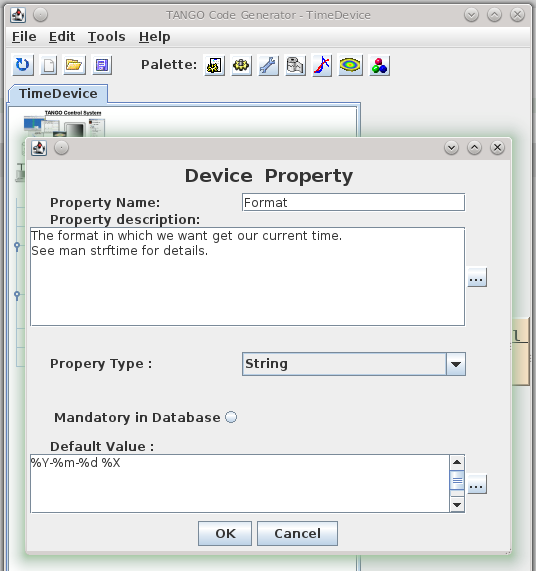
TANGO devices are configured with properties, which are not to confuse with OO-properties or TANGO attributes. TANGO properties are read on initialisation of a device and saved to the TANGO database. That way they live across server restarts. TANGO properties replace simple configuration files or registry-like configuration frameworks. As they are saved in the TANGO database it makes our devices location-agnostic – they can run on any host system on the network. Let us add a format properties to our TimeDevice to change the output to our liking. Again, we use pogo to define the property:

Pogo-Device Property

The property will be generated as a member variable of our TANGO device manage by the framework. We do not need to read it from the database ourselves – the corresponding code is generated by pogo – we just use it (format in line 5):

/*----- PROTECTED REGION ID(TimeDevice::read_CurrentTime) ENABLED START -----*/

  attr_CurrentTime_read = new Tango::DevString;
  TimeProvider timeProvider;
  *attr_CurrentTime_read = Tango::string_dup(timeProvider.now(format).c_str());
  //	Set the attribute value
  attr.set_value(attr_CurrentTime_read, 1, 0, true);

/*----- PROTECTED REGION END -----*/	//	TimeDevice::read_CurrentTime

Managing device state

The state of a TANGO device is extremely important for TANGO clients because they often decide how to interact with a device based on its state. We will cover state and the TANGO state machine in a later post but for now we make our TimeDevice sane by setting the its state to ON after correct initialisation, so that it reflects the operating state of the TimeDevice:

/*----- PROTECTED REGION ID(TimeDevice::init_device) ENABLED START -----*/

  set_state(Tango::ON);
  set_status("Ready to accept time queries.");

/*----- PROTECTED REGION END -----*/    //    TimeDevice::init_device

Here is the result in Jive and AtkPanel:

Configure Device in Jive-AtkPanel

Conclusion
We extended our to device with some real world features like configuration by the means of device properties and rudimentary state management. Real state management is an important topic on its own and deserves a separate blog post. Feel free to play with the full source code.

What developers can learn from designers

Looking beyond the tellerrand into what and how and why other disciplines do something can teach us more about our craft.

Slow down

Technology demands speed. Our industry focuses on speed and efficiency. Even our processes measure speed. (Scrum calls it velocity) But thinking needs time. Planning takes time. Caring needs time. Details need time. Testing needs time. Hearing, researching, observing, listening. All these need time. Designers know this.
We need to slow down. In order to see and design the details without losing the big picture we need to slow down. Great designs come from thinking hard. How do you do that? You concentrate on the essence. What matters most. How do you identify the essence? By thinking hard. And that needs time.

Design is about intention

Take a look at your code: is every line there for a reason? Every line? The order of the methods. The name of the variables. The separation in classes, interfaces, packages. How much of it is accidentally? Good designers choose everything with a reason. The place of this button? No coincidence. This color? This control? This flow of actions? Everything has an intention behind it. The information presented. Even the information not presented. The wording? Is part of the overall character. The menu structure? Grounded in good decisions.
On the other side when I look at my code (especially after some months) it doesn’t look so organized and determined. The order of the methods? Grown. The reason for this interface when there is only one implementation? Maybe I thought there would be more. Using this pattern here? What part of your code tells you its intent? And how much cries: incidental complexity? Think about it: did you choose what to include and what to left out?

Test for change, build to learn

What was the subtitle of the first XP book? Embrace change. This sounds like we are victims. Change is coming and we need to cope with it. But what when change is really coming? Are we prepared? 58 unit tests for the garbage?! The whole architecture and patterns I developed, tested and refactored countless times? Delete them?! In reality we still fear change.
But it does not have to be this way. What do designers do? They test for change. They build wireframes, mockups, prototypes. If some of them didn’t work out they can abandon them. The cost to create them is low. And even when it was not the right design they learned something. They build the prototypes to test their hypotheses. They build them to proof or falsify their assumptions. They build to learn.
The learning effect is more important than the artifact itself.
And when the application is in production? They also test for change. They do A/B tests (again for learning). Designers don’t wait until change comes to them and then they have to embrace it, they test for change.

Listen

Listen. Truly listen. Shut down your preconceptions. How often do we ask too fast, too much? Suggestive questions? Questions with constrained possibilities to answer? I often ask goal directed questions. To further find out. To define what the requirements are.
Then one day I made a mistake. I asked an open ended question. And got an answer. Not what I expected. I thought I would know the shape of the problem. I thought: okay, we need a chart, the possibility to switch between different scales and a second view for the deviation. But no. Suddenly the customer tells me: just show one series in one scale. The deviation can be displayed in a table. We do not need other scales. In previous meetings he nodded in agreement when I presented the other solution. What happened? Did the customer change his mind? No. He told me his thoughts. Not the other way around. I did not tell him what I think and he agrees. He had to think for himself. He had to shape his thoughts in order to explain them to me. He had to think it through.

Net effect matters most

Developers like to think in features. When you ask a developer what did you do for customer X, he might tell you: we created a system to manage the complex process of submitting proposals for a great variety of technologies in an efficient manner. Features: submission of proposals, complexity management, flexibility and efficiency. The what.
A designer might answer: through our work scientists all over the world have access to advanced technology to explore the future of science. The effect on the world, users and customers.
Think what is made possible through our creations, how it improves lives. Start with why.

Documentation is essential

There is this notion in our craft that the code is all the documentation you need. Why is this the way it is? Take a look at the code. The code is the documentation. Look at the commit message. This is all you need.
No. In our experience code as documentation sucks. It is too low level. What is the goal you want to reach with this piece? What is the information you collected. What are the decisions you made. What is omitted. What is rethought. What alternatives were abandoned.
Designers use all kind of artifacts to learn and record their findings and decisions. They create and keep only the essential ones and keep it pragmatic. Easy to create. Easy to update. Easy to note down what you learned and what was wrong in your assumptions. The code is just one level of abstraction and usually the end result of the thought and decision process. Record and keep the way of the decisions, not just the end result.

Focus on the whole

Developers like to divide and conquer. To separate everything into small manageable pieces. Agile demands that. First services. Then microservices. What’s next? Nanoservices?
Designers on the other hand keep the complete experience in mind. For them the whole product matters. The whole is more than the sum of its parts. The dream of the developer is that all pieces fit like Lego stones together in the end. But they forget to imagine and plan the whole creation they wanted to build. A house is not the same as another house. The composition of rooms matter. The lighting. The connections between rooms and floors. The placement of windows and doors. The whole experience. The same is valid for applications that people use.

Solution alternatives

As developers we are natural problem solvers. We are given a problem and create a solution. Designers are problem solvers, too. They identify a problem and create many solutions, test them, rate them and present them. They explore. They test and learn. They collect data and evidence. They know that every solution has its trade offs. The most promising ones are evaluated. With a plan. With hypotheses. They crave for feedback.

Reduced and emphasized – It’s about the connection

YAGNI. KISS. We know them. But what do we do with the time saved? We solve other problems. Designers carve out the details. They think of interactions, clear wording, better defaults. The little things that delight the user. Going the extra mile. The user of the applications feels cared for. He feels that there was a human that thought about his situation. There’s a connection between designers and users through the application.
When we saw Bret Victor presenting his jaw dropping talk about “Inventing on principle” he made one important point: creators must feel a connection to their creation. I think everyone should feel a connection to the software he uses. He should feel cared for and delighted. Applications are not just tools, they are experiences, they create emotions, they connect us.