The fallacy of “the right tool”

There is a fallacy around Polyglot Programming, especially the term “the right tool for the job”: Programming languages aren’t tools.

Let me start this blog post with a disclaimer: I’m really convinced of the value of multilingual programming and also think that applying the “right tool for the job” is a good thing. But there is a fallacy around this concept in programming that i want to point out here. The fallacy doesn’t invalidate the concept, keep that in mind.

Polyglot cineasts

Let me start with an odd thought: What if there was a movie, a complicated international thriller around a political intrigue, playing in over half a dozen countries. The actors of each country speak their native tongue and no subtitles are provided. Who would be able to follow the plot? Only a chosen few of really polyglot cineasts would ever appreciate the movie. Most of us wouldn’t want to see it.

Polyglot programming

Our last web application project was comprised of that half a dozen languages (Groovy, Java, HTML, CSS, HQL/SQL, Ant). We could easily include more programming languages if we feel the need to do it. Adding Clojure, Scala or Ruby/JRuby doesn’t sound absurd to us. A programmer capable of knowing and switching between numerous programming languages is called a “Polyglot Programmer“.

The main justification for heterogeneous (polyglot) projects often is the concept of “using the right tool for the job”. The job often is a subtask of the whole project, like building the project, accessing the database, implementing the ever-changing business logic. For each subtask, some other language might outshine the competitors. Besides some reasonable doubt concerning the hidden cost of this approach, there is a misconception of the term “tool”.

Programming languages aren’t tools

If you use a tool in (basic or advanced) engineering, let’s say a hammer to drive some nails into a wooden plate or a screwdriver to decompose your computer, you’ll put the tool aside as soon as “the job” is finished. The resulting product (a new wooden cabinet or a collection of circuit boards) doesn’t include the tool. Most of the times, your job is really finished, without “change requests” to the product.

If your tool happens to be a programming language, you’ll produce source code bound to the tool. Without the tool, the product isn’t working at all. If you regard your compiled binaries as “the product”, you can’t deal with “change requests”, a concept that programmers learn early and painful. The product of a programmer obviously is source code. And programming languages don’t act as tools, but as materials in this respect. Tools go away, materials stick.

Programming languages are materials

As source code is tied to its programming language, they form a conceptional union. So I suggest to change the term to “using the right material for the job” when speaking about programming languages. This is a more profound decision to make in comparision to choosing between a Phillips style or a TORX screwdriver. Materials need to outlast when the tools are long put aside.

But there are tools, too

In my web application example above, we used a lot of tools. Grails is our framework of choice, Jetty our web container to deploy to, the Spring Framework provides mighty utilities and we used IDEA to bolt it all together. We could easily exchange Tomcat for Jetty or IDEA with Eclipse without changing the source code (the example doesn’t work that easy for Grails and Spring, though). Tools need to be replaceable or even disposable.

Summary

The term “the right tool for the job” cannot easily be applied to programming languages, as they aren’t tools, but materials. This is why polyglot programming is dangerous to when used heavily in a single project. It’s easy to end up with a tangled “amalgam project”.

Two more disclaimers:

  • If chosen right, “composite construction” is a powerful concept that unifies the advantages of two materials instead of adding up their drawbacks.
  • Being multilingual is advantageous for a programmer. Just don’t show it all off in one project.

Follow-up to our Dev Brunch December 2009

A follow-up to our December 2009 Dev Brunch which was omitted because of really bad weather and bad health.

Yesterday, we had an appointment for our Dev Brunch meeting in December 2009. We tried to adapt to the christmas time and scheduled the “brunch” to be in the late evening, replacing coffee with mulled wine and toast with ginger bread. We even called it a “drunch” as a combination of “drunk” and “brunch”. It didn’t help.

The Dev Drunch omitted

It was the coldest and most snowy weekend in years. Most participants called in sick, others refused to go outside. Two brave remainders accomplished to reach our company but decided to concentrate on the mulled wine and the heating radiator instead of talking about software development. We chattered about a lot of topics, but none of it is worth to be reported. When the wine ran out, we went home again.

This was the last chance in 2009 to attend a Schneide Dev Brunch. See you all in 2010 and get well soon.

A more elegant way to equals in Java

Implementing equals and hashCode in Java is a basic part of your toolbox. Here I describe a cleaner and less error-prone way to use in your code.

— Disclaimer: I know this is pretty basic stuff but many, many programmers are doing it still wrong —
As a Java programmer you know how to implement equals and that hashCode has to be implemented as well. You use your favorite IDE to generate the necessary code, use common wisdom to help you code it by hand or use annotations. But there is a fourth way: introducing EqualsBuilder (not the apache commons one which has some drawbacks over this one) which implements the general rules for equals and hashCode:

public class EqualsBuilder {

  public static interface IComparable {
      public Object[] getValuesToCompare();
  }

  private EqualsBuilder() {
    super();
  }

  public static int getHashCode(IComparable one) {
    if (null == one) {
      return 0;
    }
    final int prime = 31;
    int result = 1;
    for (Object o : one.getValuesToCompare()) {
      result = prime * result
                + EqualsBuilder.calculateHashCode(o);
    }
    return result;
  }

  private static int calculateHashCode(Object o) {
    if (null == o) {
      return 0;
    }
    return o.hashCode();
  }

  public static boolean isEqual(IComparable one,
                                              Object two) {
    if (null == one || null == two) {
      return false;
    }
    if (one.getClass() != two.getClass()) {
      return false;
    }
    return compareTwoArrays(one.getValuesToCompare(),
              ((IComparable) two).getValuesToCompare());
  }

  private static boolean compareTwoArrays(Object arrayOne, Object arrayTwo) {
      if (Array.getLength(arrayOne) != Array.getLength(arrayTwo)) {
        return false;
      }
      for (int i = 0; i < Array.getLength(arrayOne); i++) {
        if (!EqualsBuilder.areEqual(Array.get(arrayOne, i), Array.get(arrayTwo, i))) {
          return false;
        }
      }
      return true;
  }

  private static boolean areEqual(Object objectOne, Object objectTwo) {
    if (null == objectOne) {
      return null == objectTwo;
    }
    if (null == objectTwo) {
      return false;
    }
    if (objectOne.getClass().isArray() && objectTwo.getClass().isArray()) {
        return compareTwoArrays(objectOne, objectTwo);
    }
    return objectOne.equals(objectTwo);
  }

}

The interface IComparable ensures that equals and hashCode are based on the same instance variables.
To use it your class needs to implement the interface and call the appropiate methods from EqualsBuilder:

public class MyClass implements IComparable {
  private int count;
  private String name;

  public Object[] getValuesToCompare() {
    return new Object[] {Integer.valueOf(count), name};
  }

  @Override
  public int hashCode() {
    return EqualsBuilder.getHashCode(this);
  }

  @Override
  public boolean equals(Object obj) {
    return EqualsBuilder.isEqual(this, obj);
  }
} 

Update: If you want to use isEqual directly one test should be added to the start:

  if (one == two) {
    return true;
  }

Thanks to Nyarla for this hint.

Update 2: Thanks to a hint by Alex I fixed a bug in areEqual: when an array (especially a primitive one) is passed than the equals would return a wrong result.

Update 3: The newly added compareTwoArrays method had a bug: it resulted in true if arrayTwo is bigger than arrayOne but starts the same. Thanks to Thierry for pointing that out.

Forced into switch/case – Qt’s Model/View API

During my life as a programmer I have more and more come to dislike switch/case statements. They tend to be hard to grasp and with languages like C/C++ they are often the source of hard-to-find errors. Compilers that have warnings about missing default statements or missing cases for enumerated values can help to mitigate the situation, but still, I try to avoid them whenever I can.

The same holds true for if-elseif cascades or lots of if-elses in one method. They are hard to read, hard to maintain, increase the Crap, etc.

If you share this kind of mindset I invite you implement to some custom models with Qt4’s Model/View API. The design of the Model/View classes is derived from the well-known MVC pattern which separates data (model), presentation (view) and application logic (controller). In Qt’s case, view and controller are combined, supposedly making it simpler to use.

The basic idea of Qt’s implementation of its Model/View design is that views communicate with models using so-called model indexes. Using a table as an example, a row/column pair of (3,4) would be a model index pointing to data element in row 3, column 4. When a view is to be displayed it asks the attached model for all sorts of information about the data.

There are a few model implementations for standard tasks like simple string lists (QStringListModel) or file system manipulation (QDirModel < Qt4.4, QFileSystemModel >= Qt4.4). But usually you have to roll your own. For that, you have to subclass one of the abstract model classes that suits your needs best and implement some crucial methods.

For example, model methods rowCount and columnCount are called by the view to obtain the range of data it has to display. It then uses, among others, the data method to query all the stuff it needs to display the data items. The data method has the following signature:

QVariant data ( const QModelIndex&amp; index, int role ) const

Seems easy to understand: parameter index determines the data item to display and with QVariant as return type it is possible to return a wide range of data types. Parameter role is used to query different aspects of the data items. Apart from Qt::DisplayRole, which usually triggers the model to return some text, there are quite a lot other roles. Let’s look at a few examples:

  • Qt::ToolTipRole can be used to define a tool tip about the data item
  • Qt::FontRole can be use to define specific fonts
  • Qt::BackgroundRole and Qt::ForegroundRole can be used to set corresponding colors

So the views call data repeatedly with all the different roles and your model implementation is supposed to handle those different calls correctly. Say you implement a table model with some rows and columns. The design of the data method is forcing you into something like this …

QVariant data ( const QModelIndex&amp; index, int role ) const  {
   if (!index.isValid()) {
      return QVariant();
   }

   switch (role)
   {
      case Qt::DisplayRole:
         switch (index.column())
         {
            case 0:
               // return display data for column 0
               break;
            case 1:
               // return display data for column 1
               break;
            ...
         }
         break;

      case Qt::ToolTipRole:
         switch (index.column())
         {
            case 0:
               // return tool tip data for column 0
               break;
            case 1:
               // return tool tip data for column 1
               break;
            ...
         }
         break;
      ...
   }
}

… or equivalent if-else structures. What happens here? The design of the data method forces the implementation to “switch” over role and column in one method. But nested switch/case statements? AARGH!! With our mindset outlined in the beginning this is clearly unacceptable.

So what to do? Well, to tell the truth, I’m still working on the best™ solution to that but, anyway, here is a first easy improvement: handler methods. Define handler methods for each role you want to support and store them in a map. Like so:

#include &lt;QAbstractTableModel&gt;

class MyTableModel : public QAbstractTableModel
{
  Q_OBJECT

  typedef QVariant (MyTableModel::*RoleHandler) (const QModelIndex&amp; idx) const;
  typedef std::map&lt;int, RoleHandler&gt; RoleHandlerMap;

  public:
    enum Columns {
      NAME_COLUMN = 0,
      ADDRESS_COLUMN
    };

    MyTableModel() {
      m_roleHandlerMap[Qt::DisplayRole] =
         &amp;MyTableModel::displayRoleHandler;
      m_roleHandlerMap[Qt::ToolTipRole] =
         &amp;MyTableModel::tooltipRoleHandler;
    }

    QVariant displayRoleHandler(const QModelIndex&amp; idx) const {
      switch (idx.column()) {
        case NAME_COLUMN:
          // return name data
          break;

        case ADDRESS_COLUMN:
          // return address data
          break;

        default:
          Q_ASSERT(!&quot;Invalid column&quot;);
          break;
      }
      return QVariant();
    }

    QVariant tooltipRoleHandler(const QModelIndex&amp; idx) const {
      ...
    }

    QVariant data(const QModelIndex&amp; idx, int role) const {
      // omitted: check for invalid model index

      if (m_roleHandlerMap.count(role) == 0) {
        return QVariant();
      }

      RoleHandler roleHandler =
        (*m_roleHandlerMap.find(role)).second;
      return (this-&gt;*roleHandler)(idx);
    }
  private:
    RoleHandlerMap m_roleHandlerMap;
};

The advantage of this approach is that the supported roles are very well communicated. We still have to switch over the columns, though.

I’m currently working on a better solution which splits the data calls up into more meaningful methods and kind of binds the columns to specific parts of the data items in order to get a more row-centric approach: one row = one element, columns = element attributes. I hope this will get me out of this switch/case/if/else nightmare.

What do you think about it? I mean, is it just me, or is an API that forces you into crappy code just not so well done?

How would you solve this?

Blog harvest, December 2009

Some noteworthy blog articles, harvested for early December 2009

Today’s blog harvest spans a lot of topics that i’ve found noteworthy in the last weeks. As an added bonus, there’s a watchworthy video link at the end. I hope you enjoy reading the articles as much as I did. If you have thoughts one the articles, feel free to comment them here.

This was the article side of this harvesting. Let’s have some fun by watching a video and relieving our conscience:

  • Living with 1000 Open Source Projects – It might get crowded on your disk! Nic Williams shares his secrets of mastering open source heavy lifting. The video runs a short half hour and has its funniest minute between 11:20 and 12:20. Brilliant!
  • The Bad Code Offset – Guilty of writing bad code? Well, remember the last entry of the list above? You’ve probably created a new job. If not, you can find absolution by buying some “Bad Code Offsets”. Think of it as the Carbon offset of the software industry.

SSD and (One)-touch Backup solution

As explained a while ago we (developers) get an annual creativity budget. This time I decided to improve my notebook working experience and reliability by introducing two new items:

  1. A fast SSD replacing the conventional relatively slow 2,5″ hard disk
  2. An one-touch backup solution which in fact is a no touch solution

The SSD is a X25-m from Intel with 160Gb and the backup solution is a Seagate Replica with 500Gb disk space. Although there are recurring problems with the firmware and toolbox software the Intel SSD seemed to be the best choice price/performance/reliability wise. To be on a safer side data wise we paired it with the backup solution. Let me first explain the migration which went really smooth and was the first stress test for the backup system. The steps were the following:

  1. Backup the existing system with the replica which does not require any user interaction after the client backup software is automatically installed
  2. replace the original harddisk with the SSD
  3. reboot the system with the recovery CD of the replica solution and restore the backed up system
  4. reboot the recovered system from the SSD

The whole process went really smooth and only took some hours of data copying. There were no hickups whatsoever. After booting from the SSD my system was exactly like before, so the replica already proved that it really works even in the worst case of a complete drive loss.

The performance of the whole system is noticable better especially at system and application startup as you would expect.

Conclusion

The backup solution is so damn easy to use that I would recommend it to all people running Windows and caring about the data on their system. To keep your backup up to date just plug the external hard drive in a free USB port and continue working. You don’t have to do any configuration and other hassles which often end any effort of deploying a working backup solution. This is even more true for private people who do not have the knowledge to fiddle with system details. So go for a “one touch backup” if you do not have some working solution in use already!

A modern SSD can really improve your working experience especially on notebooks where hard disk performance is far worse than in an workstation environment. So older hardware can get new life and make your life easier and more productive.

Follow-up to our Dev Brunch November 2009

A follow-up to our November 2009 Dev Brunch, summarizing the talks and providing bonus material.

Today we held our Dev Brunch meeting for November 2009. It was the last possible date for this month, but we were affected by absences nonetheless. This is the follow-up posting for this rather small gathering, summarizing the topics and providing additional information.

The Dev Brunch

If you want to know more about the meaning of the term “Dev Brunch” or how we realize it, have a look at the follow-up posting of October’s brunch. This time, no notebook was needed.

The November 2009 Dev Brunch

The topics of this session were:

  • Object Calisthenics by example – Experiences gained while programming a small project following the Object Calisthenics rules while practicing Test Driven Development, too.
  • Object Calisthenics inspected – Observations and insights gained when explaining Object Calisthenics to several teams, programmers and student courses.

As you can immediately see, the meeting was small, but surprisingly consistent. We didn’t agree upon the topic beforehands, but it was a perfect match. Everybody who missed this brunch definitely missed some very interesting first-hand experiences on Object Calisthenics, too. To ease this lack a bit, let me rephrase the content a bit.

Object Calisthenics

You might have heard about Object Calisthenics before, on this blog or other resources on the net. Perhaps you’ve read the original article, which is highly advised. In short, Object Calisthenics are a set of inspiring, if not irritating programming rules that should lead to better programming style through excercise. You should consult the links above for specifics.

Object Calisthenics by example

When applying the rules to a domain class model, some new techniques arose to compensate the “train wreck line”-programming style (see rule 4) and to introduce first class collections (rule eight) and avoid getters and setters (rule 9). This techniques included the use of the Visitor design pattern, which wasn’t the author’s first choice beforehands. Test Driven Development alone wouldn’t have led to this solution, but the solution works well for the given use case.

The author softened some rules for his example and found valid explanations for doing so. This might be the content of an additional blog posting that still needs to be written. It will be announced in the comments when published.

Test Driven Development and Object Calisthenics do not interfere with each other. They both aim for better code and design, but through different means. They could be regarded as complements in a programmer’s toolbox.

Object Calisthenics inspected

When teaching the nine rules, some effects occurred repeatedly. The first observation was that the rules follow a dramatic composition that orders them from “most obvious and immediate code improvement” to “hardest to achieve code improvement” and in the same order from “easiest to acknowledge” to “most controversial”. At the end of the list, the audience rioted most of the time. But if you reject the last few rules, you’ve silently agreed to the first ones, the ones with the greatest potential for immediate improvement.

Another observation is that the rules stick. Even if you reject them on first notion, it creeps into your thinking, whispering that “it might be possible right now with this code“. It’s a learning catalyst for those of us that aren’t born as programming super-heros. To speak in terms Kent Beck coined: Object Calisthenics provide some handy practices that might eventually lead to a better understanding of their underlying principles. Even beginners can follow the practices and review their code on compliance. When they fully get to know the principles (like Law Of Demeter, for example), they are already halfway there.

The third observation was that most experienced programmers intuitively revealed the principles behind the rules before I could even try to explain. Some even found very interesting associations with other principles that weren’t so obvious.

At last, Object Calisthenics, if performed as a group exercise, can be a team solder. You can rant over code together without regrets – the rules were made elsewhere. And you can discuss different solutions without feeling pointless – fulfilling the rules is the common goal for a short time.

The Dev Brunch retrospected

This brunch was small both in attendee and topic count. That created a very productive discussion. We’ll try to grow the insights gained today into additional blog entries. Stay tuned.

Open Source Love Day November 2009

Our Open Source Love Day for November 2009 brought love for EGit, the Eclipse git plugin and some frustration over lacking documentation.

Today, we celebrated our third Open Source Love Day (OSLD). It was slightly degraded by a company-wide illness outbreak, but we tried to make the best out of the situation.

Open Source Love Days are our way to show our appreciation and care to the Open Source software ecosystem. Our work wouldn’t be as fun or just not possible without professional Open Source software. You can read more about our motivation and specifica in our first OSLD blog posting.

You can participate at our OSLD by using the features we’ve built today:

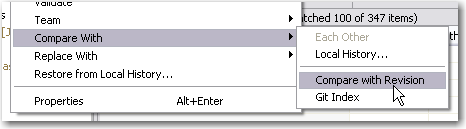
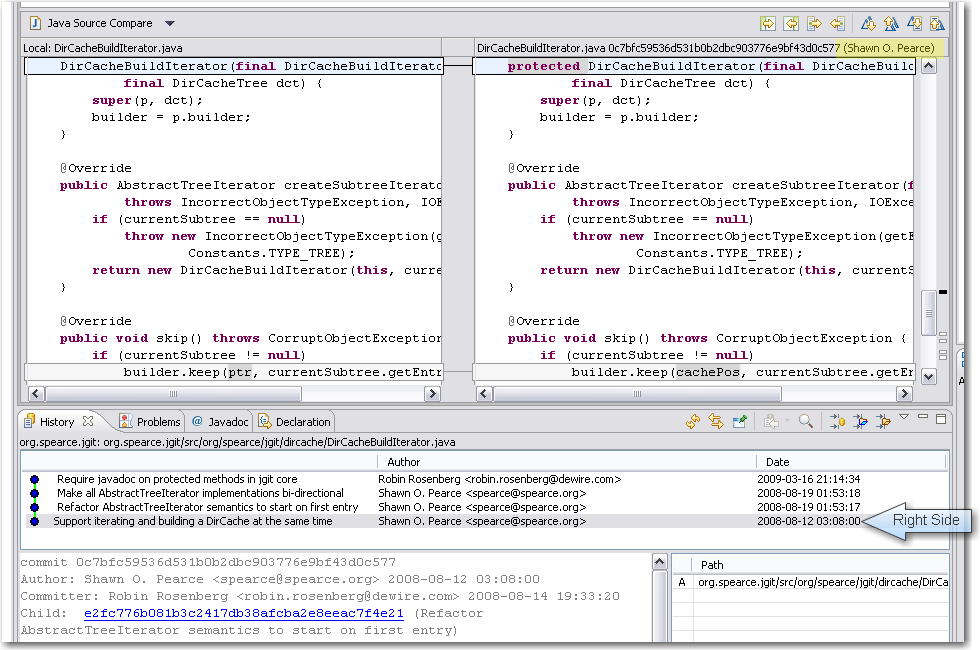
  • We think git is an enrichment to the SCM market, as is Eclipse to the IDE market. Improving the quality of Eclipse’s git plugin is the next logical step. The ability to diff the content of two revisions in EGit was committed today. As a bonus, the name of the committer shows up in the right manner, too. See the screenshots to get the idea:

When developing EGit, we were already using it to pull the sources. Unfortunately, the repository URL changed bigtimes since our checkout without us noticing. This got us into trouble trying to follow the contributor guide. The command line version of git isn’t that communicative yet. But after all, this is a great time to learn about the real world problems when using git. The EGit contributor guide itself is a fantastic way for a project to show initial appreciation to volunteer efforts. Thanks for caring, guys! If you are interested to review our changes yourself, fetch the patch.

  • Another part of today’s work was on the KDevelop project. We tried to fix some outstanding little features or bugs, whatever is on the list of KDevelop 4. But we spent our day fixing our development machines instead. The Ubuntu linux operating system (8.10) was way too old to get useful results and KDE needs to be up-to-date to develop KDevelop. Besides our sluggishness to keep our virtual machines on the bleeding edge, the checkout experience of KDevelop was rather sleek. What bothers us a bit is the ominous entanglement between KDevelop and KDE. It seems you can’t have one without the other and need to master both to make a stand.
  • As a third part, we wanted to contribute to the TANGO project (not the useful icon collection, but the useful control system). They migrated their main repository from CVS to SVN lately, but the migration seems unfinished still. At least, the migration effort lacks public documentation for the occasional contributor. That’s a real showstopper, because you never get beyond the very first step: setting up a working project. We won’t give up and email the project leads on this topic, but it didn’t fit into this OSLD.

What were our lessons learnt today?

  • Just having a possibility to view or download the source code doesn’t make an Open Source project. The key to success is the ability of complete strangers to hop in and perform useful work. Having terse, but accurate documentation helps a lot. The EGit contributor guide is a good example of a single document that makes the difference. If you own an open source project and want to attract occassional contributors (like us), write such a document and watch us (and others) drop you a patch. That said, we come to belief that the person that writes technical documentation for the developers is one of the most important roles on a project. Perhaps we join some projects in the future to fill that role.

To sum it up, this OSLD was limited from the beginning by developer availibility. With lacking documentation, we nearly grinded to a halt. We look forward to our next OSLD in December.

We are software tailors

Our company is called Softwareschneiderei (which is German for software tailoring). This name describes our intention to write bespoken software, software that fits people perfectly. Over time different additional metaphors from the tailor’s world came around: seams/tucks which describe places in software systems where cuts can be made and testing can be done. Tailoring is a craftsmanship so an apprenticeship model and the pride in our work exists.
This describes the mentoring and bespoken software development we do. But besides that we do a lot of bug fixing, improvement of existing software which was written by others and evaluation of other people’s code. Thanks to a piece from Jason Fried (thanx Jason!) those other parts fit perfectly into our vision as software tailors: we iron/press (fix bugs, improve the code), we trim and cut (remove bottlenecks and unwanted functionality or extend the software to use other systems) and we measure (analyze, inspect and evaluate systems).

Speed up your buildbox, Part III: Memory

This is the third part of a series on how to boost your build box without much effort. This episode talks about the effects of faster and more RAM.

© Friedberg - Fotolia.comIn the first and second part of our effort to speed up our buildbox, we replaced the harddisk with a RAM disk and swapped in a bigger CPU. This brought the build time down from 03:30 minutes to 02:00 minutes.

Boosting the memory

When we began the journey, we wanted to undercut the 02:00 minutes threshold. The last component that directly impacts performance of our box was the memory. We started out with 4 GB of DDR2-800 modules. To have a feeling for the effects, we upgraded to 4 GB of DDR2-1066 first and then added another 4 GB, resulting in 8 GB of RAM. We expected the performance gain to be small, but noticeable. The RAM disk, for example, is directly affected by memory speed.

As much, but faster

The first upgrade brought the first surprise: Upgrading from DDR2-800 to DDR2-1066 modules didn’t change anything. It’s not that the mainboard or CPU doesn’t support the faster RAM, it just seems to be fast enough, despite the data bus clock rate. Our build process still took 02:00 minutes, reproducible and without exception.

Filling all the banks

The mainboard can load up to 16 GB of RAM, but our budget just allowed to buy 8 GB of DDR2-1066 RAM. We installed it and ran the same 32 bit Ubuntu Linux as before. The build process took 02:00 minutes, which was expected now.

Changing to 64bit

We changed to boot harddisk, installed a 64 bit Ubuntu Linux and ran the build again. Still 02:00 minutes. The switch to 64 bit wasn’t a big deal with Java, but some of the included native libraries complained about the change. Recompiling them solved the issue.

Finally reaching the target

As a last measure, we increased the maximum memory of the build JVM to the biggest value it would accept. This was -Xmx2600m, a surplus of 600 MB to the original setting. This sped up the build process by five seconds, it took 01:55 minutes now.

Conclusion and perspective

We’ve reached our anticipated target of less than two minutes build time. We exceeded our original budget of 500 EUR, but bought some parts that finally weren’t used in the build box, but elsewhere. The two parts that made the whole difference were the CPU and some more memory to spend it on the RAM disk.

If you want to speed up your single build box, aim for the CPU/RAM combo and try to install a RAM disk to perform all the work on.

This leads me to the perspective of the next part of the series: If you plugged in the most expensive CPU and enormous amounts of RAM to speed up your buildbox, you still aren’t done. You should invest some time to look into distributed builds. Hudson as our continuous integration server provides nearly instant “build slave” support. With this feature, you can set up a whole build farm to further increase your build throughput.

Stay tuned for “Part IV: Beyond the box”