Today computers are used to control plenty different hardware systems both in laboratories and in the “real” world. Think of simple examples like automatic roller shutters that may be vital in keeping offices cool in summer while allowing for the maximum of light inside when the sun is occluded by clouds.
Most of the time things are way more complicated of course and soon real automation systems come into play providing intricate control and safety-related fail-safe mechanisms. Beckhoff ADS provides a means to communicate with such automation systems, often implemented as programmable logic controllers (PLC).
While many of these systems are Windows-based and provide rich programming environments on Windows they often provide interoperability with other programming languages and operating systems. In case of ADS there is a cross-platform open source C++ library provided by Beckhoff and even a python library (pyads) based on the C library for easy access of ADS devices.
ADS examples
This is great news because it allows you to choose your platform more freely and especially in science many organizations prefer Linux machines in their infrastructure. Here is an example using pyads to read a value from an ADS device:
import pyads

# The ip of the PLC
remote_ip = '192.168.0.55'
# This is the AMS network id. Usually consists of the IP address with .1.1 appended
remote_ads = '192.168.0.55.1.1'
# This is the ads port for the remote SPS controllers.
# Has nothing to do with TCP/IP ports!!!
ads_port = 851
# Set our local AMS network id to the client endpoint
# in the TwinCAT routing configuration
pyads.set_local_address('192.168.11.66.1.1')

with pyads.Connection(remote_ads, ads_port, remote_ip) as plc:
     print(plc.read_by_name('GlobalStructure.live_bit', pyads.PLCTYPE_BOOL))
Remote Access
When developing for our customers using ADS it is often not feasible to have the PLCs and a realistic set of controlled hardware in our own offices. Fortunately it is possible to communicate with the ADS interface of the customers on-site PLC over VPN and SSH-tunneling.
There are some caveats on the way to working remotely against an ADS device, namely the port to be tunneled, the route on the PLC and the correct IPs and NetIds.
SSH-Tunneling the ADS communication
Setting up SSH tunneling is probably the most easy part using putty on Windows or plain OpenSSH local forwarding using config files. The important thing is that you need to tunnel TCP-Port 48898 and not the ADS port 851!
Configuring the PLC route
The ADS endpoint needs a AMS route setup for the machine you SSH into. Otherwise that machine you use to tunnel your requests will not be authorized to communicate to the ADS device. This is well documented and a standard workflow for the automation people but crucial for the remote access to work. We need the AMS Net Id from this step to finally setup the connection.
Connecting remotely using the SSH-Tunnel
After everything is prepared we need to adjust the connection parameters for our ADS client. Taking the example from above this usually means changing remote_ip and the local AMS Net Id:
# The ip the SSH-tunnel is bound to, usually localhost
remote_ip = '127.0.0.1'
# This is the AMS network id of the endpoint. Leave unchanged!
remote_ads = '192.168.0.55.1.1'
# Set our local AMS network id to the client endpoint in the TwinCAT routing config
# This represents our ssh host, not the local machine!
pyads.set_local_address('192.168.0.100.1.1')
Conclusion
Beckhoff ADS provides a state-of-the-art means of communicating to PLCs over the network. With a bit of configuration this can easily be done remotely in addition to on-site in a platform agnostic way.
If you want to work on the scale of an IT landscape, you need to have a plan in the form of a map. In the first part of this series, we talked about creating such a map. This blog entry will give you the basic tools to make sense of all the things on it and how to convey meaning to other people while using the map.
The third part will talk about actionable steps that are a result of our interpretation of the map.
Making sense of the map
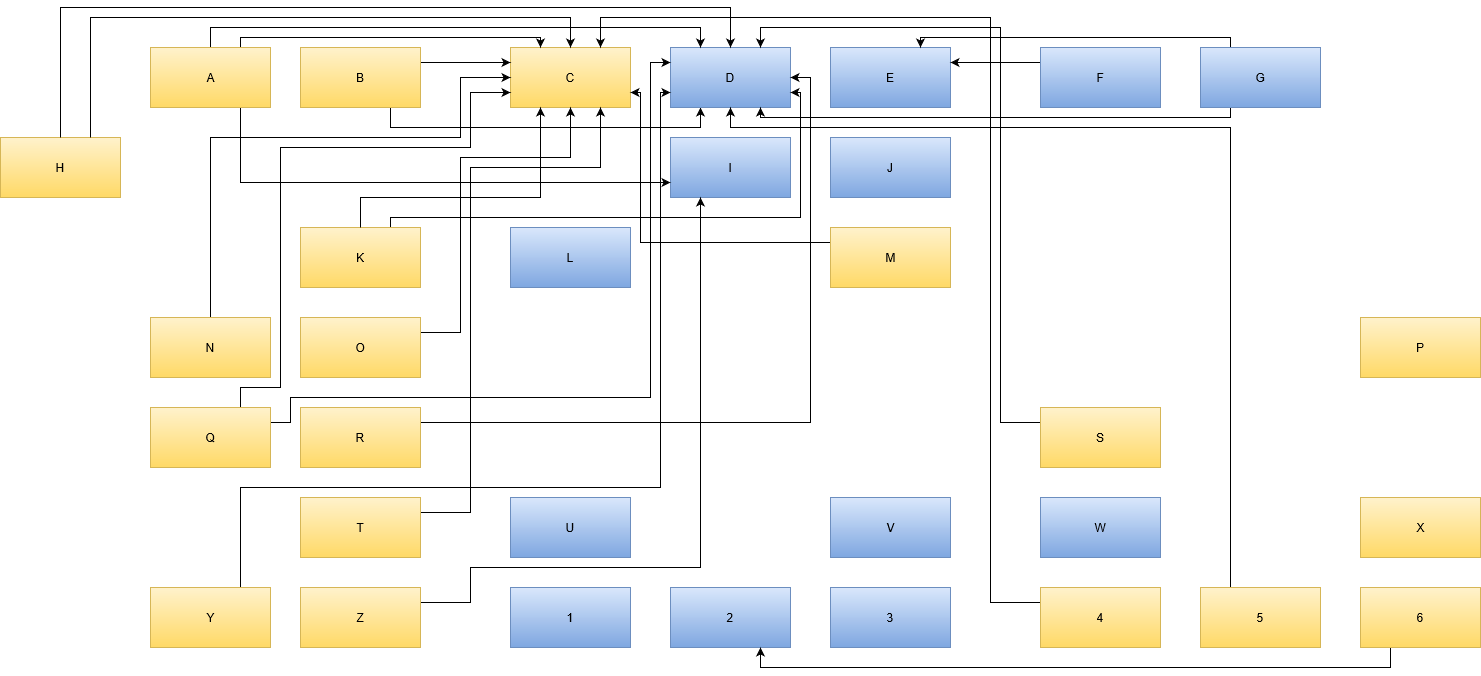
You’ve drawn the map of all your IT assets and given all the boxes names that you find useful. You’ve asked around to find relationships between your assets, represented by arrows between the boxes. You’ve moved the boxes around a bit to reduce arrow intersections. The map seems to be as “clean” as it can get at the moment.
Now is the time to apply meaning to the structures you see.
Interpreting loners
The first thing you want to look for are boxes without any relationships. These entities don’t interact with other things on your map and are not required by anything, too. Let’s think of them as independent value sources. If this asset brings your organization a describable and current advantage, you’ve found the ideal asset.
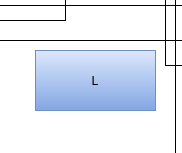
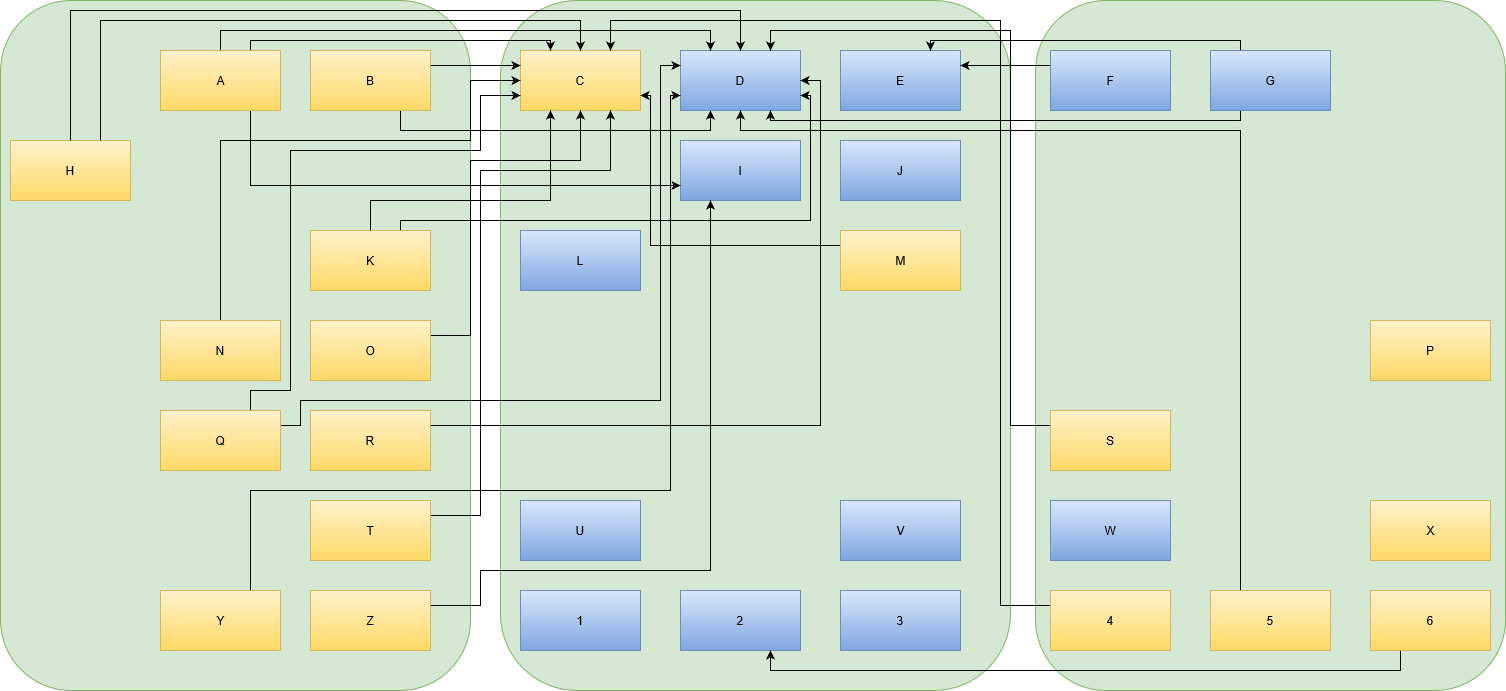
An example could be the blue box “L” in our example map. It isn’t coupled to any other asset. Let’s say it is a “customer relationship management” (CRM) system. Remember, boxes are not labeled by their actual implementation (in this case, maybe a vTiger or SugarCRM), but by the value they provide for the organization. If your organization needs a CRM (or benefits from its presence), then you have a “loner”, which is a good thing.
If the CRM stops working, the humans in the organization will be unhappy about it, but the outage itself will be limited to the CRM and not spread to other parts of your IT landscape (given that your map reflects the reality). If the outage lasts longer, your employees will adapt their work processes to circumvent the pothole in your IT. There will be a lot of post-it notes, at least for some time.
If the CRM is updated to a new version, you need to train your employees, but it won’t require other IT entities in your organization to match that update. The CRM can run on ancient hardware and software, as long as the human requirements are met. A loner on your map is a good thing.
Interpreting relicts
If you find a lonely box without a current use case, you’ve found a relict. Be glad that you’ve found it, because relicts tend to remain hidden and not show up on architect maps. If you can make sure that the relict serves no purpose for the organization anymore, you can eliminate it. Removing an asset from the map (and your real IT infrastructure) is a good thing, because you reduce complexity, costs and risks. There is no IT asset without associated costs and risks.
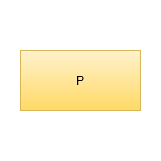
If, for example, the yellow box “P” represents a computer that provides a service that nobody uses anymore, the computer itself is still present in the network and can be used as a stepping stone for malicious itents. Let’s say the computer is a Raspberry Pi that isn’t included in the first tier of workhorse computers, its operating system might be outdated and susceptible to attacks. It doesn’t provide value for the organization anymore, but it increases the organization’s risk.
Revealing this kind of “dead weight” in your IT landscape is a real advantage, because you can cut it out rather easy.
Interpreting rings
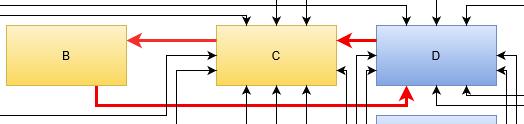
A typical structure on your map could be a circular dependency. In its smallest form, it is just two boxes that both depend on each other. The more elaborate ring consists of several boxes that are connected without a clear start and end. This is the worst thing to find.
A ring in your entities means that you have to consider all elements in the ring as one big entity. You cannot modify them independently, neither on the technological level nor on in the temporal dimension. A ring is basically a mexican standoff situation for all included entities. You can also call it a deadlock. Whatever you call it, it is bad news. You probably want to break the ring as soon as possible.
Breaking a ring would warrant its own blog post altogether. A basic starting point might be the Acyclic dependencies principle of software design. You probably need to split at least one of your entities into smaller parts or introduce a new entity. The least favorable move would be to merge all entities into one bigger entity, creating a monolith. You will regret this move when the inevitable modernization pressure rises.
Interpreting chains
If your entities form “deep” dependency lines where A depends on B, B depends on C, C depends on D and so forth, you have discovered a chain. This structure is less troublesome compared to the ring, but worth a worry nonetheless. In terms of operational risk, the chain creates a meta-system with a failure rate that is the sum of the failure rates of the chain elements. To make a long story short, you’ll never get a reliable infrastructure with long chains.
The longer your chains are, the more ripple effects an outage will have on your IT landscape. Remember that a chain always breaks at its weakest link, but this link will bring down the whole line.
You can reduce the length of a chain of entities in your IT landscape by inserting buffer elements like read-only copies of central data sources. But more important is to think (and talk) about why the dependencies are there in the first place. Maybe your data storage strategy is too decentralized and you would gain some favorable dependency structures by pooling data together (essentially creating a data monolith if you overdo it).
Introducing zones
Recognizing the basic shapes on your map is important, but you also have to look at the forest and not only the trees. The basic layout of your boxes already tell you a lot about your IT landscape zones.
A zone on your map is a region of boxes that you can encircle and give it a superordinate name. The basic rule of a zone is that all entities in it should share a common property. The less technology-based this property is, the better is your zoning. A zone for “java web services” or “metal computers” is eventually useful, but won’t stand the test of time. Sooner or later, some java services are replaced by other programming languages and some real machines get virtualized. Do you move them to other zones on your map? What really changed for the users of your IT landscape?
If you concentrate on your users, you might be able to come up with properties that really affect them. Look at this example that takes our initial example and separates it into three zones:
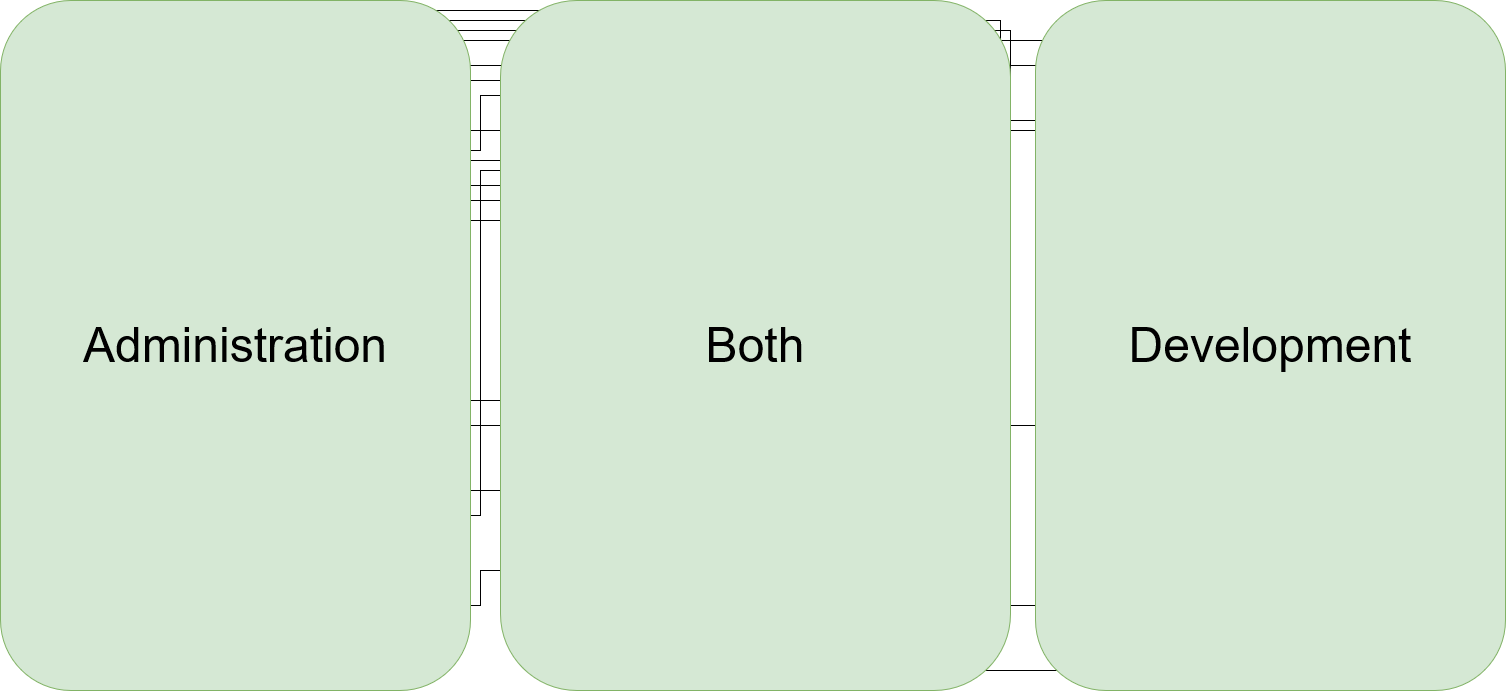
And now, we find a user-oriented name for each zone. In our example, we’ve grouped the entities by user role and are now able to label our zones:
This grouping has the added advantage that the target audience for each modification to the map can be identified nearly immediately. It makes it easier to anticipate the effects of outages or problems and to identify non-cohesive usage of the same tool/entity.
In our example, each box in the “Both” zone is essential to the functioning of the organization. But just because a specific service is used by both other groups doesn’t mean they have overlapping requirements. Maybe it is better for everybody involved to actually divide an entity into two separate boxes in the respective zones, even if both boxes are implemented with the exact same tool/technology at the moment.
Identifying the zones takes your map to the next level. You end up with fewer, but bigger boxes and their dependencies. It’s the same IT landscape, but with less detail. Now you can start your discovery process again.
Conclusion
Your IT landscape map can be interpreted by looking for common structures (like loners, rings and chains) and by defining zones. This allows us to gather a list of problem points that we want to improve. It also allows to evaluate the expectable ramifications of changes to entities in our IT landscape. And there will be changes. The one (and probably only) constant in IT is that all things change.
In the next part of this series, we look at ways to transform the map from the current state towards a better one. Stay tuned!
Last year, I moved. Moving into a new apartment is very much akin to a major rewrite of a complex piece of software. A piece of software with a limited amount of users, maybe (well, me, my girlfriend, that’s it), but with an immensely sophisticated structure of requirements… despite the decade-long experience of “living somewhere” one usually has at this point.
For example, I have a scarce habit of hoarding hardware synthesizers – from Soviet-era monstrosities like the Поливокс to modern machines, they have a few things in common, as they
take quite some space (due to their extensive wiring) and some are heavy
idle around for most of the time (I mean, I have a job)
are versatile enough not to have a clear-cut function in any workflow.
These are somewhat essential. All in all, I had some unassigned space in my new home and my machines instantly colonized there. Like his original version of “work expands to fill the time available“, there seems to be another Parkinson‘s Law correlating hardware synthesizers and the space you allow them to have. So basically, they now occupied one room of their own.
Which could be the end of the story and everyone would live happily ever after. If you have, like, a Googol amount of rooms. And considering Point 2 above – this solution feels quite like a waste.
Now – also last year, I began to deep-dive into the techniques of User Experience. And basically, my problem is pretty much comparable to a customer with a few quite diverging requirements. Who wants his problem solved, but hasn‘t yet figured out his actual needs to begin with.
Ergo, I should be able to use my insights of the field of UX, or Interaction Design, directly to my advantage, by applying techniques of User Research to my own behaviour.
And the first question should always be: By which approach do we get the largest understanding by the least effort? But the zeroth question is actually: How “wicked” is my problem?. Do I have an absolutely ill-defined, ever-changing, non-testable set of challenges? Or is my problem-solving rather a technical feat, implementing the best patterns, clearest details, best documentation?
Indeed. Point 3 above makes my problem rather ill-defined. On some wickedness scale, with 1 being a quick YouTube search for a How-To, 10 being a problem that I would need to go on a week-long mountain retreat with daily meditation sessions… I would give it a 6-7.
This feels like it should be in the range of difficult, but solvable with a kind of generalized abstract thinking. I choose to opt for the technique of the Five Whys: The goal is to find a consecutive number of deeper questions after my problem solving. But generally, I understand this as
“Five” is a general number one can aim for. There can be more, less, and there can be branches in the questioning.
“Why” is a placeholder for any qualifier that goes to a more abstract level. It can also be a „What do you want…“, „How about…“, „What‘s wrong with…“ serving that purpose
So. I consider myself sitting on opposite sides of a table and asking:
What do you want to accomplish, and why?
I want to have a truckload of synthesizers, fully functional, and also not to waste my space.
Why do you need your space?
Not only do I also have other stuff. Less clutter is generally a way to improve life quality.
Why don‘t you just get rid of the machines, i.e. selling, basement, …?
Well. I do want to have access to spontaneous synthesizer jams. The pandemic makes it hard to get that creative input anywhere else.
Why does this need to be spontaneous?
Because musical, like any creative flow, comes spontaneously. I don‘t want to have a great idea gone by because of long efforts in setting up.
Why would set up times have to be slow?
Because in an strictly ordered system I need to collect stuff from various spaces, i.e. the synthesizer itself, the power plug from a box of power plugs, cables for MIDI, audio, control voltages, …
Why would these have to be in their ordered boxes, for apart from the synthesizer?
Hm. Well, I guess they wouldn‘t have to be. That‘s just what one would do..?
Now basically, this example did not happen as straightforward as I just made it seem, but it helped me to channel my focus on a rule that is actually quite known in the design of enjoyable user interfaces: „Group things according to their usage, not their nature“. This is a form of reducing cognitive load. UI designers sometimes make this mistake, e.g. grouping “everything that is a filter” in one section, “everything that is a configuration” in one section, and so on; focussing more on the technical implementation of what these are, not on the proximity in the actual domain. This gets worse, the more technical any domain in its essence is, which is the mistake I did.
Wiring hardware synthesizers together is a very technical task, but there is much more use in grouping what belongs together when one wants to use it, not when one looks at its definition.
So now I have it. I, as a user, am happy that I, as a researcher, actually asked stupid questions like “Why don‘t you sell all the garbage?” in order to channel my focus to a system, in which setting up the whole stuff is rather quick, reducing the cognitive load, or rather shift it to the cleanup process – which is fine because I now can trust the system 😉
A few weeks ago, I heard a nice story about the hidden cost of new features. Imagine a website, driven by a content management system, consisting of text, pictures and fancy styling. When the content management system gets an update, the website developer takes a look at the release notes and finds that a lot of new and cool features are included that you’ll get for free once you update.
So he updates the site, tries it out and publishes it onto the web. A few days later, the customer and owner of the website sends a bug report of some arbitrarily flipped images. There are just short of a hundred images on the website and a handful of them now show up upside down.
Who would update a website and randomly rotate some images?
Why would a content management system decide that excatly these images need a spin?
The answer is not as obvious as one might think.
The latest cause of the effect was a change of the imaging library the content management system uses to deliver the image content. It got upgraded to a new engine that essentially does the same thing as the old one: Take the image file content and put it on the web. But, it does it more thoroughly.
One feature of JPEG images are the EXIF metadata properties. Examples of useful properties are the photography time, the geolocation or the camera model. Some cameras add even more information into the metadata, like exposure time or the camera’s orientation (rotation) during the photographing process. There are cameras that notice if you hold them upside down and store this circumstance into the picture.
Then, there are imaging libraries that just take the pixels and put them on the screen. And there are libraries that know about their domain and read the EXIF metadata, interpret the rotation data and accomodate for that fact. Because, who would like to look at pictures that are displayed totally wrong?
The first version of the content management system’s imaging library didn’t care much about metadata. The new version takes rotation into account.
So, the cause of the suddenly rotated pictures originates with the photographer that happened to work during a workout session or in australia. This fact was registered and stored by the camera and promply ignored by the picture editing software and the earlier content management system. It was rediscovered only when the new version went live.
For the customer, this is a random regression. It worked just fine all those years! For the developer, this is a minefield. Every picture could contain an evil rotation information that gets applied someday.
For a security engineer, this is a harmless but perfect example of a persistence attack. You embed malicious payloads into data that do nothing for a long time, but are activated suddenly, without outside intervention, by an unrelated change of system parts towards a “lucky” constellation.
First things first, here’s the mantra again: Whenever you want to call a function, ask yourself:
Can I return first?
But now to the example:
Parsing array braces
The task was to parse a string with a data-type in it. This was already working for single-value types, so we could parse "int", "double", "string" etc, via the function from_input_type. Now I was to extend it to also parse array definitions with one or two fixed dimensions, like "int[5]" or "double[4,7]".
My first attempt, implementing it as a constructor taking the definition string, looked like this:
auto suffix_begin = type_code.find('[');
if (suffix_begin == std::string::npos)
{
  this->type = from_input_type(type_code);
  return;
}

auto suffix_end = type_code.find(']', suffix_begin);
if (suffix_end == std::string::npos)
{
  throw std::invalid_argument("Malformed attribute type suffix: no end brace.");
}

auto type_tag = type_code.substr(0, suffix_begin);
this->type = from_input_type(type_tag);
auto in_brackets = type_code.substr(suffix_begin+1, suffix_end-suffix_begin-1);

auto separator = in_brackets.find(',');
if (separator == std::string::npos)
{
  this->rank = attribute_rank_t::1d;
  this->dim[0] = parse_size(in_brackets);
  return;
}

auto first = in_brackets.substr(0, separator);
auto second = in_brackets.substr(separator+1);

this->rank = attribute_rank_t::2d;
this->dim[0] = parse_size(first);
this->dim[1] = parse_size(second);
It’s not pretty, but it passed all the tests I set up for it. And this was pre-refactoring. I knew there was something else coming up: In a different constructor, we wanted to parse type definitions that look similar, but are not quite the same. Instead of 1 or 2 fixed dimensions, the brackets have to be empty there, e.g. "float[]" or "string[]". Note that they are still optional, it can still have single-values as well.
Now I wanted to reuse the code to locate the brackets, but the current structure wasn’t really well suited for that, with the member initialization spread all over the function. Obviously, the code parsing the contents of the brackets (from the auto separator = ... line down) was of no use for the second case, the first half is the interesting bit here. So I was looking at the calls to from_input_type in the upper half and asked myself: Can I return first, before calling this? The answer is, of course, yes.
struct type_with_brackets_t
{
  std::string_view type;
  std::string_view in_brackets;
  // There's a difference between empty brackets (e.g. string[])
  // and no brackets (e.g. string)
  bool has_brackets = false;
};

type_with_brackets_t split_type(std::string_view const& type_code)
{
  auto suffix_begin = type_code.find('[');
  if (suffix_begin == std::string::npos)
  {
    return {type_code, {}, false};
  }

  auto suffix_end = type_code.find(']', suffix_begin);
  if (suffix_end == std::string::npos)
  {
    throw std::invalid_argument("Malformed attribute type suffix: no end brace.");
  }

  auto type_tag = type_code.substr(0, suffix_begin);
  auto suffix = type_code.substr(suffix_begin+1, suffix_end-suffix_begin-1);
  return {type_tag, suffix, true};
}
With this, we can replace the upper half of the first function with:
auto [tag, in_brackets, has_brackets] = split_type(type_code);
this->type = from_input_type(tag);
if (!has_brackets)
  return;

/* continue parsing in_brackets */
The other “int[]” case can obviously be implemented very easiely now:
Of course, when just extracting the code as a function, you could be tempted to also call from_input_type in that function, but return first guided us away from that. I think this is a very good outcome, as it clearly separates splitting the string and interpreting the parts, naturally eliminating the duplicated from_input_type call. You can still have a function that does both, if you want, by adding a small facade araound split_type that also does the conversion.
I hope this example cleared up the method a bit more. One reason why deeply nested function calls are so common is that most languages make it easier to pass parameters than return multiple values. You will often find that this style will require more custom data-types that are just used as function return values. But functions will naturally compose easier because you will bundle smaller pieces, e.g. in this case, you can use the function without from_input_type, and I believe that will pay off in the end.


 Schneide Blog