Oracle and the materialized view update

Materialized views are powerful. They give us precomputed, queryable snapshots of expensive joins and aggregations. But the moment you start layering other views on top of them, you enter tricky territory.

The Scenario

You define a materialized view to speed up a reporting query. Soon after, others discover it and start building new views on top of it. The structure spreads.

Now imagine: you need to extend the base materialized view. Maybe add a column, or adjust its definition. That’s when the trouble starts.

The Problem

Unlike regular views, materialized views don’t offer a convenient CREATE OR REPLACE. You can’t just adjust the definition in place. Oracle also doesn’t allow a simple ALTER to add a column or tweak the structure—recreating the materialized views is often the only option.

Things get even more complicated when other views depend on your materialized view. In that case, Oracle won’t even let you drop it. Instead, you’re greeted with an error about dependent objects, leaving you stuck in a dependency lock-in.

The more dependencies there are, the more brittle the setup becomes. What started as a performance optimization can lock you into a rigid structure that resists change.

As a short example, let’s look at how other databases handle this scenario. In Postgres, you can drop a materialized view even if other views depend on it. The dependent views temporarily lose their base and will fail if queried, but you won’t get an error on the drop. Once you recreate the materialized view with the same name and structure, the dependent views automatically start working again.

What to Do?

That is the hard question. Sometimes you can try to hide materialized views behind stable views. Or you take the SQL of all dependent views, drop them, change the materialized view, and then recreate all dependent views— a process that can be a huge pain.

How do you manage changes to materialized views that already have dependent views stacked on top? Do you design around it, fight with rebuild scripts every time, or have another solution?

The Dimensions of Navigation in Eclipse

Following up on “The Dimensions of Navigation in Object-Oriented Code” this post explores how Eclipse, one of the most mature IDEs for Java development, supports navigating across different dimensions of code: hierarchy, behavior, validation and utilities.

Let’s walk through these dimensions and see how Eclipse helps us travel through code with precision.

1. Hierarchy Navigation

Hierarchy navigation reveals the structure of code through inheritance, interfaces and abstract classes.

  • Open Type Hierarchy (F4):
    Select a class or interface, then press F4. This opens a dedicated view that shows both the supertype and subtype hierarchies.
  • Quick Type Hierarchy (Ctrl + T):
    When your cursor is on a type (like a class, interface name), this shortcut brings up a popover showing where it fits in the hierarchy—without disrupting your current layout.
  • Open Implementation (Ctrl + T on method):
    Especially useful when dealing with interfaces or abstract methods, this shortcut lists all concrete implementations of the selected method.

2. Behavioral Navigation

Behavioral navigation tells you what methods call what, and how data flows through the application.

  • Open Declaration (F3 or Ctrl + Click):
    When your cursor is on a method call, pressing F3 or pressing Ctrl and click on the method jumps directly to its definition.
  • Call Hierarchy (Ctrl + Alt + H):
    This is a powerful tool that opens a tree view showing all callers and callees of a given method. You can expand both directions to get a full picture of where your method fits in the system’s behavior.
  • Search Usages in Project (Ctrl + Shift + G):
    Find where a method, field, or class is used across your entire project. This complements call hierarchy by offering a flat list of usages.

3. Validation Navigation

Validation navigation is the movement between your business logic and its corresponding tests. Eclipse doesn’t support this navigation out of the box. However, the MoreUnit plugin adds clickable icons next to classes and tests, allowing you to switch between them easily.

4. Utility Navigation

This is a collection of additional navigation features and productivity shortcuts.

  • Quick Outline (Ctrl + O):
    Pops up a quick structure view of the current class. Start typing a method name to jump straight to it.
  • Search in All Files (Ctrl + H):
    The search dialog allows you to search across projects, file types, or working sets.
  • Content Assist (Ctrl + Space):
    This is Eclipse’s autocomplete—offering method suggestions, parameter hints, and even auto-imports.
  • Generate Code (Alt + Shift + S):
    Use this to bring up the “Source” menu, which allows you to generate constructors, getters/setters, toString(), or even delegate methods.
  • Format Code (Ctrl + Shift + F):
    Helps you clean up messy files or align unfamiliar code to your formatting preferences.
  • Organize Imports (Ctrl + Shift + O):
    Automatically removes unused imports and adds any missing ones based on what’s used in the file.
  • Markers View (Window Show View Markers):
    Shows compiler warnings, TODOs, and FIXME comments—helps prioritize navigation through unfinished or problematic code.

Eclipse Navigation Cheat Sheet

ActionShortcut / Location
Open Type HierarchyF4
Quick Type HierarchyCtrl + T
Open ImplementationCtrl + T (on method)
Open DeclarationF3 or Ctrl + Click
Call HierarchyCtrl + Alt + H
Search UsagesCtrl + Shift + G
MoreUnit SwitchMoreUnit Plugin
Quick OutlineCtrl + O
Search in All FilesCtrl + H
Content AssistCtrl + Space
Generate CodeAlt + Shift + S
Format CodeCtrl + Shift + F
Organize ImportsCtrl + Shift + O
Markers ViewWindow → Show View → Markers

The Dimensions of Navigation in Object-Oriented Code

One powerful aspects of modern software development is how we move through our code. In object-oriented programming (OOP), understanding relationships between classes, interfaces, methods, and tests is important. But it is not just about reading code; it is about navigating it effectively.

This article explores the key movement dimensions that help developers work efficiently within OOP codebases. These dimensions are not specific to any tool but reflect the conceptual paths developers regularly take to understand and evolve code.

1. Hierarchy Navigation: From Parent to Subtype and Back

In object-oriented systems, inheritance and interfaces create hierarchies. One essential navigation dimension allows us to move upward to a superclass or interface, and downward to a subclass or implementing class.

This dimension is valuable because:

  • Moving up let us understand general contracts or abstract logic that governs behavior across many classes.
  • Moving down help us see specific implementations and how abstract behavior is concretely realized.

This help us maintain a clear overview of where we are within the hierarchy.

2. Behavioral Navigation: From Calls to Definitions and Back

Another important movement is between where methods are defined and where they are used. This is less about structure and more about behavior—how the system flows during execution.

Understanding this movement helps developers:

  • Trace logic through the system from the point of use to its implementation.
  • Identify which parts of the system rely on a particular method or class.
  • Assess how a change to a method might ripple through the codebase.

This navigation is useful when debugging, refactoring, or working in unfamiliar code.

3. Validation Navigation: Between Code and its Tests

Writing automated tests is a fundamental part of software development. Tests are more than just safety nets—they also serve as valuable guides for understanding and verifying how code is intended to behave. Navigating between a class and its corresponding test forms another important dimension.

This movement enables developers to:

  • Quickly validate behavior after making changes.
  • Understand how a class is intended to be used by seeing how it is tested.
  • Improve or add new tests based on recent changes.

Tight integration between code and test supports confident and iterative development, especially in test-driven workflows.

4. Utility Navigation: Supporting Movements that Boost Productivity

Beyond the main three dimensions, there are several supporting movements that contribute to developer efficiency:

  • Searching across the codebase to find any occurrence of a class, method, or term.
  • Generating boilerplate code, like constructors or property accessors, to reduce repetitive work.
  • Code formatting and cleanup, which helps maintain consistency and readability.
  • Autocompletion, which reduces cognitive load and accelerates writing.

These actions do not directly reflect code relationships but enhance how smoothly we can move within and around the code, keeping us focused on solving problems rather than managing structure.

Conclusion: Movement is Understanding

In object-oriented systems, navigating through your codebase along different dimensions provides essential insight for understanding, debugging, and improving your software.

Mastering these dimensions transforms your workflow from reactive to intuitive, allowing you to see code not just as static text, but as a living system you can navigate, shape, and grow.

In an upcoming post, I will take the movement dimensions discussed here and show how they are practically supported in IDEs like Eclipse and IntelliJ IDEA.

Tell different stories within the same universe

You might know this from fantasy book series: the author creates a unique world, a whole universe of their own and sets a story or series of books within it. Then, a few years later, a new series is released. It is set in the same universe, but at a different time, with different characters, and tells a completely new story. Still, it builds on the foundation of that original world. The author does not reinvent everything from scratch. They use the same map, the same creatures, the same customs and rules established in the earlier books.

Examples of this are the Harry Potter series and Fantastic Beasts, or The Lord of the Rings and The Hobbit.

But what does this have to do with software development?
In one of my projects, I faced a very similar use case. I had to implement several services, each covering a different use case, but all sharing the same set of peripherals, adapters, and domain types.

So I needed an architecture that did not just allow for interchangeable periphery, as is usually the focus, but also supported interchangeable use cases. In other words, I needed a setup that allowed for multiple “books” to be written within the same “universe.”

Architecture

Let’s start with a simple example: user management.
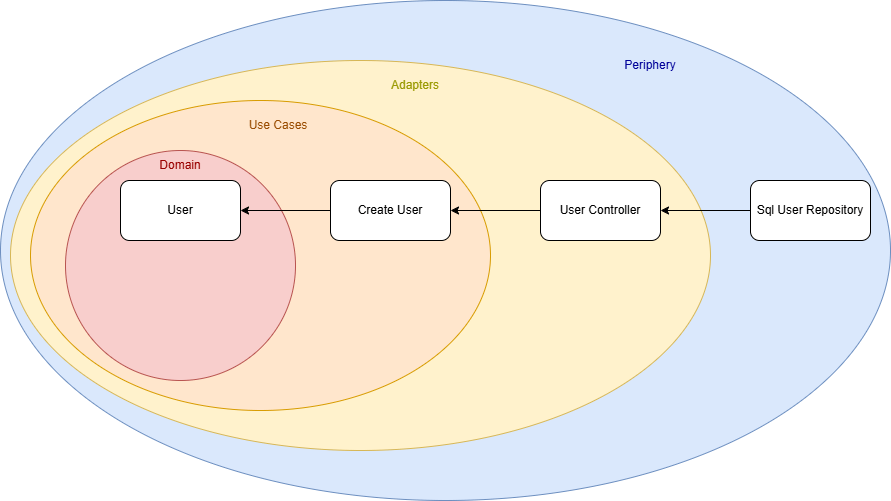
I originally implemented it following Clean Architecture principles, where the structure resembles an onion, dependencies flow inward, from the outer layers to the core domain logic. This makes the outer layers (the “peel”) easily replaceable or extendable.

Our initial use case is a service that creates a user. The use case defines an interface that the user controller implements, meaning the dependency flows from the outer layer (the controller) toward the core. So far, so good.

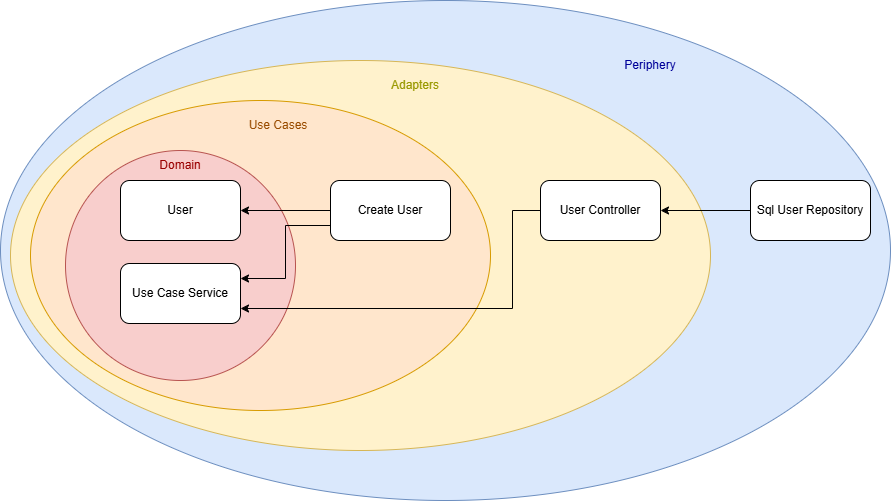
However, I wanted to evolve the architecture to support multiple use cases. For that, the direct dependency from the UserController to the CreateUser use case had to be removed.

My solution was to introduce a new domain module, a shared foundation that contains all interfaces, data types, and common logic used by both use cases and adapters. I called this module the UseCaseService.

The result is a new architecture diagram:

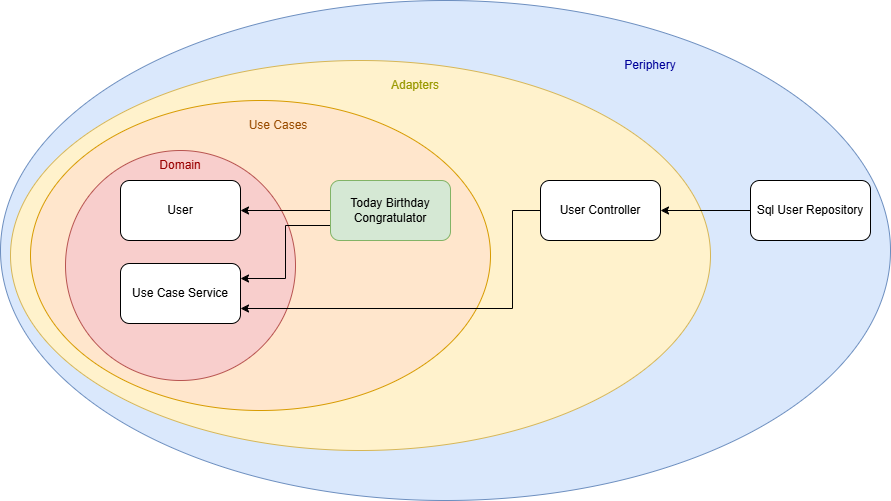
There is no longer a direct connection between a specific use case and an adapter. Instead, both depend on the shared UseCaseService module. With this setup, I can easily create new use cases that reuse the existing ecosystem without duplicating code or logic.

For example, I could implement another service that retrieves all users whose birthday is today and sends them birthday greetings. (Whether this is GDPR-compliant is another discussion!) But thanks to this architecture, I now have the freedom to implement that use case cleanly and efficiently.

Conclusion

Architecture is a highly individual matter. There is no one-size-fits-all solution that solves every problem or suits every project. Models like Clean Architecture can be helpful guides, but ultimately, you need to define your own architectural requirements and find a solution that meets them. This was a short story of how one such solution came to life based on my own needs.

It is also a small reminder to keep the freedom to think outside the box. Do not be afraid to design an architecture that truly fits you and your project, even if it deviates from the standard models.

Forking an Open Source Repository in Good Faith

One might love Open Source for different reasons: Maybe as a philosophical concept of transcendental sharing and human progress, maybe for reasons of transparency and security, maybe for the sole reason of getting stuff for free…

But, as a developer, Open Source is additionally appealing for the sake of actively participating, learning and sharing on a directly personal level.

Now I would guess that most repository forks are probably done for rather practical reasons (“I wanna have that!”), the forks get some minor patches one happens to need right now – or for some super-specific use case – and then hang around for some time until that use case vanishes or the changes are so vast that there will never be a merge (a situation commonly known as “der Zug ist abgefahren”), one might sometimes try to supply one’s work for the good of more than oneself. That is what I hereby declare a “Fork in Good Faith.”

A fork can happen in good faith if some conditions are true, like:

  • I am sure that someone else can benefit from my work
  • My technical skills match the technical level of the repository in question
  • Said upstream repository is even open for contributions (i.e. not understaffed)
  • My broader vision does not diverge from the original maintainers’ vision

Maybe there are more of these, but the most essential point is a mindset:

  • I declare to myself that I want to stay compatible with the upstream as long as is possible from both sides.

To fork with Good Faith is, then, a great idea because it helps to advance much more causes at once than just the stuff for free, i.e. on a developmental level:

  1. You learn from the existing code, i.e. the language, coding style, design patterns, specific solutions, algorithms, hidden gems, …
  2. You learn from the existing repository, i.e. how commits and branches are organized, how commit messages are used productively, how to manage patches or changes in general, …
  3. In reverse, the original maintainers might learn from you, or at least future contributors might
  4. You might get more people to actually see / try / use your awesome feature, thus getting more feedback or bug reports than brewing your own soup
  5. You might consider it as a workout of professional confidence, to advocate your use cases or implementation decisions against other developers, training to focus on rational principles and unlearning the reflexes of your ego.
  6. This can also serve as a workout in mental fluidity, by changing between different coding styles or conventions – if you are e.g. used of your super-perfect-one-and-only way of doing things, it might just positively blow your mind to see that other conventions can work too, if done properly.
  7. Having someone to actually review your changes in a public pull request (merge request) gives you feedback also on an organisational level, as in “was all of this part actually important for your feature?”, “can you put that into a future pull request?” or “why did you rewrite all comments for some Paleo-Siberian language??”

Not to forget, you might grow your personal or professional network to some degree, or at least get the occasional thank you from anyone (well…).

But the basic point of this post is this:

Maintaining a Fork in Good Faith is active, continuous work.

And there is no shame in abandoning that claim, but if you do once, there might be no easy return.

Just think about the pure sadness of features that are sometimes replicated over-and-over again, or get lost over the time;

And just think about how confusing or annoying that already could have been for yourself, e.g. with some multiply-forked npm package or maybe full-fledged end-user projects (… how many forks of e.g. WLED do even exist?).

This is just some reflection of how careful such a decision should be done. Of course, I am writing this because I recently became aware of that point of bifurcation, i.e. not the point where a repository is forked, but the one where all of the advantages mentioned above are weighed against real downsides.

And these might be legitimate, and numerous, too. Just to name a few,

  1. Maybe the existing conventions are just not “done properly”, and following them for the sake of uniformity makes you unproductive over time?
  2. Maybe the original maintainers are just understaffed, non-responsive or do not adhere to a style of communication that works with you?
  3. Maybe most discussions are really just debates of varying opinion (publicly, over the internet – that usually works!) and not vehicles of transcending the personal boundaries of human knowledge after all?
  4. Maybe you are stuck with sub-par legacy code, unable to boy-scout away some technical debt because “that is not the point right now”, or maybe every other day some upstream commit flushes in more freshly baked legacy code?
  5. Maybe no one understands your use case and contrary to the idea mentioned above – in order to get appropriate feedback about your features, and to prove its worth, you need to distribute this independently?
  6. Maybe at one point the maintainers of an upstream repository change, and from now on you have to name your variables in some Paleo-Siberian language?

I guess you get the point by now. There is much energy to be saved by never considering upstream compatibility in the first place, but there is also much potential to be wasted. I have no clear answer – yet – how to draw the line, but maybe you have some insight on that topic, too.

Are there any examples of forks that live on their own, still with the occasional cherry-pick, rebase, merge? Not one comes to my mind.

Nginx upload limit

Today, I encountered a surprising issue with my Docker-based web application. The application has an upload limit set, but before reaching it, an unexpected error appeared:

413 Request Entity Too Large

Despite the application’s upload limit being correctly configured, the error occurred much earlier—when the file was barely over 1MB. Where does this limitation come from, and how can it be changed?


Troubleshooting

The issue occurred before the request even reached the application layer, during a critical step in request processing. The root cause was Nginx, the web server and reverse proxy used in the Docker stack.

Nginx, commonly used in modern application stacks for load balancing, caching, and HTTPS handling, acts as the gateway to the application, managing all incoming requests. However, Nginx was rejecting uploads larger than 1MB. This was due to the client_max_body_size directive, which—when unset—defaults to a relatively low limit in some configurations. As a result, Nginx blocked larger file uploads before they could reach the application.

Solution

To resolve this issue, the client_max_body_size directive in the Nginx configuration needed to be updated to allow larger file uploads.

Modify the nginx.conf file or the relevant server block configuration:

server {
    listen 80;
    server_name example.com;
    client_max_body_size 100M;  # Allow uploads up to 100MB
}

After making this change, restart Nginx to apply the new configuration:

nginx -s reload

If Nginx is running in a Docker container, you can restart the container instead:

docker restart <container_name>

With this update, the upload limit increased to 100MB, allowing the application to handle larger files without premature rejection. Once the configuration was applied, the error disappeared, and file uploads worked as expected, provided they remained within the newly defined limits.

Integrating API Key Authorization in Micronaut’s OpenAPI Documentation

In a Java Micronaut application, endpoints are often secured using @Secured(SecurityRule.IS_AUTHENTICATED), along with an authentication provider. In this case, authentication takes place using API keys, and the authentication provider validates them. If you also provide Swagger documentation for users to test API functionalities quickly, you need a way for users to specify an API key in Swagger that is automatically included in the request headers.

For a general guide on setting up a Micronaut application with OpenAPI Swagger and Swagger UI, refer to this article.

The following article focuses on how to integrate API key authentication into Swagger so that users can authenticate and test secured endpoints directly within the Swagger UI.

Accessing Swagger Without Authentication

To ensure that Swagger is always accessible without authentication, update the application.yml file with the following settings:

micronaut:  
  security:
    intercept-url-map:
      - pattern: /swagger/**
        access:
          - isAnonymous()
      - pattern: /swagger-ui/**
        access:
          - isAnonymous()
    enabled: true

These settings ensure that Swagger remains accessible without requiring authentication while keeping API security enabled.

Defining the Security Schema

Micronaut supports various Swagger annotations to configure OpenAPI security. To enable API key authentication, use the @SecurityScheme annotation:

import io.swagger.v3.oas.annotations.security.SecurityScheme;
import io.swagger.v3.oas.annotations.enums.SecuritySchemeIn;
import io.swagger.v3.oas.annotations.enums.SecuritySchemeType;

@SecurityScheme(
    name = "MyApiKey",
    type = SecuritySchemeType.APIKEY,
    in = SecuritySchemeIn.HEADER,
    paramName = "Authorization",
    description = "API Key authentication"
)

This defines an API key security scheme with the following properties:

  • Name: MyApiKey
  • Type: APIKEY
  • Location: Header (Authorization field)
  • Description: Explains how the API key authentication works

Applying the Security Scheme to OpenAPI

Next, we configure Swagger to use this authentication scheme by adding it to @OpenAPIDefinition:

import io.swagger.v3.oas.annotations.info.*;
import io.swagger.v3.oas.annotations.security.SecurityRequirement;

@OpenAPIDefinition(
    info = @Info(
        title = "API",
        version = "1.0.0",
        description = "This is a well-documented API"
    ),
    security = @SecurityRequirement(name = "MyApiKey")
)

This ensures that the Swagger UI recognizes and applies the defined authentication method.

Conclusion

With these settings, your Swagger UI will display an Authorization field in the top-left corner.

Users can enter an API key, which will be automatically included in all API requests as a header.

This is just one way to implement authentication. The @SecurityScheme annotation also supports more advanced authentication flows like OAuth2, allowing seamless token-based authentication through a token provider.

By setting up API key authentication correctly, you enhance both the security and usability of your API documentation.

String Representation and Comparisons

Strings are a fundamental data type in programming, and their internal representation has a significant impact on performance, memory usage, and the behavior of comparisons. This article delves into the representation of strings in different programming languages and explains the mechanics of string comparison.

String Representation

In programming languages, such as Java and Python, strings are immutable. To optimize performance in string handling, techniques like string pools are used. Let’s explore this concept further.

String Pool

A string pool is a memory management technique that reduces redundancy and saves memory by reusing immutable string instances. Java is a well-known language that employs a string pool for string literals.

In Java, string literals are automatically “interned” and stored in a string pool managed by the JVM. When a string literal is created, the JVM checks the pool for an existing equivalent string:

  • If found, the existing reference is reused.
  • If not, a new string is added to the pool.

This ensures that identical string literals share the same memory location, reducing memory usage and enhancing performance.

Python also supports the concept of string interning, but unlike Java, it does not intern every string literal. Python supports string interning for certain strings, such as identifiers, small immutable strings, or strings composed of ASCII letters and numbers.

String Comparisons

Let’s take a closer look at how string comparisons work in Java and other languages.

Comparisons in Java

In this example, we compare three strings with the content “hello”. While the first comparison return true, the second does not. What’s happening here?

String s1 = "hello";
String s2 = "hello";
String s3 = new String("hello");

System.out.println(s1 == s2); // true
System.out.println(s1 == s3); // false

In Java, the == operator compares references, not content.

First Comparison (s1 == s2): Both s1 and s2 reference the same object in the string pool, so the comparison returns true.

Second Comparison (s1 == s3): s3 is created using new String(), which allocates a new object in heap memory. By default, this object is not added to the string pool, so the object reference is unequal and the comparison returns false.

You can explicitly add a string to the pool using the intern() method:

String s1 = "hello";
String s2 = new String("hello").intern();

System.out.println(s1 == s2); // true

To compare the content of strings in Java, use the equals() method:

String s1 = "hello";
String s2 = "hello";
String s3 = new String("hello");

System.out.println(s1.equals(s2)); // true
System.out.println(s1.equals(s3)); // true
Comparisons in Other Languages

Some languages, such as Python and JavaScript, use == to compare content, but this behavior may differ in other languages. Developers should always verify how string comparison operates in their specific programming language.

s1 = "hello"
s2 = "hello"
s3 = "".join(["h", "e", "l", "l", "o"])

print(s1 == s2)  # True
print(s1 == s3)  # True

print(s1 is s2)  # True
print(s1 is s3)  # False

In Python, the is operator is used to compare object references. In the example, s1 is s3 returns False because the join() method creates a new string object.

Conclusion

Different approaches to string representation reflect trade-offs between simplicity, performance, and memory efficiency. Each programming language implements string comparison differently, requiring developers to understand the specific behavior before relying on it. For example, some languages differentiate between reference and content comparison, while others abstract these details for simplicity. Languages like Rust, which lack a default string pool, emphasize explicit memory management through ownership and borrowing mechanisms. Languages with string pools (e.g., Java) prioritize runtime optimizations. Being aware of these nuances is essential for writing efficient, bug-free code and making informed design choices.

Why Java’s built-in hash functions are unsuitable for password hashing

Passwords are one of the most sensitive pieces of information handled by applications. Hashing them before storage ensures they remain protected, even if the database is compromised. However, not all hashing algorithms are designed for password security. Java’s built-in hashing mechanisms used e.g. by HashMap, are optimized for performance—not security.

In this post, we will explore the differences between general-purpose and cryptographic hash functions and explain why the latter should always be used for passwords.

Java’s built-in hashing algorithms

Java provides a hashCode() method for most objects, including strings, which is commonly used in data structures like HashMap and HashSet. For instance, the hashCode() implementation for String uses a simple algorithm:

public int hashCode() {
    int h = 0;
    for (int i = 0; i < value.length; i++) {
        h = 31 * h + value[i];
    }
    return h;
}

This method calculates a 32-bit integer hash by combining each character in the string with the multiplier 31. The goal is to produce hash values for efficient lookups.

This simplicity makes hashCode() extremely efficient for its primary use case—managing hash-based collections. Its deterministic nature ensures that identical inputs always produce the same hash, which is essential for consistent object comparisons. Additionally, it provides decent distribution across hash table buckets, minimizing performance bottlenecks caused by collisions.

However, the same features that make the functions ideal for collections are also its greatest weaknesses when applied to password security. Because it’s fast, an attacker could quickly compute the hash for any potential password and compare it to a leaked hash. Furthermore, it’s 32-bit output space is too small for secure applications and lead to frequent collisions. For example:

System.out.println("Aa".hashCode()); // 2112
System.out.println("BB".hashCode()); // 2112

The lack of randomness (such as salting) and security-focused features make hashCode() entirely unsuitable for protecting passwords. You can manually add a random value before passing the string into the hash algorithm, but the small output space and high speed still make it possible to generate a lookup table quickly. It was never designed to handle adversarial scenarios like brute-force attacks, where attackers attempt billions of guesses per second.

Cryptographic hash algorithms

Cryptographic hash functions serve a completely different purpose. They are designed to provide security in the face of adversarial attacks, ensuring that data integrity and confidentiality are maintained. Examples include general-purpose cryptographic hashes like SHA-256 and password-specific algorithms like bcrypt, PBKDF2, and Argon2.

They produce fixed-length outputs (e.g., 256 bits for SHA-256) and are engineered to be computationally infeasible to reverse. This makes them ideal for securing passwords and other sensitive data. In addition, some cryptographic password-hashing libraries, such as bcrypt, incorporate salting automatically—a technique where a random value is added to the password before hashing. This ensures that even identical passwords produce different hash values, thwarting attacks that rely on precomputed hashes (rainbow tables).

Another critical feature is key stretching, where the hashing process is deliberately slowed down by performing many iterations. For example, bcrypt and PBKDF2 allow developers to configure the number of iterations, making brute-force attacks significantly more expensive in terms of time and computational resources.

Conclusion

Java’s built-in hash functions, such as hashCode(), are designed for speed, efficiency, and consistent behavior in hash-based collections. They are fast, deterministic, and effective at spreading values evenly across buckets.

On the other hand, cryptographic hash algorithms are purpose-built for security. They prioritize irreversibility, randomness, and computational cost, all of which are essential for protecting passwords against modern attack vectors.

Java’s hashCode() is an excellent tool for managing hash-based collections, but it was never intended for the high-stakes realm of password security.

A few more heuristics for rejecting Merges

Since a few weeks ago, I am trying to find a few easy things to look for when facing a Merge Request (also called “Pull Request”) that is too large to be quickly accepted.

When facing a larger Merge Request, how can one rather quickly decide whether it is worth going through all changes in one session, or to decide that this is too dangerous and reject.

These thoughts apply for a medium-sized repository – I am of the opinion that if you happen to work in a large project, or contribute to a public open-source repository, one should never even aim for larger merge requests, i.e. they should be rejected if there is more than one reason any code changed in that MR.

Being too strict just for the sake of it, in my eyes, can be a costly mistake – You waste your time in unnecessary structure and, in earlier / more experimental development stages, you might not want to take the drive out of a project. Nevertheless, maintainers need to know what’s going on.

Last time, I kept two main thoughts open, and I want to discuss these here, especially since they now had time to flourish a while in the tasty marinade that is my brain.

Can you describe the changes in one sentence?

I want my code to change for a multitude of reasons, but I want to know which kind of “glasses” I read these changes with. For me, it is a lesser problem to go through many changes if I can assign them to the same “why”. I.e. introducting i18n might change many lines of codes, but as these happen for the same reason, they can be understood easily.

But if, for some reason, people decide to change the formatting (replace tabs with spaces or such shenanigans), you better make sure that this the only reason any line changes. If there is any other thing someone did “as it just appeared easy” -reject the whole MR. That is no place for the “boy scout rule”, it is just too dangerous.

For me, it is too little to always apply the same type of glasses to any Merge Request there is. One could say “I only look for technical correctness”. But usually I can very well allow myself some flexibility there. I need to know, however, that all changes happened for only a few given reasons, because only then I can be sure that the developer did not actually loose track of his goal somewhere on the way.

Does this Merge increase the trust in a collaboration?

From a bird-eye point of view, people working together should always pay attention whether a given trajectory goes in the direction of increasing trust. Of course, if you fix a broken menu button in a user interface of a large project, the MR should just do that – but if you are in a smaller project with the intention of staying there, I suggest that every MR expresses exactly that: “I understand what is important at the current stage of this collaboration and do exactly that”.

Especially when working together for a longer time, it can be easy to let the branching discipline slip a little – things might have gone well for a longer time. But this is a fragile state, because if you then care too little about the boundaries of a specific MR, this can damage the trust all too easily.

In a customer project, this trust goes out to the customer. This might be the difference between “if something breaks they’ll write you a mail, you fix it, they are happy” and “they insist on a certain test coverage”.

Conclusion

So basically, reviewing the code of others boils down to writing own code, or improving User Experience, or managing anything – think not in a list of small-scale checklists, think in terms of “Cognitive Load”. A good programmer should have a large set of possible glasses (mindsets) through which they see code, especially foreign code. One should always be honest whether a given change is compatible with only a very small number of reasons. If there is a Merge Request that allows itself to do too much, this is not the Boy Scout Rule – it is a recipe of undermining mutual trust. Do not overestimate your own brain capacity. Reject the thing, and reserve that capacity for something useful.