Use duplication to make your single source of truth

Having a single source of truth is one of the big tenets of programming. It is easy to see why. If you want to figure out something about your program, or change something, you just go to the corresponding source.

One of the consequences of this is usually code duplication, but things can get a lot more complicated very fast, when you think of knowledge duplication or fragmentation, instead of just code. Quite unintuitively, duplication can actually help in this case.

Consider the case where you serialize an enum value, e.g. to a database or a file. Suddenly, you have two conceptual points that ‘know’ about the translation of your enum literals to a numeric or string value: The mapping in your code and the mapping implicitly stored in the serialization. None of these two points can be changed independently. Changing the serialized content means changing the source code and vice-versa.

You could still consider your initial enum to value mapping the single source of truth, but the problem is that you can easily miss disruptive changes. E.g. if you used the numeric value, just reordering the enumerated will break the serialization. If you used the text name of the enum, even a simple rename refactoring will break it.

So to deal with this, I often build my own single source of truth: a unit test that keeps track of such implicit value couplings. That way, the test can tell you when you are accidentally breaking things. Effectively, this means duplicating the knowledge of the mapping to a ‘safe’ space: One that must be deliberately changed, and resists accidentally being broken. And then that becomes my new single source of truth for that mapping.

How I accidentally cut my audio-files in half

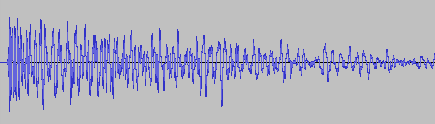
A couple of weeks ago, I asked my brother to test out my new game You Are Circle (please wishlist it and check out the demo, if that’s up your alley!) and among lots of other valuable feedback, he mentioned that the explosion sound effects had a weird click sound at the end that he could only hear with his headphones on. For those of you not familiar with audio signal processing, those click or pop sounds usually appear when the ‘curvy’ audio signal is abruptly cut off1. I did not notice it on my setup, but he has a lot of experience with audio mixing, so I trusted his hearing. Immediately, I looked at the source files in audacity:

They looked fine, really. The sound slowly fades out, which is the exact thing you need to do to prevent clicks & pops. Suspecting the problem might be on the playback side of his particular setup, I asked him to record the sound on his computer the next time he tested and then kind of forgot about it for a bit.

Fast-forward a couple of days. Neither of us had followed up on the little clicky noise thing. While doing some video captures with OBS, I noticed that the sound was kind of terrible in some places, the explosions in particular. Maybe that was related?

While building a new version of my game, Compiling resources... showed up in my console and it suddenly dawned on me: What if my home-brew resource compiler somehow broke the audio files? I use it to encode all the .wav originals into Ogg Vorbis for deployment. Maybe a badly configured encoding setup caused the weird audio in OBS and for my brother? So I looked at the corresponding .ogg files, and to my surprise, it indeed had a small abrupt cut-off at the end. How could that happen? Only when I put both the original and the processed file next to each other, did I see what was actually going on:

It’s only half the file! How did that happen? And what made this specific file so special for it to happen? This is one of many files that I also convert from stereo to mono in preprocessing. So I hypothesized that might be the problem. No way I missed all of those files being cut in half though, or did I? So I checked the other files that were converted from stereo to mono. Apparently, I did miss it. They were all cut in half. So I took a look at the code. It looked something like this:

while (keep_encoding)
{
  auto samples_in_block = std::min(BLOCK_SIZE, input.sample_count() - sample_offset);
  if (samples_in_block != 0)
  {
    auto samples_per_channel = samples_in_block / channel_count;
    auto channel_buffer = vorbis_analysis_buffer(&dsp_state, BLOCK_SIZE);
    auto input_samples = input.samples() + sample_offset;

    if (convert_to_mono)
    {
      for (int sample = 0; sample < samples_in_block; sample += 2)
      {
        int sample_in_channel = sample / channel_count;
        channel_buffer[0][sample_in_channel] = (input_samples[sample] + input_samples[sample + 1]) / (2.f * 32768.f);
      }
    }
    else
    {
      for (int sample = 0; sample < samples_in_block; ++sample)
      {
        int channel = sample % channel_count;
        int sample_in_channel = sample / channel_count;
        channel_buffer[channel][sample_in_channel] = input_samples[sample] / 32768.f;
      }
    }

    vorbis_analysis_wrote(&dsp_state, samples_per_channel);
    sample_offset += samples_in_block;
  }
  else
  {
    vorbis_analysis_wrote(&dsp_state, 0);
  }

  /* more stuff to encode the block using the ogg/vorbis API... */
}

Not my best work, as far as clarity and deep nesting goes. After staring at it for a while, I couldn’t really figure out what was wrong with it. So I built a small test program to debug into, and only then did I see what was wrong.

It was terminating the loop after half the file, which now seems pretty obvious given the outcome. But why? Turns out it wasn’t the convert_to_mono at all, but the whole loop. What’s really the problem here is mismatched and imprecise terminology.

What is a sample? The audio signal is usually sampled several thousand times (44.1kHz, 48kHz or 96kHz are common) per second to record the audio waves. One data point is called a sample. But that is only enough of a definition if the sound has a single channel. But all those with convert_to_mono==true were stereo, and that’s exactly were the confusion is in this code. One part of the code thinks in single-channel samples, i.e. a single sampling time-point has two samples in a stereo file, while the other part things in multi-channel samples, i.e. a single sampling time-point has only one stereo sample, that consists of multiple numbers. Specifically this line:

auto samples_in_block = std::min(BLOCK_SIZE, input.sample_count() - sample_offset);

samples_in_block and sample_offset use the former definition, while input.sample_count() uses the latter. The fix was simple: replace input.sample_count() with input.sample_count() * channel_count.

But that meant all my stereo sounds, even the longer music files, were missing the latter half. And this was not a new bug. The code was in there since the very beginning of the git history. I just didn’t hear its effects. For the sound files, many of them have a pretty long fade out in the second half, so I can kind of get why it was not obvious. But the music was pretty surprising. My game music loops, and apparently, it also loops if you cut it in half. I did not notice.

So what did I learn from this? Many of my assumptions while hunting down this bug were wrong:

  • My brother’s setup did not have anything to do with it.
  • Just because the original source file looked fine, I thought the file I was playing back was good as well.
  • The bad audio in OBS did not have anything to do with this, it was just recorded too loud.
  • The ogg/vorbis encoding was not badly configured.
  • The convert_to_mono switch or the special averaging code did not cause the problem.
  • I thought I would have noticed that almost all my sounds were broken for almost two years. But I did not.

What really cause the problem was an old programming nemesis, famously one of the two hard things in computer science: Naming things. There you have it. Domain language is hard.

  1. I think this is because this sudden signal drop equates to a ‘burst’ in the frequency domain, but that is just an educated guess. If you know, please do tell. ↩︎

The Estranged Child

One code construct I encounter every now and then is what my colleague appropriately dubbed “the extranged child”, after I said that I do not have a proper name for it. It happens in OOP when a parent object creates child objects, and then later needs to interact with that child:

class Child { /* ... */ }

class Parent
{
  Child Create() { /* ... */ }
  void InteractWith(Child c) { /* ... */ }
}

This is all good, but as soon as inheritance enters the picture, it becomes more complicated:

abstract class BaseChild { /* ... */ }
abstract class BaseParent
{
  public abstract BaseChild Create();
  public abstract void InteractWith(BaseChild child);
}

class RealChild : BaseChild { }
class RealParent : BaseParent
{
  public override BaseChild Create()
  {
    return new RealChild( /* ... */ );
  }

  public override void InteractWith(BaseChild child)
  {
    // We really want RealChild here...
    var realChild = child as RealChild;
  }
}

The interaction often needs details that only the child type associated with that specific parent type has, so that involves a smelly downcast at that point.

Just looking at the type system, this now violates the Liskov-Substitution-Principle also known as the L from SOLID.

One possible solution is adding a precondition for the InteractWith function. Something along the lines of “May only be called with own children”. That works, but cannot be checked by a compiler.

Another solution is to move the InteractWith function into the child, because at the point when it is created, it can know its real parent. That may not be the natural place for the function to go. Also, it requires the child to keep a reference to its parent, effectively making it a compound. But this approach can usually be done, as long as the relation of ‘valid’ child/parent types is one to one.

If you have a parent object that can create different kinds of children that it later needs to interact with, that approach is usually doomed as well. E.g. let the parent be a graphics API like OpenGL or DirectX, and the children be the resources created, like textures or buffers. For drawing, both are required later. At that point, really only the precondition approach works.

On the implementation side, the “ugly” casts remain. Stand-ins for the children can be used and associated with the data via dictionaries, hash-tables or any other lookup. This approach is often coupled with using (possibly strongly typed) IDs as the stand-ins. However, that really only replaces the downcast with a lookup, and it will also fail if the precondition is not satisfied.

Have you encountered this pattern before? Do you have a different name for it? Any thoughts on designing clean APIs that have such a parent-child relationship in a hierarchy? Let me know!

Experimenting with CMake’s unity builds

CMake has an option, CMAKE_UNITY_BUILD, to automatically turn your builds into unity-builds, which is essentially combining multiple source files into one. This is supposed to make your builds more efficient. You can just enable enable it while executing the configuration step of your CMake builds, so it is really easy to test. It might just work without any problems. Here are some examples with actual numbers of what that does with build times.

Project A

Let us first start with a relatively small project. It is a real project we have been developing, that reads sensor data, transports it over the network and displays it using SDL and Dear ImGui. I’m compiling it with Visual Studio (v17.13.6) in CMake folder mode, using build insights to track the actual time used. For each configuration, I’m doing a clean rebuild 3 times. The steps are the number of build statements that ninja runs.

Unity Build#StepsTime 1Time 2Time 3
OFF4013.3s13.4s13.6s
ON2810.9s10.7s9.7s

That’s a nice, but not massive, speedup of 124,3% for the median times.

Project A*

Project A has a relatively high number of non-compile steps: 1 step is code generation, 6 steps are static library linking, and 7 steps are executable linking. That’s a total of 14 non-compile steps, which are not directly affected by switching to unity builds. 5 of the executables in Project A are non-essential, basically little test programs. So in an effort to decrease the relative number of non-compile steps, I disabled those for the next test. Each of those also came with an additional source file, so the total number of steps decreased by 10. This really only decreased the relative amount of non-compile steps from 35% to 30%, but the numbers changes quite a bit:

Unity Build#StepsTime 1Time 2Time 3
OFF309.9s10.0s9.7s
ON189.0s8.8s9.1s

Now the speedup for the median times was only 110%.

Project B

Project B is another real project, but much bigger than Project A, and much slower to compile. It’s a hardware orchestration system with a web interface. As the project size increases, the chance for something breaking when enabling unity builds also increases. In no particular order:

  • Include guards really have to be there, even if that particular header was not previously included multiple times
  • Object files will get a lot bigger, requiring /bigobj to be enabled
  • Globally scoped symbols will name-clash across files. This is especially true for static globals or things in unnamed namespaces, which basically don’t do their job anymore. More subtly, things moved into the global namespace will also clash, such as the classes with the same name moved into the global namespace via using namespace.

In general, that last point will require the most work to resolve. If all fails, you can disable unity build on a target via set_target_properties(the_target PROPERTIES UNITY_BUILD OFF) or even just skip specific files for unity build inclusion via SKIP_UNITY_BUILD_INCLUSION. In Project B, I only had to do this for files generated by CMakeRC. Here are the results:

Unity Build#StepsTime 1Time 2Time 3
OFF416279.4s279.3s284,0s
ON11873.2s76.6s74.5s

That’s a massive speedup of 375%, just for enabling a build-time switch.

When to use this

Once your project has a certain size, I’d say definitely use this on your CI pipeline, especially if you’re not doing incremental builds. It’s not just time, but also energy saved. And faster feedback cycles are always great. Enabling it on developer machines is another matter: it can be quite confusing when the files you’re editing do not correspond to what the build system is building. Also, developers usually do more incremental builds where the advantages are not as high. I’ve also used hybrid approaches where I enable unity builds only for code that doesn’t change that often, and I’m quite satisfied with that. Definitely add an option to turn that off for debugging though. Have you had similar experiences with unity builds? Do tell!

You are mislead about the Big-O notation

One statement I have people say and people repeat a lot, especially in the data-oriented design bubble, is that Big-O notation cannot accurately real-life performance of contemporary computer programs, especially in the presence of multi-tier memory hierarchies like L1/L2/L3-caches for RAM. This is, at best, misleading and gives this fantastic tool a bad reputation.

At it’s core, Big-O is just a way to categorize functions in how they scale. There’s nothing in the formal definition about performance at all. Of course, it is often used to categorize performance of algorithms and implementations of them. But to use it for that, you need two other things: A machine model and a metric for it.

Traditionally, when performance categorization using Big-O is taught, the machine model is either the Turing-machine or the slightly closer-to-reality RAM-machine. The metric is a number of operations. The operation that is counted has a huge impact. For example, insertion sort can easily be implemented in O(n*log(n)) when counting the number of comparisons (by using binary search to find the insertion point), but is in O(n²) when counting the number of memory moves/swaps.

Neither the model nor the metric is intrinsic to Big-O. To use in in the context of memory hierarchies, you just need to start counting what matters to you, e.g. memory accesses, cache misses or branch mispredictions. This is not new either, I learned about cache-aware and cache-oblivious machine models for this in university over 15 years ago.

TL;DR: Big-O is not obsolete, you just have to use it to count the appropriate performance-critical element in your algorithm.

Efficient integer powers of floating-point numbers in C++

Given a floating-point number x, it is quite easy to square it: x = x * x;, or x *= x;. Similarly, to find its cube, you can use x = x * x * x;.

However, when raising it to the 4’th power, things get more interesting: There’s the naive way: x = x * x * x * x;. And the slightly obscure way x *= x; x *= x; which saves a multiplication.

When raining to the 8’th power, the naive way really loses its appeal: x = x * x * x * x * x * x * x * x; versus x *= x; x *= x; x *= x;, that’s 7 multiplications version just 3. This process can easily be extended for raising a number to any power-of-two N, and will only use O(log(n)) multiplications.

The algorithm can also easily be extended to work with any integer power. This works by decomposing the number into product of power-of-twos. Luckily, that’s exactly what the binary representation so readily available on any computer is. For example, let us try x to the power of 20. That’s 16+4, i.e. 10100 in binary.

x *= x; // x is the original x^2 after this
x *= x; // x is the original x^4 after this
result = x;
x *= x; // x is the original x^8 after this
x *= x; // x is the original x^16 after this
result *= x;

Now let us throw this into some C++ code, with the power being a constant. That way, the optimizer can take out all the loops and generate just the optimal sequence of multiplications when the power is known at compile time.

template <unsigned int y> float nth_power(float x)
{
  auto p = y;
  auto result = ((p & 1) != 0) ? x : 1.f;
  while(p > 0)
  {
    x *= x;
    p = p >> 1;
    if ((p & 1) != 0)
      result *= x;
  }

  return result;
}

Interestingly, the big compilers do a very different job optimizing this. GCC optimizes out the loops with -O2 exactly up to nth_power<15>, but continues to do so with -O3 on higher powers. clang reliably takes out the loops even with just -O2. MSVC doesn’t seem to eliminate the loops at all, nor does it remove the multiplication with 1.f if the lowest bit is not set. Let me know if you find an implementation that MSVC can optimize! All tested on the compiler explorer godbolt.org.

Four-way Navigation in UIs

Just yesterday, I was working on the task of enabling gamepad navigation of a graphical UI. I had implemented this before in my game abstractanks but since forgotten how exactly I did it. So I opened the old code and tried to decipher it, and I figured that’d make a nice topic to write about.

Basic implementation

Let’s break down the simple version of the problem: You have a bunch of rectangular controls, and given a specific one, figure out the next one with an input of either left, up, right or down.

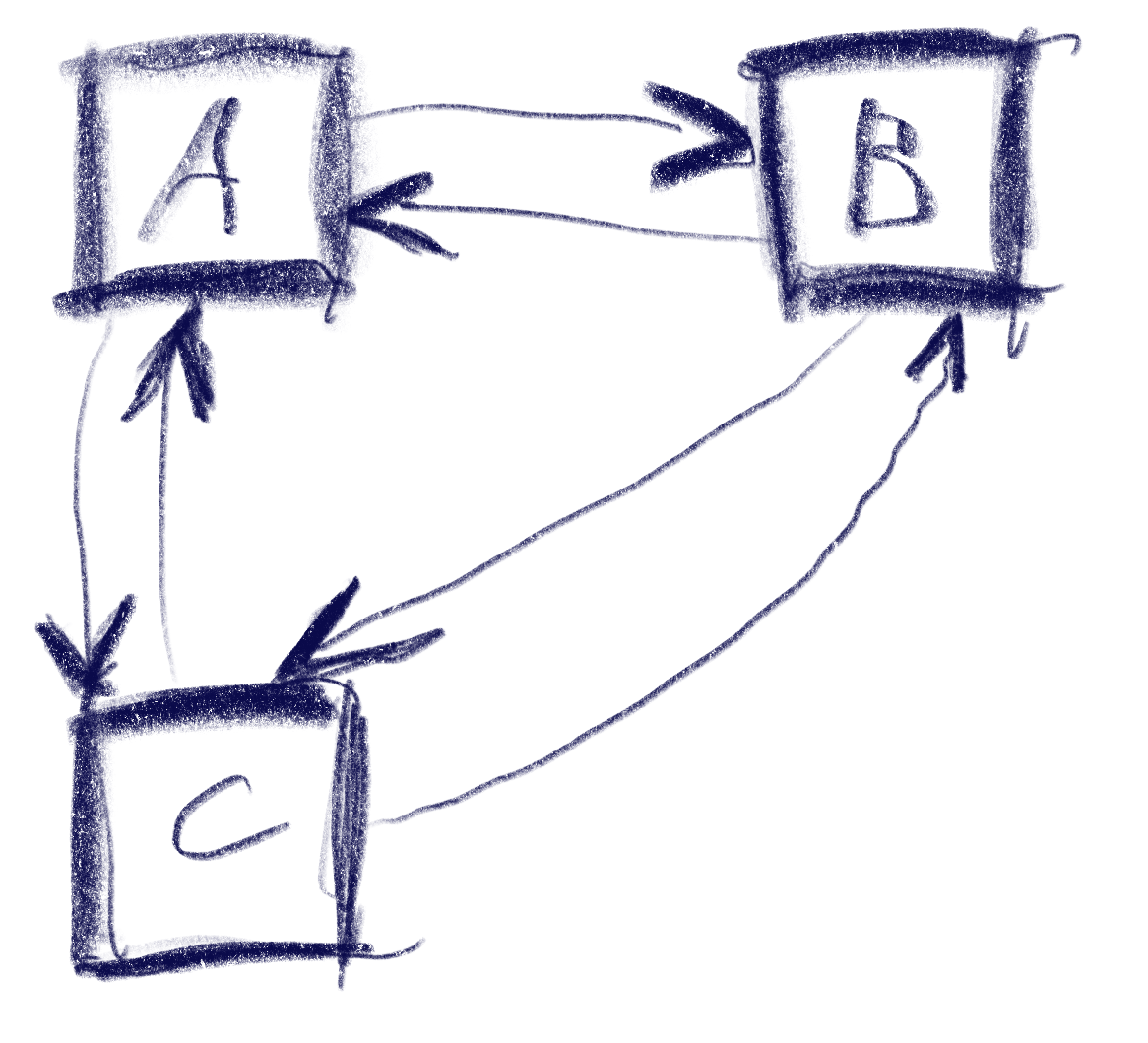
This sketch shows a control setup with a possible solution. It also contains an interesting situation: going ‘down’ from B box goes to C, but going up from there goes to A!

The key to creating this solution is a metric that weights the gap for a specific input direction, e.g. neighbor_metric(
box<> const& from, box<> const& to, navigation_direction direction)
. To implement this, we need to convert this gap into numbers we can use. I’ve used a variant of Arvo’s algorithm for that: For both axes, get the difference of the rectangles’ intervals along that axis and store those in a 2d-vector. In code:

template <int axis> inline float difference_on_axis(
box<> const& from, box<> const& to)
{
if (to.min[axis] > from.max[axis])
return to.min[axis] - from.max[axis];
else if (to.max[axis] < from.min[axis])
return to.max[axis] - from.min[axis];
return 0.f;
}

v2<> arvo_vector(box<> const& from, box<> const& to)
{
return {
difference_on_axis<0>(from, to),
difference_on_axis<1>(from, to) };
}

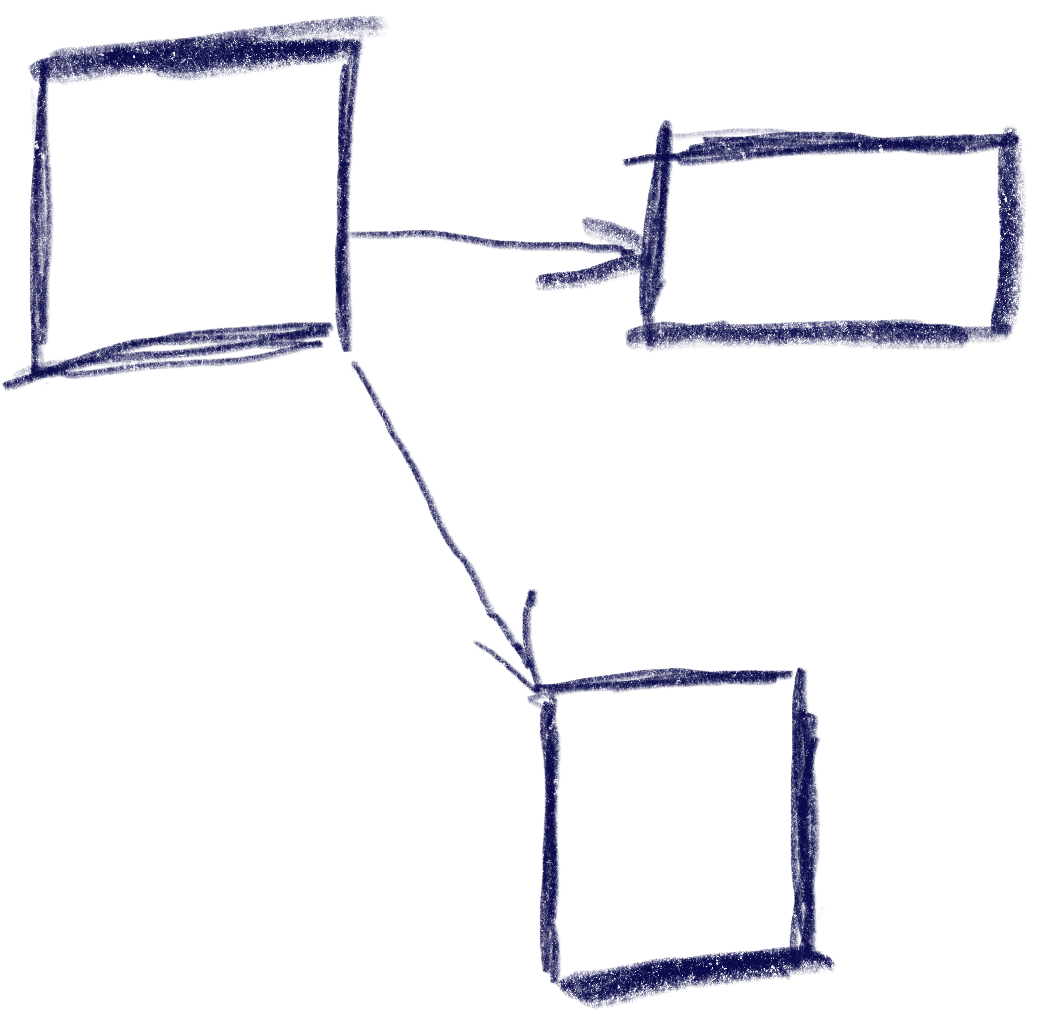
That sketch shows the resulting vectors from the box in the top-left going to two other boxes. Note that these vectors are quite different from the difference of the boxes’ centers. In the case of the two top boxes, the vector connecting the centers would tilt down slightly, while this one is completely parallel to the x axis.

Now armed with this vector, let’s look at the metric I was using. It results in a 2d ‘score’ that is later compared lexicographically to determine the best candidate: the first number determines the ‘angle’ with the selected axis, the other one the distance.

template <int axis> auto metric_on_axis(box<> const& from, box<> const& to)
{
auto delta = arvo_vector(from, to);
delta[0] *= delta[0];
delta[1] *= delta[1];
auto square_distance = delta[0] + delta[1];

float cosine_squared = delta[axis] / square_distance;
return std::make_pair(-cosine_squared, delta[axis]);
}

std::optional<std::pair<float, float>> neighbor_metric(
box<> const& from, box<> const& to, navigation_direction direction)
{
switch (direction)
{
default:
case navigation_direction::right:
{
if (from.max[0] >= to.max[0])
return {};
return metric_on_axis<0>(from, to);
}
case navigation_direction::left:
{
if (from.min[0] <= to.min[0])
return {};
return metric_on_axis<0>(from, to);
}
case navigation_direction::up:
{
if (from.max[1] >= to.max[1])
return {};
return metric_on_axis<1>(from, to);
}
case navigation_direction::down:
{
if (from.min[1] <= to.min[1])
return {};
return metric_on_axis<1>(from, to);
}
}
}

In practice this means that the algorithm will favor connections that best align with the input direction, while ties resolved by using the closest candidate. The metric ‘disqualifies’ candidates going backward, e.g. when going right, the next box cannot start left of the from box.

Now we just need to loop through all candidates and the select the one with the lowest metric.

This algorithm does not make any guarantees that all controls will be accessible, but that is a property that can easily be tested by traversing the graph induced by this metric, and the UI can be designed appropriately. It also does not try to be symmetric, e.g. going down then up does not always result in going back to the previous control. As we can see in the first sketch, this is not always desirable. I think it’s nice to be able to go from B to C via ‘down’, but I’d be weird to go ‘up’ back there instead of A. Instead, going ‘right’ to B does make sense.

Hard cases

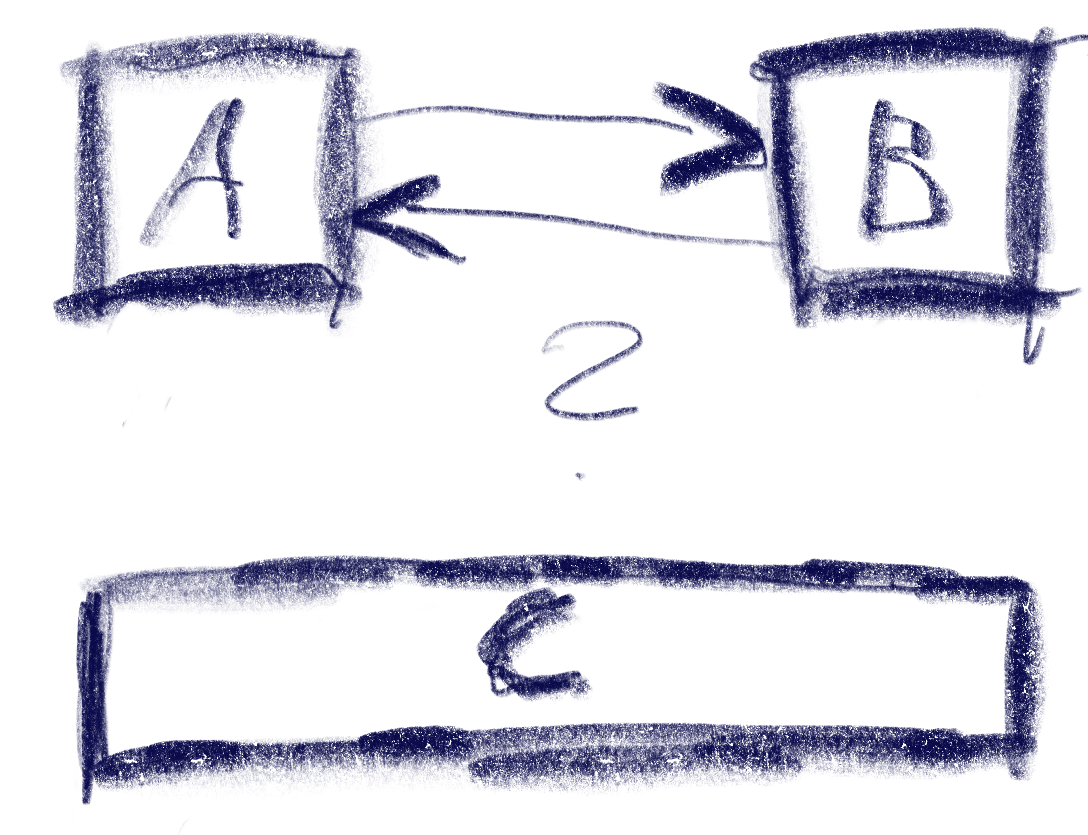
But there can be ambiguities that this algorithm does not quite solve. Consider the case were C is wider, so that is is also under B:

The algorithm will connect both A and B down to C, but the metric will be tied for A and B going up from C. The metric could be extended to also include the ‘cross’ axis min-point of the box, e.g. favoring left over right for westerners like me. But going from B down to C and then up to A would feel weird. One idea to resolve this is to use the history to break ties, e.g. when coming from B to C, going back up would go back to C.

Another hard case is scroll-views. In fact, they seem to change the problem domain. Instead of treating the inputs as boxes in a flat plane, navigating in a scroll view requires to navigate to potentially only partially visible or even invisible boxes and bringing them into view. I’ve previously solved this by treating every scroll-view as its own separate plane and navigating only within that if possible. Only when no target is found within the scroll-view, did the algorithm try to navigate to items outside.


My Favorite Pattern

It has become somewhat of an internal meme that I do not like it when programmers use the word “wrapper”. When someone does say it, I usually get a cue from one of the others to start complaining about it. Do not get me wrong, though. I am very much in favor of wrapping things, but with purpose. And my favorite one is the façade.

When simple becomes complex

Many times, APIs start out simple and elegant. This usually works for a while and the API gets used a lot precisely because of its beauty and simplicity. But eventually, a new use case comes along that demands more of the API than it can currently serve. It has to be extended. This usually takes the form of an additional method or function parameter, or an additional function that needs to be called. Using the API now becomes more complex all its users.

Do not underestimate this effect. I have only anecdotal evidence, but in my experience, a lot of unnecessary software complexity can be attributed to this1. The Pareto-Principle applies here: A single use case causes all the users of the previously simple API to deal with new complexity (e.g. 10% of the use cases cause 90% of the complexity in the user-/call-sites).

Façades make it look beautiful

Luckily, it can be dealt with beautifully: using the façade pattern. This pattern abstracts a complex API behind a simple API. The trade-off, of course, is that it is less powerful than the “full API”. In our example though, all of the previous use-cases can keep using the simple API via a façade.

When to apply this

The aforementioned example, extending an API, is a very nice opportunity to apply the façade. Just keep the interface of the old API around, and re-implement it using the new, extended API, which is usually created by modifying the old API’s implementation. Now all the old call-sites can stay the same, yet you can have a more powerful API for those rare cases that need it.

Of course, you can also identify common usage patterns and refactor them using a façade, but that’s usually much harder to do.

What exactly are façades made of?

Façades do not hide the more complex API in the sense that the APIs users are not allowed to use it. Yes, façades make APIs look beautiful, but that is where the metaphor ends. You can still access what is behind the façade. You can even write more façades for the behind. Many APIs have multiple common cases and only very few complex ones.

So… Classes? Functions? Data? Any of those, in fact. Whenever you enable writing something in a simpler way for a common case, you have a façade . Very often, a small function with a simple signature is all the façade you need.

But it makes all the difference.

Now can someone please tell me what that little hook under the c is called?

  1. Façades can, of course, also contribute to creating complexity by growing the codebase and creating ‘variants’. But they rarely do. ↩︎

Exploring Tango Admin Devices

We are using the open-source control system framework TANGO in several projects where coordinated control of multiple hardware systems is needed.

What is TANGO good for?

TANGO provides uniform, distributed access and control of heterogeneous hardware devices. It is object-oriented in nature and usually one hardware device is represented by one (or more) software devices.

The device drivers can be written in either C++, Java or Python and client libraries exist for all of these languages. Using a middleware adapter like TangoGQL any language can access the devices.

All that makes TANGO useful for building SCADA systems ranging from a handful controlled devices to several hundreds you want to supervise and control.

Lesser know features of TANGO

All of the above is well known in the TANGO and SCADA community and quite straightforward. What some people may not know is that TANGO automatically provides an Admin-device for each TANGO server (an executable running one or more TANGO devices).

These admin devices have an address of the form dserver/<server_name>/<instance_name> and provide numerous commands for controlling and querying the TANGO device server instance:

You can for example introspect the device server to find available device classes, device instances and needed device properties (think of them as configuration settings).

In addition to introspection you can also control some aspects of the TANGO server like polling and logging. The Admin-device also allows restarting individual devices or even the whole server instance. This can be very useful to apply configuration changes remotely without shell access or something similar to the remote machine.

Wrapping it up

Admin-devices automatically exist and run for each TANGO device server. Using them allows clients to explore what devices are available, what they offer and how they can be configured. They also allow some aspects to be changed remotely at runtime.

We use these features to provide a rich web-base UI for managing the control system in a convenient way instead of relying on the basic tools (like Jive and Astor) that TANGO offers out-of-the-box.

Avoid special values of the result type for error indication

As many of you may know we work with a variety of programming languages and ecosystems with very different code bases. Sometimes it may be a modern green field project using state of the art frameworks. At other times it may be a dreaded legacy project initially written many years ago (either by us or someone we do not even know) using ancient languages and frameworks like really old java stuff (pre jdk 7) or C++ (pre C++11), for example.

These old projects could not use features of modern incarnations of these languages/compilers/environments – and that is fine with me. We usually gradually modernize such systems and try to update the places where we come along to fix some issues or implement new features.

Over the years I have come across a pattern that I think is dangerous and easily leads to bugs and harder to maintain code:

Special values of the resulting type of a function to indicate errors

The examples are so numerous and not confined to a certain programming environment that they urged me to write this article. Maybe some developers using this practice will change their mind and add a few tools to their box to write safer and more expressive code.

A simple example

Let us image a function that returns a simple integer number like this:

/**
 * Here we talk to a hardware sensor. If everything works, we should
 * get a value between -50 °C and +50 °C.
 * If something goes wrong, we return -9999.
int readAmbientTemperature();

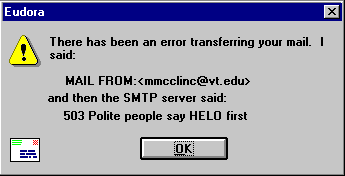
Given the documentation, clients can surely use this kind of function and if every use site interprets the result correctly, nothing will ever go wrong. The problem here is, that we need a lot of domain knowledge and that we have to check for the special value.

If we use this pattern for other values where the value range is not that clearly bounded we may either run into problems or invent other “impossible values” for each use case.

If we forget to check for the special value the users may see it an be confused or even worse it could be used in calculations.

The problem even gets worse with more flexible types like floating point numbers or strings where it is harder to compare and divide valid results from failure indicators.

Classic error message that mixes technical code and error message in a confusing, albeit funny sentence (Source: Interface Hall Of Shame)

Of course, there are slightly better alternatives like negative numbers in a positive-only domain function or MAX_INT, NaN or the like provided by most languages.

I do not find any of the above satisfying and good enough for production use.

Better alternatives

Many may argue, that their environment lacks features to implement distinct error indicators and values but I tend to disagree and would like to name a few widely used alternatives for very different languages and environments:

  • Return codes and out-parameters for C-like languages like in the unix and win32 APIs (despite all their other flaws… 😀 )
  • Exceptions for Java, Python, .NET and maybe in some cases even C++ with sufficiently specific type and details to differentiate different failures
  • Optional return types when the failures do not need special handling and absence of a value is enough
  • HTTP status code (e.g. 400 or 404) and a JSON object containing reason and details instead of a 2xx status with the value
  • A result struct or object containing execution status and either a value on success or error details on failure

Conclusion

I am aware that I probably spent way too much words on such a basic topic but I think the number of times I have encountered such a style – especially in code of autodidacts, but also professionals – justifies such an article in my opinion. I hope I provided some inspiration for those who do not know better or those who want to help others improve.