Migrating from Oracle to PostgreSQL

One promise of SQL for application developers is that changing the database management system (DBMS) is not that of a big deal. Due to the many specialties and not complete standards conformance of the database vendors it can be a big task to migrate from one DBMS vendor to another.

Nevertheless, there are plenty of good reasons to do so:

  • Cost of buying, running and maintaining the DBMS
  • Limitations of the current DBMS like performance, tool support, character sets, naming, data types and sizes etc.
  • Missing features like geospatial support, clustering, replication, sharding, timeseries support and so on
  • Support or requirements on the customers or operators side

Some of our long running projects that started several years ago had the requirement to work with an Oracle DBMS, version 8i at that time. Now, more than 10 years later our customer provides and prefers to host a PostgreSQL 13 cluster. Of course she would like us to migrate our applications over to the new DBMS and eventually get rid of the Oracle installation.

Challenges for the migration

Even though PostgreSQL is supports most of SQL:2016 core and most important features of Oracle there are enough differences and subtleties that make migration non-trivial. The most obvious items to look out for are

  • different column type names
  • SQL features and syntactical differences (sequences!)
  • PL/SQL functions syntax and features

Depending on your usage of database specific features you have to assess how much work and risk is expected.

Tools and migration process

Fortunately, there is a quite mature tool that can aid you along the process called ora2pg. It has tons of options to help you customizing the migration and a quite helpful assessment of the task ahead. The migration report looks like this:

-------------------------------------------------------------------------------
Ora2Pg v21.1 - Database Migration Report
-------------------------------------------------------------------------------
Version Oracle Database 12c Enterprise Edition Release 12.1.0.2.0
Schema  NAOMI-TEST
Size    91.44 MB

-------------------------------------------------------------------------------
Object  Number  Invalid Estimated cost  Comments        Details
-------------------------------------------------------------------------------
DATABASE LINK   0       0       0.00    Database links will be exported as SQL/MED PostgreSQL's Foreign Data Wrapper (FDW) extensions using oracle_fdw.
FUNCTION        1       0       1.00    Total size of function code: 0 bytes.
GLOBAL TEMPORARY TABLE  60      0       168.00  Global temporary table are not supported by PostgreSQL and will not be exported. You will have to rewrite some application code to match the PostgreSQL temporary table behavior.  ht_my_table <--- SNIP --->.
INDEX   69      0       6.90    0 index(es) are concerned by the export, others are automatically generated and will do so on PostgreSQL. Bitmap will be exported as btree_gin index(es). Domain index are exported as b-tree but commented to be edited to mainly use FTS. Cluster, bitmap join and IOT indexes will not be exported at all. Reverse indexes are not exported too, you may use a trigram-based index (see pg_trgm) or a reverse() function based index and search. Use 'varchar_pattern_ops', 'text_pattern_ops' or 'bpchar_pattern_ops' operators in your indexes to improve search with the LIKE operator respectively into varchar, text or char columns.
JOB     0       0       0.00    Job are not exported. You may set external cron job with them.
SEQUENCE        4       0       1.00    Sequences are fully supported, but all call to sequence_name.NEXTVAL or sequence_name.CURRVAL will be transformed into NEXTVAL('sequence_name') or CURRVAL('sequence_name').
SYNONYM 0       0       0.00    SYNONYMs will be exported as views. SYNONYMs do not exists with PostgreSQL but a common workaround is to use views or set the PostgreSQL search_path in your session to access object outside the current schema.
TABLE   225     0       72.00    495 check constraint(s).       Total number of rows: 264690. Top 10 of tables sorted by number of rows:. topt has 52736 rows. po has 50830 rows. notification has 18911 rows. timeline_entry has 16556 rows. char_sample_types has 11400 rows. char_safety_aspects has 9488 rows. char_sample_props has 5358 rows. tech_spec has 4876 rows. mail_log_entry has 4778 rows. prop_data has 4358 rows. Top 10 of largest tables:.
-------------------------------------------------------------------------------
Total   359     0       248.90  248.90 cost migration units means approximatively 3 man-day(s). The migration unit was set to 5 minute(s)

-------------------------------------------------------------------------------
Migration level : A-3
-------------------------------------------------------------------------------

Migration levels:
    A - Migration that might be run automatically
    B - Migration with code rewrite and a human-days cost up to 5 days
    C - Migration with code rewrite and a human-days cost above 5 days
Technical levels:
    1 = trivial: no stored functions and no triggers
    2 = easy: no stored functions but with triggers, no manual rewriting
    3 = simple: stored functions and/or triggers, no manual rewriting
    4 = manual: no stored functions but with triggers or views with code rewriting
    5 = difficult: stored functions and/or triggers with code rewriting
-------------------------------------------------------------------------------

The tool is written in Perl, so I decided to put and run it inside Docker containers because I did not want to mess with my working machine or some VMs. To have quick turnaround times with my containers I split up the process into 3 steps:

  1. Export of the schema and data using a docker container
  2. On success copy the ora2pg project to the host
  3. Import the schema and data using another docker container

The ora2pg migration project is copied to the host machine allowing you to inspect the export and make adjustments if need be. Then you can copy it to the import container or simply bind mount the directory containing the ora2pg project.

The Dockerfile for the export image looks like this

FROM centos:7

# Prepare the system for ora2pg 
RUN yum install -y wget
RUN wget https://yum.oracle.com/RPM-GPG-KEY-oracle-ol7 -O /etc/pki/rpm-gpg/RPM-GPG-KEY-oracle

COPY ol7-temp.repo /etc/yum.repos.d/
RUN yum install -y oraclelinux-release-el7
RUN mv /etc/yum.repos.d/ol7-temp.repo /etc/yum.repos.d/ol7-temp.repo.disabled
RUN yum install -y oracle-instantclient-release-el7
RUN yum install -y oracle-instantclient-basic
RUN yum install -y oracle-instantclient-devel
RUN yum install -y oracle-instantclient-sqlplus

RUN yum install -y perl perl-CPAN perl-DBI perl-Time-HiRes perl-YAML perl-local-lib make gcc
RUN yum install -y perl-App-cpanminus

RUN cpanm CPAN::Config
RUN cpanm CPAN::FirstTime

ENV LD_LIBRARY_PATH=/usr/lib/oracle/21/client64/lib
ENV ORACLE_HOME=/usr/lib/oracle/21/client64

RUN perl -MCPAN -e 'install DBD::Oracle'

COPY ora2pg-21.1.tar.gz /tmp

WORKDIR /tmp
RUN tar zxf ora2pg-21.1.tar.gz && cd ora2pg-21.1 && perl Makefile.PL && make && make install

RUN mkdir -p /naomi/migration
RUN ora2pg --project_base /ora2pg --init_project my-migration
WORKDIR /ora2pg

COPY ora2pg.conf /ora2pg/my-migration/config/

CMD ora2pg -t SHOW_VERSION -c config/ora2pg.conf && ora2pg -t SHOW_TABLE -c config/ora2pg.conf\
 && ora2pg -t SHOW_REPORT --estimate_cost -c config/ora2pg.conf\
 && ./export_schema.sh && ora2pg -t INSERT -o data.sql -b ./data -c ./config/ora2pg.conf

Once the export looks good you can work on importing everything. The Dockerfile for the import image looks like this:

FROM centos:7

# Prepare the system for ora2pg 
RUN yum install -y wget
RUN wget https://yum.oracle.com/RPM-GPG-KEY-oracle-ol7 -O /etc/pki/rpm-gpg/RPM-GPG-KEY-oracle

COPY ol7-temp.repo /etc/yum.repos.d/
RUN yum install -y oraclelinux-release-el7
RUN mv /etc/yum.repos.d/ol7-temp.repo /etc/yum.repos.d/ol7-temp.repo.disabled
RUN yum install -y oracle-instantclient-release-el7
RUN yum install -y oracle-instantclient-basic
RUN yum install -y oracle-instantclient-devel
RUN yum install -y oracle-instantclient-sqlplus
RUN yum install -y postgresql-server

RUN yum install -y perl perl-CPAN perl-DBI perl-Time-HiRes perl-YAML perl-local-lib make gcc
RUN yum install -y perl-App-cpanminus

RUN cpanm CPAN::Config
RUN cpanm CPAN::FirstTime

ENV LD_LIBRARY_PATH=/usr/lib/oracle/21/client64/lib
ENV ORACLE_HOME=/usr/lib/oracle/21/client64

RUN perl -MCPAN -e 'install DBD::Oracle'

COPY ora2pg-21.1.tar.gz /tmp

WORKDIR /tmp
RUN tar zxf ora2pg-21.1.tar.gz && cd ora2pg-21.1 && perl Makefile.PL && make && make install

# you need to mount the project volume to /ora2pg
WORKDIR /ora2pg

CMD ./import_all.sh -d my_target_db -h $pg_host -U myuser -o myowner

Our target database runs on another host, so you need credentials to authenticate and perform all the required actions. Therefore we are the import container interactively. The PowerShell command for the import looks like this

docker run -it --rm -e pg_host=192.168.56.1 -v $PWD/ora2pg/my-migration:/ora2pg pgimport

The import script allows you to create the schema, sequences, indexes, constraints and load the data. I suggest adding the contraints after importing the data – a workflow supported by the import_all.sh script.

That way we got our Oracle database migrated into a PostgreSQL database. Unfortunately, this is only one part of the whole migration. The other part is making changes to the application code to correctly use the new database.
The IT architect, Part III: Improve your environment

If you happen to work on a system that scales to the size of an IT landscape, your worst bet is to let it evolve by circumstances. You want to have a plan and act upon that plan. The base for your plan could be a landscape map, which we talked about in the first part of this series. Upon drawing the map, you want to interpret it in order to find the strong points and weak spots. We’ve talked about assessing the map in the second part of this series.

In this blog article, we look at ways to improve our IT landscape towards the goal of overall stability.

Our mission statement

If we want to improve things, we need to know in what aspect the improvement should occur. At the scale of an IT landscape, overall stability is a commonly desired trait. This doesn’t mean rigidity, where you cannot change a thing in the landscape lest the whole thing breaks. It also doesn’t mean that ever part of our landscape needs to be stable itself. Overall stability means that even with the inevitable outage or replacement of a part, the whole system still works. The system is resilient to change and failure, at least resilient enough for the organization working with the system.

If our mission is to improve towards overall stability, we need to work on the relationships between our services (or assets, as we called them earlier, because “service” is a greatly overloaded term) more than we need to work on the service itself.

This doesn’t mean that individual stability of an asset isn’t important. It certainly is, but more often than not, you cannot improve this single value that much. What you can iterate on with recognizable effect is limiting the consequences of lacking individual stability.

Our mantra

The fundamental rule that brings overall stability is the “dependency rule” of the clean architecture that is meant for internal software application architecture. But if we see our IT landscape as one big application (software or not might make less of a difference than thought), we can apply the rule without modification:

All dependencies point towards the center (inside) and never in the opposite direction (outside).

That’s it. You define a center of your map and have all dependencies point towards it. This results in a structure of “rings” around the center that denote different levels of stability. The dependency rule can be rewritten as such:

All dependencies point from the less stable asset to the more stable asset and never in the opposite direction.

If you think of stability only in terms of “service availability” that tells you the percentage of time you can utilize the service without degradation, you’re thinking too short. Stability also means stable interface and stable implementation. You can have a really rock solid ISDN internet connection at the center of your IT landscape map, if your ISP discontinues the technology, the lack of implementation stability will force you to change the asset and hope that all dependent assets (basically your whole map) are not affected by the change.

Planning for obsolescence

Trying to bring the relationships between your assets in congruence with their significance for your IT landscape is the central work of an IT architect. The main question is always: What happens if this asset needs to be replaced?

In IT, there is no such thing as an “eternally working asset”. I’m not well-versed in more physical domains like mechanical engineering to say that this an univeral invariant, but in my field of speciality, everything changes eventually.

If you create an IT landscape where every asset can be replaced with manageable effort and predictable consequences, you’ve created an overall stable system. You can probably improve the availability of parts of it, but you won’t need to overhaul the whole thing over and over again. Your IT landscape is ready to grow, evolve and change, but it does so in a controlled manner and without compromising the mission.

Anti-obsolescence patterns

On your way from your current map to your anticipated one, you’ll recognize recurring patterns that you employ to solve dependency problems or improve the longevity of overall structures. Here are three patterns that have helped me in my endeavours:

Protected variation

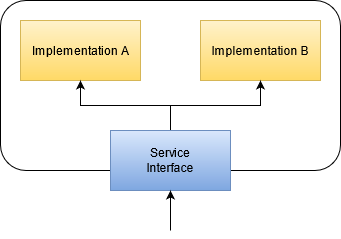
If you have more than one implementation for basically the same service (like the example of an internet connection), you probably want the rest of the map to not know about the multiplicity. In this case, you introduce an additional asset that acts as a router between the implementations. Think of the router (or service interface) as a guarding wall for your service implementations. It acts as a “portal” to the real service and can be paper-thin (at least for now). If you want to improve the runtime availability of your service, the router can also act as a load balancer and a circuit breaker. The important rule is that all outside relationships only point to the router, not the actual implementations.

Opinionated interface

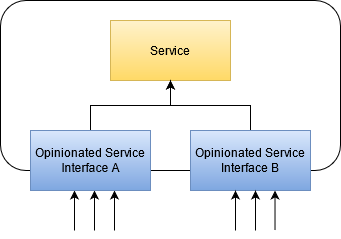
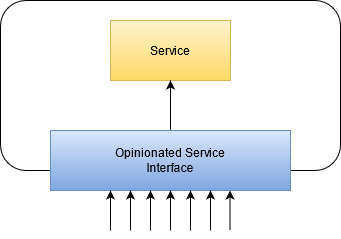
If you find an asset that has a lot of incoming dependencies, you’ve found a change risk. If you swap the service for a newer version with a similar, but not quite equivalent interface, you’ll find that you have to adjust lots of dependent assets in oftentimes surprising fashion. You can reduce your surprise by introducing a “portal” interface, just like you did in the protected variations, but without the variations. The portal or “opinionated service” interface offers everything your other assets require of the original service, but nothing more. It captures the “opinion” of your organization towards the service. When you introduce such a portal, it is nothing more than a forwarding service that maybe handles authentication itself. If you plan to swap the service, the portal becomes your requirement list and its new implementation will convert data back and forth.

If you find that your portal gets to big, you could think about multiple portals with their own separated “opinion” about the service, all forwarding to the same “source of truth”:

Now you need to maintain several interface services, but they separate different concerns or contexts into separate assets, which might help with future migrations. Chances are, if there are separate concerns, that they will be provided by separate assets in the future.

Circular portals

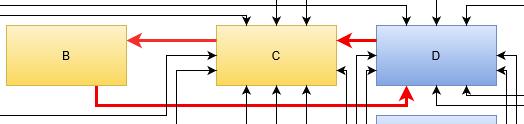
The most nasty thing to occur on your map is the ring (see part II of the series). In its smallest form, its just two assets requiring each other:

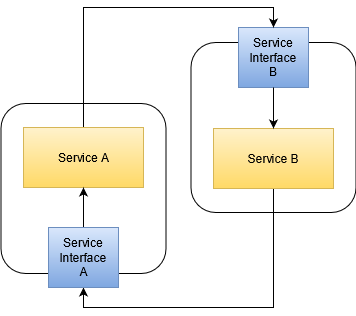
There are no easy ways out of this situation. But we can make some steps in the right direction and see where it takes us. The first step is introducing buffer assets that act as stand-ins for the real asset:

This doesn’t break the ring yet, but it gives us a chance to do so later. The service interfaces are opinionated and maybe even tailored specifically to the service using it. This reduces the “area of dependency” to its minimum. With a little luck, we find that Service A requires things of Service B that, if isolated, don’t require things of Service A themselves. If that’s the case, we can work on splitting Service B in two parts: One dependent on Service A, but not required by it and one indepedent of Service A, but needed by it. This would break the ring and give us a long chain that is much easier to work with. The problem is: None of this is guaranteed. In the worst case, you’ll still end up with your circular dependency with extra steps and nothing can be done about it.

Conclusion

When you begin to work with your IT landscape map, you begin to transform your assets from what they provide to what others actually require from them. Minimizing the relationships between assets, if not by number then at least by scope, is an appreciable improvement that gives you leeway to make changes in your actual IT setup without compromising the overall structure.

If you accompany your journey towards the best-fitting IT landscape with your map, you always have a plan at hands that you can show to people to form a shared understanding of the current state and the desired outcome. And if you keep old versions of your map in the archives, you can sometimes look back and see how far you’ve come yet.

Rounding numbers is not that easy

For many computer programs it is necessary to round numbers. For example an invoice amount should only have two decimal places and a tool for time management often does not have to be accurate to the millisecond. Fortunately you don‘t have to write a method for that yourself. In Java or JavaScript you can use Math.round, Python has a built-in function for rounding and the Kotlin Standard Library also contains a method for this purpose. Anyway some of these functions have a few surprises in store and violate the principle of least astonishment. The principle of least astonishment was first formulated by Geoffrey James in his book The Tao of Programming. It states that a program should always behave in the way the user expects it to, but it can also be applied to source code. Thus a method or a class should have a name that describes its behavior in a proper way.

So, what would you expect a method with the name round to do? The most common way to round numbers is the so called round half up method. It means that half-way values are always rounded up. For example 4.5 gets rounded to 5 and 3.5 gets rounded to 4. Negative numbers get rounded in the same way, for example -4.5 gets rounded to -4. In fact the Math.round functions in Java and JavaScript use this kind of rounding and thus behave in a way most people would expect.

But in other programming languages this can be different. Actually I used the Python built-in rounding function for some time without recognizing it does not always round half-way values up. For example round(3.5) results in 4 as you would expect, but round(4.5) also returns 4. That‘s because Python uses the so called round half to even method for rounding values. This means that half-way values are always rounded to the nearest even number. The advantage in this kind of rounding is that if you add mulitple rounded values the error gets minimized, so it can be beneficial for statistical calculations. If you still want to round half-way values up in Python, you can implement your own rounding function:

def round_half_up(number, decimals: int):
	rounded_value = int(number * (10**decimals) + 0.5) / (10**decimals)

	if rounded_value % 1 == 0:
		rounded_value = int(rounded_value)

	return rounded_value

round_half_up(4.5, decimals=0)    # results in 5

A different way in Python to round half-way values up is to use the decimal module, which contains different rounding modes:

from decimal import *

Decimal("4.5").quantize(Decimal("1"), rounding=ROUND_HALF_UP)    # results in 5

It should be noted that the ROUND_HALF_UP mode in this module does actually not use the round half up method as explained above, but the also very common round half away from zero method. So for positive numbers the results are the same, but -4.5 does not get rounded to -4, but -5.

Python is by the way not the only programming language that uses the round half to even method. For example Kotlin and R round half-way values to the nearest even number, too. However for Kotlin there are several easy ways to round half-way values up: you could use the methods roundToInt or roundToLong from the standard library or the Math.round method from Java instead of the method round.

It should also be noted that the explained methods for rounding are not the only ones. Instead of rounding half-way values up you could also use the round half down method, so rounding 3.5 would result in 3. And instead of rounding half to even you could use the round half to odd method and 4.5 would get rounded to 5, as would 5.5. There are some more methods and everyone of them has its use case, so you should always choose carefully.

To sum it up, rounding is not as easy as it seems. Although most programming languages have a method for rounding in their standard library you should always take a closer look and check if the rounding function you want to use behaves in the way you expect and want it to.

Sometimes you will be surprised.

Developing remotely for Beckhoff ADS on Linux

Today computers are used to control plenty different hardware systems both in laboratories and in the “real” world. Think of simple examples like automatic roller shutters that may be vital in keeping offices cool in summer while allowing for the maximum of light inside when the sun is occluded by clouds.

Most of the time things are way more complicated of course and soon real automation systems come into play providing intricate control and safety-related fail-safe mechanisms. Beckhoff ADS provides a means to communicate with such automation systems, often implemented as programmable logic controllers (PLC).

While many of these systems are Windows-based and provide rich programming environments on Windows they often provide interoperability with other programming languages and operating systems. In case of ADS there is a cross-platform open source C++ library provided by Beckhoff and even a python library (pyads) based on the C library for easy access of ADS devices.

ADS examples

This is great news because it allows you to choose your platform more freely and especially in science many organizations prefer Linux machines in their infrastructure. Here is an example using pyads to read a value from an ADS device:

import pyads

# The ip of the PLC
remote_ip = '192.168.0.55'
# This is the AMS network id. Usually consists of the IP address with .1.1 appended
remote_ads = '192.168.0.55.1.1'
# This is the ads port for the remote SPS controllers.
# Has nothing to do with TCP/IP ports!!!
ads_port = 851
# Set our local AMS network id to the client endpoint
# in the TwinCAT routing configuration
pyads.set_local_address('192.168.11.66.1.1')

with pyads.Connection(remote_ads, ads_port, remote_ip) as plc:
     print(plc.read_by_name('GlobalStructure.live_bit', pyads.PLCTYPE_BOOL))

Remote Access

When developing for our customers using ADS it is often not feasible to have the PLCs and a realistic set of controlled hardware in our own offices. Fortunately it is possible to communicate with the ADS interface of the customers on-site PLC over VPN and SSH-tunneling.

There are some caveats on the way to working remotely against an ADS device, namely the port to be tunneled, the route on the PLC and the correct IPs and NetIds.

SSH-Tunneling the ADS communication

Setting up SSH tunneling is probably the most easy part using putty on Windows or plain OpenSSH local forwarding using config files. The important thing is that you need to tunnel TCP-Port 48898 and not the ADS port 851!

Configuring the PLC route

The ADS endpoint needs a AMS route setup for the machine you SSH into. Otherwise that machine you use to tunnel your requests will not be authorized to communicate to the ADS device. This is well documented and a standard workflow for the automation people but crucial for the remote access to work. We need the AMS Net Id from this step to finally setup the connection.

Connecting remotely using the SSH-Tunnel

After everything is prepared we need to adjust the connection parameters for our ADS client. Taking the example from above this usually means changing remote_ip and the local AMS Net Id:

# The ip the SSH-tunnel is bound to, usually localhost
remote_ip = '127.0.0.1'
# This is the AMS network id of the endpoint. Leave unchanged!
remote_ads = '192.168.0.55.1.1'
# Set our local AMS network id to the client endpoint in the TwinCAT routing config
# This represents our ssh host, not the local machine!
pyads.set_local_address('192.168.0.100.1.1')

Conclusion

Beckhoff ADS provides a state-of-the-art means of communicating to PLCs over the network. With a bit of configuration this can easily be done remotely in addition to on-site in a platform agnostic way.

The IT architect, Part II: Assess your situation

If you want to work on the scale of an IT landscape, you need to have a plan in the form of a map. In the first part of this series, we talked about creating such a map. This blog entry will give you the basic tools to make sense of all the things on it and how to convey meaning to other people while using the map.

The third part will talk about actionable steps that are a result of our interpretation of the map.

Making sense of the map

You’ve drawn the map of all your IT assets and given all the boxes names that you find useful. You’ve asked around to find relationships between your assets, represented by arrows between the boxes. You’ve moved the boxes around a bit to reduce arrow intersections. The map seems to be as “clean” as it can get at the moment.

Now is the time to apply meaning to the structures you see.

Interpreting loners

The first thing you want to look for are boxes without any relationships. These entities don’t interact with other things on your map and are not required by anything, too. Let’s think of them as independent value sources. If this asset brings your organization a describable and current advantage, you’ve found the ideal asset.

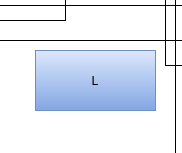
An example could be the blue box “L” in our example map. It isn’t coupled to any other asset. Let’s say it is a “customer relationship management” (CRM) system. Remember, boxes are not labeled by their actual implementation (in this case, maybe a vTiger or SugarCRM), but by the value they provide for the organization. If your organization needs a CRM (or benefits from its presence), then you have a “loner”, which is a good thing.

If the CRM stops working, the humans in the organization will be unhappy about it, but the outage itself will be limited to the CRM and not spread to other parts of your IT landscape (given that your map reflects the reality). If the outage lasts longer, your employees will adapt their work processes to circumvent the pothole in your IT. There will be a lot of post-it notes, at least for some time.

If the CRM is updated to a new version, you need to train your employees, but it won’t require other IT entities in your organization to match that update. The CRM can run on ancient hardware and software, as long as the human requirements are met. A loner on your map is a good thing.

Interpreting relicts

If you find a lonely box without a current use case, you’ve found a relict. Be glad that you’ve found it, because relicts tend to remain hidden and not show up on architect maps. If you can make sure that the relict serves no purpose for the organization anymore, you can eliminate it. Removing an asset from the map (and your real IT infrastructure) is a good thing, because you reduce complexity, costs and risks. There is no IT asset without associated costs and risks.

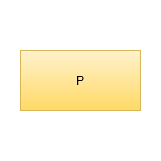
If, for example, the yellow box “P” represents a computer that provides a service that nobody uses anymore, the computer itself is still present in the network and can be used as a stepping stone for malicious itents. Let’s say the computer is a Raspberry Pi that isn’t included in the first tier of workhorse computers, its operating system might be outdated and susceptible to attacks. It doesn’t provide value for the organization anymore, but it increases the organization’s risk.

Revealing this kind of “dead weight” in your IT landscape is a real advantage, because you can cut it out rather easy.

Interpreting rings

A typical structure on your map could be a circular dependency. In its smallest form, it is just two boxes that both depend on each other. The more elaborate ring consists of several boxes that are connected without a clear start and end. This is the worst thing to find.

A ring in your entities means that you have to consider all elements in the ring as one big entity. You cannot modify them independently, neither on the technological level nor on in the temporal dimension. A ring is basically a mexican standoff situation for all included entities. You can also call it a deadlock. Whatever you call it, it is bad news. You probably want to break the ring as soon as possible.

Breaking a ring would warrant its own blog post altogether. A basic starting point might be the Acyclic dependencies principle of software design. You probably need to split at least one of your entities into smaller parts or introduce a new entity. The least favorable move would be to merge all entities into one bigger entity, creating a monolith. You will regret this move when the inevitable modernization pressure rises.

Interpreting chains

If your entities form “deep” dependency lines where A depends on B, B depends on C, C depends on D and so forth, you have discovered a chain. This structure is less troublesome compared to the ring, but worth a worry nonetheless. In terms of operational risk, the chain creates a meta-system with a failure rate that is the sum of the failure rates of the chain elements. To make a long story short, you’ll never get a reliable infrastructure with long chains.

The longer your chains are, the more ripple effects an outage will have on your IT landscape. Remember that a chain always breaks at its weakest link, but this link will bring down the whole line.

You can reduce the length of a chain of entities in your IT landscape by inserting buffer elements like read-only copies of central data sources. But more important is to think (and talk) about why the dependencies are there in the first place. Maybe your data storage strategy is too decentralized and you would gain some favorable dependency structures by pooling data together (essentially creating a data monolith if you overdo it).

Introducing zones

Recognizing the basic shapes on your map is important, but you also have to look at the forest and not only the trees. The basic layout of your boxes already tell you a lot about your IT landscape zones.

A zone on your map is a region of boxes that you can encircle and give it a superordinate name. The basic rule of a zone is that all entities in it should share a common property. The less technology-based this property is, the better is your zoning. A zone for “java web services” or “metal computers” is eventually useful, but won’t stand the test of time. Sooner or later, some java services are replaced by other programming languages and some real machines get virtualized. Do you move them to other zones on your map? What really changed for the users of your IT landscape?

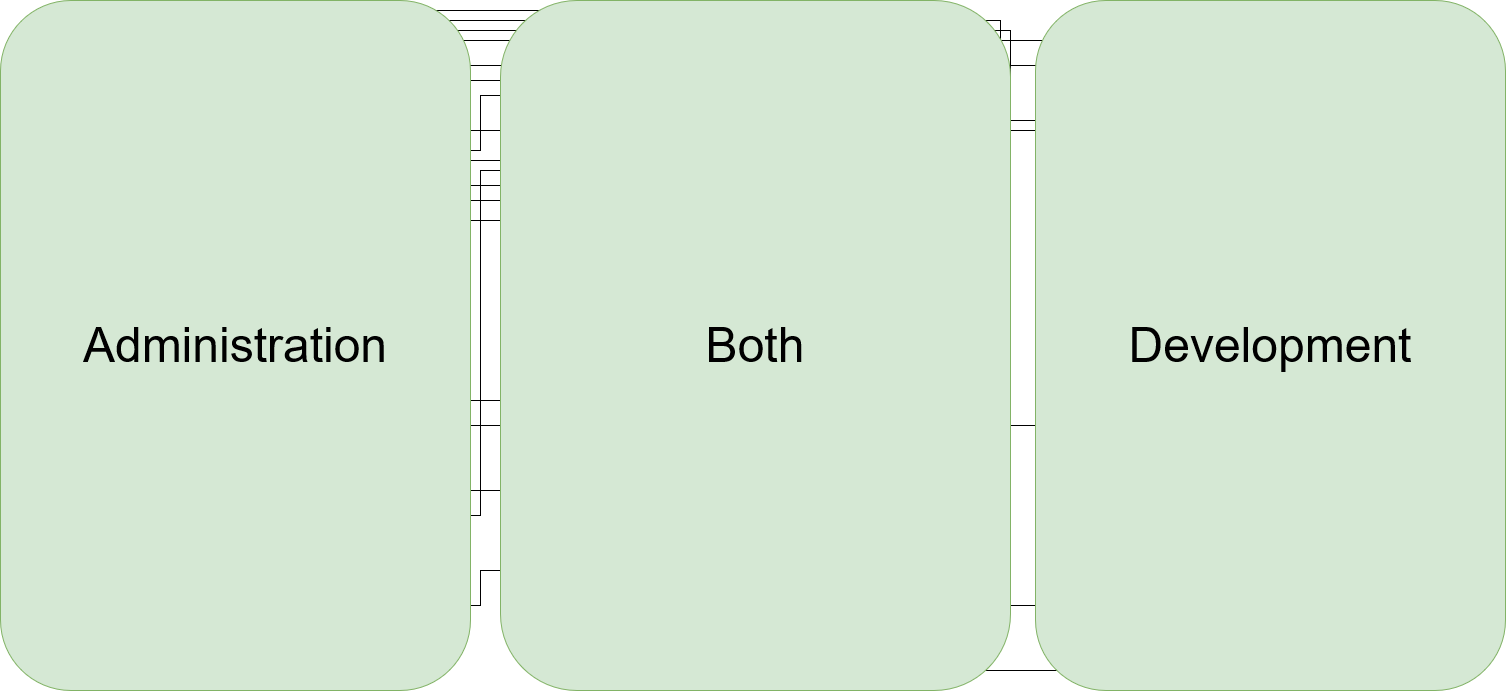
If you concentrate on your users, you might be able to come up with properties that really affect them. Look at this example that takes our initial example and separates it into three zones:

And now, we find a user-oriented name for each zone. In our example, we’ve grouped the entities by user role and are now able to label our zones:

This grouping has the added advantage that the target audience for each modification to the map can be identified nearly immediately. It makes it easier to anticipate the effects of outages or problems and to identify non-cohesive usage of the same tool/entity.

In our example, each box in the “Both” zone is essential to the functioning of the organization. But just because a specific service is used by both other groups doesn’t mean they have overlapping requirements. Maybe it is better for everybody involved to actually divide an entity into two separate boxes in the respective zones, even if both boxes are implemented with the exact same tool/technology at the moment.

Identifying the zones takes your map to the next level. You end up with fewer, but bigger boxes and their dependencies. It’s the same IT landscape, but with less detail. Now you can start your discovery process again.

Conclusion

Your IT landscape map can be interpreted by looking for common structures (like loners, rings and chains) and by defining zones. This allows us to gather a list of problem points that we want to improve. It also allows to evaluate the expectable ramifications of changes to entities in our IT landscape. And there will be changes. The one (and probably only) constant in IT is that all things change.

In the next part of this series, we look at ways to transform the map from the current state towards a better one. Stay tuned!

Upgrade with a twist

A few weeks ago, I heard a nice story about the hidden cost of new features. Imagine a website, driven by a content management system, consisting of text, pictures and fancy styling. When the content management system gets an update, the website developer takes a look at the release notes and finds that a lot of new and cool features are included that you’ll get for free once you update.

So he updates the site, tries it out and publishes it onto the web. A few days later, the customer and owner of the website sends a bug report of some arbitrarily flipped images. There are just short of a hundred images on the website and a handful of them now show up upside down.

Who would update a website and randomly rotate some images?

Why would a content management system decide that excatly these images need a spin?

The answer is not as obvious as one might think.

The latest cause of the effect was a change of the imaging library the content management system uses to deliver the image content. It got upgraded to a new engine that essentially does the same thing as the old one: Take the image file content and put it on the web. But, it does it more thoroughly.

One feature of JPEG images are the EXIF metadata properties. Examples of useful properties are the photography time, the geolocation or the camera model. Some cameras add even more information into the metadata, like exposure time or the camera’s orientation (rotation) during the photographing process. There are cameras that notice if you hold them upside down and store this circumstance into the picture.

Then, there are imaging libraries that just take the pixels and put them on the screen. And there are libraries that know about their domain and read the EXIF metadata, interpret the rotation data and accomodate for that fact. Because, who would like to look at pictures that are displayed totally wrong?

The first version of the content management system’s imaging library didn’t care much about metadata. The new version takes rotation into account.

So, the cause of the suddenly rotated pictures originates with the photographer that happened to work during a workout session or in australia. This fact was registered and stored by the camera and promply ignored by the picture editing software and the earlier content management system. It was rediscovered only when the new version went live.

For the customer, this is a random regression. It worked just fine all those years! For the developer, this is a minefield. Every picture could contain an evil rotation information that gets applied someday.

For a security engineer, this is a harmless but perfect example of a persistence attack. You embed malicious payloads into data that do nothing for a long time, but are activated suddenly, without outside intervention, by an unrelated change of system parts towards a “lucky” constellation.

Guess what you can embed into EXIF metadata, too? Javascript or any other form of executable code. And then you wait.

To end this blog entry on a light note, sometimes the payload may just happen to be your last name – True!

return first example

It seems my “return first” post was not as enlightening as I had hoped. It was posted on reddit, and while the majority of commenters completely missed the point, it wasn’t really clear for those that did not just read the title. Either way, I am to blame for that – the examples and my reasoning were not very conclusive. So let me try clearing up the confusion with a better example.

First things first, here’s the mantra again: Whenever you want to call a function, ask yourself:

Can I return first?

But now to the example:

Parsing array braces

The task was to parse a string with a data-type in it. This was already working for single-value types, so we could parse "int", "double", "string" etc, via the function from_input_type. Now I was to extend it to also parse array definitions with one or two fixed dimensions, like "int[5]" or "double[4,7]".

My first attempt, implementing it as a constructor taking the definition string, looked like this:

auto suffix_begin = type_code.find('[');
if (suffix_begin == std::string::npos)
{
  this->type = from_input_type(type_code);
  return;
}

auto suffix_end = type_code.find(']', suffix_begin);
if (suffix_end == std::string::npos)
{
  throw std::invalid_argument("Malformed attribute type suffix: no end brace.");
}

auto type_tag = type_code.substr(0, suffix_begin);
this->type = from_input_type(type_tag);
auto in_brackets = type_code.substr(suffix_begin+1, suffix_end-suffix_begin-1);

auto separator = in_brackets.find(',');
if (separator == std::string::npos)
{
  this->rank = attribute_rank_t::1d;
  this->dim[0] = parse_size(in_brackets);
  return;
}
  
auto first = in_brackets.substr(0, separator);
auto second = in_brackets.substr(separator+1);

this->rank = attribute_rank_t::2d;
this->dim[0] = parse_size(first);
this->dim[1] = parse_size(second);

It’s not pretty, but it passed all the tests I set up for it. And this was pre-refactoring. I knew there was something else coming up: In a different constructor, we wanted to parse type definitions that look similar, but are not quite the same. Instead of 1 or 2 fixed dimensions, the brackets have to be empty there, e.g. "float[]" or "string[]". Note that they are still optional, it can still have single-values as well.
Now I wanted to reuse the code to locate the brackets, but the current structure wasn’t really well suited for that, with the member initialization spread all over the function. Obviously, the code parsing the contents of the brackets (from the auto separator = ... line down) was of no use for the second case, the first half is the interesting bit here. So I was looking at the calls to from_input_type in the upper half and asked myself: Can I return first, before calling this? The answer is, of course, yes.

struct type_with_brackets_t
{
  std::string_view type;
  std::string_view in_brackets;
  // There's a difference between empty brackets (e.g. string[])
  // and no brackets (e.g. string)
  bool has_brackets = false;
};

type_with_brackets_t split_type(std::string_view const& type_code)
{
  auto suffix_begin = type_code.find('[');
  if (suffix_begin == std::string::npos)
  {
    return {type_code, {}, false};
  }

  auto suffix_end = type_code.find(']', suffix_begin);
  if (suffix_end == std::string::npos)
  {
    throw std::invalid_argument("Malformed attribute type suffix: no end brace.");
  }

  auto type_tag = type_code.substr(0, suffix_begin);
  auto suffix = type_code.substr(suffix_begin+1, suffix_end-suffix_begin-1);
  return {type_tag, suffix, true};
}

With this, we can replace the upper half of the first function with:

auto [tag, in_brackets, has_brackets] = split_type(type_code);
this->type = from_input_type(tag);
if (!has_brackets)
  return;

/* continue parsing in_brackets */

The other “int[]” case can obviously be implemented very easiely now:

auto [tag, _, has_brackets] = split_type(type_code);
this->type = from_input_type(tag);
this->is_array = has_brackets;

Of course, when just extracting the code as a function, you could be tempted to also call from_input_type in that function, but return first guided us away from that. I think this is a very good outcome, as it clearly separates splitting the string and interpreting the parts, naturally eliminating the duplicated from_input_type call. You can still have a function that does both, if you want, by adding a small facade araound split_type that also does the conversion.

I hope this example cleared up the method a bit more. One reason why deeply nested function calls are so common is that most languages make it easier to pass parameters than return multiple values. You will often find that this style will require more custom data-types that are just used as function return values. But functions will naturally compose easier because you will bundle smaller pieces, e.g. in this case, you can use the function without from_input_type, and I believe that will pay off in the end.

JDBC’s wasNull method pitfall

Java’s java.sql package provides a general API for accessing data stored in relational databases. It is part of JDBC (Java Database Connectivity). The API is relatively low-level, and is often used via higher-level abstractions based on JDBC, such as query builders like jOOQ, or object–relational mappers (ORMs) like Hibernate.

If you choose to use JDBC directly you have to be aware that the API relatively old. It was added as part of JDK 1.1 and predates later additions to the language such as generics and optionals. There are also some pitfalls to be avoided. One of these pitfalls is ResultSet’s wasNull method.

The wasNull method

The wasNull method reports whether the database value of the last ‘get’ call for a nullable table column was NULL or not:

int height = resultSet.getInt("height");
if (resultSet.wasNull()) {
    height = defaultHeight;
}

The wasNull check is necessary, because the return type of getInt is the primitive data type int, not the nullable Integer. This way you can find out whether the actual database value is 0 or NULL.

The problem with this API design is that the ResultSet type is very stateful. Its state does not only change with each row (by calling next method), but also with each ‘get’ method call.

If any other ‘get’ method call is inserted between the original ‘get’ method call and its wasNull check the code will be wrong. Here’s an example. The original code is:

var width = rs.getInt("width");
var height = rs.getInt("height");
var size = new Size(width, rs.wasNull() ? defaultHeight : height);

A developer now wants to add a third dimension to the size:

var width = rs.getInt("width");
var height = rs.getInt("height");
var depth = rs.getInt("depth");
var size = new Size(width, rs.wasNull() ? defaultHeight : height, depth);

It’s easy to overlook the wasNull call, or to wrongly assume that adding another ‘get’ method call is a safe code change. But the wasNull check now refers to “depth” instead of “height”, which breaks the original intention.

Advice

So my advice is to wrap the ‘get’ calls for nullable database values in their own methods that return an Optional:

Optional<Integer> getOptionalInt(ResultSet rs, String columnName) {
    final int value = rs.getInt(columnName);
    if (rs.wasNull()) {
        return Optional.empty();
    }
    return Optional.of(value);
}

Now the default value fallback can be safely applied with the orElse method:

var width = rs.getInt("width");
var height = getOptionalInt(rs, "height").orElse(defaultHeight);
var depth = rs.getInt("depth");
var size = new Size(width, height, depth);

Running Tango-Servers in Docker

Containers are a great way of running your software in an environment that you defined and no one else needs to maintain of even know about. This is especially true if your software provides its service using a network port. All that operators have to provide is the execution platform for the container and the required resources.

Tango servers fit quite well into this type of software: Essentially they provide a service over the network. Unfortunately, they need a tango control system to be fully usable, so thats some other services. Luckily, there are docker images for this so building a stack of containers to run your Tango server in the scope of a control system is quite easy (sample docker-compose.yml):

version: '3.7'
services:
  my-tango-server:
    container_name: my-tango-server
    image: my-ts
    environment:
      - TANGO_HOST=tango-cs:10000
    depends_on:
      - tango-cs
  tango-cs:
    container_name: tango-database
    image: tangocs/tango-cs:9.3.2-alpha.1-no-tango-test
    ports:
      - "10000:10000"
    environment:
      - TANGO_HOST=localhost:10000
      - MYSQL_HOST=tango-db:3306
      - MYSQL_USER=tango
      - MYSQL_PASSWORD=tango
      - MYSQL_DATABASE=tango
    links:
      - "tango-db:localhost"
    depends_on:
      - tango-db
  tango-db:
    container_name: mysql-database
    image: tangocs/mysql:9.2.2
    environment:
      - MYSQL_ROOT_PASSWORD=root
    volumes:
      - tango_mysql_data:/var/lib/mysql
volumes:
  tango_mysql_data:

Example Dockerfile for the image my-ts used for the my-tango-server container:

FROM debian:buster

WORKDIR /tango-server
COPY ./my-tango-server .

RUN DEBIAN_FRONTEND=noninteractive apt-get install -y ./*.deb

CMD my-tango-server myts

Unfortunately this naive approach has the following issues:

  • The network port of our tango server changes with each restart and is not available from outside the docker stack
  • The tango server communicates the internal IP-Address of its container to the tango database so connection attempts from the outside fail even if the port is correct
  • Even though the tango server container depends on the tango control system container the tango server might start up before the tango control system is available.

Let us tackle the issues one by one.

Expose a fixed port for the Tango server

This is probably the easiest issue to fix because it is well documented for OmniORB and widely used. So let us change docker-compose.yml to expose a port and pass it into the container as an environment variable:

version: '3.7'
services:
  my-tango-server:
    container_name: my-tango-server
    image: my-ts
    ports:
      - "45450:45450"
   environment:
      - TANGO_HOST=tango-cs:10000
      - TANGO_SERVER_PORT=45450
    depends_on:
      - tango-cs
  tango-cs:
 ...

And use it in our Dockerfile for the my-ts image:

FROM debian:buster

WORKDIR /tango-server
COPY ./my-tango-server .

RUN DEBIAN_FRONTEND=noninteractive apt-get install -y ./*.deb

CMD my-tango-server myts -ORBendPoint giop:tcp::$TANGO_SERVER_PORT

Fine, now our Tango server always listens on a defined port and that same port is exposed to the outside of our docker stack.

Publish the correct IP/hostname of the Tango server

I found it hard to find documentation about this and how to put it on the command line correctly but here is the solution to the problem. The crucial command line parameter is -ORBendPointPublish . We need to pass a hostname of the host machine into the container and let OmniORB publish that name (tango-server.local in our example):

version: '3.7'
services:
  my-tango-server:
    container_name: my-tango-server
    image: my-ts
    ports:
      - "45450:45450"
   environment:
      - TANGO_HOST=tango-cs:10000
      - TANGO_SERVER_PORT=45450
      - TANGO_SERVER_PUBLISH=tango-server.local:45450
    depends_on:
      - tango-cs
  tango-cs:
 ...

And the corresponding changes to our Dockerfile:

FROM debian:buster

WORKDIR /tango-server
COPY ./my-tango-server .

RUN DEBIAN_FRONTEND=noninteractive apt-get install -y ./*.deb

CMD my-tango-server myts -ORBendPoint giop:tcp::$TANGO_SERVER_PORT -ORBendPointPublish giop:tcp:$TANGO_SERVER_PUBLISH

Waiting for availability of a service

This one is not specific to our tango server and the whole stack but a general problem when building stacks where one service depends on another one being up and listening on a network port. Docker compose takes care of the startup order of the containers but does not check for the readiness of services running in the containers. In linux containers this can easily be achieved by using the small shell utility wait-for-it. Here we only need to make some changes to our Dockerfile:

FROM debian:buster
RUN DEBIAN_FRONTEND=noninteractive apt-get update && apt-get install wait-for-it

WORKDIR /tango-server
COPY ./my-tango-server .

RUN DEBIAN_FRONTEND=noninteractive apt-get install -y ./*.deb

CMD wait-for-it $TANGO_HOST -- my-tango-server myts -ORBendPoint giop:tcp::$TANGO_SERVER_PORT -ORBendPointPublish giop:tcp:$TANGO_SERVER_PUBLISH

Depending on your distribution/base image installation of the tool (or other similar alternatives like dockerize or docker-compose-wait).

Summing it up

After moving some rocks out of the way it is dead easy to deploy your tango servers together with a complete tango control system to any host platform providing a container runtime. You do not need to delivery everything in one single stack if you do not want to. Most of the stuff described above works the same when deploying tango control system and tango servers in independent stacks or as separate containers even on multiple hosts.

The IT architect, Part I: Map your assets

When I’m tasked with commenting on a software architecture, my first step is to request or draw a map of all distinguishable elements of the software system and give them relationships to each other. This inevitably results in a boxes-and-arrows type of diagram that serves as a base for all future communication about the subject. Having a shared representation about a system is a great way to pinpoint discussions and focus on a particular area without forgetting the rest completely.

When I’m tasked with commenting on IT infrastructure, my first step is to request or draw a map of all distinguishable elements of the IT architecture (or “IT landscape”, a term that I actually prefer because it conveys better that a lot of things on this scale happen unplanned) and give them relationships to each other. Once again, we are drawing boxes and connecting them with arrows.

Being able to rely on this map is an essential base for all communication about IT architecture. And if you know how to read the map, it directs your efforts of consolidating your IT architecture nearly intuitively.

In this blog entry, we talk about drawing the map. The second part goes into interpretation of the map, the third part emphasizes actionable steps based on the map and our interpretation of it. Based on questions and discussion, there might even be a fourth part, but that’s not planned yet.

Your initial boxes

Beginning the IT architecture map is easy: Draw a box and give it a name. The name should correspond to an element of your work environment that is distinguishable from other elements. Note how I don’t say “system” or “service” or “server”. For an IT architecture, these words describe an implementation, a particular manifestation of the architecture. They don’t belong on the map (or this map). If you cannot see the difference yet, think about the floor plan of a house. It doesn’t tell you about the material the house is made of and you can use the same floor plan for a wooden cabin or a marble mansion (barring some pesky statics limitations that I don’t have a clue of). In our IT architecture map, each box represents a “thing” that will at the latest get a name the minute it stops working.

There will be boxes in your IT architecture map that don’t relate to anything else. That’s fine and not a problem, as long as the box relates to humans. If you cannot find a meaningful relationship between the box and humans or other boxes, you’ve found a relict. This is in fact one of the hardest tasks in IT architecture analysis, so congratulations!

Adding relationships

Every other box interacts with its environment in some manner. Again, the concrete implementation of that interaction is not important for our map. For our current view on the landscape, it makes no difference if a software system uses HTTP calls to a server or a computer tranfers bytes over RS232 wire to an appliance box. The fact that one box relies on the availability of another box is all that matters. That’s the essence of our arrows: Box 1 requires box 2 to be “online” in order to perform its duties. Without box 2, the functionality offered by box 1 will be limited, down to a point where it is no longer useful to others. Our arrows denote dependencies between boxes. If you happen to be a software developer: we don’t talk about code dependencies here. Also, even if closely related, we don’t mean format or protocol dependencies. We just state that if box 2 “goes down”, box 1 will follow closely.

This is the base for a rule of thumb about dependency arrows: Don’t draw them bidirectionally. Each arrow has one clear direction (like box 1 –> box 2). If you find that box 2 also depends on box 1, you should draw two arrows in opposite directions. As a preview for the interpretation step: This dependency cycle is a sore spot in your current architecture. It means that your two boxes appear as one to the outside. It means that you cannot replace one part without the other. The replaceability of single boxes is an important aspect of your landscape’s health.

Making it readable

When you’ve placed your boxes and drawn the arrows, it’s time to improve on the map’s layout. A guideline for the layout is that arrows shouldn’t intersect each other. Another guideline is that boxes that are semantically related should be near each other on the map. These two requirements alone often result in a lot of movement and experiments. You might want to use a software that allows for these experiments without much effort.

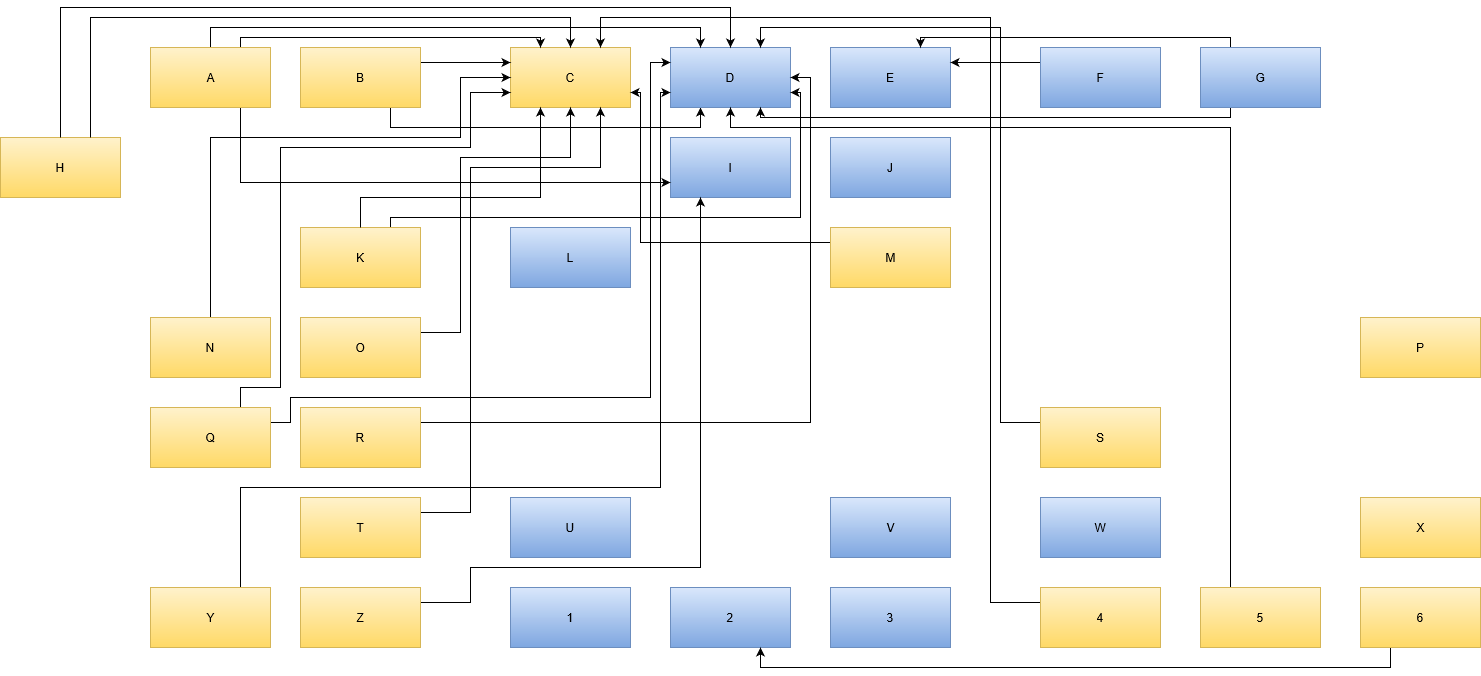
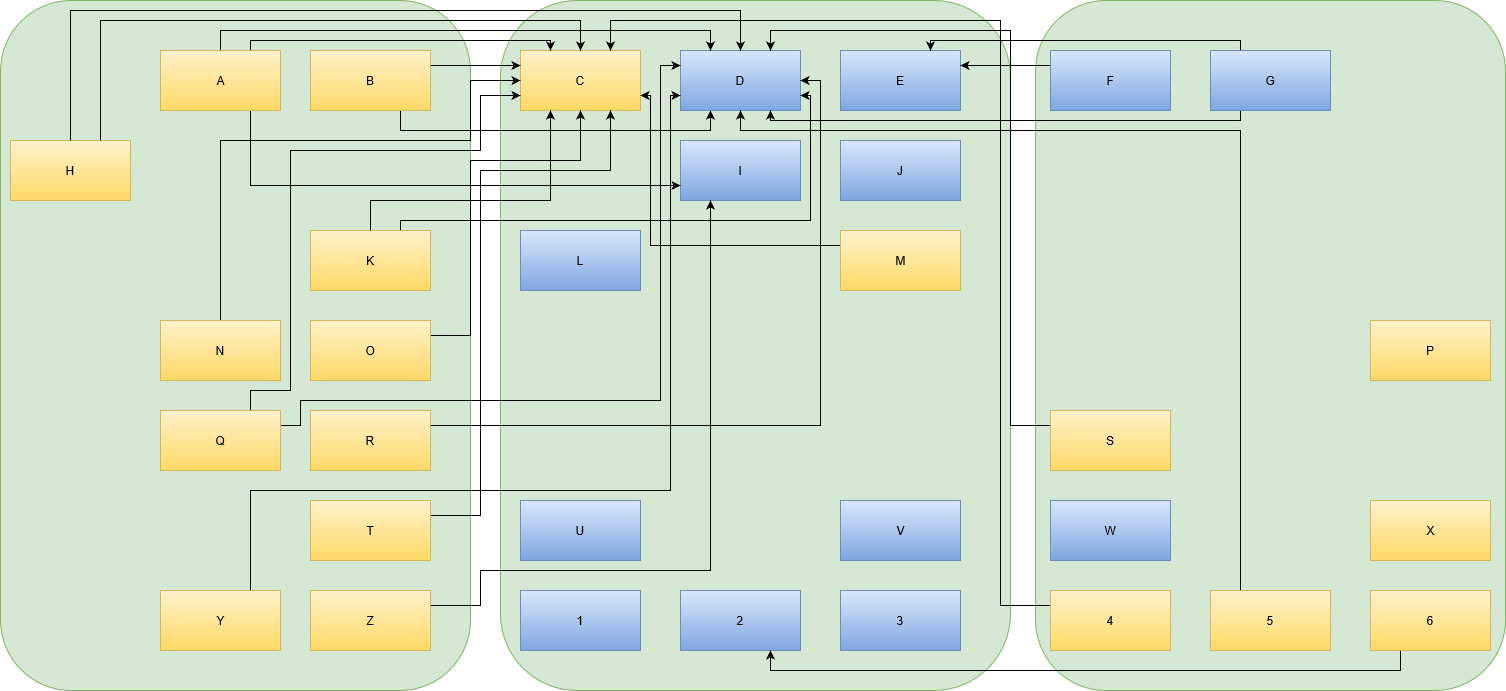
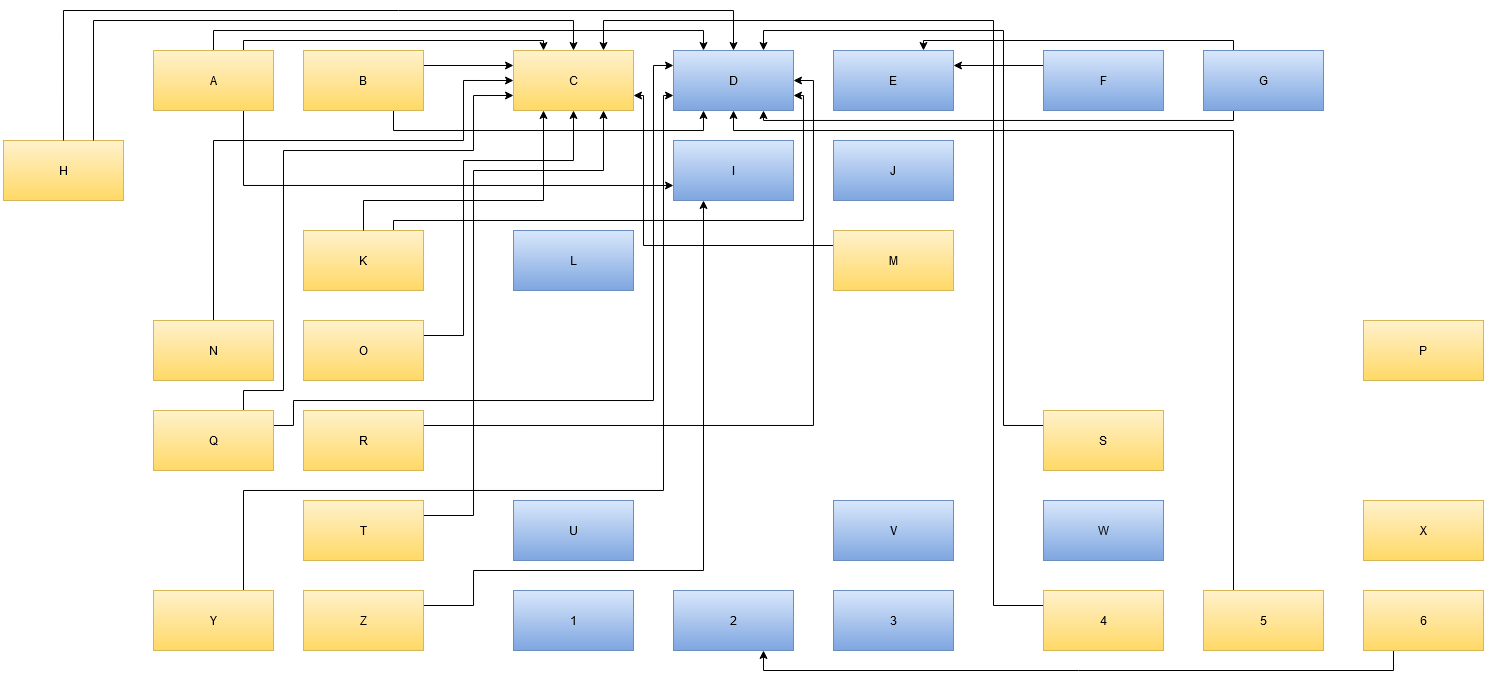
You’ll recognize a fitting layout when you see it. The map corresponds to your internal landscape representation enough to be useful in discussions. It might look like this real example:

First thing you’ll notice it that the names are replaced by denotations with zero meaning. In a real map, the box “C” might be named “time tracking” and box “D” could be labelled “issue tracking”. The name should indicate the responsibility of the element/box. You can also add the current implementation of that responsibility, if that makes things clearer. In our example, box “D”, indicating “issue tracking” might have “(JIRA)” added to the description. Just be aware that your organization probably needs another issue tracking system in that place even if JIRA falls out of favour. Following your arrows backwards, you’ll know which other elements of your landscape will be affected by this replacement. More on that in the next part about interpreting the map.

Evolving the map

Another thing you probably scoffed at is the intersecting arrows in the example. The map’s author came up with this layout as the best representation when the map had fewer boxes. With each subsequently added box, another arrow or two tried to reach the “center”. The intersections are a direct consequence of the emergence of a “center”. This is an important finding of your map: Being able to identify your map’s center and deduce meaning from it. To spoiler a bit: If your center is “time tracking” and “issue tracking”, you probably charge money per hour to solve other people’s problems.

Conclusion

You’ve probably seen how drawing an IT landscape map can benefit your organization and your discussions about its present and future. One thing you should keep in mind is that the map should reflect the current state and not your desired state of your organization’s IT architecture. That’s what will be addressed in part 3 of this series. Stay tuned!

Want to read more? Head over to part II of this series.