Your own CI-based RPM build farm, part 3

In my previous post we learned how to build RPM packages of your software for multiple versions of your target distribution(s). Now I want to present a way of automating the build process and building packages on/for all target platforms. You should have a look at the openSUSE build service to see if it already fits your needs. Then you can stop reading here :-).

We needed better control over the platforms and the process, so we setup a build farm based on the Jenkins continuous integration (CI) server ourselves. The big picture consists of the following components:

  • build slaves allowing a jenkins user to do unattended builds of the packages
  • Jenkins continuous integration server using matrix builds with build slaves for each target platform
  • build script orchestrating the build of all our self-maintained packages
  • jenkins job to deploy the packages to our RPM repository

Preparing the build slaves

Standard installations of openSUSE need some minor tweaks so they can be used as Jenkins build slaves doing unattended RPM package builds. Here are the changes we needed to make it work properly:

  1. Add a user account for the builds, e.g. useradd -m -d /home/jenkins jenkins and setup a password with passwd jenkins.
  2. Change sshd configuration to allow password authentication and restart sshd.
  3. We will link the SOURCES and SPECS directories of /usr/src/packages to the working copy of our repository, so we need to delete the existing directories: rm -r /usr/src/packages/SPECS /usr/src/packages/SOURCES /usr/src/packages/RPMS /usr/src/packages/SRPMS.
  4. Allow non-priviledged users to work with /usr/src/packages with chmod -R o+rwx /usr/src/packages.
  5. Copy the ssh public key for our git repository to the build account in ~/.ssh/id_rsa
  6. Test ssh access on the slave as our build user with ssh -v git@repository. With this step we confirm the host authenticity one time so that future public key ssh interactions work unattended!
  7. Configure git identity on the slave with git config --global user.name "jenkins@build###-$$"; git config --global user.email "jenkins@buildfarm.myorg.net".
  8. Add privileges for the build user needed for our build process in /etc/sudoers: jenkins ALL = (root) NOPASSWD:/usr/bin/zypper,/bin/rpm

Configuring the build slaves

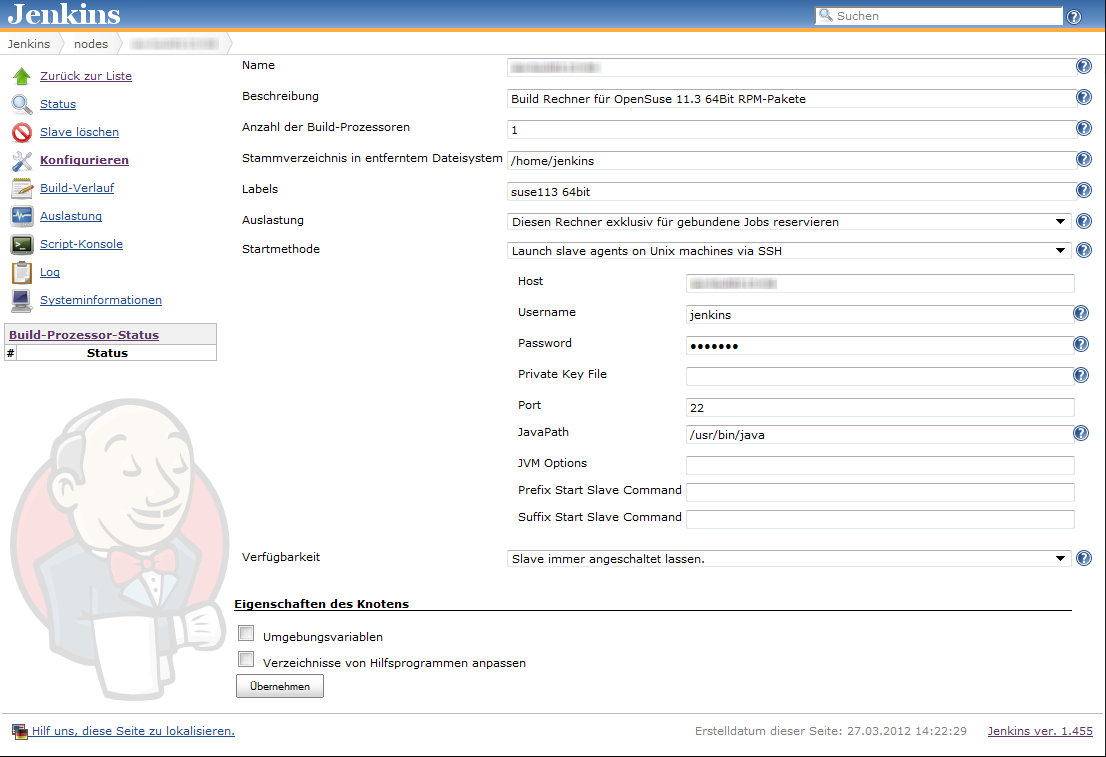
Linux build slaves over ssh are quite easily configured using Jenkins’ web interface. We add labels denoting the distribution release and architecture to be easily able to setup our matrix builds. Then we setup our matrix build as a new job with the usual parameters for source code management (in our case git) etc.

Our configuration matrix has the two axes Architecture and OpenSuseRelease and uses the labels of the build slaves. Our only build step here is calling the script orchestrating the build of our rpm packages.

Putting together the build script

Our build script essentially sets up a clean environment, builds package after package installing build prerequisites if needed. We use small utility functions (functions.sh) for building a package, installing packages from repository, installing freshly built packages and removing installed RPM. The script contains roughly the following phases:

  1. Figure out some quirks about the environment, e.g. openSUSE release number or architecture to build.
  2. Clean the environment by removing previously installed self-built packages.
  3. Setting up the build environment, e.g. linking folder from /usr/src/packages to our working copy or installing compilers, headers and the like.
  4. Building the packages and installing them locally if they are a dependency of packages yet to be built.

Here is a shortened example of our build script:

#!/bin/bash

RPM_BUILD_ROOT=/usr/src/packages
if [ "i686" = `uname -m` ]
then
  ARCH=i586
else
  ARCH=`uname -m`
fi
SUSE_RELEASE=`cat /etc/SuSE-release | sed '/^[openSUSE|CODENAME]/d' | sed 's/VERSION =//g' | tr -d '[:blank:]' | sed 's/\.//g'`

source functions.sh

# setup build environment
ensureDirectoryLinks
# force a repository refresh without checking the signature
sudo zypper -n --no-gpg-checks refresh -f OUR_REPO
# remove previously built and installed packages
removeRPM libomniORB4.1
removeRPM omniNotify2
# install needed tools
installFromRepo c++-compiler
if [ $SUSE_RELEASE -lt 121 ]
then
  installFromRepo java-1_6_0-sun-devel
else
  installFromRepo jdk
fi
installFromRepo log4j
buildRPM omniORB
installRPM $ARCH/libomniORB4.1
installRPM $ARCH/omniORB-devel
installRPM $ARCH/omniORB-servers
buildAndInstallRPM omniNotify2 $ARCH

Deploying our packages via Jenkins

We setup a second Jenkins job to deploy successfully built RPM packages to our internal repository. We use the Copy Artifacts plugin to fetch the rpms from our build job and put them into a directory like all_rpms. Then we add a build step to execute a script like this:

for i in suse-12.1 suse-11.4 suse-11.3
do
  rm -rf $i
  mkdir -p $i
  versionlabel=`echo $i | sed 's/[-\.]//g'`
  cp -r "all_rpms/Architecture=32bit,OpenSuseRelease=$versionlabel/RPMS" $i
  cp -r "all_rpms/Architecture=64bit,OpenSuseRelease=$versionlabel/RPMS" $i
  cp -r "all_rpms/Architecture=64bit,OpenSuseRelease=$versionlabel/SRPMS" $i
  rsync -e "ssh" -avz $i/* root@rpmrepository.intranet:/srv/www/htdocs/OUR_REPO/$i/
  ssh root@rpmrepository.intranet "createrepo /srv/www/htdocs/OUR_REPO/$i/RPMS"

Summary

With a setup like this we can perform an automatic build of all our RPM packages on several targetplatform everytime we update one of the packages. After a successful build we can deploy our new packages to our RPM repository making them available for our whole organisation. There is an initial amount of work to be done but the rewards are easy, unattended package updates with deployment just one button click away.

Game of Life: TDD style in Java

I always got problems finding the right track with test driven development (TDD), going down the wrong track can get you stuck.
So here I document my experience with tdd-ing Conway’s Game of Life in Java.

I always got problems finding the right track with test driven development (TDD), going down the wrong track can get you stuck.
So here I document my experience with tdd-ing Conway’s Game of Life in Java.

The most important part of a game of life implementation since the rules are simple is the datastructure to store the living cells.
So using TDD we should start with it.
One feature of our cells should be that they are equal according to their coordinates:

@Test
public void positionsShouldBeEqualByValue() {
  assertEquals(at(0, 1), at(0, 1));
}

The JDK features a class holding two coordinates: java.awt.Point, so we can use it here:

public class Board {
  public static Point at(int x, int y) {
    return new Point(x, y);
  }
}

You could create your own Position or Cell class and implementing equals/hashCode accordingly but I want to keep things simple so we stick with Point.
A board should holding the living cells and we need to compare two boards according to their living cells:

@Test
public void boardShouldBeEqualByCells() {
  assertEquals(new Board(at(0, 1)), new Board(at(0, 1)));
}

Since we are only interested in living cells (all other cells are considered dead) we store only the living cells inside the board:

public class Board {
  private final Set<Point> alives;

  public Board(Point... points) {
    alives = new HashSet<Point>(Arrays.asList(points));
  }

  @Override
  public boolean equals(Object o) {
    if (this == o) return true;
    if (o == null || getClass() != o.getClass()) return false;

    Board board = (Board) o;

    if (alives != null ? !alives.equals(board.alives) : board.alives != null) return false;

    return true;
  }

  @Override
  public int hashCode() {
    return alives != null ? alives.hashCode() : 0;
  }
}

If you take a look at the rules you see that you need to have a way to count the neighbours of a cell:

@Test
public void neighbourCountShouldBeZeroWithoutNeighbours() {
  assertEquals(0, new Board(at(0, 1)).neighbours(at(0, 1)));
}

Easy:

public int neighbours(Point p) {
  return 0;
}

Neighbours are either vertically adjacent:

@Test
public void neighbourCountShouldCountVerticalOnes() {
  assertEquals(1, new Board(at(0, 0), at(0, 1)).neighbours(at(0, 1)));
}
public int neighbours(Point p) {
  int count = 0;
  for (int yDelta = -1; yDelta <= 1; yDelta++) {
    if (alives.contains(at(p.x, p.y + yDelta))) {
      count++;
    }
  }
  return count;
}

Hmm now both neighbour tests break, oh we forgot to not count the cell itself:
First the test…

@Test
public void neighbourCountShouldNotCountItself() {
  assertEquals(0, new Board(at(0, 0)).neighbours(at(0, 0)));
}

Then the fix:

public int neighbours(Point p) {
  int count = 0;
  for (int yDelta = -1; yDelta <= 1; yDelta++) {
    if (!(yDelta == 0) && alives.contains(at(p.x, p.y + yDelta))) {
      count++;
    }
  }
  return count;
}

And the horizontal adjacent ones:

@Test
public void neighbourCountShouldCountHorizontalOnes() {
  assertEquals(1, new Board(at(0, 1), at(1, 1)).neighbours(at(0, 1)));
}
public int neighbours(Point p) {
  int count = 0;
  for (int yDelta = -1; yDelta <= 1; yDelta++) {
    for (int xDelta = -1; xDelta <= 1; xDelta++) {
      if (!(xDelta == 0 && yDelta == 0) && alives.contains(at(p.x + xDelta, p.y + yDelta))) {
        count++;
      }
    }
  }
  return count;
}

And the diagonal ones are also included in our implementation:

@Test
public void neighbourCountShouldCountDiagonalOnes() {
  assertEquals(2, new Board(at(-1, 1), at(1, 0), at(0, 1)).neighbours(at(0, 1)));
}

So we set the stage for the rules. Rule 1: Cells with one neighbour should die:

@Test
public void cellWithOnlyOneNeighbourShouldDie() {
  assertEquals(new Board(), new Board(at(0, 0), at(0, 1)).next());
}

A simple implementation looks like this:

public Board next() {
  return new Board();
}

OK, on to Rule 2: A living cell with 2 neighbours should stay alive:

@Test
public void livingCellWithTwoNeighboursShouldStayAlive() {
  assertEquals(new Board(at(0, 0)), new Board(at(-1, -1), at(0, 0), at(1, 1)).next());
}

Now we need to iterate over each living cell and count its neighbours:

public class Board {
  public Board(Point... points) {
    this(new HashSet<Point>(Arrays.asList(points)));
  }

  private Board(Set<Point> points) {
    alives = points;
  }

  public Board next() {
    Set<Point> aliveInNext = new HashSet<Point>();
    for (Point cell : alives) {
      if (neighbours(cell) == 2 {
        aliveInNext.add(cell);
      }
    }
    return new Board(aliveInNext);
  }
}

In this step we added a convenience constructor to pass a set instead of some cells.
The last Rule: a cell with 3 neighbours should be born or stay alive (the pattern is called blinker, so we name the test after it):

@Test
public void blinker() {
  assertEquals(new Board(at(-1, 1), at(0, 1), at(1, 1)), new Board(at(0, 0), at(0, 1), at(0, 2)).next());
}

For this we need to look at all the neighbours of the living cells:

public Board next() {
  Set<Point> aliveInNext = new HashSet<Point>();
  for (Point cell : alives) {
    for (int yDelta = -1; yDelta <= 1; yDelta++) {
      for (int xDelta = -1; xDelta <= 1; xDelta++) {
        Point testingCell = at(cell.x + xDelta, cell.y + yDelta);
        if (neighbours(testingCell) == 2 || neighbours(testingCell) == 3) {
          aliveInNext.add(testingCell);
        }
      }
    }
  }
  return new Board(aliveInNext);
}

Now our previous test breaks, why? Well the second rule says: a *living* cell with 2 neighbours should stay alive:

public Board next() {
  Set<Point> aliveInNext = new HashSet<Point>();
  for (Point cell : alives) {
    for (int yDelta = -1; yDelta <= 1; yDelta++) {
      for (int xDelta = -1; xDelta <= 1; xDelta++) {
        Point testingCell = at(cell.x + xDelta, cell.y + yDelta);
        if ((alives.contains(testingCell) && neighbours(testingCell) == 2) || neighbours(testingCell) == 3) {
          aliveInNext.add(testingCell);
        }
      }
    }
  }
  return new Board(aliveInNext);
}

Done!
Now we can refactor and make the code cleaner like removing the logic duplication for iterating over the neighbours, adding methods like toString for output or better failing test messages, etc.

Python Pitfall: Alleged Decrement Operator

The best way to make oneself more familiar with the possibilities and pitfalls of a newly learned programming language is to start pet projects using that language. That’s just what I did to dive deeper into Python. While working on my Python pet project I made a tiny mistake which took me quite a while to figure out. The code was something like (highly simplified):

for i in range(someRange):
  # lots of code here
  doSomething(--someNumber)
  # even more code here

For me, with a strong background in Java and C, this looked perfectly right. Yet, it was not. Since it compiled properly, I immediately excluded syntax errors from my mental list of possible reasons and began to search for a semantic or logical error.

After a while, I remembered that there is no such thing as post-increment or post-decrement operator, so why should there be a pre-decrement? Well, there isn’t. But, if there is no pre-decrement operator, why does –someNumber compile? Basically, the answer is pretty simple: To Python –someNumber is the same as -(-(someNumber)).

A working version of the above example could be:

for i in range(someRange):
  # lots of code here
  someNumber -= 1
  doSomething(someNumber)
  # even more code here

Use Boost’s Multi Index Container!

Boost’s multi index container is a very cool and useful piece of code. Make it a part of your toolbox. You can start slowly by replacing uses of std::set and std::multiset with simple boost::multi_index_containers.

Sometimes, after you have used a special library or other special programming tool for a job, you forget about it because you don’t have that specific use case anymore. Boost’s multi_index container could fall in this category because you don’t have to hold data in memory with the need to access it by different keys all the time.

Therefore, this post is intended to be a reminder for c++ programmers that there exists this pretty cool thing called boost::multi_index_container and that you can use it in more situations than you would think at first.

(If you’re already using it on a regular basis you may stop here, jump directly to the comments and tell us about your typical use cases.)

I remember when I discovered boost::multi_index_container I found it quite intimidating at first sight. All those templates that are used in sometimes weird ways can trigger that feeling if you are not a template metaprogramming specialist (i.e. haven’t yet read Andrei Alexandrescu’s book “Modern C++ Design” ).

But if you look at it after you fought your way through the documentation and after your unit test is green that tests your first example, it doesn’t look that complicated anymore.

My latest use case for boost::multi_index_container was data objects that should be sorted by two different date-times. (For dates and times we use boost::date_time, of course). At first, the requirement was to store the objects sorted by one date time. I used a std::set for that with a custom comparator. Everything was fine.

With changing requirements it became necessary to retrieve objects by another date time, too. I started to use another std::set with a different comparator but then I remembered that there was some cool container somewhere in boost for which you can define multiple indices ….

After I had set it up with the two date time indices, the code also looked much cleaner because in order to update one object with a new time stamp I could just call container->replace(…) instead of fiddling around with the std::set.

Furthermore, I noticed that setting up a boost::multi_index_container with a specific key makes it much clearer what you intend with this data structure than using a std::set with a custom comparator. It is not that much more typing effort, and you can practice template metaprogramming a little bit 🙂

Let’s compare the two implementations:

#include <boost/shared_ptr.hpp>
#include <boost/date_time/posix_time/posix_time.hpp>
using boost::posix_time::ptime;

// objects of this class should be stored
class MyDataClass
{
  public:
    const ptime& getUpdateTime() const;
    const ptime& getDataChangedTime() const;

  private:
    ptime _updateTimestamp;
    ptime _dataChangedTimestamp;
};
typedef boost::shared_ptr<MyDataClass> MyDataClassPtr;

Now the definition of a multi index container:

#include <boost/multi_index_container.hpp>
#include <boost/multi_index/ordered_index.hpp>
#include <boost/multi_index/mem_fun.hpp>
using namespace boost::multi_index;

typedef multi_index_container
<
  MyDataClassPtr,
  indexed_by
  <
    ordered_non_unique
    <
      const_mem_fun<MyDataClass, 
        const ptime&, 
        &MyDataClass::getUpdateTime>
    >
  >
> MyDataClassContainer;

compared to std::set:

#include <set>

// we need a comparator first
struct MyDataClassComparatorByUpdateTime
{
  bool operator() (const MyDataClassPtr& lhs, 
                   const MyDataClassPtr& rhs) const
  {
    return lhs->getUpdateTime() < rhs->getUpdateTime();
  }
};
typedef std::multiset<MyDataClassPtr, 
                      MyDataClassComparatorByUpdateTime> 
   MyDataClassSetByUpdateTime;

What I like is that the typedef for the multi index container reads almost like a sentence. Besides, it is purely declarative (as long as you get away without custom key extractors), whereas with std::multiset you have to implement the comparator.

In addition to being a reminder, I hope this post also serves as motivation to get to know boost::multi_index_container and to make it a part of your toolbox. If you still have fears of contact, start small by replacing usages of std::set/multiset.

Packaging RPMs for a variety of target platforms, part 2

In part 1 of our series covering the RPM package management system we learned the basics and built a template SPEC file for packaging software. Now I want to give you some deeper advice on building packages for different openSUSE releases, architectures and build systems. This includes hints for projects using cmake, qmake, python, automake/autoconf, both platform dependent and independent.

Use existing makros and definitions

RPM provides a rich set of macros for generic access to directory paths and programs providing better portability over different operating system releases. Some popular examples are /usr/lib vs. /usr/lib64 and python2.6 vs. python2.7. Here is an exerpt of macros we use frequently:

  • %_lib and %_libdir for selection of the right directory for architecture dependent files; usually [/usr/]lib or [/usr/]lib64.
  • %py_sitedir for the destination of python libraries and %py_requires for build and runtime dependencies of python projects.
  • %setup, %patch[#], %configure, %{__python} etc. for preparation of the build and execution of helper programs.
  • %{buildroot} for the destination directory of the build artifacts during the build

Use conditionals to enable building on different distros and releases

Sometimes you have to use %if conditional clauses to change the behaviour depending on

  • operating system version
    %if %suse_version < 1210
      Requires: libmysqlclient16
    %else
      Requires: libmysqlclient18
    %endif
    
  • operating system vendor
    %if "%{_vendor}" == "suse"
    BuildRequires: klogd rsyslog
    %endif
    

because package names differ or different dependencies are needed.

Try to be as lenient as possible in your requirement specifications enabling the build on more different target platforms, e.g. use BuildRequires: c++_compiler instead of BuildRequires: g++-4.5. Depend on virtual packages if possible and specify the versions with < or > instead of = whenever reasonable.

Always use a version number when specifying a virtual package

RPM does a good job in checking dependencies of both, the requirements you specify and the implicit dependencies your package is linked against. But if you specify a virtual package be sure to also provide a version number if you want version checking for the virtual package. Leaving it out will never let you force a newer version of the virtual package if one of your packages requires it.

Build tool specific advices

  • qmake: We needed to specify the INSTALL_ROOT issuing make, e.g.:
    qmake
    make INSTALL_ROOT=%{buildroot}/usr
    
  • autotools: If the project has a sane build system nothing is easier to package with RPM:
    %build
    %configure
    make
    
    %install
    %makeinstall
    
  • cmake: You may need to specify some directory paths with -D. Most of the time we used something like:
    %build
    cmake -DCMAKE_INSTALL_PREFIX=%{_prefix} -Dlib_dir=%_lib -G "Unix Makefiles" .
    make
    

Working with patches

When packaging projects you do not fully control, it may be neccessary to patch the project source to be able to build the package for your target systems. We always keep the original source archive around and use diff to generate the patches. The typical workflow to generate a patch is the following:

  1. extract source archive to source-x.y.z
  2. copy extracted source archive to a second directory: cp -r source-x.y.z source-x.y.z-patched
  3. make changes in source-x.y.z-patched
  4. generate patch with: cd source-x.y.z; diff -Naur . ../source-x.y.z-patched > ../my_patch.patch

It is often a good idea to keep separate patches for different changes to the project source. We usually generate separate patches if we need to change the build system, some architecture or compiler specific patches to the source, control-scripts and so on.

Applying the patch is specified in the patch metadata fields and the prep-section of the SPEC file:

Patch0: my_patch.patch
Patch1: %{name}-%{version}-build.patch

...

%prep
%setup -q # unpack as usual
%patch0 -p0
%patch1 -p0

Conclusion
RPM packaging provides many useful tools and abstractions to build and package projects for a wide variety of RPM-based operation systems and releases. Knowing the macros and conditional clauses helps in keeping your packages portable.

In the next and last part of this series we will automate building the packages for different target platforms and deploying them to a repository server.

You can “Hit the ground running”

I strongly believe that programmers in a new project can start productive in a very short time. Not in every project but here are some tips which get you started faster in unknown territory.

I strongly believe that programmers in a new project can start productive in a day or even in a few hours. I’ve seen and experienced myself that you can hit the ground running on day one or two. This might not be true for every project but there are certain things that help getting you started.

Architecture

Wikipedia
The software architecture of a system is the set of structures needed to reason about the system, which comprise software elements, relations among them, and properties of both

A well thought out or even documented architecture in a project can go a long way. This does not need to be an all details handbook, just a rough sketch. We like to make a module map to give an overview of the parts of the system which exist and communicate which each other. But it is more important to have an architecture. Some systems get an architecture by default (see conventions) but even if they don’t you need to think and organize how the parts of your system are composed and segregated. Common rules and guidelines like low coupling, high cohesion or architectural patterns are great helpers in establishing an architecture in different levels of granularity.

Conventions

Conventions or common ways to do something in an uniform way aka style can give you a head start when diving into an unknown code base. Convention over configuration frameworks like Rails or Grails give you a set of common conventions and if you know them you can easily find the domain classes or the corresponding controller. By knowing the conventions and the style you get a rough map where to look for what.
Coding conventions help you to read and understand code (every team should have coding conventions).

Ordering your tasks

When approaching a new code base start with small tasks like changing a label in a view or fix bugs which are located in one system layer. Even better write (unit) tests to secure parts of the system you are working in or make them more testable.

Ask, ask, ask

Nothing beats the information inside the heads of the authors of the system. So if something is weird or confusing, ask. It might shed a light onto problem areas which aren’t known by the team. Nonetheless you can test your assumptions against the code (testing) or by asking your other team members.

How do you approach a new code base?

Gamification in Software Development

During the last three years gamification became quite popular in everyday applications, e.g. marketing or social media. A simple, but often observed technique is to award users with badges for specific actions and achievements. This technique can be used in pretty simple ways, e.g. member titles in forums based on the number of posts, but may also be rather elaborate, e.g. StackOverflow’s system of granting badges to users based on on their reputation and other aspects. Some companies even announced to, or already do, include gamification aspects in consumer and business software, e.g. SAP or Microsoft.

Besides adding fun and a little competition to everyday activities, gamification can also be useful by encouraging users to explore the features of software and, by doing so, discover functionality they are yet unaware of*.

Considering software development, there are also some gamification plugins for IDEs and other tools, which are worth to take a look at. The following provides an incomplete list:

If you happen to know of any other, please leave a comment, so I can update and extend this list.


*Btw: Did you know, that JIRA has keyboard shortcuts?

Performance Hogs Sometimes Live in Most Unexpected Places

Surprises when measuring performance are common – but sometimes you just can’t believe it.

When we develop software we always apply the best practice of not optimizing prematurely. This plays together with other best practices like writing the most readable code, or YAGNI.

‘Premature’ means different things in different situations. If you don’t have performance problems it means that there is absolutely no point in optimizing code. And if you do have performance problems it means that Thou Shalt Never Guess which code to optimize because software developers are very bad at this. The keyword here is profiling.

Since we don’t like to be “very bad” at something we always try to improve our skills in this field. The skill of guessing which code has to be optimized, or “profiling in your head” is no different in this regard.

So most of the times in profiling sessions, I have a few unspoken guesses at which parts of the code the profiler will point me to. Unfortunately, I have to say that  I am very often very surprised by the outcome.

Surprises in performance fixing sessions are common but they are of different quality. One rather BIG surprise was to find out that std::string::find of the C++ standard library is significantly slower (by factor > 10) than its C library counterpart strstr (discovered with gcc-4.4.6 on CentOS 6, verified with eglibc-2.13 and gcc-4.7).

Yes, you read right and you may not believe it. That was my reaction, too, so I wrote a little test program containing only two strings and calls to std::string::find and std::strstr, respectively. The results were – and I’ve no problem repeating myself here – a BIG surprise.

The reason for that is that std::strstr uses a highly optimized string matching algorithm version whereas std::string::find works with straight-forward memory comparison.

So when doing profiling sessions, always be prepared for shaking-your-world-view kind of surprises. They can even come from your beloved and highly regarded standard library.

UPDATE: See this stackoverflow question for more information.

Clean Code OSX / Cocoa Development – Setting up CI and unit testing

To start with the tool chain used by clean code development you need a continuous integration server.
Here we install Jenkins on OS X (Lion) for Cocoa development (including unit testing of course).

Prerequisites: Xcode 4 and Java 1.6 installed

To start with the tool chain used by clean code development you need a continuous integration server.
Here we install Jenkins on OS X (Lion) for Cocoa development (including unit testing of course).

Installing Jenkins

Installing Jenkins is easy if you have homebrew installed:

brew update
brew install jenkins

and start it:

java -jar /usr/local/Cellar/jenkins/1.454/lib/jenkins.war

Open your browser and go to http://localhost:8080.

Installing the Xcode plugin

Click on Manage Jenkins -> Manage Plugins
and install the following plugins:

  • Git plugin
  • Xcode plugin (not the SICCI one)

Setup Job

On the Jenkins start page navigate to New Job -> Freestyle

Choose Git as your Version control system (or what is appropriate for you). If you want to run a local git build use a file URL, supposing your project is in a directory named MyProject inside your home directory the URL would look like:

file://localhost//Users/myuser/MyProject/

Add a Xcode build step under Build -> Add build step -> Xcode
and enter your main target (which is normally your project name)
Target: MyProject
Configuration: Debug

If you got Xcode 4.3 installed you may run into

error: can't exec '/Developer/usr/bin/xcodebuild' (No such file or directory)

First you need to install the Command Line Tools Xcode 4 via Downloads Preference Pane in Xcode (you need a developer account) and run

sudo xcode-select -switch /Applications/Xcode.app/Contents/Developer

Done!
Now you can build your project via Jenkins.

GHUnit Tests

Since we want to do clean code development we need unit tests. Nowadays you have two options: OCUnit or GHUnit. OCUnit is baked into Xcode right from the start and for using it in Jenkins you just create an additional build step with your unit testing target. So why use GHUnit (besides having a legacy project using it)? For me GHUnit has one significant advantage over OCUnit: you can run an individual test. And with some additions and tweaks you have support in Xcode, too.

So if you want to use GHUnit start with installing the Xcode Templates.
In Xcode you select your targets and create a new target via New Target -> Add Target -> GHUnit -> GHUnit OSX Test Bundle with OCMock
This creates a new directory. If you use automatic reference counting (ARC), replace GHUnitTestMain.m with the one from Tae

Copy RunTests.sh into UnitTests/Supported Files which copies the file into your UnitTests directory. Make it executable from the terminal with

chmod u+x RunTests.sh

In Xcode navigate to your unit test target and in Build Phases add the following under Run Script

$TARGETNAME/RunTests.sh

In Jenkins add a new Xcode build step to your job with Job -> Configure -> Add Build Step -> Xcode
Enter your unit test target into the Target field, set the configuration to Debug and add the follwing custom xcodebuild arguments:

GHUNIT_CLI=1 GHUNIT_AUTORUN=1 GHUNIT_AUTOEXIT=1 WRITE_JUNIT_XML=YES

At the time of this writing there exists a bug that the custom xcodebuild arguments are not persisted after the first run.

At the bottom of the page check Publish JUnit Test Report and enter

build/test-results/*.xml.

Ready to start!

Clean Code Developer at your fingertips

You’ve probably already heard about the Clean Code Developer initiative. We’re donating a full spectrum of mousepad designs for your educational support.

We are participants in the Clean Code Developer (CCD) movement. This initiative provides a way to perpetually learn, train, reflect and act on the most important topics of today’s software development by formulating a value system and a learning path. The learning path is subdivided in different grades, associated with colors. Every Clean Code Developer progresses continually through the grades, focussing on the principles and practices of the current grade.

If you want a tongue-in-cheek explanation of what the Clean Code Developer is in one sentence: It’s a sight-seeing tour to the most prominent topics every professional software developer should know. But other than your usual tourist rip-off, you can just stay seated and enjoy another round without ever paying anything except attention.

Visualize it

An important aspect of learning and deliberate practice is proper visualization. We invest a lot of work at our workplace, our software and the interaction with our customers to make things visible. When we reflected on our Clean Code Developer practice, we knew that it lacked visualization.

The proposed equipment for a Clean Code Developer is a desktop background picture, a mousepad with an image of all grades at once and some rubber wristbands in the colors of the grades. The wristbands serve as a reminder and a self-assessment tool. The desktop background picture is nice, but only visible if we don’t perform actual work. This let us concentrate on the mousepad.

Duplicate if necessary

The mousepad is the most prominent “advertising” space on the typical work desktop. We want to advertise the content of our current Clean Code Developer grade to ourself. The combination of these two thoughts is not one mousepad, but one for every grade. Imagine six mousepads in the colors of the grades, displaying your currently most important topics right under your fingertips.

We liked the idea so much that we worked on it. The result is a collection of mousepads for every Clean Code Developer to enjoy.

Iterative design

It took us several full cycles of planning, design, layout and proof-reading to have the first version of mousepads produced. It took only a few hours of real-world testing to start the second iteration to further improve the design. Right now, we are on the third iteration. The first iteration had the five colored CCD grades printed on real mousepads. The second iteration added the mousepad for the white grade and a little stand-up display for the initial black grade. The third iteration incorporated the official Clean Code Developer logo, the website URL and improved some details.

Here are some promotional photos of the five first-iteration mousepads:

This slideshow requires JavaScript.

As you can see, we chose to print ultra-slim mousepads to test if it’s feasible to use them stacked all at once (it isn’t, your mileage may vary) or use them even if you aren’t used to mousepads at all (it depends, really). You might want to print the images onto the mousepad you prefer best.

Do it yourself

Yes, you’ve read it right. We are donating the mousepad images back to the community. You can download everything right here:

All documents are bare of any company logo or other advertising and free for your constructive usage. There is only one catch really: the documents are in german language. This might not be apparent at first because we really like the original english technical terms, but some content might need translation for non-german speakers. If you are interested to produce an all-english version, drop us a line.

Acknowledgements

These mousepads wouldn’t exist without the help and inspiration of many co-workers. First of all, the founders of the Clean Code Developer movement, Ralf Westphal and Stefan Lieser, provided all the content of the mousepads. Without their groundbreaking work, we probably wouldn’t have thought of this. The design and production is owed to Hannegret Lindner from the Hannafaktur, a small graphic design agency. We admire her endurance with our iterative approach. And finally, the initial inspiration sparked in a creative discussion with Eric Wolf and Benjamin Trautwein from ABAS Software AG.

It’s your turn now

We are very curious about your story, photo or action still with the mousepads (or the little stand-up display). You can also just share your thoughts about the whole idea or submit an improvement. We’d love to hear from you.