Gradle projects as Debian packages

Gradle is a great tool for setting up and building your Java projects. If you want to deliver them for Ubuntu or other debian-based distributions you should consider building .deb packages. Because of the quite steep learning curve of debian packaging I want to show you a step-by-step guide to get you up to speed.

Prerequisites

You have a project that can be built by gradle using gradle wrapper. In addition you have a debian-based system where you can install and use the packaging utilities used to create the package metadata and the final packages.

To prepare the debian system you have to install some packages:

sudo apt install dh-make debhelper javahelper

Generating packaging infrastructure

First we have to generate all the files necessary to build full fledged debian packages. Fortunately, there is a tool for that called dh_make. To correctly prefill the maintainer name and e-mail address we have to set 2 environment variables. Of course, you could change them later…

export DEBFULLNAME="John Doe"
export DEBEMAIL="john.doe@company.net"
cd $project_root
dh_make --native -p $project_name-$version

Choose “indep binary” (“i”) as type of package because Java is architecture indendepent. This will generate the debian directory containing all the files for creating .deb packages. You can safely ignore all of the files ending with .ex as they are examples features like manpage-generation, additional scripts pre- and post-installation and many other aspects.

We will concentrate on only two files that will allow us to build a nice basic package of our software:

  1. control
  2. rules

Adding metadata for our Java project

In the control file fill all the properties if relevant for your project. They will help your users understand what the package contains and whom to contact in case of problems. You should add the JRE to depends, e.g.:

Depends: openjdk-8-jre, ${misc:Depends}

If you have other dependencies that can be resolved by packages of the distribution add them there, too.

Define the rules for building our Java project

The most important file is the rules makefile which defines how our project is built and what the resulting package contents consist of. For this to work with gradle we use the javahelper dh_make extension and override some targets to tune the results. Key in all this is that the directory debian/$project_name/ contains a directory structure with all our files we want to install on the target machine. In our example we will put everything into the directory /opt/my_project.

#!/usr/bin/make -f
# -*- makefile -*-

# Uncomment this to turn on verbose mode.
#export DH_VERBOSE=1

%:
	dh $@ --with javahelper # use the javahelper extension

override_dh_auto_build:
	export GRADLE_USER_HOME="`pwd`/gradle"; \
	export GRADLE_OPTS="-Dorg.gradle.daemon=false -Xmx512m"; \
	./gradlew assemble; \
	./gradlew test

override_dh_auto_install:
	dh_auto_install
# here we can install additional files like an upstart configuration
	export UPSTART_TARGET_DIR=debian/my_project/etc/init/; \
	mkdir -p $${UPSTART_TARGET_DIR}; \
	install -m 644 debian/my_project.conf $${UPSTART_TARGET_DIR};

# additional install target of javahelper
override_jh_installlibs:
	LIB_DIR="debian/my_project/opt/my_project/lib"; \
	mkdir -p $${LIB_DIR}; \
	install lib/*.jar $${LIB_DIR}; \
	install build/libs/*.jar $${LIB_DIR};
	BIN_DIR="debian/my_project/opt/my_project/bin"; \
	mkdir -p $${BIN_DIR}; \
	install build/scripts/my_project_start_script.sh $${BIN_DIR}; \

Most of the above should be self-explanatory. Here some things that cost me some time and I found noteworthy:

  • Newer Gradle version use a lot memory and try to start a daemon which does not help you on your build slaves (if using a continous integration system)
  • The rules file is in GNU make syntax and executes each command separately. So you have to make sure everything is on “one line” if you want to access environment variables for example. This is achieved by \ as continuation character.
  • You have to escape the $ to use shell variables.

Summary

Debian packaging can be daunting at first but using and understanding the tools you can build new packages of your projects in a few minutes. I hope this guide helps you to find a starting point for your gradle-based projects.

C++17: The two line visitor explained

If you have ever used an “idiomatic” C++ variant datatype like Boost.Variant or the new C++17 std::variant, you probably wished you could assemble a visitor to dispatch on the type by assembling a couple of lambda expressions like this:

auto my_visitor = visitor{
  [&](int value) { /* ... */ },
  [&](std::string const& value) { /* ... */ },
};

The code in question

While reading through the code for lager I stumbled upon a curious way to to make this happen. And it is just two lines of code! Wow, that is cool.

template<class... Ts> struct visitor: Ts... { using Ts::operator()...; };
template<class... Ts> visitor(Ts...) -> visitor<Ts...>;

A comment in the code indicated that the code was copied from cppreference.com where I quickly found the source on the page for std::visit, albeit with the different name “overloaded”. There were, however, no comments as to how this code worked.

Multiple inheritance to the rescue

Lambda expressions in C++ are just syntactic sugar for callables, pretty much like a struct with an operator(). As such, you can derive from them. which is what the first line does.
It uses variadic templates and multiple inheritance to assemble the types of the lambdas into one type. Without the content in the struct body, an instantiation with our example would be roughly equivalent to this:

struct int_visitor {
  void operator()(int value)
  {/* ... */}
};

struct string_visitor {
  void operator()(std::string const& value)
  {/* ... */}
};

struct visitor : int_visitor, string_visitor {
};

Using all of it

Now this cannot yet be called, as overload resolution (by design) does not work across different types. Hence the using in the structs body. It pulls the operator() implementations into the visitor type where overload resolution can work across all of them.
With it, our hypothetical instantiation becomes:

struct visitor : int_visitor, string_visitor {
  using int_visitor::operator();
  using string_visitor::operator();
};

Now an instance of that type can actually be called with both our types, which is what the interface for, e.g. std::visit demands.

Don’t go without a guide

The second line intruiged me. It looks a bit like a function declaration but that is not what it is. The fact that I had to ask in the (very helpful!) C++ slack made me realize that I did not keep up with the new features in C++17 as much as I would have liked.
This is, in fact, a class template argument deducation (CTAD) guide. It is a new feature in C++17 that allows you do deduce template arguments for a type based on constructor parameters. In a way, it supercedes the Object Generator idiom of old.
The syntax is really quite straight-forward. Given a list of constructor parameter types, resolve to a specific template instance based on those.

Constructing

The last piece of the puzzle is how the visitor gets initialized. The real advantage of using lambdas instead of writing the struct yourself is that you can capture variables from your context. Therefore, you cannot just default-initialize most lambdas – you need to transport its values, its bound context.
In our example, this uses another new C++17 feature: extended aggregate initialization. Aggregate initialization is how you initialized structs way back in C with curly-brackets. Previously, it was forbidden to do this with structs that have a base class. The C++17 extension now lifts this restriction, thus making it possible to initialize this visitor with curly brackets.

Edit 2018/04/16: The people on r/cpp rightfully pointed out that using the “other name” in the code snippet was confusing – so the visitor is now called “visitor”.

Advanced deb-packaging with CMake

CMake has become our C/C++ build tool of choice because it provides good cross-platform support and very reasonable IDE (Visual Studio, CLion, QtCreator) integration. Another very nice feature is the included packaging support using the CPack module. It allows to create native deployable artifacts for a plethora of systems including NSIS-Installer for Windows, RPM and Deb for Linux, DMG for Mac OS X and a couple more.

While all these binary generators share some CPACK-variables there are specific variables for each generator to use exclusive packaging system features or requirements.

Deb-packaging features

The debian package management system used not only by Debian but also by Ubuntu, Raspbian and many other Linux distributions. In addition to dependency handling and versioning packagers can use several other features, namely:

  • Specifying a section for the packaged software, e.g. Development, Games, Science etc.
  • Specifying package priorities like optional, required, important, standard
  • Specifying the relation to other packages like breaks, enhances, conflicts, replaces and so on
  • Using maintainer scripts to customize the installation and removal process like pre- and post-install, pre- and post-removal
  • Dealing with configuration files to protect end user customizations
  • Installing and linking files and much more without writing shell scripts using ${project-name}.{install | links | ...} files

All these make the software easier to package or easier to manage by your end users.

Using deb-features with CMake

Many of the mentioned features are directly available as appropriately named CMake-variables all starting with CPACK_DEBIAN_.  I would like to specifically mention the CPACK_DEBIAN_PACKAGE_CONTROL_EXTRA variable where you can set the maintainer scripts and one of my favorite features: conffiles.

Deb protects files under /etc from accidental overwriting by default. If you want to protect files located somewhere else you specify them in a file called conffiles each on a separate line:

/opt/myproject/myproject.conf
/opt/myproject/myproject.properties

If the user made changes to these files she will be asked what to do when updating the package:

  • keep the own version
  • use the maintainer version
  • review the situation and merge manually.

For extra security files like myproject.conf.dpkg-dist and myproject.conf.dpkg-old are created so no changes are lost.

Unfortunately, I did not get the linking feature working without using maintainer scripts. Nevertheless I advise you to use CMake for your packaging work instead of packaging using the native debhelper way.

It is much more natural for a CMake-based project and you can reuse much of your metadata for other target platforms. It also shields you from a lot of the gory details of debian packaging without removing too much of the power of deb-packages.

Lessons learned developing hybrid web apps (using Apache Cordova)

In the past year we started exploring a new (at leat for us) terrain: hybrid web apps. We already developed mobile web apps and native apps but this year we took a first step into the combination of both worlds. Here are some lessons learned so far.

In the past year we started exploring a new (at leat for us) terrain: hybrid web apps. We already developed mobile web apps and native apps but this year we took a first step into the combination of both worlds. Here are some lessons learned so far.

Just develop a web app

after all the hybrid app is a (mobile) web app at its core, encapsulating the native interactions helped us testing in a browser and iterating much faster. Also clean architecture supports to defer decisions of the environment to the last possible moment.

Chrome remote debugging is a boon

The tools provided by Chrome for remote debugging on Android web views and browser are really great. You can even see and control the remote UI. The app has some redraw problems when the debugger is connected but overall it works great.

Versioning is really important

Developing web apps the user always has the latest version. But since our app can run offline and is installed as a normal Android app you have to have versions. These versions must be visible by the user, so he can tell you what version he runs.

Android app update fails silently

Sometimes updating our app only worked in parts. It seemed that the web view cached some files and didn’t update others. The problem: the updater told the user everything went smoothly. Need to investigate that further…

Cordova plugins helped to speed up

Talking to bluetooth devices? checked. Saving lots of data in a local sqlite? Plugins got you covered. Writing and reading local files? No problemo. There are some great plugins out there covering your needs without going native for yourself.

JavaScript isn’t as bad as you think

Working with JavaScript needs some discipline. But using a clean architecture approach and using our beloved event bus to flatten and exposing all handlers and callbacks makes it a breeze to work with UIs and logic.

SVG is great

Our apps uses a complex visualization which can be edited, changed, moved and zoomed by the user. SVG really helps here and works great with CSS and JavaScript.

Use log files

When your app runs on a mobile device without a connection (to the internet) you need to get information from the device to you. Just a console won’t cut it. You need log files to record the actions and errors the user provokes.

Accessibility is harder than you think

Modern design trends sometimes make it hard to get a good accessibility. Common problems are low contrast, using only icons on buttons, indiscernible touch targets, color as information bearer and touch targets that are too small.

These are just the first lessons we learned tackling hybrid development but we are sure there are more to come.

Integrating catch2 with CMake and Jenkins

A few years back, we posted an article on how to get CMake, googletest and jenkins to play nicely with each other. Since then, Phil Nash’s catch testing library has emerged as arguably the most popular thing to write your C++ tests in. I’m going to show how to setup a small sample project that integrates catch2, CMake and Jenkins nicely.

Project structure

Here is the project structure we will be using in our example. It is a simple library that implements left-pad: A utility function to expand a string to a minimum length by adding a filler character to the left.

├── CMakeLists.txt
├── source
│   ├── CMakeLists.txt
│   ├── string_utils.cpp
│   └── string_utils.h
├── externals
│   └── catch2
│       └── catch.hpp
└── tests
    ├── CMakeLists.txt
    ├── main.cpp
    └── string_utils.test.cpp

As you can see, the code is organized in three subfolders: source, externals and tests. source contains your production code. In a real world scenario, you’d probably have a couple of libraries and executables in additional subfolders in this folder.

The source folder

set(TARGET_NAME string_utils)

add_library(${TARGET_NAME}
  string_utils.cpp
  string_utils.h)

target_include_directories(${TARGET_NAME}
  INTERFACE ./)

install(TARGETS ${TARGET_NAME}
  ARCHIVE DESTINATION lib/)

The library is added to the install target because that’s what we typically do with our artifacts.

I use externals as a place for libraries that go into the projects VCS. In this case, that is just the catch2 single-header distribution.

The tests folder

I typically mirror the filename and path of the unit under test and add some extra tag, in this case the .test. You should really not need headers here. The corresponding CMakeLists.txt looks like this:

set(UNIT_TEST_LIST
  string_utils)

foreach(NAME IN LISTS UNIT_TEST_LIST)
  list(APPEND UNIT_TEST_SOURCE_LIST
    ${NAME}.test.cpp)
endforeach()

set(TARGET_NAME tests)

add_executable(${TARGET_NAME}
  main.cpp
  ${UNIT_TEST_SOURCE_LIST})

target_link_libraries(${TARGET_NAME}
  PUBLIC string_utils)

target_include_directories(${TARGET_NAME}
  PUBLIC ../externals/catch2/)

add_test(
  NAME ${TARGET_NAME}
  COMMAND ${TARGET_NAME} -o report.xml -r junit)

The list and the loop help me to list the tests without duplicating the .test tag everywhere. Note that there’s also a main.cpp included which only defines the catch’s main function:

#define CATCH_CONFIG_MAIN
#include <catch.hpp>

The add_test call at the bottom tells CTest (CMake’s bundled test-runner) how to run catch. The “-o” switch commands catch to direct its output to a file, report.xml. The “-r” switch sets the report mode to JUnit format. We will need both to integrate with Jenkins.

The top-level folder

The CMakeLists.txt in the top-level folder needs to call enable_testing() for our setup. Other than that, it just directs to the subfolders via add_subdirectory().

Jenkins

Now all that is needed is to setup Jenkins accordingly. Setup jenkins to get your code, add a “CMake Build” build-step. Hit “Add build tool invocation” and check “Use cmake” to let cmake handle the invocation of your build tool (e.g. make). You also specify the target here, which is typically “install” or “package” via the “–target” switch.

Now you add another step that runs the tests via CTest. Add another Build Step, this time “CMake/CPack/CTest Execution” and pick CTest. The one quirk with this is that it will let the build fail when CTest returns a non-zero exit code – which it does when any tests fail. Usually, you want the build to become unstable and not failed if that happens. Hence set “1-65535” in the “Ignore exit codes” input.

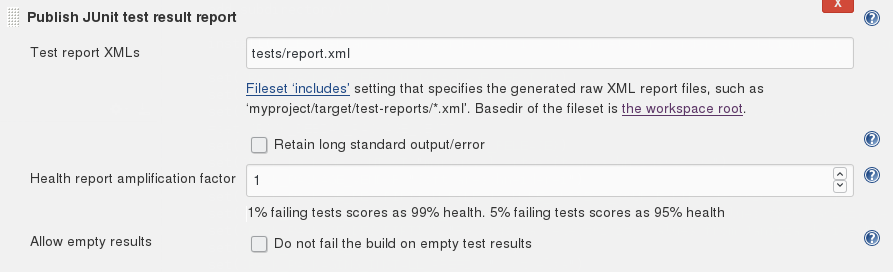
The final step is to let jenkins use the report.xml that we had CTest generate so it can generate the test result charts and tables. To do that, add the post-build action: “Publish JUnit test result report” and point it to tests/report.xml.

Done!

That’s it. Now you got your CI running nice catch tests. The code for this example is available on our github.

Functional tests for Grails with Geb and geckodriver

Previously we had many functional tests using the selenium-rc plugin for Grails. Many were initially recorded using Selenium IDE, then refactored to be more maintainable. These refactorings introduced “driver” objects used to interact with common elements on the pages and runners which improved the API for walking through a multipage process.

Selenium-rc got deprecated quite a while ago and support for Firefox broke every once in a while. Finally we were forced to migrate to the current state-of-the-art in Grails functional testing: Geb.

Generally I can say it is really a major improvement over the old selenium API. The page concept is similar to our own drivers with some nice features:

  • At-Checkers provide a standardized way of checking if we are at the expected page
  • Default and custom per page timeouts using atCheckWaiting
  • Specification of relevant content elements using a JQuery-like syntax and support for CSS-selectors
  • The so-called modules ease the interaction with form elements and the like
  • Much better error messages

While Geb is a real improvement over selenium it comes with some quirks. Here are some advice that may help you in successfully using geb in the context of your (grails) webapplication.

Cross-plattform testing in Grails

Geb (or more specifically the underlying webdriver component) requires a geckodriver-binary to work correctly with Firefox. This binary is naturally platform-dependent. We have a setup with mostly Windows machines for the developers and Linux build slaves and target systems. So we need binaries for all required platforms and have to configure them accordingly. We have simply put them into a folder in our project and added following configuration to the test-environment in Config.groovy:

environments {
  test {
    def basedir = new File(new File('.', 'infrastructure'), 'testing')
    def geckodriver = 'geckodriver'
    if (System.properties['os.name'].toLowerCase().contains('windows')) {
      geckodriver += '.exe'
    }
    System.setProperty('webdriver.gecko.driver', new File(basedir, geckodriver).canonicalPath)
  }
}

Problems with File-Uploads

If you are plagued with file uploads not working it may be a Problem with certain Firefox versions. Even though the fix has landed in Firefox 56 I want to add the workaround if you still experience problems. Add The following to your GebConfig.grooy:

driver = {
  FirefoxProfile profile = new FirefoxProfile()
  // Workaround for issue https://github.com/mozilla/geckodriver/issues/858
  profile.setPreference('dom.file.createInChild', true)
  new FirefoxDriver(profile)
}

Minor drawbacks

While the Geb-DSL is quite readable and allows concise tests the IDE-support is not there. You do not get much code assist when writing the tests and calling functions of the page objects like in our own, code based solution.

Conclusion

After taking the first few hurdles writing new functional tests with Geb really feels good and is a breeze compared to our old selenium tests. Converting them will be a lot work and only happen on a case-by-case basis but our coverage with Geb is ever increasing.

Keeping connections alive with libcurl

libcurl is quite a comfortable option to transfer files across a variety of network protocols, e.g. HTTP, FTP and SFTP.

It’s really easy to get started: downloading a single file via http or ftp takes only a couple of lines.

Drip, drip..

But as with most powerful abstractions, it is a bit leaky. While it does an excellent job of hiding such steps as name resolution and authentication, these steps still “leak out” by increasing the overall run-time.

In our case, we had five dozen FTP servers and we needed to repeatedly download small files from all of them. To make matters worse, we only had a small time window of 200ms for each transfer.

Now FTP is not the most simple protocol. Essentially, it requires the client to establish a TCP control connection, that it uses negotiate a second data connection and initiate file transfers.

This initial setup phase needs a lot of back and forth between server and client. Naturally, this is quite slow. Ideally, you would want to do the connection setup once and keep both the control and the data connection open for subsequent transfers.

libcurl does not explicitly expose the concept of an active connection. Hence you cannot explicitly tell the library not to disconnect it. In a naive implementation, you would download multiple files by simply creating an easy session object for each file transfer:

for (auto file : FILE_LIST)
{
  std::vector<uint8_t> buffer;
  auto curl = curl_easy_init();
  if (!curl)
    return -1;
  auto url = (SERVER+file);
  curl_easy_setopt(curl, CURLOPT_URL,
    url.c_str());
  curl_easy_setopt(curl, CURLOPT_WRITEFUNCTION,
    appendToVector);
  curl_easy_setopt(curl, CURLOPT_WRITEDATA,
    &buffer);
  if (curl_easy_perform(curl) != CURLE_OK)
    return -1;

  process(buffer);
  curl_easy_cleanup(curl);
}

That does indeed reset the connection for every single file.

Re-use!

However, libcurl can actually keep the connection open as part of a connection re-use mechanism in the session object. This is documented with the function curl_easy_perform. If you simply hoist the easy session object out of the loop, it will no longer disconnect between file transfers:

auto curl = curl_easy_init();
if (!curl)
  return -1;

for (auto file : FILE_LIST)
{
  std::vector<uint8_t> buffer;
  auto url = (SERVER+file);
  curl_easy_setopt(curl, CURLOPT_URL, 
    url.c_str());
  curl_easy_setopt(curl, CURLOPT_WRITEFUNCTION, 
    appendToVector);
  curl_easy_setopt(curl, CURLOPT_WRITEDATA, 
    &buffer);
  if (curl_easy_perform(curl) != CURLE_OK)
    return -1;

  process(buffer);
}
curl_easy_cleanup(curl);

libcurl will now cache the active connection in the session object, provided the files are actually on the same server. This improved the download timings of our bulk transfers from 130ms-260ms down to 30ms-40ms, quite the enormous gain. The timings now fit into our 200ms time window comfortably.

Using PostgreSQL with Entity Framework

The most widespread O/R (object-relational) mapper for the .NET platform is the Entity Framework. It is most often used in combination with Microsoft SQL Server as database. But the architecture of the Entity Framework allows to use it with other databases as well. A popular and reliable is open-source SQL database is PostgreSQL. This article shows how to use a PostgreSQL database with the Entity Framework.

Installing the Data Provider

First you need an Entity Framework data provider for PostgreSQL. It is called Npgsql. You can install it via NuGet. If you use Entity Framework 6 the package is called EntityFramework6.Npgsql:

> Install-Package EntityFramework6.Npgsql

If you use Entity Framework Core for the new .NET Core platform, you have to install a different package:

> Install-Package Npgsql.EntityFrameworkCore.PostgreSQL

Configuring the Data Provider

The next step is to configure the data provider and the database connection string in the App.config file of your project, for example:

<configuration>
  <!-- ... -->

  <entityFramework>
    <providers>
      <provider invariantName="Npgsql"
         type="Npgsql.NpgsqlServices, EntityFramework6.Npgsql" />
    </providers>
  </entityFramework>

  <system.data>
    <DbProviderFactories>
      <add name="Npgsql Data Provider"
           invariant="Npgsql"
           description="Data Provider for PostgreSQL"
           type="Npgsql.NpgsqlFactory, Npgsql"
           support="FF" />
    </DbProviderFactories>
  </system.data>

  <connectionStrings>
    <add name="AppDatabaseConnectionString"
         connectionString="Server=localhost;Database=postgres"
         providerName="Npgsql" />
  </connectionStrings>

</configuration>

Possible parameters in the connection string are Server, Port, Database, User Id and Password. Here’s an example connection string using all parameters:

Server=192.168.0.42;Port=5432;Database=mydatabase;User Id=postgres;Password=topsecret

The database context class

To use the configured database you create a database context class in the application code:

class AppDatabase : DbContext
{
  private readonly string schema;

  public AppDatabase(string schema)
    : base("AppDatabaseConnectionString")
  {
    this.schema = schema;
  }

  public DbSet<User> Users { get; set; }

  protected override void OnModelCreating(DbModelBuilder builder)
  {
    builder.HasDefaultSchema(this.schema);
    base.OnModelCreating(builder);
  }
}

The parameter to the super constructor call is the name of the configured connection string in App.config. In this example the method OnModelCreating is overridden to set the name of the used schema. Here the schema name is injected via constructor. For PostgreSQL the default schema is called “public”:

using (var db = new AppDatabase("public"))
{
  var admin = db.Users.First(user => user.UserName == "admin")
  // ...
}

The Entity Framework mapping of entity names and properties are case sensitive. To make the mapping work you have to preserve the case when creating the tables by putting the table and column names in double quotes:

create table public."Users" ("Id" bigserial primary key, "UserName" text not null);

With these basics you’re now set up to use PostgreSQL in combination with the Entity Framework.


Evolution of programming languages

Programming languages evolve over time. They get new language features and their standard library is extended. Sounds great, doesn’t it? We all know not going forward means your go backward.

But I observe very different approaches looking at several programming ecosystems we are using.

Featuritis

Java and especially C# added more and more “me too” features release after release making relatively lean languages quite complex multi-paradigm languages. They started object oriented and added generics, functional programming features and declarative programming (LINQ in C#) and different UI toolkits (AWT, Swing, JavaFx in Java; Winforms, WPF in C#) to the mix.

Often the new language features add their own set of quirks because they are an afterthought and not carefully enough designed.

For me, this lack of focus makes said language less attractive than more current approaches like Kotlin or Go.

In addition, deprecation often has no effect (see Java) where 20 year old code and style still works which increases the burden further . While it is great from a business perspektive in that your effort to maintain compatibility is low it does not help your code base. Different styles and old ways of doing something tend to remain forever.

Revolution

In Grails (I know, it is not a programming language, but I has its own ecosystem) we see more of a revolution. The core concept as a full stack framework stays the same but significant components are changed quite rapidly. We have seen many changes in technology like jetty to tomcat, ivy to maven, selenium-rc to geb, gant to gradle and the list goes on.

This causes many, sometimes subtle, changes in behaviour that are a real pain when maintaining larger applications over many years.

Framework updates are often a time-consuming hassle but if you can afford it your code base benefits and will eventually become cleaner.

Clean(er) evolution

I really like the evolution in C++. It was relatively slow – many will argue too slow – in the past but it has picked up pace in the last few years. The goal is clearly stated and only features that support it make it in:

  • Make C++ a better language for systems programming and library building
  • Make C++ easier to teach and learn
  • Zero-Cost abstractions
  • better Tool-support

If you cannot make it zero-cost your chances are slim to get your feature in…

C at its core did not change much at all and remained focused on its merits. The upgrades mostly contained convenience features like line comments, additional data type definitions and multithreading.

Honest evolution – breaking backwards compatibility

In Python we have something I would call “honest evolution”. Python 3 introduced some breaking changes with the goal of a cleaner and more consistent language. Python 2 and 3 are incompatible so the distinction in the version number is fair. I like this approach of moving forward as it clearly communicates what is happening and gets rid of the sins in the past.

The downside is that many systems still come with both, a Python 2 and a Python 3 interpreter and accompanying libraries. Fortunately there are some options and tools for your code to mitigate some of the incompatibilities, like the __future__ module and python-six.

At some point in the future (expected in 2020) there will only support for Python 3. So start making the switch.

A Tale of Two Languages

Recently, I presented my mysteriously titled talk “A Tale of Two Languages” at our local C++ user group. Before the talk, I was not really sure whether it would resonate with my audience. But it did, and helped to engage people in a healthy discussion about how to use C++.

Essentially, the talk was about how I am using two different modes or dialects of C++ to write and maintain applications. The title suggests two languages – and it sure can be thought of that way, but for now I’m using the word “modes” to distinguish it from the term programming languages.

You write the application in one mode, while keeping the style relatively easy. In the other mode, you make sure that you can write easy and efficient code in the other, while leveraging the full power of C++.

I call the first application mode and the second library mode.

Library mode

As I said before, this the power mode. One of C++’s design paradigms is self-extension. You are extending the language from the language itself. It’s a very powerful mechanism, the same one that drives the standard library. It’s also why C++ does not have the need for a built-in string type.

This power is a bit of a double-edged sword. On the one hand, it allows you to adapt the language specifically for your needs, for example with application specific value types. For a 3D application, a well designed 2d vector or point type will make your code easier and probably faster. On the other hand, a badly designed type on this level will haunt your application for years to come. I have seen both.

That’s a simple example though. More powerful primitives, such as domain-specific-language like constructs also belong into this mode. In general, things in this mode are less discoverable and less maintainable, but they strive to improve discoverability, efficiency and maintainability on the other side. As a consequence, this code needs more stringent documentation and specification.

Application mode

This is the mode that you use to write the majority of your application. Application mode is all about agility and leveraging opportunities. You intentionally restrict yourself in order to keep your development speed up. Simplicity trumps most other qualities in this mode. If you need another quality to be the defining factor, for example because you need some code to be a little more complex in order to run faster, you should put it into library mode instead.

Unlike code in library mode, this code needs to speak for itself. Therefore, documentation is usually nothing but a duplication.

One important aspect is that this code should be devoid of all subtleties.

Parameter passing and its consequences

That last bit is especially uncommon in C++, where most decisions are really a catch-22. Hence the resulting code hints at the struggles endured while writing it.

For example, to write an efficient function in C++, you need to decide whether to pass each parameter by value, or by reference, or by a pointer. The decision on which to use depends largely on your implementation, i.e. what you are doing with the parameter after it was passed to the function. That usually couples your implementation too tightly to its interface and degrades programmer productivity by giving too many options.

Using a shared-ownership smart-pointer such as std::shared_ptr by default is a good middle ground here. It does the right thing most of the time and is not to far off at most other times. Many other mainstream languages, such as python, go this route. Some frameworks, such as Qt, use that semantic as well.
Like const-correctness, passing all parameters in a std::shared_ptr is viral. Object thus passed need to be created on a the stack, preferably with std::make_shared. You will also store those smart pointers in other objects, so shared_ptr will have quite a lot of screen space. Therefore I usually make an alias:

template using Ptr = std::shared_ptr;

If it’s going to be the default, it should not clutter your code. Since objects are transported in a Ptr by default, they usually do not even need a copy constructor or other “value-like” semantics. These objects are less about maintaining invariants, and more about implementing abstract interfaces and bundling functionality in maintainable chunks. I usually use boost::noncopyable to mark them, though Herb Sutter’s Metaclasses proposal could make this even nicer.
Note that you can still promote them to value types in library mode, should the need arise. But they will become more costly to maintain.

Other simplifications

There are plenty of other things to avoid in application mode. Writing templated types makes your code inherently non-local and dependent on a type that can be anywhere. Note that instantiation of templates from library mode is fine – at that point, all the facts are known.

Another thing that makes your code non-local, and therefore unfitting for application mode, is overloading. Especially in the presence of ADL. For example, which functions are in your actual overload set depends on which headers you include and which using-directives and declarations are active. Sometimes, that is desirable. But not in application mode.

Resolution

Since using this “two modes” approach, I have found that my productivity is much higher – even in older code that went through a lot of evolution. The code does not actually get a lot slower, even with all the smart pointers. In fact, I am sure that I could only optimize a few cases because the design in application mode is a lot more flexible, and the structure more visible.