Configuring your Java webapp

There are several ways to configure your Java Servlet-based webapp with values for deployment-specific things like the database connection or directories for data and logs. Let us take a look at the alternatives and their benefits and drawbacks.

web.xml

The deployment descriptor (web.xml) resides inside your WAR file. You can specify init parameters available using the ServletContext.
web.xml

<context-param>
    <param-name>LogDirectory</param-name>
    <param-value>/myapp/logs</param-value>
</context-param>

Accessing the parameter in your Servlet:

String logDirectory = getServletContext().getInitParameter("LogDirectory");
// do something with it

The nice thing about this solution is the self-containment of your packaged application. The price is building a customized web.xml/WAR for each deployment instance.

Environment variables

Another possibility is to pass environment variables to your servlet container at startup, e.g. using JAVA_OPTS in the case of Apache Tomcat.
tomcat.conf

...
JAVA_OPTS="-DLogDirectory=/myapp/logs"
...

They can be easily accessed using

    System.getProperty("LogDirectory");

This is very easy to employ but has several drawbacks:

  • you have to mess with the configuration of your servlet container/host to set the variables
  • they are valid for the whole servlet container, possibly interferring with other webapps or the container itself
  • the settings are harder to find than in one file that you deliver with your webapp
  • need of server restart to change the values

context.xml

Using context.xml and JNDI is our preferred way of configuring our webapps. You can ship a default context.xml in the META-INF directory of your WAR and easily configure resources and beans:

<Context>
    <Environment name="LogDirectory" value="/myapp/logs" type="java.lang.String" />
    <!-- Development DB -->
    <Resource name="jdbc/devdb" auth="Container" type="javax.sql.DataSource"
               maxActive="100" maxIdle="30" maxWait="-1"
               username="sa" password="" driverClassName="org.h2.Driver"
               url="jdbc:h2:mem:devDB;mode=Oracle"/>
</Context>

A context.xml outside of your WAR has to be copied in the context configuration directory of your servlet container, e.g.:

cp context.xml /etc/tomcat7/Catalina/localhost/myapp.xml

You can then access the configuration items using JNDI:

Context ctx = (Context) new InitialContext().lookup("java:comp/env");
String logDirectory = (String) ctx.lookup("LogDirectory");
// do something

You can of course use context-params and the ServletContext to retrieve simple String parameters stored in the context.xml instead of web.xml, too.

The name of the context file must match the name of the deployed application. That way we can deploy the same WAR on several target machines and configure the applications separately. The context.xml not only contains the JNDI datasources (which is very common) but also configuration parameters that may change for each target system.

How to speed up your ORM queries of n x m associations

What solution (no cache) causes a 45x speedup? Learn the different approaches and how they compare

What causes a speedup like this? (all numbers are in ms)

Disclaimer: the absolute benchmark numbers are for illustration purposes, the relationship and the speedup between the different approaches are important (just for the curious: I measured 500 entries per table in a PostgreSQL database with both Rails 4.1.0 and Grails 2.3.8 running on Java 7 on a recent MBP running OSX 10.8)

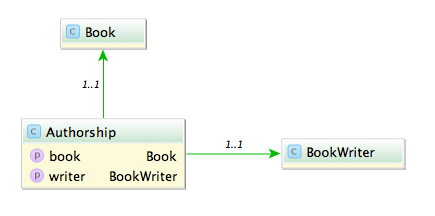
Say you have the model classes Book and (Book)Writer which are connected via a n x m table named Authorship:

A typical query would be to list all books with its authors like:

Fowler, Martin: Refactoring

A straight forward way is to query all authorships:

In Rails:

# 1500 ms
Authorship.all.map {|authorship| "#{authorship.writer.lastname}, #{authorship.writer.firstname}: #{authorship.book.title}"}

In Grails:

// 585 ms
Authorship.list().collect {"${it.writer.lastname}, ${it.writer.firstname}: ${it.book.title}"}

This is unsurprisingly not very fast. The problem with this approach is that it causes the famous n+1 select problem. The first option we have is to use eager fetching. In Rails we can use ‘includes’ or ‘joins’. ‘Includes’ loads the associated objects via additional queries, one for authorship, one for writer and one for book.

# 2300 ms
Authorship.includes(:book, :writer).all

‘Joins’ uses SQL inner joins to load the associated objects.

# 1000 ms
Authorship.joins(:book, :writer).all
# returns only the first element
Authorship.joins(:book, :writer).includes(:book, :writer).all

Additional queries with ‘includes’ in our case slows down the whole request but with joins we can more than halve our time. The combination of both directives causes Rails to return just one record and is therefore ruled out.

In Grails using ‘belongsTo’ on the associations speeds up the request considerably.

class Authorship {
    static belongsTo = [book:Book, writer:BookWriter]

    Book book
    BookWriter writer
}

// 430 ms
Authorship.list()

Also we can implement eager loading with specifying ‘lazy: false’ in our mapping which boosts a mild performance increase.

class Authorship {
    static mapping = {
        book lazy: false
        writer lazy: false
    }
}

// 416 ms
Authorship.list()

Can we do better? The normal approach is to use ‘has_many’ associations and query from one side of the n x m association. Since we use more properties from the writer we start from here.

class Writer < ActiveRecord::Base
  has_many :authors
  has_many :books, through: :authors
end

Testing the different combinations of ‘includes’ and ‘joins’ yields interesting results.

# 1525 ms
Writer.all.joins(:books)

# 2300 ms
Writer.all.includes(:books)

# 196 ms
Writer.all.joins(:books).includes(:books)

With both options our request is now faster than ever (196 ms), a speedup of 7.
What about Grails? Adding ‘hasMany’ and the authorship table as a join table is easy.

class BookWriter {
    static mapping = {
        books joinTable:[name: 'authorships', key: 'writer_id']
    }

    static hasMany = [books:Book]
}
// 313 ms, adding lazy: false results in 295 ms
BookWriter.list().collect {"${it.lastname}, ${it.firstname}: ${it.books*.title}"}

The result is rather disappointing. Only a mild speedup (2x) and even slower than Rails.

Is this the most we can get out of our queries?
Looking at the benchmark results and the detailed numbers Rails shows us hints that the query per se is not the problem anymore but the deserialization. What if we try to limit our created object graph and use a model class backed by a database view? We can create a view containing all the attributes we need even with associations to the books and writers.

create view author_views as (SELECT "authorships"."writer_id" AS writer_id, "authorships"."book_id" AS book_id, "books"."title" AS book_title, "writers"."firstname" AS writer_firstname, "writers"."lastname" AS writer_lastname FROM "authorships" INNER JOIN "books" ON "books"."id" = "authorships"."book_id" INNER JOIN "writers" ON "writers"."id" = "authorships"."writer_id")

Let’s take a look at our request time:

# 15 ms
 AuthorView.select(:writer_lastname, :writer_firstname, :book_title).all.map { |author| "#{author.writer_lastname}, #{author.writer_firstname}: #{author.book_title}" }
// 13 ms
AuthorView.list().collect {"${it.writerLastname}, ${it.writerFirstname}: ${it.bookTitle}"}

13 ms and 15 ms. This surprised me a lot. Seeing this in comparison shows how much this impacts performance of our request.

The lesson here is that sometimes the performance can be improved outside of our code and that mapping database results to objects is a costly operation.

When UTF8 != UTF8

Not all encoding problems are problems with different encodings

Problem

Recently I encountered a problem with umlauts in file names. I had to read names from a directory and find and update the appropriate entry in the database. So if I had a file named hund.pdf (Hund is German for dog) I had to find the corresponding record in the database and attach the file. Almost all files went smooth but the ones with umlauts failed all.

Certainly an encoding problem I thought. So I converted the string to UTF-8 before querying. Again the query returned an empty result set. So I read up on the various configuration options for JDBC, Oracle and Active Record (it is a JRuby on Rails based web app). I tried them all starting with nls_language and ending with temporary setting the locale. No luck.

Querying the database with a hard coded string containing umlauts worked. Both strings even printed on the console looked identically.

So last but not least I compared the string from the file name with a hard coded one: they weren’t equal. Looking at the bytes a strange character combination was revealed \204\136. What’s that? UTF8 calls this a combining diaeresis. What’s that? In UTF8 you can encode umlauts with their corresponding characters or use a combination of the character without an umlaut and the combining diaeresis. So ‘ä’ becomes ‘a\204\136’.

Solution

The solution is to normalize the string. In (J)Ruby you can achieve this in the following way:

string = string.mb_chars.normalize.to_s

And in Java this would be:

string = Normalizer.normalize(string, Normalizer.Form.NFKC)

Ruby uses NFKC (or kc for short) as a default and suggests this for databases and validations.

Lesson learned: So the next time you encounter encoding problems look twice it might be in the right encoding but with the wrong bytes.

JavaScript for Java developers

Although JavaScript and Java sound and look similar they are very different in their details and philosophies. Here I try to compare the two languages regardless of their libraries and frameworks. The goal is that you as a Java developer get an understanding of what JavaScript is and how it differs from Java.

Although JavaScript and Java sound and look similar they are very different in their details and philosophies. Here I try to compare the two languages regardless of their libraries and frameworks. The goal is that you as a Java developer get an understanding of what JavaScript is and how it differs from Java. One hint: you can use jsfiddle.net to try out some of the snippets here or any JavaScript.
Note: right now this document discusses JavaScript 1.4, if enough interest is there I try to update it to a newer version (preferable ES5).

Primitives

Java – char, boolean, byte, short, int, long, float, double
JavaScript – none

Primitives are elements of the language which aren’t objects and therefore have no methods defined on them. JavaScript has no primitives.

Immutable types

Java – String (16bit), Character, Boolean, Byte, Short, Integer, Long, Float, Double, BigDecimal, BigInteger
JavaScript – String (16bit), Number(double, 64bit floating point), Boolean, RegExp

The next special kind of object are immutable objects, objects which represent values and cannot be changed.
JavaScript has four value objects: String (16bit like in Java), Number (64bit floating point like a double in Java), Boolean (like in Java) and RegExp (similar to Java). Java differences the number types further and introduces a Character.
Strings in JavaScript can be in single or double quotes and the sign to escape is the backslash (‘\’) just like in Java.
A regexp can be created via new RegExp or with ‘/’ like:

/a*/

Arrays

Java – special
JavaScript – normal object

Another base type in every language is the array. In Java the array is treated as a special kind of object it has a length property and is the only object which has the bracket ‘[]’ operator. In Java you create and access an array in the following way:

// creation
String[] empty = new String[2]; // an empty array with length 2
String[] array = new String[] {"1", "2"};

// read
empty[0]; // => null
empty[5]; // => ArrayIndexOutOfBoundsException

// write
empty[0] = "Test"; // empty is now ["Test", null]
empty[2] = "Test";  // => ArrayIndexOutOfBoundsException

JavaScript handles creation and access in a different way:

// creation
var empty = new Array(2); // an empty array with length 2
var array = ["1", "2"];

// read
empty[0]; // => undefined
empty[5]; // => undefined

// write
empty[0] = "Test"; // empty is now ["Test", undefined]
empty[2] = "Test"; // empty is now ["Test", undefined, "Test"]

The reason for the strange patterns is that an array in JavaScript is just an object with the indexes as properties and reading an undefined property returns undefined whereas setting an undefined property creates the property on the object. More on this under objects.

Comments

Java – // and /**/
JavaScript – // and /**/

Both languages allow the line ‘//’ and the block ‘/* */’ comments whereas the line comment is preferred in JavaScript because commenting out a regular expression can lead to syntax errors:

/a*/

Commenting out this regular expression with the block comment would result in

/* /a*/ */

which is a syntax error.

Boolean Truth

Java – true: true, false: false
JavaScript – false: false, null, undefined, ”, 0, NaN, true: all other values

Another stumbling block for Java developers is the handling of expressions in a boolean context. JavaScript not just treats false as false but also defines null, undefined, the empty string, 0, NaN as falsy values. All other values are evaluated to true.

Literals

Java – “, ‘, numbers, booleans
JavaScript – “, ‘, [], {}, /, numbers, booleans

Literals are a short hand for constructing objects inside the language. Java only supports string, number and boolean creation with literals everything else needs a new operator. In JavaScript you can create strings, numbers, booleans, arrays, objects and regular expressions:

"A string";
'Another string';
var number = 5;
var whatif = true;
var array = [];
var object = {};
var regexp = /a*b+/;

Operators

Java – postfix (expr++ expr–), unary (++expr –expr +expr -expr ~ !), multiplicative (* / %), additive (+ -), shift (<> >>>), relational ( = instanceof), equality (== !=), bitwise AND (&), bitwise exclusive OR (^),, bitwise inclusive OR (|), logical AND (&&), logical OR (||), ternary (?:), assignment (= += -= *= /= %= &= ^= |= <>= >>>=)
JavaScript – object creation (new), function call (()), increment/decrement (++ –), unary (+expr -expr ~ !), typeof, void, delete, multiplicative (* / %), additive (+ -), shift (<> >>>), relational ( = in instanceof), equality (== != === !==), bitwise AND (&), bitwise exclusive OR (^),, bitwise inclusive OR (|), logical AND (&&), logical OR (||), ternary (?:), assignment (= += -= *= /= %= &= ^= |= <>= >>>=)

Java and JavaScript have many operators in common. JavaScript has some additional ones. ‘void’ is an operator to return undefined and rarely useful. ‘delete’ removes properties from objects and hence also elements from arrays. ‘in’ tests for a property of an object but does not work for literal strings and numbers.

var string = "A string";
"length" in string // => error
var another = new String('Another string');
"length" in another // => true

The unary operators ‘+’ and ‘-‘ try to convert their operands to numbers and if the conversion fails they return NaN:

+'5' // => 5
-'2' // => 2
-'a' // => NaN

Typeof returns the type of its operand as a string. Beware the difference between literal creation and creation via new for numbers and strings.

typeof undefined // => "undefined"
typeof null // => "object"
typeof true // => "boolean"
typeof 5 // => "number"
typeof new Number(5) // => "object"
typeof 'a' // => "string"
typeof new String('a') // => "object"
typeof document // => Implementation-dependent
typeof function() {} // => "function"
typeof {} // => "object"
typeof [] // => "object"

All host environment specific objects like window or the html elements in a browser have implementation dependent return values.
Note that for an array it also returns “object” if you need to distinguish an array you must dig deeper.

Object.prototype.toString.call([]) // => "[object Array]"

The two pairs of equality operators (== != and === !==) behave differently. The shorter ones ‘==’ and ‘!=’ use type coercion which produces strange results and breaks transitivity:

'' == '0' // => false
0 == '' // => true
0 == '0' // => true

‘===’ and ‘!==’ works as expected if both operands are of the same type and have the same value they are true. The same value means either they are the same object or if they are a literal string, a literal number or a literal boolean have the same value regardless of length or precision.

5 === 5 // => true
5 === 5.0 // => true
'a' === "a" // => true
5 === '5' // => false
[5] === [5] // => false
new Number(5) === new Number(5) // => false
var a = new Number(5);
a === a  // => true
false === false // => true

Declaration

Java – type
JavaScript – var

Since JavaScript is a dynamically typed language you do not specify types when declaring parameters, fields or local variables you just use var:

var a = new Number(5);

Scope

Java – block
JavaScript – function

Scope is a common pitfall in JavaScript. Scope defines the code area in which a variable is valid and defined. Java has block scope which means a variable is defined and valid inside any block.

int a = 2;
int b = 1;
if (a > b) {
	int number = 5;
}
// no number defined here

JavaScript on the other hand has function scope which can lead to some confusion for developers coming from block scoped languages.

var f = function() {
  var a = 2;
  var b = 1;
  if (a > b) {
	var number = 5;
  }
  alert(number); // number is valid here
};
// but not here

One thing to remember is that closures have a reference not a copy of their variables from an outer scope.

for (var i = 0; i < 3; i++) {
  setTimeout(function() {
    i; // => always 3
  }, 200);
}

How can you fix this? You need to add a wrapper function and pass the values you need.

for (var i = 0; i < 3; i++) {
  (function(i) {
    setTimeout(function() {
      i; // => 0, 1, 2
    }, 200);
  })(i);
}

Statements

Java – conditional (switch, if/else), loop (while, do/while, for), branch (return, break, continue), exception (throw, try/catch/finally)
JavaScript – conditional (switch (uses ===), if/else), loop (while, do/while, for, for in (beware of protoype chain)), branch (break, continue, return), exception (throw, try/catch/finally), with

The statements which can be used in Java and JavaScript are largely the same but since JavaScript is dynamically typed you can use them with any types. See the section about boolean truth for the statements which need an expression to evaluate to false or true. Switch uses the ‘===’ operator to match the cases and has the same fall through pitfall like Java. ‘For in’ iterates over the names of all properties of an object including those which are inherited via the prototype chain. ‘With’ can be used to shorten the access to objects.

with (object) {
  a = b
}

The problem here is you don’t know from looking at the code if a and/or b is a property of object or a global variable. Because of this ambiguity ‘with’ should be avoided

Object creation

Java – new
JavaScript – new or functional creation / module pattern

In Java you just declare your class

public class Person {
  private final String name;
  
  public Person(String name) {
    this.name = name;
  }
  
  public String getName() {
    return this.name;
  }
}

and instantiate it via new.

Person john = new Person("John");

In JavaScript there is no class keyword but you can create objects via ‘{}’ or ‘new’. Let’s take a look at the functional approach first. The so called module pattern supports encapsulation (read: private members).

var person = function(name) {
  var private_name = name;
  return {
    get_name: function() {
      return private_name;
    }
  };
};

Now person holds a reference to a factory method and calling it will create a new person.

var john = person('John');

Another more classical and familiar way is to use ‘new’.

var Person = function(name) {
  this.name = name;
};

Person.prototype.get_name = function() {
  return this.name;
};

var john = new Person('John');

But what happens when we leave out the new?

var john = Person('John'); // bad idea!

Now this is bound to window (the global context) and a name property is defined on window but we can avoid this:

var Person = function(name) {
  if (!(this instanceof Person)) {
    return new Person(name);
  }
  this.name = name;
};

Now you can call Person with or without new and both behave the same. If you don’t want to repeat this for every class you can use the following pattern (adapted from John Resig to make it ES5 strict compatible).

// adapted from makeClass - By John Resig (MIT Licensed) - http://ejohn.org/blog/simple-class-instantiation/
var makeClass = function() {
  var internal = false;
  var create = function(args) {
    if (this instanceof create) {
      if (typeof this.init == "function") {
        this.init.apply(this, internal ? args : arguments);
      }
    } else {
      internal = true;
      return new create(arguments);
    }
  };
  return create;
};

This creates a function which can create classes. You can use it similar to the classical pattern.

var Person = makeClass();
Person.prototype.init = function(name) {
  this.name = name;
};
Person.prototype.get_name = function() {
  return this.name;
};

var john = new Person('John');

But name is now a public member of Person what if we want it to be private? If we take another look at the functional pattern above we can use the same mechanism.

var Person = function(name) {
  if (!(this instanceof Person)) {
    return new Person(name);
  }
  var private_name = name;
  this.get_name = function() {
    return private_name;
  };
  this.set_name = function(new_name) {
    private_name = new_name;
  };
};

Now name is also a private member of the Person class. Using makeClass you can achieve it in the following way.

var Person = makeClass();
Person.prototype.init = function(name) {
  var private_name = name;
  this.get_name = function() {
    return private_name;
  };
};

var john = new Person('John');

Encapsulation

Java – visibility modifiers (public, package, protected, private)
JavaScript – public or private (via closures)

As we have seen in the previous section we can have private variables and also methods via the encapsulation of a closure. All other variables and members are public.

Accessing properties

Java – .
JavaScript – . or []

Besides the dot you can also use an object like a hash.

var a = {b: 1};
a.b = 3;
a['b'] = 5;

Accessing non existing properties

Java – prevented by the compiler
JavaScript – get returns undefined, set creates

In Java accessing a property or method of an object which does not exists is prevented by the compiler. In JavaScript the following compiles and runs fine.

var a = {};
a.b;
a.b = 5;

When you access non existing members of an object you get undefined in return. Setting the non existing property creates it on the object.

Invocation and this

Java – method
JavaScript – method, function, constructor, apply

JavaScript knows four kinds of invocations: method, function, constructor and apply. A function on an object is called method and calling it will bound this to the object.

var john = {
  name: "John",
  get_name: function() {
    return this.name; // => this is bound to john
  }
};
john.get_name(); // => John

But there is a potential pitfall: it doesn’t matter which method you call but how! This problem can be worked around with the apply/call pattern below.

var john = {
  name: "John",
  get_name: function() {
    return this.name; // => this is bound to the global context
  }
};
var fn = john.get_name;
fn(); // => NOT John

A function which is not a property of an object is just a function and this is bound to the global context (in a browser the global context is the window object).

var get_name = function() {
  return this.name; // this is bound to the global context
};
get_name();

Calling a function with ‘new’ constructs a new object and bounds this to it.

var Person = function(name) {
  this.name = name; // => this is bound to john
};
var john = new Person("John");
john.name; // => John

JavaScript is a functional language (some call it even Lisp in C’s clothing) and therefore functions have methods, too. ‘Apply’ and ‘call’ are both methods to call a function with binding ‘this’ explicit.

var john = {
  name: "John"
};
var get_name = function() {
  return this.name; // this is bound to the john
};
get_name.apply(john); // => John
get_name.call(john); // => John

The difference between ‘apply’ and ‘call’ is just how they take their additional parameters: ‘apply’ needs an array whereas ‘call’ takes them explicitly.

var john = {
  name: "John"
};
var set_name = function(name) {
  this.name = name; // this is bound to the john
};
set_name.apply(john, ["Jack"]); // => Jack
set_name.call(john, "John"); // => John

Variable arguments

Java – …
JavaScript – arguments

In Java you can use variable argument lists via ‘…’. In JavaScript you do not need to declare them. All parameters of a function call are available via arguments regardless of what parameters are declared.

var sum = function() {
  var result = 0;
  for (var i = 0; i < arguments.length; i++) {
    result += arguments[i];
  }
  return result;
};
sum(1); // => 1
sum(1, 2); // => 3

Also arguments looks like an array it isn’t one and if you need an array of arguments you can use slice to convert it.

var array = Array().slice.call(arguments);

Inheritance

Java – extends, implements
JavaScript – prototype chain

Java can easily inherit types or implementation via implements or extends. JavaScript has no classes and uses another approach called the prototype chain. If you want to create a new object User which inherits from Person you use the prototype attribute.

var Person = function(name) {
  this.name = name;
};

var User = function(username) {
  Person.call(this, username); // emulating call to super
  this.username = username;
};

User.prototype = new Person();

var john = new User('John');
john.name; // => John
john.username; // => John

If I left something out or got something wrong please leave a comment. Also if you think a topic discussed here should be explored in more depth feel free to comment.

Special upgrade notes for Grails 1.3.x to 2.2.x

Usually there are quite extensive upgrade notes that should take you from one Grails release to another. Every now and then there are subtle changes in behaviour that may break your application without being mentioned in the notes. We are maintaining some Grails applications started years ago in the Grails 1.0.x era and a bucket full of experience upgrading between major releases.

Here are our special upgrade notes for 1.3.x to 2.2.x:

  • domain constructors with default parameters lead to DuplicateMethodErrors. The easy fix is to change code like
    public MyDomain(def number = 0) {
        ...
    }
    

    to

    public MyDomain() {
        this(0)
    }
    
    public MyDomain(def number) {
        ...
    }
    
  • private static classes are disallowed in controllers. So in general avoid visibility modifiers for multiple classes in one file.
  • If you use Apache Shiro with the Grails Shiro Plugin for authentication, you will have to do some work for existing accounts to stay working because the default CredentialMatcher changed from SHA1 to SHA256. To get the old behaviour add the following to conf/spring/resources.groovy:
    import org.apache.shiro.authc.credential.Sha1CredentialsMatcher
    
    beans = {
        ...
        credentialMatcher(Sha1CredentialsMatcher) {
            storedCredentialsHexEncoded = true
        }
        ...
    }
    
    
  • A domain class property or even a domain class with the name “environment” clashes(d) with a spring bean (GRAILS-7851) and leads to unexpected effects. Renaming the property or class is a viable workaround.
  • Namespacing in tag libs is broken so that you cannot name a local variable “properties”:
        def myTag = { attrs, body ->
            String properties = 'some string'
    

    leads to a bogus error
    [groovyc] TagLib.groovy: -1: The return type of java.lang.String getProperties() in TagLib$_closure24_closure87 is incompatible with java.util.Map getProperties() in groovy.lang.Closure.Simply renaming the variable to something like props fixes the problem.

  • Migrations need package statements if you organize them in subdirectories.

In addition to the changes mentioned in the official release notes solving the issues above made our application work again with the latest and greatest Grails release.

Scaling your web app: Cache me if you can

Invalidation and transaction aware caching using memcached with Grails as an example

One of the biggest problems of caches is how and when do I invalidate my cache content? When you read outdated data from the cache you are toast.
For example we have a list of children elements inside a parent. Normally you would cache the children under the parent’s id:

cache[parent.id] = children

But how do you know if your cache content is still valid? When one child or the list of children changes you write the new content into the cache

cache[parent.id] = newChildren

But when do you update the cache? If you place the update code where the list of children is modified the cache is updated before transaction has ended. You break the isolation. Another point would be after the transaction has been committed but then you have to track all changes. There is a better way: use a timestamp from the database which is also visible to other transactions when it is committed. It should also be in the parent object because you need this object for the cache key nonetheless. You could use lastUpdated or another timestamp for this which is updated when the children collection changes. The cache key is now:

cache[parent.id + '_' + parent.lastUpdated]

Now other transactions read the parent object and get the old timestamp and so the old cache content before the transaction is committed. The transaction itself gets the new content. In Grails if you change the collection lastUpdated is automatically updated and in Rails with belongs_to and touch even a change in a child updates the lastUpdate of the parent – no manual invalidation needed.

Excourse: using memcached with Grails

If you want to use memcached from the JVM there is a good library which wraps common calls: spymemcached. If you want to use spymemcached from Grails you drop the jar into your lib folder and wrap it in a Service:

class MemcachedService implements InitializingBean {
  static final Object NULL = "NULL"
  def MemcachedClient memcachedClient

  def void afterPropertiesSet() {
    memcachedClient = new MemcachedClient(
      new ConnectionFactoryBuilder().setTranscoder(new CustomSerializingTranscoder()).build(),
      AddrUtil.getAddresses("localhost:11211")
    )
  }

  def connected() {
    return !memcachedClient.availableServers.isEmpty()
  }

  def get(String key) {
    return memcachedClient.get(key)
  }

  def set(String key, Object value) {
    memcachedClient.set(key, 600, value)
  }

  def clear() {
    memcachedClient.flush()
  }
}

Spymemcached serializes your cache content so you need to make all your cached classes implement Serializable. Since Grails uses its own class loaders we had problems with deserializing and used a custom serializing transcoder to get the right class loader (taken from this issue):

public class CustomSerializingTranscoder extends SerializingTranscoder {

  @Override
  protected Object deserialize(byte[] bytes) {
    final ClassLoader currentClassLoader = Thread.currentThread().getContextClassLoader();
    ObjectInputStream in = null;
    try {
      ByteArrayInputStream bs = new ByteArrayInputStream(bytes);
      in = new ObjectInputStream(bs) {
        @Override
        protected Class<ObjectStreamClass> resolveClass(ObjectStreamClass objectStreamClass) throws IOException, ClassNotFoundException {
          try {
            return (Class<ObjectStreamClass>) currentClassLoader.loadClass(objectStreamClass.getName());
          } catch (Exception e) {
            return (Class<ObjectStreamClass>) super.resolveClass(objectStreamClass);
          }
        }
      };
      return in.readObject();
    } catch (Exception e) {
      e.printStackTrace();
      throw new RuntimeException(e);
    } finally {
      closeStream(in);
    }
  }

  private static void closeStream(Closeable c) {
    if (c != null) {
      try {
        c.close();
      } catch (IOException e) {
        e.printStackTrace();
      }
    }
  }
}

With the connected method you can check if any memcached instances are available. Which is better than calling a method and waiting for the timeout.

def connected() {
  return !memcachedClient.availableServers.isEmpty()
}

Now you can inject your Service where you need to and cache along.

Cache the outermost layer

If you use Hibernate you get database based caching almost for free, so why bother using another cache? In one application we used Hibernate to fetch a large chunk of data from the database and even with caches it took 100 ms. Measuring the code showed that the processing of the data (conversion for the client) took by far the biggest chunk. Caching the processed data lead to 2 ms for the whole request. So one take away is here that caching the result of (user indepedent) calculations and conversions can speed up your request even further. When you got static resources you could also use HTTP directives.

Web apps: Security is more than you think

Security in web apps is an ever increasing important topic: in this post we take a look at injection attacks especially SQL injection, the number one OWASP security problem.

Security in web apps is an ever increasing important topic besides securing the machine or your web/application containers on which your apps run you need to deal with some security related issues in your own apps. In this article we take a look at the number one (according to OWASP)risk in web apps:

Injection attacks

Every web app takes some kind of user input (usually through web forms) and works with it. If the web app does not properly handle the user input malicious entries can lead to severe problems like stealing or losing of data. But how do you identify problems in your code? Take a look at a naive but not uncommon implementation of a SQL query:

query("select * from user_data where username='" + username + "'")

Using the input of the user directly in a query like this is devastating, examples include dropping tables or changing data. Even if your library prevents you from using more than one statement in a query you can change this query to return other users’ data.
Blacklisting special characters is not a solution since you need some of them in your input or there are methods to circumvent your blacklists.
The solution here is to proper escape your input using your libraries mechanisms (e.g. with Groovy SpringJDBC):

query("select * from user_data where username=:username", [username: username])

But even when you escape everything you need to take care what you inject in your query. In this example all data is stored with a key of username.data.

query("select * from user_data where key like :username '.%' ", [username: username])

In this case everything will be escaped correctly but what happens when your user names himself % ? He gets the data of all users.

Is SQL the only vulnerable part of your app? No, every part which interprets your input and executes it is vulnerable. Examples include shell commands or JavaScript which we will look at in a future blog post.

As the last query showed: besides using proper escaping, setting your mind for security problems is the first and foremost step to a secure app.

Upgrading your app to Grails 2.0.0? Better wait for 2.0.1

Grails 2.0.0 is a major step forward for this popular and productive, JVM-based web framework. It has many great new features that make you want to migrate existing projects to this new version.

So I branched our project and started the migration process. Everything went smoothly and I had only to fix some minor compilation problems to get our application running again. Soon the first runtime errors occured and approximately 30 out of over 70 acceptance tests failed. Some analysis showed three major issue categories causing the failures:

  1. Saving domain objects with belongsTo() associations may fail with a NULL not allowed for column "AUTHOR_ID"; SQL statement: insert into book (id, version, author_id, name) values (null, ?, ?, ?) [90006-147] message due to grails issue GRAILS-8337. Setting the other direction of the association manually can act as a workaround:
    book.author.book = book
  2. When using the MarkupBuilder with the img tag in your TabLibs, your images may disappear. This is due to a new img closure defined in ApplicationTagLib. The correct fix is using
    delegate.img

    in your MarkupBuilder closures. See GRAILS-8660 for more information.

  3. Handling of null and the Groovy NullObject seems to be broken in some places. So we got org.codehaus.groovy.runtime.typehandling.GroovyCastException: Cannot cast object 'null' with class 'org.codehaus.groovy.runtime.NullObject' to class 'Note' using groovy collections’ find() and casting the result with as:
     Note myNote = notes?.find {it.title == aTitle} as Note

    Removing type information and the cast may act as a workaround. Unfortunately, we are not able to reproduce this issue in plain groovy and did not have time to extract a small grails example exhibiting the problem.

These bugs and some other changes may make you reconsider the migration of some bigger project at this point in time. Some of them are resolved already so 2.0.1 may be the release to wait for if you are planning a migration. We will keep an open eye on the next releases and try to switch to 2.0.x when our biggest show stoppers are resolved.

Even though I would advise against migrating bigger existing applications to Grails 2.0.0 I would start new projects on this – otherwise great – new platform release.

Deployment with the Play! framework

Play! is a great framework for java-base development of modern web applications. Unfortunately, the documentation about deployment options is not really that extensive in certain details. I want to describe a way to automatically build a self-contained zip archive without the source code. The documentation does state that using the standalone web server is preferred so we will use that option.

Our goal is:

  • an artifact with the executable application
  • no sources in the artifact
  • startup script for different platform and environments
  • CI integration with execution of the tests

Fortunately, the play framework makes most of this quite easy if you know some small tricks.

The first very important step towards our goal is embedding the whole Play! framework somewhere in your project directory. I like to put it into lib/play-x.y.z (x.y.z being the framework version). That way you can do perform all neccessary calls to play scripts using relative paths and provide a self-contained artifact which developers or clients may download and execute on their machine. You can also be sure everyone is using the correct (read “same”) framework version.

The next important thing is to write some small start-scripts so you can demo the software easily on any machine with Java installed. Your clients may try it out theirselves if the project policy is open enough. Here are small examples for linux

#!/bin/sh
python lib/play-1.2.3/play run --%demo -Dprecompiled=true

and windows

REM start our app in the "demo" environment
lib\play-1.2.3\play run --%%demo -Dprecompiled=true

The last ingredient to a great deployment and demoing experience is the build script which builds, tests and packages the software together. We do not want to include the sources in the artifact, so there is a bit of work to do. We perform following steps in the script:

  1. delete old artifacts to ensure a clean build
  2. call play to precompile our application
  3. call play to execute all our automatic tests
  4. copy all needed files into our distribution directory ready to be packed together
  5. pack the artifacts into a zip archive

Our sample build script is for the linux shell but you can easily translate it to the scripting environment of your choice, be it apache ant, gradle, windows batch depending on your needs and preference:

#!/bin/sh

rm -r dist
rm -r test-result
rm -r precompiled
python lib/play-1.2.3/play precompile
python lib/play-1.2.3/play auto-test
TARGET=dist/my_project
mkdir -p $TARGET/app
cp -r app/views $TARGET/app
cp -r conf lib modules precompiled public $TARGET
cp programs/my_project* $TARGET
cd dist && zip -r my_project.zip my_project

Now we can hook the project into a continuous integration server like Jenkins and let it archive the build artifact containing an executable installation of our web application. You could grant your client direct access to the artifact, use it for demos and further deployment steps like triggered upload to a staging server or the like.

HTTP Get: The problem with Percent Encoded Parameters

Encoding problems are common place in software development but sometimes you get them in unexpected places.

Encoding problems are common place in software development but sometimes you get them in unexpected places.
About the setup: we have a web application written in Grails (though the choice of framework here doesn’t really matter) running on Tomcat. A flash application sends a HTTP Get request to this web application.
As you might know parameters in Get request are encoded in the URL with the so called percent encoding for example: %20 for space. But how are they encoded? UTF8?
Looking at our tomcat configuration all Get parameters are decoded with UTF8. Great. But looking at the output of what the flash app sends us we see scrambled Umlauts. Hmmm clearly the flash app does not use UTF8. But wait! There’s another option in Tomcat for decoding Get parameters: look into the header and use the encoding specified there. A restart later nothing changed. So flash does not send its encoding in the HTTP header. Well, let’s take a look at the HTTP standard:

If a reserved character is found in a URI component and no delimiting role
is known for that character, then it must be interpreted as representing the
data octet corresponding to that character's encoding in US-ASCII.

Ah.. US-ASCII and what about non ASCII ones? Wikipedia states:

For a non-ASCII character, it is typically converted to its byte sequence
in UTF-8, and then each byte value is represented as above.

Typically? Not in our case, so we tried ISO-8859-1 and finally the umlauts are correct! But currency signs like the euro are again garbage. So which encoding is similar to Latin-1 but not quite the same?
Yes, guess what: cp1252, the Windows native encoding.
And we tested all this on a Mac?!