Separate your code domains

You can improve your code reusability by separating the technical domain code from the business domain code. This article tries to explain how to start.

When you develop software, you most likely have to think in two target domains at the same time. One domain will be the world of your stakeholder. He might talk about business rules and business processes and business everything, so lets call it the business domain. The other domain is the world you own exclusively with your colleagues, it’s the world of computers, programming languages and coding standards. Lets call it the technical domain. It’s the world where your stakeholders will never follow you.

Mixing the domains

Whenever you create source code, you probably try to solve problems in the business domain with the means of your technical domain – e.g. the programming language you’ve chosen on the hardware platform you anticipate the software to run on. Inevitably, you’ll mix parts of the business domain with parts of the technical domain. The main question is – will it blend? Most of the time, the answer is yes. Like milk in coffee, the parts of two domains will blend into an inseparable mixture. Which isn’t necessarily a bad thing – your solution works just fine.

The hard part comes when you want to reuse your code. It’s like reusing the milk in your coffee, but without the coffee. You’ve probably done it, too (reusing domain-blended code, not extracting the milk from your coffee) and it wasn’t the easy “just copy it over here and everything’s fine” reusability you’ve dreamt of.

Separating the domains

One solution for this task begins by realizing which code belongs to which domain. There isn’t a clear set of rules that you can just check and be sure, but we’ve found two rules of thumb helpful for this decision:

  • If you have a strong business domain data type model in your code (that is, you’ve modelled many classes to directly represent concepts and items from your stakeholder’s world), you can look at a line of code and scan for words from the business domain. If there aren’t any, chances are that you’ve found a line belonging to the technical domain. If you prefer to model your data structures with lists and hashmaps containing strings and integers, you’re mostly out of luck here. Hopefully, you’ve chosen explicit names for your variables, so you don’t end with a line stating map.get(key), when in fact, you’re looking up orders.getFor(orderNumber).
  • For every line of code, you can ask yourself “do I want to write it or do I have to write it?”. This question assumes that you really want to solve the problems of the business domain. Every line of code you just have to write because otherwise, the compiler, the QA department, your colleagues or, ultimately, your coder idol of choice would be disappointed is a line from the technical domain. Every line of code that would only disappoint your stakeholder if it would be missing is a line from the business domain. Most likely, everything that your business-driven tests assert is code from the business domain.

Once you categorized your lines of code into their associated domain, you can increase the reusability of your code by separating these lines of code. Effectively, you try to avoid the blending of the parts, much like in a good latte macchiato. If you achieve a clear separation of the different code parts, chances are that you have come a long way to the anticipated “copy and paste” reusability.

Example one: Local separation

Well, all theory is nice and shiny, but what about the real (coding) life? Here are two examples that show the mechanics of the separation process.

In the first example, we’re given a compressed zip file archive as an InputStream. Our task is to write the archive entries to disk, given that certain rules apply:

public void extractEntriesFrom(InputStream in) {
    ZipInputStream zipStream = new ZipInputStream(in);
    try {
         ZipEntry entry = null;
         while ((entry = zipStream.getNextEntry()) != null) {
             if (rulesApplyFor(entry)) {
                 File newFile = new File(entry.getName());
                 writeEntry(zipStream,
                      getOutputStream(basePath(), newFile));
             }
             zipStream.closeEntry();
         }
    } catch (IOException e) {
        e.printStackTrace();
    } finally {
        IOHandler.close(zipStream);
    }
}

This is fairly common code, nothing to be proud of (we can argue that the method signature isn’t as explicit as it should be, the exceptions are poorly handled, etc.), but that’s not the point of this example. Try to focus your attention to the domain of each code line. Is it from the business or the technical domain? Let me refactor the example to a form where the code from both domains is separated, without changing the additional flaws of the code:

public void extractEntriesFrom(InputStream in) {
    ZipInputStream zipStream = new ZipInputStream(in);
    try {
         ZipEntry entry = null;
         while ((entry = zipStream.getNextEntry()) != null) {
             handleEntry(entry, zipStream);
             zipStream.closeEntry();
         }
    } catch (IOException e) {
        e.printStackTrace();
    } finally {
        IOHandler.close(zipStream);
    }
}

protected void handleEntry(ZipEntry entry,
        ZipInputStream zipStream) throws IOException {
    if (rulesApplyFor(entry)) {
        File newFile = new File(entry.getName());
        writeEntry(zipStream,
            getOutputStream(basePath(), newFile));
    }
}

In this version of the same code, the method extractEntriesFrom(…) doesn’t know anything about rules or how to write an entry to the disk. Everything that’s left in the method is part of the technical domain – code you have to write in order to perform something useful within the business domain. The new method handleEntry(…) is nearly free of technical domain stuff. Every line in this method depends on the specific use case, given by your business domain.

Example two: Full separation

Technically, the first example only consisted of a simple refactoring (Extract Method). But by separating the code domains, we’ve done the first step of a journey towards code reusability. It begins with a simple refactoring and ends with separated classes in separated packages from two separated project parts, named something like “application” and “framework”. Even if you only find a class named “Tools” or “Utils” in your project, you’ve done intermediate steps towards the goal: Separating your technical domain code from your business domain code in order to reuse the former (because no two businesses are alike).

The next example shows a full separation in action:

WriteTo.file(target).using(new Writing() {
    @Override
    public void writeTo(PrintWriter writer) {
        writer.println("Hello world!");
        writer.println("Hello second line.");
        // more business domain code here
    }
});

Everything other than the first line (and the necessary java boilerplate) is business domain code. In the first line, only the specified target file isn’t technical. Everything related to opening the file output stream, handling exceptions, closing all resources and all the other fancy stuff you want to do when writing to a file is encapsulated in the WriteTo class. The equivalent to the handleEntry(…) method from the first example is the writeTo(…) method of the Writing interface. Everything within this method is purely business domain related code. The best thing is: you can nearly forget about the technical domain when filling out the method, as it is embedded in a reusable “code clamp” providing the proper context.

Conclusion

If you want to write reusable code, consider separating your two major code domains: the technical domain and the business domain. The first step is to be aware of the domains and distinguish between them. Your separation process then can start with simple extractions and finally lead to a purely technical framework where you “only” have to fill in the business domain code. By the way, it’s a variation of the classic “separation of concerns” principle, if you want to read more.
A shot at definitions beyond “unit test”

When doing research on which kinds of programmatic tests different developers and companies utilize and how they handle them, I realized that there is no common definition of terms and concepts. While most sources agree on what is and what is not a unit test, there are various contradictory definitions of what a test is, if it is not a unit test. In this blog post I’d like to present a brief overview of the definitions we are currently using. Since we steadily try to enhance and refine our development process and tools, the terms and concepts presented here are almost certain to change in the future.

Please note that this post is not intended to fully describe all the details of the different test approaches, but rather to give an idea and first impression on how we distinguish them.

Unit Tests

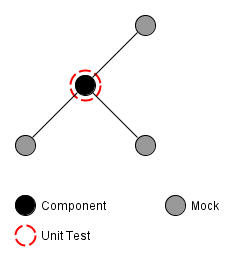
The most basic kind of programmatic tests, unit-tests, are likely to be the most commonly used kind of test. They help to determine that a small piece of code, e.g. a single method or class, behaves as intended by its developer. If properly applied, unit-tests provide a solid foundation to build an application upon. Figure 1 schematically depicts the scope of a unit-test in an exemplary software system.

Depending on the complexity of the tested system, techniques like mocking of dependencies may be required. Especially system resources need to be replaced by mocks, since unit tests need to be completely independent from them (Michael Feathers describes this and some other requirements of unit tests in his blog post “A Set of Unit Testing Rules”). Furthermore, unit tests are not meant to be long running, but instead have to execute within a split second.

Schematic view of a unit test of a component in an exemplary system
Figure 1: Schematic view of a unit test of an component in an exemplary system

Integration Tests

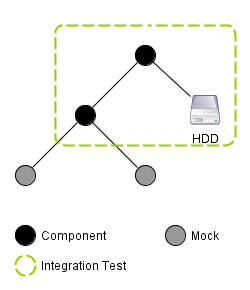
A more sophisticated approach to testing are integration tests which challenge a part or sub-system of an application made up of several units in order to determine whether these units properly cooperate. In contrast to unit tests, integration tests may include system resources and may also determine the test’s outcome by checking the state of these resources. This larger scope and the fact that the tested functionality is typically made up of several actions, leads to integration tests taking a multitude of the time taken by unit tests. Figure 2 schematically illustrates an integration test’s view on an exemplary system.

Schematic of an integration test in an exemplary system
Figure 2: Schematic of an integration test in an exemplary system

Acceptance Tests

The by far most involved technique to test the behavior of an application is the utilization of acceptance tests. While the other approaches challenge only parts of an application, acceptance tests are meant to challenge the application as a whole from a user’s point of view. This includes using system resources, as well as to control the application and verify its proper function as a user would: Through its (G)UI and without knowing anything about the internals of the software.

Schematic of an acceptance test in an exemplary system
Figure 3: Schematic of an acceptance test in an exemplary system

Conclusion

While some developers only distinguish between unit tests and other tests, defining the latter ones more clearly proved very useful when creating, using and explaining them to other developers and customers. Yet, these definitions are not carved in stone and certainly need to be refined over time. Thus, I would like to get to know your opinion on these definitions. Do you agree or do you have a completely different way of distinguishing between test approaches? How many kinds of tests do you distinguish? And why do you do so?

A VisualBasic.NET cheat sheet for Java developers

If you want to learn VisualBasic.NET coming from a Java perspective, we’ve prepared a little cheat sheet to ease the transition.

Sometimes, we cannot choose what language to implement a project in. Be it because of environmental restrictions (everything else is programmed in language X) or just because there’s an existing code base that needs to be extended and improved. This is when our polyglot programming mindset will be challenged. In a recent project, we picked up the current incarnation of VisualBasic, a language most of us willfully forgot after brief exposure in the late nineties, more than 10 years ago.

Spaceward Ho!

So we ventured into the land of VisualEverything, installing VisualStudio (without ReSharper at first) and finding out about the changes in VisualBasic.NET compared to VisualBasic 6, the language version we used back in the days. Being heavily trained in Java and “javaesque” languages, we were pleasantly surprised to find a modern, object-oriented language with a state-of-the-art platform SDK (the .NET framework) and only little reminiscences of the old age. Microsoft did a great job in modernizing the language, cutting out maybe a bit too much language specific stuff. VisualBasic.NET feels like C# with an uninspired syntax.

Making the transition

To ease our exploration of the language features of VisualBasic.NET, one of our student workers made a comparison table between Java and VisualBasic.NET. This cheat sheet helped us tremendously to wrap our heads around the syntax and the language. The platform SDK is very similar to the Java API, as you can see in the corresponding sections of the table. And because it helped us, it might also help you to gain a quick overview over VisualBasic.NET when you are heading from Java.

I have to thank Frederik Zipp a lot for his work. My only contribution to this cheat sheet is the translation from german to english. I can only try to imagine his effort of putting everything together. And while you might read the whole comparison in about 21 minutes (as stated in the title), it’s worth several hours of searching.

The downloads

And without much further ado, here are the download links for the HTML and PDF versions of the “Java vs. VisualBasic.NET cheat sheet”:

You may use and modify the documents as you see fit. If you redistribute it, please adhere to the Creative Commons Attribution-ShareAlike license. Thank you.

Grails: Beware of the second level cache

Know your caches!

Recently we were hunting a strange bug. Take the following domain model:

class Computer {
  Coder coder
}

class Coder {
  static hasMany = [projects:Project]
}

Querying the computer and iterating over the respective coder and projects sometimes resulted in strange number of projects: 1. Looking into the underlying database we quickly found out that the number of 1 was not correct. It got even more strange: getting the coder in question via Coder.get in the loop yielded the correct results. What was the problem?
After some code reading and debugging another query which was called after the first one but before accessing the coder in the loop gave some insight:

  Coder.withCriteria {
    projects {
      idEq(projectId)
    }
  }

This second query also queried the Coder but constrained the projects to a specific one. These coders were populated into the second level cache and when we called computer.coder the second level cache returned the before queried coder. But this coder had only one project!
Since we only needed the number of coders with this project we changed the second
query to using count, so no instances of Coder are returned and thus saved in the second level cache. Bug fixed.

Summary of the Schneide Dev Brunch at 2011-07-17

A summary of our Dev Brunch at Sunday 2011-07-17. You’ll read about conferences, the GRASP principles and some cool projects to know about, mostly.

Last Sunday, the 17th July of 2011, we held another Dev Brunch at our company.

A Dev Brunch is an event that brings three main ingredients together: developers, food and software industry related topics. Given enough time (there is never enough time!), we chat, eat, learn and laugh the whole evening through. Most of the stories and chitchat that is told cannot be summarized and has little value outside its context. But most participants bring a little topic alongside their food bag, something of interest they can talk like 10 minutes about. This blog post summarizes at least the official topics and gives links to additional resources.

Conference review of the Java Forum Stuttgart 2011

The Java Forum Stuttgart is an annual conference held by the Java User Group Stuttgart. It’s the biggest regional Java event and always worth a visit (as long as you understand the german language). This year, the talks stagnated a bit around topics that are mostly well-known.

The best talk was given by Michael Wiedeking from MATHEMA Software GmbH in Erlangen. The talk titled “The next big (Java) thing”, but mostly addressed the history and current state of Java in an entertaining and thought-provoking way. The premise was that you have to know the past and present to anticipate the future. The slides don’t represent the talk well enough, but here’s a link anyway.

Another session introduced the PatternTesting toolkit, a collection of helper classes and useful features that enrich the development of unit testing. Alongside the other spice you can add to unit tests, this project might be worth a look. My favorite was the @Broken annotation that ignores a test case until a given date. It’s like an @Ignore with a best-before date.

There were the usual introductory talks, for example about CouchDB and git/Egit. They were well-executed, but lacked a certain thrill if you heard about the projects before.

As a personal summary, the Java world lacks the “next big thing” a bit.Two buzz products for the next year might be Eclipse Jubula (for UI testing) and Griffon (for desktop application development).

Conference review of the Karlsruhe Entwicklertag (developer day) 2011

The Karlsruhe Entwicklertag is another annual conference, spanning several days and presenting top-notch talks and sessions. It’s the first address for software developers in Karlsruhe that want to stay up to date with current topics and products.

Some topics were presented nearly identically to the Java Forum Stuttgart (but half a year earlier if that matters), while other tracks (like the Pecha Kucha talks) can only be found here.

The buzz product for the next year might be Gerrit (for code review) and Eclipse Jubula again (for UI testing).

As a personal summary, even this conference lacked a certain drive towards real new “big picture” topics. But maybe, that’s just allright given all the hype of the last years.

The GRASP principles

This topic contained hands-on software development knowledge about the nine principles named “GRASP” or General Responsibility Assignment Software Patterns/Principles. There is nothing really new about the GRASP principles, they will only give you common names for otherwise mostly unnamed best practices or fundamental design paradigms and patterns.

We even went through some educational slides that summarize the principles. The most discussion arose about the name “Pure Fabrication” for classes without a relation to the problem domain.

If you are an average experienced software developer, spend a few minutes and scan the GRASP principles so you can combine the name with the specific content.

First-hand experiences of combining work and children

We are well within the best age to raise children. So this topic gets a lot attention, specifically the actual tipps to survive the first two years with kids and how to interact with the different administrative bodies. Germany is a welfare state, but nobody claimed that welfare should be easy or logical. We’ve learned a lot about different reference dates and unusual time partitioning.

Another insight was that working less than 40 percent isn’t really worth the hassle. You are mostly inefficient and aware of it.

That’s all, folks

As always, we shared a lot more information and anecdotes. If you want to participate at one of our Dev Brunches, let us know. We are open for guests and really interested in your topics.

Bogus Error Messages with Qt .ui Files

Name your Qt Forms correctly and you will save lots of debugging time.

Bogus errors together with their messages can have a large number of reasons – full hard drives being one of the classics. When it comes to programming and especially C++, the possibilities for cryptic, meaningless and misleading error message are infinite.

A nice one bit us at one of our customers the other day. The message was something like

QLayout can only have instances of QWidget as parent

and it appeared as standard error output during program start-up. Needless to say that the whole thing crashed with a segmentation fault after that. The only change that was made was a header file that was added to the Qt files list in the CMakeLists.txt file.  The Qt class in this header file was just in its beginnings and had not yet any QLayouts, or QWidgets in it. Even the  C++ standard measure of cleaning and recompiling everything didn’t help.

So how is it possible that an additional Qt header file that has not references to QLayout and QWidget can cause such an error message?

As all of you experienced C/C++ developers know, for the compiler, a code file is not only the stuff that it contains directly but also what is #included! The offending header file included a generated ui description file which you get when you design your windows – or Forms in Qt terminology – with the Qt designer and use the Compile-Time-Form-Processing-approach to incorporate the form into the code base.

But how can that effect anything?

The Qt designer saves the forms into .ui files. From that, the so-called User Interface Compiler (uic) generates a header file containing a C++ class together with inlined code that creates the form. Form components like line edits, or push buttons are generated as instance attributes. The name of the class is generated from the name of the form. You can even use namespaces.  By naming it e.g. myproject::BestFormEverDesigned the generated class is named BestFormEverDesigned   is put into namespace myproject.

So far, so nice, handy and easy to use.

When you create a new form in qt designer, the default name is Form. Maybe you can guess already where this leads to…

Two forms for which the respective developers forgot to set a proper name, existed in the same sub project and had been compiled and linked into the same shared library. The compiler has no chance to detect this, because it sees only one

class Form
{

at a time. The linker happily links all of this together since it thinks that all Forms are created equal. And then at run-time … Boom!

I will have to look into a little Jenkins helper which breaks the build when a Form form is checked in…

Your own dsl: a primer on operators

When writing your own domain specific language (dsl), a full fledged parser generator like antlr can be very helpful with the nitty gritty. You may come to a point where you want to use (infix) operators in your language. But beware! A naive solution might look like:

expr: number '+' expr | number '-' expr | number '*' expr | number '/' expr | …;

If you want to support mathematical like operators this solution misses two important traits: operator precedence and associativity.
Precendence can be easily achieved:

expr: term '+' expr |  term '-' expr | …;
term: number '*' term | number '/' term | …;

The operators with the lowest precedence come first, then the next and so on. Unfortunately this has one side effect: the operators are now right associative.
Which means an expression like 5 – 4 + 3 would evaluate to -2 and not 4. Because of right associativity it is the same as 5 – (4 + 3). So another refinement does the trick:

expr: term (('+'  |  '-' | …) term)*;
term: number (('*' | '/' | …) number)* | …;

How I met my coding style

One of my students recently asked me where I got my coding style from. This blog post tries to answer that really good question.

One of my students recently asked a question that really stuck in my brain: “Where did you get your coding style from?”. The best part of the question was that I didn’t have an answer, until now. I care about coding style a lot and try to talk about it, too. Here are some coding style related blog posts to give you some examples:

Code squiggles were a crazy idea that really provided readability value even after the initial excitement was gone.

Readable code means that you can read the code out loud and it makes sense to (nearly) everyone.

The student wanted to know how to gather the experience to write readable, elegant or just plain crazy code. The answers he anticipated were books or “trial and error”. I’ve come to the conclusion that, while both sources provided enormous amounts of inspiration and knowledge, there’s another single vital ingredient that rounds up the mix: care.

The simple answer to the question is that I cared enough about coding style to gather some knowledge in this field. The more adequate answer is that a lot of factors helped me to improve my coding style.

Books with code examples

Early in my career, I was always looking for programming books with lots of code examples. This is a typical pattern for the novice and advanced beginner stages in the Dreyfus model of skill acquisition. I felt confident when I understood a piece of code and knew that I could produce something similar, given the proper amount of time.

It took a few years of exposure to actual real-life programming to discover that most code examples in books are rubbish. The code exists only as a “textbook example” for the given problem, it isn’t meant to be actually used outside the (often narrow) context. If you stick to copy&paste programming, your code will have the appeal of a patchwork clothing made out of rags. It might fulfill the requirement, but nothing more. You can’t learn style from programming books alone. This isn’t the fault of the books, by the way. Most programming books aren’t about style, but about programming or solving programmer’s problems.

There are a few precious exceptions from the general trend of bad code snippets. For example, Robert C. Martin’s “Clean Code” is a recent book with mostly well-done code listings. The best way to separate ugly code from nice one in books is to re-read them a few years later and try to improve the printed source code.

I encourage you to read as many books about programming as you can possibly handle. Even the bad ones will have an impact and inspire you in some way or the other. Books are like mentors, whereas good books are good mentors. Reading a programming book again after some time will show you how much knowledge you gained in the meantime and how much there’s still to be discovered.

Other people’s source code

The large amount of open source software available to be read in the original version is a gift to every programmer. You can dissect the source code of rock star programmers, scroll over the vast textual deserts of “enterprise code” or digest little gems of pure genius inside otherwise rather dull projects, all without additional cost except the time and attention you’re willing to invest.

When you reach a level of code reading when other people’s code “opens up” to you and you start to see the “deeper motives” or the “bigger picture”, whatever you call it, that’s a magical moment. Suddenly, you don’t read other people’s code, but other people’s minds as they lay out the fundamentals of their software. You’ll begin to read and understand code in larger and larger blocks and see structures that were right there before, but unbeknownst to you.

I doubt you can gain this ability by working with textbook examples, as they are restricted in scope by the very nature of limited print space and a specific topic. The one book that accomplishes something equivalent is “Growing Object-Oriented Software, Guided by Tests” by Steve Freeman and Nat Pryce. It’s a rare gem of truly holistic code examples mixed with the essence of many years of experience.

Other people

As beneficial as reading other people’s source code is, talking with them about it raises the whole experience to another level. If you can get in synch well enough to get past the initial buzzword bombing to show off your leetness, you can exchange coding experience worth many weeks in just a few minutes. And while you are talking with them, why not grab a notebook and type away your ideas?

Most programmers I’ve met, regardless of their skill level, could teach me something. And I’ve had several enlightening moments of novice programmers pointing out something or asking a question in a way that really inspired me. You’ll have to listen in order to learn, as painful or overwhelming as it may be sometimes.

Most people are very shy and insecure about their abilities. Encourage them to tell you more and show your interest in their work. Several noteworthy elements of my coding style were adopted late at night at a bar, when a fellow programmer finally had enough beer to brag about his code.

Own achievements

This one will hurt. Remember the times when you shouted out loud “what the f**k?” over some idiot’s source code? Let this idiot be yourself some months or a year ago. Read your own code. Refactor your own code. Rewrite your own code. It’s the same proceeding our brain performs when we dream at night: It rehashes old memories and experiences and lives through it again, in time lapse mode. As long as you don’t dream about programming (I’ve started to code in my dreams very early and it keeps getting more abstract over the time), the only way to rehash your old code it to live through it again by working with it again.

You’ll put many past achievements into perspective, remembering how proud you were and being embarrassed now. That’s part of the learning process and really shows your progress. Just be aware that today’s triumph will undergo the same transformation sooner or later.

Practice is a big part of gaining experience. And practicing means playing around, making errors, trying crazy new things and generally questioning everything you’ve learnt so far. Try to allocate as much practicing time as you can get (besides reading those books!) and really hone your skills. This works exceptionally well with other people, at a code camp, a code retreat, a hackathon, whatever you call it.

The right mindset

This is the secret ingredient to all the things listed above. Without the right mindset, everything in addition to your day-to-day work will appear like a chore. This doesn’t mean that you’ll have to sacrifice all your spare time to improve your coding style. It just means that you won’t mind reading a good book about programming at the weekend if you’re really enjoying it. You cannot learn this attitude from books or even blog posts, it’s a passion that you’ll have to develop on your own.

I can try to describe a big part of my passion: Nothing is good enough. There is never a “good enough”. I’m not falling into despair over it, it’s just an endless challenge for me. Tomorrow, I will be a little bit better than today. But even tomorrow, I’m not “good enough” and can still improve. Sometimes, my improvement rate is neglectable for a long time when suddenly an inspiration completely rearranges my (programming) world.

I made my last giant leaps in coding style when I deliberately avoided parts of my usual habits during programming and tried to focus on what I really wanted to do right now and how to express it in the best way possible (for me). The result was astonishing and humbling at the same time: there’s so much knowledge to gain, there’s so little I know. But yet, I keep getting better and that really makes me complete.

Old code: The StringChunker

This is a little story about a single piece of (java) code: Why it got written, how it got used, what happened after the initial usage and where it is today. At the end, you’ll get the full source code and a brainteaser.

This will be a little story about a single piece of code: Why it got written, how it got used, what happened after the initial usage and where it is today. At the end, you’ll get the full source code and a brainteaser.

Prelude

In the year 2004, a long-term customer asked us to develop a little data charting software for the web. The task wasn’t very complicated, but there were two hidden challenges. The first challenge was the data source itself that could have outages for various reasons that each needed to be addressed differently. The second, more subtle challenge was a “message from the operator” that should be displayed, but without the comments. Failing to meet any of these challenges would put the project at risk of usability.

On a side note, when the project was finished, the greatest risk to its usability wasn’t these challenges, but some assumptions made by the developers that turned out wrong, without proper test coverage or documentation. But that’s fodder for another blog post.

Why it got written

When addressing the functionality of the “message from the operator”, we developed it in a test-first manner, as the specification was quite clear: Everything after the first comment sign (“#”) must never be displayed on the web. Soon, we discovered a serious flaw (let’s call it a bug) in the java.util.StringTokenizer class we used to break down the string. Whenever the comment sign was the first character of the string, it just got ignored. This behaviour is still present with today’s JDK and will not be fixed, as StringTokenizer is a legacy class now:

public class LeadingDelimiterBug {
@Test
public void ignoresLeadingDelimiter() throws Exception {
StringTokenizer tokenizer = new StringTokenizer("#thisShouldn'tBeShown", "#");
assertEquals("", tokenizer.nextToken());
assertEquals("thisShouldn'tBeShown", tokenizer.nextToken());
}

String.split() wasn’t available in 2004, so we had to develop our own string partitioning functionality. It was my task and I named the class StringChunker. The class was born on a monday, 21.06.2004, coincidentally also the longest day of the year. I remember coding it until late in the night.

How it got used

The StringChunker class was developed test-first and suffered from feature creep early on. As it was planned as an utility class, I didn’t focus on the requirements at hand, but thought of “possibly needed functionality” and implemented those, too. The class soon had 9 member variables and over 250 lines of code. You could toggle between four different tokenizing modes like “ignore leading/trailing delimiters”, which ironically is exactly what the StringTokenizer does. The code was secured with tests that covered assumed use cases.

Despite the swiss army knife of string tokenizing that I created, the class only served to pick the comment apart from the payload of the operator’s message. If the special case of a leading comment sign would have been declared impossible (or ruled out beforehands), the StringTokenizer would have done the job just as good. Today, there is String.split() that handles the job decently:

public class LeadingDelimiterBug {
@Test
public void ignoresLeadingDelimiterWithSplit() throws Exception {
String[] tokens = "#thisShouldn'tBeShown".split("\\#");
assertEquals("", tokens[0]);
assertEquals("thisShouldn'tBeShown", tokens[1]);
}
 

But the StringChunker in summer 2004 was the shiny new utility class for the job. It got included in the project and known to the developers.

What happened afterwards

The StringChunker was a success in the project and soon was adopted to virtually every other project in our company. Several bugs and quirks were found (despite the unit tests, there were edge cases) and fixed. This lead to a multitude of slightly different implementations over the years. If you want to know what version of the class you’re using, you need to look at the test that covers all bugfixes (or lacks them).

Whenever one of our developers had to chop a string, he instantly imported the StringChunker to the project. Not long after, the class got promoted to be part of our base library of classes that serves as the foundation for every new project. Now the StringChunker was available like every class of java.lang or java.util and got used like a commodity.

Where it is today

When you compare the initial implementation with today’s code, there really isn’t much difference. Some methods got rewritten to conform to our recent taste of style, but the core of the class still is a hopeless mess of 25-lines-methods and a mind-boggling amount of member variables and conditional statements. I’m still a little bit ashamed to be the creator of such a beast, even if it’s not the worst code I’ve ever written (or will write).

The test coverage of the class never reached 100%, it’s at 95% with some lines lacking a test. This will be the topic of the challenge at the end of this blog post. The test code never got enough love to be readable. It’s only a wall of text in its current state. We can do better than that now.

The class is so ubiquitous in our code base that more than a dozen other foundation classes rely on it. If you would delete the class in a project of ours, it would definitely fall apart somewhere crucial. This will be the most important point in the conclusion.

The source

If you want to have a look at the complete source of the StringChunker, you can download the zip archive containing the compileable sources from our download server. Please bear in mind that we give out the code for educational purpose only. You are free to adapt the work to suit your needs, though.

An open question

When you look at the test coverage, you’ll notice that some lines aren’t tested. We have an internal challenge for several years now if somebody is able to come up with a test that covers these lines. It might be possible that these lines aren’t logically reachable and should be deleted. Or our test harness still has holes. The really annoying aspect about this is that we cannot just delete the lines and see what happens. Most of our ancient projects lack extensive test coverages, and even if they are tested, there could be a critical test missing, allowing the project to pass the tests but fail in production. It’s just too dangerous a risk to take.

So the challenge to you is: Can you provide test cases that cover the remaining lines, thus pushing the test coverage to 100%? I’m very eager to see your solution.

Conclusion

The StringChunker class is a very important class in our toolset. It’s versatile and well tried. But it suffered from feature creep from the very first implementation. There are too many different operation modes combined in one class, violating the Single Responsibility Principle and agglomerating complexity. The test coverage isn’t perfect, leaving little but enough room for speculative functionality (behaviour you might employ, presumably unaware of the fact that it isn’t guaranteed by tests). And while the StringChunker code got micro-refactored (and improved) several times over the years, the test code has a bad case of code rot, leaving it in a state of paralysis. Before the production code is changed in any manner, the test code needs to be overhauled to be readable again.

If I should weight the advantages provided by this class to the disadvantages and risks, I would consider the StringChunker a legacy risk. It might even be a technical debt, now that String.split() is available. The major pain point is that this class is used way too often given its poor code quality. With every new usage, the direct or assumed cost of code change rises. And the code has to change to comply to our current quality standards.

Finale

This was my confession about “old code” in a blog post series that was started by Volker with his blog post “Old Code”. As a personal statement: I’m embarrassed. I can vividly remember the feeling of satisfaction when this beast was completed. I’m guilty of promoting the code as a solution to every use case that could easily be implemented with a StringTokenizer or a String.split(), just because it is available, too and it contains my genius. After reviewing the code, I hope the bigger genius lies within avoiding the class in the future.

How to accidentally kill your CI build time

At one of our customers I do C++ consulting in a mid-sized project which uses cmake as build system. A clean build on our Jenkins CI server takes about 40 minutes (including unit tests) which is way too long to be considered “fast feedback” in an agile kind of way.

Because of that, we do clean builds only 2 times a day – some time during the night and during lunch break. The rest of the day the CI server only does a “svn update” and a normal “make”, which takes about 3-10 minutes depending on what files have been changed.

With C++ there are lots of ways to unnecessarily lengthen your build time. The most important factor is, of course, #include dependencies. One has to be very (very) disciplined in adding #include directives in header files. Otherwise, the whole world suddenly gets rebuild when some small header file somewhere in a little corner of the code has been changed.

And I have to say, for the most part, this project is in pretty good shape with regard to #include dependencies.

So what the hell has suddenly increased our build time from 3-10 minutes to 20-25 minutes? was what I was thinking some time last week while waiting for the CI server to spit out new latest and greatest rpm packages. For some reason, our normal, rest-of-the-day build started to compile what felt like everything in our main package even on the slightest code change in a remote .cpp file.

What happened?

In order to have the build time available (e.g. to show in an “about” box), we use a preprocessor symbol like REVISION_DATE which gets filled in a CMakeLists.txt file. The whole thing looks like this:

...
EXEC_PROGRAM(date ARGS '+%F_%T' OUTPUT_VARIABLE REVISION_DATE)
...
ADD_DEFINITIONS(-DREVISION_DATE=\"${REVISION_DATE}\")
...

Since the beginning of the time these lines of CMake code lived in a small sub-sub-..-directory with little to no incomming dependencies. Then, at some point, it became necessary to have the REVISION_DATE symbol at some other place, too, which led to a move of the above code into the CMakeLists.txt file of the main package.

The value of command date +%F_%T changes every second which leads to a changed REVISION_DATE on every build – which is what we initially intended. What changes, too, of course, is the value of the ADD_DEFINITIONS directive. And as CMake is very strict with the slightest change in this value, every make target below that line gets rebuild – which in our case was everything in the main package.

So there! Build time killing creatures are lurking everywhere in our C/C++ projects. Always be aware of them!