Modern developer Issue 4: My SQL toolbox

Thinking in SQL

SQL is such a basic and useful language but the underlying thinking is non-intuitive when you come from imperative languages like Java, Ruby and similar.
SQL is centered around sets and operations on them. The straight forward solution might not be the best one.

Limit

Let’s say we need the maximum value in a certain set. Easy:

select max(value) from table

But what if we need the row with the maximum value? Just adding the other columns won’t work since aggregations only work with other aggregations and group bys. Joining with the same table may be straight forward but better is to not do any joins:

select * from (select * from table order by value desc) where rownum<=1

Group by and having

Even duplicate values can be found without joining:

select value from table group by value having count(*) > 1

Grouping is a powerful operation in SQL land:

select max(value), TO_CHAR(time, 'YYYY-MM') from table group by TO_CHAR(time, 'YYYY-MM')

Finding us the maximum value in each month.

Mapping with outer joins

SQL is also good for calculations. Say we have one table with values and one with a mapping like a precalculated log table. Joining both gets the log of each of your values:

select t.value, log.y from table t left outer join log_table log on t.value=log.x

Simple calculations

We can even use a linear interpolation between two values. Say we have only the function values stored for integers but we values between them and these values between them can be interpolated linearly.

select t.value, (t.value-floor(t.value))*f.y + (ceil(t.value)-t.value)*g.y from table t left outer join function_table f on floor(t.value)=f.x left outer join function_table g on ceil(t.value)=g.x

When you need to calculate for large sets of values and insert them into another table it might be better to calculate in SQL and insert in one step without all the conversion and wrapping stuff present in programming languages.

Conditions

Another often overlooked feature is to use a condition:

select case when MOD(t.value, 2) = 0 then 'divisible by 2' else 'not divisible by 2' end from table t

These handful operations are my basic toolbox when working with SQL, almost all queries I need can be formulated with them.

Dates and timestamps

One last reminder: when you work with time always specify the wanted time zone in your query.

Modern developer #3: Framework independent JavaScript architecture

Usually small JavaScript projects start with simple wiring of callbacks onto DOM elements. This works fine when it the project is in its initial state. But in a short time it gets out of hand. Now we have spaghetti wiring and callback hell. Often at this point we try to get help by looking at adopting a framework, hoping to that its coded best practices draw us out of the mud. But now our project is tied to the new framework.
In search of another, framework independent way I stumbled upon scalable architecture by Nicholas Zakas.
It starts by defining modules as independent units. This means:

  • separate JavaScript and DOM elements from the rest of the application
  • Modules must not reference other modules
  • Modules may not register callbacks or even reference DOM elements outside their DOM tree
  • To communicate with the outside world, modules can only call the sandbox

The sandbox is a central hub. We use a pub/sub system:

sandbox.publish({type: 'event_type', data: {}});

sandbox.subscribe('event_type', this.callback.bind(this));

Besides being an event bus, the sandbox is responsible for access control and provides the modules with a consistent interface.
Modules are started and stopped (in case of misbehaving) in the application core. You could also use the core as an anti corruption layer for third party libraries.
This architecture gives a frame for implementation. But implementing it raises other questions:

  • how do the modules update their state?
  • where do we call the backend?

Handling state

A global model would reside or be referenced by the application core. In addition every module has its own model. Updates are always done in application event handlers, not directly in the DOM event handlers.
Let me illustrate. Say we have a module with keeps track of selected entries:

function Module(sandbox) {
  this.sandbox = sandbox;
  this.selectedEntries = [];
}

Traditionally our DOM event handler would update our model:

button.on('click', function(e) {
  this.selectedEntries.push(entry);
});

A better way would be to publish an application event, subscribe the module to this event and handle it in the application event handler:

this.sandbox.subscribe('entry_selected', this.entrySelected.bind(this));

Module.prototype.entrySelected = function(event) {
  this.selectedEntries.push(event.entry);
};

button.on('click', function(e) {
  this.sandbox.publish({type: 'entry_selected', entry: entry});
});

Other modules can now listen on selecting entries. The module itself does not need to know who selected the entry. All the internal communication of selection is visible. This makes it possible to use event sourcing.

Calling the backend

No module should directly call the backend. For this a special module called extension is used. Extensions encapsulate cross cutting concerns and shield communication with other systems.

Summary

This architecture keeps UI parts together with their corresponding code, flattens callbacks and centralizes the communication with the help of application events and encapsulates outside communication. On top of that it is simple and small.

Modern developer Issue #2: RPM like deployment on Windows

Deployment is a crucial step in every development project. Without shipping no one would ever see our work (and we get no feedback if our work is good).

drawer

Often we fear deploying to production because of the effort involved and the errors we make. Questions like ‘what if we forget a step?’ or ‘what if the new version we install is buggy?’ buzz in our mind.
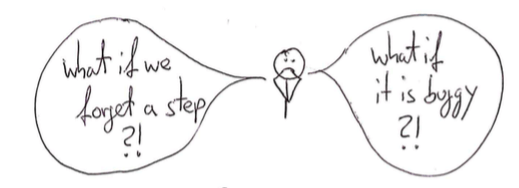
fears

Deployment needs to be a non-event, a habit. For this we need to automate every step besides the first one: clicking a button to start deployment.
deploy

On Linux we have wonderful tools for this but what if you are stuck with deploying to Windows?
brave

Fear not, brave developer! Even on Windows we can use a package manager to install and rollback buggy versions. Let me introduce you to chocolatey.

choco

Chocolatey (or choco in short) uses the common NuGet package format. Formerly developed for the .net platform we can use it for other platforms, too. In our following example we use a simple Java application which we install as a service and as a task.
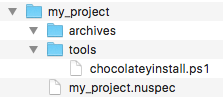
Setting up we need a directory structure for the package like this:

folders

We need to create two files: one which specifies our package (my_project.nuspec) and one script which holds the deployment steps (chocolateyinstall.ps1). The specification file holds things like the package name, the package version (which can be overwritten when building the package), some pointers to project, source and license URLs. We can configure files and directories which will be copied to the package: in our example we use a directory containing our archives (aptly named archives) and a directory containing the installation steps (named tools). Here is a simple example:

<?xml version="1.0" encoding="utf-8"?>
<!-- Do not remove this test for UTF-8: if “Ω” doesn’t appear as greek uppercase omega letter enclosed in quotation marks, you should use an editor that supports UTF-8, not this one. -->
<package xmlns="http://schemas.microsoft.com/packaging/2015/06/nuspec.xsd">
  <metadata>
    <id>my_project</id>
    <title>My Project (Install)</title>
    <version>0.1</version>
    <authors>Me</authors>
    <owners>Me</owners>
    <summary></summary>
    <description>Just an example</description>
    <projectUrl>http://localhost/my_project</projectUrl>
    <packageSourceUrl>http://localhost/git</packageSourceUrl>
    <tags>example</tags>
    <copyright>My company</copyright>
    <licenseUrl>http://localhost/license</licenseUrl>
    <requireLicenseAcceptance>false</requireLicenseAcceptance>
    <releaseNotes></releaseNotes>
  </metadata>
  <files>
    <file src="tools\**" target="tools" />
    <file src="archives\**" target="archives" />
  </files>
</package>

This file tells choco how to build the packages and what to include. For the deployment process we need a script file written in Powershell.
powershell

A Powershell primer

Powershell is not as bad as you might think. Let’s take a look at some basic Powershell syntax.

Variables

Variables are started with a $ sign. As in many other languages ‘=’ is used for assignments.

$ErrorActionPreference = 'Stop'

Strings

Strings can be used with single (‘) and double quotes (“).

$serviceName = 'My Project'
$installDir = "c:\examples"

In double quoted strings we can interpolate by using a $ directly or with curly braces.

$packageDir = "$installDir\my_project"
$packageDir = "${installDir}\my_project"

For escaping double quotes inside a double quoting string we need back ticks (`)

"schtasks /end /f /tn `"${serviceName}`" "

Multiline strings are enclosed by @”

$cmdcontent = @"
cd /d ${packageDir}
java -jar ${packageName}.jar >> output.log 2>&1
"@

Method calls

Calling methods looks a mixture of command line calls with uppercase names.

Write-Host "Stopping and deleting current version of ${packageName}"
Get-Date -format yyyyddMMhhmm
Copy-Item $installFile $packageDir

Some helpful methods are:

  • Write-Host or echo: for writing to the console
  • Get-Date: getting the current time
  • Split-Path: returning the specified part of a path
  • Join-Path: concatenating a path with a specified part
  • Start-Sleep: pause n seconds
  • Start-ChocolateyProcessAsAdmin: starting an elevated command
  • Get-Service: retrieving a Windows service
  • Remove-Item: deleting a file or directory
  • Test-Path: testing for existence of a path
  • New-Item: creating a file or directory
  • Copy-Item: copying a file or directory
  • Set-Content: creating a file with the specified contents
  • Out-Null: swallowing output
  • Resolve-Path: display the path after resolving wildcards

The pipe (|) can be used to redirect output.

Conditions

Conditions can be evaluated with if:

if ($(Get-Service "$serviceName" -ErrorAction SilentlyContinue).Status -eq "Running") {
}

-eq is used for testing equality. -ne for difference.

Deploying with Powershell

For installing our package we need to create the target directories and copy our archives:

$packageName = 'myproject'
$installDir = "c:\examples"
$packageDir = "$installDir\my_project"

Write-Host "Making sure $installDir is in place"
if (!(Test-Path -path $installDir)) {New-Item $installDir -Type Directory  | Out-Null}

Write-Host "Making sure $packageDir is in place"
if (!(Test-Path -path $packageDir)) {New-Item $packageDir -Type Directory  | Out-Null}

Write-Host "Installing ${packageName} to ${packageDir}"
Copy-Item $installFile $packageDir

When reinstalling we first need to delete existing versions:

$installDir = "c:\examples"
$packageDir = "$installDir\my_project"

if (Test-Path -path $packageDir) {
  Remove-Item -recurse $(Join-Path $packageDir "\*") -exclude *.conf, *-bak*, *-old*
}

Now we get to the meat creating a Windows service.

$installDir = "c:\examples"
$packageName = 'myproject'
$serviceName = 'My Project'
$packageDir = "$installDir\my_project"
$cmdFile = "$packageDir\$packageName.cmd"

if (!(Test-Path ($cmdFile)))
{
    $cmdcontent = @"
cd /d ${packageDir}
java -jar ${packageName}.jar >> output.log 2>&1
"@
    echo "Dropping a ${packageName}.cmd file"
    Set-Content $cmdFile $cmdcontent -Encoding ASCII -Force
}

if (!(Get-Service "${serviceName}" -ErrorAction SilentlyContinue))
{
  echo "No ${serviceName} Service detected"
  echo "Installing ${serviceName} Service"
  Start-ChocolateyProcessAsAdmin "install `"${serviceName}`" ${cmdFile}" nssm
}

Start-ChocolateyProcessAsAdmin "set `"${serviceName}`" Start SERVICE_DEMAND_START" nssm

First we need to create a command (.cmd) file which starts our java application. Installing a service calling this command file is done via a helper called nssm. We set it to starting manual because we want to start and stop it periodically with the help of a task.

For enabling a reinstall we first stop an existing service.

$installDir = "c:\examples"
$serviceName = 'My Project'
$packageDir = "$installDir\my_project"

if (Test-Path -path $packageDir) {
  Write-Host $(Get-Service "$serviceName" -ErrorAction SilentlyContinue).Status

  if ($(Get-Service "$serviceName" -ErrorAction SilentlyContinue).Status -eq "Running") {
    Start-ChocolateyProcessAsAdmin "Stop-Service `"${serviceName}`""
    Start-Sleep 2
  }
}

Next we install a task with help of the build in schtasks command.

$serviceName = 'My Project'
$installDir = "c:\examples"
$packageDir = "$installDir\my_project"
$cmdFile = "$packageDir\$packageName.cmd"

echo "Installing ${serviceName} Task"
Start-ChocolateyProcessAsAdmin "schtasks /create /f /ru system /sc hourly /st 00:30 /tn `"${serviceName}`" /tr  `"$cmdFile`""

Stopping and deleting the task enables us to reinstall.

$packageName = 'myproject'
$serviceName = 'My Project'
$installDir = "c:\examples"
$packageDir = "$installDir\my_project"

if (Test-Path -path $packageDir) {
  Write-Host "Stopping and deleting current version of ${packageName}"
  Start-ChocolateyProcessAsAdmin "schtasks /delete /f /tn `"${serviceName}`" "
  Start-Sleep 2
  Start-ChocolateyProcessAsAdmin "schtasks /end /f /tn `"${serviceName}`" "
  Remove-Item -recurse $(Join-Path $packageDir "\*") -exclude *.conf, *-bak*, *-old*
}

tl;dr

Putting it all together looks like this:

$ErrorActionPreference = 'Stop'; # stop on all errors

$packageName = 'myproject'
$serviceName = 'My Project'
$installDir = "c:\examples"
$packageDir = "$installDir\my_project"
$cmdFile = "$packageDir\$packageName.cmd"
$currentDatetime = Get-Date -format yyyyddMMhhmm
$scriptDir = "$(Split-Path -parent $MyInvocation.MyCommand.Definition)"
$installFile = (Join-Path $scriptDir -ChildPath "..\archives\$packageName.jar") | Resolve-Path


if (Test-Path -path $packageDir) {
  Write-Host "Stopping and deleting current version of ${packageName}"
  Start-ChocolateyProcessAsAdmin "schtasks /delete /f /tn `"${serviceName}`" "
  Start-Sleep 2
  Start-ChocolateyProcessAsAdmin "schtasks /end /f /tn `"${serviceName}`" "
  Remove-Item -recurse $(Join-Path $packageDir "\*") -exclude *.conf, *-bak*, *-old*

  Write-Host $(Get-Service "$serviceName" -ErrorAction SilentlyContinue).Status

  if ($(Get-Service "$serviceName" -ErrorAction SilentlyContinue).Status -eq "Running") {
    Write-Host "Stopping and deleting current version of ${packageName}"
    Start-ChocolateyProcessAsAdmin "Stop-Service `"${serviceName}`""
    Start-Sleep 2
  }

  if ($(Get-Service "$serviceName"  -ErrorAction SilentlyContinue).Status -ne "Running") {
    Write-Host "Cleaning ${packageDir} directory"
    Remove-Item -recurse $(Join-Path $packageDir "\*") -exclude *.conf, *-bak*, *-old*
  }
}
 
Write-Host "Making sure $installDir is in place"
if (!(Test-Path -path $installDir)) {New-Item $installDir -Type Directory  | Out-Null}

Write-Host "Making sure $packageDir is in place"
if (!(Test-Path -path $packageDir)) {New-Item $packageDir -Type Directory  | Out-Null}

Write-Host "Installing ${packageName} to ${packageDir}"
Copy-Item $installFile $packageDir

if (!(Test-Path ($cmdFile)))
{
    $cmdcontent = @"
cd /d ${packageDir}
java -jar ${packageName}.jar >> output.log 2>&1
"@
    echo "Dropping a ${packageName}.cmd file"
    Set-Content $cmdFile $cmdcontent -Encoding ASCII -Force
}

if (!(Get-Service "${serviceName}" -ErrorAction SilentlyContinue))
{
  echo "No ${serviceName} Service detected"
  echo "Installing ${serviceName} Service"
  Start-ChocolateyProcessAsAdmin "install `"${serviceName}`" ${cmdFile}" nssm
}

Start-ChocolateyProcessAsAdmin "set `"${serviceName}`" Start SERVICE_DEMAND_START" nssm

echo "Installing ${serviceName} Task"
Start-ChocolateyProcessAsAdmin "schtasks /create /f /ru system /sc hourly /st 00:30 /tn `"${serviceName}`" /tr  `"$cmdFile`""

Finally

Now we just need to create the package in our build script. The package will be named my_project.version.nupkg.
On our build machine we need to install choco. On the target machine we need the following tools installed:
chocolatey and nssm (for service management). Now we can create the package with:

  choco pack --version=${version}

Copy it to the target machine and install the current version with:

choco install -f -y c:\\installations\\${archive.name} --version=${version}

Put these steps inside a build script and use your favourite contininuous integration platform and voila.
Done.

deploy

A zine for the modern developer

A new zine for the modern developer, this time about CQRS

Martin Fowler once said:

Test for value of an article isn’t novelty of its ideas, but how many who could benefit who haven’t considered them, or are using them badly

So I thought that I should share some things I am learning and have learned as a software developer. Maybe one time I will write a book but this requires a huge effort. Luckily Julia Evans (thank you!) just wrote a post having the same dilemma. She decided to create and publish a lean version of a book: a zine.
This pushed me to do my own zine. I believe that a modern software developer is confronted with many topics besides programming and so the topics will range from software architecture over user experience (UX) to marketing.
My first zine is about CQRS, an architecture I am excited about. Enjoy (PDF download).

Getting better at programming without coding

Almost two decades ago one of the programming books was published that had a big impact on my thinking as a software engineer: the pragmatic programmer. Most of the tips and practices are still fundamental to my work. If you haven’t read it, give it a try.
Over the years I refined some practices and began to get a renewed focus on additional topics. One of the most important topics of the original tips and of my profession is to care and think about my craft.
In this post I collected a list of tips and practices which helped and still help me in my daily work.

Think about production

Since I develop software to be used, thinking early about the production environment is key.

Deploy as early as possible
Deployment should be a non event. Create an automatic deployment process to keep it that way and deploy as early as possible to remove the risk from unpleasant surprises.

Master should always be deployable
Whether you use master or another branch, you need a branch which could always be deployed without risk.

Self containment
Package (as many as possible of) your dependencies into your deployment. Keep the surprises of missing repositories or dependencies to a minimum of none.

Use real data in development
Real data has characteristics, gaps and inconsistencies you cannot imagine. During development use real data to experience problems before they get into production.

No data loss
Deploying should not result in a loss of data. Your application should shutdown gracefully. Often deployment deletes the directory or uses a fresh place. No files or state in memory should be used as persistence by the application. Applications should be stateless processes.

Rollback
If anything goes wrong or the new deployed application has a serious bug you need to revert it to the last version. Make rollback a requirement.

No user interruption
Users work with your application. Even if they do not lose data or their current work when you deploy, they do not like surprises.

Separate one off tasks
Software should be running and available to the user. Do not delay startup with one off admin tasks like migration, cache warm-up or search index creation. Make your application start in seconds.

Manage your runs
Problems, performance degradation and bugs should be visible. Monitor your key metrics, log important things and detect problems in the application’s data. Make it easy to combine, search and graph your recordings.

Make it easy to reproduce
When a bug occurs or your user has a problem, you need to follow the steps how the system arrived at its current state. Store their actions so that they can be easily replayed.

Think about users

Software is used by people. In order to craft successful applications I have to consider what these people need.

No requirements, just jobs
Users use the software to get stuff done. Features and requirements confuse solutions with problems. Understand in what situation the user is and what he needs to get to his goal. This is the job you need to support.

Work with the user
In order to help the user with your software I need to relate to his situation. Observing, listening, talking to and working along him helps you see his struggles and where software can help.

Speak their language
Users think and speak in their domain. Not in the domain of software. When you want to help them, you and the user interface of your software needs to speak like a user, not like a software.

Value does not come from effort
The most important things your software does are not the ones which need the most effort. Your users value things which help them the most. Find these.

Think about modeling

A model is at the core of your software. Every system has a state. How you divide and manage this state is crucial to evolving and understanding your creation.

Use the language of the domain
In your core you model concepts from the user’s domain. Name them accordingly and reasoning about them and with the users is easier.

Everything has one purpose
Divide your model by the purpose of its parts.

Separate read from write
You won’t get the model right from the start. It is easier to evolve the model if read and write operations have their own model. You can even have different read models for different use cases. (see also CQRS and Turning the database inside out)

Different parts evolve at different speeds
Not all parts of a model are equal. Some stand still, some change frequently. Some are specified, about some others you learn step by step. Some need to be constant, some need to be experimented with. Separating parts by its changing speed will help you deal with change.

Favor immutability
State is hard. State is needed. Isolating state helps you understand a running system. Isolating state helps you remove coupling.

Keep it small
Reasoning about a large system is complicated. Keep effects at bay and models small. Separating and isolating things gives you a chance to overview the whole system.

Think about approaches

Getting to all this is a journey.

When thinking use all three dimensions
Constraining yourself to a computer screen for thinking deprives you of one of your best thinking tools: spatial reasoning. Use whiteboards, walls, paper and more to remove the boundaries from your thoughts.

Crazy 8
Usually you think in your old ways. Getting out of your (mental) box is not easy. Crazy 8 is a method to create 8 solutions (sketches for UI) in a very short time frame.

Suspend judgement
As a programmer you are fast to assess proposals and solutions. Don’t do that. Learn to suspend your judgement. Some good ideas are not so obvious, you will kill them with your judgement.

Get out
Thinking long and hard about a problem can put you into blindfold mode. After stating the problem, get out. Take a walk. Do not actively think or talk about the problem. This simulates the “shower effect”: getting the best ideas when you do not actively think about the problem.

Assume nothing
Assumptions bear risks. They can make your project fail. Approach your project with what is certain. Choose your direction to explore and find your assumptions. Each assumption is an obstacle, an question that needs an answer. Ask your users. Design hypotheses and experiments to proof them. (see From agile to UX for a detailed approach)

Pre-mortem
Another way to find blind spots in your thinking is to frame for failure. Construct a scenario in which your project is failed. Then reason about what made it fail. Where are your biggest risks? (see How to map your fears for details)

MVA – Minimum, valuable action
Every step, every experiment should be as lightweight as possible. Do not craft a beautiful prototype if a sketch would suffice. Choose the most efficient method to get further to your goal.

Put it into a time box
When you need to experiment, constrain it. Define a time in which you want to have an answer. You do not need to go the whole way to get an impression.

From Agile to UX: a change in perspective

Usually a project starts with a client sending us a list of requirements in varying levels of detail. In my early days I started with finding the most efficient way to fulfill these requirements with written software.

Over time and with increased experience I broke down the large requirements into smaller ones. With every step I tried to get feedback from the client if my solution matched his imagination.

Step by step I refined this iterative process by developing more efficiently, getting earlier feedback, testing and asking questions for more detail about the constraints of the solution. Sometimes I identified some parts that weren’t needed in the solution.

In the journey to getting more agile I even re-framed the initial question from ‘how can I get more efficiently to a satisfying solution’ to ‘which minimal solution brings the most value to the customer’.

This was the first change of perspective from the process of solving to a process of value. But a problem still persisted: the solution was based on my assumptions of what I believe that brings value to the customer.
The only feedback I would get was that the customer accepted the solution or stated some improvements. But for this feedback I had to implement the whole solution in software.

The clash of worlds: agile and UX

Diving into the UX and product management world my view of software development is questioned at its foundation. Agile software development and development projects in general start with a fatal assumption: the goal is to bring value through software that fulfills the requirements. But value is not created by software or by satisfying any requirements. For the user value is created by helping him getting his jobs done, helping him solving his problems in his context.

This might sound harsh but software is not an end in itself but rather one way to help users achieve their goals.
On top of that requirements lack the reasons why the user needs them (which jobs they help the user do) and in which situation the user might need them (the context).
In order to account this I need to change my focus away from defining the solution (the requirements) to exploring the users, their problems and their context.

The problem with finding problems

As a software developer I am skilled in finding solutions. Because of this I have some difficulties in finding the problems without proposing (even subconsciously) a solution right away. If you are like me while talking with a client or user I tend to imagine the possible solutions in my head. On top of that missing details that are filled by my experience or my assumptions. The problem is that assumptions are difficult to spot. One way is to look at the language. A repeatable way is to use a process for finding them.

The product kata

Recently I stumbled upon an excellent blog post by Melissa Perri, a product manager and UX designer. In this post she describes a way named ‘the product kata’.

The product kata starts with defining the direction: the problem, job or task I want to address.
After a listening tour with the different stakeholders (including clients and users), the requirements list and a contextual observation of the current solution I can at least give a rough description of the problem.

These steps help me to get a basic understanding of the domain and the current situation. In my old way of doing things I would now rush towards the solution. I would identify the next step(s) bearing the most value for the client and along the way remove the shortcomings of the current solution. But wait. The product kata proposes a different way.

A different way

Let’s use an example from a real project. Say the client needs a way to check incoming values measured by some sensors. The old solution plots these values over time in a chart. It lacks important contextual information, has no notion of what ‘checking the values’ mean and therefore cannot document the check result. Since the process of checking the values is central to the business we need to put it first and foremost. Following the product kata I define the direction as ‘check the sensor values’.

Direction: check the sensor values

To see if I reached the goal the kata needs a target condition which I define as ‘the user should be able to check the sensor values and record the check result’.

Target condition: the user should be able to check the sensor values and record the check result

Currently the user isn’t able to check anything. So the next step of the kata is to look at the current condition. If the current condition matches the target condition I am done. The current condition in my example is that the user cannot check the sensor values in the right way.

Current condition: the user cannot check the values in the right way

The first obstacle to achieving the target condition is that I don’t know what the right way is. Since the old solution lacks some important information to fulfill the check my first obstacle I want to address is to find out what information does the user need.

Obstacle: what additional information (besides the values themselves) does the user need

Since the product kata originates from lean product management I need to find an efficient step which addresses this obstacle. In my case I choose to make a simple paper sketch of a chart and interview the user about which data they needed in the past.

Step: paper sketch of chart (to frame the discussion) and interview about information needed in the past

I expect to collect a list with all the information needed.

Expected: a list of past data sources which helped the user in his check process

After doing this I learned what information should be displayed and which information (from the old solution) was not needed in the past.

Learned: two list of things: what was needed, what not

Now I repeat the kata from the start. The current condition still not matches the target condition. My next obstacle is that we do not know from the vast resources of information that is needed and the possible actions during the check which are related, form a group or are the most important ones. So my next step is to do a card sort with the users to take a peek into their mental model. I expect to find out about the priorities and grouping of the possible information and actions.

After I gathered and condensed the information from the card sorts, my next obstacle is to find out more about the journey of the user during the check and the struggles he has. From my earlier contextual observation I have the current user journey and the struggles along the way. Armed with the insights from the earlier steps I can now create a design which maps the user journey and addresses the struggles with the data and the actions according to the mental model of the user.
For this I develop a (prototypical) implementation in software and test them with a group of users. I expect to verify or find problems regarding the match of the mental model of the user and my solution.
This process of the product kata is repeated until the current condition meets the target condition.

Why this is needed

What changed for me is that I do not rush towards solving the problem but first build a solid understanding by learning more about the users, their jobs and contexts in a directed way. The product kata helps me to frame my thoughts towards the users and away from the solution and my assumptions about it. It helps me structure my discovery process and the progress of the project.
My old way started from requirements and old solutions improving what was done before. The problem with this approach is that assumptions and decisions that were made in the past are not questioned. The old way of doing things may be an inspiration but it is not a good starting point.
Requirements by the client are predefined solutions: they frame the solution space. If the client is a very good project manager this might work but if I am responsible for leading the project this can lead to a disaster.
The agile way of developing software is great at executing. But without guidance and a way of learning about the users and their problems, agile software development is lost.

What I’ve learned in UX in the first half of 2016

The first part of my journey to better software

Since the beginning of the year we as a team of developers started meeting 1-2 times a month talking about UX design. Urged with a motivation to create better software for our clients and serve them better I started the conversation inside our company. Years ago I read classics like Alan Cooper’s The Inmates and Don Norman’s The Psychology of Everyday Things. They left me with a craving to create something more fitting for users but I had no place where to start. At the turn of the year I focused on learning as much as I can about UX, product design and design in general. Here’s my list of insights I gained in these 6 months (in no particular order):

  • doing UX means changing the culture and mindset of the whole company from technology to people
  • nothing beats exposure to real users in their contexts (source)
  • contextual observation and interviews are key and the most profitable and motivating method to find out more about your users
  • analytics and data can tell you more about what user do, interviews why are they doing it
  • in the enterprise context where we are it is sometimes difficult if not impossible to gain access to users
  • some methods from UX feel a bit squishy and the value of doing them not apparent
  • traditional (UX) designers have a hard time talking about the value of UX for the business
  • the definition of UX is all including at best and inconsistent at worst, but it doesn’t really matter to me as I want to improve the software we write regardless of what it is called or which responsibility it is
  • in order to craft a better user experience our development process has to change drastically
  • the creative method (observe, reflect, make) is a way to order my concepts about UX
  • users behave differently in different situations, the better way to capture that is jobs to be done not persona
  • the UI layer is where experiments are made, therefore it should be changed more easily than other parts
  • assumptions are very dangerous, trying to validate or falsify them
  • you have to live with assumptions, know their risk
  • conversations are the way to spread knowledge, not documentation and not presentations
  • let users or stakeholders talk, do not complete thoughts for them, get comfortable with silence
  • the user has a whole different view of your UI than you
  • I have to learn to suspend judgement
  • ask why but not endlessly
  • the struggling moments of your users are the best points to start for a better solution
  • understand the problem, the context and the user’s motivations better
  • requirements are liars
  • use whiteboards more, they help me to think spatially
  • if you cannot argue for a design, the client overruns you with his taste
  • think in systems, systems of people and design systems
  • small usability improvements are easy and therefore we often tend to flock to them
  • conversations with people are hard therefore we tend to avoid asking the hard and important questions

In future posts I will write in more detail about each of the points.

Requirements should not drive development

I want to make the work of engineers better. Requirements and user stories are just too solution focused and miss important details to drive any software development effort which wants to help people doing a better job.

For more than a decade I develop software for engineers. The software they use is coined by vendor lock-ins, terrible interfaces and dowdy technology. In the last years I am struggling to find a better way to make tools that help them to get their jobs done. In a more pleasant and efficient way. My journey started with trying to make the internal quality of the software better through practices like clean code, TDD and the like. Maybe the software got more robust but the benefit on the user side of things was negligible.
So I turned to learning user experience design (UX). A vast land of new unknown concepts, theories and practices lays before me. So big that even practitioners in the field cannot agree what UX is.
The label isn’t important to me.

I want to make the work of engineers better.

To make the work better I have to learn more about the people and the work. The importance of domain knowledge is undisputed in the software development world. And collaboration is a pillar of modern software projects. But after reading and practicing several methods to uncover information about people and their work (read: user research) I found the traditional way of communicating inside a software project lacking.
Normally a software project starts with gathering requirements. Requirements describe what the software should do in an abstract way. For example: the software should calculate the balance of the user’s bank account. How did we found out that this is a requirement? We interviewed a stakeholder.
At first sight this might sound reasonable. Looking closer we find many problems with this approach.
First in the context of enterprise software where I work the user and the stakeholder are often different people. Even more alarming is that we talk about the wants of the solution. We have no indicator what problems does this requirement try to solve. Without knowing what we want to solve we are doomed. We are imaging an illusion.
Now even if the one who made all research and wrote the requirements knows the problems he wants the software to address the requirement is a very poor communicator. We need to spread the knowledge about the problems throughout the team. The agile approach to include roles (as a), actions (I want to) and outcomes (so that) in so called user stories is not much help.
In order to know what properties a solution must have we need to understand the user and his work. For this we need to see his context, the situation he is in. In different situations he might want to do different things. So we need to capture his motivation and of course his goals.

Jobs to be done – job stories

In the search for a better way to communicate what we find out during research I stumbled across the jobs to be done methodology. Coming originally from marketing several teams adapted this way of thinking to product development. I think Paul Adams mentioned and Alan Klement developed the idea of the job story and several others have had a great success implementing it.
What’s in a job story? A job story take the form: When (situation), I want to (motivation), so I can (expected outcome).
Now the first part captures one of the most important concepts of UX: the context.

The situation

Context is so much more than I naively imagined: it is not location and surroundings. Context or better the situation is what happened before in the environment, in the system and for the user. Developers might call it the state of these. For example: When I am about to buy a car, when I start a measurement, when I am leading the race, when my application crashed, …
The situation and what happened just before is crucial to get a sense of what the user is struggling with.

The motivation

The user wants to move from the current situation to his goal. Why? And what is important for him? What might hinder him to do so? The jobs to be done framework calls this forces. We have 4 forces:

  • push of the current situation: what is bad now
  • pull of the future: what is good then
  • habits: business as usual might hinder progress
  • anxiety: the fear of the new might bring hesitation

These forces help us to document needs of the user in the current situation. If we want to better support the user we need to care about him as a person, not just as a machine going from one state to the next. Forces help us to communicate needs. Again a property the current solutions of documenting requirements lack.

The outcome

What benefit does the user get from his actions? He has a goal. We need to know his goals in his current situation to help him get there. Beware: this is not just a feature of the system, it is an understanding the user gets, an accomplishment, a symbol of status. The benefit is the value the user gets.

Conclusion

Describing situations in which people struggle to get to the wanted outcomes and goals helps us relating to them. It helps us documenting findings and communicate them to other team members. When evaluating different solutions we can lean on the job stories to determine if they fit. Requirements and user stories are just too solution focused and miss important details to drive any software development effort which wants to help people doing a better job.

Modular development of complex UIs with atomic design

Creating user interfaces is traditionally an expensive development effort. Every web page, dialog or screen is hand crafted from scratch. Developers on the one hand write object oriented, modular code in the whole application but as soon as the UI level is reached everything breaks down.

Creating user interfaces is traditionally an expensive development effort. Every web page, dialog or screen is hand crafted from scratch. Developers on the one hand write object oriented, modular code in the whole application, use myriads of frameworks and libraries but as soon as the UI level is reached everything breaks down. Each view is written in isolation.
Designers have a different view of the UI. They see the interface through the lens of style guides and guidelines. The look and feel throughout the interface should be consistent and should be experienced as a whole.

Atomic design

These two worlds can be combined.
Many designers and developers see the need to design and create design systems. Brad Frost is the one who coined and describes a language for structuring user interfaces: atomic design. The names take heavy cues from chemistry but the important part is the containment part.
Atoms are the low level building blocks: e.g. the widgets in native UI kits or the tags in the web world. But also things like colors or type faces are atoms.
Molecules are simple combinations of atoms. A search field which is comprised of a label, a text field and a button is a molecule.
Organisms are more complex UI components. Organisms can be created from atoms, molecules and other organisms. A complete form would be a perfect example.
Combining all these into a full page or window layout is called a template in atomic design. This template is the abstract definition, the blueprint of the complete screen or page.
Filling this template with content results in a page.
All this sounds pretty abstract and the examples found in the web are very basic so let’s dive in and identify the parts in an example UI.

Decomposing a complex UI

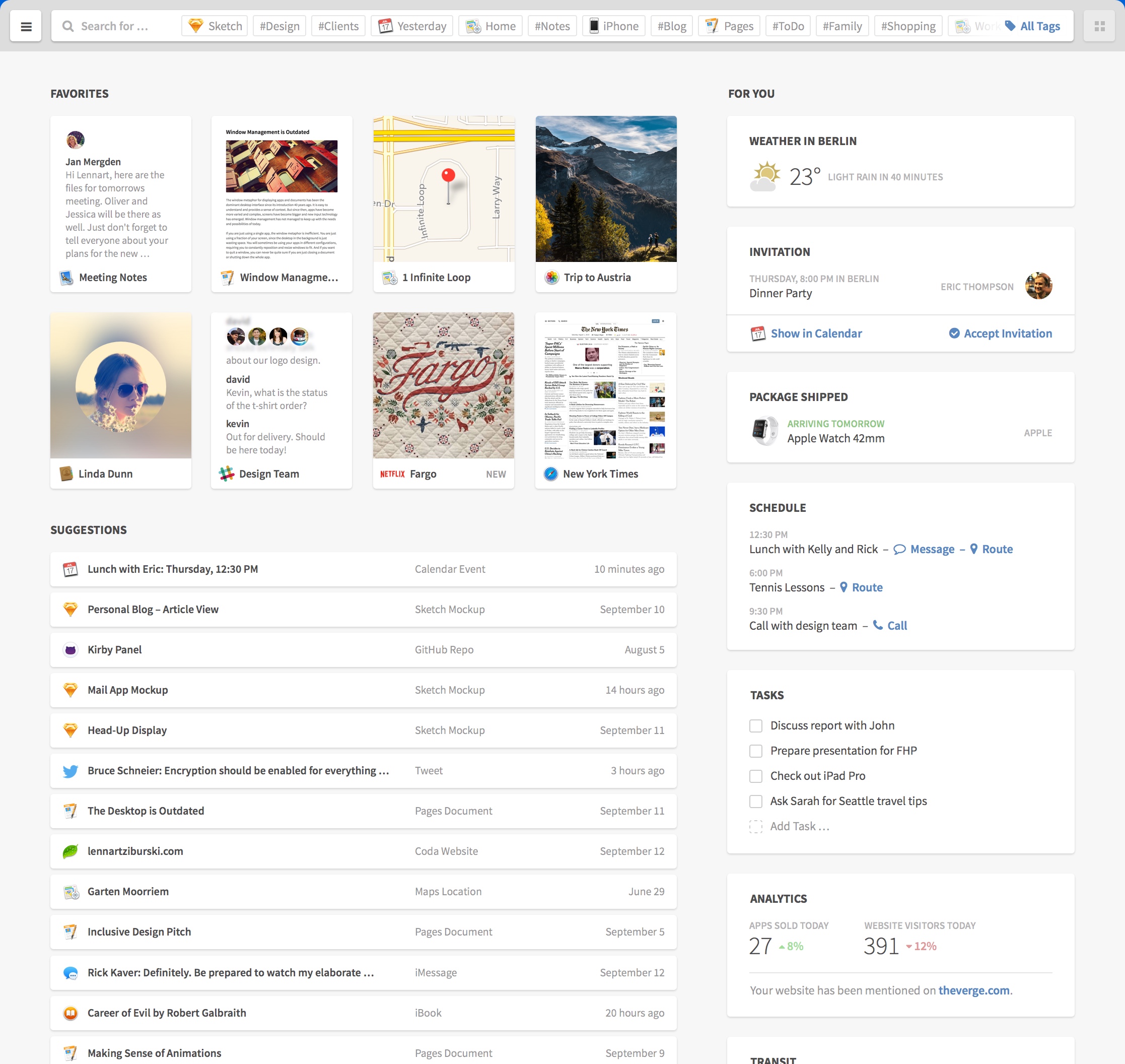
Here we take an example from the excellent UI concept by Lennart Ziburski: desktop neo. (If you haven’t seen this, you should take a look).

finder

Our first decomposing task is to identify distinct parts of the user interface and give them names. These would be the organisms.

organisms

Interlude: how to name things

As with every naming endeavor it is hard to decide which name is appropriate. Dan Mall argues in favor of display patterns to be name givers. Display patterns describe the (abstract) visual aspect and can be used with multiple content patterns. Content patterns describe the types of elements and can be rendered in multiple display patterns. Since we want to name an organism which is content agnostic we should take cues from the visual appearance not the content inside it.

Decomposing further

Now we break those organisms further down. Let’s start with the card grid organism. As the name already suggests it organizes cards in a grid or tabular layout. We have different kinds of cards. First take a look at the preview card at the left.

preview_card

The preview card consists of a thumbnail showing a preview of an item, an icon and a label. This is a simple interface element and is therefore a molecule created from the three mentioned atoms. A name for this molecule could be “image with caption”.

Interlude: testing states in the abstract

Our example touches an important and often neglected part of interfaces: you need to test for different content. Here the longer name is cut with an ellipsis. This is a simple case. But what if the name is missing? Or has unusual characters. Or or or. Besides that we need to indicate the current state of the interface as well. Do we have an error? Are we loading something? Interfaces have different states. Five to be exact. The good part is that we can (and should) test them on the abstract level of atoms, molecules and organisms.

A more complex organism

The cards in the right card grid are more complex examples. Every card is an organism with a title (atom) and a content part (molecule/organism).

The weather card has a simple molecule consisting of an icon and two labels.

weather_card

Whereas the schedule card consists of a list organism which itself includes molecules. These molecules have two labels and one or more actions (links or buttons).

schedule_card

The other parts of the interface can be decomposed as well. Charlotte Jackson describes an interesting approach to decomposing your existing interfaces: print them out, cut them to pieces and name these pieces.

Making the jump

Until now we talked about the designer’s view of the interface but the developer has to translate all these definitions into code and hook them up to content. The approach from the atomic design side is largely the same for web or native but in development we have to distinguish between them.

On Rails

Let’s first take a look at the web side of things. We could use a client side component framework like react but here are like to keep it simple.
We just use Rails in our example but every other web framework will work as well. We need to organize our newly defined chemistry lab in three parts: HTML (or views), CSS and JavaScript.
For CSS and JavaScript we use the include mechanism of the asset pipeline or import if you use SASS. Each dimension gets a separate directory inside app/assets/stylesheets or app/assets/javascripts respectively.
We name our directories atoms, molecules and organisms. The same is true for views: a directory named molecules and one named organisms inside app/views/atomic_design. No need for atoms since they are basic HTML tags or helpers. Atomic design’s templates become Rails’ layouts. Via calls to render we can inject content into these abstract organisms:

<%= render layout: '/atomic_design/organisms/card', locals: {title: 'weather in Berlin'} do %>
  <%= render layout: '/atomic_design/molecules/image_with_text', locals: {image_class: 'fa_sunny'} do %>
    <span class="temperature">23 °C</span><span class="condition">Sunny</span>
  <% end %>
<% end %>

Native

On the native side we also need a component and include mechanism. Usually every widget toolkit has a preferred way to create custom components or containers. If you develop for iOS you extend the UIView class in order to create a custom UI component. These custom views would be the molecules and organisms of our design system. To combine them you add them to other views as their subviews. The init* or properties can be used to fill these with content. The actual mechanism is similar for most native UI kits.

Design with benefits

Using atomic design to create a design system seems to be a lot of work at first. And it is.
We already mentioned two benefits: creating a common understanding and a better way to test things in isolation. Design systems help all project participants, not only designers and developers, to share a common language and understand each other. They help new members to hit the ground running. With tools like pattern lab your atomic design can also be used as documentation.
On the testing front the holy grail is to test things in isolation and in integration, atomic design and its strict separation helps immensely. Often only the sunshine or ideal state is tested and maybe a handful of error states. Thinking in isolation of molecules and organisms about the whole five states and the diverse structure of your content creates a manageable endeavor and maps a path through the jungle of our interfaces. The value which atomic design brings to the table is that your efforts to test scale with the number of molecules and organisms and not with the number of pages or screens. The isolation which a design system, and in particular atomic design, creates is comparable to the advent of unit testing in the world of software development. The separation of display patterns and content patterns reminds me of the functional paradigm with its separation of data and functions.

Beyond agile: building on the roots

Software development changes. Over a decade ago the agile manifesto adduced evidence that the document heavy processes needed to change.

Software development changes. Over a decade ago the agile manifesto adduced evidence that the document heavy processes needed to change.
Before that progress was measured by producing documents, a big planning and design phase was held at the start of every project to minimize the risk of producing the wrong software. Requirements were carved into stone. Changes later in the processes were shunned.
Agile changed all that. And besides losing some valuable practices (like documentation) recent developments call for a new form and focus of software development.
What changed? Software is now used by all kinds of people. This is not new. But design, user experience (UX), user focus and so on need to be an integral part of software development.

Business people and developers and designers must work
together daily throughout the project.

Nowadays developers need to interact not only with business people but with designers as well. Especially the waterfall like processes from the UX design or product management world struggle with the iterative and highly unplanned nature of agile.

Deliver working software value continuously frequently, from a couple of weeks to a couple of months, with a preference to the shorter timescale.

Agile only thinks in iterations or sprints. Even this changed with continuous delivery and lean development. The focus is not so more on a plannable release schedule but on bringing value to the customer.

Our highest priority is to satisfy the customer and the users
through early and continuous delivery of valuable software.

With a user focussed process not only the customer but also the user needs to be satisfied. UX design has this focus.
But UX design needs a significant research (developers call this analysis), design and test phase up front. So in practice this is masked as a big sprint 0.
Unfortunately agile has no concept of planning, design or analysis. The agile philosophy concentrates on execution. This has lead to the notion that planning can be done in every iteration.

Simplicity–the art of maximizing the amount of work not done– Managing and understanding complexity–the art of finding the right places where to invest into details– is essential.

As little planning, design and analysis as possible. The famous pendulum swings the other way. In order to avoid the planning heavy processes from the past, agile ignored and many practitioners even shunned these practices. As many designers can tell us, you need a good foundation to start with. Research is needed. “But these requirements will change” I hear the cries of the past.

Welcome changing requirements, even late in development. Agile processes harness change for the customer’s competitive advantage and the user’s delight.

A dilemma. On the one hand we need an initial investment for a good foundation. On the other hand we know that many things will change during the course of the project. We are stuck.

The best architectures, requirements, and designs solutions emerge from self-organizing teams.

One key principle that the UX design world has to offer for software development is the reasoning. Everything builds upon another thing. There is an incentive to find the cause, to construct a chain of whys. Requirements do not emerge from teams. They are grounded in user needs and business goals. These form the foundation of every user centered project.

At regular intervals All through the project, the team reflects on how to become more effective, then tunes and adjusts its behavior approach accordingly.

The agile philosophy has one core principle which helps to build a bridge between the worlds of development and design: continuous feedback.
In order to build reasoning you need to test your assumptions. UX has many practices to validate assumptions: interviewing, prototyping, analytics.
Feedback is a vital to a project and needs to be included in every action, not only the technical and measurable ones.
This feedback needs to be continuous. Regular intervals won’t cut it anymore.
We need to remove the notion of phases, iterations and sprints from our thinking. We have to define practices that help to build software that meets goals and satisfies needs. These build upon another by reasoning and on demand, not when a time plan demands it. We cannot freeze features for an iteration. Work needs to be organized around streams not iterations. These are not isolated.
Lean thinking tries to foster the notion of bringing constant value to the customers and users. Value streams.
A stream has no defined time frame or regular interval.

Working software is Goals met and satisfied needs are the primary measure of progress.

To bring design into the boat we need move the focus away from requirements and features to goals and needs. Streams of development need to identify, evaluate and build these jobs to be done, the goals. Designers bring the user needs to the table. Developers add the technical constraints. Together all these three factors, business goals, user needs and technical constraints, are balanced by the team.
All this is not new. And in practice many feedback steps or actions are omitted because of time, budget and other constraints. Information and insights are lost because of communication or documentation problems.

The most efficient and effective method of conveying information to and within a development team is face-to-face conversation.

Teams should consist of developers and designers. Both need to be present in a kind of pair. Not pair programming. Pair everything. Decisions are made at every step. All three factors need to be considered.
Right now this seems to be pretty abstract and I think we should break it down.
What are the actions during a project?

Listen

A project should start with listening (but it doesn’t need to). And listening should never stop. Listen to the customer, to the users, to the systems, to the code.

Reflect

With all that information you get from listening you constantly need to filter, to reflect, to think. What is important? What not? What is an assumption? What has changed? What needs to be together? What needs to be separated? What forms a whole? What is missing? What is common? What is different? Are we moving towards the goals or away?
Ordering and prioritizing is one of the most important tools we have to bring sense to the mess.

Imagine

How can all this information be translated into software? Into a user interface. Into parts of the software architecture. How will it be deployed? What is the environment? For the user and for the system.
Design systems, guidelines for design and development need to be constructed.

Test

Is my thinking and imaging, the design, right? Does it meet the goal? Is it fast enough? Are the technical constraints met? Does it help the user? All of this needs to be tested. Whether you use the real software, prototypes or other means: you need to remove assumptions and find proof that your translations of information into software works.

Create

This should be obvious. You need to write the software and the documentation.

Ship

Without ever reaching the user, software is worthless. It needs to be shipped. Continuously.

Build projects around motivated individuals. Give them the environment and support they need, and trust them to get the job done.

Every action happens all the time. There’s no right order of steps. This might sound chaotic.
But a project is more like the exploration of unknown terrain. You do not know beforehand what the terrain will be like. You will need to improvise. For this it is better to have practices and principles which help you recognize and react to change.
This change comes from questioning assumptions and furthering your understanding of the goals and needs. Change does not come out of nowhere. Be prepared to react to it.

Reality

One big problem from talking about development and design processes comes from the huge gap between ideal and real world. In the real world there’s not enough time, money, skills, people.

Agile processes promote sustainable development. The sponsors, developers, designers and users should be able to maintain a constant pace indefinitely.

Be pragmatic. You don’t need the newest tools. Go with universal tools: pen and paper, wiki and most importantly your head. In all this you need to think and you need to communicate. Thinking is hard and good communication is even harder. But they stand at the center of a successful project. Do not avoid meetings if they are needed for communication or decision making. Use what you have and build from there.

Continuous attention to technical excellence and good design thinking and communication enhances agility.

It is essential that you know some practices really well. Practices which help you with the actions: listening, reflecting, imagining, testing, creating, shipping.

(The quotes are taken from the principles behind the agile manifesto.)
(The idea for naming the first three actions came from Putting thought into things