Common SQL Performance Gotchas in Application Development

When building apps that use a SQL database, it’s easy to run into performance problems without noticing. Many of these issues come from the way queries are written and used in the code. Below are seven common SQL mistakes developers make, why they happen, and how you can avoid them.

Not Using Prepared Statements

One of the most common mistakes is building SQL queries by concatenating strings. This approach not only introduces the risk of SQL injection but also prevents the database from reusing execution plans. Prepared statements or parameterized queries let the database understand the structure of the query ahead of time, which improves performance and security. They also help avoid subtle bugs caused by incorrect string formatting or escaping.

// Vulnerable and inefficient
String userId = "42";
Statement stmt = connection.createStatement();
ResultSet rs = stmt.executeQuery("SELECT * FROM users WHERE id = " + userId);
// Safe and performant
String sql = "SELECT * FROM users WHERE id = ?";
PreparedStatement ps = connection.prepareStatement(sql);
ps.setInt(1, 42);
ResultSet rs = ps.executeQuery();

The N+1 Query Problem

The N+1 problem happens when an application fetches a list of items and then runs a separate query for each item to retrieve related data. For example, fetching a list of users and then querying each user’s posts in a loop. This results in one query to fetch the users and N additional queries for their posts. The fix is to restructure the query using joins or batch-fetching strategies, so all the data can be retrieved in fewer queries.

We have written about it on our blog before: Understanding, identifying and fixing the N+1 query problem

Missing Indexes

When queries filter or join on columns that do not have indexes, the database may need to scan entire tables to find matching rows. This can be very slow, especially as data grows. Adding the right indexes can drastically improve performance. It’s important to monitor slow queries and check whether indexes exist on the columns used in WHERE clauses, JOINs, and ORDER BY clauses.

Here’s how to create an index on an “orders” table for its “customer_id” column:

CREATE INDEX idx_orders_customer_id ON orders(customer_id);

Once the index is added, the query can efficiently find matching rows without scanning the full table.

Retrieving Too Much Data

Using SELECT * to fetch all columns from a table is a common habit, but it often retrieves more data than the application needs. This can increase network load and memory usage. Similarly, not using pagination when retrieving large result sets can lead to long query times and a poor user experience. Always select only the necessary columns and use LIMIT or OFFSET clauses to manage result size.

For example:

String sql = "SELECT id, name, price FROM products LIMIT ? OFFSET ?";
PreparedStatement ps = connection.prepareStatement(sql);
ps.setInt(1, 50);
ps.setInt(2, 0);
ResultSet rs = ps.executeQuery();

Chatty Database Interactions

Some applications make many small queries in a single request cycle, creating high overhead from repeated database access. Each round-trip to the database introduces latency. Here’s an inefficient example:

for (int id : productIds) {
    PreparedStatement ps = connection.prepareStatement(
        "UPDATE products SET price = price * 1.1 WHERE id = ?"
    );
    ps.setInt(1, id);
    ps.executeUpdate();
}

Instead of issuing separate queries, it’s often better to combine them or use batch operations where possible. This reduces the number of database interactions and improves overall throughput:

PreparedStatement ps = connection.prepareStatement(
    "UPDATE products SET price = price * 1.1 WHERE id = ?"
);

for (int id : productIds) {
    ps.setInt(1, id);
    ps.addBatch();
}
ps.executeBatch();

Improper Connection Pooling

Establishing a new connection to the database for every query or request is slow and resource-intensive. Connection pooling allows applications to reuse database connections, avoiding the cost of repeatedly opening and closing them. Applications that do not use pooling efficiently may suffer from connection exhaustion or high latency under load. To avoid this use a connection pooler and configure it with appropriate limits for the workload.

Unbounded Wildcard Searches

Using wildcard searches with patterns like '%term%' in a WHERE clause causes the database to scan the entire table, because indexes cannot be used effectively. These searches are expensive and scale poorly. To handle partial matches more efficiently, consider using full-text search features provided by the database, which are designed for fast text searching. Here’s an example in PosgreSQL:

SELECT * FROM articles
WHERE to_tsvector('english', title) @@ to_tsquery('database');

One of our previous blog posts dives deeper into this topic: Full-text Search with PostgreSQL.

By being mindful of these common pitfalls, you can write SQL that scales well and performs reliably under load. Good database performance isn’t just about writing correct queries – it’s about writing efficient ones.

Have you faced any of these problems before? Every project is different, and we all learn a lot from the challenges we run into. Feel free to share your experiences or tips in the comments. Your story could help someone else improve their app’s performance too.

What are GIN Indexes in PostgreSQL?

If you’ve worked with PostgreSQL and dealt with things like full-text search, arrays, or JSON data, you might have heard about GIN indexes. But what exactly are they, and why are they useful?

GIN stands for Generalized Inverted Index. Most indexes (like the default B-tree index) work best when there’s one clear value per row – like a number or a name. But sometimes, a single column can hold many values. Think of a column that stores a list of tags, words in a document, or key-value data in JSON. That’s where GIN comes in.

Let’s walk through a few examples to see how GIN indexes work and why they’re helpful.

Full-text search example

Suppose you have a table of articles:

CREATE TABLE articles (
  id    serial PRIMARY KEY,
  title text,
  body  text
);

You want to let users search the content of these articles. PostgreSQL has built-in support for full-text search, which works with a special data type called tsvector. To get started, you’d add a column to store this processed version of your article text:

ALTER TABLE articles ADD COLUMN tsv tsvector;
UPDATE articles SET tsv = to_tsvector('english', body);

Now, to speed up searches, you create a GIN index:

CREATE INDEX idx_articles_tsv ON articles USING GIN(tsv);

With that in place, you can search for articles quickly:

SELECT * FROM articles WHERE tsv @@ to_tsquery('tonic & water');

This finds all articles that contain both “tonic” and “water”, and thanks to the GIN index, it’s fast – even if you have thousands of articles.

Array example

GIN is also great for columns that store arrays. Let’s say you have a table of photos, and each photo can have several tags:

CREATE TABLE photos (
  id   serial PRIMARY KEY,
  tags text[]
);

You want to find all photos tagged with “capybara”. You can create a GIN index on the tags column:

CREATE INDEX idx_photos_tags ON photos USING GIN(tags);
SELECT * FROM photos WHERE tags @> ARRAY['capybara'];

(The @> operator means “contains” or “is a superset of”.)

The index lets PostgreSQL find matching rows quickly, without scanning the entire table.

JSONB example

PostgreSQL’s jsonb type lets you store flexible key-value data. Imagine a table of users with extra info stored in a jsonb column:

CREATE TABLE users (
  id   serial PRIMARY KEY,
  data jsonb
);

One row might store {"age": 42, "city": "Karlsruhe"}. To find all users from New York, you can use:

SELECT * FROM users WHERE data @> '{"city": "Karlsruhe"}';

And again, with a GIN index on the data column, this query becomes much faster:

CREATE INDEX idx_users_data ON users USING GIN(data);

Things to keep in mind

GIN indexes are very powerful, but they come with some tradeoffs. They’re slower to build and can make insert or update operations a bit heavier. So they’re best when you read (search) data often, but don’t write to the table constantly.

In short, GIN indexes are your friend when you’re dealing with columns that contain multiple values – like arrays, full-text data, or JSON. They let PostgreSQL break apart those values and build a fast lookup system. If your queries feel slow and you’re working with these kinds of columns, adding a GIN index might be exactly what you need.

Efficient integer powers of floating-point numbers in C++

Given a floating-point number x, it is quite easy to square it: x = x * x;, or x *= x;. Similarly, to find its cube, you can use x = x * x * x;.

However, when raising it to the 4’th power, things get more interesting: There’s the naive way: x = x * x * x * x;. And the slightly obscure way x *= x; x *= x; which saves a multiplication.

When raining to the 8’th power, the naive way really loses its appeal: x = x * x * x * x * x * x * x * x; versus x *= x; x *= x; x *= x;, that’s 7 multiplications version just 3. This process can easily be extended for raising a number to any power-of-two N, and will only use O(log(n)) multiplications.

The algorithm can also easily be extended to work with any integer power. This works by decomposing the number into product of power-of-twos. Luckily, that’s exactly what the binary representation so readily available on any computer is. For example, let us try x to the power of 20. That’s 16+4, i.e. 10100 in binary.

x *= x; // x is the original x^2 after this
x *= x; // x is the original x^4 after this
result = x;
x *= x; // x is the original x^8 after this
x *= x; // x is the original x^16 after this
result *= x;

Now let us throw this into some C++ code, with the power being a constant. That way, the optimizer can take out all the loops and generate just the optimal sequence of multiplications when the power is known at compile time.

template <unsigned int y> float nth_power(float x)
{
  auto p = y;
  auto result = ((p & 1) != 0) ? x : 1.f;
  while(p > 0)
  {
    x *= x;
    p = p >> 1;
    if ((p & 1) != 0)
      result *= x;
  }

  return result;
}

Interestingly, the big compilers do a very different job optimizing this. GCC optimizes out the loops with -O2 exactly up to nth_power<15>, but continues to do so with -O3 on higher powers. clang reliably takes out the loops even with just -O2. MSVC doesn’t seem to eliminate the loops at all, nor does it remove the multiplication with 1.f if the lowest bit is not set. Let me know if you find an implementation that MSVC can optimize! All tested on the compiler explorer godbolt.org.

Defeating TimescaleDB or shooting yourself in the foot

Today, almost everything produces periodically data: A car, cloud-connected smart-home solutions, your “smart” refrigerator and yourself using a fitness tracker. This data has to be stored in a certain way to be usable. We want fast access, beautiful charts and different aggregations over time.

There a several options both free and commercial for storing such time-series data like InfluxDB, Prometheus or TimescaleDB. They are optimised for this kind of data taking advantage of different time-series properties:

  • Storing is (mostly) append-only
  • Data points have a (strict) ordering in time
  • Data points often have fixed and variable meta data in addition to the data value itself

In one of our projects we have to store large quantities of data every 200ms. Knowing PostgreSQL as a powerful relational database management system we opted for TimescaleDB that promises time-series features for an SQL database.

Ingestion, probably the biggest problem of traditional (SQL) databases, of the data worked as expected from the beginning. We were able to insert new data at a constant rate without degrading performance.

The problem

However we got severe performance problems when querying data after some time…

So one of the key points of using a time-series database strangely did not work for us… Fortunately, since Timescale is only an extension to PostgreSQL we could use just use explain/explain analyse with our slow queries to find out what was going on.

It directly showed us that *all* chunks of our hypertable were queried instead of only the ones containing the data we were looking for. Checking our setup and hypertable definition showed that Timescale itself was working as expected and chunking the data correctly on the time axis.

After a bit more analysis and thought is was clear: The problem was our query! We used something like start_time <= to AND from <= end_time in our where clause to denote the time interval containing the requested data. Here start_time is the partition column of our hypertable.

This way we were forcing the database to look at all chunks from long ago until our end-time timestamp.

The solution

Ok, so we have to reformulate our where clause that only the relevant chunks are queried. Timescale can easily do this when we do something like start_time >= from AND start_time < to where from and to are the start and end of our desired interval. That way usually only one or only a few chunks of the hypertable are search and everything is lighning-fast even with billions of rows in our hypertable.

Of course the results of our two queries are not 100% the same sematically. But you can easily achieve the desired results by correctly calculation the start and end of the time-series data to fetch.

Conclusion

Time-series databases are powerful tools for todays data requirements. As with other tools you need some understanding of the underlying concepts and sometimes even implementation to not accidently defeat the purpose and features of the tools.

Used in the correct way they enable you to work with large amounts of data in a performant way todays users would expect. We had similar experiences with full text search engines like solr and ElasticSearch, too.

Grails Domain update optimisation

As many readers may know we are developing and maintaining some Grails applications for more than 10 years now. One of the main selling points of Grails is its domain model and object-relational-mapper (ORM) called GORM.

In general ORMs are useful for easy and convenient development at the cost of a bit of performance and flexibility. One of the best features of GORM is the availability of several flexible APIs for use-cases where dynamic finders are not enough. Let us look at a real-world example.

The performance problem

In one part of our application we have personal messages that are marked as read after viewing. For some users there can be quite a lot messages so we implemented a “mark all as read”-feature. The naive implementation looks like this:

def markAllAsRead() {
    def user = securityService.loggedInUser
    def messages = Messages.findAllByUserAndTimelineEntry.findAllByAuthorAndRead(user, false)
    messages.each { message ->
        message.read = true
        message.save()
    }
    Messages.withSession { session -> session.flush()}
 }

While this is both correct and simple it only works well for a limited amount of messages per user. Performance will degrade because all the domain objects are loaded into domain objects, then modified and save one-by-one to the session. Finally the session is persisted to the database. In our use case this could take several seconds which is much too long for a good user experience.

DetachedCriteria to the rescue

GORM offers a much better solution for such use-cases that does not sacrifice expressiveness. Instead it offers a succinct API called “Where Queries” that creates DetachedCriteria and offers batch-updates.

def markAllAsRead() {
    def user = securityService.loggedInUser
    def messages = Messages.where {
        read == false
        addressee == user
    }
    messages.updateAll(read: true)
}

This implementation takes only a few milliseconds to execute with the same dataset as above which is de facto native SQL performance.

Conclusion

Before cursing GORM for bad performance one should have a deeper look at the alternative querying APIs like Where Queries, Criteria, DetachedCriteria, SQL Projections and Restrictions to enhance your ORM toolbox. Compared to dynamic finders and GORM-methods on domain objects they offer better composability and performance without resorting to HQL or plain SQL.

Partitioning in Oracle Database: Because Who Wants to Search an Endless Table?

As data volumes continue to grow, managing large database tables and indexes can become a challenge. This is where partitioning comes in. Partitioning is a feature of database systems that allows you to divide large tables and indexes into smaller, more manageable parts, known as partitions. This can improve the performance and manageability of your database. Aside from performance considerations, maintenance operations, such as backups and index rebuilds, can become easier by allowing them to be performed on smaller subsets of data.

This is achieved by reducing the amount of data that needs to be scanned during query execution. When a query is executed, the database can use the partitioning information to skip over partitions that do not contain the relevant data, instead of having to scan the entire table. This reduces the amount of I/O required to execute the query, which can result in significant performance gains, especially for large tables.

There are several types of partitioning available in Oracle Database, including range partitioning, hash partitioning, list partitioning, and composite partitioning. Each type of partitioning is suited to different use cases and can be used to optimize the performance of your database in different ways. In this blog post we will look range partitioning.

Range partitioning

Here is an example of range-based partitioning in Oracle:

CREATE TABLE books (
  id NUMBER,
  title VARCHAR2(200),
  publication_year NUMBER
)

PARTITION BY RANGE (publication_year) (
  PARTITION p_before_2000 VALUES LESS THAN (2000),
  PARTITION p_2000s VALUES LESS THAN (2010),
  PARTITION p_2010s VALUES LESS THAN (2020),
  PARTITION p_after_2020 VALUES LESS THAN (MAXVALUE)
);

In this example, we have created a table called books that stores book titles, partitioned by the year of publication. We have defined four partitions, p_before_2000, p_2000s, p_2010s, and p_after_2020.

Now, when we insert data into the books table, it will automatically be placed in the appropriate partition based on the year of publication:

INSERT INTO books (id, title, publication_year)
  VALUES (1, 'Nineteen Eighty-Four', 1949);

This book will be inserted into partition p_before_2000, as the year of publication is before 2000. The following book will be placed into partition p_2000s:

INSERT INTO books (id, title, publication_year)
  VALUES (2, 'The Hunger Games', 2008);

When we query the books table, the database will only access the partitions that contain the data we need. For example, if we want to retrieve data for books published in 2015 and 2016, the database will only access partition p_2010s.

SELECT * FROM books WHERE publication_year>=2015 AND publication_year<=2016:

However, you should be aware that while partitioning can improve query performance for some types of queries, it can also negatively impact query performance for others, especially if the partitioning scheme does not align well with the query patterns. Therefore, you should tailor the partitioning to your needs and check if it brings the desired effect.

Understanding, identifying and fixing the N+1 query problem

One of the most common performance pitfalls for applications accessing data from databases is the so-called “N+1 query problem”, or sometimes also called the “N+1 selects problem”. It is the first thing you should look for when an application has performance issues related to database access. It is especially easy to run into with object-relational mappers (ORMs).

The problem

The problem typically arises when your entity-relationship model has a 1:n or n:m association. It exists when application code executes one query to get objects of one entity and then executes another query for each of these objects to get the objects of an associated entity. An example would be a blog application that executes one query to fetch all authors whose names start with the letter ‘B’, and then another query for each of these authors to fetch their articles. In pseudocode:

# The 1 query
authors = sql("SELECT * FROM author WHERE name LIKE 'B%'");

# The N queries
articles = []
FOR EACH author IN authors:
    articles += sql("SELECT * FROM article WHERE author_id=:aid", aid: author.id)

The first query is the “1” in “N+1”, the following queries in the loop are the “N”.

Of course, to anybody who knows SQL this is a very naive way to get the desired result. However, OR mappers often seduce their users into writing inefficient database access code by hiding the SQL queries and allowing their users to reach for the normal tools of their favorite programming language like loops or collection operations such as map. A lot of popular web application frameworks come along with OR mappers: Rails with Active Record, Grails with GORM (Hibernate based), Laravel with Eloquent.

How to detect

The easiest way to detect the problem in an application is to log the database queries. Virtually all ORMs have a configuration option to enable query logging.

For Grails/GORM the logging can be enabled per data source in the application.yml config file:

dataSource:
    logSql: true
    formatSql: true

For Rails/ActiveRecord query logging is automatically enabled in the development environment. Since Grails 5.2 the Verbose Query Logs format is enabled by default, which you had to explicitly enable in earlier versions.

For Laravel/Eloquent you can enable and access the query log with these two methods/functions:

DB::connection()->enableQueryLog();
DB::getQueryLog();

Once query logging is enabled you will quickly see if the same query is executed over and over again, usually indicating the presence of the N+1 problem.

How to fix

The goal is to replace the N+1 queries with a single query. In SQL this means joining. The example above would be written as a single query:

SELECT article.*
FROM article
JOIN author
  ON article.author_id=author.id
WHERE author.name LIKE 'B%'

The query interface of ORMs usually allows you to write joins as well. Here the example in ActiveRecord:

Article.joins(:authors).where("authors.name LIKE ?", "B%")

Another option when using ORMs is to enable eager loading for associations. In GORM this can be enabled via the fetchMode static property:

class Author {
    static hasMany = [articles: Article]
    static fetchMode = [articles: 'eager']
}

REST APIs

The problem isn’t limited to SQL databases and SQL queries. For REST APIs it’s the “N+1 requests problem”, describing the situation where a client application has to call the server N+1 times to fetch one collection resource + N child resources. Here the REST-API has to be extended or modified to serve the client’s use cases with a single request. Another option is to offer a GraphQL API instead of a REST API. GraphQL is a query language for HTTP APIs that allows complex queries, so the client application can specify exactly what resources it needs with in a single request.

Hacking one‘s wetware by sleeping slantwise

Over the turn of the year I took some weeks off, in order to work out some private projects, finish some books that I had halfway-finished for far too long, and of course, to reflect about what such concepts like New Year actually could mean. As usual, the short answer is… not much per se, but one can seize the occasion to contrive a few goals for the year. You know, not these mundane, marginal resolutions like “on February 20th I will definitely go for a run”, or ambiguous abstracts like “in 2021 I‘m finally gonna be a people person!”, but a more profound search for something new, a kind of evaluation of undiscovered instrument in the toolkit of one‘s being, the juicy stuff.

Now we‘ve seen for quite some years, that the world of self-improvement likes to border on the superstitious. From particularly fine-tuned compositions of one‘s diet plan, to the sheer religious belief in certain routines, there‘s no shortage in shady suggestions that draw their data from unique success stories that makes me wonder: Even if there was a kind of biological truth to these underlying claims, how could I survive the cringing of my heart that I would experience by reading these articles?

A special downside of solutions of the kind „collection of very intricate details“ is that they aim to intervene in your life at a very incessant level. Which is, you have to think about them all day in fear of breaking the patterns, i.e. you not only distract yourself from the stuff you actually want to do, but also not giving you a certainty of feedback in either – if something appears to help – what exactly it is that helps, or – if there‘s no effect to be noticed – which detail is maybe done wrong in order to blast away all the other efforts. I guess I would only resort to such methods if I had the impression that something‘s seriously wrong with me, and I currently don‘t notice people telling me this more than once a week, so it‘s fine.

Then there are the kind of solutions that I consider just minor variations of the stuff that one already sort of knows. E.g. I don‘t consider “doing some physical movement once in a while is quite ok” as a real form of “bio-hack”, as that is just common knowledge. Ok, you still have to actually apply it, fair enough, but from an intellectual standpoint it’s boring.

So anyway, I‘m still convinced there ought to be some ways of modifying your life style at quite a beginner-suitable level, one that can easily be opted-in, low requirement of risk or investion, and that‘s where I usually start listening.

A few years back, for instance, for me that was the discovery of intermittent fasting, which in my case happened to show nearly instantaneous effects, mostly positive (e.g. for subjective impressions of my attention and overall well-being). This is something that I‘d at least easily recommend trying out a few times, but as for me, right now, I‘m not really inclined in implementing it right now.

One can probably be a bit ambivalent about all these over-the-(online-)counter supplement prescriptions that are listed everywhere. I‘m not going to recommend the regular use of any substance here, but there‘s plenty of articles about nootropics or other cognitive enhancers; some of these articles also border on the quasi-religious realm, others appear more scientific (the usage of coffee is living in the same domain, and I like that a lot) – so I‘ll leave it to the reader to form his own opinion.

Having said that, I can now finally reveal what this post is all about, as I seem to have found another intriguing way which I‘m just trying out now since a few weeks. I found the claim that it is advantageous of sleeping on an inclined bed. That certainly was outside my curretn scope, the underlying claims are about an improved flow of your glymphatic system, as well as pressure regulation. Be that as it may, it doesn‘t sound harmful and it‘s easily obtainable: by raising your bed‘s head end about 10-15cm with some suitable, stable risers, available for below 20€. I found only weird for the first night and seemed to wake up in a better mood. Together with such nice add-on as a wake up light (if you have one), this certainly qualifies as a “why didn’t anyone tell me earlier?”-moment for me.

So, if you have more intriguing bio-hacks that you consider definitely on the non-quacky side, I‘m interested 🙂

Transposition as a programming technique

If you have been programming for a while, you will probably, and hopefully, agree that it is preferable to have a sequence of functions as opposed to the same number of functions nested. In other words, call-graph breadth is better than depth. Among other reasons, a “linear” set of instructions is often easier to follow, which is better for humans, and also tends to not go haywire with what memory it touches, which is better for computers.
However, deep call hierarchies occur much more than I would like. I have seen call stacks well beyond 200 functions deep. But this need not be – one can often be turned into the other by transposition. Transposition derives from the latin transponere, which roughly means “to put across”. With matrices, it means swapping rows and columns. Similarly, we can swap call-hierarchy depth for breath.

The example

A couple of months ago, I was tasked with programming a standing-wave display of power-line voltage curves. As you might know, the signal is roughly sine-wave shaped at about 50Hz. The signal is captured in time windows of 200ms, i.e. there’s a new packet of data 5 times a second with 10 sine cycles in it. However, the frequency value jitters just enough to make the signal drift a bit in the 200ms window, i.e. the wave moves forwards and backwards a little bit. The standing-wave feature tries to remove that drift and make it seemingly stationary in our fixed time window, so changes in amplitude become more visible.

Algorithm 1

The idea seems simple enough for just one signal:

  1. In the previous wave, search backwards to find the spot where the wave crosses from positive to negative.
  2. Take the previous wave from that point on and stitch it together with the current one, and cut that off at 200ms of data.

But there is not just one signal, there can be hundreds. And they should all be aligned to one designated “master” signal. So now we add extra steps:

  1. For all other signals, find the wave packets overlapping (in time) with our new stiched wave packet.
  2. Order them, and stitch them to a new wave packet covering exactly the same time window.

Now even in this version, finding the right packets for a time interval can be more tricky than it seems, because the values for the signals come in irregularly and can be shifted significantly. So you can just buffer of the last N (5?) packets for each signal and search in there. Still, one more requirement remains. For the display of archived data, the algorithm should work on batches of waves, i.e. many seconds worth, which made step 3 harder by extending the search space. So add:

  1. For each previous and current pair in a given time-interval:

Now the whole thing was pretty much implemented with steps 0 to 4 being functions calling into the next step, with major loops on the 0th and 3rd step. The wave data flows through these implementation layers vertically, i.e. from step 0 to step 4 and back, but the control flow of the program does not. It flows perpendicular to it, horizontally, solely controlled by the outer-most loop. It is intuitive to write it this way – after all, the control flow follows the flow of time in the data we are processing, but the code was not particularly easy, especially with the search in step 3 becoming unnecessarily complex.

Algorithm 2

Now let us try transposing this, and match the flow of data with our control flow:

  1. Gather all relevant signals for the time interval and sort their packets.
  2. Extract all the “stitching” time codes from the master signal.
  3. For all signals, traverse pairs together with the time codes and stitch accordingly.

The whole process becomes more digestible, and processing the data in stages made it obvious that sorted data makes using a “merge” type algorithm very easy.
Both algorithms use the same data, but the second makes it explicit, while the first just passes it through the call-stack in chunks.

Conclusion

I have since used this idea of “transposition” a few times to clean up and simplify my designs. It seems especially helpful when trying to decouple messaging from bulk processing.
The idea of looking at the data flow and adapting the control flow to match it, is central to data-oriented design. I argue that while this can be used to optimized programs, transposition is mainly a tool to make programs simpler, which can then lead to optimization. Separating processing into stages is also very similar to loop-fission.
Have you used a technique like this before? Do you, perhaps, know it by another name? Let me know!

Game Optimization Resolved

In my last blog post, I explained a performance problem in my game abstractanks but not how I solved it.

So I had not done any optimization work in a while, so the first thing I did turned out to be an error. And not only in hindsight – I actually knew how to tackle a problem like that – I just temporarily forgot at that point.

Going down the rabbit hole

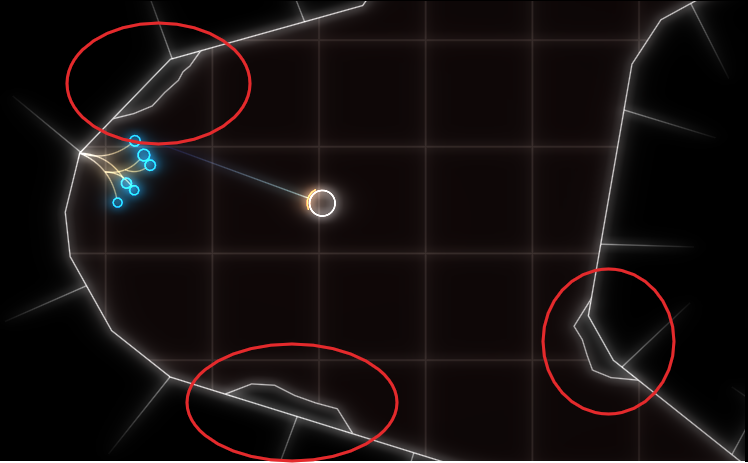
Where we left off, my profiler showed FriendlyUnitOccupies as the culprit. That function basically does circle/circle collision detection using a quad-tree as the spatial acceleration structure. Looking at the samples from my profiler, I could see that that it was descending into the tree quite deeply. Like all tree structures, a quad-tree does pointer-chasing which is very bad for modern CPUs. So I figured I should look at how to optimize that. The data structure was implemented in a hurry, so there seemed plenty to do:

  • Instead of recursing into each node, use tail-call optimization and early culling to speed up traversal.
  • Pre-cache the query with the max-search radius and the other requirements to the units, e.g. not dead, same team, etc.. and then use that to build a new tree for the actual queries.

Because the data structure was pretty non-generic, I started to basically rewrite it to use it in this scenario. While I was about half way through with that, it dawned on me that I was barking at the wrong tree.

Taking a step back

The excellent book Video Game Optimization has some great advice on which level to attack an optimization problem.

  1. System-level. Can you change the system to do something differently and still solve your problem?
  2. Algorithm-level. Are you using the most efficient right algorithm for the data you have?
  3. Micro-level. Are you not wasting any processing power on the lower levels?

I was already on the algorithm level. So I went back to the systemic level: What if the AI did not try to change the target position that often, maybe just every few seconds? That effectively meant lowering the AIs APM. It’s not a bad solution, especially since that makes the AI behave more human. But on the other hand, real-time games, as the name implies, have a soft real-time requirement. So you generally like to avoid huge workloads that go over your frame budget. With how slow the algorithm was, that could easily be the case. The solution is then to do the work concurrently, either by splitting it up or doing it in the background. Both solutions seemed difficult, since the AI code does currently not allow for easy concurrency. So that idea was out.

What if the parking-positions where cached? Subsequent calls to get parking positions could probably reuse a lot of the positions that were computed in previous frames, given that the target point only moves by a little bit each frame. I figured that might work, but it requires more housekeeping and data-dependencies – the result of the previous query needs to be used for the next. That seemed complex and therefore brittle.

A Solution?

Temporal coherency was a pretty good idea though, but not the scale was to big this time. What if I exploited it within a single frame? Now the original code did obscure this, but maybe it gets a little more clear if I write it like this:

optional<v2> GameWorld::FindFreePosition(v2 Center, std::vector<v2> const& Occupied)
{
  auto CheckPosition = [&](v2 Candiate)
  {
    if (!IsPassable(Candidate))
      return false;

    if (OverlapsWith(Occupied))
      return false;

    return !FriendlyUnitOccupies(Candidate);  
  };
  auto Samples = SampledPositions(Center, SomeRandomness());
  auto Found = find_if(SampledPositions.begin(), SampledPositions.end(), CheckPosition(Position));
  
  return (Found != SampledPositions.end()) ? *Found : none;
}

Now as I explained in the previous post, this was called in a loop for each unit to be parked.

std::vector<v2> GameWorld::FindParkingPositions(v2 Center, std::size_t N)
{
  std::vector<v2> Results;
  for (std::size_t i = 0; i < N; ++i)
  {
    auto MaybePosition = FindFreePosition(Center, Results);
    if (!MaybePosition) // No more free space?
      break;
    Results.push_back(*MaybePosition);
  }
  return Results;
}

Easy to see: counting the number of CheckPosition calls, this algorithm is O(n) in number of sampled positions. The number of sampled positions depends linearly on the number of units to be parked, because more units obviously need more parking positions, essentially making this O(n²) for the unit count! But the positions get resampled for each unit – with the only change being the little bit of randomness that is injected everytime. In other words, each call would just test false for sampled positions roughly corresponding to the units that are already placed.

So what I did was a very small change: only inject the randomness once and merge the loops:

auto Samples = SampledPositions(Center, SomeRandomness());
std::vector<v2> Results;

for (auto const& Sample : Samples)
{
  if (CheckPosition(Sample))
    Results.push_back(Sample);

  if (Result.size() >= N)
    break;
}
return Results;

And this did the trick! The algorithm’s run-time when below the 1ms range, and the smaller variation in randomness is not really visible.

Conslusions

I was thrown off-track be the false conclusion that CheckPositions was too slow when it was in fact just called too often. Context is key! Always approach these things outside-in.
Using less-than-optimal abstractions obscured the opportunity to hoist out the sample generation from me. Iteration is always a separate concern, even when it is not on containers!