Dockerized toolchain in CLion with Conan

In the olden times it was relatively hard to develop C++ projects cross-platform. You had to deal with cross-compiling, different compilers and versions of them, implementation-defined and unspecified behaviour, build system issues and lacking dependency management.

Recent compilers mitigated many problems and tools like CMAKE and Conan really helped with build issues and dependencies. Nevertheless, C++ – its compilers and their output – is platform-dependent and thus platform differences still exist and shine through. But with the advent of containerization and many development tools supporting “dev containers” or “dockerized toolchains” this also became much easier and feasible.

CLion’s dockerized toolchain

CLions dockerized toolchain is really easy to setup. After that you can build and run your application on the platform of your choice, e.g. a Debian container running your IDE on a Windows machine. This is all fine and easy for a simple CMake-based hello-world project.

In real projects there are some pitfalls and additional steps to do to make it work seamlessly with Conan as your dependency manager.

Expanding the simple case to dependencies with Conan

First of all your container needs to be able to run Conan. Here is a simple Dockerfile that helps getting started:

FROM debian:bookworm AS toolchain

RUN DEBIAN_FRONTEND=noninteractive apt-get update && apt-get -y dist-upgrade
RUN DEBIAN_FRONTEND=noninteractive apt-get update && apt-get -y install \
  cmake \
  debhelper \
  ninja-build \
  pipx \
  git \
  lsb-release \
  python3 \
  python3-dev \
  pkg-config \
  gdb

RUN PIPX_BIN_DIR=/usr/local/bin pipx install conan

# This allows us to automatically use the conan context from our dockerized toolchain that we populated on the development
# machine
ENV CONAN_HOME=/tmp/my-project/.conan2

The important thing here is that you set CONAN_HOME to the directory CLion uses to mount your project. By default CLion will mount your project root directory to /tmp/<project_name> into the dev container.

If you have some dependencies you need to build/export yourself, you have to run the conan commands using your container image with a bind mount so that the conan artifacts reside on your host machine because CLion tends to use short-lived containers for the toolchain. So we create a build_dependencies.sh script

#!/usr/bin/env bash

# Clone and export conan-omniorb
rm -rf conan-omniorb
git clone -b conan2/4.2.3 https://github.com/softwareschneiderei/conan-omniorb.git
conan export ./conan-omniorb

# Clone and export conan-cpptango
rm -rf conan-cpptango
git clone -b conan2/9.3.6 https://github.com/softwareschneiderei/conan-cpptango.git
conan export ./conan-cpptango

and put it in the docker command:

CMD chmod +x build_environment.sh && ./build_environment.sh

Now we can run the container to setup our Conan context once using a bind-mount like -v C:\repositories\my-project\.conan2:/tmp/my-project/.conan2.

If you have done everything correctly, especially the correct locations for the Conan artifacts you can use your dockerized toolchain and develop transparently regardless of host and target platforms.

I hope this helps someone fighting multiplatform development using C++ and Conan with CLion.

The Dimensions of Navigation in Object-Oriented Code

One powerful aspects of modern software development is how we move through our code. In object-oriented programming (OOP), understanding relationships between classes, interfaces, methods, and tests is important. But it is not just about reading code; it is about navigating it effectively.

This article explores the key movement dimensions that help developers work efficiently within OOP codebases. These dimensions are not specific to any tool but reflect the conceptual paths developers regularly take to understand and evolve code.

1. Hierarchy Navigation: From Parent to Subtype and Back

In object-oriented systems, inheritance and interfaces create hierarchies. One essential navigation dimension allows us to move upward to a superclass or interface, and downward to a subclass or implementing class.

This dimension is valuable because:

  • Moving up let us understand general contracts or abstract logic that governs behavior across many classes.
  • Moving down help us see specific implementations and how abstract behavior is concretely realized.

This help us maintain a clear overview of where we are within the hierarchy.

2. Behavioral Navigation: From Calls to Definitions and Back

Another important movement is between where methods are defined and where they are used. This is less about structure and more about behavior—how the system flows during execution.

Understanding this movement helps developers:

  • Trace logic through the system from the point of use to its implementation.
  • Identify which parts of the system rely on a particular method or class.
  • Assess how a change to a method might ripple through the codebase.

This navigation is useful when debugging, refactoring, or working in unfamiliar code.

3. Validation Navigation: Between Code and its Tests

Writing automated tests is a fundamental part of software development. Tests are more than just safety nets—they also serve as valuable guides for understanding and verifying how code is intended to behave. Navigating between a class and its corresponding test forms another important dimension.

This movement enables developers to:

  • Quickly validate behavior after making changes.
  • Understand how a class is intended to be used by seeing how it is tested.
  • Improve or add new tests based on recent changes.

Tight integration between code and test supports confident and iterative development, especially in test-driven workflows.

4. Utility Navigation: Supporting Movements that Boost Productivity

Beyond the main three dimensions, there are several supporting movements that contribute to developer efficiency:

  • Searching across the codebase to find any occurrence of a class, method, or term.
  • Generating boilerplate code, like constructors or property accessors, to reduce repetitive work.
  • Code formatting and cleanup, which helps maintain consistency and readability.
  • Autocompletion, which reduces cognitive load and accelerates writing.

These actions do not directly reflect code relationships but enhance how smoothly we can move within and around the code, keeping us focused on solving problems rather than managing structure.

Conclusion: Movement is Understanding

In object-oriented systems, navigating through your codebase along different dimensions provides essential insight for understanding, debugging, and improving your software.

Mastering these dimensions transforms your workflow from reactive to intuitive, allowing you to see code not just as static text, but as a living system you can navigate, shape, and grow.

In an upcoming post, I will take the movement dimensions discussed here and show how they are practically supported in IDEs like Eclipse and IntelliJ IDEA.

Expose your app/API with zrok during development

Nowadays many of us are developing libraries, tools and applications somehow connected to the web. Often we provide APIs over HTTP(S) for frontends or other services or develop web apps using such services or backends.

As browsers become more and more picky HTTP is pretty much dead but for developers it is extremely convenient to avoid the hassle of certificates, keystores etc.

Luckily, there is a simple and free tool, that can help in several development scenarios: zrok.io

My most common ones are:

  • Allowing customers easy (temporary) access to your app in development
  • Developing SSO and other integrations that need publicly visible HTTPS endpoints
  • Collaborating with your distributed colleagues and allowing them to develop against your latest build on your machine

What is zrok?

For our use cases think of it as an simple, ad-hoc HTTPS-proxy transport-securing your services and exposing them publicly. For the other features and technical zero trust networking platform explanation head over to their site.

How to use zrok?

You only need a few steps to get zrok up and running. Even though their quick start explains the most important steps I will mention them here too:

After these steps your are ready to go and may share your local service running on http://localhost:8080 using zrok share public 8080.

Some practical advice and examples

If you want a stable URL for your service, use a reserved share instead of the default temporary one:

.\zrok.exe reserve public http://localhost:5000 --unique-name "mydevinstance"
.\zrok.exe share reserved mydevinstance

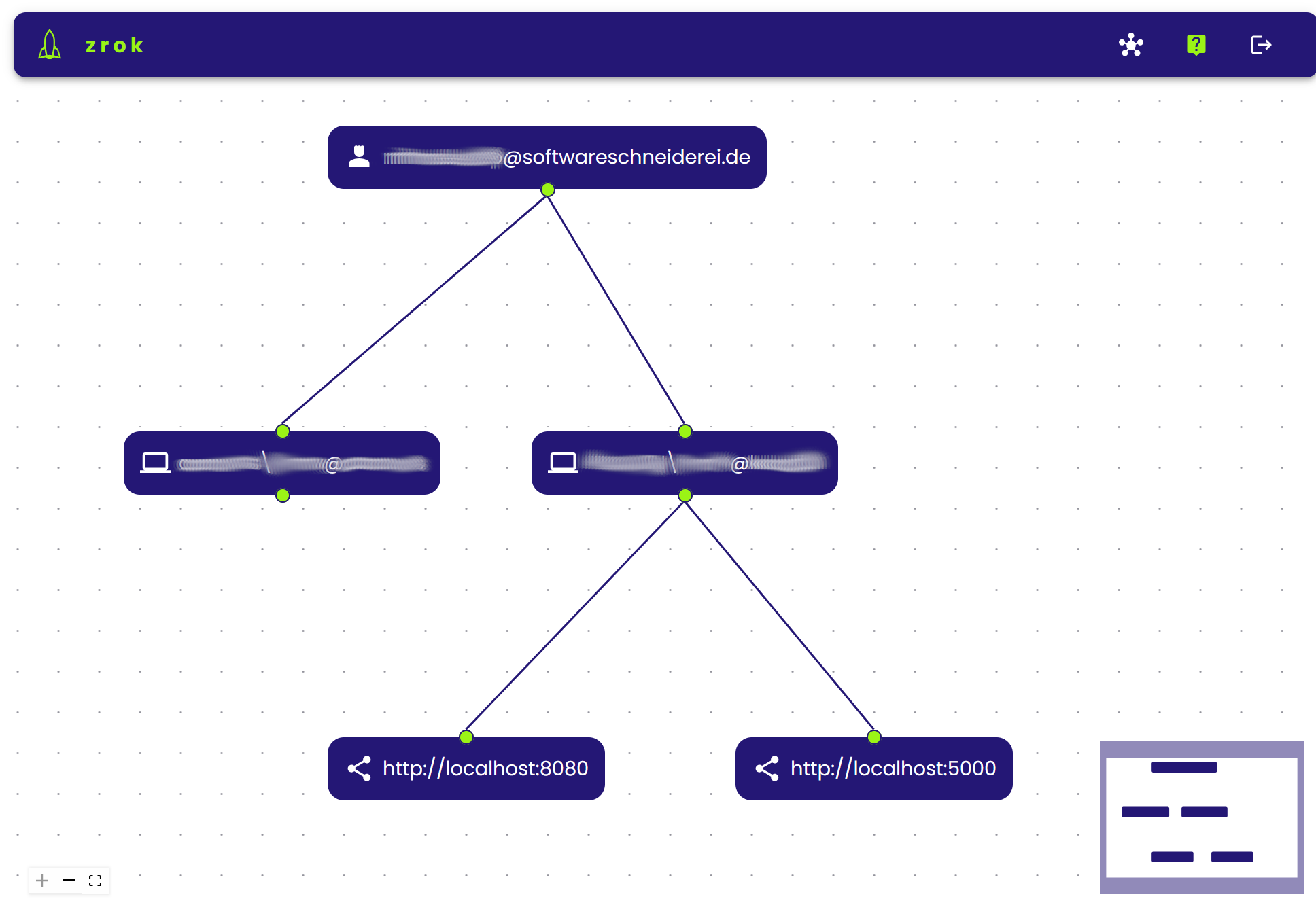
That way you get a stable endpoint over restarts which greatly reduces configuration burden in external services or communication with customers or colleagues. You can manage your shares on multiple machines online on https://api-v1.zrok.io:

Your service is then accessible under https://mydevinstance.share.zrok.io/ and you may monitor accesses in the terminal or on the webpage above.

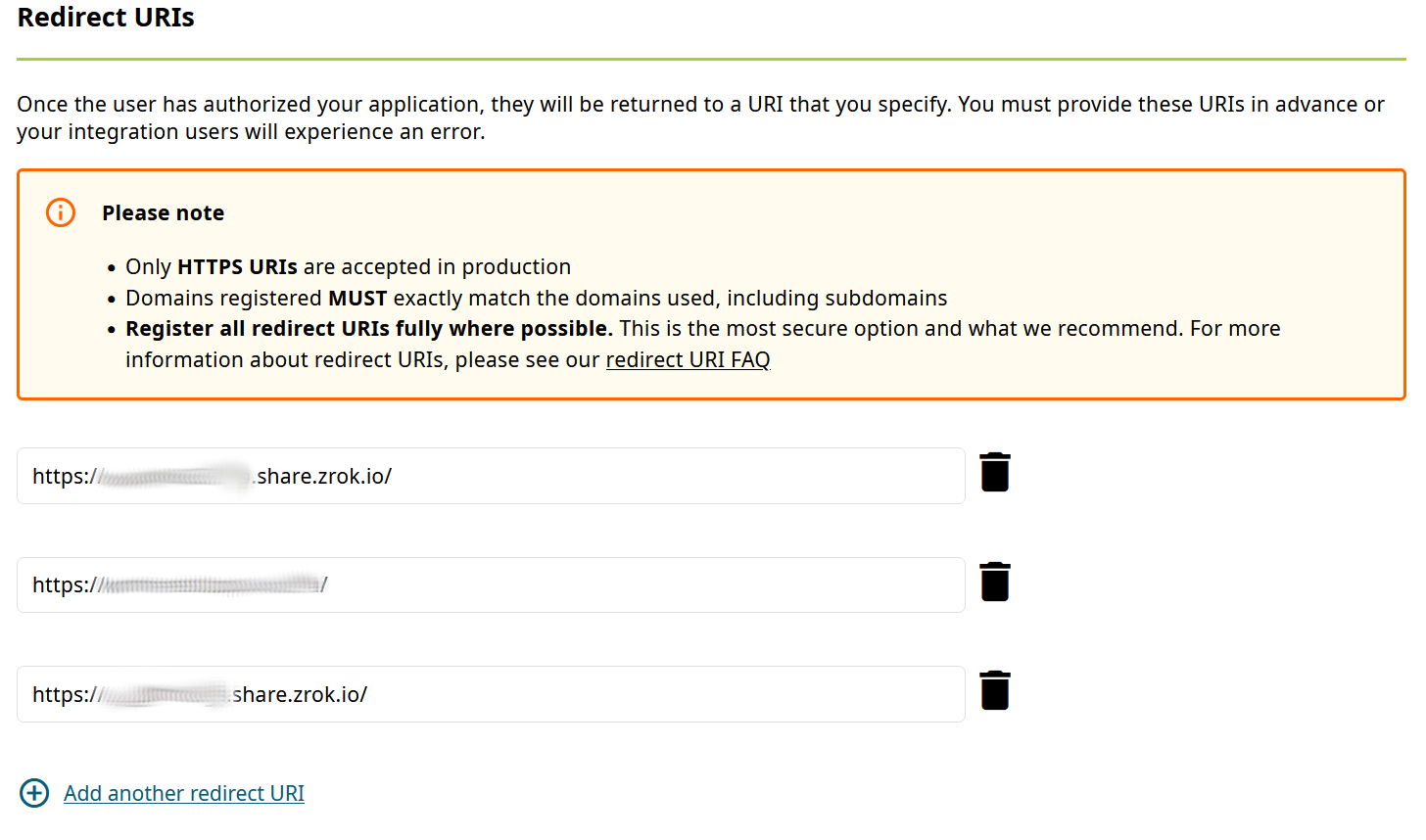
That enables you to use your local service for development against other services, like OAuth or OpenID single-sign-on (SSO), here with ORCID:

Conclusion

Using zrok developers may continue to ignore HTTPS for their local development instances while still being able to expose them privately or publicly including transparent SSL support.

That way you can integrate easily with other services expecting secured public endpoint or collaborate with others transparently without VPNs, tunnels or other means.

Local Javascript module development

https://www.viget.com/articles/how-to-use-local-unpublished-node-packages-as-project-dependencies/

yalc: no version upgrade, no publish etc.

Building an application using libraries – called packages or modules in Javascript – is a common practice since decades. We often use third-party libraries in our projects to not have to implement everything ourselves.

In this post I want to describe the less common situation where we are using a library we developed on our own and/or are actively maintaining. While working on the consuming application we need to change the library sometimes, too. This can lead to a cumbersome process:

  1. Need to implement a feature or fix in the application leads to changes in our library package.
  2. Make a release of the library and publish it.
  3. Make our application reference the new version of our library.
  4. Test everything and find out, that more changes are needed.
  5. Goto 1.

This roundtrip-cycle takes time, creates probably useless releases of our library and makes our development iterations visible to the public.

A faster and lighter alternative

Many may point to npm link or yarn link but there are numerous problems associated with these solutions, so I tried the tool yalc.

After installing the tool (globally) you can make changes to the library and publish them locally using yalc publish.

In the dependent project you add the local dependency using yalc add <dependency_name>. Now we can quickly iterate without creating public releases of our library and test everything locally until we are truly ready.

This approach worked nicely for me. yalc has a lot more features and there are nice guides and of course its documentation.

Conclusion

Developing several javascript modules locally in parallel is relatively easy provided the right tooling.

Do you have similar experiences? Do you use other tools you would recommend?

Working with JSON-DOM mapping in EntityFramework and PostgreSQL

A while ago, one of my colleagues covered JSON usage in PostgreSQL on the database level in two interesting blog posts (“Working with JSON data in PostgreSQL” and “JSON as a table in PostgreSQL 17”).

Today, I want to show the usage of JSON in EntityFramework with PostgreSQL as the database. We have an event sourcing application similar to the one in my colleagues first blog post written in C#/AspNetCore using EntityFramework Core (EF Core). Fortunately, EF Core and the PostgreSQL database driver have relatively easy to use JSON support.

You have essentially three options when working with JSON data and EF Core:

  1. Simple string
  2. EF owned entities
  3. System.Text.Json DOM types

Our event sourcing use case requires query support on the JSON data and the data has no stable and fixed schema, so the first two options are not really appealing. For more information on them, see the npgsql documentation.

Let us have a deeper look at the third option which suits our event sourcing use-case best.

Setup

The setup is ultra-simple. Just declare the relevant properties in your entities as JsonDocument and make them disposable:

public class Event : IDisposable
{
    public long Id { get; set; }

    public DateTime Date { get; set; }
    public string Type { get; set; }
    public JsonDocument Data { get; set; }
    public string Username { get; set; }
    public void Dispose() => Json?.Dispose();
}

Using dotnet ef migrate EventJsonSupport should generate changes for the database migrations and the database context. Now we are good to start querying and deserializing our JSON data.

Saving our events to the database does not require additional changes!

Writing queries using JSON properties

With this setup we can use JSON properties in our LINQ database queries like this:

var eventsForId = db.Events.Where(ev =>
  ev.Data.RootElement.GetProperty("payload").GetProperty("id").GetInt64() == id
)
.ToList();

Deserializing the JSON data

Now, that our entities contain JsonDocument (or JsonElement) properties, we can of course use the System.Text.Json API to create our own domain objects from the JSON data as we need it:

var eventData = event.Data.RootElement.GetProperty("payload");
return new HistoryEntry
{
    Timestamp = eventData.Date,
    Action = new Action
    {
        Id = eventData.GetProperty("id").GetInt64(),
        Action = eventData.GetProperty("action").GetString(),
    },
    Username = eventData.Username,
};

We could for example deserialize different domain object depending on the event type or deal with evolution of our JSON data over time to accomodate new features or refactorings on the data side.

Conclusion

Working with JSON data inside a classical application using an ORM and a relational database has become suprisingly easy and efficient. The times of fragile full-text queries using LIKE or similar stuff to find your data are over!

Git revert may not be what you want!

Git is a powerful version control system (VCS) for tracking changes in a source code base as most developers will know by now… It is also known for its quirky command line interface and previously less known concepts like staging area, cherry-picking and rebasing.

This can make Git quite intimidating and there are many memes about how confusing and hard it is to work with.

Especially for people coming from Subversion (SVN) there are a few changes and pitfalls because some commands have the same name but either do different things in the context or altogether, e.g. commit, checkout and revert.

Commit in the SVN world perform synchronization with the remote repository whereas a commit in git is local and has to synchronized with the remote repository using push. Checkout is similar and maybe even worse: In SVN it fetches the remote repository state and puts it in your working copy. In Git is used to replace files in your working copy with contents from the local repository or formerly to switch and/or create local branches…

But now on to our main topic:

What does git revert actually do?

Revert is maybe the most misleading command existing in both SVN and Git.

In SVN it is quite simple: Undo all local edits (see svnbook). It throws away you uncommited changes and causes potential data loss.

Git’s revert works in a completely different way! It creates “inverse” commit(s) in your (local) repository. Your working copy has to be clean without changes to be able to revert and you will undo the specified commit and record this change in the repository and its history.

So both revert commands are fundamentally different. This can lead to unexpected behaviour, especially when reverting a merge commit:

We had the case where our developers had two feature branches and one dev decided to temporarily merge the other feature branch to test some things out. Then he reverted the merge using git revert and opened a merge request. This leads to the situation, that the other feature branch becomes unmergeable because git records no changes. This is rightfully so, because this was already merged as part of the first one, but without the changes (because they were reverted!). So all the changes of the other feature branch were lost and not easily mergeable:

To fix a situation like this you can cherry-pick the reverted commit mentioned in the commit message.

How to revert local changes in git

So revert is maybe not what we wanted to do in the first place to undo our temporary merge of the other feature branch. Instead we should use git reset. It has some variants, but the equivalent of SVN’s revert would be the lossy

git reset --hard HEAD

to clean our working copy. If we wanted to “revert” the merge commit in our example we would do

git reset --hard HEAD^

to undo the last commit.

I hope this clear up some confusion regarding the function of some Git commands vs. their SVN counterparts or “false friends”.

Defeating TimescaleDB or shooting yourself in the foot

Today, almost everything produces periodically data: A car, cloud-connected smart-home solutions, your “smart” refrigerator and yourself using a fitness tracker. This data has to be stored in a certain way to be usable. We want fast access, beautiful charts and different aggregations over time.

There a several options both free and commercial for storing such time-series data like InfluxDB, Prometheus or TimescaleDB. They are optimised for this kind of data taking advantage of different time-series properties:

  • Storing is (mostly) append-only
  • Data points have a (strict) ordering in time
  • Data points often have fixed and variable meta data in addition to the data value itself

In one of our projects we have to store large quantities of data every 200ms. Knowing PostgreSQL as a powerful relational database management system we opted for TimescaleDB that promises time-series features for an SQL database.

Ingestion, probably the biggest problem of traditional (SQL) databases, of the data worked as expected from the beginning. We were able to insert new data at a constant rate without degrading performance.

The problem

However we got severe performance problems when querying data after some time…

So one of the key points of using a time-series database strangely did not work for us… Fortunately, since Timescale is only an extension to PostgreSQL we could use just use explain/explain analyse with our slow queries to find out what was going on.

It directly showed us that *all* chunks of our hypertable were queried instead of only the ones containing the data we were looking for. Checking our setup and hypertable definition showed that Timescale itself was working as expected and chunking the data correctly on the time axis.

After a bit more analysis and thought is was clear: The problem was our query! We used something like start_time <= to AND from <= end_time in our where clause to denote the time interval containing the requested data. Here start_time is the partition column of our hypertable.

This way we were forcing the database to look at all chunks from long ago until our end-time timestamp.

The solution

Ok, so we have to reformulate our where clause that only the relevant chunks are queried. Timescale can easily do this when we do something like start_time >= from AND start_time < to where from and to are the start and end of our desired interval. That way usually only one or only a few chunks of the hypertable are search and everything is lighning-fast even with billions of rows in our hypertable.

Of course the results of our two queries are not 100% the same sematically. But you can easily achieve the desired results by correctly calculation the start and end of the time-series data to fetch.

Conclusion

Time-series databases are powerful tools for todays data requirements. As with other tools you need some understanding of the underlying concepts and sometimes even implementation to not accidently defeat the purpose and features of the tools.

Used in the correct way they enable you to work with large amounts of data in a performant way todays users would expect. We had similar experiences with full text search engines like solr and ElasticSearch, too.

Swagger-ui for any JVM-based backend

We often implement web applications with a React frontend and one of a large pool of backend frameworks/technologies. These include Micronaut, .NET Framework, Javalin, Flask, Eclipse Jetty among others.

A documentation of the API that allows calling the endpoints can be very helpful even during development to illustrate the API usage. OpenAPI and implementations like Swagger and Swashbuckle fulfill this task quite well.

While many of the backend frameworks support documenting and calling the API using Swagger-UI out-of-the-box or using plugins some frameworks like Undertow do not have direct support for it. Nevertheless, it is relatively easy to add an OpenAPI documentation with a web interface to almost any backend. We demonstrate the setup here using Undertow because it is used in some of our projects.

Adding dependencies and build config

Since we mostly use Gradle for our JVM-based backends we will highlight the additions to build.gradle to make to generate the OpenAPI definition. It consists of the following steps:

  • Adding the Swagger gradle plugin
  • Adding dependencies for the required annotations
  • Configuring the resolve-task of the gradle plugin

Here is an example exerpt of our build.gradle:

plugins {
  id 'java'
  id 'application'
// ...
  id "io.swagger.core.v3.swagger-gradle-plugin" version "2.2.20"
}

dependencies {
// ...
    implementation 'io.undertow:undertow-core:2.3.12.Final'
    implementation 'io.undertow:undertow-servlet:2.3.12.Final'
    implementation 'io.swagger.core.v3:swagger-annotations:2.2.20'
    implementation 'org.jboss.resteasy:jaxrs-api:3.0.12.Final'
}

resolve {
    outputFileName = 'demo-server'
    outputFormat = 'JSON'
    prettyPrint = 'TRUE'
    classpath = sourceSets.main.runtimeClasspath
    resourcePackages = ['com.schneide.demo.server', 'com.schneide.demo.server.api']
    outputDir = layout.buildDirectory.dir('resources/main/swagger').get().asFile
}

Adding the annotations

We need to add some annotations to our code so that the OpenAPI JSON (or YAML) file will be generated.

The API root class looks like below:

@OpenAPIDefinition(info =
@Info(
        title = "Demo Server Web-API",
        version = "0.11",
        description = "REST API for the demo web application..",
        contact = @Contact(
                url = "https://www.softwareschneiderei.de",
                name = "Softwareschneiderei GmbH",
                email = "kontakt@softwareschneiderei.de")
)
)
public class ApiHandler {
    public ApiHandler() {
        super();
    }

    /**
     *  Connect our handlers
     */
    public RoutingHandler createApiHandler() {
        final RoutingHandler api = new RoutingHandler();
        api.get("/demo", new DemoHandler());
        // ...
        return api;
    }
}

We also refactored our handlers to separate the business api and the Undertow handler interface methods to generate a expressive API.

The result looks something like this:

@Path("/api/demo")
public class DemoHandler implements HttpHandler {
    public DemoHandler() {
        super();
    }

    @Override
    public void handleRequest(HttpServerExchange exchange) throws Exception {
         exchange.getResponseHeaders().put(Headers.CONTENT_TYPE, "application/json");
            final Map<String, Deque<String>> params = exchange.getQueryParameters();
            final int month = Integer.parseInt(params.get("month").getFirst());
            final int year = Integer.parseInt(params.get("year").getFirst());
        exchange.getResponseSender().send(new Gson().toJson(getDaysIn(year, month)));
    }

    @GET
    @Operation(
            summary = "Get number of days in the given month and year",
            responses = {
                    @ApiResponse(
                            responseCode = "200",
                            description = "A number of days in the given month and year",
                            content = @Content(mediaType = "application/json",
                                    schema = @Schema(implementation = Integer.class)
                            )
                    )
            }
    )
    public Integer getDaysIn(@QueryParam("year") int year, @QueryParam("year") int month) {
        return YearMonth.of(year, month).lengthOfMonth();
    }
}

When running the resolve task all of the above results in a OpenAPI definition file in build/resources/main/swagger/demo-server.json.

Swagger-UI for the API definition

Now that we have this API definition we can use it to generate clients and – more important to us – generate a web UI documenting the API and allowing to execute and demo the functionality. For this we simply download the Swagger-UI distribution and place the contents of the dist/ folder in src/main/resources/swagger-ui. We then have to let Undertow serve definition and UI like so:

class DemoServer {
    public DemoServer() {
        final GracefulShutdownHandler rootHandler = gracefulShutdown(createHandler());
        Undertow.builder().addHttpListener(8080, "localhost").setHandler(rootHandler).build().start();
    }

    private HttpHandler createHandler() {
        return path()
                .addPrefixPath("/api", new ApiHandler().createApiHandler())
                .addPrefixPath("/swagger-ui", resource(new ClassPathResourceManager(getClass().getClassLoader(), "swagger-ui/"))
                        .setWelcomeFiles("index.html"))
                .addPrefixPath("/swagger", resource(new ClassPathResourceManager(getClass().getClassLoader(), "swagger/")));
    }
}

Note: I tried using the swagger-ui webjar but was unable to configure the location (the URL) of my OpenAPI definition file. Therefore I used the plain swagger-ui download instead.

Wrapping it up

We have to do some setup work and potentially some refactorings to provide a meaninful API documentation for our backend. After this work it is mostly adding some Annotations to methods and types used in your web API.

Improving search for special content

Nowadays many applications are very complex or handle so much data that users need and expect a fast and powerful search functionality. Popular search engine you can leverage are ElasticSearch and Solr. They both use Lucene for index management under the hood and provide a similar functionality regarding indexing and text search.

In previous posts I already gave some advice on using and improving search in your applications using these engines. For example a how-to for .NET (core) with ElasticSearch and using n-grams or wildcard fields for substring search.

Even if these frameworks work really great implementing a great search functionality can be quite hard, especially when handling special data like DOIs, IP-Adresses, Hostnames and other text containing special characters.

What’s the deal with special characters?

The standard analyzers are tuned for dealing with natural language based texts. So they split words on punctuation, whitespace and certain special characters. These are usually filtered out and not indexed. So if you index something like my-cool-hostname the dashes and the complete string will not land in the index only leaving the separate parts my, cool and hostname.

The problem with that is, that neither an exact match nor a substring like my-cool will yield any results. That is not what your users will expect…

Making your search work with special data

There are several ways to improve your search functionality for fields or texts containing different kinds of non-language strings. Here are some simple options that will improve or fix handling problematic cases and make your search work as expected by your users.

My examples use ElasticSearch features and wording, so they may be called differently for other search engines.

Using a keyword field

If you only need an exact match on some weird data field like a DOI 10.1000/182 containing punctuation and slashes, where a user normally just copy & pastes the search string from somewhere using a keyword field for indexing instead of the text type might be the better option. Usually this is easy to implement and fast for indexing and searching.

Using multiple index fields for one data field

ElasticSearch also offers the possibility to index the same data using multiple index fields. So you can keep sub-string features while adding exact match or special character support by adding different index fields like keyword above or an index field using a different analyzer (see this option below). This is called multi-field in ElasticSearch. Using multi-fields can also be used to improve sorting and scoring matches.

Using different analyzers

As I mentioned before the standard analyzers for text fields use tokenization rules and character filters useful for natural language. Sometimes you want to keep words together or preserve special characters. To implement an appropriate search for hostnames or IP addresses you could for example use a custom analyzer with a whitespace or pattern tokenizer.

Conclusion

Default full text search works great out-of-the-box in many cases. However, there are many cases of special, structured data where you need to fine-tune the way the index gets populated.

Many approaches can be combined using different analyzers and indexing a data in several ways.

There is a lot you can do to provide awesome search capabilities to your users but that requires quite some knowledge of the way the search engines work and about the data you want to be searchable.

Using JSON-Schema for data exchange

Several years ago XML was a quite popular document format – mostly due to its schema validation possibilities and clearly defined structure. Many libraries made working with such data documents possible (not really nice or a pleasure…) and humans could read them if need be. XML as a text format is programming language agnostic and processable in practically all useful programming environments.

Working with XML always was more of a pain for me. Fortunately, since then a lot of time passed and alternatives like JSON, YAML and TOML arised. All of them have their strengths and weaknesses and can fill similar roles as XML.

In general they have 2 things in common compared to XML:

  1. superiour readability
  2. lacking validation compared to XML schema

Nowadays, JSON is very widespread due to the popularity of JavaScript and perhaps the most used data exchange format across the internet. Despite having some syntactic quirks like its strictness about commas and forbidding of comments it is imho quite a good format. It is concise, human-readable, flexible and relatively simple. Many languages treat it like nested dictionaries so understanding and working with JSON is easy.

The main drawback is missing documentation and validation.

Enter JSON schema

JSON schema is a specification with accompanying libraries to fix the major issues about JSON. You define a schema of your data documents in JSON and put it in separate files. This adds the missing features to your JSON data documents I complained about: documentation and the possibility of automatic validation.

How does a simple JSON schema file look like? Let us have a look:

{
  "$schema": "https://json-schema.org/draft/2020-12/schema",
  "$id": "https://cars.softwareschneiderei.com/car.schema.json",
  "title": "Car",
  "description": "Describing some important properties of a car",
  "type": "object",
  "properties": {
    "manufacturer": {
      "description": "The company producing the car.",
      "type": "string"
    },
    "model": {
      "description": "The name of the car model.",
      "type": "string"
    },
    "engineType": {
      "description": "One of the available engine types.",
      "enum": [
        "gasoline",
        "diesel",
        "hybrid",
        "electric"
      ]
    },
    "availableColors": {
      "description": "The colors the car is available in. Some colors may increase the price.",
      "type": "array",
      "items": {
        "type": "string"
      },
      "minItems": 1,
      "uniqueItems": true
    },
    "price": {
      "description": "The price tag in € including VAT. The price is optional.",
      "type": "number"
    }
  },
  "required": [
    "manufacturer",
    "model",
    "engine",
    "availableColors"
  ]
}

A valid data document could look like below:

{
  "manufacturer": "Porsche",
  "model": "911 Turbo",
  "engineType": "gasoline",
  "availableColors": [ "black", "blue", "red", "yellow", "white" ],
  "price": 150000
}

I think we can easily see how the documentation helps to understand the data, for example regarding the price property. The Java code to validate the data may look similar to this:

public void processCarData(String carFileName) { 
  var schemaDefinition = Json.decodeValue(readFile("car.schema.json"));
  JsonSchema schema = JsonSchema.of((JsonObject) schemaDefinition);
  var schemaValidator = Validator.create(schema, new JsonSchemaOptions()
      .setDraft(Draft.DRAFT202012)
      .setBaseUri("https://cars.softwareschneiderei.com"));
  var car = Json.decodeValue(readFile(carFileName));

  if (!schemaValidator.validate(car).getValid()) {
    throw new IllegalArgumentException("The format of the car data is invalid.");
  }
  // Data valid, work with it...
}

Conclusion

As depicted above JSON schema fills some important gaps when using JSON as an data exchange format. It offers helpful tools to document data structure and to validate data against a definition written in JSON itself.

That way we can safely work with the data, document the structure and still maintain the other good properties of JSON like interoperability, human-readability and data effienciency.