Simple C++11 – Part III – Best friends

Now that we got the whole rigid setup of how to create a compile unit and a class setup out-of-the-way, we can finally start to write some code. What separates simple modern C++ code from the old ways is the degree of abstraction you can use to write your code. Previously, you had to think in memory and instructions. Now, powerful abstractions and language mechanisms help you to think in values and operations, and still get down to the bare metal of the machine when you need to. Here’s my personal set of “best friend” language and library features that helps me be as expressive as possible in the lower-level application code and still leverage the raw power of C++.

std::vector<T>

With all its simplicity, it is still powerful enough to handle the greater part of all memory management issues. Better yet, it maps excellently to modern hardware and even when used naively, it is often extremely efficient. And in the rare cases when it is not, the performance can usually be easily improved by using std::vector::reserve.

With C++11, you can now even toss it around, nest it and return huge vectors from functions without any performance problems. Also, initializer_lists make it easy to fill them with data.

std::vector<int> my_special_numbers() {
  return {4, 8, 15, 16, 23, 42};
}

Such code is no longer a subtle performance problem, but actually encouraged.

There’s no doubt that whenever you need a container, std::vector should be your first candidate.

for-each

Printing a range like that is now easy. No need to even know about the existence of iterators or use counters:

for (auto&& number : my_special_values()) {
  std::cout << number << std::endl;
}

std::unordered_map<K,V>

For the rare cases when a flat vector will just not suffice, this neat hash-map will make your life easier. C++11’s initializer syntax makes it a lot cleaner to fill these than before:

std::unordered_map<std::string, int>
my_icecream_ratings() {
  return {
    {"vanilla", 3},
    {"chocolate", 9},
    {"strawberry", 8},
    {"raspberry", 7},
    {"lemon", 3}
  };
}

auto

And now working with them becomes nice and easy too:

auto ratings = my_icecream_ratings();
ratings.insert({"caramel", 2});
std::cout << "Chocolate was a "
  << ratings["chocolate"];

You can even change the result type to an unordered_multimap or something similar and the code will still work.

std::shared_ptr<T>

In a perfect or, should I say, functional world, shared ownership would not be a thing. Pointers or even references would not exist. It just makes things a lot more complex than a clear ownership. It just appears that when requirements change, this or that object is no longer exclusively owned by that other object. Or the lifetime of an object cannot easily be scoped in the presence of multithreading. When this happens, and std::shared_ptr will make your tasks bearable. This is as close as you usually get to completely automatic lifetime management in C++.

void save_image_in_background(
  std::shared_ptr<image const> raw_image) {
  auto thread = std::thread([raw_image]{
    raw_image.save("raw.png");
  });
 
  thread.detach();
}

I like to think of pointers as a necessary evil. Sometimes, the alternative just makes things even more confusing, and when that happens, you at least don’t want manual resource management in the way.

Of course, std::unique_ptr seems to a powerful competitor for shared_ptr’s tasks, but in my experience, you very rarely need a single-ownership pointer in application code. Why not use a moveable type instead? unique_ptr can be useful as a helper to implement library primitives, but you should rarely encounter one in application-level code.

Less is more

Note how many fancy C++11 features did not make my list. For example, lambdas are very useful – and I even used one in my shared_ptr example. But they should be used in moderation. They allow to define code out-of-place, to be executed whenever. This makes it harder to reason about them.
Likewise, things like variadic templates are great for library code, but rarely help in application level.

This ends my small series on C++ for now. I hope I have shown how concentrating on a few simple features helps you write more maintainable and less obscure C++ code, on a level of abstraction that is not lower than most comparable languages. Do you have other methods to achieve this? Or do you even want to have this? I’d like to hear!

The JavaScript ‘console’ Object

Most JavaScript developers are familiar with these basic functions of the console object: console.log(), .info(), .warn() and .error(). These functions dump a string or an object to the JavaScript console.

However, the console object has a lot more to offer. I’ll demonstrate a selection of the additional functionality, which is less known, but can be useful for development and debugging.

Tabular data

Arrays with tabular structure can be displayed with the console.table() function:

var timeseries = [
 {timestamp: new Date('2016-04-01T00:00:00Z'), value: 42, checked: true},
 {timestamp: new Date('2016-04-01T00:15:00Z'), value: 43, checked: true},
 {timestamp: new Date('2016-04-01T00:30:00Z'), value: 43, checked: true},
 {timestamp: new Date('2016-04-01T00:45:00Z'), value: 41, checked: false},
 {timestamp: new Date('2016-04-01T01:00:00Z'), value: 40, checked: false},
 {timestamp: new Date('2016-04-01T01:15:00Z'), value: 39, checked: false}
];

console.table(timeseries);

The browser will render the data in a table view:

Output of console.table()
JavaScript console table output

This function does not only work with arrays of objects, but also with arrays of arrays.

Benchmarking

Sometimes you want to benchmark certain sections of your code. You could write your own function using new Date().getTime(), but the functions console.time() and console.timeEnd() are already there:

console.time('calculation');
// code to benchmark
console.timeEnd('calculation');

The string parameter is a label to identify the benchmark. The JavaScript console output will look like this:

calculation: 21.460ms

Invocation count

The function console.count() can count how often a certain point in the code is called. Different counters are identified with string labels:

for (var i = 1; i <= 100; i++) {
  if (i % 15 == 0) {
    console.count("FizzBuzz");
  } else if (i % 3 == 0) {
    console.count("Fizz");
  } else if (i % 5 == 0) {
    console.count("Buzz");
  }
}

Here’s an excerpt of the output:

...
FizzBuzz: 6 (count-demo.js, line 3)
Fizz: 25 (count-demo.js, line 5)
Buzz: 13 (count-demo.js, line 7)
Fizz: 26 (count-demo.js, line 5)
Fizz: 27 (count-demo.js, line 5)
Buzz: 14 (count-demo.js, line 7)

Conclusion

The console object does not only provide basic log output functionality, but also some lesser-known, yet useful debugging helper functions. The Console API reference describes the full feature set of the console object.

Making CherryPy Application WSGI compatible

When choosing a micro web framework evolving it to fit your needs is key. As CherryPy is one of our choices I want to show you how to evolve it in terms of web server. Of course you can use the embedded CherryPy web server in development and for small sites. It is fast enough for many use cases and supports important features like SSL so you may come a long way just using it. There are several reasons to put your CherryPy behind a tried and trusted native web server like Apache or nginx:

  • Consistent production environment using different application servers (e.g. for Java and Python) using a powerful and uniform frontend
  • Many options and possibilites using Apache modules
  • Well known and understood environment for administrators
  • Separation of web-facing http server concerns and your web application
  • Improved performance and security

Making CherryPy a WSGI-compatible

The good news is that CherryPy application objects are already a WSGI-compliant application. So creating a wsgi.py like the following will enable integration with mod_wsgi of Apache:

def application(environ, start_response):
    cherrypy.tree.mount(MyApp(), script_name=None, config=None)
    return cherrypy.tree(environ, start_response)

Integrating with Apache’s mod_wsgi

It is quite easy to integrate a Python WSGI application with apache using mod_wsgi. If the module is present you just need to add some directives telling Apache where to mount the wsgi application defined by your wsgi.py script:

WSGIScriptAlias /my_app /path/to/wsgi.py
# May be required to allow your web app using libraries installed on the system
<Directory /usr/lib/python2.7/site-packages/ >
    Order deny,allow
    Allow from all
    Require all granted
</Directory>

After you have such a setup working properly you can consult the mod_wsgi documentation on how to improve in regards to threading, script reloading etc.

Configuring the WSGI-app

Many web applications need some form of configuration. Your application should not make assumptions on its install location or some directory structure. Generally speaking, an application should never assume that it can use relative path names for accessing the filesystem. Also access to operating system environment variables is dangerous because the application may run in different contexts. But we can specify WSGI-environment variables in the web servers’ configuration. An easy and safe way is to provide the configuration directory and other values using WSGI-environment variables that we can specify in the mod_wsgi configuration:

WSGIScriptAlias /my_app /path/to/wsgi.py
SetEnv configuration_dir /etc/my_shiny_web_app
...

We can access the wsgi-environment in python like so:

def application(environ, start_response):
    configdir = environ['configuration_dir']
    cherrypy.config.update(os.path.join(configdir, 'global.conf'))

    cherrypy.tree.mount(MyApp(), config=os.path.join(configdir, 'my_app.conf'))
    return cherrypy.tree(environ, start_response)

Note: Because your web app can be mounted to other locations than “/” on the the web server your application should not hard-code absolute links and the like. They all will be dead if your app is mounted at a different location.

Modular development of complex UIs with atomic design

Creating user interfaces is traditionally an expensive development effort. Every web page, dialog or screen is hand crafted from scratch. Developers on the one hand write object oriented, modular code in the whole application but as soon as the UI level is reached everything breaks down.

Creating user interfaces is traditionally an expensive development effort. Every web page, dialog or screen is hand crafted from scratch. Developers on the one hand write object oriented, modular code in the whole application, use myriads of frameworks and libraries but as soon as the UI level is reached everything breaks down. Each view is written in isolation.
Designers have a different view of the UI. They see the interface through the lens of style guides and guidelines. The look and feel throughout the interface should be consistent and should be experienced as a whole.

Atomic design

These two worlds can be combined.
Many designers and developers see the need to design and create design systems. Brad Frost is the one who coined and describes a language for structuring user interfaces: atomic design. The names take heavy cues from chemistry but the important part is the containment part.
Atoms are the low level building blocks: e.g. the widgets in native UI kits or the tags in the web world. But also things like colors or type faces are atoms.
Molecules are simple combinations of atoms. A search field which is comprised of a label, a text field and a button is a molecule.
Organisms are more complex UI components. Organisms can be created from atoms, molecules and other organisms. A complete form would be a perfect example.
Combining all these into a full page or window layout is called a template in atomic design. This template is the abstract definition, the blueprint of the complete screen or page.
Filling this template with content results in a page.
All this sounds pretty abstract and the examples found in the web are very basic so let’s dive in and identify the parts in an example UI.

Decomposing a complex UI

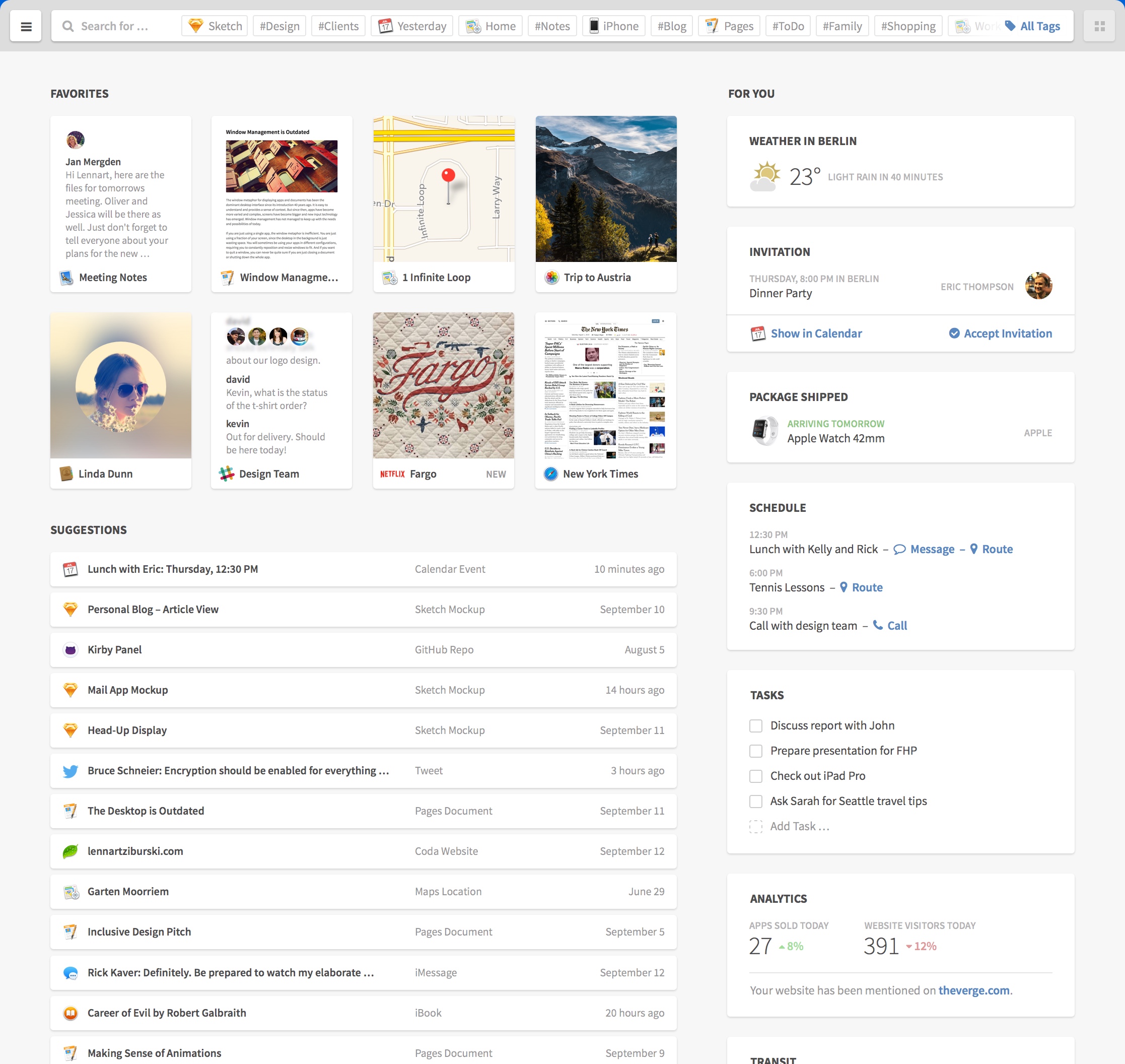
Here we take an example from the excellent UI concept by Lennart Ziburski: desktop neo. (If you haven’t seen this, you should take a look).

finder

Our first decomposing task is to identify distinct parts of the user interface and give them names. These would be the organisms.

organisms

Interlude: how to name things

As with every naming endeavor it is hard to decide which name is appropriate. Dan Mall argues in favor of display patterns to be name givers. Display patterns describe the (abstract) visual aspect and can be used with multiple content patterns. Content patterns describe the types of elements and can be rendered in multiple display patterns. Since we want to name an organism which is content agnostic we should take cues from the visual appearance not the content inside it.

Decomposing further

Now we break those organisms further down. Let’s start with the card grid organism. As the name already suggests it organizes cards in a grid or tabular layout. We have different kinds of cards. First take a look at the preview card at the left.

preview_card

The preview card consists of a thumbnail showing a preview of an item, an icon and a label. This is a simple interface element and is therefore a molecule created from the three mentioned atoms. A name for this molecule could be “image with caption”.

Interlude: testing states in the abstract

Our example touches an important and often neglected part of interfaces: you need to test for different content. Here the longer name is cut with an ellipsis. This is a simple case. But what if the name is missing? Or has unusual characters. Or or or. Besides that we need to indicate the current state of the interface as well. Do we have an error? Are we loading something? Interfaces have different states. Five to be exact. The good part is that we can (and should) test them on the abstract level of atoms, molecules and organisms.

A more complex organism

The cards in the right card grid are more complex examples. Every card is an organism with a title (atom) and a content part (molecule/organism).

The weather card has a simple molecule consisting of an icon and two labels.

weather_card

Whereas the schedule card consists of a list organism which itself includes molecules. These molecules have two labels and one or more actions (links or buttons).

schedule_card

The other parts of the interface can be decomposed as well. Charlotte Jackson describes an interesting approach to decomposing your existing interfaces: print them out, cut them to pieces and name these pieces.

Making the jump

Until now we talked about the designer’s view of the interface but the developer has to translate all these definitions into code and hook them up to content. The approach from the atomic design side is largely the same for web or native but in development we have to distinguish between them.

On Rails

Let’s first take a look at the web side of things. We could use a client side component framework like react but here are like to keep it simple.
We just use Rails in our example but every other web framework will work as well. We need to organize our newly defined chemistry lab in three parts: HTML (or views), CSS and JavaScript.
For CSS and JavaScript we use the include mechanism of the asset pipeline or import if you use SASS. Each dimension gets a separate directory inside app/assets/stylesheets or app/assets/javascripts respectively.
We name our directories atoms, molecules and organisms. The same is true for views: a directory named molecules and one named organisms inside app/views/atomic_design. No need for atoms since they are basic HTML tags or helpers. Atomic design’s templates become Rails’ layouts. Via calls to render we can inject content into these abstract organisms:

<%= render layout: '/atomic_design/organisms/card', locals: {title: 'weather in Berlin'} do %>
  <%= render layout: '/atomic_design/molecules/image_with_text', locals: {image_class: 'fa_sunny'} do %>
    <span class="temperature">23 °C</span><span class="condition">Sunny</span>
  <% end %>
<% end %>

Native

On the native side we also need a component and include mechanism. Usually every widget toolkit has a preferred way to create custom components or containers. If you develop for iOS you extend the UIView class in order to create a custom UI component. These custom views would be the molecules and organisms of our design system. To combine them you add them to other views as their subviews. The init* or properties can be used to fill these with content. The actual mechanism is similar for most native UI kits.

Design with benefits

Using atomic design to create a design system seems to be a lot of work at first. And it is.
We already mentioned two benefits: creating a common understanding and a better way to test things in isolation. Design systems help all project participants, not only designers and developers, to share a common language and understand each other. They help new members to hit the ground running. With tools like pattern lab your atomic design can also be used as documentation.
On the testing front the holy grail is to test things in isolation and in integration, atomic design and its strict separation helps immensely. Often only the sunshine or ideal state is tested and maybe a handful of error states. Thinking in isolation of molecules and organisms about the whole five states and the diverse structure of your content creates a manageable endeavor and maps a path through the jungle of our interfaces. The value which atomic design brings to the table is that your efforts to test scale with the number of molecules and organisms and not with the number of pages or screens. The isolation which a design system, and in particular atomic design, creates is comparable to the advent of unit testing in the world of software development. The separation of display patterns and content patterns reminds me of the functional paradigm with its separation of data and functions.

Our five types of configuration

Over the years, we came up with a strategy to handle configurable aspects of our software applications. Using five different types of configuration, we are able to provide high customizability with modest effort.

settings © vege / fotoliaConfigurable aspects of software are the magical parts with which you can achieve higher customer satisfaction with relatively modest investment if done right. Your application would be perfect if only this particular factor were of the value three instead of two as it is now. No problem – a little tweak in the configuration files and everything is right. No additional development cost, no compile/build cycle. You can add or increase business value with a simple text editor when things are configurable.

The first problem of this approach is the developer’s decision what to make configurable. Every configurable and therefor variable value of a software system requires some sort of indirection and additional infrastructure. It suddenly counts as user input and needs to be validated and sanitized. If your application environment requires an identifier like a key, the developer needs to come up with a good one, consistent to the existing keys and meaningful enough to make sense to an unsuspecting user. In short, making something configurable is additional and hard work that every developer tries to avoid in the face of tight deadlines and long feature lists.

Over-configurability

Our first approach to configurable content of our applications lead to a situation where everything could be configured, even the name and location of the configuration files themselves. You had to jump through so many hoops to get from the code to the actual value that it was a nightmare to maintain. And it provided virtually no business value at all. No customer ever changed the location of only one configuration file. All they did was to change values inside the configuration files once in a while. Usually, the values were adjusted once at first installation and once some time later, when the improvement of the change could be anticipated. The possibility of the second adjustment usually brings the customer satisfaction.

Under-configurability

So we tried to narrow down the path of configurable aspects by asking our customers for constant values. We are fortunate to have direct customer access and to develop a lot of software based on physics and chemistry, science fields with a high rate of constants. But the attempt to embed natural constants directly in the code failed, too. Soon after we installed the first software of this kind, an important constant related to neutron backscattering was changed – just a bit, but enough to make a difference. Putting important domain values in the code just doesn’t cut it, even if they are labeled constants and haven’t changed for decades.

The five types

A good configurable software application finds the sweet spot between being completely configurable and totally rigid. To help you with this balancing, here are the five types of configuration we identified along our way:

Resources

The section containing the resources of the application isn’t meant to be introspected or edited by the user. It contains mostly binary data like images or media formats and static content like translations. Most resources are even bundled into archive files, so they don’t present themselves as files. All resources are overwritten with every new version of the application, so changing for example an icon is possible, but only has a short-term effect unless it is fed back into the code base. If the resources were deleted, the application would probably boot up, but lack all kind of icons, images and media. Most language content would be replaced by internationalization keys. In short, the application would be usable, but ugly.

(Manufacturer) Settings

We call every configurable option that is definitely predefined by the developer a setting. We group these options into a section called settings. Like resources, settings are overwritten with every new version of the application, so changes should be rare and need to be reported back into development. Settings are configurable if the urgent need arises, but are ultimately owned by the developers and not by the users. The most delicate decision for a developer is to distinguish between a setting and an option. Settings are owned by the developer, options are owned by the user. If the settings were deleted, the application would most likely not boot up or use hard-coded defaults that might not be suited for the given use case. We use settings mostly for feature toggles or dynamically loaded content like menu definitions or team credits.

Options

This is the most interesting type of configurable in terms of user centered business value. Every little bit of information in the option section is only deployed once. As soon as it can be edited by the user, it belongs to the user. We deliver nearly every property, config or ini file as an option. We fill them with nondestructive defaults and adjust the values during the initial deployment, but after that, the user is free to change the files as he likes. This has three important implications for the developer:

  • You can’t rely on the presence of any option entry. Each option entry needs to have a hardcoded fallback value that takes over if the entry is missing in the files.
  • Every new option entry needs to be optional (no pun intended). Since we can’t redeploy the option files, any new entry won’t exist in an existing installation and we can’t force the user to add it. If you can’t find a sensible way to make your option optional, you’re going to have a hard time.
  • If you need to make changes to existing option files, you need to automate it because the number of installations might be huge. We’ve developed our own small domain specific language for update scripts that perform these changes while maintaining readability. Update scripts are the most fragile part of an update deployment and should be avoided whenever possible.

The options are what makes each installation unique, so we take every measure to avoid data loss. All options are in one specific directory tree and can be backuped by a simple copy and paste. Our deliverables don’t contain option files, so they can’t be overwritten by manual copy or extract actions. If the options were deleted, the application would boot up and recreate the initial options with our default values, therefor losing its uniqueness.

(Mutable) Data

The data section is filled with mutable information that gets created by the application itself. It’s more of a database implemented in files than real configuration. The user isn’t encouraged to even look into this section, let alone required to edit anything by hand. If this section would be deleted, the application would lose parts of its current state like lists of pending tasks, but not the carefully adjusted configurables. The application would boot up into a pristine state, but with a suitable configuration.

Archive

The last type isn’t really a configuration, but a place for the application to store the documents it produces as part of its user-related functionality. Only the application writes to the archive, and only in a one-time fashion. Existing content is never altered and rarely deleted. The archive is the place to look for results like measurement data or analysis reports. It’s very important to keep the archive free of any kind of mutable data. If the archive would be deleted, all previously produced result documents would be lost, but the application would work just fine.

Summary

As you’ve seen, we differentiate between five types of configurables, but only two types are “real” configuration: The settings belong to the developer while the options belong to the user. We’ve built over a dozen successful applications using this strategy and are praised for their configurability while our required effort for maintainance is rather low.

Let us know if you have a similar or totally different concept for configurables by dropping a comment.

Simple C++11 – Part II – Class declarations

In the previous part, I’ve shown my guidelines for setting up compilation units. When writing simple application code with C++11, either classes or free-functions should be your main building blocks. Therefor, in this part, I will focus on what to look out for when writing class declarations.

While templates can be very useful, they do not scale well as the code base gets larger. Metaprogramming or other niche styles have their places, too, but I like to look at those as a means to create language extensions rather than principal implementation tools.

Avoid inline implementations

…especially in header files. It can be tempting to write classes solely in the header file. In fact, it has almost become a sign of quality for parts of C++ code to be header only. But this scales badly in most cases, and evolving such a code-base will result in a dramatic explosion of compile times. Always splitting classes into a declaration and definition acts as a first-level compile- firewall and dependency-breaker. Users of your class no longer need to worry about changes in the implementation of the member functions of that class. Note that those changes are often indirect: a change only affects a class that is used in the implementation of your class’ member functions. By splitting the declaration and definition, users of your class do not have to be recompiled.

But why stop at the compiler? The same argument holds for programmers. If you start to split interface and implementation on this level, you automatically provide ‘reader-firewalls’ as well. By just providing a clean header file, you are giving readers sort of a manual for your class. No need to look at the implementation at all, if the interface is well-defined.

Inline code definition is also the main reason against excessive use of templates. Yes, they grant a lot of flexibility, but you pay a hefty price which needs to be justified by an enormous reduction of complexity elsewhere. In general, templates are a bit too powerful for their own good, which is why they need extra moderation.

Always declare implicit functions

Implicitly declared functions seem comfortable, but they have a few implications that are hard to understand. First of, if an implicit function gets generated for your class, it will be generated as inline. This means that the implementation becomes a dependency to all users of your class. This can have very subtle effects such as this:

#include <vector>
class Entry;

class EntryManager {
public:
  EntryManager(EntryGenerator& generator);
  int getEntryCount() const;
  std::string getIDForEntry(int index) const;
private:
  std::vector<Entry> mData;
};

On the surface, it looks like there should be no dependency (other than the name) on MyEntry when including this header. But there is!
The destructor is not declared so it will get generated – as inline. Because deletion of a vector requires the held type to be complete, any place that needs to be able to destruct a MyEntryManager also needs to know how to destruct MyEntry, which is not intended at all. Remember there’s a total of six functions that can be implicitly generated! Because of that, there are analogous problems for copy-construction, assignment, move-construction and move-assignment.

To avoid these problems, either delete the function explicitly in the header, default it in the implementation file, or actually implement it. You rarely need to do the latter, so I advise to default all the ones you need, and delete the rest:

#include <vector>
class Entry;

class EntryManager {
public:
  EntryManager(EntryGenerator& generator);
  EntryManager(EntryManager const&)=delete;
  EntryManager& operator=(EntryManager const&)=delete;
  EntryManager(EntryManager&& rhs);
  EntryManager& operator=(EntryManager&& rhs);
  ~EntryManager();
  int getEntryCount() const;
  std::string getIDForEntry(int index) const;
private:
  std::vector<MyEntry> mData;
};

And somewhere in the implementation file:

EntryManager::EntryManager(EntryManager&& rhs) = default;
EntryManager::~EntryManager() = default;
EntryManager& EntryManager::operator=(EntryManager&& rhs) = default;

This has another nice side effect because the vector-template gets instantiated into that object file and does not “bloat” all use-sites.

Exactly one public function and one private data section per class

..starting with the public section. This is where you address the next programmer that has to read your class. And it should be the only place for him to look.

I avoid private member functions because they cannot be tested easily and can add hidden compile-time dependencies to a project. Why should a user of your class recompile if you change an implementation detail? For small and trivial implementation helpers, the unnamed-namespace in the implementation file is a much better place. If those helpers become larger or more complex, it is a better idea to implement them in a collaborating class, which can be tested and reused.

Protected member functions split your interface to two parts, one exclusively for derived classes and one for everyone (including derived classes). This is very rarely needed, and in almost all of those cases, a separate interface will scale better (although it is slightly harder to implement).

Either an interface or an implementation

So far, I have left inheritance out of the picture and only talked about concrete classes. Inheritance is actually rarely needed, composition often suffices. But if it is needed, make sure that a class is either concrete and final (implementations), or has a complete and minimal set of pure-virtual member functions (interfaces). This will result in shallow hierarchies and easily understood interfaces. Remember that inheritance is not a tool for sharing code from the classes you implement, but for the code using those classes – i.e. where the Liskov Substition Principle holds.

Now it gets really easy to implement new classes in the hierarchy: Just implement all the functions in the interface. No more questioning whether to leave the default behaviour or override. You will also automatically tend towards clearer separation of components – things that need to be polymorphic move to the interface, other  functionality merely uses it.

This pattern is useful even when polymorphy is not needed. Such small interfaces devoid of any implementation detail can act as another compiler firewall. Collaborators can work with just the interface and do not have to be recompiled when the implementation changes. Also, the interface can be implemented for mock or fake objects in testing.

Conclusion

This concludes the second part of the series. I originally intended it to be about how to write a whole class, but that would have been too much to digest for one post. I am well aware that some of these guidelines can stir quite the controversy in the C++ community. For example, declaring the implicit functions seems to be in conflict with the recently popular rule of zero. Scott Meyers had similar concerns, but does not quite touch the inline aspect.

For me personally, these guidelines have helped tremendously, especially when scaling to bigger code-bases. But as before, I am curious what others are thinking about this!

IS NULL or IS NOT NULL, that is the question

Today I’ll demonstrate a curiosity of SQL regarding the NOT IN operator in combination with a subquery and NULL values.

Let’s assume we have two database tables, users and profiles:

 users              profiles
+--------------+  +-------------+
| id  username |  | id  user_id |
| 0   'joe'    |  | 0   2       |
| 1   'kate'   |  | 1   0       |
| 2   'john'   |  | 2   NULL    |
| 3   'maria'  |  +-------------+
+--------------+

We want to find all users, which have no associated profile. The intuitive solution would be a negated membership test (“NOT IN”) on the result set of a subquery:

SELECT * FROM users WHERE id NOT IN (SELECT user_id FROM profiles);

The anticipated result is:

+---------------+
| id  username	|
| 1   'kate'    |
| 3   'maria'   |
+---------------+

However, the actual result is an empty set:

+--------------+
| id  username |
+--------------+

This is irritating, especially since the non-negated form produces a sensible result:

SELECT * FROM users WHERE id IN (SELECT user_id FROM profiles);

+--------------+
| id  username	|
| 0   'joe'    |
| 2   'john'   |
+--------------+

So why does the NOT IN operator produce this strange result?

To understand what happens we replace the result of the subquery with a set literal:

SELECT * FROM users WHERE id NOT IN (2, 0, NULL);

This statement is internally translated to:

SELECT * FROM users WHERE id<>2 AND id<>0 AND id<>NULL;

And here comes the twist: a field<>NULL clause evaluates to UNKNOWN in SQL, which is treated like FALSE in a boolean expression. The desired clause would be id IS NOT NULL, but this is not what is used by SQL. As a consequence the result set is empty.

The result for the non-negated membership test (“IN”) can be explained as well. The IN clause is internally translated to:

SELECT * FROM users WHERE id=2 OR id=0 OR id=NULL;

A field=NULL clause evaluates to UNKNOWN as well. But in this case it is of no consequence, since the clause is joined via OR.

Now that we know what’s going on, how can we fix it? There are two possibilities:

One is to use an outer join:

SELECT u.id FROM users u LEFT OUTER JOIN profiles p ON u.id=p.user_id WHERE p.id IS NULL;

The other option is to filter out all NULL values in the subquery:

SELECT id FROM users WHERE id NOT IN (SELECT user_id FROM profiles WHERE user_id IS NOT NULL);

Conclusion

Both field=NULL and field<>NULL evaluate to UNKNOWN in SQL. Unfortunately, SQL uses these clauses for IN and NOT IN set operations. The solution is to work around it.

Small is beautiful – CherryPy Microframework

Origami Elephant (Image used with kind permission of Anya Midori)

We are developing web applications for our clients using various different frameworks and technologies. The choice depends on several different factors like hosting, the clients IT infrastructure and administration and of course project scope. Some of our successful web projects use the Grails or Ruby on Rails with JRuby full stack frameworks. While they provide a ton of powerful features they also intrinsically carry some complexity. This is not always needed nor wanted, some projects might fare well with much less. Sometimes the scope of a project is not entirely clear so choosing a lean alternative you can gradually extend and refine may be the right fit.


Full stack frameworks

A full stack framework usually delivers built-in solutions for persistence/database access, domain modelling, routing, html-templating and so on. If you know for sure that you will need all the provided features from the start and that they are a good fit feel free to choose a full stack framework like Rails, Grails, Play or Django. If you need less or there is no convincing solution for your needs start with a minimal system that delivers value to your clients.

Microframeworks

Microframeworks provide only the basic functionality for routing and handling requests. No templating, no databases, no session management etc. attached. We made really good experiences with microframeworks like Nancy for .NET or CherryPy for Python. You start very simple and are up an running in minutes. If most of your GUI is client-side you do not need templating and you do not have it from the start. You do not need a database, well, you do not have one. Your server side logic revolves around REST, there you go!

The key point is that you are not stuck with this minimal set of support but you can easily extend the framework with features if need be. And usually you have several options per concern to choose from. For templating in Python there are many different solutions like Mako, Jinja2Genshi and others. Need only file-based persistence, want to manage your database in SQL or need an object-relational mapper (ORM) – everything is up to you.

CherryPy

Our experience with CherryPy was very positive. It is easy to run standalone using the integrated web server. You can also run it behind any WSGI-compatible web server because a CherryPy application automatically serves as a WSGI application. This is very nice if you need the power of a native web server and the ease and flexibility of a Python microframework. CherryPy is also very flexible when it comes to request routing offering much convenience with the default routing and method annotations to expose actions on the one hand and _cp_dispatch or MethodDispatcher on the other. It feels easy to extend the solution bit by bit as needed, there is seldom something in your way. Configuration is easy and powerful and the documentation gets you up to speed most of the time.

Conclusion

Microframeworks let you choose what you need and which implementation best fits your needs. You do not carry all that complexity with you from the start and easily pull more framework support in as you go choosing the most appropriate for your current situation. Your choices may differ in the next project since every project is different.

Beyond agile: building on the roots

Software development changes. Over a decade ago the agile manifesto adduced evidence that the document heavy processes needed to change.

Software development changes. Over a decade ago the agile manifesto adduced evidence that the document heavy processes needed to change.
Before that progress was measured by producing documents, a big planning and design phase was held at the start of every project to minimize the risk of producing the wrong software. Requirements were carved into stone. Changes later in the processes were shunned.
Agile changed all that. And besides losing some valuable practices (like documentation) recent developments call for a new form and focus of software development.
What changed? Software is now used by all kinds of people. This is not new. But design, user experience (UX), user focus and so on need to be an integral part of software development.

Business people and developers and designers must work
together daily throughout the project.

Nowadays developers need to interact not only with business people but with designers as well. Especially the waterfall like processes from the UX design or product management world struggle with the iterative and highly unplanned nature of agile.

Deliver working software value continuously frequently, from a couple of weeks to a couple of months, with a preference to the shorter timescale.

Agile only thinks in iterations or sprints. Even this changed with continuous delivery and lean development. The focus is not so more on a plannable release schedule but on bringing value to the customer.

Our highest priority is to satisfy the customer and the users
through early and continuous delivery of valuable software.

With a user focussed process not only the customer but also the user needs to be satisfied. UX design has this focus.
But UX design needs a significant research (developers call this analysis), design and test phase up front. So in practice this is masked as a big sprint 0.
Unfortunately agile has no concept of planning, design or analysis. The agile philosophy concentrates on execution. This has lead to the notion that planning can be done in every iteration.

Simplicity–the art of maximizing the amount of work not done– Managing and understanding complexity–the art of finding the right places where to invest into details– is essential.

As little planning, design and analysis as possible. The famous pendulum swings the other way. In order to avoid the planning heavy processes from the past, agile ignored and many practitioners even shunned these practices. As many designers can tell us, you need a good foundation to start with. Research is needed. “But these requirements will change” I hear the cries of the past.

Welcome changing requirements, even late in development. Agile processes harness change for the customer’s competitive advantage and the user’s delight.

A dilemma. On the one hand we need an initial investment for a good foundation. On the other hand we know that many things will change during the course of the project. We are stuck.

The best architectures, requirements, and designs solutions emerge from self-organizing teams.

One key principle that the UX design world has to offer for software development is the reasoning. Everything builds upon another thing. There is an incentive to find the cause, to construct a chain of whys. Requirements do not emerge from teams. They are grounded in user needs and business goals. These form the foundation of every user centered project.

At regular intervals All through the project, the team reflects on how to become more effective, then tunes and adjusts its behavior approach accordingly.

The agile philosophy has one core principle which helps to build a bridge between the worlds of development and design: continuous feedback.
In order to build reasoning you need to test your assumptions. UX has many practices to validate assumptions: interviewing, prototyping, analytics.
Feedback is a vital to a project and needs to be included in every action, not only the technical and measurable ones.
This feedback needs to be continuous. Regular intervals won’t cut it anymore.
We need to remove the notion of phases, iterations and sprints from our thinking. We have to define practices that help to build software that meets goals and satisfies needs. These build upon another by reasoning and on demand, not when a time plan demands it. We cannot freeze features for an iteration. Work needs to be organized around streams not iterations. These are not isolated.
Lean thinking tries to foster the notion of bringing constant value to the customers and users. Value streams.
A stream has no defined time frame or regular interval.

Working software is Goals met and satisfied needs are the primary measure of progress.

To bring design into the boat we need move the focus away from requirements and features to goals and needs. Streams of development need to identify, evaluate and build these jobs to be done, the goals. Designers bring the user needs to the table. Developers add the technical constraints. Together all these three factors, business goals, user needs and technical constraints, are balanced by the team.
All this is not new. And in practice many feedback steps or actions are omitted because of time, budget and other constraints. Information and insights are lost because of communication or documentation problems.

The most efficient and effective method of conveying information to and within a development team is face-to-face conversation.

Teams should consist of developers and designers. Both need to be present in a kind of pair. Not pair programming. Pair everything. Decisions are made at every step. All three factors need to be considered.
Right now this seems to be pretty abstract and I think we should break it down.
What are the actions during a project?

Listen

A project should start with listening (but it doesn’t need to). And listening should never stop. Listen to the customer, to the users, to the systems, to the code.

Reflect

With all that information you get from listening you constantly need to filter, to reflect, to think. What is important? What not? What is an assumption? What has changed? What needs to be together? What needs to be separated? What forms a whole? What is missing? What is common? What is different? Are we moving towards the goals or away?
Ordering and prioritizing is one of the most important tools we have to bring sense to the mess.

Imagine

How can all this information be translated into software? Into a user interface. Into parts of the software architecture. How will it be deployed? What is the environment? For the user and for the system.
Design systems, guidelines for design and development need to be constructed.

Test

Is my thinking and imaging, the design, right? Does it meet the goal? Is it fast enough? Are the technical constraints met? Does it help the user? All of this needs to be tested. Whether you use the real software, prototypes or other means: you need to remove assumptions and find proof that your translations of information into software works.

Create

This should be obvious. You need to write the software and the documentation.

Ship

Without ever reaching the user, software is worthless. It needs to be shipped. Continuously.

Build projects around motivated individuals. Give them the environment and support they need, and trust them to get the job done.

Every action happens all the time. There’s no right order of steps. This might sound chaotic.
But a project is more like the exploration of unknown terrain. You do not know beforehand what the terrain will be like. You will need to improvise. For this it is better to have practices and principles which help you recognize and react to change.
This change comes from questioning assumptions and furthering your understanding of the goals and needs. Change does not come out of nowhere. Be prepared to react to it.

Reality

One big problem from talking about development and design processes comes from the huge gap between ideal and real world. In the real world there’s not enough time, money, skills, people.

Agile processes promote sustainable development. The sponsors, developers, designers and users should be able to maintain a constant pace indefinitely.

Be pragmatic. You don’t need the newest tools. Go with universal tools: pen and paper, wiki and most importantly your head. In all this you need to think and you need to communicate. Thinking is hard and good communication is even harder. But they stand at the center of a successful project. Do not avoid meetings if they are needed for communication or decision making. Use what you have and build from there.

Continuous attention to technical excellence and good design thinking and communication enhances agility.

It is essential that you know some practices really well. Practices which help you with the actions: listening, reflecting, imagining, testing, creating, shipping.

(The quotes are taken from the principles behind the agile manifesto.)
(The idea for naming the first three actions came from Putting thought into things

The whole company under version control

One of our secrets is that we’ve put the whole company under version control. You can see every change to our business data and undo every mistake.

by Sashkin / fotolia

A minor fact about the Softwareschneiderei that always evokes surprised reactions is that everything we do is under version control. This should be no surprise for our software development work, as version control is a best practice for about twenty years now. If you aren’t a software developer or unfamiliar with the concept of version control for whatever reasons, here’s a short explanation of its main features:

Summary of version control

Version control systems are used to track the change history of a file or a bunch of files in a way that makes it possible to restore previous versions if needed. Each noteworthy change of a file (or a bunch of files) is stored as a commit, a new savepoint that can be restored. Each commit can be provided with a change note, a short comment that describes the changes made. This results in a timeline of noteworthy changes for each file. All the committed changes are immutable, so you get revision safety of your data for almost no cost.

Usual work style for developers

In software development, each source code file has to be “in a repository”, the repository being the central database for the version control system. The repository is accessible over the network and holds the commits for the project. One of the first lessons a developer has to learn is that source code that isn’t committed to a version control system just doesn’t exist. You have to commit early and you have to commit often. In modern development, commit cycles of a few minutes are usual and necessary. Each development step results in a commit.

What we’ve done is to adopt this work style for our whole company. Every document that we process is stored under version control. If we write you a quote or an invoice, it is stored in our company data repository. If we send you a letter, it was first committed to the repository. Every business analysis spreadsheet, all lists and inventories, everything is stored in a repository.

Examples of usage scenarios

Let me show you two examples:

We have a digital list of all the invoices we sent. It’s nothing but a spreadsheet with the most important data for each invoice. Every time we write an invoice, it is another digital document with all the necessary text and an additional line in the list of invoices. Both changes, the new invoice document and the extended list are included in one commit with a comment that hints to the invoice number and the project number. These changes are now included in the ever-growing timeline of our company data.

We also have a liquidity analysis spreadsheet that needs to be updated often. Every time somebody makes a change to the spreadsheet, it’s a new commit with a comment what was updated. If the update was wrong for whatever reason, we can always backtrack to the spreadsheet content right before that faulty commit and try again. We don’t only have the spreadsheet, but the whole history of how it was filled out, by whom and when.

Advantages of version controlled files

Before we switched to a version controlled work style, we had network shares as the place to store all company data. This is probably the de-facto standard of how important files are handled in many organizations. Adding version control has some advantages:

  • While working with network shares, everybody works on the same file. Most programs show a warning that another user has write access on a file and only opens in read-only mode. But not every program does that and that’s where edit collisions occur without anybody noticing. With version control, you work on a local copy of the file. You can always change the file, but you will get a “merge conflict” when another user has altered the file in the repository after your last synchronization. These merge conflicts are usually minor inconveniences with source code, but a major pain with binary file formats like spreadsheets. So you’ll know about edit collisions and you’ll try to avoid them. How do you avoid them? By planning and communicating your work better. Version control emphasizes the collaborative work setting we all live in.
  • Version controlled data is always traceable. You can pinpoint exactly who did what at which time and why (as stated in the commit comment). There is no doubt about any number in a spreadsheet or any file in your repository. This might sound like a surveillance nightmare, but it’s more of a protection against mishaps and honest errors.
  • Version control lets you review your edits. Every time you commit your work, you’ll see a list of files that you’ve changed. If there is a file that you didn’t know you’ve changed, the version control just saved your ass. You can undo the erroneous change with a simple click. If you’d worked with network shares, this change would have gone unnoticed. With version control, you have to double-check your work.
  • There are no accidental deletions with version control. Because you have every file stored in the repository, you can always undo every delete operation. With network shares, every file lives in the constant fear of the delete key. With version control, you catch your mishap in the commit step and just restore the file.

Summary of the adoption

When we switched to version control for every company data, we just committed our network shares in the repository and started. The work style is a bit inconvenient at first, because it is additional work and needs frequent breaks for the commits, but everybody got used to it very fast. Soon, the advantages began to outweight the inconvenience and now working with our company data is free of fear because we have the safety net of version control.

You want to know more about version control? Feel free to ask!