Avoid fragmenting your configuration

Nowadays configuration often is done using environment (aka ENV) variables. They work great using docker/containers, in development and production, on all platforms and using all languages. In short I think environment variables are great for configuration of many aspects of an application.

However, I encountered a pattern in several different applications that I really dislike: Several, fragmented ENV variables for one configurable aspect of the application.

Let us have a look at two examples to see what I mean, then I will try to explain where it could come from and why I think it is bad practice. Finally I will show a better alternative – at least in my opinion.

First real world example

In one javascript app a websocket url was made configurable using 4 (!) ENV variables like this:

WS_PREFIX || "wss://";
WS_HOST || "hostname";
WS_PORT || "";
WS_PATH || "/ws";

function ConnectionString(prefix, host, port, path) {
  return {
    attrib: {
      prefix, 
      host,
      port,
      path,
    },
    string: prefix + host + port + path,
  };
}

We immediately see, that the author wrote a function to deal with the complex configuration in the rest of the application. Not only the devops team or administrators need to supply many ENV variables but they have to supply them in a peculiar way:

The port needs to be specified as :8888, using a leading colon (or the host needs a trailing colon…) which is more than unexpected. The alternative would be a better and more sophisticated implementation of ConnectionString…

Another real example

In the following example the code there are again three ENV variables dealing with hosts, urls and websockets. This examples feels quite convoluted, is hard to understand and definitely needs a refactoring.

TANGOGQL_SOCKET=ws://${TANGO_HOST}:5004/socket

const defaultHost = window.TANGOGQL_HOST ?? "localhost:5004";
const defaultSocketUrl = window.TANGOGQL_SOCKET ?? ws://${defaultHost}/socket;

// dealing with config peculiarities somewhere else
const socketUrl = React.useMemo(() =>
        config.host.replace(/.*:\/\//, "ws://") + "/socket"
    , [config.host]);

Discussion

The examples show clearly that something simple like a configuration for an URL can lead to complicated and hard to use solutions. Most likely the authors tried to not repeat themselves and factored the URLs into the smallest sensible components. While this may sound like a good idea it puts burden on both the developers and the devops team configuring the application.

In my opinion it would be much simpler and more usable for both parties to have complete URLs for the different use cases. Of course this could mean repeating protocols, hostnames and ports if they are the same in the different situations. But just having one or two ENV variables like

WS_URL=wss://myhost:8080/ws
HOST_URL=https://myhost:8080

would be straightforward to use in code and to be configured in the runtime environment. At the same time the chance for errors and the complexity in the configuration is reduced.

Even though certain parts of the URLs are duplicated in the configuration I highly prefer this approach over the presented real world solutions.

Useful background metrics: Distance to Disaster

This blog post would not have happened without my wife, who, upon learning that I use this metric in my everyday life, urged me to write about it.

I often categorize events that happen in my life. Due to my nature, I analyze detrimental events more thorough than things that “worked as intended”. One tool for my analysis is a measurement that I call “Distance to Disaster” (DtD). It indicates the “distance” or “bad faith work” or “bad decisions” that needs to be invested in order for disaster to happen. Let me explain:

If we wait on a train, we can stand in the middle of the platform and maximize the physical distance to the tracks before and behind us. Or we can stand right at the edge and minimize the physical distance to one track. If the track we chose for our position is the one where our train will arrive, we have a very low distance to distaster. We can lose our balance and fall onto the tracks. We can misjudge the physical dimensions of the train and get hit with something. In short: Nobody wants to wait on a train with a minimized (physical) distance to disaster.

Another measurement unit for the metric is “bad faith work”. Let’s assume you want to steal my most priced possession. That would be a disaster for me. You need to gain access to my home (step 1), then open the safe (step 2) and then find the key to the safe desposit box at my bank (no-brainer, not a step on its own). Afterwards, you need to gain access to the bank room before I recognize my loss (step 3) and open the box that has a two-lock system (step 4). It is probably easier to come up with a plan to circumvent some steps and attack the bank directly. If you just succeeded with step 1, my most priced possession is probably still very secure because a DtD of 3 is rather high.

And then, there are “bad decisions”. Let’s say you write code and accidentally hit “load” instead of “save”. If you are me in the early nineties, you just overwrote your code with an empty file. I still remember that day and it didn’t help that “save” was bound to F5 and “load” to F6. One bad decision lead to disaster.

Now imagine you still use the same shitty IDE (it was the GWBasic editor), but with modern version control. You commit early and often. You accidentally hit “load” instead of “save” and lose your last few minutes of work. Sad, but not a disaster. Even if you delete the whole file, you can restore your last commit as often as you want. Using version control adds +1 to your “bad decision distance” to disaster.

You probably understand the concept by now. You can specify what a “disaster” is and then measure your current distance to it by trying to come up with the least steps that lead to it.

In our normal everyday life, we are surprisingly often only one step away from disaster, but it never happens. That’s a reassuring reality, but shouldn’t keep us from thinking about how to increase the step count without much effort.

One typical implementation of this approach is a modest backup strategy for all data that you intend to keep. Another one is to have spare parts for crucial devices in stock (the “hardware backup”).

Don’t get me wrong: It’s not about maximizing the DtD. It’s about recognizing the cheap and easy opportunity to add one more step to the distance.

And it’s not about “disaster” in the meaning of life-altering, stop-the-world events. A “disaster” can be everything you don’t want to happen. Try to bring a reasonable distance between you and this thing if possible.

Now that you know about the concept, can you find examples of cheap and easy DtD improvements in software development? Let us know in the comments!

Addendum for my co-workers: Our ETOD metrics is the DtD metrics applied on financial resources.

And another addendum: I find a lot of similarities in the field and mindset of accident prevention. For example, airplane cockpits are designed in a way that dangerous actions require the actuation of two control elements like switches or buttons that are located on different sides of the room. Making it two buttons instead of one adds “bad decision” distance. Placing the buttons in different directions adds “intent distance”.

In software user interaction designs, we try to replicate the second button with a confirmation dialog (“Are you sure?”). It adds to the “bad decision” distance but often lacks in the “intent distance” dimension. I don’t want to be responsible for cumbersome “maximized mouse distance” dialogs, though.

Using Message Queuing Telemetry Transport (MQTT) for communication in a distributed system

If you have several participants who are interested in each other’s measurements or events, you can use the MQTT protocol for this. In the following, I will present the basics.

The Mqtt protocol is based on publish and subscribe with asynchronous communication. Therefore it can also be used in networks with high latency. It can also be operated with low bandwidth.

At the center is an MQTT broker. It receives published messages and forwards them to the subscribing clients. The MQTT topics are used for this purpose. Each message is published to a topic. The topics look like a file path and can be chosen almost freely. The only exception are names beginning with $, because these are used for MQTT-own telemetry data. An example for such a topic would be “My/Test/Topic”. Attention, the topic is case sensitive. Every level of the topic can be subscribed to. For example “My/Test/Topic/#”, “My/Test/#” or “My/#”. In the latter case, a message published to “My/Productive/Things” would also be received by the subscriber. This way you can build your own message hierarchy using the Topics.

In the picture a rough structure of the MQTT infrastructure is shown. Two clients have subscribed to a topic. If the sensor sends data to the topic, the broker forwards it to the clients. One of the clients writes the data into a database, for example, and then processes it graphically with a tool such as Grafana.

How to send messages

For the code examples I used Python with the package paho-mqtt. First, an MQTT client must be created and connected.

self.client = mqtt.Client()
self.client.connect("hostname-broker.de", 1883)
self.client.loop_start()

Afterwards, the client can send messages to the MQTT broker at any time using the publish command. A topic and the actual message are sent as payload. The payload can have any structure. For example Json format or xml. In the code example json is used

self.client.publish(topic="own/test/topic", payload=json.dumps(payload))

How to subscribe topics

Even when subscribing, an MQTT client must first be created and a connection established. However, the on_connect and on_message functions are also used here. These are always called when the client establishes a connection or a new message arrives. It makes sense to make the subscriptions in the on_connect method, since they are created so with a new connection also always new and are not lost.

self.client = mqtt.Client()
self.client.on_connect = on_connect
self.client.on_message = on_message
self.client.connect("hostname-broker.de", 1883)
self.client.loop_start()

Here you can see an example on_connect method that outputs the result code of the connection setup and subscribes to a topic. For this, only the respective topic must be specified.

def on_connect(client, userdata, flags, rc):
      print(Connected with result code " + str(rc))
      self.client.subscribe("own/test/topic/#")

In the on_message method you can specify what should happen to an incoming message.

Conclusion

MQTT is a simple way to exchange data between a variety of devices. You can customize it very much and have a lot of freedom. All messages are TSL encrypted and you can set up client authentication in the broker, which is why it is also considered secure. For asynchronous communication, this is definitely a technology to consider.

Developing for Cordova + SQLite in a standard Browser environment

As any developer, who doesn’t just love it when a product that has grown over the years suddenly needs to target a new platform (e.g. operating system) because some customer demands changed, some dependency broke or some other totally unexpected thing called “progress” happened?

Fortunately, there are some approachs to cross-platform development and if one expects such a change of direction, one can early on adopt a suitable runtime environment such as Apache Cordova or Capacitor/Ionic or similar, who all promise you a Write-Once-Run-Anywhere experience, decoupling the application logic from the lower-level OS interactions.

Unfortunately though, this promise is a total lie and usually, after starting such a totally platform-agnostic project, really soon you will want to use a dependency that will only work for one platform and then your options are limited.

One such example is a Cordova project we are currently moving from Android to iOS, and in that process also redesigning a nice, modern frontend to replace a very outdated (read: unmaintainable) Vanilla JS application. So now we have set it up smoothly (React + Vite + Typescript – you name it!), so technically we do not need anything iOS-specific yet, so we can work on our redesign in a pure-browser environment with hot reloading and the likes – life is good!

Then comes the realization that our application is quite data heavy and uses an on-device SQL database to persist its data, and we don’t have that in the browser – so, life turned bad.

What to do? There had been a client-side WebSQL database specification once, but this was unofficial and never fully implemented, abandoned in 2010, still present in Chrome but they are even live announcing how they are removing it, so this is not the future-proof way to go.

We crave a smooth flow of development.

  • It is not an option to re-build the app at every change.
  • It is not an option to have the production system use its SQLite DB and the development environment to use a totally different one like IndexedDB – certain SQLite queries are too ingrained in our application.
  • It’s only probably an option to use an experimental technology like absurd-sql, which aims to fill in that gap but then again needs advanced API features like Web Workers, SharedArrayBuffer, Atomics API which we wouldn’t require else
  • It is possible to use in-memory SQLite via sql.js but for persistence, it wasn’t instantly obvious to me how to couple that with the partially supported Origin Private File System API

So after all, this is the easiest solution that still gave me most of my developer smoothness back: Use sql.js in memory and for development, display two nice buttons on the UI which let me download the whole DB and upload one from file again. This is the sketch:

We create a CombinedDatabase class which, depending on the environment, can hand out such a database in a Singleton-like manner

class CombinedDatabase {

    // This is the Singleton-part

    private static instance: CombinedDatabase;

    public static get = async (): Promise<CombinedDatabase> => {
        if (!this.instance) {
            const {db, type} = await this.createDatabase();
            this.instance = new CombinedDatabase(db, type);
        }
        return this.instance;
    };

    private static createDatabase = async () => {
        if (inProductionEnvironment()) {
            return {
                db: createCordovaSqliteInstance(),
                type: "CordovaSqlite"
             };
        } else {
            const sqlWasmUrl = (await import("../assets/sql-wasm.wasm?url")).default;
            // we extend the window object for reasons I tell you below
            window.sqlJs = await initSqlJs({locateFile: () => sqlWasmUrl});
            const db = new window.sqlJs.Database();
            return {db, type: "InMemory"};
        }
    }


    // This is the actual flesh, i.e. a switch of which API to use

    private readonly type: string;
    private cordovaSqliteDb: SQLitePlugin.Database | null = null;
    private inMemorySqlJsDb: SqlJsDatabase | null = null;

    private constructor(db: SQLitePlugin.Database | SqlJsDatabase, type: string) {
        this.type = type;
        switch(type) {
            case "CordovaSqlite":
                this.cordovaSqliteDb = db as SQLitePlugin.Database;
                break;
            case "InMemory":
                this.inMemorySqlJsDb = db as SqlJsDatabase;
                break;
            default:
                throw Error("Invalid CombinedDatabase type: " + type);
        }
    }

   // ... and then there are some methods

}

(This is simplified – in actual, type is an enum for me , and there’s also error handling, but you know – not the point here).

This structure is nice, because you can now implement low-level methods like some executeQuery(...) etc. which just decide depending on the type, which of the private DB instances it can address, and even if they work differently, return a unified response format.

The rest of our application does not know anything about any Cordova-SQLite-dependency, or sql.js, or whatever. Life is good again.

So How do Import / Export work?

I gave the CombinedDatabase some interfacing methods, similar to


    public async export() {
        switch (this.type) {
            case "CordovaSqlite":
                throw Error("Not implemented for cordova-sqlite database");
            case "InMemorySqlJs":
                return this.inMemorySqlJsDb!.export();
            default:
                throw Error("DB not initialized, cannot export.");
        }
    }

    public async import(binaryData: Uint8Array) {
        if (this.type !== CombinedDatabaseType.InMemorySqlJs) {
            throw Error("DB import only implemented for the in-memory/sql.js database, this is a DEVELOPMENT feature!");
        }
        await this.close();
        this.inMemorySqlJsDb = new window.sqlJs.Database(binaryData);
    }

This is also the reason why I monkey-patched the window object earlier, so I still have this API around outside the Singleton instantiation (createDatabase). Yes, this is a global variable and a kind of hack, but imo is what can safely be done inside the Browser within some good measure.

Remember, in Typescript you need to declare this e.g. in some global.d.ts file

import {SqlJsStatic} from "sql.js";

declare global {
    interface Window {
        sqlJs?: SqlJsStatic
    }
}

Or go around the Window interface by casting (window as any).sqlJs – you decide what you prefer.

Anyway, the export() functionality can then be used quite handily, it returns the in-memory database as a binary array and you can make the browser download that via a Blob URL:

api.db.export().then((array: Uint8Array) => {
    const blob = new Blob([array], {type: "application/x-sqlite3"});
    const link = document.createElement("a");
    link.href = URL.createObjectURL(blob);
    link.download = `bonpland${Date.now()}.db`;
    link.target = "_blank";
    link.click();
});

And similarly, you can use import() by reading a Uint8Array from a temporary <input type="file"> element with a FileReader() (somewhat common solution, but just comment below if you want the details).

To be exact, I don’t even use the import() button anymore because I pass my development DB as an asset to the dev server. This is nice (and only takes a few seconds on hot reloading because our DB is like 50 MB in size), but somewhat Vite-specific, which is why I will postpone this topic to some later blog time.

Even better automated instance construction in C++

In the previous articles on automated instance construction (first and second) I showed how you can use constructor-argument deduction to automatically do dependency injection. While that approach worked nicely in general, one little detail was still nagging me: Since construction of the actual objects happens at the end of a recursion, the stack depth in some of those construction could get quite deep. In fact there are an additional Maxactual number of c’tor parameters functions on the stack before the c’tor is called. This effect is even worse when resolving long dependency chains, were those functions are there for each of the dependencies currently being resolved.

The previous code uses an std::index_sequence of the exactly the right length to inject the same number of mimic parameters that are then used to locate dependencies. If we knew the right length, there wouldn’t have to be any recursion around the construction. And that’s actually easy to refactor out, we can just figure out the std::index_sequence first and return, and then use it outside of the recursion:

template <class T, std::size_t Head, std::size_t... Rest>
constexpr auto
injection_parameter_sequence(std::index_sequence<Head, Rest...>,
  decltype(T{ mimic<T>{ Head }, mimic<T>{ Rest }... })* = nullptr)
{
  return std::index_sequence<Head, Rest...>{};
}

template <class T>
constexpr auto injection_parameter_sequence(std::index_sequence<>)
{
  return std::index_sequence<>{};
}

template <class T, std::size_t... Rest>
constexpr auto
injection_parameter_sequence(std::index_sequence<Rest...>)
{
  return injection_parameter_sequence<T>(std::make_index_sequence<sizeof...(Rest) - 1>{});
}

Starting with a “long” index sequence, this overload set returns the smaller index sequence for the construction. We can use a small tool function to actually create the instance:

template <class T, std::size_t... Params>
constexpr auto make_unique_injected_with_sequence(service_provider const& p, std::index_sequence<Params...>)
{
  return std::make_unique<T>(mimic<T>(p, Params)...);
}

Which can be called like this:

template <class T, std::size_t Max = 16> auto make_unique_injected(service_provider const& p)
{
  return make_unique_injected_with_sequence<T>(p,
    injection_parameter_sequence<T>(std::make_index_sequence<Max>{}));
}

Only these last two function will be added to the call stack for each constructor call, which is not a whole lot. This construction has the additional advantage that only these two need to be changed to support different kinds construction, e.g. using std::make_shared instead of std::make_unique.

Oracle DB’s Gradual Password Rollover Feature

It is good security practice to change passwords regularly. When changing a database password, however, the problem arises that applications that access this database have to be reconfigured if the password changes. If multiple applications or services use the same database user, then they all need to be reconfigured at once, typically during a scheduled downtime.

Oracle 21c introduced a new feature called Gradual Password Rollover that can help make such a password change less disruptive. The feature was also backported to Oracle 19c. If this feature is switched on for a user profile, a transition time is granted when the password is changed, during which both the old and the new password are valid. The applications can then change their configuration to the new password within this period according to their own schedule.

How to enable it

You must first be logged in as a privileged user who is allowed to manage users. The grace period for which both passwords should be valid after a password change is set via a user profile. A user profile is a set of limits on the database resources and the user password. The profile setting for this feature is called PASSWORD_ROLLOVER_TIME. You either create a new profile and specify this setting as a limit, or you adjust an existing profile. Here are both variants:

-- Create a new profile ...
CREATE PROFILE example_profile LIMIT PASSWORD_ROLLOVER_TIME 1;

-- ... or alter an existing profile
ALTER PROFILE example_profile LIMIT PASSWORD_ROLLOVER_TIME 1;

The unit of this setting is days. The minimum value is one hour (1/24) and the maximum value is 60 (days). You can assign this profile to a user with the following statement:

ALTER USER example_user PROFILE example_profile;

Now change the user’s password:

ALTER USER example_user IDENTIFIED BY thenewpassword;

Now you should be able to log in as this user with both the old and the new password. You can query the current status from the dba_users table:

SELECT username, account_status, profile
  FROM  dba_users
  WHERE username='example_user';

The value of the account_status column should have changed from OPEN to OPEN & IN ROLLOVER. This indicates that the user account is in the password rollover phase, and two passwords are active at the same time. You can end this period early with the following command:

ALTER USER example_user EXPIRE PASSWORD ROLLOVER PERIOD;

A final note: If you change the password again during the rollover period only the original password (the one before the rollover period was started) and the latest password are valid, which means a user account can’t have more than two valid passwords at the same time.

Avoid special values of the result type for error indication

As many of you may know we work with a variety of programming languages and ecosystems with very different code bases. Sometimes it may be a modern green field project using state of the art frameworks. At other times it may be a dreaded legacy project initially written many years ago (either by us or someone we do not even know) using ancient languages and frameworks like really old java stuff (pre jdk 7) or C++ (pre C++11), for example.

These old projects could not use features of modern incarnations of these languages/compilers/environments – and that is fine with me. We usually gradually modernize such systems and try to update the places where we come along to fix some issues or implement new features.

Over the years I have come across a pattern that I think is dangerous and easily leads to bugs and harder to maintain code:

Special values of the resulting type of a function to indicate errors

The examples are so numerous and not confined to a certain programming environment that they urged me to write this article. Maybe some developers using this practice will change their mind and add a few tools to their box to write safer and more expressive code.

A simple example

Let us image a function that returns a simple integer number like this:

/**
 * Here we talk to a hardware sensor. If everything works, we should
 * get a value between -50 °C and +50 °C.
 * If something goes wrong, we return -9999.
int readAmbientTemperature();

Given the documentation, clients can surely use this kind of function and if every use site interprets the result correctly, nothing will ever go wrong. The problem here is, that we need a lot of domain knowledge and that we have to check for the special value.

If we use this pattern for other values where the value range is not that clearly bounded we may either run into problems or invent other “impossible values” for each use case.

If we forget to check for the special value the users may see it an be confused or even worse it could be used in calculations.

The problem even gets worse with more flexible types like floating point numbers or strings where it is harder to compare and divide valid results from failure indicators.

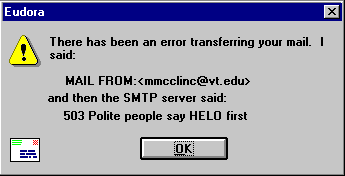
Classic error message that mixes technical code and error message in a confusing, albeit funny sentence (Source: Interface Hall Of Shame)

Of course, there are slightly better alternatives like negative numbers in a positive-only domain function or MAX_INT, NaN or the like provided by most languages.

I do not find any of the above satisfying and good enough for production use.

Better alternatives

Many may argue, that their environment lacks features to implement distinct error indicators and values but I tend to disagree and would like to name a few widely used alternatives for very different languages and environments:

  • Return codes and out-parameters for C-like languages like in the unix and win32 APIs (despite all their other flaws… 😀 )
  • Exceptions for Java, Python, .NET and maybe in some cases even C++ with sufficiently specific type and details to differentiate different failures
  • Optional return types when the failures do not need special handling and absence of a value is enough
  • HTTP status code (e.g. 400 or 404) and a JSON object containing reason and details instead of a 2xx status with the value
  • A result struct or object containing execution status and either a value on success or error details on failure

Conclusion

I am aware that I probably spent way too much words on such a basic topic but I think the number of times I have encountered such a style – especially in code of autodidacts, but also professionals – justifies such an article in my opinion. I hope I provided some inspiration for those who do not know better or those who want to help others improve.

What else can we do?

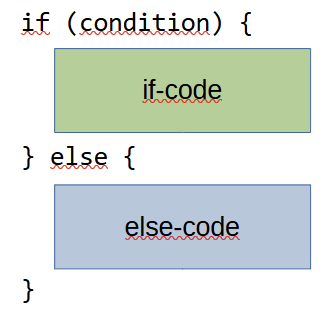
A common code structure to implement a decision is the if-statement, or in its complete form, the if-else-statement:

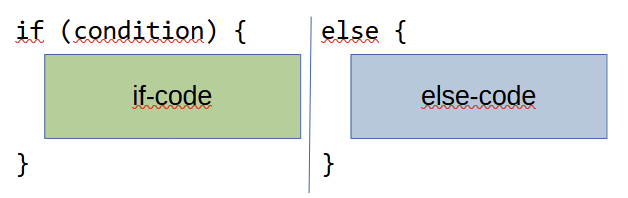
By using the explicit if-else-statement, you essentially partition a part of your code into two “execution lanes” that are used mutually exclusive. Instead of writing them one upon the other, we could, if our code editors supported it, write them side by side:

There are some graphical code editors that tried this tabular approach. It certainly looks unfamiliar to the eye trained on the first notation, but it makes one thing clear: The code flow will go through only one of the columns, not both.

Dependence on explicit conditionals

Using the if-else-statement became so second-nature to most developers that they acted confused and helpless when presented with a simple restriction:

“Don’t use the else keyword”

Jeff Bay, Object Calisthenics, 2008

The restriction is imposed as the second of nine rules from the object calisthenics by Jeff Bay. In the explanation of the rule, he stated that the rule should act as a first step towards implicit conditional statements. Paraphrased: There are 99 ways to express an else statement without using the keyword, but the average developer knows none of them.

In my opinion, the rule is merely the warm-up phase to a bigger challenge, as stated by the “anti-if campaign”: To get rid of if-statements (and else-statements by that matter) in all contexts where alternatives prove more effective.

In order to decide when not to use if-statements, we should learn about the alternatives. There are plenty to choose from! (refer to slide #4)

But we should also learn about the if-statement itself. The goal isn’t to abandon it, but to use it when appropriate and then use it to its full potential.

An interesting thought about the “else”

We already know everything about the if and else? I had the opportunity to learn something new not long ago. The hint came from Kevlin Henney in one of his talks (Non-Functional Coding):

The talk is fairly recent and has some traditional “Kevlin parts” in it. The part I highlighted is unusually aggressive for him. The reasoning is sound, but the nearly personal attack towards the audience (to “piss them off”) is uncalled for.

But, the “volume up to 200 %”-style works more often than not and the bit got me thinking. The culprit in question is this code:

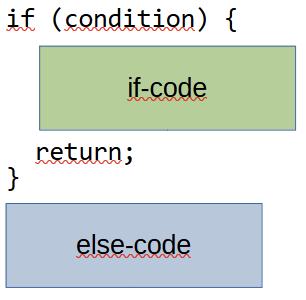
According to Kevlin, this style “is just wrong”. Let’s try to find out why.

There is one principle that is mentioned by Kevlin in passing: The “Single Level of Abstraction” principle that states that you should not mix different levels of abstraction in one block of code (the principle talks about methods). It is a foundation for the first rule in the object calisthenics: “Only one level of indentation per method”.

If you look at the if-code and else-code, they operate on the same level of abstraction. Maybe not on the same level of probability, but they deal with the same topic. Elevating one part by eliminating the else-block in favor of an early return means that this part is more important. It also designates the if-code and in fact the whole if-statement to be a guard clause. Guard clauses typically deal with invalid state and don’t complement the desired functionality. They act as gatekeepers and interdict the invalid state to enter the method’s main body. As a metaphor: The bouncers in front of a club are like guard clauses. To say that being denied entry by a bouncer is comparable fun to being in the club is probably not a widespread opinion.

Unfinished reflection

I still reflect on other clues that are name-dropped by Kevlin, like the stated reduction of refactoring opportunities, but that’s probably because I don’t have enough comparison material.

There is one thing that I haven’t got a proper hold on yet and that’s the term “control state“. My google kung-fu is not mighty enough to reach past some obscure ASP.NET concepts from ten years ago. I haven’t heard the term in books – at least I don’t remember it.

So here is my call for help: Can you provide some source or explanation about what Kevlin Henney means by “control state“?

And what else do you think about the whole discussion?

Arrow Anti-Pattern

When you write code, it can happen that you nest some ifs or loops inside each other. Here is an example:

Because of the shape of the indentation, this code smell is called an anti-arrow pattern. The deepest indentation depth is the tip of the arrow. In my opinion, such a style is detrimental to readability and comprehension.

In the following, I would like to present a simple way of resolving such arrow anti-patterns.

Extract Method

First we extract the arrow pattern as a new method. This allows us to use return values instead of variable assignments and makes the code clearer.

public string PrintElephantMessage(Animal animal)
{
    Console.WriteLine(IsAElephant(animal));
}
public string IsAElephant(Animal animal)
{
    if (animal.IsMammal())
    {
        if (animal.IsGrey())
        {
            if (animal.IsBig())
            {
                if (animal.LivesOnLand())
                {
                    return "It is an elephant";
                }
                else
                {
                    return "It is not an elephant. Elephants live on land";
                }
            }
            else
            {
                return "It is not an elephant. Elephants are big";
            }
        }
        else
        {
            return "It is not an elephant. Elephants are grey";
        }
    }
    else
    {
        return "It is not an elephant. Elephants are mammals";
    }
}

Turn over ifs

A quick way to eliminate the arrow anti-pattern is to invert the if conditions. This will make the code look like this:

public string IsAElephant(Animal animal)
{
    if (!animal.IsMammal())
    {
        return "It is not an elephant. Elephants are mammals";
    }
    if (!animal.IsGrey())
    {
        return "It is not an elephant. Elephants are grey";
    }
    if (!animal.IsBig())
    {
        return "It is not an elephant. Elephants are big";
    }
    if (!animal.LivesOnLand())
    {
        return "It is not an elephant. Elephants live on land";
    }
    return "It is an elephant";
}

Some IDEs like Visual Studio can help flip the Ifs.

Conclusion

Arrow anti-pattern are code smells and make your code less legible. Fortunately, you can refactor the code with a few simple steps.

How to migrate a create-react-app project to vite

It seems that the React community is finally accepting that their old way of scaffolding a new projects, create-react-app (CRA in short), has outlived its usefulness. While there is no official statement about that, there was no update on npm in about a year, which in the JS universe screams “TOXIC WASTE” in very clear words, and meanwhile also has vanished from the official “Start a new React Project” docs.

In search for possibilities, one can do some quick google searches (e.g. this or that or maybe this) and at the moment, I’m giving vite a chance and it has not disappointed me yet, as the opposite:

  • the build definitely feels faster (as the French would say: plus vite), but I never quantified it
  • that over 9000 deprecation warnings one was accustomed to using CRA – gone TO ZERO
  • and the biggest point, no dependency on webpack. Webpack has this weird custom to introduce brutally breaking changes between their versions and then you have to polyfill Node JS core modules or whatever floats their boat, giving users not a choice – i.e. making it highly TOXIC in itself

But still, the react-scripts which CRA employs have played quite a role in development, as it also helped with the “npm start” development server and also as a test runner – so generally, if you have developed your project over some years, you might have relied on it quite a bit, and now you don’t want to recreate everything from scratch.

I recently migrated one of our projects and this is what worked for me. There were three main concerns

  • switch the general infrastructure to vite, so we can develop and build again
  • introduce vitest as a test runner
  • migrate Redux store tests specifically

Let’s focus today on the thing without tests and I will come back to that next time.

Migrate to vite INFRASTRUCTURE

This was actually surprisingly concise, I just had to

npm install -D vite @vitejs/plugin-react
npm uninstall react-scripts

(when in doubt, remove the node_modules folder and run npm install again, but I didn’t have to), then I adjusted package.json to:

  "scripts": {
    "start": "vite",
    "build": "vite build", 
  },

You might prefer to call your dev server via “npm run dev” instead of “npm start”, in that case just replace the "start": "vite" with "dev": "vite" above.

The Vite templates prefer to include a script "preview": "vite preview" but I do not use it, so I didn’t copy that.

It also was required to set this package.json entry:

  // somewhere top-level, i.e. next to "version" or somewhere like that
  "type": "module",

(I’m not entirely sure whether we can now safely remove the “browserslist” or “babel” entries from the package.json because they might be useless now, but I will have to think about in another minute.)

Now, some real code changes. One of the larger todos here might be to make sure that every JSX-containing source file ends with .jsx – there have been discussions about this and beforehand, it was still possible to just place your <App/> etc. inside an App.js, but vite does not like that anymore, so this is a thing you have to do.

So the code changes amount to:

  • Rename every .js file which has some JSX in it to .jsx – pro tip: do it via the IDE so you do not have to care for every import / require-Statement manually!
  • move the template in ./public/index.html directly to ./index.html and in there, replace every mentioning of %PUBLIC_URL% just by the single slash /
  • In the index.html <body>, include your index.jsx e.g. like:
  <body>
    <noscript>You need to enable JavaScript to run this app.</noscript>
    <div id="root"></div>
    <script type="module" src="/src/index.jsx"></script>
  </body>

It might be said that the vite templates like to call their index file “main.jsx”, but it’s not important – just match whatever you put inside the <script src="..."/>.

Now in order not to change your habits too much, i.e. keep your CI build as it is, plus maybe some Docker Dev Containers or even browser bookmarks, you can use this vite.config.js – see docs:

import { defineConfig } from 'vite';
import react from '@vitejs/plugin-react';

export default defineConfig({
  plugins: [react()],
  server: {
    port: 3000,
    host: true
  },
  build: {
    outDir: './build'
  },
});

otherwise, vite prefers to run its dev server on port 5173 (guess it’s Leetspeak) and build in ./dist – just so you know.

Addon: Using ReactComponents from SVGs with Vite. Also with refs.

Since today morning, when I wrote this article, I already learned something new. In another project we were importing SVG files via the approach

import {ReactComponent as Bla} from "./bla.svg";

const ExampleUsage = () => {
  return <Bla />;
};

Doing so now results in

Uncaught SyntaxError: ambiguous indirect export: ReactComponent

This can be solved by npm install vite-plugin-svgr and then updating vite.config.js:

import {defineConfig} from "vite";
import react from "@vitejs/plugin-react";
import svgr from "vite-plugin-svgr";

export default defineConfig({
    plugins: [
        svgr({
            svgrOptions: {
                ref: true,
            },
        }),
        react(),
    ],
    server: {
        port: 3000,
        host: true,
    },
    build: {
        outDir: "./build",
    },
});

The { svgrOptions: {ref: true} } was a specific requirement for our use case, it is necessary if you ever want to access the imported ReactComponents ref; i.e. in our ExampleUsage we needed a specification <Bla ref={...}/> . Leaving the svgrOption ref then at false (its default) gives us the error:

Warning: Function components cannot be given refs. Attempts to access this ref will fail. Did you mean to use React.forwardRef()?

Then, Make the tests work again

As mentioned above, these were a bit trickier, and while I found a way to leave most tests untouched, there was some specific tweaking to be done with Redux store tests, and also with mocking a foreign class (GraphQLClient from “graphql-request” in my case).

But as also mentioned above, I guess this might be a topic for my next blog post. In case you urgently need that knowledge, drop us a mail or something.. 🙂