Small is beautiful – CherryPy Microframework

Origami Elephant (Image used with kind permission of Anya Midori)

We are developing web applications for our clients using various different frameworks and technologies. The choice depends on several different factors like hosting, the clients IT infrastructure and administration and of course project scope. Some of our successful web projects use the Grails or Ruby on Rails with JRuby full stack frameworks. While they provide a ton of powerful features they also intrinsically carry some complexity. This is not always needed nor wanted, some projects might fare well with much less. Sometimes the scope of a project is not entirely clear so choosing a lean alternative you can gradually extend and refine may be the right fit.


Full stack frameworks

A full stack framework usually delivers built-in solutions for persistence/database access, domain modelling, routing, html-templating and so on. If you know for sure that you will need all the provided features from the start and that they are a good fit feel free to choose a full stack framework like Rails, Grails, Play or Django. If you need less or there is no convincing solution for your needs start with a minimal system that delivers value to your clients.

Microframeworks

Microframeworks provide only the basic functionality for routing and handling requests. No templating, no databases, no session management etc. attached. We made really good experiences with microframeworks like Nancy for .NET or CherryPy for Python. You start very simple and are up an running in minutes. If most of your GUI is client-side you do not need templating and you do not have it from the start. You do not need a database, well, you do not have one. Your server side logic revolves around REST, there you go!

The key point is that you are not stuck with this minimal set of support but you can easily extend the framework with features if need be. And usually you have several options per concern to choose from. For templating in Python there are many different solutions like Mako, Jinja2Genshi and others. Need only file-based persistence, want to manage your database in SQL or need an object-relational mapper (ORM) – everything is up to you.

CherryPy

Our experience with CherryPy was very positive. It is easy to run standalone using the integrated web server. You can also run it behind any WSGI-compatible web server because a CherryPy application automatically serves as a WSGI application. This is very nice if you need the power of a native web server and the ease and flexibility of a Python microframework. CherryPy is also very flexible when it comes to request routing offering much convenience with the default routing and method annotations to expose actions on the one hand and _cp_dispatch or MethodDispatcher on the other. It feels easy to extend the solution bit by bit as needed, there is seldom something in your way. Configuration is easy and powerful and the documentation gets you up to speed most of the time.

Conclusion

Microframeworks let you choose what you need and which implementation best fits your needs. You do not carry all that complexity with you from the start and easily pull more framework support in as you go choosing the most appropriate for your current situation. Your choices may differ in the next project since every project is different.

Beyond agile: building on the roots

Software development changes. Over a decade ago the agile manifesto adduced evidence that the document heavy processes needed to change.

Software development changes. Over a decade ago the agile manifesto adduced evidence that the document heavy processes needed to change.
Before that progress was measured by producing documents, a big planning and design phase was held at the start of every project to minimize the risk of producing the wrong software. Requirements were carved into stone. Changes later in the processes were shunned.
Agile changed all that. And besides losing some valuable practices (like documentation) recent developments call for a new form and focus of software development.
What changed? Software is now used by all kinds of people. This is not new. But design, user experience (UX), user focus and so on need to be an integral part of software development.

Business people and developers and designers must work
together daily throughout the project.

Nowadays developers need to interact not only with business people but with designers as well. Especially the waterfall like processes from the UX design or product management world struggle with the iterative and highly unplanned nature of agile.

Deliver working software value continuously frequently, from a couple of weeks to a couple of months, with a preference to the shorter timescale.

Agile only thinks in iterations or sprints. Even this changed with continuous delivery and lean development. The focus is not so more on a plannable release schedule but on bringing value to the customer.

Our highest priority is to satisfy the customer and the users
through early and continuous delivery of valuable software.

With a user focussed process not only the customer but also the user needs to be satisfied. UX design has this focus.
But UX design needs a significant research (developers call this analysis), design and test phase up front. So in practice this is masked as a big sprint 0.
Unfortunately agile has no concept of planning, design or analysis. The agile philosophy concentrates on execution. This has lead to the notion that planning can be done in every iteration.

Simplicity–the art of maximizing the amount of work not done– Managing and understanding complexity–the art of finding the right places where to invest into details– is essential.

As little planning, design and analysis as possible. The famous pendulum swings the other way. In order to avoid the planning heavy processes from the past, agile ignored and many practitioners even shunned these practices. As many designers can tell us, you need a good foundation to start with. Research is needed. “But these requirements will change” I hear the cries of the past.

Welcome changing requirements, even late in development. Agile processes harness change for the customer’s competitive advantage and the user’s delight.

A dilemma. On the one hand we need an initial investment for a good foundation. On the other hand we know that many things will change during the course of the project. We are stuck.

The best architectures, requirements, and designs solutions emerge from self-organizing teams.

One key principle that the UX design world has to offer for software development is the reasoning. Everything builds upon another thing. There is an incentive to find the cause, to construct a chain of whys. Requirements do not emerge from teams. They are grounded in user needs and business goals. These form the foundation of every user centered project.

At regular intervals All through the project, the team reflects on how to become more effective, then tunes and adjusts its behavior approach accordingly.

The agile philosophy has one core principle which helps to build a bridge between the worlds of development and design: continuous feedback.
In order to build reasoning you need to test your assumptions. UX has many practices to validate assumptions: interviewing, prototyping, analytics.
Feedback is a vital to a project and needs to be included in every action, not only the technical and measurable ones.
This feedback needs to be continuous. Regular intervals won’t cut it anymore.
We need to remove the notion of phases, iterations and sprints from our thinking. We have to define practices that help to build software that meets goals and satisfies needs. These build upon another by reasoning and on demand, not when a time plan demands it. We cannot freeze features for an iteration. Work needs to be organized around streams not iterations. These are not isolated.
Lean thinking tries to foster the notion of bringing constant value to the customers and users. Value streams.
A stream has no defined time frame or regular interval.

Working software is Goals met and satisfied needs are the primary measure of progress.

To bring design into the boat we need move the focus away from requirements and features to goals and needs. Streams of development need to identify, evaluate and build these jobs to be done, the goals. Designers bring the user needs to the table. Developers add the technical constraints. Together all these three factors, business goals, user needs and technical constraints, are balanced by the team.
All this is not new. And in practice many feedback steps or actions are omitted because of time, budget and other constraints. Information and insights are lost because of communication or documentation problems.

The most efficient and effective method of conveying information to and within a development team is face-to-face conversation.

Teams should consist of developers and designers. Both need to be present in a kind of pair. Not pair programming. Pair everything. Decisions are made at every step. All three factors need to be considered.
Right now this seems to be pretty abstract and I think we should break it down.
What are the actions during a project?

Listen

A project should start with listening (but it doesn’t need to). And listening should never stop. Listen to the customer, to the users, to the systems, to the code.

Reflect

With all that information you get from listening you constantly need to filter, to reflect, to think. What is important? What not? What is an assumption? What has changed? What needs to be together? What needs to be separated? What forms a whole? What is missing? What is common? What is different? Are we moving towards the goals or away?
Ordering and prioritizing is one of the most important tools we have to bring sense to the mess.

Imagine

How can all this information be translated into software? Into a user interface. Into parts of the software architecture. How will it be deployed? What is the environment? For the user and for the system.
Design systems, guidelines for design and development need to be constructed.

Test

Is my thinking and imaging, the design, right? Does it meet the goal? Is it fast enough? Are the technical constraints met? Does it help the user? All of this needs to be tested. Whether you use the real software, prototypes or other means: you need to remove assumptions and find proof that your translations of information into software works.

Create

This should be obvious. You need to write the software and the documentation.

Ship

Without ever reaching the user, software is worthless. It needs to be shipped. Continuously.

Build projects around motivated individuals. Give them the environment and support they need, and trust them to get the job done.

Every action happens all the time. There’s no right order of steps. This might sound chaotic.
But a project is more like the exploration of unknown terrain. You do not know beforehand what the terrain will be like. You will need to improvise. For this it is better to have practices and principles which help you recognize and react to change.
This change comes from questioning assumptions and furthering your understanding of the goals and needs. Change does not come out of nowhere. Be prepared to react to it.

Reality

One big problem from talking about development and design processes comes from the huge gap between ideal and real world. In the real world there’s not enough time, money, skills, people.

Agile processes promote sustainable development. The sponsors, developers, designers and users should be able to maintain a constant pace indefinitely.

Be pragmatic. You don’t need the newest tools. Go with universal tools: pen and paper, wiki and most importantly your head. In all this you need to think and you need to communicate. Thinking is hard and good communication is even harder. But they stand at the center of a successful project. Do not avoid meetings if they are needed for communication or decision making. Use what you have and build from there.

Continuous attention to technical excellence and good design thinking and communication enhances agility.

It is essential that you know some practices really well. Practices which help you with the actions: listening, reflecting, imagining, testing, creating, shipping.

(The quotes are taken from the principles behind the agile manifesto.)
(The idea for naming the first three actions came from Putting thought into things

The whole company under version control

One of our secrets is that we’ve put the whole company under version control. You can see every change to our business data and undo every mistake.

by Sashkin / fotolia

A minor fact about the Softwareschneiderei that always evokes surprised reactions is that everything we do is under version control. This should be no surprise for our software development work, as version control is a best practice for about twenty years now. If you aren’t a software developer or unfamiliar with the concept of version control for whatever reasons, here’s a short explanation of its main features:

Summary of version control

Version control systems are used to track the change history of a file or a bunch of files in a way that makes it possible to restore previous versions if needed. Each noteworthy change of a file (or a bunch of files) is stored as a commit, a new savepoint that can be restored. Each commit can be provided with a change note, a short comment that describes the changes made. This results in a timeline of noteworthy changes for each file. All the committed changes are immutable, so you get revision safety of your data for almost no cost.

Usual work style for developers

In software development, each source code file has to be “in a repository”, the repository being the central database for the version control system. The repository is accessible over the network and holds the commits for the project. One of the first lessons a developer has to learn is that source code that isn’t committed to a version control system just doesn’t exist. You have to commit early and you have to commit often. In modern development, commit cycles of a few minutes are usual and necessary. Each development step results in a commit.

What we’ve done is to adopt this work style for our whole company. Every document that we process is stored under version control. If we write you a quote or an invoice, it is stored in our company data repository. If we send you a letter, it was first committed to the repository. Every business analysis spreadsheet, all lists and inventories, everything is stored in a repository.

Examples of usage scenarios

Let me show you two examples:

We have a digital list of all the invoices we sent. It’s nothing but a spreadsheet with the most important data for each invoice. Every time we write an invoice, it is another digital document with all the necessary text and an additional line in the list of invoices. Both changes, the new invoice document and the extended list are included in one commit with a comment that hints to the invoice number and the project number. These changes are now included in the ever-growing timeline of our company data.

We also have a liquidity analysis spreadsheet that needs to be updated often. Every time somebody makes a change to the spreadsheet, it’s a new commit with a comment what was updated. If the update was wrong for whatever reason, we can always backtrack to the spreadsheet content right before that faulty commit and try again. We don’t only have the spreadsheet, but the whole history of how it was filled out, by whom and when.

Advantages of version controlled files

Before we switched to a version controlled work style, we had network shares as the place to store all company data. This is probably the de-facto standard of how important files are handled in many organizations. Adding version control has some advantages:

  • While working with network shares, everybody works on the same file. Most programs show a warning that another user has write access on a file and only opens in read-only mode. But not every program does that and that’s where edit collisions occur without anybody noticing. With version control, you work on a local copy of the file. You can always change the file, but you will get a “merge conflict” when another user has altered the file in the repository after your last synchronization. These merge conflicts are usually minor inconveniences with source code, but a major pain with binary file formats like spreadsheets. So you’ll know about edit collisions and you’ll try to avoid them. How do you avoid them? By planning and communicating your work better. Version control emphasizes the collaborative work setting we all live in.
  • Version controlled data is always traceable. You can pinpoint exactly who did what at which time and why (as stated in the commit comment). There is no doubt about any number in a spreadsheet or any file in your repository. This might sound like a surveillance nightmare, but it’s more of a protection against mishaps and honest errors.
  • Version control lets you review your edits. Every time you commit your work, you’ll see a list of files that you’ve changed. If there is a file that you didn’t know you’ve changed, the version control just saved your ass. You can undo the erroneous change with a simple click. If you’d worked with network shares, this change would have gone unnoticed. With version control, you have to double-check your work.
  • There are no accidental deletions with version control. Because you have every file stored in the repository, you can always undo every delete operation. With network shares, every file lives in the constant fear of the delete key. With version control, you catch your mishap in the commit step and just restore the file.

Summary of the adoption

When we switched to version control for every company data, we just committed our network shares in the repository and started. The work style is a bit inconvenient at first, because it is additional work and needs frequent breaks for the commits, but everybody got used to it very fast. Soon, the advantages began to outweight the inconvenience and now working with our company data is free of fear because we have the safety net of version control.

You want to know more about version control? Feel free to ask!

The tables will eventually turn for every optimization

Nearly all performance optimizations turn sour sooner or later. Here’s a story that illustrates the concept and gives a simple ruleset to avoid the effect.

An inconvenient truth

One of the things every software developer has to learn the hard way is that performance optimizations are a bad thing most of the time. The lesson is counter-intuitive because it is in conflict with several fundamental motivations of our artist/engineer attitude:

  • We want our code to be as fast as possible or even faster. (We really like the prospect of making the impossible happen!)
  • We don’t want to waste resources if it can be avoided. (Digital resources have always been scarce. Development in abundance wasn’t taught!)
  • We want to be clever and one-up everybody with the latest trick/hack. (This ego boost driven development attitude is a major problem on its own!)

But we can’t deny that clever guys exist since forever and that their wisdom should be considered. Here’s one clever guy fourty years ago:

premature optimization is the root of all evil.

said Donald Knuth in 1974. A typical computer had RAM in the lower kilobyte range these days and clocked with around a megahertz. The Intel 8080 was introduced in this year. No sign of abundance all around.

Coming from this insight, i teach the “three rules of performance optimization” to my students:

  1. Don’t
  2. Not Yet
  3. Measure

A little disclaimer: Performance optimizations are measured in milliseconds. You are still responsible for complexity optimizations and should engage them. Complexity is measured in O(n).

I blogged about the rules some time ago, so I won’t repeat the whole meaning behind them. Today, I want to tell a story related to rule three (“Measure”) and why it’s generally a good idea to stay clear of optimizations if not absolutely necessary.

An accidental observation

by ortodoxfoto / fotolia

In one of our long-running projects, we store data in a 24/7 manner since more than ten years. The project started on Pentium IV boxes with 120 GB harddisks. Soon enough, the available disk space vanished rapidely. Our customer wanted to optimize the storage efficiency. We told him that we can always trade storage space versus computation time or the other way around (the infamous space/time tradeoff), but if we compress the data in the system’s archive to save space, it will result in slower archive access. Our customer understood the tradeoff and decided he wanted storage efficiency over access speed for the archive.

So we added a compression step when certain data types were stored in the archive. Because the data was text based (XML and other formats), the compression rate was at 90% and even higher, meaning that we could fit ten times more data on the disk than before. We certainly met the customer’s goal of store efficiency. But what about the access speed? We needed to add the decompression step for certain data types at the place where our system loads from the archive. After that, we hoped that the speed didn’t suffer too badly. We measured the access times before and after the change and couldn’t believe our eyes: The access time was nearly ten times faster than before. There was no tradeoff, we actually shrank memory consumption and computation time at once and in the same ballpark figure. We felt like heros.

Discovering false premises

Why did this happen? Our explanation is that at some specific point in time, the CPUs became too fast for a tradeoff. In the good old days, there really was a tradeoff: if you needed to compress parts of your harddisk to save space, loading these parts became slower. Because the CPU had to perform extra work on top of the loading, you had to wait longer. Loading more data directly from disk was faster than loading less data from disk and decompressing it. When the CPU became fast enough to actually decompress during the I/O delay of the harddisk, that’s when the raw amount of data that needed to be transferred from disk determined the loading speed. And since uncompressed data is larger, it now took longer to load than compressed data.

At some specific point in time, the old wisdom that compressed data is slower became a lie. Nobody told us. We weren’t heros, we just lived on false premises.

Our customer was pleased and continued to be pleased for years. Every few years, the CPUs of the target machines would become even faster, but the harddisk performance would hardly improve. The new wisdom was truer than ever: Less data is faster, regardless of what the CPU has to do with it. This was a performance optimization that could be used everywhere. You want to increase I/O speed? Compress the data.

The tables begin to turn

Fast forward to modern days. A new technology promised to improve harddisk performance by orders of magnitude: The solid state disk (SSD) delivers impressive amounts of data per second, but more important, gets rid of the initial seek time that magnetic spindle disks had (those few milliseconds to locate the data on the disk that felt like ages for modern CPUs). We started our migration to SSD in 2010 and were SSD-exclusive at the end of 2013. Our customer was a bit more hesistant, but the latest generation of target machines run on SSDs, too. So how did this affect our performance optimization?

As you can probably deduce by now, the decompression work of the CPU re-emerged in the archive access time. It’s by no means as bad as in ancient times, but the days of “no tradeoff” are gone, again. The performance optimization isn’t an optimization anymore. We still have it in the system, because it was never meant to improve performance, but storage efficiency, and it still does that perfectly. And needs to, because SSD are still expensive and don’t offer storage space in abundance. But the old wisdom is back (partially): compressed data is slower, if not by much.

What do we learn from this?

Over the course of a few years, a specific feature (transparent storage compression) in our system was a performance burden, then a performance booster and a burden again. We didn’t change the code, we just changed the hardware circumstances. The best lesson to be learnt is that no performance optimization lasts forever. Premises will change. Effects will be negated. Bottlenecks will be shifted. It’s best to know when that happens. And then it’s best to be able to revoke the optimization. Or, if all this sounds way too much trouble for such a tiny performance gain, remember the first rule of performance optimization (Don’t) and just leave it alone. You can always tell yourself that you’ve just optimized your code for the machine it will run on in ten years.

Recap of the Schneide Dev Brunch 2015-12-13

If you couldn’t attend the Schneide Dev Brunch at 13th of December 2015, here is a summary of the main topics.

brunch64-borderedTwo weeks ago, we held another Schneide Dev Brunch, a regular brunch on the second sunday of every other (even) month, only that all attendees want to talk about software development and various other topics. So if you bring a software-related topic along with your food, everyone has something to share. The brunch was small this time, but with enough stuff to talk about. As usual, a lot of topics and chatter were exchanged. This recapitulation tries to highlight the main topics of the brunch, but cannot reiterate everything that was spoken. If you were there, you probably find this list inconclusive:

Company strategies

Our first topic was about the changes that happen in company culture once a certain threshold is overstepped. The founders lose touch with their own groundwork and then with their own employees. Compliance frameworks are installed and then enforced, even if the rules make no sense in specific cases. A new hierarchy layer, the middle management, springs into existence and is populated by people that never worked on the topic but make all the decisions. The brightest engineers are promoted to a management position and find themselves helpless and overburdened. Adopting a new technology or tool takes forever now. The whole company stalls technologically.

Sounds familiar? We discussed several cases of this dramaturgy and some ways around it. One possible remedy is to never grow big enough. Stay small, stay fast and stay agile. That’s the Schneide way.

Code analysis with jDeodorant

We devoted a lot of time on getting to know jDeodorant, an eclipse-based code smell detection tool for Java. We grabbed a real project and analyzed it with the tool. Well, this step alone took its time, because the plugin cannot be operated in an intuitive manner. It presents itself as a collection of student thesis work without overarching narrative and a clear disregard of expectation conformity. If several experienced eclipse users cannot figure out how a tool works despite having used similar tools for years, something is afoul. We got past the bad user experience by viewing several screencasts, the most noteworthy being a plain feature demonstration.

Once you figure out the handling, the tool helps you to find code smells or refactoring opportunities. In our case, most of the findings were false alarms or overly picky. But in two cases, the tool provided a clear hint on how to make the code better (both being feature envies). If the project would really benefit from the proposed refactorings is subject for discussion. The tool acts like a very assiduous colleague in a code review when every improvement gets rewarded.

We really don’t know how to rate this tool. It’s hard to learn and provides little value on first sight, but might be useful on larger legacy code bases. We’ll keep it at the back of our minds.

Naming and syntax rules

During the discussion about jDeodorant, we talked about naming schemes and other syntax rules. We remembered horrific conventions like prefixed I and E or suffixed Exception. The last one got some curious looks, because it’s still a convention in the Java SDK and some names won’t make it without, like the beloved IOException. But what about the NullPointerException? Wouldn’t NullPointer describe the problem just as good? Kevlin Henney already talked about this and other ineffective coding habits (if you have audio degradation halfway through, try another video of the talk). It’s a good eye-opener to (some of) the habits we’ve adopted without questioning them. But challenging the status quo is a good thing if done in reasonable doses and with a constructive attitude.

Unit testing

When we played around with jDeodorant and surfed the code of the project that served as our testing ground, the Infinitest widget raised some questions. So we talked about Continuous Testing, unit tests and some pitfalls if your tests aren’t blazing fast. The eclipse plugin for MoreUnit was mentioned soon. Those two plugins really make a difference in working with tests. Especially the unannounced shortcut Ctrl+J is very helpful. I’ve even blogged about the topic back in 2011.

Epilogue

As usual, the Dev Brunch contained a lot more chatter and talk than listed here. The number of attendees makes for an unique experience every time. We are looking forward to the next Dev Brunch at the Softwareschneiderei. And as always, we are open for guests and future regulars. Just drop us a notice and we’ll invite you over next time.

Renaming is hard work

Imagine you’ve developed a software solution for one of your customers, for example a custom CRM. Everything in this system revolves around the concept of a customer as the key entity. Of course, this is reflected in your code as well. The code is crowded with variable and class names like customerThis and CustomerThat. But now your customer wants you to change the term customer to client.

The minimal and lazy solution would be to change only those occurrences of the word, which are visible to the users. This includes:

  • Texts displayed in the user interface. If your application is internationalized or at least prepared for internationalization, they are usually neatly contained in translation files and can be easily updated.
  • User documentation like manuals. Don’t forget to update the screenshots.

However, if you do not want to let the code diverge from the language of the domain, you have to rename and update a lot more:

  • identifiers in the code (types, namespaces/packages, variables, constants)
  • source files and directories
  • code comments
  • log output strings
  • internationalization keys
  • text protocol strings (e.g. JSON keys) and HTTP API routes/parameters. Of course you can only do that if you are allowed to break the protocol! Don’t accidentaly break your API or formats, e.g. if JSON keys or XML tags are generated via reflection from code identifiers.
  • IDs of HTML tags in views, CSS class names and selector strings in referencing Javascript code
  • internal documentation (e.g. Wiki)

IDE support for renaming can help a lot. Especially the renaming of identifiers is reliable in statically typed languages. However, local variables, function parameters, and fields usually have to be renamed separately. In dynamically typed languages automated renaming of identifiers is often guesswork. Here you must rely on a good test coverage. Even in statically typed languages identifiers can be referenced via strings if reflection is used.

If you use a grep-like tool or the search feature of your IDE or editor to assist you, keep in mind that composite terms can occur in many different forms like FooBar, fooBar, foo-bar, foo_bar, foo.bar, foo bar or foobar. Don’t forget about irregular plural forms, e.g. technology – pl. technologies. Also think of abbreviations, otherwise a

for (Option opt : options)

might end up as

for (Alternative opt : alternatives)

But this is not the end of the story. A lot of renamings require migration scripts or update scripts to be executed at the time of the next update or deployment:

  • database tables and columns
  • some ORMs like Hibernate store class names in the database for the “table-per-hierarchy” mapping
  • string-based enum values in database entries
  • configuration keys and values
  • keys and values in data formats (JSON, XML, …) of stored data. You probably have to provide backward-compatibility for the old formats if the data files are not stored all in one place and can’t be converted in one go
  • names of data folders

If you don’t rename everything all at once, but decide to use the new term only in newly written code and to leave the old term in the existing code until it eventually gets replaced, you will probably end up with a long transition phase and lots of confusion for new project members who don’t know about the history of the project.

Learning UX design: UX is like a text adventure

Designing with a beginner’s mind. Question everything. Get to the whys, the reasons. But how do I translate this information to a software interface?

In the first part I emphasized how important it is to think for the user. Normally I tried to think like the user. The problem is: the users of my software have a totally different view point and experience. They are experts in their respective domain and have years of working knowledge in it. So I try a more naive approach: thinking with a beginner’s mind. Question everything. Get to the whys, the reasons. But how do I translate this information to a software interface?

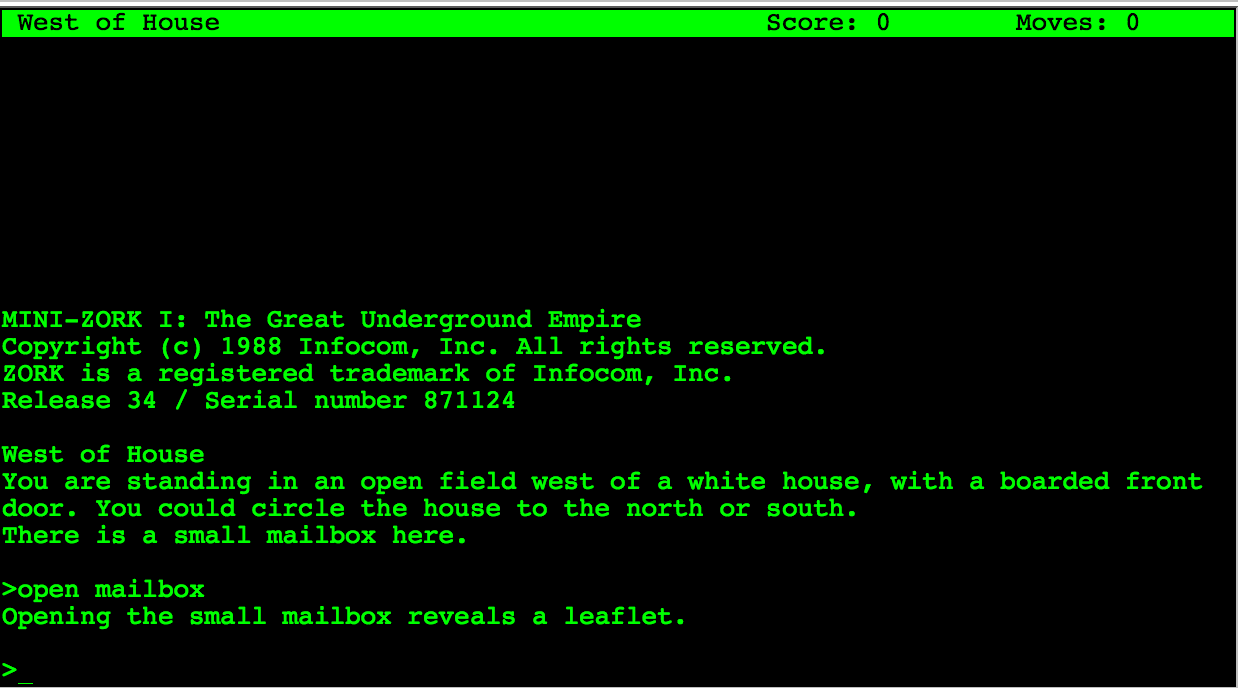
zork

A text adventure

I remember playing (and programming) my first text adventures, later on with simple static images. Many of them had a rich and fascinating atmosphere in spite of having any graphic gizmos or sophisticated real time action.
One of the most important parts of your user interface is text and the words need to be carefully chosen from the user’s domain. But here I want to highlight another similarity between a text adventure and thinking for the user. A text adventure presents the user with a short but sufficient description. These small snippets of text is all the information the user needs at this step of his journey.
A user interface should be the same. Think about the crucial information the user needs at this step. But the description does not stop here: it highlights important parts which further the story. Think about the necessary information and the most important information. Think about a simple hierarchy of information.
For atmosphere and fun the text adventures add small sentences or even unusual phrasing. Besides highlighting things by contrast these parts help the user to get a sense where in the part of the journey he is. Where he came from and where he can go. It connects different rooms.
A business process from the user’s domain is like a journey through the software. He needs to know what the next steps are, what is expected and what is already accomplished. Furthermore the actions which can be done are of utmost importance. In text adventures objects which can be interacted with are emphasized by giving them an extra wording or sentence at the end of a paragraph. Actions are revealed by the domain (common wisdom or specific domain knowledge like fantasy).
For this we need to determine which actions can be done in this part of the process, on this screen.

Information and actions

After listening and reflecting on the information we collected from the user’s view point of their domain, we need to divide it up into steps of a process and form a consistent journey which resembles the imagination of the process the users have in mind. Ryan Singer uses a simple but effective notation for jotting down the needed information and the possible actions.
The information forms the base. Without it the user does not know where in the process he is, what process he works on and what are the next steps. In order to extract this information form the vast knowledge we already collected we need to abstract.
Imagine you have only the information present in this step and want to reach this goal. Is this possible? Is the information sufficient? What information is lacking? Is the missing information part of the common domain knowledge? Did you verify it is common domain knowledge? And if you have enough information: do you know what the expected actions are? What should be done to get further to the goal?

The big picture

Thinking about every step on the way to the goal helps designing each step. But it is also important to not lose sight of the big picture, the goal. Maybe some steps are not necessary or can be circumvented in special cases. Here you need the knowledge of the domain experts. But remember you need to question the assumptions behind their reasoning. Some steps may be mandated by law, some steps may be needed as a mental help. Do not try to cram everything into one step. The steps and their order need to resemble the mental image of the users. But you can help to remove cruft and maybe even delight them on their journey. But this is part of another post.

Our voyage to service separation – Part II

We transformed our evolutionary grown IT landscape to a planned setup. Here is what we learned on the way (part 2/2).

Recap of the situation

In the first part of this blog series, we introduced you to our evolutionary grown IT landscape. We had a room full of snow- flaked servers and no overall concept how to use them. We wanted our services to be self-contained and separated. So we chose the approach of virtualization to host one VM per service on a uniform platform. We chose VirtualBox, Vagrant and Ansible to help us along the way.
This blog entry tells you about the way and our experiences and insights.

The migration

In order to migrate every service you use to its own virtual machine (VM), you’ll need a list or map of your services first. We gathered our list, compared it to reality, adjusted it, reiterated everything, added the forgotten services, drew the map, compared again, drew again and even then missed some services that are painfully obvious in hindsight, like DNS or SMTP. We identified more than 15 distinct services and estimated their resource profile. Then we planned the VM layouts and estimated the required computation power to host all of them. Then we bought the servers.

We started with three powerful hosting servers but soon saw that there is a group of “alpha VMs” with elevated requirements on availability and bought a fourth hosting server with emphasis on redundancy. If some seldom used backoffice service goes down, that’s one thing. The most important services of our company should not go down because of a harddisk failure or such.

Four nearly identical hosting servers to run 15+ VMs on required a repeatable process to set things up. This is where the first tip comes into play:

  • Document everything. Document all the details. Have your Wiki ready and write a step-by-step tutorial for every task you perform. It’s really tedious and probably a bit cumbersome at first, but it will pay of sooner and better than you’d imagine.

We started the migration process with the least important services to get a feeling for the required steps. It turned out later that these services were also the most time-consuming ones. The most essential and seemingly complex services took the least time. We essentially experienced the pareto effect but in reverse: We started with the lowest benefit for the highest cost. But we can give two tips from this experience:

  • Go the extra mile. Just forget about the pareto effect and migrate all services. It’s so much more fun to have a clean IT landscape map than one where most things are tidy but there’s an area marked “here be dragons”.
  • Migration effort and service importance aren’t linked. Our most important service was migrated in about half an hour. Our least important service needed nearly three days. It’s all about the system architecture of the service and if it values self-containment.

The migration took place over the course of a few months with frequent address changes of our tools and an awful lot of communication for cutoff dates. If you need to migrate a service, be very open about the process and make sure that the old service address won’t work after the switch. I cannot count the amount of e-mails I wrote with the subject prefix “IMPORTANT!”. But the transition went smooth and without problems, so we probably added some extra caution that might not have been necessary.

After the migration

When we had migrated our last service in its own VM, there were a lot of old servers without any purpose anymore. We switched them off and got rid of them. Now we had nearly two dozen new servers to care for. One insight we had right after the start of our journey is that virtualized servers require the same amount of administration as physical ones. Just using our old approaches for the new IT landscape wouldn’t cut it. So we invested heavily in automation and scripted everything. Want to set up a new CI build slave? Just add its address into Ansible’s inventory and run the script (“playbook”). All servers need security updates? Just one command and a little wait.

Gears by Pete BirkinshawLearning to automate the administrative tasks in the right way had a steep curve, but it’s the only feasible way. We benefit heavily from the simple fact that we forced ourselves to do it by making it impossible to handle the tasks manually. It’s a “burned bridges” approach, but upon reaching the goal, it really pays off. So another tip:

  • Automate everything. Even if you think you’ll perform this task just a few times – that’s exactly the scenario to automate it to never have to bother with the details again. Automation is key if you want to scale your IT landscape to reasonable sizes.

Reaping the profit

We’ve done the migration and have a fully virtualized setup now. This would not be very beneficial in itself, but opens the door for another level of capabilities we simply couldn’t leverage before. Let me just describe two of them:

  • Rethink your backup strategy. With virtual machines, you can now backup your services on an appliance level. If you wanted to perform this with a real server, you would need to buy the exact same hardware, make exact copies of the harddisks and store this “clone machine” somewhere safe. Creating an appliance level backup means to stop the VM, export it and restart it. You’ll have some downtime, but everything else is just a (big) file.
  • Rethink your service maintainance strategy. We often performed test upgrades to newer versions of our important services on test machines. If the upgrade went well, we would perform it again on the live server and hope for the best. With virtual machines and appliance backups, you can try the upgrade on an exact copy of the live server over and over again. And if you are happy with the result, you just swap your copy with the live server and everything’s fine. No need for duplicated procedures, you always work with the real deal – well, an indistinguishable copy of it.

Conclusion

We’ve migrated our IT landscape from evoluationary to a planned virtualized state in just about a year. We’ve invested weeks of work in it, just to have the same services available as before. From a naive viewpoint, nothing much has changed. So – was it worth it?

The answer is short and clear: Absolutely yes. Even in the short time after the migration, the whole setup performs smoother and more in a planned way than just by chance. The layout can be communicated clearer and on different levels. And every virtual machine has its own use case, to the point and dedicated. We now have an IT landscape that obeys our rules and responds to our needs, whereas before we often needed to make hard compromises.

The positive effects of documentation and automation alone are worth the journey, even if they are mere side effects of the main goal. +1, would migrate again.

Simple C++11 – Part I – Unit Structure

C++ has long had the stigma of an overlay complex and unproductive language. Lately, with the advent of C++11, things have brightened a bit, but there are still a lot of misconceptions about the language. I think this is mostly because C++ was taught in a wrong way. This series aims to show my, hopefully somewhat simpler, way of using C++11.

Since it is typically the first thing I do when starting a new project, I will start with how I am setting up a new compile unit, e.g. a header and compile unit pair.

Note that I will try not to focus on a specific C++11 paradigm, such as object-oriented or imperative. This structure seems to work well for all kinds of paradigms. But without much further ado, here’s the header file for my imaginary “MyUnit” unit:

MyUnit.hpp

#pragma once

#include <vector>
#include "MyStuff.hpp"

namespace MyModule { namespace MyUnit {

/** Does something only a good bar could.
*/
std::vector<float> bar(int fooCount);

/** Foo is an integral part of any program.
    Be sure to call it frequently.
*/
void foo(MyStuff::BestType somethingGood);

}}

I prefer the .hpp file ending for headers. While I’m perfectly fine with .h, I think it is helpful to differentiate pure C headers from C++ headers.

#pragma once

I’m using #pragma once here instead of include guards. It is not an official part of the standard, but all the big compilers (Visual C++, g++ and clang) support it, making it a de-facto standard. Unlike include guards, you only have to add only one line, which says exactly what you want to achieve with it. You do not have to find a unique identifier for your include guard that will most certainly break if you rename the file/unit. It’s more readable, more resilient to change and easier to set up.

Namespaces

I like to have all the contents of a unit in a single namespace. The actual structure of the namespaces – i.e. per unit or per module or something else entirely depends on the specifics of the project, but filling more than one namespace is a guarantee for chaos. It’s usually a sign that the unit should be broken up into smaller pieces. An exception to this would be the infamous “detail” namespace, as seen in many of the Boost libraries. In that case, the namespace is not used to structure the API, but to explicitly omit things from the API that have to be visible for technical reasons.

Documentation

Documentation goes into the header, not into the implementation. The header describes the API, not only to the compiler, but also to humans. It is by no means an implementation detail, but part of the seam that isolates it from the rest of the code. Note that this part of the documentation concerns the API contract only, never the implementation. That part goes into the .cpp file.

But now to the implementation file:

MyUnit.cpp

#include "MyUnit.hpp"

#include "CoolFunctionality.hpp"

using namespace MyModule;
using namespace MyUnit;

namespace {

int helperFunction(float rhs)
{
  /* ... */
}

}// namespace

std::vector<float> MyUnit::bar(int fooCount)
{
  /* ... */
}

void MyUnit::foo(MyStuff::BestType somethingGood)
{
  /* ... */
}

Own #include first

The only rule I have for includes is that the unit’s own include is always the first. This is to test whether the header is self-sufficient, i.e. that it will compile without being in the context of other headers or, even worse, code from an implementation file. Some people like to order the rest of their includes according to their “origin”, e.g. sections for system headers or library headers. I think imposing any extra order here is not needed. If anything, I prefer not waste time sorting include directives and just append an include when I need it.

Using namespace

I choose using-directives of my unit’s namespaces over explicitly accessing the namespaces each time. Unlike the headers, the implementation file lives in a locally defined context. Therefore, it is not a problem to use a very specific view onto the unit. In fact, it would be a problem to be overly generic. The same argument also holds for other “local” modules that this unit is only using, as long as there are no collisions. I avoid using namespaces from external libraries to mark the library boundary (such as std, boost etc.).

Unnamed namespace

The unnamed namespace contains all the implementation helpers specific to this unit. It is quite common for this to contain a lot of the “meat” of an actual unit, while the unit’s visible functions merely wrap and canonize the functionality implemented here. I try to keep only one unnamed namespace in each file, to have a clear separation of what is supposed to be visible to the outside – and what is not.

Visible implementation

The implementation of the visible API of the module is the most obvious part of the .cpp file. For consistency reasons, the order of the functions should be the same as in the header.

I’d advice against implementing in a file wide open namespace. That means balancing an unnecessary pair of parenthesis over the whole implementation file.  Also, you can not only define functions and types, but also declare them – this leads to a function further down in the implementation to see a different namespace than one before it.

Conclusion

This concludes the first part. I’ve played with the thought of using a 3-piece setup instead, extending the header/implementation with a unit-test file, but have not gathered any sharable experience yet. This setup, however, has worked for me for a long time and with many different projects. Have you had similar – or completely different – setups that worked for you? Do tell!

Synchronizing asynchronous calls in JavaScript

In Node.js all I/O performing operations like HTTP requests, file access etc. are designed to be non-blocking. The functions for these operations usually take a callback function argument as last parameter, which will be called once the operation is finished. The asynchronous nature of these operations often requires special means of synchronization, as exemplified in this post.

Let’s assume we want to download a set of files from a list of URLs:

var urls = [
    'http://example.org/file1',
    'http://example.org/file2',
    'http://example.org/file3',
];

If we were to use a classic, synchronous blocking function for the download operation the implementation might look like this:

urls.forEach(function(url) {
    downloadSync(url);
    console.log('Downloaded ' + url);
});
console.log('Downloads complete.')

Output:

Downloaded http://example.org/file1
Downloaded http://example.org/file2
Downloaded http://example.org/file3
Downloads complete.

The program loops through the list of URLs and downloads one file after the other. Each subsequent download is only started after the previous download has finished. No two downloads are active at the same time. Finally, the program prints a message indicating that all downloads are complete.

Now we want to embrace the asynchronous programming style of Node.js. We have a different function, downloadAsync, which is a non-blocking asynchronous function. The function uses the callback convention of Node.js to let the programmer handle the completion of the asynchronous operation:

urls.forEach(function(url) {
    downloadAsync(url, function() {
        console.log('Downloaded ' + url);
    });
});
console.log('Downloads complete.')

Output:

Downloads complete.
Downloaded http://example.org/file2
Downloaded http://example.org/file3
Downloaded http://example.org/file1

The download operations are now started at the same time and finish in a different order, depending on how long it takes each file to download. The quickest download finishes first, the slowest last. The total time for all downloads to finish is probably shorter than before, because slower connections do not make faster connections wait for them to finish.

However, there is one problem with this code: the message “Downloads complete.” is shown before the downloads are actually completed, which is obviously not the intended behavior. The reason why this happens is because the control flow immediately continues after the forEach loop has started all the downloads.

The ‘async’ module

What we need to correct this behavior is a way to wait for all asynchronous download operations started by the loop to finish before we print the “Downloads complete” message.

The async module for JavaScript provides various synchronization mechanisms for exactly these kinds of situations. In our case we’re going to use async.each:

var async = require('async');

async.each(urls, function(url, callback) {
    downloadAsync(url, function() {
        console.log('Downloaded ' + url);
        callback();
    });
}, function done() {
    console.log('Downloads complete.')
});

The async.each function is similar to JavaScript’s forEach function. However, the function called for each iteration has an additional callback parameter, which must be called when each iteration is considered to be completed. The third parameter to async.each is also a callback function. This function is called after all iterations reported their completion. This is where we place the output of the “Downloads complete” message.

Conclusion

The async module provides a rich toolset for the synchronization of asynchronous operations in JavaScript. Go check it out!