Clean Code OSX / Cocoa Development – Setting up CI and unit testing

To start with the tool chain used by clean code development you need a continuous integration server.
Here we install Jenkins on OS X (Lion) for Cocoa development (including unit testing of course).

Prerequisites: Xcode 4 and Java 1.6 installed

To start with the tool chain used by clean code development you need a continuous integration server.
Here we install Jenkins on OS X (Lion) for Cocoa development (including unit testing of course).

Installing Jenkins

Installing Jenkins is easy if you have homebrew installed:

brew update
brew install jenkins

and start it:

java -jar /usr/local/Cellar/jenkins/1.454/lib/jenkins.war

Open your browser and go to http://localhost:8080.

Installing the Xcode plugin

Click on Manage Jenkins -> Manage Plugins
and install the following plugins:

  • Git plugin
  • Xcode plugin (not the SICCI one)

Setup Job

On the Jenkins start page navigate to New Job -> Freestyle

Choose Git as your Version control system (or what is appropriate for you). If you want to run a local git build use a file URL, supposing your project is in a directory named MyProject inside your home directory the URL would look like:

file://localhost//Users/myuser/MyProject/

Add a Xcode build step under Build -> Add build step -> Xcode
and enter your main target (which is normally your project name)
Target: MyProject
Configuration: Debug

If you got Xcode 4.3 installed you may run into

error: can't exec '/Developer/usr/bin/xcodebuild' (No such file or directory)

First you need to install the Command Line Tools Xcode 4 via Downloads Preference Pane in Xcode (you need a developer account) and run

sudo xcode-select -switch /Applications/Xcode.app/Contents/Developer

Done!
Now you can build your project via Jenkins.

GHUnit Tests

Since we want to do clean code development we need unit tests. Nowadays you have two options: OCUnit or GHUnit. OCUnit is baked into Xcode right from the start and for using it in Jenkins you just create an additional build step with your unit testing target. So why use GHUnit (besides having a legacy project using it)? For me GHUnit has one significant advantage over OCUnit: you can run an individual test. And with some additions and tweaks you have support in Xcode, too.

So if you want to use GHUnit start with installing the Xcode Templates.
In Xcode you select your targets and create a new target via New Target -> Add Target -> GHUnit -> GHUnit OSX Test Bundle with OCMock
This creates a new directory. If you use automatic reference counting (ARC), replace GHUnitTestMain.m with the one from Tae

Copy RunTests.sh into UnitTests/Supported Files which copies the file into your UnitTests directory. Make it executable from the terminal with

chmod u+x RunTests.sh

In Xcode navigate to your unit test target and in Build Phases add the following under Run Script

$TARGETNAME/RunTests.sh

In Jenkins add a new Xcode build step to your job with Job -> Configure -> Add Build Step -> Xcode
Enter your unit test target into the Target field, set the configuration to Debug and add the follwing custom xcodebuild arguments:

GHUNIT_CLI=1 GHUNIT_AUTORUN=1 GHUNIT_AUTOEXIT=1 WRITE_JUNIT_XML=YES

At the time of this writing there exists a bug that the custom xcodebuild arguments are not persisted after the first run.

At the bottom of the page check Publish JUnit Test Report and enter

build/test-results/*.xml.

Ready to start!

Clean Code Developer at your fingertips

You’ve probably already heard about the Clean Code Developer initiative. We’re donating a full spectrum of mousepad designs for your educational support.

We are participants in the Clean Code Developer (CCD) movement. This initiative provides a way to perpetually learn, train, reflect and act on the most important topics of today’s software development by formulating a value system and a learning path. The learning path is subdivided in different grades, associated with colors. Every Clean Code Developer progresses continually through the grades, focussing on the principles and practices of the current grade.

If you want a tongue-in-cheek explanation of what the Clean Code Developer is in one sentence: It’s a sight-seeing tour to the most prominent topics every professional software developer should know. But other than your usual tourist rip-off, you can just stay seated and enjoy another round without ever paying anything except attention.

Visualize it

An important aspect of learning and deliberate practice is proper visualization. We invest a lot of work at our workplace, our software and the interaction with our customers to make things visible. When we reflected on our Clean Code Developer practice, we knew that it lacked visualization.

The proposed equipment for a Clean Code Developer is a desktop background picture, a mousepad with an image of all grades at once and some rubber wristbands in the colors of the grades. The wristbands serve as a reminder and a self-assessment tool. The desktop background picture is nice, but only visible if we don’t perform actual work. This let us concentrate on the mousepad.

Duplicate if necessary

The mousepad is the most prominent “advertising” space on the typical work desktop. We want to advertise the content of our current Clean Code Developer grade to ourself. The combination of these two thoughts is not one mousepad, but one for every grade. Imagine six mousepads in the colors of the grades, displaying your currently most important topics right under your fingertips.

We liked the idea so much that we worked on it. The result is a collection of mousepads for every Clean Code Developer to enjoy.

Iterative design

It took us several full cycles of planning, design, layout and proof-reading to have the first version of mousepads produced. It took only a few hours of real-world testing to start the second iteration to further improve the design. Right now, we are on the third iteration. The first iteration had the five colored CCD grades printed on real mousepads. The second iteration added the mousepad for the white grade and a little stand-up display for the initial black grade. The third iteration incorporated the official Clean Code Developer logo, the website URL and improved some details.

Here are some promotional photos of the five first-iteration mousepads:

This slideshow requires JavaScript.

As you can see, we chose to print ultra-slim mousepads to test if it’s feasible to use them stacked all at once (it isn’t, your mileage may vary) or use them even if you aren’t used to mousepads at all (it depends, really). You might want to print the images onto the mousepad you prefer best.

Do it yourself

Yes, you’ve read it right. We are donating the mousepad images back to the community. You can download everything right here:

All documents are bare of any company logo or other advertising and free for your constructive usage. There is only one catch really: the documents are in german language. This might not be apparent at first because we really like the original english technical terms, but some content might need translation for non-german speakers. If you are interested to produce an all-english version, drop us a line.

Acknowledgements

These mousepads wouldn’t exist without the help and inspiration of many co-workers. First of all, the founders of the Clean Code Developer movement, Ralf Westphal and Stefan Lieser, provided all the content of the mousepads. Without their groundbreaking work, we probably wouldn’t have thought of this. The design and production is owed to Hannegret Lindner from the Hannafaktur, a small graphic design agency. We admire her endurance with our iterative approach. And finally, the initial inspiration sparked in a creative discussion with Eric Wolf and Benjamin Trautwein from ABAS Software AG.

It’s your turn now

We are very curious about your story, photo or action still with the mousepads (or the little stand-up display). You can also just share your thoughts about the whole idea or submit an improvement. We’d love to hear from you.

Dependencies: Let’s have just one more

A few days back, I evaluated some libraries to be used in a C++ based application. At first glance, one of these looked particularly good. Lots of well written and detailed documentation, a nice to use API and quite some success stories. I decided to give it a try, which was exactly when I encountered a first minor inconvenience. While the library was available as pre-built release for a vast amount of operating systems, 32 bit as well as 64 bit, there was no official, pre-built release for the required 64 bit Windows. Thus, I had to compile it myself. No problem so far.

For this case, the documentation even had a section listing the dependencies required for building the library. Due to this list being not very long, I was rather enthusiastic to finally be able to try the library.

To cut it short, that list was all but complete.

I spent the better part of the afternoon trying to get the build done. All in vain. When I resolved one dependency, another until then unknown dependency arose, then the next, and so on. When I reached the point where a dependency required Fortran to be built (no joke!) I eventually decided to abandon the nice looking library in favor of another one, which isn’t nearly as all-embracing and nice, but at least won’t take me even deeper into dependency hell.

This rather frustrating experience made me wonder, whether the authors of the library even once tried to build it on another than the development machine? And if so, why didn’t they bother to include a complete list of the dependencies into the documentation?

Clang, The Friendly Compiler

Clang C/C++ compiler can be called The Friendly Compiler, since it makes it much easier to find and understand compile errors and potential bugs in your code. Go use it!

A while back I suggested to make friends with your compiler as a basis for developing high quality code. My focus then was GCC since it was and still is the compiler I use most of the time. Well, turns out that although GCC may be a reasonably good companion on the C/C++ development road, there are better alternatives.

Enter Clang: I had heard about Clang a few times in the past but never gave it a real shot. That changed after I watched Chandler Carruth’s talk at GoingNative 2012.

First of all I was stunned by the quote from Richard Stallman about GCC being deliberatly designed to make it hard to use it in non-free software. I always wondered why IDEs like KDevelop keep reinventing the wheel all the time by implementing their own C/C++ parsers instead of using already existing and free GCC code. This was the answer: THEY SIMPLY COULDN’T!!

One main point of Chandler’s talk was the quality of diagnostic messages of Clang. GCC is a friend that although telling you exactly what’s wrong with your code, it often does it with complicated sentences hidden in walls of text.

Clang on the other hand, tries very hard to comprehend what you really wanted to write, it speaks in much more understandable words and shows you the offending code locations with nice graphics.

You could say that compared to Clang, which is empathic, understanding, pragmatic and always tries to be on the same page with you, GCC comes across more like an arrogant, self-pleasing and I’m-more-intelligent-than-you kinda guy.

Where GCC says: “What? That should be a template instantiation? Guess what, you’re doing WRONG!! “, Clang is more like: “Ok my friend, now let’s sit down together and analyse step-by-step what’s the problem here. I’ll make us tea.

You’ll find many examples of Clangs nice diagnostic output in Chandler’s talk. Here is another one, as a little teaser:

struct A
{
  std::string _str1;
  std::string _str2;
};

struct AHasher
{
  std::size_t operator() (const A& a)
  {
    return std::tr1::hash()(a._str1) ^
      std::tr1::hash()(a._str2);
  }
};
...
typedef std::tr1::unordered_map<A, int> AMap;
...

What’s wrong with this code? Yes, exactly: the operator in AHasher must be const. Errors with const correctness are typical, easy-to-overlook kind of problems in day-to-day programming. GCCs reaction to something like that is that something discards qualifiers. This may be perfectly right, and after a while you even get used to it. But as you can see with Clang, you can do much better.

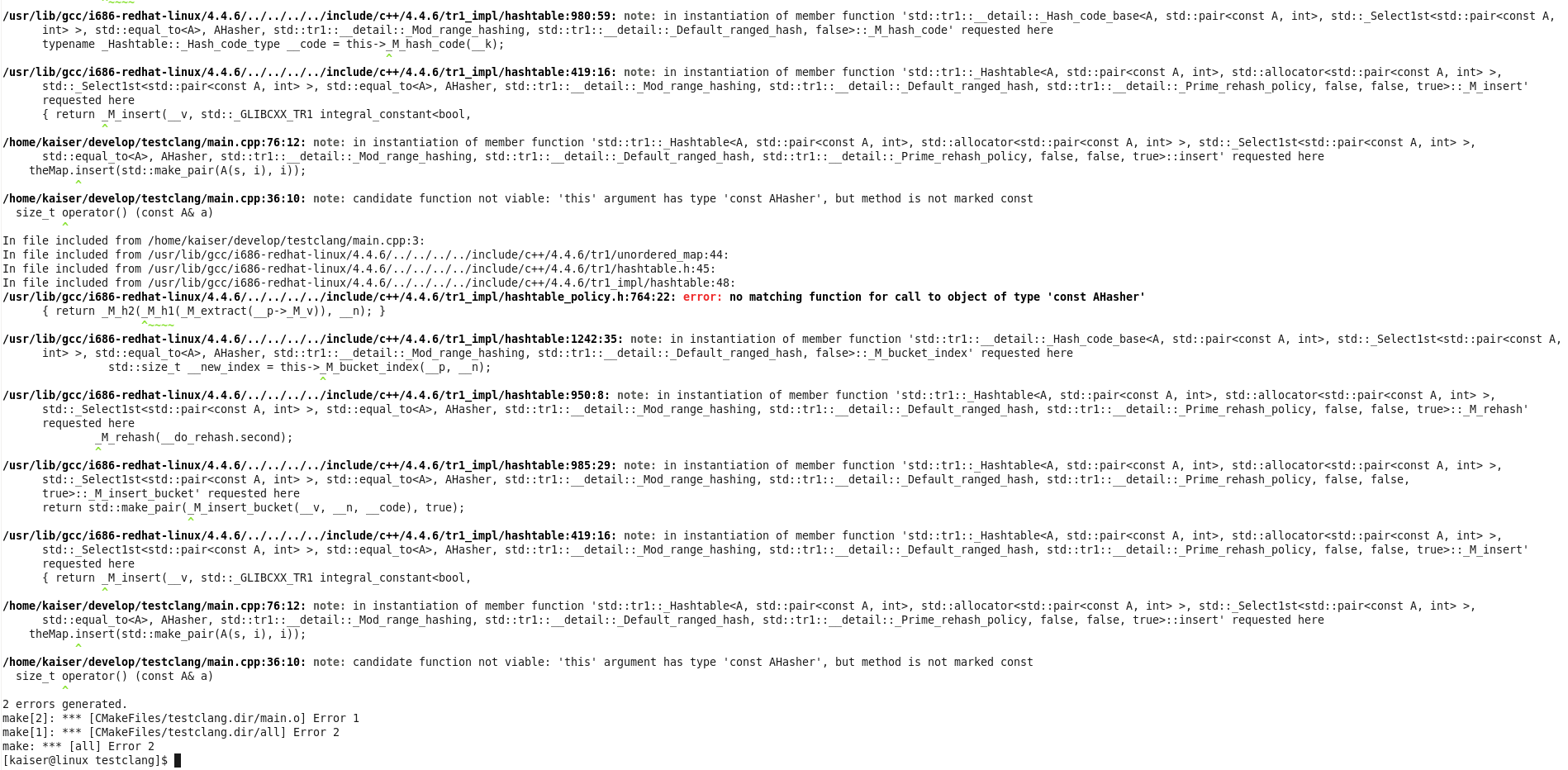
The following two screenshots directly compare GCCs and Clangs output compiling the code above. Because there is a template instantiation involved, GCC covers you in its typical wall of text, before it actually tells you what’s wrong (last line).

CLang’s output is much better formated, it shows you the template instantiation steps much more cleanly and in the last line it tells you to the point what is really wrong: …but method is not marked const. Yeah!


Different view on Apache Maven

Many people see Apache Maven as a build and dependency management tool. I see its strengths in other areas. Recently we had an in-house discussion about maven and I want to present my views here:

Pros

  • Maven standardizes your project layout and thus lowers the entry barrier for other developers.
  • Maven provides a IDE/tool agnostic way of describing a project and infrastructure to work with it. You get things like build and launch targets for free, depending on the archetype.
  • Archetypes (templates) for new projects make getting up to speed faster and easier.
  • Integration in many tools like continuous integration servers or IDEs is very good, so not much configuration work has to be done to get your project under test and supervision of analysis tools.
  • Ready-to-use plugins for many tasks.
  • Usable software distribution model helping in distibuted environments.

Cons

  • Big, ugly xml-specification (maven2, still need to check out the groovy and scala DSLs for poms) of the project.
  • Lacking documentation in some areas, e.g. certain plugins and best practices.
  • Once in a while “downloading the internet”-effect and auto-magic you need cope with.
  • Does not really solve dependency problems the way many people expect it.

So while you certainly can implement all wanted features of maven with other build and scripting systems and setup nice self-contained projects using maven can help you depending on your scenario. You have to know the strengths and weaknesses of your tools and try to decide accordingly. My experience is that you can get a basic project up and running in a healthy state very fast with maven. As the project grows the complexity will too and may outweigh the initial benefits. All tools require that you understand and use them well or they will stand in your way more and more. Especially using maven makes only sense if you adopt its style and conventions. If you strongly disagree there you will be happier with some solution like ant, cmake, gradle, ivy, make, sbt or the like providing more freedom by leaving more descisions up to you.

We are using different build and project description tools depending on the environment, involved technologies and project size and scope. Often this decision will not or cannot be changed so try to make a sensible decision considering all available information at hand.

Refactor now

What would you say about a mechanic or a craftsman who makes his work and does not clean up afterwards? Would you drive your car with stuff lying in the engine bay? Or use your bath with dirt all over?

Sometimes we write code or a test and think: make it work first and refactor it later. But this ‘later’ may not come in a while.
What would you say about a mechanic or a craftsman who makes his work and does not clean up afterwards? Would you drive your car with stuff lying in the engine bay? Or use your bath with dirt all over?
Certainly not.
So don’t wait until someone cleans your code or until you come back after a while and the first thing you do is cleaning up.
I know that when things get tough, deadlines are near, refactoring does not have top priority. So why not use an iteration or even some hours to clean up afterwards? It will help you in the future.

Take your programming course with a grain of salt, please

If you are cursed with silly rules in your programming course, we offer you some word of encouragement to find a mentor and keep your mental sanity and programming habits.

Lately, we had a talk with one of our former interns who now happens to study informatics at university. He presented some code he had written for his programming course and we did a team code review. The review itself was a lot of fun and sparked quite a few discussions. At one point, we assessed the different implementation styles of a method, changing the rather complex single return code into an early return method. Our former intern (now student) listened to the solution and stated: “I am not allowed to do that.”

There was a sudden silence, as everyone tried to comprehend what that means.

The student explained: “my course instructor prefers the single return approach over the early return style”. Well, that’s one thing, we can handle different opinions. “And”, he continued, “he announced there will be a painful deduction of points if we don’t comply to this style.” When the course tried to discuss this point, the explanation given was: “the single return style is superior because the other style is frowned upon.”

We couldn’t believe it. But, as it turns out, there are many rules like the one above in this programming course. And nearly every rule is highly debatable if not plain wrong (in our perception).

There is no problem with the presentation of certain rules in a beginner’s programming course. Novices need clear and precise rules to learn, according to the Dreyfus Model of Skill Acquisition. The concept just doesn’t work for students that aren’t on the Novices level anymore. These students are explicitely forbidden to create more advanced solutions. They are discouraged to look into different programming styles because it will only harm their grades.

We can think of a possible explanation for this scenario: The assignments have to be evaluated by the course instructors. It takes a lot of hard work (and time) to evaluate hundreds of totally different solutions for the same problem. If the solutions are mostly similar in style and concepts, the evaluation is a lot easier and can be done without full understanding of the code.

This is a rather poor explanation. It says “don’t be too advanced in your field of study or you will be too troublesome to attend to”. This is essentially an anesthetization by decree. But the real problem arises when you realize that there won’t be any continuative programming courses. They will never teach you all the more advanced concepts or rectify the silly rules that should get you along as a beginner. After you’ve successfully mastered this course, the studying focusses on the more academic topics of our field. The next possibility to develop your programming skills in a professional setting is your first software development job.

We don’t have a practical solution to this problem. One obvious solution would be to have more instructors evaluate less assignment solutions in the same time, enabling them to dive deeper in the code and give better personalized feedback. This scenario lacks at least enough capable instructors. The reality shows that Novices level students (in the sense of the Dreyfus Model) are often taught by Advanced Beginner level instructors (called a “tutor”).

But we have a word of encouragement for all you students out there, feeling dumbed down by your instructors: It’s not your fault! Take your programming course rules with a (big) grain of salt and talk to other developers. If you don’t know anybody already in the industry, try to make contact with some fellow open source developer on the web. It’s really just the advice “Find a Mentor” from the book Apprenticeship Patterns (highly recommended for aspiring software developers) applied in real life.

Because if you don’t actively unlearn all these arbitrary rules or at least put them into perspective, you’ll start your professional developer career with the burden of some really antic code quirks.

Good luck and tell us your story, if you want.

The Impatient Acceptance Test

When implementing new features it is always a good idea to test them – preferably with automated acceptance tests. Yet, there is a vast number of pitfalls to be avoided when doing so in order to put the testing effort to proper use. Just last week, I encountered a new one (at least for me): The impatient test.

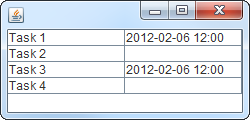
The new feature was basically a long taking background operation which presents its result in a table on the GUI. If the operation succeeded, date and time are displayed in the accordant cell of the table, if not, the cell is left untouched (e.g. left empty if there was no successful run yet, or, if there was, the date of the last successful run is shown).

During the test, four tasks were to be completed by the background operation, two of which were supposed to succeed and the others to fail. So, the expected result was something like:

Expected result

Having obeyed  the “fail-first” guideline and having seen the test pass later on, I was quite sure the test and the feature worked as intended. Yet, manual testing proved otherwise. With the exact same scenario, task 4 always succeeded.

In fact, there was a bug that caused task 4 to result in a false-positive. But why did the automated test not uncover this flaw? Let’s recall what the test does:

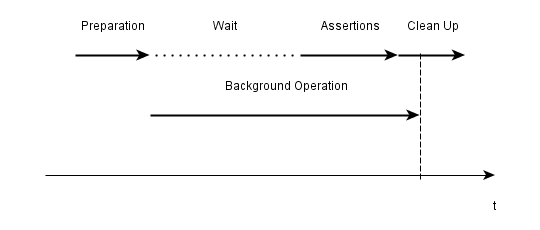
  1. Prepare the test environment and the application
  2. Start the background operation comprised of tasks 1-4
  3. Wait
  4. Evaluate/assert the results
  5. Clean up

Some investigation unveiled that the problem was caused by the fact that the test just did not wait long enough for the background operation to finish properly, e.g. the results were evaluated before task 4 was finished. Thus, the false-positive occurred just after the test checked whether it was there:

Timeline of the test
Results being evaluated before everything is finished

After having spotted the source of the problem, several possible solutions ranging from “wait longer in the test” to “explicitly display unfinished runs in the application” came to mind. The most elegant and practical of which is to have the test waiting for the background operation to finish instead of just waiting a given period. Even though this required some more infrastructure.

Though acceptance testing is a great tool for developing software, this experience reminded me that there is also the possibility of flawed, or not completely correct, tests luring you into a false sense of security if you pay too few attention. Manual testing in addition to automated testing may help to avoid these pitfalls.

Don’t mix C++ smart pointers with references

This post will teach by example that mixing smart pointers with references in c++ is not a particularly good idea.

As I did in the past, I will use this post as means to remember and to push the following principle deeper in my head – and hopefully in yours as a reader and C++ programmer:

Do not mix smart pointers with references in your C++ programms.

Of course I knew that before I created this little helper library, that was supposed to make it easier to send data asynchronous over an existing connection. Here is the situation (simplified):

class A
{
  ...
  void doStuff();

  private:
     // a private shared_ptr to B
    boost::shared_ptr<B> _bPointer;
};

class C
{
  public:
    C(B& b) : _b(b)
    {}

    ~C()
    {
      _bRef.resetSomeValueToDefault();
    }

  private:
     // a private reference to B which is set in the ctor
    B& _bRef;
};

void A::doStuff()
{
  createBpointerIfNotExisting();
  C myC(*_bPointer);
  myC.someMethodThatDoesSomethingWithB();
  if (someCondition) {
    // Delete this B instance.
    // A new instance will be created next time
    _bPointer.reset();
  }
}

So class A has a shared pointer of B which is given as a reference to an instance of class C in method A::doStuff. Class C stores the B instance as reference and interacts with it during its lifetime, which ends at the end of A::doStuff.

The last interaction occurrs at the very end of its life – in the destructor.

I highlighted the most important facts, but I’ll give you a few more moments …

The following happens (in A::doStuff):

  • line 29: if no instance of B exists (i.e. _bPointer is null), a new B instance is created and held in _bPointer
  • line 30: instance myC of C is created on the stack. A reference of B is given as ctor parameter
  • line 32-35: if “someCondition” is true, _bPointer is reseted which means that the B instance gets deleted
  • line 37: A::doStuff() ends and myC goes out of scope
  • line 19: the destructor of C is called and _bRef is accessed
  • since the B instance does not exist any more … memory corruption!!!

The most annoying thing with this kind of errors is that the program crashes somewhere, but almost never where the error actually occurred. This means, that you get stack traces pointing you right into some rock-solid 3rd party library which had never failed since you know and use it, or to some completely unrelated part in your code that had worked without any problems before and hasn’t been changed in years.

I even had these classes unit tested before I integrated them. But for some strange reason – maybe because everything gets reset after each test method – the bug never occurred in the tests.

So always be very cautious when you mix smart pointers with references, and when you do, make sure you have your object lifetimes completely under control!

Upgrading your app to Grails 2.0.0? Better wait for 2.0.1

Grails 2.0.0 is a major step forward for this popular and productive, JVM-based web framework. It has many great new features that make you want to migrate existing projects to this new version.

So I branched our project and started the migration process. Everything went smoothly and I had only to fix some minor compilation problems to get our application running again. Soon the first runtime errors occured and approximately 30 out of over 70 acceptance tests failed. Some analysis showed three major issue categories causing the failures:

  1. Saving domain objects with belongsTo() associations may fail with a NULL not allowed for column "AUTHOR_ID"; SQL statement: insert into book (id, version, author_id, name) values (null, ?, ?, ?) [90006-147] message due to grails issue GRAILS-8337. Setting the other direction of the association manually can act as a workaround:
    book.author.book = book
  2. When using the MarkupBuilder with the img tag in your TabLibs, your images may disappear. This is due to a new img closure defined in ApplicationTagLib. The correct fix is using
    delegate.img

    in your MarkupBuilder closures. See GRAILS-8660 for more information.

  3. Handling of null and the Groovy NullObject seems to be broken in some places. So we got org.codehaus.groovy.runtime.typehandling.GroovyCastException: Cannot cast object 'null' with class 'org.codehaus.groovy.runtime.NullObject' to class 'Note' using groovy collections’ find() and casting the result with as:
     Note myNote = notes?.find {it.title == aTitle} as Note

    Removing type information and the cast may act as a workaround. Unfortunately, we are not able to reproduce this issue in plain groovy and did not have time to extract a small grails example exhibiting the problem.

These bugs and some other changes may make you reconsider the migration of some bigger project at this point in time. Some of them are resolved already so 2.0.1 may be the release to wait for if you are planning a migration. We will keep an open eye on the next releases and try to switch to 2.0.x when our biggest show stoppers are resolved.

Even though I would advise against migrating bigger existing applications to Grails 2.0.0 I would start new projects on this – otherwise great – new platform release.