Save yourself from releasing garbage with Git Hooks

Times do happen, where one would write code that should please, please not land in the production release, like for example:

  • Overwriting a certain URL with a local one
  • Having a dialog always-open in order to efficiently style it
  • or generally, mocking code of something that is not-important-right-now™

And then we all already know that such shortcuts tend to stay in the code longer than intended. One might tell oneself:

Oh, I will mark this as // TODO: Remove ASAP

This is the feature branch, so either me or the Code Review will catch it when merging on main.

And this is better than nothing – some Git clients might disallow you from even committing code with any //TODO, but I feel that this is direct violation of the idea of “Commit Early, Commit Often”. As in, now you’re bound to finish your feature before you commit. This is the opposite of helping. By now you figure:

Thanks for nothing, I will just rename this as // TO_REMOVE

Rest of above logic applies untampered with.

These keyword-in-comments are sometimes called Code Tags (e.g. here), and here we just worked around the point that //TODO is more commonly used than other tags, but of course, these still are comments of no specific meaning.

You might now be able to push again, but still – say, the Code Reviewer does the heinous mistake of trusting you too much – this might lead to code in the official release that behaves so silly that it just makes every customer question your mental sanity, or worse.

Git Hooks can help you with appearing more sane than you are.

These are bash scripts in your specific repository instance (i.e. your local clone, or the server copy, individually) to run at specific points in the Git workflow.

For our particular use case, two hooks are of interest:

  • A pre-receive hook run on the server-side repository instance that can prevent the main branch from receiving your dumb development code. This sounds more rigid, but you need access to the server hosting the (bare) repository.
  • A pre-push hook run on your local repository instance that can prevent you from pushing your toxic waste to the branch in question. Keep in mind that if you do your merging unto main via GitLab Merge Requests etc. that this hook will not run then – but implementing it is easier because you already have all the access.

The local pre-push hook is as simple as adding a file named pre-push in the .git/hooks subfolder. It needs to be executable – (which, under Windows, you can use e.g. Git Bash for.)

cd $repositoryPath/.git/hooks
touch pre-push
chmod +x pre-push

And it contains:

#!/bin/sh
 
while read localRef localHash remoteRef remoteHash; do
    if [[ "$remoteRef" == "refs/heads/main" ]]; then
        for commit in $(git rev-list $remoteHash..$localHash); do
            if git grep -n "// REMOVE_ME" $commit; then
                echo "REJECTED: Commit contains REMOVE_ME tag!"
                exit 1
            fi
        done
    fi
done

This already will then lead git push to fail with output like

2f5da72ae9fd85bb5d64c03171c9a8f248b4865f:src/DevelopmentStuff.js:65:        // REMOVE_ME: temporary override for database URL
REJECTED: Commit contains REMOVE_ME tag!
failed to push some refs to '...'

and if that REMOVE_ME is removed, the push goes through.

Some comments:

  • You can easily extend this to multiple branches with the regex condition:
    if [[ "$remoteRef" =~ /(main|release|whatever)$ ]];
  • The git grep -n flag is there for printing out the offending line number.
  • You can make this more convenient with git grep -En "//\s*REMOVE_ME", i.e. allowing an arbitrary number of whitespace between the // and the tag.
  • The surrounding loop structure:
    while read localRef localHash remoteRef remoteHash;
    is exactly matching the way git is processing this pre-push hook. Each hook has a while read <arg list> structure, but the specific arguments depend on the actual hook type.

Hope this can help you taking some extra care!

However, remember that for these local hooks, every developer has to setup them for themselves; they are not pushed to the server instance – but implementing a pre-receive hook there is the topic for a future blog post.

Forking an Open Source Repository in Good Faith

One might love Open Source for different reasons: Maybe as a philosophical concept of transcendental sharing and human progress, maybe for reasons of transparency and security, maybe for the sole reason of getting stuff for free…

But, as a developer, Open Source is additionally appealing for the sake of actively participating, learning and sharing on a directly personal level.

Now I would guess that most repository forks are probably done for rather practical reasons (“I wanna have that!”), the forks get some minor patches one happens to need right now – or for some super-specific use case – and then hang around for some time until that use case vanishes or the changes are so vast that there will never be a merge (a situation commonly known as “der Zug ist abgefahren”), one might sometimes try to supply one’s work for the good of more than oneself. That is what I hereby declare a “Fork in Good Faith.”

A fork can happen in good faith if some conditions are true, like:

  • I am sure that someone else can benefit from my work
  • My technical skills match the technical level of the repository in question
  • Said upstream repository is even open for contributions (i.e. not understaffed)
  • My broader vision does not diverge from the original maintainers’ vision

Maybe there are more of these, but the most essential point is a mindset:

  • I declare to myself that I want to stay compatible with the upstream as long as is possible from both sides.

To fork with Good Faith is, then, a great idea because it helps to advance much more causes at once than just the stuff for free, i.e. on a developmental level:

  1. You learn from the existing code, i.e. the language, coding style, design patterns, specific solutions, algorithms, hidden gems, …
  2. You learn from the existing repository, i.e. how commits and branches are organized, how commit messages are used productively, how to manage patches or changes in general, …
  3. In reverse, the original maintainers might learn from you, or at least future contributors might
  4. You might get more people to actually see / try / use your awesome feature, thus getting more feedback or bug reports than brewing your own soup
  5. You might consider it as a workout of professional confidence, to advocate your use cases or implementation decisions against other developers, training to focus on rational principles and unlearning the reflexes of your ego.
  6. This can also serve as a workout in mental fluidity, by changing between different coding styles or conventions – if you are e.g. used of your super-perfect-one-and-only way of doing things, it might just positively blow your mind to see that other conventions can work too, if done properly.
  7. Having someone to actually review your changes in a public pull request (merge request) gives you feedback also on an organisational level, as in “was all of this part actually important for your feature?”, “can you put that into a future pull request?” or “why did you rewrite all comments for some Paleo-Siberian language??”

Not to forget, you might grow your personal or professional network to some degree, or at least get the occasional thank you from anyone (well…).

But the basic point of this post is this:

Maintaining a Fork in Good Faith is active, continuous work.

And there is no shame in abandoning that claim, but if you do once, there might be no easy return.

Just think about the pure sadness of features that are sometimes replicated over-and-over again, or get lost over the time;

And just think about how confusing or annoying that already could have been for yourself, e.g. with some multiply-forked npm package or maybe full-fledged end-user projects (… how many forks of e.g. WLED do even exist?).

This is just some reflection of how careful such a decision should be done. Of course, I am writing this because I recently became aware of that point of bifurcation, i.e. not the point where a repository is forked, but the one where all of the advantages mentioned above are weighed against real downsides.

And these might be legitimate, and numerous, too. Just to name a few,

  1. Maybe the existing conventions are just not “done properly”, and following them for the sake of uniformity makes you unproductive over time?
  2. Maybe the original maintainers are just understaffed, non-responsive or do not adhere to a style of communication that works with you?
  3. Maybe most discussions are really just debates of varying opinion (publicly, over the internet – that usually works!) and not vehicles of transcending the personal boundaries of human knowledge after all?
  4. Maybe you are stuck with sub-par legacy code, unable to boy-scout away some technical debt because “that is not the point right now”, or maybe every other day some upstream commit flushes in more freshly baked legacy code?
  5. Maybe no one understands your use case and contrary to the idea mentioned above – in order to get appropriate feedback about your features, and to prove its worth, you need to distribute this independently?
  6. Maybe at one point the maintainers of an upstream repository change, and from now on you have to name your variables in some Paleo-Siberian language?

I guess you get the point by now. There is much energy to be saved by never considering upstream compatibility in the first place, but there is also much potential to be wasted. I have no clear answer – yet – how to draw the line, but maybe you have some insight on that topic, too.

Are there any examples of forks that live on their own, still with the occasional cherry-pick, rebase, merge? Not one comes to my mind.

Beware of using Git LFS on Github

In my private game programming projects, I am often using data files alongside my code for all kinds of game assets like images and sounds. So I thought it might be a good idea to use the Git Large File Storage (=LFS) extension for that.

What is Git LFS?

Essentially, if you’re not using it, the file will be in your local .git folder if it was part of your repository at any time in your history. E.g. if you accidentally added&committed a 800mb video files and then deleted it again, they will still be in your local .git folder. This problem multiplies when using a CI with many branches: each branch will typically have a copy of all files ever used in your repository. This is not a problem with source code files, because they are not that big and they can be compressed really well with different versions of themselves, which is what git typically does.

With Git LFS, the big files are only stored as references in the .git folder. This means that you might need an additional request to your remote when checking them out again, but it will save you lots space and traffic when cloning repositories.

In my previous projects on github, I just did not enable LFS for my assets. And that worked fine, as my assets are usually pretty small and I don’t change them often. But this time I wanted to try it.

Sorry, Github, what?

Imagine my suprise when I got an e-mail from github last month warning me that my LFS traffic quota is almost reached and I have to pay to extend it. What? I never had and traffic quota problems without LFS. Github doesn’t even seem to have one, if I just keep my big files in ‘pure’ git. So that’s what I get for trying to safe Github traffic.

Now the LFS quota is a meager 1 gb per month with Github Pro. That’s nothing. Luckily, my current project is not asset heavy: the full repo is very small at ~60mb. But still the quota was reached with me as a single developer. How did that happen? I just enabled CI for my project on my home server and I was creating lots of branches my CI wanted to build. That’s only 12 branches cloned for the 80% warning to be reached.

Workarounds

Jenkins, which I’m using as a CI tool, has the ability to use a ‘reference repository’ when cloning. This can be used to get the bulk of the data from a local remote, while getting the rest from Github. This is what I’m now using to avoid excess LFS traffic. It is a bit of a pain to set up: you have to manually maintain this reference repository, Jenkins will not do it for you, and you have to do that on each agent. I only have one at this point, so that’s an okay trade-off. But next time, Isure won’t use Git LFS on Github, if I can avoid it.

Git revert may not be what you want!

Git is a powerful version control system (VCS) for tracking changes in a source code base as most developers will know by now… It is also known for its quirky command line interface and previously less known concepts like staging area, cherry-picking and rebasing.

This can make Git quite intimidating and there are many memes about how confusing and hard it is to work with.

Especially for people coming from Subversion (SVN) there are a few changes and pitfalls because some commands have the same name but either do different things in the context or altogether, e.g. commit, checkout and revert.

Commit in the SVN world perform synchronization with the remote repository whereas a commit in git is local and has to synchronized with the remote repository using push. Checkout is similar and maybe even worse: In SVN it fetches the remote repository state and puts it in your working copy. In Git is used to replace files in your working copy with contents from the local repository or formerly to switch and/or create local branches…

But now on to our main topic:

What does git revert actually do?

Revert is maybe the most misleading command existing in both SVN and Git.

In SVN it is quite simple: Undo all local edits (see svnbook). It throws away you uncommited changes and causes potential data loss.

Git’s revert works in a completely different way! It creates “inverse” commit(s) in your (local) repository. Your working copy has to be clean without changes to be able to revert and you will undo the specified commit and record this change in the repository and its history.

So both revert commands are fundamentally different. This can lead to unexpected behaviour, especially when reverting a merge commit:

We had the case where our developers had two feature branches and one dev decided to temporarily merge the other feature branch to test some things out. Then he reverted the merge using git revert and opened a merge request. This leads to the situation, that the other feature branch becomes unmergeable because git records no changes. This is rightfully so, because this was already merged as part of the first one, but without the changes (because they were reverted!). So all the changes of the other feature branch were lost and not easily mergeable:

To fix a situation like this you can cherry-pick the reverted commit mentioned in the commit message.

How to revert local changes in git

So revert is maybe not what we wanted to do in the first place to undo our temporary merge of the other feature branch. Instead we should use git reset. It has some variants, but the equivalent of SVN’s revert would be the lossy

git reset --hard HEAD

to clean our working copy. If we wanted to “revert” the merge commit in our example we would do

git reset --hard HEAD^

to undo the last commit.

I hope this clear up some confusion regarding the function of some Git commands vs. their SVN counterparts or “false friends”.

Lineendings in repository

Git normally leaves files and their lineendings untouched. However, it is often desired to have uniform line endings in a project. Git provides support for this.

Config Variable

What some may already know is the configuration variable core.autocrlf. With this, a developer can locally specify that his newly created files are checked in to Git with LF. By setting the variable to “true” the files will be converted to CRLF locally by Git on Windows and converted back when saved to the repository. If the variable is set to “input” the files are used locally with the same lineending as in Git without conversion.
The problem is, this normalization only affects new files and each developer must set it locally. If you set core.autocrlf to false, files can still be checked in with not normalized line endings.

Gitattributes File

Another possibility is the .gitattributes file. The big advantage is that the file is checked in similarly to the .gitignore file and the settings therefore apply to all developers. To do this, the .gitattributes file is created in the repository and a path pattern and the text attribute are defined in it. The setting affects how the files are stored locally for the git switch, git checkout and git merge commands and how the files are stored in the repository for git add and git commit.

*.jpg          -text

The text attribute can be unset, then neither check-in nor check-out will do any conversions

*              text=auto

The attribute can also be set to auto. In this case, the line endings will be converted to LF at check-in if Git recognizes the file contents as text. However, if the file is already CRLF in the repository, no conversion takes place and the files remain CRLF. In the example above, the settings are set for all file types.

*.txt         text
*.vcproj      text eol=crlf
*.sh          text eol=lf

If the attribute is set, the lineending are stored in the default repository with LF. But eol can also be used to force fixed line endings for specific file types.

*.ps1	      text working-tree-encoding=UTF-16

Furthermore, settings such as the encoding can be set via the gitattributes file by using working-tree-encoding attribute. Everything else can be read in the documentation of the gitattributes file.

We use this possibility more and more often in our projects. Partly only to set single file types like .sh files to LF or to normalize the whole project.

Reading a conanfile.txt from a conanfile.py

I am currently working on a project that embeds another library into its own source tree via git submodules. This is currently convenient because the library’s development is very much tied to the host project and having them both in the same CMake project cuts down dramatically on iteration times. Yet, that library already has its own conan dependencies in a conanfile.txt. Because I did not want to duplicate the dependency information from the library, I decided to pull those into my host projects requirements programmatically using a conanfile.py.

Luckily, you can use conan’s own tools for that:

from conans.client.loader import ConanFileTextLoader

def load_library_conan(recipe_folder):
    text = Path(os.path.join(recipe_folder, "libary_folder", "conanfile.txt")).read_text()
    return ConanFileTextLoader(text)

You can then use that in your stage methods, e.g.:

    def config_options(self):
        for line in load_library_conan(self.recipe_folder).options.splitlines():
            (key, value) = line.split("=", 2)
            (library, option) = key.split(":", 2)
            setattr(self.options[library], option, value)

    def requirements(self):
        for x in load_library_conan(self.recipe_folder).requirements:
            self.requires(x)

I realize this is a niche application, but it helped me very much. It would be cool if conan could delegate into subfolders natively, but I did not find a better way to do this.

git-submodules in Jenkins pipeline scripts

Nowadays, the source control git is a widespread tool and work nicely hand in hand with many IDEs and continuous integration (CI) solutions.

We use Jenkins as our CI server and migrated mostly to the so-called pipeline scripts for job configuration. This has the benefit of storing your job configuration as code in your code repository and not in the CI servers configuration. Thus it is easier to migrate the project to other Jenkins CI instances, and you get versioning of your config for free.

Configuration of a pipeline job

Such a pipeline job is easily configured in Jenkins merely providing the repository and the location of the pipeline script which is usually called Jenkinsfile. A simple Jenkinsfile may look like:

node ('build&&linux') {
    try {
        env.JAVA_HOME="${tool 'Managed Java 11'}"
        stage ('Prepare Workspace') {
            sh label: 'Clean build directory', script: 'rm -rf my_project/build'
            checkout scm // This fetches the code from our repository
        }
        stage ('Build project') {
            withGradle {
                sh 'cd my_project && ./gradlew --continue war check'
            }
            junit testResults: 'my_project/build/test-results/test/TEST-*.xml'
        }
        stage ('Collect artifacts') {
            archiveArtifacts(
                artifacts: 'my_project/build/libs/*.war'
            )
        }
    } catch (Exception e) {
        if (e in org.jenkinsci.plugins.workflow.steps.FlowInterruptedException) {
            currentBuild.result = 'ABORTED'
        } else {
            echo "Exception: ${e.class}, message: ${e.message}"
            currentBuild.result = 'FAILURE'
        }
    }
}

If you are running GitLab you get some nice features in combination with the Jenkins Gitlab plugin like automatic creation of builds for all your branches and merge requests if you configure the job as a multibranch pipeline.

Everything works quite well if your project resides in a single Git repository.

How to use it with git submodules

If your project uses git-submodules to connect other git repositories that are not directly part of your project the responsible line checkout scm in the Jenkinsfile does not clone or update the submodules. Unfortunately, the fix for this issue leads to a somewhat bloated checkout command as you have to copy and mention the settings which are injected by default into the parameter object of the GitSCM class and its extensions…

The simple one-liner from above becomes something like this:

checkout scm: [
    $class: 'GitSCM',
    branches: scm.branches,
    extensions: [
        [$class: 'SubmoduleOption',
        disableSubmodules: false,
        parentCredentials: false,
        recursiveSubmodules: true,
        reference: 'https://github.com/softwareschneiderei/ADS.git',
        shallow: true,
        trackingSubmodules: false]
    ],
    submoduleCfg: [],
    userRemoteConfigs: scm.userRemoteConfigs
]

After these changes projects with submodules work as expected, too.

Simple build triggers with secured Jenkins CI

The jenkins continuous integration (CI) server provides several ways to trigger builds remotely, for example from a git hook. Things are easy on an open jenkins instance without security enabled. It gets a little more complicated if you like to protect your jenkins build environment.

Git plugin notify commit url

For git there is the “notifyCommitUrl” you can use in combination with the Poll SCM settings:

$JENKINS_URL/git/notifyCommit?url=http://$REPO/project/myproject.git

Note two things regarding this approach:

  1. The url of the source code repository given as a parameter must match the repository url of the jenkins job.
  2. You have to check the Poll SCM setting, but you do not need to provide a schedule

Another drawback is its restriction to git-hosted jobs.

Jenkins remote access api

Then there is the more general and more modern jenkins remote access api, where you may trigger builds regardless of the source code management system you use.
curl -X POST $JENKINS_URL/job/$JOB_NAME/build?token=$TOKEN

It allows even triggering parameterized builds with HTTP POST requests like:

curl -X POST $JENKINS_URL/job/$JOB_NAME/build \
--user USER:TOKEN \
--data-urlencode json='{"parameter": [{"name":"id", "value":"123"}, {"name":"verbosity", "value":"high"}]}'

Both approaches work great as long as your jenkins instance is not secured and everyone can do everything. Such a setting may be fine in your companies intranet but becomes a no-go in more heterogenious environments or with a public jenkins server.

So the way to go is securing jenkins with user accounts and restricted access. If you do not want to supply username/password as part of the url for doing HTTP BASIC auth and create users just for your repository triggers there is another easy option:

Using the Build Authorization Token Root Plugin!

Build authorization token root plugin

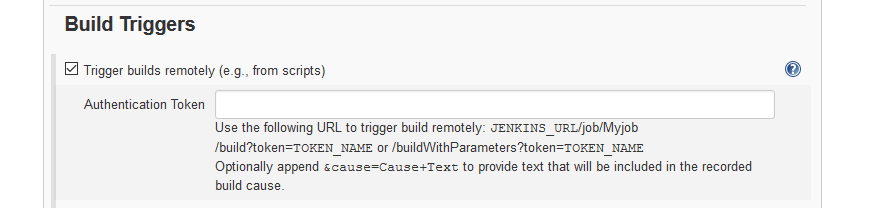
The plugin introduces a configuration setting in the Build triggers section to define an authentication token:

It also exposes a url you can access without being logged in to trigger builds just providing the token specified in the job:

$JENKINS_URL/buildByToken/build?job=$JOB_NAME&token=$TOKEN

Or for parameterized builds something like:

$JENKINS_URL/buildByToken/buildWithParameters?job=$JOB_NAME&token=$TOKEN&Type=Release

Conclusion

The token root plugin does not need HTTP POST requests but also works fine using HTTP GET. It does neither requires a user account nor the awkward Poll SCM setting. In my opinion it is the most simple and pragmatic choice for build triggering on a secured jenkins instance.

Recap of the Schneide Dev Brunch 2016-08-14

If you couldn’t attend the Schneide Dev Brunch at 14th of August 2016, here is a summary of the main topics.

brunch64-borderedTwo weeks ago at sunday, we held another Schneide Dev Brunch, a regular brunch on the second sunday of every other (even) month, only that all attendees want to talk about software development and various other topics. This brunch had its first half on the sun roof of our company, but it got so sunny that we couldn’t view a presentation that one of our attendees had prepared and we went inside. As usual, the main theme was that if you bring a software-related topic along with your food, everyone has something to share. We were quite a lot of developers this time, so we had enough stuff to talk about. As usual, a lot of topics and chatter were exchanged. This recapitulation tries to highlight the main topics of the brunch, but cannot reiterate everything that was spoken. If you were there, you probably find this list inconclusive:

Open-Space offices

There are some new office buildings in town that feature the classic open-space office plan in combination with modern features like room-wide active noise cancellation. In theory, you still see your 40 to 50 collegues, but you don’t necessarily hear them. You don’t have walls and a door around you but are still separated by modern technology. In practice, that doesn’t work. The noise cancellation induces a faint cheeping in the background that causes headaches. The noise isn’t cancelled completely, especially those attention-grabbing one-sided telephone calls get through. Without noise cancellation, the room or hall is way too noisy and feels like working in a subway station.

We discussed how something like this can happen in 2016, with years and years of empirical experience with work settings. The simple truth: Everybody has individual preferences, there is no golden rule. The simple conclusion would be to provide everybody with their preferred work environment. Office plans like the combi office or the flexspace office try to provide exactly that.

Retrospective on the Git internal presentation

One of our attendees gave a conference talk about the internals of git, and sure enough, the first question of the audience was: If git relies exclusively on SHA-1 hashes and two hashes collide in the same repository, what happens? The first answer doesn’t impress any analytical mind based on logic: It’s so incredibly improbable for two SHA-1 hashes to collide that you might rather prepare yourself for the attack of wolves and lightning at the same time, because it’s more likely. But what if it happens regardless? Well, one man went out and explored the consequences. The sad result: It depends. It depends on which two git elements collide in which order. The consequences range from invisible warnings without action over silently progressing repository decay to immediate data self-destruction. The consequences are so bitter that we already researched about the savageness of the local wolve population and keep an eye on the thunderstorm app.

Helpful and funny tools

A part of our chatter contained information about new or noteworthy tools to make software development more fun. One tool is the elastic tabstop project by Nick Gravgaard. Another, maybe less helpful but more entertaining tool is the lolcommits app that takes a mugshot – oh sorry, we call that “aided selfie” now – everytime you commit code. That smug smile when you just wrote your most clever code ever? It will haunt you during a git blame session two years later while trying to find that nasty heisenbug.

Anonymous internet communication

We invested a lot of time on a topic that I will only decribe in broad terms. We discussed possibilities to communicate anonymously over a compromised network. It is possible to send hidden messages from A to B using encryption and steganography, but a compromised network will still be able to determine that a communication has occured between A and B. In order to communicate anonymously, the network must not be able to determine if a communication between A and B has happened or not, regardless of the content.

A promising approach was presented and discussed, with lots of references to existing projects like https://github.com/cjdelisle/cjdns and https://hyperboria.net/. The usual suspects like the TOR project were examined as well, but couldn’t hold up to our requirements. At last, we wanted to know how hard it is to found a new internet service provider (ISP). It’s surprisingly simple and well-documented.

Web technology to single you out

We ended our brunch with a rather grim inspection about the possibilities to identify and track every single user in the internet. To use completely exotic means of surfing is not helpful, as explained in this xkcd comic. When using a stock browser to surf, your best practice should be to not change the initial browser window size – but just see for yourself if you think it makes a difference. Here is everything What Web Can Do Today to identify and track you. It’s so extensive, it’s really scary, but on the other hand quite useful if you happen to develop a “good” app on the web.

Epilogue

As usual, the Dev Brunch contained a lot more chatter and talk than listed here. The number of attendees makes for an unique experience every time. We are looking forward to the next Dev Brunch at the Softwareschneiderei. And as always, we are open for guests and future regulars. Just drop us a notice and we’ll invite you over next time.

For the gamers: Schneide Game Nights

Another ongoing series of events that we established at Softwareschneiderei are the Schneide Game Nights that take place at an irregular schedule. Each Schneide Game Night is a saturday night dedicated to a new or unknown computer game that is presented by a volunteer moderator. The moderator introduces the guests to the game, walks them through the initial impressions and explains the game mechanics. If suitable, the moderator plays a certain amount of time to show more advanced game concepts and gives hints and tipps without spoiling too much suprises. Then it’s up to the audience to take turns while trying the single player game or to fire up the notebooks and join a multiplayer session.

We already had Game Nights for the following games:

  • Kerbal Space Program: A simulator for everyone who thinks that space travel surely isn’t rocket science.
  • Dwarf Fortress: A simulator for everyone who is in danger to grow attached to legendary ASCII socks (if that doesn’t make much sense now, lets try: A simulator for everyone who loves to dig his own grave).
  • Minecraft: A simulator for everyone who never grew out of the LEGO phase and is still scared in the dark. Also, the floor is lava.
  • TIS-100: A simulator (sort of) for everyone who thinks programming in Assembler is fun. Might soon be an olympic discipline.
  • Faster Than Light: A roguelike for everyone who wants more space combat action than Kerbal Space Program can provide and nearly as much text as in Dwarf Fortress.
  • Don’t Starve: A brutal survival game in a cute comic style for everyone who isn’t scared in the dark and likes to hunt Gobblers.
  • Papers, Please: A brutal survival game about a bureaucratic hero in his border guard booth. Avoid if you like to follow the rules.
  • This War of Mine: A brutal survival game about civilians in a warzone, trying not to simultaneously lose their lives and humanity.
  • Crypt of the Necrodancer: A roguelike for everyone who wants to literally play the vibes, trying to defeat hordes of monsters without skipping a beat.
  • Undertale: A 8-bit adventure for everyone who fancies silly jokes and weird storytelling. You’ll feel at home if you’ve played the NES.

The Schneide Game Nights are scheduled over the same mailing list as the Dev Brunches and feature the traditional pizza break with nearly as much chatter as the brunches. The next Game Night will be about:

  • Factorio: A simulator that puts automation first. Massive automation. Like, don’t even think about doing something yourself, let the robots do it a million times for you.

If you are interested in joining, let us know.

Recap of the Schneide Dev Brunch 2016-06-12

If you couldn’t attend the Schneide Dev Brunch at 12th of June 2016, here is a summary of the main topics.

brunch64-borderedLast sunday, we held another Schneide Dev Brunch, a regular brunch on the second sunday of every other (even) month, only that all attendees want to talk about software development and various other topics. This brunch was a little different because it had a schedule for the first half. That didn’t change much of the outcome, though. As usual, the main theme was that if you bring a software-related topic along with your food, everyone has something to share. We were quite a lot of developers this time, so we had enough stuff to talk about. As usual, a lot of topics and chatter were exchanged. This recapitulation tries to highlight the main topics of the brunch, but cannot reiterate everything that was spoken. If you were there, you probably find this list inconclusive:

The internals of git

Git is a version control system that has, in just a few years, taken over the places of nearly every previous tool. It’s the tool that every developer uses day in day out, but nobody can explain the internals, the “plumbing” of it. Well, some can and one of our attendees did. In preparation of a conference talk with live demonstration, he gave the talk to us and told us everything about the fundamental basics of git. We even created our own repository from scratch, using only a text editor and some arcane commands. If you visited the Karlsruhe Entwicklertag, you could hear the gold version of the talk, we got the release candidate.

The talk introduced us to the basic building blocks of a git repository. These elements and the associated commands are called the “plumbing” of git, just like the user-oriented commands are called the “porcelain”. The metaphor was clearly conceived while staring at the wall in a bathroom. Normal people only get to see the porcelain, while the plumber handles all the pipework and machinery.

Code reviews

After the talk about git and a constructive criticism phase, we moved on to the next topic about code reviews. We are all interested in or practicing with different tools, approaches and styles of code review, so we needed to get an overview. There is one company called SmartBear that has its public relationship moves done right by publishing an ebook about code reviews (Best Kept Secrets of Code Review). The one trick that really stands out is adding preliminary comments about the code from the original author to facilitate the reviewer’s experience. It’s like a pre-review of your own code.

We talked about different practices like the “30 minutes, no less” rule (I don’t seem to find the source, have to edit it in later, sorry!) and soon came to the most delicate point: the programmer’s ego. A review isn’t always as constructive as our criticism of the talk, so sometimes an ego will get bruised or just appear to be bruised. This is the moment emotions enter the room and make everything more complicated. The best thing to keep in mind and soul is the egoless programming manifesto and, while we are at it, the egoless code review. If everything fails, your process should put a website between the author and the reviewer.

That’s when tools make their appearance. You don’t need a specific tool for code reviews, but maybe they are helpful. Some tools dictate a certain workflow while others are more lenient. We concentrated on the non-opinionated tools out there. Of course, Review Ninja is the first tool that got mentioned. Several of our regular attendees worked on it already, some are working with it. There are some first generation tools like Barkeep or Review Board. Then, there’s the old gold league like Crucible. These tools feel a bit dated and expensive. A popular newcomer is Upsource, the code review tool from JetBrains. This is just a summary, but there are a lot of tools out there. Maybe one day, a third generation tool will take this market over like git did with version control.

Oh, and you can read all kind of aspects from reviewed code (but be sure to review the publishing date).

New university for IT professionals

In the german city of Köln (cologne), a new type of university is founded right now: https://code.university/ The concept includes a modern approach to teaching and learning. What’s really cool is that students work on their own projects from day one. That’s a lot like we started our company during our studies.

Various chatter

After that, we discussed a lot of topics that won’t make it into this summary. We drifted into ethics and social problems around IT. We explored some standards like the infamous ISO 26262 for functional safety. We laughed, chatted and generally had a good time.

Economics of software development

At last, we talked about statistical analysis and economic viewpoints of software development. That’s actually a very interesting topic if it were not largely about huge spreadsheets filled with numbers, printed on neverending pages referenced by endless lists of topics grouped by numerous chapters. Yes, you’ve already anticipated it, I’m talking about the books of Capers Jones. Don’t get me wrong, I really like them:

There a some others, but start with these two to get used to hard facts instead of easy tales. In the same light, you might enjoy the talk and work of Greg Wilson.

Epilogue

As usual, the Dev Brunch contained a lot more chatter and talk than listed here. The number of attendees makes for an unique experience every time. We are looking forward to the next Dev Brunch at the Softwareschneiderei. And as always, we are open for guests and future regulars. Just drop us a notice and we’ll invite you over next time.