Oracle database identity column

A few days ago, I came across the topic of identity columns in Oracle. So I decided to try it out to check if it would benefit my database tables.  I would like to share the results in this article. First, I will explain what identity columns are and how to create them.

General

If you declare a column as an identity column, the value will be automatically populated from an associated sequence generator. It is possible to add an identity column by using either the CREATE TABLE or ALTER TABLE statement. In the example below, I will show how to add it using the CREATE TABLE statement.

The column marked as an identity needs to be of the data type integer, long, or number.

CREATE TABLE EXAMPLE (
    id NUMBER GENERATED ALWAYS AS IDENTITY,
    ...
);

In this case, I ALWAYS want a value to be automatically filled in. There is also the option to only fill it if no value was specified (BY DEFAULT) or when the given value is null (BY DEFAULT ON NULL).

Additionally, you can configure the sequence as shown in the following example.

CREATE TABLE EXAMPLE (
    id NUMBER GENERATED ALWAYS AS IDENTITY
    (START WITH 1 INCREMENT BY 2 MAXVALUE 5000 NO CYCLE CACHE 100),
    ...
);

With these  settings, the sequence starts with 1 and increments by 2, so the values are 1, 3, 5, and so on. The sequence counts up to 2000 and then stop. If CYCLE is set, the sequence continues with 1 again.

The cache defines a client to request 100 pre-defined values in advance. Because of the step width of 2 for example the values 1 – 199 will be assigned. If a second client asks, it will receive the values 201 – 399. As a result, the entries in the table can have the IDs 1, 201, 3, 5, 7, 203 for example.

Using with Ruby on Rails / Active Records

My use case is to use the table in Ruby on Rails with Active Records. Here, I want Active Record to auto-increment the ID, so I can retrieve it in my program. However, if I do not use the identity column feature and also do not specify the name of a manually created sequence, Ruby always returns 0 as the ID. When I add a sequence name, I get the correct ID.

Now I am trying to change this to work with the identity column. The insert in Oracle directly with SQL works fine.

The next step is to use it in my Ruby program, and the first problem occurs. Unfortunately, it is not possible to define my own sequence name. Oracle automatically creates sequences with cryptic names like ISEQ$$_12345 for identity columns which reduces readability in code. Additionally if I recreate the table, the sequence name changes, which means I have to update my code afterwards. This seems to be the first showstopper.

Nonetheless I continue and try to create a new entry with it. The entry was created. It works! Or wait a moment. Ruby always shows 0 instead of the right ID. It seems like the program can not use the sequence correctly.  I halt my testing. Maybe it is possible to make Ruby work with identity sequences, maybe it is not. If you have already found a solution, feel free to comment.

In the end I decide that using the manually created sequence still fit better. The main reason is the naming, so I do not want to spend more time searching for a solution to make it work with Ruby.

Conclusion

Although the identity column option does not fit my use case, it is a possible to create a table column with auto-generated values in Oracle. For situations where the ID is not of interest, it can simplify the work. You do not have to create the logic with sequences and triggers on your own.

Interacting with SVG files inside your React applications

So, for some reason you have a SVG file that somehow resembles a part of the application you are currently developing.

This might be only a sketch that you want to prepare as a Click Dummy, or it might be that you need to display a somewhat unique, complicated structure that is best layed out per SVG editor. This is somewhat expected when you have customers in the technical / scientific research sector.

So now you want to fill it with life.

Now, the SVG format is quite close to the <svg> structure that one can embed into HTML, but there are some steps in between. Most importantly, most SVG Editors fill their .svg files up with meta data or specific information only required for the editor in case you want to edit the files again.

Thus, you have three choices to integrate the SVG component in a React application

  • Re-Build your SVG with custom React Components that, via JSX, render their <svg>, <g>, <path>, etc. accordingly
  • Convert your SVG to valid JSX – this is possible in many cases, but you need to take care e.g. that the style attribute is a string in the SVG and an object in JSX, also it can be still way too large to be readily put in a single React Component
  • Import your .svg as its own React Component and then wrap that into an own Component that takes care about the interaction part

While I also have written a small converter that does the SVG-JSX-Conversion just fine for me for any file that comes out of Inkscape (probably an idea for my next blog post), we had the case of some files with about 16000 lines of SVG each, so I chose the third method in our case.

In my eyes, it is very correct to mention that the following way somehow goes against the React Mindset. In which you render all your components yourself to attach them the required mouse event handlers, never having to interact with a HTML “id” or any document.getElementById() or document.getElementByClassName().

In any React application, these should be avoided, but the idea here is to have a singular point – a SvgWrapper Component – where you allow these functions because you’d agree about the need to somehow target the specific SVG elements.

The gist:

import {ReactComponent as OurHorrificSvgMonster} from "/src/monster.svg";

const OurBeautifulComponent = () => {

    useOurCarefulSvgSynchronizationEffect(); // more on this below

    return (
        <SvgWrapper>
             <OurHorrificSvgMonster/>
        </SvgWrapper>
    )
};

Quick note: you can target the embedded <svg> element itself by <OurHorrificSvgMonster ref={...}/> and you could use this (ref.current holds that HTML element) to traverse all the children, so if you know much about the structure of your svg you could even live without the <SvgWrapper>. But say someone else made the horrific svg monster and all you have is the id or class names to all the individual svg elements inside.

Then

const WithVanillaHandlersConnected = ({children}) => {
    const dispatch = useDispatch();

    React.useEffect(() => {

        const onClick = (event) => {
            dispatch(awesomeAction(event.target.id));
        };

        const awesomeElements = [...document.getElementsByClassName("awesome")];

        awesomeElements.forEach(elem => {
            elem.addEventListener("click", onClick);
        });

        return () => awesomeElements.forEach(pipe => {
            pipe.removeEventListener("click", onClick);
        });
    }, []);

    return children;
};

I chose this dispatch() as a placeholder for any interaction with the surrounding web application, it could also be a simple React state or something. You can register any event listener you want here (also “mouseover”, “mouseout”, “contextmenu”, …), but think of removing it again in the effect return function.

By the way, document.getElementsByClassName(…) returns something like a HTMLCollection which is not exactly iterable, thus the […destructuring] to make the .forEach() possible.

We now have the first part – our elements (in our case, everything that has class “awesome”) has got a click handler that allows to dispatch anything to the application state. But now they need to change, too.

In a purely React-y way, this could be done by a svg element that chooses its fill = {isActive? "magenta" : "black"} but as we choose not to render our components ourselves, we need to once again grab deeply into the DOM and dare to manipulate it by hand.

As mentioned above – this is a step towards very ugly problems as React cannot guarantee that your visual layer matches your application state. You, on yoru own, have to guarantuee to do what’s right.

This is where this comes in:

/*
 for this example, think of that the redux selector selectSomethingFromTheState returns something like:

result = [
  {elementId: "elem1", isActive: true},
  ...
];

and isActive could be the thing that was toggled by our awesomeAction() above

*/

const useOurCarefulSvgSynchronizationEffect = () => {
    const elementStates = useSelector(selectSomethingFromTheState);

    React.useEffect(() => {
        for (const state of elementStates) {
            const element = document.getElementById(state.elementId};
            element.style.fill = isActive ? "magenta" : "black";
            // ... do other stuff with the DOM element
        }
    }, [elementStates]);
};

There we have it – we have the SvgWrapper and the use…SynchronizationEffect() that both stray from the React mindset by accessing the DOM directly, but we do it in a fashion where it is concisely encapsulated inside <OurBeautifulComponent> and there is no direct knowledge about the IDs inside the SVG, or Class manipulations, CSS Selectors, etc. elsewhere.

In my opinion, one can indeed go against the rules if it’s necessary, but I also see the option for a Stockton Rush quotation here.. so, if you know of any more elegant way, please feel free to share.

PS: by the way, if you use vite, you might get an “Uncaught SyntaxError” when trying import { ReactComponent ... } – I’ve written about this before.

Naming is hard and Java Enums don’t help

This is a short blog post about a bug in my code that stumped me for some moments. I try to tell it in a manner where you can follow the story and try to find the solution before I reveal it. You can also just read along and learn something about Java Enums and my coding style.

A code structure that I use sometimes is the Enum type that implements an interface:

public enum BuiltinTopic implements Topic {

    administration("Administration"),
    userStatistics("User Statistics"),
    ;
	
    private final String denotation;

    private BuiltinTopic(String denotation) {
        this.denotation = denotation;
    }
	
    @Override
    public String denotation() {
        return this.denotation;
    }
}

The Topic interface is nothing special in this example. It serves as a decoupling layer for the (often large) part of client code that doesn’t need to know about any specifics that stem from the Enum type. It helps with writing tests that aren’t coupled to locked-down types like Enums. It is just some lines of code:

public interface Topic {

    String denotation();
}

Right now, everything is fine. The problems start when I discovered that the denotation text is suited for the user interface, but not for the configuration. In order to be used in the configuration section of the application, it must not contain spaces. Ok, so let’s introduce a name concept and derive it from the denotation:

public interface Topic {

    String denotation();
	
    default String name() {
        return Without.spaces(denotation());
    }
}

I’ve chosen a default method in the interface so that all subclasses have the same behaviour. The Without.spaces() method does exactly what the name implies.

The new method works well in tests:

@Test
public void name_contains_no_spaces() {
    Topic target = () -> "User Statistics";
    assertEquals(
       "UserStatistics",
       target.name()
    );
}

The perplexing thing was that it didn’t work in production. The names that were used to look up the configuration entries didn’t match the expected ones. The capitalization was wrong!

To illustrate the effect, take a look at the following test:

@Test
public void name_contains_no_spaces() {
    Topic target = BuiltinTopic.userStatistics;
    assertEquals(
        "userStatistics",
        target.name()
    );
}

You can probably spot the difference in the assertion. It is “userStatistics” instead of “UserStatistics”. For a computer, that’s a whole different text. Why does the capitalization of the name change from testing to production?

The answer lies in the initialization of the test’s target variable:

In the first test, I use an ad-hoc subtype of Topic.

In the second test and in production, I use an object of type BuiltinTopic. This object is an instance of an Enum.

In Java, Enum classes and Enum objects are enriched with automatically generated methods. One of these methods equip Enum instances with a name() method that has a default implementation to return the Enum instances’ variable/constant name. Which in my case is “userStatistics”, the same string I expect, minus the correct capitalization of the first character.

If I had named the Enum instance “UserStatistics”, everything would have worked out until somebody changes the name or adds another instance with a slight difference in naming.

If I had named my Enum instance something totally different like “topic2”, it would have been obvious. But in this case, with only the minor deviation, I was compelled to search for problems elsewhere.

The problem is that the auto-generated name() method overwrites my default method, but only in cases of real Enum instances.

So I thought hard about the name of the name() method and decided that I don’t really want a name(), I want an identifier(). And that made the problem go away:

public interface Topic {

    String denotation();
	
    default String identifier() {
        return Without.spaces(denotation());
    }
}

Because the configuration code only refers to the Topic type, it cannot see the name() method anymore and only uses the identifier() that creates the correct strings.

I don’t see any (sane) way to prohibit the Java Enum from automatically overwriting my methods when the signature matches. So it feels natural to sidestep the problem by changing names.

Which shows once more that naming is hard. And soft-restricting certain names like Java Enums do doesn’t lighten the burden for the programmer.

Trying ChatGPT as a professional software developer

We are a company of software developers that does not sell a product but provides a wide range of services. Our primary service is developing individual software or maintaining existing software for our customers.

Most of us are polyglot developers each sufficiently fluent in a couple of languages. While I see this as a strength it also means that I do not know the idiomatic solution for a task in all ecosystems in use in our projects by heart.

A few days ago I had a remote-pair-programming session with one of our customers and we wondered how to idiomatically trim certain characters from a string in JavaScript. My customer came up with the idea of asking ChatGPT for a solution while I would have asked Google or stackoverflow.

Being curious we took the ChatGPT route and it delivered a correct solution after I clarified what I mean with “trim”:

function trimCharacterFromStartAndEnd(str, char) {
  // Create a regular expression to match the specified character at the beginning and end of the string
  const regex = new RegExp(`^${char}+|${char}+$`, 'g');
  
  // Use the replace() function to remove the character from the start and end of the string
  const trimmedStr = str.replace(regex, '');
  
  return trimmedStr;
}

// Example usage
const originalString = '###Hello World!###';
const trimmedString = trimCharacterFromStartAndEnd(originalString, '#');
console.log(trimmedString); // Output: Hello World!

But from a professional perspective the code was not simple, concise and idiomatic. I intuitively knew there must be a better way.

So I did what ChatGPT does best: I chatted with it to improve the solution to arrive at a solution a was satisfied with:

function trimCharacterFromStartAndEnd(str, char) {
  return str.replace(/^${char}+|${char}+$/g, '');
}

// Example usage
const originalString = '###Hello World!###';
const trimmedString = trimCharacterFromStartAndEnd(originalString, '#');
console.log(trimmedString); // Output: Hello World!

However, you possibly need to handle regex special characters like '.', '*' etc. if they can part of your characters to trim.

Some of the intermediate steps also have their uses depending on the needed flexibility. See the full conversation at trim character from string chat.

Similarily, stackoverflow provides some comprehensive answers you can adapt to your specific situation.

Evaluation

Using ChatGPT can actually provide you useful results. To make the most out of it, you have to be able to judge the solution provided by the AI and try to push it in the wanted direction.

After my experiment our students got the inofficial advice that their solutions should not be worse than what ChatGPT delivers. 😀

Arriving at a good solution was not faster or easier than the traditional developers’ approach using Google and/or stackoverflow. Nevertheless it was more interactive, more fun and most importantly it worked.

It was a bit disappointing to lose context at some points in the conversation, with the g-flag for example. Also the “shortest” solution is longer than the variant with the regex-literal, so strictly speaking ChatGPT’s answer is wrong…

I will not radically change my style of work and jump on the AI-hype-train but I plan to continue experimenting with it every now and then.

ChatGPT and friends certainly have some potential depending on the use case but still require a competent human to judge and check the results.

Do Not Just Eat That Frog!

It is surely remarkable how much advice on Software Development is actually advice on Project Management, sometimes bordering into the psychological field and being more like management of personal Energy, Attention or Motivation. But this does make sense, considering how so often, some seemingly simple task can blow up to something difficult to manage, then becoming trivial again, then mathematically impossible, then simple again.

All of that within a context where somewhere, some customers enjoy their day, not being inclined to be part of these emotional loops at all. Just solve their problems. Which is our job.

So, one of the frequent Time Management tips passed around is “Eat That Frog” (Originally by Brian Tracy with some help from Mark Twain). The main idea is that some seriously demanding task (“having to eat a live frog”) will not become more attractive during the day, so it’s important to make it your very first priority to gulp that thing down, first thing the morning.

I found this approach quite helpful, and it can be part of a larger strategy known as “Risk First” as commonly mentioned by other authors around here.

However, any good advice can only be applied within boundaries and recently, I was dealing with several harder issues that made me refine the original thesis quite a bit.

I did not find this knowledge somewhere else, so feel free to discuss and correct me on my points of view. Not that I could be mistaken, though ¯\_(ツ)_/¯

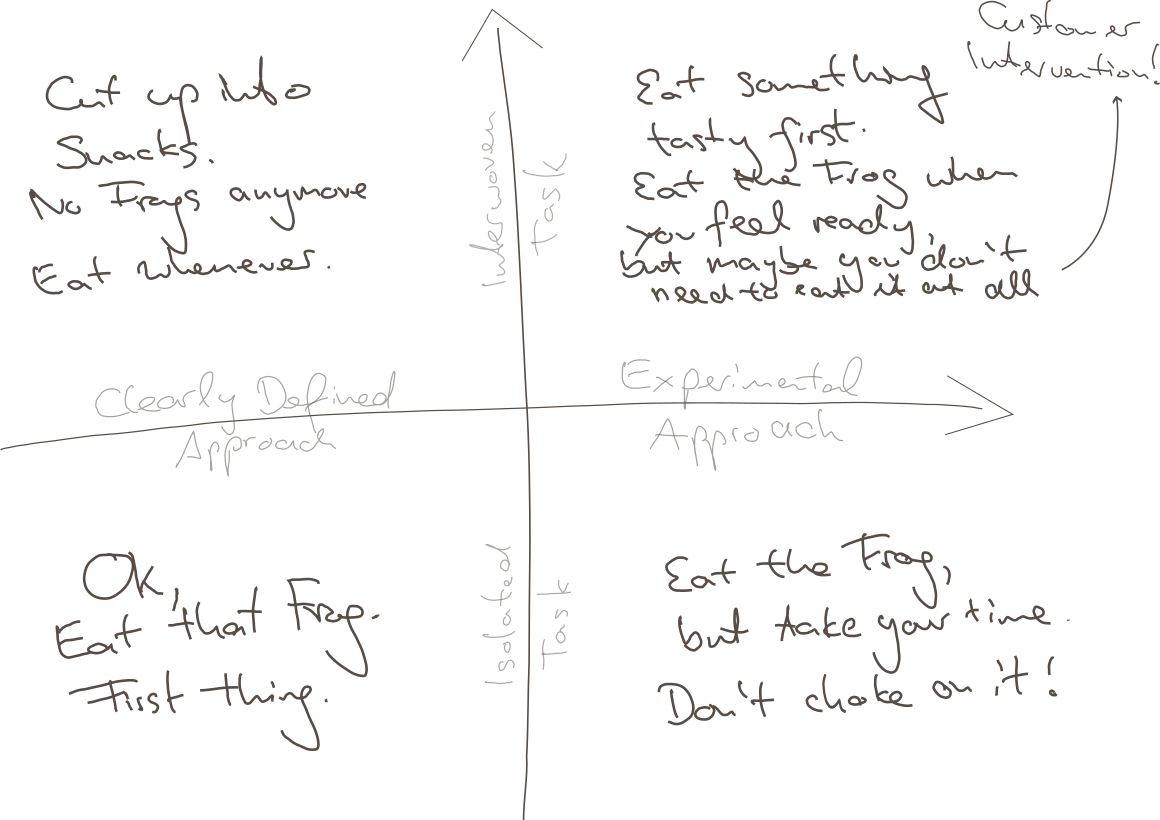
It turns out, there are several cases where it would be straightway destructive just to Eat the next-best Frog, and I will try to explain this to you using my impressive drawing skills:

Point being, there are at least two boundaries of application:

  • Clarity of Approach: How clearly-defined is it, as opposed to requiring one or multiple experimental, creative approachs?
  • Relation to other Tasks: How isolated is your task, is it heavily interwoven with other tasks?

Why these distinctions? Maybe we can agree on

  • Overwhelming Frog tasks can act stifling on your creativity, so if that very mindset is required for your approach, you will not succeed by pressuring through.
  • Thinking yourself into a complex topic first thing in the morning might require some warm up time for your brain, booting every relevant detail into your cloud of thoughts.
  • Parkinson’s Law states “Work expands so as to fill the time available for its completion.” – from which I derive: If your task is too large but it could be divided into sub-tasks, you might use any available time to do something related to your giant Frog, but not necessarily the most precise thing to do.
  • The motivation of having done multiple small tasks can provide you with the energy of finishing “That Frog” within the near future.

So to relate that to the Frogophage subject at hand; my findings are:

  • Bottom Right: If your task is quite isolated from other tasks, but still it’s approach isn’t very clear, do not think of your problem as a frog to be eaten right now. You will have to eventually have eaten it, but take your time, don’t choke on it – don’t destroy your creative thinking by believing that you can rush through it.
  • Top Left: If your Frog is defined as one well-defined task, but can actually be seen as a composition of many Sub-Frogs, stop for a minute and invest your time in actually resolving the atomic issues. This might feel like slowing you down, but there is no honor in having eaten That Disgusting Frog, if actually you could have eaten a tasty buffet of small snacks instead.
  • Top Right: Interwoven Tasks that also require an Experimental Approach are hard because you might just waste your time trying to upfront define your smaller snacks, and you might not have all the relevant information booted into your brain at the time of your supposed Frog Breakfast, so: Try to warm up yourself by solving some smaller of the connected issues first; by bringing your consciousness into the right state it can very well appear what can be tried.
    • Bonus Point: It can also render your whole Frog irrelevant when it becomes clear that your whole problem has to be redefined by Customer Intervention. Sometimes you just have to explain the poor guys that something is complicated (costly for them), and they might come up with a request that is completely different from your original frog.
  • Bottom Left: However, if none of thse apply and there’s just a nauseating thing in front of you, that you just know has to be done, you have somewhat of a clear idea how to start, it does not depend on many other things done first or simultaneously – better Eat That Frog. It likely won’t go away and you can then use the resulting feel-good moment to inspire the rest of your day.
Conclusion

I guess this all boils down to “whatever advice there is, there are some limits to its applications”. I hope you already weren’t the type of person who would just think of any problem as some big unquestionable Frog to be gobbled up without reconsideration…

… but nonetheless, maybe this can help in evaluating your strategy when facing the next difficult thing.

And don’t just eat frogs, please.

Finding refactoring candidates using reflection

If some of your types are always used together, that is probably a sign that you are missing an abstraction that bundles them. For example, if I always see the types Rectangle and Color together, it’s probably a good idea to create a ColoredRectangle class that combines the two. However, these patterns tend to emerge over time, so it’s hard to actually find them manually.

Reflection can help find these relationships between types. For example, you can look at all the function/method parameter lists in your code and mark all types appearing there as ‘being used together’. Then count how often these tuples appear, and you might have a good candidate for refactoring.

Here’s how to do that in C#. First pick a few assemblies you want to analyze. One way to get them is using Assembly.GetAssembly(typeof(SomeTypeFromYourAssembly)). Then get all the methods from all the types:

IEnumerable<MethodInfo> GetParameterTypesOfAllMethods(IEnumerable<Assembly> assemblies)
{
  var flags = BindingFlags.Instance | BindingFlags.Static | BindingFlags.Public
    | BindingFlags.NonPublic | BindingFlags.DeclaredOnly;
  foreach (var assembly in assemblies)
  {
    foreach (var type in assembly.GetTypes())
    {
      foreach (var method in type.GetMethods(flags))
      {
        yield return method;
      }
    }
  }
}

The flags are important: the default will not include NonPublic and DeclaredOnly. Without those, the code will not report private methods but give you methods from base classes that we do not want here.

Now this is where things become a little more muddy, and specific to your application. I am skipping generated methods with “IsSpecialName”, and then I’m only looking at non-generic class parameters:

foreach (var method in GetParameterTypesOfAllMethods(assemblies))
{
  if (method.IsSpecialName)
    continue;

  var parameterList = method.GetParameters();

  var candidates = parameterList
      .Select(x => x.ParameterType)
      .Where(x => !x.IsGenericParameter)
      .Where(x => x.IsClass);

  /* more processing here */
}

Then I convert the types to a string using ToString() to get a nice identifier that includes filled generic parameters. I sort and join the type ids to get a key for my tuple and count the number of appearances in a Dictionary<string, int>:

var candidateNames = candidates
    .Select(x => x.ToString())
    .OrderBy(x => x)
    .ToList();

if (candidateNames.Count <= 1)
  continue;

if (candidateNames.Any(string.IsNullOrWhiteSpace))
  continue;

var key = string.Join(",", candidateNames);

if (!lookup.ContainsKey(key))
{
  lookup.Add(key, 1);
}
else
{
  lookup[key]++;
}

Once that is done, you can sort the resulting lookup, print out all the tuples, and see if there are any good candidates.

There’s much room for improvement with a method like this. For example, skipping non-class types is a pretty arbitrary choice. And you will not find new tuples built from built-in types this way. However, because those types offer very little semantic by themselves, it can be hard to correlate multiple occurrences simply by their types.

Avoid fragmenting your configuration

Nowadays configuration often is done using environment (aka ENV) variables. They work great using docker/containers, in development and production, on all platforms and using all languages. In short I think environment variables are great for configuration of many aspects of an application.

However, I encountered a pattern in several different applications that I really dislike: Several, fragmented ENV variables for one configurable aspect of the application.

Let us have a look at two examples to see what I mean, then I will try to explain where it could come from and why I think it is bad practice. Finally I will show a better alternative – at least in my opinion.

First real world example

In one javascript app a websocket url was made configurable using 4 (!) ENV variables like this:

WS_PREFIX || "wss://";
WS_HOST || "hostname";
WS_PORT || "";
WS_PATH || "/ws";

function ConnectionString(prefix, host, port, path) {
  return {
    attrib: {
      prefix, 
      host,
      port,
      path,
    },
    string: prefix + host + port + path,
  };
}

We immediately see, that the author wrote a function to deal with the complex configuration in the rest of the application. Not only the devops team or administrators need to supply many ENV variables but they have to supply them in a peculiar way:

The port needs to be specified as :8888, using a leading colon (or the host needs a trailing colon…) which is more than unexpected. The alternative would be a better and more sophisticated implementation of ConnectionString…

Another real example

In the following example the code there are again three ENV variables dealing with hosts, urls and websockets. This examples feels quite convoluted, is hard to understand and definitely needs a refactoring.

TANGOGQL_SOCKET=ws://${TANGO_HOST}:5004/socket

const defaultHost = window.TANGOGQL_HOST ?? "localhost:5004";
const defaultSocketUrl = window.TANGOGQL_SOCKET ?? ws://${defaultHost}/socket;

// dealing with config peculiarities somewhere else
const socketUrl = React.useMemo(() =>
        config.host.replace(/.*:\/\//, "ws://") + "/socket"
    , [config.host]);

Discussion

The examples show clearly that something simple like a configuration for an URL can lead to complicated and hard to use solutions. Most likely the authors tried to not repeat themselves and factored the URLs into the smallest sensible components. While this may sound like a good idea it puts burden on both the developers and the devops team configuring the application.

In my opinion it would be much simpler and more usable for both parties to have complete URLs for the different use cases. Of course this could mean repeating protocols, hostnames and ports if they are the same in the different situations. But just having one or two ENV variables like

WS_URL=wss://myhost:8080/ws
HOST_URL=https://myhost:8080

would be straightforward to use in code and to be configured in the runtime environment. At the same time the chance for errors and the complexity in the configuration is reduced.

Even though certain parts of the URLs are duplicated in the configuration I highly prefer this approach over the presented real world solutions.

Using Message Queuing Telemetry Transport (MQTT) for communication in a distributed system

If you have several participants who are interested in each other’s measurements or events, you can use the MQTT protocol for this. In the following, I will present the basics.

The Mqtt protocol is based on publish and subscribe with asynchronous communication. Therefore it can also be used in networks with high latency. It can also be operated with low bandwidth.

At the center is an MQTT broker. It receives published messages and forwards them to the subscribing clients. The MQTT topics are used for this purpose. Each message is published to a topic. The topics look like a file path and can be chosen almost freely. The only exception are names beginning with $, because these are used for MQTT-own telemetry data. An example for such a topic would be “My/Test/Topic”. Attention, the topic is case sensitive. Every level of the topic can be subscribed to. For example “My/Test/Topic/#”, “My/Test/#” or “My/#”. In the latter case, a message published to “My/Productive/Things” would also be received by the subscriber. This way you can build your own message hierarchy using the Topics.

In the picture a rough structure of the MQTT infrastructure is shown. Two clients have subscribed to a topic. If the sensor sends data to the topic, the broker forwards it to the clients. One of the clients writes the data into a database, for example, and then processes it graphically with a tool such as Grafana.

How to send messages

For the code examples I used Python with the package paho-mqtt. First, an MQTT client must be created and connected.

self.client = mqtt.Client()
self.client.connect("hostname-broker.de", 1883)
self.client.loop_start()

Afterwards, the client can send messages to the MQTT broker at any time using the publish command. A topic and the actual message are sent as payload. The payload can have any structure. For example Json format or xml. In the code example json is used

self.client.publish(topic="own/test/topic", payload=json.dumps(payload))

How to subscribe topics

Even when subscribing, an MQTT client must first be created and a connection established. However, the on_connect and on_message functions are also used here. These are always called when the client establishes a connection or a new message arrives. It makes sense to make the subscriptions in the on_connect method, since they are created so with a new connection also always new and are not lost.

self.client = mqtt.Client()
self.client.on_connect = on_connect
self.client.on_message = on_message
self.client.connect("hostname-broker.de", 1883)
self.client.loop_start()

Here you can see an example on_connect method that outputs the result code of the connection setup and subscribes to a topic. For this, only the respective topic must be specified.

def on_connect(client, userdata, flags, rc):
      print(Connected with result code " + str(rc))
      self.client.subscribe("own/test/topic/#")

In the on_message method you can specify what should happen to an incoming message.

Conclusion

MQTT is a simple way to exchange data between a variety of devices. You can customize it very much and have a lot of freedom. All messages are TSL encrypted and you can set up client authentication in the broker, which is why it is also considered secure. For asynchronous communication, this is definitely a technology to consider.

Developing for Cordova + SQLite in a standard Browser environment

As any developer, who doesn’t just love it when a product that has grown over the years suddenly needs to target a new platform (e.g. operating system) because some customer demands changed, some dependency broke or some other totally unexpected thing called “progress” happened?

Fortunately, there are some approachs to cross-platform development and if one expects such a change of direction, one can early on adopt a suitable runtime environment such as Apache Cordova or Capacitor/Ionic or similar, who all promise you a Write-Once-Run-Anywhere experience, decoupling the application logic from the lower-level OS interactions.

Unfortunately though, this promise is a total lie and usually, after starting such a totally platform-agnostic project, really soon you will want to use a dependency that will only work for one platform and then your options are limited.

One such example is a Cordova project we are currently moving from Android to iOS, and in that process also redesigning a nice, modern frontend to replace a very outdated (read: unmaintainable) Vanilla JS application. So now we have set it up smoothly (React + Vite + Typescript – you name it!), so technically we do not need anything iOS-specific yet, so we can work on our redesign in a pure-browser environment with hot reloading and the likes – life is good!

Then comes the realization that our application is quite data heavy and uses an on-device SQL database to persist its data, and we don’t have that in the browser – so, life turned bad.

What to do? There had been a client-side WebSQL database specification once, but this was unofficial and never fully implemented, abandoned in 2010, still present in Chrome but they are even live announcing how they are removing it, so this is not the future-proof way to go.

We crave a smooth flow of development.

  • It is not an option to re-build the app at every change.
  • It is not an option to have the production system use its SQLite DB and the development environment to use a totally different one like IndexedDB – certain SQLite queries are too ingrained in our application.
  • It’s only probably an option to use an experimental technology like absurd-sql, which aims to fill in that gap but then again needs advanced API features like Web Workers, SharedArrayBuffer, Atomics API which we wouldn’t require else
  • It is possible to use in-memory SQLite via sql.js but for persistence, it wasn’t instantly obvious to me how to couple that with the partially supported Origin Private File System API

So after all, this is the easiest solution that still gave me most of my developer smoothness back: Use sql.js in memory and for development, display two nice buttons on the UI which let me download the whole DB and upload one from file again. This is the sketch:

We create a CombinedDatabase class which, depending on the environment, can hand out such a database in a Singleton-like manner

class CombinedDatabase {

    // This is the Singleton-part

    private static instance: CombinedDatabase;

    public static get = async (): Promise<CombinedDatabase> => {
        if (!this.instance) {
            const {db, type} = await this.createDatabase();
            this.instance = new CombinedDatabase(db, type);
        }
        return this.instance;
    };

    private static createDatabase = async () => {
        if (inProductionEnvironment()) {
            return {
                db: createCordovaSqliteInstance(),
                type: "CordovaSqlite"
             };
        } else {
            const sqlWasmUrl = (await import("../assets/sql-wasm.wasm?url")).default;
            // we extend the window object for reasons I tell you below
            window.sqlJs = await initSqlJs({locateFile: () => sqlWasmUrl});
            const db = new window.sqlJs.Database();
            return {db, type: "InMemory"};
        }
    }


    // This is the actual flesh, i.e. a switch of which API to use

    private readonly type: string;
    private cordovaSqliteDb: SQLitePlugin.Database | null = null;
    private inMemorySqlJsDb: SqlJsDatabase | null = null;

    private constructor(db: SQLitePlugin.Database | SqlJsDatabase, type: string) {
        this.type = type;
        switch(type) {
            case "CordovaSqlite":
                this.cordovaSqliteDb = db as SQLitePlugin.Database;
                break;
            case "InMemory":
                this.inMemorySqlJsDb = db as SqlJsDatabase;
                break;
            default:
                throw Error("Invalid CombinedDatabase type: " + type);
        }
    }

   // ... and then there are some methods

}

(This is simplified – in actual, type is an enum for me , and there’s also error handling, but you know – not the point here).

This structure is nice, because you can now implement low-level methods like some executeQuery(...) etc. which just decide depending on the type, which of the private DB instances it can address, and even if they work differently, return a unified response format.

The rest of our application does not know anything about any Cordova-SQLite-dependency, or sql.js, or whatever. Life is good again.

So How do Import / Export work?

I gave the CombinedDatabase some interfacing methods, similar to


    public async export() {
        switch (this.type) {
            case "CordovaSqlite":
                throw Error("Not implemented for cordova-sqlite database");
            case "InMemorySqlJs":
                return this.inMemorySqlJsDb!.export();
            default:
                throw Error("DB not initialized, cannot export.");
        }
    }

    public async import(binaryData: Uint8Array) {
        if (this.type !== CombinedDatabaseType.InMemorySqlJs) {
            throw Error("DB import only implemented for the in-memory/sql.js database, this is a DEVELOPMENT feature!");
        }
        await this.close();
        this.inMemorySqlJsDb = new window.sqlJs.Database(binaryData);
    }

This is also the reason why I monkey-patched the window object earlier, so I still have this API around outside the Singleton instantiation (createDatabase). Yes, this is a global variable and a kind of hack, but imo is what can safely be done inside the Browser within some good measure.

Remember, in Typescript you need to declare this e.g. in some global.d.ts file

import {SqlJsStatic} from "sql.js";

declare global {
    interface Window {
        sqlJs?: SqlJsStatic
    }
}

Or go around the Window interface by casting (window as any).sqlJs – you decide what you prefer.

Anyway, the export() functionality can then be used quite handily, it returns the in-memory database as a binary array and you can make the browser download that via a Blob URL:

api.db.export().then((array: Uint8Array) => {
    const blob = new Blob([array], {type: "application/x-sqlite3"});
    const link = document.createElement("a");
    link.href = URL.createObjectURL(blob);
    link.download = `bonpland${Date.now()}.db`;
    link.target = "_blank";
    link.click();
});

And similarly, you can use import() by reading a Uint8Array from a temporary <input type="file"> element with a FileReader() (somewhat common solution, but just comment below if you want the details).

To be exact, I don’t even use the import() button anymore because I pass my development DB as an asset to the dev server. This is nice (and only takes a few seconds on hot reloading because our DB is like 50 MB in size), but somewhat Vite-specific, which is why I will postpone this topic to some later blog time.

Even better automated instance construction in C++

In the previous articles on automated instance construction (first and second) I showed how you can use constructor-argument deduction to automatically do dependency injection. While that approach worked nicely in general, one little detail was still nagging me: Since construction of the actual objects happens at the end of a recursion, the stack depth in some of those construction could get quite deep. In fact there are an additional Max–actual number of c’tor parameters functions on the stack before the c’tor is called. This effect is even worse when resolving long dependency chains, were those functions are there for each of the dependencies currently being resolved.

The previous code uses an std::index_sequence of the exactly the right length to inject the same number of mimic parameters that are then used to locate dependencies. If we knew the right length, there wouldn’t have to be any recursion around the construction. And that’s actually easy to refactor out, we can just figure out the std::index_sequence first and return, and then use it outside of the recursion:

template <class T, std::size_t Head, std::size_t... Rest>
constexpr auto
injection_parameter_sequence(std::index_sequence<Head, Rest...>,
  decltype(T{ mimic<T>{ Head }, mimic<T>{ Rest }... })* = nullptr)
{
  return std::index_sequence<Head, Rest...>{};
}

template <class T>
constexpr auto injection_parameter_sequence(std::index_sequence<>)
{
  return std::index_sequence<>{};
}

template <class T, std::size_t... Rest>
constexpr auto
injection_parameter_sequence(std::index_sequence<Rest...>)
{
  return injection_parameter_sequence<T>(std::make_index_sequence<sizeof...(Rest) - 1>{});
}

Starting with a “long” index sequence, this overload set returns the smaller index sequence for the construction. We can use a small tool function to actually create the instance:

template <class T, std::size_t... Params>
constexpr auto make_unique_injected_with_sequence(service_provider const& p, std::index_sequence<Params...>)
{
  return std::make_unique<T>(mimic<T>(p, Params)...);
}

Which can be called like this:

template <class T, std::size_t Max = 16> auto make_unique_injected(service_provider const& p)
{
  return make_unique_injected_with_sequence<T>(p,
    injection_parameter_sequence<T>(std::make_index_sequence<Max>{}));
}

Only these last two function will be added to the call stack for each constructor call, which is not a whole lot. This construction has the additional advantage that only these two need to be changed to support different kinds construction, e.g. using std::make_shared instead of std::make_unique.