Calculation with infinite decimal expansion in Java

When dividing decimal numbers in Java, some values—like 1 divided by 3—result in an infinite decimal expansion. In this blog post, I’ll show how such a calculation behaves using BigDecimal and BigFraction.

BigDecimal

Since this cannot be represented exactly in memory, performing such a division with BigDecimal without specifying a rounding mode leads to an “java.lang.ArithmeticException: Non-terminating decimal expansion; no exact representable decimal result”. Even when using MathContext.UNLIMITED or an effectively unlimited scale, the same exception is thrown, because Java still cannot produce a finite result.

BigDecimal a = new BigDecimal("1");
BigDecimal b = new BigDecimal("3");
BigDecimal c = a.divide(b);

By providing a scale – not MathContext.UNLIMITED – and a rounding mode, Java can approximate the result instead of failing. However, this also means the value is no longer mathematically exact. As shown in the second example, multiplying the rounded result back can introduce small inaccuracies due to the approximation.

BigDecimal a = new BigDecimal("1");
BigDecimal b = new BigDecimal("3");
BigDecimal c = a.divide(b, 100, RoundingMode.HALF_UP); // 0.3333333...
BigDecimal a2 = c.multiply(b);  // 0.9999999...

When working with BigDecimal, it’s important to think carefully about the scale you actually need. Every additional decimal place increases both computation time and memory usage, because BigDecimal stores each digit and carries out arithmetic with arbitrary precision.

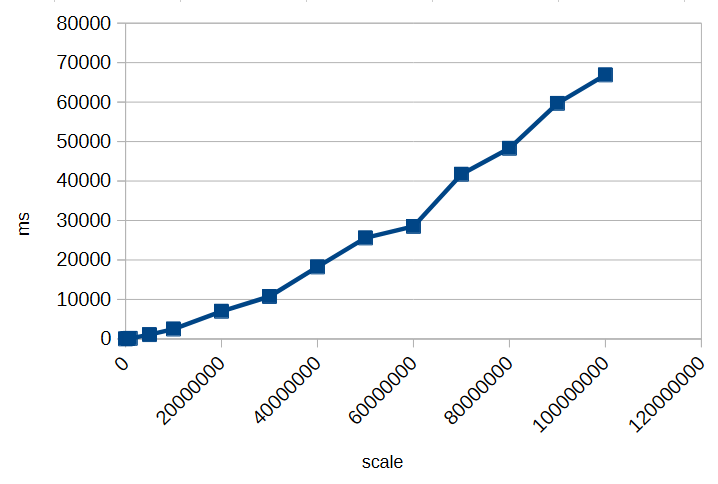
To illustrate this, here’s a small timing test for calculating 1/3 with different scales:

As you can see, increasing the scale significantly impacts performance. Choosing an unnecessarily high scale can slow down calculations and consume more memory without providing meaningful benefits. Always select a scale that balances precision requirements with efficiency.

However, as we’ve seen, decimal types like BigDecimal can only approximate many numbers when their fractional part is infinite or very long. Even with rounding modes, repeated calculations can introduce small inaccuracies.

But how can you perform calculations exactly if decimal representations can’t be stored with infinite precision?

BigFraction

To achieve truly exact calculations without losing precision, you can use fractional representations instead of decimal numbers. The BigFraction class from Apache Commons Numbers stores values as a numerator and denominator, allowing it to represent numbers like 1/3 precisely, without rounding.

import org.apache.commons.numbers.fraction.BigFraction;

BigFraction a = BigFraction.ONE;
BigFraction b = BigFraction.of(3);
BigFraction c = a.divide(b);    // 1 / 3
BigFraction a2 = c.multiply(b); // 1

In this example, dividing 1 by 3 produces the exact fraction 1/3, and multiplying it by 3 returns exactly 1. Since no decimal expansion is involved, all operations remain mathematically accurate, making BigFraction a suitable choice when exact arithmetic is required.

BigFraction and Decimals

But what happens if you want to create a BigFraction from an existing decimal number?

BigFraction fromDecimal = BigFraction.from(2172.455928961748633879781420765027);
fromLongDecimal.bigDecimalValue(); // 2172.45592896174866837100125849246978759765625 

At first glance, everything looks fine: you pass in a precise decimal value, BigFraction accepts it, and you get a fraction back. So far, so good. But if you look closely at the result, something unexpected happens—the number you get out is not the same as the one you put in. The difference is subtle, hiding far to the right of the decimal point—but it’s there.
And there’s a simple reason for it: the constructor takes a double.

A double cannot represent most decimal numbers exactly. The moment your decimal value is passed into BigFraction.from(double), it is already approximated by the binary floating-point format of double. BigFraction then captures that approximation perfectly, but the damage has already been done.

Even worse: BigFraction offers no alternative constructor that accepts a BigDecimal directly. So whenever you start from a decimal number instead of integer-based fractions, you inevitably lose precision before BigFraction even gets involved. What makes this especially frustrating is that BigFraction exists precisely to allow exact arithmetic.

Creating a BigFraction from a BigDecimal correctly

To preserve exactness when converting a BigDecimal to a BigFraction, you cannot rely on BigFraction.from(double). Instead, you can use the unscaled value and scale of the BigDecimal directly:

BigDecimal longNumber = new BigDecimal("2172.455928961748633879781420765027");
BigFraction fromLongNumber = BigFraction.of(
   longNumber.unscaledValue(),
   BigInteger.TEN.pow(longNumber.scale())
); // 2172455928961748633879781420765027 / 1000000000000000000000000000000

fromLongNumber.bigDecimalValue() // 2172.455928961748633879781420765027

This approach ensures the fraction exactly represents the BigDecimal, without any rounding or loss of precision.

BigDecimal longNumber = new BigDecimal("2196.329071038251366120218579234972");
BigFraction fromLongNumber = BigFraction.of(
   longNumber.unscaledValue(),
   BigInteger.TEN.pow(longNumber.scale())
); // 549082267759562841530054644808743 / 250000000000000000000000000000

fromLongNumber.bigDecimalValue() // 2196.329071038251366120218579234972

In this case, BigFraction automatically reduces the fraction to its simplest form, storing it as short as possible. Even though the original numerator and denominator may be huge, BigFraction divides out common factors to minimize their size while preserving exactness.

BigFraction and Performance

Performing fractional or rational calculations in this exact manner can quickly consume enormous amounts of time and memory, especially when many operations generate very large numerators and denominators. Exact arithmetic should only be used when truly necessary, and computations should be minimized to avoid performance issues. For a deeper discussion, see The Great Rational Explosion.

Conclusion

When working with numbers in Java, both BigDecimal and BigFraction have their strengths and limitations. BigDecimal allows precise decimal arithmetic up to a chosen scale, but it cannot represent numbers with infinite decimal expansions exactly, and high scales increase memory and computation time. BigFraction, on the other hand, can represent rational numbers exactly as fractions, preserving mathematical precision—but only if constructed carefully, for example from integer numerators and denominators or from a BigDecimal using its unscaled value and scale.

In all cases, it is crucial to be aware of these limitations and potential pitfalls. Understanding how each type stores and calculates numbers helps you make informed decisions and avoid subtle errors in your calculations.

Make your users happy by not caring about how they would enter data

As many of our customers are operating somewhere in the technical or scientific field, we happen to get requests that are somewhat of the form

Well, so we got that spreadsheet managing our most important data and well…
… it’s growing over our heads with 1000+ entries…
… here are, sadly, multiple conflicting versions of it …
… no one understands these formulae that Kevin designed …
… we just want ONE super-concise number / graph from it …
… actually, all of the above.

And while that scenario might be exaggerated for the sole reason of entertainment, at its core there’s something quite universal. Now there’s one thing to feel like the only adult in the room, throwing one’s hands up into the air, and then calculating the minimum expenses for a self-contained solution and while doing so, we still would strive for a simple proposal, that’s always quite a tightrope walk between the “this really needs not to be fancy” and the “but we can not violate certain standards either”.

And in such a case, your customer might happily agree with you – they do not want to rely on their spreadsheets, it just was too easy just to start with. And now they’re addicted.

The point of this post is this: If your customer has tabular data, there’s almost no “simple” data input interface you can imagine that is not absolutely outgunned by spreadsheets, or even text files. The sheer amount of conventions that nearly everyone already knows, don’t try to compete with some input fields and “Add entity” buttons and HTML <form>s.

This is no praise towards spreadsheet software at all. But consider the hidden costs that can wait behind a well-intended “simple data input form”.

For the very first draft of your software

  • do not build any form of data input interface, if you cannot exactly know that it will quickly empower the user to something they can not do already.
  • Do very boldly state: Keep your spreadsheets, CSV, text files. I will work with them, not against them.
  • E.g. Offer something as “uncool” as a “(up) load file” button, or a field to paste generic text. You do not have to parse .xls, .xlsx, .ods files either. The message should be: Use whatever software you want to use, up to the point where it started to be a liability, not your friend anymore.
  • Do not be scared about “but what if they have wrong formatting”. Well then find the middle ground – what kind of data should you really sanitize, what can you straightout reject?

Make it clear that you prioritize the actual problem of your customer. Examples:

  1. if that problem is “too many sources-of-not-really-truth-anymore”, then your actual solution should focus on merging such data sources. But if that was the main problem of your customer, imagine them to always have some new long-lost-data-sources on some floppy disk, stashed in their comic book collection, or something.
  2. if that problem is “we cannot see through that mess”, then your actual solution should focus on analyzing, on visualizing the important quantities.
  3. if the problem is that Kevin starts writing new crazy formulae everyday and your customer is likely go out of business whenever he chooses to quit, then yes, maybe your actual solution is really in constructing a road block, but then rather in a long discussion about the actual use cases, not by just translating the crazy logic into Rust now, because “that’s safer”.

It is my observation, that a technically-accustomed customer is usually quite flexible in their ways. In some cases it really is your job to impose a static structure, and these are the cases in which they will probably approve of having that done to them. In other cases, e.g. their problem is a shape-shifting menace that they cannot even grasp, do not start with arbitrary abstractions, templates, schemas that will just slow them down.
I mean – either you spend your day migrating their data all the time, and putting new input elements on their screen, or you spend your day solving their actual troubles.

Use duplication to make your single source of truth

Having a single source of truth is one of the big tenets of programming. It is easy to see why. If you want to figure out something about your program, or change something, you just go to the corresponding source.

One of the consequences of this is usually code duplication, but things can get a lot more complicated very fast, when you think of knowledge duplication or fragmentation, instead of just code. Quite unintuitively, duplication can actually help in this case.

Consider the case where you serialize an enum value, e.g. to a database or a file. Suddenly, you have two conceptual points that ‘know’ about the translation of your enum literals to a numeric or string value: The mapping in your code and the mapping implicitly stored in the serialization. None of these two points can be changed independently. Changing the serialized content means changing the source code and vice-versa.

You could still consider your initial enum to value mapping the single source of truth, but the problem is that you can easily miss disruptive changes. E.g. if you used the numeric value, just reordering the enumerated will break the serialization. If you used the text name of the enum, even a simple rename refactoring will break it.

So to deal with this, I often build my own single source of truth: a unit test that keeps track of such implicit value couplings. That way, the test can tell you when you are accidentally breaking things. Effectively, this means duplicating the knowledge of the mapping to a ‘safe’ space: One that must be deliberately changed, and resists accidentally being broken. And then that becomes my new single source of truth for that mapping.

Common SQL Performance Gotchas in Application Development

When building apps that use a SQL database, it’s easy to run into performance problems without noticing. Many of these issues come from the way queries are written and used in the code. Below are seven common SQL mistakes developers make, why they happen, and how you can avoid them.

Not Using Prepared Statements

One of the most common mistakes is building SQL queries by concatenating strings. This approach not only introduces the risk of SQL injection but also prevents the database from reusing execution plans. Prepared statements or parameterized queries let the database understand the structure of the query ahead of time, which improves performance and security. They also help avoid subtle bugs caused by incorrect string formatting or escaping.

// Vulnerable and inefficient
String userId = "42";
Statement stmt = connection.createStatement();
ResultSet rs = stmt.executeQuery("SELECT * FROM users WHERE id = " + userId);
// Safe and performant
String sql = "SELECT * FROM users WHERE id = ?";
PreparedStatement ps = connection.prepareStatement(sql);
ps.setInt(1, 42);
ResultSet rs = ps.executeQuery();

The N+1 Query Problem

The N+1 problem happens when an application fetches a list of items and then runs a separate query for each item to retrieve related data. For example, fetching a list of users and then querying each user’s posts in a loop. This results in one query to fetch the users and N additional queries for their posts. The fix is to restructure the query using joins or batch-fetching strategies, so all the data can be retrieved in fewer queries.

We have written about it on our blog before: Understanding, identifying and fixing the N+1 query problem

Missing Indexes

When queries filter or join on columns that do not have indexes, the database may need to scan entire tables to find matching rows. This can be very slow, especially as data grows. Adding the right indexes can drastically improve performance. It’s important to monitor slow queries and check whether indexes exist on the columns used in WHERE clauses, JOINs, and ORDER BY clauses.

Here’s how to create an index on an “orders” table for its “customer_id” column:

CREATE INDEX idx_orders_customer_id ON orders(customer_id);

Once the index is added, the query can efficiently find matching rows without scanning the full table.

Retrieving Too Much Data

Using SELECT * to fetch all columns from a table is a common habit, but it often retrieves more data than the application needs. This can increase network load and memory usage. Similarly, not using pagination when retrieving large result sets can lead to long query times and a poor user experience. Always select only the necessary columns and use LIMIT or OFFSET clauses to manage result size.

For example:

String sql = "SELECT id, name, price FROM products LIMIT ? OFFSET ?";
PreparedStatement ps = connection.prepareStatement(sql);
ps.setInt(1, 50);
ps.setInt(2, 0);
ResultSet rs = ps.executeQuery();

Chatty Database Interactions

Some applications make many small queries in a single request cycle, creating high overhead from repeated database access. Each round-trip to the database introduces latency. Here’s an inefficient example:

for (int id : productIds) {
    PreparedStatement ps = connection.prepareStatement(
        "UPDATE products SET price = price * 1.1 WHERE id = ?"
    );
    ps.setInt(1, id);
    ps.executeUpdate();
}

Instead of issuing separate queries, it’s often better to combine them or use batch operations where possible. This reduces the number of database interactions and improves overall throughput:

PreparedStatement ps = connection.prepareStatement(
    "UPDATE products SET price = price * 1.1 WHERE id = ?"
);

for (int id : productIds) {
    ps.setInt(1, id);
    ps.addBatch();
}
ps.executeBatch();

Improper Connection Pooling

Establishing a new connection to the database for every query or request is slow and resource-intensive. Connection pooling allows applications to reuse database connections, avoiding the cost of repeatedly opening and closing them. Applications that do not use pooling efficiently may suffer from connection exhaustion or high latency under load. To avoid this use a connection pooler and configure it with appropriate limits for the workload.

Unbounded Wildcard Searches

Using wildcard searches with patterns like '%term%' in a WHERE clause causes the database to scan the entire table, because indexes cannot be used effectively. These searches are expensive and scale poorly. To handle partial matches more efficiently, consider using full-text search features provided by the database, which are designed for fast text searching. Here’s an example in PosgreSQL:

SELECT * FROM articles
WHERE to_tsvector('english', title) @@ to_tsquery('database');

One of our previous blog posts dives deeper into this topic: Full-text Search with PostgreSQL.

By being mindful of these common pitfalls, you can write SQL that scales well and performs reliably under load. Good database performance isn’t just about writing correct queries – it’s about writing efficient ones.

Have you faced any of these problems before? Every project is different, and we all learn a lot from the challenges we run into. Feel free to share your experiences or tips in the comments. Your story could help someone else improve their app’s performance too.

The real value of DSLs

A few years ago, domain specific languages (DSLs) were a really hot topic and “the future”. Now, after the dust has settled there are a bunch of successful and useful examples like LINQ and Gradle but no holy grail buzz anymore.

In some of our projects we did implement some small embedded DSLs (eDSL) if we expected great benefit. Most of the time they are just working silently in the background of our solutions. But sometimes they really shine:

A recent story involving a DSL

A few days ago, I got a request from one of our customers regarding a complex “traffic light”-like system for scientific proposals in a proposal submission system. Each proposal goes through a bunch of phases where different parties have participate. While that sounds relatively simple our system has different proposal types, different roles, different states over time and so on.

All of the above leads to “Starbuck’s menu”-style complexity. And now, after several years in production the customer comes up with some special cases that are counterintuitive.

Expecting the worst I dived into the source code and was delighted to see a quite expressive DSL. Our project and thus also the DSL for the “status overview” feature leveraged the flexible syntax of Groovy (which is also used by Gradle). After a few minutes I could not only understand all the rules for the different status lights but also pin-point the cases in question.

I then moved forward and used the rule definition in our DSL to talk to our customer directly! And after a few more minutes he – as the domain expert – also understood our rule definition and the cause for the irritating display of a certain combination of proposal type, role and phase.

The fix was more or less straightforward and I simply handed that one source file to our customer for future reference.

Here is an excerpt of our status phase rules written in our own DSL:

PhaseRules {
    submission {
        green {
            proposal.isValidated()
        }
        red {
           !proposal.isValidated()
        }
        white {
            false
        }
        user {
            yellow {
                proposal.isCallPhaseIndependent())
            }
            grey {
                false
            }
        }
        scientist {
            yellow {
                false
            }
            grey {
                proposalNeedsValidationByProposer(proposal)
            }
        }
        userOffice {
            yellow {
                false
            }
            grey {
                proposalNeedsValidationByProposer(proposal)
            }
        }
    }

    check {
        green {
            proposal.isValidated() && proposal.hasFeasibilityComment()
        }
        red {
        }
    }
    // more phases, roles, states and rules omitted...
}

In that moment I was very proud of my project team, their decision to implement a DSL for this feature and an appropriate implementation.

It saved me a lot of headaches and quite some time. Furthermore it reinforced our customers trust in the application and improved the transparency and traceability of our solution.

This high level abstraction let both me and the customer ignore all the implementation details and focus on the actual functionality and behaviour correcting/improving the status display for our users.

How to Eat Last

A good book about leader mentality is “Leaders Eat Last” from Simon Sinek. The book is not about your diet, but your approach towards your subordinates and your peer group.

I don’t want to recapitulate the content of the book – it is worth the read or at least a presentation about it. I want to talk about one specific implementation of the principle in my company that I did even before reading the book, but could only name and highlight after Simon Sinek lend me his analogy.

I’m a software developer and founded a software development company. I hired other software developers and they develop software with me. I might be the founder, owner and director of the company (so, in a short team, the “leader”), but I’m still a fellow developer and understand the developer’s mindset. So I know what a developer wants, because I want it, too.

Except, I make sure that I’m the last one in the company to get it.

Two examples:

We bought our second round of office desks in 2010, when we moved into a new office. They were still traditional desks that could only be height-adjusted with tremenduous effort. We only did it once and settled for “good enough”. Our first electrically height adjustable desk was bought in 2013 because of a specific medical requirement. But it opened the door to the possibility of having the desk at any height throughout the day. You might even work standing up.

We slowly accumulated more electrically height adjustable desks until we had 50 percent classic and 50 percent electric desks. At that point, I bought the other half at once (and they are fancy “gamer nerd” desks, because why not?). The last classic desk in the company was my own. I replaced it with the oldest electric desk in the portfolio. Now I can work while standing up, too.

When the Corona pandemic hit in 2020, we moved to home offices all of a sudden. I wrote about this change several times on this blog. This physical separation led to an increased demand for video calls. I made sure everyone is covered with the basic equipment (webcam, headphones, etc.), including me. But I also experimented with the concept of a “virtual office”. It consisted of a video meeting room that I hung out in all workday. I turned the camera and microphone off, but was instantly present if somebody had a desire to talk to me – just like in the real office. For this use case, I installed an additional monitor on my setup, the fourth one, called the “pandemic display” in a blog post about it. Because I didn’t know if the experiment would work, I bought the smallest and cheapest display available for me.

The experiment went fine and I decided to equip everyone with an additional “videoconference display”. The new models were bigger and better. If an employee didn’t see the benefit of it, I didn’t force them to install one in their home office, but every workplace in the office has at least four monitors. Guess were the original one is still installed? I made sure everybody had a better monitor than me.

With this process, I can guarantee that my employees have the work equipment that is good enough for their boss. Because I have it too – or something inferior. If I feel the need to upgrade my gear, I upgrade everybody else and then lift my things to their level. If I feel comfortable with my gear, so does everybody else (except for individual demands and we have a process installed for that, too).

I love self-regulating systems and this is one: The whole company is equipped in a manner that is sufficient or even better for me to do the work. If I want more or better things, everybody gets the upgrade before me because only then do I allow myself to have the same luxury. No “upward” exception for the boss, and only temporarily “downwards”. My wants and needs define the lower limit of equipment quality for all of us. If I can’t buy it for everyone, I don’t buy it.

That is the whole trick: Equip yourself last or lowest. You can be sure everybody is well-equipped that way. Thanks, Simon!

Don’t go bursting the pipe

Java Streams are like clean, connected pipes: data flows from one end to the other, getting filtered and transformed along the way. Everything works beautifully — as long as the pipe stays intact.

But what happens if you cut the pipe? Or if you throw rocks into it?

Both stop the flow, though in different ways. Let’s look at what that means for Java Streams.

Exceptions — Cutting the Pipe in Half

A stream is designed for pure functions. The same input gives the same output without side effects. Each element passes through a sequence of operations like map, filter, sorted. But when one of these operations throws an exception, that flow is destroyed. Exceptions are side effects.

Throwing an exception in a stream is like cutting the pipe right in the middle:
some water (data) might have already passed through, but nothing else reaches the end. The pipeline is broken.

Example:

var result = items.stream()
    .map(i -> {
        if(i==0) {
            throw new InvalidParameterException();
        }
        return 10 / i;
    })
    .toList();

If you throws the exception, the entire stream stops. The remaining elements never get processed.

Uncertain Operations — Throwing Rocks into the Pipe

Now imagine you don’t cut the pipe — you just throw rocks into it.

Some rocks are small enough to pass.
Some are too big and block the flow.
Some hit the walls and break the pipe completely.

That’s what happens when you perform uncertain operations inside a stream that might fail in expected ways — for example, file reads, JSON parsing, or database lookups.

Most of the time it works, but when one file can’t be read, you suddenly have a broken flow. Your clean pipeline turns into a source of unpredictable errors.

var lines = files.stream()
   .map(i -> {
        try {
            return readFirstLine(i); // throws IOException
        }
        catch (IOException e) {
            throw new RuntimeException(e);
        }
    })
    .toList();

The compiler does not allow checked exceptions like IOException in streams. Unchecked exceptions, such as RuntimeException, are not detected by the compiler. That’s why this example shows a common “solution” of catching the checked exception and converting it into an unchecked exception. However, this approach doesn’t actually solve the underlying problem; it just makes the compiler blind to it.

Uncertain operations are like rocks in the pipe — they don’t belong inside.
You never know whether they’ll pass, get stuck, or destroy the stream.

How to Keep the Stream Flowing

There are some strategies to keep your stream unbroken and predictable.

Prevent problems before they happen

If the failure is functional or domain-specific, handle it before the risky operation enters the stream.

Example: division by zero — a purely data-related, predictable issue.

var result = items.stream()
    .filter(i -> i != 0)
    .map(i -> 10 / i) 
    .toList();

Keep the flow pure by preparing valid data up front.

Represent expected failures as data

This also applies to functional or domain-specific failures. If a result should be provided for each element even when the operation cannot proceed, use Optional instead of throwing exceptions.

var result = items.stream()
    .collect(Collectors.toMap(
        i -> i,
        i -> {
            if(i == 0) {
                return Optional.empty();
            }
            return Optional.of(10 / i);
        }
    ));

Now failures are part of the data. The stream continues.

Keep Uncertain Operations Outside the Stream

This solution is for technical failures that cannot be prevent — perform it before starting the stream.

Fetch or prepare data in a separate step that can handle retries or logging.
Once you have stable data, feed it into a clean, functional pipeline.

var responses = fetchAllSafely(ids); // handle exceptions here

responses.stream()
    .map(this::transform)
    .toList();

That way, your stream remains pure and deterministic — the way it was intended.

Conclusion

A busted pipe smells awful in the basement, and exceptions in Java Streams smell just as bad. So keep your pipes clean and your streams pure.

Getting rid of all the files in ASP.NET “Single File” builds

I’ve come to finding it somewhat amusing, that if you build a fresh .NET project, like,

dotnet publish ./Blah.csproj ... -c Release -p:PublishSingleFile=true

that the published “Single File” contains of quite a handful of files. So do I, having studied physics and all that, have an outdated knowledge of the concept of “single”? Or is there a very specific reason for any of the files that appear that and it just has to be?
I really needed to figure that out for a small web server application (so, ASP.NET), and as we promised our customer a small, simple application; all the extra non-actually-single files were distracting spam at least, and at worst it would suggest a level of complexity to them that wasn’t helpful, or suggest a level of we-don’t-actually-care when someone opens that directory.

So what I found to do a lot was to extend my .csproj file with the following entries, which I want to explain shortly:


  <PropertyGroup Condition="'$(Configuration)'=='Release'">
    <DebugSymbols>false</DebugSymbols>
    <DebugType>None</DebugType>
  </PropertyGroup>

  <PropertyGroup>
    <PublishIISAssets>false</PublishIISAssets>
    <AspNetCoreHostingModel>OutOfProcess</AspNetCoreHostingModel>
  </PropertyGroup>	

  <ItemGroup Condition="'$(Configuration)'=='Release'">
    <Content Remove="*.Development.json" />
    <Content Remove="wwwroot\**" />
  </ItemGroup>

  <ItemGroup>
      <EmbeddedResource Include="wwwroot\**" />
  </ItemGroup>
  • The first block gets rid of any *.pdb file, which stands for “Program Debug Database” – these contain debugging symbols, line numbers, etc. that are helpful for diagnostics when the program crashes. Unless you have a very tech-savvy customer that wants to work hands-on when a rare crash occurs, end users do not need them.
  • The Second block gets rid of the files aspnetcorev2_inprocess.dll and web.config. These are the Windows “Internet Information Services” module and configuration XML that can be useful when an application needs tight integration with the environmental OS features (authentication and the likes), but not for a standalone web application that just does a simple thing.
  • And then the last two blocks can be understood nearly as simple as they are written – while a customer might find an appsettings.json useful, any appsettings.Development.json is not relevant in their production release,
  • and for a ASP.NET application, any web UI content conventionally lives in a wwwroot/ folder. While the app needs them, they might not need to be visible to the customer – so the combination of <Content Remove…/> and <EmbeddedResource Include…/> does exactly that.

Maybe this can help you, too, in publishing cleaner packages to your customers, especially when “I just want a simple tool” should mean exactly that.


How I accidentally cut my audio-files in half

A couple of weeks ago, I asked my brother to test out my new game You Are Circle (please wishlist it and check out the demo, if that’s up your alley!) and among lots of other valuable feedback, he mentioned that the explosion sound effects had a weird click sound at the end that he could only hear with his headphones on. For those of you not familiar with audio signal processing, those click or pop sounds usually appear when the ‘curvy’ audio signal is abruptly cut off1. I did not notice it on my setup, but he has a lot of experience with audio mixing, so I trusted his hearing. Immediately, I looked at the source files in audacity:

They looked fine, really. The sound slowly fades out, which is the exact thing you need to do to prevent clicks & pops. Suspecting the problem might be on the playback side of his particular setup, I asked him to record the sound on his computer the next time he tested and then kind of forgot about it for a bit.

Fast-forward a couple of days. Neither of us had followed up on the little clicky noise thing. While doing some video captures with OBS, I noticed that the sound was kind of terrible in some places, the explosions in particular. Maybe that was related?

While building a new version of my game, Compiling resources... showed up in my console and it suddenly dawned on me: What if my home-brew resource compiler somehow broke the audio files? I use it to encode all the .wav originals into Ogg Vorbis for deployment. Maybe a badly configured encoding setup caused the weird audio in OBS and for my brother? So I looked at the corresponding .ogg files, and to my surprise, it indeed had a small abrupt cut-off at the end. How could that happen? Only when I put both the original and the processed file next to each other, did I see what was actually going on:

It’s only half the file! How did that happen? And what made this specific file so special for it to happen? This is one of many files that I also convert from stereo to mono in preprocessing. So I hypothesized that might be the problem. No way I missed all of those files being cut in half though, or did I? So I checked the other files that were converted from stereo to mono. Apparently, I did miss it. They were all cut in half. So I took a look at the code. It looked something like this:

while (keep_encoding)
{
  auto samples_in_block = std::min(BLOCK_SIZE, input.sample_count() - sample_offset);
  if (samples_in_block != 0)
  {
    auto samples_per_channel = samples_in_block / channel_count;
    auto channel_buffer = vorbis_analysis_buffer(&dsp_state, BLOCK_SIZE);
    auto input_samples = input.samples() + sample_offset;

    if (convert_to_mono)
    {
      for (int sample = 0; sample < samples_in_block; sample += 2)
      {
        int sample_in_channel = sample / channel_count;
        channel_buffer[0][sample_in_channel] = (input_samples[sample] + input_samples[sample + 1]) / (2.f * 32768.f);
      }
    }
    else
    {
      for (int sample = 0; sample < samples_in_block; ++sample)
      {
        int channel = sample % channel_count;
        int sample_in_channel = sample / channel_count;
        channel_buffer[channel][sample_in_channel] = input_samples[sample] / 32768.f;
      }
    }

    vorbis_analysis_wrote(&dsp_state, samples_per_channel);
    sample_offset += samples_in_block;
  }
  else
  {
    vorbis_analysis_wrote(&dsp_state, 0);
  }

  /* more stuff to encode the block using the ogg/vorbis API... */
}

Not my best work, as far as clarity and deep nesting goes. After staring at it for a while, I couldn’t really figure out what was wrong with it. So I built a small test program to debug into, and only then did I see what was wrong.

It was terminating the loop after half the file, which now seems pretty obvious given the outcome. But why? Turns out it wasn’t the convert_to_mono at all, but the whole loop. What’s really the problem here is mismatched and imprecise terminology.

What is a sample? The audio signal is usually sampled several thousand times (44.1kHz, 48kHz or 96kHz are common) per second to record the audio waves. One data point is called a sample. But that is only enough of a definition if the sound has a single channel. But all those with convert_to_mono==true were stereo, and that’s exactly were the confusion is in this code. One part of the code thinks in single-channel samples, i.e. a single sampling time-point has two samples in a stereo file, while the other part things in multi-channel samples, i.e. a single sampling time-point has only one stereo sample, that consists of multiple numbers. Specifically this line:

auto samples_in_block = std::min(BLOCK_SIZE, input.sample_count() - sample_offset);

samples_in_block and sample_offset use the former definition, while input.sample_count() uses the latter. The fix was simple: replace input.sample_count() with input.sample_count() * channel_count.

But that meant all my stereo sounds, even the longer music files, were missing the latter half. And this was not a new bug. The code was in there since the very beginning of the git history. I just didn’t hear its effects. For the sound files, many of them have a pretty long fade out in the second half, so I can kind of get why it was not obvious. But the music was pretty surprising. My game music loops, and apparently, it also loops if you cut it in half. I did not notice.

So what did I learn from this? Many of my assumptions while hunting down this bug were wrong:

  • My brother’s setup did not have anything to do with it.
  • Just because the original source file looked fine, I thought the file I was playing back was good as well.
  • The bad audio in OBS did not have anything to do with this, it was just recorded too loud.
  • The ogg/vorbis encoding was not badly configured.
  • The convert_to_mono switch or the special averaging code did not cause the problem.
  • I thought I would have noticed that almost all my sounds were broken for almost two years. But I did not.

What really cause the problem was an old programming nemesis, famously one of the two hard things in computer science: Naming things. There you have it. Domain language is hard.

  1. I think this is because this sudden signal drop equates to a ‘burst’ in the frequency domain, but that is just an educated guess. If you know, please do tell. ↩︎

Your Placeholder Data Still Conveys Meaning – Part I

There is a long-standing tradition to fill unknown text fields with placeholder data. In graphic design, these texts are called “dummy text”. In the german language, the word is “Blindtext”, which translates directly as “blind text”. The word means that while some text is there, the meaning of it can’t be seen.

A popular dummy text is the latin sounding “Lorem ipsum dolor sit amet”, which isn’t actually valid latin. It has no meaning other than being text and taking up space.

While developing software user interfaces, we often deal with smaller input areas like textfields (instead of text areas that could hold a sizeable portion of “lorem ipsum”) or combo boxes. If we don’t know the actual content yet, we tend to fill it with placeholder data that tries to reflect the software’s domain. And by doing that, we can make many mistakes that seem small because they can easily be fixed – just change the text – but might have negative effects that can just as easily be avoided. But you need to be aware of the subtle messages your placeholders send to the reader.

In this series, we will look at a specific domain example: digital invoices. The mistakes and solutions aren’t bound to any domain, though. And we will look at user interfaces and the corresponding source code, because you can fool yourself or your fellow developers with placeholder data just as easily as your customer.

We start with a relatively simple mistake: Letting your placeholder data appear to be real.

The digital (or electronic) invoice is a long-running effort to reduce actual paper document usage in the economy. With the introduction of the european norm EN 16931, there is a chance of a unified digital format used in one major economic region. Several national interpretations of the norm exist, but the essential parts are identical. You can view invoices following the format with a specialized viewer application like the Quba viewer. One section of the data is the information about the invoice originator, or the “seller” in domain terms:

You can see the defined fields of the norm (I omitted a few for simplicity – a mistake we will discuss later in detail) and a seemingly correct set of values. It appears to be the address of my company, the Softwareschneiderei GmbH.

If you take a quick look at the imprint of our home page, you can already spot some differences. The street is obviously wrong and the postal code is a near miss. But other data is seemingly correct: The company name is real, the country code is valid and my name has no spelling error.

And then, there are those placeholder texts that appear to be correct, but really aren’t. I don’t encourage you to dial the phone number, because it is a real number. But it won’t connect to a phone, because it is routed to our fax machine (we don’t actually have a “machine” for that, it’s a piece of software that will act like a fax). Even more tricky is the e-mail address. It could very well be routed, but actually isn’t.

Both placeholder texts serve the purpose of “showing it like it might be”, but appear to be so real and finalized that they lose the “placeholder” characteristics. If you show the seller data to me, I will immediately spot the wrong street and probably the wrong postal code, but accept the phone number as “real”. But is isn’t real, it is just very similar to the real one.

How can you avoid placeholders that look too real?

One possibility is to fake the data completely until given the real values:

These texts have the same “look and feel” and the same lengths as the near-miss entries, but are readily recognizable as made-up values.

There is only one problem: If you mix real and made-up values, you present your readers a guessing game for each entry: real or placeholder? If it is no big deal to change the placeholders later on, resist the urge to be “as real as possible”. You can change things like the company name from “Softwareschneiderei GmbH” to “Your Company Name Here Inc.” or something similar and it won’t befuddle anybody because the other texts are placeholders, too. You convey the information that this section is still “under construction”. There is no “80% done” for these things. The section is fully real or not. Introducing situations like “the company name and the place are already real, but the street, postal code and anything else isn’t” doesn’t clear anything and only makes things more complicated.

But I want to give you another possibility to make the placeholders look less real:

Add a prefix or suffix that communicates that the entry is in a state of flux:

That way, you can communicate that you know, guess or propose a value for the field, but it still needs approval from the customer. Another benefit is that you can search for “TODO” and list all the decisions that are pending.

If, for some reason, it is not possible to include the prefix or suffix with a separator, try to include it as visible (and searchable) as possible:

This are the two ways I make my placeholder text convey the information that they are, indeed, just placeholders and not the real thing yet.

Maybe there are other possibilities that you know of? Describe them in a comment below!

In the first part of this series, we looked at two mistakes:

  1. Your placeholders look too real
  2. You mix real data with placeholders

And we discussed three solutions:

  1. Make your placeholders unmistakably fake
  2. Give your placeholders a “TODO” prefix or suffix
  3. Demote your real data to placeholders as long as there is still an open question

In the next part of this series, we will look at the code side of the problem and discover that we can make our lives easier there as well.