The Impatient Acceptance Test

When implementing new features it is always a good idea to test them – preferably with automated acceptance tests. Yet, there is a vast number of pitfalls to be avoided when doing so in order to put the testing effort to proper use. Just last week, I encountered a new one (at least for me): The impatient test.

The new feature was basically a long taking background operation which presents its result in a table on the GUI. If the operation succeeded, date and time are displayed in the accordant cell of the table, if not, the cell is left untouched (e.g. left empty if there was no successful run yet, or, if there was, the date of the last successful run is shown).

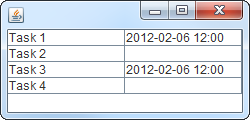
During the test, four tasks were to be completed by the background operation, two of which were supposed to succeed and the others to fail. So, the expected result was something like:

Expected result

Having obeyed  the “fail-first” guideline and having seen the test pass later on, I was quite sure the test and the feature worked as intended. Yet, manual testing proved otherwise. With the exact same scenario, task 4 always succeeded.

In fact, there was a bug that caused task 4 to result in a false-positive. But why did the automated test not uncover this flaw? Let’s recall what the test does:

  1. Prepare the test environment and the application
  2. Start the background operation comprised of tasks 1-4
  3. Wait
  4. Evaluate/assert the results
  5. Clean up

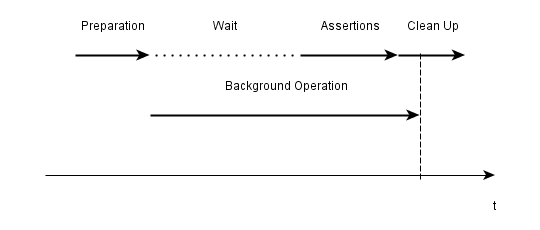
Some investigation unveiled that the problem was caused by the fact that the test just did not wait long enough for the background operation to finish properly, e.g. the results were evaluated before task 4 was finished. Thus, the false-positive occurred just after the test checked whether it was there:

Timeline of the test
Results being evaluated before everything is finished

After having spotted the source of the problem, several possible solutions ranging from “wait longer in the test” to “explicitly display unfinished runs in the application” came to mind. The most elegant and practical of which is to have the test waiting for the background operation to finish instead of just waiting a given period. Even though this required some more infrastructure.

Though acceptance testing is a great tool for developing software, this experience reminded me that there is also the possibility of flawed, or not completely correct, tests luring you into a false sense of security if you pay too few attention. Manual testing in addition to automated testing may help to avoid these pitfalls.

Don’t mix C++ smart pointers with references

This post will teach by example that mixing smart pointers with references in c++ is not a particularly good idea.

As I did in the past, I will use this post as means to remember and to push the following principle deeper in my head – and hopefully in yours as a reader and C++ programmer:

Do not mix smart pointers with references in your C++ programms.

Of course I knew that before I created this little helper library, that was supposed to make it easier to send data asynchronous over an existing connection. Here is the situation (simplified):

class A
{
  ...
  void doStuff();

  private:
     // a private shared_ptr to B
    boost::shared_ptr<B> _bPointer;
};

class C
{
  public:
    C(B& b) : _b(b)
    {}

    ~C()
    {
      _bRef.resetSomeValueToDefault();
    }

  private:
     // a private reference to B which is set in the ctor
    B& _bRef;
};

void A::doStuff()
{
  createBpointerIfNotExisting();
  C myC(*_bPointer);
  myC.someMethodThatDoesSomethingWithB();
  if (someCondition) {
    // Delete this B instance.
    // A new instance will be created next time
    _bPointer.reset();
  }
}

So class A has a shared pointer of B which is given as a reference to an instance of class C in method A::doStuff. Class C stores the B instance as reference and interacts with it during its lifetime, which ends at the end of A::doStuff.

The last interaction occurrs at the very end of its life – in the destructor.

I highlighted the most important facts, but I’ll give you a few more moments …

The following happens (in A::doStuff):

  • line 29: if no instance of B exists (i.e. _bPointer is null), a new B instance is created and held in _bPointer
  • line 30: instance myC of C is created on the stack. A reference of B is given as ctor parameter
  • line 32-35: if “someCondition” is true, _bPointer is reseted which means that the B instance gets deleted
  • line 37: A::doStuff() ends and myC goes out of scope
  • line 19: the destructor of C is called and _bRef is accessed
  • since the B instance does not exist any more … memory corruption!!!

The most annoying thing with this kind of errors is that the program crashes somewhere, but almost never where the error actually occurred. This means, that you get stack traces pointing you right into some rock-solid 3rd party library which had never failed since you know and use it, or to some completely unrelated part in your code that had worked without any problems before and hasn’t been changed in years.

I even had these classes unit tested before I integrated them. But for some strange reason – maybe because everything gets reset after each test method – the bug never occurred in the tests.

So always be very cautious when you mix smart pointers with references, and when you do, make sure you have your object lifetimes completely under control!

Upgrading your app to Grails 2.0.0? Better wait for 2.0.1

Grails 2.0.0 is a major step forward for this popular and productive, JVM-based web framework. It has many great new features that make you want to migrate existing projects to this new version.

So I branched our project and started the migration process. Everything went smoothly and I had only to fix some minor compilation problems to get our application running again. Soon the first runtime errors occured and approximately 30 out of over 70 acceptance tests failed. Some analysis showed three major issue categories causing the failures:

  1. Saving domain objects with belongsTo() associations may fail with a NULL not allowed for column "AUTHOR_ID"; SQL statement: insert into book (id, version, author_id, name) values (null, ?, ?, ?) [90006-147] message due to grails issue GRAILS-8337. Setting the other direction of the association manually can act as a workaround:
    book.author.book = book
  2. When using the MarkupBuilder with the img tag in your TabLibs, your images may disappear. This is due to a new img closure defined in ApplicationTagLib. The correct fix is using
    delegate.img

    in your MarkupBuilder closures. See GRAILS-8660 for more information.

  3. Handling of null and the Groovy NullObject seems to be broken in some places. So we got org.codehaus.groovy.runtime.typehandling.GroovyCastException: Cannot cast object 'null' with class 'org.codehaus.groovy.runtime.NullObject' to class 'Note' using groovy collections’ find() and casting the result with as:
     Note myNote = notes?.find {it.title == aTitle} as Note

    Removing type information and the cast may act as a workaround. Unfortunately, we are not able to reproduce this issue in plain groovy and did not have time to extract a small grails example exhibiting the problem.

These bugs and some other changes may make you reconsider the migration of some bigger project at this point in time. Some of them are resolved already so 2.0.1 may be the release to wait for if you are planning a migration. We will keep an open eye on the next releases and try to switch to 2.0.x when our biggest show stoppers are resolved.

Even though I would advise against migrating bigger existing applications to Grails 2.0.0 I would start new projects on this – otherwise great – new platform release.

Grails 2.0.0 Update: Test Problems

Recently we tried to upgrade to Grails 2.0.0, but problems with mocks stopped our tests to pass.

Grails 2 has some nice improvements over the previous 1.3.x versions and we thought we give it a try. Upgrading our application and its 18 plugins went smooth (we already used the database migration plugin). The application started and ran without problems. The better console output and stacktraces are a welcomed improvement. So all in all a pleasant surprise!
So just running the tests for verification and we can commit to our upgrade branch. Boom!

junit.framework.AssertionFailedError:
No more calls to 'method' expected at this point. End of demands.

Looking at the failing unit test showed that we did not use any mock object for this method call. Running the test alone let it pass. Hhhmm seems like we hit GRAILS-8530. The problem even exists between unit and integration tests. So when you mock something in your unit test it is also mocked in the integration tests which are run after the unit tests.
Even mocking via Expando metaclass and the map notation did not work reliably. So upgrading for us is not viable at the moment.

Separate Master Data and Variable Data

If you come across an accumulation of data fields, you might want to split them into master data and variable data. This could at least help when dealing with storage issues.

In the design of data structures or objects, there are two different kinds of data, namely “Master Data” (german: Stammdaten) and “Variable Data” (german: Bewegungsdaten). The first kind, master data, are data fields that will change seldom over time and can sometimes be used to “identify” an object. The second kind are data fields that capture the current value of an object’s aspect, but are expected to change in the future. If you can categorize your data fields in this manner, think about separating them into different objects.

Let me make an actual example. An application we develop has a central instance (the “center”) that distributes situational data to several operation desks, powered by client applications, named the “clients”. Each client instance is registered in the center to enable the supervision and administration of clients. The data for each client is stored in a ClientInformation object that is mapped to a database relation. Let’s have a look at some of the data fields of ClientInformation:

  • int internalIdentifier – the database primary key for the record
  • String type – some type of the client application
  • String instanceName – the given readable denotation of the operation desk
  • String version – the currently installed version of the client application
  • Date connectionDate – the last time this client application established a connection
  • Date lastActionDate – the last time this client application issued an action command (“was active”)

We can start all kinds of (justified) discussion about primitive obsession, too much information at one place and so on, but for this blog entry, only the categorization in master data and variable data is of interest. My opinion on the example is that the first three data fields (internalIdentifier, type and instanceName) are definitely in the master data category. The last two data fields are clearly variable data, while the version field is something in between. My guts tell me to categorize the version as master data, because it won’t change on a daily schedule.

When separating the two categories of data, the ClientInformation object may turn into a reference holder object only. In this case, the ClientInformation holds two references, one to a new ClientMasterData object (holding internalIdentifier, type, instanceName and version) and another one to a new ClientVariableData object (holding connectionDate and lastActionDate).

A less radical modification would be to let the master data remain in the ClientInformation object and only extract the variable data into a new ClientConnectionData object. If a client connects, only the referenced ClientConnectionData object has to change.

If you separate your master data from the variable data, you can very easily concentrate on the variable data for performance optimizations. This is where the data changes will happen and a tuned storage strategy will pay off. The master data should be designed more carefully concerning the type information, so if we really start the discussion about primitive obsession, I would first tend to the master data fields and argue that the type shouldn’t be a String but an Enum and the version should be a more sophisticated Version type. This could be modelled even with a slow object/relational mapper because the data is only written/read once.

The next time you come across one of your data model objects that contain more than two data fields, have a look at their categorization in master and variable data. Perhaps you can see a good reason to split the object.

Depth-first programmers

Depth-first programmers are always busy creating horribly complicated solutions that are somehow off the mark. Here’s why and what to do against it.

Just as there are at least two fundamentally different approaches for searching, namely depth-first and breadth-first search, there are also different types of programmers. The depth-first programmer is a dangerous type, as he is prone to yak shaving and reinvention of the wheel.

The depth-first programmer

Let me try to define the term of a “depth-first programmer” by a little (true) story. A novice java programmer should make some changes to an existing code. To secure his work, he should and wanted to write unit tests in JUnit. He started the work and soon enough, first results could be seen. But when he started to write his tests, the progress notifications stopped. The programmer worked frantically for hours and then days to write what appeared to be some simple data-driven tests.

Finally, the novice java programmer reported success and showed his results. He wrote his tests and “had to extend JUnit a bit to do it right”. Wait, what? Well, in JUnit, the test methods cannot have parameters, but the programmer’s tests needed to be parametrized. So he replaced the part of JUnit that calls the test methods by reflection with an “improved” algorithm that could also inject parameters. His implementation relied on obscure data structures that provided the actual parameter values and only really worked for his needs. The whole mess was nearly intangible, a big bloat and needed most of the development time for the unit tests.

And it was totally unnecessary once you learn about “Parameterized” JUnit4 tests or build light-weight data drivers instead of changing the signature of the test method itself. But this programmer dove deep into JUnit to adjust the framework itself to his needs. When asked about it, he stated that “he needed to pass the parameters somehow”. That’s right, but he choose the most expensive way to do so.

He exhibited the general behaviour of a depth-first programmer: whenever you face a problem, take the first possible solution to a problem you can come up with and work on it without evaluation against other possibilities. And continue on the path without looking back, no matter how long it takes.

Stuck in activism

The problem with this approach should be common sense. The obvious option isn’t always the best or even a good one. You have to evaluate the different possible solutions by their advantages and drawbacks. A less obvious solution might be far better in every aspect but obviousness. Another problem with this approach is the absence of internal warning signs.

Getting stuck is an internal warning sign every programmer understands. You’ve worked your way in a certain direction and suddenly, you cannot advance further. Something blocks your anticipated way of solving the problem and you cannot think of an acceptable way past it. A depth-first programmer never gets stuck this way. No matter how expensive, he will pursue the first thing that brings him closer to the target. A depth-first programmer always churns out code at full speed. Most of it isn’t needed on second thought and can be plain harmful when left in the project. The depth-first programmer will always report progress even when he needs days for a task of minutes. He is stuck in activism.

Progress without guidance

This isn’t a rant about incompetent programmers. Every good programmer knows the situation when you suddenly realize that you’re shaving a yak when all you wanted to do is to add a feature to the code base. This is your self-guidance system regaining consciousness after a period of auto-piloting in depth-first mode. Every programmer behaves depth-first sometimes.

This can be explained with the Dreyfus Model of Skill Acquisition. On the first stage, called “Beginner”, you are simply not capable of proper self-evaluation. You cannot distinguish between good and not so good approaches beforehands or even afterwards. Your expertise in the narrow field of the problem at hand isn’t broad enough to recognize an error even when you are working on the error yourself for prolonged times.

In the Dreyfus Model, a beginner needs external guidance. Somebody with more experience has to point out errors for you and formulate alternatives as clearly and specific as possible. Without external guidance, a beginner will become a depth-first programmer. We’ve all been there.

 Be a guide

The real failure in the story above was done by me. Instead of interacting with the novice java programmer after a few hours when I thought he should be done by now, I let him “advance”. I could have avoided the resulting mess by providing guidance and a few alternate solutions for the immediate problem. I would give an overview of the problem’s context and some hints about the general direction this task should be solved.

Every depth-first programmer works in a suboptimal environment. The programmer tries his best, it’s really the environment that could do better.

So, the next time you see somebody working frantically on a problem that should be rather easy to solve, lend him a hand. Be gentle and empathic about his attempt and work with proposals, not with instructions. Perhaps you’ve spared yourself a mess like an unnecessarily extended JUnit library and the depth-first programmer the frustration when his hard work of several days is silently discarded.

A review of the year 2011 at Softwareschneiderei

This is a review of the year 2011 for the Softwareschneiderei, a software development company from Karlsruhe, Germany.

The current year 2011 is coming to an end. This is the traditional time to pause and reflect on what has happened. This blogpost tries to sum up our year in software development at Softwareschneiderei. It was an interesting, entertaining and successful year for us, that’s for sure.

The official parts

Our developer blog was alive throughout the hardest times of the year, when everyone was under full project load. Every week, one of our developer shares a little posting with the world. The blog is still managed by token only. Looking at the visitor statistics, we fully appreciate your attention. The first blog post of this year looked at the remainder of a failed project. “A tale of scrap metal code” was a detailed vivisection in three parts. Over the course of the year, we wrote about bogus error messages, Groovy, Grails, GORM and some confessions about coding style and multithreading. If you have the time, spend a few minutes to browse our blog post archive for this year.

Our “official” company blog, written in german language, had no activity this year. We can certainly do better than this and take it on the list for 2012.

The company homepage, written in german language, had continuous updates and extensions this year. We coupled the “Open Source Love Day” (OSLD) with our “Homepage Comittee”, when every employee has to improve the homepage in some aspects and present the change to the “comittee”. Unfortunately, this somehow lead to fewer OSLDs this year.

The ongoing Dev Brunch sessions thinned out a bit in the second half of the year. This was a concession to the ever-growing workload. We strive to establish a tighter schedule with accompanying blog posts in the next year.

The internal parts

We were under heavy development load this year. This isn’t a bad thing, but impacts the internal communication and team building process. We tried to cope a bit by restructuring the Open Source Love Day to a “Team Day”, when the whole team meets and works on various internal or hobby projects. Some of these days were spend on Code Camps and other training events. This means less love for the open source community, but crucial together time for us.

We picked up several “new” programming languages this year. You can tell by the blog posts that we worked with Python, Ruby, Flex/ActionScript and even VisualBasic on real projects. The VisualBasic experience was a little epiphany that it’s really the developer and not the language that leads to shitty software.

One method of continuous improvement is our “creativity budget”. Basically, it’s money every developer can spend to improve his workplace. This budget wasn’t used at all this year, as the workplaces seem to be optimal. This cannot be true, so we bought brand new computers or a big RAM upgrade for everyone. And every computer has a big enough SSD now. We took our own advice seriously and invested in our productivity.

Our developer crew grew again this year. We are beginning to think about the remaining space in the new office again. But as usual, we grow slowly and deliberately. There’s nothing worse than a team of strangers.

Conclusion

The year 2011 was great! We’re looking forward to the year 2012, with our motto of christmas 2011: “cheery and spry” (the original motto is in german language “froh und munter”, I hope the translation caught the original spirit).

Have a great turn of the year, everyone. We’d love to see you again next year.

Python in C++: Rerouting Python’s stdout

A few weeks ago I published a post that showed how to embedd Python into C++ and how to exchange data between the two languages. Today, I want to present a simple practice that comes in handy when embedding Python into C++: Rerouting Python’s standard output using CPython.

After initializing Python, the new destination of the output stream needs to be created using PyFile_FromString(…) and set to be the new standard output:

PyObject* pyStdOut = PyFile_FromString("CONOUT$", "w+");
PyObject* sys = PyImport_ImportModule("sys");
PyObject_SetAttrString(sys, "stdout", pyStdOut);

Basically that’s all it needs. When executing Python script via PyRun_String(…), all calls to print(…) will write the data directly to pyStdOut.

Ater the Python script is finished, the data in pyStdOut can be retrieved and further processed with C++ by converting it using PyFile_AsFile(…):

FILE* pythonOutput = PyFile_AsFile(pyStdOut);

Breakpad and Your CI – A Strong Team

Google’s breakpad together with your CI system can prepare you for the worst.

If your C++ software has to run 24/7 on some server rack at your customer’s data center, it has to meet not only all the user requirements, but also requirements that come from you as developer. When your customer calls you about some “problems”, “strange behaviours”, or even crashes, you must be able to detect what went wrong. Fast!

One means to this end is of course logging. But if your application crashes, nothing beats a decent stacktrace 🙂

Google’s breakpad library comes in very handy here because it provides very easy crash reporting. Even if your process has 2 gigs of virtual memory, breakpad shrinks that ‘core dump’ down to a couple of megs.

Breakpad pulls that trick off by using so-called symbol files that you have to generate for each compiled binary (executable or shared library). These symbol files together with the breakpad dump file that is created at crash time are then used to recreate the stacktrace.

Because every compilation creates different binaries, dump file and symbol files need to be ‘based on’ exactly the same binaries.

This is where you can let your CI system do some work for you. At one of our customers we use Jenkins not only for the usual automatic builds and tests after each check-in but also for release builds that go into production.

At the end of each build, breakpad’s symbol dumper runs over all compiled executables and libraries and generates the symbol files. These are then archived together with the compiled binaries.

Now we are prepared. Whenever some customer sends us a dump file, we can just easily pull out the symbol files corresponding to the software version that runs at this customer and let breakpad do its magic…


Deployment with the Play! framework

Play! is a great framework for java-base development of modern web applications. Unfortunately, the documentation about deployment options is not really that extensive in certain details. I want to describe a way to automatically build a self-contained zip archive without the source code. The documentation does state that using the standalone web server is preferred so we will use that option.

Our goal is:

  • an artifact with the executable application
  • no sources in the artifact
  • startup script for different platform and environments
  • CI integration with execution of the tests

Fortunately, the play framework makes most of this quite easy if you know some small tricks.

The first very important step towards our goal is embedding the whole Play! framework somewhere in your project directory. I like to put it into lib/play-x.y.z (x.y.z being the framework version). That way you can do perform all neccessary calls to play scripts using relative paths and provide a self-contained artifact which developers or clients may download and execute on their machine. You can also be sure everyone is using the correct (read “same”) framework version.

The next important thing is to write some small start-scripts so you can demo the software easily on any machine with Java installed. Your clients may try it out theirselves if the project policy is open enough. Here are small examples for linux

#!/bin/sh
python lib/play-1.2.3/play run --%demo -Dprecompiled=true

and windows

REM start our app in the "demo" environment
lib\play-1.2.3\play run --%%demo -Dprecompiled=true

The last ingredient to a great deployment and demoing experience is the build script which builds, tests and packages the software together. We do not want to include the sources in the artifact, so there is a bit of work to do. We perform following steps in the script:

  1. delete old artifacts to ensure a clean build
  2. call play to precompile our application
  3. call play to execute all our automatic tests
  4. copy all needed files into our distribution directory ready to be packed together
  5. pack the artifacts into a zip archive

Our sample build script is for the linux shell but you can easily translate it to the scripting environment of your choice, be it apache ant, gradle, windows batch depending on your needs and preference:

#!/bin/sh

rm -r dist
rm -r test-result
rm -r precompiled
python lib/play-1.2.3/play precompile
python lib/play-1.2.3/play auto-test
TARGET=dist/my_project
mkdir -p $TARGET/app
cp -r app/views $TARGET/app
cp -r conf lib modules precompiled public $TARGET
cp programs/my_project* $TARGET
cd dist && zip -r my_project.zip my_project

Now we can hook the project into a continuous integration server like Jenkins and let it archive the build artifact containing an executable installation of our web application. You could grant your client direct access to the artifact, use it for demos and further deployment steps like triggered upload to a staging server or the like.