Configuring your Java webapp

There are several ways to configure your Java Servlet-based webapp with values for deployment-specific things like the database connection or directories for data and logs. Let us take a look at the alternatives and their benefits and drawbacks.

web.xml

The deployment descriptor (web.xml) resides inside your WAR file. You can specify init parameters available using the ServletContext.
web.xml

<context-param>
    <param-name>LogDirectory</param-name>
    <param-value>/myapp/logs</param-value>
</context-param>

Accessing the parameter in your Servlet:

String logDirectory = getServletContext().getInitParameter("LogDirectory");
// do something with it

The nice thing about this solution is the self-containment of your packaged application. The price is building a customized web.xml/WAR for each deployment instance.

Environment variables

Another possibility is to pass environment variables to your servlet container at startup, e.g. using JAVA_OPTS in the case of Apache Tomcat.
tomcat.conf

...
JAVA_OPTS="-DLogDirectory=/myapp/logs"
...

They can be easily accessed using

    System.getProperty("LogDirectory");

This is very easy to employ but has several drawbacks:

  • you have to mess with the configuration of your servlet container/host to set the variables
  • they are valid for the whole servlet container, possibly interferring with other webapps or the container itself
  • the settings are harder to find than in one file that you deliver with your webapp
  • need of server restart to change the values

context.xml

Using context.xml and JNDI is our preferred way of configuring our webapps. You can ship a default context.xml in the META-INF directory of your WAR and easily configure resources and beans:

<Context>
    <Environment name="LogDirectory" value="/myapp/logs" type="java.lang.String" />
    <!-- Development DB -->
    <Resource name="jdbc/devdb" auth="Container" type="javax.sql.DataSource"
               maxActive="100" maxIdle="30" maxWait="-1"
               username="sa" password="" driverClassName="org.h2.Driver"
               url="jdbc:h2:mem:devDB;mode=Oracle"/>
</Context>

A context.xml outside of your WAR has to be copied in the context configuration directory of your servlet container, e.g.:

cp context.xml /etc/tomcat7/Catalina/localhost/myapp.xml

You can then access the configuration items using JNDI:

Context ctx = (Context) new InitialContext().lookup("java:comp/env");
String logDirectory = (String) ctx.lookup("LogDirectory");
// do something

You can of course use context-params and the ServletContext to retrieve simple String parameters stored in the context.xml instead of web.xml, too.

The name of the context file must match the name of the deployed application. That way we can deploy the same WAR on several target machines and configure the applications separately. The context.xml not only contains the JNDI datasources (which is very common) but also configuration parameters that may change for each target system.

Bit-fiddling is possible in Java

We have a service interface for Modbus devices that we can use remotely from Java. Modbus supports only very basic data types like single bits and 16-bit words. Our service interface provides the contents of a 16-bit input or holding register as a Java integer.

Often one 16-bit register is not enough to solve a problem in your domain, like representing a temperature as floating point number. A common solution is to combine two 16-bit registers and interpret their contents as a floating point number.

So the question is how to combine the bits of the two int values and convert them to a float in Java. There are at least two possiblities I want to show you.

The “old-fashioned” way includes bit-shifting and bit-wise operators which you actually can use in Java despite of the major flaw regarding primitive types: there are no unsigned data types; even byte is signed!

public static float floatFrom(int mostSignificat16Bits, int leastSignificant16Bits) {
    int bits = (mostSignificat16Bits << 16) | leastSignificant16Bits;
    return Float.intBitsToFloat(bits);
}

As seemingly more modern way is using java.nio.ByteBuffer:

public static float nioFloatFrom(int mostSignificat16Bits, int leastSignificant16Bits) {
    final ByteBuffer buf = ByteBuffer.allocate(4).putShort((short) mostSignificat16Bits).putShort((short) leastSignificant16Bits);
    buf.rewind(); // rewind to the beginning of the buffer, so it can be read!
    return buf.getFloat();
}

The second method seems superior when working with many values because you can fill the buffer conveniently in one phase and extract the float values conveniently by subsequent calls to getFloat().

Conclusion

Even if it is not one of Java’s strengths you actually can work on the bit- and byte-level and perform low level tasks. Do not let the lack of unsigned data types scare you; signedness is irrelevant for the bits in memory.

Dynamic addition and removal of collection-bound items in an HTML form with Angular.js and Rails

A common pattern in one of our web applications is the management of a list of items in a web form where the user can add, remove and edit multiple items and finally submit the data:

form-fields

The basic skeleton for this type of functionality is very simple with Angular.js. We have an Angular controller with an “items” array:

angular.module('example', [])
  .controller('ItemController', ['$scope', function($scope) {
    $scope.items = [];
  }]);

And we have an HTML form bound to our Angular controller:

<form ... ng-app="example" ng-controller="ItemController"> 
  <table>
    <tr>
      <th></th>
      <th>Name</th>
      <th>Value</th>
    </tr>
    <tr ng-repeat="item in items track by $index">
      <td><span class="remove-button" ng-click="items.splice($index, 1)"></span></td>
      <td><input type="text" ng-model="item.name"></td>
      <td><input type="text" ng-model="item.value"></td>
    </tr>
    <tr>
      <td colspan="3">
        <span class="add-button" ng-click="items.push({})"></span>
      </td>
    </tr>
  </table>
  <!-- ... submit button etc. -->
</form>

The input fields for each item are placed in a table row, together with a remove button per row. At the end of the table there is an add button.

How do we connect this with a Rails model, so that existing items are filled into the form, and items are created, updated and deleted on submit?

First you have to transform the existing Ruby objects of your has-many association (in this example @foo.items) into JavaScript objects by converting them to JSON and assigning them to a variable:

<%= javascript_tag do %>
  var items = <%= escape_javascript @foo.items.to_json.html_safe %>;
<% end %>

Bring this data into your Angular controller scope by assigning it to a property of $scope:

.controller('ItemController', ['$scope', function($scope) {
  $scope.items = items;
}]);

Name the input fields according to Rails conventions and use the $index variable from the “ng-repeat” directive to provide the correct index value. You also need a hidden input field for the id, if the item already has one:

  <td>
    <input name="foo[items_attributes][$index][id]" type="hidden" ng-value="item.id" ng-if="item.id">
    <input name="foo[items_attributes][$index][name]" type="text" ng-model="item.name">
  </td>
  <td>
    <input name="foo[items_attributes][$index][value]" type="text" ng-model="item.value">
  </td>

In order for Rails to remove existing elements from a has-many association via submitted form data, a special attribute named “_destroy” must be set for each item to be removed. This only works if

accepts_nested_attributes_for :items, allow_destroy: true

is set in the Rails model class, which contains the has-many association.

We modify the click handler of the remove button to set a flag on the JavaScript object instead of removing it from the JavaScript items array:

<span class="remove-button" ng-click="item.removed = true"></span>

And we render an item only if the flag is not set by adding an “ng-if” directive:

<tr ng-repeat="item in items track by $index" ng-if="!item.removed">

At the end of the form we render hidden input fields for those items, which are flagged as removed and which already have an id:

<div style="display: none" ng-repeat="item in items track by $index"
ng-if="item.removed && item.id">
  <input type="hidden" name="foo[items_attributes][$index][id]" ng-value="item.id">
  <input type="hidden" name="foo[items_attributes][$index][_destroy]" value="1">
</div>

On submit Rails will delete those elements of the has-many association with the “_destroy” attribute set to “1”. The other elements will be either updated (if they have an id attribute set) or created (if they have no id attribute set).

How to speed up your ORM queries of n x m associations

What solution (no cache) causes a 45x speedup? Learn the different approaches and how they compare

What causes a speedup like this? (all numbers are in ms)

Disclaimer: the absolute benchmark numbers are for illustration purposes, the relationship and the speedup between the different approaches are important (just for the curious: I measured 500 entries per table in a PostgreSQL database with both Rails 4.1.0 and Grails 2.3.8 running on Java 7 on a recent MBP running OSX 10.8)

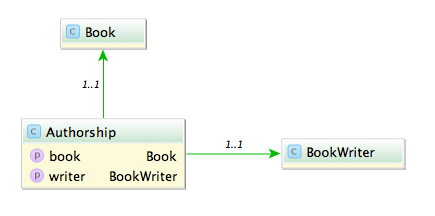
Say you have the model classes Book and (Book)Writer which are connected via a n x m table named Authorship:

A typical query would be to list all books with its authors like:

Fowler, Martin: Refactoring

A straight forward way is to query all authorships:

In Rails:

# 1500 ms
Authorship.all.map {|authorship| "#{authorship.writer.lastname}, #{authorship.writer.firstname}: #{authorship.book.title}"}

In Grails:

// 585 ms
Authorship.list().collect {"${it.writer.lastname}, ${it.writer.firstname}: ${it.book.title}"}

This is unsurprisingly not very fast. The problem with this approach is that it causes the famous n+1 select problem. The first option we have is to use eager fetching. In Rails we can use ‘includes’ or ‘joins’. ‘Includes’ loads the associated objects via additional queries, one for authorship, one for writer and one for book.

# 2300 ms
Authorship.includes(:book, :writer).all

‘Joins’ uses SQL inner joins to load the associated objects.

# 1000 ms
Authorship.joins(:book, :writer).all
# returns only the first element
Authorship.joins(:book, :writer).includes(:book, :writer).all

Additional queries with ‘includes’ in our case slows down the whole request but with joins we can more than halve our time. The combination of both directives causes Rails to return just one record and is therefore ruled out.

In Grails using ‘belongsTo’ on the associations speeds up the request considerably.

class Authorship {
    static belongsTo = [book:Book, writer:BookWriter]

    Book book
    BookWriter writer
}

// 430 ms
Authorship.list()

Also we can implement eager loading with specifying ‘lazy: false’ in our mapping which boosts a mild performance increase.

class Authorship {
    static mapping = {
        book lazy: false
        writer lazy: false
    }
}

// 416 ms
Authorship.list()

Can we do better? The normal approach is to use ‘has_many’ associations and query from one side of the n x m association. Since we use more properties from the writer we start from here.

class Writer < ActiveRecord::Base
  has_many :authors
  has_many :books, through: :authors
end

Testing the different combinations of ‘includes’ and ‘joins’ yields interesting results.

# 1525 ms
Writer.all.joins(:books)

# 2300 ms
Writer.all.includes(:books)

# 196 ms
Writer.all.joins(:books).includes(:books)

With both options our request is now faster than ever (196 ms), a speedup of 7.
What about Grails? Adding ‘hasMany’ and the authorship table as a join table is easy.

class BookWriter {
    static mapping = {
        books joinTable:[name: 'authorships', key: 'writer_id']
    }

    static hasMany = [books:Book]
}
// 313 ms, adding lazy: false results in 295 ms
BookWriter.list().collect {"${it.lastname}, ${it.firstname}: ${it.books*.title}"}

The result is rather disappointing. Only a mild speedup (2x) and even slower than Rails.

Is this the most we can get out of our queries?
Looking at the benchmark results and the detailed numbers Rails shows us hints that the query per se is not the problem anymore but the deserialization. What if we try to limit our created object graph and use a model class backed by a database view? We can create a view containing all the attributes we need even with associations to the books and writers.

create view author_views as (SELECT "authorships"."writer_id" AS writer_id, "authorships"."book_id" AS book_id, "books"."title" AS book_title, "writers"."firstname" AS writer_firstname, "writers"."lastname" AS writer_lastname FROM "authorships" INNER JOIN "books" ON "books"."id" = "authorships"."book_id" INNER JOIN "writers" ON "writers"."id" = "authorships"."writer_id")

Let’s take a look at our request time:

# 15 ms
 AuthorView.select(:writer_lastname, :writer_firstname, :book_title).all.map { |author| "#{author.writer_lastname}, #{author.writer_firstname}: #{author.book_title}" }
// 13 ms
AuthorView.list().collect {"${it.writerLastname}, ${it.writerFirstname}: ${it.bookTitle}"}

13 ms and 15 ms. This surprised me a lot. Seeing this in comparison shows how much this impacts performance of our request.

The lesson here is that sometimes the performance can be improved outside of our code and that mapping database results to objects is a costly operation.

Don’t ever not avoid negative logic

If you want to be nice to people with a challenged relationship with boolean logic, try to avoid negative formulations and negations.

I start this post with a confession: I’m not able to discern true from false. I wasn’t born with this inability, it got worse over time. The first time I knew I have this problem was in driver’s school when my teacher told me that most people cannot switch from forward to backward drive and still tell left from right. Left and right are the same to me ever since, even in forward motion. When I was taught boolean logic, my inability spread from “left and right” to “true and false” and led to funny results in some tests, especially multiple choice questions with negative statements. But my guess is that I’m not alone with this problem.

No negations

So I’m probably a little bit over-sensitive about this topic, but that should only make the point clearer: Don’t obscure your (boolean) statement with unnecessary layers of negation. See? I just did it, too. Let me rephrase: Always state your boolean logic without negation, if possible.

It’s really easy for us super-clever programmers to juggle several dozen variables in our head and evaluate any boolean statement on the fly by reading it once – regardless of parenthesis. Well, until it’s not. The thing about boolean logic is that you can’t be “unsure”. It’s only ever “true” or “false”, and just by wild guessing, you will be right about it half the time – try that with basic numerical algebra! So even if the statement looks daunting, you have a fifty-fifty chance of success.

Careful crafting

For me (and probably all people with “boolean disability”, as I call it), every boolean statement is a challenge. So you can be sure that I put maximum effort in succeeding. I write my statements carefully and with great emphasis on clarity (this blog post only covers one aspect). I re-read them several times, sometimes aloud (to my imaginary rubber duck). I thoroughly test them – most statements are factored into their own method to achieve direct testability. And I try them out before committing. Still, there is a valid chance that my boolean disability didn’t magically disappear when I wrote my unit tests and I happily asserted that the statement always has to decide the right things in the wrong way.

By painful introspection about the real nature of my boolean disability, I discovered a great easement: If a statement doesn’t flip everything on its head by negation or negative formulation, I can actually follow through most of the time. Let me rephrase for clarity: If a statement uses negation, it is hard for me to follow. And I guess everyone has a personal limit:

ow_owl

A workaround

The workaround for my boolean disability is really easy: Express the statement like it really was meant in the first place. Express it without “plot twist”. Instead of

if (!string.isEmpty())

try something like

if (string.hasContent())

Disclaimer: I know that the Java SDK (still) doesn’t provide this method. It was just an example.

A real-life example

A real-life example that caused us some troubles can be found in the otherwise excellent Greenmail plugin for Grails. In the configuration, you can set the property

greenmail.disabled = true

to disable the mail server that otherwise would start automatically. The positive formulation would be

greenmail.enabled = false

To tell the full story: The negated formulation was probably chosen to simplify the plugin’s implementation in Groovy. The side effect of this short-cut is that you can’t state

greenmail.disabled = false

and be sure that it will start the mail server. In fact, it won’t. As a developer challenged by boolean logic, this issue gave me nightmares.

The three-state trap

Using this rule as a guideline for boolean statements will also prohibit that you fall into the “three-state trap”. Imagine a Person object with the method

boolean isOlderThan(Person other)

But you want to know if a person is younger than another, so you just negate the result:

if (!personA.isOlderThan(personB))

just to be clear, following the rule of “no negations”, you would’ve written:

if (personA.isYoungerThan(personB))

which isn’t quite the same! If both persons are of equal age (the “third state”), the negated statement returns true (if I evaluated it correct!), whereas the last statement gives the correct answer (false – not younger).

Use as a guideline

Don’t get me wrong: Avoiding negations isn’t always possible or the best available option. This isn’t a law, it’s a guideline or a rule of thumb. And just because some complex boolean statement is free of negations doesn’t make it acceptable automatically. It’s just a tiny step towards pain-free boolean statements. And that’s a bad thing… NOT.

Documentation for your project: what and how

Writing documentation is seldom fun for developers and much useless documentation is written. I want to provide some guidelines helping to focus your project documentation efforts on useful stuff instead of following a set of dogmatic rules to plainly fulfill requirements.

Code Documentation

Probably written many times before but nevertheless often neglected:

  • Avoid untouched documentation templates, e.g. // This is a getter for A. They only clutter the code hurting developers instead of providing value.
  • Do not document every class, method, file etc. blindly. Focus on all API classes et al. to be used by other (external) developers.
  • Do not document what the code does, it should speak for itself. Rather explain why a certain algorithm or data structure is used. Try to communicate design decisions.
  • Check comments everytime you touch documented code and update them if necessary. Outdated documentation hurts more than its worth so if docs exists keep them up-to-date.

Project Documentation

This kind of documentation usually provides more value than many javadoc/doxygen generated pages. Nowadays, many people use a wiki software for project documentation. I encourage you to use a powerful wiki like Confluence because it provides rich formatting options and templating allowing for visually pleasing and expressive documentation. As such it may be even printed (to PDF) and handed out to your customers.

  • Putting parts like Installation into the code repository and integrating them into the wiki often serves administrators, managers (visibility!) and developers. See my older post “centralized project documentation” for some other ideas.
  • Wikis allow for easy editing and document sharing and are version controlled. All this facilitates reviews and updates of the documents.
  • Document prerequisites and external dependencies explicitly. They may be hard to find in configuration files but are of good use to people running your project.
  • Improve  searches in the wiki by providing tags and other metadata to help your future me and others finding the information they are looking for.
  • Provide consistent examples or even templates for common documentation tasks to encourage others and help them getting their project documentation started.

Conclusion

Good documentation is a real asset and can provide much value if you keep your efforts focused on the important stuff. Complex workflows and draconic rules will hinder documentation efforts wheres open collaboration and valuable documentation will motivate bringing more of it into existence.

When UTF8 != UTF8

Not all encoding problems are problems with different encodings

Problem

Recently I encountered a problem with umlauts in file names. I had to read names from a directory and find and update the appropriate entry in the database. So if I had a file named hund.pdf (Hund is German for dog) I had to find the corresponding record in the database and attach the file. Almost all files went smooth but the ones with umlauts failed all.

Certainly an encoding problem I thought. So I converted the string to UTF-8 before querying. Again the query returned an empty result set. So I read up on the various configuration options for JDBC, Oracle and Active Record (it is a JRuby on Rails based web app). I tried them all starting with nls_language and ending with temporary setting the locale. No luck.

Querying the database with a hard coded string containing umlauts worked. Both strings even printed on the console looked identically.

So last but not least I compared the string from the file name with a hard coded one: they weren’t equal. Looking at the bytes a strange character combination was revealed \204\136. What’s that? UTF8 calls this a combining diaeresis. What’s that? In UTF8 you can encode umlauts with their corresponding characters or use a combination of the character without an umlaut and the combining diaeresis. So ‘ä’ becomes ‘a\204\136’.

Solution

The solution is to normalize the string. In (J)Ruby you can achieve this in the following way:

string = string.mb_chars.normalize.to_s

And in Java this would be:

string = Normalizer.normalize(string, Normalizer.Form.NFKC)

Ruby uses NFKC (or kc for short) as a default and suggests this for databases and validations.

Lesson learned: So the next time you encounter encoding problems look twice it might be in the right encoding but with the wrong bytes.

The various ways of error handling

There are various approaches and philosophies regarding error handling in different programming languages. This article tries to give an overview.

Exceptions

Most of the current mainstream programming languages use exceptions for error handling. When an exception is raised (“thrown”), the call stack is being unwound until the exception is caught. The functions passed along the way through the call stack have to ensure that any opened resources are properly closed. This is usually done via finally blocks. If the exception is not caught the program terminates.

Exceptions come in two flavors: checked exceptions and unchecked exceptions. The handling of checked exceptions is enforced by the compiler. Checked exceptions are part of the function signatures. A function explicitly declares in its signature what exceptions can be thrown:

void f() throws A, B, C

The caller of a function has to either handle the exceptions (fully or partially) or let them pass through by re-declaring them in the throws clause of its own function signature.

Checked exceptions have the property that it’s hard to forget to handle them. However, proponents of unchecked exceptions argue that checked exceptions have two problems: versioning and scalability.

Once declared they are part of the interface and adding another exception will break all client code. Multiple exception types also tend to accumulate the more different subsystems are being aggregated. Proponents of unchecked exceptions prefer a catch-all clause further up the call stack. Some languages (e.g. Erlang) even follow a “let it crash” paradigm and simply respawn crashed processes. This approach is more viable in distributed systems than in user-facing applications.

Java is known for its checked exceptions. C#, C++, Scala and most dynamically typed languages decided to go with unchecked exceptions.

No exceptions

An alternative to exceptions is no exceptions. Exceptions overlay multiple different control flows, which makes it harder to reason about the control flow of a function. With exceptions functions can return at many other points than the explicit return points.

If an error is just a value that is returned by a function it can be handled by the usual control flow mechanisms of a language (like if and else) without the need of a special sub-language for error handling. These errors tend to be handled closer to the place of their occurrence rather than further up the call stack.

In such a language, which uses return values to flag errors, you’d better check all errors, otherwise you risk continuing with an incorrect, invalid or meaningless value. This can be enforced either by the compiler or via a lint tool.

There are different possibilities of how an error could be returned from a function:

In C a sentinel value in the range of the return type is often used to indicate an error, e.g. a negative value or zero. This is not a good solution, because it intermingles two things that do not belong together and it limits the range of valid return values. Another solution in C could be the use of an error output parameter. Prominent examples are NSError in Objective C or GError in GLib. This brings us to another possibility:

Some languages support multiple return values (e.g. Go) or tuple types (product types), which can act as multiple return values. One value can hold the actual result (e.g. number of bytes written), the other can indicate an error.

Multiple return types / product types are a simple solution, cover the necessary use cases and require little additional language support. A more sophisiticated and more restrictive solution are sum types, but they require a little bit more language support: instead of returning a value AND a possible error, a function returns either a value OR an error. This way the programmer is forced to check for an error by discriminating between the two cases. This is usually done via a feature called structural pattern matching (not to be confused with pattern matching on strings), either explicitly with a switch/case-like control structure or implicitly via convenience function. A popular example is Haskell’s Maybe monad or the Option or similarly named type in some other languages (e.g. Scala, Standard ML, OCaml).


Finally: return considered harmful

No wonder nobody wants to write explicit return statements anymore. They are more dangerous than you might think.

Ok, calm down already – I’m not going to take your return statement away. It’s a nice little statement that gets rarer and rarer,  mostly because many modern languages allow for implicit return values, e.g. in Scala, everything is an expression and the last expression of a method is its return value – except when it isn’t. You dont need to write an explicit return statement anymore, so our laziness takes over and we omit it.

And I’m not argueing that a finally block is a bad thing – quite the contrary. Even in the age of try-with-resources and autoclose closures, a well-crafted finally block is a beautiful piece of code at its right place.

But put the two together and you’ve got a recipe for desaster, at least in Java (try it in your language of choice with care). Let’s have a look at code:

public void doSomething() {
    try {
        throw new Error("drama!");
    } finally {
        // dispose resources here
    }
}

Ok, I could have spared you the drama of an Error and just thrown a RuntimeException (or a declared and checked Exception), but it’ll soon illustrate the effect all the better.

First, the code does exactly what it should: if you call the method, you’ll get to catch an Error and all resources that were used inside the method are cleaned up right before you catch it. And since the method has no return value, you don’t miss out there.

But what if I want to give one of those endangered return statements a new home and insert it into the finally block?

public void doSomething() {
    try {
        throw new Error("drama!");
    } finally {
        // dispose resources here
        return;
    }
}

Not much has changed. I’m still not missing any return value and the Error still gets thrown. The resources are cleaned up quite as thorough as before, but something important has changed: You won’t ever see the Error. You won’t catch it because it gets eaten by that return statement at the end of the finally block.

So in short: return statements are hungry little beasts that will eat your Throwables if you corral them inside a finally block.

No wonder nobody wants to have them in their code if they behave like that.

Oh, and rest assured that you will be warned: All modern IDEs will point you to the inevitable desaster waiting to happen, if only with a compiler warning.

But where do Throwables go when they got eaten? Good question. They don’t show up on any UncaughtExceptionHandler, they don’t even stay in memory. Probably, they just are digested, never to be seen again.

If you don’t regard return statements as a little more dangerous now, you probably also raise switch-statements for fun.

Grails Update from 2.2 to 2.3

An update in the minor version does not seem like a big step but this is one brought a lot of changes, so here a step by step guide which highlights some pitfalls.

An update in the minor version does not seem like a big step but this is one brought a lot of changes, so here a step by step guide which highlights some pitfalls.

First update the version of Grails in your application properties:

app.grails.version=2.3.8

The tomcat and hibernate plugins now have versions of their respective frameworks and not the version number of Grails:

plugins.tomcat=7.0.52.1
plugins.hibernate=3.6.10.13

Grails 2.3 has a new databinding mechanism. To use the old one, especially if you use custom property editors you have to add this option to your Config.groovy:

grails.databinding.useSpringBinder = true

But even with the old databinding something changed. The field id is not bound in command objects you need to bind id explicitly:

def action = { MyCommand command ->
  command.id = params['id']?.toLong()
}

Besides the databinding mechanism also the dependency resolving changed. But you can use the old ivy mechanism by including this in BuildConfig.groovy:

grails.project.dependency.resolver="ivy"

Nonetheless all dependencies must be declared in application.properties or BuildConfig.groovy. If you have a lib directory with local jars in your application you need to add this to your repositories as a local directory:

grails.project.dependency.resolution = {
    repositories {
        flatDir name:'myRepo', dirs:'lib'
    }
}

When you have all dependencies declared your application should start.

Tests

Grails 2.3 features a new test mode: forking. This causes some problems and is better to be deactivated in BuildConfig.groovy:

grails.project.fork = [
        test: false,
]

With the new version only JUnit4 style tests are supported. This means that you don’t extend GroovyTestCase or GrailsUnitTestCase. All rules must be public and non static. All tests methods need to be annotated with @Test. Set up methods are annotated with @Before and must be public. The tearDown methods must also be annotated with @After and be public. A bug in Grails prevents you from naming the set up and tear down methods freely: the names must be setUp and tearDown. All test methods must be public void, the old def declaration is not supported anymore. Now without extending GroovyTestCase you lose the assertion methods and need to add a static import:

import static groovy.util.GroovyTestCase.*

Unit Tests

All tests should be annotated with @TestMixin([GrailsUnitTestMixin]). If you need to mock domain classes you change mockDomain to @Mock:

class MyTest {
	public void testThis() {
      mockDomain(MyDomainClass, [mdc])
  }
}
@Mock([Proposal])
class MyTest {
	public void testThis() {
      mdc.save()
  }
}

Configuration is now already mocked and your properties can be added easily:

config.my.property.value.is='123'

Integration tests

As mentioned before setUp method naming has a bug: you have to name them setUp otherwise the changes to your database aren’t rollbacked.

Acceptance Tests with Selenium

You need to patch the Remote Control Plugin because of a ClassNotFoundException. Add an additional constructor to RemoteControl.groovy to support setting the classloader:

RemoteControl(ClassLoader loader) {
  super(new HttpTransport(getFunctionalTestReceiverAddress(), loader), loader)
} 

In your tests you call this new constructor with the classloader of your class:

new RemoteControl(getClass().classLoader)

Using a Groovy Mixin in your application does not work in your tests and need to be replaced with grails.util.Mixin. But this only works in one way: the target class can access the mixin but the mixin not the target class. For this to work you need to let your mixin implement MixinTargetAware and declare a field named target:

class MyMixin implements MixinTargetAware {
	def target
}

Subtle changes and pitfalls

If you have a classname with a Controller suffix and a corresponding test but which isn’t a Grails controller Grails nevertheless tries to mock the class in your unit tests. If you rename the test to something without controller everything works fine.

In our pre 2.3 project we had some select tags in our views and used fieldValue for the selection:

<g:select value="${fieldValue(bean: object, field: 'value')}">

But now the select tag uses equals which fails if the values aren’t Strings. Just use the unescaped value:

<g:select value="${object?.value}">

I hope this guide and hints help others to avoid the headaches when upgrading your Grails application.