Implementation visibility – Part I

The concept of implementation visibility is very powerful. If you choose the wrong visibility for your requirements, your code will end up unmaintainable.

Somewhere in my take on programming, there lingers the concept of “implementation visibility”, that I’m not quite sure to be able to express clearly, but I’ll try.

Let’s say you are writing an academic text like a bachelor thesis and your professor makes it clear that she regards the list of literature a very important part of your work. What are you going to do? Concentrate on your cool topic and treat the literature as a secondary task? Or will you shift your focus and emphasize your extensive literature research, highlighting promising cross-references in your text? You’ll probably adjust your resources to make your list of literature more prominent, more visible. You respond to the priorities of your stakeholders.

Now imagine that your customer wants you to program a web application, but has one big requirement: All actions of the users need to be reassured with a confirmation question (as in “do you really want to delete this?”). He makes it clear that this is a mandatory feature that needs to be implemented with utmost care and precision. What would you do? We responded by adjusting our system’s architecture to incorporate the requirement into the API. You can read about our approach in this blog post from 2015. The gist of it is that every possible client of the system will be immediately aware of the requirement and has a much easier time conforming to it. It is harder to ignore or forget the requirement than to adhere to it because the architecture pushes you into the right direction.

The implementation of the customer’s requirement in the example above is very visible. You’ll take one look at the API and know about it. It isn’t hidden into well-meaning but out-dated developer documentation or implicitly stated because every existing action has a confirmation step and you should be sentient enough to know that this means your new one needs one, too. The implementation visibility of the customer’s requirement is maximized with our approach.

Stages of visibility

I have identified some typical stages (or levels) of implementation visibility that I want to present in this blog post series. That doesn’t mean that there won’t or can’t be others. I’m not even sure if the level system is as one-dimensional as I’m claiming here. I invite you to think about the concept, make your own observations and evolve from there. This is a starting point, not an absolute truth.

The following stages typically appear in my projects:

  • level 0: Inline
    • level 0+: Inline with comment
    • level 0++: Inline with apologetic comment
  • level 1: separate method
  • level 2: separate class
    • level 2+: new type in domain model
  • level 3: separate aggregate
  • level 4: separate package or module
  • level 5: separate application or service

In my day-to-day work, the levels 1 to 3 are the most relevant, but that’s probably not universally applicable. Our example above with the requirement-centered API isn’t even located on this list. I suggest it’s at level 6 and called separate concept or something similar.

An example to explain the visibility levels

Let’s assume a customer wants us to program a generic webshop. We are not very versed in commerce or e-commerce things and just start implementing requirements one after one.

After the first few iterations with demonstrated and usable artifacts, our customer calls us and explains that all prices in the webshop are netto prices and that there need to be some kind of brutto price calculation. You, being accustomed to prices that don’t change once you put products into your shopping cart, ask a few questions and can finally grasp the concept of value added taxes. Now you want to implement it into the webshop.

The first approach to the whole complex is to show the brutto prices right besides the netto prices when the user views his shopping cart. You can then validate the results with your customer and discuss problems or misconceptions that are now visible and therefore tangible.

The original code of your shopping cart renderer might look like this:


public class ShowShoppingCart {
  public ShoppingCartRenderModel render(Iterable<Product> inCart) {
    final ShoppingCartRenderModel result = new ShoppingCartRenderModel();
    for (Product each : inCart) {
      result.addProductLine(
               each.description(),
               each.nettoPrice());
      }
      return result;
  }
}

A quick explanation of the code: The class ShowShoppingCart takes some products and converts them into a ShoppingCartRenderModel that contains the shopping cart data in a presentable form so the GUI just needs to take the render model and paste it into some kind of template. For each product, there is one line with a description and the (already renamed) netto price on the page.

Visibility level 0: It’s just code anyway

Let’s start with the lowest and most straight-forward implementation visibility level: The inline implementation.

public class ShowShoppingCart {
  public ShoppingCartRenderModel render(Iterable<Product> inCart) {
    final ShoppingCartRenderModel result = new ShoppingCartRenderModel();
    for (Product each : inCart) {
      final Euro bruttoPrice = each.nettoPrice().multiplyWith(1.19D);
      result.addProductLine(
            each.description(),
            each.nettoPrice(),
            bruttoPrice);
    }
    return result;
  }
}

The new code is in lines 5 and 9. As you can see, the programmer chose to implement exactly what he understood from the discussion about netto and brutto prices with the customer. A brutto price is a netto price with value added tax. The VAT rate is 19 percent at the time of writing, so a multiplication with 1.19 is a valid implementation.

Our problem with this approach isn’t the usage of floating point numbers in the calculations or that calculations even exist in a method that should do nothing more than render some products, but that the visibility of the requirement is minimal. If you, I or somebody else doesn’t know exactly where this code hides, we will have a hard time finding it once the VAT is changed or anything else should be done with brutto prices or VATs.

Technically, the customer’s requirement is implemented and the brutto prices will show up. But because the concept of taxes (or VAT) is important for the customer, we likely made the code too invisible to be maintainable.

Visibility level 0+: Hey, I even wrote a comment

To make some part of the code stick out of the mess, we have the tool of inline code comments. Let’s apply them to our example and raise our visibility level from 0 to 0+:

public class ShowShoppingCart {
  public ShoppingCartRenderModel render(Iterable<Product> inCart) {
    final ShoppingCartRenderModel result = new ShoppingCartRenderModel();
    for (Product each : inCart) {
      // AN-17: calculating the brutto price from the netto price
      final Euro bruttoPrice = each.nettoPrice().multiplyWith(1.19D);
      result.addProductLine(
            each.description(),
            each.nettoPrice(),
            bruttoPrice);
    }
    return result;
  }
}

The new code is in lines 5, 6 and 10. You can see that the programmer chose the same approach as before, but realized that the code would be buried if not marked. Given that the requirement identifier is “AN-17”, the code can be found by a text search of this number. And if you happen to stumble upon this part of the application, you can deduct meaning about what you see from the comment.

Except that you cannot really be sure what the AN-17 code really is. Is the result.addProductLine() part of AN-17 or not? Would you expect the calculation of taxes and prices in a method called render() in a class named ShowShoppingCart? Is this implementation really correct? Aren’t there different tax rates for different products? Did the original author think about that? Is the customer content with this functionality?

Note that you cannot really test the brutto price calculation. You have to invent some products, render them and then scrape the brutto prices from the render model. That’s tedious at best and a clear sign that the implementation visibility is still too low. On to the next level

Visibility level 0++: This sucks, but I’ve got to go now

This level tries to make you a partner in crime by explicitly stating what’s obviously wrong with the code at hand. Now it’s your responsibility to fix it. You wouldn’t leave a broken window be, would you?

public class ShowShoppingCart {
  public ShoppingCartRenderModel render(Iterable<Product> inCart) {
  final ShoppingCartRenderModel result = new ShoppingCartRenderModel();
  for (Product each : inCart) {
    // AN-17: calculating the brutto price from the netto price
    // TODO: take different tax factors into account
    final Euro bruttoPrice = each.nettoPrice().multiplyWith(1.19D);
    result.addProductLine(
          each.description(),
          each.nettoPrice(),
          bruttoPrice);
  }
  return result;
  }
}

The new code is in lines 5, 6, 7 and 11. The new comment line 6 is typical for this visibility level: The original programmer knew that his implementation isn’t adequate but couldn’t be bothered with improving it. Perhaps he had external circumstances force him to do it. Whatever it was, this code is the equivalent to a soiled public toilet. The difference is, this time we can determine who made the mess.

The apologetic “I know I made a mess” comment often begins with TODO or FIXME. This isn’t directed towards the original author, it’s pointed at you, the person that happens to read the comment. Now, what are you going to do? Pretend you didn’t read the comment? Leave the toilet soiled? Clean up the mess of your predecessor? You probably have work to do, too. And doesn’t it work the way it is? Never change a running system!

We will see how you can improve the implementation visibility of the requirement in the next blog post of this series. Stay tuned!
How do I start a project

On my quest to build better software for people and their needs I try to move my current agile project approach to a more user centered and outcome oriented one.

This starts right at the beginning of a project. After getting the go from the client I start with meeting the project leads on the client side, the ones who will make decisions and control the way of the project.
I like to take an assumption driven process or learning focussed one to ask questions and clear my assumptions on my way.
The first questions I have are:

  • who will use the software
  • who will be affected by the software/project
  • what are their goals/expected outcomes, what if they could choose only one
  • what do they expect from the software
  • what will happen if the project stalls or even fails

The people using the software aka the users are one of the main focus during the project but also the people who get benefits from the software without directly using it are really important and should not be neglected. These can be the people responsible for operating the software or managers getting reports from actual users. I keep them in mind so that other parts which are often missed during a user centered approach are considered.
All these people have some expectations how the software will affect them, some even have goals or need something to come out of the project. These outcomes cover a great range: from measureable business goals like increasing revenue or retention rate, to personal benefits like visibility. It is important to get a rough priority, I use a narrowing question like ‘what if you could choose only one’.
Besides from goals and outcomes people have also imaginations how the software will be used by them, in which context and how often.
These are the positive effects of the project and the software but all is not sunshine, so I also look at what will happen if the project is delayed, stops or even *shudder* fails. These are the risks that I need to consider and may be even plan for.
All these questions help me frame the project from the end. I know what goals to aim for and in which direction the journey goes.
This is my first step to build a shared understanding among the project participants. The steps to learn about what picture they have in mind. My questions and their answers help me to clarify the direction. After that I need to plan the first phase. For this I have to clear my mind and start with a beginner’s mind to find my hidden assumptions. Every assumption I or other have need to be called out explicitly. I have to capture it and formulate a corresponding learning step.

But this is a topic for another post…

The definition of done

From large to small, from projects to issues, a team needs to define when they are considered done.

From large to small, from projects to issues, a team needs to define when they are considered done.
This decision differs from team to team, some have steps to done, others just one state. Even the words used in your issue tracker reflect your choices: what does ‘fixed’ mean, what is ‘closed’ used for…
Even some practices like test driven development define a state of done: the code is done if all tests are green and it is refactored.

What’s your definition of done?

Let’s take a look at some examples:

  • tests are green and code is refactored
  • QA says ok
  • customer/stakeholder/product owner accepts the issue
  • developer thinks the code reflects the description in the issue
  • a predefined spec, maybe even with an acceptance test, is fulfilled
  • no bugs were found while clicking through
  • the code is merged with the master branch
  • the continuous integration tool has found no errors

The problem with this ‘definition of done’s is that either they look for an external person to accept by their opinion/guideline or concentrate on some output. But the people needing the software do not want the software in its own regard. They want to reach a goal through the software. The software is a mean to an end: their goals. Without defining the goals and needs beforehand you are either doomed to guess them and are at the mercy of arbitariness (from your point of view) or concentrate on some measurable output like code, tests or a completed feature.

Defining what the user wants to do with this new feature or project should be the first thing in a project right after the initial introductions. Who will use the app or the feature? (the intended audience, the users) What do they expect from it? (the benefits) What goal do they want to reach?
With this questions and answers you have a target. After completing the issues or project you can see if the target has been reached, if the goals are met. It might be the same with an acceptance process from a stakeholder but here you know the target beforehand not after.

About API astonishments

Nowadays we developers tend to stand on the shoulders of giants: We put powerful building-blocks from different libraries together to build something worth man-years in hours. Or we fill-in the missing pieces in a framework infrastructure to create a complete application in just a few days.

While it is great to have such tools in the form of application programmer interfaces (API) at your disposal it is hard to build high quality APIs. There are many examples for widely used APIs, good and bad. What does “bad API” mean? It depends on your view point:

Bad API for the API user

For the application programmer a bad API means things like:

  • Simple tasks/use cases are complicated
  • Complex tasks are impossible or require patching
  • Easy to misuse producing bugs

A very simple real life example of such an API is a C++ camera API I had to use in a project. Our users were able to change the area of interest (AOI) of the picture to produce images consisting of only a part of full resolution images. Our application did crash or not work as expected without obvious reasons. It took many hours of debugging to spot the subtle API misuse that could be verified be reading the documentation:

The value of camera.Width.GetMax() changed instead of being constant! The reason is that AOI was meant and not the sensor resolution width. The full resolution width we actually wanted is obtained by calling camera.WidthMax.GetValue(). This kind of naming makes the properties almost undistinguishable and communicates nothing of the implications. Terms like AOI or sensor width or full resolution just do not appear in this part of the API.

Small things like the example above may really hurt productivity and user experience of an API.

Bad API for the API programmer

API programmers can easily produce APIs that are bad for themselves because they take away too much freedom away resulting in:

  • Frequent breaking changes
  • API rewrites
  • Unimplementable features
  • Confusing, not fitting interfaces

Design your interfaces small and focused. Use types in the interface that leave as much freedom as possible without hurting usability (see Iterable vs. Collection vs. List vs. ArrayList for example). Try to build composable and extendable types because adding types or methods is less of a problem than changing them.

Conclusion

Developers should put extra care in interfaces they want to publish for others to use. Once the API is out there breaking it means angry users. Be aware that good API design is hard and necessary for a painless evolution of an API. Consider reading books like “Practical API Design” or “Build APIs You Won’t Hate” if you want to target a wider audience.

Evolvability of Code: Uniform Access Principle

Most programmers like freedom. So there are many means of hiding implementations in modern programming languages, e.g. interfaces in Java, header files in C/C++ and visibility modifiers like private and protected in most object-oriented languages. Even your ordinary functions or public class interface gives you the freedom to change the implementation without needing to touch the clients. Evolvability in this sense means you can change and refine your implementations without requiring others, namely clients of your code, to change.

Changing the class interface or function signatures within a project is often possible and feasible, at least if you have access to all client code and use powerful refactoring tools. If you published your code as a library or do not want to break all client code or forcing them to adapt to your changes you have to consider your interface code to be fixed. This takes away some of your precious freedom. So you have to design your interfaces carefully with evolability in mind.

Some programming languages implement the uniform access principle (UAP) that eases evolvability in that it allows you to migrate from public attributes to properties/method calls without changing the clients: Read and write access to the attribute uses the same syntax as invoking corresponding methods. For clarification an example in Python where you may start with a class like:

class Person(object):
  def __init__(self, name, age):
    self.name = name
    self.age = age

Using the above class is trivial as follows

>>> pete = Person("pete", 32)
>>> print pete.age
32
# a year has passed
>>> pete.age = 33
>>> print pete.age
33

Now if the age is not a plain value anymore but needs checking, like always being greater zero or is calculated based on some calendar you can turn it to a property like so:

class Person(object):
  def __init__(self, name, age):
    self.name = name
    self._age = age

  @property
  def age(self):
    return self._age

  @age.setter
  def age(self, new_age):
    if new_age < 0:
      raise ValueError("Age under 0 is not possible")
    self._age = new_age

Now the nice thing is: The above client code still works without changes!

Scala uses a similar and quite concise mechanism for implementing the UAP wheres .NET provides some special syntax for properties but still migration from public fields easily possible.

So in languages supporting the UAP you can start really simple with public attributes holding the plain value without worrying about some potential future. If you later need more sophisticated stuff like caching, computation of the value, validation or even remote retrieval you can add it using language features without touching or bothering clients.

Unfortunately some powerful and widespread languages like Java and C++ lack support for UAP. Changing a public field to a more complex property means the introduction of getter and setter methods and changing all clients. Therefore you see, especially in Java, many data classes littered with trivial getter and setter pairs doing nothing interesting and introducing unnecessary bloat to maintain the evolvability of the code.

Why I’m not using C++ unnamed namespaces anymore

Well okay, actually I’m still using them, but I thought the absolute would make for a better headline. But I do not use them nearly as much as I used to. Almost exactly a year ago, I even described them as an integral part of my unit design. Nowadays, most units I write do not have an unnamed namespace at all.

What’s so great about unnamed namespaces?

Back when I still used them, my code would usually evolve gradually through a few different “stages of visibility”. The first of these stages was the unnamed-namespace. Later stages would either be a free-function or a private/public member-function.

Lets say I identify a bit of code that I could reuse. I refactor it into a separate function. Since that bit of code is only used in that compile unit, it makes sense to put this function into an unnamed namespace that is only visible in the implementation of that unit.

Okay great, now we have reusability within this one compile unit, and we didn’t even have to recompile any of the units clients. Also, we can just “Hack away” on this code. It’s very local and exists solely to provide for our implementation needs. We can cobble it together without worrying that anyone else might ever have to use it.

This all feels pretty great at first. You are writing smaller functions and classes after all.

Whole class hierarchies are defined this way. Invisible to all but yourself. Protected and sheltered from the ugly world of external clients.

What’s so bad about unnamed namespaces?

However, there are two sides to this coin. Over time, one of two things usually happens:

1. The code is never needed again outside of the unit. Forgotten by all but the compiler, it exists happily in its seclusion.
2. The code is needed elsewhere.

Guess which one happens more often. The code is needed elsewhere. After all, that is usually the reason we refactored it into a function in the first place. Its reusability. When this is the case, one of these scenarios usually happes:

1. People forgot about it, and solve the problem again.
2. People never learned about it, and solve the problem again.
3. People know about it, and copy-and-paste the code to solve their problem.
4. People know about it and make the function more widely available to call it directly.

Except for the last, that’s a pretty grim outlook. The first two cases are usually the result of the bad discoverability. If you haven’t worked with that code extensively, it is pretty certain that you do not even know that is exists.

The third is often a consequence of the fact that this function was not initially written for reuse. This can mean that it cannot be called from the outside because it cannot be accessed. But often, there’s some small dependency to the exact place where it’s defined. People came to this function because they want to solve another problem, not to figure out how to make this function visible to them. Call it lazyness or pragmatism, but they now have a case for just copying it. It happens and shouldn’t be incentivised.

A Bug? In my code?

Now imagine you don’t care much about such noble long term code quality concerns as code duplication. After all, deduplication just increases coupling, right?

But you do care about satisfied customers, possibly because your job depends on it. One of your customers provides you with a crash dump and the stacktrace clearly points to your hidden and protected function. Since you’re a good developer, you decide to reproduce the crash in a unit test.

Only that does not work. The function is not accessible to your test. You first need to refactor the code to actually make it testable. That’s a terrible situation to be in.

What to do instead.

There’s really only two choices. Either make it a public function of your unit immediatly, or move it to another unit.

For functional units, its usually not a problem to just make them public. At least as long as the function does not access any global data.

For class units, there is a decision to make, but it is simple. Will using preserve all class invariants? If so, you can move it or make it a public function. But if not, you absolutely should move it to another unit. Often, this actually helps with deciding for what to create a new class!

Note that private and protected functions suffer many of the same drawbacks as functions in unnamed-namespaces. Sometimes, either of these options is a valid shortcut. But if you can, please, avoid them.

4 questions you need to ask yourself constantly while programming

Most of today’s general purpose progamming languagues come with plethora of features. Often there are different levels of abstractions and intended use cases. Some features are primarily for library designers, others ease implementation of domain specific languages and application developers use mostly another feature set.

Some language communities are discussing “language profiles / levels” to ban certain potentionally harmful constructs. The typical audience like application programmers does not need them but removing them from the language would limit its usefulness in other cases. Examples are Scala levels (a bit dated), the Google C++ Style Guide or Profiles in the C++ Core Guidelines.

In the wild

When reading other peoples code I often see novice code dealing with low-level threading. Or they go over board with templates, reflection or meta programming.

I have even seen custom ClassLoaders in Java written by normal application programmers. People are using threads when workers, tasks, actors or other more high-level abstractions would fit much better.

Especially novices seem to be unable to recognize their limits and to stay off of inappropriate and potentially dangerous features.

How do you decide what is appropriate in your situation?

Well, that is a difficult question. If you find the task at hand seems hard you should probably take a step back because:

There are two hard things in computer science: cache invalidation, naming things, and off-by-one errors.

-Jeff Atwood

Then ask yourself some simple questions:

  1. Someone must have done it before. Have I searched thoroughly for hints or solutions?
  2. Is there a (better) library, data structure or abstraction?
  3. Do I really have to do this? There must be a better/easier way!
  4. What do I gain using feature/library/tool X and what are its costs? What about the alternatives?

Conclusion

You need some experience to recognize that you are on the wrong path, solving problems you would not even have if doing the right thing in the first place.

Experience is what you got by not having it when you needed it.

-Author Unknown

Try to know and admit your limits – there is nothing wrong with struggling to get things working but it helps to frequently check your direction by taking a step back and reflecting.

The rule of additive changes

Change is in the nature of software development. Most difficult aspects of the craft revolve around dealing with change. How does one keep software extensible? How do you adapt to new business requirements?

With experience comes the intuition that some kind of changes are more volatile than other changes. For example, it is often safer to add a new function or type to an application than change an existing one.

This is because adding something new means that it is not already strongly connected to the rest of the application. Or at least that’s the assumption. You have yet to decide how the new component interacts with the rest of the application. Usually this is done by a, preferably small, incision in the innards of your software. The first change, the adding, should not break anything. If anything, the small incision should be the only dangerous aspect of the change.

This is as very important concept: adding should not break things! This is so important, I want to give it a name:

The Rule of Additive Changes

Adding something to a well-designed software system should not break existing functionality. Exceptions should be thoroughly documented and communicated.

Systems should always be designed and tought so that the rule of additive changes holds. Failure to do so will lead to confusing surprises in the best cases, and well hidden bugs in worse cases.

The rule is nothing new, however: it’s a foundation, an axiom, to many other rules, such as the Liskov Substitution Principle:

Inheritance

Quoting from Wikipedia:

“If S is a subtype of T, then objects of type T in a program may be replaced with objects of type S without altering any of the desirable properties of that program”

This relies on subtyping as an additive change: S works at least as good as any T, so it is an extension, an addition. You should therefore design your systems in a way that the Liskov Substition Principle, and therefore the rule of additive changes, both hold: An addition of a new type in a hierarchy cannot break anything.

Whitelists vs. Blacklists

Blacklists will often violate the rule of additive changes. Once you add a new element to the domain, the domain behind the blacklist will change as well, while the domain behind a whitelist will be unaffected. Ultimately, both can be what you want, but usually, the more contained change will break less – and you can still change the whitelist explicitly later!

Note that systems that filter classes from a hierarchy via RTTI or, even more subtle, via ask-interfaces, are blacklists. Those systems can break easily when new types are introduces to a hierarchy. Extra care needs to be taken to make sure the rule of addition holds for these systems.

Introspection and Reflection

Without introspection and reflection, programs cannot know when you are adding a new type or a new function. However, with introspection, they can. Any additive change can also be an incision point. Therefore, you need to be extra careful when designing systems that use introspection: They should not break existing functionality for adding something.

For example, adding a function to enable a specific new functionality is okay. A common case of this would be to adding a function to a controller in a web-framework to add a new action. This will not inferfere with existing functionality, so it is fine.

On the other hand, adding a member to a controller should not disable or change functionality. Adding a special member for “filtering” or some kind of security setting falls into this category. You think you’re merely adding something, but in fact you are modifying. A system that relies on such behavior therefore violates the rule of additive changes. Decorating the member is a much better alternative, as that makes it clear that you are indeed modifying something, which might break existing functionality.

Not all languages or frameworks provide this possibility though. In that case, the only alternative is good communication and documentation!

Refactoring

Many engineers implicitly assume that the rule of additive changes holds. In his book “Working Effectively With Legacy Code”, Micheal Feathers proposes the sprout and wrap techniques to change legacy software. The underlying technique is the same for both: formulating a potentially breaking change as mostly additive, with only a small incision point. In the presence of systems that do not follow the rule of additive changes, such risk minimization does not work at all. For example, adding additional function can break a system that relies heavily on introspection – which goes against all intuition.

Conclusion

This rule is not a new concept. It is something that many programmers have in their head already, but possibly fractured into lots of smaller guidelines. But it is one overarching concept and it needs a name to be accessible as such. For me, that makes things a lot clearer when reasoning about systems at large.

Explicit types – and when to use them

Many modern programming languages offer a way declare variables without an explicit type if the type can be inferred, either dynamically or statically. Many also allow for variables to be explicitly defined with a type. For example, Scala and C# let you omit the explicit variable type via the var keyword, but both also allow defining variables with explicit types. I’m coming from the C++ world, where “auto” is available for this purpose since the relatively recent C++11. However, people are still debating whether you should actually use it.

Pros

Herb Sutter popularised the almost-always-auto style. He advocates that using more type inference is good because it is roughly equivalent to programming against interfaces instead of implementations. He says that “Overcommitting to explicit types makes code less generic and more interdependent, and therefore more brittle and limited.” However, he also mentions that you might sometimes want to use explicit types.

Now what exactly is overcommiting here? When is the right time to use explicit types?

Cons

Opponents to implicit typing, many of them experienced veterans, often state that they want the actual type visible in the source code. They don’t want to rely on type inference being right. They want the code to explicitly state what’s going on.

At first, I figured that was just conservatism in the face of a new “scary” feature that they did not fully understand. After all, IDEs can usually infer the type on-the-fly and you can hover on a variable to let it show you the type.

For C++, the function signature is a natural boundary where you often insert explicit types, unless you want to commit to the compile time and physical dependency cost that comes with templates. Other languages, such as Groovy, do not have this trade-off and let you skip explicit types almost everywhere. After working with Groovy/Grails for a while, where the dominant style seems to be to omit types whereever possible, it dawned on me that the opponents of implicit typing have a point. Not only does the IDE often fail to show me the inferred type (even though it still works way more often than I would have anticipated), but I also found it harder to follow and modify code that did not mention explicit types. Seemingly contrary to Herb Sutter’s argument, that code felt more brittle than I had liked.

Middle-ground

As usual, the truth seems to be somewhere in the middle. I propose the following rule for when to use explicit types:

  • Explicit typing for domain-types
  • Implicit typing everywhere else

Code using types from the problem domain should be as specific as possible. There’s no need for it to be generic – it’s actually counter-productive, as otherwise the code model would be inconsistent with model of the problem domain. This is also the most important aspect to grok when reading code, so it should be explicit. The type is as important as the action on it.

On the other hand, for pure-fabrication types that do not respresent a concept in the domain, the action is important, while the type is merely a means to achieve this action. Typically, most of the elements from a language’s standard library fall into this category. All your containers, iterators, callables. Their types are merely implementation details: an associative container could be an array, or a hash-map or a tree structure. Exchanging it rarely changes the meaning of the code in the problem domain – it just changes its performance characteristics.

Containers will occasionally contain domain-types in their type. What do you do about those? I think they belong in the “everywhere else” catergory, but you should be take extra care to name the contained type when working with it – for example when declaring the variable of the for-each loop on it, or when inserting something into it. This way, the “collection of domain-type” aspect will become clear, but the specific container implementation will stay implicit – like it should.

What do you think? Is this a useful proposition for your code?

Modular development of complex UIs with atomic design

Creating user interfaces is traditionally an expensive development effort. Every web page, dialog or screen is hand crafted from scratch. Developers on the one hand write object oriented, modular code in the whole application but as soon as the UI level is reached everything breaks down.

Creating user interfaces is traditionally an expensive development effort. Every web page, dialog or screen is hand crafted from scratch. Developers on the one hand write object oriented, modular code in the whole application, use myriads of frameworks and libraries but as soon as the UI level is reached everything breaks down. Each view is written in isolation.
Designers have a different view of the UI. They see the interface through the lens of style guides and guidelines. The look and feel throughout the interface should be consistent and should be experienced as a whole.

Atomic design

These two worlds can be combined.
Many designers and developers see the need to design and create design systems. Brad Frost is the one who coined and describes a language for structuring user interfaces: atomic design. The names take heavy cues from chemistry but the important part is the containment part.
Atoms are the low level building blocks: e.g. the widgets in native UI kits or the tags in the web world. But also things like colors or type faces are atoms.
Molecules are simple combinations of atoms. A search field which is comprised of a label, a text field and a button is a molecule.
Organisms are more complex UI components. Organisms can be created from atoms, molecules and other organisms. A complete form would be a perfect example.
Combining all these into a full page or window layout is called a template in atomic design. This template is the abstract definition, the blueprint of the complete screen or page.
Filling this template with content results in a page.
All this sounds pretty abstract and the examples found in the web are very basic so let’s dive in and identify the parts in an example UI.

Decomposing a complex UI

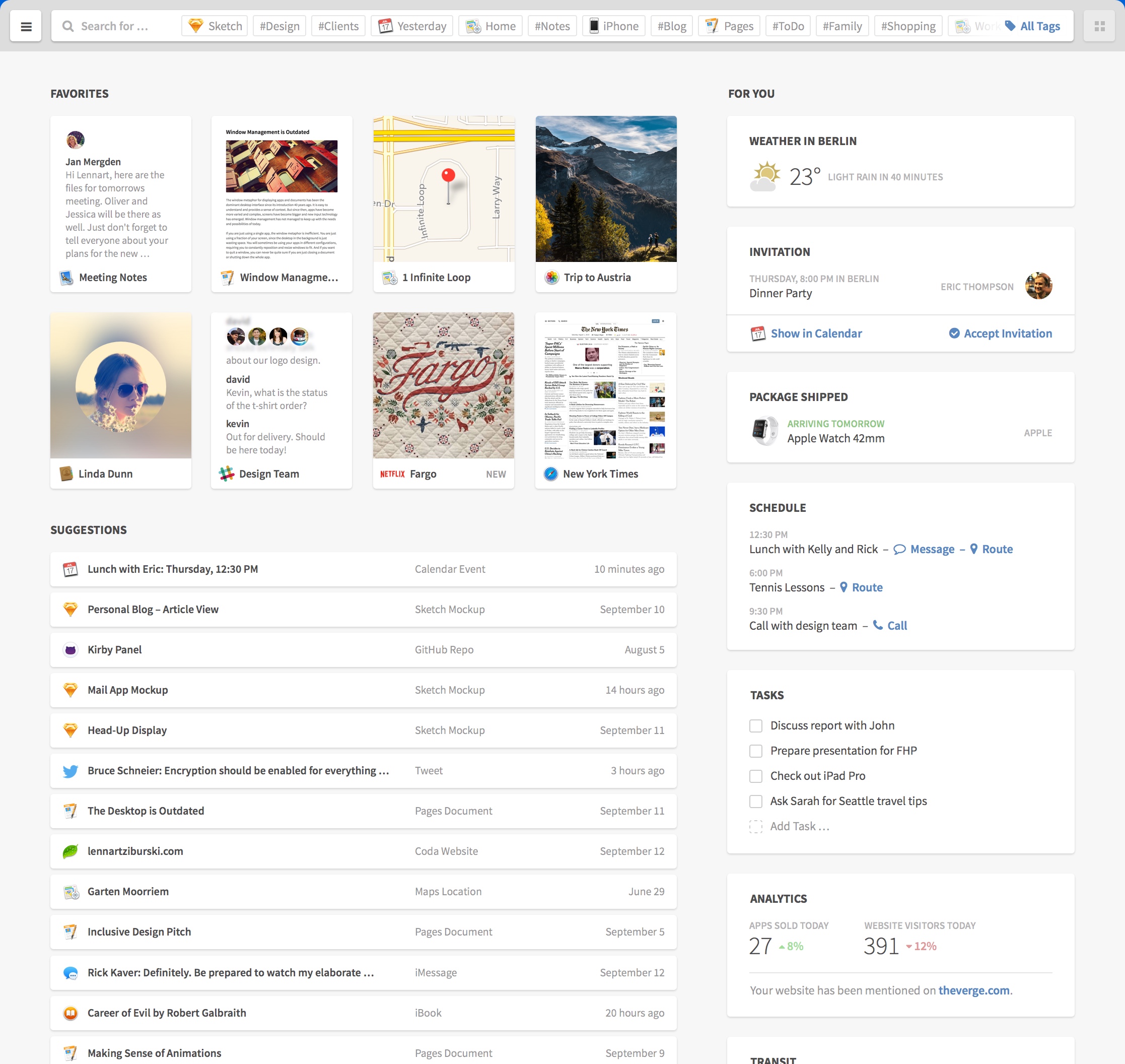
Here we take an example from the excellent UI concept by Lennart Ziburski: desktop neo. (If you haven’t seen this, you should take a look).

finder

Our first decomposing task is to identify distinct parts of the user interface and give them names. These would be the organisms.

organisms

Interlude: how to name things

As with every naming endeavor it is hard to decide which name is appropriate. Dan Mall argues in favor of display patterns to be name givers. Display patterns describe the (abstract) visual aspect and can be used with multiple content patterns. Content patterns describe the types of elements and can be rendered in multiple display patterns. Since we want to name an organism which is content agnostic we should take cues from the visual appearance not the content inside it.

Decomposing further

Now we break those organisms further down. Let’s start with the card grid organism. As the name already suggests it organizes cards in a grid or tabular layout. We have different kinds of cards. First take a look at the preview card at the left.

preview_card

The preview card consists of a thumbnail showing a preview of an item, an icon and a label. This is a simple interface element and is therefore a molecule created from the three mentioned atoms. A name for this molecule could be “image with caption”.

Interlude: testing states in the abstract

Our example touches an important and often neglected part of interfaces: you need to test for different content. Here the longer name is cut with an ellipsis. This is a simple case. But what if the name is missing? Or has unusual characters. Or or or. Besides that we need to indicate the current state of the interface as well. Do we have an error? Are we loading something? Interfaces have different states. Five to be exact. The good part is that we can (and should) test them on the abstract level of atoms, molecules and organisms.

A more complex organism

The cards in the right card grid are more complex examples. Every card is an organism with a title (atom) and a content part (molecule/organism).

The weather card has a simple molecule consisting of an icon and two labels.

weather_card

Whereas the schedule card consists of a list organism which itself includes molecules. These molecules have two labels and one or more actions (links or buttons).

schedule_card

The other parts of the interface can be decomposed as well. Charlotte Jackson describes an interesting approach to decomposing your existing interfaces: print them out, cut them to pieces and name these pieces.

Making the jump

Until now we talked about the designer’s view of the interface but the developer has to translate all these definitions into code and hook them up to content. The approach from the atomic design side is largely the same for web or native but in development we have to distinguish between them.

On Rails

Let’s first take a look at the web side of things. We could use a client side component framework like react but here are like to keep it simple.
We just use Rails in our example but every other web framework will work as well. We need to organize our newly defined chemistry lab in three parts: HTML (or views), CSS and JavaScript.
For CSS and JavaScript we use the include mechanism of the asset pipeline or import if you use SASS. Each dimension gets a separate directory inside app/assets/stylesheets or app/assets/javascripts respectively.
We name our directories atoms, molecules and organisms. The same is true for views: a directory named molecules and one named organisms inside app/views/atomic_design. No need for atoms since they are basic HTML tags or helpers. Atomic design’s templates become Rails’ layouts. Via calls to render we can inject content into these abstract organisms:

<%= render layout: '/atomic_design/organisms/card', locals: {title: 'weather in Berlin'} do %>
  <%= render layout: '/atomic_design/molecules/image_with_text', locals: {image_class: 'fa_sunny'} do %>
    <span class="temperature">23 °C</span><span class="condition">Sunny</span>
  <% end %>
<% end %>

Native

On the native side we also need a component and include mechanism. Usually every widget toolkit has a preferred way to create custom components or containers. If you develop for iOS you extend the UIView class in order to create a custom UI component. These custom views would be the molecules and organisms of our design system. To combine them you add them to other views as their subviews. The init* or properties can be used to fill these with content. The actual mechanism is similar for most native UI kits.

Design with benefits

Using atomic design to create a design system seems to be a lot of work at first. And it is.
We already mentioned two benefits: creating a common understanding and a better way to test things in isolation. Design systems help all project participants, not only designers and developers, to share a common language and understand each other. They help new members to hit the ground running. With tools like pattern lab your atomic design can also be used as documentation.
On the testing front the holy grail is to test things in isolation and in integration, atomic design and its strict separation helps immensely. Often only the sunshine or ideal state is tested and maybe a handful of error states. Thinking in isolation of molecules and organisms about the whole five states and the diverse structure of your content creates a manageable endeavor and maps a path through the jungle of our interfaces. The value which atomic design brings to the table is that your efforts to test scale with the number of molecules and organisms and not with the number of pages or screens. The isolation which a design system, and in particular atomic design, creates is comparable to the advent of unit testing in the world of software development. The separation of display patterns and content patterns reminds me of the functional paradigm with its separation of data and functions.