Clang, The Friendly Compiler

Clang C/C++ compiler can be called The Friendly Compiler, since it makes it much easier to find and understand compile errors and potential bugs in your code. Go use it!

A while back I suggested to make friends with your compiler as a basis for developing high quality code. My focus then was GCC since it was and still is the compiler I use most of the time. Well, turns out that although GCC may be a reasonably good companion on the C/C++ development road, there are better alternatives.

Enter Clang: I had heard about Clang a few times in the past but never gave it a real shot. That changed after I watched Chandler Carruth’s talk at GoingNative 2012.

First of all I was stunned by the quote from Richard Stallman about GCC being deliberatly designed to make it hard to use it in non-free software. I always wondered why IDEs like KDevelop keep reinventing the wheel all the time by implementing their own C/C++ parsers instead of using already existing and free GCC code. This was the answer: THEY SIMPLY COULDN’T!!

One main point of Chandler’s talk was the quality of diagnostic messages of Clang. GCC is a friend that although telling you exactly what’s wrong with your code, it often does it with complicated sentences hidden in walls of text.

Clang on the other hand, tries very hard to comprehend what you really wanted to write, it speaks in much more understandable words and shows you the offending code locations with nice graphics.

You could say that compared to Clang, which is empathic, understanding, pragmatic and always tries to be on the same page with you, GCC comes across more like an arrogant, self-pleasing and I’m-more-intelligent-than-you kinda guy.

Where GCC says: “What? That should be a template instantiation? Guess what, you’re doing WRONG!! “, Clang is more like: “Ok my friend, now let’s sit down together and analyse step-by-step what’s the problem here. I’ll make us tea.

You’ll find many examples of Clangs nice diagnostic output in Chandler’s talk. Here is another one, as a little teaser:

struct A
{
  std::string _str1;
  std::string _str2;
};

struct AHasher
{
  std::size_t operator() (const A& a)
  {
    return std::tr1::hash()(a._str1) ^
      std::tr1::hash()(a._str2);
  }
};
...
typedef std::tr1::unordered_map<A, int> AMap;
...

What’s wrong with this code? Yes, exactly: the operator in AHasher must be const. Errors with const correctness are typical, easy-to-overlook kind of problems in day-to-day programming. GCCs reaction to something like that is that something discards qualifiers. This may be perfectly right, and after a while you even get used to it. But as you can see with Clang, you can do much better.

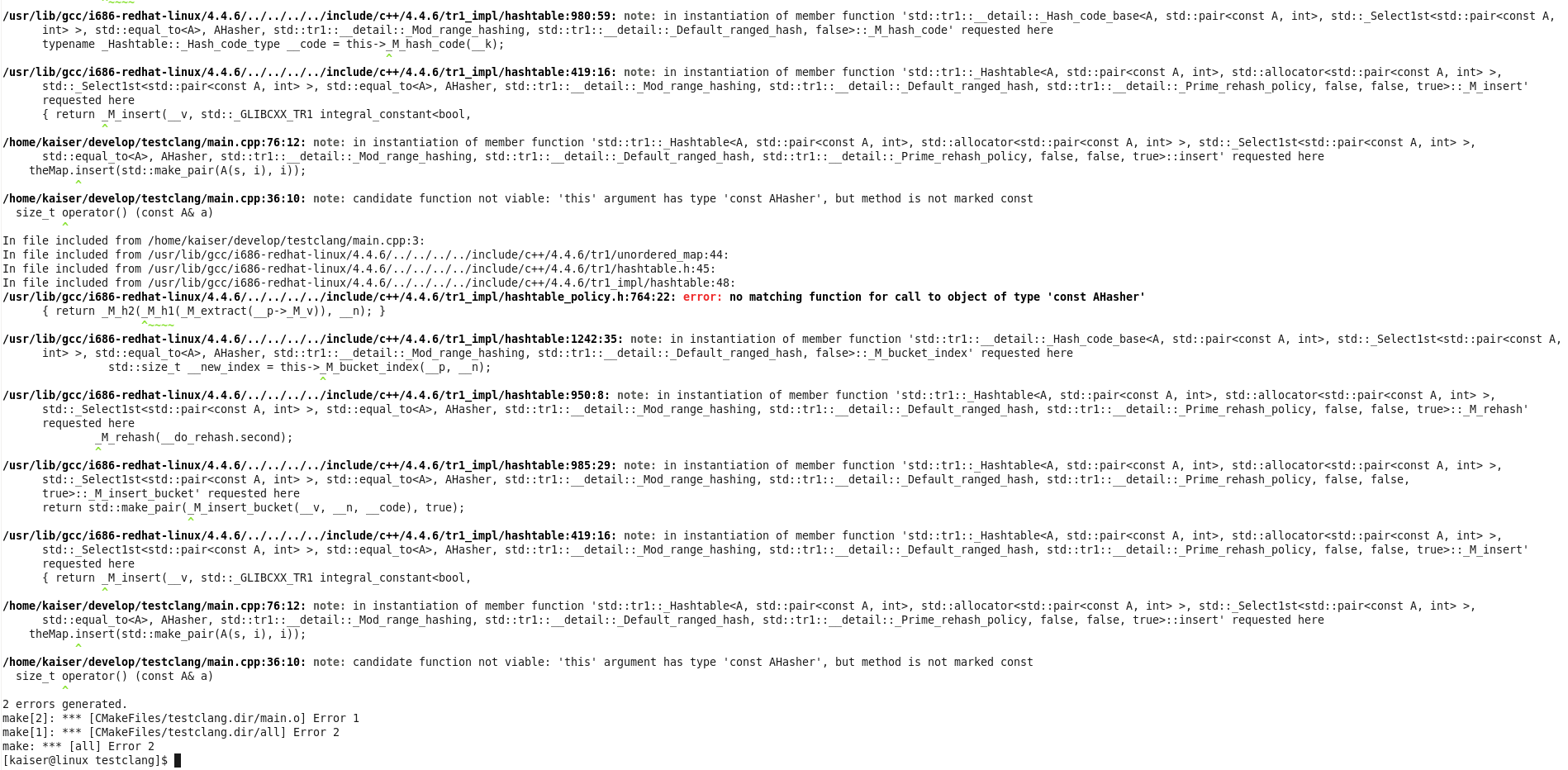
The following two screenshots directly compare GCCs and Clangs output compiling the code above. Because there is a template instantiation involved, GCC covers you in its typical wall of text, before it actually tells you what’s wrong (last line).

CLang’s output is much better formated, it shows you the template instantiation steps much more cleanly and in the last line it tells you to the point what is really wrong: …but method is not marked const. Yeah!


Don’t mix C++ smart pointers with references

This post will teach by example that mixing smart pointers with references in c++ is not a particularly good idea.

As I did in the past, I will use this post as means to remember and to push the following principle deeper in my head – and hopefully in yours as a reader and C++ programmer:

Do not mix smart pointers with references in your C++ programms.

Of course I knew that before I created this little helper library, that was supposed to make it easier to send data asynchronous over an existing connection. Here is the situation (simplified):

class A
{
  ...
  void doStuff();

  private:
     // a private shared_ptr to B
    boost::shared_ptr<B> _bPointer;
};

class C
{
  public:
    C(B& b) : _b(b)
    {}

    ~C()
    {
      _bRef.resetSomeValueToDefault();
    }

  private:
     // a private reference to B which is set in the ctor
    B& _bRef;
};

void A::doStuff()
{
  createBpointerIfNotExisting();
  C myC(*_bPointer);
  myC.someMethodThatDoesSomethingWithB();
  if (someCondition) {
    // Delete this B instance.
    // A new instance will be created next time
    _bPointer.reset();
  }
}

So class A has a shared pointer of B which is given as a reference to an instance of class C in method A::doStuff. Class C stores the B instance as reference and interacts with it during its lifetime, which ends at the end of A::doStuff.

The last interaction occurrs at the very end of its life – in the destructor.

I highlighted the most important facts, but I’ll give you a few more moments …

The following happens (in A::doStuff):

  • line 29: if no instance of B exists (i.e. _bPointer is null), a new B instance is created and held in _bPointer
  • line 30: instance myC of C is created on the stack. A reference of B is given as ctor parameter
  • line 32-35: if “someCondition” is true, _bPointer is reseted which means that the B instance gets deleted
  • line 37: A::doStuff() ends and myC goes out of scope
  • line 19: the destructor of C is called and _bRef is accessed
  • since the B instance does not exist any more … memory corruption!!!

The most annoying thing with this kind of errors is that the program crashes somewhere, but almost never where the error actually occurred. This means, that you get stack traces pointing you right into some rock-solid 3rd party library which had never failed since you know and use it, or to some completely unrelated part in your code that had worked without any problems before and hasn’t been changed in years.

I even had these classes unit tested before I integrated them. But for some strange reason – maybe because everything gets reset after each test method – the bug never occurred in the tests.

So always be very cautious when you mix smart pointers with references, and when you do, make sure you have your object lifetimes completely under control!

Upgrading your app to Grails 2.0.0? Better wait for 2.0.1

Grails 2.0.0 is a major step forward for this popular and productive, JVM-based web framework. It has many great new features that make you want to migrate existing projects to this new version.

So I branched our project and started the migration process. Everything went smoothly and I had only to fix some minor compilation problems to get our application running again. Soon the first runtime errors occured and approximately 30 out of over 70 acceptance tests failed. Some analysis showed three major issue categories causing the failures:

  1. Saving domain objects with belongsTo() associations may fail with a NULL not allowed for column "AUTHOR_ID"; SQL statement: insert into book (id, version, author_id, name) values (null, ?, ?, ?) [90006-147] message due to grails issue GRAILS-8337. Setting the other direction of the association manually can act as a workaround:
    book.author.book = book
  2. When using the MarkupBuilder with the img tag in your TabLibs, your images may disappear. This is due to a new img closure defined in ApplicationTagLib. The correct fix is using
    delegate.img

    in your MarkupBuilder closures. See GRAILS-8660 for more information.

  3. Handling of null and the Groovy NullObject seems to be broken in some places. So we got org.codehaus.groovy.runtime.typehandling.GroovyCastException: Cannot cast object 'null' with class 'org.codehaus.groovy.runtime.NullObject' to class 'Note' using groovy collections’ find() and casting the result with as:
     Note myNote = notes?.find {it.title == aTitle} as Note

    Removing type information and the cast may act as a workaround. Unfortunately, we are not able to reproduce this issue in plain groovy and did not have time to extract a small grails example exhibiting the problem.

These bugs and some other changes may make you reconsider the migration of some bigger project at this point in time. Some of them are resolved already so 2.0.1 may be the release to wait for if you are planning a migration. We will keep an open eye on the next releases and try to switch to 2.0.x when our biggest show stoppers are resolved.

Even though I would advise against migrating bigger existing applications to Grails 2.0.0 I would start new projects on this – otherwise great – new platform release.

Grails 2.0.0 Update: Test Problems

Recently we tried to upgrade to Grails 2.0.0, but problems with mocks stopped our tests to pass.

Grails 2 has some nice improvements over the previous 1.3.x versions and we thought we give it a try. Upgrading our application and its 18 plugins went smooth (we already used the database migration plugin). The application started and ran without problems. The better console output and stacktraces are a welcomed improvement. So all in all a pleasant surprise!
So just running the tests for verification and we can commit to our upgrade branch. Boom!

junit.framework.AssertionFailedError:
No more calls to 'method' expected at this point. End of demands.

Looking at the failing unit test showed that we did not use any mock object for this method call. Running the test alone let it pass. Hhhmm seems like we hit GRAILS-8530. The problem even exists between unit and integration tests. So when you mock something in your unit test it is also mocked in the integration tests which are run after the unit tests.
Even mocking via Expando metaclass and the map notation did not work reliably. So upgrading for us is not viable at the moment.

Python in C++: Rerouting Python’s stdout

A few weeks ago I published a post that showed how to embedd Python into C++ and how to exchange data between the two languages. Today, I want to present a simple practice that comes in handy when embedding Python into C++: Rerouting Python’s standard output using CPython.

After initializing Python, the new destination of the output stream needs to be created using PyFile_FromString(…) and set to be the new standard output:

PyObject* pyStdOut = PyFile_FromString("CONOUT$", "w+");
PyObject* sys = PyImport_ImportModule("sys");
PyObject_SetAttrString(sys, "stdout", pyStdOut);

Basically that’s all it needs. When executing Python script via PyRun_String(…), all calls to print(…) will write the data directly to pyStdOut.

Ater the Python script is finished, the data in pyStdOut can be retrieved and further processed with C++ by converting it using PyFile_AsFile(…):

FILE* pythonOutput = PyFile_AsFile(pyStdOut);

Breakpad and Your CI – A Strong Team

Google’s breakpad together with your CI system can prepare you for the worst.

If your C++ software has to run 24/7 on some server rack at your customer’s data center, it has to meet not only all the user requirements, but also requirements that come from you as developer. When your customer calls you about some “problems”, “strange behaviours”, or even crashes, you must be able to detect what went wrong. Fast!

One means to this end is of course logging. But if your application crashes, nothing beats a decent stacktrace 🙂

Google’s breakpad library comes in very handy here because it provides very easy crash reporting. Even if your process has 2 gigs of virtual memory, breakpad shrinks that ‘core dump’ down to a couple of megs.

Breakpad pulls that trick off by using so-called symbol files that you have to generate for each compiled binary (executable or shared library). These symbol files together with the breakpad dump file that is created at crash time are then used to recreate the stacktrace.

Because every compilation creates different binaries, dump file and symbol files need to be ‘based on’ exactly the same binaries.

This is where you can let your CI system do some work for you. At one of our customers we use Jenkins not only for the usual automatic builds and tests after each check-in but also for release builds that go into production.

At the end of each build, breakpad’s symbol dumper runs over all compiled executables and libraries and generates the symbol files. These are then archived together with the compiled binaries.

Now we are prepared. Whenever some customer sends us a dump file, we can just easily pull out the symbol files corresponding to the software version that runs at this customer and let breakpad do its magic…


HTTP Get: The problem with Percent Encoded Parameters

Encoding problems are common place in software development but sometimes you get them in unexpected places.

Encoding problems are common place in software development but sometimes you get them in unexpected places.
About the setup: we have a web application written in Grails (though the choice of framework here doesn’t really matter) running on Tomcat. A flash application sends a HTTP Get request to this web application.
As you might know parameters in Get request are encoded in the URL with the so called percent encoding for example: %20 for space. But how are they encoded? UTF8?
Looking at our tomcat configuration all Get parameters are decoded with UTF8. Great. But looking at the output of what the flash app sends us we see scrambled Umlauts. Hmmm clearly the flash app does not use UTF8. But wait! There’s another option in Tomcat for decoding Get parameters: look into the header and use the encoding specified there. A restart later nothing changed. So flash does not send its encoding in the HTTP header. Well, let’s take a look at the HTTP standard:

If a reserved character is found in a URI component and no delimiting role
is known for that character, then it must be interpreted as representing the
data octet corresponding to that character's encoding in US-ASCII.

Ah.. US-ASCII and what about non ASCII ones? Wikipedia states:

For a non-ASCII character, it is typically converted to its byte sequence
in UTF-8, and then each byte value is represented as above.

Typically? Not in our case, so we tried ISO-8859-1 and finally the umlauts are correct! But currency signs like the euro are again garbage. So which encoding is similar to Latin-1 but not quite the same?
Yes, guess what: cp1252, the Windows native encoding.
And we tested all this on a Mac?!

The Story of a Multithreading Sin

The story of a bug that was caused by a common multithreading pitfall, the dreaded liquid lock.

In my last blog entry, I wrote about multithreading pitfalls (in Java), and ironically, this was the week when we got a strange bug report from one of our customers. This blog entry tells the story of the bug and adds another multithreading pitfall to the five I’ve already listed in my blog entry “When it comes to multithreading, better be safe than sorry”.

The premise

We developed a software that runs on several geographically distant independent “stations” that collect a multitude of environmental measurement data. This data is preprocessed and stuffed into data packages, which are periodically transferred to a control center. The software of this control center, also developed by us, receives the data packages, stores them on disk and in a huge database and extracts the overall state of the measurement network from raw data. If you describe the main task of the network on this level, it sounds nearly trivial. But the real functionality requirements are manifold and the project grew large.

We kept the whole system as modular as necessary to maintain an overall grasp of what is going on where in the system and installed a sufficient automatic test coverage for the most important parts. The system is still under active development, but the main parts of the network are in production usage without real changes for years now.

The symptoms

This might explain that we were very surprised when our customer told us that the control center had lost some data packages. Very soon, it turned out that the control center would randomly enter a state of “denial”. In this state, it would still accept data packages from the stations and even acknowledge their arrival (so the stations wouldn’t retry the transmission), but only write parts of the package or nothing at all to the disk and database. When the control center entered this state, it would never recover from it. But when we restarted the software manually, everything would run perfectly fine for several days and then revert back into denial without apparent trigger.

We monitored the control center with every means on our disposal, but its memory consumption, CPU footprint and threading behaviour was without noticeable problem even when the instance was in its degraded state. There was no exception or uncommon entry logged in the logfiles. As the symptom happened randomly, without external cause and with no chance of reversal once it happened, we soon suspected some kind of threading issue.

The bug

The problem with a threading issue is that you can’t just reproduce the bug with an unit or system test. We performed several code reviews until we finally had a trace. When a data package arrives, a global data processing lock is acquired (so that no two data packages can be processed in parallel) and the content of the package is inspected. This might trigger several network status changes. These change events are propagated through the system with classic observer/listener structures, using synchronous calls (normal delegation). The overall status of the network is translated in a human readable status message and again forwarded to a group of status message listeners. This is a synchronous call again. One of the status message listeners was the software driver for a LED ticker display. This module was a recent addition to the control center’s hardware outfit and used to display the status message prominently to the operators. Inside this LED software driver, some bytes are written to a socket stream and then the driver awaits an answer of the hardware device. To avoid the situation that two messages are sent to the device at the same time, a lock is acquired just before the message is sent. This code attracted our attention. Lets have a look at it:

private Message lastMessage = new Message();

public void show(Message message) {
    synchronized (this.lastMessage) {
        writeCommandAndWaitForResponse(Command.SHOW_TEXT, message.asBytes());
        this.lastMessage = message;
    }
}

The main problem here is the object the lock is acquired upon: the reference of lastMessage is mutable! We call this a liquid lock, because the lock isn’t as solid as it should be. It’s one of the more hideous multithreading pitfalls as it looks like everything’s fine at first glance. But this lock doesn’t have a complete “locking” effect because each caller may acquire the lock of a different instance. And a lock with a flawed locking behaviour is guaranteed to fail (in production). The liquid lock is like the bigger brother of the local lock. It isn’t local, but its mutability cause the same problems.

The bug finally turned out to be caused by the liquid lock in the LED display driver that got notified of system message changes when a data package arrived. But only if multiple messages were sent at once to the device, discarding some of the necessary answers in this circumstance or if the connection to the LED hardware would fail in the midst of a transmission, the system would not return from the write attempt. If one thread wouldn’t return to the data package processor, the global data processing lock would not be freed (read the start of this chapter again, this is the most important lock in the system!). And while the data processing lock was still held, all other data packages would be received, but piling up to obtain the lock. But the lock would never be returned from the thread waiting on an answer from a hardware device that had no intention to send another answer. This was when the control center appeared to be healthy but didn’t process any data packages anymore.

The conclusion

If you want to avoid the category of liquid lock multithreading bugs, make sure that all your lock instance references are immutable. Being final is an important property of lock instance references. Avoid to retrieve your locks from notoriously muteable data structures like collections or arrays. The best thing you can do to avoid liquid locks is to “freeze” all your lock instances.

Another insight from this story is that software modules have to be separated threadwise, too. It was a major design flaw to let the data processing thread, while holding the main processing lock, descend down into the deep ends of the LED driver, eventually getting stuck there for infinity. Some simple mechanisms like asynchronous listener notification or producer/consumer queues for pending transmission requests would have helped to confine the effects of the liquid lock bug inside the LED module. Without proper thread separation, it took down the whole software instance.

Debug Output

Crafting debug output from std::istream data can be dangerous!

Writing a blog post sometimes can be useful to get some face-palm kind of programming error out of one’s system.

Putting such an error into written words then serves a couple of purposes:

  • it helps oneself remembering
  • it helps others who read it not to do the same thing
  • it serves as error log for future reference

So here it comes:

In one project we use JSON to serialize objects in order to send them over HTTP (we use the very nice JSON Spirit library, btw).

For each object we have serialize/deserialize methods which do the heavy lifting. After having developed a new deserialize method I wanted to test it together with the HTTP request handling. Using curl for this I issued a command like this:

curl -X PUT http://localhost:30222/some/url -d @datafile

This command issues a PUT request to the given URL and uses data in ./datafile, which contains the JSON, as request data.

The request came through but the deserializer wouldn’t do its work. WTF? Let’s see what goes on – let’s put some debug output in:

MyObject MyObjectSerializer::deserialize(std::istream& jsonIn)
{
   // debug output starts here
   std::string stringToDeserialize;
   Poco::StreamCopier::copyToString(jsonIn, stringToDeserialize);
   std::cout << "The String: " << stringToDeserialize << std::endl;
   // debug output ends here

   json_spirit::Value value;
   json_spirit::read(jsonIn, value);
   ...
}

I’ll give you some time to spot the bug…. 3..2..1..got it? Please check Poco::StreamCopier documentation if you are not familiar with POCO libraries.
What’s particularly misleading is the “Copier” part of the name StreamCopier, because it does not exactly copy the bytes from the stream into the string – it moves them. This means that after the debug output code, the istream is empty.

Unfortunately, I did not immediately recognize the change in the error outputs of the JSON parser. This might have given me a hint to the real problem. Instead, during the next half hour I searched for errors in the JSON I was sending.

When I finally realized it …

Readable Code Needs Time and Care

A few weeks ago I was about to write an acceptance test involving socket communication. Since I was only interested in a particular sequence of exchanged data, I needed to wait for the start command and ignore all information sent prior to that command. In this blog post I’d like to present the process of enhancing the readability of the tiny piece of code responsible for this task.

The first version, written without thinking much about readability looked something like the following:

private void waitForStartCommand(DataInputStream inputStream) {
  String content = inputStream.readUTF();
  while (!START_COMMAND.equals(content)) {
    content = inputStream.readUTF();
  }
}

The aspect that disturbed me most about this solution was calling inputStream.readUTF() twice (Remember: DRY). So I refactored and came up with:

private void waitForStartCommand(DataInputStream inputStream) {
  String content = null;
  do {
    content = inputStream.readUTF();
  } while (!START_COMMAND.equals(content)) {
}

In this version the need to declare and initialize a variable grants far too much meaning to an unimportant detail. So, a little refactoring resulted in the final version:

private void waitForStartCommand(DataInputStream inputStream) {
  while (startCommandIsNotReadOn(inputStream)) {
    continue;
  }
}

private boolean startCommandIsNotReadOn(DataInputStream inputStream) {
  return !START_COMMAND.equals(inputStream.readUTF());
}

This example shows pretty well how even rather simple code may need to be refactored several times in order to be highly readably and understandable. Especially code that handles more or less unimportant side aspects, should be as easily to understand as possible in order to avoid conveying the impression of being of major importance.